

MSA301 和 MSA311 传感器
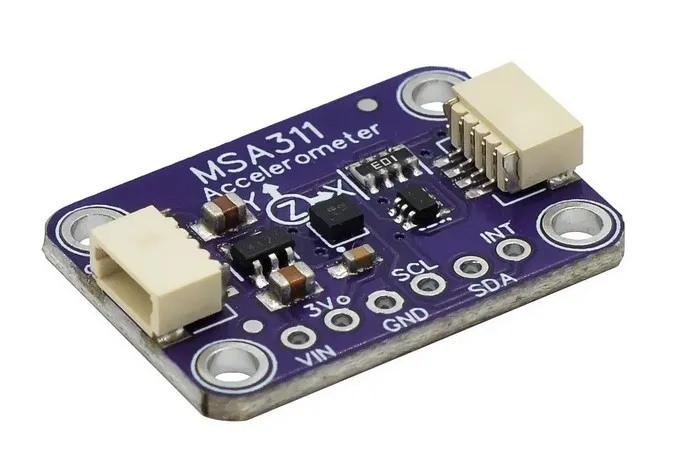
msa3xx 传感器平台允许您在 ESPHome 中使用 MSA301 和 MSA311 三轴、
低 g 加速度计(数据手册)。
此传感器需要在您的配置中设置 I²C 才能工作。
MSA301 和 MSA311 几乎是相同的传感器。唯一的区别是 ADC 分辨率。MSA311 具有固定的 12 位分辨率,而 MSA301 的 ADC 为 14 位,可配置为进行 8、10、12 或 14 位测量。
此组件提供加速度数据(m/s²)、方向信息和敲击检测。XYZ 轴可以 校准和转换,以匹配传感器的物理方向。
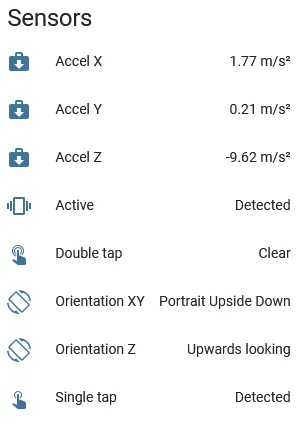
# Example configuration entrymsa3xx: type: msa301 range: 4G resolution: 12 update_interval: 10s配置由三个部分组成:中心组件、加速度传感器、 带有方向信息的文本传感器,以及用于敲击和移动检测的二元传感器。
基本配置:
-
type(必选,string): 传感器类型。为
msa301或msa311。 -
update_interval (可选,Time): 更新加速度传感器的间隔。 默认为
10s。 -
range (可选,string): 传感器测量的范围。为
2G、4G、8G、16G之一。 默认为2G,意味着它检测-2g到2g之间的加速度。 -
resolution (可选,int): 传感器的 ADC 分辨率(以位为单位)。
msa301支持的值有8、10、12、14(默认)。 对于msa311,唯一支持的分辨率是12(也是默认)。 -
calibration (可选):
- offset_x (可选,float): X 轴零位校准,单位为 m/s²。从 -4.5 到 4.5。默认为
0。 - offset_y (可选,float): Y 轴零位校准,单位为 m/s²。从 -4.5 到 4.5。默认为
0。 - offset_z (可选,float): Z 轴零位校准,单位为 m/s²。从 -4.5 到 4.5。默认为
0。
- offset_x (可选,float): X 轴零位校准,单位为 m/s²。从 -4.5 到 4.5。默认为
-
transform (可选):
- mirror_x (可选,boolean): 镜像 X 轴。默认为
false。 - mirror_y (可选,boolean): 镜像 Y 轴。默认为
false。 - mirror_z (可选,boolean): 镜像 Z 轴。默认为
false。 - swap_xy (可选,boolean): 交换 X 和 Y 轴。默认为
false。
- mirror_x (可选,boolean): 镜像 X 轴。默认为
提供三个二元传感器可用。所有传感器均应用内部 500 ms 防抖。 每个传感器都需要 name。来自 Binary Sensor 的其他所有选项。 也可以使用简写表示法。
binary_sensor: - platform: msa3xx tap: Single tap # 传感器的简写表示法 double_tap: Double tap # 同上 active: # 传感器的常规表示法,以便 name: Active # 使用过滤器和其他选项 filters: - delayed_off: 5000ms # 延长移动检测信号的示例- tap (可选): 单击检测。
- double_tap (可选): 双击检测。
- active (可选): 移动检测。
加速度数据可通过传感器配置使用。
您可以使用简写表示法,如 acceleration_x: "Acceleration X",或使用常规表示法。对于
常规表示法,只需 name 即可。来自 Sensor 的所有选项。
sensor: - platform: msa3xx acceleration_x: Accel X acceleration_y: Accel Y acceleration_z: Accel Z- acceleration_x (可选): X 轴加速度,m/s²。
- acceleration_y (可选): Y 轴加速度,m/s²。
- acceleration_Z (可选): Z 轴加速度,m/s²。
文本传感器提供方向信息。您可以使用简写表示法,如
orientation_xy: "Orientation XY",或使用常规表示法。
text_sensor: - platform: msa3xx orientation_xy: Orientation XY orientation_z: Orientation Z-
orientation_xy (可选): XY 方向。可以为
Portrait Upright、Portrait Upside Down、Landscape Left、Landscape Right之一。 -
orientation_z (可选): Z 方向。可以为
Upwards looking、Downwards looking之一。
on_tap 触发器
Section titled “on_tap 触发器”此自动化将在检测到单击时触发。
msa3xx: type: msa301 # ... on_tap: - then: - logger.log: "Tapped"on_double_tap 触发器
Section titled “on_double_tap 触发器”此自动化将在检测到双击时触发。
msa3xx: type: msa301 # ... on_double_tap: - then: - logger.log: "Double tapped"on_active 触发器
Section titled “on_active 触发器”此自动化将在设备检测到运动变化时触发。
msa3xx: type: msa301 # ... on_active: - then: - logger.log: "Activity detected"on_orientation 触发器
Section titled “on_orientation 触发器”此自动化将在设备相对于重力场向量 g 的方向发生变化时触发。
msa3xx: type: msa301 # ... on_orientation: - then: - logger.log: "Orientation change detected"同时使用 MSA301 和 MSA311
Section titled “同时使用 MSA301 和 MSA311”如果您希望在同一配置中使用这两个传感器,可以通过为每个传感器指定 ID 来实现。
msa3xx:  - id: my_msa301_sensor    type: msa301    # ...  - id: my_msa311_sensor    type: msa311
sensor:  - platform: msa3xx    msa3xx_id: my_msa311_sensor    acceleration_x: Accel X    acceleration_y: Accel Y    acceleration_z: Accel Z
binary_sensor:  - platform: msa3xx    msa3xx_id: my_msa301_sensor    tap: Single tap