

LD2450 传感器
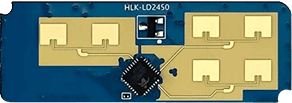
ld2450 组件允许您在 ESPHome 中使用 HLK-LD2450 人体
存在、运动检测和跟踪雷达模块。
目标跟踪涉及实时跟踪特定区域内(移动)目标的位置,从而 测量目标的距离、角度和速度(相对于传感器)。
LD2450 是 Hi-link 24G 毫米波雷达系列中用于运动目标跟踪的传感器模块。该 模块具有简化的 24 GHz 雷达传感器硬件和智能算法固件。主要用于 室内使用,以实现对移动人体目标的位置跟踪。
NOTE
确保 LD2450 固件版本为 V2.02.23090617 或更高版本,以确保正常集成功能。您
可以使用 HLKRadarTool 移动应用 更新固件。
此传感器需要在您的配置中设置 UART 才能工作,parity 和
stop_bits 必须分别为 NONE 和 1。强烈建议使用硬件 UART,以
正确支持 LD2450 模块默认的 256000 波特率。
# ld2450 configurationld2450: id: ld2450_radar- id (可选,ID): 手动为此 Ld2450 组件指定 ID。
- uart_id (可选,ID): 手动指定要使用的 UART 组件 的 ID。 如果配置了多个 UART,则为必需。
- on_data (可选,Automation): 收到每次报告后要执行的 自动化。所有目标值保证为最新且一致。
ld2450 二值传感器为目标提供存在状态。
binary_sensor: - platform: ld2450 ld2450_id: ld2450_radar has_target: name: Presence has_moving_target: name: Moving Target has_still_target: name: Still Target-
has_target (可选): 如果目标静止或运动则为 true。 来自 Binary Sensor 的所有选项。
-
has_moving_target (可选): 如果检测到运动目标则为 true。 来自 Binary Sensor 的所有选项。
-
has_still_target (可选): 如果检测到静止目标则为 true。 来自 Binary Sensor 的所有选项。
NOTE
默认情况下,上述每个 Binary Sensor 组件都包含 以下过滤器,以防止向 Home Assistant 大量推送状态更新:
- settle: 1000ms如果您已定义其他过滤器,此默认值将被覆盖;当然,如果您愿意,可以按照上述方式将其添加到自定义 过滤器中。
要移除任意给定二值传感器实例的默认过滤器,请在其配置中添加 filters: []。
ld2450 传感器为您提供有关检测到的目标状态和属性的信息。
sensor: - platform: ld2450 ld2450_id: ld2450_radar target_count: name: Presence Target Count still_target_count: name: Still Target Count moving_target_count: name: Moving Target Count target_1: x: name: Target-1 X y: name: Target-1 Y speed: name: Target-1 Speed angle: name: Target-1 Angle distance: name: Target-1 Distance resolution: name: Target-1 Resolution target_2: x: name: Target-2 X y: name: Target-2 Y speed: name: Target-2 Speed angle: name: Target-2 Angle distance: name: Target-2 Distance resolution: name: Target-2 Resolution target_3: x: name: Target-3 X y: name: Target-3 Y speed: name: Target-3 Speed angle: name: Target-3 Angle distance: name: Target-3 Distance resolution: name: Target-3 Resolution zone_1: target_count: name: Zone-1 All Target Count still_target_count: name: Zone-1 Still Target Count moving_target_count: name: Zone-1 Moving Target Count zone_2: target_count: name: Zone-2 All Target Count still_target_count: name: Zone-2 Still Target Count moving_target_count: name: Zone-2 Moving Target Count zone_3: target_count: name: Zone-3 All Target Count still_target_count: name: Zone-3 Still Target Count moving_target_count: name: Zone-3 Moving Target Count-
target_count (可选,int): 检测到的目标总数,无论其是静止还是在运动中。 来自 Sensor 的所有选项。
-
still_target_count (可选,int): 静止目标的计数。 来自 Sensor 的所有选项。
-
moving_target_count (可选,int): 运动目标的计数。 来自 Sensor 的所有选项。
-
target_N (可选): 目标的详细信息(N = 1 到 3)。最多可检测到 3 个目标:
target_1、target_2、target_3。-
x (可选,int): 目标沿 X 轴方向距
ld2450传感器的距离,单位为毫米 (mm)(传感器左侧为负,传感器右侧为正)。ld2450模块可在X方向检测到 -3000 到 3000 mm 的目标。来自 Sensor 的所有选项。 -
y (可选,int): 目标沿 Y 方向距
ld2450传感器的距离,单位为毫米 (mm)(近/远)。ld2450模块可在Y方向检测到 0 到 6000 mm 的目标。 来自 Sensor 的所有选项。 -
speed (可选,int): 运动目标的速度,单位为
mm/s。来自 Sensor 的所有选项。
-
angle (可选,int): 目标相对于
ld2450传感器的角度,单位为度 (°)。来自 Sensor 的所有选项。
-
distance (可选,int): 目标沿 X 轴方向距
ld2450传感器的距离,单位为毫米 (mm)(传感器左侧为负,传感器右侧为正)。来自 Sensor 的所有选项。 -
resolution (可选,int):
ld2450目标检测范围分辨率,单位为毫米 (mm)。来自 Sensor 的所有选项。
-
-
zone_N (可选): 已定义区域中的目标计数详细信息(N = 1 到 3)。最多 三个区域:
zone_1、zone_2、zone_3。
NOTE
默认情况下,上述每个 Sensor 组件都包含以下 过滤器,以防止向 Home Assistant 大量推送状态更新:
- timeout: timeout: 1s value: last- throttle_with_priority: 1000ms如果您已定义其他过滤器,此默认值将被覆盖;当然,如果您愿意,可以按照上述方式将其添加到自定义 过滤器中。
要移除任意给定传感器实例的默认过滤器,请在其配置中添加 filters: []。
ld2450 开关允许您控制 Ld2450 的 Bluetooth 和 Multi/Single Target Tracking。
switch: - platform: ld2450 ld2450_id: ld2450_radar bluetooth: name: "Bluetooth" multi_target: name: "Multi Target Tracking"-
bluetooth (可选): 打开/关闭蓝牙适配器。默认为
true。来自 Switch 的所有选项。 -
multi_target (可选): 打开/关闭多目标跟踪选项。初始状态基于 启动时从 LD2450 模块读取的相应设置。来自 Switch 的所有选项。
ld2450 数值平台允许您控制 Ld2450 的存在超时和区域配置。
number: - platform: ld2450 ld2450_id: ld2450_radar presence_timeout: name: "Timeout" zone_1: x1: name: Zone-1 X1 y1: name: Zone-1 Y1 x2: name: Zone-1 X2 y2: name: Zone-1 Y2 zone_2: x1: name: Zone-2 X1 y1: name: Zone-2 Y1 x2: name: Zone-2 X2 y2: name: Zone-2 Y2 zone_3: x1: name: Zone-3 X1 y1: name: Zone-3 Y1 x2: name: Zone-3 X2 y2: name: Zone-3 Y2- ld2450_id (可选,ID): 手动为 Ld2450 组件指定 ID。
- presence_timeout(必选,int): 即使检测已清除,
存在状态仍将持续保持的持续时间(秒)。默认为
5秒。来自 Number 的所有选项。
NOTE
presence_timeout 值仅适用于存在二值传感器状态。
它不适用于任何其他传感器数据,如目标计数或目标详细信息。
-
zone_N (可选): 区域的配置(N = 1 到 3),定义为传感器前方 及相对于传感器的矩形区域。最多可配置三个区域:
zone_1、zone_2、zone_3。区域 坐标由x1、y1(近左)到x2、y2(远右)组成,以 毫米 (mm) 指定。
ld2450 按钮允许您对 Ld2450 执行 restart 和 factory reset 操作。
button: - platform: ld2450 ld2450_id: ld2450_radar factory_reset: name: "LD2450 Factory Reset" restart: name: "LD2450 Restart"-
factory_reset (可选): 将
ld2450重置为其工厂默认配置/值。 来自 Button 的所有选项。 -
restart (可选): 重启
ld2450设备。来自 Button 的所有选项。
ld2450 文本传感器允许您获取有关 Ld2450 的信息。
text_sensor: - platform: ld2450 ld2450_id: ld2450_radar version: name: "LD2450 Firmware" mac_address: name: "LD2450 BT MAC" target_1: direction: name: "Target-1 Direction" target_2: direction: name: "Target-2 Direction" target_3: direction: name: "Target-3 Direction"-
version (可选):
ld2450固件版本。 来自 Text Sensor 的所有选项。 -
mac_address (可选):
ld2450蓝牙 MAC 地址。 来自 Text Sensor 的所有选项。 -
target_N (可选): 目标(N = 1 到 3)。最多可检测到 3 个目标:
target_1、target_2、target_3。-
direction (可选): 目标相对于
ld2450传感器的方向。可选值:Stationary、Moving away、Approaching、NA。来自 Sensor 的所有选项。
-
ld2450 选择器允许您控制 Ld2450 的 baud rate 和 zone type。
select: - platform: ld2450 ld2450_id: ld2450_radar baud_rate: name: "Baud rate" zone_type: name: "Zone Type"-
baud_rate (可选): 控制 UART 串口波特率。默认为
256000。更改后,所有传感器 将停止工作,直到使用更新的 UART 组件 配置进行全新安装。来自 Select 的所有选项。 -
zone_type (可选): 控制区域检测模式。可设置为
Disabled、Detection或Filter。选择Disabled将禁用区域检测。Detection模式用于 仅检测指定区域内的目标,而Filter模式可用于排除某个区域不被检测。来自 Select 的所有选项。
以下是 Ld2450 的完整示例配置。
esphome:  name: ld2450-radar  friendly_name: ld2450-radar
esp32:  board: wemos_d1_mini32
logger:
api:
ota:  - platform: esphome
wifi:  ap:
uart:  id: uart_ld2450  tx_pin: GPIOXX  rx_pin: GPIOXX  baud_rate: 256000  parity: NONE  stop_bits: 1
ld2450:  id: ld2450_radar  uart_id: uart_ld2450
binary_sensor:  - platform: ld2450    ld2450_id: ld2450_radar    has_target:      name: Presence    has_moving_target:      name: Moving Target    has_still_target:      name: Still Target
number:  - platform: ld2450    ld2450_id: ld2450_radar    presence_timeout:      name: "Timeout"    zone_1:      x1:        name: Zone-1 X1      y1:        name: Zone-1 Y1      x2:        name: Zone-1 X2      y2:        name: Zone-1 Y2    zone_2:      x1:        name: Zone-2 X1      y1:        name: Zone-2 Y1      x2:        name: Zone-2 X2      y2:        name: Zone-2 Y2    zone_3:      x1:        name: Zone-3 X1      y1:        name: Zone-3 Y1      x2:        name: Zone-3 X2      y2:        name: Zone-3 Y2
switch:  - platform: ld2450    ld2450_id: ld2450_radar    bluetooth:      name: "Bluetooth"    multi_target:      name: "Multi Target Tracking"
select:  - platform: ld2450    ld2450_id: ld2450_radar    baud_rate:      name: "Baud rate"    zone_type:      name: "Zone Type"
button:  - platform: ld2450    ld2450_id: ld2450_radar    factory_reset:      name: "LD2450 Factory Reset"      entity_category: "config"    restart:      name: "LD2450 Restart"      entity_category: "config"
text_sensor:  - platform: ld2450    ld2450_id: ld2450_radar    version:      name: "LD2450 Firmware"    mac_address:      name: "LD2450 BT MAC"    target_1:      direction:        name: "Target-1 Direction"    target_2:      direction:        name: "Target-2 Direction"    target_3:      direction:        name: "Target-3 Direction"
sensor:  - platform: ld2450    ld2450_id: ld2450_radar    target_count:      name: Presence Target Count  - platform: ld2450    ld2450_id: ld2450_radar    still_target_count:      name: Still Target Count  - platform: ld2450    ld2450_id: ld2450_radar    moving_target_count:      name: Moving Target Count  - platform: ld2450    ld2450_id: ld2450_radar    target_1:      x:        name: Target-1 X      y:        name: Target-1 Y      speed:        name: Target-1 Speed      angle:        name: Target-1 Angle      distance:        name: Target-1 Distance      resolution:        name: Target-1 Resolution    target_2:      x:        name: Target-2 X      y:        name: Target-2 Y      speed:        name: Target-2 Speed      angle:        name: Target-2 Angle      distance:        name: Target-2 Distance      resolution:        name: Target-2 Resolution    target_3:      x:        name: Target-3 X      y:        name: Target-3 Y      speed:        name: Target-3 Speed      angle:        name: Target-3 Angle      distance:        name: Target-3 Distance      resolution:        name: Target-3 Resolution    zone_1:      target_count:        name: Zone-1 All Target Count      still_target_count:        name: Zone-1 Still Target Count      moving_target_count:        name: Zone-1 Moving Target Count    zone_2:      target_count:        name: Zone-2 All Target Count      still_target_count:        name: Zone-2 Still Target Count      moving_target_count:        name: Zone-2 Moving Target Count    zone_3:      target_count:        name: Zone-3 All Target Count      still_target_count:        name: Zone-3 Still Target Count      moving_target_count:        name: Zone-3 Moving Target Count