

LD2412 传感器
组件/集线器
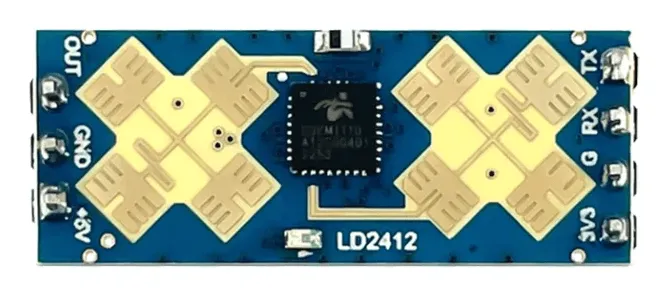
Section titled “组件/集线器”ld2412 传感器平台允许您在 ESPHome 中使用 HI-LINK LD2412 运动和存在传感器。
需要在配置中设置 UART 才能使此传感器工作;parity 和 stop_bits 必须分别为 NONE 和 1。
强烈建议使用硬件 UART,因为它最能支持传感器模块默认的 115200 波特率。
# 示例配置条目ld2412:ld2412 二值传感器允许您快速确定传感器报告的各种状态。
binary_sensor: - platform: ld2412 has_target: name: 存在 has_moving_target: name: 运动目标 has_still_target: name: 静止目标 dynamic_background_correction_status: name: 动态背景校正状态-
has_target (可选):如果检测到目标(静止或运动中)则为 true。 来自 二值传感器 的所有选项。
-
has_moving_target (可选):如果检测到运动目标则为 true。 来自 二值传感器 的所有选项。
-
has_still_target (可选):如果检测到静止目标则为 true。 来自 二值传感器 的所有选项。
-
dynamic_background_correction_status (可选):当传感器正在执行动态背景校正时为 true。 来自 二值传感器 的所有选项。
-
ld2412_id (可选, ID):手动指定组件的 ID。使用多个组件时需要。
NOTE
默认情况下,上述每个目标 二值传感器 组件都包含以下 过滤器 以防止向 Home Assistant 发送过多状态更新:
- settle: 1000ms如果您定义了其他过滤器,此默认值将被覆盖;当然,如果您愿意,可以将其添加回您的自定义过滤器中。
要删除任何给定二值传感器实例的默认过滤器,请在其配置中添加 filters: []。
ld2412 传感器允许报告传感器进行的各种测量值。
sensor: - platform: ld2412 moving_distance: name : 运动距离 still_distance: name: 静止距离 moving_energy: name: 运动能量 still_energy: name: 静止能量 detection_distance: name: 检测距离 light: name: 光照 gate_0: move_energy: name: 门0运动能量 still_energy: name: 门0静止能量 gate_1: move_energy: name: 门1运动能量 still_energy: name: 门1静止能量 gate_2: move_energy: name: 门2运动能量 still_energy: name: 门2静止能量 gate_3: move_energy: name: 门3运动能量 still_energy: name: 门3静止能量 gate_4: move_energy: name: 门4运动能量 still_energy: name: 门4静止能量 gate_5: move_energy: name: 门5运动能量 still_energy: name: 门5静止能量 gate_6: move_energy: name: 门6运动能量 still_energy: name: 门6静止能量 gate_7: move_energy: name: 门7运动能量 still_energy: name: 门7静止能量 gate_8: move_energy: name: 门8运动能量 still_energy: name: 门8静止能量 gate_9: move_energy: name: 门9运动能量 still_energy: name: 门9静止能量 gate_10: move_energy: name: 门10运动能量 still_energy: name: 门10静止能量 gate_11: move_energy: name: 门11运动能量 still_energy: name: 门11静止能量 gate_12: move_energy: name: 门12运动能量 still_energy: name: 门12静止能量 gate_13: move_energy: name: 门13运动能量 still_energy: name: 门13静止能量-
light (可选, int):当处于 工程模式 时,指示光照灵敏度,否则指示
unknown。值在0到255之间(含)。注意这是一个任意单位,不对应任何特定的光照强度测量单位。来自 传感器 的所有选项。 -
moving_distance (可选, int):检测到的运动目标的距离,单位 cm。来自 传感器 的所有选项。
-
still_distance (可选, int):检测到的静止目标的距离,单位 cm。来自 传感器 的所有选项。
-
moving_energy (可选, int):运动目标的能量。值在
0到100之间(含)。来自 传感器 的所有选项。 -
still_energy (可选, int):静止目标的能量。值在
0到100之间(含)。来自 传感器 的所有选项。 -
detection_distance (可选, int):目标的距离,单位 cm。来自 传感器 的所有选项。
-
gate_X (可选):门 X 的能量值,其中 X 的范围为 0 到 13。
-
ld2412_id (可选, ID):手动指定组件的 ID。使用多个组件时需要。
NOTE
默认情况下,上述每个 传感器 组件都包含以下 过滤器 以防止向 Home Assistant 发送过多状态更新:
- throttle_with_priority: 1000ms如果您定义了其他过滤器,此默认值将被覆盖;当然,如果您愿意,可以将其添加回您的自定义过滤器中。
要删除任何给定传感器实例的默认过滤器,请在其配置中添加 filters: []。
ld2412 开关允许您从前端启用或禁用传感器功能。
switch: - platform: ld2412 engineering_mode: name: 工程模式 bluetooth: name: 蓝牙-
bluetooth (可选):开启/关闭蓝牙适配器。默认为
true。来自 开关 的所有选项。 -
engineering_mode 开启/关闭工程模式。来自 开关 的所有选项。
-
ld2412_id (可选, ID):手动指定组件的 ID。使用多个组件时需要。
ld2412 数值组件允许您控制模块的配置。
number: - platform: ld2412 timeout: name: 存在超时 min_distance_gate: name: 最小距离门 max_distance_gate: name: 最大距离门 light_threshold: name: 光照阈值 gate_0: move_threshold: name: 门0运动阈值 still_threshold: name: 门0静止阈值 gate_1: move_threshold: name: 门1运动阈值 still_threshold: name: 门1静止阈值 gate_2: move_threshold: name: 门2运动阈值 still_threshold: name: 门2静止阈值 gate_3: move_threshold: name: 门3运动阈值 still_threshold: name: 门3静止阈值 gate_4: move_threshold: name: 门4运动阈值 still_threshold: name: 门4静止阈值 gate_5: move_threshold: name: 门5运动阈值 still_threshold: name: 门5静止阈值 gate_6: move_threshold: name: 门6运动阈值 still_threshold: name: 门6静止阈值 gate_7: move_threshold: name: 门7运动阈值 still_threshold: name: 门7静止阈值 gate_8: move_threshold: name: 门8运动阈值 still_threshold: name: 门8静止阈值 gate_9: move_threshold: name: 门9运动阈值 still_threshold: name: 门9静止阈值 gate_10: move_threshold: name: 门10运动阈值 still_threshold: name: 门10静止阈值 gate_11: move_threshold: name: 门11运动阈值 still_threshold: name: 门11静止阈值 gate_12: move_threshold: name: 门12运动阈值 still_threshold: name: 门12静止阈值 gate_13: move_threshold: name: 门13运动阈值 still_threshold: name: 门13静止阈值-
timeout (可选, int):在不再检测到存在后,存在状态保持的时间,单位秒。默认为
5s。来自 数值 的所有选项。 -
min_distance_gate (可选, int):运动检测的最大距离门。值在
1到12之间(含)。默认为1。来自 数值 的所有选项。 -
max_distance_gate (可选, int):静止检测的最大距离门。值在
2到13之间(含)。默认为13。来自 数值 的所有选项。 -
light_threshold (可选, int):触发传感器 OUT 引脚的光照阈值。来自 数值 的所有选项。
-
gate_X (可选):门 X 的阈值,其中 X 的范围为 0 到 13。
-
ld2412_id (可选, ID):手动指定组件的 ID。使用多个组件时需要。
ld2412 按钮允许您对传感器执行操作。
button: - platform: ld2412 factory_reset: name: 恢复出厂设置 restart: name: 重启 query_params: name: 查询参数 start_dynamic_background_correction: name: 开始动态背景校正-
factory_reset (可选):此命令用于将所有配置值恢复为原始值。 来自 按钮 的所有选项。
-
restart (可选):重启设备。来自 按钮 的所有选项。
-
query_params (可选):刷新设备的所有传感器值。来自 按钮 的所有选项。
-
start_dynamic_background_correction (可选):开始动态背景校正。来自 按钮 的所有选项。
-
ld2412_id (可选, ID):手动指定组件的 ID。使用多个组件时需要。
ld2412 文本传感器允许报告传感器元数据。
text_sensor: - platform: ld2412 version: name: 固件版本 mac_address: name: MAC地址-
version (可选):固件版本。来自 文本传感器 的所有选项。
-
mac_address (可选):蓝牙 MAC 地址。蓝牙关闭时将设置为
unknown。来自 文本传感器 的所有选项。 -
ld2412_id (可选, ID):手动指定组件的 ID。使用多个组件时需要。
ld2412 选择器允许您配置传感器硬件。
select: - platform: ld2412 out_pin_level: name: 硬件输出引脚电平 distance_resolution: name: 距离分辨率 light_function: name: 光照功能 baud_rate: name: 波特率-
distance_resolution (可选):控制门距离分辨率。可以是
0.75m、0.5m或0.2m。 默认为0.75m。来自 选择器 的所有选项。 -
baud_rate (可选):允许更改 LD2412 串口的波特率。默认为
115200。更改后,传感器将停止工作,直到在设备配置中更新 UART 组件 为新的波特率。来自 选择器 的所有选项。 -
out_pin_level (可选):允许选择传感器检测到存在时 LD2412 的 OUT 引脚行为。 可以是
low或high。默认为low。来自 选择器 的所有选项。 -
light_function (可选):允许选择 LD2412 的 OUT 引脚如何响应光照级别。可以是
off、below或above。注意这与存在检测配合使用。详情请参阅参考手册。 -
ld2412_id (可选, ID):手动指定组件的 ID。使用多个组件时需要。
OUT 引脚
Section titled “OUT 引脚”LD2412 的 OUT 引脚提供了一种简单的硬件机制,用于报告传感器是否检测到存在(和光照)。如果您愿意,可以设置一个 GPIO 二值传感器:
binary_sensor: - platform: gpio pin: GPIOXX name: LD2412 Out引脚状态 device_class: presence要校准您的传感器,请执行以下操作:
或者,您可以简单地离开房间,打开”动态背景校正”,让它自动校准。