LD2410 传感器
组件/集线器
Section titled “组件/集线器”ld2410 传感器平台允许您在 ESPHome 中使用 HI-LINK LD2410 运动和存在传感器。
共有三种具有类似通信协议的型号:
必须在配置中设置 UART 才能使此传感器工作,parity 和 stop_bits 必须 分别为 NONE 和 1。
强烈建议使用硬件 UART 引脚,以最好地支持传感器开箱即用的 256000 波特率。
# 示例配置条目ld2410:ld2410 二值传感器允许您快速确定传感器报告的各种状态。
binary_sensor: - platform: ld2410 has_target: name: 存在 has_moving_target: name: 移动目标 has_still_target: name: 静止目标 out_pin_presence_status: name: OUT 引脚存在状态-
has_target (可选): 如果检测到静止或运动目标则为 true。 来自 二值传感器 的所有选项。
-
has_moving_target (可选): 如果检测到移动目标则为 true。 来自 二值传感器 的所有选项。
-
has_still_target (可选): 如果检测到静止目标则为 true。 来自 二值传感器 的所有选项。
-
out_pin_presence_status (可选): 当处于 工程模式 时,指示 OUT 引脚的状态,否则为
false。OUT 引脚指示取决于 灯光功能 配置。可能需要更新到最新固件才能使用此功能。 来自 二值传感器 的所有选项。
NOTE
默认情况下,上述每个 二值传感器 组件都默认包含以下 过滤器,以防止状态更新淹没 Home Assistant:
- settle: 1000ms如果您定义了其他过滤器,此默认值将被覆盖;当然,如果您愿意,可以将其添加回您的自定义过滤器中。
要删除任何给定二值传感器实例的默认过滤器,请在其配置中添加 filters: []。
ld2410 传感器允许报告传感器采集的各种测量数据。
sensor: - platform: ld2410 light: name: 光线 moving_distance: name: 移动距离 still_distance: name: 静止距离 moving_energy: name: 移动能值 still_energy: name: 静止能值 detection_distance: name: 检测距离 g0: move_energy: name: G0 移动能值 still_energy: name: G0 静止能值 g1: move_energy: name: G1 移动能值 still_energy: name: G1 静止能值 g2: move_energy: name: G2 移动能值 still_energy: name: G2 静止能值 g3: move_energy: name: G3 移动能值 still_energy: name: G3 静止能值 g4: move_energy: name: G4 移动能值 still_energy: name: G4 静止能值 g5: move_energy: name: G5 移动能值 still_energy: name: G5 静止能值 g6: move_energy: name: G6 移动能值 still_energy: name: G6 静止能值 g7: move_energy: name: G7 移动能值 still_energy: name: G7 静止能值 g8: move_energy: name: G8 移动能值 still_energy: name: G8 静止能值-
light (可选, int): 当处于 工程模式 时,指示光线灵敏度,否则为
unknown。值在0到255之间(含)。 来自 传感器 的所有选项。 -
moving_distance (可选, int): 检测到的移动目标的距离(厘米)。 来自 传感器 的所有选项。
-
still_distance (可选, int): 检测到的静止目标的距离(厘米)。 来自 传感器 的所有选项。
-
moving_energy (可选, int): 移动目标的能量值。 值在
0到100之间(含)。 来自 传感器 的所有选项。 -
still_energy (可选, int): 静止目标的能量值。 值在
0到100之间(含)。 来自 传感器 的所有选项。 -
detection_distance (可选, int): 目标的距离(厘米)。 来自 传感器 的所有选项。
-
gX (可选): 第 X 个闸门的能量值(X => 0 到 8)。
NOTE
默认情况下,上述每个 传感器 组件都默认包含以下 过滤器,以防止状态更新淹没 Home Assistant:
- throttle_with_priority: 1000ms如果您定义了其他过滤器,此默认值将被覆盖;当然,如果您愿意,可以将其添加回您的自定义过滤器中。
要删除任何给定传感器实例的默认过滤器,请在其配置中添加 filters: []。
ld2410 开关允许您从前端启用或禁用传感器功能。
switch: - platform: ld2410 engineering_mode: name: 工程模式 bluetooth: name: 控制蓝牙-
engineering_mode (可选): 启用/禁用工程模式。请注意,这需要更多资源,不建议在不需要时启用。来自 开关 的所有选项。
-
bluetooth (可选): 打开/关闭蓝牙适配器。默认为
true。 来自 开关 的所有选项。
ld2410 数值组件允许您控制 Ld2410 的配置。
number: - platform: ld2410 timeout: name: 超时时间 light_threshold: name: 光线阈值 max_move_distance_gate: name: 最大移动距离闸门 max_still_distance_gate: name: 最大静止距离闸门 g0: move_threshold: name: G0 移动阈值 still_threshold: name: G0 静止阈值 g1: move_threshold: name: G1 移动阈值 still_threshold: name: G1 静止阈值 g2: move_threshold: name: G2 移动阈值 still_threshold: name: G2 静止阈值 g3: move_threshold: name: G3 移动阈值 still_threshold: name: G3 静止阈值 g4: move_threshold: name: G4 移动阈值 still_threshold: name: G4 静止阈值 g5: move_threshold: name: G5 移动阈值 still_threshold: name: G5 静止阈值 g6: move_threshold: name: G6 移动阈值 still_threshold: name: G6 静止阈值 g7: move_threshold: name: G7 移动阈值 still_threshold: name: G7 静止阈值 g8: move_threshold: name: G8 移动阈值 still_threshold: name: G8 静止阈值-
timeout (可选, int): 离开后存在状态保持的时间(秒)。默认为
5s。 来自 数值 的所有选项。 -
light_threshold (可选, int): 设置 灯光功能 的光线阈值。 值在
0到255之间(含)。默认为128。 来自 数值 的所有选项。 -
max_move_distance_gate (可选, int): 移动检测的最大距离闸门。 值在
2到8之间(含)。默认为8。 来自 数值 的所有选项。 -
max_still_distance_gate (可选, int): 静止检测的最大距离闸门。 值在
2到8之间(含)。默认为8。 来自 数值 的所有选项。 -
gX (可选): 第 X 个闸门的阈值(X => 0 到 8)。
闸门阈值默认值
Section titled “闸门阈值默认值”| 闸门 | 默认移动阈值 | 默认静止阈值 |
|---|---|---|
| 0 | 50 | 0 |
| 1 | 50 | 0 |
| 2 | 40 | 40 |
| 3 | 30 | 40 |
| 4 | 20 | 30 |
| 5 | 15 | 30 |
| 6 | 15 | 20 |
| 7 | 15 | 20 |
| 8 | 15 | 20 |
ld2410 按钮允许您对传感器执行操作。
button: - platform: ld2410 factory_reset: name: 恢复出厂设置 restart: name: 重启 query_params: name: 查询参数-
factory_reset (可选): 此命令用于将所有配置值恢复为原始值。 来自 按钮 的所有选项。
-
restart (可选): 重启设备。 来自 按钮 的所有选项。
-
query_params (可选): 刷新设备的所有传感器值。 来自 按钮 的所有选项。
ld2410 文本传感器允许报告传感器元数据。
text_sensor: - platform: ld2410 version: name: 固件版本 mac_address: name: MAC 地址ld2410 选择器允许您配置传感器硬件。
select: - platform: ld2410 distance_resolution: name: 距离分辨率 baud_rate: name: 波特率 light_function: name: 灯光功能 out_pin_level: name: OUT 引脚电平-
distance_resolution (可选): 控制闸门距离分辨率。可以是
0.75m或0.2m。 默认为0.75m。来自 选择器 的所有选项。 -
baud_rate (可选): 控制串口波特率。默认为
256000。更改后,所有传感器将停止工作,直到您使用更新的 UART 组件 配置重新安装配置。 来自 选择器 的所有选项。 -
light_function (可选): 如果设置,将根据 光线阈值 影响 OUT 引脚值。可以是
off、low或above。默认为off。 来自 选择器 的所有选项。 -
out_pin_level (可选): 控制 OUT 引脚的
离开值。可以是low或high。默认为low。 来自 选择器 的所有选项。
bluetooth_password.set 动作
Section titled “bluetooth_password.set 动作”这是一个用于设置蓝牙密码的 动作。
- bluetooth_password.set: id: my_ld2410 password: "HiLink"配置变量:
要从 HA 更改密码,您可以使用以下示例配置:
ld2410:  id: my_ld2410
api:  actions:    - action: set_ld2410_bluetooth_password      variables:        password: string      then:        - bluetooth_password.set:            id: my_ld2410            password: !lambda 'return password;'
OUT 引脚
Section titled “OUT 引脚”如果您将 LD2410 的 OUT 引脚连接到 GPIO 引脚,您可以设置一个 GPIO 二值传感器 来监控传感器指示的存在状态,如果启用了 灯光功能,可能还包括其状态:
binary_sensor: - platform: gpio pin: GPIOXX name: GPIO OUT 引脚存在 device_class: presence要校准您的 ld2410 传感器,请执行以下操作:
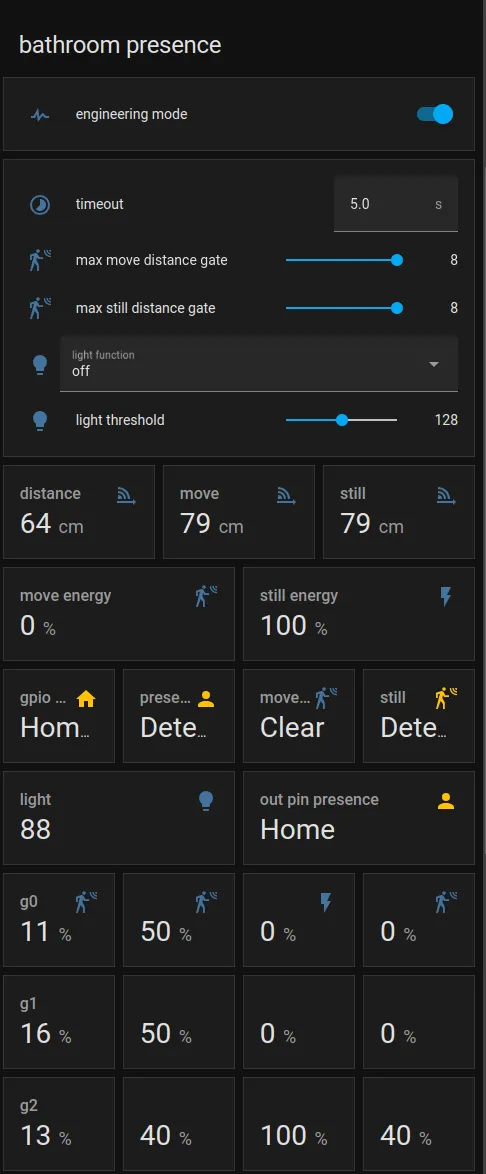
Home Assistant 卡片
Section titled “Home Assistant 卡片”为了方便校准过程,您可以使用以下自定义手动卡片。
type: vertical-stacktitle: 'DEVICE'cards: - type: horizontal-stack cards: - type: entities entities: - entity: 'switch.DEVICE_engineering_mode' name: engineering mode - type: vertical-stack cards: - type: entities entities: - entity: 'number.DEVICE_timeout' name: timeout - entity: 'number.DEVICE_max_move_distance_gate' name: max move distance gate - entity: 'number.DEVICE_max_still_distance_gate' name: max still distance gate - entity: 'select.DEVICE_light_function' name: light function - entity: 'number.DEVICE_light_threshold' name: light threshold - type: horizontal-stack cards: - type: entity entity: 'sensor.DEVICE_detection_distance' name: distance - type: entity entity: 'sensor.DEVICE_moving_distance' name: move - type: entity entity: 'sensor.DEVICE_still_distance' name: still - type: horizontal-stack cards: - type: entity entity: 'sensor.DEVICE_move_energy' name: move energy - type: entity entity: 'sensor.DEVICE_still_energy' name: still energy - type: horizontal-stack cards: - type: entity entity: 'binary_sensor.DEVICE_gpio_out_pin_presence_status' name: gpio presence state_color: true - type: entity entity: 'binary_sensor.DEVICE_presence' name: presence state_color: true - type: entity entity: 'binary_sensor.DEVICE_moving_target' name: movement state_color: true - type: entity entity: 'binary_sensor.DEVICE_still_target' name: still state_color: true - type: conditional conditions: - entity: 'switch.DEVICE_engineering_mode' state: 'on' card: type: vertical-stack cards: - type: horizontal-stack cards: - type: entity entity: 'sensor.DEVICE_light' name: light - type: entity entity: 'binary_sensor.DEVICE_out_pin_presence_status' name: out pin presence state_color: true - type: horizontal-stack cards: - type: entity entity: 'sensor.DEVICE_g0_move_energy' name: 'g0' - type: entity entity: 'number.DEVICE_g0_move_threshold' name: ' ' - type: entity entity: 'sensor.DEVICE_g0_still_energy' name: ' ' - type: entity entity: 'number.DEVICE_g0_still_threshold' name: ' ' - type: horizontal-stack cards: - type: entity entity: 'sensor.DEVICE_g1_move_energy' name: 'g1' icon: ' ' - type: entity entity: 'number.DEVICE_g1_move_threshold' name: ' ' icon: ' ' - type: entity entity: 'sensor.DEVICE_g1_still_energy' name: ' ' icon: ' ' - type: entity entity: 'number.DEVICE_g1_still_threshold' name: ' ' icon: ' ' - type: horizontal-stack cards: - type: entity entity: 'sensor.DEVICE_g2_move_energy' name: 'g2' icon: ' ' - type: entity entity: 'number.DEVICE_g2_move_threshold' name: ' ' icon: ' ' - type: entity entity: 'sensor.DEVICE_g2_still_energy' name: ' ' icon: ' ' - type: entity entity: 'number.DEVICE_g2_still_threshold' name: ' ' icon: ' ' - type: horizontal-stack cards: - type: entity entity: 'sensor.DEVICE_g3_move_energy' name: 'g3' icon: ' ' - type: entity entity: 'number.DEVICE_g3_move_threshold' name: ' ' icon: ' ' - type: entity entity: 'sensor.DEVICE_g3_still_energy' name: ' ' icon: ' ' - type: entity entity: 'number.DEVICE_g3_still_threshold' name: ' ' icon: ' ' - type: horizontal-stack cards: - type: entity entity: 'sensor.DEVICE_g4_move_energy' name: 'g4' icon: ' ' - type: entity entity: 'number.DEVICE_g4_move_threshold' name: ' ' icon: ' ' - type: entity entity: 'sensor.DEVICE_g4_still_energy' name: ' ' icon: ' ' - type: entity entity: 'number.DEVICE_g4_still_threshold' name: ' ' icon: ' ' - type: horizontal-stack cards: - type: entity entity: 'sensor.DEVICE_g5_move_energy' name: 'g5' icon: ' ' - type: entity entity: 'number.DEVICE_g5_move_threshold' name: ' ' icon: ' ' - type: entity entity: 'sensor.DEVICE_g5_still_energy' name: ' ' icon: ' ' - type: entity entity: 'number.DEVICE_g5_still_threshold' name: ' ' icon: ' ' - type: horizontal-stack cards: - type: entity entity: 'sensor.DEVICE_g6_move_energy' name: 'g6' icon: ' ' - type: entity entity: 'number.DEVICE_g6_move_threshold' name: ' ' icon: ' ' - type: entity entity: 'sensor.DEVICE_g6_still_energy' name: ' ' icon: ' ' - type: entity entity: 'number.DEVICE_g6_still_threshold' name: ' ' icon: ' ' - type: horizontal-stack cards: - type: entity entity: 'sensor.DEVICE_g7_move_energy' name: 'g7' icon: ' ' - type: entity entity: 'number.DEVICE_g7_move_threshold' name: ' ' icon: ' ' - type: entity entity: 'sensor.DEVICE_g7_still_energy' name: ' ' icon: ' ' - type: entity entity: 'number.DEVICE_g7_still_threshold' name: ' ' icon: ' ' - type: horizontal-stack cards: - type: entity entity: 'sensor.DEVICE_g8_move_energy' name: 'g8' icon: ' ' - type: entity entity: 'number.DEVICE_g8_move_threshold' name: ' ' icon: ' ' - type: entity entity: 'sensor.DEVICE_g8_still_energy' name: ' ' icon: ' ' - type: entity entity: 'number.DEVICE_g8_still_threshold' name: ' ' icon: ' '然后将所有 DEVICE 替换为您的设备名称。
结果: