

MAX6956 I/O 扩展器
MAX6956 组件允许您在 ESPHome 中使用 MAX6956 I/O 扩展器 (数据手册)。它使用 I²C 总线 进行通信。
max6956 有两种版本:20 端口或 28 端口,取决于封装。
配置完成后,您可以将 20 或 28 个引脚中的任何一个用于您的项目。在 ESPHome 中,它们模拟真正的内部 GPIO 引脚,因此可以与 ESPHome 的许多组件一起使用,如 GPIO 二值传感器或 GPIO 开关。不支持输入中断变化检测。
引脚也可以单独配置为 LED 驱动器并与 Light 组件一起使用。电流值可以全局设置或为每个引脚单独设置,共有 16 个可能的级别。驱动 RGB LED 需要 3 个引脚。
任何接受 引脚模式 的选项理论上都可以使用。
组件/集线器
Section titled “组件/集线器”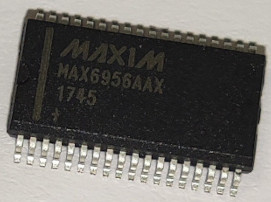
max6956 是一个 I²C 总线 从设备。其地址通过 A0 和 A1 硬件引脚配置,范围从 0x40 到 0x4F。
max6956: - id: max6956_1 address: 0x40 i2c_id: bus_a-
id (必需, ID):此
max6956组件使用的 ID。 -
address (可选, int):驱动器的 I²C 地址。 默认为
0x40。 -
i2c_id (可选):I²C 总线 ID 默认为
false -
brightness_global (可选):设置所有配置为 LED 驱动器的引脚的吸入电流值。 默认为
0 -
brightness_mode (可选):定义配置为 LED 驱动器的引脚的吸入电流是全局配置还是每个引脚单独配置。 默认为
global
二值传感器示例
Section titled “二值传感器示例”max6956 引脚可用作二值传感器。支持单独的上拉电阻。
# 示例配置binary_sensor: - platform: gpio name: "MaxIn Pin 4" id: In_4 pin: max6956: max6956_1 number: 4 mode: input: true pullup: true inverted: Falsemax6956 引脚可用作开关。
# 示例配置 switch: - platform: gpio name: "MaxIn Pin 8" id: In_8 pin: max6956: max6956_1 number: 8 mode: output: true inverted: FalseLED 驱动器示例
Section titled “LED 驱动器示例”max6956 可以控制恒流吸人来驱动 LED,有 16 个等分档位,从 1.5mA 到 24mA。
# 示例配置:引脚作为 LED 驱动器,电流全局设置i2c:  id: bus_a  sda: GPIOXX  scl: GPIOXX
switch:  - platform: template    name: "Led"    id: MaxOut4    optimistic: true    turn_on_action:      - output.turn_on: maxOut_pin4    turn_off_action:      - output.turn_off: maxOut_pin4
number:  - platform: template    name: "Global brightness"    id: global_brightness    optimistic: true    min_value: 0    max_value: 15    initial_value: 1    step: 1    mode: slider    on_value:      - max6956.set_brightness_global:          id: max6956_1          brightness_global: !lambda return x;
max6956:  - id: max6956_1    address: 0x40    i2c_id: bus_a    brightness_mode: global    brightness_global: 5
# 要使用的输出output:  - platform: max6956    pin: 4    id: maxOut_pin4
# 绑定到输出的 LEDlight:  - platform: monochromatic    id: Light_1    output: maxOut_pin4
# 示例配置:引脚作为 LED 驱动器,电流单独管理(RGB LED)i2c: id: bus_a sda: GPIOXX scl: GPIOXX
max6956: - id: max6956_1 address: 0x40 i2c_id: bus_a brightness_mode: segment
switch: - platform: template name: "Led Red" id: MaxOut4 optimistic: true turn_on_action: - output.turn_on: maxOut_pin4 turn_off_action: - output.turn_off: maxOut_pin4
- platform: template name: "Led Green" id: MaxOut5 optimistic: true turn_on_action: - output.turn_on: maxOut_pin5 turn_off_action: - output.turn_off: maxOut_pin5
- platform: template name: "Led Blue" id: MaxOut6 optimistic: true turn_on_action: - output.turn_on: maxOut_pin6 turn_off_action: - output.turn_off: maxOut_pin6
number: - platform: template name: "Number Red" id: number_LedRed optimistic: true min_value: 0 max_value: 100 initial_value: 10 step: 1 mode: slider on_value: - output.set_level: id: maxOut_pin4 level: !lambda return x/100;
- platform: template name: "Number Green" id: number_LedGreen optimistic: true min_value: 0 max_value: 100 initial_value: 10 step: 1 mode: slider on_value: - output.set_level: id: maxOut_pin5 level: !lambda return x/100;
- platform: template name: "Number Blue" id: number_LedBlue optimistic: true min_value: 0 max_value: 100 initial_value: 10 step: 1 mode: slider on_value: - output.set_level: id: maxOut_pin6 level: !lambda return x/100;output: - platform: max6956 pin: 4 id: maxOut_pin4 - platform: max6956 pin: 5 id: maxOut_pin5 - platform: max6956 pin: 6 id: maxOut_pin6
light: - platform: rgb id: Light_1 default_transition_length: 0.1s gamma_correct: 1 red: maxOut_pin4 green: maxOut_pin5 blue: maxOut_pin6