

DF-Player mini
dfplayer (数据手册) 组件允许您播放存储在 SD 卡或 USB 闪存驱动器中的声音和音乐。
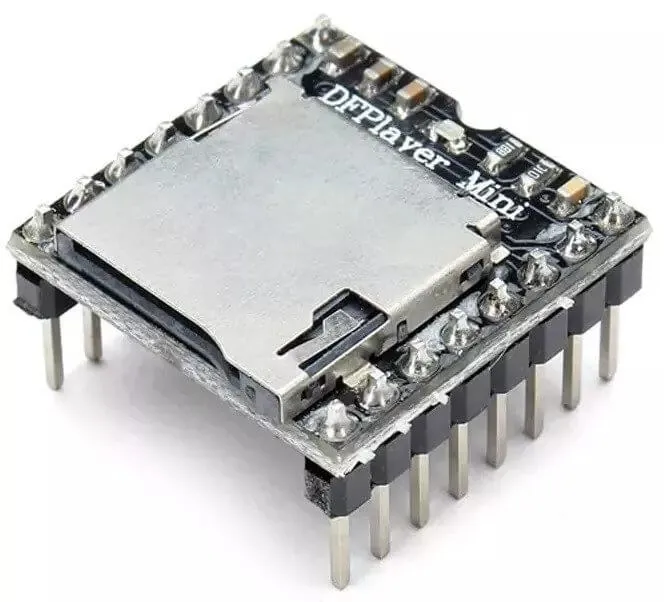
要使此组件工作,您需要在配置中设置一个 UART 总线。
该模块可以由 NodeMCU 的 3.3V 输出供电。对于通信,您可以仅将 uart 总线的 tx_pin 连接到模块的 RX,但如果需要播放状态反馈,您还需要将 rx_pin 连接到模块的 TX。为了获得最佳音质,可以将带电源的立体声扬声器连接到模块的 DAC_R、DAC_L 和 GND,或者该模块具有内置的 3W 音频放大器,在这种情况下,引脚 SPK_1 和 SPK_2 应连接到一个无源扬声器,并且需要 5V 1A 电源。
# 示例配置条目dfplayer:- uart_id (可选, ID): 手动指定 UART 集线器的 ID。
- id (可选, ID): 手动指定用于代码生成的 ID。
- on_finished_playback (可选, 自动化): 播放完成时要执行的操作。
dfplayer.is_playing 条件
Section titled “dfplayer.is_playing 条件”此条件在播放活动时返回 true。
# 在某个触发器中:on_...: if: condition: dfplayer.is_playing then: logger.log: '播放活动进行中!'dfplayer.play_next 动作
Section titled “dfplayer.play_next 动作”开始播放下一首曲目或跳到下一首曲目。
on_...: then: - dfplayer.play_next:dfplayer.play_previous 动作
Section titled “dfplayer.play_previous 动作”播放之前播放的曲目。
on_...: then: - dfplayer.play_previous:dfplayer.play 动作
Section titled “dfplayer.play 动作”播放指定曲目。
on_...: then: - dfplayer.play: file: 23 loop: false # 简写形式 - dfplayer.play: 23配置选项:
-
file (可选, int, 可模板化): 全局曲目编号(来自设备中的所有曲目)。如果未指定,则播放第一首曲目。
-
loop (可选, boolean, 可模板化): 重复播放同一首曲目。默认为
false。
dfplayer.play_mp3 动作
Section titled “dfplayer.play_mp3 动作”播放 mp3 文件夹内的曲目。文件夹内的文件必须从 1 编号到 9999,如 0001.mp3、0002.mp3 等。文件夹名称必须是 mp3,放置在 SD 卡根目录下,mp3 文件名必须是 4 位数字,例如 “0001.mp3”,放置在 mp3 文件夹下。如果需要,您可以在文件名中的数字后添加其他文本,例如 0001hello.mp3,但在 yaml 中必须仅通过数字引用。
/mp3 /0001hello.mp3 /0002.mp3 /0003_thisistheway.mp3 ..on_...: then: - dfplayer.play_mp3: file: 1 # 简写形式 - dfplayer.play_mp3: 1配置选项:
- file (必需, int, 可模板化):
mp3文件夹内要播放的文件编号。
dfplayer.play_folder 动作
Section titled “dfplayer.play_folder 动作”播放编号文件夹内的文件,文件夹必须从 1 开始编号并带前导零。如 01、02 等。文件夹内的文件必须使用两位前导零编号,如 001.mp3、002.mp3 等。文件夹编号范围为 1 到 99,文件名范围为 1 到 255,或者文件夹编号为 1 到 10,文件编号为 1 到 1000。
/01 /001.mp3 /002.mp3 ../02 /001.mp3 /002.mp3 /003.mp3 ..on_...: then: - dfplayer.play_folder: folder: 2 file: 1配置选项:
-
folder (必需, int, 可模板化): 文件夹编号。
-
file (可选, int, 可模板化): 文件夹内要播放的文件编号。仅当未设置
loop时可选。 -
loop (可选, boolean, 可模板化): 重复播放文件夹中的所有文件。会导致
file被忽略。默认为false。
dfplayer.set_device 动作
Section titled “dfplayer.set_device 动作”更改正在使用的设备。有效值为 TF_CARD 和 USB。
on_...: then: - dfplayer.set_device: TF_CARDdfplayer.set_volume 动作
Section titled “dfplayer.set_volume 动作”更改音量。
on_...: then: - dfplayer.set_volume: volume: 20 # 简写形式 - dfplayer.set_volume: 20配置选项:
- volume (必需, int, 可模板化): 音量值。有效值为
0到30。
dfplayer.volume_up 动作
Section titled “dfplayer.volume_up 动作”调高音量。
on_...: then: - dfplayer.volume_updfplayer.volume_down 动作
Section titled “dfplayer.volume_down 动作”调低音量。
on_...: then: - dfplayer.volume_downdfplayer.set_eq 动作
Section titled “dfplayer.set_eq 动作”更改音频均衡器预设。
on_...: then: - dfplayer.set_eq: eq_preset: ROCK # 简写形式 - dfplayer.set_eq: ROCK配置选项:
- eq_preset (必需): 均衡器预设值。有效值为
NORMAL、POP、ROCK、JAZZ、CLASSIC和BASS。
dfplayer.sleep 动作
Section titled “dfplayer.sleep 动作”进入睡眠模式。播放停止,需要发送 dfplayer.set_device: TF_CARD 动作才能再次启用播放。
on_...: then: - dfplayer.sleepdfplayer.reset 动作
Section titled “dfplayer.reset 动作”模块重置。
on_...: then: - dfplayer.resetdfplayer.start 动作
Section titled “dfplayer.start 动作”开始播放曲目或恢复暂停的播放。
on_...: then: - dfplayer.startdfplayer.pause 动作
Section titled “dfplayer.pause 动作”暂停播放,可以使用 dfplayer.start 从相同位置恢复播放。
on_...: then: - dfplayer.pausedfplayer.stop 动作
Section titled “dfplayer.stop 动作”停止播放。
on_...: then: - dfplayer.stopdfplayer.random 动作
Section titled “dfplayer.random 动作”随机播放所有曲目。
on_...: then: - dfplayer.random- id (可选, ID): 如果您有多个组件,手动指定 DFPlayer 的 ID。
使用以下代码,您可以快速设置一个节点,并在 Home Assistant 的开发者工具中使用服务。例如,要调用 dfplayer.play_folder,选择服务 esphome.test_node_dfplayer_play 并在服务数据中输入
{ "file": 23 }uart: tx_pin: GPIOXX rx_pin: GPIOXX baud_rate: 9600
dfplayer: on_finished_playback: then: logger.log: '播放完成事件'
api: actions: - action: dfplayer_next then: - dfplayer.play_next: - action: dfplayer_previous then: - dfplayer.play_previous: - action: dfplayer_play variables: file: int then: - dfplayer.play: !lambda 'return file;' - action: dfplayer_play_loop variables: file: int loop_: bool then: - dfplayer.play: file: !lambda 'return file;' loop: !lambda 'return loop_;' - action: dfplayer_play_folder variables: folder: int file: int then: - dfplayer.play_folder: folder: !lambda 'return folder;' file: !lambda 'return file;'
- action: dfplayer_play_loop_folder variables: folder: int then: - dfplayer.play_folder: folder: !lambda 'return folder;' loop: true
- action: dfplayer_set_device_tf then: - dfplayer.set_device: TF_CARD
- action: dfplayer_set_device_usb then: - dfplayer.set_device: USB
- action: dfplayer_set_volume variables: volume: int then: - dfplayer.set_volume: !lambda 'return volume;' - action: dfplayer_set_eq variables: preset: int then: - dfplayer.set_eq: !lambda 'return static_cast<dfplayer::EqPreset>(preset);'
- action: dfplayer_sleep then: - dfplayer.sleep
- action: dfplayer_reset then: - dfplayer.reset
- action: dfplayer_start then: - dfplayer.start
- action: dfplayer_pause then: - dfplayer.pause
- action: dfplayer_stop then: - dfplayer.stop
- action: dfplayer_random then: - dfplayer.random
- action: dfplayer_volume_up then: - dfplayer.volume_up
- action: dfplayer_volume_down then: - dfplayer.volume_down