

Climate 组件
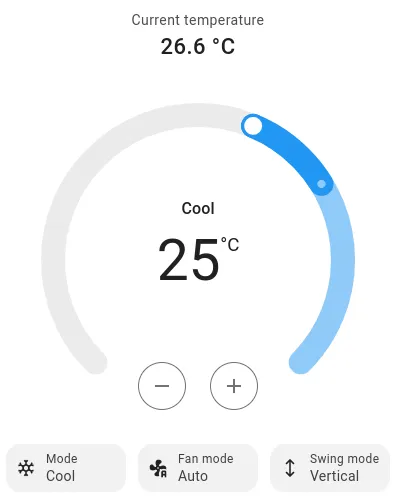
ESPHome 支持温控设备(Climate devices)。温控设备可以代表不同类型的硬件,但其定义特征是温控设备具有可设定的目标温度,并且可以设置为不同的模式,如 HEAT(制热)、COOL(制冷)、HEAT_COOL(制热/制冷)或 OFF(关闭)。
NOTE
并非所有温控组件都支持所有可能的功能。请查看相应文档页面以了解支持的功能详情。
基础 Climate 配置
Section titled “基础 Climate 配置”ESPHome 中的所有温控平台都继承自温控配置模式。在 ESPHome 中,所有温度值默认使用 °C。某些平台允许转换为 °F 或以 °F 设置,这将在各自文档中单独说明。
climate: - platform: ... visual: min_temperature: 18 max_temperature: 25 temperature_step: 0.1 min_humidity: 30% max_humidity: 99% - platform: ... visual: min_temperature: 18 max_temperature: 25 temperature_step: target_temperature: 0.5 current_temperature: 0.1配置变量:
- id (可选, string): 手动指定用于代码生成的 ID。id 和 name 中至少必须指定一个。
- name (可选, string): 温控设备的名称。id 和 name 中至少必须指定一个。
NOTE
如果您为设备设置了 friendly_name,并且希望温控设备使用该名称,可以设置 name: None。
-
icon (可选, icon): 手动设置前端界面中温控设备使用的图标。
-
visual (可选): 温控设备的可视化设置 - 这些设置不影响设备运行,仅用于控制温控设备在前端界面中的显示方式。
-
min_temperature (可选, float): 温控设备可达到的最低温度。用于设置前端界面仪表的范围。
-
max_temperature (可选, float): 温控设备可达到的最高温度。用于设置前端界面仪表的范围。
-
temperature_step (可选, float): 目标温度控制的粒度。可以是单个数值,也可以按以下方式拆分:
- target_temperature (必填, float): 目标温度的粒度
- current_temperature (必填, float): 当前温度的粒度
-
min_humidity (可选, percentage): 温控设备可达到的最低湿度。用于设置前端界面仪表的范围。
-
max_humidity (可选, percentage): 温控设备可达到的最高湿度。用于设置前端界面仪表的范围。
-
高级选项:
-
internal (可选, boolean): 将此组件标记为内部组件。内部组件不会暴露给前端界面(如 Home Assistant)。仅指定
id而不指定name会隐式将其设置为 true。 -
disabled_by_default (可选, boolean): 如果为 true,则此实体不应在用户手动启用之前添加到任何客户端的前端界面(通常是 Home Assistant,通过 Home Assistant UI 启用)。默认为
false。 -
entity_category (可选, string): 实体的类别。请参阅 https://developers.home-assistant.io/docs/core/entity/#generic-properties 获取可用选项列表。设置为
""可移除默认实体类别。 -
如果启用了 Webserver 并选择了版本 3,则支持 Webserver 组件的所有其他选项。请参阅 Webserver 版本 3。
MQTT 选项:
-
action_state_topic (可选, string): 用于发布温控设备动作状态变更的主题。
-
current_temperature_state_topic (可选, string): 用于发布当前温度变更的主题。
-
current_humidity_state_topic (可选, string): 用于发布当前湿度变更的主题。
-
fan_mode_state_topic (可选, string): 用于发布风扇模式变更的主题。
-
fan_mode_command_topic (可选, string): 用于接收风扇模式命令的主题。
-
mode_state_topic (可选, string): 用于发布温控设备模式变更的主题。
-
mode_command_topic (可选, string): 用于接收温控设备模式命令的主题。
-
preset_state_topic (可选, string): 用于发布预设模式变更的主题。
-
preset_command_topic (可选, string): 用于接收预设模式命令的主题。
-
swing_mode_state_topic (可选, string): 用于发布摆风模式变更的主题。
-
swing_mode_command_topic (可选, string): 用于接收摆风模式命令的主题。
-
target_temperature_state_topic (可选, string): 用于发布目标温度变更的主题。
-
target_temperature_command_topic (可选, string): 用于接收目标温度命令的主题。
-
target_temperature_high_state_topic (可选, string): 用于发布较高目标温度变更的主题。
-
target_temperature_high_command_topic (可选, string): 用于接收较高目标温度命令的主题。
-
target_temperature_low_state_topic (可选, string): 用于发布较低目标温度变更的主题。
-
target_temperature_low_command_topic (可选, string): 用于接收较低目标温度命令的主题。
-
target_humidity_state_topic (可选, string): 用于发布目标湿度变更的主题。
-
target_humidity_command_topic (可选, string): 用于接收目标湿度命令的主题。
-
MQTT 组件的所有其他选项。
Climate 自动化
Section titled “Climate 自动化”climate.control 动作
Section titled “climate.control 动作”这是一个用于设置温控设备参数的动作。
- climate.control: id: my_climate mode: HEAT_COOL target_temperature: 25°C配置变量:
-
id (必填, ID): 要控制的温控设备的 ID。
-
mode (可选, string, 可模板化): 将温控设备设置为特定模式。可选值为:
OFF- 设备手动设置为关闭,设备处于非活动状态。AUTO- 设备应动态调整温度。例如根据时间表或学习行为。HEAT- 设备设置为制热以达到目标温度。COOL- 设备设置为制冷以达到目标温度。HEAT_COOL- 设备应制热/制冷以维持目标温度。FAN_ONLY- 设备仅启用风扇,不进行制热或制冷。DRY- 设备设置为除湿模式。
-
target_temperature (可选, float, 可模板化): 设置温控设备的目标温度。
-
target_temperature_low (可选, float, 可模板化): 设置具有双点目标温度的温控设备的较低目标温度。
-
target_temperature_high (可选, float, 可模板化): 设置具有双点目标温度的温控设备的较高目标温度。
-
target_humidity (可选, float, 可模板化): 设置温控设备的目标湿度。
-
preset (可选, string, 可模板化): 设置温控设备的预设模式。可选值为
ECO、AWAY、BOOST、COMFORT、HOME、SLEEP、ACTIVITY。 -
custom_preset (可选, string, 可模板化): 设置温控设备支持的自定义预设模式之一。
-
fan_mode (可选, string, 可模板化): 设置温控设备的风扇模式。可选值为
ON、OFF、AUTO、LOW、MEDIUM、HIGH、MIDDLE、FOCUS、DIFFUSE、QUIET。 -
custom_fan_mode (可选, string, 可模板化): 设置温控设备支持的自定义风扇模式之一。
-
swing_mode (可选, string, 可模板化): 设置温控设备的摆风模式。可选值为
OFF、BOTH、VERTICAL、HORIZONTAL。
lambda 调用
Section titled “lambda 调用”从 lambda 中,您可以调用所有温控设备上的多种方法来执行一些高级操作。
- 属性:所有温控设备都有只读属性来获取设备的当前状态。
// 当前模式,类型:ClimateMode(枚举) id(my_climate).mode // 当前温度,类型:float(度) id(my_climate).current_temperature // 当前湿度,类型:float(百分比) id(my_climate).current_humidity // 目标温度,类型:float(度) id(my_climate).target_temperature // 较低目标温度,类型:float(度) id(my_climate).target_temperature_low // 较高目标温度,类型:float(度) id(my_climate).target_temperature_high // 目标湿度,类型:float(百分比) id(my_climate).target_humidity // 风扇模式,类型:FanMode(枚举) id(my_climate).fan_mode // 摆风模式,类型:SwingMode(枚举) id(my_climate).swing_mode // 当前动作(当前处于空闲、制冷、制热等状态),ClimateAction(枚举) id(my_climate).action // 预设模式,类型:Preset(枚举) id(my_climate).preset- 自定义模式访问方法:
// 检查是否激活了自定义风扇模式,类型:bool id(my_climate).has_custom_fan_mode() // 获取自定义风扇模式(只读),类型:StringRef id(my_climate).get_custom_fan_mode() // 检查是否激活了自定义预设模式,类型:bool id(my_climate).has_custom_preset() // 获取自定义预设模式(只读),类型:StringRef id(my_climate).get_custom_preset()NOTE
get_custom_fan_mode() 和 get_custom_preset() 返回 StringRef。当未设置自定义模式时,它们返回空的 StringRef。使用 has_custom_fan_mode() 或 has_custom_preset() 检查自定义模式是否激活,或者检查返回的 StringRef 是否为空。
// 使用 has_custom_fan_mode() 检查if (id(my_climate).has_custom_fan_mode()) {  auto mode = id(my_climate).get_custom_fan_mode();  ESP_LOGD("tag", "Mode: %.*s", (int) mode.size(), mode.c_str());}
// 或者检查是否为空auto mode = id(my_climate).get_custom_fan_mode();if (!mode.empty()) { // 使用 mode}.make_call:控制温控设备
auto call = id(my_climate).make_call(); call.set_mode("OFF"); // 等等,请参阅 API 参考 call.perform();climate.on_state 触发器
Section titled “climate.on_state 触发器”每次温控设备状态更新时(例如,当前温度测量值或用户设置的模式发生变化),此触发器会被激活。Climate 本身作为引用 x 供自动化使用。
climate: - platform: midea # 或任何其他平台 # ... on_state: - logger.log: "状态已更新!" - lambda: |- if (x.mode != CLIMATE_MODE_OFF) id(some_binary_sensor).publish_state(true);climate.on_control 触发器
Section titled “climate.on_control 触发器”每次温控设备的控制输入通过 ClimateCall 更新时(包括来自 Home Assistant 的更改),此触发器会被激活。也就是说,例如对于模式的更改会触发此触发器,但温度测量值的更改不会。如果同时定义了 on_state 触发器,此触发器将在 on_state 之前被调用。ClimateCall 控制对象作为引用 x 供自动化使用,可以被修改。
climate: - platform: ... # ... on_control: - logger.log: "收到控制输入;配置已更新!" - lambda: |- if (x.get_mode() != CLIMATE_MODE_OFF) { id(turnoff_script).stop(); x.set_target_temperature(25.0f); }