

2022.4:群组!群组!群组!
👋 我都不知道该从哪里开始介绍这次发布;现在已经是 4 月了,而我可以向你保证:这次更新绝对不是玩笑。说真的,它塞满了功能和令人惊叹的新东西 🤯
这次发布的重点,是把原本只有 YAML 配置用户才能用到的体验和功能带到用户界面里,让每个人都能轻松使用。这是我们持续精简整体体验的重要一步。
我已经没办法把所有内容都塞进这篇发布说明里了,但还有更多值得一提的东西!Zack 和 Paulus 承诺会在新闻通讯里再放出几条很棒的(而且是独家的)消息!顺带一提,这份新闻通讯现在已经改名为 Building the Open Home,一定要去看看。
我想邀请你读完下面这份(很长的)发布说明。我相信里面一定有很多你会喜欢、甚至爱上的内容 ❤️
也欢迎告诉我,你觉得这次发布里最杀手级的功能是什么?
祝你享受这次发布!
../Frenck
- 告别 Lovelace,欢迎仪表盘
- 隐藏实体
- 现在可在 UI 中使用:群组!
- 开关伪装成 X
- 更多辅助器现已可通过 UI 使用
- 介绍更新实体
- 为 Home Assistant Core 与 Container 安装提供备份
- 测试你的自动化条件
- 区域现在也有状态了!
- 调整传感器的计量单位
- 调整长期统计数据
- 优化性能
- 全新与升级版选择器!
- 触发器上的变量
- 其他值得注意的变化
- 新集成
- 现在可通过 UI 设置的集成
- 发布 2022.4.1 - April 7
- 发布 2022.4.2 - April 11
- 发布 2022.4.3 - April 12
- 发布 2022.4.4 - April 14
- 发布 2022.4.5 - April 16
- 发布 2022.4.6 - April 20
- 发布 2022.4.7 - April 24
- 需要帮助?加入社区!
- 不向后兼容的变更
- 告别以下内容
- 全部变更
告别 Lovelace,欢迎仪表盘
在这次发布中,我们要和 “Lovelace” 这个名称告别了;它现在被重命名为 “仪表盘”。
在过去一段时间里,我们已经逐步更多地使用“仪表盘”这个说法, 让大家慢慢习惯。从这次发布开始,“Lovelace” 这个术语将被“仪表盘”完全取代。
这次改名是为了改进用户体验,并进一步精简 Home Assistant 的整体用语。 对新用户来说,“Lovelace” 并不能直观表达含义,还需要额外学习;而“仪表盘”则一目了然。
所以,你的 Home Assistant 仪表盘长什么样呢?
隐藏实体
Besides enabling/disabling 实体, it is now also possible to hide them.
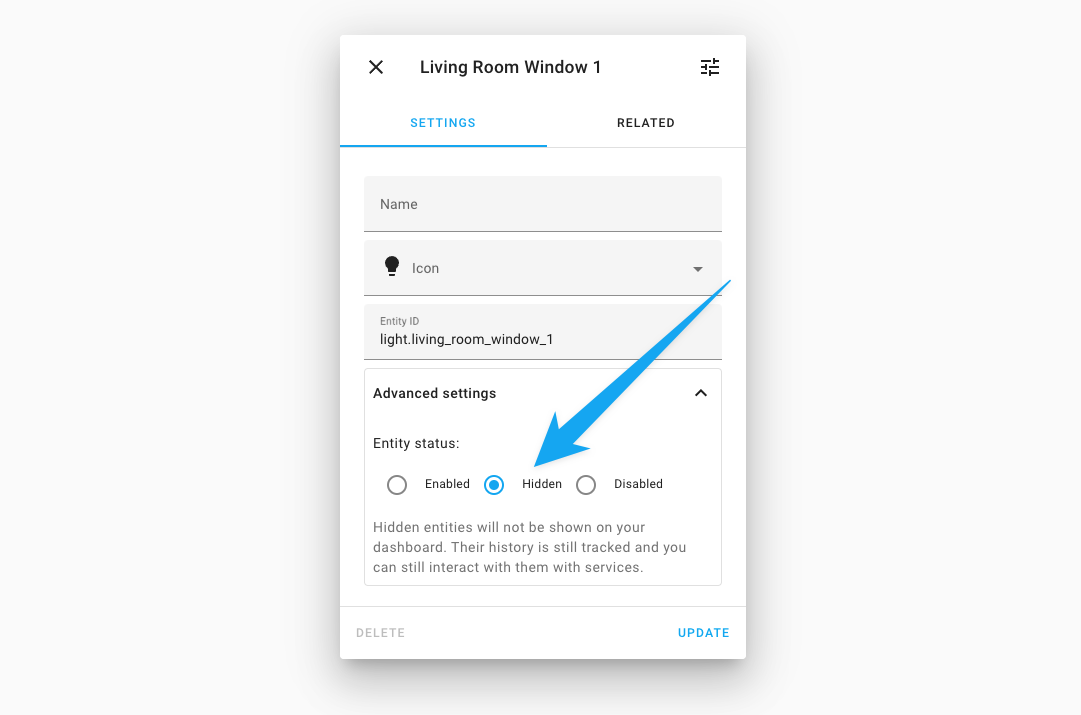 You can now mark an 实体 as hidden in the 实体 设置.
Hiding 实体 will hide them from most places in the UI, but they are still there and are still being recorded.
However, they are no longer shown on auto-generated 仪表盘; they are automatically hidden from HomeKit, Alexa & Google Assistant and aren't called when a 服务 call targets their area.
Hiding 实体 can be used to clean up your automatically generated 仪表盘 or hide those 灯光 实体 that you have put into groups. About groups…
现在可在 UI 中使用:群组!
A group lets you combine multiple 实体 into a single 实体. 实体 that are members of a group can be controlled and monitored as a whole. Useful for cases where you want to control, for example, the multiple bulbs in a 灯光 fixture as a single 灯光 in Home Assistant.
Using groups is a very common use case, but, until now, an advanced use case as groups were only available for YAML 配置. As of today, groups are available in the UI! 🎉
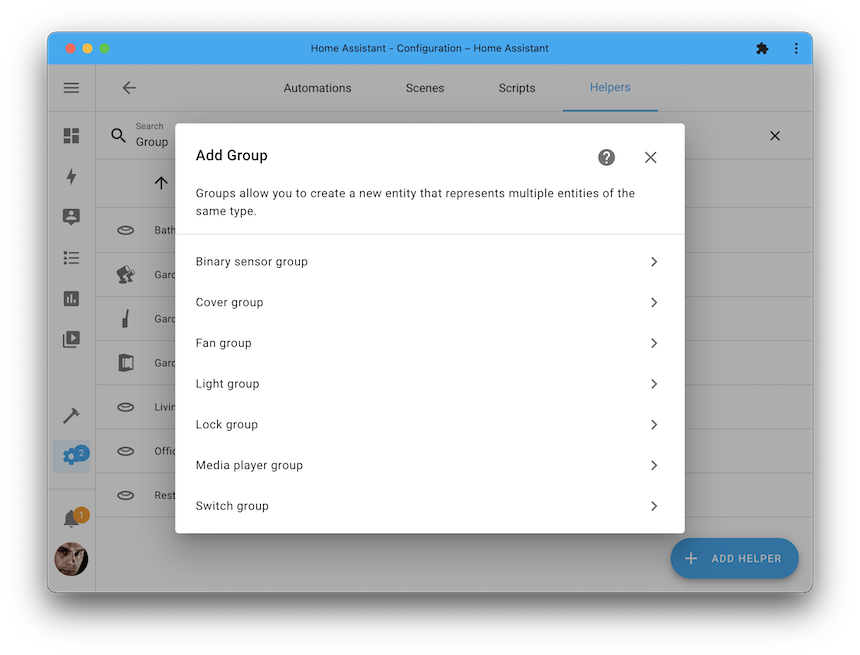
Select the type of 实体 you want to group and select the group members you want to add: Done! You can group multiple types of 实体: 二元sensor, 遮盖, 风扇, 灯光, and media players; also added in this 发布 is support for 门锁 and 开关 groups.
Remember the hide 实体 functionality described above? That is super helpful for hiding those individual 灯光 实体 of your 灯光 fixture. So, when you create a new group in the UI, you can select to hide all group members automatically!
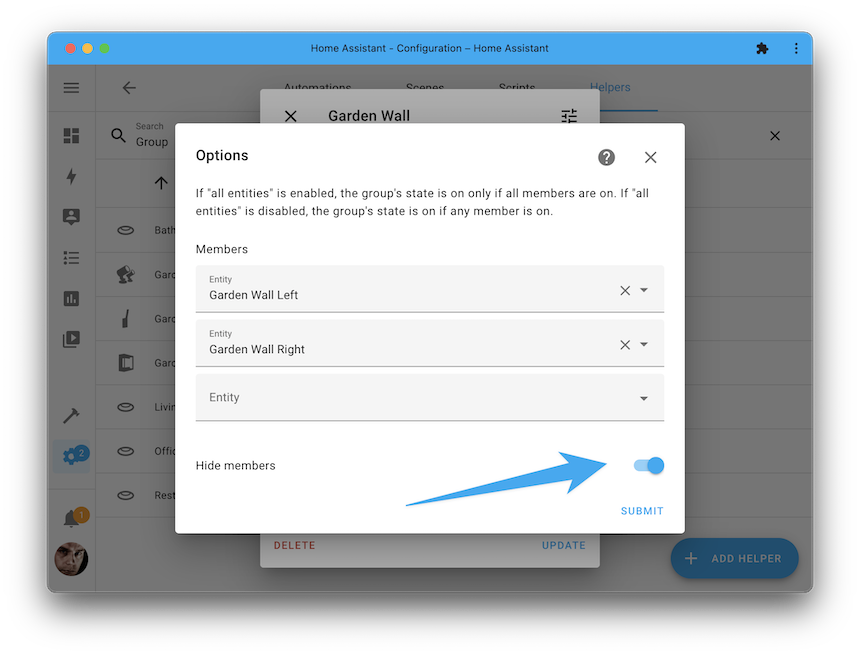
Your groups can be found under 配置 > 自动化 & 脚本 > Helpers, or, if you have updated to this 发布 already, click the my button below to add a new group immediately:
开关伪装成 X
In Home Assistant’s world, a wall plug is a 开关. And while that is correct for a wallplug in general, those plugs (or relays) are often used with a 灯光 fixture, a 风扇, garage door, or maybe your Christmas tree 灯光. 🎄
This 发布 introduces the “开关 as X” helper, which lets you convert any Home Assistant 开关 into a 灯光, 遮盖, 风扇, 门锁, or siren to match your real-world use better.
开关 as X can be found under 配置 > 自动化 & 脚本 > Helpers, but wait! We made it easier: You can also change the 开关 itself when editing the 开关 实体:
The video above shows how to create a new 灯光 实体, which uses the original 开关. The original 开关 is now automatically hidden from most of the Home Assistant UI but is still available on this 设备 page.
If you have updated to this 发布 already, click the my button below to transform one of your 开关 right away:
更多辅助器现已可通过 UI 使用
The above Groups and 开关 as X, are to be found in what we call: Helpers.
Helpers are 集成 that expose a way for a user to provide input or consume existing data in Home Assistant to provide a new 实体.
The latter category of helpers has very much been extended in this 发布! Not just groups and 开关 as X, but we have many more helper 集成 available in the UI now!
This 发布 brings the following helpers to the UI:
- Derivative
- Groups
- [集成 - Riemann sum integral]
- Min/Max
- 开关 as X
- Threshold
- Times of day
- Utility Meter
介绍更新实体
Say "hi!" to a brand new 实体 type: update.
更新 实体 can tell you if an 更新 is available for your 设备 and 服务 and, in some cases, allow you to 安装 the 更新 straight from Home Assistant!
And the beautiful thing is: They show up in your 配置 仪表盘, just like a Home Assistant, Home Assistant OS, or add-on 更新. As a Matter of fact, those are now 更新 实体 too!
Now updates are 实体, other 集成 can provide them too! For example, a WLED firmware 更新 for your LED strip will show up and installs with a single click.
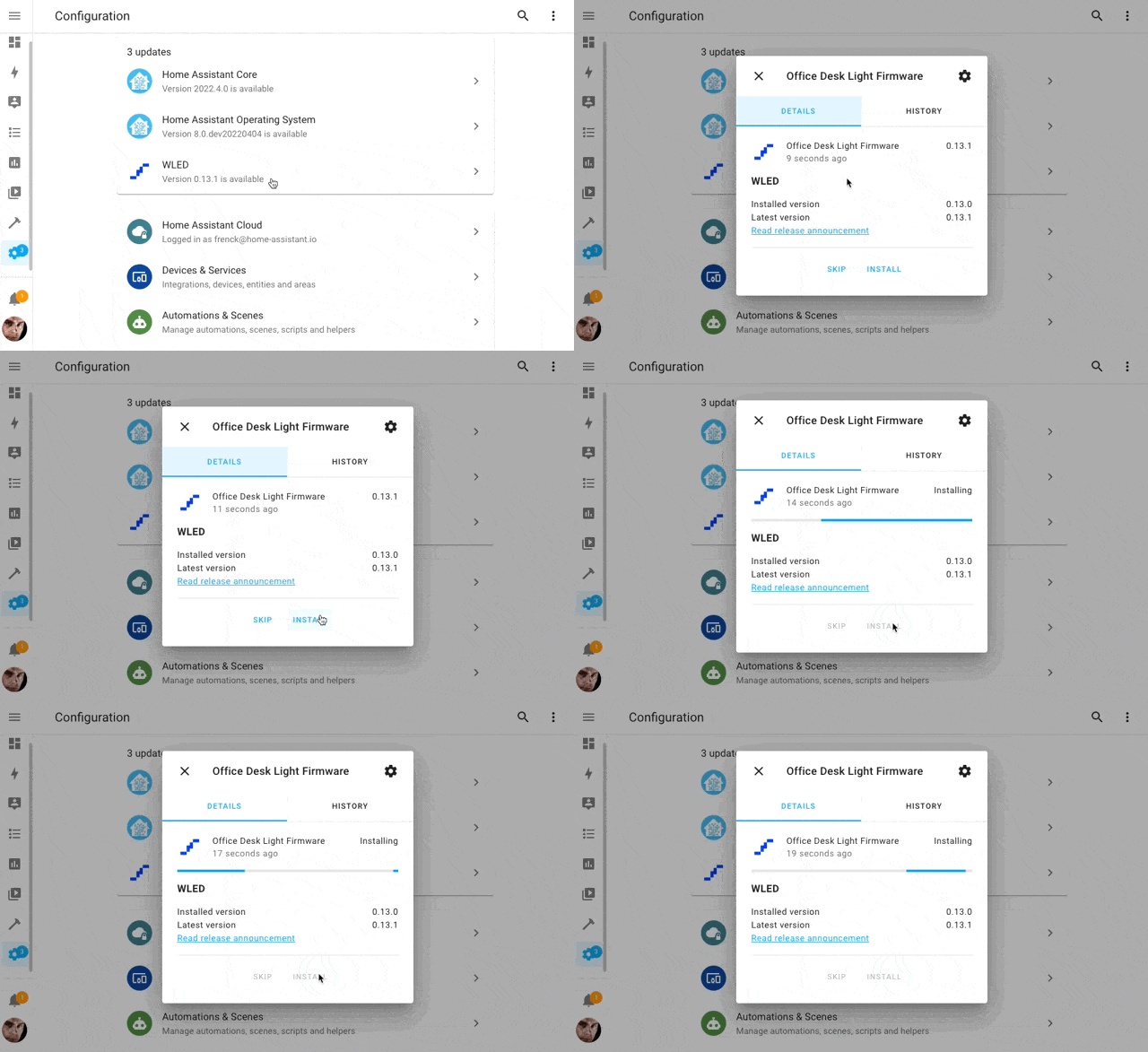 A WLED firmware 更新 can now be 已安装 just like any other 更新.
These update 实体 can be provided by 集成 and provide more
information about the 更新, like: 版本 information, links to 发布 notes,
and the possibility to skip that specific 版本 offered.
The blue number indicator on the 配置 cog icon in your 侧边栏 tells you how many updates are pending.
The Home Assistant Supervisor (providing 核心, OS, and add-on updates), WLED, Pi-hole, and Synology DSM 集成 have implemented these brand new 更新 实体 in this 发布.
And because they are all 实体, it means you can automate with them. For example, you could send a 通知 when a new add-on 更新 is available for 安装.
为 Home Assistant Core 与 Container 安装提供备份
If you are running Home Assistant OS or 受监管模式, you already have access to Home Assistant's really helpful 备份 capabilities. However, this feature was unavailable if you run Home Assistant 核心 in Python or use a Home Assistant 容器 in Docker.
That all changes this 发布: Introducing a 备份 集成 for Home Assistant 核心 and 容器 安装 types!
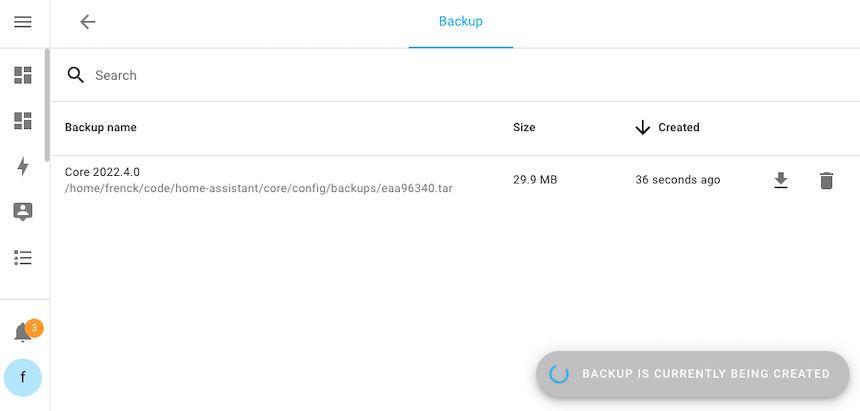 Home Assistant 核心 and 容器 installations can now also back up their instance.
These backups can be downloaded and extracted if you want or need to 恢复 one of the previous backups. Also, these backups are compatible with Home Assistant OS installations. So, if you plan on migrating 安装 types in the future, that is now super easy!
You can find the 备份 仪表盘 in the 配置 menu, or, if you have upgraded already, click the my button below to create a new 备份 right away:
测试你的自动化条件
In our previous 发布 we added a feature to see if the 自动化 you create 触发器 correctly. During the 发布 party live stream, we got questions: "Can this be done for 条件 too?"; Sure we can!
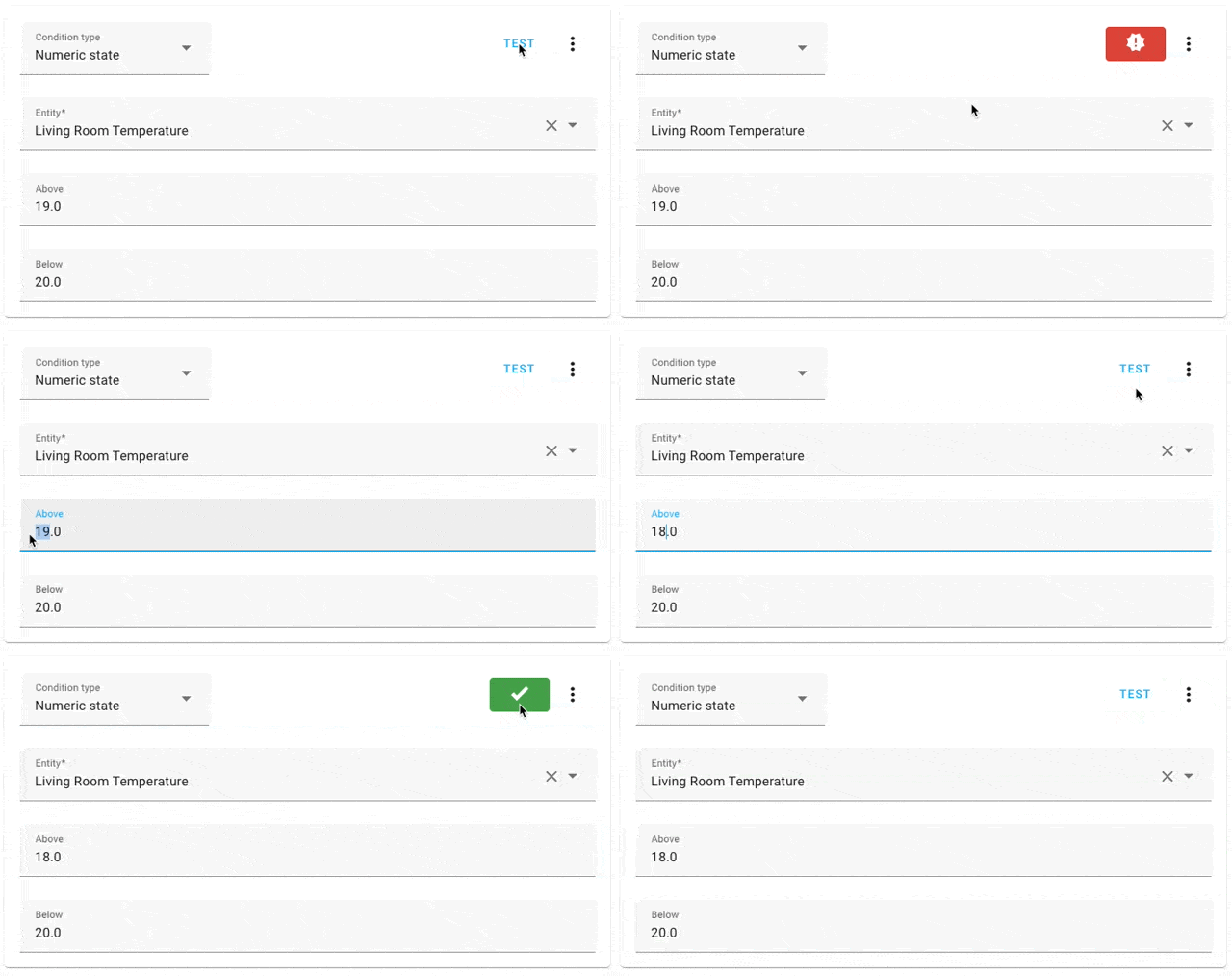 Every 条件 now has a little test button, to test if the 条件 passes right now.
Additionally, the “triggered” bar got an additional feature too! You can click on it to get a raw view of all 触发器 variable data. This data can be helpful in case you want to create an advanced 条件 or template using that information.
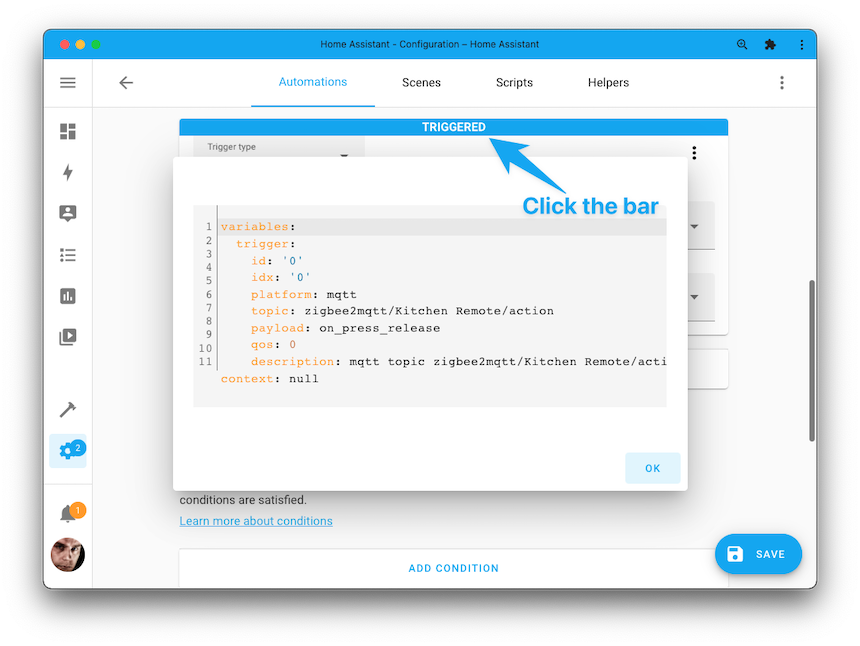
区域现在也有状态了!
If you ever looked at the 状态 of a zone 实体, you would have noticed
it always said: "Zoning". Not really helpful 🙃
So, to improve on that, we changed that behavior. The 状态 of a zone 实体
will now show the number of persons currently in that zone; that is more
helpful! Additionally, it means that a zone has history now too!
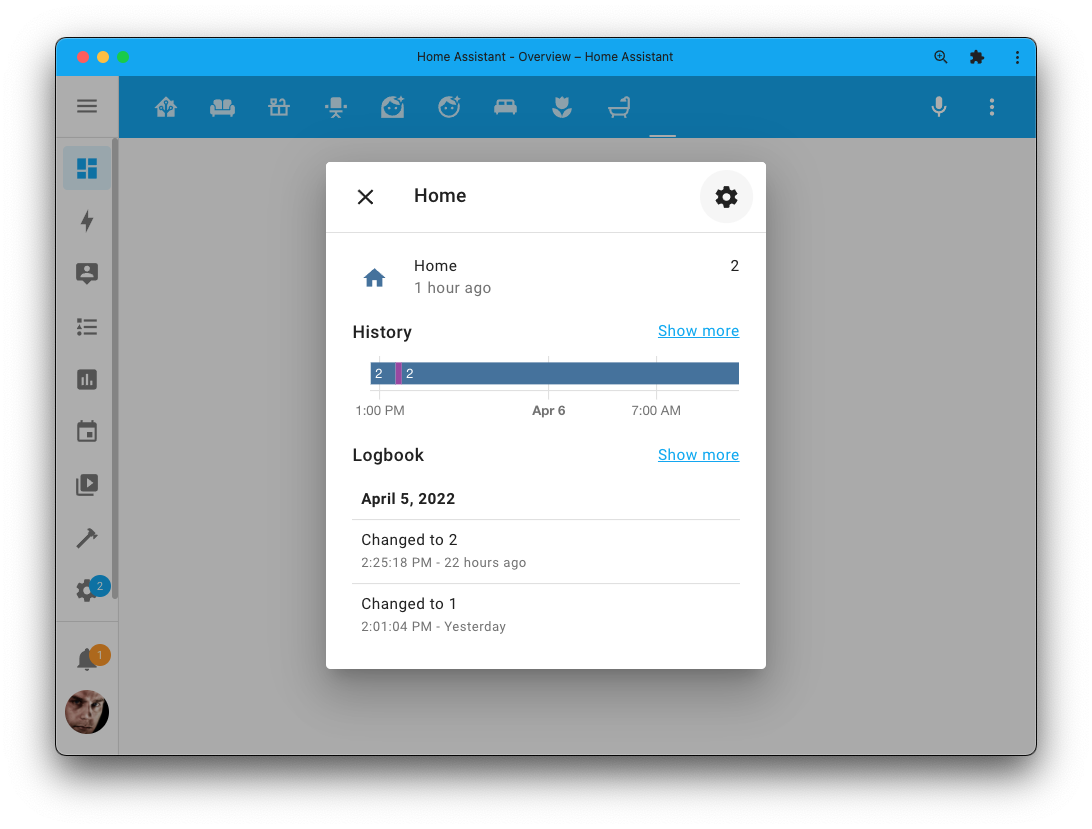
This will greatly simplify 自动化 and 脚本 that, for example, 触发器 on: Nobody is home, everybody is home, someone left home (or any other zone for that Matter). Or use it as a 条件 to prevent an 自动化 from running when nobody is home.
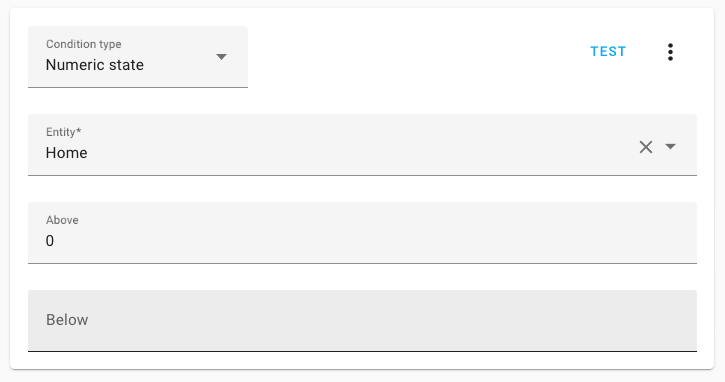 The 条件 ensures this 自动化 will only 触发器 if someone is home.
调整传感器的计量单位
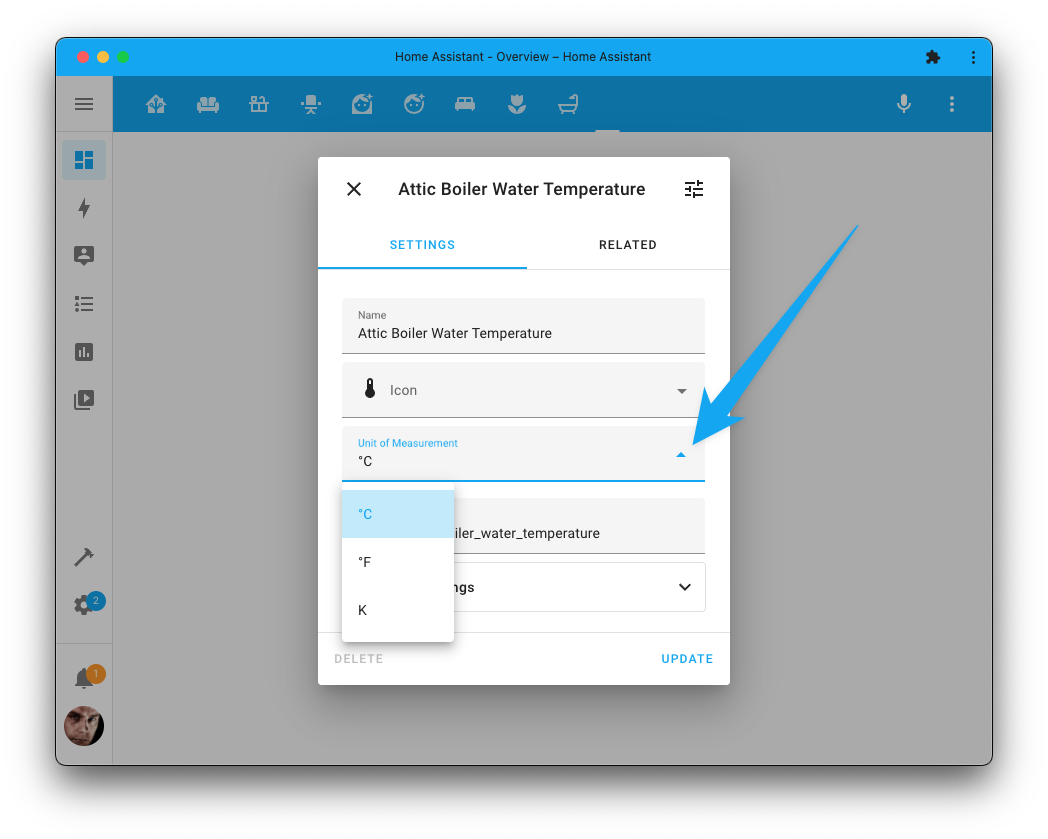
Got that one 传感器 measuring a temperature in Celsius, but you prefer it to be in Fahrenheit? No problem! You can now change the unit of measurement for temperature and pressure 传感器 straight from the UI.
调整长期统计数据
Long-term statistics are great! Until... something went wrong 😅
Unfortunately, things happen. For example, it registered a big spike, or your solar or electricity meter provided a one-off rogue measurement. These events impact your long-term statistics, which might forever have incorrect history.
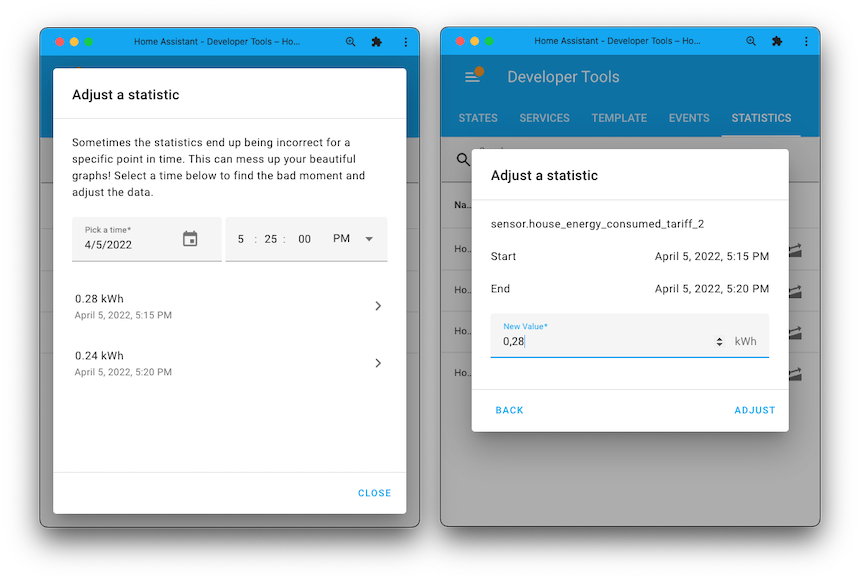
We now have made available a little developer tool that allows you to correct/adjust long-term historical data to solve these issues.
The new tool can be found at 开发者工具 > Statistics, and click the icon, next to the statistic you'd like to adjust search for the incorrect datapoint by date & time and adjust the value.
优化性能
This 发布 brings significant performance optimizations to both Home Assistant's 后端 and 前端 UI.
前端 UI performance
The communication layer between the Home Assistant 前端 and its 核心 后端 has been greatly improved. It now sends over a lot less data and is heavily optimized to send the least amount of data when first loading up the UI.
The UI will load faster since less data is transferred over the wire, and there is less data for the web browser or app to process.
Additionally, transmitting less data means Home Assistant will work better on slower data connections and, if essential for you, uses less data on your mobile data plan.
Database performance
This 发布 features write reductions intended to preserve SD 卡片 lifetimes, performance improvements designed to get data to the 前端 faster, and database size reductions ranging from 10-35% for most installs.
When the same set of 状态 属性 already exists in the database, newly recorded 状态 changes now only store a reference to the 状态 属性 instead of saving the whole set of 状态 属性.
As data stored in the database before 2022.4 does not get updated, the reduction in database size will occur over time with the recording of new data and the purging of old data.
On top of that, most 实体 history graphs no longer need to fetch the 属性 from the 后端, and as a result, they load much faster after 24 hours of running on 2022.4. This change is especially noticeable for energy 传感器.
For a complete set of changes to the underlying database, check out the Data Science Portal.
全新与升级版选择器!
Selectors are UI inputs used throughout Home Assistant. It powers our new UI helpers, 自动化 editor, and provides UIs for Blueprints and 脚本.
We added a whole bunch of new selectors that are usable in your Blueprints, and extended the options for many existing selectors.
For example, we now have a location selector that lets you pick coordinates from a map. An RGB color and color temperature selector, an icon, theme, time, date, datetime selector; The 实体, 设备, and area selectors can now be configured to accept multiple 实体, 设备, or areas!
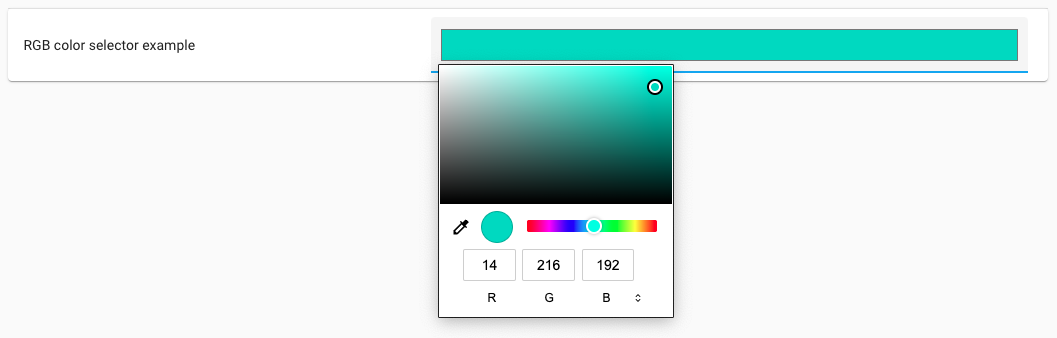 One of the new selector added: RGB Color; it can be used in Blueprints too!
We are looking forward to seeing new and improved Blueprints using these new selectors on the Blueprints Exchange!
For the latest information about all available selectors and their options, check out the updated selectors 文档.
触发器上的变量
For the more advanced uses cases, this 发布 provides: variables on 触发器. It is exactly what it says on the can: The possibility of setting variables on 触发器 that become available when that specific 触发器 触发器.
These variables can be helpful to pass down specific information based on the 触发器 that fired. The 自动化 example below shows how a message can be passed to the notify 服务 based on its triggering motion 传感器.
Oh! And yes: these variables can use templates too!
其他值得注意的变化
There is much more juice in this 发布; here are some of the other noteworthy changes this 发布:
- @balloob took a deep dive into the world of media players and made sure many more of them now work with the media browser and play media 动作! If you use: Bluesound, Denon HEOS, forked-daapd, Linn / OpenHome, Logitech Squeezebox, Music Player Daemon (MPD), Panasonic Viera, UniFi Protect, or Yamaha MusicCast, you can now use the media browser!
- Want to 更新 the appearance of a 二元sensor? You can now do that!
When you edit the 实体 in the UI, you can select how it would show up. No
need to customize
device_classin YAML anymore. Thanks, @zsarnett! - The Material Design Icons have been updated! Check out all these beautiful new icons we can use now! Thanks, @goyney!
- Our analytics 集成 now include data on using SSL certificates in Home Assistant (yes or no) in the analytics. Of course, only if you have enabled Analytics. Thanks for enabling it 💙!
- Timers can now 恢复/survive their 状态 across restarts. Awesome work @raman325! Each timer now has a 配置 option to enable 恢复.
- @epenet has been cranking out a lot of improvements for the Samsung TV 集成 this month! Shoutout to @bdraco for helping out on that one too.
- Android 11 support for the Android TV 集成 is here! Thanks, @JeffLIrion!
- Long-awaited and finally there: Native Hue groups support for brightness and other 属性! Thanks to Signify, who implemented our request for this. This means Home Assistant can now control groups as a whole instead of per 灯光. Nice and snappy now! Thanks for adding support to Home Assistant for it @marcelveldt!
- @thecode added support for the second generation Shelly 遮盖 设备; thanks!
- If your Solar inverter has a lower capacity than your 面板' combined capacity, then @klaasnicolaas has good news for you. The Forecast.Solar 集成 now supports this and can adjust the forecast to take your inverter cap into account.
- Media players now have controls for the repeat modes in the UI! Thanks, @NachtaktiverHalbaffe!
- RFXCOM RFXtrx now supports sirens and chimes! Thanks, @elupus!
- The GitHub 集成 now uses event subscriptions instead of polling GitHub. Excellent work, @ludeeus!
- The TP-Link Kasa Smart 集成 now supports effects for their 灯光 strips. Thanks, @bdraco!
新集成
We welcome the following new 集成 this 发布:
- Airzone, added by @Noltari
- 备份, added by @ludeeus
- Kaleidescape, added by @SteveEasley
- PECO Outage Count, added by @IceBotYT
- 开关 as X, added by @emontnemery
- Uonet+ Vulcan, added by @Antoni-Czaplicki
- 更新, added by @ludeeus & @frenck
现在可通过 UI 设置的集成
The following 集成 are now available via the Home Assistant UI:
- Deluge, done by @tkdrob
- Derivative, done by @emontnemery
- Discord, done by @tkdrob
- Fibaro, done by @rappenze
- File Size, done by @gjohansson-ST
- Generic 摄像头, done by @davet2001
- Google Calendars, done by @allenporter
- Groups, done by @emontnemery
- [集成 - Riemann sum integral], by @emontnemery
- Min/Max, done by @emontnemery
- Moon, done by @frenck
- Season, done by @frenck
- Sun, done by @frenck
- Tankerkoenig, done by @mib1185
- Threshold, done by @emontnemery
- Times of day, done by @emontnemery
- Trafikverket Train, done by @gjohansson-ST
- Uptime, done by @frenck
- Utility Meter, done by @emontnemery
发布 2022.4.1 - April 7
- Add comments to zwave_js node metadata WS API (@raman325 - #67210) (zwave_js docs)
- Continue on template 错误 during yaml import for generic (@davet2001 - #69440) (generic docs)
- Fix telegram broadcast (@balloob - #69452) (telegram_bot docs)
- Fix elkm1 connection when 面板 drops VN request (@bdraco - #69454) (elkm1 docs)
- Ignore IPv6 link local address on ssdp discovery in Fritz!Smarthome (@mib1185 - #69455) (fritzbox docs)
- Fix 重载 race in unifiprotect (@bdraco - #69485) (unifiprotect docs)
- Bump pyhaversion from 22.04.0 to 22.4.1 (@ludeeus - #69486) (版本 docs)
- Fix remote_rpi_gpio missing requirement (@thecode - #69488) (remote_rpi_gpio docs)
- Fix reloading the sun 集成 (@bdraco - #69495) (sun docs)
- Gracefully handle empty summary in google calendar (@allenporter - #69520) (google docs)
- Fix adding OS 实体 for 受监管模式 installations (@ludeeus - #69539) (hassio docs)
- Fix registered 实体 without a category not being exclude-able in the HomeKit UI (@bdraco - #69543) (homekit docs)
- Run energy db calls in the db executor (@bdraco - #69544) (energy docs)
- Generic fix stream thumbnail (@davet2001 - #69378) (generic docs)
- 日志 which 设备 has the time discrepancy (@hunterjm - #69595) (onvif docs)
- Fix utility_meter reset 服务 (@dgomes - #69612) (utility_meter docs)
- 更新 aioairzone to v0.3.1 (@Noltari - #68975) (airzone docs)
- 更新 aioairzone to v0.3.3 (@Noltari - #69615) (airzone docs)
- Mark backgrounds optional for tplink random effects (@bdraco - #69622) (tplink docs)
- Fix ZHA group creation (@puddly - #69629) (zha docs)
- Fix tado default overlay for when set pre new overlay feature (@north3221 - #69584) (tado docs)
- Move new
zha_eventcommand parameters into aparamskey to ensure backwards compatibility (@puddly - #69631) (zha docs) - Bump ZHA quirks to 0.0.71 (@dmulcahey - #69633) (zha docs)
- Fix Samjin Multi acceleration in ZHA (@dmulcahey - #69636) (zha docs)
- [powerwall] Skip 备份 reserve 传感器 if data is unavailable (@mdz - #69637) (powerwall docs)
- Fix bugs calendar oauth token date handling (@allenporter - #69641) (google docs)
发布 2022.4.2 - April 11
- 更新 python-mpd2 to 3.0.5 (@azrdev - #69304) (mpd docs)
- Fix Netgear 开关 状态 更新 (@starkillerOG - #69597) (netgear docs)
- Fix upnp subscription in SamsungTV (@epenet - #69652) (samsungtv docs)
- Fix soundtouch 服务 calls (@KNXBroker - #69655) (soundtouch docs)
- Suppress Upnp parsing 错误 in SamsungTV (@epenet - #69664) (samsungtv docs)
- Add None guard for zwave_js 加湿器 实体 (@EiNSTeiN- - #69667) (zwave_js docs)
- Fix Shelly gen2 遮盖 unavailable when not calibrated (@thecode - #69671) (shelly docs)
- Refresh google calendar tokens with invalid expiration times (@allenporter - #69679) (google docs)
- Support webp still image format in generic 摄像头 (@davet2001 - #69718) (generic docs)
- Increase tplink effects random seed allowed range to 1-600 (@bdraco - #69725) (tplink docs)
- Bump aio_georss_gdacs to 0.7 (@exxamalte - #69743) (gdacs docs)
- Fix SleepIQ firmness number step and min values (@mfugate1 - #69757) (sleepiq docs)
- Fix unifiprotect for 2.0.0-beta2 of UniFi Protect (@AngellusMortis - #69762) (unifiprotect docs)
- 升级 pynina to 0.1.8 (@DeerMaximum - #69771) (nina docs)
- Handle expired credentials in reauth in google calendar initialization (@allenporter - #69772) (google docs)
- Bump rtsp-to-webrtc to 0.5.1 (@allenporter - #69776) (rtsp_to_webrtc docs)
- Bump slixmpp to 1.8.2 (@michaeldavie - #69794) (xmpp docs)
- Fix converting (value, unit) tuples if value is None (@rikroe - #69802) (bmw_connected_drive docs)
- Reduce API limit for tomorrow.io (@raman325 - #69818) (tomorrowio docs)
- Speed up Plex playback for multiple videos (@jjlawren - #69821) (plex docs)
- Retry on more Plex connection failures during startup (@jjlawren - #69822) (plex docs)
- Downgrade av to 8.1.0 to fix memory leak (@bdraco - #69833) (stream docs) (generic docs)
- Don't test config on yaml import for generic 摄像头 (@davet2001 - #69714) (generic docs)
发布 2022.4.3 - April 12
- 更新 xknx to 0.20.2 (RC) (@marvin-w - #69859) (knx docs)
- Fix profiler object growth logging test (@bdraco - #69211) (profiler docs)
- Handle Squeezebox media ids that are not URLs (@rajlaud - #69696) (squeezebox docs)
- Add diagnostics support for ZHA (@dmulcahey - #69756) (zha docs)
- Bump devolo-home-control-api to 0.18.1 (@Shutgun - #69840) (devolo_home_control docs)
- Fix #69694 (@iMicknl - #69850) (overkiz docs)
- Fix google calendar timestamp out of range (@allenporter - #69863) (google docs)
- Use quickplay when casting splash for mediaplayer.turn_on (@emontnemery - #69866) (cast docs)
- Motion blinds fix set absolute position 服务 (@starkillerOG - #69873) (motion_blinds docs)
- Bump zigpy to 0.44.2 and and zha-quirks to 0.0.72 (@puddly - #69879) (zha docs)
- Handle add-on issues (@ludeeus - #69897) (hassio docs)
- Fix unique id in SamsungTV config flow (@epenet - #69899) (samsungtv docs)
- Bump renault-api to 0.1.11 (@epenet - #69900) (renault docs)
- Fix 温控 HVAC 设备 条件 (@frenck - #69908) (温控 docs)
- Fix adjusting 5-minute statistics (@emontnemery - #69921) (recorder docs) (传感器 docs)
- Fix adjusting statistics in ft³ (@emontnemery - #69913) (recorder docs) (传感器 docs)
- Downgrade ZHA dependency zigpy-deconz from 0.15.0 to 0.14.0 (@puddly - #69927) (zha docs)
- Fix fibaro 灯光 状态 for rgb 灯光 and HC3 (@rappenze - #69884) (fibaro docs)
- Not all music are URLs (@balloob - #69936) (mpd docs)
- Guard against non http schemes (@balloob - #69938) (media_player docs)
发布 2022.4.4 - April 14
- Remove duplicate program (@golles - #69734) (home_connect docs)
- Fix Prosegur availability through Alexa (@dgomes - #69941) (prosegur docs)
- Fix race during homekit controller pairing (@bdraco - #69948) (homekit_controller docs)
- Fix HomeKit Controller 设备 class for CO 传感器 (@bdraco - #69949) (homekit_controller docs)
- Fix available property in the base supervisor 实体 (@ludeeus - #69966) (hassio docs)
- Use ha-av instead of av and bump to v9.1.1-3 (@uvjustin - #69974) (stream docs) (generic docs)
- Fix config_flow 错误 from dlna_dmr for UPnP discovery info containing a single 服务 (@chishm - #69977) (dlna_dmr docs)
- Fix config_flow 错误 for UPnP info with single 服务 (@chishm - #69979) (dlna_dms docs)
- Suppress UpnpResponseError in SamsungTV (@epenet - #69984) (samsungtv docs)
- Fix missing interior battery 传感器 for Ambient PWS (@bachya - #69994) (ambient_station docs)
- ZHA diagnostics fixes (@dmulcahey - #70000) (zha docs)
- use newer 版本 of openhomedevice (@bazwilliams - #70022) (openhome docs)
- Handle KeyError when loading backups (@ludeeus - #70028) (备份 docs)
- Fix tomorrow.io units... again... (@raman325 - #70029) (tomorrowio docs)
- Check supported features in media player reproduce 状态 (@balloob - #70055) (media_player docs)
发布 2022.4.5 - April 16
- Fix retry when Met config entry fails (@chemelli74 - #70012) (met docs)
- Set source & sound mode at start in media player reproduce 状态 (@thecode - #70064) (media_player docs)
- Limit Supervisor refresh updates (@ludeeus - #70075) (hassio docs)
- Correct tomorrowio weather units (@raman325 - #70107) (tomorrowio docs)
- 更新 xknx to 0.20.3 (@farmio - #70123) (knx docs) (dependency)
- Bump pymazda to 0.3.3 (@bdr99 - #70136) (mazda docs) (dependency)
- Ensure powerwall retries 设置 when api returns too many requests (@bdraco - #70143) (powerwall docs)
- Fix StationInfo not string in Trafikverket Train (@gjohansson-ST - #70153) (trafikverket_train docs)
发布 2022.4.6 - April 20
- Fix bug in google calendar offset calculation (#70024) (@allenporter - #70166) (google docs)
- Improve roon integraton (@pavoni - #66000) (roon docs)
- Fix opening/closing for awning in Overkiz 集成 (@tetienne - #68890) (overkiz docs)
- Move handling of non-secure login to the elkm1 library (@bdraco - #69483) (elkm1 docs)
- Fix file size last_updated (@chemelli74 - #70114) (filesize docs)
- Revert zigpy-zigate to 0.7.4 (@doudz - #70184) (zha docs)
- Fix handling of powerview stale 状态 (@bdraco - #70195) (hunterdouglas_powerview docs)
- Auto set content type for stream-only in generic 摄像头 (@davet2001 - #70200) (generic docs)
- Hide credentials from generated titles in generic 摄像头 (@davet2001 - #70204) (generic docs)
- Bump aiodiscover to 1.4.9 (@bdraco - #70213) (dhcp docs)
- Screenlogic config: Filter unexpected host names (@dieselrabbit - #70256) (screenlogic docs)
- Fix handling unassigned areas in lutron_caseta (@bdraco - #70258) (lutron_caseta docs)
- Fix updating CameraZone coords for UniFi Protect (@AngellusMortis - #70260) (unifiprotect docs)
- Add Insteon USB discovery (@balloob - #70306) (insteon docs)
- Bump aiohomekit to 0.7.17 (@bdraco - #70313) (homekit_controller docs)
- Fix #69952: Daikin AC Temperature jumps after being set (@vanackej - #70326) (daikin docs)
发布 2022.4.7 - April 24
- Fixed syntax 错误 in ALTER TABLE statement (#70304) (@dmak - #70336) (recorder docs)
- 更新 xknx to 版本 0.20.4 (@marvin-w - #70342) (knx docs)
- Bump aiodiscover to 1.4.10 (@bdraco - #70348) (dhcp docs)
- Bump zwave-js-server-python to 0.35.3 (@raman325 - #70357) (zwave_js docs)
- Bump pyplaato to 0.0.18 (@JohNan - #70391) (plaato docs)
- Bump aiodiscover to 1.4.11 (@bdraco - #70413) (dhcp docs)
- Ensure rainmachine creates config entry titles as strings (@bdraco - #70417) (rainmachine docs)
- Fix history not including start time 状态 (@bdraco - #70447) (recorder docs)
- Daikin AC : Round to nearest half degree (#70446) (@vanackej - #70452) (daikin docs)
需要帮助?加入社区!
Home Assistant 拥有一个非常棒的用户社区,大家都非常乐于互相帮助。 欢迎加入我们!
我们非常活跃的 Discord 聊天服务器 是交流的绝佳去处, 也别忘了加入我们超赞的论坛。
发现了 bug 或问题?请在我们的问题跟踪器 中提交反馈,帮助我们尽快修复!或者查看帮助页面,了解更多可获取帮助的渠道。
你更喜欢邮件吗?可以订阅 Open Home Newsletter, 第一时间在收件箱获取最新功能动态、社区消息,以及更多 Open Home 资讯。
不向后兼容的变更
以下列出了本次发布中的破坏性变更,按主题或集成分类。 选择任一条目即可查看该项变更的详细信息。
如果你是自定义集成开发者,并希望了解与你的集成相关的破坏性变更和新功能: 请务必阅读我们的开发者博客,其中汇总了本次发布的全部变更。
如果某个服务显式将某实体作为目标,但该实体并不支持该服务, 我们现在会抛出错误,而不是静默忽略。
这有助于发现过去会悄悄失败的自动化或脚本。
在 2021 年 8 月发布中,我们已弃用开关上的所有能耗相关属性。
这些属性是:current_power_w 和 today_energy_kwh。
这些值本应作为独立的功率与能耗传感器提供。
所有受影响的集成都已在 2021 年 7 月 22 日收到需要调整的通知。
从本次发布起,这些属性已从开关核心实体平台移除,
这意味着以下集成不再提供 current_power_w 和 today_energy_kwh 属性:
- ATEN Rack PDU
- Belkin WeMo
- D-Link Wi-Fi Smart Plugs
- Edimax
- ELV PCA
- Emulated Kasa
- Fibaro
- Hive
- HomematicIP Cloud
- MQTT
- myStrom
- Netio
- Ubiquiti mFi mPort
- Vera
此前已弃用的 Android TV 集成 YAML 配置现已移除。
Android TV 现已通过 UI 配置。你现有的 YAML 配置已在之前版本导入, 现在可以安全地从 YAML 配置文件中移除。
此前已弃用的 Apple iCloud 集成 YAML 配置现已移除。
Apple iCloud 现已通过 UI 配置。你现有的 YAML 配置已在之前版本导入, 现在可以安全地从 YAML 配置文件中移除。
此前已弃用的 Awair 集成 YAML 配置现已移除。
Awair 现已通过 UI 配置。你现有的 YAML 配置已在之前版本导入, 现在可以安全地从 YAML 配置文件中移除。
此前已弃用的 BMW Connected Drive 集成 YAML 配置现已移除。
BMW Connected Drive 现已通过 UI 配置。你现有的 YAML 配置已在之前版本导入, 现在可以安全地从 YAML 配置文件中移除。
此前已弃用的 Brunt 集成 YAML 配置现已移除。
Brunt 现已通过 UI 配置。你现有的 YAML 配置已在之前版本导入, 现在可以安全地从 YAML 配置文件中移除。
ClimaCell 公司已品牌重塑为 Tomorrow.io,
因此我们将弃用 climacell 集成,改用新的 tomorrowio 集成。
对于使用 v4 API 密钥的 climacell 用户,从旧集成迁移到新集成将自动完成。
如果你使用的是 v3 API 密钥,则需要先申请 v4 API 密钥才能完成迁移;
提交新密钥后,你的配置会自动迁移。
目前,v3 用户在提交新 API 密钥之前,仍可继续使用现有 ClimaCell 配置, 确保你的自动化和仪表盘依然正常工作。
在未来的发布中,我们将移除 climacell 集成中的大部分代码。
迁移流程仍可进行,但原有集成将不再可用。
此前已弃用的 CPU Speed 集成 YAML 配置现已移除。
CPU Speed 现已通过 UI 配置。你现有的 YAML 配置已在之前版本导入, 现在可以安全地从 YAML 配置文件中移除。
Deluge 集成已迁移为通过 UI 配置。 通过 YAML 配置 Deluge 的方式已被弃用,并将在未来的 Home Assistant 发布中移除。
你现有的 YAML 配置会在升级到本次发布时自动导入; 因此升级后可安全地从 YAML 配置中移除。
Discord 集成已迁移为通过 UI 配置。 通过 YAML 配置 Discord 的方式已被弃用,并将在未来的 Home Assistant 发布中移除。
你现有的 YAML 配置会在升级到本次发布时自动导入; 因此升级后可安全地从 YAML 配置中移除。
此前已弃用的 DNS IP 集成 YAML 配置现已移除。
DNS IP 现已通过 UI 配置。你现有的 YAML 配置已在之前版本导入, 现在可以安全地从 YAML 配置文件中移除。
Dune HD 集成此前已迁移为通过 UI 配置。 通过 YAML 配置 Dune HD 现已被弃用,并将在未来的 Home Assistant 发布中移除。
你现有的 YAML 配置已自动导入; 因此可以安全地从 YAML 配置中移除。
partner 参数在 2021 年已被弃用,但此前在配置中仍会被接受。
现在 partner 选项已移除;请在更新前从 YAML 配置中删除 partner 参数。
Enphase Envoy 逆变器的 last_reported 属性现已改为独立的时间戳传感器。
由于该传感器会产生大量状态变化和数据库记录,因此默认禁用。 你可以在 UI 中按需启用每个 last reported 传感器。
此前已弃用的 EZVIZ 集成 YAML 配置现已移除。
EZVIZ 现已通过 UI 配置。你现有的 YAML 配置已在之前版本导入, 现在可以安全地从 YAML 配置文件中移除。
Fibaro 集成已迁移为通过 UI 配置。 通过 YAML 配置 Fibaro 的方式已被弃用,并将在未来的 Home Assistant 发布中移除。
你现有的 YAML 配置会在升级到本次发布时自动导入; 因此升级后可安全地从 YAML 配置中移除。
File Size 集成已迁移为通过 UI 配置。 通过 YAML 配置 File Size 的方式已被弃用,并将在未来的 Home Assistant 发布中移除。
你现有的 YAML 配置会在升级到本次发布时自动导入; 因此升级后可安全地从 YAML 配置中移除。
(@gjohansson-ST - #67668) (文档)
File Size 传感器的附加属性已拆分为独立传感器,且默认禁用。
如果你此前在自动化、脚本等场景中使用了这些属性, 需要更新为使用新的独立传感器。
(@gjohansson-ST - #67668) (文档)
此前已弃用的 Fronius 集成 YAML 配置现已移除。
Fronius 现已通过 UI 配置;你现有的 YAML 配置已在之前版本中导入, 现在可以安全地从 YAML 配置文件中移除。
Generic 摄像头集成已迁移为通过 UI 配置。 通过 YAML 配置 Generic 摄像头的方式已被弃用,并将在未来的 Home Assistant 发布中移除。
你现有的 YAML 配置会在升级到本次发布时自动导入; 因此升级后可安全地从 YAML 配置中移除。
(@davet2001 - #52360) (文档)
此前已弃用的 Huawei LTE 集成 YAML 配置现已移除。
Huawei LTE 现已通过 UI 配置;你现有的 YAML 配置已在之前版本中导入, 现在可以安全地从 YAML 配置文件中移除。
此前已弃用的 Launch Library 集成 YAML 配置现已移除。
Launch Library 现已通过 UI 配置;你现有的 YAML 配置已在之前版本中导入, 现在可以安全地从 YAML 配置文件中移除。
此前已弃用的 LG webOS Smart TV 集成 YAML 配置现已移除。
LG webOS Smart TV 现已通过 UI 配置;你现有的 YAML 配置已在之前版本中导入, 现在可以安全地从 YAML 配置文件中移除。
Mazda 服务 start_engine、stop_engine、turn_on_hazard_lights
和 turn_off_hazard_lights 已弃用,并由 button 实体取代。
请改用 button 实体。
Mazda 服务 start_charging 和 stop_charging 已弃用,
并由充电开关实体取代。请改用该开关实体。
此前已弃用的 Met.no 集成 YAML 配置现已移除。
Met.no 现已通过 UI 配置。你现有的 YAML 配置已在之前版本导入, 现在可以安全地从 YAML 配置文件中移除。
reverse_order 已经很长时间不再允许(也无法生效),现已移除。
此前已弃用的 data_count 现已移除。
(@janiversen - #67236) (文档)
此前已弃用的数据类型 int、uint 和 float 现已移除。
对于使用非标准寄存器大小的设备,可使用 count 覆盖默认寄存器数量。
(@janiversen - #67268) (文档)
现在会根据配置的数据类型自动区分调用 write_register
还是 write_registers(超过 16 位时使用 write_registers)。
此前 write_registers 且 count=1 的特殊情况现已不再支持。
(@janiversen - #67268) (文档)
MySensors 集成已在一年前迁移为通过 UI 配置。 通过 YAML 配置 MySensors 已被弃用,并将在未来的 Home Assistant 发布中移除。
你现有的 YAML 配置早已自动导入,因此可以安全地从 YAML 配置中移除。
(@MartinHjelmare - #68504) (文档)
此前已弃用的 Nanoleaf 集成 YAML 配置现已移除。
Nanoleaf 现已通过 UI 配置。你现有的 YAML 配置已在之前版本导入, 现在可以安全地从 YAML 配置文件中移除。
Legacy Works with Nest API 的弃用计划已暂缓, 直到 SDM API OAuth 注册问题解决为止(因此这不是破坏性变更)。
(@allenporter - #68715) (文档)
用于显示 核心、Web 或 FTL 组件是否有可用更新的二元传感器实体已弃用, 并将在 Home Assistant 核心 2022.6 中移除。
PI-Hole 集成现已提供 update 实体来替代该弃用实体。
媒体浏览器现已支持多个 Plex Media Server。
如果你配置了多个 Plex 集成/服务器, 此前通过媒体选择器添加 Plex 媒体项的自动化和脚本可能需要更新。
温控实体属性 selected_schema 和 available_schemas
将在未来版本中移除。
本次发布引入了 select 平台,提供这些属性值,
并支持切换日程。
(@CoMPaTech - #68303) (文档)
连接到 OpenTherm 设备的本地室外温度传感器命名已优化为:outdoor_air_temperature。
例如,原先的 sensor.opentherm_outdoor_temperature
现在显示为 sensor.opentherm_outdoor_air_temperature。
其他设备基于邮编的 outdoor_temperature 用法没有变化。
(@CoMPaTech - #68303) (文档)
此前已弃用的 PVOutput 集成 YAML 配置现已移除。
PVOutput 现已通过 UI 配置。你现有的 YAML 配置已在之前版本导入, 现在可以安全地从 YAML 配置文件中移除。
此前已弃用的 PVOutput 传感器附加属性现已全部移除, 这些属性现在都拥有各自独立的传感器。
适用于以下 PVOutput 属性:
energy_generationpower_generationenergy_consumptionpower_consumptionefficiencytemperaturevoltage
如果你的自动化或脚本依赖这些属性,需要改为使用新的独立传感器。
以下破坏性变更仅影响手动使用 Home Assistant 核心数据库, 或在自定义集成中直接使用数据库的场景;例如, 使用自定义查询或对数据库进行数据分析时。
属性现存储在 state_attributes 表中,相同的一组属性仅存储一次
(多对一关系)。
属性大约占数据库大小的 21%(不含统计数据时为 28%)。 在部分分析过的生产实例中,属性中有 82% 到 88% 与其他属性集重复。 预计这项变更平均可将数据库大小减少约 13% 到 16%。
states 表中的 domain 列已移除,domain 可由 entity_id 推导。
sun.sun 实体的属性不再记录到数据库中。
由于历史数据可通过 astral 库推导,无需从数据库读取,
且 sun 属性会频繁生成新的属性行,因此决定将其从数据库记录中移除。
集成和平台现在可向 recorder 提供提示, 以排除特定实体状态属性的记录。
这会排除几乎没有历史价值或属于静态值的属性, 从而显著减少存储数据量。
以下属性将不再记录:
- 所有实体:
attribution和supported_features。 - 摄像头:
token和entity_picture。 - 温控:
hvac_modes,fan_modes,swing_modes,min_temp,max_temp,min_humidity,max_humidity,target_temp_step, andpreset_modes. - 风扇:
preset_modes. - 灯光:
color_modes,min_mireds,max_mireds, andeffect_list. - 媒体播放器:
entity_picture_local,source_list,media_postition, andmedia_postition_updated_at. - 热水器:
operation_list,min_temp, andmax_temp. - 加湿器:
min_humidity,max_humidity, andavailable_modes. - 数字:
min,max,step, andmode. - 选择:
options. - 警报器:
available_tones. - 吸尘器:
fan_speed_list. - 天气:
forecast.
(@bdraco - #68404 #69155 #69156 #69158 #69159 #69165 #69192 #69193 #69194 #69195 #69196 #69199)
设备信号重复发送支持已移除。RFXCOM 会按协议需要在内部重复发送数据包。
启用了房间传感器(作为主测量传感器)的 Sensibo Air 设备, 现在会从该房间传感器获取温度和湿度。
(@gjohansson-ST - #66949) (文档)
此前已弃用的 Sensibo 集成 YAML 配置现已移除。
Sensibo 现已通过 UI 配置。你现有的 YAML 配置已在之前版本导入, 现在可以安全地从 YAML 配置文件中移除。
Emonitor 的 avg_power 和 max_power 附加属性已移除,
并改为各自独立的传感器。
SleepIQ 集成中的 sleep number firmness 传感器实体已弃用, 并将在未来版本中移除。现可使用提供相同信息的数字实体替代。
SoChain 集成已被禁用,其功能依赖我们无法提供的旧版 Python 包。
(@emontnemery - #68856) (文档)
此前已弃用的 Solax 集成 YAML 配置现已移除。
Solax 现已通过 UI 配置。你现有的 YAML 配置已在之前版本导入, 现在可以安全地从 YAML 配置文件中移除。
Sonos 设备的“Source”下拉菜单不再包含收藏项。 收藏项已移至媒体浏览器,并可在自动化/脚本构建器中通过媒体选择器 (也就是“Play Media”)使用。
当前可选的“Source”下拉菜单仅保留静态输入, 比如电视和线路输入。
media_player.select_source 服务调用仍会接受收藏名称。
该兼容功能未来可能会移除,但目前没有相关计划。
这项变更是为了减少数据库写入。此前每次收藏项变更, 都会为每个 Sonos 设备重写完整收藏列表。
Supervisor 集成中用于显示 Home Assistant OS 与附加组件是否有可用更新的 二元传感器实体已弃用,并将在 Home Assistant 2022.6 中移除。
Supervisor 集成现已提供 update 实体来替代该弃用实体。
此前已弃用的 SwitchBot 集成 YAML 配置现已移除。
SwitchBot 现已通过 UI 配置。你现有的 YAML 配置已在之前版本导入, 现在可以安全地从 YAML 配置文件中移除。
用于显示 Synology DSM 固件是否有可用更新的二元传感器实体已弃用, 并将在 Home Assistant 核心 2022.6 中移除。
Synology DSM 集成现已提供 update 实体来替代该弃用实体。
Tankerkoenig 集成已迁移为通过 UI 配置。 通过 YAML 配置 Tankerkoenig 已被弃用,并将在未来的 Home Assistant 发布中移除。
你现有的 YAML 配置会在升级到本次发布时自动导入, 因此升级后可安全地从 YAML 配置中移除。
is_open 属性已从所有实体中移除,并改为独立传感器。
如果你的自动化或脚本依赖该属性,需要相应调整。
具有开/关延迟的模板二元传感器,或基于触发器的二元传感器,
在 Home Assistant 核心启动时现在会初始化为上一次状态,
而不再是 unknown。
(@emontnemery - #67546 #67546) (文档)
powerwall 即时电表传感器上的 frequency、current 和 voltage
属性现已改为独立实体。
is_active 属性已移除,因为可由读数推导得到。
由于这些传感器会产生大量状态变化,新传感器默认不启用,
你可在 UI 中手动启用。
Trafikverket Train 集成已迁移为通过 UI 配置。 通过 YAML 配置 Trafikverket Train 已被弃用,并将在未来的 Home Assistant 发布中移除。
你现有的 YAML 配置会在升级到本次发布时自动导入, 因此升级后可安全地从 YAML 配置中移除。
(@gjohansson-ST - #65182) (文档)
此前已弃用的 Trafikverket Weather Station 集成 YAML 配置现已移除。
Trafikverket Weather Station 现已通过 UI 配置。你现有的 YAML 配置已在之前版本导入, 现在可以安全地从 YAML 配置文件中移除。
measure time属性现在是标准 ISO 格式字符串。available属性已移除,实体在不可用时会将状态设为unavailable。
任何依赖这些属性的自动化或脚本都需要更新以适配这些变更。
(@gjohansson-ST - #65233) (文档)
Unifi Protect 的 last tripped 属性现已改为独立时间戳传感器。 为减少状态机和数据库中的数据量,这些传感器默认不启用。 新传感器可在 UI 中手动启用。
UniFi Protect 的 Privacy Mode 开关现已标记为配置实体。 这意味着这些开关将不再自动暴露或显示在自动生成的 Lovelace 仪表盘、 Google Assistant、Alexa 或 HomeKit 中。
此集成现已提供一个开关实体,可用于暂停/恢复某个监控器的监控。
因此,你需要使用 UptimeRobot 的“main”API 密钥; 如果你之前已经在用该密钥,则无需任何操作。 如果你使用的是只读 API 或监控器专用 API 密钥, 该集成会在首次启动时要求重新授权。
要获取 API 密钥,请前往 UptimeRobot 网站的 My 设置 页面, 在页面底部可以找到你的密钥。
(@chemelli74 - #68224) (文档)
utility_meter 的 tariff selector 实体现在是标准的选择实体,
entity_id 为 select.X,不再是 entity_id 为 utility_meter.X 的自定义实体。
另外:
- 参数为
tariff的服务调用utility_meter.select_tariff已弃用, 请改用参数为option的服务调用select.select_option。 - 服务调用
utility_meter.next_tariff已弃用,且无替代方案。
在 Home Assistant 核心 2022.7 发布前保留向后兼容:
- 已弃用的
utility_meter.X实体仍可用。 utility_meter.select_tariff服务调用在utility_meter.X实体上仍可用, 但调用时会记录警告。utility_meter.next_tariff服务调用在utility_meter.X实体上仍可用, 但调用时会记录警告。
在 Home Assistant 核心 2022.7 发布中:
- 已弃用的
utility_meter.X实体将不可用。 utility_meter.select_tariff服务调用将被移除。utility_meter.next_tariff服务调用将被移除。
此前已弃用的 版本 集成 YAML 配置现已移除。
版本 现已通过 UI 配置。你现有的 YAML 配置已在之前版本导入, 现在可以安全地从 YAML 配置文件中移除。
此前已弃用的 Whois 集成 YAML 配置现已移除。
Whois 现已通过 UI 配置。你现有的 YAML 配置已在之前版本导入, 现在可以安全地从 YAML 配置文件中移除。
固件更新的 binary_sensor 和 button 实体已弃用,
并将在 Home Assistant 2022.6 中移除。
WLED 集成现已提供全新的 update 实体,
可替代这些实体提供的功能(并提供更多功能)。
此前已弃用的 Yale Smart 报警 集成 YAML 配置现已移除。
Yale Smart 报警 现已通过 UI 配置。你现有的 YAML 配置已在之前版本导入, 现在可以安全地从 YAML 配置文件中移除。
此前已弃用的 Yamaha Music Cast 集成 YAML 配置现已移除。
Yamaha Music Cast 现已通过 UI 配置。你现有的 YAML 配置已在之前版本导入, 现在可以安全地从 YAML 配置文件中移除。
如果对应驱动值缺失,Z-Wave JS 警报器实体现在会返回 unknown 状态。
此前这种情况下状态默认是 off。
如果你的自动化和脚本依赖 Z-Wave JS 警报器实体状态,
可能需要考虑这一变化。
(@MartinHjelmare - #67172) (文档)
Inovelli LZW36 风扇控制器在特定百分比下的选定风扇速度已发生变化。
将百分比设置为 1% 不再启用 breeze 模式;
该功能现在通过预设访问。
(@mkowalchuk - #60947) (文档)
告别以下集成
以下 GPIO 集成此前已弃用,现已移除。
- BeagleBone Black GPIO
- BH1750
- Blinkt!
- BMP280 Environmental 传感器
- Bosch BME280 Environmental 传感器
- Bosch BME680 Environmental 传感器
- DHT 传感器
- Enviro pHAT
- HTU21D(F) 传感器
- MCP23017 I/O Expander
- MH-Z19 CO2 传感器
- Orange Pi GPIO
- PCAL9535A I/O Expander
- pi4ioe5v9xxxx IO Expander
- PiFace Digital I/O (PFIO)
- Piglow
- pigpio Daemon PWM LED
- 树莓派 RF
- Raspihats
- Sense HAT
- Sensirion SHT31
- Time of Flight
有关 GPIO 集成移除的更多信息, 请参阅 Architectural Decision Record 0019。
以下集成也已在本次发布中不再可用:
- Apple Push 通知 服务 (APNS) 已移除。这不会影响我们的移动应用! (@frenck - #67158)
- Media Player Classic Home Cinema (MPC-HC) 集成因使用网页抓取, 而该方式已不再允许,因此已移除。 (@frenck - #67189)
- OpenZWave 此前已弃用,现已移除。请改用 Z-Wave JS。 (@frenck - #68054)
- SmartHab 已移除,其背后公司已关闭。 (@outadoc - #67874)
- Z-Wave(旧
zwave集成)此前已弃用,现已移除。请改用 Z-Wave JS。 (@frenck - #67221)
所有变更
当然,本次发布还有更多内容。你可以在这里查看完整变更列表: Home Assistant 核心 2022.4 完整更新日志