

Enphase Envoy
Enphase Envoy 集成用于接入 Enphase IQ Gateway。它是 Enphase 太阳能逆变器和电池系统的通信设备。在本文档以及集成实体名称中,Enphase IQ Gateway 通常简称为 Envoy。这是该集成早期沿用下来的命名,因其更简洁而继续保留。
支持的设备
实际型号和已安装组件会决定可用的功能,以及哪些数据可以提供给 Energy dashboard。同时,Envoy firmware 也存在一些会随着版本变化而出现或消失的已知问题。
此集成适用于:
- 仅提供发电数据的较旧和较新 Envoy 型号(如 Envoy-R(LCD)、Envoy-S(非计量版))
- 同时提供发电和用电数据的较新 Envoy 型号(如配备 CT 的 Envoy-S Metered)
- 内嵌 Envoy 的各种 Enphase IQ Combiner 产品;其在集成中的表现方式与独立设备相同。
不支持的设备
此集成不适用于:
- 运行 3.9 之前 firmware、且不具备 REST API 的旧款 Envoy 型号。
前提条件
- Envoy 必须已完成配置并投入使用。
- Envoy 必须接入本地网络,并能通过 IPV4 被 Home Assistant 访问。(另见故障排查中的周期性网络连接问题)
- Envoy firmware 版本需为 3.9 或更高。
- 当 Envoy firmware 为 7 或更高版本时:
- 需要 Enlighten cloud 用户名和密码。
- 需要 Home Assistant 2023.9 或更高版本。
当前此集成不支持 Enlighten 账户的 Multi Factor Authentication。在配置 Envoy 以及刷新 token 时,应先将其关闭。
::: :::note 配置 此集成可通过 UI 配置。前往 设置 > 设备与服务 添加。
必填手动输入
配置单个 Envoy 时,需要手动输入以下信息:
选项
如需配置 Enphase Envoy 选项,请按以下步骤操作:
-
在 Home Assistant 中,前往 设置 > 设备与服务。
-
如果已配置多个 Enphase Envoy 实例,选择你要配置的那个实例。
-
在卡片上选择齿轮图标
。 - 如果卡片上没有齿轮图标,则表示该集成不支持为此设备提供选项。

-
编辑选项后,选择 Submit 保存更改。
下方列出了可启用/禁用的选项。它们默认都不会启用,而且在大多数情况下也不是集成正常运行所必需的。只有在文中提到的特定场景下,才需要设置这些选项。
重新配置
此集成支持通过 reconfigure 菜单项更新 Envoy 配置。重新配置时可修改 Envoy 的 IP 地址、用户名和/或密码。如果你的 Enlighten 凭据或设备 IP 地址发生变化,需要手动更新时,请使用该菜单项。通常情况下,IP 地址变化会被自动发现并更新。
当 Envoy firmware 升级后,若认证方式需要从本地 Envoy 用户名/密码切换为基于 Enlighten 用户名/密码的 token 认证,也需要使用此菜单项(参见必填手动输入)。
删除集成
此集成遵循标准的集成删除流程,无需额外步骤。
从 Home Assistant 中移除一个集成实例
- 前往 设置 > 设备与服务,并选择该集成卡片。
- 在设备列表中,选择你要移除的集成实例。
- 在对应条目旁选择三点
菜单,然后选择 删除。
功能
此集成会根据你的 Enphase 系统配置提供不同的实体。Envoy 可与 Enphase IQ micro-inverters、Enphase ACB 与 IQ batteries、Enphase Ensemble Enpower switch 与 load shedding relays、兼容的发电机以及 IQ Meter Collar 通信。
- 你可能在其他时期听过这些产品使用过不同名称。
- 在本文档中,
SN作为设备序列号占位符使用;实际实体名称中会包含设备真实序列号。
太阳能发电数据
所有接入太阳能逆变器的 Envoy 型号,无论是否安装 production CT、无论 firmware 版本如何,都会上报当前太阳能功率和历史发电数据。
汇总发电数据
Envoy 设备会汇总所有已连接 micro-inverters 的数据并统一上报。
Production sensor entities
- Envoy SN Current power production: Current aggregated inverter power production in W.
- Envoy SN Energy production last seven days: Energy produced in previous 7 days, not including today's, in Wh, display scaled to kWh. (See known limitations Energy Incorrect). This entity is not logged in statistics.
- Envoy SN Energy production today: Energy produced since midnight in Wh, default display scaled to kWh. (See known limitations Late reset, Energy Incorrect).
- Envoy SN Lifetime energy production: Lifetime energy production in Wh, default display scaled to MWh. (See known limitations Lifetime reset).
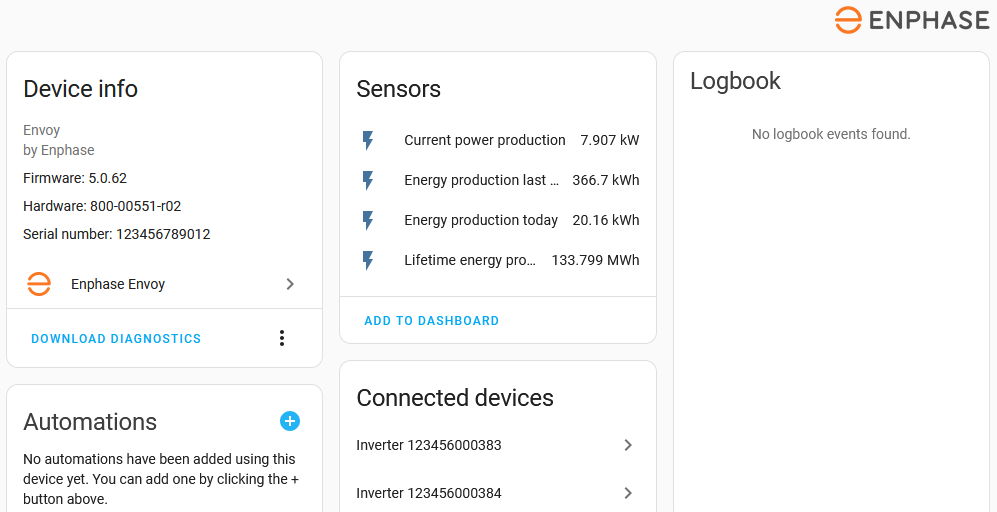
若配合多相 CT 相位数据使用,也会提供被默认禁用的分相实体。
单个 micro-inverter 发电数据
Envoy 还会提供每个 micro-inverter 的独立发电数据。这里的 SN 指 micro-inverter 的序列号。
Sensor entities
- Inverter SN: Current power generated by the inverter in W.
- Inverter SN last reported: Time when Envoy last received a data update from the inverter. Typical update rate for an inverter to the Envoy is every 5 to 15 minutes. This entity is disabled by default for all inverters.
- Inverter SN Lifetime maximum power: Maximum power production measured by the inverter (W). This entity is disabled by default for all inverters.
根据 Envoy firmware 版本不同,Envoy 还可能提供更详细的 inverter 设备数据。若支持,则会出现额外实体;这些实体默认对所有 inverter 都是禁用状态,可按需启用。
- Inverter SN DC voltage: DC voltage measured by the inverter (V).
- Inverter SN DC current: DC current measured by the inverter (A).
- Inverter SN AC voltage: AC voltage measured by the inverter (V).
- Inverter SN AC current: AC current measured by the inverter (A).
- Inverter SN Frequency: Frequency measured by the inverter (Hz).
- Inverter SN Temperature: Temperature measured by the inverter (°C).
- Inverter SN Energy produced: Energy produced by the inverter during last report cycle (mWh).
- Inverter SN Energy today: Energy produced today by the inverter (Wh).
- Inverter SN Lifetime energy: Total energy produced during inverter lifetime (Wh).
- Inverter SN Report duration: Time in seconds covered by the last report data.
由于 Envoy firmware 的限制,只有在配置的 inverter 数量不超过 49 台时,才可获取详细 inverter 设备数据;超过 49 台时,每台 inverter 仅能提供 3 个发电功率相关实体。
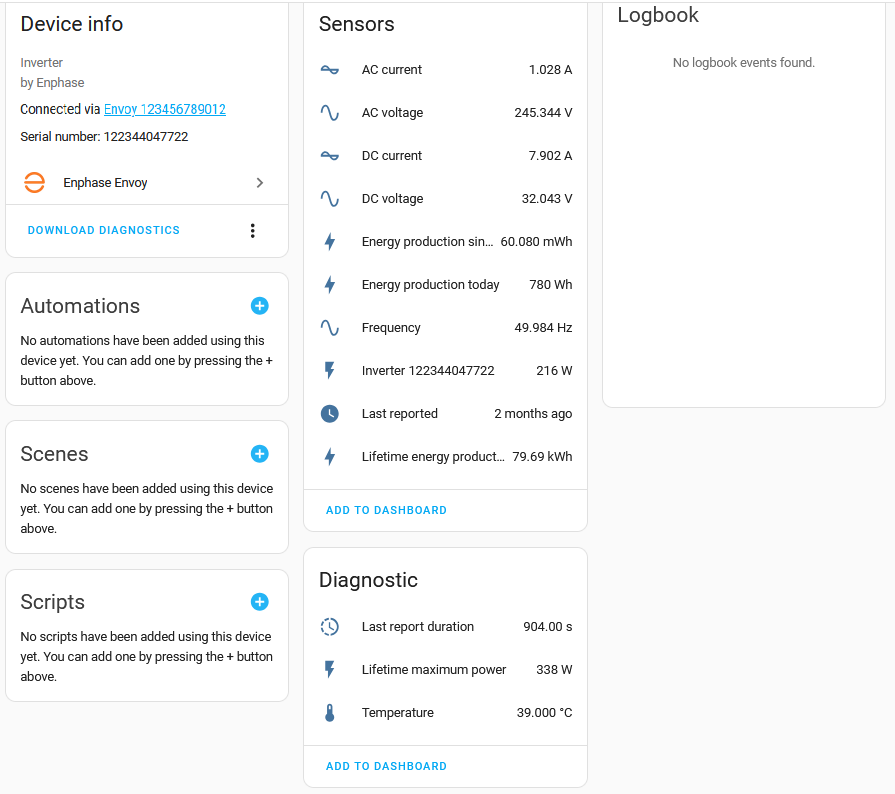
家庭用电数据
家庭用电数据要求使用已安装并正确配置至少 1 个 consumption CT 的 Envoy Metered。
Consumption Sensor Entities
- Envoy SN Current power consumption: Current power consumption in W.
- Envoy SN Lifetime energy consumption: Lifetime energy consumption in Wh, default display scaled to MWh.
- Envoy SN Energy consumption last seven days: Energy consumption in previous 7 days, not including today's, in Wh, display scaled to kWh. (See known limitations Energy Incorrect) This entity is not logged in statistics.
- Envoy SN Energy consumption today: Energy consumption since midnight in Wh, default display scaled to kWh. (See known limitations Energy Incorrect)
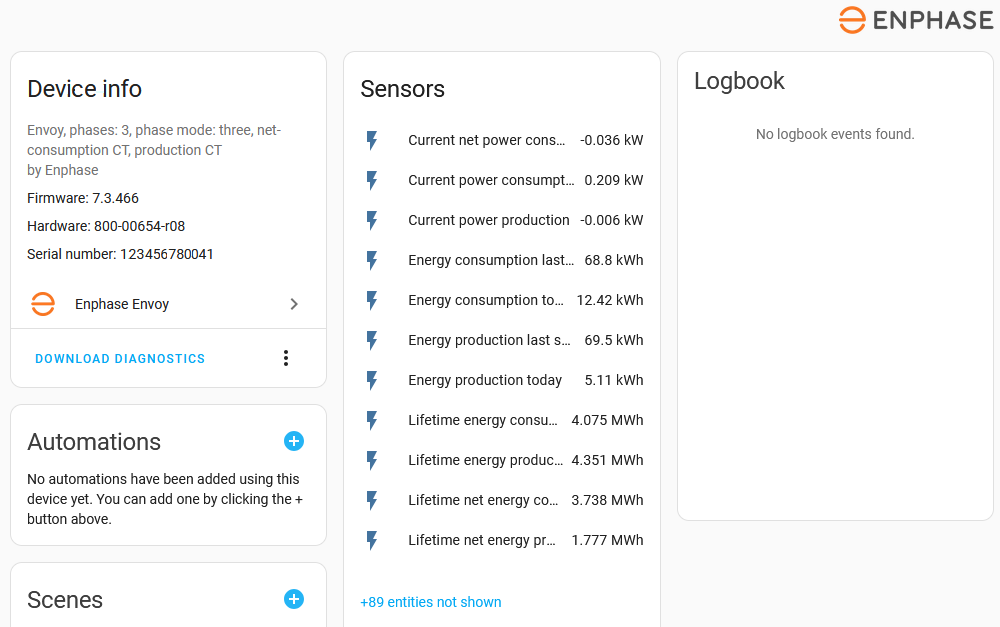
若配合多相 CT 相位数据使用,也会提供默认禁用但未显示的分相实体,可按需启用。
Current Transformers
Envoy Metered 最多可安装 6 个 CT。它们可在单相或多相配置中分配给 production、consumption 和/或 storage 测量用途。
下图展示了 CT 的安装位置以及本文中的命名方式。
- The production CT measures the energy exchange between Solar production and the switchboard.
- If the consumption CT is installed as Load only a.k.a. total-consumption it measures energy exchange from the switchboard to the loads/house.
- If the consumption CT is installed as Load with Solar a.k.a. net-consumption, it measures energy exchange between the switchboard and the grid.
- The storage CT measures the energy exchange between the battery storage and the switchboard.
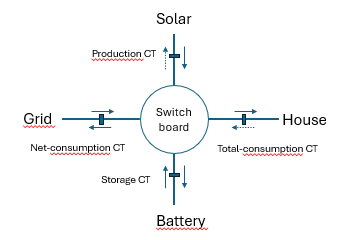
这并不代表官方或唯一的配置方式。实际安装通常受当地规范、安装商设计以及 Enphase 安装指南影响,因此会存在不同变体。这里仅提供一个简化视图及本文档使用的命名约定,以帮助理解集成行为。更多信息请参考 Enphase documentation。
::: 当 Envoy Metered 安装了 production CT 后,相关 CT 数据将用于提供汇总太阳能发电数据。同理,已安装的 consumption CT 会作为家庭用电数据的来源。
通常只会安装 net-consumption 或 total-consumption 其中一种 CT,另一种数据则由 Envoy 计算得出。
CT 汇总与分相数据
在启用了多相配置并使用 CT 时,同时可获得汇总数据和各相独立数据。若只配置了 1 相,则相位数据与汇总数据相同,不会创建分相实体;若配置超过 1 相,则会为每一相创建默认禁用的实体,可按需启用。
分相实体名称基于汇总实体名称,并在后缀中附加相位名。相位名称为 L1、L2、L3。例如,启用后,第 3 相的lifetime energy production 会显示为 Envoy SN Lifetime energy production L3。
Current transformer entities
CT measure multiple properties of the energy exchange which are available as Envoy device entities. These are all disabled by default, enable them as desired.
Production CT sensor entities
- Envoy SN Frequency production CT: Frequency in Hz.
- Envoy SN Voltage production CT: Voltage in V. (see limitations Summed voltage)
- Envoy SN Production CT current: Current in A.
- Envoy SN Powerfactor production CT: Powerfactor, ratio of active to apparent power.
- Envoy SN Metering status production CT: Status of the metering process:
normal,not-metering,check-wiring. - Envoy SN Meter status flags active production CT: Count of CT status flags active. See troubleshooting CT Active flag count is non-zero when non-zero.
Net-consumption CT sensor entities
- Envoy SN Frequency net consumption CT: Frequency in Hz .
- Envoy SN Voltage net consumption CT: Voltage in V. (see limitations Summed voltage
- Envoy SN net consumption CT current: Current in A.
- Envoy SN Powerfactor net consumption CT: Power factor, ratio of active to apparent power.
- Envoy SN Metering status net consumption CT: Status of the metering process:
normal,not-metering,check-wiring. - Envoy SN Meter status flags active net consumption CT: Count of CT status flags active. See troubleshooting CT Active flag count is non-zero when non-zero.
Storage CT sensor entities
- Envoy SN Frequency storage CT: Frequency in Hz.
- Envoy SN Voltage storage CT: Voltage in V. (see limitations Summed voltage
- Envoy SN storage CT current: Current in A.
- Envoy SN Powerfactor storage CT: Power factor, ratio of active to apparent power.
- Envoy SN Metering status storage CT: Status of the metering process:
normal,not-metering,check-wiring. - Envoy SN Meter status flags active storage CT: Count of CT status flags active. See troubleshooting CT Active flag count is non-zero when non-zero.
For storage CT energy entities refer to battery sensor description.
电网传感器实体
当 Envoy Metered 安装了 net-consumption CT 时,会提供 Grid import/export 相关实体。使用这些实体时,请同时参考限制说明:Grid Import/Export values incorrect。
- Envoy SN Current net power consumption: Current power exchange from (positive) / to (negative) the grid in W, default display in kW.
- Envoy SN Lifetime net energy consumption: Lifetime energy consumed / imported from the grid in Wh, default display in MWh.
- Envoy SN Lifetime net energy production: Lifetime energy produced / exported to the grid in Wh, default display in MWh.
When using an IQ Metered Collar, the net-consumption CT's are integrated in the collar.
When used with multiphase CT phase data, disabled phase entities are available as well.
电网平衡导入/导出传感器实体
When the Envoy Metered is equipped with either a total-consumption CT or a net-consumption CT, the balance of grid import and export is available as well. The balanced power and energy entities are disabled by default, enable these as desired.
- Envoy SN balanced net power consumption: Current power exchange from (positive) / to (negative) the grid in W, default display in kW. (This is the same value as Envoy SN Current net power consumption when using a net-consumption CT.)
- Envoy SN Lifetime balanced net energy consumption: Lifetime energy balance (difference) of imported and exported grid energy in Wh, default display in kWh.
When used with multiphase CT phase data, disabled phase entities are available as well.
电池储能数据
多代 Enphase 电池系统及其不同配置都可以通过本集成提供实体数据。
- AC-Batteries: first generation battery setup, no longer in production.
- IQ Batteries: current Enphase battery models.
这些电池既可独立部署,也可作为带有 Enpower/IQ System Controller 的 Enphase Ensemble 系统的一部分。
IQ battery 数据
Aggregated IQ battery sensor entities
汇总 IQ battery 数据会包含所有已安装的 IQ Batteries。
- Envoy SN Battery: Current aggregated state of charge in %
- Envoy SN Available battery energy: Current aggregated IQ battery energy content in Wh
- Envoy SN Battery capacity: Aggregated maximum IQ battery energy content in Wh
- Envoy SN Reserve battery level: Configured aggregated IQ Battery backup state of charge in %
- Envoy SN Reserve battery energy: Configured aggregated IQ battery backup energy content in Wh
If a storage CT is installed:
- Envoy SN Current battery discharge: Current power in/out of the battery in W.
- Envoy SN Lifetime battery energy discharged: Lifetime energy discharged from the battery in Wh, default display format MWh.
- Envoy SN Lifetime battery energy charged: Lifetime energy charged in the battery in Wh, default display format MWh.
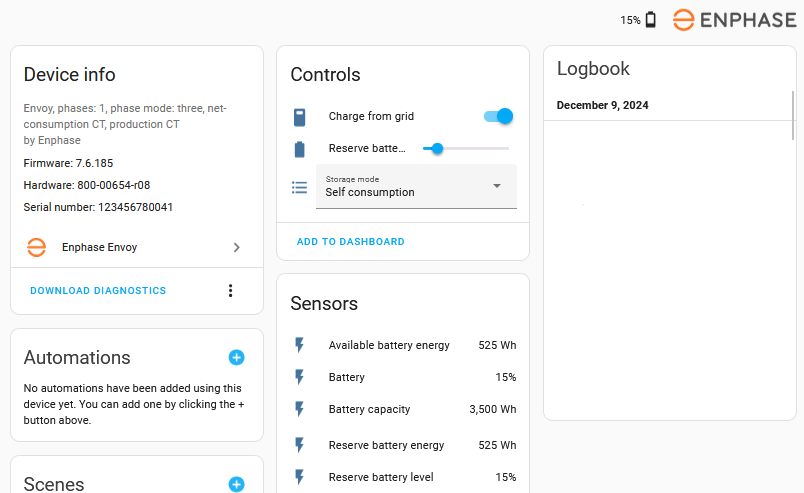
:::note 如果安装了 Enpower 设备,那么 Charge from grid、Reserve battery level 和 Storage mode 将作为 Enpower 设备实体 提供,而不是 Envoy 设备实体。
单个 IQ battery 数据
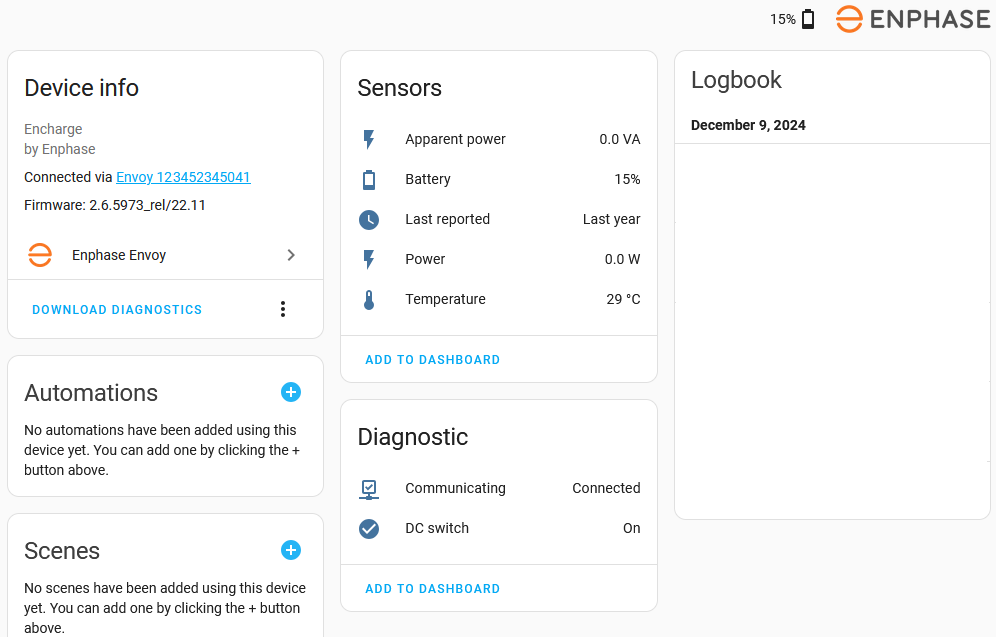
每个 IQ Battery 都会创建一个关联到 Envoy 父设备的 Encharge 设备。每个 Encharge 设备都会提供对应的独立电池传感器。
Individual IQ battery sensor entities
- Encharge SN Battery: Current state of charge of the battery in %
- Encharge SN Power: Current power in W
- Encharge SN Apparent Power: Current apparent power in VA
- Encharge SN Temperature: Current temperature in degrees C or F, based on your localization.
- Encharge SN Last reported: Time when Envoy received last update from the battery.
Individual IQ battery binary sensor entities
- Encharge SN Communicating: Communication status of encharge battery, Connected / Disconnected. This is a diagnostics entity.
- Encharge SN DC Switch: DC Switched off status of encharge battery, On / Off. This is a diagnostics entity.
AC-battery 数据
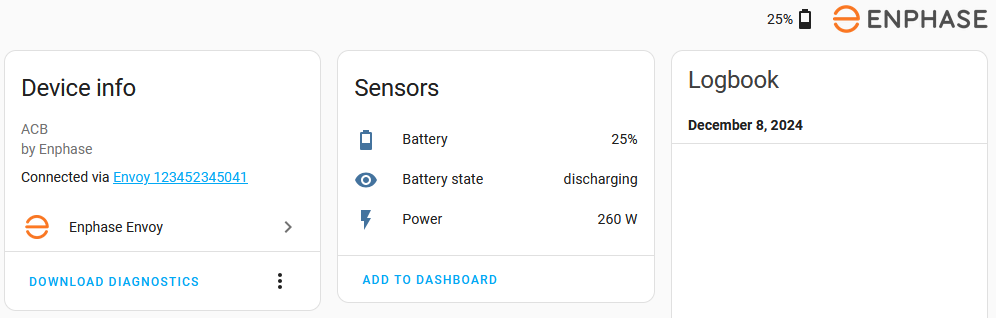
AC-battery 不提供单体数据,仅提供所有 AC-batteries 的汇总数据。
AC-battery sensor entities
- ACB SN Battery: Current AC-battery state of charge in %
- ACB SN Battery state: AC-battery state: charging, idle, discharging
- ACB SN Power: Current AC-battery power in W
- Envoy SN Available ACB battery energy: Current AC-battery energy content in Wh
汇总 IQ 与 AC battery 传感器实体
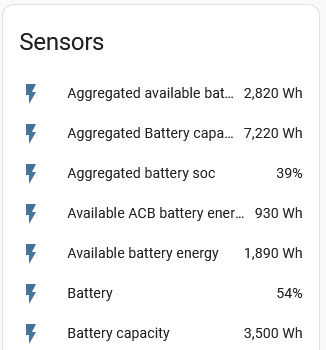
如果系统同时使用 IQ 和 AC batteries,则会提供所有已安装 IQ batteries 与 AC batteries 的汇总电池数据。
- Envoy SN Aggregated Battery SOC: Overall aggregated battery state of charge in %
- Envoy SN Aggregated Available battery energy: Overall aggregated battery energy content in Wh
- Envoy SN Aggregated Battery capacity: Overall aggregated maximum battery energy content in Wh
The below figure shows the 3 aggregated entities along with the AC-battery energy and 3 of the IQ Battery aggregate values.
Enpower 数据
如果安装了 Enphase Enpower 离网切换设备,其数据会通过多个 Enpower 设备实体提供。
Enpower binary sensor entities
- Enpower SN Grid status: status of the grid.
Enpower number entities
- Enpower SN Reserve battery level: reserve battery level to maintain for outages in %. Changing the value, on the UI or in an action, will update the setting in the Envoy. Also see limitations, No battery controls.
Enpower select entities
- Enpower SN Storage mode: Current configured storage mode,
Full backup,Self consumption,Savings mode. Changing the selection, in the UI or in an action, will update the setting in the Envoy. Also see limitations, No battery controls.
Enpower sensor entities
- Enpower SN Temperature: Current temperature in degrees C or F, based on your localization.
- Enpower SN Last reported: Time when Envoy received last update from the enpower device.
- Enpower SN Communicating: Communication status of enpower switch, Connected / Disconnected. This is a diagnostics entity.
Enpower switch entities
- Enpower SN Charge from grid: Allow or disallow charging Encharge/IQ batteries from grid when a charge schedule is active. Changing the switch, in the UI or in an action, will update the setting in the Envoy. If no charge schedule is active, changing the setting will not have an immediate effect. Also see limitations, No battery controls.
- Enpower SN Grid enabled: Enable or disable grid connection. Note that the Enpower has a slight delay built-in between receiving these commands and actually switching the system on or off grid.
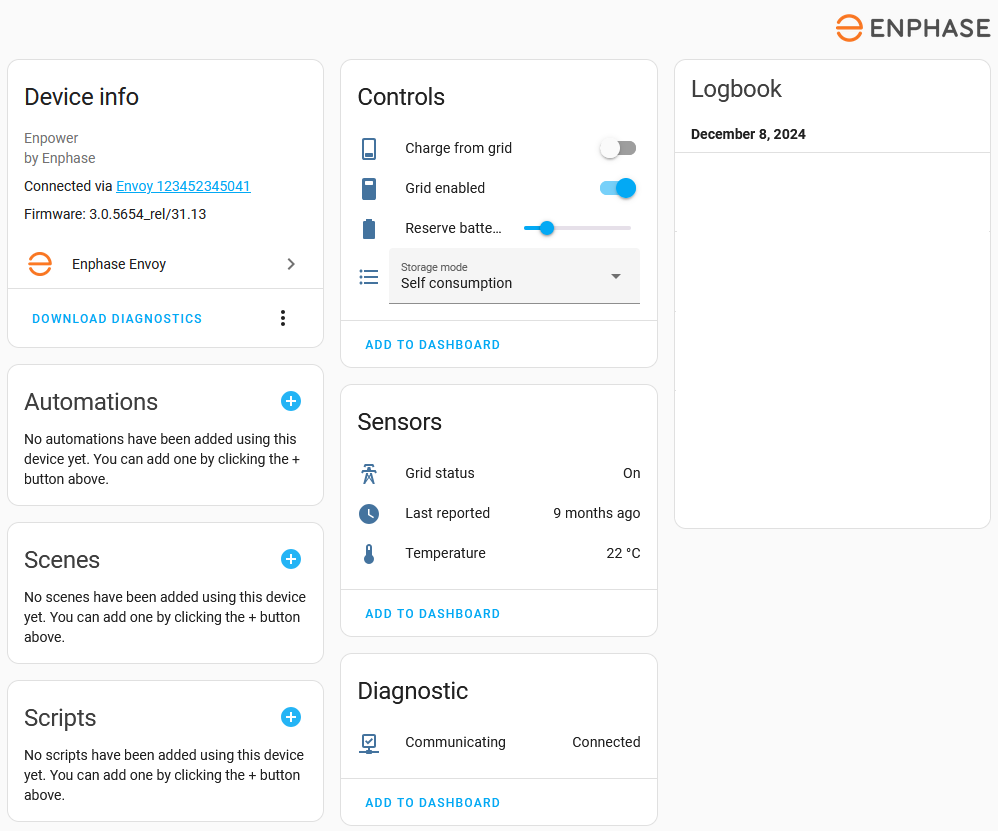
如果未安装 Enpower,那么 Charge from grid、Reserve battery level 和 Storage mode 会作为 Envoy 设备实体 提供,而不是 Enpower 设备实体。
Enpower load shedding relays
安装 Enpower/IQ System Controller 后,会提供用于查看和控制 Enpower 四个 load-shedding relays 状态的实体。在许多欧洲国家常见的那种不带 load-shedding 和离网功能的电池安装方案中,这些传感器和开关不会出现。
Enphase Enpower 具备 4 个 load shedding relays(无源触点,通常也称 dry-contacts),可用于控制家中的非关键负载。它们主要有两种工作模式:
-
Standard:当 mode 实体设为 standard 时,你可以分别为 on grid、off grid 和 on generator 三种工作状态指定 relay 是否上电。
-
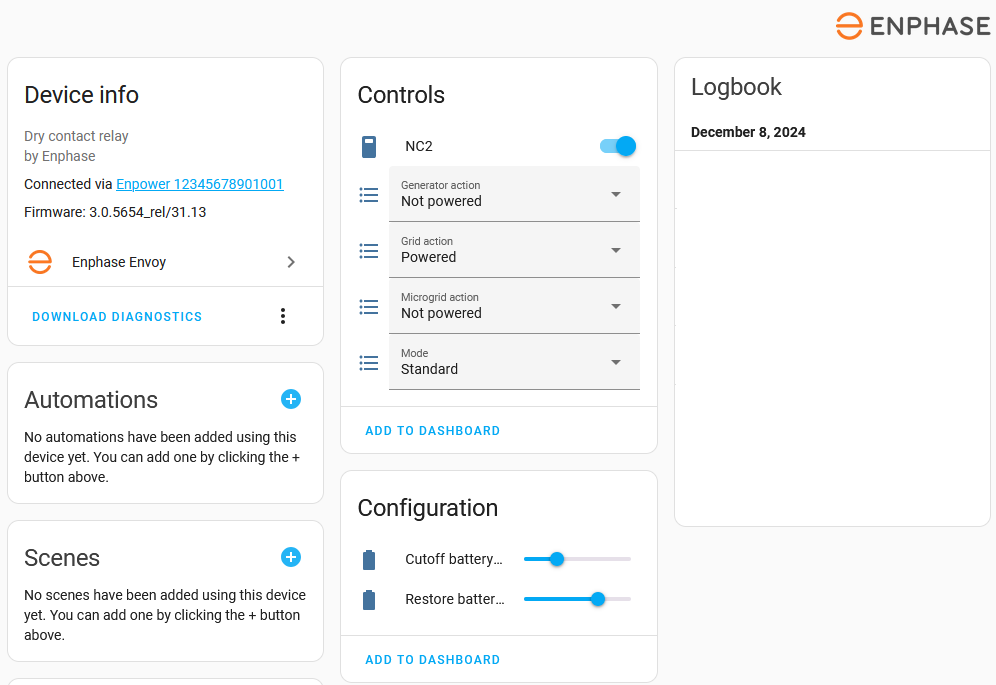
Battery level:当 relay mode 设为 battery level 时,relay 会根据 Encharge IQ batteries 的剩余电量自动开关。系统会提供两个 number 实体,用于设置 relay 的 cutoff 和 restore 阈值。当电量低于 cutoff 时,relay 会关闭并切断所连接负载;当电量回升到 restore 之上时,relay 会重新打开并恢复供电。
实体和设备名称源自 Enpower 设备中配置的 load_name。
Dry-contact number entities
- LOAD_NAME cutoff battery level: battery level below which relay will turn off when in
Battery levelmode. - LOAD_NAME restore battery level: battery level above which the relay will turn back on when in
Battery levelmode.
Dry-contact select entities
- LOAD_NAME mode: dry-contact operational mode:
standardorbattery - LOAD_NAME Grid action: dry-contact on grid action:
Powered,Not powered,Follow schedule,None - LOAD_NAME Micro-grid action: dry-contact on micro-grid action:
Powered,Not powered,Follow schedule,None - LOAD_NAME Generator action: dry-contact on generator action:
Powered,Not powered,Follow schedule,None
IQ Meter Collar 数据
IQ Meter Collar 内置了 net-consumption CT。对应 CT 数据会出现在net-consumption 数据和电网传感器中,此外 collar 本身的状态也会以实体形式提供。
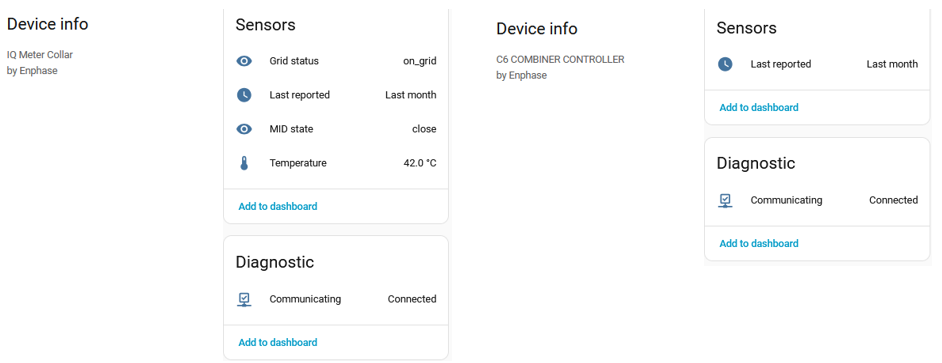
Collar status entities
- Collar SN Admin state: Collar admin status, on grid / off grid.
- Collar SN Grid state: Grid connection status, on grid / off grid / synchronizing to grid / manual override active.
- Collar SN MID State: Status of enphase Microgrid Interconnection Device, open / closed.
- Collar SN Temperature: Current temperature in degrees C or F, based on your localization.
- Collar SN Last reported: Time when Envoy received last update from the collar device.
- Collar SN Communicating: Communication status of the collar, Connected / Disconnected. This is a diagnostics entity.
实际使用中发现,Grid state 似乎并不能准确反映真实的电网状态变化;相反,on grid / off grid 的状态更像体现在 Admin state 的值中。使用这些实体时请留意这一点。未来随着更多观察,可能会补充更准确的 Collar 实体说明。
C6 Combiner Controller 数据
Enphase C6 combiner controller(C6CC)会向 Envoy 提供一些状态信息,这些信息会以实体形式呈现。
C6CC status entities
- C6CC SN Last reported: Time when Envoy received last update from the combiner device.
- C6CC SN Communicating: Communication status of C6 Combiner, Connected / Disconnected. This is a diagnostics entity.
数据轮询间隔
所有数据都会在一次统一的采集周期中完成获取,并集中来自 Envoy 的少量几个 endpoint。例如,若三个不同值都来自同一个 endpoint,就不会发起三次独立请求,而是通过一次请求统一获取。这样可以尽量减少对 Envoy 的请求次数。集成使用的是 Envoy 本地 REST API;只有在 1 年有效期的 token 即将到期前约 1 个月,才会重新向 Enphase Enlighten 网站申请新 token。
默认情况下,此集成会每 60 秒为所有实体采集一次数据。如需自定义采集频率,请参考定义自定义轮询间隔。通过 + choose entity 按钮,只需选择 Envoy 设备中的任意一个实体作为 action 目标即可。更新其中一个实体时,Envoy 及其相关设备(如 inverter)的所有实体都会一起更新,因此无需把多个实体、全部实体,或全部 inverter 实体都加入目标。若你使用多个 Envoy,则为每个 envoy 各选一个实体作为目标,或按需分别创建多个自定义轮询间隔。
未安装 CT 的 Envoy 系统会每 5 分钟采集一次各个太阳能逆变器的数据。但在这 5 分钟周期内,并不是所有 inverter 都会同时更新。缩短采集间隔,最多只能让单个 inverter 的更新更快显示出来,并不会带来更细粒度的数据。
安装了 CT 后,数据粒度会更高,缩短采集间隔也可能带来更多细节。但 Envoy 的资源并非无限,采集间隔过短可能导致连接丢失、设备卡死或重启。实际使用中需要根据具体环境逐步调优。
更新凭据或设备 IP 地址
此集成支持通过 reconfigure 菜单项更新 Envoy 配置。重新配置时可修改 Envoy 的 IP 地址、用户名和/或密码。如果你的 Enlighten 凭据或设备 IP 地址发生变化,需要手动更新时,请使用该菜单项。通常情况下,IP 地址变化会被自动发现并更新。
当 Envoy firmware 升级后,若认证方式需要从本地 Envoy 用户名/密码切换为基于 Enlighten 用户名/密码的 token 认证,也需要使用此菜单项(参见必填手动输入)。
Firmware 更新
加载配置条目时,系统会从 envoy 读取 firmware 版本。随后该版本会用于判断可用功能以及所需的认证方式。firmware 版本会作为配置条目的 sw_version 属性保存,并显示在 envoy 的设备页面中。
系统每 4 小时会将 Envoy 当前实际 firmware 版本与已知版本进行比较。如果发现不同,就会重新加载配置条目,以应用可能需要的配置变化。如果你知道 firmware 刚刚更新过,也可以手动重新加载 envoy 配置条目,达到同样效果。
firmware 版本不会作为独立实体提供,而是作为 envoy 的属性存在。若要在自动化、脚本或模板中使用该版本信息,可参考下面的示例,并替换为任意一个 envoy 实体。
Firmware 更新提醒
如果你希望在 firmware 更新时收到通知,可以使用社区 blueprint 共享区中的这个自动化 blueprint:Enphase Envoy Firmware update notification。
使用 import blueprint to 按钮导入该 blueprint。导入后会安装到 /config/blueprints/automation/catsmanac/Track_envoy_firmware.yaml。可参考 blueprint 共享帖中的自动化示例,实现一个在 firmware 发生变化时发送通知的自动化。
能源仪表板
此集成提供了多个适合接入 energy dashboard 的实体。
太阳能面板
对于 Solar production,请使用 Envoy SN Lifetime energy production 实体。整体来看,它通常比 Envoy 直接上报的每日数值更稳定。(另见已知限制:Late reset、Energy Incorrect)
电网
是否有可用于电网的相关数据,取决于是否安装了 CT 以及安装类型。另请参阅限制说明:Grid Import/Export values incorrect 和 Balancing grid meter。
使用 net-consumption CT 的电网
安装 net-consumption CT 后,可同时获得电网用电和回送电网的数据。(另见限制说明)
- 对于 Grid consumption,请使用 Envoy SN Lifetime net energy consumption 实体。
- 对于 Return to grid,请使用 Envoy SN Lifetime net energy production 实体。
使用平衡能耗实体的电网
安装 total-consumption CT 或 net-consumption CT 后,也可以获得平衡后的电网导入/导出能量值。这个值并不适合直接用于 energy dashboard,需要通过模板将其拆分为导入和导出两个数值。
若要将平衡能量值 Envoy SN Lifetime balanced net energy consumption 拆分为导入/导出值,社区 blueprint 共享区提供了一个名为 Filter positive or negative value changes in a sensor entity 的传感器 blueprint template。
使用 import blueprint to 按钮导入该 blueprint。导入后会安装到 /config/blueprints/template/catsmanac/Filter_positive_or_negative_value_changes_in_sensor_entity.yaml。请按照 blueprint 共享帖中的说明和模板来实现此类拆分。
Alternatively, creating 2 split energy sensors can be done by splitting the Envoy SN balanced net power consumption into power import and export using filter range helpers. These are then the source for two Riemann sum integral helpers to calculate energy from the power values.
家用电池储能
Whether there is data available to use with the electricity grid depends on the installed storage CT, if any.
使用 storage CT 的家用电池储能
With a storage CT installed, data for both Energy coming out and going into the battery is available.
- For Energy going into the battery, use the Envoy SN Lifetime battery energy charged entity.
- For Energy coming out of the battery, use the Envoy SN Lifetime battery energy discharged entity.
不使用 storage CT 的家用电池储能
Without a storage CT installed, only the current Power in and out of individual batteries, or the current aggregated battery energy content is available. These values are not suited for direct use with the energy dashboard. It will require some templating to split the value into an import and export values.
使用 battery power 的家用电池储能数据
Battery power is the current power flow in or out of an individual battery. Using the summed Power values of all batteries, the result needs to be split in 2 entities, representing total power in and power out.
This can be done using the filter range helper. Next, each entity needs to be integrated into energy, using two Riemann sum integral helpers. The resulting data can be used for Energy going into the battery and Energy coming out of the battery.
If desired, this can also be done in a similar way for individual batteries.
基于 available battery energy 的家用电池储能数据
Changes in the Available battery energy are a result from Energy going in or out of the battery. Splitting these energy changes into 2 entities, one tracking positive changes, one the negative changes, results in data that can be used for Energy going into the battery and Energy coming out off the battery. This method does not account for conversion losses as Energy content changes do not exactly match actual energy flow in and out of the battery.
To split the changes in Available battery energy into charge-discharge values, a sensor blueprint template named Filter positive or negative value changes in a sensor entity is available in the community blueprints exchange.
Import the blueprint using the import blueprint to button. This will install the blueprint as /config/blueprints/template/catsmanac/Filter_positive_or_negative_value_changes_in_sensor_entity.yaml. Use the directions and templates in the blueprint exchange topic to implement such a split using the Envoy SN available battery energy entity as source entity. Add positive changes to a battery_charge entity and add negative changes to a battery_discharge entity.
单独设备
Although not a replacement for individual energy or power measurement devices, with multiphase CT installed, energy consumption for phases is available. These can be used for individual devices, if of interest.
动作
可用动作包括:switch.turn_on、switch.turn_off、switch.toggle、number.set_value、select.select
Action switch.turn_on/switch.turn_off/switch.toggle
这些动作可用于打开、关闭或切换以下对象:
- the Enpower device switches
grid_enabled,charge_from_grid - the Enpower load shedding relays switch.
Example:
Action number.set_value
此动作用于修改 Enpower 的 Reserve battery level 设置。
Example:
Action select.select
此动作可修改:
- Relays relay_mode, grid_action, micro_grid_action or generator_action
- Battery storage mode
Example:
从技术上说,也可以使用 select.first、select.last、select.previous、select.next,但由于这些值之间并不存在明确的顺序关系,因此并不建议使用。
Envoy 更换
当需要更换实体 Envoy 时,需要先做一些准备,以确保旧设备中的数据能延续到新设备上。此处假设新 Envoy 是在现有安装中替换旧 Envoy,并且接线方式保持不变。新 Envoy 会有不同的序列号,也很可能会有不同的 IP 地址。
背景
在 Home Assistant 配置中,Envoy 实体通过各自的 unique_id 来识别,其中包含 Envoy 的序列号。对于 micro-inverters、Enpower 和/或 Encharge 设备,其 unique_id 中则包含这些设备自身的序列号,而不是 Envoy 的序列号。
真正存储在状态、短期统计和长期统计中的数据,则是通过 entity_id 关联到实体的。这个 entity_id 同样注册在实体配置中,数据存储正是依靠它与实体建立关联。与 unique_id 类似,entity_id 里也包含 Envoy、micro-inverters、Enpower 和/或 Encharge 设备的序列号。
When adding the new Envoy, new entities are created, each containing the new Envoy's serial number in unique_id and entity_id. For the Envoy data, this results in states and short- and long-term statistics starting from that point in time. Data from the old Envoy can not be seen in the new Envoy. For the micro-inverters and Enpower/Encharge device data, the serial numbers remain the same, and data will continue from the old data.
To 'chain' the data of the old Envoy to the new Envoy, the entities of the new Envoy should connect to the existing data. To do so, we need to make sure the existing data can be found when using the new entity_id that contains the new Envoy serial number. This can be done by updating the entity_id of the old Envoy entities and replacing their old serial numbers with the new Envoy serial number. See customizing entities for how to change the entity_id. This should be done before the new Envoy is configured in Home Assistant.
更换流程
Do not add the new Envoy to Home Assistant yet, even if it shows as discovered. First, complete the steps below.
- Find all entities for the old Envoy.
- Go to Settings > Devices & services > Entities.
- Use the filter to filter the Enphase_envoy integration. Also include disabled entities.
- For each entity inspect the entity ID field (customizing entities) and replace the old Envoy serial number by the new Envoy serial number.
- Update any actions, cards, scripts, automations, dashboards, and other tools that use the original entity_id to use the new entity_id.
- Once completed, remove the old Envoy from Home Assistant
- Only now add the new Envoy to Home Assistant. The data from the old Envoy should now be visible in the new Envoy.
更换后的注意事项
Even though the data continues from the old envoy, there will be a discontinuity in time and/or value for entities. The lifetime values for Envoy and/or connected devices will most likely start from zero again, unless they were transferred between the old and new physical Envoy, if possible. Such discontinuity will be visible in trends and may affect any automations, calculations, and more.
When used with the energy dashboard, it may result in a peak at the start of the new data. Although the energy dashboard probably handles any reset to zero well. If any peaks occur, correct the first statistics entry of new data in Settings > Developer tools > Statistics and set the value to zero. (See Statistics Tab)
已知问题与限制
已报告问题
For reported issues in GitHub, refer to issues list for the Enphase Envoy integration.
For topics in the Home Assistant community, use this filter of topics that contain the text Enphase.
Firmware 变更
Envoy firmware versions come with changing behavior, features, and potential issues. Firmware is pushed to the Envoy by Enphase, while 'not always communicated in detail upfront'. This may result in sudden changes in the Envoy behavior and is always accompanied by an outage while Envoy is being updated.
无法控制电池
As of Envoy firmware 8.2.4225, the Envoy no longer supports the following operations through the local REST API used by Home Assistant:
- Setting battery modes
- Enabling/disabling charging from the grid
- Changing reserve battery level
在问题得到解决之前,你必须通过 Enphase App 来控制这些功能。
延迟重置
Not all firmware versions reset Energy production today or Energy consumption today, Energy production last seven days and Energy consumption last seven days at midnight. A 1 hour delay is reported. In this case, best use a utility meter with the 'Lifetime' entity for daily reporting. This seems to be daylight savings time change related and surfaced in recent firmware versions. Some older firmware versions would reset up to 15 minutes late, even outside daylight saving periods.
能量数据不正确
When using Envoy Metered with CT
- not all firmware versions report
Energy production todayand/orEnergy consumption todaycorrectly. Zero data, changes to a lower value and unexpected spikes have been reported. Enphase reportedly indicated it is an issue in summing phase values to aggregated data. In this case, either use individual phase data or a utility meter with theLifetime energy productionorLifetime energy consumptionentity for daily reporting. - not all firmware versions report
Energy production last seven daysand/orEnergy consumption last seven dayscorrectly. Zero and unexpected values have been reported. Enphase reportedly indicated it is an issue in summing phase values to aggregated data. In this case, use the individual phase data. Energy production todayandEnergy consumption todayhave been reported not to reset to zero. Instead, it resets to a non-zero value that seems to gradually increase over time, although other values have been reported as well. This issue has also been reported as starting suddenly overnight. For daily reporting, it is recommended to use a utility meter with theLifetime energy productionorLifetime energy consumptionentity.
“今日发电量”未重置为零的历史示例


这些问题可能会导致日志中出现类似如下的记录:
如果这类日志频繁出现并造成困扰,建议直接禁用对应实体,因为它的数据可靠性本身就值得怀疑。
累计值重置
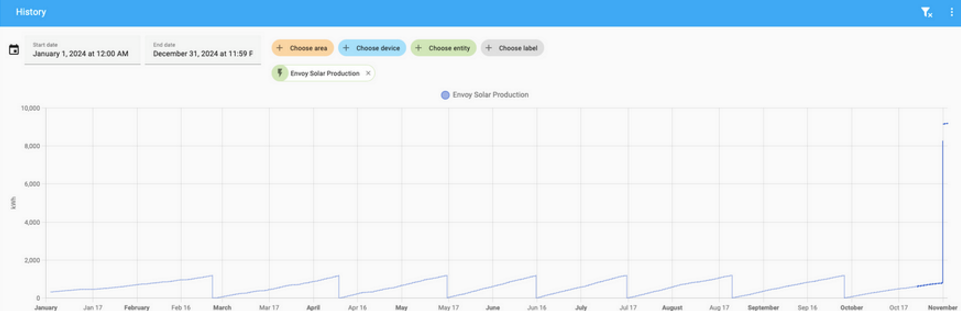
未安装 CT 且运行较旧 firmware 的 Envoy Metered,据反馈会在 Lifetime energy production 达到 1.2 MWh 时重置为 0。对于 energy dashboard 来说,这种重置本身不是问题。较新的 8.x.x firmware 已修复该重置,但会带来一次性的累计值跳变到完整 lifetime 数值。这会影响 energy dashboard,可通过在 开发者工具:统计 中将该时刻的统计值设为 0 来解决。
Envoy 累计发电量发生重置的历史示例
累计发电量减少 1.2 MWh
据反馈,自 firmware 8.2.4264 起,envoy 会在不固定时间把 Lifetime energy production 数值减少 1.2 MWh。目前的推测是,当某个 inverter 的内部累计焦耳计数器(32 位)超过上限(约 1.19 MWh)并归零时,就会触发这种跳变,进而导致所有 inverter 汇总值减少 1.2 MWh。
Envoy 累计发电量下降的历史示例
下方示例展示了多个 inverter 随时间陆续达到 1.2 MWh 累计值后出现的下降情况。通常这会在运行若干年后开始出现,并在随后几个月内因各个太阳能板发电差异而陆续发生。
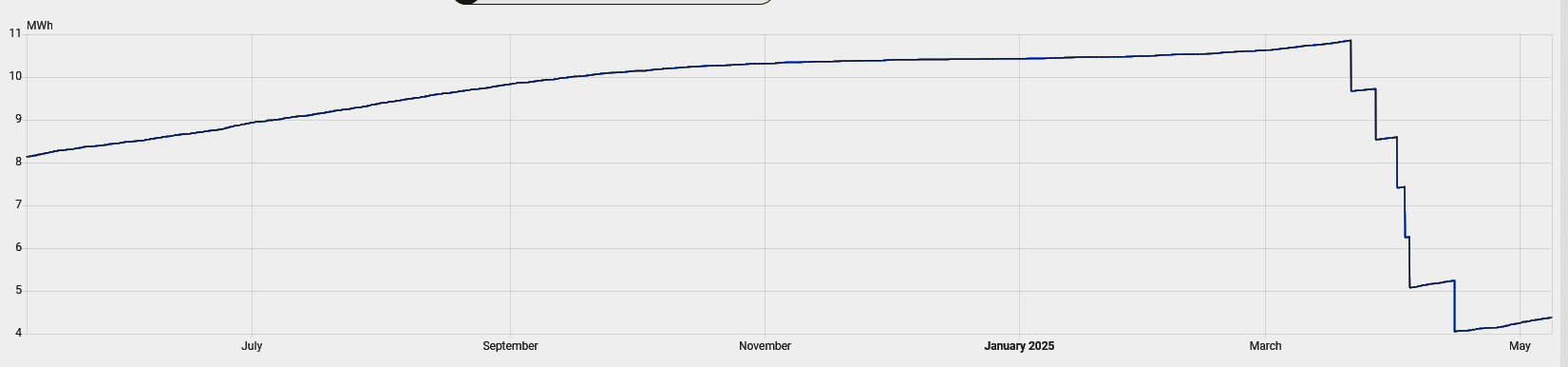
为修正这个问题,社区 blueprint 共享区提供了一个名为 Correct Envoy lifetime production energy 的传感器 blueprint template。
使用 import blueprint to 按钮导入该 blueprint。导入后会安装到 /config/blueprints/template/marcelhoogantink/correct_envoy_lifetime_production_energy.yaml。可按 blueprint 共享帖中的模板创建一个修正后的 lifetime 数值实体。
缺少 inverter 数据
如果你没有看到全部已安装的 inverters,且你的 inverter 数量超过 49 台,同时正在使用 HA 2025.7、2025.7.1 或 2025.7.2,请升级到 HA 2025.7.3 或更高版本。由于 Envoy firmware 的限制,最多只提供 49 台 inverter 的详细数据;在上述版本中,超出的 inverter 会被直接丢弃。2025.7.3 通过仅使用不受该限制影响的 inverter 基础数据修复了这个问题。
缺少 inverter 详细信息
如果你看不到 inverters 的详细数据,请先确认是否安装了超过 49 台 inverter。由于 Envoy firmware 的限制,只有在配置的 inverter 数量不超过 49 台时,才会提供 inverter 设备详细数据;超过 49 台时,每台 inverter 只会提供 3 个发电功率相关实体。
电压求和
在多相配置下,Envoy Metered 会将 CT 测得的各相电压相加后作为汇总数据。对于 split-phase 这可能是合理的,但在三相系统中,应优先使用各相独立数据,而不是这个求和值。
Grid Import/Export 数值不正确
配备 net-consumption CT 的 Envoy Metered 会测量配电盘与电网之间的实时功率和能量交换。已有反馈称,这些数值与其他电网表计和/或 Enphase 网站显示的数据不一致。目前尚不清楚这是近期 firmware 引入的问题,还是早已存在。使用这些数值时,最好先确认它们在你的实际环境中是否准确。
平衡型电网表计
在带电池的多相系统中,如果所在地区使用的是相位平衡型电网表计,电池可能会在某一相向电网回送另一相所缺少的电量,而另一相则从电网取回这部分电量,仿佛把电网当作相间“运输通道”。由于电网表计会对这两相的导入与导出进行平衡,最终净值为零。但 Envoy 的多相 net-consumption CT 会分别上报各相数值,导致某一相的导出偏高、另一相的导入偏高。可考虑使用 lifetime balanced net energy consumption(即电网导入与导出的平衡和)来消除这一影响,不过仍需要借助模板将其拆分为导入和导出值。另一种做法是使用 current net power consumption 或 balanced net power consumption,并结合 Riemann 积分求和 helper。
故障排查
Enlighten 认证问题
如果在配置 Envoy 时遇到认证错误,请确认你的 Enlighten 账户已关闭 Multi Factor Authentication(MFA)。当前此集成不支持在获取 token 时使用 MFA。若出现以下任一错误,请优先检查是否已关闭 MFA。
- Before HA version 2026.1.2: KeyError: 'is_consumer'
- As of HA version 2026.1.2
- KeyError: 'session_id'
- EnvoyAuthenticationError: No session id in Enlighten login reply, disable Multi Factor Authentication
这些错误也可能会在首次获取 token 约 11 个月后、刷新 token 时出现在日志中。
周期性网络连接问题
如果你遇到周期性的连接问题,请确保 Envoy 只连接到一个网络接口(以太网或 Wi-Fi 二选一,不要同时使用)。Envoy 不应同时接入本地有线网络和本地 Wi-Fi。若两个连接同时启用,自动发现可能会在两个接口之间来回切换,从而导致大约每 30 分钟出现一次连接中断。
CT Active flag count 非零
CT active flag count 数值表示当前被置位的 CT 状态标记数量。正常情况下,CT active flag count 应为零。若该值非零,请查看 Envoy 的诊断报告,并在 raw_data - /ivp/meters - statusFlags 中查找已置位的标志,可能包括 (production-imbalance | negative-production | power-on-unused-phase | negative-total-consumption) 中的一项或多项。这些名称本身往往能提示潜在的安装问题。
日志提示 state is not strictly increasing
日志中会针对当日用电量或当日发电量出现类似下面这样的记录。该问题说明请参阅 energy incorrect。
调试日志与诊断
此集成提供 debug log 和 diagnostics report,使用方式与 Home Assistant 故障排查页面中的说明一致。
调试日志
在使用集成过程中遇到问题时,请先为 Envoy 启用调试日志,然后重新启动集成。这样 Home Assistant 日志文件中就会记录更详细的数据采集信息。请保持调试日志开启足够长的时间,以便覆盖问题发生时刻;如果问题是间歇性的,可能需要等待较久,同时日志文件也可能明显增大。
如果你预期某些功能应当出现但实际上没有显示,请确保在启用调试日志的情况下重新加载集成。 集成加载时,会扫描 Envoy 以识别可用功能并按需完成配置。首次扫描完成后,后续只会采集已识别功能对应的数据。因此,在启用调试日志的状态下重新加载集成,可以让调试日志包含这次初始完整扫描,方便分析为什么某些功能未出现。另请注意,有些功能实体默认是禁用的,若希望显示出来,需要手动启用;开始调试前请先确认这一点。
当问题已经复现后,请停止调试日志(会自动开始下载调试日志文件)。提交问题反馈时,请同时附上调试日志文件和一个诊断文件。
调试日志会显示与 Envoy / IQ Gateway 的全部通信。以下示例开头的日志行就是该集成生成的记录:
下面是一段典型的数据请求 / 响应日志。这些行会包含从 Envoy 接收到的数据详情。
一次采集周期结束时,日志中通常会出现:
诊断数据
诊断数据文件是一个 JSON 文件,其中包含 data 部分,用于记录此集成的详细信息。该文件可用任意文本编辑器查看。data 部分最多包含 6 个主要子区块,分别反映集成的配置方式和数据使用情况。反馈问题时请一并附上该文件。
下面列出了这 6 个子区块(均为折叠展示)。
配置条目
显示添加集成时创建的配置内容。
Envoy 属性
显示首次数据扫描得出的结论,以及识别到的功能项,其中也包括在 Envoy 中检测到的 firmware 版本。
原始数据
显示创建诊断报告时最近一次数据扫描从 Envoy 收集到的原始数据。如果你对 dashboard 中展示的数据有疑问,可先查看这里的 Envoy 原始上报内容。集成本身不会修改这些数据,只是将其提供给各实体使用。
Envoy 模型数据
显示从 raw_data 中提取出来、并被 Home Assistant 集成作为 Envoy 类数据使用的内容。这只是完整原始数据集的一个子集。
按设备分组的 Envoy 实体
显示基于首次扫描结果所创建的全部实体,并按设备分组。同时还包含最近一次数据采集周期对应的实体状态。这里的状态值来自 Envoy model data,也就是你在 dashboard 中看到的值。
测试样本
用于构建测试 fixtures 的数据。只有在集成选项中启用了 Collect test fixture data 时,此部分才会出现。