

2023.5: Let''s talk!
Home Assistant 核心 2023.5! 🎉
What an exciting 发布 we have for you this month! This 发布 is all about voice (well, almost fully), and I'm super excited we can ship you all this truly amazing stuff!
I've been following the progress of this all being built this month, and really, I've been mindblown multiple times a week. So what is in here? Well, you can now actually talk to Home Assistant! 🤯
I really appreciate that all these voice elements have been built the Home Assistant way: to be fully configurable and extendable. Giving you choices, including entirely local options for your own voice assistant.
This 发布 is packed! And we are not even halfway through Home Assistant's Year of the voice yet…
Enjoy the 发布!
../Frenck
- Let's talk!
- Manage what is exposed to your voice assistants
- Improved entities setting
- Configuring the LEDs of your Home Assistant Yellow
- Webhooks 触发器 options
- New Assist pipeline and language selectors
- Other noteworthy changes
- New integrations
- integrations now available to set up from the UI
- 发布 2023.5.1 - May 4
- 发布 2023.5.2 - May 5
- 发布 2023.5.3 - May 14
- 发布 2023.5.4 - May 23
- Need help? Join the community!
- Backward-incompatible changes
- Farewell to the following
- All changes
Don't forget to join our 发布 party live stream on YouTube 3 May 2023, at 12:00 PDT / 21:00 CEST!
来聊聊吧!
Our goal for 2023 is to let you control Home Assistant in your own language: It is Home Assistant’s Year of the Voice! After chapter 1 in January, we announced chapter 2 in this exciting journey last week!
This 发布 ships everything (plus more) that was announced! This means, as of this 发布, you can actually start talking to Home Assistant! 🎙️
Here is a quick summary of all that has been announced, linked to the place you can read more about each of them:
- Compose your own voice assistant using the new assist pipelines
- Voice Assistant powered by Home Assistant Cloud
- Fully local text-to-speech using Piper
- Fully local speech-to-text using OpenAI Whisper
- The Wyoming protocol and 集成
- Create your own ESPHome-powered voice assistant
- The Voice-over-IP 集成, call Home Assistant ☎️
To help you get started, we made sure the 文档 is perfect, including some cool project tutorials to jump-start your own private voice assistant journey:
- The world's most private voice assistant
- Giving your voice assistant a Super Mario personality using OpenAI
- Installing a local Assist pipeline
- The $13 tiny ESPHome-based voice assistant
If you missed last week's live stream, be sure to check it out. It is full of live demos and detailed explanations of everything packed into this 发布. The recording of the live stream:
管理暴露给语音助手的实体
A brand new and exciting menu item can be found in your 设置 menu: Voice assistants!
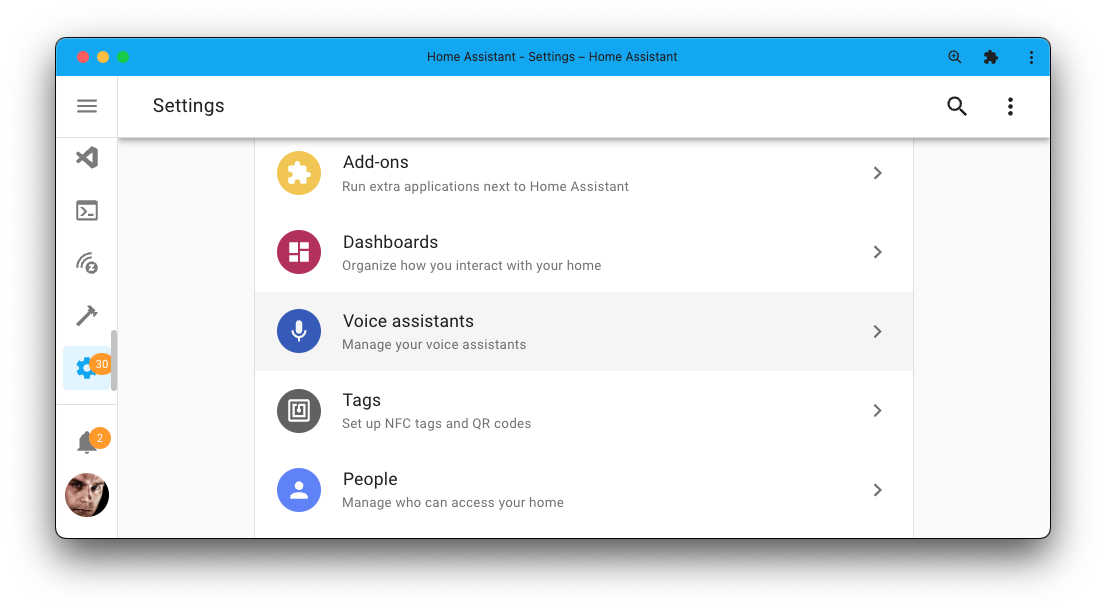
This new 设置 item gives you access to many fantastic new voice features; it also provides a new Expose tab where you can manage which 实体 are exposed to your Assist, Alexa, and Google Assistant.
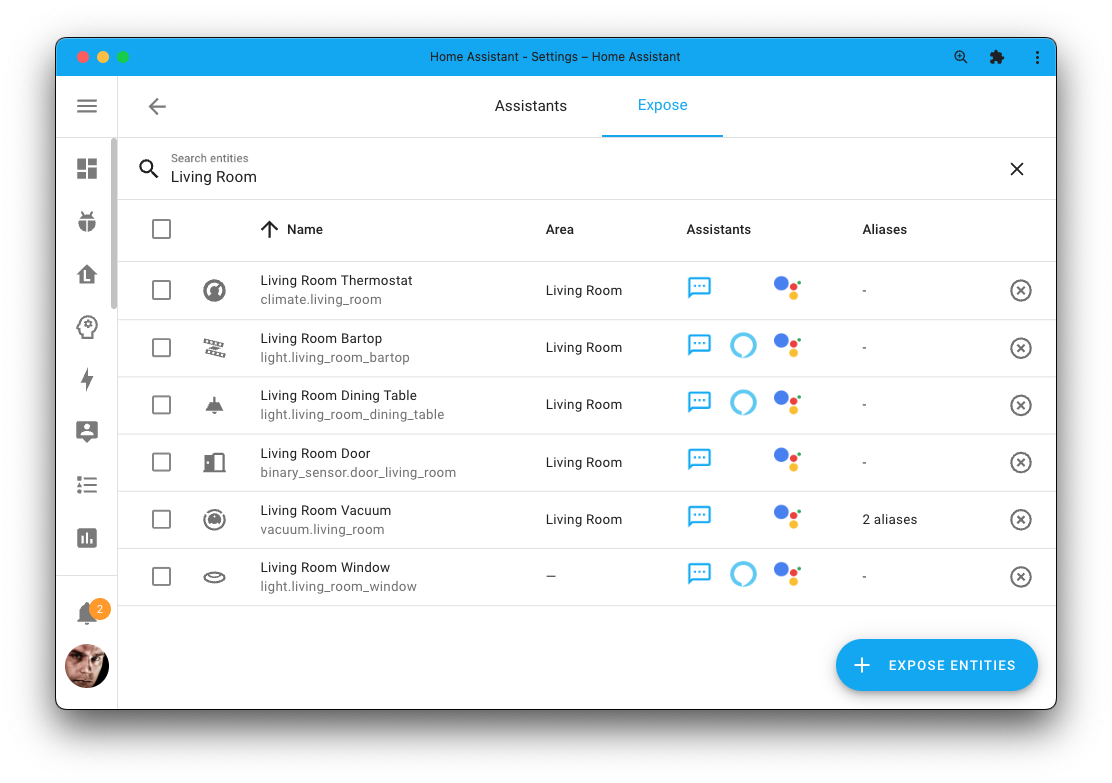
It gives an 概述 of what 实体 you have exposed to your voice assistants and easily remove or add new ones. Clicking on an 实体 in this screen will bring up the voice assistant setting for that 实体, allowing you to turn on/off the 实体's exposure to a specific voice assistant and manage the 实体's aliases.
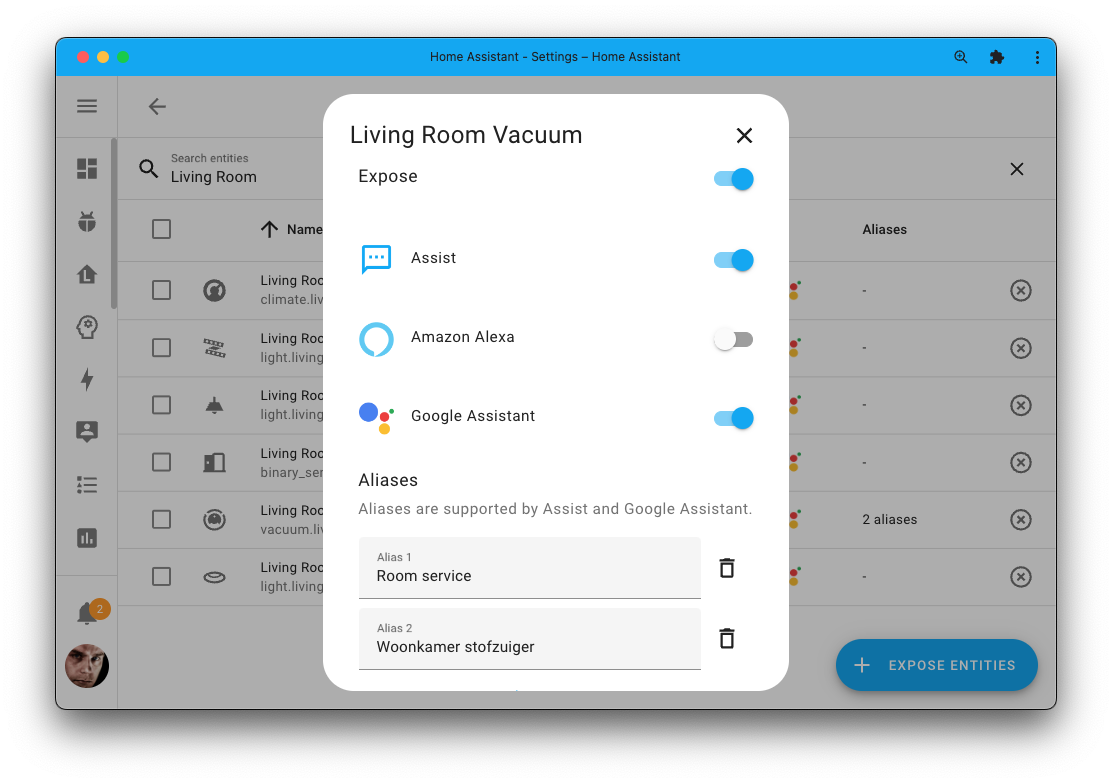
This currently supports our Assist, and Amazon Alexa and Google Assistant via Home Assistant Cloud.
改进后的实体设置
Some nice tweaks have been made to the 实体 设置 dialog, making it easier to use and look cleaner.
The 实体 设置 dialog used to have an expandable advanced section, which you could expand to access features like showing/hiding/disabling 实体, changing the area, etc.
The advanced section has been removed, and all its features have been reorganized. So, no features were lost while providing a much nicer interface.
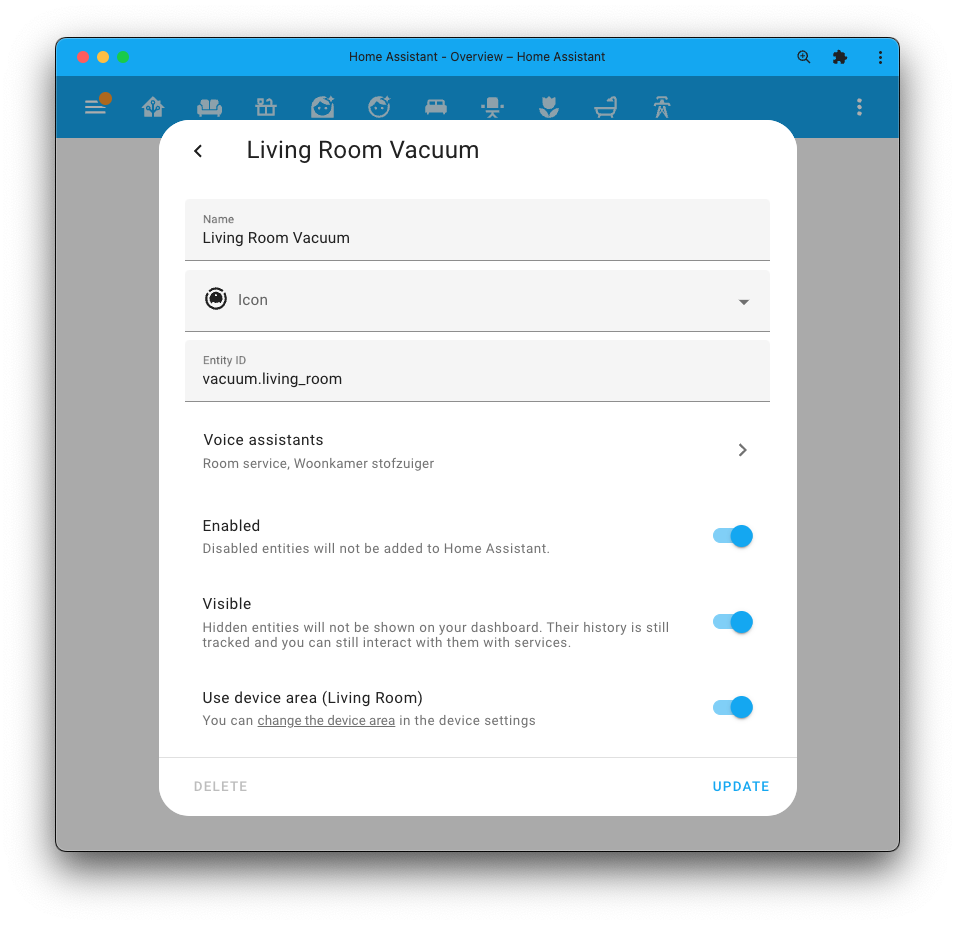
And, since this is the year of the voice, you may notice the "Voice assistants" option in the above screenshot, which will bring up:
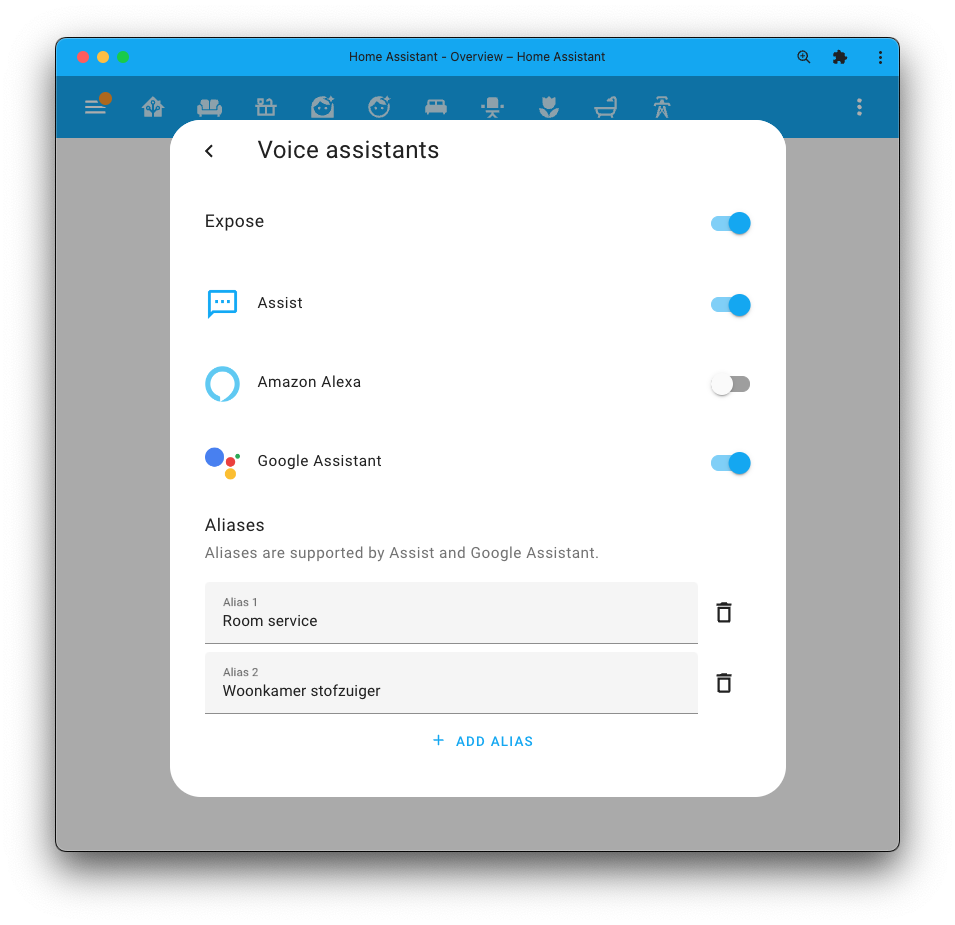
This allows you to quickly change the voice assistants the 实体 is exposed to, including its aliases, without having to navigate back to the voice assistants 面板 in the main 设置 screen.
配置 Home Assistant Yellow 的 LED
The enclosure of our amazing Home Assistant Yellow allows you to look at the beautiful board and parts inside of it.
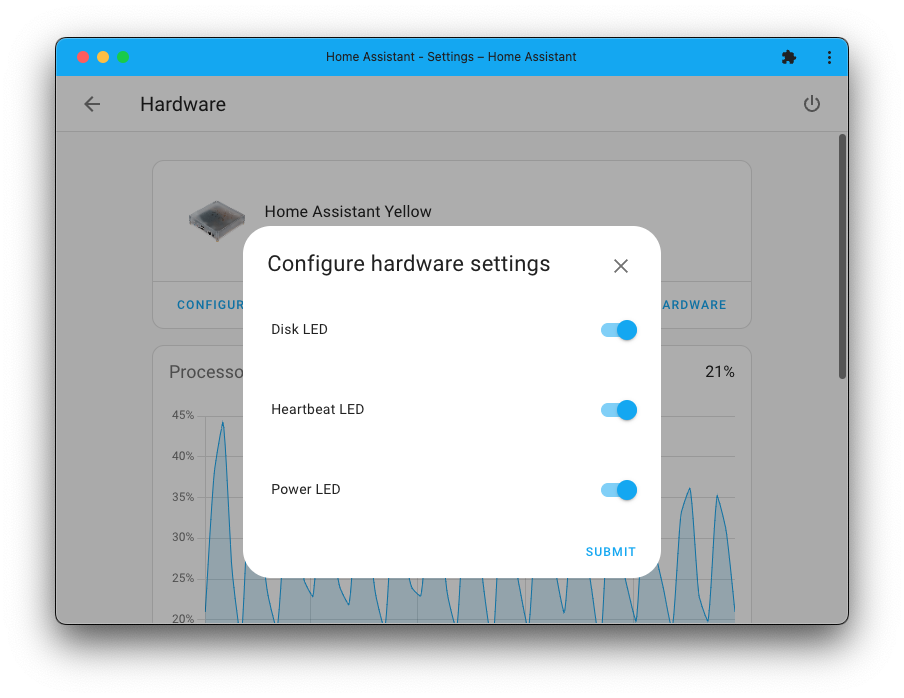
However, the LEDs on the board might 灯光 up your environment when it is dark in an unwanted way. For example, when you sleep in the same room as your Home Assistant Yellow is in.
As of this 发布, you can 配置 (打开/off) the disk, heartbeat, and power LEDs of your Home Assistant Yellow by using the 配置 button on the 设置 > Hardware page.
Webhook 触发器选项
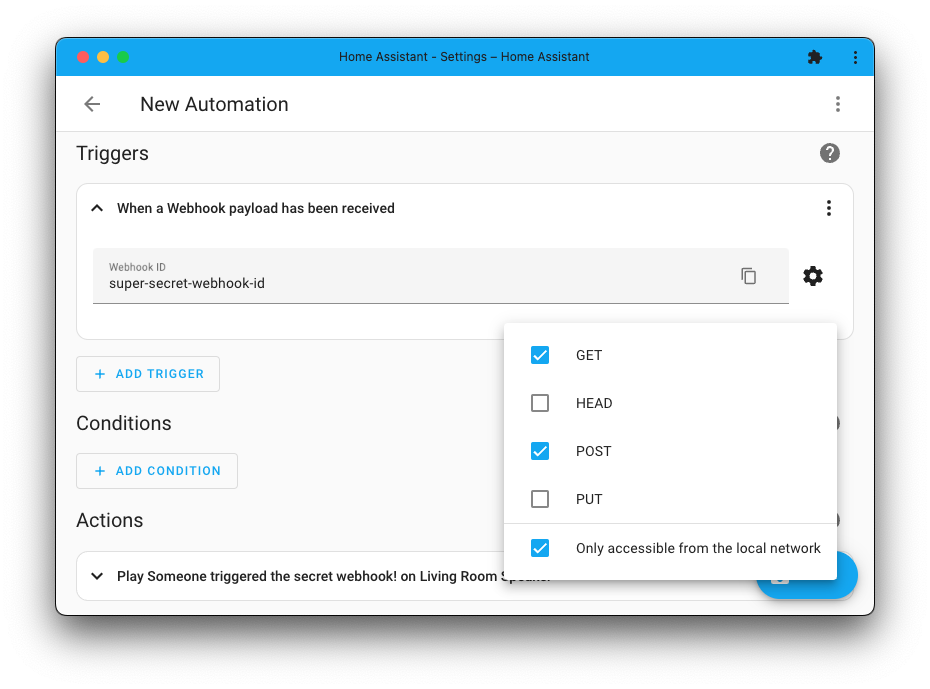
Webhooks have been extended this 发布. We now have support for webhooks
that use the GET HTTP method!
But that is not all. Thanks to @esev, we also got some new security features for our webhook 触发器. You can now set which HTTP methods your webhook 触发器 work with and the ability to limit webhooks to only work on your local network.
全新的 Assist 流水线与语言选择器
If you are building 自动化 or 脚本 Blueprints, you can now leverage two new UI selectors for use with your Blueprints: an Assist pipeline selector and a language selector.
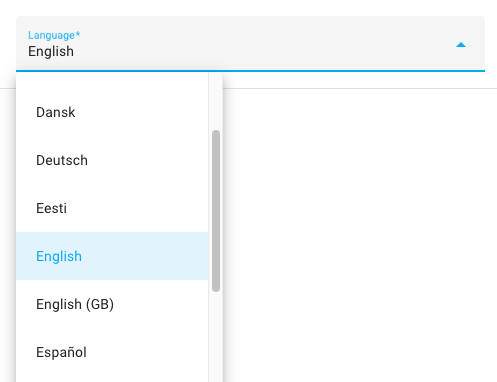 The language selector let's a user choose from a list of languages.
You could, for example, leverage this in a 通知 Blueprint to allow setting a different language on a text-to-speech 通知.
More information can be found in our selectors 文档.
其他值得注意的变化
There is much more juice in this 发布; here are some of the other noteworthy changes this 发布:
- Home Assistant Operating System v10 has been released! The ODROID M-1 is now supported, improved data disk support and memory management. Bug fixes and reliability improvements for 蓝牙 and Thread.
- Matter now has support for 遮盖, thanks @hidaris!
- The process of making backups is now faster 🚀, thanks @bdraco!
- @bdraco also gave the ONVIF 集成 some love, which should improve the stability of the 集成. Nice!
- You can now set up multiple instances of the OpenAI Conversation 集成 with, for example, different prompts. Thanks, @balloob!
- @rubenbe added direction support to MQTT 风扇! Nice!
- BTHome added support for button and dimmer events. This means it supports the brand new Shelly BLU Button1! Thanks, @Ernst79!
- The Supervisor can now create repair issues for some of the issues it detected on your system. Awesome @mdegat01!
- @mib1185 added a 服务 to allow sorting of the Shopping list. Thanks!
- @depoll added an 属性 to the Person 实体 that list the 设备 trackers for this person. Very useful for templates! Thanks!
- The NextDNS 集成 added a whole bunch of new parental control 开关, thanks @bieniu!
- Synology DSM can now browse your Synology Photos in the media browser. Cool addition, @lodesmets!
- Simplepush now supports attachments, thanks to @tymm!
- Some Z-Wave 通知 传感器 won't clear to idle automatically. Now you can use the new 通知 idle buttons to idle them manually!
New 集成
We welcome the following new 集成 in this 发布:
- Android TV Remote, added by @tronikos
Launch apps and control your Android TV 设备. - RAPT 蓝牙, added by @sairon
Integrates RAPT Pill hydrometers into Home Assistant. - Voice over IP, added by @synesthesiam
Talk to Assist using an analog phone and a VoIP adapter. - Wyoming, added by @synesthesiam
Connect to voice 服务 supporting the Wyoming protocol. - Roborock, added by @Lash-L
Control your RoboRock 吸尘器 maintaining Roborock app support. - Anova, added by @Lash-L
Control Anova sous vides with Wi-Fi capabilities.
This 发布 also has a new virtual 集成. Virtual 集成 are stubs that are handled by other (existing) 集成 to help with findability. This one is new:
- Monessen provided by Intellifire, added by @jeeftor
现已可通过 UI 设置的集成
The following 集成 are now available via the Home Assistant UI:
- Brottsplatskartan, done by @gjohansson-ST
- qBittorrent, done by @chrisx8
- Snapcast, done by @luar123
- Workday, done by @gjohansson-ST
发布 2023.5.1 - May 4
- Fix onvif 设置 when time set 服务 is not functional (@bdraco - #92447) (onvif docs)
- Fix onvif 摄像头 with invalid encodings in 设备 info (@bdraco - #92450) (onvif docs)
- Bump
aionotionto 2023.05.0 (@bachya - #92451) (notion docs) - Fix lifx 灯光 strips when color zones are not initially populated (@bdraco - #92487) (lifx docs)
- Bump 蓝牙-auto-recovery 1.1.2 (@bdraco - #92495) (蓝牙 docs)
- Force migration of cloud 设置 to exposed_entities (@emontnemery - #92499) (cloud docs)
- 更新 前端 to 20230503.2 (@bramkragten - #92508) (前端 docs)
发布 2023.5.2 - May 5
- Fix transmission 错误 handling (@DDanii - #91548) (transmission docs)
- Fix power 传感器 state_class in Netatmo 集成 (@hex7c0 - #92468) (netatmo docs)
- Fix for SIA Code not being handled well (@eavanvalkenburg - #92469) (sia docs)
- Fix 场景 服务 examples (@karwosts - #92501) (场景 docs)
- Fix blocking I/O in the event loop when starting ONVIF (@bdraco - #92518) (onvif docs)
- Improve cloud migration (@emontnemery - #92520) (cloud docs)
- Bump aioesphomeapi to 13.7.3 to fix disconnecting while handshake is in progress (@bdraco - #92537) (esphome docs)
- Handle invalid ZHA cluster handlers (@puddly - #92543) (zha docs)
- Allow duplicate 状态 updates when force_update is set on an esphome 传感器 (@bdraco - #92553) (esphome docs)
- Bump elkm1-lib to 2.2.2 (@bdraco - #92560) (elkm1 docs)
- Re-run expose 实体 migration if first time failed (@balloob - #92564) (cloud docs)
- Fix hassio get_os_info retry (@epenet - #92569) (hassio docs)
- Bump hatasmota to 0.6.5 (@emontnemery - #92585) (tasmota docs)
- Improve reliability of ONVIF subscription renewals (@bdraco - #92551) (onvif docs)
- Lower scan interval for OpenSky (@joostlek - #92593) (opensky docs)
- 更新 前端 to 20230503.3 (@bramkragten - #92617) (前端 docs)
- Fix missing ONVIF events when switching from PullPoint to webhooks (@bdraco - #92627) (onvif docs)
- Add support for visitor detections to onvif (@bdraco - #92350) (onvif docs)
- Fix duplicate ONVIF 传感器 (@bdraco - #92629) (onvif docs)
发布 2023.5.3 - May 14
- Roborock continue on failed MQTT disconnect (@Lash-L - #92502) (roborock docs)
- Bump bimmer_connected to 0.13.3 (@rikroe - #92648) (bmw_connected_drive docs)
- Fix parallel_updates being acquired too late for 实体 executor jobs (@bdraco - #92681)
- Always request at least one zone for multi-zone LIFX 设备 (@bdraco - #92683) (lifx docs)
- Fix onvif reauth when 设备 returns a http 401/403 错误 (@bdraco - #92690) (onvif docs)
- Bump
aionotionto 2023.05.1 (@bachya - #92697) (notion docs) - Bump pyoverkiz to 1.7.8 (@iMicknl - #92702) (overkiz docs)
- Bump aiowebostv to 0.3.3 to fix Python 3.11 support (@thecode - #92736) (webostv docs)
- 更新 deprecated functions in SIA (@eavanvalkenburg - #92737) (sia docs)
- Bump aioesphomeapi to 3.7.4 to fix proxied BLE connections not retrying right away on 错误 (@bdraco - #92741) (esphome docs)
- Increase timeout to 30 seconds for Mazda 集成 (@bdr99 - #92744) (mazda docs)
- Fix zwave_js 服务 example data (@karwosts - #92748) (zwave_js docs)
- Bump asyncsleepiq to 1.3.5 (@kbickar - #92759) (sleepiq docs)
- 更新 aioairzone to v0.5.3 (@Noltari - #92780) (airzone docs)
- Fix race in Alexa async_enable_proactive_mode (@emontnemery - #92785) (alexa docs)
- Fix Airzone Auto operation mode (@Noltari - #92796) (airzone docs)
- 更新 aioairzone to v0.5.5 (@Noltari - #92812) (airzone docs)
- Don't try to 恢复 unavailable nor unknown 状态 (@dgomes - #92825) ([集成 docs])
- Bump sonos-websocket to 0.1.1 (@jjlawren - #92834) (sonos docs)
- Allow "no" to match "nb" in language util (@synesthesiam - #92862)
- Bump ZHA dependencies (@puddly - #92870) (zha docs)
- Add ONVIF 服务 to diagnostics (@bdraco - #92878) (onvif docs)
- Bump UPB 集成 library to 0.5.4 (@gwww - #92879) (upb docs)
- Bump 蓝牙-auto-recovery to 1.2.0 (@bdraco - #92893) (蓝牙 docs)
- Fix already_configured string in workday (@gjohansson-ST - #92901) (workday docs)
- Fix uptime 传感器 deviation detection in Fritz!Tools (@mib1185 - #92907) (fritz docs)
- Bump volvooncall to 0.10.3 to fix 传感器 type 错误 (@decompil3d - #92913) (volvooncall docs)
- Bump eternalegypt to 0.0.16 (@tkdrob - #92919) (netgear_lte docs)
- Bump python-vehicle to 1.0.1 (@joostlek - #92933) (rdw docs)
- Fix remove of 设备 when surveillance station is not used in Synology DSM (@mib1185 - #92957) (synology_dsm docs)
- Bump reolink-aio to 0.5.15 (@starkillerOG - #92979) (reolink docs)
- Bump bellows to 0.35.5 to fix Aqara Zigbee connectivity issue (@puddly - #92999) (zha docs)
- Disable cleanup_closed for aiohttp.TCPConnector with cpython 3.11.1+ (@bdraco - #93013)
- Fix sslv2/sslv3 with unverified connections (@bdraco - #93037)
- Fix a series of bugs due to Notion API changes (@bachya - #93039) (notion docs)
发布 2023.5.4 - May 23
- Fix weather handling in zamg (@killer0071234 - #85635) (zamg docs)
- Fix onvif 摄像头 that cannot parse relative time (@bdraco - #92711) (onvif docs) (dependency)
- 更新 solax 状态 class for 传感器 with no units (@MichaelMraka - #92914) (solax docs)
- Fix NWS 错误 with no observation (@MatthewFlamm - #92997) (nws docs)
- Increase timeout to 30 seconds for homeassistant_alerts 集成 (@N3rdix - #93089) (homeassistant_alerts docs)
- Fix ONVIF 摄像头 that change the xaddr for the pull point 服务 (@bdraco - #93104) (onvif docs)
- Bump pyunifiprotect to 4.9.0 (@bdraco - #93106) (unifiprotect docs) (dependency)
- Fix last imap message is not reset on empty search (@jbouwh - #93119) (imap docs)
- Bump
accuweatherto 版本 0.5.2 (@bieniu - #93130) (accuweather docs) (dependency) - Better handling of source 传感器 unavailability in Riemman 集成 (@dgomes - #93137) ([集成 docs])
- Bump
regenmaschineto 2023.05.1 (@bachya - #93139) (rainmachine docs) (dependency) - Bump pyatv to 0.11.0 (@bdraco - #93172) (apple_tv docs)
- Fix china login for bmw_connected_drive (@rikroe - #93180) (bmw_connected_drive docs)
- Add 风扇 and Dry HVAC modes to Advantage Air MyTemp preset (@Bre77 - #93189) (advantage_air docs)
- Disconnect yale access 门锁 at the stop event (@bdraco - #93192) (august docs) (yalexs_ble docs) (dependency)
- Add support for Yale Home brand to august (@bdraco - #93214) (august docs)
- Bump async-upnp-client to 0.33.2 (@StevenLooman - #93329) (dependency)
- Bump
aionotionto 2023.05.5 (@bachya - #93334) (notion docs) - Bump zwave-js-server-python to 0.48.1 (@raman325 - #93342) (zwave_js docs) (dependency)
- Bump glances_api to 0.4.2 (@freeDom- - #93352) (glances docs)
- Fix august 配置 url with Yale Home brand (@bdraco - #93361) (august docs) (dependency)
- Bump httpx to 0.24.1 (@epenet - #93396) (dependency)
- Fix non threadsafe call xiaomi_aqara (@bdraco - #93405) (xiaomi_aqara docs)
- Bump Matter server library to 3.4.1 and address changes (@marcelveldt - #93411) (Matter docs) (dependency)
- Fix race in tracking pending writes in recorder (@bdraco - #93414) (recorder docs)
需要帮助?加入社区!
Home Assistant has a great community of users who are all more than willing to help each other out. So, join us!
Our very active Discord chat server is an excellent place to be at, and don't forget to join our amazing forums.
Found a bug or issue? Please report it in our issue tracker, to get it fixed! Or, check our help page for guidance for more places you can go.
Are you more into email? Sign-up for our Building the Open Home Newsletter to get the latest news about features, things happening in our community and other news about building an Open Home; straight into your inbox.
不向后兼容的变更
The ozone 传感器 and the ozone 状态 属性 of the weather 实体 showed
incorrect values and are being removed. If you use these values in your
自动化 or 脚本, you need to 更新 them.
The "Android TV" 集成 has been renamed to "Android 调试 Bridge".
This rename is because that is what it actually controlled/provided. With the addition of the Android TV Remote 集成 in this 发布, we wanted to reduce possible confusion in the future.
All YAML 配置 options for the history 集成 have been removed as they were no longer used by the 前端.
The min/max target humidities for (de)加湿器 设备 exposed over HomeKit has changed. The HomeKit UI will now show the real relative humidity. When the slider in HomeKit goes above or below the max/min set humidity, it will be set back to the max/min allowed humidity.
Default HomeKit to listen on all interfaces to match Home Assistant behavior.
To limit HomeKit to specific network interfaces, specify an address
in configuration.yaml.
The use of imap_content event could break for users that want to parse data
from larger email messages from the truncated part. Only the first 2048
bytes of the message body (2 KiB) will be available.
The silence option for DynamicShutter has been removed because it caused the 遮盖 实体 to be non-functional if it did not support silence. This functionality will be reintroduced in a future 发布.
For Reolink doorbells, the "Status LED" 灯光 实体 is replaced by a
"Status LED" select 实体. The 开关 off 状态 corresponds to the select
Auto, and the 开关 on 状态 corresponds to the select
Auto & always on at night. An additional Stay off 状态 is now available.
(@starkillerOG - #90469) (文档)
- Muted groups with stream playing will have 状态
idleinstead ofplaying. - Connected clients will not have 状态
onanymore but use the same 状态 as groups:idleandplaying. - Disconnected clients have 状态
standbyinstead ofoffbecause the Snapcast server still accepts commands.
The unit conversion for all memory, storage, and network utilization-related 传感器 was corrected from binary (1024) to decimal (1000) base to be in line with the used measurement units (eq. MB = 1.000.000 bytes).
You may need to 更新 the historically recorded units for these 传感器 via the statistics page under 开发者工具.
The ensure_ascii argument for to_json in Jinja templates now defaults to
False, allowing us to use a faster JSON encoder by default.
This should not be an issue for most, as JSON parsers broadly accept Unicode
input. If you still need to encode Unicode characters inside JSON strings,
set ensure_ascii to True explicitly to 恢复 the old behavior.
UniFi 集成 no longer provides both hostname and host_name 属性
for a client tracker 实体. Only host_name will be provided as an 属性.
The previous deprecated set_doorbell_message 服务 has been removed. Use
the text 实体 for the UniFi Protect LCD screen instead.
(@AngellusMortis - #91523) (文档)
The previously deprecated YAML 配置 of the Universal 设备 ISY/IoX 集成 has been removed.
Universal 设备 ISY/IoX is now configured via the UI. Any existing YAML 配置 has been imported in previous releases and can now be safely removed from your YAML 配置 files.
The built-in percentage unit % is now used for relative humidity and absolute
humidity instead of the custom units %RH and %AH, respectively.
The following custom ISY994 服务 have been removed:
reloadcleanup_entitiessystem_queryset_ramp_rateset_on_levelrun_network_resourceset_variable
These 服务 had been previously deprecated in favor of built-in 服务
and number, select, and button 实体. Please 更新 your 自动化
and 仪表盘 to use the new 实体 and/or built-in 服务 if you have
not already.
Dusk/Dawn nodes on Insteon Motion 传感器 now have their 状态 inverted to correctly show "灯光 detected" during daylight and "No 灯光" when the dusk 传感器 is active.
This is reversed from previous behavior. If you rely on this 传感器 in your 自动化, they must be updated.
Two new Webhook 触发器 options have been added that limit how a webhook can
触发器 an 自动化. A new allowed_methods option can be used to control
which HTTP request methods can activate the 触发器 (GET, HEAD, POST, and
PUT). And the local_only option is used to allow 设备 outside your local
network to activate the 触发器.
Previously all webhook 触发器 could be activated by HEAD, POST, and PUT
methods from any 设备 (local or on the internet). With the new options, only
POST and PUT are enabled by default.
In Home Assistant 核心 2023.7, any webhook 触发器 that does not set local_only
to false can only be activated by 设备 on the same network as Home Assistant.
Click the gear/cog icon beside the Webhook ID to 更新 your webhook 触发器. Then select an appropriate value for Only accessible from the local network. It is necessary to deselect the option for the Save button to appear. Then reselect the option if it should be enabled. This will make the repair 警告 go away.
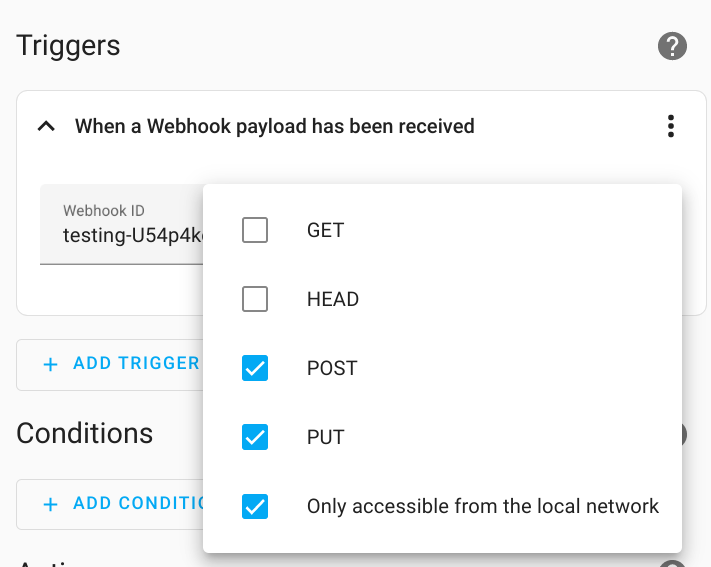
See the webhook 触发器 文档 for a description of the new options. And please review the new Webhook Security section for best practices when using webhook 触发器.
With this 发布, you will need to 更新 your zwave-js-server instance.
You must use zwave-js-server 1.28.0 or greater (schema 28).
- If you use the
Z-Wave JSadd-on, you need at least 版本0.1.79. - If you use the
Z-Wave JS UIadd-on, you need at least 版本1.11.2. - If you use the
Z-Wave JS UIDocker 容器, you need at least 版本8.14.2. - If you run your own Docker 容器 or some other 安装 method,
you will need to 更新 your
zwave-js-serverinstance to at least1.28.0.
If you are a custom 集成 developer and want to learn about breaking changes and new features available for your 集成: Be sure to follow our developer 博客. The following are the most notable for this 发布:
告别以下集成
The following 集成 are also no longer available as of this 发布:
- Coronavirus (COVID-19) has been removed. The data is no longer provided by the source provider. (@emontnemery - #90934)
- Xbox Live was previously deprecated and has now been removed. The Xbox 集成 is still available. (@MartinHjelmare - #90592)
所有变更
Of course, there is a lot more in this 发布. You can find a list of all changes made here: Full changelog for Home Assistant 核心 2023.5