

2023.4:自定义模板宏,以及更多全新的实体对话框!
Home Assistant 核心 2023.4 来了!🎉
春天(以及发布)已经到来!而这个复活节周末,我们也准备了一些很棒的新功能让你尽情体验!🐰
我很高兴看到这次发布又加入了更多全新的实体对话框。它们看起来很漂亮,而且在移动应用中的使用体验也格外出色。更棒的是,Tile 卡片还带来了新功能!不过……
天啊,我真的太喜欢这次发布中新加入的自定义 Jinja2 模板宏能力了,简直让人震撼!最棒的一点是,它们还非常容易分享。我已经等不及想看看大家会玩出什么新花样了!
复活节快乐!🐣 也祝你享受这次发布!
../Frenck
- 报警、遮盖与风扇实体的新对话框
- Tile 卡片的新功能
- 模板宏
- 更多新的模板功能
- 数据库可扩展性
- 新的选择器能力
- 实体翻译
- 其他值得注意的变化
- 新集成
- 现在可通过 UI 设置的集成
- 发布 2023.4.1 - April 6
- 发布 2023.4.2 - April 8
- 发布 2023.4.3 - April 12
- 发布 2023.4.4 - April 13
- 发布 2023.4.5 - April 17
- 发布 2023.4.6 - April 21
- Need help? Join the community!
- Backward-incompatible changes
- Farewell to the following
- All changes
Don't forget to join our 发布 party live stream on YouTube 5 April 2023, at 12:00 PDT / 21:00 CEST!
报警、遮盖与风扇实体的新对话框
上一期发布 带来了灯光、开关和警笛的全新实体对话框;看起来 大家都非常喜欢!
所以,这次发布中 @piitaya 继续推进了这项工作, 将 @matthiasdebaat 的设计落地,把同样清爽整洁的新 UI 带到了报警控制面板、遮盖和风扇的实体对话框中!
遮盖
First up, 遮盖! For 遮盖, there are many variants, doors, windows, curtains, blinds, shutters, etc. Not just that, some can be controlled by how far they are open/closed, and others can only be opened and closed.
This is no problem for the new dialogs. They will adjust to the capabilities your 遮盖 has:
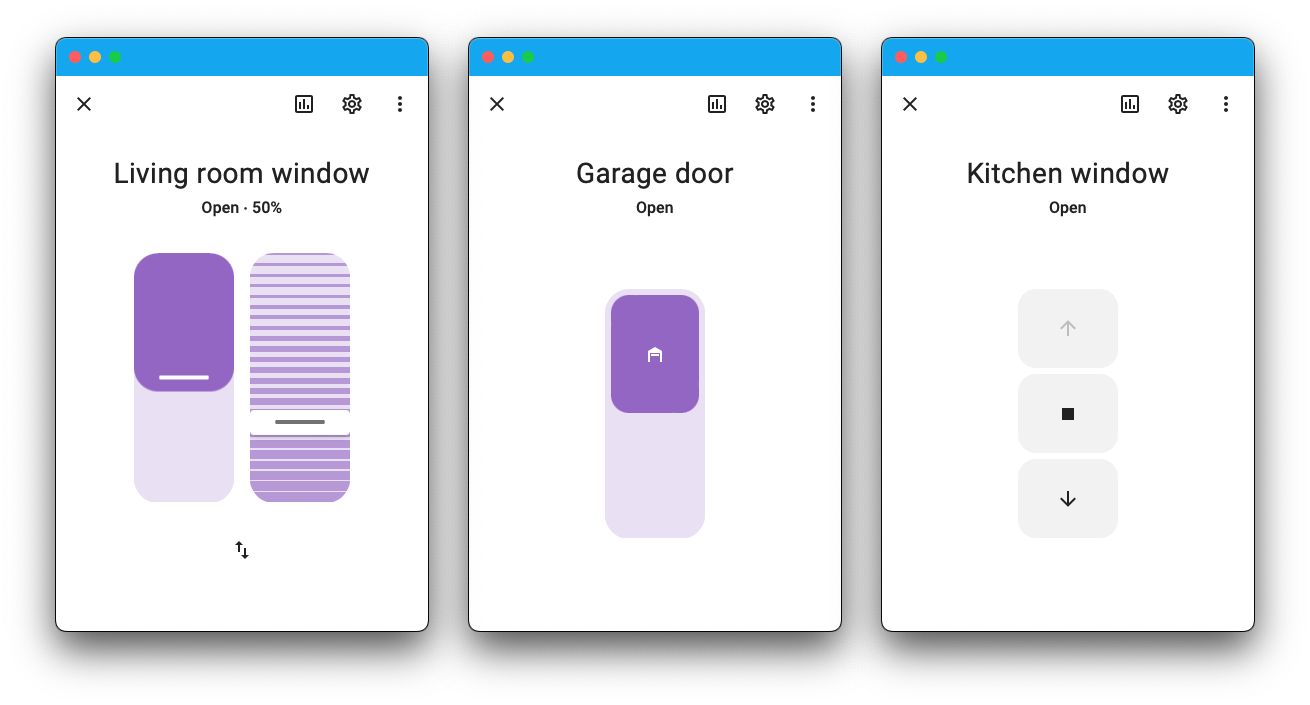
The one on the left is interesting, as the first slider controls how far down the blinds are. Notice how it slides in from the top! The slider directly next to it controls the tilt. Nice!
风扇
Next up, the 风扇 实体. The UI experience shown in the dialog will automatically adjust to the capabilities of the 风扇 you are controlling, just like with 遮盖.
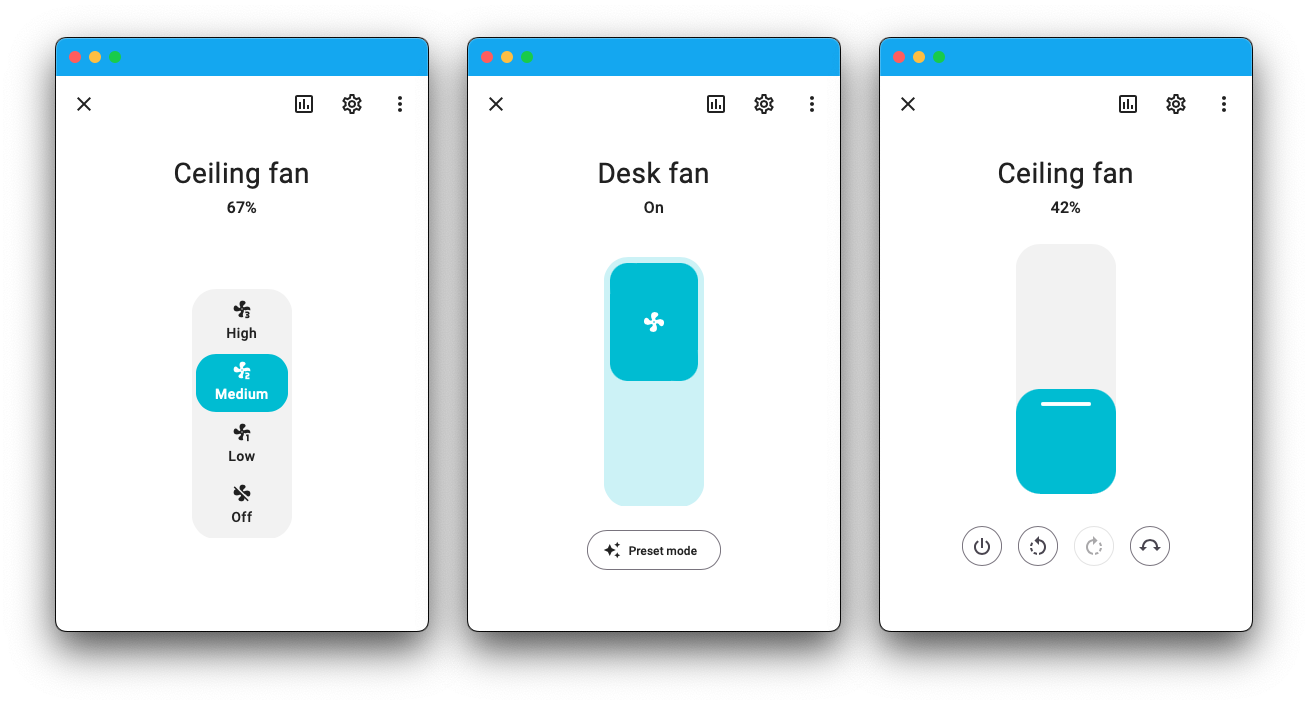
Depending on the number of speed steps your 风扇 has, the dialog will automatically adjust the UI. In case it has four speed steps or less, it will show the speed buttons as on the left screenshot. Otherwise, it will use the slider shown on the most right screenshot.
报警控制面板
Lastly, the 报警 control 面板 实体. They are a bit different compared to others as, more often, these require one to input a code to arm or disarm the 报警.
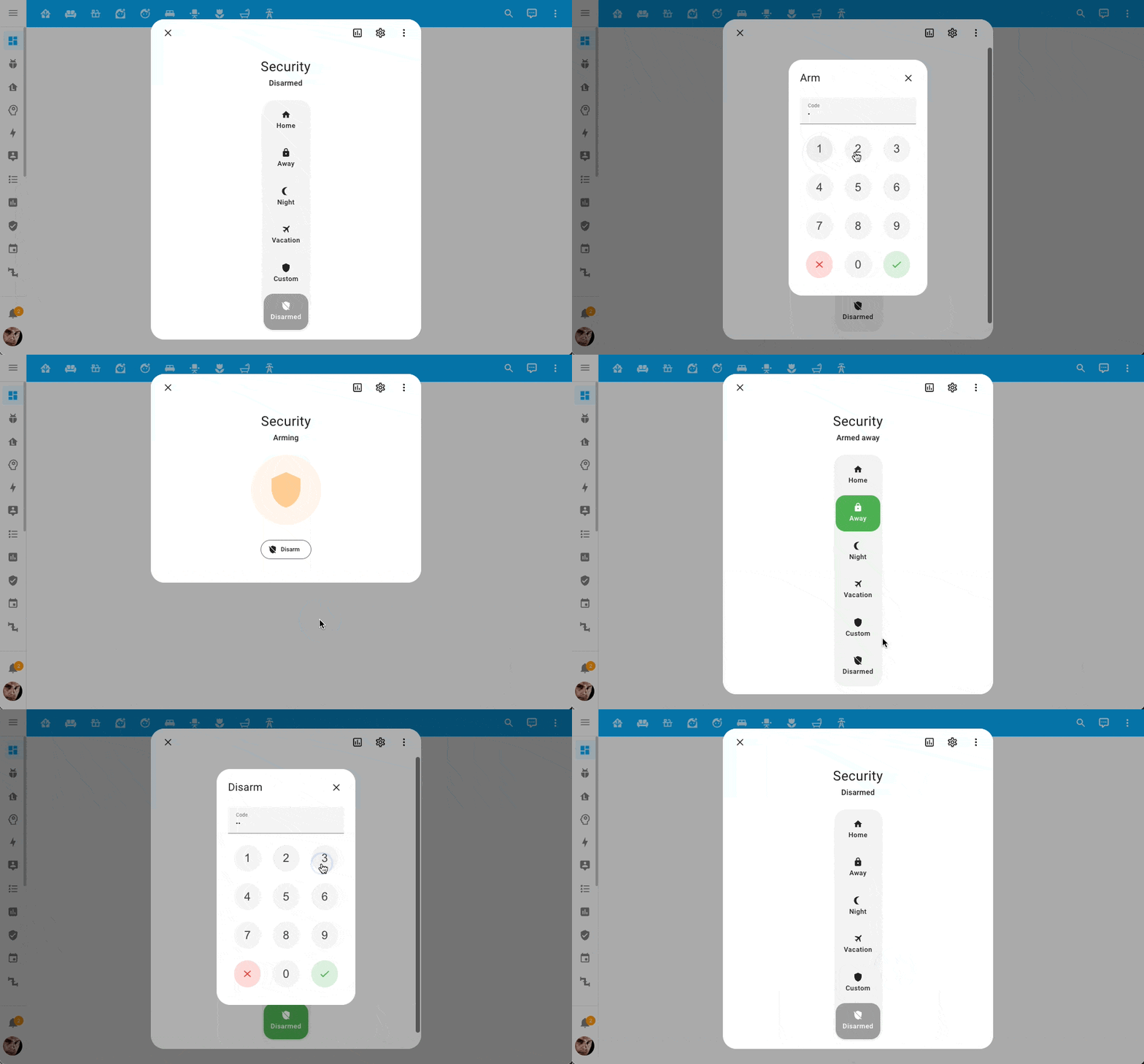 This is how arming and disarming an 报警 now looks like.
When needed, the pin-pad will pop up! A nice finishing touch is the neat little animation is shown during the process of arming and disarming the 报警.
Tile 卡片的新功能
The Tile 卡片 has two new features: 风扇 speed & 报警 mode.
Both look and feel similar to the new 实体 dialogs from above, making the look and feel, nice and consistent. Take a look; aren't they beautiful?
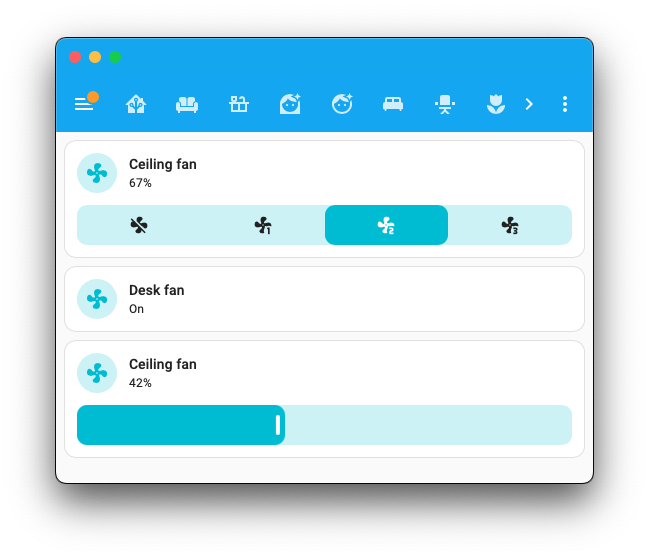
Like the new 风扇 实体 dialog, the 风扇 speed feature will show buttons if there are 4 speeds or less; in all other cases, it will use the slider. If the 风扇 can only be turned on/off, like the 风扇 in the middle in the above screenshot, the regular tile can be used.
The 报警 mode feature allows quickly setting your 报警 in a different 状态. The feature provides the option to select which modes are shown as buttons in the 卡片.
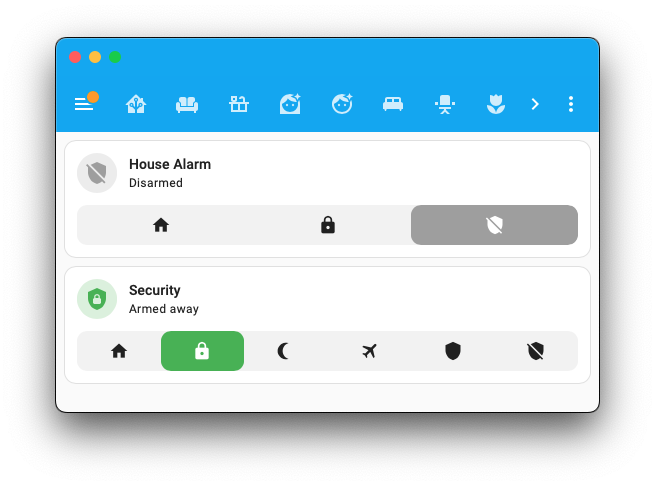
Just like with the new 实体 dialog, the pin pad will pop up once a code entry is needed and even the nice little animation is there. 🤩
模板宏
If you are an advanced Home Assistant user, you most likely will be familiar with Home Assistant's templating language: Jinja2. It allows you to do amazing powerful things in your templates. However, if you have lots of them, you often end up repeating similar logic everywhere!
@depoll to the rescue! He found a way to add the ability to centrally define your own Jinja2 macros and import and use them anywhere in Home Assistant! 🤯
To support this, Home Assistant now has a new custom_templates folder, where
you can store your macros. For example, assume this file
/config/custom_templates/tools.jinja:
This macro answer_question will ask and answer a question based on a given
实体 ID. You can now import and use this macro anywhere in Home Assistant.
For example:
Which will output:
An fantastic contribution! Thank you, @depoll!
更多新的模板功能
As if the reusability of your macros wasn't good enough already, there is much more templating goodness in this 发布!
Thanks, @depoll, @ehendrix23, @petro31, and @rokam, for these amazing additions down below! ❤️
Adjusted behavior of relative_time and today_at
@Petro31 adjust the behavior for template 实体 using the relative_time
and today_at template functions to 更新 their 状态 once a minute. Nice!
New is_hidden_entity function
The brand new is_hidden_entity function was added by @depoll, which can tell
if a given 实体 has been marked "hidden" or not. This function also works
as a test. Cool!
This example returns a list of all 实体 in the kitchen area that are not hidden.
New areas function
Talking about areas, @rokam added an areas function, which returns a list
of all areas you have!
A simplistic example:
Added break and continue for use in for loops
@depoll added support for break and continue in for loops, which allows
short-circuiting those loops, allowing you to make them more efficient.
New has_value function
Lastly, @ehendrix23 added a requested template function from the Month of
"What the Heck?!": has_value. The has_value function can also be used as
test and can filter out 实体 currently in an unavailable or unknown
状态.
You could use this conditionally, like so:
Or, maybe list all 实体 from the living room that currently have no 状态 value:
数据库可扩展性
As your smart home grows and you add more 设备, this means more data to keep track of. This 发布 includes significant advancements to the recorder database design to help Home Assistant scale.
This 版本 has a new database format that reduces the space needed to store history for your 设备. This change comes with a few benefits:
- Smaller (deduplication), less disk usage
- Reduced disk IO (SD-卡片 lifetime improvements)
- Reduced CPU-usage 📉
- Quicker startup 🏎️
- Faster history graphs and logbook
- Reduced latency in the entire system which means less waiting from the time you hit a button until an 动作 completes 🚀
- Home Assistant now keeps history when renaming 实体 🤘
If you are accessing the database directly, check out the Data Science Portal and the SQL integrations for updated example queries.
It may take a while to complete background data migration, depending on the size of your stored data. To ensure Home Assistant keeps history when renaming an 实体, wait 24 hours after upgrading before renaming.
新的选择器能力
Selectors are user inputs for the user interface that drive things like Blueprints. A new selector for use in Blueprints has been added by @emontnemery and @piitaya: The constant selector.
The constant selector provides an optional input, which returns a fixed value (the constant) when enabled, otherwise doesn't provide any value at all.
Example use in a Blueprint:
Which results in the following:
 When checked, the selector returns the set value.
Also improved are the 设备 and 实体 filters on the Area, 实体, 设备, and Target selectors. Previously, you could filter with a single set of 条件; now, you can pass in a list of filters.
If you are building Blueprints, this can be really helpful if a user should be able to select one of multiple different 设备.
An example, this selector allows you to select the battery 传感器 of either a Philips Hue RWL020 (US) or RWL021 (EU) remote in your Blueprint.
实体翻译
Over the past releases, we’ve been slowly extending translation support in more places in Home Assistant. This 发布 completes support for translating 实体!
This includes the 实体' names, their 属性, and translations of the 属性 values. These translations will be visible on your 仪表盘, dialogs, 自动化 editors, etc. Pretty much all places displaying them.
集成 have to explicitly add support for these. Quite a few 集成 have done so in this 发布, but we expect many to follow in the upcoming releases.
其他值得注意的变化
There are much more easter bunnies in this 发布; here are some of the other noteworthy changes this 发布:
- @ArturoGuerra added support for 门锁 to Matter! Nice!
- The new 灯光 实体 dialog (introduced last 发布) now better supports white mode. Thanks, @piitaya!
- @emontnemery added energy storage and volume storage 设备 classes; these will allow differentiating between, for example, consumed energy versus stored energy in a battery.
- @starkillerOG is rocking the Reolink 集成. It now provides button, 开关, siren, select, number, and 灯光 实体 for all kinds of things you Reolink 摄像头 and doorbells can do. Awesome!
- The Universal Media Player now supports browsing media! Thanks, @Drafteed!
- The Supervisor 集成 now provides 传感器 containing the Home Assistant 核心 and Supervisor's stats. Thanks, @ludeeus!
- The Spotify 集成 now supports podcasts! Nice @BTMorton!
- LIVISI Smart Home now supports 温控 设备, 开关 (PSSO, ISS, and ISS2), and window 传感器 (WDS). Thanks @StefanIacobLivisi & @planbnet!
- ESPHome now supports pairing 蓝牙 设备. Nice work @bdraco & @jagheterfredrik!
- @MarkGodwin extended the TP-Link Omada 集成 to support 更新 实体; awesome!
- All
sun.sun实体 属性 are now also available as 传感器, much easier to use, thanks @gjohansson-ST! - 遮盖 with the door 设备 class, now appear as actual doors in HomeKit, nice @Dexwell!
- @loongyh did something similar for Google Assistant. 遮盖 with the window 设备 class now show up as actual windows. Thanks!
- The SQL 集成 now supports 设置 设备 and 状态 classes, thanks @gjohansson-ST!
- @teharris1 added support for the new Insteon i3 设备, cool!
新集成
This 发布 has no new 集成, but does provide a couple of new virtual 集成. Virtual 集成 are stubs handled by other (existing) 集成 to help with findability. These are new:
- ESERA 1-Wire provided by 1-Wire, added by @jrieger
- HomeSeer works with Z-Wave, added by @b-uwe
- Quadra-Fire provided by IntelliFire, added by @jeeftor
- Vermont Castings provided by IntelliFire, added by @jeeftor
现在可通过 UI 设置的集成
The following 集成 are now available via the Home Assistant UI:
- EDL21, done by @StephanU
- Frontier Silicon, done by @wlcrs
- Nextcloud, done by @mib1185
- Obihai, done by @ejpenney
发布 2023.4.1 - April 6
- Handle Uncaught exceptions in async_update Honeywell (@mkmer - #90746) (honeywell docs)
- Bump fritzconnection to 1.12.0 (@saschaabraham - #90799) (fritz docs) (fritzbox_callmonitor docs)
- Fix issue with Insteon All-Link Database loading (@teharris1 - #90858) (insteon docs)
- Generate a seperate 日志 message per dumped object for profiler.dump_log_objects (@bdraco - #90867) (profiler docs)
- Add constraint for websockets to <11.0 (@bdraco - #90868)
- Add MariaDB deadlock retry wrapper to database timestamp column migrations (@bdraco - #90880) (recorder docs)
- Migrate 实体 unique ids in PI-Hole (@mib1185 - #90883) (pi_hole docs)
- Fix missing 蓝牙 client wrapper in bleak_retry_connector (@bdraco - #90885) (蓝牙 docs)
- Bump ulid-transform 0.6.0 (@bdraco - #90888)
- Guard against invalid ULIDs in contexts while recording events (@bdraco - #90889) (recorder docs)
- Fix entity_id migration query failing with MySQL 8.0.30 (@bdraco - #90895) (recorder docs)
- Bump
simplisafe-pythonto 2023.04.0 (@bachya - #90896) (simplisafe docs) - Bump aiodiscover to 1.4.16 (@bdraco - #90903) (dhcp docs)
- Return empty available programs list if an appliance is off during initial 配置 (@stickpin - #90905) (home_connect docs)
- Handle NoURLAvailableError in Nuki component (@pree - #90927) (nuki docs)
- 更新 前端 to 20230406.1 (@bramkragten - #90951) (前端 docs)
- Fix flaky test in vesync (@epenet - #90921) ([vesync docs])
- Bump
aioambientto 2022.10.0 (@bachya - [#90940]) (ambient_station docs) - Bump reolink-aio to 0.5.10 (@starkillerOG - [#90963]) (reolink docs)
- Avoid writing 状态 to all esphome 实体 at shutdown (@bdraco - #90555) (esphome docs)
- Fix 状态 being cleared on disconnect with deep sleep esphome 设备 (@bdraco - #90925) (esphome docs)
- Coerce previously persisted local calendars to have valid durations (@allenporter - #90970) (local_calendar docs)
- Bump gcal_sync to 4.1.3 (@allenporter - #90968) (google docs)
- Fix 错误 after losing an imap connection (@jbouwh - #90966) (imap docs)
- Fix command_template 传感器 value_template not being used if json_attributes set (@gadgetchnnel - #90603) (command_line docs)
- Fix verisure autolock (@heiparta - #90960) (verisure docs)
发布 2023.4.2 - April 8
- Fix NMBS AttributeError (@PatrickGlesner - #90525) (nmbs docs)
- Bump websockets constraint to 11.0.1+ (@bdraco - #90901) (ambient_station docs) (vallox docs)
- Raise an issue for legacy SQL queries that will cause full table scans (@bdraco - #90971) (sql docs)
- Resume 实体 id post migration after a 重启 (@bdraco - #90973) (recorder docs)
- Bump vallox-websocket-api to 3.2.1 (@bdraco - #90980) (vallox docs)
- Bump
aioambientto 2023.04.0 (@bachya - #90991) (ambient_station docs) - Bump roombapy to 1.6.8 (@joostlek - #91012) (roomba docs)
- Delay utility_meter until HA has started (@dgomes - #91017) (utility_meter docs)
- Make sure upnp-router is also initialized when first seen through an advertisement (@StevenLooman - #91037) (upnp docs)
- Bump ZHA quirks lib (@dmulcahey - #91054) (zha docs)
- Fix Smartthings acceleration 传感器 in ZHA (@dmulcahey - #91056) (zha docs)
- Bump zeroconf to 0.55.0 (@bdraco - #90987) (zeroconf docs)
- Bump zeroconf to 0.56.0 (@bdraco - #91060) (zeroconf docs)
- Make location optional in google calendar create 服务 (@allenporter - #91061) (google docs)
- Bump gcal_sync to 4.1.4 (@allenporter - #91062) (google docs)
- Bump subarulink to 0.7.6 (@G-Two - #91064) (subaru docs)
- Bump env_canada to v0.5.31 (@michaeldavie - #91094) (environment_canada docs)
- Fix context_user_id round trip when calling to_native (@bdraco - #91098) (recorder docs)
- Bump flux_led to 0.28.37 (@bdraco - #91099) (flux_led docs)
- Make the device_tracker more forgiving when passed an empty ip address string (@bdraco - #91101) (device_tracker docs)
发布 2023.4.3 - April 12
- Fix configuring Flo instances (@amattas - #90990) (flo docs)
- Fall back to polling if webhook cannot be registered on Nuki (@pree - #91013) (nuki docs)
- Track availability of source 传感器 in utility meter (@dgomes - #91035) (utility_meter docs)
- Bump aiopyarr to 23.4.0 (@tkdrob - #91110) (sonarr docs) (radarr docs) (lidarr docs)
- Bump env_canada to 0.5.32 (@michaeldavie - #91126) (environment_canada docs)
- Relax calendar event validation to allow existing zero duration events (@allenporter - #91129) (google docs) (calendar docs) (caldav docs)
- Bump ulid-transform to 0.6.3 (@bdraco - #91133)
- Fix false positive in SQL 传感器 full table scan check (@bdraco - #91134) (sql docs)
- Reolink config flow fix custom port when USE_HTTPS not selected (@starkillerOG - #91137) (reolink docs)
- Fix all day event coercion logic (@allenporter - #91169) (calendar docs) (local_calendar docs)
- Reduce startup time for System Bridge 集成 (@timmo001 - #91171) (system_bridge docs)
- Cleanup ZHA from Zigpy deprecated property removal (@dmulcahey - #91180) (zha docs)
- Bump
pytileto 2023.04.0 (@bachya - #91191) (tile docs) - Flush conversation name cache when an 实体 is renamed (@emontnemery - #91214) (conversation docs)
- 更新 前端 to 20230411.0 (@bramkragten - #91219) (前端 docs)
- Fix switch_as_x name (@emontnemery - #91232) (switch_as_x docs)
- 更新 Inovelli Blue Series 开关 support in ZHA (@codyhackw - #91254) (zha docs)
- Bump ZHA dependencies (@puddly - #91291) (zha docs)
- 恢复 use of local timezone for MariaDB/MySQL in SQL 集成 (@bdraco - #91313) (recorder docs) (sql docs)
- Google Assistant SDK: Fix broadcast command for Portuguese (@tronikos - #91293) (google_assistant_sdk docs)
- Remove codecov from Python test requirements (@frenck - #91295)
发布 2023.4.4 - April 13
- Bump python-homewizard-energy to 2.0.1 (@DCSBL - #91097) (homewizard docs) (dependency)
- Bump aiolifx to 0.8.10 (@bdraco - #91324) (lifx docs) (dependency)
- 更新 前端 to 20230411.1 (@bramkragten - #91344) (前端 docs)
发布 2023.4.5 - April 17
- Add SetSynchronizationPoint fallback to onvif (@GrumpyMeow - #86400) (onvif docs)
- Fix SharkIQ token expiration (@funkybunch - #89357) (sharkiq docs)
- Reolink prevent ONVIF push being lost due to ConnectionResetError (@starkillerOG - #91070) (reolink docs)
- Add missing mock in sharkiq tests (@epenet - #91325) (sharkiq docs)
- Tado set_water_heater_timer should use water_heater domain (@rich-kettlewell - #91364) (tado docs)
- Fix listener running in foreground for System Bridge 集成 (@timmo001 - #91391) (system_bridge docs)
- Bump onvif-zeep-async to 1.2.5 (@bdraco - #91399) (onvif docs)
- Fix 属性 reporting config failures in ZHA (@puddly - #91403) (zha docs)
- Save Thread dataset store when changing preferred dataset (@emontnemery - #91411) (Thread docs)
- Bump env_canada to v0.5.33 (@michaeldavie - #91468) (environment_canada docs)
- Fix creating onvif pull point subscriptions when InitialTerminationTime is required (@bdraco - #91470) (onvif docs) (dependency)
- Bump onvif-zeep-async to 1.2.11 (@bdraco - #91472) (onvif docs) (dependency)
- Handle a few more transient onvif 错误 (@bdraco - #91473) (onvif docs)
- Reolink ONVIF move read to primary callback (@starkillerOG - #91478) (reolink docs)
- Fix onvif failing to 重载 (@bdraco - #91482) (onvif docs)
- Resolve issue with switchbot blind tilt 设备 getting stuck in opening/closing 状态 (@BTMorton - #91495) (switchbot docs) (dependency)
- Fix 状态 mapping in fibaro 温控 (@rappenze - #91505) (fibaro docs)
- Bump unifiprotect to 4.8.1 (@AngellusMortis - #91522) (unifiprotect docs) (dependency)
发布 2023.4.6 - April 21
- Add a guard against selecting all 实体 in
state_changes_during_period(@bdraco - #91585) (recorder docs) - Fix tasks with no due date from not triggering
oncalendar 状态. (@boralyl - #91196) (todoist docs) - Fix Insteon thermostat issue (@teharris1 - #91568) (insteon docs)
- Handle UnsupportedError in HomeWizard (@DCSBL - #91608) (homewizard docs)
- Bump renault-api to 0.1.13 (@epenet - #91609) (renault docs)
- Handle long format context UUIDs during migration (@bdraco - #91657) (recorder docs)
- Bump aioshelly to 5.3.2 (@thecode - #91679) (shelly docs)
- Fallback to generating a new ULID on migraiton if context is missing or invalid (@bdraco - #91704) (recorder docs)
- Bump python-songpal dependency (@rytilahti - #91708) (songpal docs)
- Do not wait for MQTT at startup mqtt_statestream (@jbouwh - #91721) (mqtt_statestream docs)
- Bump pylitterbot to 2023.4.0 (@natekspencer - #91759) (litterrobot docs)
- Bump pysml to 0.0.10 (@StephanU - #91773) (edl21 docs)
- Relax the constraint that events must have a consistent timezone for start/end (@allenporter - #91788) (google docs) (calendar docs)
- Disallow uploading files to bypass the media dirs (@balloob - #91817) (media_source docs)
需要帮助?加入社区!
Home Assistant has a great community of users who are all more than willing to help each other out. So, join us!
Our very active Discord chat server is an excellent place to be at, and don't forget to join our amazing forums.
Found a bug or issue? Please report it in our issue tracker, to get it fixed! Or, check our help page for guidance for more places you can go.
Are you more into email? Sign-up for our Building the Open Home Newsletter to get the latest news about features, things happening in our community and other news about building an Open Home; straight into your inbox.
不向后兼容的变更
The previously deprecated YAML 配置 of the Aladdin Connect 集成 has been removed.
Aladdin Connect is now configured via the UI, any existing YAML 配置 has been imported in previous releases and can now be safely removed from your YAML 配置 files.
The 二元sensor providing available firmware updates has been deprecated
since 2022.5 and is now removed. Use the new update 实体 instead.
This change only affects Home Assistant instances running directly on MacOS (not inside a virtual machine).
Any 集成 or 设备 previously set up using a UUID 蓝牙 address will need to be deleted and recreated.
The calendar.create_event 服务 now enforces that start and end dates are
exclusive. This has always been part of the specification but was not clearly
documented and enforced.
(@allenporter - #89533) (文档)
The previously deprecated YAML 配置 of the DSMR Reader 集成 has been removed.
DSMR Reader is now configured via the UI, any existing YAML 配置 has been imported in previous releases and can now be safely removed from your YAML 配置 files.
AQI 传感器 状态 values are now in English, and the user interface will display their translation for the selected language. If you have been using this 传感器 in your 自动化 and 脚本, you'll need to adjust these for this change.
The name and station 传感器 状态 属性 have been removed because
they are static data that do not describe the 状态 of the 实体.
The index 传感器 状态 属性 has been migrated to a separate 实体,
for example, sensor.home_no2_index.
The behavior of passing parameters to 服务 calls targeting 通知 groups has changed.
Current behavior: data mappings configured in the 服务 override
mappings configured in the 动作.
New behavior: data mappings configured in the 动作 override
mappings configured in the 服务.
In order to obtain an up-to-date list of compatible programs for your appliances, it will be necessary to reconfigure the 集成.
Please note that due to limitations on the Home Connect side, it is important to have your appliances Turned on during the reconfiguration process.
This 动作 is a one-time requirement.
The previously deprecated YAML 配置 of the IMAP 集成 has been removed.
IMAP is now configured via the UI, any existing YAML 配置 has been imported in previous releases and can now be safely removed from your YAML 配置 files.
The conversion to MWh and the corresponding MWh-实体 have been removed.
To resolve the breaking change :
- If you make use of any of
sensor.heat_meter_heat_usageorsensor.heat_meter_heat_previous_yearfor 自动化, 脚本, etc., you can replace these with the GJ-实体sensor.heat_meter_heat_usage_gjandsensor.heat_meter_heat_previous_year_gj. - If applicable, in the energy 仪表盘, replace
sensor.heat_meter_heat_usagewithsensor.heat_meter_heat_usage_gj. Note that the energy 仪表盘 will still convert to MWh or kWh, therefore resulting in the same values as before.
Logbook will be unavailable until the database schema migration completes. Logbook 脚本 and 自动化 traces from previous runs of Home Assistant will be unavailable until background data migration is completed following the schema migration.
(@bdraco - #88942 #89465) (文档)
自动化 and 脚本 traces that include 状态 change events recorded with Home Assistant 2022.5.x or older will no longer display context information for these events in the logbook tab.
- The MySensors notify platform has been removed. It's been deprecated since 2023.2.0. It's been replaced by a text 实体 platform.
- You should 更新 any 自动化 or 脚本 that use the
notify.mysensors*服务 to instead use thetext.set_value服务 and the corresponding text 实体 as a target. - The MySensors IR
switch实体, corresponding to anS_IRchild withV_SENDvalue, has been removed. This 实体 hasb been deprecated since 2023.2.0. It's been replaced by aremote实体. - You should 更新 any 自动化 or 脚本 that use the
mysensors.send_ir_code服务 to instead use theremote.send_command服务 and the correspondingremote实体 as a target. Similar changes should be made for 动作 using theswitch.turn_onandswitch_turn_off服务 targeting the removed IRswitch实体. Replace these withremote.turn_onandremote.turn_off服务 andremote实体 targets.
(@MartinHjelmare - #90402 #90403) (文档)
The previously deprecated YAML 配置 of the Moon 集成 has been removed.
Moon is now configured via the UI, any existing YAML 配置 has been imported in previous releases and can now be safely removed from your YAML 配置 files.
The tls_version 配置 parameter (deprecated June 2020) has been
removed. All other MQTT broker 设置 have been moved to the UI before.
When the tls_version setting is still in your YAML 配置, MQTT will
not start up.
The previously deprecated MQTT broker YAML 配置 has been removed.
The MQTT broker is now configured via the UI, any existing MQTT broker YAML 配置 has been imported in previous releases and can now be safely removed from your YAML 配置 files.
The option to define your own scan interval has been removed, data is now updated every 60 seconds.
Your previously selected model has been reset to the new and cheaper GPT 3.5 model.
The built-in areas variable is no longer overwritten and is now the same as
areas in every template. The new default template is now:
The open and close commands for the io:CyclicGarageOpenerIOComponent device
Have been removed, see this issue
for more details on this 设备.
To sum up, this 设备 is a garage door but cannot be exposed as such within Home Assistant. There is no 状态 returned and no clear open and close command.
Only one command is available: cycle. A button is a perfect fit for this
use case and remove all confusion; this button 实体 has been added this
发布.
The previously deprecated YAML 配置 of the Pushbullet 集成 has been removed.
Pushbullet is now configured via the UI, any existing YAML 配置 has been imported in previous releases and can now be safely removed from your YAML 配置 files.
(@gjohansson-ST - #90285) (文档)
The previously deprecated YAML 配置 of the Radio Thermostat 集成 has been removed.
Radio Thermostat is now configured via the UI, any existing YAML 配置 has been imported in previous releases and can now be safely removed from your YAML 配置 files.
(@gjohansson-ST - #90284) (文档)
Oversized events with data larger than 32KiB are no longer recorded to avoid overloading the database and polluting the memory cache.
The previously deprecated YAML 配置 of the Scrape 集成 has been removed.
Scrape is now configured via the UI, any existing YAML 配置 has been imported in previous releases and can now be safely removed from your YAML 配置 files.
(@gjohansson-ST - #90272) (文档)
The previously deprecated YAML 配置 of the Season 集成 has been removed.
Season is now configured via the UI, any existing YAML 配置 has been imported in previous releases and can now be safely removed from your YAML 配置 files.
Tasmota sensor no longer sets the force_update flag to True.
Tasmota binary_sensor no longer sets the force_update flag to True, except
for binary_sensor mapped to a Tasmota 开关 with switchmode set to 13 or 14.
(@DerEnderKeks - #85943) (文档)
The relative_time and today_at template functions and filters are no
longer supported in limited templates.
Enumerating 状态 using templates are no longer sorted by
entity_id by default, as it was computationally expensive.
To 恢复 the original behavior, a sort filter can be added to any
existing template using the below example:
The behavior of the threshold 二元sensor has changed:
- The threshold 二元sensor's 状态 is reset to
unknownwhen the monitored 传感器's 状态 is unknown, unavailable, or not a valid float. - When the monitored 传感器's 状态 is first valid, or when it's valid
after being
unknown,unavailable, or not a valid float:- Initialize a threshold 传感器 with only a lower threshold to 状态
off, with theposition属性 set toabove. - Initialize a threshold 传感器 with only a upperthreshold to 状态
off, with theposition属性 set tobelow. - Initialize a threshold 传感器 with only an upper and a lower threshold
to 状态
on, with theposition属性 set toin_range.
- Initialize a threshold 传感器 with only a lower threshold to 状态
(@emontnemery - #88978) (文档)
The end-date for garbage collection events on the calendar 实体, will now be one day later compared to the start date. This is because in calendaring, the end-date is exclusive.
(@bobvandevijver - #89028) (文档)
The previously deprecated YAML 配置 of the Volvo On Call 集成 has been removed.
Volvo On Call is now configured via the UI, any existing YAML 配置 has been imported in previous releases and can now be safely removed from your YAML 配置 files.
(@gjohansson-ST - #90288) (文档)
With this 发布, you will need to 更新 your zwave-js-server instance.
You must use zwave-js-server 1.27.0 or greater (schema 27).
- If you use the
Z-Wave JSadd-on, you need at least 版本0.1.77. - If you use the
Z-Wave JS UIadd-on, you need at least 版本1.8.1. - If you use the
Z-Wave JS UIDocker 容器, you need at least 版本8.11.1. - If you run your own Docker 容器 or some other 安装 method, you
will need to 更新 your
zwave-js-serverinstance to at least1.27.0.
If you are a custom 集成 developer and want to learn about breaking changes and new features available for your 集成: Be sure to follow our developer 博客. The following are the most notable for this 发布:
Farewell to the following
The following 集成 are also no longer available as of this 发布:
- Dark Sky has been removed. Apple acquired Dark Sky, and the API has now been shut down. (@gjohansson-ST - #90322)
- Magicseaweed has been removed. Magicseedweed no longer provides API keys to users. Additionally, the 集成 is no longer in a functional 状态. (@gjohansson-ST - #90277)
All changes
Of course, there is a lot more in this 发布. You can find a list of all changes made here: Full changelog for Home Assistant 核心 2023.4