Group
Group 集成可让你将多个实体组合成一个实体。组内成员实体可以作为一个整体进行控制和监控。
例如,当你想在 Home Assistant 中把一个灯具里的多个灯泡作为单个灯来控制时,这会非常有用。你还可以选择隐藏组内的单个成员实体。
以下实体可以分组:
配置
此集成可通过 UI 配置。前往 设置 > 设备与服务 添加。
Note
通知实体只能通过 UI 进行分组。
旧版通知操作只能通过 YAML 配置进行分组。
组行为
二进制传感器、灯光和开关组
简而言之,只要组内任意成员实体为 on,该组也会显示为 on。以下是组行为的完整说明:
- 如果所有组成员都为
unavailable,则组状态为 unavailable。
- 否则,如果所有组成员都为
unknown 或 unavailable,则组状态为 unknown。
- 否则,如果至少有一个组成员为
on,则组状态为 on。
- 否则,组状态为
off。
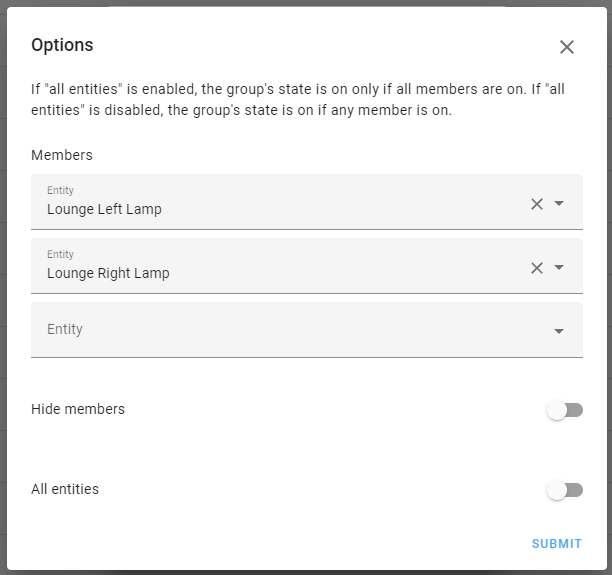
二进制传感器、灯光和开关组允许你设置“所有实体”选项。启用后,组行为会反转,只有当组内所有成员都为 on 时,组状态才会变为 on。启用“所有实体”后的完整行为如下:
- 如果所有组成员都为
unavailable,则组状态为 unavailable。
- 否则,如果至少有一个组成员为
unknown 或 unavailable,则组状态为 unknown。
- 否则,如果至少有一个组成员为
off,则组状态为 off。
- 否则,组状态为
on。
Note
对于使用 HS 色彩模式的灯光组:当一个灯光组包含两个或更多灯,并且它们的颜色在色环上均匀分布时(例如两个灯相差 180°,三个灯相差 120°),灯光组的平均颜色可能会变成 0°(红色)或 180°(浅蓝色)。这是因为色相值在色环上首尾相接,对相对色相求平均时,数学结果可能会得到意料之外的颜色。为避免这种情况,建议为灯具使用 RGB 色彩模式,或避免将颜色正好相对的灯分到同一组中。
按钮组
组状态为该按钮组中最后一次被按下的时间。
- 如果所有组成员都为
unavailable,则组状态为 unavailable。
- 否则,组状态为该组按钮最后一次被按下的时间。
盖板和阀门组
简而言之,只要组内任意成员实体为 open,该组也会显示为 open。以下是盖板组和阀门组的完整行为说明:
- 如果所有组成员都为
unavailable,则组状态为 unavailable。
- 否则,如果所有组成员都为
unknown 或 unavailable,则组状态为 unknown。
- 否则,如果至少有一个组成员为
opening,则组状态为 opening。
- 否则,如果至少有一个组成员为
closing,则组状态为 closing。
- 否则,如果至少有一个组成员为
open,则组状态为 open。
- 否则,组状态为
closed。
事件组
- 如果所有组成员都为
unavailable,则组状态为 unavailable。
- 否则,组状态为任意组成员最近一次接收到的事件。
风扇组
简而言之,只要组内任意成员实体为 on,该组也会显示为 on。以下是风扇组的完整行为说明:
- 如果所有组成员都为
unavailable,则组状态为 unavailable。
- 否则,如果所有组成员都为
unknown 或 unavailable,则组状态为 unknown。
- 否则,如果至少有一个组成员为
on,则组状态为 on。
- 否则,组状态为
off。
锁组
简而言之,只要组内任意成员实体为 unlocked,该组也会显示为 unlocked。以下是锁组的完整行为说明:
- 如果所有组成员都为
unavailable,则组状态为 unavailable。
- 否则,如果所有组成员都为
unknown 或 unavailable,则组状态为 unknown。
- 否则,如果至少有一个组成员为
jammed,则组状态为 jammed。
- 否则,如果至少有一个组成员为
opening,则组状态为 opening。
- 否则,如果至少有一个组成员为
locking,则组状态为 locking。
- 否则,如果至少有一个组成员为
open,则组状态为 open。
- 否则,如果至少有一个组成员为
unlocking,则组状态为 unlocking。
- 否则,如果所有组成员都为
locked,则组状态为 locked。
- 否则,组状态为
unlocked。
通知实体组
- 如果所有组成员都为
unavailable,则组状态为 unavailable。
- 否则,组状态为最近一次发送到该组的通知。
媒体播放器组
- 如果所有组成员都为
unavailable,则组状态为 unavailable。
- 否则,如果所有组成员都为
unknown 或 unavailable,则组状态为 unknown。
- 否则,如果所有组成员都为
buffering,则组状态为 buffering。
- 否则,如果所有组成员都为
idle,则组状态为 idle。
- 否则,如果所有组成员都为
paused,则组状态为 paused。
- 否则,如果所有组成员都为
playing,则组状态为 playing。
- 否则,如果至少有一个组成员不为
off、unavailable 或 unknown,则组状态为 on。
- 否则,组状态为
off。
- 组状态会根据所选的
type 对收集到的状态进行组合或计算,可用于求最小值、最大值、最新值(last)、首个可用值、平均值、中位数、范围、乘积、标准差或总和。
- 成员可以是任意状态为数值的
sensor、number 或 input_number。
- 如果所有组成员都为
unavailable 或缺失,则组状态为 unavailable
- 配置变量
ignore_non_numeric 用于控制当组状态不为 unavailable 时的行为:
- 设为
false(默认值)时,组状态按以下方式计算:
- 如果所有成员都存在于状态机中且状态为数值:按
type 进行计算
- 否则:设为
unknown
- 设为
true 时,组状态按以下方式计算:
- 如果至少有一个成员的状态为数值:按
type 进行计算
- 否则:设为
unknown
ignore_non_numeric 可与 first_available 类型结合使用,以始终获取组中第一个可用的数值状态。
管理组
要编辑组,请前往 设置 > 设备与服务 > 助手。在列表中找到并选择该组。
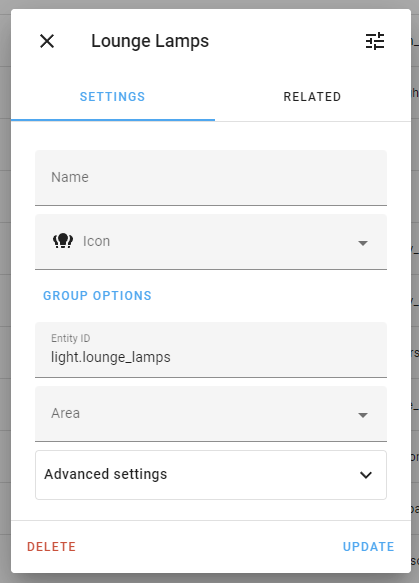
组选项
要在现有组中添加或移除实体,请选择 Group options。所有现有实体都会列在 members 区域中,你可以在那里增删实体。
组属性
以下是组可用的属性。
YAML 配置
此外,此集成也可以通过 YAML 手动配置。下面是使用 configuration.yaml 文件配置组的示例。
二进制传感器组的 YAML 配置示例:
# Example configuration.yaml entry
binary_sensor:
  - platform: group
    name: "Patio Doors"
    device_class: opening
    entities:
      - binary_sensor.door_left_contact
      - binary_sensor.door_right_contact
按钮组的 YAML 配置示例:
# Example configuration.yaml entry
button:
  - platform: group
    name: "Restart all ESPHome devices"
    device_class: opening
    entities:
      - button.device_1_restart
      - button.device_2_restart
盖板组的 YAML 配置示例:
# Example configuration.yaml entry
cover:
  - platform: group
    name: "Window Covers"
    entities:
      - cover.hall_window
      - cover.living_room_window
事件组的 YAML 配置示例:
# Example configuration.yaml entry
event:
  - platform: group
    name: "Remote events"
    entities:
      - event.remote_button_1
      - event.remote_button_2
      - event.remote_button_3
      - event.remote_button_4
风扇组的 YAML 配置示例:
# Example configuration.yaml entry
fan:
  - platform: group
    name: "Downstairs Fans"
    entities:
      - fan.lanai_west
      - fan.lanai_south
      - fan.lanai_east
灯光组的 YAML 配置示例:
# Example configuration.yaml entry
light:
  - platform: group
    name: "Kitchen Lights"
    entities:
      - light.kitchen_ceiling_lights
      - light.kitchen_under_cabinet_lights
      - light.kitchen_spot_lights
      - light.pendant_lights
锁组的 YAML 配置示例:
# Example configuration.yaml entry
lock:
  - platform: group
    name: "House Locks"
    entities:
      - lock.front_door
      - lock.back_door
媒体播放器组的 YAML 配置示例:
# Example configuration.yaml entry
media_player:
  - platform: group
    entities:
      - media_player.kitchen_tv
      - media_player.living_room_tv
传感器组的 YAML 配置示例:
# Example configuration.yaml entry
sensor:
  - platform: group
    type: mean
    entities:
      - sensor.temperature_kitchen
      - sensor.temperature_hallway
开关组的 YAML 配置示例:
# Example configuration.yaml entry
switch:
  - platform: group
    entities:
      - switch.tv
      - switch.soundbar
阀门组的 YAML 配置示例:
# Example configuration.yaml entry
valve:
  - platform: group
    name: "Garden Valves"
    entities:
      - valve.front_garden
      - valve.back_garden
entities:
  description: A list of entities to be included in the group.
  required: true
  type: [string, list]
name:
  description: The name of the group.
  required: false
  type: string
unique_id:
  description: An ID that uniquely identifies this group. If two groups have the same unique ID, Home Assistant will raise an error. Giving the group a unique ID allows the group name, icon and area to be customized via the UI.
  required: false
  type: string
all:
  description: Only available for `binary_sensor`, `light` and `switch` groups. Set this to `true` if the group state should only turn *on* if **all** grouped entities are *on*.
  required: false
  type: boolean
  default: false
type:
  description: "Only available for `sensor` group. The type of sensor: `min`, `max`, `last`, `first_available`, `mean`, `median`, `range`, `product`, `stdev`, or `sum`."
  type: string
  required: true
ignore_non_numeric:
  description: Only available for `sensor` group. Controls how the [state is calculated when group members have non-numeric state](#sensor-number-and-input_number-groups).
  type: boolean
  required: false
  default: false
unit_of_measurement:
  description: Only available for `sensor` group. Set the unit of measurement for the sensor.
  type: string
  required: false
device_class:
  description: Only available for `binary-sensor` or `sensor` group. Set the device class according to available options for [binary sensors](/home-assistant/integrations/binary_sensor/#device-class) or [sensors](/home-assistant/integrations/sensor/#device-class) respectively.
  type: string
  required: false
state_class:
  description: Only available for `sensor` group. Set the state class for the sensor according to [available options](https://developers.home-assistant.io/docs/core/entity/sensor/#available-state-classes).
  type: string
  required: false
通知组
这类组是一个特殊情况,目前只能通过 YAML 配置。
通知组用于将多个通知操作合并为一个操作。这样你只需执行一次操作,就可以向多个设备发送通知。
# Example configuration.yaml entry
notify:
  - platform: group
    name: "My notification group"
    services:
      - action: html5
        data:
          target: "macbook"
      - action: mobile_app_pauluus
name:
  description: Setting the parameter `name` sets the name of the group.
  required: true
  type: string
services:
  description: A list of all the actions to be included in the group.
  required: true
  type: list
  keys:
    action:
      description: The name part of an entity ID, e.g.,  if you use `notify.html5` normally, just put `html5`. Note that you must put everything in lower case here. Although you might have capitals written in the actual notification actions!
      required: true
      type: string
    data:
      description: A dictionary containing parameters to add to all notify payloads. This can be anything that is valid to use in a payload, such as `data`, `message`, `target` or `title`. Parameters specified by the action will override the values configured here.
      required: false
      type: string
旧式组
这类组是一个特殊情况,只能通过 YAML 配置。
我们不再推荐使用这些旧式组。 它们仍然受支持,但更建议使用上文介绍的新式组。
早期的 Home Assistant 会使用组在界面中对实体进行视觉分组;那时这也是判断哪些实体会显示在同一张仪表板卡片中的唯一方式。如今情况已经不同,因为我们已经拥有完善的 UI 编辑器和仪表板功能。
不过,旧式组仍然保留在 Home Assistant 中。
一方面,它们更灵活一些(目前可以使用更多实体类型);但另一方面,它们也更受限制,而且使用起来更复杂。
其局限在于:旧式组被设计成通用组,而上文介绍的新式组则被设计为成员实体的完整替代品(例如上文提到的灯光组会具备完整的灯光功能)。除了只能通过手动 YAML 配置外,它们在自定义方面的 UI 支持也比较有限。
旧式组的 YAML 配置示例:
# Example configuration.yaml entry
group:
  kitchen:
    name: "Kitchen Group"
    entities:
      - switch.kitchen_pin_3
  climate:
    name: "Climate Group"
    entities:
      - sensor.bedroom_temp
      - sensor.porch_temp
  awesome_people:
    name: "Awesome People"
    entities:
      - device_tracker.dad_smith
      - device_tracker.mom_smith
name:
  description: Name of the group.
  required: false
  type: string
entities:
  description: A list of entities to group.
  required: true
  type: list
all:
  description: Set this to `true` if the group state should only turn *on* if **all** grouped entities are *on*.
  required: false
  type: boolean
  default: false
icon:
  description: The icon that shows in the front end.
  required: false
  type: string
旧式组可对以下域中的实体计算组状态:
alertalarm_control_panelautomationbinary_sensorcalendarclimatecoverdevice_trackerfanhumidifierinput_booleanlightlockmedia_playerpersonplantremotescriptswitchvacuumwater_heater
:::note
除这些平台域外,旧式组不支持其他域,未来也不会新增支持。
:::
当成员实体都只有单一的 on 和 off 状态时,组状态将按如下方式计算:
当组中包含来自具有多个 on 状态的域,或仅使用 on/off 的域的实体时,组状态将为 on 或 off。
你也可以创建系统无法计算组状态的组。包含不受支持域实体的组,其状态始终会是 unknown。
不过,这些组仍然可以在模板中通过 expand() 指令使用,也可以调用 homeassistant.turn_on 和 homeassistant.turn_off 等动作。
属性
以下是旧式组可用的属性。
操作
以下操作可用于修改组,或在不重启 Home Assistant 的情况下重新加载配置。这些操作仅适用于旧式组,不能用于上文介绍的新式组。

