

Landis+Gyr Heat Meter
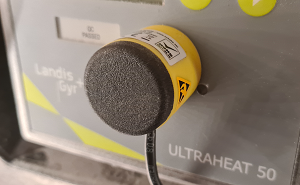
Home Assistant 的 Landis+Gyr Heat Meter 集成可让您读取 Landis & Gyr Ultraheat 设备的仪表数值。这些设备通常用于区域供热。该集成已在 Landis & Gyr Ultraheat 50 (UH50)(型号 LUGCUH50)上完成测试,其他型号也很可能可用。
设备通过光学接口读取,因此需要一个(USB)红外读取器并将其连接到 Home Assistant。
配置
此集成可通过 UI 配置。前往 设置 > 设备与服务 添加。
传感器
此集成会创建以下传感器:
- 热量使用量(MWh)
- 体积用量(m3)
为了兼容 Home Assistant 的能量计量单位,热量使用量会从设备提供的 GJ 数值换算为 MWh,换算系数为:1 GJ = 0.277778 MWh。
从设备读取的其他数据会作为诊断实体添加:
- 换算前从设备直接读取的热量使用量(GJ)
- 所有者编号
- 上一年体积用量(m3)
- 上一年热量使用量(MWh)
- 上一年热量使用量(GJ)
- 错误编号
- 设备编号
- 计量周期分钟数
- 最大功率(kW)
- 上一年最大功率(kW)
- 最大流量(m3ph)
- 上一年最大流量(m3ph)
- 最高供水温度(°C)
- 最高回水温度(°C)
- 上一年最高供水温度(°C)
- 上一年最高回水温度(°C)
- 运行小时数
- 故障小时数
- 上一年故障小时数
- 年度设定日
- 月度设定日
- 仪表日期时间
- 测量范围(m3ph)
- 设置与固件
- 流量小时数
能源仪表板
在能源仪表板中,热量使用量或体积用量都可以作为“Gas”使用。如果您想按每 MWh 提供价格,请先应用换算系数。
轮询设备
默认情况下,每天只会轮询一次(以及在添加集成后立即轮询一次)。每次读取热量表数值时,设备电池寿命理论上会减少约 30 分钟。
手动轮询(可选)
如果您想更精细地控制设备轮询时间,请禁用此集成的默认轮询,并创建一个自动化来更新其中一个实体(其他实体也会一起更新)。
如果您熟悉 YAML,可以使用以下代码:
如需更详细的自定义轮询间隔设置步骤,请按照下方流程操作。
定义自定义轮询间隔
If you want to define a specific interval at which your device is polled for data, you can disable the default polling interval and create your own polling automation.
- Go to Settings > Devices & services, and select your integration.
- On the integration entry, select
. - Then, select System options and toggle the button to disable polling.
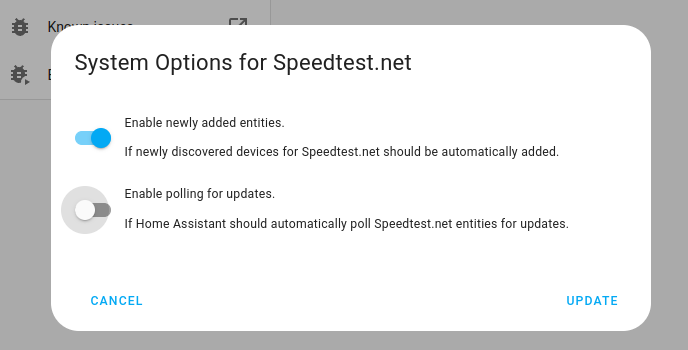
- Then, select System options and toggle the button to disable polling.
- To define your custom polling interval, create an automation.
- Go to Settings > Automations & scenes and create a new automation.
- Define any trigger and condition you like.
- Select Add action, then select Other actions.
- Select Perform action, and from the list, select the
homeassistant.update_entityaction. - Choose your targets by selecting the Choose area, Choose device, Choose entity, or Choose label buttons.
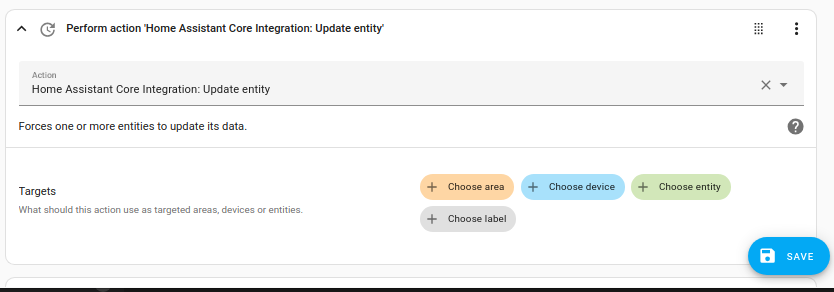
- Save your new automation to poll for data.