OpenAI
OpenAI 集成为 Home Assistant 添加了一个由 OpenAI 提供支持的对话代理。
通过向 AI 提供对 Home Assistant Assist API 的访问权限,您可以让它控制 Home Assistant。您可以在公开实体页面中控制它可访问的设备和实体。AI 可以为您提供设备信息,并控制这些设备。
此集成不与句子触发器集成。
此集成需要使用 API 密钥,您可以在此处生成该密钥。。这是一项付费服务,我们建议您在 OpenAI 门户 中密切监控您的费用并配置使用限制,以避免与使用该服务相关的不必要的费用。
配置
要将 OpenAI 服务添加到您的 Home Assistant 实例,请使用此 My 按钮:

手动配置步骤
- 打开您的 Home Assistant 实例。
- 前往 设置 > 设备与服务。
- 在右下角,选择 添加集成。
- 在列表中选择 OpenAI。
- 按照屏幕上的说明完成设置。
API key:
  description: "API key from OpenAI for authentication."
生成 API 密钥
OpenAI 密钥用于验证对 OpenAI API 的请求。要生成 API 密钥,请执行以下步骤:
选项
要为 OpenAI 设置选项,请按以下步骤操作:
-
在 Home Assistant 中,前往 设置 > 设备与服务。
-
如果已配置多个 OpenAI 实例,请选择您要配置的实例。
-
在卡片上选择齿轮图标 。
- 如果卡片上没有齿轮图标,则表示该集成不支持此设备的选项。

-
编辑选项,然后选择 提交 以保存更改。
该集成提供以下类型的子条目:
对话和 AI 任务子条目具有以下配置选项(其中一些可能由于子条目类型或模型选择而不可用):
Instructions:
  description: AI 如何响应您的请求的指令。它使用 [Home Assistant 模板](/home-assistant/docs/configuration/templating/)编写。
Control Home Assistant:
  description: If the model is allowed to interact with Home Assistant. It can only control or provide information about entities that are [exposed](/home-assistant/voice_control/voice_remote_expose_devices/) to it.
Recommended settings:
  description: If enabled, the recommended model and settings are chosen.
如果您选择不使用推荐的设置,您可以配置以下选项:
Model:
  description: The GPT language model is used for text generation. You can find more details on the available models in the [ChatGPT Documentation](https://platform.openai.com/docs/models). The default is "gpt-4o-mini".
Maximum Tokens to Return in Response:
  description: The maximum number of words or "tokens" that the AI model should generate in its completion of the prompt. For more information, see the [OpenAI Completion Documentation](https://platform.openai.com/docs/guides/completion/introduction).
Temperature:
  description: A value that determines the level of creativity and risk-taking the model should use when generating text. A higher temperature means the model is more likely to generate unexpected results, while a lower temperature results in more deterministic results. See the [OpenAI Completion Documentation](https://platform.openai.com/docs/guides/completion/introduction) for more information.
Top P:
  description: An alternative to temperature, top_p determines the proportion of the most likely word choices the model should consider when generating text. A higher top_p means the model will only consider the most likely words, while a lower top_p means a wider range of words, including less likely ones, will be considered. For more information, see the [OpenAI Completion API Reference](https://platform.openai.com/docs/api-reference/completions/create#completions/create-top_p).
Enable web search:
  description: Enable OpenAI-provided [Web search tool](https://openai.com/index/new-tools-for-building-agents/#web-search). Note that it is only available for gpt-4o and newer models.
Search context size:
  description: The search is performed with a separate fine-tuned model with its own context and its own [pricing](https://platform.openai.com/docs/pricing#built-in-tools). This parameter controls how much context is retrieved from the web to help the tool formulate a response. The tokens used by the search tool do not affect the context window of the main model. These tokens are also not carried over from one turn to another — they're simply used to formulate the tool response and then discarded. This parameter would affect the search quality, cost, and latency.
Include home location:
  description: This parameter allows using the location of your Home Assistant instance during search to provide more relevant search results.
语音转文本 (STT) 子条目具有以下配置选项:
Instructions:
  description: 可用于通过向模型提供额外上下文来提高转录质量的指令,类似于您提示其他 LLM 的方式。模型将尝试匹配提示的风格、语言和上下文。您还可以使用它来传递常见误解词汇的正确拼写字典。有关更多提示,请查看 [OpenAI STT 模型提示指南](https://developers.openai.com/api/docs/guides/speech-to-text#prompting)。此处不支持模板。
Model:
  description: The Speech-to-text model for audio transcription.
文本转语音 (TTS) 子条目具有以下配置选项:
Instructions:
  description: AI 如何朗读您的文本的指令。您可以提示模型控制语音的各个方面,包括口音、情感范围、语调、模仿、语速、音调、耳语等。此处不支持模板。
Speed:
  description: Additionally adjust the speed of the generated speech. Accepts values between 0.25 and 4.0, where 1.0 is the default speed.
通过电话与超级马里奥交谈
您可以使用 OpenAI Conversation 集成与超级马里奥交谈,如果需要,可以让它控制您家中的设备。
操作
Note
以下操作已弃用,并将在将来删除。请改用相应的 AI Task 操作。
操作 openai_conversation.generate_image
允许您要求 OpenAI 根据提示生成图像。这个动作
填充响应数据
与所请求的图像。
action: openai_conversation.generate_image
data:
  config_entry: abce6b8696a15e107b4bd843de722249
  prompt: "Cute picture of a dog chasing a herd of cats"
  size: 1024x1024
  quality: standard
  style: vivid
response_variable: generated_image
响应数据字段“url”将包含生成图像的 URL,“revised_prompt”将包含使用的更新提示。
使用生成的图像实体的示例
以下示例显示了生成图像并显示的自动化
它在图像模板实体中。提示使用天气实体的状态
生成纽约当前天气状况的新图像。
生成的图像实体可用于仪表板上的卡片等。
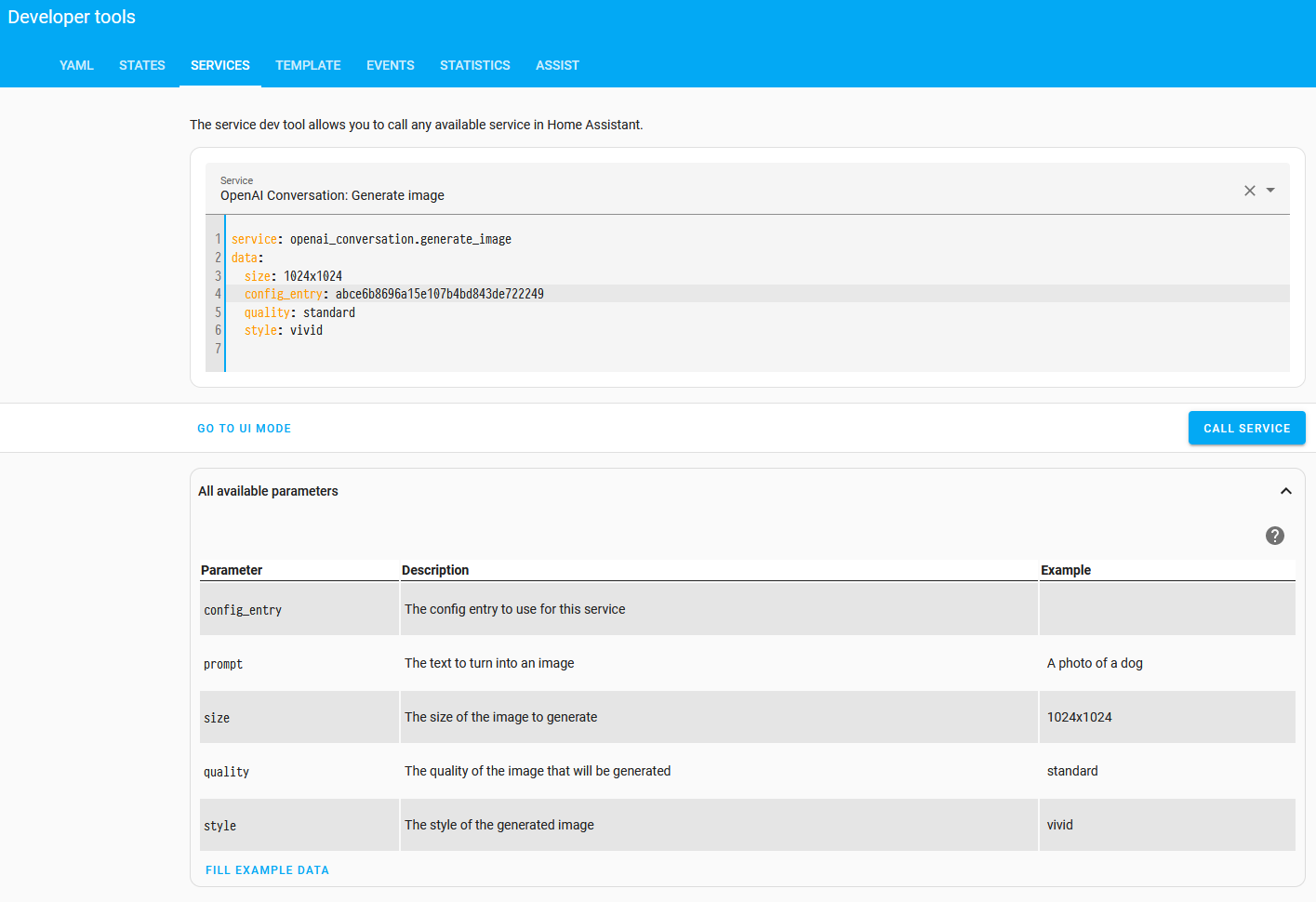
The config_entry is installation specific. To get the value, make sure the integration has been installed.
Then, go to Settings > Developer tools > Actions. Ensure you are in UI mode and enter the following below:
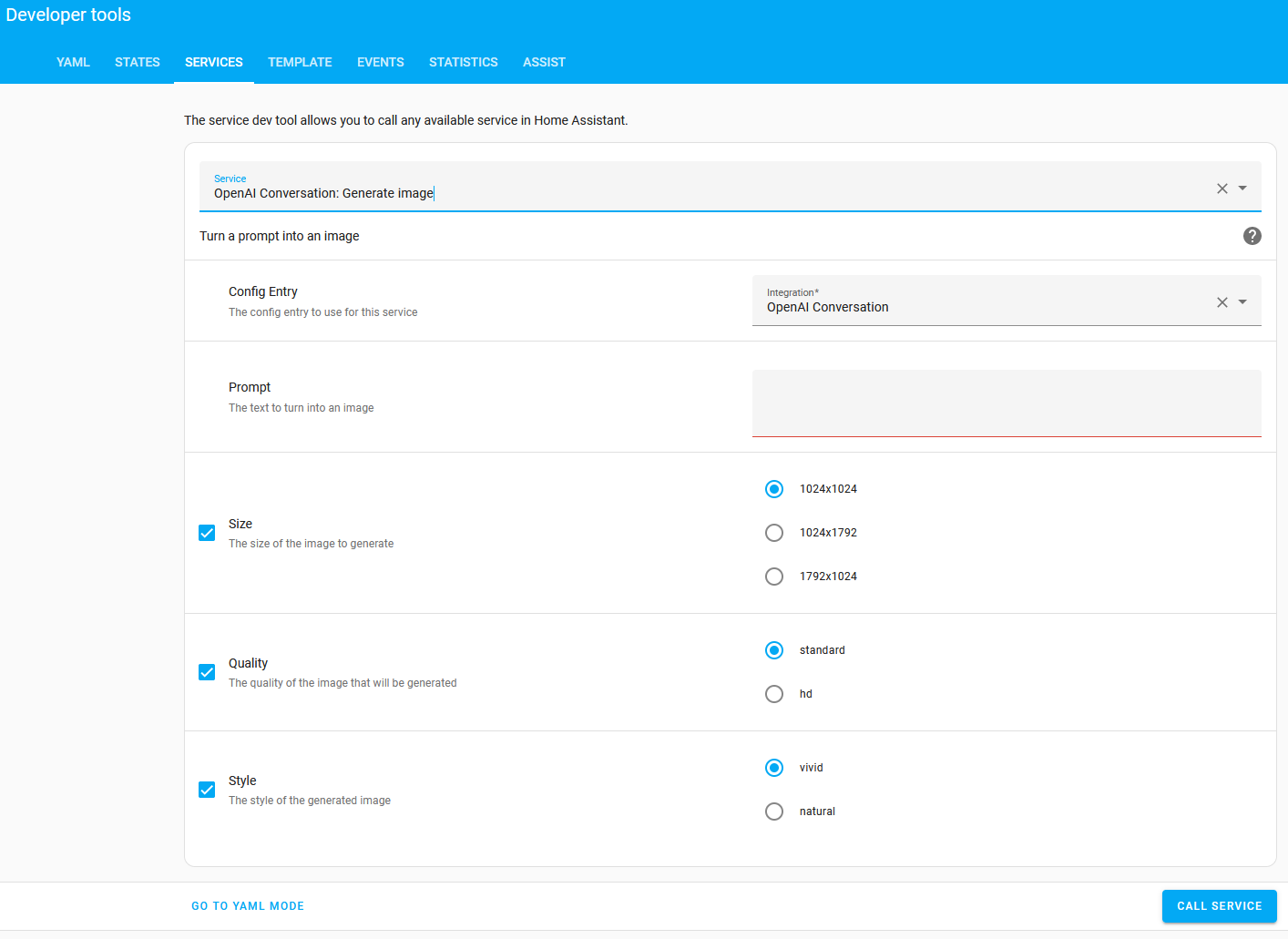
选择 YAML 模式 以显示要在下面的示例自动化中使用的 config_entry 值。
automation:
  - alias: "Update image when weather changes"
    triggers:
      - trigger: state
        entity_id: weather.home
    actions:
      - alias: "Ask OpenAI to generate an image"
        action: openai_conversation.generate_image
        response_variable: generated_image
        data:
          config_entry: abce6b8696a15e107b4bd843de722249
          size: "1024x1024"
          prompt: >-
            New York when the weather is {{ states("weather.home") }}

- 别名:“发送手动事件来更新图像实体”
        事件:新天气图像
        事件数据:
          url: '{{ generated_image.url }}'

template:
  - trigger:
      - alias: "Update image when a new weather image is generated"
        trigger: event
        event_type: new_weather_image
    image:
      - name: "AI generated image of New York"
        url: "{{ trigger.event.data.url }}"
操作:生成内容
openai_conversation.generate_content 操作允许您要求 OpenAI 根据提示生成内容。这个动作
填充响应数据
OpenAI 的回应。
-
数据属性:config_entry
-
数据属性:提示
- 描述:用于生成内容的文本。
- 示例:描述天气
- 可选:无
-
数据属性:image_filename
- 描述:提示中包含的图像的文件名列表。
- 示例:/tmp/image.jpg
- 可选:是
action: openai_conversation.generate_content
data:
  config_entry: abce6b8696a15e107b4bd843de722249
  prompt: >-
    Very briefly describe what you see in this image from my doorbell camera.
    Your message needs to be short to fit in a phone notification. Don't
    describe stationary objects or buildings.
  image_filename:
    - /tmp/doorbell_snapshot.jpg
response_variable: generated_content
响应数据字段“text”将包含生成的内容。
另一个具有多个图像的示例:
action: openai_conversation.generate_content
data:
  prompt: >-
    Briefly describe what happened in the following sequence of images
    from my driveway camera.
  image_filename:
    - /tmp/driveway_snapshot1.jpg
    - /tmp/driveway_snapshot2.jpg
    - /tmp/driveway_snapshot3.jpg
    - /tmp/driveway_snapshot4.jpg
response_variable: generated_content
已知限制
目前,该集成没有任何已知的限制。
删除集成
此集成遵循标准集成删除。不需要额外的步骤。
从 Home Assistant 中删除集成实例
- 前往 设置 > 设备与服务,然后选择该集成卡片。
- 在设备列表中,选择您要删除的集成实例。
- 在该条目旁边,选择三点菜单 ,然后选择 删除。

