

2022.6:获得更多洞察!
👋 你好,Home Assistant 核心 2022.6!
6 月这次发布带来了更多洞察!你可以更清楚地了解自己的能源使用情况,也能更好地知道家中各种设备到底在忙些什么!
不过,6 月带来的还不止这些。除了这次发布和发布派对之外,这个月我们还准备了另外两场活动!
6 月 15 日,我们将举办一场 Matter in Home Assistant 工作坊!
这场工作坊会向你展示我们最近在 Matter 方向上的进展,并让你亲自上手, 把你的第一个 Matter 设备添加到自己的实例中! 我个人对这场活动非常期待;我已经给自己下单了 工作坊详情里列出的那些配件 🤗。
第二天,也就是 6 月 16 日,还有第二场活动:Let's get loud!
这场活动将聚焦于一种面向 Open Home 理念的全新家庭音频与音乐方案。 届时你将看到来自 Home Assistant、ESPHome、 Raspiaudio 以及……某个全新项目的最新消息与音频演示!
另外,也欢迎 Jacqueline Raaflaub!👋 Jacqueline 已经加入 Nabu Casa; 她将协助支持工作,并参与社区管理。 很高兴你加入我们,欢迎!
总之,这次 Home Assistant Core 发布带来了一些新功能, 同时也在底层做了大量清理工作。再加上接下来的活动,这将会是一个非常精彩的月份!
祝你享受这次发布(以及即将到来的活动)!
../Frenck
- 在能源仪表盘中对比数据
- 日志簿从未如此出色!
- 精简 OAuth2 使用体验
- 支持偏移量的日历触发器
- 改进后的场景编辑器
- 数据库性能
- 其他值得注意的变化
- 新集成
- 现在可通过 UI 设置的集成
- 发布 2022.6.1 - June 2
- 发布 2022.6.2 - June 4
- 发布 2022.6.3 - June 6
- 发布 2022.6.4 - June 7
- 发布 2022.6.5 - June 10
- 发布 2022.6.6 - June 14
- 发布 2022.6.7 - June 22
- Need help? Join the community!
- Backward-incompatible changes
- Farewell to the following
- All changes
错过了我们在 YouTube 上的发布派对直播?别担心! 你可以直接在这里观看回放!
在能源仪表盘中对比数据
Did you use less or more energy than... Yesterday? Last week? Month? Year? We all want to know if we are on the right track, right?
This 发布 introduces the capability to compare energy data against the previous period directly from the energy 仪表盘!
Clicking the "Compare data" button in the top right of your energy 仪表盘 will instantly compare the period you are currently viewing with the same period before that. It adds the previous period to the graphs using a lighter bar color.
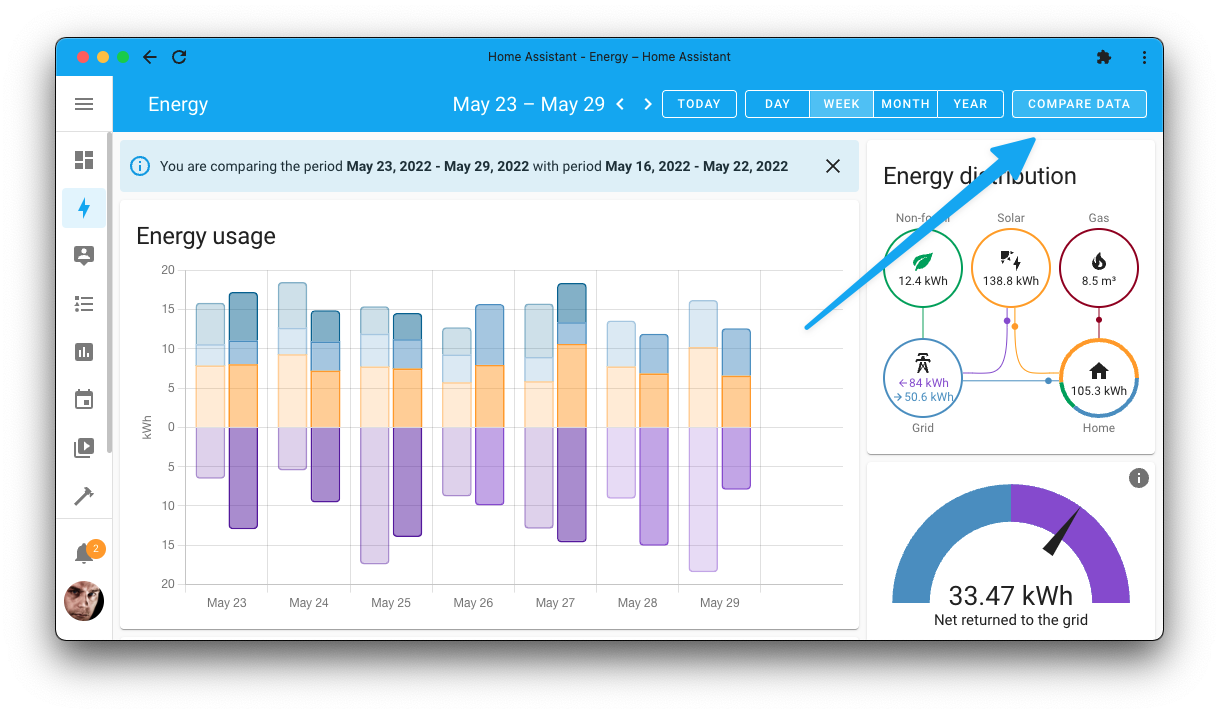
In the above screenshot, my energy usage of this week is compared with the week before; since, a week is selected as the period to view.
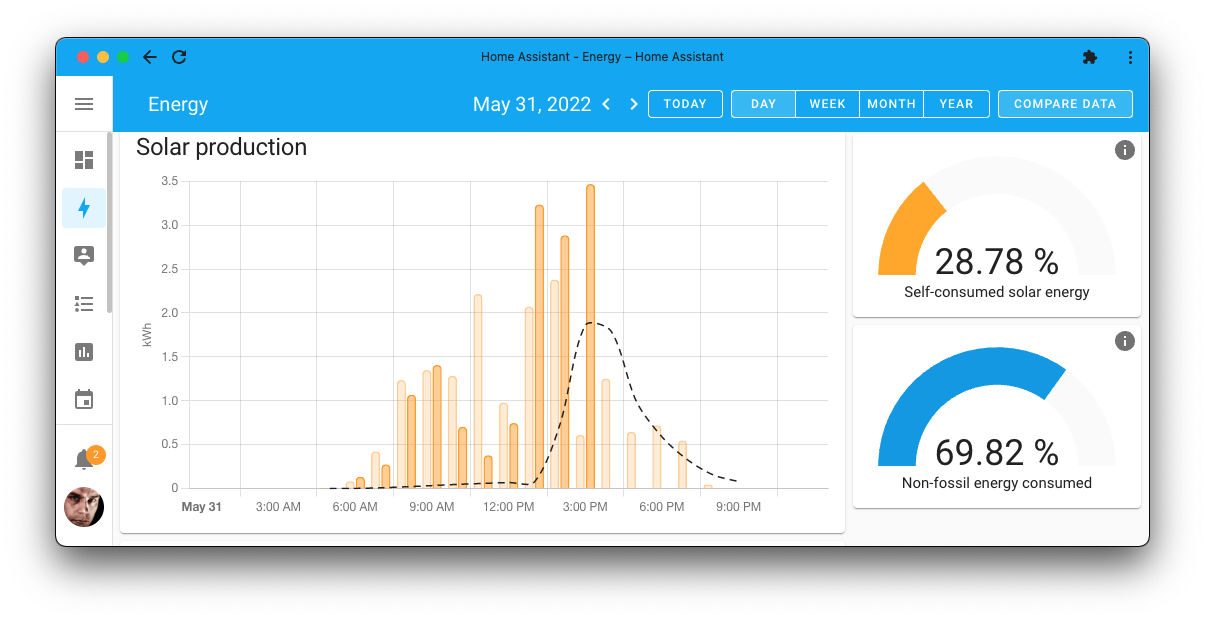
The same also works for other graphs; for example, the screenshot below shows the solar energy production for today compared with yesterday.
日志簿从未如此出色!
The logbook received a significant overhaul this 发布. The 后端 of the logbook got a lot of optimizations. Data processing has been polished and optimized to make logbooks load super fast, creating an experience that is as smooth as possible.
We added the logbook to more places as well. It is now shown on 设备 and area pages. That way, you can instantly see the last activity for that specific 设备 or, in case of an area, of all the 设备 in that area.
And on top of all that: Logbooks are now live! You can see events live on your screen, while the logbook updates instantly when events are happing!
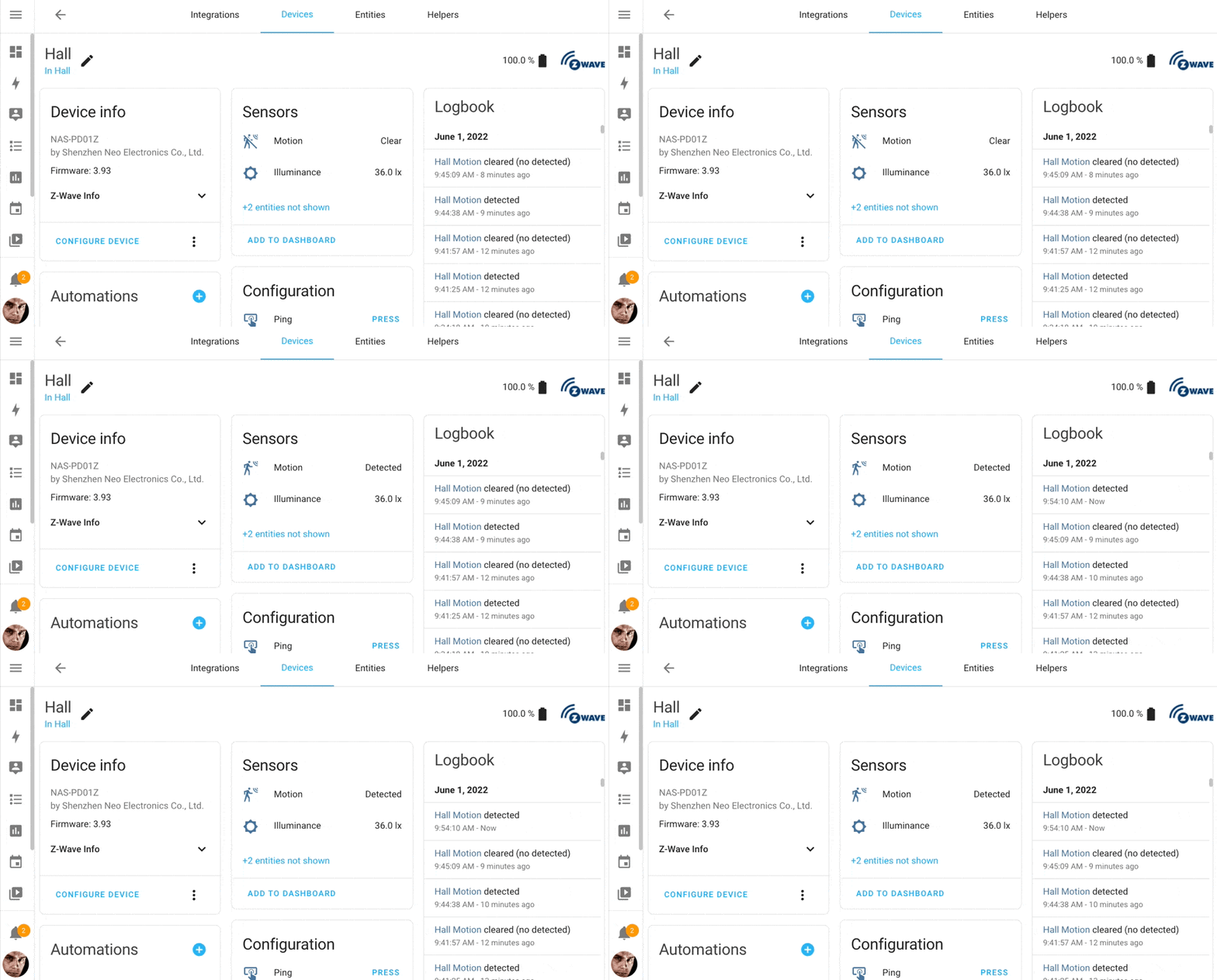 The logbook on this 设备 page, when motion is detected the logbook updates in real-time.
Also new: The logbook can now show 设备 events too! This is helpful for 实体-less 日志, like 设备 events of button presses. deCONZ, Elk-M1 Control, Philips Hue, Lutron Caséta, Shelly, and the Mobile App added support for this new feature.
Thanks @bdraco, for your hard work on the logbooks!
精简 OAuth2 使用体验
Home Assistant has quite a few 集成 that use the OAuth2 standard to authenticate your Home Assistant instance with a third-party 服务. Some examples are Home Connect, Spotify, Netatmo, Xbox, Withings, and Google Calendars.
OAuth2 can be pretty complex, as 服务 often implement additional requirements on top of the OAuth2 specifications. So, if "OAuth Redirect URI" gives you the shivers, you definitely will know what drama we are talking about. Additionally, for most, you need to register a developer account, create an application, get the client ID and secret and 配置 YAML 🥴
This 发布 aims to make this all easier and streamline this experience A LOT.
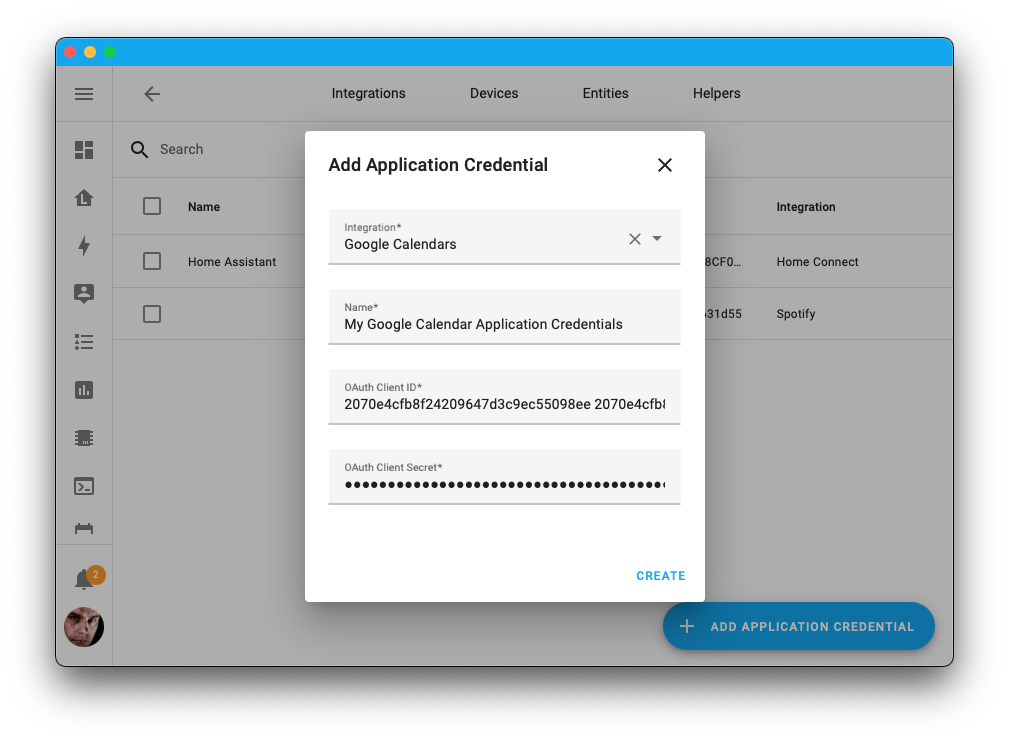
@allenporter has been busy adding support for managing OAuth2 application credentials directly from the UI! (screenshot above.) This removes the need to edit YAML (and 重启 Home Assistant). Additionally, the UI will now guide you through this all when setting up the 集成. Awesome!
Also, we have extended My Home Assistant to be able to support OAuth2 authentication redirects! It's fast, simple, privacy-aware, and nothing for you to set up. It just works! No more redirect URI frustrations. 🤘
We have updated the 文档 of all 集成 using OAuth2 to reflect all these changes.
支持偏移量的日历触发器
The last 发布, we introduced the calendar 触发器; in this 发布, the calendar 触发器 is extended with offset support!
Offsets can be helpful for use in 自动化, as it allows you to alert ahead of the actual calendar event happening. For example, triggering a 通知 the evening before trash day, a birthday reminder a week early, or a reminder 15 minutes before a meeting.
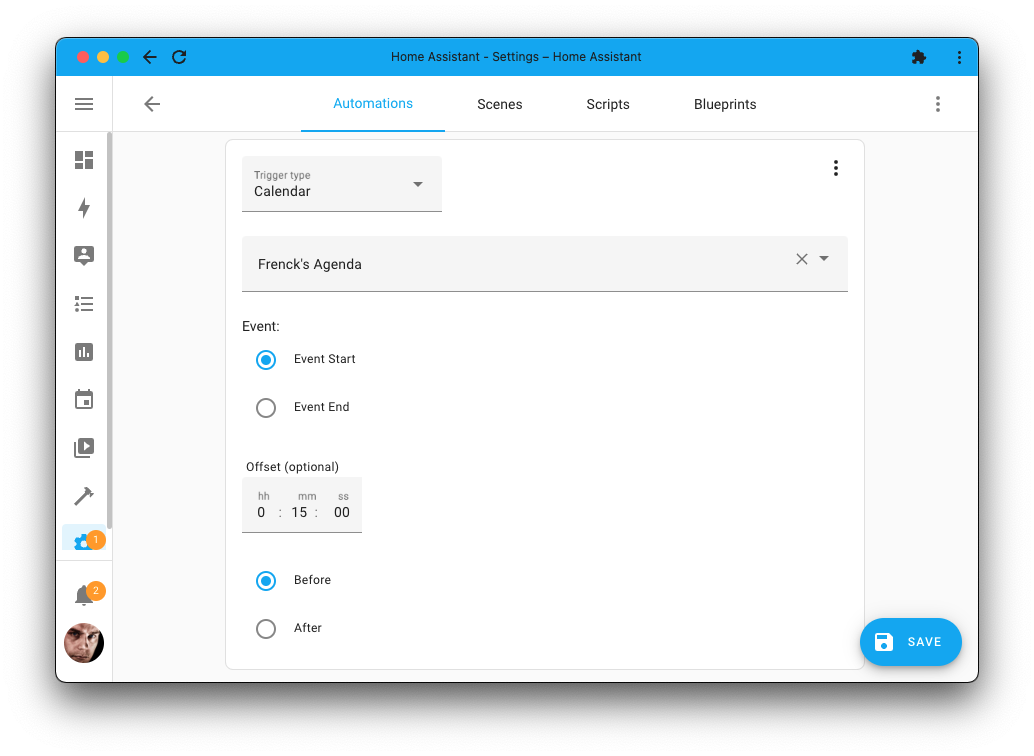
Use the calendar 触发器 to schedule anything in your home!
Create a calendar and add events to it as a schedule, for example, for your
thermostat or 灯光, and use an 自动化 to 触发器 and adjust
these 设备 based on the plan you have defined in that calendar!
This way, you can create complex schedules with repeating patterns
and schedule exceptions, with the ease of using your calendar.
改进后的场景编辑器
场景 are great for restoring 状态 of multiple 设备 to a previous 状态, e.g., to quickly set a lighting mood in a room, using an 自动化, 脚本, or a button on your 仪表盘.
When creating 场景, it creates those 场景 based on the 状态 of a whole 设备 (including all of its 实体). However, what if you want to add a specific 实体 to a 场景 and not the entire 设备?
Well, now you can!
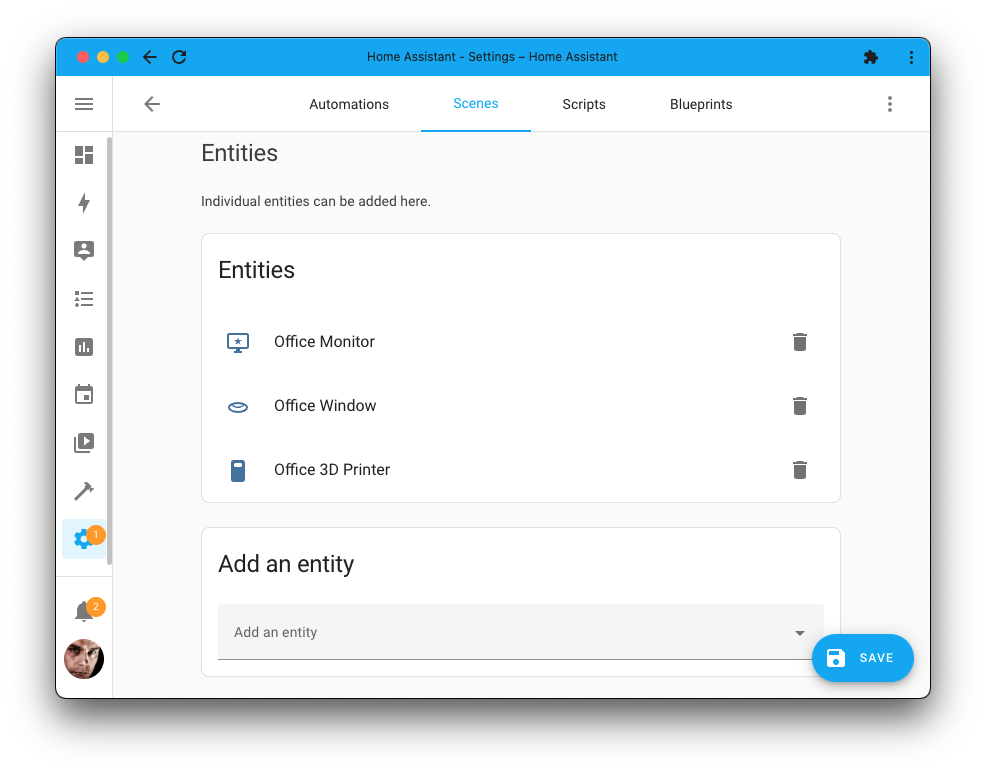
It is a small but welcome improvement that makes it possible to include single 实体 into a 场景 without adding the whole 设备. Of course, you can also still add the entire 设备 if you want to.
数据库性能
This 发布 builds on the database improvements from 2022.4. Disk writes have been reduced to preserve SD 卡片 lifetimes and new APIs have been added, which get event/historical data to the 前端 even faster.
The database storage format is further optimized, with an additional size reduction ranging from 25-40% for most installs on top of what has been gained in previous releases. This is achieved by storing events more efficiently.
Data stored in the database before upgrading to this 发布 isn't compacted. The size reduction will occur over time when new data gets recorded, and older data gets purged.
If you are using SQLite (default) or MySQL, you will benefit from a faster date parser, which speeds up multi-hour history and logbooks.
We recommend not to miss this 发布 to ensure that future database changes and migrations will be faster.
其他值得注意的变化
There is much more juice in this 发布; here are some of the other noteworthy changes this 发布:
- The System Health menu now shows database information, including versions and estimated database size. The 版本 number of the OS Agent is now also listed. Thanks, @bdraco & @ludeeus.
- The "Preload 摄像头" setting shown on every 摄像头 feed has been moved! It is now part of the 实体 设置, preventing unintentional toggling. Thanks @bramkragten!
- @goyney upgraded the Material Design Icons to 版本 v6.7.96, providing us with 100 new, fresh, and really useful icons! Thank you!
- The
thisvariable in template 实体 is now also available for use in their 动作! Thanks, @emontnemery. - A big shout out to @yosilevy, who has been improving support for RTL languages (Right to Left) in the UI! Thank you!
- @balloob added support for the media browser to the GStreamer and VLC media player 集成.
- The
as_timedeltatemplate filter/function, added by @eifinger, allows you to convert many time strings (including ISO8601) into a timedelta object. Awesome! - Lots of you asked for it; the "YAML" tab is now the first tab shown in the 开发者工具.
- @Noltari has been extending the QNAP QSW 集成, adding support for diagnostics, a reboot button, and 二元sensor for anomaly detection.
- Got a Ring doorbell? And want to fool the others in your house someone is at the door? Now you can! Thanks to @grablair you can now 触发器 the ding! This is useful for 通知, of course ;)
- Tasmota 遮盖 now support tilting, thanks @emontnemery!
- @rappenze added support for garage doors to Fibaro, nice!
- The QR Code 集成 now works on all 安装 types, thanks @cliffordwhansen!
- Venstar now has CO2 and IAQ 传感器 when the thermostat supports it, awesome @hall!
- Using a NETGEAR? @starkillerOG added the speed test 传感器!
新集成
We welcome the following new 集成 this 发布:
- Application Credentials, added by@allenporter
- Big Ass 风扇, added by @bdraco
- Geocaching, added by @Sholofly & @reinder83
- iAlarmXR, added by @bigmoby
- laundrify, added by @xLarry
- Soundavo WS66i 6-Zone Amplifier, added by @ssaenger
- YoLink, added by @matrixd2
现在可通过 UI 设置的集成
The following 集成 are now available via the Home Assistant UI:
- Aladdin Connect, done by @mkmer
- HERE Travel Time, done by @eifinger
- Slack, done by @tkdrob
发布 2022.6.1 - June 2
- Cleanup and use new MQTT_BASE_SCHEMA constants (@jbouwh - #72283) (MQTT docs)
- Move MQTT config schemas and client to separate modules (@emontnemery - #71995) (MQTT docs)
- 更新 MQTT tests to use the config entry 设置 (@jbouwh - #72373) (MQTT docs)
- Remove announce workaround for Sonos (@jjlawren - #72854) (sonos docs)
- 更新 前端 to 20220601.0 (@bramkragten - #72855) (前端 docs)
- Ensure recorder shuts down when its startup future is canceled out from under it (@bdraco - #72866) (recorder docs)
- Fix logbook not setting up with an recorder filter that has empty fields (@bdraco - #72869) (recorder docs) (logbook docs)
- Only present history_stats 状态 as unknown if the time is in the future (@bdraco - #72880) (history_stats docs)
- Fix migration of MySQL data when InnoDB is not being used (@bdraco - #72893) (recorder docs)
- Fix performance of logbook 实体 and 设备 queries with large MySQL databases (@bdraco - #72898) (logbook docs)
- Fix 重载 of MQTT yaml config (@emontnemery - #72901) (MQTT docs)
- Bump yolink-api to 0.0.6 (@matrixd2 - #72903) (yolink docs)
- Fix logging & exit code reporting to S6 on HA shutdown (@nojocodex - #72921)
- Fix bug in caldav and avoid unnecessary copy of dataclass (@allenporter - #72922) (caldav docs)
- Fix Hive authentication (@KJonline - #72929) (hive docs)
- Only sync when HA is started up as we already sync at startup (@balloob - #72940) (cloud docs)
- Fix misalignments between sql based filtering with the entityfilter based filtering (@bdraco - #72936) (recorder docs)
- Only create auto comfort 实体 for BAF 设备 that support them (@bdraco - #72948) (baf docs)
发布 2022.6.2 - June 4
- Fix statistics_during_period being incorrectly cached (@bdraco - #72947) (history docs)
- Allow
logtemplate function to return specifieddefaulton math domain 错误 (@XaF - #72960) - Bump pynetgear to 0.10.4 (@starkillerOG - #72965) (netgear docs)
- Bump bimmer_connected to 0.9.4 (@rikroe - #72973) (bmw_connected_drive docs)
- fjaraskupan: Don't filter anything in 后端 (@elupus - #72988) (fjaraskupan docs)
- Check ISY994 温控 for unknown humidity value on Z-Wave Thermostat (@shbatm - #72990) (isy994 docs)
- Fix google calendar bug where expired tokens are not refreshed (@allenporter - #72994) (google docs)
- Provide Sonos media position if duration not available (@jjlawren - #73001) (sonos docs)
- Bump pypck to 0.7.15 (@alengwenus - #73009) (lcn docs)
- Fix missing historical context data in logbook for MySQL and PostgreSQL (@bdraco - #73011) (recorder docs)
- Fix history stats not comparing all times in UTC (@bdraco - #73040) (history_stats docs)
发布 2022.6.3 - June 6
- Throttle multiple requests to the velux gateway (@marcelveldt - #72974) (velux docs)
- Bump wallbox to 0.4.9 (@hesselonline - #72978) (wallbox docs)
- Fix fibaro 遮盖 detection (@rappenze - #72986) (fibaro docs)
- Reduce branching in generated lambda_stmts (@bdraco - #73042) (recorder docs)
- Send an empty logbook response when all requested entity_ids are filtered away (@bdraco - #73046) (logbook docs)
- Bump aiolookup to 0.1.1 (@bdraco - #73048) (lookin docs)
- Bump simplisafe-python to 2022.06.0 (@bachya - #73054) (simplisafe docs)
- Fix unhandled exception when RainMachine coordinator data doesn't exist (@bachya - #73055) (rainmachine docs)
- Bump regenmaschine to 2022.06.0 (@bachya - #73056) (rainmachine docs)
- Fix incompatiblity with live logbook and google_assistant (@bdraco - #73063) (logbook docs)
- Fix elk 属性 not being json serializable (@gwww - #73096) (elkm1 docs)
- Mark counter domain as continuous to exclude it from logbook (@bdraco - #73101) (logbook docs)
- Tomorrowio utc fix (@lymanepp - #73102) (tomorrowio docs)
- Remove available property from Kodi (@Bikonja - #73103) (kodi docs)
- Point iAlarm XR at PyPI fork (@balloob - #73143) (ialarm_xr docs)
- Fix state_changes_during_period history query when no 实体 are passed (@bdraco - #73139) (recorder docs)
- Remove unused code from logbook (@bdraco - #72950) (logbook docs)
发布 2022.6.4 - June 7
- Fix 错误 when unjoining multiple Sonos 设备 simultaneously (@jjlawren - #73133) (sonos docs)
- Bump async-upnp-client==0.31.1 (@StevenLooman - #73135) (upnp docs) (yeelight docs) (dlna_dmr docs) (samsungtv docs) (ssdp docs) (dlna_dms docs)
- Use default None for voltage property of FritzDevice in Fritz!Smarthome (@mib1185 - #73141) (fritzbox docs)
- Fix KeyError from ESPHome media players on startup (@jesserockz - #73149) (esphome docs)
- Fix bugs with RainMachine zone run time 传感器 (@bachya - #73179) (rainmachine docs)
- Fix creating unique IDs for WiFi 开关 in Fritz!Tools (@mib1185 - #73183) (fritz docs)
- Bump pywemo to 0.9.1 (@esev - #73186) (wemo docs)
- Remove sqlalchemy lambda_stmt usage from history, logbook, and statistics (@bdraco - #73191) (recorder docs) (logbook docs)
发布 2022.6.5 - June 10
- Ensure netgear 设备 are tracked with one enabled config entry (@starkillerOG - #72969) (netgear docs)
- Bump yolink-api to 0.0.8 (@matrixd2 - #73173) (yolink docs)
- Fix Feedreader Atom feeds using
updateddate (@d0nni3q84 - #73208) (feedreader docs) - Hive auth fix for users (@KJonline - #73247) (hive docs)
- Fix handling of connection 错误 during Synology DSM 设置 (@mib1185 - #73248) (synology_dsm docs)
- Bump regenmaschine to 2022.06.1 (@bachya - #73250) (rainmachine docs)
- Improve Netgear logging (@starkillerOG - #73274) (netgear docs)
- Fix polling frequency for Starling 集成 (@Dullage - #73282) (starlingbank docs)
- Fix reloading themes crashing if no themes configured (@balloob - #73287) (前端 docs)
- Bump 版本 of pyunifiprotect to 3.9.0 (@AngellusMortis - #73168) (unifiprotect docs)
- Bumps 版本 of pyunifiprotect to 3.9.1 (@AngellusMortis - #73252) (unifiprotect docs)
- Bumps 版本 of pyunifiprotect to 3.9.2 to fix compat with protect 2.1.1 (@AngellusMortis - #73299) (unifiprotect docs)
- Fix initial tilt value of MQTT 遮盖 (@emontnemery - #73308) (MQTT docs)
- Fix wallbox 传感器 rounding (@hesselonline - #73310) (wallbox docs)
- Improve MQTT 重载 performance (@emontnemery - #73313) (MQTT docs)
- Guard MySQL size calculation returning None (@balloob - #73331) (recorder docs)
发布 2022.6.6 - June 14
- Filter out forced updates in live logbook when the 状态 has not changed (@bdraco - #73335) (logbook docs)
- Fix zwave_js add node schemas (@raman325 - #73343) (zwave_js docs)
- Hive Bump pyhiveapi to 0.5.10 for credentials fix (@KJonline - #73365) (hive docs)
- Fix 重载 race in yeelight when updating the ip address (@bdraco - #73390) (yeelight docs)
- Only 更新 unifiprotect ips from discovery when the console is offline (@bdraco - #73411) (unifiprotect docs)
- Fix smart by bond detection with v3 firmware (@marciogranzotto - #73414) (bond docs)
- Bump aiohue to 4.4.2 (@balloob - #73420) (hue docs)
- Fix 风扇 support in nest, removing FAN_ONLY which isn't supported (@allenporter - #73422) (nest docs)
- Guard withings accessing hass.data without it being set (@balloob - #73454) (withings docs)
- Fix max_value access for number platform in Overkiz (@tetienne - #73479) (overkiz docs)
发布 2022.6.7 - June 22
- Ensure metoffice daily are returned once daily (@gordallott - #72440) (metoffice docs)
- Fix thumbnail issues in Twitch 集成 (@bergdahl - #72564) (twitch docs)
- Bump aiobafi6 to 0.6.0 to fix logging performance (@jfroy - #73517) (baf docs) (dependency)
- Use IP address instead of hostname in Brother 集成 (@bieniu - #73556) (brother docs)
- Bump growattServer to 1.2.2 (@muppet3000 - #73561) (growatt_server docs) (dependency)
- Handle offline generators in oncue (@bdraco - #73568) (oncue docs)
- Don't attempt to 重载 MQTT 设备 tracker (@emontnemery - #73577) (MQTT docs)
- Fix handling of illegal dates in onvif 传感器 (@emontnemery - #73600) (onvif docs)
- Fix voltage and current values for Fritz!DECT smart plugs (@mib1185 - #73608) (fritzbox docs)
- Fix MQTT config schema to ensure correct validation (@jbouwh - #73619) (MQTT docs)
- Fix calling permanent off with nexia (@bdraco - #73623) (nexia docs) (dependency)
- Don't verify ssl certificates for ssdp/upnp 设备 (@StevenLooman - #73647) (upnp docs) (ssdp docs)
- Retry on SenseAPIException during sense config entry 设置 (@bdraco - #73651) (sense docs)
- Fix AmbiClimate 服务 definition (@maxgashkov - #73668) (ambiclimate docs)
- 更新 aiomusiccast (@micha91 - #73694) (yamaha_musiccast docs) (dependency)
- Fix CSRF token for UniFi (@Kane610 - #73716) (unifi docs)
- Insteon bug fixes (@teharris1 - #73791) (insteon docs)
- Fix Plugwise migration 错误 (@frenck - #73812) (plugwise docs)
需要帮助?加入社区!
Home Assistant has a great community of users who are all more than willing to help each other out. So, join us!
Our very active Discord chat server is an excellent place to be at, and don't forget to join our amazing forums.
Found a bug or issue? Please report it in our issue tracker, to get it fixed! Or, check our help page for guidance for more places you can go.
Are you more into email? Sign-up for our Building the Open Home Newsletter to get the latest news about features, things happening in our community and other news about building an Open Home; straight into your inbox.
Backward-incompatible changes
以下列出了本次发布中的不向后兼容变更,按主题或集成分类。 点击任一条目即可查看该项变更的详细说明。
Defining manually configured MQTT 实体 directly under the respective
platform keys (e.g., fan, light, sensor, etc.) is deprecated, and support
will be removed in Home Assistant 核心 2022.9.
Manually configured MQTT 实体 should now be defined under the mqtt
配置 key in configuration.yaml instead of under the platform key.
As an example, this is now deprecated:
The 配置 needs to be updated to this format:
(@jbouwh - #71676 #72183 #72281 #72249 #72271 #72167 #72165 #72251 #72279 #72268 #72272 #72273 #72274 #72278 #72270) (文档)
The following template filters and functions will now 错误 instead of returning the input if the input is invalid and no default value is specified:
acosas_timestampasinatanatan2cosfloatintlogmultiplyroundsinsqrtstrptimetantimestamp_customtimestamp_localtimestamp_utc
Examples:
- ``: Will fail to render
- ``: Will render as 5, no warning will be logged
- ``: Will fail to render
- ``: Will render as 5, no warning will be logged
(@emontnemery - #71687) (documentation)
Home Assistant will now use My Home Assistant to redirect the OAuth2 callback over.
If you need to re-authenticate with an existing OAuth2 application in the future, you might need to adjust the external application 配置. Please check the documentation of the specific 集成 on how to configure this.
(@frenck - #72449) (documentation)
If you run Home Assistant Container in Docker (e.g., using Portainer, Docker (Compose), QNAP, and others), please make sure you are not specifying an init process.
This can be an init 配置 option in your Docker management tools or
Docker Compose, or the --init command line flag on the raw Docker command.
These should NOT be set, as Home Assistant ships with the S6 init system.
While you are at it, make sure you also do not set a cmd or entrypoint.
Setting these are not breaking, however, you should not set them.
(@pvizeli - #72425) (documentation)
Using the 1-Wire via SysBus, previously deprecated, has been removed; this 集成 is being adjusted to comply with Architectural Decision Record 0019; more information can be found here:
https://github.com/home-assistant/architecture/blob/master/adr/0019-GPIO.md
ℹ️ Using the 1-Wire via OWServer is still supported!
(@epenet - #71232) (documentation)
The Aladdin Connect 集成 migrated to 配置 via the UI. Configuring Aladdin Connect via YAML 配置 has been deprecated and will be removed in a future Home Assistant release.
Your existing YAML 配置 is automatically imported on upgrade to this release; and thus can be safely removed from your YAML 配置 after upgrading.
(@mkmer - #68304) (documentation)
The binary_sensor.<your_vehicle>_lights_parking has been removed. It is not
provided by API anymore.
The following 传感器 have been renamed. Existing 传感器 with historical data and automations should be migrated automatically:
sensor.<your_vehicle>_charging_level_hvtosensor.<your_vehicle>_remaining_battery_percentsensor.<your_vehicle>_fuel_percenttosensor.<your_vehicle>_remaining_fuel_percent
(@rikroe - #71827) (documentation)
The previously deprecated YAML 配置 of the Deluge 集成 has been removed.
Deluge is now configured via the UI, any existing YAML 配置 has been imported in previous releases and can now be safely removed from your YAML 配置 files.
(@tkdrob - #71487) (documentation)
The previously deprecated YAML 配置 of the Discord 集成 has been removed.
Discord is now configured via the UI, any existing YAML 配置 has been imported in previous releases and can now be safely removed from your YAML 配置 files.
(@frenck - #71696) (documentation)
The previously deprecated YAML 配置 of the DuneHD 集成 has been removed.
DuneHD is now configured via the UI, any existing YAML 配置 has been imported in previous releases and can now be safely removed from your YAML 配置 files.
(@frenck - #71694) (documentation)
The previously deprecated YAML 配置 of the File Size 集成 has been removed.
File Size is now configured via the UI, any existing YAML 配置 has been imported in previous releases and can now be safely removed from your YAML 配置 files.
(@frenck - #71692) (documentation)
The 配置 of the OAuth application credentials for the Google Calendars 集成 has migrated to 配置 via the UI. Configuring Google Calendars OAuth application credentials via YAML 配置 has been deprecated and will be removed in a future Home Assistant release.
Your existing OAuth application credentials in the YAML 配置 is automatically imported on upgrade to this release; and thus can be safely removed from your YAML 配置 after upgrading.
All 实体 tracking state has been migrated to use the standard Home Assistant 实体 enable/disable features in the user interface and system options.
(@allenporter - #72288) (documentation)
The found_calendar 服务 has been removed from Google Calendars.
This 服务 is an internal implementation detail of the 集成
used for creating calendars found from the API,
which is now no longer exposed as a 服务.
(@allenporter - #72260) (documentation)
The HERE Travel Time 集成 migrated to 配置 via the UI. Configuring HERE Travel Time via YAML 配置 has been deprecated and will be removed in a future Home Assistant release.
Your existing YAML 配置 is automatically imported on upgrade to this release; and thus can be safely removed from your YAML 配置 after upgrading.
(@eifinger - #69212) (documentation)
The 配置 of the OAuth application credentials for the Home Connect 集成 has migrated to 配置 via the UI. Configuring Home Connect OAuth application credentials via YAML 配置 has been deprecated and will be removed in a future Home Assistant release.
Your existing OAuth application credentials in the YAML 配置 is automatically imported on upgrade to this release; and thus can be safely removed from your YAML 配置 after upgrading.
(@allenporter - #71988) (documentation)
The 配置 of the OAuth application credentials for the Honeywell Lyric 集成 has migrated to 配置 via the UI. Configuring Honeywell Lyric OAuth application credentials via YAML 配置 has been deprecated and will be removed in a future Home Assistant release.
Your existing OAuth application credentials in the YAML 配置 is automatically imported on upgrade to this release; and thus can be safely removed from your YAML 配置 after upgrading.
(@allenporter - #72335) (documentation)
The previously deprecated YAML 配置 of the International Space Station (ISS) 集成 has been removed.
International Space Station (ISS) is now configured via the UI, any existing YAML 配置 has been imported in previous releases and can now be safely removed from your YAML 配置 files.
(@frenck - #71693) (documentation)
The previously deprecated YAML 配置 of the Jandy iAqualink 集成 has been removed.
Jandy iAqualink is now configured via the UI, any existing YAML 配置 has been imported in previous releases and can now be safely removed from your YAML 配置 files.
(@epenet - #72404) (documentation)
A new 配置 key for KNX covers invert_updown can be set to
invert the up-down payload (binary) of covers independently of the
position percentage.
Previously up-down (move_long_address) payloads were inverted
when invert_position: true was configured. This now only inverts
the position_address and position_state_address payloads (%).
If you have used invert_position: true for covers, you would need to
add the new key to your YAML config to have the same behaviour as before.
(@farmio - #72012) (documentation)
The Litter-Robot vacuum 实体 will now enter an unavailable state when the robot hasn't sent an update recently.
(@natekspencer - #70810) (documentation)
The clean_cycle_wait_time_minutes, status_code, and last_seen attributes
have been removed from the vacuum 实体 as they are now available as individual
实体.
(@natekspencer - #71760) (documentation)
If the stop and start event were fired within the exact same minute, we would
previously show it as restarted in the logbook. When events crossed the
minute boundary (i.e., we fired stop at 11:30:59 and start at 11:31:04), it
would show separately as stopped and then start.
This change eliminates the inconstancy by always showing them as stopped and
started, which allows us to simplify how we generate logbook rows.
(@bdraco - #71600) (documentation)
The 实体 name in the logbook is now always shown with the current name instead of the old name if it was renamed. If the 实体 no longer exists, we now show the original entity_id instead, which aligns with the warning icon we already display in the frontend when a state is missing or removed.
(@bdraco - #71895) (documentation)
The 配置 of the OAuth application credentials for the Neato Botvac 集成 has migrated to 配置 via the UI. Configuring Neato Botvac OAuth application credentials via YAML 配置 has been deprecated and will be removed in a future Home Assistant release.
Your existing OAuth application credentials in the YAML 配置 is automatically imported on upgrade to this release; and thus can be safely removed from your YAML 配置 after upgrading.
(@allenporter - #72175) (documentation)
The 配置 of the OAuth application credentials for the Netatmo 集成 has migrated to 配置 via the UI. Configuring Netatmo OAuth application credentials via YAML 配置 has been deprecated and will be removed in a future Home Assistant release.
Your existing OAuth application credentials in the YAML 配置 is automatically imported on upgrade to this release; and thus can be safely removed from your YAML 配置 after upgrading.
(@allenporter - #71884) (documentation)
The zone status attribute has been removed from the climate 实体. The zone status is already available as a separate 传感器, and it was producing duplicate data in the state machine.
(@bdraco - #72176) (documentation)
Remove non-standard humidify_supported and dehumidify_supported attributes
from Nexia.
These attributes can already be inferred from the dehumidify_setpoint
or humidify_setpoint attributes.
As they took up space in the database every time any of the values changes, they have now been removed.
(@bdraco - #71248) (documentation)
The 配置 of the OAuth application credentials for the nVent RAYCHEM SENZ 集成 has migrated to 配置 via the UI. Configuring nVent RAYCHEM SENZ OAuth application credentials via YAML 配置 has been deprecated and will be removed in a future Home Assistant release.
Your existing OAuth application credentials in the YAML 配置 is automatically imported on upgrade to this release; and thus can be safely removed from your YAML 配置 after upgrading.
(@allenporter - #72338) (documentation)
De-duplicate event data into a new event_data table
Data is no longer stored in the event.event_data column and instead
deduplicated into the event_data.shared_data column and joined on
event.data_id==event_data.data_id.
This is the same as we did with state attributes in 2022.4, as we can reduce the size of the events table by ~8-14% on avg.
(@bdraco - #71135) (documentation)
- All the data needed to fetch a
state_changedevent is now available in the状态table (along withstate_attributesif needed). - Reduces overall database size by ~27%
- Refactors logbook to work without the need for the
state_changedeventsrows (fetched from状态). - Refactors purge to work without the need for linking the
state_changedevent. - Origin is now stored as an integer.
(@bdraco - #71165) (documentation)
The following attributes are no longer recorded for group 实体:
entity_idorderauto
These attributes provide no historical value since they are already contained in the YAML 配置 and only fill up the database.
(@bdraco - #71256) (documentation)
The recorder now refuses to set up if the database dialect is unsupported or if the database dialect is supported, but the version is too old.
(@emontnemery - #70888) (documentation)
The scape 集成 performance has been improved by using the lxml parser.
Testing (YMMV based on content and nesting):
- For large documents (5000k tags) it was at least an order of magnitude faster.
- For small documents, it was ~3x faster.
Users who are not using Home Assistant Operating System or Home Assistant
Container will need to ensure libxml2 and libxslt are installed.
For example, on Debian based Home Assistant Core installs, run:
sudo apt 安装 libxml2
(@bdraco - #71087) (documentation)
The Slack 集成 migrated to 配置 via the UI. Configuring Slack via YAML 配置 has been deprecated and will be removed in a future Home Assistant release.
Your existing YAML 配置 is automatically imported on upgrade to this release; and thus can be safely removed from your YAML 配置 after upgrading.
(@tkdrob - #69880) (documentation)
Somfy has replaced their Somfy Open API (cloud-based) with a local API (which we Home Assistant users absolutely love). Somfy has now decided to shut down its cloud API after June 21st, 2022.
Please migrate to use the Overkiz integration as a replacement.
Unfortunately, a migration to Overkiz is not possible due to differences in the authentication mechanism.
(@iMicknl - #71653) (documentation)
The sonos.join and sonos.unjoin 服务 will be removed in 2022.8 in favor
of the standard media_player.join and media_player.unjoin 服务.
(@jjlawren - #71226) (documentation)
The 配置 of the OAuth application credentials for the Spotify 集成 has migrated to 配置 via the UI. Configuring Spotify OAuth application credentials via YAML 配置 has been deprecated and will be removed in a future Home Assistant release.
Your existing OAuth application credentials in the YAML 配置 is automatically imported on upgrade to this release; and thus can be safely removed from your YAML 配置 after upgrading.
(@allenporter - #71871) (documentation)
The Squeezebox player synchronization framework has been updated to use the
standard media_player.join and media_player.unjoin 服务. The
list of synchronized players is now stored in the group_members state
attribute.
The squeezebox.sync and squeezebox.unsync 服务 are now deprecated,
and will be removed in two releases in favor of the standard
服务 listed above.
The sync_group state attribute is deprecated in favor of group_members,
and will also be removed in two releases.
(@rajlaud - #70962) (documentation)
Support for white_value is deprecated in template 灯光 and will be removed
in Home Assistant Core 2022.9.
(@emontnemery - #71044) (documentation)
The previously deprecated YAML 配置 of the Trafikverket Train 集成 has been removed.
Trafikverket Train is now configured via the UI, any existing YAML 配置 has been imported in previous releases and can now be safely removed from your YAML 配置 files.
(@gjohansson-ST - #71410) (documentation)
The auxiliary 传感器 for each Insteon 设备 are now their own 传感器 实体 instead of an attribute on the parent 实体. This makes them easier to find and allows attributes to be de-duplicated in the database.
(@bdraco - #71254) (documentation)
The Vera 集成 previously migrated to 配置 via the UI. Configuring Vera via YAML 配置 has been deprecated and will be removed in a future Home Assistant release.
Your existing YAML 配置 has already been automatically imported; and thus can be safely removed from your YAML 配置 after upgrading.
(@epenet - #72418) (documentation)
The Boards "Intel NUC", "RaspberryPi" (Raspberry Pi 1 设备), and "RaspberryPi Zero-W" are no longer supported in Home Assistant OS.
They are also no longer available in the version 集成. Please remove the version 集成 for those boards.
(@agners - #72085) (documentation)
The previously deprecated YAML 配置 of the Viessmann ViCare 集成 has been removed.
Viessmann ViCare is now configured via the UI, any existing YAML 配置 has been imported in previous releases and can now be safely removed from your YAML 配置 files.
(@epenet - #72408) (documentation)
The 配置 of the OAuth application credentials for the Withings 集成 has migrated to 配置 via the UI. Configuring Withings OAuth application credentials via YAML 配置 has been deprecated and will be removed in a future Home Assistant release.
Your existing OAuth application credentials in the YAML 配置 is automatically imported on upgrade to this release; and thus can be safely removed from your YAML 配置 after upgrading.
(@allenporter - #71990) (documentation)
The previously deprecated WLED update button 实体 has been removed.
Please use the newly provided 更新 实体 instead.
(@frenck - #71775) (documentation)
The 配置 of the OAuth application credentials for the Xbox 集成 has migrated to 配置 via the UI. Configuring Xbox OAuth application credentials via YAML 配置 has been deprecated and will be removed in a future Home Assistant release.
Your existing OAuth application credentials in the YAML 配置 is automatically imported on upgrade to this release; and thus can be safely removed from your YAML 配置 after upgrading.
(@allenporter - #71908) (documentation)
With this release, you will need to update your zwave-js-server instance.
- If you use the zwave_js add-on, you need to have at least version
0.1.60. - If you use the Z-Wave JS 2 MQTT add-on, you need to have at least version
0.41.0. - If you use the zwavejs2mqtt Docker container, you need to have at least version
6.10.0. - If you run your own Docker container, or some other installation method,
you will need to update your zwave-js-server instance to at least
1.17.0.
(@raman325 - #72395) (documentation)
If you are a custom 集成 developer and want to learn about breaking changes and new features available for your 集成: Be sure to follow our developer blog. The following are the most notable for this release:
- Logbook API removal of
entity_matches_onlyflag - Media Player updates: enqueue changes, announce added
- S6-Overlay 3.x 更新 on our Docker base images
- ServiceInfo model improvements and deprecations
Farewell to the following
The following 集成 are also no longer available as of this 发布:
- 树莓派 GPIO has been previously deprecated and now removed. More information can be found in Architectural Decision Record 0019.
All changes
Of course, there is a lot more in this 发布. You can find a list of all changes made here: Full changelog for Home Assistant 核心 2022.6