

KNX
KNX 集成可将 Home Assistant 连接到您的 KNX 安装,使您能够控制 KNX 设备、响应报文,并将其他集成实体的状态变化转发到 KNX 总线。
此集成需要本地 KNX/IP 接口或路由器,以建立 Home Assistant 与 KNX 总线之间的连接。
目前在 Home Assistant 中支持以下设备类型:
此集成可通过 UI 配置。前往 设置 > 设备与服务 添加。
KNX 连接方式
请选择连接到 KNX 总线的方式。此集成支持以下连接方法:
Automatic会在启动时扫描网关,以查找 KNX IP 接口,并通过隧道连接。当初始化设置时网关扫描未成功时,此选项不可用。Tunneling会通过隧道连接到指定的 KNX IP 接口。Routing会使用 Multicast 与 KNX IP 路由器通信。
有关 KNX 连接类型的更多信息,请参阅 连接设置。
隧道专用设置
如果在设置期间发现了多个隧道设备,您可以选择其中一个特定设备。如果未发现任何设备,也可以手动配置连接信息。
隧道端点
请选择用于连接的隧道端点。此步骤仅适用于 TCP 或 Secure Tunneling 连接类型。
路由专用设置
KNX IP Secure 专用设置
有关如何获取此配置步骤所需文件或密钥,请参阅 Connection。
重新配置
您可以随时通过集成设置更改 KNX 连接配置。这在您需要更新 Keyring 文件或切换到其他连接类型时非常有用。
- 前往 设置 > 设备与服务。
- 选择 KNX。
- 点击三点菜单
,然后选择 重新配置。
配置 KNX 接口
重新配置连接设置。更多信息请参阅上文。
导入 KNX Keyring
提供一个供集成使用的新 keyring 文件。有关如何获取该文件,请参阅 KNX Secure。
选项
如需配置 KNX 选项,请按以下步骤操作:
-
在 Home Assistant 中,前往 设置 > 设备与服务。
-
如果已配置多个 KNX 实例,请选择要配置的实例。
-
在卡片上选择齿轮图标
。 - 如果卡片上没有齿轮图标,说明该集成不支持此设备的选项设置。

-
编辑选项,然后选择 提交 以保存更改。
基本配置
要使用 KNX 集成提供的各种平台,您需要通过 KNX 面板进行设置,或将相应的 YAML 配置添加到 configuration.yaml 中。如果您希望将 YAML 部分拆分到专用文件中,请参阅拆分配置。
:::tip
更改配置后需要重启 Home Assistant。
:::
有关如何正确配置,请参阅下方各平台的专门章节。
组地址
组地址可配置为字符串或整数。3 级组地址结构使用 1/2/3 格式,2 级组地址结构使用 1/2 格式,自由组地址结构则使用 1 格式。
HA KNX 集成使用已配置的 state_address 或 *_state_address 来更新某项功能的状态。这些地址会在启动时,以及在一小时内没有收到传入报文时(默认 sync_state)通过 GroupValueRead 请求读取。
可以为每个 KNX 平台的所有功能(expose 和 notify 除外)配置被动/监听组地址。这样便可以使用多个组地址来更新对应功能的状态(例如灯光亮度)。当组地址配置为字符串列表时,第一个条目是主动发送或读取状态的地址,其余条目则注册为被动地址。这种模式与 ETS 配置类似,即第一个是“发送”地址,其余地址仅用于更新组对象。
如果您的 KNX 设备提供主动状态组对象,建议使用 *_state_address 而不是被动地址,因为这样可以降低配置复杂度,并避免错误状态(例如通道被逻辑锁定时)。
连接设置
连接参数会在集成设置过程中完成配置,并可在之后的集成设置中修改。
KNX 安全功能
KNX 集成同时支持 IP Secure 和 Data Secure。
IP Secure
IP Secure 凭据可通过两种方式提供:
- 使用
.knxkeys文件:该文件可从 ETS 导出,并导入到集成设置中。 - 手动配置:如果您未使用 Data Secure,可以在集成设置中手动输入所需的 IP Secure 凭据。
Data Secure
Data Secure 凭据始终来自 .knxkeys 文件。您可以在集成设置中导入或更新 Keyring 文件。
在导出 Keyring 文件之前,请先在 ETS 中将 Home Assistant 会使用的所有受保护组地址分配给接口的隧道端点,或分配给一个虚拟设备(dummy device)。
::: 在更新安全组时,请确保所有参与的设备、路由器和耦合器应用也一并更新。完成更改后,请将更新后的 Keyring 文件重新加载到 Home Assistant 中。
隧道
隧道连接(Tunneling)使用 KNX IP Interface 连接到 KNX 总线。大多数 KNX IP Router 也支持隧道连接。这是推荐的连接类型,也是您在集成设置中选择 Automatic 连接时所使用的方式。
对于较新的接口(支持 TCP 或 IP Secure),您可以选择要使用的特定隧道端点。请确保 Home Assistant 是唯一连接到该隧道端点的客户端。
在 ETS 中,建议将您要使用的组地址连接到 Home Assistant 所使用的隧道端点。对于受保护组地址,这是强制要求。
如果您使用 KNX IP Secure Tunneling 或 Data Secure,请从 ETS 导出 Keyring 文件,并将其导入 KNX 集成设置中。
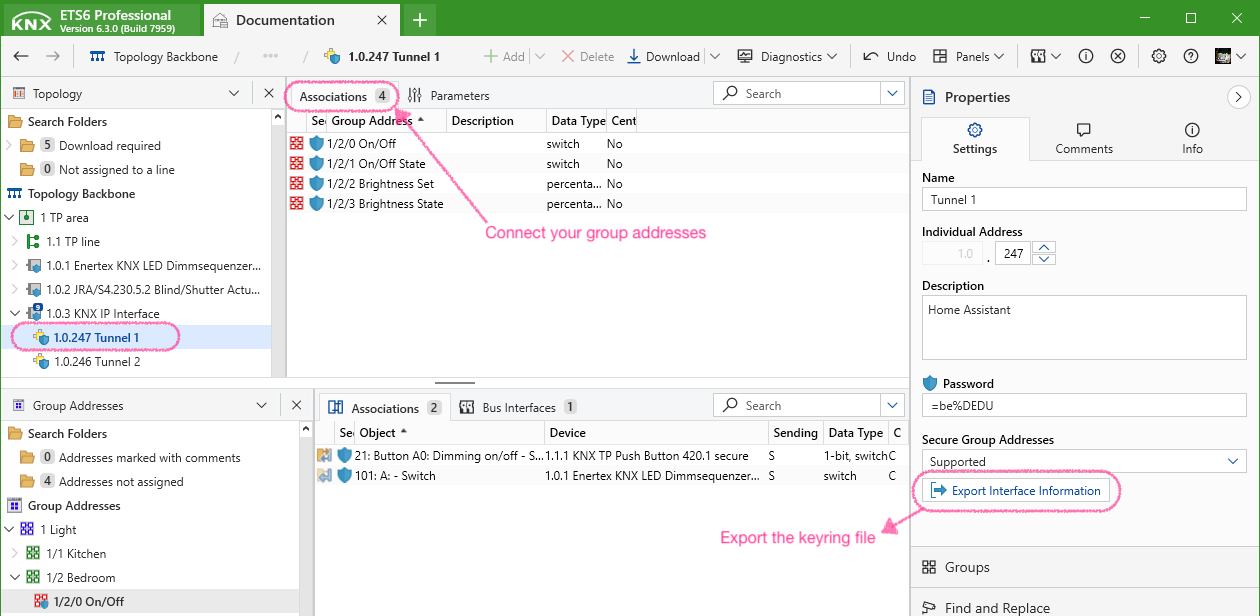
:::note 如果您希望 Home Assistant 使用特定的 individual address,可以在 ETS 中修改所用隧道端点的地址。
手动配置 IP Secure 隧道凭据
如果您选择手动配置 IP Secure 隧道连接,则需要以下信息:
- 用户 ID:请使用 2 或更高的用户 ID。(0 和 1 保留不用。)
ETS 中第一个隧道端点通常使用用户 ID
2,第二个使用3,以此类推。 - 用户密码。
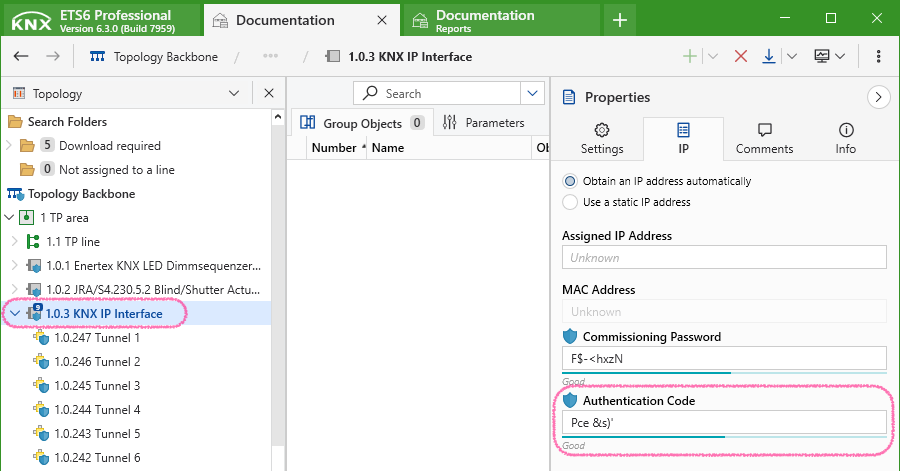
- 设备认证码(可选)。
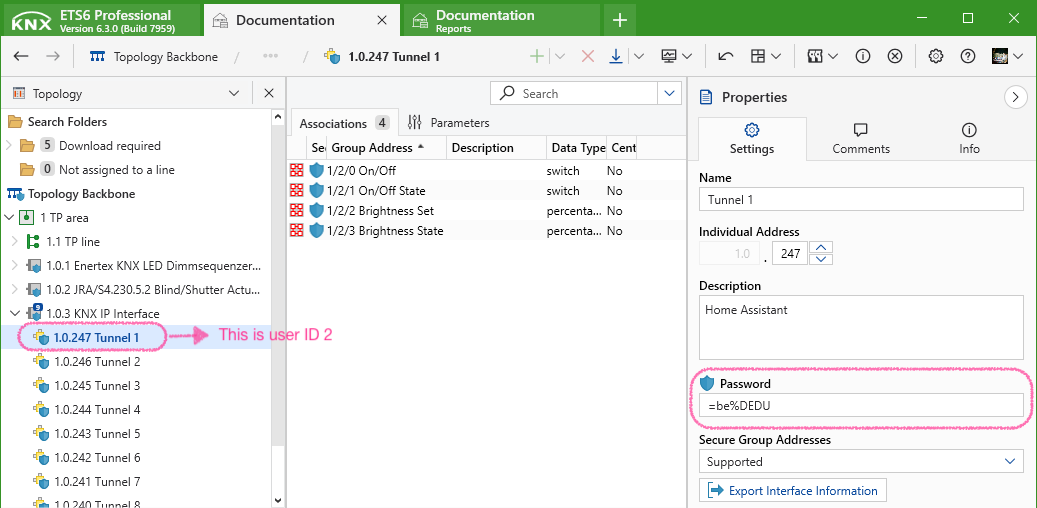
下图展示了如何在 ETS 中找到设备认证码。
路由
路由连接(Routing)通过 IP Multicast 与 KNXnet/IP 路由器通信。
使用 routing 时:
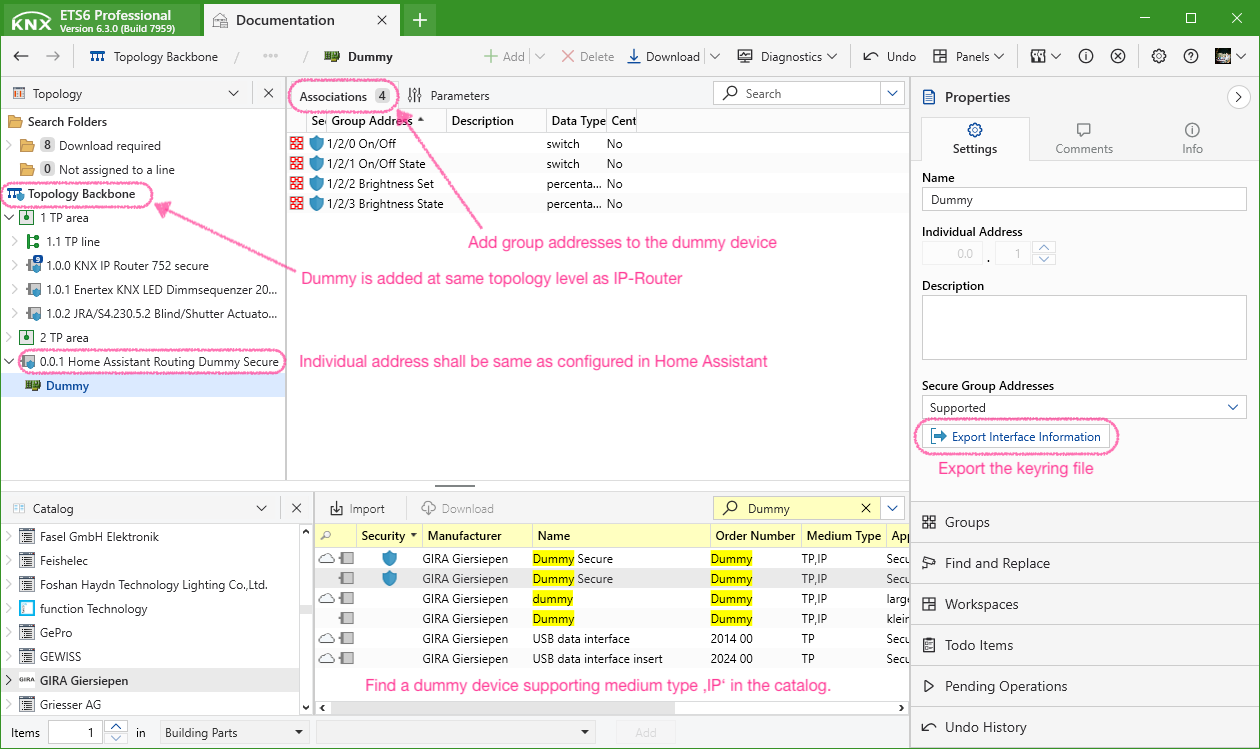
- 在 ETS 中与路由器同一拓扑层级添加一个虚拟设备(dummy device)。
- 为该虚拟设备分配与 KNX 集成设置中相同的 individual address。
- 将 Home Assistant 会使用的所有组地址连接到该虚拟设备。 这样可确保路由器和耦合器的过滤表保持最新,并支持 Home Assistant 使用安全组地址。
- 如果您使用 KNX IP Secure routing 或 Data Secure 组,请从 ETS 导出 Keyring 文件并在 KNX 集成设置中导入。
手动配置 IP Secure 路由凭据
如果您选择手动配置 IP Secure 路由,则需要主干密钥(backbone key)。您可以在 ETS 的 "Project Security" 报告中找到它。
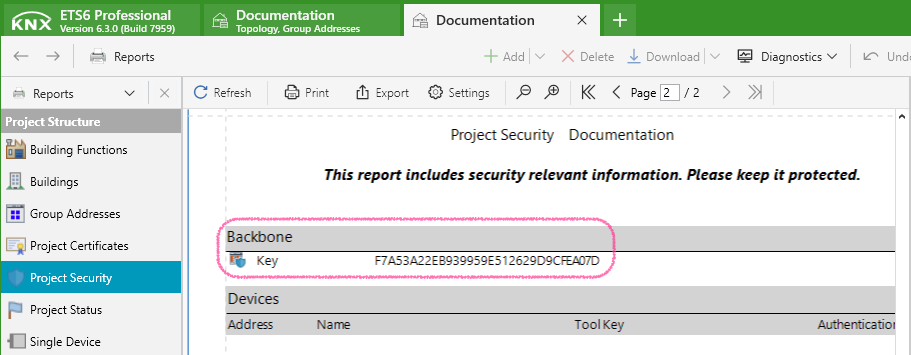
数据更新
此集成使用 KNX/IP 协议实时接收总线上的报文(telegram)。集成加载后,会主动请求初始化已配置实体所需的数据。更多信息请参阅 组地址。
KNX Interface 设备中的诊断实体状态会每 10 秒轮询一次。
触发器
KNX 集成提供了可在自动化中使用的专用触发器平台。
报文触发器
knx.telegram 触发器可用于在收到入站或出站 KNX telegram 时触发自动化。
KNX Interface 设备也提供了该触发器作为设备触发器。它支持在自动化构建器 UI 中设置选项,但不支持设置特定 DPT(type)来解码负载,因为它始终依赖项目数据。
可用的触发器数据
除了标准自动化触发器数据外,knx.telegram 触发器平台还提供以下额外触发器数据。
trigger.destination目标组地址trigger.destination_name目标组地址名称trigger.directionTelegram 方向trigger.dpt_main目标组地址主数据点类型编号trigger.dpt_sub目标组地址子数据点类型编号trigger.dpt_nameDPT 值类型名称,参见传感器值类型trigger.payload原始 telegram 负载。DPT 1、2、3 为 0..255 整数,其他 DPT 为 0..255 整数列表trigger.source源 individual addresstrigger.source_name源名称trigger.telegramtypetelegram 的 APCI 类型trigger.timestamp时间戳trigger.unit按组地址 DPT 解析出的单位trigger.value按 DPT 解码后的 telegram 负载
对于需要项目数据的值:如果未找到相关信息,或未提供项目文件,该数据将设为 null。
示例
自动化配置示例
触发器数据示例
事件
对于自动化触发,建议使用 knx.telegram 触发器,而不是 knx_event。
凡是其目标地址匹配上述模式的 telegram,都会在事件总线上作为 knx_event 发布,并包含以下数据属性:
data包含原始负载数据(例如1或"[12, 55]")destination为 telegram 发送到的 KNX 组地址字符串(例如"1/2/3")direction为 telegram 方向字符串("Incoming"/"Outgoing")source为发送方 KNX individual address 字符串(例如"1.2.3")telegramtype为 telegram 的 APCI 服务类型。"GroupValueWrite"、"GroupValueRead"或"GroupValueResponse"会生成 knx_eventvalue在地址配置了type时包含解码后的负载值。对于"GroupValueRead"telegram,该值为None
操作
如需直接与 KNX 总线交互,您可以使用以下动作:
发送
读取
您可以调用 homeassistant.update_entity 动作,对某个实体的全部 *state_address 发起 GroupValueRead 请求。
如需手动发送 GroupValueRead 请求,请使用 knx.read 动作。响应可通过 knx.telegram 触发器用于自动化,也会由 KNX 实体处理。
注册事件
knx.event_register 动作可用于注册(或取消注册)触发 knx_event 事件的组地址。在 "configuration.yaml" 的 event 键中配置的组地址无法取消注册。请参见 knx_event
注册暴露
knx.exposure_register 动作可用于注册(或取消注册)到 KNX 总线的 exposure。在 "configuration.yaml" 中定义的 exposure 无法取消注册。每个地址只能注册一个 exposure。请参见 expose
将实体状态、实体属性或时间暴露到 KNX 总线
将 Home Assistant 的实体状态和属性公开到 KNX 总线,以便其他 KNX 设备响应变化或读取最新值。您还可以广播当前时间与日期。
提供当前时间
您可以每小时向 KNX 总线广播当前本地时间、日期,或日期时间组合值。可在 KNX 面板前端中配置,也可通过 YAML 配置。
通过 YAML 配置时间暴露
实体暴露
公开 Home Assistant 实体,以便与 KNX 总线共享其状态或属性。每当值变化时,Home Assistant 会自动发送当前值,并响应 KNX 总线上的读取请求。
实体平台
通用实体配置选项
所有 KNX 实体平台都支持以下通用配置选项。
二进制传感器
KNX binary sensor 平台可用于监控 KNX 二进制传感器,如门窗磁、运动探测器和报警器等。
二进制传感器是只读实体。若要写入 KNX 总线,请配置 KNX Switch 实体 或使用 knx.send 动作。
::: Binary sensor 实体可在 KNX 面板前端中创建,也可通过 YAML 创建。
自动化示例
假设您已配置一个名为 Livingroom Switch 的 binary sensor,并希望按钮按一次切换一盏灯、按两次切换另一盏灯。
要实现此功能,需要配置 context_timeout,并确保开关每次按下都发送相同负载(在时间窗口内 on - on)。
按钮
KNX button 平台允许通过前端或动作发送预定义值。用户按下按钮时,会将指定的通用原始负载发送到 KNX 总线。
:::tip
KNX 总线上发往该按钮组地址的 telegram 不会反映为新的按钮状态。如果您要基于某个组地址接收到的特定负载进行自动化,请使用 knx.telegram 触发器。
使用 type 时必须提供 value,payload 无效。
使用 payload_length 时,value 无效。
::: See also the common entity configuration options.
温控
KNX climate 平台用作 KNX 恒温器和房间控制器的接口。
Climate 实体可在 KNX 面板前端中创建,也可通过 YAML 创建。
通过 YAML 配置 KNX climate 实体
要在您的安装中使用 KNX 恒温器,请将以下内容添加到 "configuration.yaml" 顶层的 KNX Integration 配置键中:
或者,如果您的设备为防冻/夜间/舒适模式提供了专用的二进制组地址:
如果您的设备不支持 setpoint_shift 计算(即未提供 setpoint_shift_address 值),请设置 climate 设备的 min_temp 和 max_temp 属性,
以避免前端出现超过有效温度范围的问题。在这种情况下,也请确保在配置中添加 target_temperature_address:
setpoint_shift_mode 允许使用以下两种 DPT:
- DPT6010(用于带比例因子的 1 字节有符号整数)
- DPT9002(用于 2 字节浮点数)
示例:
如果已指定 operation_mode_address,则无需设置 operation_mode_frost_protection_address / operation_mode_night_address / operation_mode_comfort_address / operation_mode_standby_address。
heat_cool_address 和 heat_cool_state_address 支持以下值:
0(制冷)1(制热)
系统会自动识别您的 KNX 恒温器支持的 HVAC 模式。您也可以使用 controller_modes 配置变量进行覆盖。支持的控制器模式如下:
offautoheatcoolfan_onlydehumidification
系统会自动识别您的 KNX 恒温器支持的预设模式。您也可以使用 operation_modes 配置变量进行覆盖。支持的运行模式如下:
autocomfortstandbyeconomybuilding_protection
另请参阅通用实体配置选项。
遮罩
The KNX cover platform is used as an interface to KNX covers.
:::note Unlike most KNX devices, Home Assistant defines 0% as closed and 100% as fully open in regards to covers. The corresponding value inversion is done internally by the KNX integration.
Home Assistant will, by default, close a cover by moving it in the DOWN direction in the KNX nomenclature, and open a cover by moving it in the UP direction.
::: Cover entities can be created from the frontend in the KNX panel or via YAML.
通过 YAML 配置 KNX cover 实体
To use your KNX covers in your installation, add the following lines to your top level KNX Integration configuration key in your "configuration.yaml":
See also the common entity configuration options.
日期
The KNX date platform allows to send date values to the KNX bus and update its state from received telegrams. It can optionally respond to read requests from the KNX bus.
:::note
Date entities without a state_address will restore their last known state after Home Assistant was restarted.
Dates that have a state_address configured request their current state from the KNX bus.
::: :::note DPT 11.001 covers the range 1990 to 2089. Year values outside of this range are not allowed.
::: Date entities can be created from the frontend in the KNX panel or via YAML.
日期时间
The KNX datetime platform allows to send datetime values to the KNX bus and update its state from received telegrams. It can optionally respond to read requests from the KNX bus.
:::note
Date entities without a state_address will restore their last known state after Home Assistant was restarted.
DateTimes that have a state_address configured request their current state from the KNX bus.
::: :::note System timezone is used as DPT 19.001 doesn't provide timezone information. Year values outside of the range 1900 to 2155 are invalid.
::: Datetime entities can be created from the frontend in the KNX panel or via YAML.
风扇
The KNX fan integration is used to control KNX fans. Following control types are supported:
- Percentage controlled: Fans that set the percentage directly from 0-100%.
- Step controlled: Fans which have a fixed amount of steps to set. The integration will convert percentage to step automatically. The
max_stepattribute is set to the number of steps of the fan, not counting theoff-step. Example: A fan supports the steps 0 to 3. To use this fan themax_stepattribute has to be set to3. The integration will convert the percentage66 %to the step2when sending data to KNX.
Fan entities can be created from the frontend in the KNX panel or via YAML.
通过 YAML 配置 KNX fan 实体
To use your KNX fan in your installation, add the following lines to your top-level KNX Integration configuration key in your "configuration.yaml":
:::note
At least one of address or switch_address must be provided. If you set only address, Home Assistant also uses this address to switch the fan on and off by sending 0 to turn the fan off.
::: See also the common entity configuration options.
灯光
The KNX light integration is used as an interface to control KNX actuators for lighting applications such as:
- Switching actuators
- Dimming actuators
- LED controllers
- DALI gateways
Light entities can be created from the frontend in the KNX panel or via YAML.
通过 YAML 配置 KNX light 实体
See also the common entity configuration options.
Many KNX devices can change their state internally without a message to the switch address on the KNX bus, e.g., if you configure a scene or a timer on a channel. The optional state_address can be used to inform Home Assistant about these state changes. If a KNX message is seen on the bus addressed to the given state_address (in most cases from the light actuator), it will overwrite the state of the object.
For switching/light actuators that are only controlled by a single group address and don't have dedicated state group objects you can set state_address to the same value as address if it is readable from the bus.
YAML 配置示例
通知
The KNX notify platform allows you to send notifications to KNX devices as DPT16 strings.
See also the common entity configuration options.
操作示例
数值
The KNX number platform allows to send generic numeric values to the KNX bus and update its state from received telegrams. It can optionally respond to read requests from the KNX bus.
:::note
Number entities without a state_address will restore their last known state after Home Assistant was restarted.
Numbers that have a state_address configured request their current state from the KNX bus.
::: Number entities can be created from the frontend in the KNX panel or via YAML.
场景
The KNX scene platform allows you to activate KNX scenes and updates scene entities when the corresponding scene number is received on the KNX bus.
Scene entities can be created from the frontend in the KNX panel or via YAML.
选择项
The KNX select platform allows the user to define a list of values that can be selected via the frontend and can be used within conditions of automation. When a user selects a new item, the assigned generic raw payload is sent to the KNX bus. A received telegram updates the state of the select entity. It can optionally respond to read requests from the KNX bus.
:::note
Select entities without a state_address will restore their last known state after Home Assistant was restarted.
Selects that have a state_address configured request their current state from the KNX bus.
See also the common entity configuration options.
传感器
The KNX sensor platform allows you to monitor KNX sensors.
Sensors are read-only entities. To write to the KNX bus, configure a KNX Number entity or use the knx.send action.
::: Sensor entities can be created from the frontend in the KNX panel or via YAML.
通过 YAML 配置 KNX sensor 实体
In order to actively read the sensor data from the bus every 30 minutes you can add the following lines to your "configuration.yaml":
See also the common entity configuration options.
更多示例
开关
The KNX switch platform is used as an interface to switching actuators.
Switch entities can be created from the frontend in the KNX panel or via YAML.
Switch entities without a state_address will restore their last known state after Home Assistant was restarted.
Switches that have a state_address configured request their current state from the KNX bus.
通过 YAML 配置 KNX switch 实体
See also the common entity configuration options.
The optional state_address can be used to inform Home Assistant about state changes not triggered by a telegram to the address e.g., if you configure a timer on a channel. If a KNX message is seen on the bus addressed to the given state address, this will overwrite the state of the switch object.
文本
The KNX text platform allows to send text values to the KNX bus and update its state from received telegrams. It can optionally respond to read requests from the KNX bus.
:::note
Text entities without a state_address will restore their last known state after Home Assistant was restarted.
Texts that have a state_address configured request their current state from the KNX bus.
::: Text entities can be created from the frontend in the KNX panel or via YAML.
时间
The KNX time platform allows to send time values to the KNX bus and update its state from received telegrams. It can optionally respond to read requests from the KNX bus.
:::note
Time entities without a state_address will restore their last known state after Home Assistant was restarted.
Times that have a state_address configured request their current state from the KNX bus.
:::
:::note
The day field of the time telegram will always be set to 0 (no day).
::: Time entities can be created from the frontend in the KNX panel or via YAML.
天气
The KNX weather platform is used as an interface to KNX weather stations.
To use your KNX weather station in your installation, add the following lines to your top-level KNX Integration configuration key in your "configuration.yaml":
See also the common entity configuration options.
数值类型
The following table lists the supported numeric Data Point Types (DPT). You can use either the type field or the DPT number as a string in your YAML configuration to specify the data type for your entities.
已知限制
-
The integration aims to be compatible with a wide variety of KNX devices from different manufacturers and eras. However, there are some devices that use non-standard DPT or use telegrams in a proprietary way. In these cases, you might not be able to configure entities directly through this integration. However, you may still use Template entities with the KNX telegram trigger to work around this.
-
USB bus interfaces are not directly supported by the underlying
xknxlibrary. However, you could try to run a software KNX router such asCalimeroorknxdalongside Home Assistant to serve as a USB to IP bridge. For best reliability, using a certified KNX IP interface or router is recommended.
故障排除 / 常见问题
KNX 集成的日志
The xknx library is used for KNX communication. It provides various logging handlers for monitoring and debug purposes.
Add the following lines to your Home Assistant "configuration.yaml" to activate them:
You can use the logger.set_level action to change the log level of a handler on a running instance.

组地址无法读取
Every *_state_address is read on startup sequentially if not configured differently. If you see the following errors in your log, a group address could not be read by a GroupValueRead request from Home Assistant in time.
ETS 中没有为该组地址(GA)分配启用读取标志的组对象(GO)
- Enable the read flag for one GO assigned to the GA. Use the one most likely to hold the current state (e.g., for a light entity's
brightness_state_addressthe according GO of the dimming actuator).
响应报文未通过安装中的线路耦合器、路由器或其他过滤器
- Assign the group addresses used by Home Assistant to the used interface in ETS if your interface application supports that. ETS will generate filter tables that are applied to your line couplers after updating their application.
- If your interface application doesn't support that, use a dummy device in ETS for Home Assistant. These can be found in the ETS online catalog. Assign it to the line your interface connects Home Assistant to and link its group objects to the group addresses you are using in Home Assistant.
系统无响应
- The timeout for logging the errors (2 seconds) is started when the GroupValueRead request is scheduled to be sent. On systems experiencing high loads sending can be delayed (e.g., Raspberry Pi running lots of integrations at startup). Incoming response telegrams are always processed, so no information gets lost.
重复的实体
If you find following error in your log you seem to have a duplicated entity in your configuration.
The unique_id for KNX entities is generated based on required configuration values.
- binary_sensor:
state_address - climate:
temperature_addresstarget_temperature_state_addresstarget_temperature_addresssetpoint_shift_address - cover:
move_long_addressposition_address - fan:
address - light:
addressor all combinedbrightness_addressif onlyindividual_colorsis used - notify:
address - scene:
addressandscene_number - sensor:
state_address - switch:
address - weather:
address_temperature
There can not be multiple entities on the same platform sharing these exact group addresses, even if they differ in other configuration.
删除集成
This integration can be removed by following these steps:
从 Home Assistant 中移除集成实例
- Go to Settings > Devices & services and select the integration card.
- From the list of devices, select the integration instance you want to remove.
- Next to the entry, select the three-dot
menu. Then, select Delete.
In addition, remove knx: from your "configuration.yaml".
:::warning Removing the integration will delete an uploaded keyring file, ETS project information, telegram history, and all entity configuration done via the UI panel.