

2022.5:精简设置体验
Home Assistant 核心 2022.5 来了!
人们常说:“五月,一切皆有可能!”而这个春天的最后一个月,我们确实给你带来了不少可能性。
这次发布中最显眼的变化,是设置菜单的下一轮重构。就我个人而言,这个结果非常合理。虽然我花了一点时间适应,但老实说,我很喜欢!🤩
与此同时,Nabu Casa 也已在全球范围推出 Home Assistant Cloud 年付订阅(加拿大、英国和欧盟除外,这些地区将在支持本地货币后很快跟进)。
我也很兴奋能向你介绍一大批强大的自动化和脚本新功能!其中有些可以直接在 UI 中使用,也有一些真正会让 YAML 社区爱不释手的重磅变化!🤖
祝你享受这次发布!
../Frenck
- 重新整理的设置菜单
- 更快找到实体
- 新的自动化与脚本功能
- 仪表卡片分段颜色
- 数据库优化
- 更新实体的改进
- Insteon 控制面板
- 模板选择器
- 其他值得注意的变化
- 新集成
- 现在可通过 UI 设置的集成
- 发布 2022.5.1 - May 5
- 发布 2022.5.2 - May 6
- 发布 2022.5.3 - May 8
- 发布 2022.5.4 - May 12
- 发布 2022.5.5 - May 18
- 需要帮助?加入社区!
- 不向后兼容的变更
- Farewell to the following
- All changes
重新整理的设置菜单
几个版本之前,我们就开始重新整理配置菜单,而这次发布则带来了这项重构中的下一大步。
我们的目标,是把所有内容都放到更符合逻辑的位置。经过用户测试, 以及前端和 UX 频道中的大量讨论后,菜单现在变成了这样:
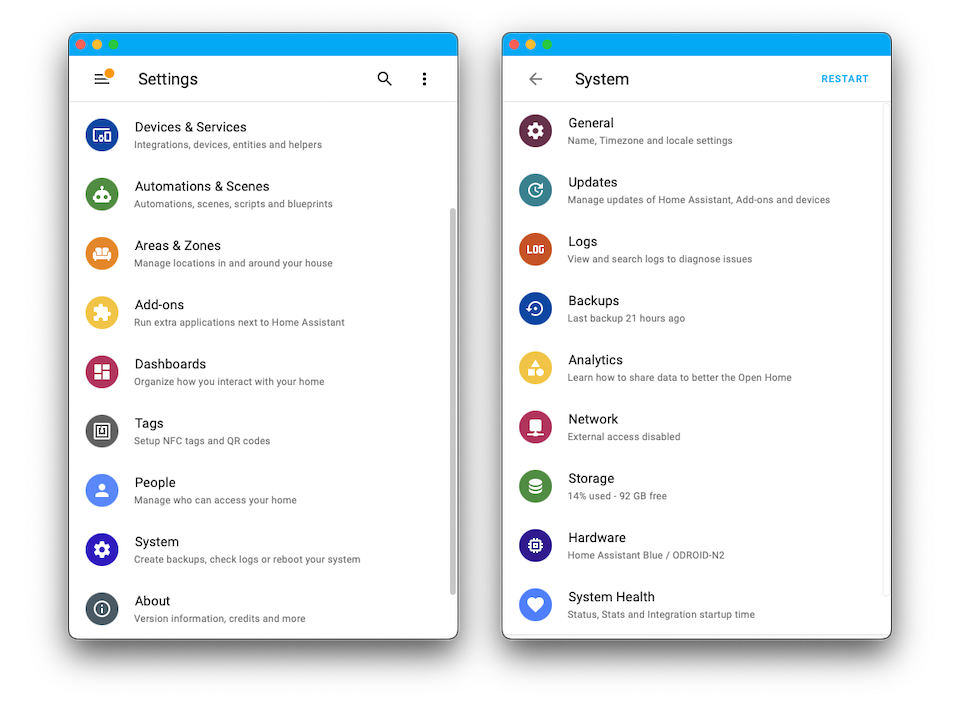
最明显的变化是,“配置”现在被重命名为“设置”,同时我们还新增了一个全新的“系统”子菜单 (如上图右侧所示)。
如果你运行的是 Home Assistant OS,Supervisor 现在已经完整并入“设置”菜单, 以提供更统一、更连贯的体验。像“网络设置在一个菜单里,而 Supervisor 又在另一个菜单里” 这种别扭情况已经被消除了。
Blueprint 已移动到“自动化与场景”部分,而应广大用户要求, 辅助器现在也迁移到了“设备与服务”页面。
YAML 配置工具也有了新归宿:开发者工具。 对于 YAML 配置检查和重载来说,这是一个更合理的位置。
你可能会注意到,一些新菜单项现在内容还比较少。像“存储”和“硬件”这样的页面, 我们很快还会继续补充更多内容!
另外,为了保险起见,我们已经把相关变更列到了“不向后兼容的变更”章节中; 如果你发现有哪里不一样了,记得去看看。
更快找到实体
Looking to access that one 实体 quickly? But it isn't on your 仪表盘?
The Quick Bar helps with that; just press e anywhere
you are in Home Assistant. This 发布 adds a quick search button to the
仪表盘 as well, so you can look up and access any 实体 you need,
even when it is not on your current 仪表盘.
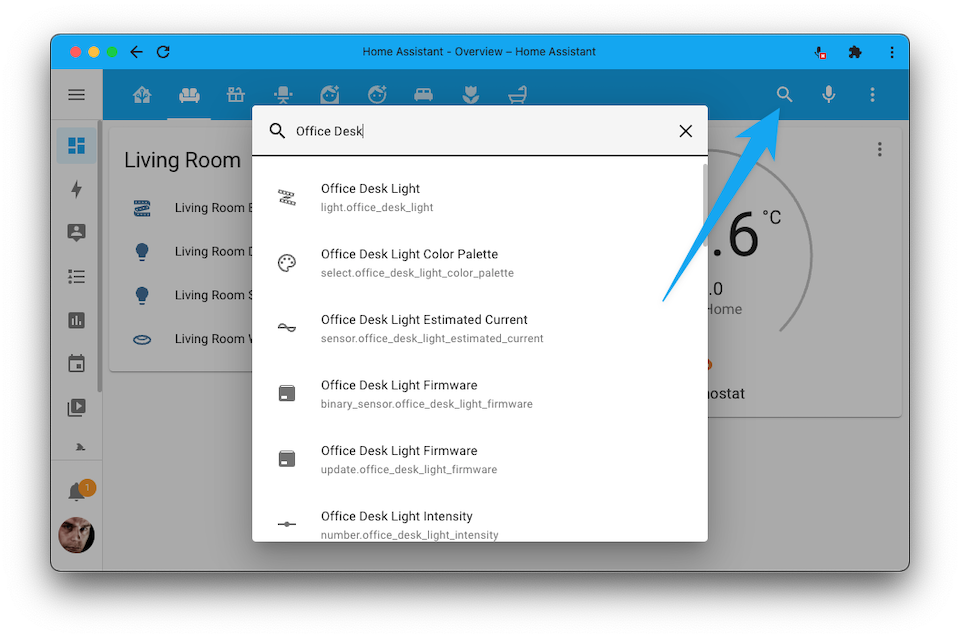
To conserve space, the search is not shown on mobile 设备; but is available via the overflow menu (the three dots in the top right).
新的自动化与脚本功能
This 发布 is packed with new 自动化 & 脚本 features! Some have been added to the UI, and others are advanced features that are only available when using YAML.
One thing almost all these changes have in common: They have been requested and voted for by the community in our Feature Requests forum.
If-then
When we introduced the Choose 动作, our goal was to provide a structure that allowed for other 动作 sequences selectively based on 条件.
While this structure is very flexible and extensive, there was still a desire for an if-then(-else) structure that is small, simple, compact, and clean. This 发布 brings you just that.
The new if-then 动作 is available via YAML and via the UI using 自动化 and 脚本 editors.
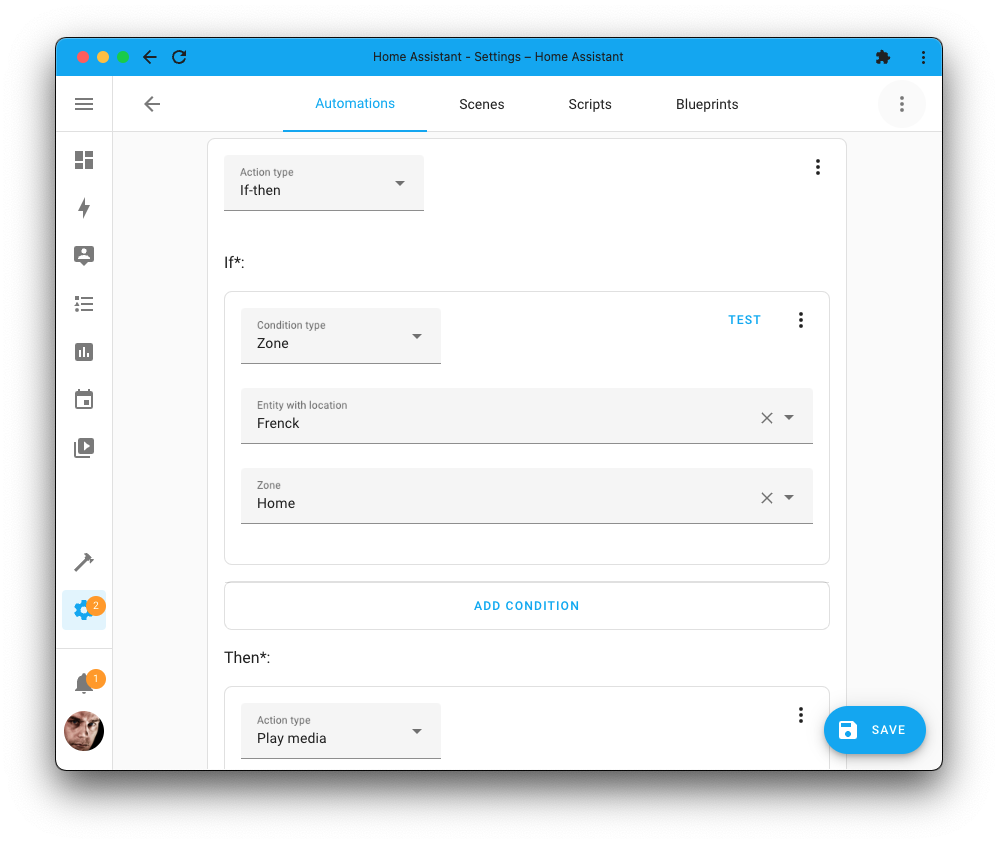
If YAML 自动化 are more your thing, this is how you can use the new if-then 动作 in your 自动化 and 脚本.
Note that that if also supports a shorthand 条件 template (if that
is more your style), for example:
More information can be found in the 脚本 文档.
Calendar 触发器
@allenporter gave the Calendar 集成 (and the Google Calendars 集成) lots of love. In the process, a new Calendar 触发器 was added, which is available for use in your 自动化.
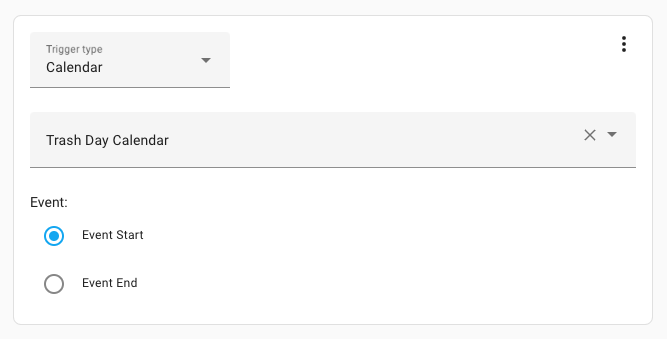 The new calendar 触发器 is available in the 自动化 editor.
This brand new 触发器 is slightly more flexible than the (previously only other option) 状态 触发器. It is available for 自动化 in YAML as well, and the 触发器 provides lots of 触发器 variables you can use in your templates.
The calendar 触发器 is, of course, also available in YAML. This 自动化 example shows the use of the 触发器 and some of the variables it provides.
More information can be found in the Calendar integrations 文档.
For each
We had several options available to repeat a group of 动作. For example, repeating based on a count, while a 条件 passes, or until a 条件 passes.
These are very powerful, but repeating a sequence for each item in a list was also requested and voted for. This 发布 adds: For each.
This is an advanced feature and is only available for use in 自动化 written manually in YAML. Here is an example that sends out two 通知 in different languages:
Each item in the list will be run against a sequence of 动作, and the item
is available as a variable you can use in your templates. The items you can
provide to for_each can be mappings, lists of just strings, and even complex
templates that provide a list as a result.
More information can be found in the 脚本 文档.
Disable any 触发器, 条件, or 动作
Sometimes, you may want to disable a specific 触发器, 动作, or 条件, whether this is for testing, a temporary workaround, or any other reason.
In YAML, you'd comment out parts of your 自动化, but if you wanted to do that in the UI, the only option you have is to delete it from the 自动化 or 脚本.
In this 发布, we added support for disabling a 触发器, 动作, or 条件; without the need for removing it or commenting it out! A disabled 触发器 won't fire, a disabled 条件 always passes, and a disabled 动作 is skipped.
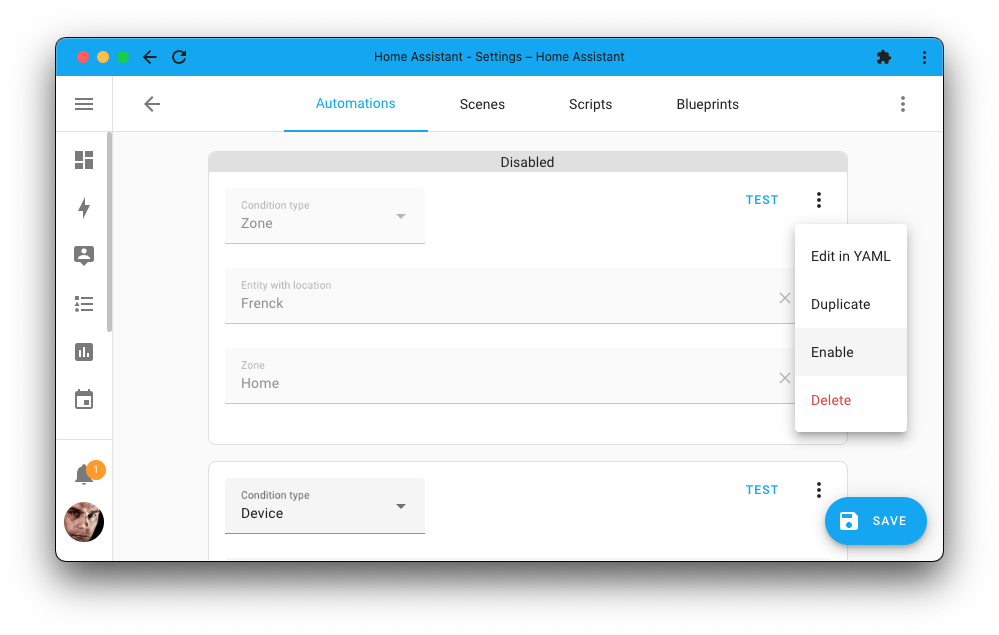
If YAML 自动化 are more your thing, this disabled feature is still helpful. While, of course, you can still comment parts out easily; using this feature will make disabled parts still show up in 自动化 and 脚本 调试 traces.
Every 触发器, 条件, and 动作 now has an enabled parameter. Which
you can set to false to disable that section. For example:
More information can be found in the disabled 触发器, 条件, and 动作 文档.
Continue on 错误
An 自动化 runs a sequence of 动作. One of the questions we often see/read/get is: "If one of the 动作 fails, why does the whole 自动化 stop?"
Good question! To answer this, we have added: Continue on 错误.
It allows specific steps in an 自动化 or 脚本 sequence to fail without interrupting the rest of the sequence.
This advanced feature is currently only available for 自动化 and 脚本 written in YAML. The following example shows an 自动化 动作 that will always run the second 动作, even if the first 动作 fails with an 错误:
More information can be found in the 脚本 文档.
Stopping a 脚本 or 自动化
You can now stop a 脚本 or 自动化 halfway using the Stop 动作. Combined with the previously mentioned new If-then 动作, this can be used to stop an 自动化 or 脚本 conditionally.
For example, this can be helpful if you want just part of an 自动化 to run when you are home and run it at full when you are away.
This feature is available both via the UI and YAML.
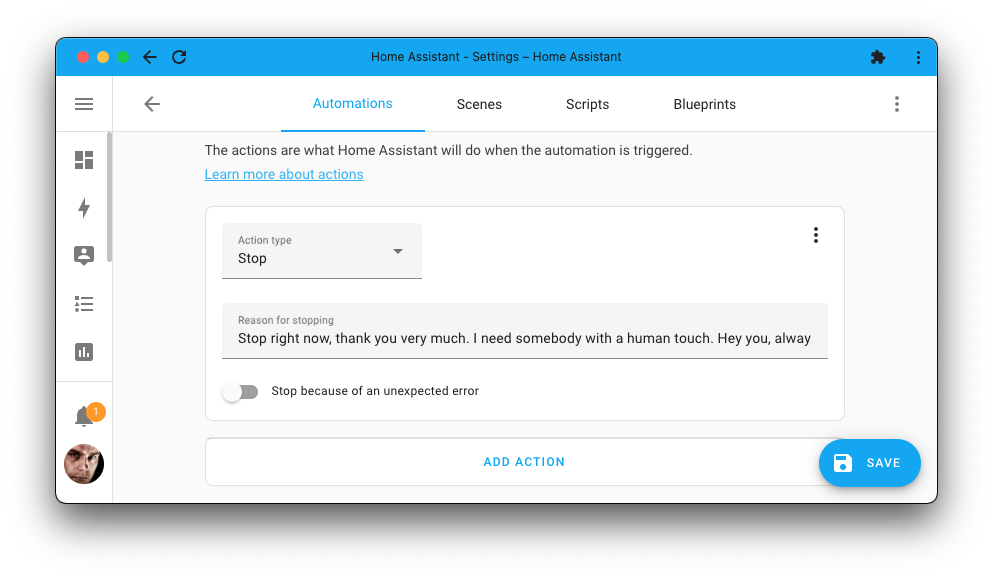
When writing YAML 自动化 or 脚本, this is how the Stop 动作 looks:
More information can be found in the 脚本 文档
Parallelizing 动作
This 发布 introduces a highly advanced feature that provides a way to parallelize 动作.
By default, all 动作 in Home Assistant run sequentially. This means the next 动作 is only started after the current 动作 has been completed.
Running in serial is not always needed, for example, if the sequence of 动作 doesn’t rely on each other and order doesn’t Matter. For those cases, the parallel 动作 can be used to run the 动作 in the sequence in parallel, meaning all the 动作 are started simultaneously.
This feature is partly available via the UI; however, as said: This is quite a powerful and advanced feature, and it comes with caveats. Be sure to check out the 脚本 文档 on parallelizing 动作 before deciding to use it.
Using a single 状态 触发器 for multiple 实体
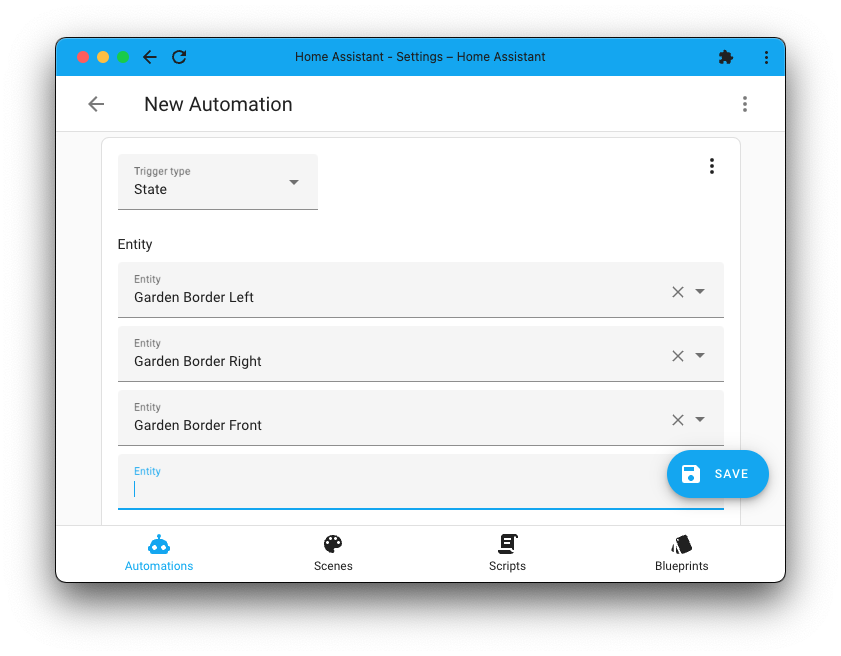
If you write 自动化 in YAML, you are probably already aware of the ability to 触发器 on multiple 实体 in a single 触发器; it has been around for quite some time.
And now also available in the UI. A small addition that might help you cut down the length of your UI-managed 自动化.
触发器 on not matching to/from 状态
This is a YAML only feature we have added to the 状态 触发器: Triggering on not matching to/from 状态. Yes, you read that correctly. When it not matches it 触发器.
Instead of from, you can now use not_from and instead of to, you can now
use not_to. This example 触发器 will only 触发器 if the 状态 was previously
not "unavailable" or "unknown":
More information can be found on the 状态 条件 文档.
Shorthand notation for logical 条件
A neat little YAML feature @thomasloven added can make your YAML-based 自动化 and 脚本 looks significantly cleaner.
Logical 条件 (also known as and, or, not) now have a shorthand
notation. Some example pseudo code to show them all:
In the above <condition>, of course, needs to be replaced with an actual
条件, but the short new syntax of or, and, and not is clearly visible.
More information can be found on the 条件 文档.
仪表卡片分段颜色
An excellent addition by @Netzwerkfehler is the ability to freely define the number of segments, and their colors, of the gauge 卡片!
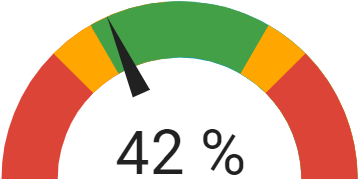 Screenshot of the gauge 卡片 with multiple colored segments.
Helpful if you'd like to define upper and lower 传感器 limits on your gauge, as shown in the example above. The 配置 example used for the above screenshot can be found in the Gauge 卡片 文档.
数据库优化
The last 发布 focused on reducing the size of the database and optimizing the writing of data to the database.
While there are some additional optimizations in this 发布 to further reduce the amount of data that needs to be written, in this 发布, we focused on how often data is read from the database and optimizing its scale for larger setups.
This 发布 is for you if you have many 传感器 generating statistics, as compiling statistics now takes 30-100x less time.
Are you using the History Stats 集成? The number of database queries needed for most 传感器 with a fixed start time is 99% less.
We have made additional improvements to the history APIs to speed up retrieving from the database, reducing API response times by 15-35% on average.
Finally, we have reduced the memory used during database migrations to smooth future migrations and are now automatically repacking your database once a month to keep things tidy.
更新实体的改进
In the previous 发布, we introduced 更新 实体. It was a well-received concept, and we added a couple of improvements to it.
Almost all feedback we got involved "Skipping an 更新"-related functionality. Can I unskip an 更新? How to see which updates I have skipped?
To help with these, we added a dedicated 设置 menu for updates. It provides an 概述 of all pending updates and provides the ability to view updates you have previously skipped.
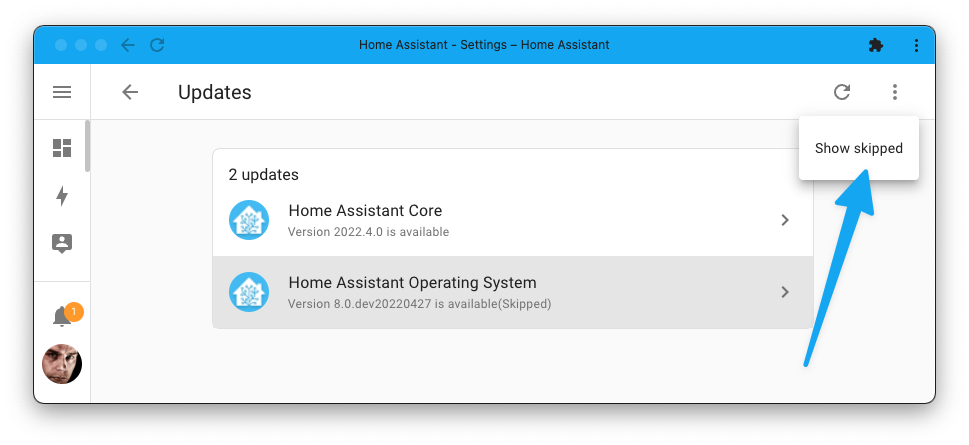
Skipped updates can now be "unskipped" again too! This works in the same way as skipping an 更新 but can also be done in 自动化 using this new .
Two new 集成 have implemented 更新 实体 this 发布:
- Sensibo, done by @gjohansson-ST
- AVM FRITZ!Box Tools, done by @Mask3007
And finally, if you'd like to receive 更新 通知: The "更新 通知" Blueprint by @mdegat01 has been getting quite some attention in the community this month!
Insteon 控制面板
In case you have missed it, the US smart home company Insteon went out of business and shut down its cloud 服务.
Read more about it in our dedicated 博客 post.
As Home Assistant works with Insteon locally, we have seen quite a few new users joining our community; so:
👋 Hello, dear Insteon user. We have a new control 面板 for you!
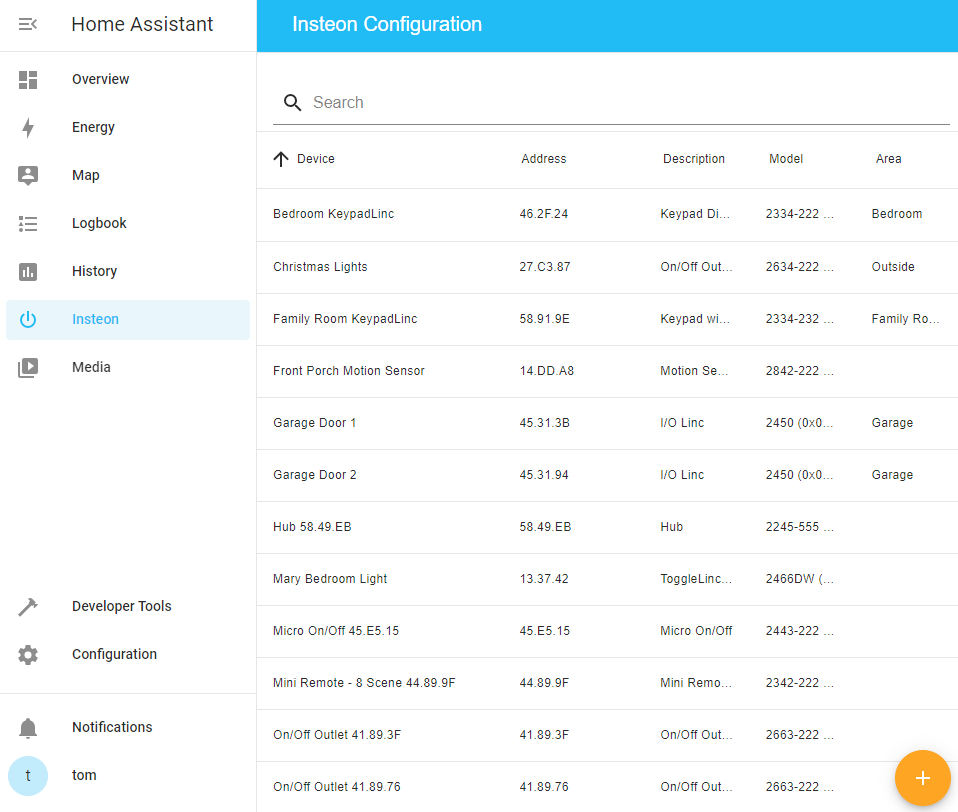 The new Insteon control 面板 allows you to manage your Insteon 设备.
This new control 面板 allows you to manage your Insteon 设备 from Home Assistant directly, just like you would have done previously with the Insteon application.
Thanks for you hard work on this Tom Harris!
模板选择器
A new selector is added: The Template selector.
This new selector can be used in, for example, Blueprints, 脚本 fields, or in a (custom) 集成. It provides a nice code editor with Jinja syntax highlighting and 实体 auto-completion.
We have deployed it in the 自动化 and 脚本 editor too! So, you now get this editor when editing your template 条件 or wait for template 动作 in the UI.
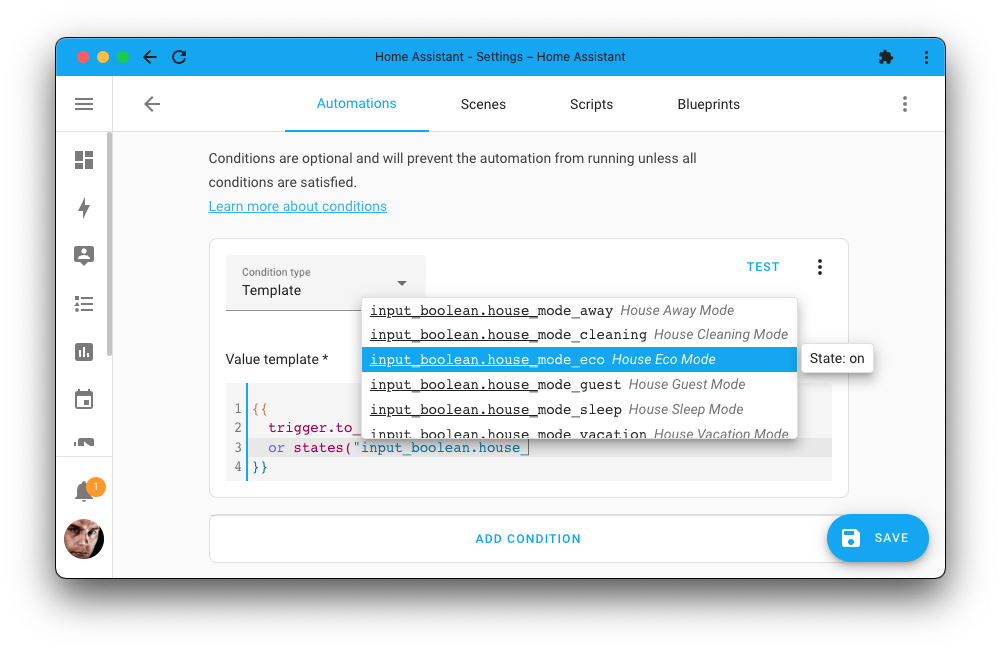
其他值得注意的变化
There is much more juice in this 发布; here are some of the other noteworthy changes this 发布:
- Every 脚本 now automatically gets a unique ID, which means you can edit their name, icon and assign them to areas straight from the UI! Thanks, @frenck!
- If you run the Z-Wave JS server manually in, for example, a Docker 容器, it will now be automatically discovered on your network. Thanks @raman325!
- Template 实体 now have a
thisvariable available, which is a reference to the 状态 of the template 实体 itself. Awesome work @akloeckner and @emontnemery! - Running Home Assistant 核心 or 容器? @frenck added the 服务 to the 备份 集成 allowing you to create an 自动化 to create backups on a schedule.
- @sisimomo added Markdown support to Blueprint input descriptions, allowing you to add links to, for example, 文档 in your Blueprints.
- The Shelly 集成 now supports authentication for the second generation 设备, thanks @thecode!
- 状态 条件 with multiple 实体 can now also match if any of the 实体 match the 条件 (instead of all), thanks @frenck!
- Sonos now has a favorites 传感器 so that you can access and use your favorites in your 自动化, 脚本, and templates. Thanks @jjlawren!
- @dmulcahey added support for configuring the power-on 状态 of 设备 that have this 配置 option to ZHA. Nice!
- 传感器 now have a new 设备 class available: "duration". Thanks, @bdraco!
- The output of Media Selector can now be directly used with play media 服务 calls in your Blueprints. Awesome, @emontnemery!
- @raman325 added 前端 support for Sirens, so you can actually turn one on from the UI. 🚨 Alarming news @raman325!
- @frenck added a persons 属性 to zones, which indicates who is currently in a zone.
- When customizing the 设备 class / "Show as" of an 实体 in the UI, you can now set it to nothing/empty as well. Thanks, @zsarnett!
- @rdfurman Added support to the Honeywell Total Connect Comfort (US) 集成 for outdoor 传感器. Awesome!
- Philips TV now provides a 开关 to 打开/off the "Ambilight+Hue" syncing (if your TV model supports that). Thanks, @bramstroker!
新集成
We welcome the following new 集成 this 发布:
- Meater, added by@Sotolotl
- QNAP QSW, added by @Noltari
- SENZ, added by @milanmeu
- SlimProto (Squeezebox Players), added by @marcelveldt
- Trafikverket Ferry, added by @gjohansson-ST
现在可通过 UI 设置的集成
The following 集成 are now available via the Home Assistant UI:
- SABnzbd, done by @shaiu
- SQL, done by @gjohansson-ST
- Steam, done by @tkdrob
- Tautulli, done by @tkdrob
发布 2022.5.1 - May 5
- fix reading of battery messages (@2Fake - #70659) (devolo_home_control docs)
- Only test for EncryptedBridge in Samsung J/H models (@epenet - #71291) (samsungtv docs)
- Ensure rachio retries 设置 later when cloud 服务 is broken (@bdraco - #71300) (rachio docs)
- Fix lutron caseta occupancy 传感器 (@bdraco - #71309) (lutron_caseta docs)
- 更新 aioairzone to v0.4.3 (@Noltari - #71312) (airzone docs)
- Fix apple tv 警告 (@balloob - #71321) (apple_tv docs)
- Fix Meater (@emontnemery - #71324) (meater docs)
- Bump numpy to 1.21.6 (@pvizeli - #71325) (opencv docs) (tensorflow docs) (trend docs) (iqvia docs) (compensation docs)
- Only lookup unknown Google Cast models once (@emontnemery - #71348) (cast docs)
- Bump library 版本 (@bieniu - #71349) (nam docs)
- Ignore loading system 实体 category (@balloob - #71361)
- Fix importing blueprints (@balloob - #71365) (blueprint docs)
- Add unique ids to 传感器 (@shaiu - #71367) (sabnzbd docs)
- Bump pychromecast to 12.1.1 (@balloob - #71377) (cast docs)
发布 2022.5.2 - May 6
- 升级 glances_api to 0.3.5 (@difelice - #71243) (glances docs)
- Fix Canary 摄像头 stream blocking call (@0bmay - #71369) (canary docs)
- 更新 Zigpy 属性 cache for 开关 设备 that do not report 状态 (@dmulcahey - #71417) (zha docs)
- Stringify enums in selectors (@balloob - #71441) (blueprint docs)
发布 2022.5.3 - May 8
- Move flexit 温控 to HVAC 动作 (@balloob - #71443) (flexit docs)
- Fix display of multiline queries in sql config flow (@bdraco - #71450) (sql docs)
- Ensure sql 传感器 keep working after using the options flow (@bdraco - #71453) (sql docs)
- Fix rgb conversion in fibaro 灯光 (@rappenze - #71476) (fibaro docs)
- Revert usage of Fibaro Client V5 as it has too many 错误 (@rappenze - #71477) (fibaro docs)
- 更新 py-canary to 0.5.2 (@0bmay - #71489) (canary docs)
- bump total_connect_client to 2022.5 (@austinmroczek - #71493) (totalconnect docs)
- Add timeout (@bieniu - #71499) (brother docs)
- Add Ukraine 报警 集成 (@PaulAnnekov - #71501) (ukraine_alarm docs) (new-集成)
- fix speed 传感器 wrong number (@shaiu - #71502) (sabnzbd docs)
- Bump 前端 to 20220504.1 (@balloob - #71504) (前端 docs)
- Fix other enums in helpers (@balloob - #71505)
发布 2022.5.4 - May 12
- Fix timezone issue on onvif 集成 (@marvinroger - #70473) (onvif docs)
- Fix Insteon issue with dimmer default on level (@teharris1 - #71426) (insteon docs)
- Migrate sabnzbd 传感器 unique ids (@shaiu - #71455) (sabnzbd docs)
- Bump simplisafe-python to 2022.05.1 (@bachya - #71545) (simplisafe docs)
- Fix SABnzbd config check (@shaiu - #71549) (sabnzbd docs)
- Fix typer/click incompatibilty for unifiprotect (@AngellusMortis - #71555) (unifiprotect docs)
- Improve Google Cast detection of HLS playlists (@emontnemery - #71564) (cast docs)
- Correct 设备 class for meater cook 传感器 (@emontnemery - #71565) (meater docs)
- Bump pychromecast to 12.1.2 (@emontnemery - #71567) (cast docs)
- Bump logi_circle to 0.2.3 (@evanjd - #71578) (logi_circle docs)
- Bump nam 后端 library to 版本 1.2.4 (@bieniu - #71584) (nam docs)
- Bump pydeconz to v92 (@Kane610 - #71613) (deconz docs)
- Fix wrong brightness level change visible in UI (@rappenze - #71655) (fibaro docs)
- Prevent history_stats from rejecting 状态 when microseconds differ (@bdraco - #71704) (history_stats docs)
- Fix zwave_js 设备 自动化 bug (@raman325 - #71715) (zwave_js docs)
- Fix merge conflict with master to dev in sabnzbd (CI fix) (@bdraco - #71605) (sabnzbd docs)
- Add use_wallclock_as_timestamps option to generic (@uvjustin - #71245) (generic docs)
- Changed API for Ukraine 报警 (@PaulAnnekov - #71754) (ukraine_alarm docs)
发布 2022.5.5 - May 18
- Refresh 摄像头 stream source of Synology DSM connected 摄像头 (@mib1185 - #70938)
- Warn user if "model" key is missing from Shelly firmware (@chemelli74 - #71612) (shelly docs)
- Remove LIFX bulb discovery from the inflight list if it fails to connect (@Djelibeybi - #71673) (lifx docs)
- Limit parallel requests in fibaro 灯光 (@rappenze - #71762) (fibaro docs)
- Fix VeSync air_quality 风扇 属性 (@jetpacktuxedo - #71771) (vesync docs)
- Fix handling package detection for latest UniFi Protect beta (@AngellusMortis - #71821) (unifiprotect docs)
- Add missing Shelly 遮盖 传感器 bugfix (@RadekHvizdos - #71831) (shelly docs)
- Revert changing
pysnmptopysnmplib(@bieniu - #71901) (snmp docs) (brother docs) - Suppress Upnp 错误 in SamsungTV resubscribe (@epenet - #71925) (samsungtv docs)
- Properly handle Shelly gen2 设备 disconnect (@chemelli74 - #71937) (shelly docs)
- Include initial 状态 in history_stats count (@bdraco - #71952) (history_stats docs)
- Fix filesize doing IO in event loop (@thecode - #72038) (filesize docs)
- Ignore UpnpXmlContentError in SamsungTV (@epenet - #72056) (samsungtv docs)
- Cleanup unused import in SamsungTV (@epenet - #72102) (samsungtv docs)
需要帮助?加入社区!
Home Assistant has a great community of users who are all more than willing to help each other out. So, join us!
Our very active Discord chat server is an excellent place to be at, and don't forget to join our amazing forums.
Found a bug or issue? Please report it in our issue tracker, to get it fixed! Or, check our help page for guidance for more places you can go.
Are you more into email? Sign-up for our Building the Open Home Newsletter to get the latest news about features, things happening in our community and other news about building an Open Home; straight into your inbox.
Backward-incompatible changes
以下列出了本次发布中的破坏性变更,按主题或集成分类。 点击任一条目即可查看该项变更的详细说明。
This 发布 contains several changes to the 配置 menu. These are the most important changes.
-
The
Configurationmenu has been renamed toSettings. -
Helpersmoved toDevices & services. -
Blueprintsmoved toAutomations & Scenes. -
Areasis now grouped with `Zones. -
仪表盘
Resourcesmoved to overflow menu*. -
A brand new
Systemmenu housing all system-related settings:- The
重启button is available in theSystemmenu. - New
Updatesmenu, which also now provides the ability to join or leave the beta channel from the overflow menu*. - All logs moved to
日志(Supervisor, audio, etc). Backupsmoved from the Supervisor/Main menu to here.Networknow has all network related settings previously in the General settings and Supervisor.Storageprovides information about used space, eMMC Lifetime, and also provides theMove datadiskfeature in the overflow menu*.Hardwarenow has theRebootand重启 Hostcontrols,Available Hardwareis available in the overflow menu*.System Healthmoved to its own menu item in the system menu.- Processor and memory usage was moved into the new
System Healthmenu. - The 集成 list with timings, previously shown in the
Aboutmenu, is moved into the newSystem Healthmenu.
- The
Additionally, the developers tools has a brand new YAML tab, which contains
the buttons and tools to reload and check your YAML 配置. This was
previously known as "Server Controls", but now moved to the developer tools.
* The overflow menu is the menu you see when you click on the three vertical dots in the top right of your screen.
传感器 reporting a temperature but not setting 设备 class to temperature will no longer have their values automatically converted. For 传感器 that are manually configured, users need to set the 设备 class. If the 集成 providing the 传感器 does not support setting 设备 class, the 传感器's state can be filtered through a template 传感器.
(@emontnemery - #69069)
The previously deprecated YAML 配置 of the AVM FRITZ!Box Call Monitor 集成 has been removed.
AVM FRITZ!Box Call Monitor is now configured via the UI, any existing YAML 配置 has been imported in previous releases and can now be safely removed from your YAML 配置 files.
(@cdce8p - #70829) (documentation)
The binary 传感器 实体 showing that an update is available for the FRITZ!Box firmware has been deprecated and will be removed in Home Assistant 2022.7.
The AVM FRITZ!Box Tools 集成 now provides an 更新 实体 as a
replacement.
(@Mask3007 - #70096) (documentation)
All bmw_connected_drive.* 服务 are removed (deprecated since 2022.2).
Please use the new button 实体 with the button.press 服务 instead.
(@rikroe - #69808) (documentation)
The button.<your_vehicle_refresh 实体 is deprecated and will be removed in
a future version. Please use the homeassistant.update_entity 服务 with
any BMW 实体 to force-refresh all platforms from the BMW API.
(@rikroe - #67003) (documentation)
Migrating deCONZ Siren 实体 from switch platform to siren platform has been removed. This only affects users upgrading from before 2021.10 to 2022.5 or later. At most, this causes lingering unavailable switch 实体; which can be manually removed.
(@Kane610 - #70600) (documentation)
Migrated deCONZ light 实体 of type "On/Off Output" to switch from light platform as they are binary 设备 (only on/off).
(@Kane610 - #70598) (documentation)
The internal cost and compensation 传感器 实体, used by the energy 仪表盘 of Home Assistant, are now hidden by default.
(@frenck - #70378) (documentation)
Fibaro lights no longer support deprecated white_value,
use rgbw_color instead.
(@rappenze - #69189) (documentation)
Units changed from cents to ¢/kWh. This more accurately represents the type
of value, and makes the 传感器 work when used in the Energy dashboards.
If you relied on this unit of measurement format in your automations, scripts, or have been recording it in an external time metrics database, you may need to adapt to this change.
(@ZephireNZ - #69396) (documentation)
The pretty formatted value attribute has been removed in favor of using the new duration state class, which is formatted by the frontend.
This change significantly reduces the number of rows stored in the database.
(@bdraco - #70720) (documentation)
The 设备 class carbon_dioxide is no longer admitted as a binary_sensor
设备 class; as it is not a valid 设备 class for a binary 传感器. If you have
overridden the 设备 class with customize you need to adjust your 配置.
(@epenet - #69239) (documentation)
The native IKEA TRÅDFRI groups are now removed. We propose using light groups instead.
Additionally, the previously deprecated YAML 配置 of the IKEA TRÅDFRI 集成 has been removed.
IKEA TRÅDFRI is now configured via the UI, any existing YAML 配置 has been imported in previous releases and can now be safely removed from your YAML 配置 files.
(@ggravlingen - #68033) (documentation)
The 集成 传感器 unit 配置 parameter was deprecated in
Home Assistant Core release 2021.10 and is now removed as it did not
take unit_prefix and unit_time into account.
Example:
The 配置 in the example would cause the source 传感器's unit
(e.g., W) to be overruled and the 集成 传感器's unit_of_measurement
would be set to MWs (MegaWatt-Second) even though the integral calculation
was performed with k (kilo) and h (hour), i.e., the value of the 集成
传感器 is in kWh, not MWs.
(@dgomes - #69157) (documentation)
The LIFX 集成 changed the network adapters used to discover LIFX 设备. Instead of enabling all adapters on which LIFX 设备 appear, it now only uses the adapter(s) enabled in Home Assistant.
This makes the discovery of LIFX faster and more reliable.
(@Djelibeybi - #70458) (documentation)
Media Player now supports a new state, buffering. 集成 supporting this state previously reported playing but may now report buffering. This may also introduce new state transitions between the two states during playback.
In order to maintain previous behavior, replace usage of playing with both the buffering and playing states, and consider how to handle transitions between the two.
(@emontnemery - #70863) (documentation)
Filenames and directories starting with a . will no longer appear in the
Media Browser.
If the file or directory name starts with a ., it means they are marked
hidden; thus, the media browser will now respect that.
(@DDanii - #69820) (documentation)
min_max 传感器 generated a significant amount of database rows because they
included all attributes regardless of the configured type. For active 传感器,
these attributes added up to multiple megabytes per day for each 传感器.
Reference issue report.
min_max 传感器 now only set attributes based on the configured type of 传感器
as below:
min:min_entity_idmax:max_entity_idlast:last_entity_id
The following attributes are no longer present: min, max, mean, median,
last, count_sensors
If access to the data previously provided by the attributes is needed,
create a separate min_max 传感器 for that required type instead.
(@bdraco - #70142) (documentation)
The previously deprecated YAML 配置 of the MJPEG IP Camera 集成 has been removed.
MJPEG IP Camera is now configured via the UI, any existing YAML 配置 has been imported in previous releases and can now be safely removed from your YAML 配置 files.
(@frenck - #68033) (documentation)
The previously deprecated YAML 配置 of the ONVIF 集成 has been removed.
ONVIF is now configured via the UI, any existing YAML 配置 has been imported in previous releases and can now be safely removed from your YAML 配置 files.
(@hunterjm - #70395) (documentation)
The original orp_supply_level and ph_supply_level 传感器 will become
unavailable. Two new 传感器 will be automatically created, but the originals
will have to be removed and the new ones manually renamed to match the originals.
This should only affect those with IntelliChem.
(@dieselrabbit - #69937) (documentation)
The previously deprecated modem_callerid.reject_call 服务 has now been
removed. A button 实体 has previously been made available as a replacement.
(@frenck - #69019) (documentation)
The previously deprecated "Wanted" 传感器 in the Radarr 集成 has been removed. If you have this 传感器 still configured in your YAML 配置, you should remove it before updating.
(@tkdrob - #69500) (documentation)
RainMachine zone switches no longer have the time_remaining attribute;
instead, each zone now has a separate 传感器 实体 (设备 class of timestamp,
实体 category of diagnostic) that shows the datetime at which the zone will
finish (or last finished if the zone isn't running).
(@bachya - #69206) (documentation)
RainMachine switch attributes that are floats are now rounded to two decimals
of precision.
(@bachya - #70006) (documentation)
Home Assistant will now automatically repack your database once a month, on the second Sunday of the month.
Repacking allows shrinking the database in file size, resulting in smaller backups. It also frees up the space that has been freed up by the database optimizations made in 2022.4.
Some notes:
- It is only done once a month to minimize I/O.
- The second Sunday was chosen as it would be out of sync with Home Assistant releases.
- This automatic repacking can be disabled by setting
auto_repacktofalsein the recorder 配置.
(@bdraco - #69314) (documentation)
It's no longer possible to configure the recorder to use an in-memory database.
(@emontnemery - #69616) (documentation)
集成 and platforms can provide hints to the recorder to exclude specific 实体 state attributes from being recorded.
This excludes attributes that hold little to no historical value or are a static value. This significantly reduces the amount of data stored.
The following attributes are no longer recorded:
- 自动化:
current,id,last_action,last_triggered,maxandmode. - Input Boolean:
editable. - Input Button:
editable. - Input Datetime:
editable,has_date, andhas_datetime. - Input Number:
editable,max,min,mode, andstep. - Input Text:
editable,max,min,mode, andpattern. - Input Select:
editable.
(@frenck - #70154 #70224 #70225 #70226)
The SABnzbd 集成 migrated to 配置 via the UI. Configuring SABnzbd via YAML 配置 has been deprecated and will be removed in a future Home Assistant release.
Your existing YAML 配置 is automatically imported on upgrade to this release; and thus can be safely removed from your YAML 配置 after upgrading.
(@shaiu - #68138) (documentation)
The binary 传感器 for the update available has been removed.
Use the new 更新 实体 to monitor available updates instead.
(@gjohansson-ST - #70180) (documentation)
The sonos_group attribute on Sonos media players has been renamed
to group_members to align with other 集成.
(@jjlawren - #70924) (documentation)
The SQL 集成 migrated to 配置 via the UI. Configuring SQL via YAML 配置 has been deprecated and will be removed in a future Home Assistant release.
Your existing YAML 配置 is automatically imported on upgrade to this release; and thus can be safely removed from your YAML 配置 after upgrading.
(@gjohansson-ST - #68700) (documentation)
The Steam 集成 migrated to 配置 via the UI. Configuring Steam via YAML 配置 has been deprecated and will be removed in a future Home Assistant release.
Your existing YAML 配置 is automatically imported on upgrade to this release; and thus can be safely removed from your YAML 配置 after upgrading.
The first account listed in the YAML 配置 will be considered as your Steam ID as there is no way to identify your Steam ID from your API key. You can put your Steam ID as the first entry in accounts before updating, or set up the 集成 from scratch.
(@tkdrob - #67261) (documentation)
The naming of 实体 and 设备 has been aligned, so that the 设备 name is now part of the 实体 name.
(@mib1185 - #69754) (documentation)
The Tautulli 集成 migrated to 配置 via the UI. Configuring Tautulli via YAML 配置 has been deprecated and will be removed in a future Home Assistant release.
Your existing YAML 配置 is automatically imported on upgrade to this release; and thus can be safely removed from your YAML 配置 after upgrading.
(@tkdrob - #57450) (documentation)
Trigger-based template 传感器 are now initialized to the last known state at Home Assistant startup, instead of to "unknown".
(@emontnemery - #69344) (documentation)
The TTS base_url option is deprecated. Please, configure internal/external
URL instead.
(@balloob - #70382) (documentation)
The UPnP/IGD 集成 options have been removed. This includes the ability to configure a custom update/scan interval.
As an alternative, the more generic and more flexible
homeassistant.update_entity 服务 can be used to create an 自动化 that
updates the 实体 on your desired intervals or schedule.
(@StevenLooman - #69134) (documentation)
Vera power meter 传感器 is now using the (correct) symbol W for watt instead
of watts.
If you relied on this unit of measurement format in your automations, scripts, or have been recording it in an external time metrics database, you may need to adapt to this change.
(@emontnemery - #69285) (documentation)
With this release, you will need to update your zwave-js-server instance.
- If you use the zwave_js add-on, you need to have at least version
0.1.56. - If you use the Z-Wave JS 2 MQTT add-on, you need to have at least version
0.38.0. - If you use the zwavejs2mqtt Docker container, you need to have at least version
6.7.0. - If you run your own Docker container, or some other installation method,
you will need to update your zwave-js-server instance to at least
1.16.0.
(@raman325 - #70464) (documentation)
Zengge lights no longer support white_value, please use white instead.
(@emontnemery - #55260) (文档)
If you are a custom 集成 developer and want to learn about breaking changes and new features available for your 集成: Be sure to follow our developer 博客. The following are the most notable for this 发布:
- Calendar Data Model improvements and deprecations
- Deprecating all SUPPORT_* constants
- Local OAuth2 Updates
- Saying goodbye to the time_changed event
- Constant deprecations for 2022.5
Farewell to the following
The following 集成 are also no longer available as of this 发布:
- Arlo has been removed. It was in a broken 状态 for a long time caused by authentication changes upstream. (@anaisbetts - #70330)
- Digital Loggers has been removed. It relied on web scraping, which is not allowed for a Home Assistant 核心 集成. (@tkdrob - #69939)
- Updater was previously deprecated and has been removed. Use the 版本 and Analytics 集成 as a replacement. (@frenck - #68981)
All changes
Of course, there is a lot more in this 发布. You can find a list of all changes made here: Full changelog for Home Assistant 核心 2022.5