

SQL
SQL 集成允许你使用 sqlalchemy 库所支持的 SQL 数据库中的值,来填充传感器状态(及其属性)。
如果搭配 recorder 集成数据库使用,它可以用于展示 Home Assistant 传感器的统计信息;也可以用于外部数据源。
此集成既可通过配置流程设置,也可通过 YAML 配置。
此集成可通过 UI 配置。前往 设置 > 设备与服务 添加。
通过 YAML 配置
要配置此传感器,请在 configuration.yaml 中定义数据库连接参数和查询列表。每条查询都会创建一个传感器。
要启用它,请将以下内容添加到 configuration.yaml。
:::tip
更改配置后需要重启 Home Assistant。
:::
数据更新
默认情况下,该集成每 30 秒执行一次 SQL 查询以更新传感器。 如果你希望使用不同的更新频率,可以在集成的系统选项中关闭自动刷新(Enable polling for updates),然后通过自动化自行设置轮询频率。
如需更详细的自定义间隔设置步骤,请参考下方流程。
自定义轮询间隔
如果你想指定设备的数据轮询间隔,可以关闭默认轮询,并创建自己的轮询自动化。
- Go to Settings > Devices & services, and select your integration.
- On the integration entry, select
. - Then, select System options and toggle the button to disable polling.
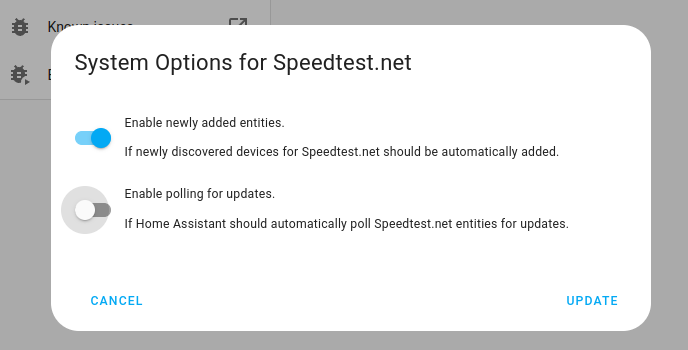
- Then, select System options and toggle the button to disable polling.
- To define your custom polling interval, create an automation.
- Go to Settings > Automations & scenes and create a new automation.
- Define any trigger and condition you like.
- Select Add action, then select Other actions.
- Select Perform action, and from the list, select the
homeassistant.update_entityaction. - Choose your targets by selecting the Choose area, Choose device, Choose entity, or Choose label buttons.
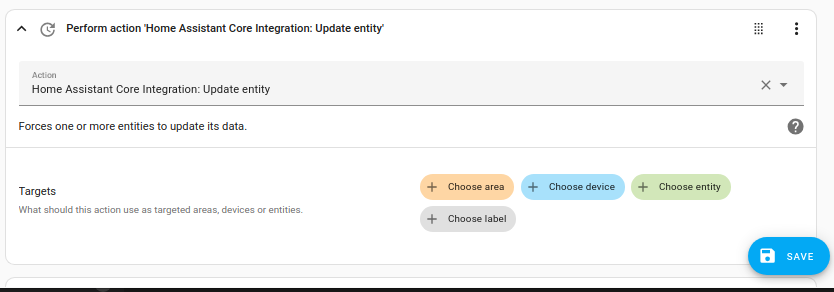
- Save your new automation to poll for data.
操作
操作:SQL 查询
sql.query 操作会对数据库执行任意只读的 SELECT 查询,并返回结果。
- Data attribute:
query- Description: The
SELECTquery to execute. OnlySELECTstatements are allowed. - Optional: No
- Description: The
- Data attribute:
db_url- Description: The URL of the database to connect to. If not provided, the default Home Assistant recorder database will be used.
- Optional: Yes
The sql.query action returns a list of rows, where each row is a dictionary of column names to values.
数据类型转换
The data returned by the database is converted to be compatible with the action response. The following conversions are applied:
Decimaltypes are converted to floats.DateandDatetimeobjects are converted to ISO 8601 formatted strings.bytesandbytearrayare converted to a hexadecimal string prefixed with0x.- All other basic types (string, integer, float, boolean) are returned as is.
示例
Example of calling the sql.query action in an automation:
This would return a result similar to this, which will be stored in the sun_history variable:
说明
See supported engines for which you can connect with this integration.
The SQL integration will connect to the Home Assistant Recorder database if "Database URL" has not been specified.
There is no explicit configuration required for attributes. The integration will set all columns returned by the query as attributes.
Note that in all cases only the first row returned will be used.
使用模板
For incoming data, a value template translates incoming JSON or raw data into a valid payload.
Incoming payloads are rendered with possible JSON values, so when rendering, the value_json variable can be used to access attributes in a JSON-based payload. Otherwise, the value variable can be used for non-JSON payloads.
The this variable can also be used in the template. The this attribute refers to the current entity state of the entity.
Further information about the this variable can be found in the template documentation.
Example value template with JSON:
With the following payload:
Template {{ value_json.temperature | round(1) }} renders to 21.9.
示例
In this section, you find some real-life examples of how to use this sensor.
实体的当前状态
This example shows the previously recorded state of the sensor sensor.temperature_in.
The query will look like this:
Use state as column for value.
使用模板统计状态变化次数
This example shows the amount of state changes of the sensor sensor.temperature_in
using another sensor's state to provide the time window.
The query will look like this:
Use changes as column for value.
实体的上一个状态
Based on previous example with temperature, the query to get the former state is :
Use state as column for value.
实体在 x 时间前的状态
If you want to extract the state of an entity from a day, hour, or minute ago, the query is:
Replace -1 day with the target offset, for example, -1 hour.
Use state as column for value.
Keep in mind that, depending on the update frequency of your sensor and other factors, this may not be a 100% accurate reflection of the actual situation you are measuring. Since your database won’t necessarily have a value saved exactly 24 hours ago, use “>=” or “<=” to get one of the closest values.
MariaDB
On MariaDB the following where clause can be used to compare the timestamp:
Replace - INTERVAL 1 DAY with the target offset, for example, - INTERVAL 1 HOUR.
数据库大小
Postgres
Use db_size as column for value.
Replace dsmrreader with the correct name of your database.
The unit of measurement returned by the above query is MiB, please configure this correctly.
Set the device class to Data size so you can use UI unit conversion.
MariaDB/MySQL
Change table_schema="homeassistant" to the name that you use as the database name, to ensure that your sensor will work properly.
Use value as column for value.
The unit of measurement returned by the above query is MiB, please configure this correctly.
Set the device class to Data size so you can use UI unit conversion.
SQLite
If you are using the recorder integration then you don't need to specify the location of the database. For all other cases, add sqlite:////path/to/database.db as Database URL.
Use size as column for value.
The unit of measurement returned by the above query is MiB, please configure this correctly.
Set the device class to Data size so you can use UI unit conversion.