

添加 state card
Home Assistant 的主界面是一个列出当前 entities 及其状态的列表。对于系统中的每个 entity,都会渲染一张 state card。State card 会显示一个图标、entity 的名称、状态上次更改的时间以及当前状态,或一个用于与之交互的控件。
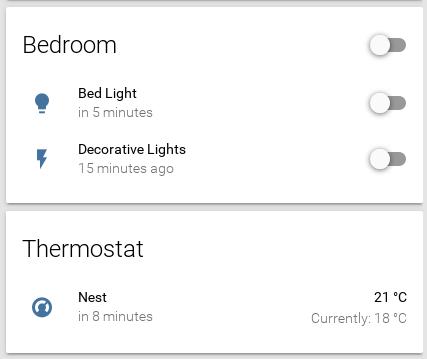
不同的卡片类型可以在这里找到。
未分组的 Sensors 会作为所谓的 badge 显示在 state card 的顶部。

不同的 badge 位于文件 /src/components/entity/ha-state-label-badge.ts 中。
添加自定义卡片类型只需几个简单步骤。在此示例中,我们将为 domain camera 添加一个新的 state card:
- 在文件 /common/const.ts 中,将
'camera'添加到数组DOMAINS_WITH_CARD。 - 在文件夹 /state-summary/ 中创建文件
state-card-camera.ts。 - 在 state-card-content.ts 中添加
import './state-card-camera.ts';。