自定义卡片功能

一些 dashboard cards 支持 features。这些小部件会为 card 添加快捷控制。我们提供了许多内置 features,但你并不局限于 Home Assistant 默认包含的那些。你可以像定义custom cards一样构建并使用自己的 feature。

定义你的卡片功能

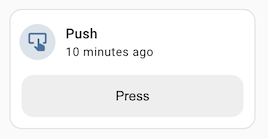
下面是一个用于 button entity 的 custom card feature 示例。

Screenshot of the custom card feature example

import {
  LitElement,
  html,
  css,
} from "https://unpkg.com/lit-element@2.0.1/lit-element.js?module";

const supportsButtonPressCardFeature = (stateObj) => {
  const domain = stateObj.entity_id.split(".")[0];
  return domain === "button";
};

class ButtonPressCardFeature extends LitElement {
  static get properties() {
    return {
      hass: undefined,
      config: undefined,
      stateObj: undefined,
    };
  }

  static getStubConfig() {
    return {
      type: "custom:button-press-card-feature",
      label: "Press",
    };
  }

  setConfig(config) {
    if (!config) {
      throw new Error("Invalid configuration");
    }
    this.config = config;
  }

  _press(ev) {
    ev.stopPropagation();
    this.hass.callService("button", "press", {
      entity_id: this.stateObj.entity_id,
    });
  }

  render() {
    if (
      !this.config ||
      !this.hass ||
      !this.stateObj ||
      !supportsButtonPressCardFeature(this.stateObj)
    ) {
      return null;
    }

    return html`
      <button class="button" @click=${this._press}>
        ${this.config.label || "Press"}
      </button>
    `;
  }

  static get styles() {
    return css`
      .button {
        display: block;
        height: var(--feature-height, 42px);
        width: 100%;
        border-radius: var(--feature-border-radius, 12px);
        border: none;
        background-color: #eeeeee;
        cursor: pointer;
        transition: background-color 180ms ease-in-out;
      }
      .button:hover {
        background-color: #dddddd;
      }
      .button:focus {
        background-color: #cdcdcd;
      }
    `;
  }
}

customElements.define("button-press-card-feature", ButtonPressCardFeature);

window.customCardFeatures = window.customCardFeatures || [];
window.customCardFeatures.push({
  type: "button-press-card-feature",
  name: "Button press",
  supported: supportsButtonPressCardFeature, // Optional
  configurable: true, // Optional - defaults to false
});

如果你希望你的 feature 更好地融入 home assistant 的默认设计,可以使用这些 CSS 变量:

  • --feature-height: 推荐高度(42px)。
  • --feature-border-radius: 推荐圆角半径(12px)。这对设置按钮或滑块的圆角可能很有用。
  • --feature-button-spacing: 推荐按钮间距(12px)。如果你的 feature 中有多个按钮,这会很有用。

与 custom cards 的主要区别在于图形化配置选项。 若要让它显示在 card editor 中,你必须将描述它的对象添加到数组 window.customCardFeatures 中。

该对象的必需属性是 typename。建议定义带函数的 supported 选项,这样 editor 只会在 feature 与 card 中所选实体兼容时才推荐它。如果你的实体带有额外配置(例如上面示例中的 label 选项),请将 configurable 设为 true,以便 editor 正常工作。

此外,静态函数 getConfigElementgetStubConfig 的工作方式与普通 custom cards 相同。