

title: '2023.8:已翻译的服务、事件与通配符!' description: '<a href=''/home-assistant/integrations/版本/2023.8''<img src=''/home-assistant/images/blog/2023-08/social.png'' style=''border: 0;box-shadow: none;''</a。' 还能使用 Assist 调用 OpenAI 的 DALL-E 生成图像,等等!
2023.8:已翻译的服务、事件与通配符!
Home Assistant 核心 2023.8! 🎉
又一个月,又一个精彩的 Home Assistant 发布!在经历了 6 月 和 7 月 两个内容爆满的版本后,这次发布稍微克制一些。 我们很多人也正在享受暑假 🏖️。
这次发布里的几乎每项功能都非常棒,很难只挑一个最爱。翻译体验有了大幅提升, 用户体验更好了;还新增了一个可以捕获遥控器等设备事件的实体;而 Assist 的新能力则再次让人惊艳!
说到 Assist,你看过 语音之年 - 第三章 的博客了吗?或者也可以看看 YouTube 上的直播回放, 里面演示了这些新功能。
这次也新增了一些集成,其中最值得一提的是 Opower! 这个集成可以拉取美国许多公用事业公司的能耗数据。例如,它支持 PG&E、ComEd、BGE 等众多服务商!⚡️ 这对我们的美国朋友来说绝对是个好消息!
Enjoy the 发布!
../Frenck
- 已翻译的服务
- 事件实体登场
- 改进 Home Assistant 的首次使用体验
- 使用 Assist 将条目加入购物清单
- 使用 OpenAI 的 DALL-E 生成图像
- 句子触发器支持通配符
- 条件选择器
- 其他值得注意的变更
- 新集成
- 现已支持通过 UI 配置的集成
- 发布 2023.8.1 - August 4
- 发布 2023.8.2 - August 11
- 发布 2023.8.3 - August 18
- 发布 2023.8.4 - August 24
- 需要帮助?加入社区!
- 不向后兼容的变更
- 告别以下内容
- 全部变更
Don't forget to join our 发布 party live stream on YouTube 2 August 2023, at 12:00 PDT / 21:00 CEST!
已翻译的服务
All 服务 in Home Assistant are now translatable! 🌎
服务 are the 动作 you can call, like turning on a 灯光. This was one of the bigger parts of Home Assistant that still was only available in English. Odd, as the Home Assistant interface can be used in 60+ languages!
In this 发布, translations for these 服务 have been added to drastically improve the experience when English is not your primary language. For example, when you use the Dutch language (as used in the screenshot below), the 服务 to 打开 a 灯光 is now also translated into Dutch.
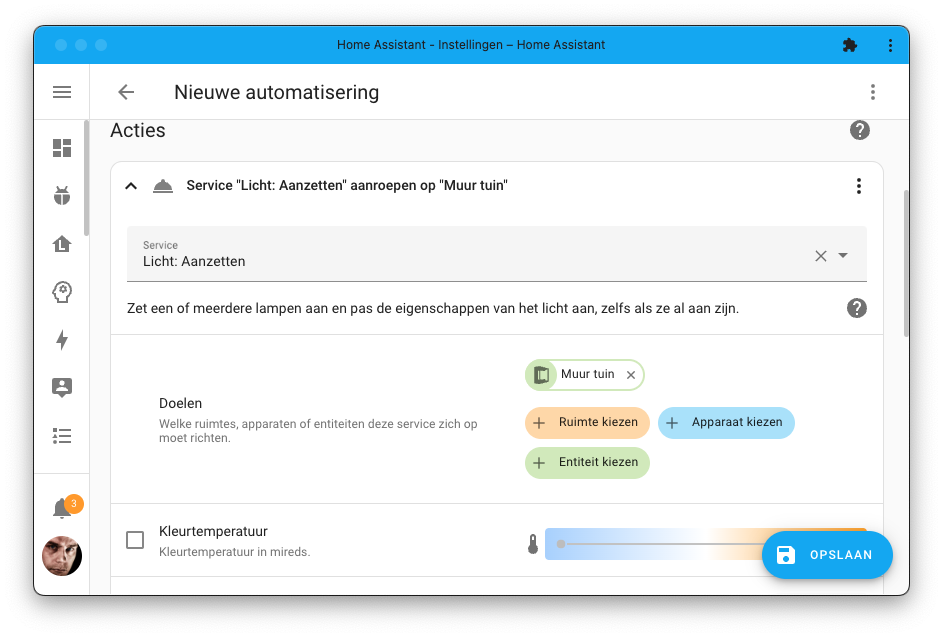
A big step forward! Implementing this change has resulted in a substantial increase in the number of translations. They have doubled! 😅
Because of that, translating all 服务 might take some time; however… You can help! You don’t have to be a developer to help with this; you can do this from the comfort of your browser. Check out our 文档 on how to contribute translations.
事件实体登场
Events are signals that are emitted when something happens, for example, when someone presses a physical button like a doorbell or when a button on a remote control is pressed.
If you have ever tried to work with events in Home Assistant, you probably noticed that it was not the easiest thing to do. You need to know the event name, and then you need to know the data that is being sent with it. Before you know it, you'll start fiddling with the 开发者工具 to figure out what is going on.
To make this all easier, we are introducing a new 实体 type in this 发布: The event 实体.
The event 实体 can capture these events in the physical world and makes them available in Home Assistant as an 实体. Take for example, this Hue remote:
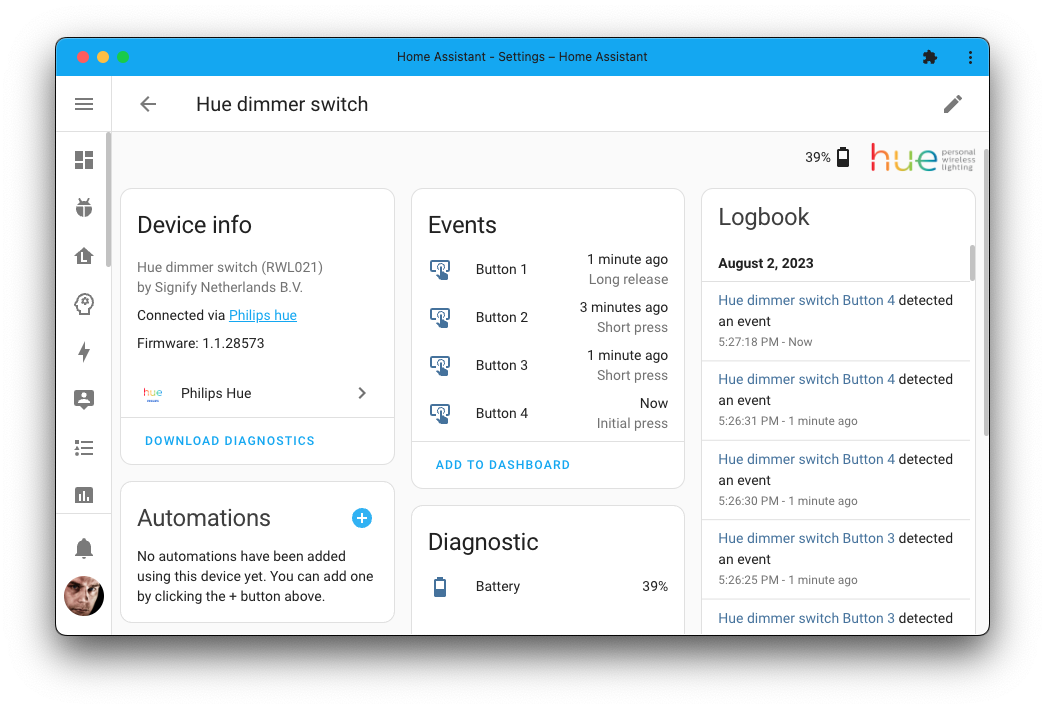
The beauty of the event 实体 is that they can be used like any other 实体 in Home Assistant: They will show up in the UI, can be used directly in the 自动化 editor, and provide historical information in the logbook.
Besides Matter, the event 实体 is also supported by HomeKit 设备, MQTT, and Philips Hue. We expect to see more integrations supporting this new 实体 type soon.
改进 Home Assistant 的首次使用体验
Onboarding is a user's first experience with Home Assistant. The onboarding screens are the first you see, and steps you take when you access Home Assistant for the first time, setting up things like your account and language preferences. The goal is to ensure this process is seamless, which is why we've made improvements to the onboarding experience.
To achieve this, we have implemented a search field on the map during onboarding. Instead of endlessly dragging the pin on the map around, you can now easily search for your location.
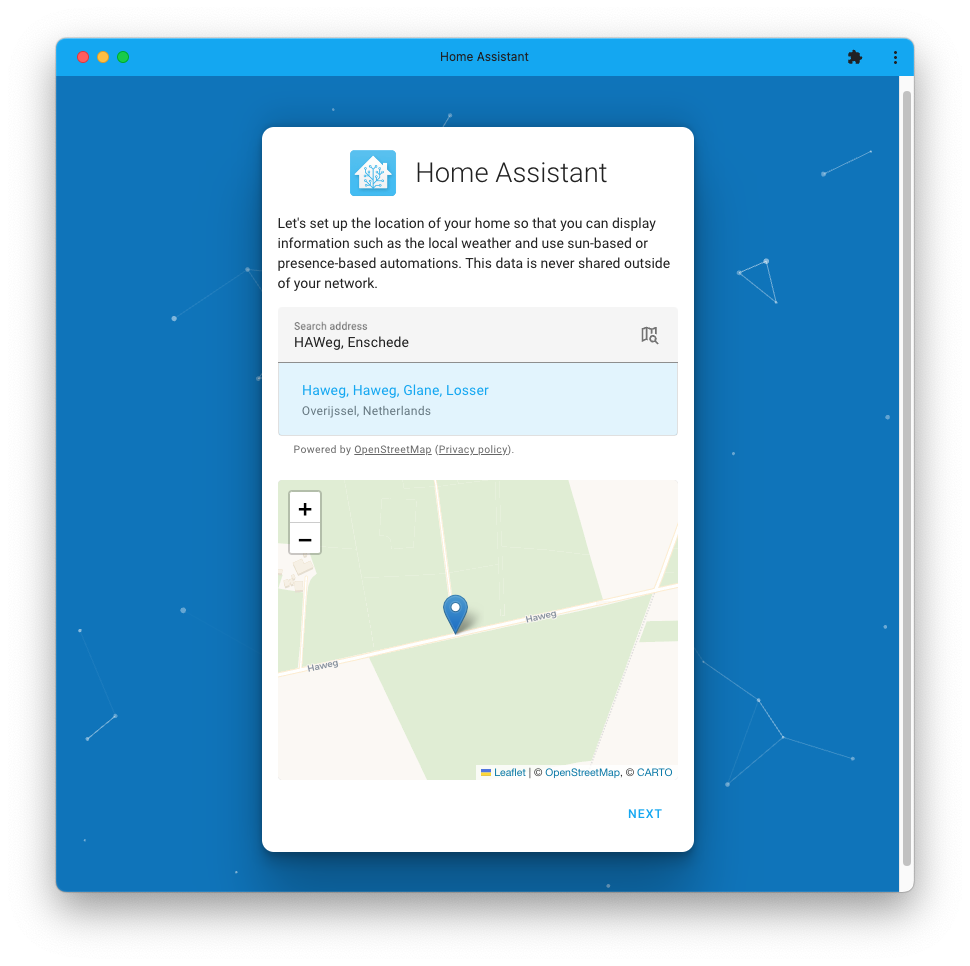
This is powered by OpenStreetMap ❤️
使用 Assist 将条目加入购物清单
What if you could ask Assist to add items to your Home Assistant shopping list? Well, now you can!
Add milk to my shopping list!
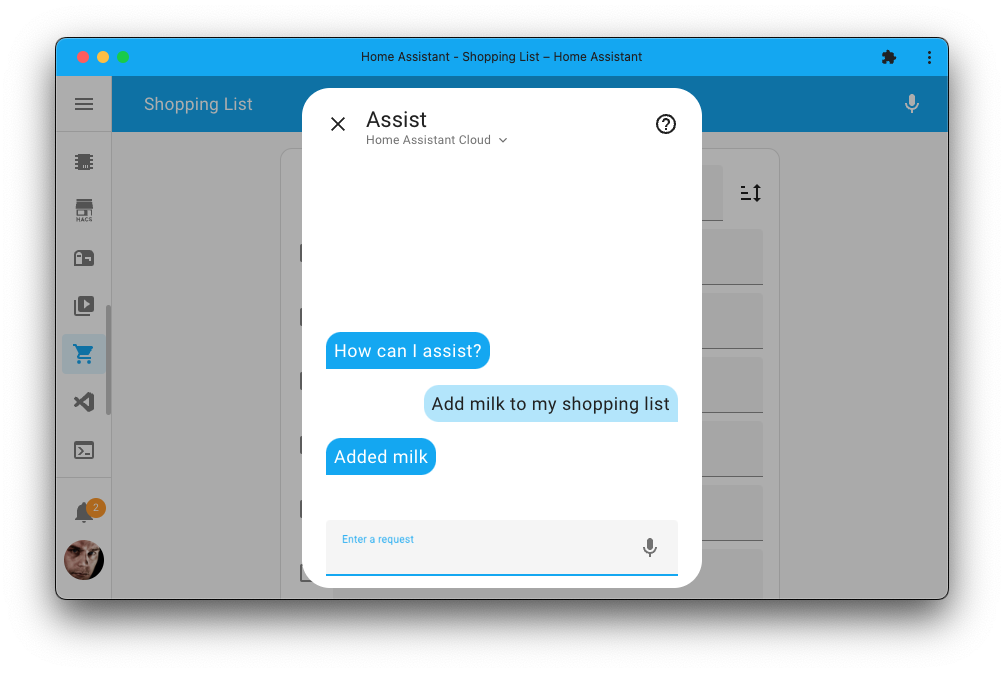
In case you are wondering, the shopping list 集成 adds a handy page to your Home Assistant interface to which everyone in your household can add items. It is a great way to keep track of what you need to buy, and now you can add items to it with your voice using Assist!
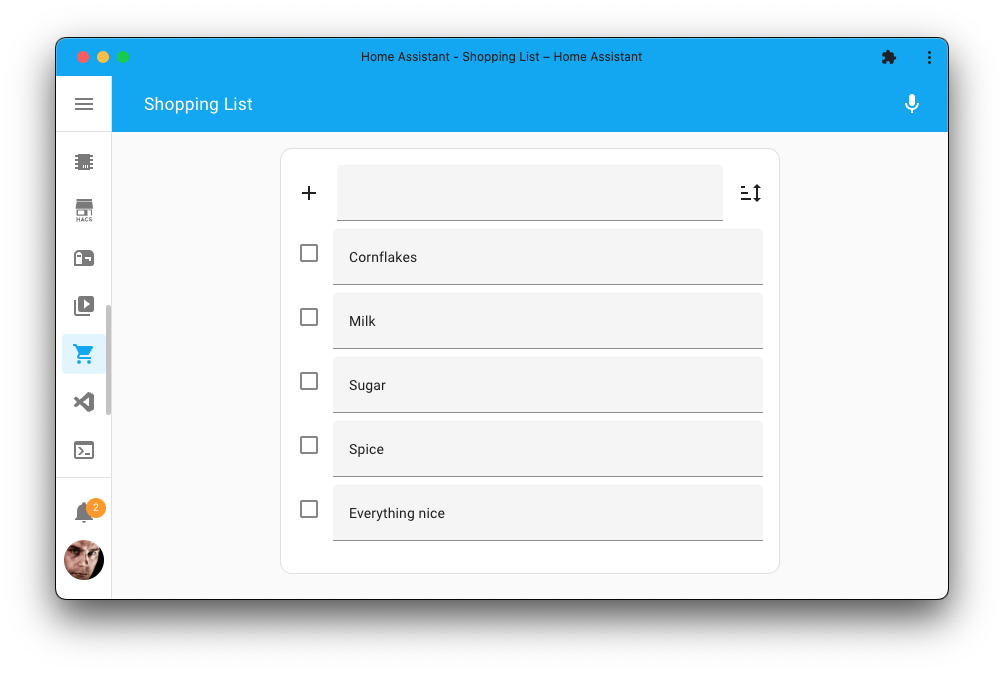
To be able to use this feature, you need to have the shopping list 集成 set up, which is as easy as clicking the My Home Assistant button below:
使用 OpenAI 的 DALL-E 生成图像
In the last 发布, we added the ability for 服务 to respond with data, and now we added a 服务 that allows you to generate an image using OpenAI's DALL-E.
All you need is to set up the OpenAI conversation agent 集成 on your instance, and you will get a new 服务: .
Call this 服务 describing the image you'd like the AI to generate, and it will respond with an image URL you can use in your 自动化.
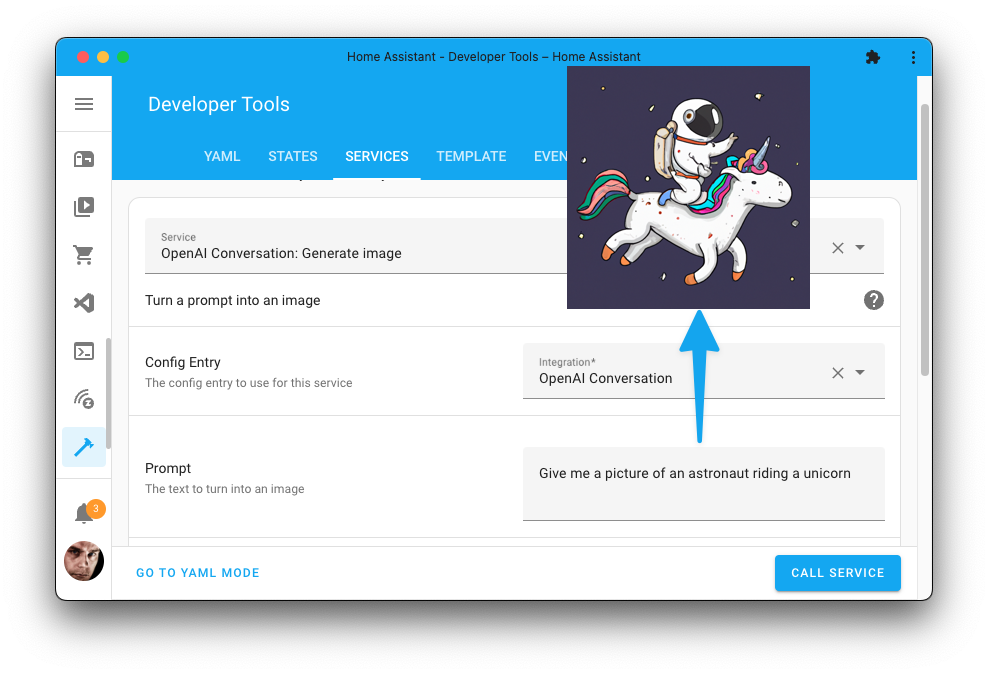
You could, for example, use this to generate an image of a city that matches the weather 条件 outside of your home, let the AI generate an image about the latest news headline to show on your 仪表盘, or maybe generate a fun image of someone putting out garbage on garbage day.
You could even combine it with the wildcard support for sentence 触发器 so you could ask Home Assistant to generate an image using your voice...
句子触发器支持通配符
Sentence 触发器 now support wildcards! This means you can now partially match a sentence, and use the matched part in your 动作. This is what powers the above shopping list feature too, and it can be used for many other things as well.
You could, for example, create a sentence 触发器 that matches when you say:
Play the white album by the Beatles
Using the wildcard support, you can get the album and artist name from the spoken sentence and use those in your 动作. To 触发器 on the above example sentence, you would use the following command in your sentence 触发器:
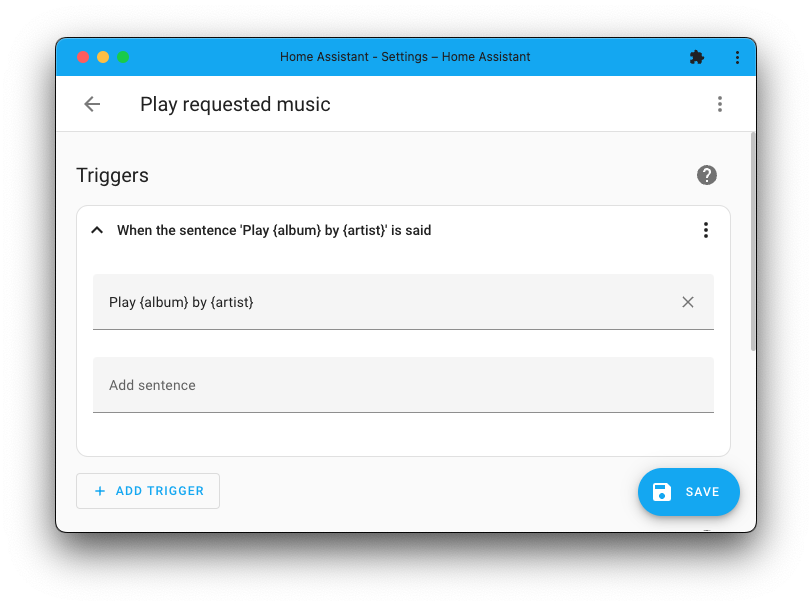
This will make the album and artist available as 触发器 variables that you
can use in your 动作; for example, to start playing the music requested.
These wildcards are interesting and open up a lot of possibilities! Read more about sentence 触发器 in our 文档.
JLo realized he could use these wildcards, combined with the new generate image 服务, to let Home Assistant generate an image and show it on his Chrome Cast-enabled 设备 just by using his voice! 😎 You could ask it:
Show me a picture of an astronaut riding a unicorn!
He put this together in an 自动化 blueprint, which you can use to do the same thing in your own Home Assistant instance:
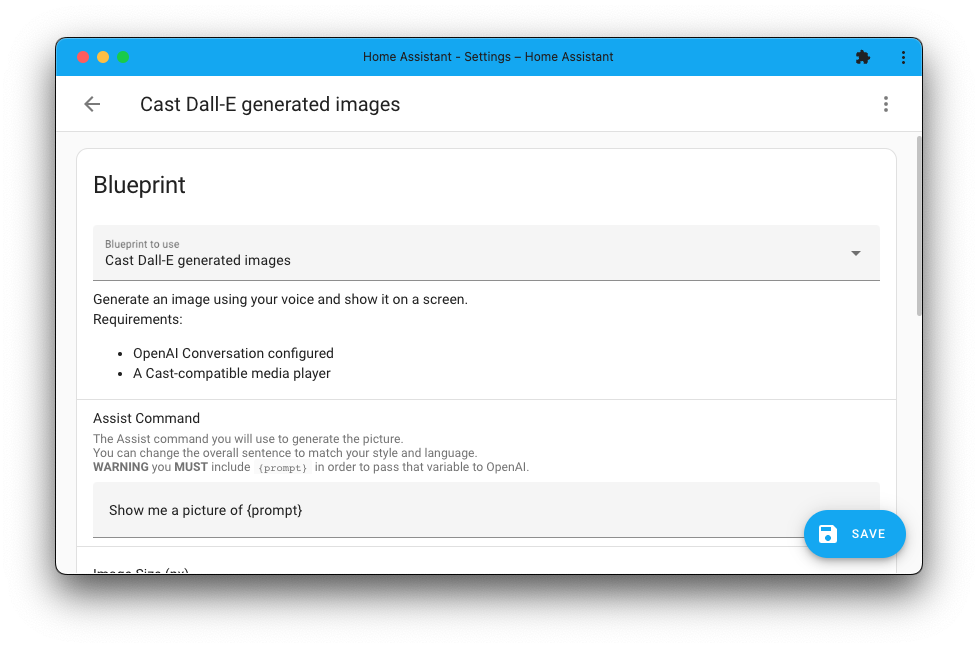
Provide the sentence you like to 触发器 on and the media player you want to show the image at, and you're good to go! You can import his blueprint using the My Home Assistant button below:
条件选择器
A new selector is available for use in, for example, blueprints: The 条件 selector.
This selector takes and shows the 条件 part of the 自动化 editor, and allows blueprint creators to use a user-provided 条件 in their blueprinted 自动化 and 脚本.
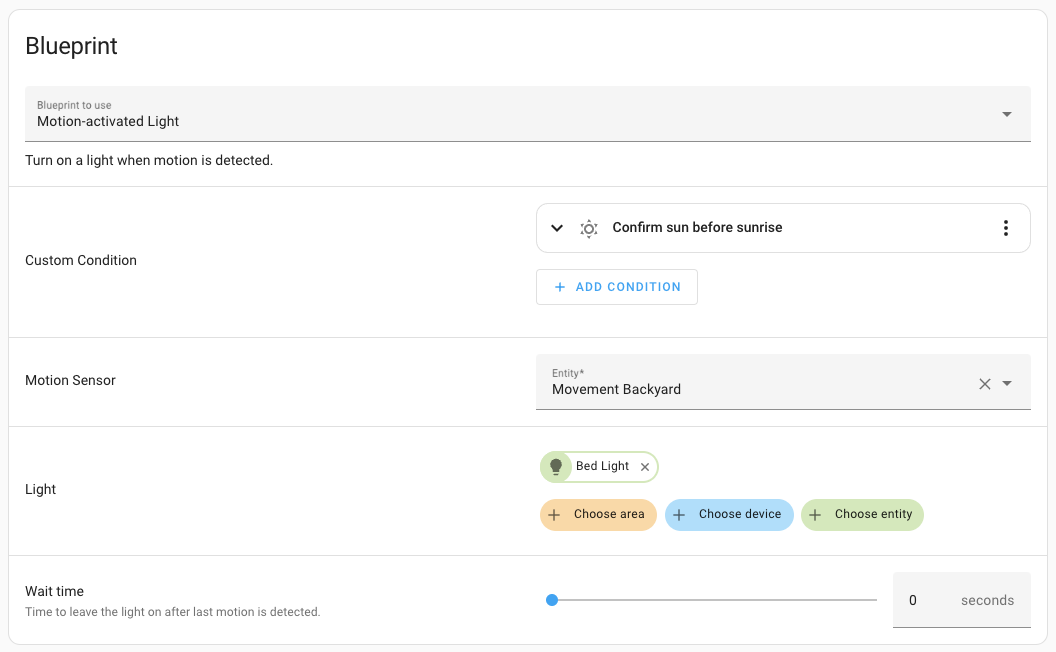 This blueprint allows one to set a custom 条件 using the new 条件 selector.
其他值得注意的变更
There are many more improvements in this 发布; here are some of the other noteworthy changes this 发布:
- Tons of performance upgrades again this month (thanks @bdraco), these include a much faster ingress experience when visiting add-on web interfaces. 🚀
- @emontnemery added filters to many of the 服务 Home Assistant provides, meaning only options relevant to the 实体 you are calling the 服务 on will be shown in the UI. Nice!
- CO2Signal changed its name to Electricity Maps. The 集成 has been renamed to match that. Thanks, @madsnedergaard!
- @Lash-L keeps extending the Roborock 集成, adding many new 实体 in this 发布. This includes an 错误 传感器, volume controls, and DnD setting times. Awesome!
- EZVIZ received a big 更新, adding support for 报警 control 面板, buttons, and select 实体. Thanks @RenierM26!
- @farmio added support for adding date and date/time 实体 to KNX! Great!
- The Xiaomi BLE now supports the MiScale (V1 and V2). Thanks, @Ernst79!
- UniFi Network now has controls to turn an UniFi WLAN on and off and added image 实体 for QR codes for WLAN access. Thanks, @Kane610!
新集成
We welcome the following new 集成 in this 发布:
- Electric Kiwi, added by @mikey0000
Integrate with the independent power and broadband company Electric Kiwi from New Zealand. - Event, added by @frenck
A new event 实体 that other 集成 can provide to show detected events in the physical world. - Duotecno, added by @Cereal2nd
Integrate with the Duotecno nodes. - Gardena 蓝牙, added by @elupus
Integrate your Gardena Smart devices using 蓝牙. - Opower, added by @tronikos
Read out energy information from utilities that use Opower. See the virtual 集成 below for which utility providers those are. - PEGELONLINE, added by @mib1185
Provides water level 传感器 from the German Federal Waterways and Shipping Administration.
This 发布 also has a new virtual 集成. Virtual 集成 are stubs that are handled by other (existing) 集成 to help with findability. These are new:
- Atlantic City Electric provided by Opower
- Baltimore Gas and Electric (BGE) provided by Opower
- Commonwealth Edison (ComEd) provided by Opower
- Delmarva Power provided by Opower
- Evergy provided by Opower
- Pacific Gas & Electric (PG&E) provided by Opower
- PECO Energy Company (PECO) provided by Opower
- Potomac Electric Power Company (Pepco) provided by Opower
- Puget Sound Energy (PSE) provided by Opower
现已支持通过 UI 配置的集成
The following 集成 are now available via the Home Assistant UI:
发布 2023.8.1 - August 4
- Raise PlatformNotReady on initial OwnTone connection failure (@uvjustin - #97257)
- Add overkiz battery 传感器 level medium (@matthieume - #97472)
- Fix ZHA
turn_onissues withtransition=0, improve tests (@TheJulianJES - #97539) - Bump pyDuotecno to 2023.8.1 (@Cereal2nd - #97583)
- Bump Cryptography to 41.0.3 for a second security fix (@blastoise186 - #97611)
- Waqi 状态 unknown if value is string (@joostlek - #97617)
- Bump dbus-fast to 1.90.1 (@bdraco - #97619)
- Bump python-roborock to 0.31.1 (@Lash-L - #97632)
- Bump intents to 2023.8.2 (@synesthesiam - #97636)
- Add 设备 naming to Yeelight (@joostlek - #97639)
- Fix typo in tplink OUI (@bdraco - #97644)
- Revert "Add 设备 naming to Yeelight" (@joostlek - #97647)
- Enable the
PRESET_MODEFanEntityFeaturefor VeSync air purifiers (@DuckyCrayfish - #97657) - Fix tplink child plug 状态 reporting (@bdraco - #97658)
- Fix date and timestamp 设备 class in Command Line 传感器 (@gjohansson-ST - #97663)
- Bump zeroconf to 0.72.3 (@bdraco - #97668)
- Bump pyatv to 0.13.3 (@bdraco - #97670)
- Fix color mode 属性 for both official and non-official Hue 灯光 (@marcelveldt - #97683)
- Fix UniFi image platform not loading when passphrase is missing from WLAN (@Kane610 - #97684)
- Fix Kostal_Plenticore SELECT 实体 using device_info correctly (@N3rdix - #97690)
- Fix freebox enumerate raid disks (@cyr-ius - #97696)
- Fix allow_name_translation logic (@amitfin - #97701)
- Fix NWS twice_daily forecast day/night detection (@karwosts - #97703)
- Bump opower to 0.0.19 (@tronikos - #97706)
- Fix detection of client WAN access rule in AVM Fritz!Box Tools (@mib1185 - #97708)
- Fix unloading KNX 集成 without 传感器 (@farmio - #97720)
- 更新 zigpy to 0.56.3 (@cdce8p - #97480)
- Bump zigpy to 0.56.4 (@TheJulianJES - #97722)
- Fix keymitt_ble RuntimeWarning (@cdce8p - #97729)
- Bump zeroconf to 0.74.0 (@bdraco - #97745)
- Avoid calling the http access logging when logging is disabled in emulated_hue (@bdraco - #97750)
- Bump opower to 0.0.20 (@tronikos - #97752)
- Bump pyduotecno to 2023.8.3 (@Cereal2nd - #97759)
- Add has 实体 name to Solarlog (@joostlek - #97764)
- Fix WAQI being zero (@joostlek - #97767)
发布 2023.8.2 - August 11
- Handle Alert exception on 通知 failure (@karwosts - #93632)
- Add yeelight class to fix superclass issue (@joostlek - #97649)
- Fix metoffice visibility range 传感器 设备 class (@MrHarcombe - #97763)
- Don't assume that
battery_levelvalue is always present in Tractivehw_info(@bieniu - #97766) - Improve counting of UniFi WLAN Clients 传感器 (@Kane610 - #97785)
- 集成 tado bump (@erwindouna - #97791)
- Ensure webhooks take HA cloud into account (@frenck - #97801)
- Bump aiohomekit to 2.6.13 (@bdraco - #97820)
- Fix Samsung syncthru 设备 info (@joostlek - #97843)
- Fallback to get_hosts_info on older Fritz!OS in AVM Fritz!Tools (@mib1185 - #97844)
- Fix Command Line template 错误 when data is None (@gjohansson-ST - #97845)
- Bump Omada API 版本 to fix #96193 (@MarkGodwin - #97848)
- Bump pysensibo to 1.0.33 (@gjohansson-ST - #97853)
- Add missing translation key to Gardena 蓝牙 (@joostlek - #97855)
- Bump bimmer_connected to 0.13.9, fix notify (@rikroe - #97860)
- Do not fire homekit_controller events from IP polling (@bdraco - #97869)
- Avoid polling event characteristic in homekit_controller (@bdraco - #97877)
- Fix handling HomeKit events when the char is in 错误 状态 (@bdraco - #97884)
- Bump python-roborock to 0.32.2 (@Lash-L - #97907)
- modbus: Adjust read count by slave_count (@janiversen - #97908)
- Bump pyatv to 0.13.4 (@bdraco - #97932)
- Bump yeelight to v0.7.13 (@alexyao2015 - #97933)
- Android TV Remote: Fix missing key and cert when adding a 设备 via IP address (@tronikos - #97953)
- Fix tomorrowio 集成 for new users (@lymanepp - #97973)
- Bump ZHA dependency bellows to 0.35.9 (@puddly - #97976)
- Bump
pyairvisualto 2023.08.1 (@bachya - #97999) - Bump aiohomekit to 2.6.15 (@bdraco - #98005)
- Add translation keys to Tuya 遮盖 (@joostlek - #98040)
- Remove trailing . from melcloud 服务 descriptions (@reedy - #98053)
- Bump AIOAladdinConnect to 0.1.57 (@mkmer - #98056)
- Bump pynina to 0.3.2 (@DeerMaximum - #98070)
- Bump opower to 0.0.24 (@tronikos - #98091)
- Improve UniFi control PoE mode (@Kane610 - #98119)
- Add missing translation key in Tuya (@joostlek - #98122)
- Correct unit of rain pause (@elupus - #98131)
- Make gardena closing 传感器 unavailable when closed (@elupus - #98133)
- Bump opower to 0.0.26 (@tronikos - #98141)
- Opower: Add gas 传感器 for utilities that report CCF (@tronikos - #98142)
- Get Opower accounts from the customer endpoint (@tronikos - #98144)
- 更新 aioairzone to v0.6.5 (@Noltari - #98163)
- Use explicit 设备 name in Broadlink (@joostlek - #98229)
- Bump pynws 1.5.1; fix regression for precipitation probability (@MatthewFlamm - #98237)
- Bump pymazda to 0.3.11 (@bdr99 - #98084)
发布 2023.8.3 - August 18
- Fix ness 报警 armed_home 状态 appearing as disarmed/armed_away (@nickw444 - #94351)
- Correct modbus config validator: slave/swap (@janiversen - #97798)
- Fix Opower utilities that have different ReadResolution than previously assumed (@tronikos - #97823)
- modbus config: count and slave_count can normally not be mixed. (@janiversen - #97902)
- Create abstraction for Generic YeeLight (@joostlek - #97939)
- modbus: Repair swap for slaves (@janiversen - #97960)
- Use Local Timezone for Withings 集成 (@VidFerris - #98137)
- Bump pyrainbird to 4.0.0 (@allenporter - #98271)
- Bump Python-Roborock to 0.32.3 (@Lash-L - #98303)
- Bump flux-led to 1.0.2 (@bdraco - #98312)
- Use default translations by removing names from tplink descriptions (@joostlek - #98338)
- Fix tts notify config validation (@MartinHjelmare - #98381)
- Fix GoGoGate2 配置 URL when remote access is disabled (@oyvindwe - #98387)
- Handle missing keys in Honeywell (@mkmer - #98392)
- Bump Reolink_aio to 0.7.7 (@starkillerOG - #98425)
- 更新 rokuecp to 0.18.1 (@ctalkington - #98432)
- 更新 pyipp to 0.14.3 (@ctalkington - #98434)
- Fix inconsistent lyric temperature unit (@lscorcia - #98457)
- Bump aiohomekit to 2.6.16 (@bdraco - #98490)
- Bump opower to 0.0.29 (@tronikos - #98503)
- Revert "集成 tado bump" (@erwindouna - #98505)
- Fix the availability 条件 for Shelly N current 传感器 (@bieniu - #98518)
- Correct number of registers to read for 传感器 for modbus (@janiversen - #98534)
- Pin setuptools to 68.0.0 (@frenck - #98582)
- Bump ESPHome recommended BLE 版本 to 2023.8.0 (@bdraco - #98586)
- Verisure unpack (@niro1987 - #98605)
- 更新 前端 to 20230802.1 (@bramkragten - #98616)
发布 2023.8.4 - August 24
- Fix octoprint down every two minutes (@markusressel - #90001)
- modbus: slave is allowed with custom (@janiversen - #98644)
- Bump opowerto 0.0.30 (@tronikos - #98660)
- Correct modbus swap/datatype 错误 message (@janiversen - #98698)
- Bump opower to 0.0.31 (@tronikos - #98716)
- Reduce Freebox router Raid 警告 to one occurence (@fthiery - #98740)
- Remove repair issue for MQTT discovered items (@frenck - #98768)
- Bump androidtvremote2 to 0.0.14 (@tronikos - #98801)
- Bump pylitterbot to 2023.4.4 (@natekspencer - #98414)
- Bump pylitterbot to 2023.4.5 (@natekspencer - #98854)
- Bump reolink-aio to 0.7.8 (@starkillerOG - #98942)
需要帮助?加入社区!
Home Assistant has a great community of users who are all more than willing to help each other out. So, join us!
Our very active Discord chat server is an excellent place to be at, and don't forget to join our amazing forums.
Found a bug or issue? Please report it in our issue tracker, to get it fixed! Or, check our help page for guidance for more places you can go.
Are you more into email? Sign-up for our Building the Open Home Newsletter to get the latest news about features, things happening in our community and other news about building an Open Home; straight into your inbox.
不向后兼容的变更
Python 3.10 support has previously been deprecated and has now been removed. Home Assistant now requires Python 3.11 to run.
You don't have to do anything if you are using Home Assistant OS, Home Assistant 容器, or Home Assistant 受监管模式 安装 method. In those cases, we handle this all for you.
Your system has been using Python 3.11 for quite some time already.
The legacy discovery 集成 has been removed. This only affects the automatic discovery of Enigma2, Yamaha Network Receivers, and Bluesound.
These can still be manually configured as per usual.
Note this is for our very, very old discovery logic. This does not affect the discovery of any other 集成/设备/服务.
If you still have discovery: listed in your YAML 配置, you can
safely remove it.
The Ecovacs 集成 has been migrated to the new "StateVacuumEntity" under the hood.
The 状态 of the 吸尘器 实体 now report not only on or off,
instead cleaning, paused, docked (implicit mean charging),
returning (to base), idle and error. Further, the 动作 turn_on
(start cleaning), and turn_off (stop cleaning and return to base) were
superseded by three single 动作 start, stop and return_to_base.
The legacy Works With Nest API is no longer supported. You must manually take
动作 to use the SDM API by removing the Nest 配置 from configuration.yaml
and restarting Home Assistant. Then add the Nest 集成 following the
instructions. Please review the 文档 for information about which
设备 are supported.
Additionally, as a reminder, the legacy Works With Nest API is shutting down in September 2023.
(@allenporter - #96111) (文档)
It's no longer allowed for an MQTT RGB 灯光 without a brighness_state_topic
to report an RGB value of RGB=0,0,0. The reason is that for such 灯光,
the 灯光's brightness is derived from the RGB value, and an RGB value
of RGB=0,0,0 corresponds to a brightness of 0 which is not allowed.
In case an MQTT RGB 灯光 without a brighness_state_topic reports 0,0,0
for R, G, and B, that 更新 will be ignored.
The MQTT 温控 CONF_POWER_STATE_TOPIC and CONF_POWER_STATE_TEMPLATE were
deprecated in HA 核心 2023.2.0 and are now removed. Please remove these options
from your 配置. The options were not implemented but will break your
MQTT 配置 if they are still present in your config.
The way MQTT 实体 are named and how 设备 配置 can be shared between discovered 实体 has changed.
Sharing of 设备 配置
Discovered MQTT 实体 can share 设备 配置, meaning one 实体 can include the full 设备 配置, and other 实体 can link to that 设备 by only setting mandatory fields.
The mandatory fields were previously limited to at least one of
connection and identifiers, but have now been extended to at least
one of connection and identifiers as well as the name.
Naming of MQTT 实体
The naming of MQTT 实体 has been changed to be aligned with the entities naming guidelines:
- The
has_entity_name实体 will be set toTrueon all MQTT 实体. - This means any MQTT 实体 which is part of a 设备 will automatically have its
friendly_name属性 prefixed with the 设备 name. - Unnamed
binary_sensor,button,event,number, andsensor实体 will now be named by their 设备 class instead of being named "MQTT 二元sensor" etc. - It's now allowed to set an MQTT 实体's name to
Noneto mark it as the main feature of a 设备.
The Dynalite 配置 面板, which previously was on the Home Assistant 侧边栏, has moved. It can now be accessed via the 集成 page in 设置 > 设备 & 服务 > Dynalite > configuration.
The 状态 values of the Reason Ventilation 集成 have been changed to be more consistent with other 集成 and are now lowercase. Additionally, it can now provide translations for the 状态 values in the UI.
This means that the following 状态 values have changed:
Off->offLevel1->level1Level2->level2Level3->level3Level4->level4Breeze->breezeHoliday->holiday
Please 更新 any 自动化 where you are using the 状态 of this Renson 传感器.
If you are a custom 集成 developer and want to learn about breaking changes and new features available for your 集成: Be sure to follow our developer 博客. The following are the most notable for this 发布:
- 动作 event for custom 卡片
- The naming of MQTT 实体 changes to correspond with HA guidelines
- Translating 服务
- Updates to the 吸尘器 实体 集成
告别以下内容
The following 集成 are also no longer available as of this 发布:
- Discovery has been removed. This is the old legacy discovery 集成.
See the backward-incompatible changes above 更多信息.
(@frenck - #96856) - Mi Flora has been removed. 此集成早已被
Xiaomi BLE 集成 a long time ago and was in a non-functional 状态.
(@frenck - #96868) - Xiaomi Mijia BLE T&H 传感器 has been removed. 此集成早已被
replaced by the Xiaomi BLE 集成 a long time ago and was in a
non-functional 状态.
(@frenck - #96869)
全部变更
Of course, there is a lot more in this 发布. You can find a list of all changes made here: Full changelog for Home Assistant 核心 2023.8