

title: '2023.12:欢迎回家!' description: '<a href=''/home-assistant/integrations/版本/2023.12''<img src=''/home-assistant/images/blog/2023-12/social.png'' style=''border: 0;box-shadow: none;''</a。' 默认仪表盘选项、可显示长期统计的历史仪表盘,还有更多内容!'
2023.12:欢迎回家!

Home Assistant 核心 2023.12! 🎄
The last 发布 of 2023 is here, and we are going out with a bang! 🎉
2023 has been the Year of the Voice, and please stay tuned, as we will host a final 5th chapter live stream on our YouTube channel on 13 December 2023, at 12:00 PST / 21:00 CET! But that is not the end of the voice journey... Be sure to tune in!
This 发布 has some nice quality-of-life improvements, making it feel like Christmas already! The thermostat 卡片 has been redesigned to match the gorgeous new 实体 dialog introduced, a new feature for the ever-improving tile 卡片, re-importing blueprints, and much more!
I'm most excited about the new login page that this 发布 brings. It is beautiful, modern, and literally welcomes you into your own home! 🏡 Home is where Home Assistant is, right? 😃
This is it for 2023! What a year it has been! I just got one last thing to say this year:
Thank you for using Home Assistant! ❤️
Happy holidays & enjoy the 发布!
../Frenck
- 漂亮的新登录页
- 温控卡片的新设计
- Tile 卡片的数字输入功能
- 默认仪表盘选项
- 显示长期统计的历史仪表盘
- 更多待办!
- 重新导入蓝图
- 其他值得注意的变更
- 新集成
- 现已支持通过 UI 配置的集成
- 发布 2023.12.1 - December 8
- 发布 2023.12.2 - December 13
- 发布 2023.12.3 - December 14
- 发布 2023.12.4 - December 27
- 需要帮助?加入社区!
- 不向后兼容的变更
- 告别以下内容
- 全部变更
Don't forget to join our 发布 party live stream on YouTube 6 December 2023, at 12:00 PST / 21:00 CET!
漂亮的新登录页
This feature has been disabled in Home Assistant 2023.12.3.
Read more about it here.
The login page of Home Assistant has been redesigned to be more modern and match the recent redesign of the Home Assistant onboarding.
When Home Assistant detects you are accessing it via your local home network, it means you are in your trusted home environment; you will be greeted by this beautiful new login page, which resembles how most platforms, like Windows, macOS, Netflix, and others, handle this: by showing your user profiles.
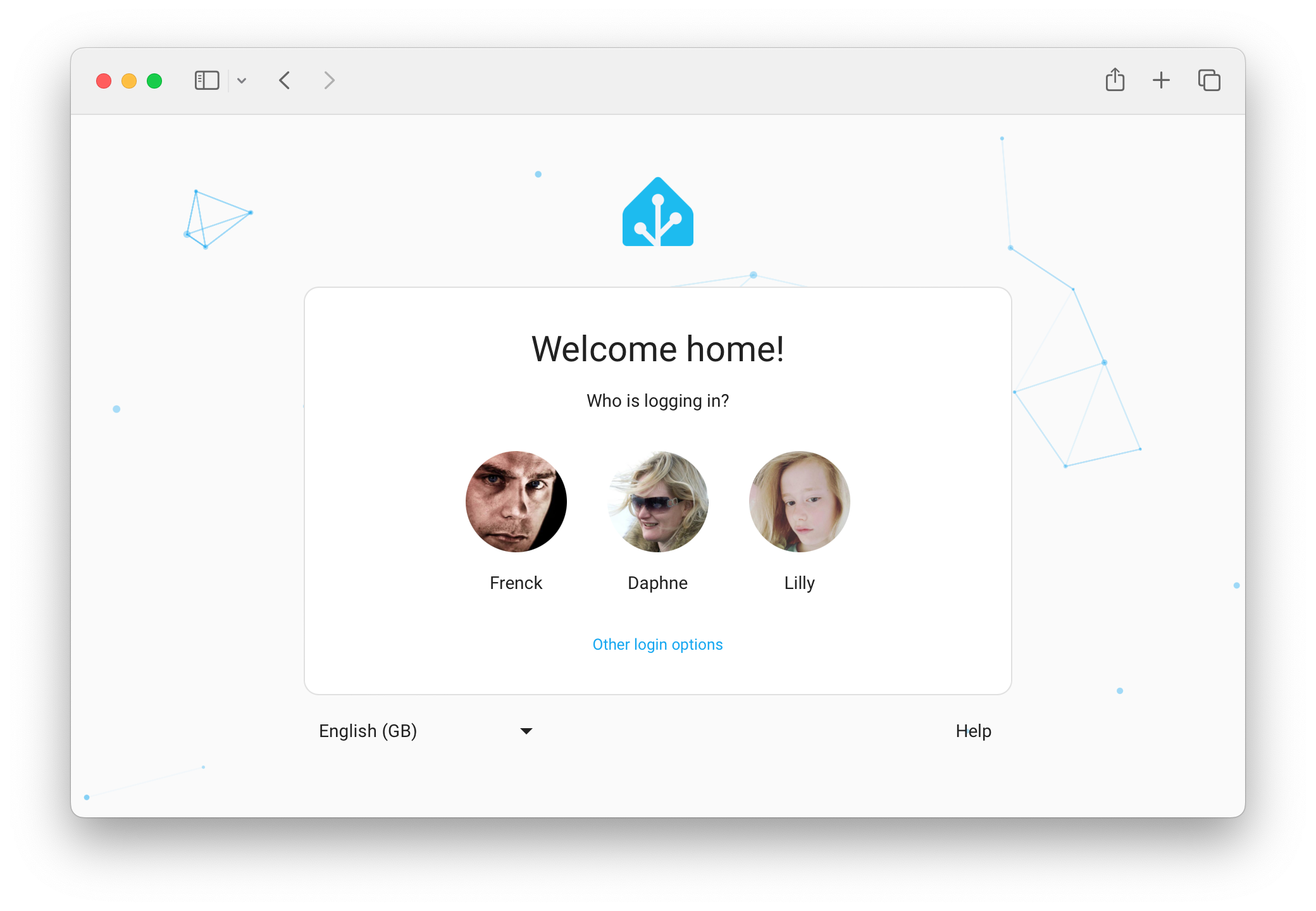
It is also much smarter! It works seamlessly with trusted networks, and when home, we automatically remember your login. So, no more forgetting to check the "keep me logged in" checkbox. 👊
Of course, when logging in from outside your home network, we can't do this as that would give away privacy-sensitive information about your system and who is in it. So, when you are outside of your home network, the login page will ask for your username and password, just like before.
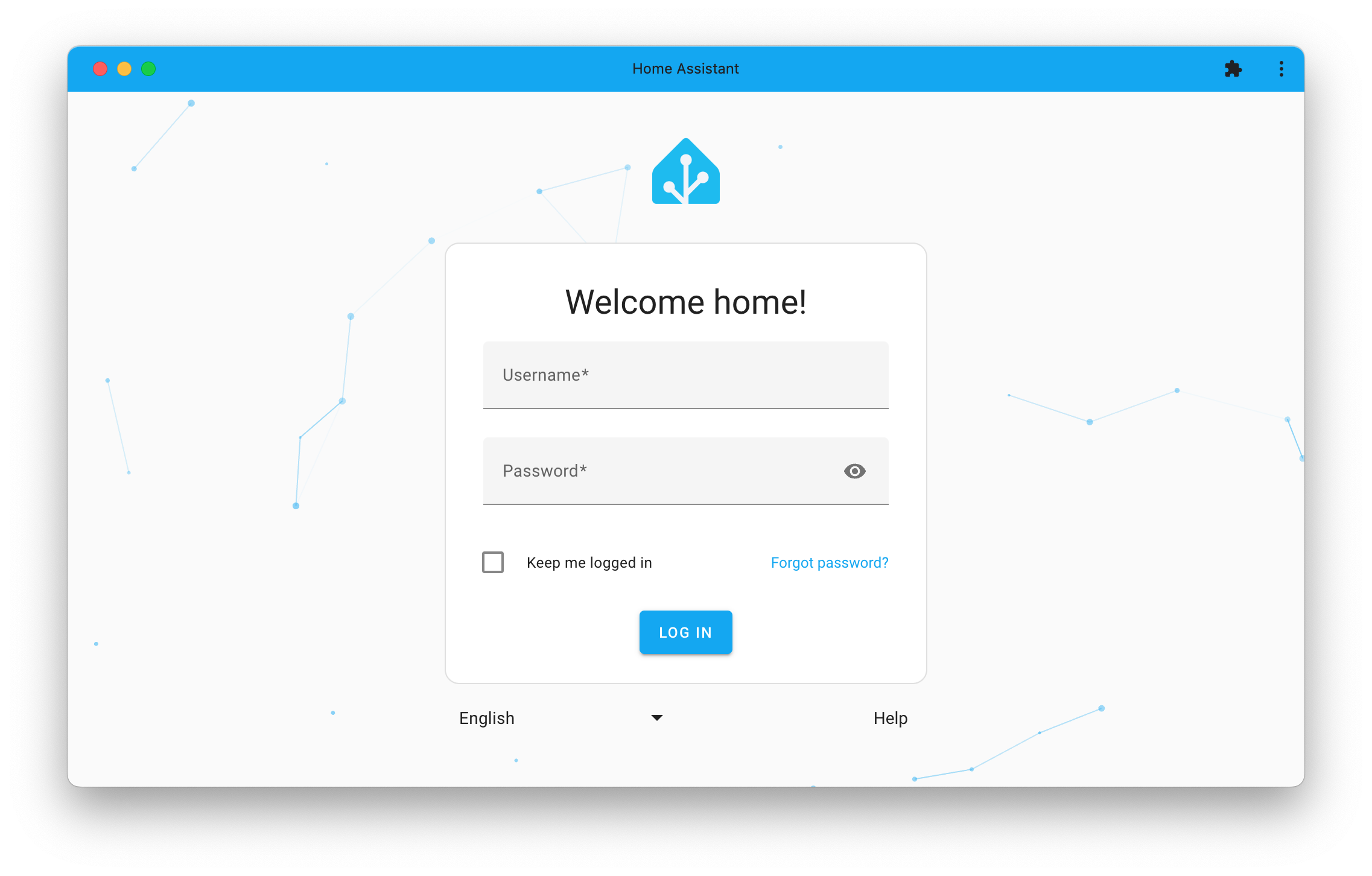
Oh! And you can now change the language straight from the login page! 🌍
温控卡片的新设计
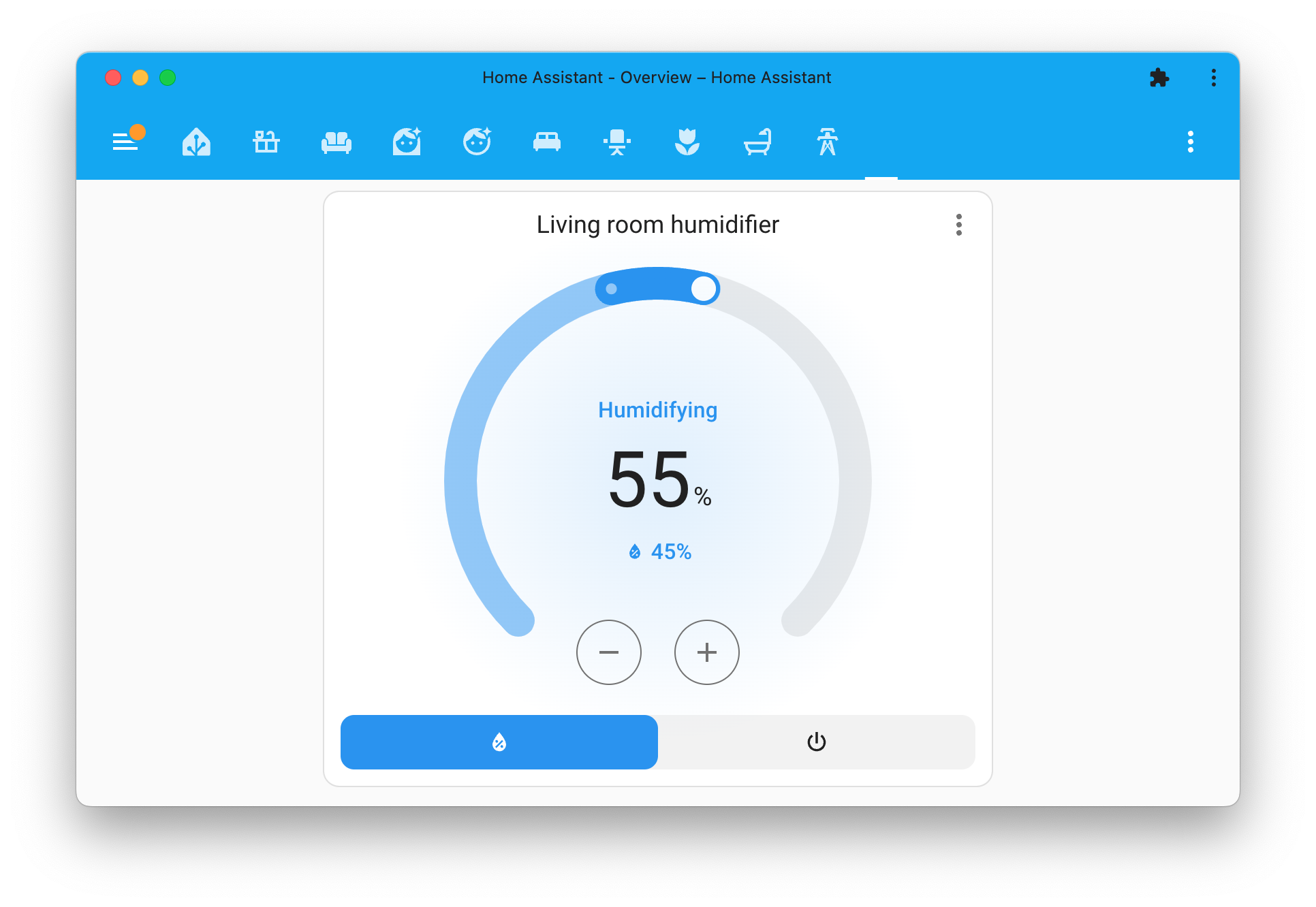
Home Assistant 2023.9 introduced a gorgeous new 实体 dialog for thermostat 实体. As a result of that, many have been asking for a similar design for the thermostat 卡片. Well, here it is!
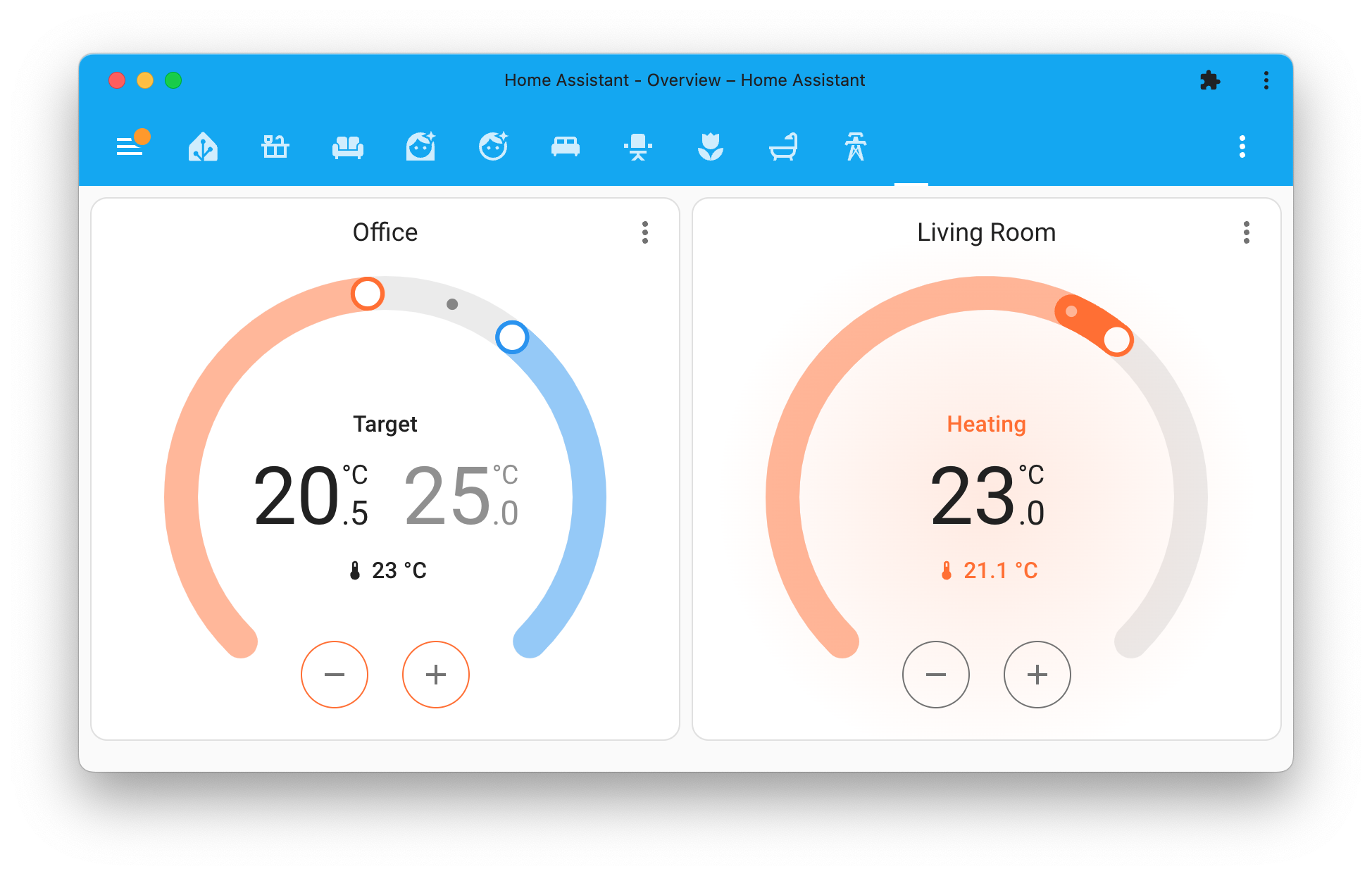
There is nothing you have to do to use this new 卡片. Once you 升级 to this 发布, the thermostat 卡片 will automatically use this gorgeous new design.
We took it one step further and added support for features. Features are additional functionality that you can add to a 卡片, previously only available for the tile 卡片. This 发布 adds support for features to the thermostat 卡片 as well!
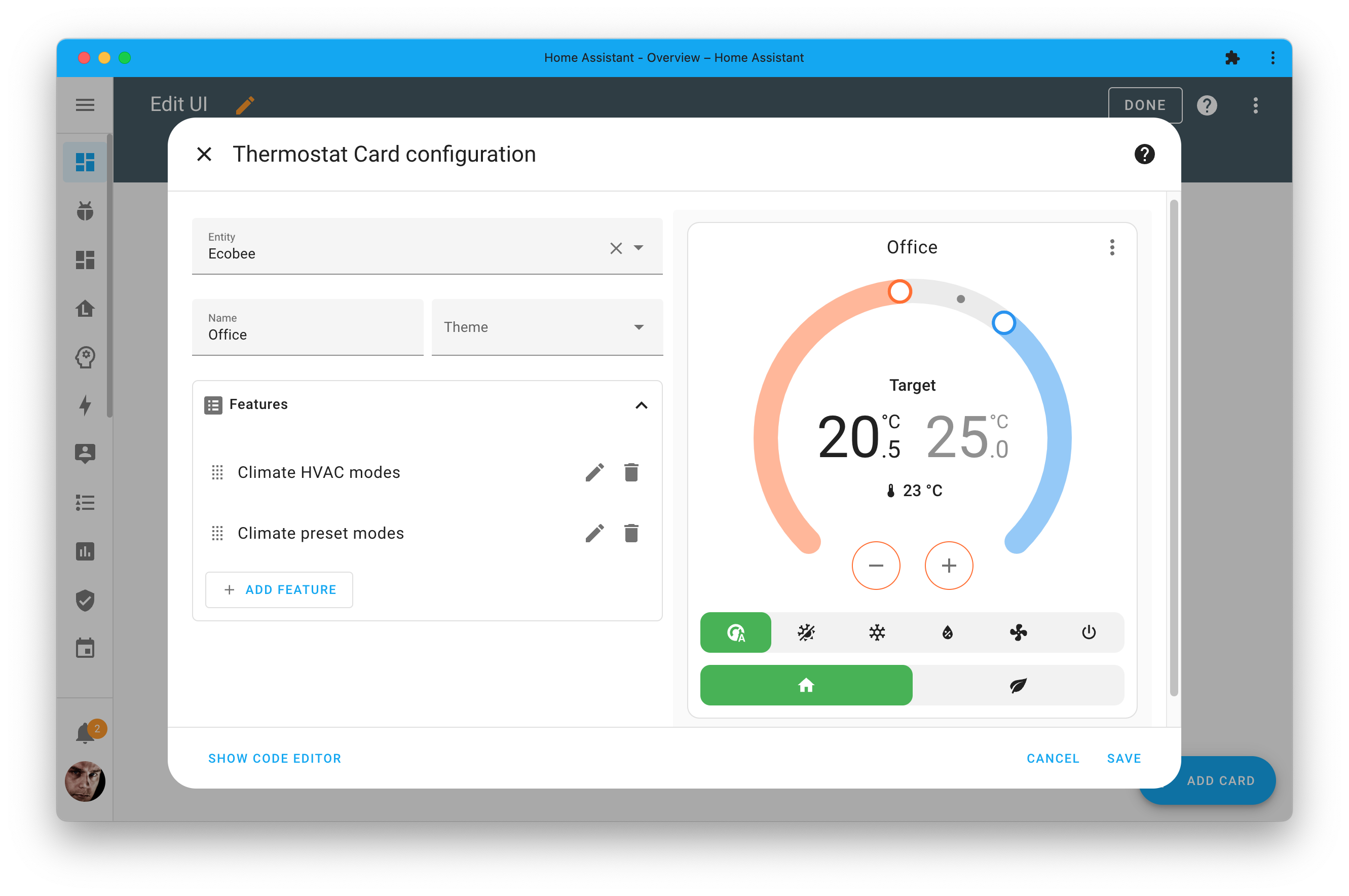
For the thermostat 卡片, it allows you to add HVAC mode buttons and presets. By default, these features are hidden, giving it the cleanest look possible.
Oh! The same design has been applied to the (de)humidifer 卡片, of course, including its respective tile features 😎.
Tile 卡片的数字输入功能
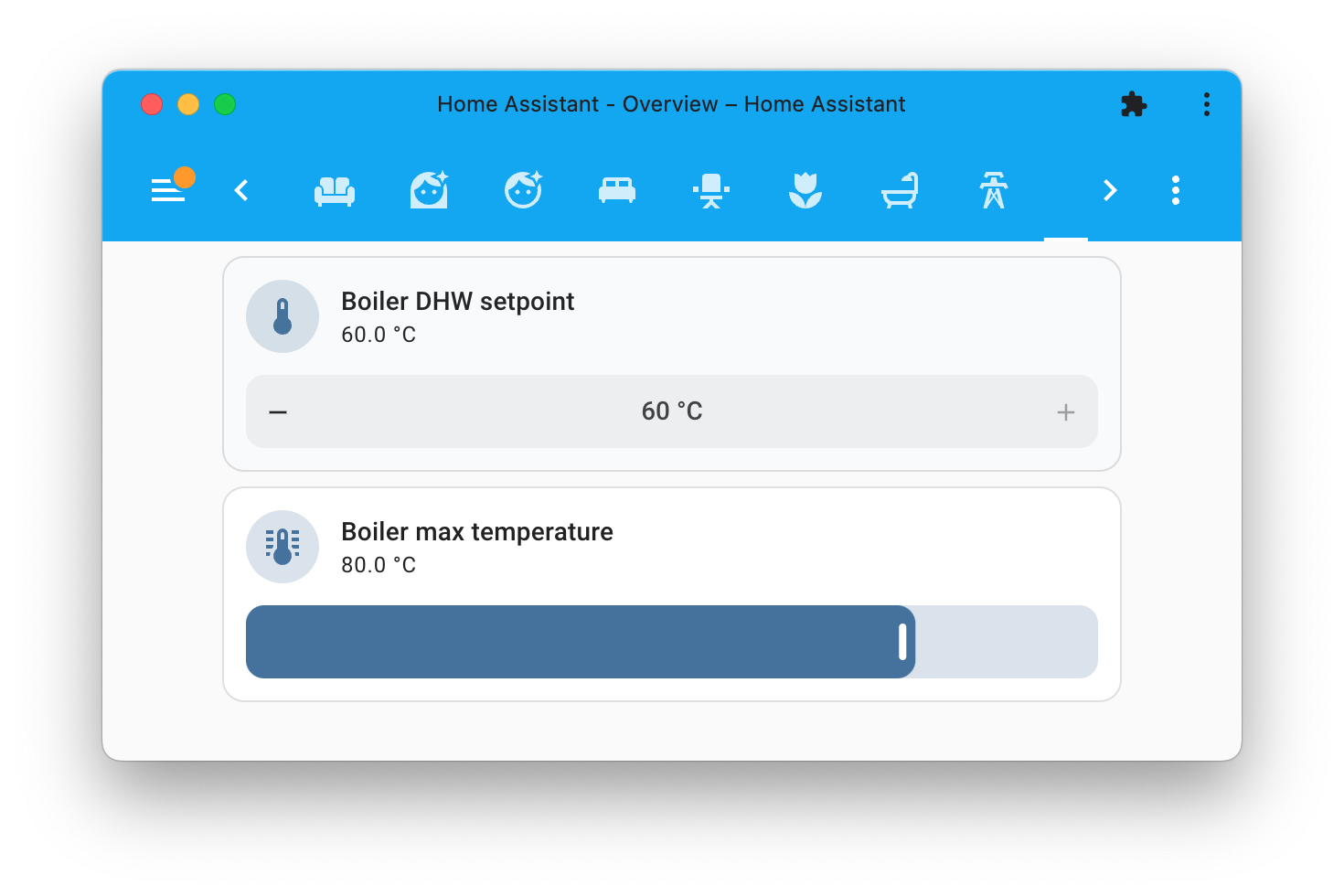
The tile 卡片 is very powerful, and @JosephAbbey is even extending it this 发布 by adding a new "numeric input" feature.
The numeric input feature works with all number 实体 and number helpers. It allows you to control the number 实体 from the tile 卡片 directly and provides the choice to use it as a slider or as an input with up/down buttons.
默认仪表盘选项
The default 仪表盘 now has options that will allow you to change its behavior. You can now 配置 the default 仪表盘 to hide certain areas, hide 实体 that don't belong to an area, and the option to hide the energy summary 卡片.
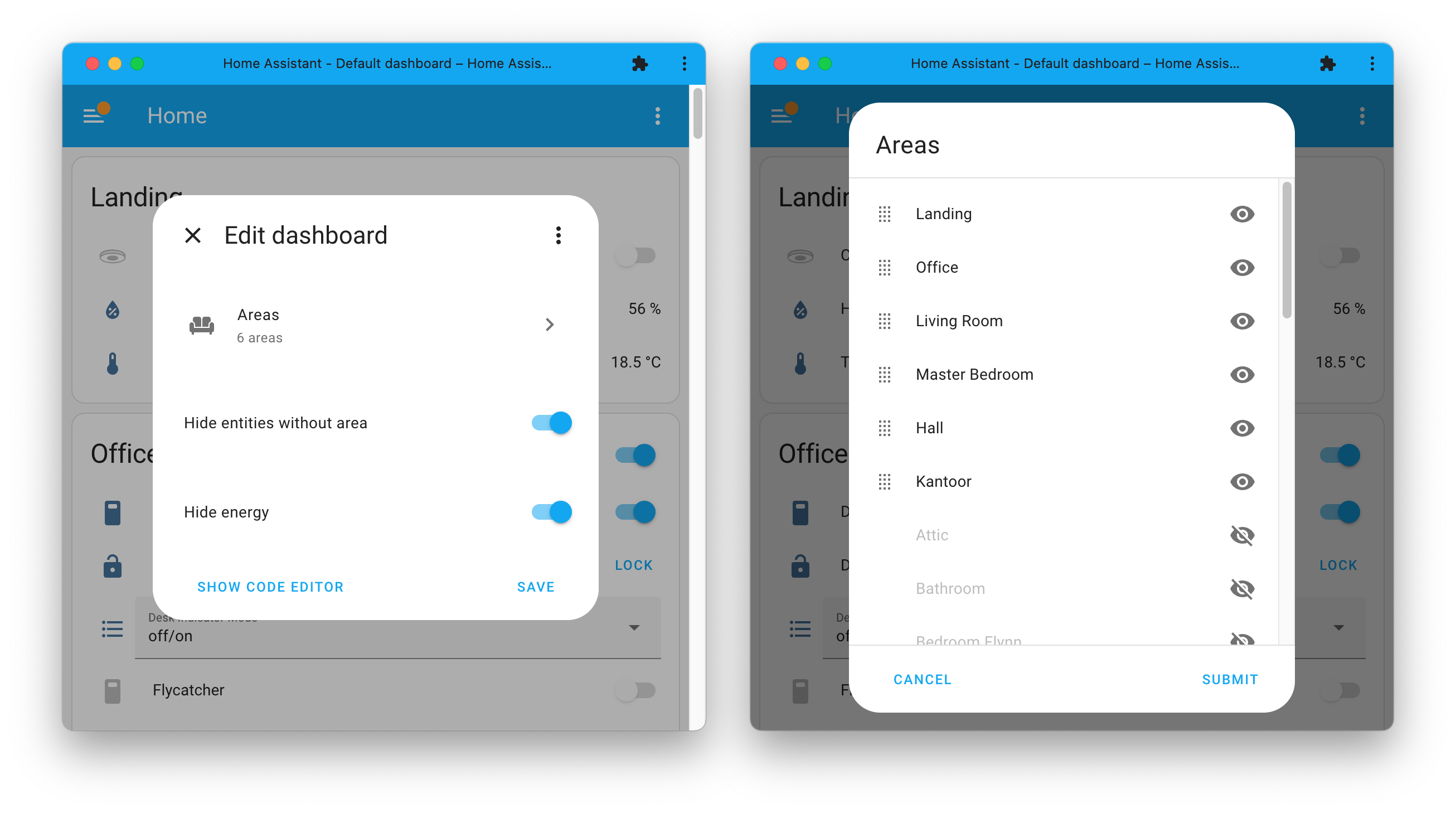
When selecting Areas, you can choose to hide the areas but also change the display order of the areas by dragging them around.
A first step in making the 仪表盘 configurable, but above all, it gives you more control over the default 仪表盘, especially when you have just started with using Home Assistant.
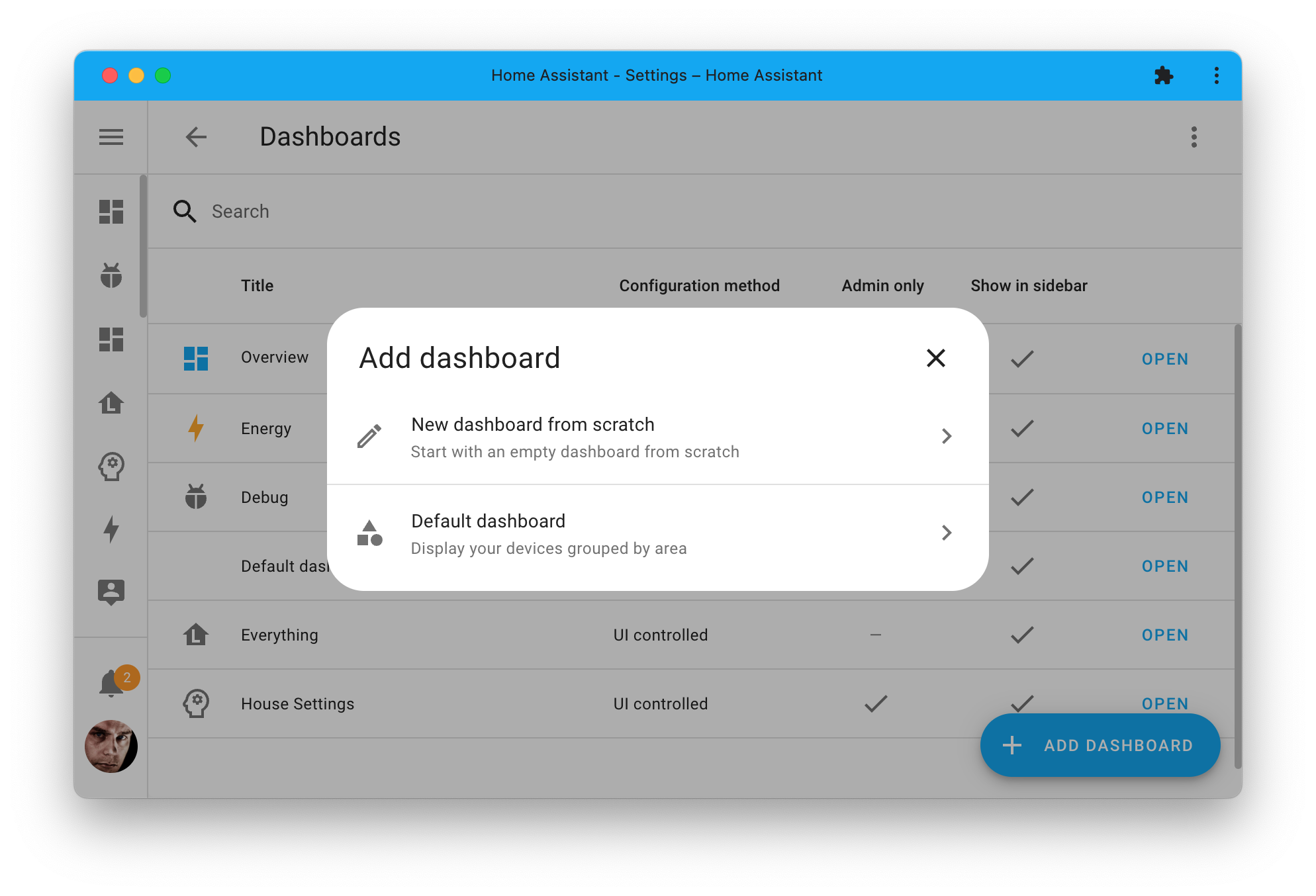
When adding a new 仪表盘, we added a dialog similar to the ones we show when you create new 自动化 or 脚本. It gives you the option to start with an empty manual 仪表盘 or create a new default 仪表盘.
显示长期统计的历史仪表盘
The history 仪表盘 did get some love from @karwosts this 发布; he added a big improvement to all the graphs shown there.
Previously, the graphs would only show the 状态 history, limited to a few days, until the data is removed. This is not always very useful, for example, when you want to look back further in time.
@karwosts came up with a solution for this, and the history 仪表盘 now combines the 状态 history with the recorded long-term statistics to provide insights into the past.
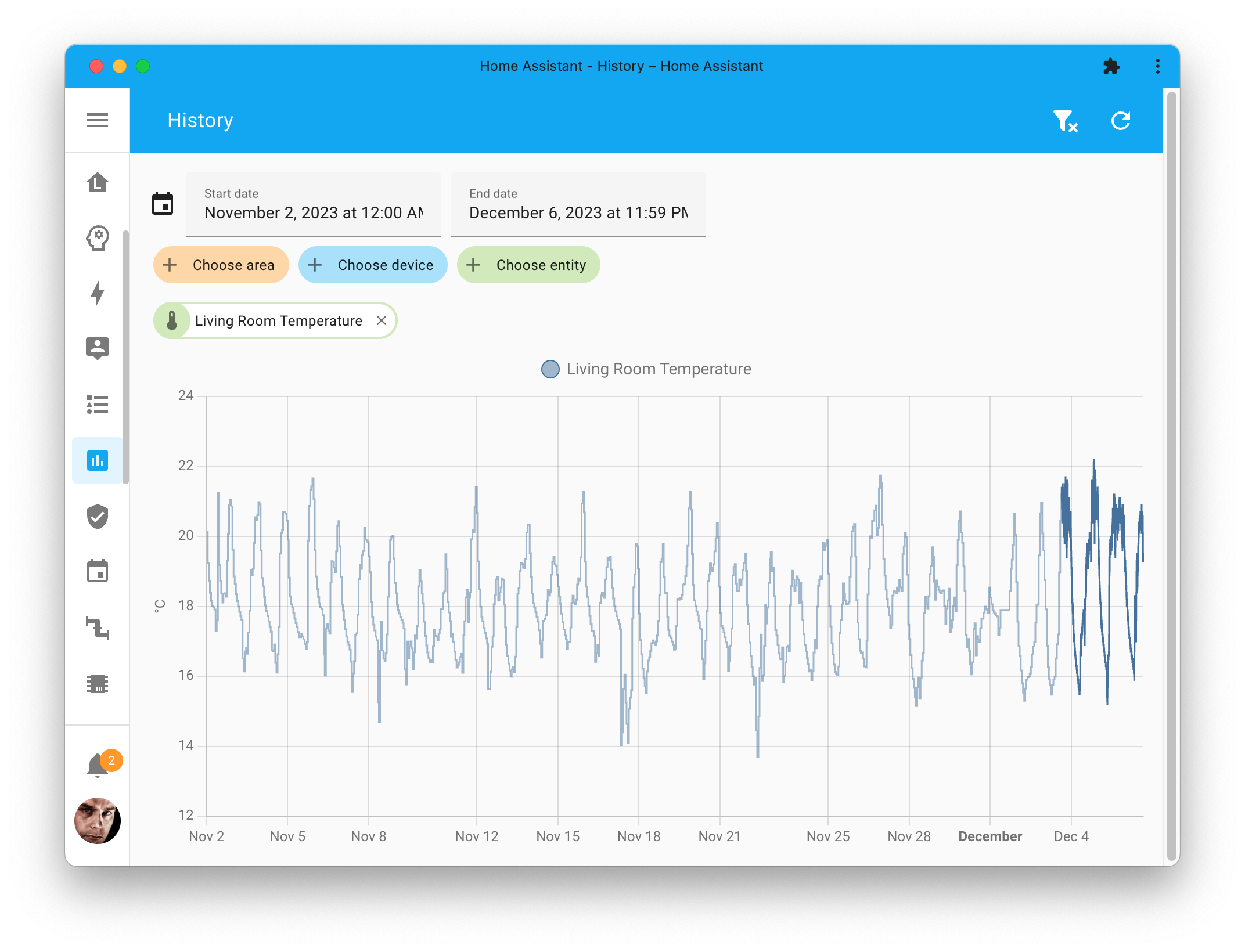
The right and darker part of the graph line is provided by the 状态 history (like before), and the long-term statistics provide the left and lighter part of the graph line (and is thus downsampled hourly data).
If you have manually 修改 the days to keep before purging recorder on your system, consider removing that customization. With the long-term statistics and new feature, you most likely don’t need it anymore, resulting in a smaller database and, thus, faster and smaller backups.
更多待办!
The first iteration for support for to-do lists was added in the last 发布, and there has been continued work on this feature in this 发布.
First of all, there are two new 服务 available. A much-requested 服务 to list all items on a to-do list and a helpful 服务 to remove all completed items from a to-do list.
It is nice to see 集成 adding support for the to-do list feature. For example, the CalDAV 集成 now supports adding to-do items to your CalDAV server, and with Picnic and OurGroceries you can now manage your shopping list. In the case of Picnic, it will even look up the product you add in their store to your shopping list and add the product to your shopping cart.
Also, when viewing a to-do list from the Home Assistant interface, you can copy/paste or bookmark the URL, which will always bring you back to the same one—a small but very helpful improvement.
重新导入蓝图
This 发布 adds the ability to re-import the blueprint from the source from which you originally imported it. The newly downloaded blueprint will overwrite the existing blueprint, providing a simple "更新" feature for blueprints.
If you use Blueprints, for example, the ones 创建 by our incredible community, you might have noticed that when you import a blueprint, it will not 更新 when the author updates it. The only option you had was to manually adjust the YAML of the blueprint to make it match the latest 版本 published by the author. To make this last bit easier, we added this re-import ability.
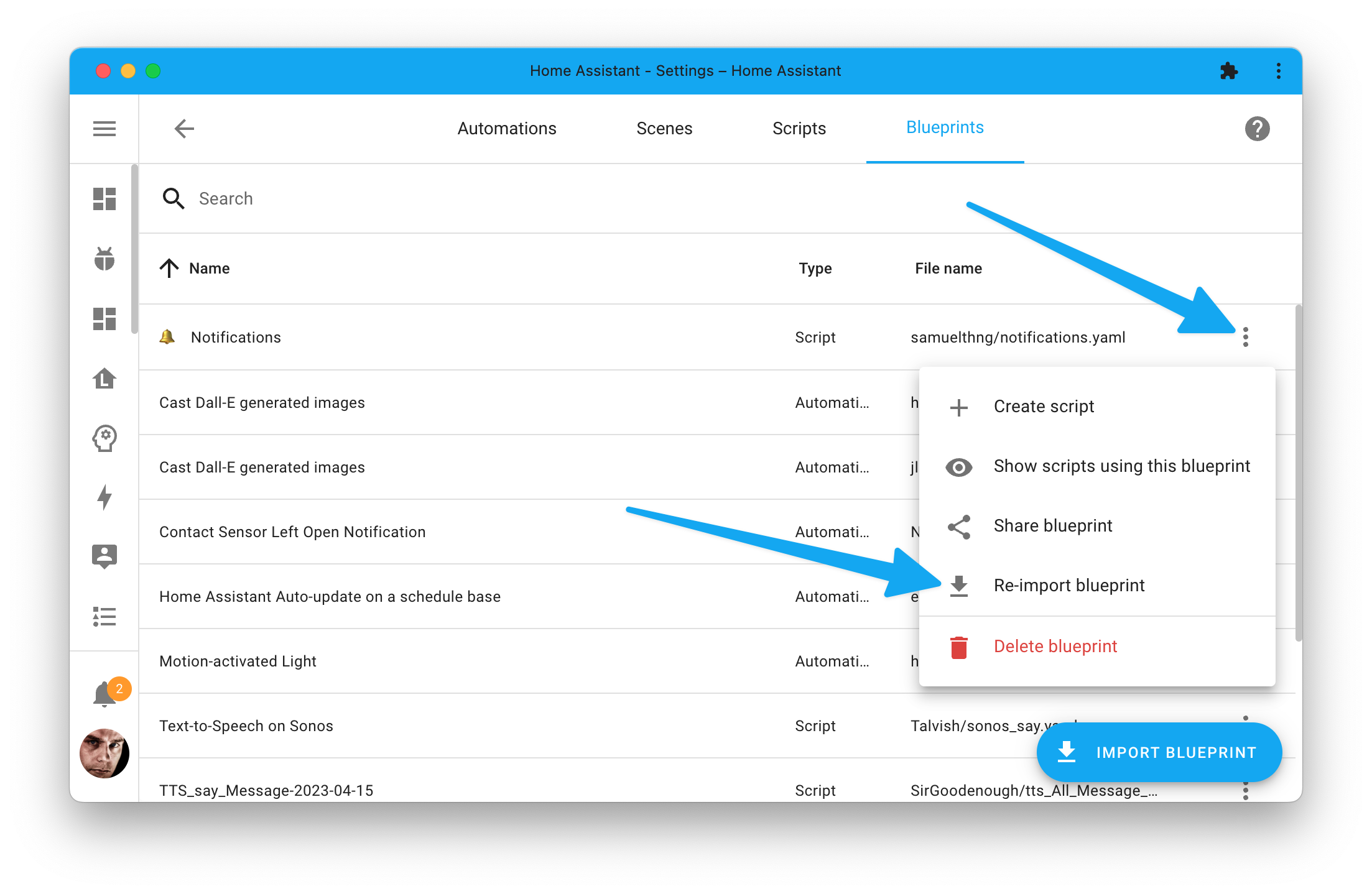
A helpful feature that will make it easier to keep your blueprints in sync with the latest 版本 published by the blueprint author.
其他值得注意的变更
There are many more improvements in this 发布; here are some of the other noteworthy changes this 发布:
- We have a brand new 触发器 selector for you to use in your Blueprints and 脚本. Thanks, @piitaya!
- That is not all for selectors, @schelv added support for Kelvin to the color temperature selector. Nice!
- If you use the IKEA IDÅSEN desk, you will now have a height 传感器! Thanks @abmantis!
- The ESPHome 集成 had many performance improvements, making it faster and more reliable. Thanks @bdraco!
- @Lash-L added support for displaying maps from your Roborock 吸尘器! Awesome!
- 服务 with a response now support handling responses when multiple 实体 are targeted. Nice! Thanks @eifinger!
- @iMicknl added local API support for the Somfy TaHoma to the Overkiz 集成! Also, thanks Somfy! It's nice to see a manufacturer adding local API support!
- The ViCare received tons of love from @CFenner; keep up the good work!
- The media browser now has support for toggling between grid and list view. Thanks @karwosts!
- @emontnemery worked hard to improve all 错误 messages originating from manual YAML 配置. The messages should now be more detailed, readable, and correctly pinpoint which file and file line the 错误 is located at. Awesome!
- @karwosts 创建 a UI when you want to add selectors to your 脚本 field! Very nicely done!
- 错误 shown by Home Assistant can now be translated! While many places still need to adopt this, it is a big and user-friendly step forward! Outstanding job @jbouwh!
新集成
We welcome the following new 集成 in this 发布:
- Devialet, added by @fwestenberg
Control your wireless Devialet speakers. - Linear Garage Door, added by @IceBotYT
Lets you control and automate your Linear garage doors. - MyPermobil, added by @IsakNyberg
Provides various 传感器 for your Permobil wheelchair. - OurGroceries, added by @OnFreund
Integrate with the OurGroceries shopping lists. - V2C, added by @dgomes
Monitoring and control of a local V2C Trydan EVSE.
现已支持通过 UI 配置的集成
The following 集成 are now available via the Home Assistant UI:
- CalDAV, done by @allenporter
- Fast.com, done by @erwindouna
- Ping, done by @jpbede
发布 2023.12.1 - December 8
- Initialize energy_state without price (@Excentyl - #97031)
- Bump yolink-api to 0.3.4 (@matrixd2 - #105124)
- Bump apple_weatherkit to 1.1.2 (@tjhorner - #105140)
- Correct smtp 错误 message string (@jbouwh - #105148)
- Expose todo 实体 to Assist by default (@synesthesiam - #105150)
- Disable scenarios (场景) for local API in Overkiz (@iMicknl - #105153)
- Improve LIDL christmas 灯光 detection in deCONZ (@Kane610 - #105155)
- Bump reolink_aio to 0.8.2 (@starkillerOG - #105157)
- Don't return TTS URL in Assist pipeline (@synesthesiam - #105164)
- Bump Météo-France to 1.3.0 (@Quentame - #105170)
- Fix ZHA quirk ID custom 实体 matching all 设备 (@TheJulianJES - #105184)
- Fix missing apostrophe in smtp (@lunmay - #105189)
- Set ping interval to 15 seconds instead of 5 minutes (@nohn - #105191)
- Increase ping 更新 interval to 30 seconds (@jpbede - #105199)
- Fix bug in roon incremental volume control. (@pavoni - #105201)
- fix supportedFanOscillationModes is null (@haimn - #105205)
- Disable config flow progress in peco config flow (@emontnemery - #105222)
- Fix Fritzbox 灯光 设置 (@flabbamann - #105232)
- Fix check_date 服务 in workday (@gjohansson-ST - #105241)
- Fix AsusWrt invalid data type with tuple type (@ollo69 - #105247)
- Explicit check for None in Discovergy 实体 if 条件 (@jpbede - #105248)
- Add migration for old HomeWizard 传感器 (@DCSBL - #105251)
- Fix 更新 of uncategorized OurGroceries items (@OnFreund - #105255)
- Bump pyunifiprotect to 4.22.0 (@bdraco - #105265)
- Set 设备 id and forward 错误 to Wyoming satellites (@synesthesiam - #105266)
- Fix MQTT json 灯光 状态 updates using deprecated color handling (@jbouwh - #105283)
- Always set _attr_current_option in Nobø Hub select 实体 (@oyvindwe - #105289)
- 更新 前端 to 20231208.2 (@piitaya - #105299)
- Add test for energy cost 传感器 for late price 传感器 (@emontnemery - #105312)
- Use area id for context instead of name (@synesthesiam - #105313)
- Add workaround for orjson not handling subclasses of str (@emontnemery - #105314)
- Add rollback on exception that needs rollback in SQL (@gjohansson-ST - #104948)
- Workaround
to_jsontemplate filter in parsing dict key (@jbouwh - #105327) - Bump plugwise to v0.34.5 (@bouwew - #105330)
发布 2023.12.2 - December 13
- Fix Lyric LCC thermostats auto mode (@apt-itude - #104853)
- Bump zeroconf to 0.128.0 (@bdraco - #104936)
- Fix CI test_invalid_rrule_fix test by freezing the time (@jbouwh - #105294)
- Add missing 配置 for 服务.yaml in blink (@mkmer - #105310)
- Bump pyschlage to 2023.12.0 (@dknowles2 - #105349)
- Fix preset modes 错误 in Smartthings (@gjohansson-ST - #105375)
- Fix 服务 missing key in Blink (@mkmer - #105387)
- Fix adding/updating todo items with due date in CalDAV 集成 (@DerFlob - #105435)
- Check if heat area exists when setting up valve opening and battery 传感器 in moehlenhoff alpha2 (@j-a-n - #105437)
- Bump hatasmota to 0.8.0 (@emontnemery - #105440)
- Bump plugwise to v0.35.3 (@bouwew - #105442)
- Fix alexa calling not featured 遮盖 服务 (@jbouwh - #105444)
- Fix fitbit oauth reauth 调试 logging (@allenporter - #105450)
- Write Enphase Envoy data to 日志 when in 调试 mode (@catsmanac - #105456)
- Bump ical to 6.1.1 (@allenporter - #105462)
- Bump zeroconf to 0.128.4 (@bdraco - #105465)
- Remove Aftership import issue when entry already exists (@joostlek - #105476)
- Disconnect before reconnecting to satellite (@synesthesiam - #105500)
- Bump caldav to 1.3.8 (@FrnchFrgg - #105508)
- Bump pyhiveapi to v0.5.16 (@KJonline - #105513)
- Fix 设置 Fast.com (@gjohansson-ST - #105580)
- Add name slot to HassClimateGetTemperature intent (@synesthesiam - #105585)
- Skip TTS events entirely with empty text (@synesthesiam - #105617)
- Rename "satellite enabled" to "mute" (@synesthesiam - #105619)
- Fix timing issue in Withings (@joostlek - #105203)
- 更新 pylint to 3.0.3 (@cdce8p - #105491)
- 重载 ZHA 集成 on any 错误, not just recoverable ones (@puddly - #105659)
- Bump ZHA dependencies (@puddly - #105661)
发布 2023.12.3 - December 14
- Ensure platform 设置 for all AVM FRITZ!SmartHome 设备 (@mib1185 - #105515)
- 更新 AEMET-OpenData to v0.4.7 (@Noltari - #105676)
- Fix restoring UniFi clients with old unique id (@Kane610 - #105691)
- Bump zeroconf to 0.128.5 (@bdraco - #105694)
- Add missing rest_command 重载 服务 to 服务.yaml (@jpbede - #105714)
- Fix issue clearing renault schedules (@epenet - #105719)
- Fix Fully Kiosk Browser MQTT event callbacks with non-standard event topics (@cgarwood - #105735)
- Disable user profiles on login screen (@frenck - #105749)
发布 2023.12.4 - December 27
- Pass timeout to httpx in RESTful 开关 (@vexofp - #105364)
- Add 树莓派 5 specific 容器 image (@agners - #105488)
- Set todo item status in intent (@synesthesiam - #105743)
- Bump aioairzone to v0.7.0 (@Noltari - #105807)
- 更新 aioairzone to v0.7.2 (@Noltari - #105811)
- Fix HVAC mode duplication for Shelly Gen2 温控 platform (@bieniu - #105812)
- Fix Airzone temperature range on new 温控 卡片 (@Noltari - #105830)
- Bump pyunifiprotect to 4.22.3 (@bdraco - #105833)
- Address late review comments on AVM FRITZ!SmartHome (@mib1185 - #105860)
- Set WiFi QR code 实体 to unknown when Fritzbox is not available (@mib1185 - #105870)
- Bump reolink_aio to 0.8.3 (@starkillerOG - #105489)
- Bump reolink_aio to 0.8.4 (@starkillerOG - #105946)
- Bump motionblinds to 0.6.19 (@starkillerOG - #105951)
- Fix unreachable Netatmo 传感器 returning false values (@cgtobi - #105954)
- Add 树莓派 5 to 版本 and hardware 集成 (@agners - #105992)
- Bump blinkpy 0.22.4 (@mkmer - #105993)
- Don't fetch unchanged OurGroceries lists (@OnFreund - #105998)
- Bump pyatmo to 8.0.1 (@cgtobi - #106094)
- Bump surepy to 0.9.0 (@benleb - #106101)
- Bump pyenphase to 1.15.2 (@bdraco - #106134)
- Bump ZHA dependencies (@puddly - #106147)
- Bump life360 to 6.0.1 (@pnbruckner - #106149)
- Fix bug with non-existent Notion bridge IDs (@bachya - #106152)
- Fix Netatmo 灯光 switching 状态 by assuming 状态 until next 更新 (@cgtobi - #106162)
- Bump Devialet to 1.4.4 (@fwestenberg - #106171)
- Bump ring-doorbell to 0.8.5 (@sdb9696 - #106178)
- Bump Devialet to 1.4.5 (@fwestenberg - #106184)
- Bump aiopulse to 0.4.4 (@atmurray - #106239)
- Fix Shelly consumption_types (@emontnemery - #106273)
- Missing exception on relogin in Honeywell (@mkmer - #106324)
- Redact unique id from diagnostics in blink (@mkmer - #106413)
需要帮助?加入社区!
Home Assistant has a great community of users who are all more than willing to help each other out. So, join us!
Our very active Discord chat server is an excellent place to be at, and don't forget to join our amazing forums.
Found a bug or issue? Please report it in our issue tracker, to get it fixed! Or, check our help page for guidance for more places you can go.
Are you more into email? Sign-up for our Building the Open Home Newsletter to get the latest news about features, things happening in our community and other news about building an Open Home; straight into your inbox.
不向后兼容的变更
calendar.list_events uses an outdated response data format and is now
deprecated, pending removal in Home Assistant 2024.6.
Please use calendar.get_events, which supports multiple 实体, instead.
The output of this newer 服务 changed slightly, as it now returns a mapping of 实体 IDs to lists of events instead of a list of events.
The previously deprecated counter.configure 服务 has been removed.
(@gjohansson-ST - #103204) (文档)
DSMR 实体 will not automatically 更新 on each received DSMR telegram when the value between telegrams has not changed.
If you rely on this, for example, for graphing, please refer to the statistics integrations.
(@gigatexel - #104037) (文档)
For users using the 5B 版本: The previous gas 传感器 (Gas consumption) will change to Gas consumption mbusX. Also, multiple gas 传感器 will be possible.
The previously deprecated detection sensitivity 服务 has been removed.
(@gjohansson-ST - #103392) (文档)
The initial 状态 of the smart plug did not reflect the same 状态 as in the Genius Hub application. Correcting this creates a backward-incompatible change in that the behavior is now correct but different.
If you have an 自动化 that relies on this 状态, you should check if your 自动化 or 脚本 is still behaving as expected.
(@GeoffAtHome - #102110) (文档)
When calling a 服务 via the Home Assistant REST API, the 服务 used to be canceled on connection drop, which is no longer the case. If you relied on that behavior, you would need to revisit the logic. With this change, a connection drop will not cancel the 服务 call.
Also, a REST post to call a 服务 with the /api/services/<domain>/<service>
endpoint will no longer timeout after 10 seconds.
(@Shulyaka - #102657) (@MartinHjelmare - #104709) (文档)
The HomeWizard HWE-SKE (the wall plugs), SDM230, and SDM630 provided duplicate 传感器 for energy import and export: A total and a tariff of 1.
As only a single tariff is available on those, the total and tariff 1 are always the same. To clean this up, tariff 1 has been removed.
If you used this 传感器 in your energy 仪表盘, you will need to 配置 your energy 仪表盘 to use the total import/export 传感器 instead.
S-Series 实体 priority-3102, hot-water-demand-mode-40057, and oper-mode-40238 are changed from a number 实体 to a select 实体 with mapping values for the possible choices.
If you have the old number 实体 enabled, you can delete them since they will no longer be provided by the 集成.
Remove rounding of the exchange rate.
Exchange rates are generally more sensitive to small changes, and some quotes need many decimal numbers to be accurate. The Open Exchange Rates 服务 will provide different significant digits for different quotes.
You can change the display precision or use a template 传感器 to customize the rounding of the value.
(@MartinHjelmare - #103972) (文档)
The option to set a custom polling interval has been removed. If you are using
custom interval and really need it, you can use the homeassistant.update_entity
in an 自动化 to poll at your custom pace. See our 文档 on
defining a custom polling interval
更多信息.
Support for the, in November 2019 deprecated, 属性 brightness_pct,
color_name, flash, kelvin, profile, and transition have
been removed from 灯光 场景.
If you have used these 属性 in your 场景, you will need to adjust those to this change.
(@emontnemery - #104254) (文档)
The SMTP 集成 will send images as attachments to a plain text email
instead of HTML in-line when the html field is not set.
Previous behavior was to send all images as HTML in-line even when the html
field was not set. To continue sending images as in-line, please set the
optional html field and include the images
as <img src="cid:image_name.ext"> within the HTML block as described in the
文档.
Trafikverket Weather has changed its endpoint and is no longer providing the information for wind direction and precipitation in plain text, so therefore, these 传感器 have been removed:
- Wind direction text
- Precipitation name
(@gjohansson-ST - #104165) (文档)
weather.get_forecast uses an outdated response data format and is now
deprecated, pending removal in Home Assistant 2024.6.
Please use weather.get_forecasts, which supports multiple 实体 instead.
The output of this newer 服务 changed slightly, as it now returns a mapping of 实体 IDs to lists of forecasts instead of a list of forecasts.
If you are a custom 集成 developer and want to learn about breaking changes and new features available for your 集成: Be sure to follow our developer 博客. The following are the most notable for this 发布:
- Config processing and 错误 handling
- Exception handling during 服务 calls and translation support
- New scaling utils and import changes
- Public Addon Config
告别以下内容
The following 集成 are also no longer available as of this 发布:
- MyQ has been removed. Read all about it in our 博客 post.
- eQ-3 蓝牙 Smart Thermostats have been removed. The 集成 has been in a non-functional 状态 for a long time.
全部变更
Of course, there is a lot more in this 发布. You can find a list of all changes made here: Full changelog for Home Assistant 核心 2023.12