

Ping (ICMP)
Home Assistant 目前支持以下设备类型:
此集成可通过 UI 配置。前往 设置 > 设备与服务 添加。
轮询间隔
默认情况下,集成将每 30 秒 ping 一次设备。 如果您希望以不同的间隔进行 ping,您可以在集成的系统选项中禁用自动刷新(Enable polling for updates)并使用您想要的频率创建自己的自动化。
有关如何定义自定义间隔的更详细步骤,请按照以下步骤操作。
定义自定义轮询间隔
If you want to define a specific interval at which your device is polled for data, you can disable the default polling interval and create your own polling automation.
- Go to Settings > Devices & services, and select your integration.
- On the integration entry, select
. - Then, select System options and toggle the button to disable polling.
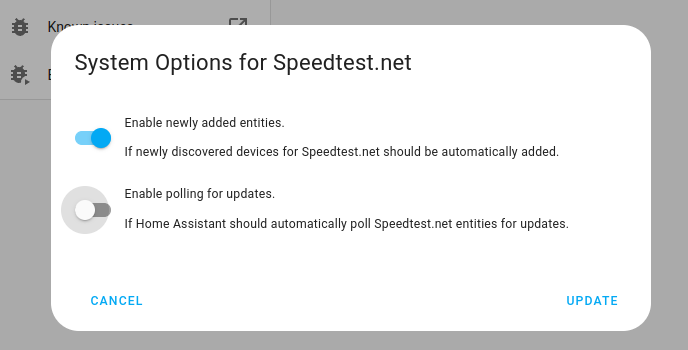
- Then, select System options and toggle the button to disable polling.
- To define your custom polling interval, create an automation.
- Go to Settings > Automations & scenes and create a new automation.
- Define any trigger and condition you like.
- Select Add action, then select Other actions.
- Select Perform action, and from the list, select the
homeassistant.update_entityaction. - Choose your targets by selecting the Choose area, Choose device, Choose entity, or Choose label buttons.
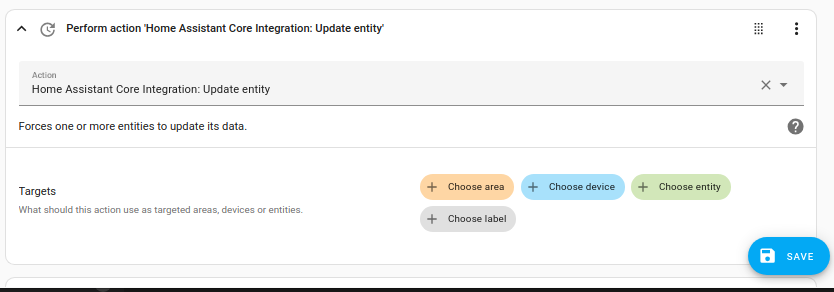
- Save your new automation to poll for data.
集成选项
可以通过集成选项更改某些行为。 要更改设置,请转到 Settings > Devices & services。选择 Ping 集成,然后选择 Configure。
- Ping count:发送到目标的 echo 请求数量。默认为 5。
- Consider home:在将断开连接的设备视为"不在家"之前必须经过的秒数。默认为 180 秒(3 分钟)。
二值传感器
ping 二值传感器平台允许您使用 ping 发送 ICMP echo 请求。这样您可以检查给定的主机是否在线,并确定从 Home Assistant 实例到该系统的往返时间。
此传感器默认启用。默认轮询间隔为 30 秒。
传感器
集成将不同的往返时间毫秒数作为实体公开:
Round Trip Time Mean Deviation- 标准偏差Round Trip Time Average- 平均往返时间Round Trip Time Minimum- 最短往返时间Round Trip Time Maximum- 最长往返时间Jitter- 往返时间的变化Packet loss- 丢失的 ICMP 回复百分比
这些实体默认禁用,如果需要可以在 UI 中启用。
在场检测
ping 设备跟踪器平台通过使用 ping 发送 ICMP echo 请求来提供在场检测。当设备运行防火墙并阻止 UDP 或 TCP 数据包但响应 ICMP 请求(如 Android 手机)时,这可能很有用。此跟踪器不需要知道 MAC 地址,因为主机可能位于不同的子网。这使得当 nmap 或其他解决方案因 arp 不起作用而无法工作时,这是检测不同子网上的主机的选项。
设备跟踪器默认禁用,可以在 UI 中启用。
:::note 请注意,现代智能手机在空闲时通常会关闭 WiFi。像这样的简单跟踪器可能本身不可靠。
::: 有关如何配置要跟踪的人员的说明,请参阅 person 集成页面。