

2022.9: Home Assistant Birthday Release!
Home Assistant 核心 2022.9! 🎂
如果你还不知道,这个月是 Home Assistant 的生日!🎉🎉 2013 年 9 月 17 日,Paulus Schoutsen 提交了 Home Assistant 的第一笔 commit,这也开启了无数家庭自动化爱好者参与这个开源项目的滚雪球之路。9 年后的今天,Home Assistant 已被超过 50 万人积极使用,而且每天都在增长。Nabu Casa 这个月也满 4 岁了。4 岁生日加上一位新的全职员工 🍄,这个月大家似乎都沉浸在生日氛围中,因此我们带来了一次内容爆棚的发布!
自动化引擎是 Home Assistant 拥有如此多用户的重要原因之一。因此,秉持着简化体验的理念,我们认为是时候进行一次改版了。你会注意到自动化编辑器在外观和交互上都有了巨大的提升,我们相信这些改进会显著提高它的可用性。至少对我来说,差别真的非常大!
我知道大家通常都期待由 @frenck 来写这些发布说明,但他去享受一个应得的假期了!所以这次就只能由我来写了。Zack 😀。希望你会喜欢这次发布,以及其中满满的新内容!
-- Zack
- Paul Bottein 加入 Nabu Casa
- 让自动化更顺手
- 新 helper:每周日程
- 蓝牙 everywhere
- Z-Wave Firmware updates now live
- Zigbee 备份 and 恢复 + migration
- 处理器与内存使用情况
- 其他值得注意的变化
- 新集成
- 现已可通过 UI 设置的集成
- 发布 2022.9.1 - September 8
- 发布 2022.9.2 - September 11
- 发布 2022.9.3 - September 13
- 发布 2022.9.4 - September 14
- 发布 2022.9.5 - September 18
- 发布 2022.9.6 - September 22
- 发布 2022.9.7 - September 26
- 需要帮助吗?加入社区
- 向后不兼容的变更
- 所有变更
Don't forget to join our 发布 party live stream on YouTube today at 12:00 PDT / 21:00 CET!
Paul Bottein 加入 Nabu Casa
我们很高兴宣布,Nabu Casa 团队迎来了最新成员:Paul Bottein。
Paul 最为人熟知的作品是 Mushroom 卡片,以及他为 Home Assistant 前端带来的一些功能,比如图标选择器。Paul 是一位非常出色的开发者,他在仪表盘设计方面的专长将为 Home Assistant 前端带来很多价值。
欢迎加入,我们也很期待 Paul 会为 Home Assistant 带来怎样的新东西!
让自动化更顺手
We felt that there were quite a few improvements we could do in order to better streamline 自动化 creation. That's why this 发布, we really took a long look at some of the main user experience issues. The new 自动化 editor improvements focus on readability and ease of use. This will also make editing 自动化 on your phone much easier!
First, you will notice the biggest change, collapsible 卡片 for 触发器, 条件, and 动作. This change allows you to really focus on what you are currently working on instead of having everything open all at once. When you first open your 自动化 in the editor, you will see all 卡片 collapsed with an auto-generated explanation of what that section is doing. This allows you to easily choose which section you want to edit and focus in on it.
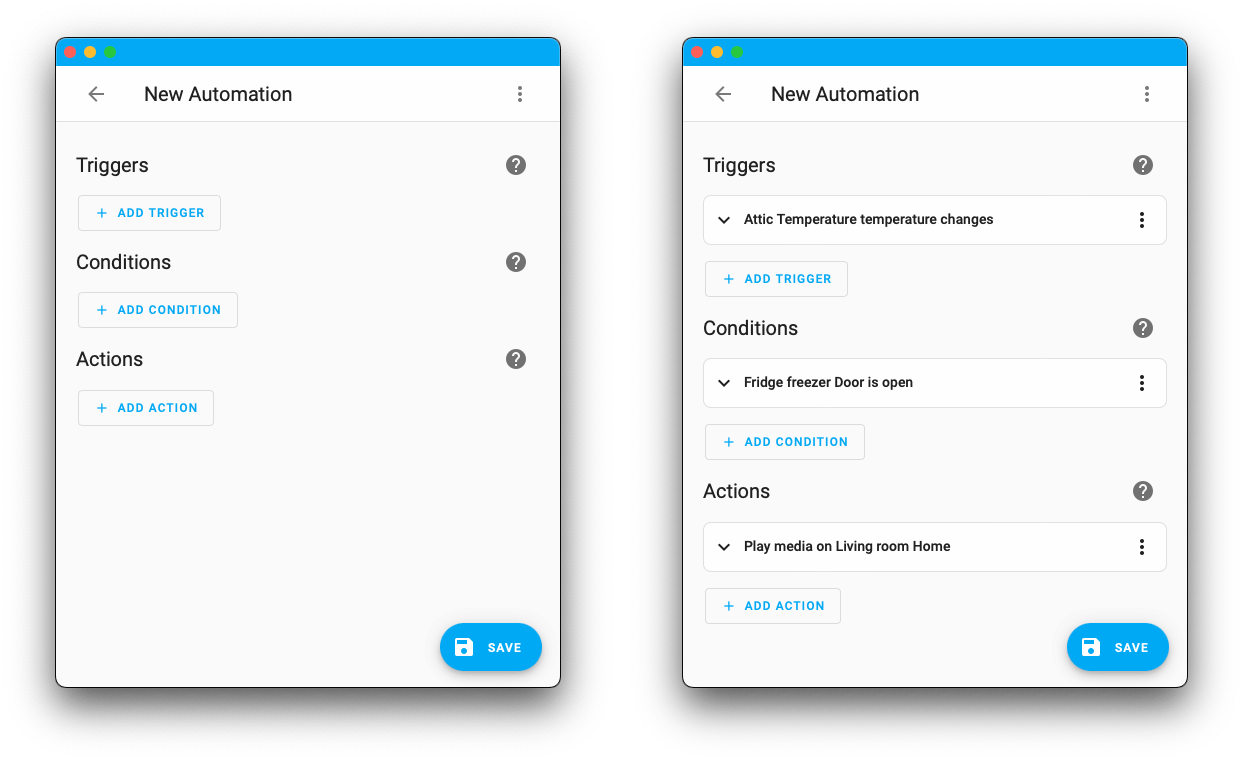
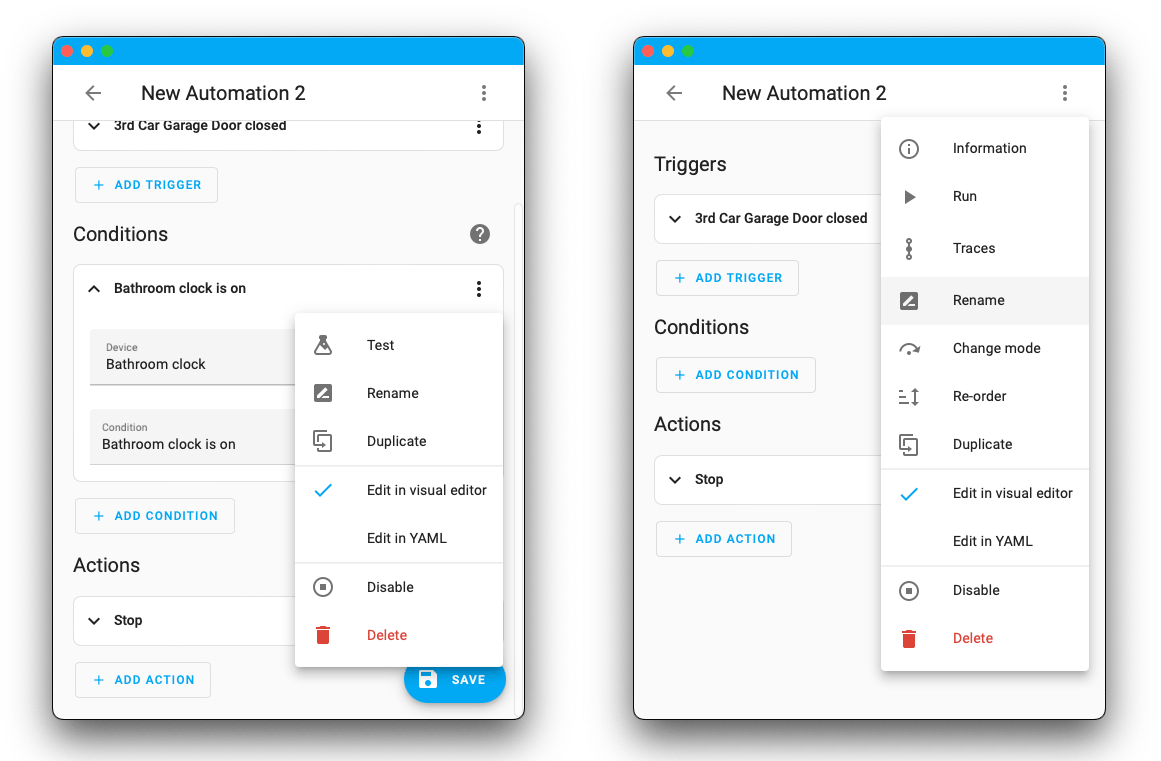
Next, there were a few items and options moved. You can see most of these in the top right overflow menu. For example, if you want to rename or 更新 the description of your 自动化 you can do that via the overflow menu > Rename. Moving these items to the overflow ensures that the main editor page is used for the main functions of your 自动化.
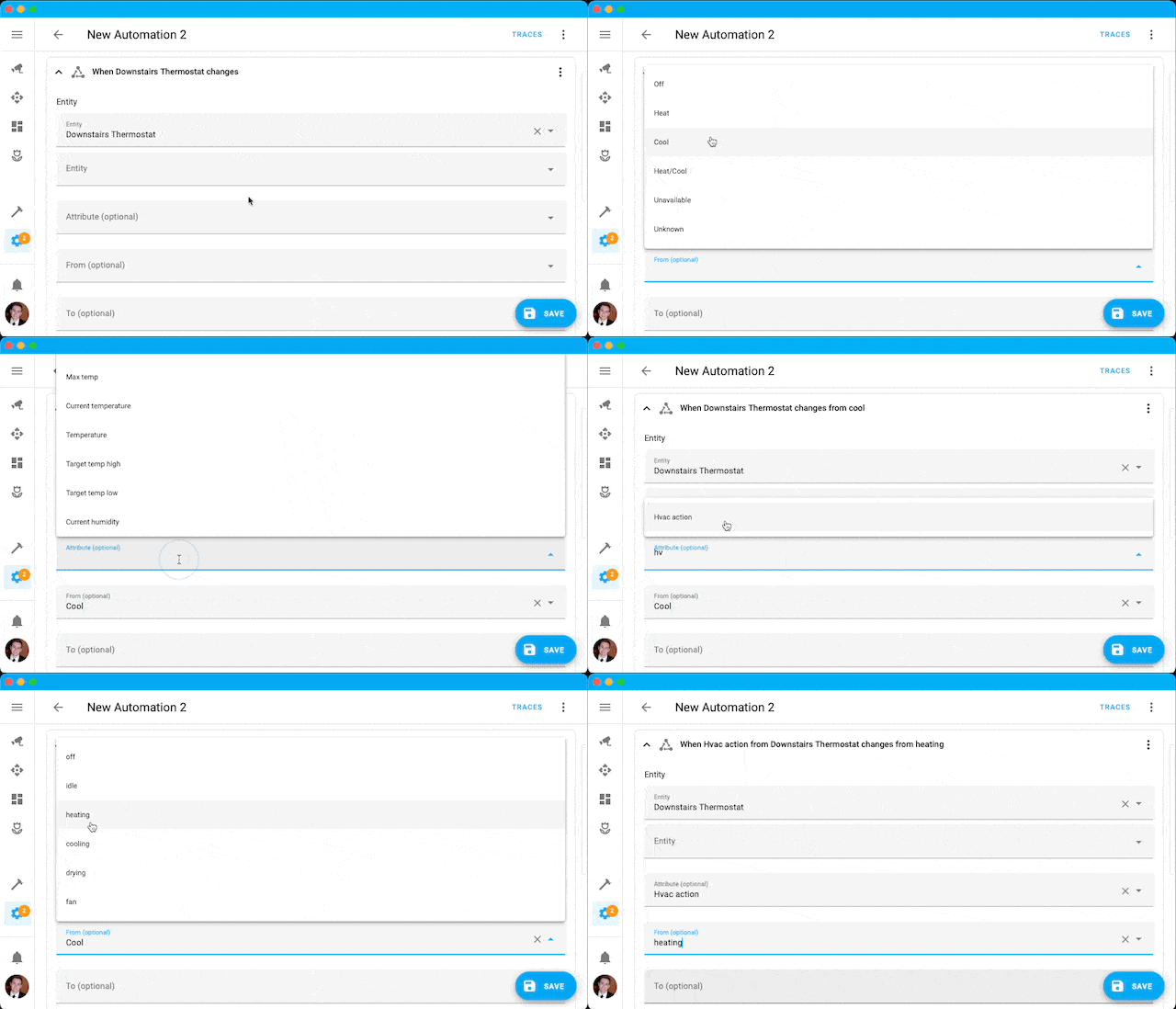
Last, but definitely not least, Frenck added some long requested features to the 自动化 forms. 状态 and 属性 value auto-completion! Now if you are adding a 状态 触发器, you can choose from a list of known 状态 for that 设备 type. These are also all translated into your language. Now there is no need to remember or find the 状态 possible or format the 状态 that needs to be entered. Just choose a 状态 from the dropdown and let your worries wisp away!
新 helper:每周日程
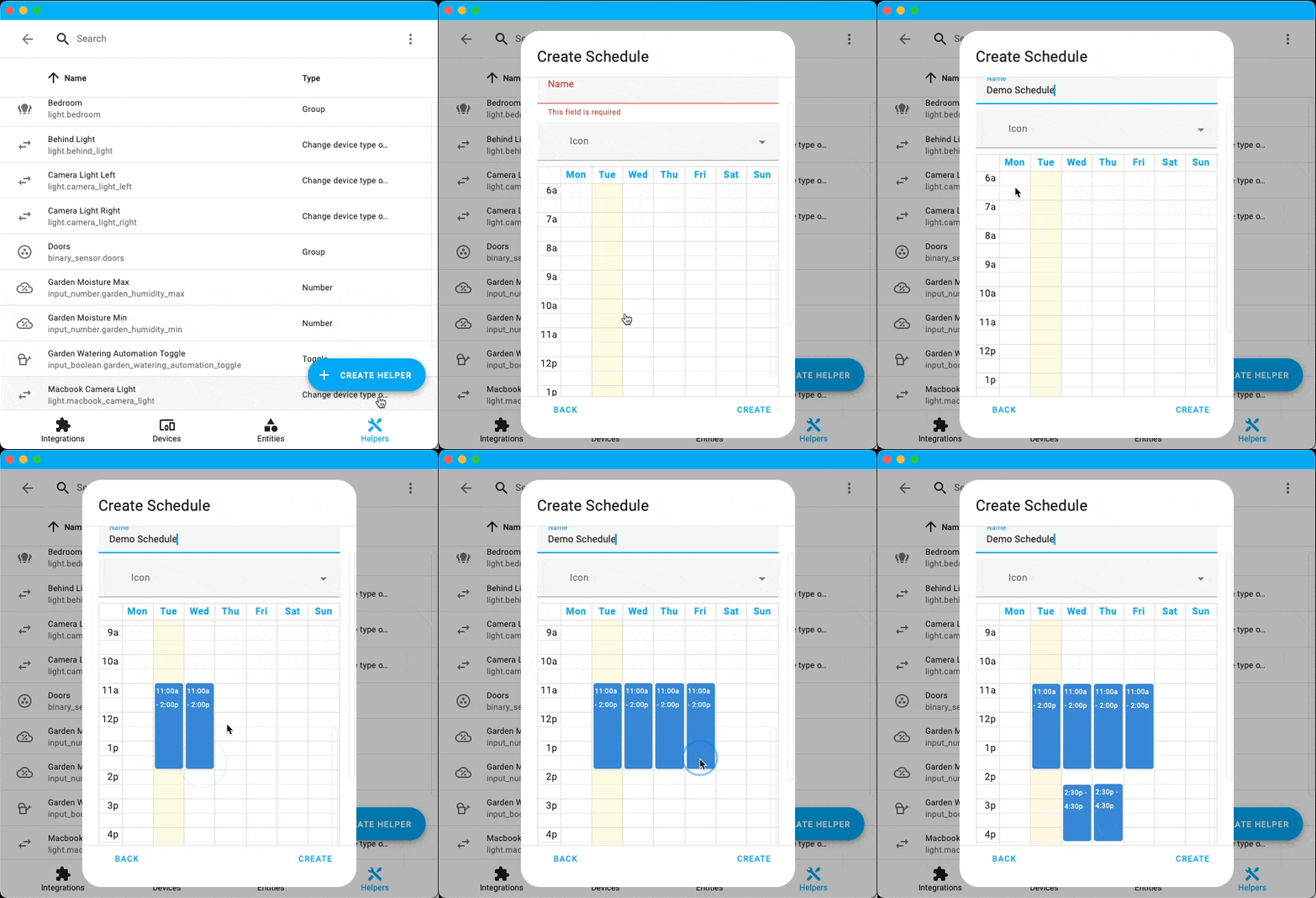
Have you ever wanted to run a schedule-based 自动化 for the same time each week or day? Well, you are now in luck! With the addition of the Schedule helper, you are now able to easily create these schedules to build more consistent 自动化 and timings.
蓝牙 everywhere
Last 发布 we introduced the 蓝牙 集成. This 发布, it's on fire 🔥 Not only do we now support multiple 蓝牙 adapters, we also support ESPHome 设备 acting as 蓝牙 proxies for your home. Wait what?!
Yes 😎. You can now greatly expand the 蓝牙 reach of Home Assistant using ordinary ESP32 设备. No extra hardware needed.
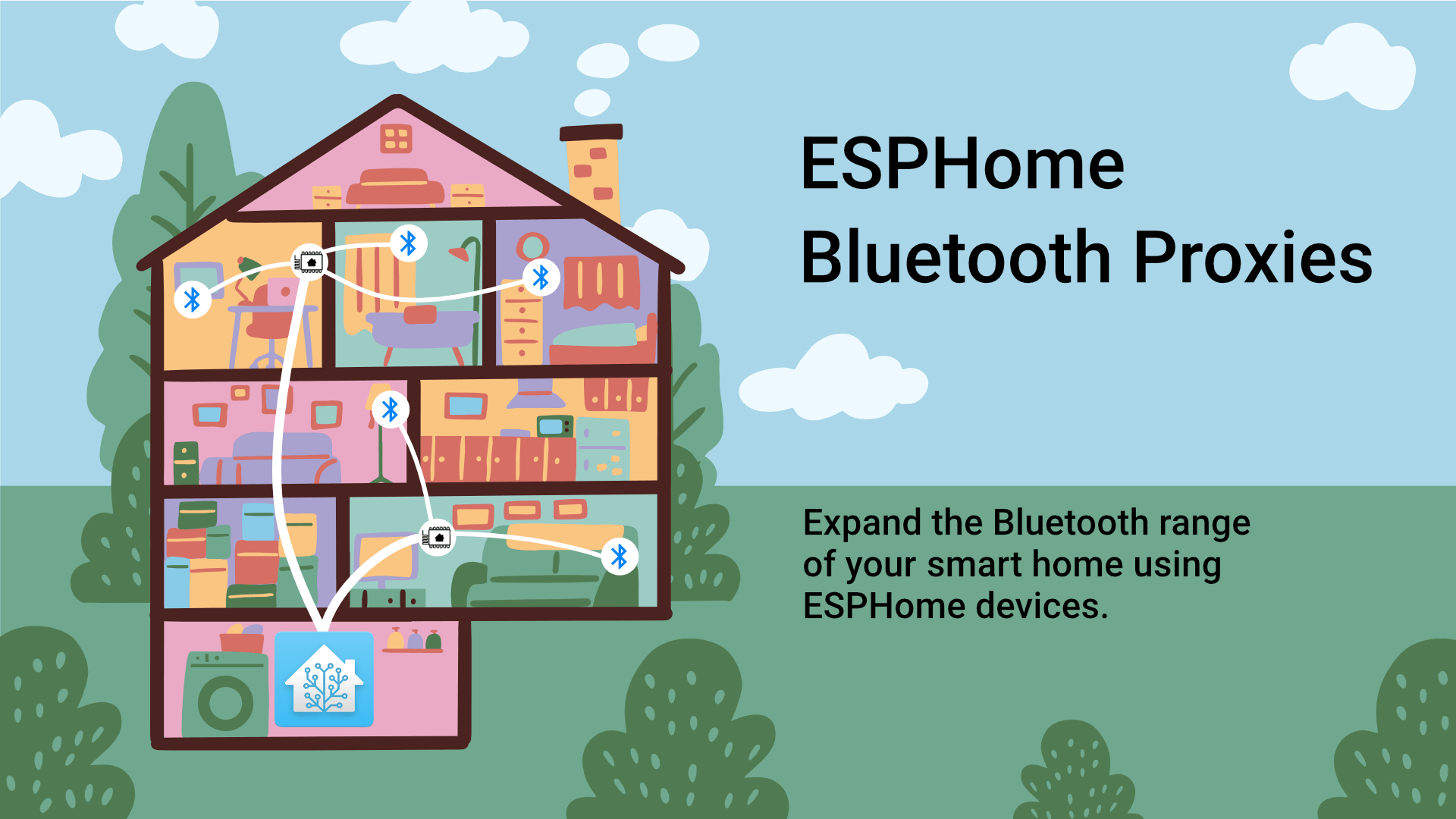
To get a proxy up and running, head over to the 蓝牙 proxy installer website and 安装 one straight from your browser.
蓝牙 proxies are currently limited to forwarding passive data. Active connections are coming in a future 发布. 蓝牙 集成 in Home Assistant will transparently use 蓝牙 proxies without any extra coding!
Most 集成 now support using the adapter with the best signal to connect 设备 that need an active connection. Extension cables, USB-Ethernet extenders, or USB-IP coupled with an additional 蓝牙 adapter can significantly extend your active connection range.
There is more! Besides 9 new supported brands, there is also support for a new open standard: BTHome by @Ernst79. It is automatically discovered by Home Assistant, 设备 can run over a year on a single battery and it supports data encryption.
Finally, suppose you are using the Home Assistant Operating System. In that case, we recommend upgrading to 版本 9 or later when it is released, as it comes with a faster D-Bus broker and newer 蓝牙 firmware which can significantly enhance 蓝牙 performance.
Thanks to @bdraco, @Ernst79, @JesseRockz, @jc2k for all the hard, amazing and epic work 🙏.
Z-Wave 固件更新现已上线
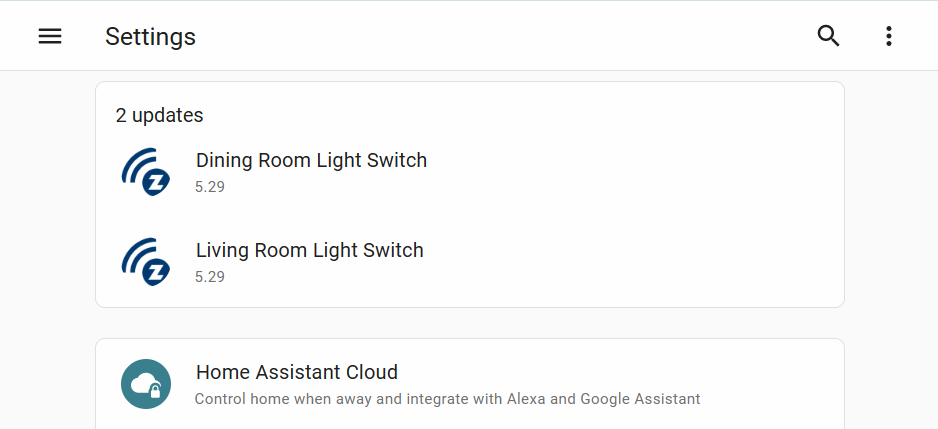
In 2022.7, we added support for updating Z-Wave 设备 firmware, but the catch was that you needed the firmware files from the manufacturer in order to complete the 更新. @AlCalzone wasn't satisfied with this approach and began working on a better solution. That better solution is here with the introduction of the Z-Wave JS Firmware 更新 服务! For supported manufacturers, Z-Wave JS can now automatically detect, download, and 安装 a firmware 更新 if it is available for your 设备. This will be done the same way you are currently updating Home Assistant. You will see a 通知 in your 设置 menu and you can 更新 right from there. Thanks @raman325
For now, only Jasco products are supported. Nabu Casa has been talking to other manufacturers to get more 设备 supported. To ensure our users can take advantage of this feature, we added 更新 实体 for your 设备 that will check once a day for new firmware updates. Nifty!
Zigbee 备份 and 恢复 + migration
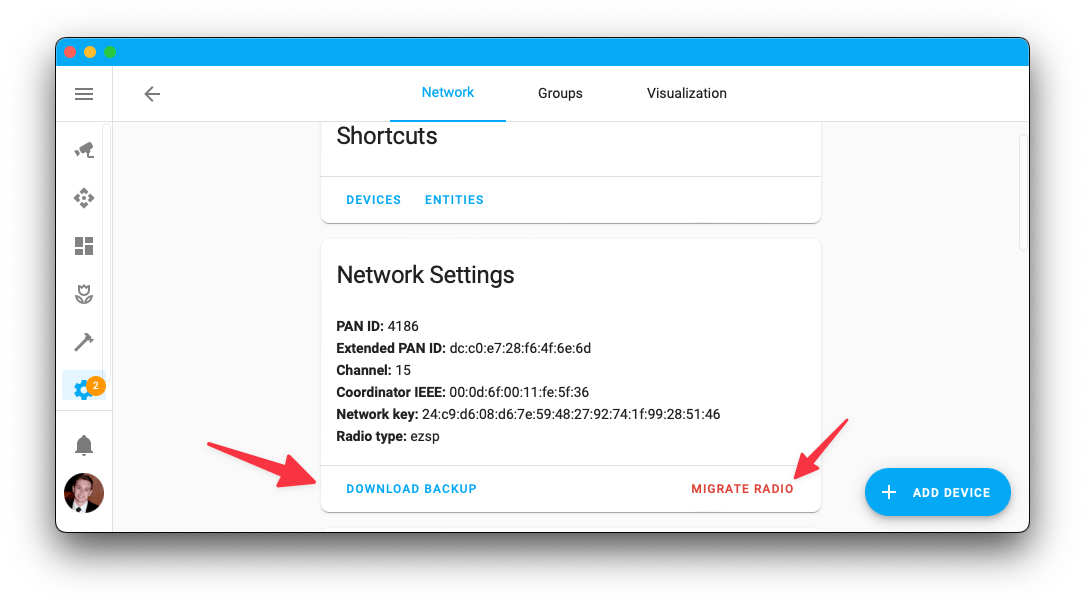
The Zigbee Home 自动化 (ZHA) 集成 now supports network backups and migrating between Zigbee coordinators. Backups are taken automatically but can also be manually 创建 from the 配置 page. After restoring a Home Assistant 备份, you can re-配置 ZHA and migrate to a new Zigbee coordinator without any loss of your 设置 or 设备 that were connected. This is helpful if your current radio fails or a new radio comes out that you may want to migrate to.
处理器与内存使用情况
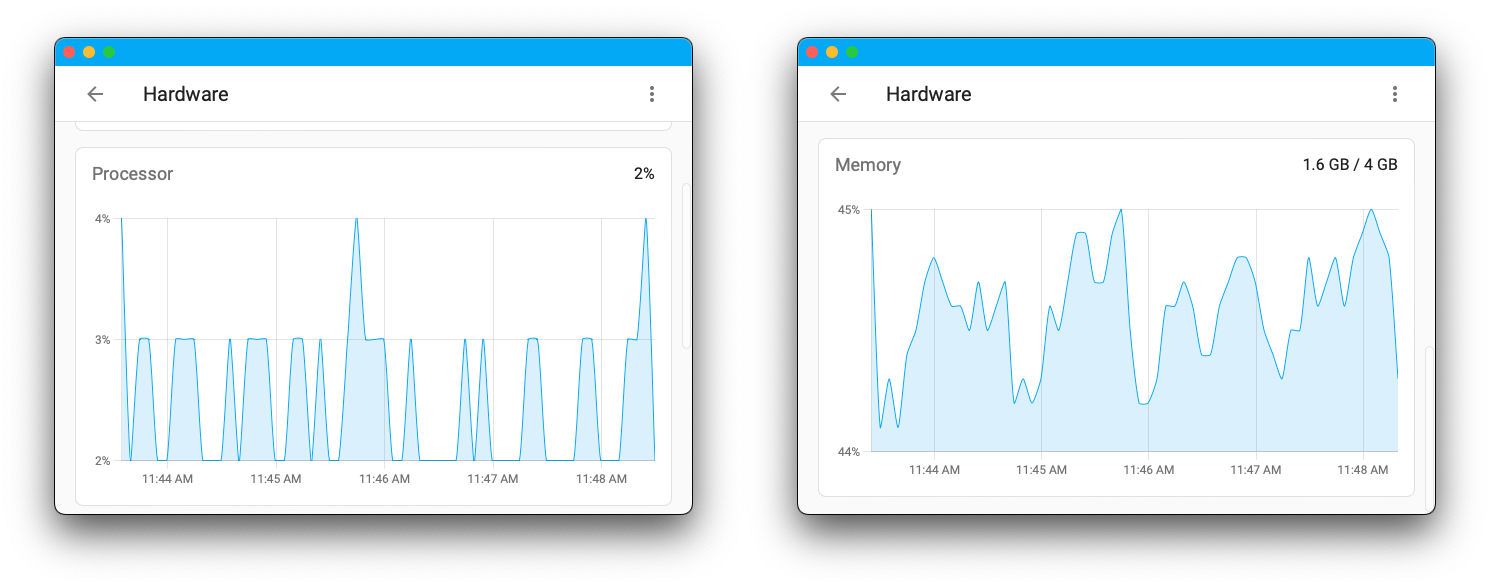
The Hardware page just got a lot more interesting. You can go check out live statistics on your Memory and Processor usage when you load the Hardware page in your system menu. These statistics will represent your entire Home Assistant instance, giving you insight in how your hardware is handling your day to day tasks. This will not show any history but will display 5 minutes of live data once you load the page.
其他值得注意的变化
There is much more juice in this 发布; here are some of the other noteworthy changes this 发布:
- 实体 more info dialog merged with 实体 设置. Thanks @balloob
- You can now enable 本地控制 of your Awair Element 设备. Thanks @zachberger
- MiFlora now supports polling of the Battery 传感器. Thanks @bdraco
- August 门锁 are now supported under the Yale Access 蓝牙 集成. Thanks @bdraco
- Many more 蓝牙 adapters are now supported for the 蓝牙 集成. Thanks @bdraco
- The SwitchBot 集成 now supports the Color Bulb and 灯光 strips. Thanks @bdraco
- 自动化, 脚本 and 场景 tables received a new overflow menu that will allow for more 动作 directly from the picker. Thanks @bramkragten and @piitaya
- You can now reorder 自动化 elements using drag and drop. Thanks @piitaya
- Icons have been added to more menus throughout the UI. Thanks @frenck
- 自动化 触发器 can now be aliased. Thanks @frenck
新集成
We welcome the following new 集成 in this 发布:
- BlueMaestro, added by @bdraco
- BThome, added by @Ernst79
- Ecowitt, added by @pvizeli
- Escea, added by @lazdavila
- File Upload, added by @balloob
- Fully Kiosk Browser, added by @cgarwood
- JustNimbus, added by @kvanzuijlen
- LaCrosse View, added by @IceBotYT
- Landis+Gyr Heat Meter, added by @vpathuis
- LED BLE, added by @bdraco
- Melnor 蓝牙, added by @vanstinator
- PrusaLink, added by @balloob
- Qingping, added by @bdraco
- Schedule, added by @frenck
- SensorPro, added by @bdraco
- ThermoBeacon, added by @bdraco
- ThermoPro, added by @bdraco
- Yale Access 蓝牙, added by @bdraco
现已可通过 UI 设置的集成
The following 集成 are now available via the Home Assistant UI:
- Android IP Webcam, done by @engrbm87
- LaMetric, done by @frenck
- Open Exchange Rates, done by @MartinHjelmare
- Pushover, done by @engrbm87
- Volvo On Call, done by @y34hbuddy
发布 2022.9.1 - September 8
- Show progress for zwave_js.更新 实体 (@raman325 - #77905) (zwave_js docs)
- Fix
lenmethod typo for Osram 灯光 (@Vaskivskyi - #78008) (osramlightify docs) - Add value ID to zwave_js 设备 diagnostics (@raman325 - #78015) (zwave_js docs)
- Fix zwave_js default emulate hardware in options flow (@MartinHjelmare - #78024) (zwave_js docs)
- Extract lametric 设备 from coordinator in notify (@ludeeus - #78027) (lametric docs)
- Bump velbus-aio to 2022.9.1 (@Cereal2nd - #78039) (velbus docs)
- Fix zwave_js 设备 re-interview (@MartinHjelmare - #78046) (zwave_js docs)
- Bump 蓝牙-adapters to 0.3.5 (@bdraco - #78052) (蓝牙 docs)
- Bump 蓝牙-auto-recovery to 0.3.2 (@bdraco - #78063) (蓝牙 docs)
- Fix bug with 1st gen RainMachine controllers and unknown API calls (@bachya - #78070) (rainmachine docs)
- Bump pylitterbot to 2022.9.1 (@natekspencer - #78071) (litterrobot docs)
- Allow OpenWeatherMap config flow to test using old API to pass (@jbouwh - #78074) (openweathermap docs)
- Fix Ecobee remote 传感器 not updating (@rlippmann - #78035) (ecobee docs)
发布 2022.9.2 - September 11
- Fix 重载 of MQTT config entries (@jbouwh - #76089) (MQTT docs)
- Clear MQTT discovery topic when a disabled 实体 is removed (@jbouwh - #77757) (MQTT docs)
- Improve 警告 messages on invalid received modes (@jbouwh - #77909) (MQTT docs)
- Handle missing supported brands (@balloob - #78090) (websocket_api docs)
- Fix switchbot writing 状态 too frequently (@bdraco - #78094) (switchbot docs)
- Fix LIFX 灯光 turning on while fading off (@amelchio - #78095) (lifx docs)
- Fix zwave_js 更新 实体 (@raman325 - #78116) (zwave_js docs)
- Improve unique_id collision checks in entity_platform (@emontnemery - #78132)
- Allow non-integers in threshold 传感器 config flow (@emontnemery - #78137) (threshold docs)
- Bump 蓝牙-adapters to 0.3.6 (@bdraco - #78138) (蓝牙 docs)
- Add missing strings for 错误 in amberelectric config flow (@Vaskivskyi - #78140) (amberelectric docs)
- Bump aioecowitt to 2022.09.1 (@pvizeli - #78142) (ecowitt docs)
- Add missing moisture 传感器 to xiaomi_ble (@Jc2k - #78160) (xiaomi_ble docs)
- Bump pySwitchbot to 0.19.1 (@bdraco - #78168) (switchbot docs)
- Bump aiohomekit to 1.5.3 (@bdraco - #78170) (homekit_controller docs)
- Fix ecowitt typing (@balloob - #78171) (ecowitt docs)
- Fix sending 通知 to multiple targets in Pushover (@engrbm87 - #78111) (pushover docs)
- Add dependencies to ecowitt (@pvizeli - #78187) (ecowitt docs)
- Bump led-ble to 0.8.3 (@bdraco - #78188) (led_ble docs)
- Fix switchbot not setting up when already connected at startup (@bdraco - #78198) (switchbot docs)
- Fix Yale Access 蓝牙 not setting up when already connected at startup (@bdraco - #78199) (yalexs_ble docs)
- Bump ZHA dependencies (@puddly - #78201) (zha docs)
- Close stale switchbot connections at 设置 time (@bdraco - #78202) (switchbot docs)
- Bump aiohomekit to 1.5.4 to handle stale ble connections at startup (@bdraco - #78203) (homekit_controller docs)
- Landis+Gyr 集成: increase timeout and add 调试 logging (@vpathuis - #78025) (landisgyr_heat_meter docs)
- Bump 蓝牙-adapters to 0.4.1 (@bdraco - #78205) (蓝牙 docs)
- Bump
regenmaschineto 2022.09.1 (@bachya - #78210) (rainmachine docs) - Bump led_ble to 0.8.5 (@bdraco - #78215) (led_ble docs)
- Bump pysensibo to 1.0.20 (@gjohansson-ST - #78222) (sensibo docs)
- Bump PySwitchbot to 0.19.5 (@bdraco - #78224) (switchbot docs)
- Bump yalexs-ble to 1.8.1 (@bdraco - #78225) (yalexs_ble docs)
- Bump led-ble to 0.9.1 (@bdraco - #78226) (led_ble docs)
- Bump aiohomekit to 1.5.6 (@bdraco - #78228) (homekit_controller docs)
发布 2022.9.3 - September 13
- Move up 设置 of 服务 to make it more robust when running multiple instances of deCONZ (@Kane610 - #77621) (deconz docs)
- Bump blinkpy to 0.19.2 (@Vaskivskyi - #78097) (blink docs)
- Bump PyViCare==2.17.0 (@TheJulianJES - #78232) (vicare docs)
- Fix missing dependency for dbus_next (@d-walsh - #78235) (蓝牙 docs)
- Bump 蓝牙-auto-recovery to 0.3.3 (@bdraco - #78245) (蓝牙 docs)
- Bump aiodiscover to 1.4.13 (@bdraco - #78253) (dhcp docs)
- Bump pySwitchbot to 0.19.6 (@bdraco - #78304) (switchbot docs)
- Make yalexs_ble matcher more specific (@bdraco - #78307) (yalexs_ble docs)
- Fix sengled bulbs in ZHA (@dmulcahey - #78315) (zha docs)
- Fix calculating gas cost for gas measured in ft3 (@emontnemery - #78327) (energy docs)
- Bump bleak to 0.17.0 (@bdraco - #78333) (蓝牙 docs)
- Drop initial when loading input_number from storage (@emontnemery - #78354) (input_number docs)
- Don't allow partial 更新 of input_number 设置 (@emontnemery - #78356) (input_number docs)
- Bump PySwitchbot to 0.19.8 (@bdraco - #78361) (switchbot docs)
- Bump yalexs-ble to 1.9.0 (@bdraco - #78362) (yalexs_ble docs)
- Bump xiaomi-ble to 0.9.3 (@bdraco - #78301) (xiaomi_ble docs)
- Bump xiaomi-ble to 0.10.0 (@bdraco - #78365) (xiaomi_ble docs)
- Bump led-ble to 0.10.0 (@bdraco - #78367) (led_ble docs)
- Bump aiohomekit to 1.5.7 (@bdraco - #78369) (homekit_controller docs)
- Don't allow partial 更新 of counter 设置 (@emontnemery - #78371) (counter docs)
- Don't allow partial 更新 of input_boolean 设置 (@emontnemery - #78372) (input_boolean docs)
- Don't allow partial 更新 of input_datetime 设置 (@emontnemery - #78373) (input_datetime docs)
- Don't allow partial 更新 of input_button 设置 (@emontnemery - #78374) (input_button docs)
- Don't allow partial 更新 of input_select 设置 (@emontnemery - #78376) (input_select docs)
- Don't allow partial 更新 of input_text 设置 (@emontnemery - #78377) (input_text docs)
- Don't allow partial 更新 of timer 设置 (@emontnemery - #78378) (timer docs)
- Unregister EcoWitt webhook at unload (@pvizeli - #78388) (ecowitt docs)
- Fix flapping system 日志 test (@bdraco - #78391) (system_log docs)
- Fix CI workflow caching (@cdce8p - #78398)
- 更新 前端 to 20220907.1 (@bramkragten - #78404) (前端 docs)
- Bump govee-ble to 0.17.3 (@bdraco - #78405) (govee_ble docs)
- Fix bug with RainMachine 更新 实体 (@bachya - #78411) (rainmachine docs)
- Retry on unavailable IPMA api (@dgomes - #78332) (ipma docs)
发布 2022.9.4 - September 14
- 更新 前端 to 20220907.2 (@bramkragten - #78431) (前端 docs)
发布 2022.9.5 - September 18
- Fix 风扇 speed regression for some xiaomi 风扇 (@peteh - #78406) (xiaomi_miio docs)
- Only redact zwave_js values that are worth redacting (@raman325 - #78420) (zwave_js docs)
- Prevent deleting blueprints which are in use (@emontnemery - #78444) (自动化 docs) (脚本 docs) (blueprint docs)
- Bump bleak-retry-connector to 0.17.1 (@bdraco - #78474) (蓝牙 docs)
- Bump python-songpal to 0.15.1 (@rytilahti - #78481) (songpal docs)
- Bump PySwitchbot to 0.19.9 (@bdraco - #78504) (switchbot docs)
- Bump yalexs_ble to 1.9.2 (@bdraco - #78508) (yalexs_ble docs)
- Bump led-ble to 0.10.1 (@bdraco - #78511) (led_ble docs)
- Bump aiohomekit to 1.5.8 (@bdraco - #78515) (homekit_controller docs)
- Fix zwave_js 更新 实体 startup 状态 (@raman325 - #78563) (zwave_js docs)
- Bump pyrisco to v0.5.5 (@OnFreund - #78566) (risco docs)
- Fix WebSocket 条件 testing (@frenck - #78570) (websocket_api docs)
- Fix switchbot not accepting the first advertisement (@bdraco - #78610) (switchbot docs)
- Fix reconnect race in HomeKit Controller (@bdraco - #78629) (homekit_controller docs)
- Bump qingping-ble to 0.7.0 (@skgsergio - #78630) (qingping docs)
- Add a helpful message to the config_entries.OperationNotAllowed exception (@bdraco - #78631)
- 更新 demetriek to 0.2.4 (@frenck - #78646) (lametric docs)
- Handle multiple files properly in zwave_js 更新 实体 (@raman325 - #78658) (zwave_js docs)
- Remove mDNS iteration from Plugwise unique ID (@frenck - #78680) (plugwise docs)
- Fix 蓝牙 callback matchers when only matching on connectable (@bdraco - #78687) (蓝牙 docs)
- Bump thermobeacon-ble to 0.3.2 (@bdraco - #78693) (thermobeacon docs)
发布 2022.9.6 - September 22
- Handle Modalias missing from the 蓝牙 adapter details on older BlueZ (@bdraco - #78716) (蓝牙 docs)
- Refactor MQTT tests to use modern platform schema part 1 (@jbouwh - #77387) (MQTT docs)
- Refactor MQTT tests to use modern platform schema part 2 (@jbouwh - #77525) (MQTT docs)
- Refactor common MQTT tests to use modern schema (@jbouwh - #77583) (MQTT docs)
- Make hass.data["MQTT"] an instance of a DataClass (@jbouwh - #77972) (MQTT docs)
- Add status codes 23 and 26 to Xiaomi Miio 吸尘器 (@starkillerOG - #78289) (xiaomi_miio docs)
- Link manually added MQTT 实体 the the MQTT config entry (@jbouwh - #78547) (MQTT docs)
- Drop PARALLEL_UPDATES from switchbot (@bdraco - #78713) (switchbot docs)
- Bump aioimaplib to 1.0.1 (@N1c093 - #78738) (imap docs) (dependency)
- Fix bug wherein RainMachine 服务 use the wrong controller (@bachya - #78780) (rainmachine docs)
- Guard Guardian 开关 from redundant on/off calls (@bachya - #78791) (guardian docs)
- Bump dbus-fast to 1.5.1 (@bdraco - #78802) (蓝牙 docs) (dependency)
- If brightness is not available, don't set a value (@elupus - #78827) (google_assistant docs)
- Pin Python patch versions [ci] (@cdce8p - #78830)
- Fix parsing Eve Energy characteristic data (@Jc2k - #78880) (homekit_controller docs)
- Check Surveillance Station permissions during 设置 of Synology DSM 集成 (@mib1185 - #78884) (synology_dsm docs)
- Handle default RSSI values from bleak in 蓝牙 (@bdraco - #78908) (蓝牙 docs)
- Disable force 更新 Netatmo (@balloob - #78913) (netatmo docs)
- Correct return typing for
catch_log_exception(@jbouwh - #78399) - Fix samsungtv to abort when ATTR_UPNP_MANUFACTURER is missing (@bdraco - #78895) (samsungtv docs)
- Handle timeout fetching bond token in config flow (@bdraco - #78896) (bond docs)
- Bump bimmer_connected to 0.10.4 (@rikroe - #78910) (bmw_connected_drive docs) (dependency)
发布 2022.9.7 - September 26
- Bump pyipma to 3.0.5 (@dgomes - #78936) (ipma docs)
- Bump motionblinds to 0.6.13 (@starkillerOG - #78946) (motion_blinds docs)
- Set OWM default mode to hourly legacy API (@jbouwh - #78951) (openweathermap docs)
- Bump yalexs to 1.2.2 (@bdraco - #78978) (august docs)
- Fix velbus matching ignored entries in config flow (@Cereal2nd - #78999) (velbus docs)
- Bumped boschshcpy 0.2.30 to 0.2.35 (@tschamm - #79017) (bosch_shc docs)
- Fix failing LaMetric pairing message during config flow (@frenck - #79031) (lametric docs)
- Fix MQTT device_tracker generating unique id-s - regression on #78547 (@jbouwh - #79033) (MQTT docs)
- Bump govee-ble to 0.19.0 (@bdraco - #79038) (govee_ble docs)
- Always 安装 requirements of after_dependencies (@emontnemery - #79094)
- Pin pyOpenSSL to 22.0.0 (@balloob - #79066)
需要帮助吗?加入社区
Home Assistant 拥有一个很棒的用户社区,大家都非常乐于互相帮助。 所以,欢迎加入我们!
我们非常活跃的 Discord 聊天服务器 是交流的绝佳去处, 也别忘了加入我们精彩的论坛。
发现 bug 或问题了吗?请在我们的 问题追踪器 中提交反馈,帮助我们修复它!或者查看帮助页面, 了解更多可获取帮助的地方。
你更喜欢邮件吗?欢迎订阅我们的 Building the Open Home Newsletter, 把最新功能、社区动态以及更多关于构建开放家庭的消息, 直接发送到你的收件箱。
向后不兼容的变更
Below is a listing of the breaking change for this 发布, per subject or 集成. Click on one of those to read more about the breaking change for that specific item.
实体 sensor.<your_vehicle>_charging_time_label (disabled by default) has
been removed as it is not provided by the upstream library/API anymore.
The 属性 charging_status of binary_sensor.<your_car>_charging_status
has been removed. Please use sensor.charging_status instead.
The Homekit PM2.5 µg/m3 mappings in the HomeKit 集成 now use the values based on the US AQI set by the EPA.
(@sarabveer - #76358) (文档)
It will no longer be possible to know if the international space station (ISS) is above you nor the timestamp for the next rise of the station as these features have been removed in the underlying API.
The 二元sensor will be removed and all 自动化 relying on this will no longer work. Unfortunately there is no substitute for this. Instead we have introduced a new 传感器, that still tells you the location of the ISS, while showing how many people are in space, as main 状态.
(@DurgNomis-drol - #77218) (文档)
The previously deprecated reset_waste_drawer and set_wait_time 服务 from
the litterrobot 吸尘器 实体, have been removed.
(@natekspencer - #77052) (文档)
Support for MQTT 温控 hold and away modes, which was deprecated in
Home Assistant 核心 2022.3.0, has been removed. The hold and away modes
are replaced by preset_mode.
The 传感器 now has a unit of measurement according to the exchange rate quote.
(@MartinHjelmare - #76017) (文档)
Roku media player will indicate IDLE instead of HOME when at home screen.
You can still detect home screen by looking at app_id 属性.
Setting up the notify platform of the SMS 集成 by a platform section in
YAML 配置 is no longer supported. The sms platform section
under notify: can be removed from your YAML 配置 files.
A recipient can be specified by using the target parameter in the notify
服务 call instead.
The previously deprecated utility_meter 实体, used to change tariffs,
have been removed. Please use the provided select 实体 instead.
You must use zwave-js-server 1.22.1 or greater (schema 22).
With this 发布, you will need to 更新 your zwave-js-server instance.
- If you use the zwave_js addon, you need to have at least 版本
0.1.66. - If you use the zwavejs2mqtt addon, you need to have at least 版本
0.46.0. - If you use the zwavejs2mqtt Docker 容器, you need to have at least 版本
7.0.0. - If you run your own Docker 容器, or some other 安装 method, you will need to 更新 your zwave-js-server instance to at least
1.22.1.
(@raman325 - #75795 #76903) (文档)
If you are a custom 集成 developer and want to learn about breaking changes and new features available for your 集成: Be sure to follow our developer 博客. The following are the most notable for this 发布:
- AutomationActionType deprecation for 2022.9
- 蓝牙 passive 传感器 API changes for 2022.9
- 设备 tracker deprecations for 2022.9
- Globally available HomeAssistant object (hass)
- LightEntity no longer supports white_value
- The issue registry has been moved to homeassistant.helpers
所有变更
Of course, there is a lot more in this 发布. You can find a list of all changes made here: Full changelog for Home Assistant 核心 2022.9