

2022.3:选择并播放媒体
Did you know that today - March 2nd - in 1949, the first automatic street 灯光 was lit in New Milford, Connecticut, USA? Seventy-three years later, we automate our entire homes 😎
Home Assistant 核心 2022.3! And this 发布 has a different and fresh "tune" to it! Yes, pun intended as this 发布 brings tons of improvements involving media.
And what is so cool about it? It is not just about browsing media, it is even more about using it! Using media allows us to make the 自动化 in our home more "personal".
For example, having our favorite radio station playing when we get home or broadcasting announcements and sound bites to our speakers to notify us of stuff happening in and around our home. (I really need to 安装 that 摄像头 at the front door now 😅.)
What are you using media for?
Enjoy the 发布!
../Frenck
- Home Assistant 新闻简报
- 媒体选择器与全新的“播放媒体”动作
- 更多媒体来源!
- 直接在浏览器中上传媒体
- UI 升级
- 触发了!
- 实体 ID 自动补全
- 其他值得注意的变化
- 新集成
- 现在可通过 UI 设置的集成
- 发布 2022.3.1 - March 3
- 发布 2022.3.2 - March 6
- 发布 2022.3.3 - March 7
- 发布 2022.3.4 - March 11
- 发布 2022.3.5 - March 15
- 发布 2022.3.6 - March 21
- 发布 2022.3.7 - March 23
- 发布 2022.3.8 - March 29
- 需要帮助?加入社区!
- 不向后兼容的变更
- Updates for custom integrations 开发者
- Farewell to the following
- All changes
Home Assistant 新闻简报
We realize you might like email more than watching this 博客, our Twitter, or 通知 in our Discord chat to stay on top of the latest Home Assistant news.
In that case, you might like to sign-up for our newsletter instead! We'll send you a new email once a month when a new 发布 drops with the 发布's highlights and interesting things we found in our community.
Our newsletter is free of any analytics and tracking. The sign-up is below, and we have enabled double opt-in to ensure no emails are sent if users don't want them.
Sign up for the Home Assistant newsletter
媒体选择器与全新的“播放媒体”动作
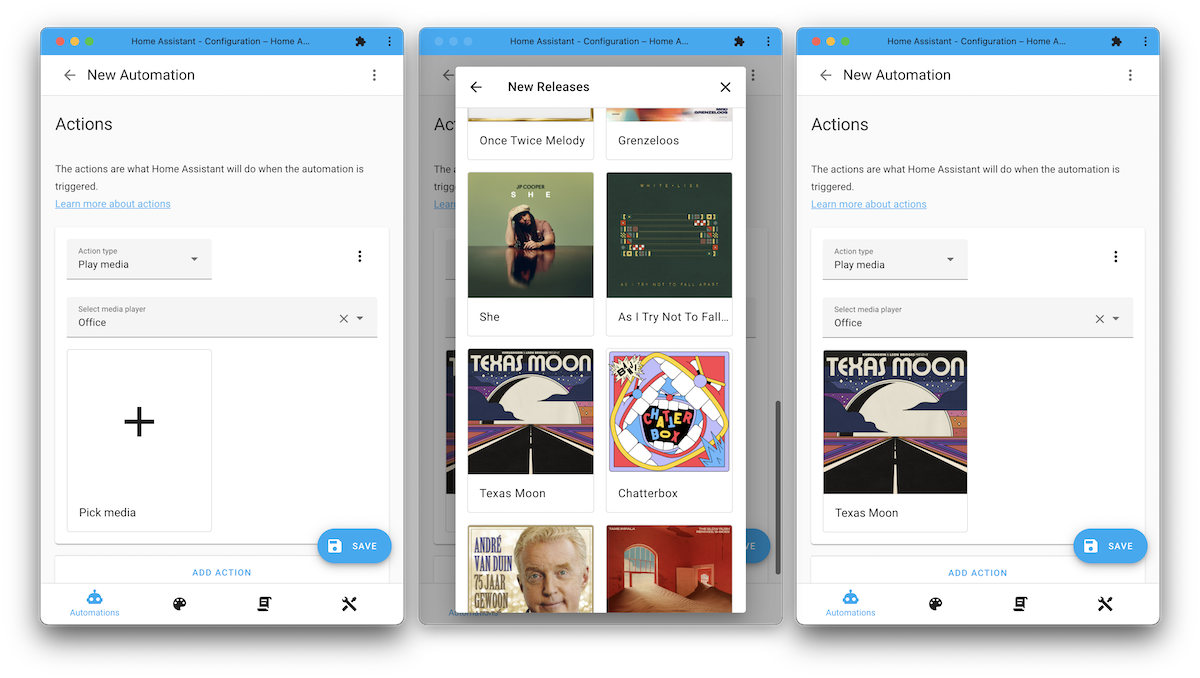
This 发布 brings a new media selector and a "Play media" 动作. These make it super easy to use media in your 自动化 and 脚本.
Choose the "Play media" 动作 when creating an 自动化, select the media player you'd like to play something on, and next... just browse and pick the media that you want it to play! Done! 🚀
Have you ever wanted to play your front door 摄像头 stream on your television when the doorbell rings? Well, this is now very possible with this 更新. Check out this video on how to set that up in only 1.5 minutes. 🤯
更多媒体来源!
Of course, the above-shown “Play media” 动作 and selector is incredible. But, you'd need some media to select! We already supported local media and things like Spotify, but wouldn't it be cool if we had more!?
So, this 发布 will bring in a bunch of new media sources.
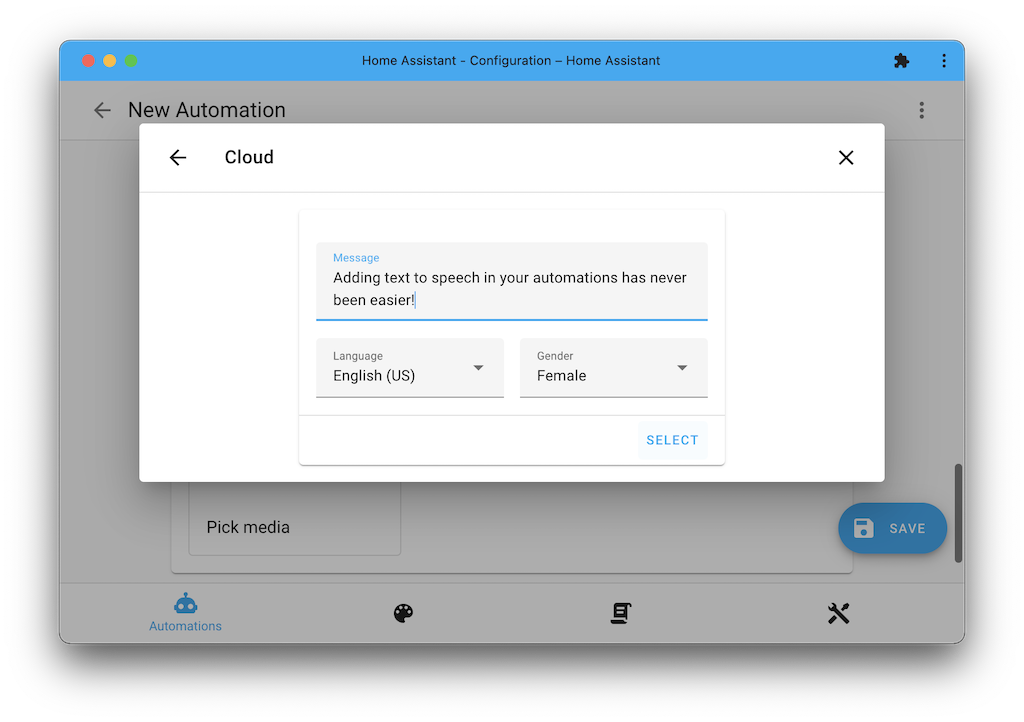
Your 摄像头! Your Lovelace 仪表盘! You can just pick one of your 摄像头 or Lovelace 仪表盘 and "Play" them on a supported 设备 (like a Google Nest Hub or television). But also text-to-speech!
But that's not it; we also have new 集成 adding new media sources. This 发布 adds the DLNA Digital Media Server and Radio Browser 集成 that allow the use of their sources with your media players.
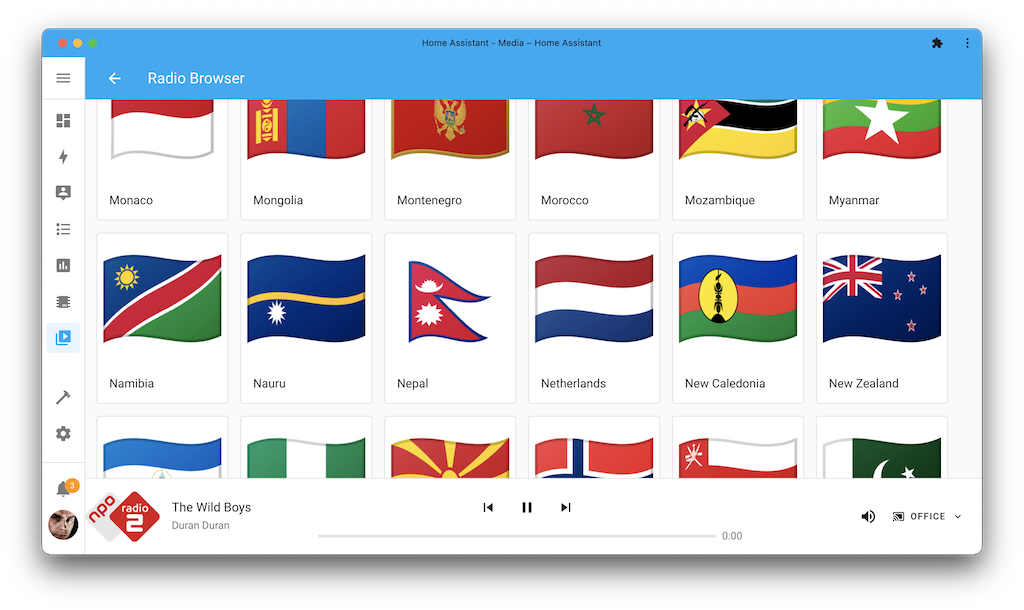
You can browse and listen to thirty thousand radio stations from all around the world. But what is even cooler is that with the new "Play media" 动作 in 自动化, you can just select your favorite radio station to be playing when, for example, you arrive home!
Adding the Radio Browser to your Home Assistant instance is as easy as clicking the My Home Assistant button below. No other 设置 prerequisites, logins, or API keys are need.
直接在浏览器中上传媒体
Getting your media files (pictures, images, soundbites, music) into your local media folder required you to use the (or something similar).
Can we improve this experience? Sure we can!
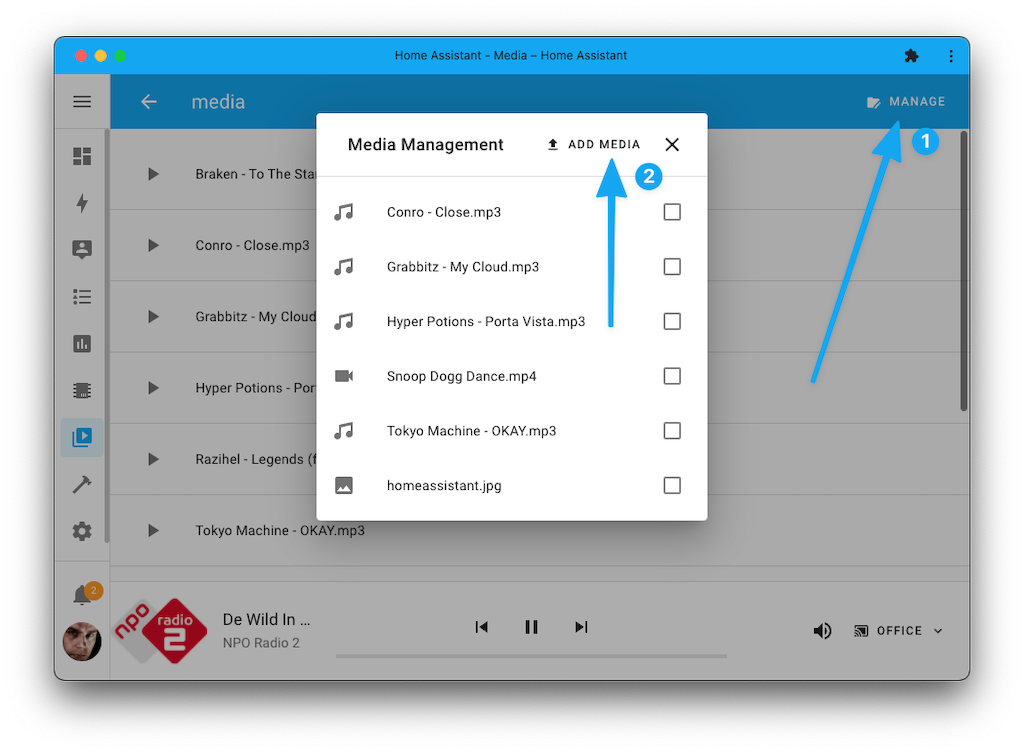
This 发布 adds initial support for local media management straight from the Home Assistant 前端, allowing you to upload and remove files directly.
UI 升级
We have been working hard on upgrading the Home Assistant 前端 to use Material Web Components (MWC) everywhere, saying goodbye to our old (and deprecated) paper style.
This allows our 前端 to be up-to-date with the latest features and the latest style. As you'll notice, these elements have a different look from the older style, so don't be alarmed if your inputs look slightly different.
Updating to MWC gives us many new opportunities for the future and makes Home Assistant more accessible, for example, when using a screen reader.
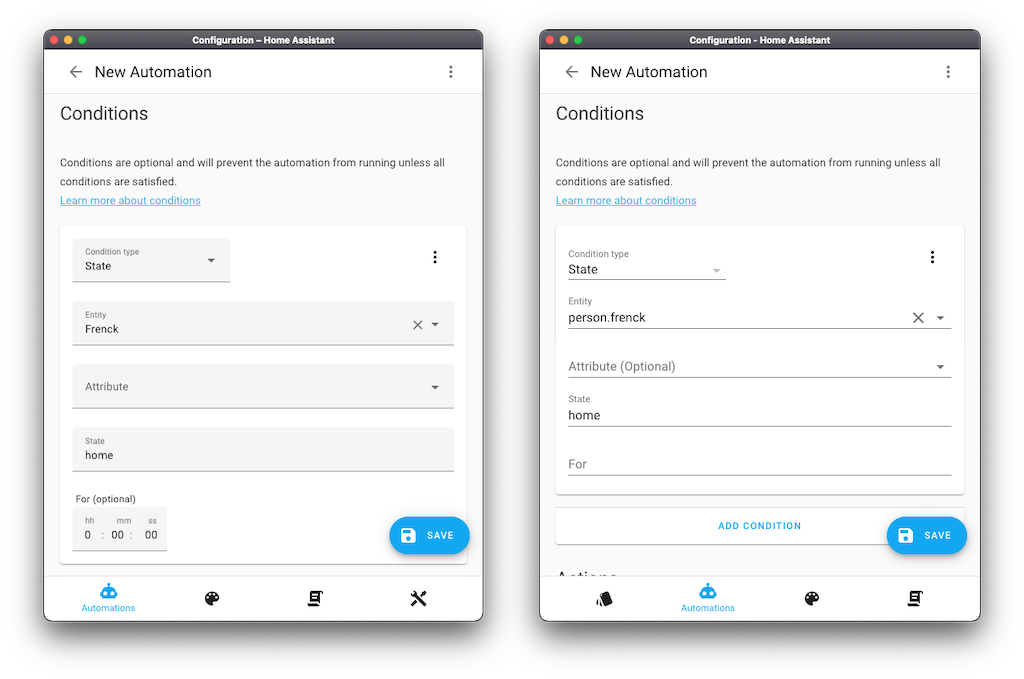
The screenshot above shows the new MWC styling on the left and the previous paper styling from an older Home Assistant 版本 on the right. The styling change mainly impacts input fields look and feel.
触发了!
When working an 自动化, 触发器 now show live in the UI when they are triggering, allowing you to validate you set it up correctly.
In this little animation below, the remote is pressed a couple of times. The 自动化 editor will show the "TRIGGERED" bar.
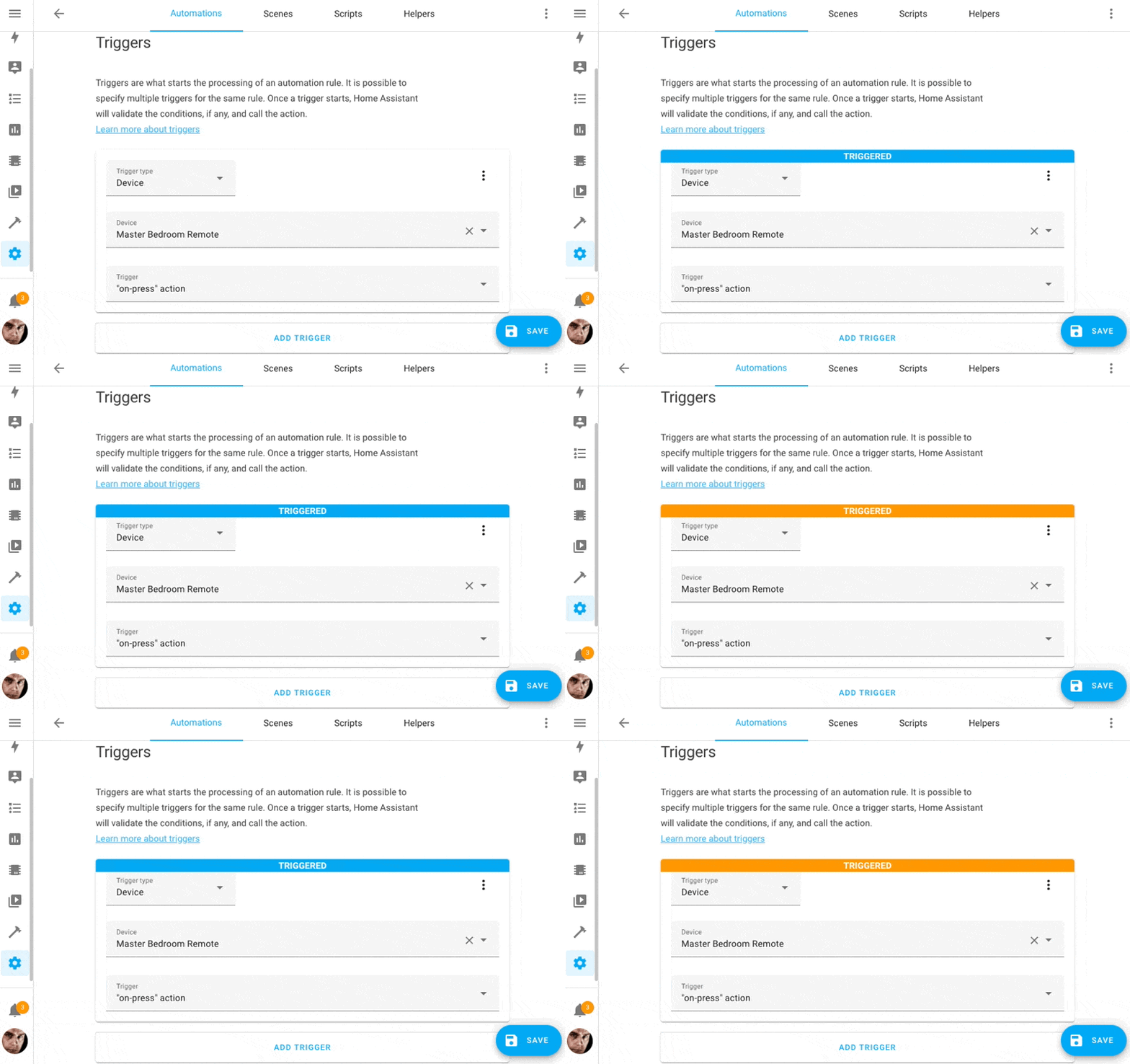 Each time the 触发器 触发器 it will be indicated in the UI.
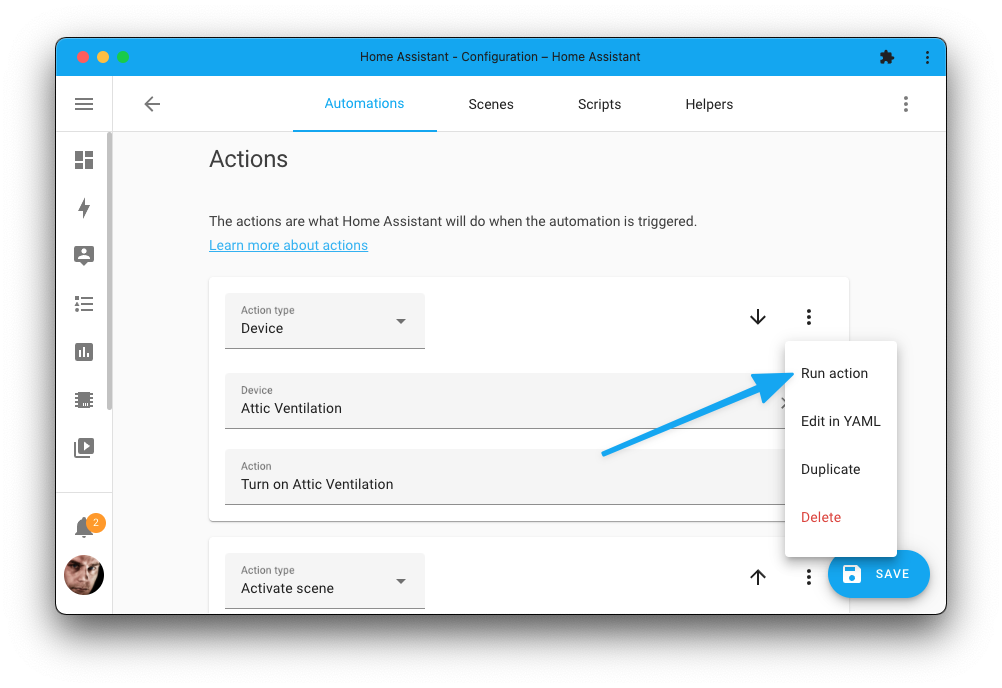
Additionally, you can now also 触发器 each individual 动作 in your 自动化 to test if the 动作 you are creating runs as expected:
实体 ID 自动补全
Our YAML 配置 and Jinja templates used in, for example, 自动化, 脚本, and 前端 仪表盘 can be a really powerful customization tool. You can definitely appreciate this feature if you use our code editor in the 前端 at times.
Thanks to @kubawolanin, we now have 实体 ID autocompletion when using the built-in code editor in the Home Assistant 前端 😎.
Just start typing an 实体 ID, and the code editor will try to suggest an 实体 ID and show the selected 实体's current 状态.
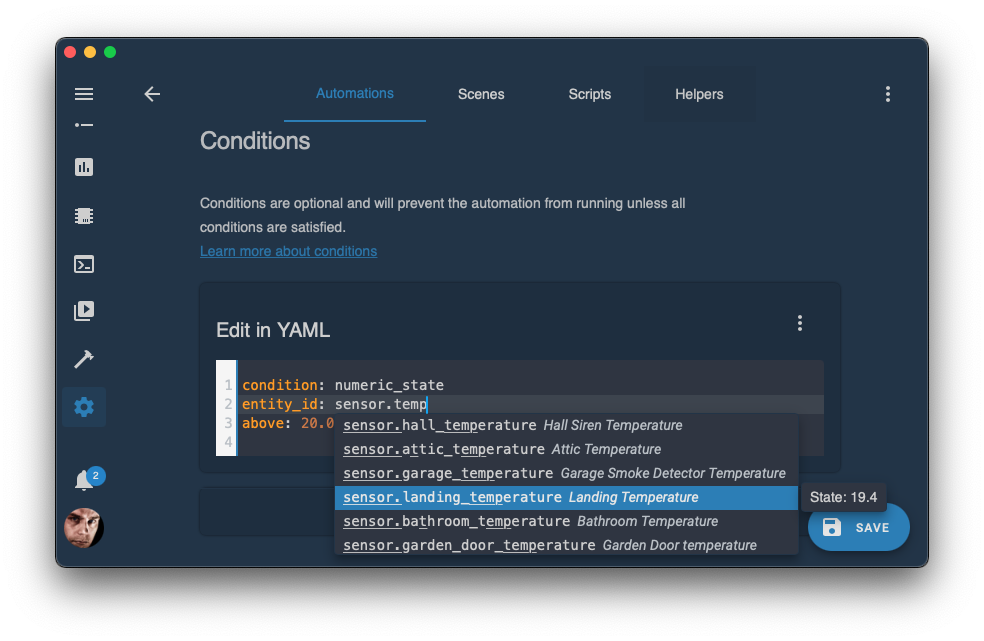
Theme: Waves by Tim Cowell.
This works when you are configuring your Lovelace 卡片, creating advanced template 条件 in your , and even if you are testing out your Jinja-template in the template 开发者工具.
Click the My button below to test it out on your Home Assistant instance:
其他值得注意的变化
There is much more juice in this 发布; here are some of the other noteworthy changes this 发布:
- ESPHome added support for 门锁! Thanks, @kbickar
- The HomeKit Controller 集成 has improved support for the Ecobee thermostats. Thanks, @Jc2k!
- When playing media in the media browser, the media player bar in the bottom will now have a volume control, thanks @balloob!
- Thanks to @kubawolanin, you can now filter and search the Home Assistant 日志!
- When selecting a date in the 前端, a beautiful new date picker is shown. Thanks, @bramkragten!
- The IKEA TRÅDFRI 集成 has been worked on by @ggravlingen and @martinhjelmare. Lots of stability issues have been resolved, battery 传感器 for blinds have been added, and also support for the air purifier has been extended with 传感器 for air quality and filter time left.
- @rfleming71 added button 实体 to the OctoPrint 集成, allowing you to control to resume, pause or stop a 3D print.
- The following 集成 have added an option to set a
unique_idin their YAML 配置; If set, you can customize those 实体 in the UI.- InfluxDB 传感器, thanks @Sanderhuisman
- Filter, thanks @dgomes
- @starkillerOG has been chewing on NETGEAR, adding traffic 传感器, a reboot button, but also 开关 to allow/block 设备. Awesome!
- Don't be alarmed now, but @jbouwh added support for Sirens to MQTT!
- @rubenverhoef also dove into MQTT and added additional command templates for MQTT 灯光.
- The Renault 集成 added HVAC, door, and 门锁 传感器, thanks @epenet
- @bdraco added support to HomeKit for controlling the 风扇 and oscillating of 风扇 in 温控 实体. Nice!
- The GitHub 集成 became much more efficient and now has many more 传感器 available! Thanks @ludeeus and @timmo001, that is just amazing!
- @kbickar hasn't been sleeping much as he modernized the SleepIQ 集成, adding a bunch of new 实体 in the process.
- If you have a Samsung Smart TV, @epenet added support for showing your 已安装 TV apps as media sources!
- Thanks to @chemelli74, you can now control the valves of those brand new Shelly TRVs!
新集成
We welcome the following new 集成 this 发布:
- DLNA Digital Media Server, added by @chishm
- Fivem, added by @Sander0542
- Moehlenhoff Alpha2, added by @j-a-n
- Pure Energie, added by @klaasnicolaas
- Radio Browser, added by @frenck
- WiZ, added by @sbidy and @bdraco
- Z-Wave.Me Z-Way, added by @PoltoS
现在可通过 UI 设置的集成
The following 集成 are now available via the Home Assistant UI:
- International Space Station (ISS), done by @DurgNomis-drol
- MJPEG IP 摄像头, done by @frenck
- SleepIQ, done by @kbickar
发布 2022.3.1 - March 3
- Bump soco to 0.26.4 (@jjlawren - #67498) (sonos docs)
- Check if UPnP is enabled on Fritz 设备 (@chemelli74 - #67512) (fritz docs)
- Fix MQTT config flow with advanced parameters (@jbouwh - #67556) (MQTT docs)
- Highlight in 日志 it is a custom component when 设置 fails (@balloob - #67559)
- Bump pyobihai (@ejpenney - #67571) (obihai docs)
- Fix data type for growatt lastdataupdate (#67511) (@muppet3000 - #67582) (growatt_server docs)
- Add guards for HomeKit 版本/names that break apple watches (@bdraco - #67585) (homekit docs)
发布 2022.3.2 - March 6
- Add unique_id to Fritz diagnostics (@chemelli74 - #67384) (fritz docs)
- Suppress roku power off timeout 错误 (@ctalkington - #67414) (roku docs)
- rfxtrx: bump to 0.28 (@elupus - #67530) (rfxtrx docs)
- Remove use of deprecated xiaomi_miio classes (@rytilahti - #67590) (xiaomi_miio docs)
- Downgrade Renault 警告 (@epenet - #67601) (renault docs)
- Handle elkm1 login case with username and insecure login (@bdraco - #67602) (elkm1 docs)
- Fix sql false 警告 (@gjohansson-ST - #67614) (sql docs)
- Allign logic for Fritz sensor and binary_sensors (@chemelli74 - #67623) (fritz docs)
- Improve logging for Fritz 开关 creation (@chemelli74 - #67640) (fritz docs)
- Fix 风扇 template loosing percentage/preset (@frenck - #67648) (template docs)
- Fix 重载 of media player groups (@emontnemery - #67653) (group docs)
- Bump pydroid-ipcam to 1.3.1 (@MartinHjelmare - #67655) (android_ip_webcam docs)
- Ensure elkm1 can be manually configured when discovered instance is not used (@bdraco - #67712) (elkm1 docs)
- Add missing disconnect in elkm1 config flow validation (@bdraco - #67716) (elkm1 docs)
- 更新 aiolifx dependency to resolve 日志 flood (@Djelibeybi - #67721) (lifx docs)
- Fix regression with homekit_controller + Aqara motion/vibration 传感器 (@Jc2k - #67740) (homekit_controller docs)
发布 2022.3.3 - March 7
- Fix false positive MQTT 温控 deprecation 警告 for defaults (@jbouwh - #67661) (MQTT docs)
- Fix timezone for growatt lastdataupdate (@muppet3000 - #67684) (growatt_server docs)
- Fix temperature stepping in Sensibo (@gjohansson-ST - #67737) (sensibo docs)
- Prevent polling from recreating an 实体 after removal (@bdraco - #67750)
- Fix internet access 开关 for old discovery (@chemelli74 - #67777) (fritz docs)
- Fix profile name 更新 for Shelly Valve (@chemelli74 - #67778) (shelly docs)
- Handle fan_modes being set to None in homekit (@bdraco - #67790) (homekit docs)
- Catch Elgato connection 错误 (@frenck - #67799) (elgato docs)
- 更新 前端 to 20220301.1 (@bramkragten - #67812) (前端 docs)
- Bump python-miio 版本 to 0.5.11 (@rytilahti - #67824) (xiaomi_miio docs)
- Prevent 场景 from restoring unavailable 状态 (@bdraco - #67836) (场景 docs)
发布 2022.3.4 - March 11
- Fix discord embed class initialization (@cheng2wei - #67831) (discord docs)
- Support playing local "file" media on Kodi (@rigrig - #67832) (kodi docs)
- Bump zwave-js-server-python to 0.35.2 (@raman325 - #67839) (zwave_js docs)
- Add missing callback decorator to sun (@bdraco - #67840) (sun docs)
- Fix shelly duo 场景 恢复 (@thecode - #67871) (shelly docs)
- Make sure blueprint cache is flushed on 脚本 重载 (@elupus - #67899) (脚本 docs)
- 更新 radios to 0.1.1 (@frenck - #67902) (radio_browser docs)
- Correct local import of paho-MQTT (@emontnemery - #67944) (MQTT docs)
- Rollback pyinsteon (@teharris1 - #67956) (insteon docs)
- Bump pysabnzbd to 1.1.1 (@Shutgun - #67971) (sabnzbd docs)
- Bump pymediaroom (@dgomes - #68016) (mediaroom docs)
发布 2022.3.5 - March 15
- Fix WebSocketTimeoutException in SamsungTV (@epenet - #68114) (samsungtv docs)
- 20220301.2 (@zsarnett - #68130) (前端 docs)
- Filter IPv6 addresses from doorbird discovery (@bdraco - #68031) (doorbird docs)
- Fix turning amcrest 摄像头 on and off (@flacjacket - #68050) (amcrest docs)
- Fix Shelly EM/3EM invalid energy value after reboot (@thecode - #68052) (shelly docs)
- Default somfy_mylink shade's _attr_is_closed to
None(@cthornton - #68053) (somfy_mylink docs) - Bump amcrest 版本 to 1.9.7 (@flacjacket - #68055) (amcrest docs)
- Bump pyisy to 3.0.5 (@bdraco - #68069) (isy994 docs)
- 更新 home_connect to 0.7.0 (@BraveChicken1 - #68089) (home_connect docs)
- Fix MQTT false positive deprecation 警告 (@jbouwh - #68117) (MQTT docs)
发布 2022.3.6 - March 21
- Fix TypeError in SamsungTV (@epenet - #68235) (samsungtv docs)
- Fix lyric 温控 (@nprez83 - #67018) (lyric docs)
- Fix finding matrix room that is already joined (@antlarr - #67967) (matrix docs)
- Respect disable_new_entities for new device_tracker 实体 (@mib1185 - #68148) (device_tracker docs)
- Add missing await [velbus] (@cdce8p - #68153) (velbus docs)
- Fix point by adding authlib constraint (@cdce8p - #68176) (point docs)
- 更新 opensensemap-api to 0.2.0 (@frenck - #68193) (opensensemap docs)
- Bump renault-api to 0.1.10 (@epenet - #68260) (renault docs)
- Hue 集成: 更新 错误 that should be supressed (@marcelveldt - #68337) (hue docs)
- Filter IPv6 addreses from enphase_envoy discovery (@bdraco - #68362) (enphase_envoy docs)
- Handle Hue discovery 错误 (@balloob - #68392) (hue docs)
- Fix tplink color temp conversion (@bdraco - #68484) (tplink docs)
发布 2022.3.7 - March 23
- Fix targeting all or none 实体 in 服务 calls (@emontnemery - #68513)
- Add support for general API exception in Sense 集成 (@kbickar - #68517) (sense docs) (emulated_kasa docs)
- Add cooldown timer before Sonos resubscriptions (@jjlawren - #68521) (sonos docs)
- Hue handle HTTP 错误 (@balloob - #68396) (hue docs)
- Simplify Hue 错误 handling a bit (@marcelveldt - #68529) (hue docs)
- Filter IPv6 addresses from AppleTV zeroconf discovery (@bdraco - #68530) (apple_tv docs)
- Bump aiohue to 4.4.0 (@marcelveldt - #68556) (hue docs)
- Bump aiohue to 版本 4.4.1 (@marcelveldt - #68579) (hue docs)
- Bump py-synologydsm-api to 1.0.7 (@mib1185 - #68584) (synology_dsm docs)
发布 2022.3.8 - March 29
- Revert "Take Abode 摄像头 snapshot before fetching latest image" (@kevdliu - #68626) (abode docs)
- Fix screenlogic to get the macaddress from discovery (@bdraco - #68687) (screenlogic docs)
- Ensure solaredge can still be 设置 with an ignored entry (@bdraco - #68688) (solaredge docs)
- Add option to connect to elkm1 non-secure when secure is discovered (@bdraco - #68735) (elkm1 docs)
- Increase zwave_js add-on start attempts before timeout (@MartinHjelmare - #68736) (zwave_js docs)
- Fix ignoring elkm1 discovery (@bdraco - #68750) (elkm1 docs)
- 更新 sense library to 0.10.4 (@kbickar - #68816) (sense docs) (emulated_kasa docs) (dependency)
- Pin click to fix typer issue (@epenet - #68808)
- Cleanup package constraints (@epenet - #68833)
需要帮助?加入社区!
Home Assistant 拥有一个非常棒的用户社区,大家都很乐意互相帮助。 所以,快来加入我们吧!
我们非常活跃的 Discord 聊天服务器 是交流的绝佳场所, 别忘了也来加入我们精彩的 论坛。
发现了 bug 或遇到问题?请到我们的 问题追踪器 提交反馈, 帮助我们修复!或者查看帮助页面,了解更多可获取支持的渠道。
如果你更喜欢通过邮件获取资讯,也可以订阅我们的新闻简报, 将社区动态和最新功能消息直接发送到你的收件箱。
Backward-incompatible changes
以下列出了本次发布中的破坏性变更,按主题或集成分类。 点击任一条目即可查看该项变更的详细说明。
This breaking change does NOT apply to users of the Z-Wave JS 集成.
This is a breaking change notice regarding the older Z-Wave and OpenZWave 集成, which both have been previously deprecated.
This 发布 of Home Assistant 核心 2022.3 will be the final 发布 that
provides these 集成. Both the old zwave and ozw 集成
are pending removal for Home Assistant 核心 2022.4.
The ozw 集成 has been deprecated before as the upstream
projects we depends on, for e.g., libraries and add-on 容器,
are no longer maintained.
As Home Assistant is moving towards support for Python 3.10, it became clear
that the old zwave 集成 isn't compatible and thus is going to
be removed for that reason.
If you are still running your Z-Wave network on either of those deprecated 集成, we highly recommend migrating to the newer Z-Wave JS 集成 after upgrading to this 发布.
The new Z-Wave JS will provide you with a modern, more feature-rich, maintained, and stable Z-Wave stack for the future.
See our 文档 for a guide on Migrating from previous Z-Wave implementations.
The previously deprecated YAML 配置 of the ASUSWRT 集成 has been removed.
ASUSWRT is now configured via the UI, any existing YAML 配置 has been imported in previous releases and can now be safely removed from your YAML 配置 files.
The AVM FRITZ!Box Call Monitor 集成 previously migrated to 配置 via the UI. Therefore, configuring the AVM FRITZ!Box Call Monitor 集成 via YAML 配置 has now been deprecated and will be removed in a future Home Assistant 发布.
Your existing YAML 配置 has been automatically imported and can be safely removed from your YAML 配置.
A typo was fixed in the ebusd 集成 for monitored 条件
WaterPressure. It is incorrectly named "WaterPreasure" in the code.
The 文档 represents the correct value.
(@nklebedev - #66355) (文档)
Elexa Guardian no longer accepts the previously deprecated entity_id parameter
in 服务 calls; 自动化 and 脚本 calling those 服务 now require
a device_id parameter.
The freebox.reboot 服务 is now deprecated and replaced by a dedicated
reboot button 实体; please use that 实体 to reboot the Freebox instead.
The native IKEA Tradfri groups are now deprecated, and this feature will be removed from the 集成 in a future 发布.
Tradfri groups rely on sending frequent requests (polling) to the gateway to check the 状态 of the groups. Continuously polling the gateway causes stability issues of the gateway, sometimes causing it to crash and requiring a 重启. We propose using 灯光 groups instead.
Configuring IKEA Tradfri via YAML 配置 has been deprecated and will be removed in a future Home Assistant 发布. Any remaining YAML 配置 has been automatically imported for a long time and thus can be safely removed from your YAML 配置.
(@ggravlingen - #65226) (文档)
The International Space Station (ISS) 集成 migrated to 配置 via the UI. Configuring International Space Station (ISS) via YAML 配置 has been deprecated and will be removed in a future Home Assistant 发布.
Your existing YAML 配置 is automatically imported on 升级 to this 发布; and thus can be safely removed from your YAML 配置 after upgrading.
(@DurgNomis-drol - #64987) (文档)
MQTT 二元sensor, 灯光, 风扇, 加湿器, and 开关 can now have
an unknown 状态 in case the 状态 is unknown.
This change was made to make the MQTT 实体 more consistent with how these 实体 behave in other parts of Home Assistant. You may need to adapt your 脚本 and 自动化 to this change.
(@jbouwh - #65183 #65308 #65301 #65302 #65294) (文档)
An MQTT 配置 in configuration.yaml no longer results in an
imported 集成 entry, MQTT must now be set up from the 前端.
Please note that:
- Any previously imported 配置 is still valid, this PR does not remove or modify imported configurations.
- It's still possible to 配置 MQTT 实体 and advanced broker configurations, such as SSL certificates, via YAML.
(@emontnemery - #66160) (文档)
The MQTT 温控 hold and away mode 配置 设置 are now
deprecated and removed in Home Assistant 核心 2022.9.0.
Please use the new preset_mode 配置 options instead.
Configuring basic MQTT broker options with YAML is now deprecated, this affects the following 配置 variables:
birth_messagebrokerdiscoverypasswordportusernamewill_message
Configuring those options can instead be done via the UI.
(@emontnemery - #66247) (文档)
Older Nest 摄像头 no longer use thumbnail images from events, and instead always use the live stream.
You should use the newer Nest Media Source APIs to fetch media for events.
(@allenporter - #66427) (文档)
Districts of Hamburg and Berlin have been removed.
Alternatively, Hamburg, Freie und Hansestadt and Berlin, Stadt can be used.
(@DeerMaximum - #65914) (文档)
Previously, a Myfox 摄像头 Shutter was mapped to a (non-functional) cover
实体. This is now changed to be a functional switch 实体 instead.
The modem_callerid.reject_call has been deprecated and will be removed in
Home Assistant 2022.4.
The 集成 now provides a button 实体 that can be used instead.
If you have been using the reject_call 服务 in your 自动化 or 脚本,
you will need to adopt those to this change.
The 传感器 for the "last order ETA start/end" have been renamed to "next delivery ETA start/end" and will now contain the ETA of the first upcoming delivery.
If multiple deliveries are planned, the next_delivery_* 传感器
contain information about the first upcoming delivery,
while the last_order_* 传感器 contain information
about the last-placed order.
Changing the scan interval option of Plugwise 设备 in the 集成 配置 has been removed. Home Assistant will, by default, use a sane and safe interval.
If you, however, still need to customize the interval, you can do so by
disabling automatic updates for the 集成 and using an 自动化
to 触发器 on your preferred interval and call homeassistant.update_entity
服务.
The Plugwise Auxiliary sensor 实体 for heating and cooling have been
removed and replaced by equivalent binary_sensor 实体.
The "Wanted" option for the Radarr 集成 has been removed, as this was an invalid endpoint.
If you have this option configured in your YAML 配置, you will need to remove it.
Previously, Renault binary_sensor 实体 could have the
状态 on or off, and in case the endpoint was unreachable: unavailable.
However, it wasn't able to have the unknown 状态, which has been added.
So, a binary_sensor 实体 can now have the on, off, unavailable,
or unknown 状态.
You might need to adapt your 自动化 or 脚本 to account this new
unknown 状态.
The optional battery voltage 属性 has been removed from the 温控 实体. If you used this 属性 in your 自动化 or 脚本, you'll need to adjust them to handle this change.
(@gjohansson-ST - #64753) (文档)
SimpliSafe no longer accepts the, previously deprecated, system_id parameter
in 服务 calls; 自动化 and 脚本 calling those 服务 now require a
device_id parameter instead.
Sonarr v2 is no longer supported and has been deemed End of Life by its 开发者 since early 2021. Please 升级 to Sonarr v3 to continue using the Sonarr 集成.
The 属性 date format of the Wanted 传感器 is now isoformated with a time of airing.
(@ctalkington - #65349) (文档)
The Home-Mode 开关 of the Surveillance Station is no longer categorized to be a 配置 实体 since it is part of the primary functionality.
The old Twitch API, 此integrations previously relied on, is shutting down soon.
Therefore, this 发布 updated the Twitch 集成 to support the new API,
and now requires a client_secret as well as a client_id, and new OAuth
tokens need to be issued with the user:read:subscriptions scope.
The Updater 集成 has been deprecated; other 集成 have replaced
all its functionality. It is no longer a part of default_config,
and if you have the updater 集成 defined directly in your YAML
配置, please remove it.
- For the
binary_sensor.updater实体, you can set up the 版本 integrations with the "Home Assistant Website" source to get the same functionality back. - The 配置 options
reportingandinclude_used_componentsfor theupdater:配置 entry was deprecated in 2021.4. If you still want to share that, please use the new Analytics integrations.
The previously deprecated vallox.set_profile 服务 has now been removed.
Please use the standard fan.set_preset_mode 服务 as a replacement.
(@andre-richter - #66655) (文档)
The 传感器 solar power production has been removed. This 传感器 was
a collection of multiple values.
Instead, we now provide four new 传感器 that each provides the data as single value:
solar power production todaysolar power production this weeksolar power production this monthsolar power production this year
You might need to adapt your 自动化 or 脚本 to this change. The stale restored 传感器 can be safely removed.
Workday 现在要求使用 2 位的 ISO 3166-1 国家代码,而不是国家名称。州、省和构成国现在必须通过 province 设置来填写。示例请参见文档。
由于我们依赖的第三方库与 Python 3.10 不兼容, Xbee 集成已被禁用。
Home Assistant 正在推进对 Python 3.10 的支持, 为了完成开发和测试环境的升级, 我们现在不得不先禁用此集成。
zwave_js.ping 服务现已弃用,改为使用新的 ping button
实体。你可以在自动化中将所有 zwave_js.ping 服务调用
替换为针对新实体的 button.press 调用,
功能不会发生变化。
zwave_js.ping 服务将在未来的 Home Assistant 发布中移除。
从这个发布开始,你需要更新你的 zwave-js-server 实例。
- 如果你使用 zwave_js 插件,版本至少需要为
0.1.54.。 - 如果你使用 Z-Wave JS 2 MQTT 插件,版本至少需要为
0.35.2。 - 如果你使用 zwavejs2mqtt Docker 容器,版本至少需要为
6.5.2。 - 如果你运行自己的 Docker 容器,或使用其他安装方式,
你需要将 zwave-js-server 实例更新到至少
1.15.0。
你的 Z-Wave 控制器将不再提供节点状态传感器。虽然这在技术上 属于破坏性变更,但在实际使用中通常不会有影响,因为控制器 始终处于在线状态。
面向自定义集成开发者的更新
如果你是自定义集成开发者,本次发布有一些更新, 你可能需要在自己的集成中加以考虑。
下面按主题列出了本次发布中的破坏性变更。 点击对应条目即可阅读该项变更的详细说明。
在 2020 年 11 月,随着 Python pip 20.3 的发布, pip 引入了一个更严格的新依赖解析器。
由于 Home Assistant 的依赖数量庞大,我们暂缓了对新版 pip 的支持, 并花了一段时间来适配这一变化。在此期间,Python pip 只会对依赖冲突给出警告。
目前我们已解决几乎所有依赖冲突,因此取消了对 pip 版本的固定, 现在将使用更新且更严格的 pip 版本。
如果你的自定义集成使用了外部依赖,可能会受到新 pip 解析器的影响。 你的依赖(及其版本范围)必须与 Home Assistant 的依赖兼容; 否则,自定义集成将无法安装。
你可以在这里查看关于 Python pip 新依赖解析器的更多信息:
https://pip.pypa.io/en/latest/user_guide/#changes-to-the-pip-dependency-resolver-in-20-3-2020
我们现在使用 aiohttp 3.8+,它要求 async_timeout 4.0+,
而后者包含多项向后不兼容的变更:
async_timeout.timeout移除了loop=关键字参数。async_timeout.current_task已被移除。timeout.remaining属性已被移除。timeout.timeout属性已被移除。
此前 Home Assistant 中有一层向后兼容逻辑用于平滑这个变更, 现在该兼容层已被移除。
如果用户将 http 集成配置为使用 SSL,
它将只接受 HTTPS 流量。这意味着内部 URL
也必须设置为 HTTPS;此外,为了让证书有效,
该 URL 还必须是一个域名。
许多需要接收该 URL 的集成在证书无效时会失败 (例如 Sonos、Cast)。
为了帮助用户正确配置,如果启用了 SSL,
get_url 辅助函数的默认行为现在会优先返回外部地址。
这样更有可能得到正确结果, 也能为更多用户带来更好的开箱体验。
现在如果传入值不符合基础实体 ID 格式
(<domain>.<object id>),split_entity_id
将抛出 ValueError。
过去这种情况下它可能会返回一个仅包含单项的列表。
在传感器中使用 datetime 和 date 设备类别时,
返回的原生值必须分别是 Python 的 datetime 或 date 对象。
在这些情况下返回 ISO 格式的日期(时间)字符串此前已被弃用, 现在其回退/向后兼容机制也已移除。
目前,zeroconf 会在 host 字段中返回 IPv4 地址。
如果没有广播 IPv4 地址,发现流程就会失败。例如,
某厂商的 Thread Border Router 会把设备广播为
仅 IPv6 的 zeroconf 服务。
现在仅 IPv6 设备也可以被发现,
这些设备的 host 属性中将包含 IPv6 地址。
需要按 IP 地址版本筛选已发现设备的开发者,
应使用 homeassistant.util.network.is_ipv4_address 或
homeassistant.util.network.is_ipv6_address 来过滤掉
不需要的 zeroconf 发现结果。
告别以下内容
以下集成自本次发布起不再可用:
全部变更
当然,本次发布还有更多内容。你可以在这里查看完整变更列表: Home Assistant 核心 2022.3 完整更新日志