

2023.9:全新的气候实体对话框、大量 Tile 功能,以及可从 UI 创建的模板传感器!

Home Assistant 核心 2023.9! 🎉
Frenck 正在享受他应得的假期,所以这个月的发布由我来负责。
这个月的 17 日,Home Assistant 将迎来诞生 10 周年。我们会在 Home Assistant YouTube 频道 准备一场特别活动,一起庆祝、回顾并展望未来。我们也会带来一些很酷的公告!希望你能在 17 日 12:00 PDT / 21:00 CET 加入我们!
这次发布内容相当充实!UI 有不少漂亮更新,包括温控实体的新对话框,以及大量 tile 卡片新功能。 现在可以直接从 UI 创建模板传感器;对于更高级的模板传感器,还能从服务中获取数据! 此外,还有一个用于获取天气预报的新服务,以及更灵活的不同预报显示方式。
还有一项你如果已经在使用 Home Assistant,可能不会立刻看到的改动:引导流程已经彻底重新设计!
我真的太喜欢了!
Enjoy the 发布!
Bram
- New 温控, 加湿器, and 热水器 entities dialogs
- Lots of new tile features
- 割草机
- 分组预览
- 从 UI 创建模板传感器
- 触发型模板实体的动作
- 天气预报服务
- 引导流程
- 其他值得注意的变更
- 新集成
- 发布 2023.9.1 - September 8
- 发布 2023.9.2 - September 12
- 发布 2023.9.3 - September 24
- 需要帮助?加入社区!
- 不向后兼容的变更
- 全部变更
Don't forget to join our 发布 party live stream on YouTube 6 September 2023, at 12:00 PDT / 21:00 CEST!
New 温控, 加湿器, and 热水器 实体 dialogs
The 实体 dialogs for 温控, 加湿器, and 热水器 实体 got an 更新, and if you ask me, it looks absolutely stunning! It now has a newly designed circular slider showing the current and target temperatures and allows you to easily swipe to the desired target temperature. There are also dedicated buttons to change the target, so it is easy to use if you are not using a touchscreen. It will glow in the middle to show its current 动作, for example when it is heating or cooling.
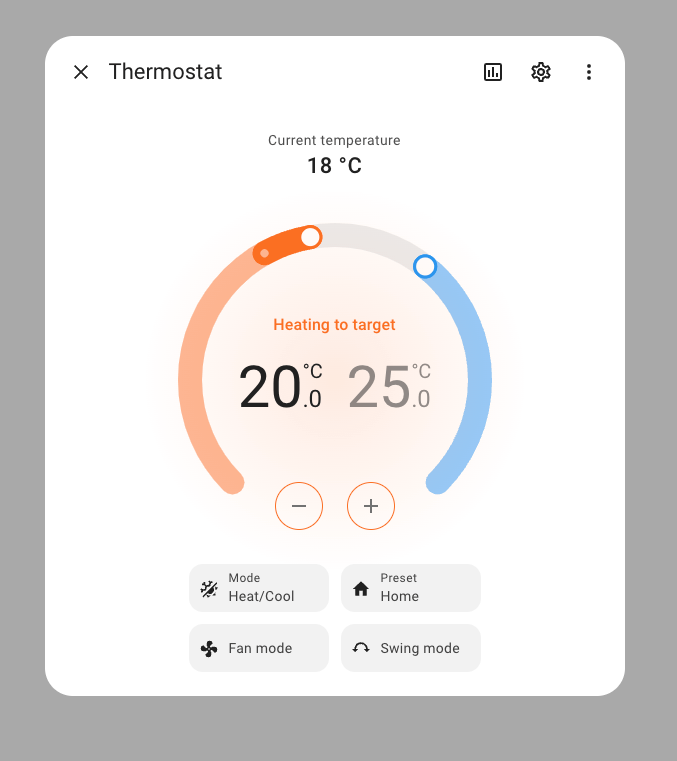 Screenshot of the more info dialog of a 温控 实体.
大量新的 Tile 功能
The tile 卡片 gets many new features this 发布.
The features of a tile 卡片 are a great way to bring more functionalities directly into your 仪表盘, without needing to open the more info dialog.
- HVAC mode
- 热水器 mode
- Temperature control
- 遮盖 position
- 遮盖 tilt
- Lawn mower commands
- Color temperature
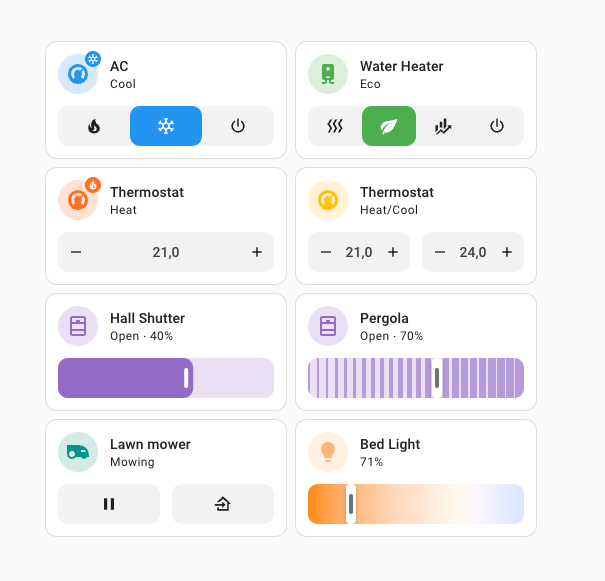 Screenshot of tile 卡片 with the new features.
割草机
A new 实体 type was added this 发布: the lawn mower!
You can now integrate your lawn mower into Home Assistant! Never worry about the lawn mower when it starts raining, you can now automate the lawn mower to stop and go back when it rains. For now, just MQTT is supported, but keep an eye out for other 集成!
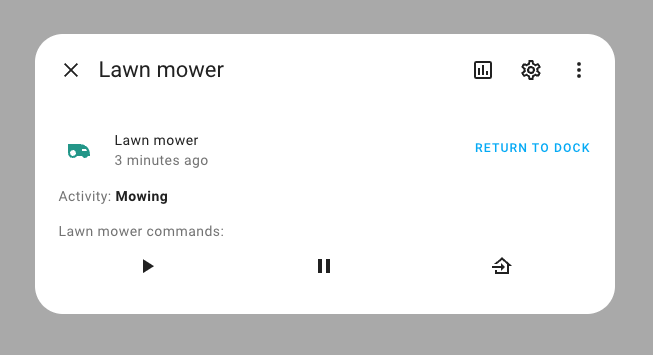 Screenshot of the more info dialog of a lawn mower 实体.
分组预览
When setting up a helper, sometimes it can be useful to see how the 实体 that you are creating looks while you are setting it up. That's why we added a preview when you create or change a group helper.
It will show exactly what the 实体 will look like with the current 设置.
And talking about groups, we also got a new group, the event group!
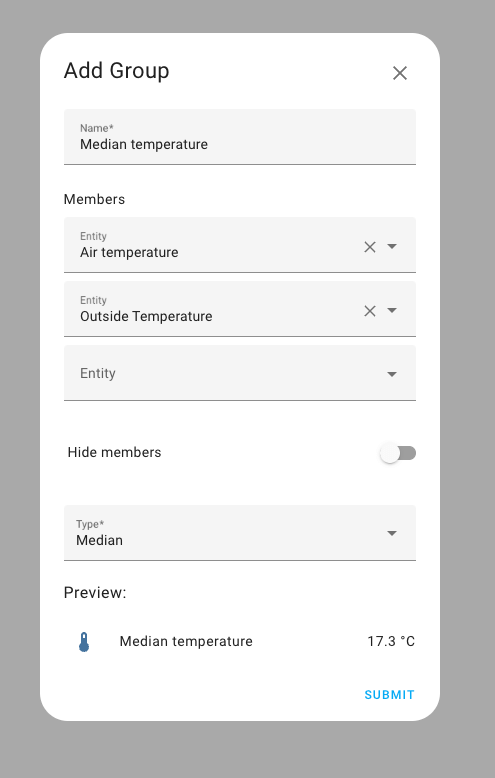 Screenshot of creating a 传感器 group.
从 UI 创建模板传感器
We also added preview support to another helper that finally made its way into the UI, the template 传感器.
From the UI you can use a template to set the 状态 of the 传感器. You can pick a unit of measurement, set the 设备 class, and select a 状态 class. Both 传感器 and 二元sensor are supported.
This will make most of the use cases for template 传感器 available through the UI and one less need for YAML!
Other more advanced fields, like 属性, are unavailable from the UI. You will still have to set those up in YAML.
With the preview, you see a live 更新 of the 传感器 value while writing the template.
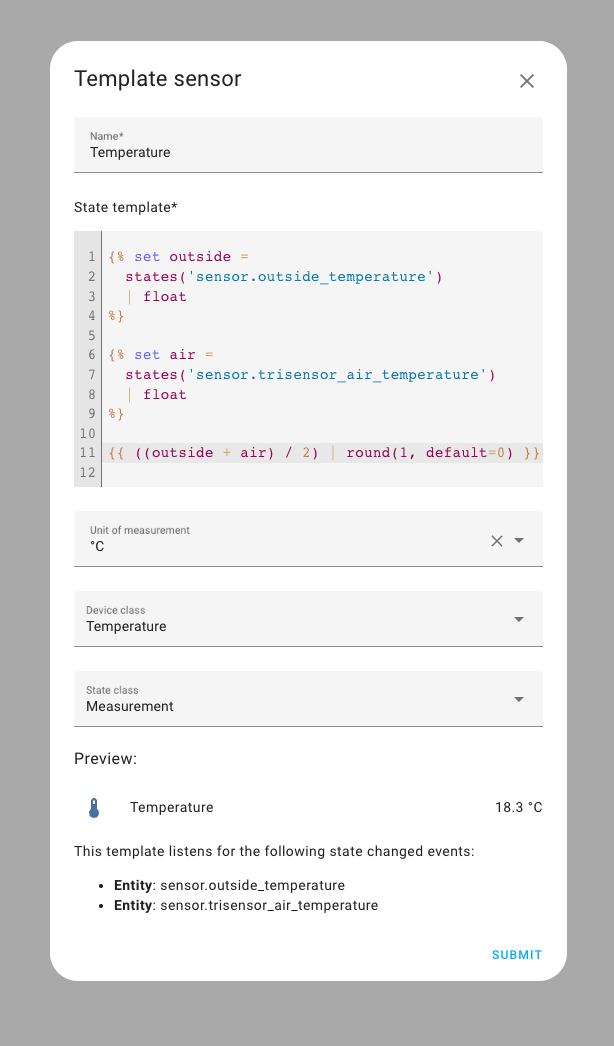 Screenshot of creating a template 传感器.
触发型模板实体的动作
触发器 template 实体 can now have an 动作 block that is executed after the 触发器 but before the 实体 are rendered.
This will allow users to fetch things like calendar events and weather forecasts using 服务 with responses and use them in their template 实体. You can even use OpenAI to set the value of your 实体 now!
All variables from the 动作 block will be available in the template.
An example that checks at midnight if you have something on your calendar tomorrow and sets a 二元sensor:
天气预报服务
We added a new 服务 for weather 实体, weather.get_forecast, that responds with the weather forecast.
Previously you would have to look at the forecast 属性 of a weather 实体 to get the forecast, now this can be done by calling a new 服务, weather.get_forecast, that will respond with the forecast.
You can also specify what type of forecast you want. Do you want to see the forecast by day or do you want to know it for every hour? This means you no longer need separate 实体 for every forecast type, but it can all be done in 1 实体.
All weather 集成 are updated to support this new 服务.
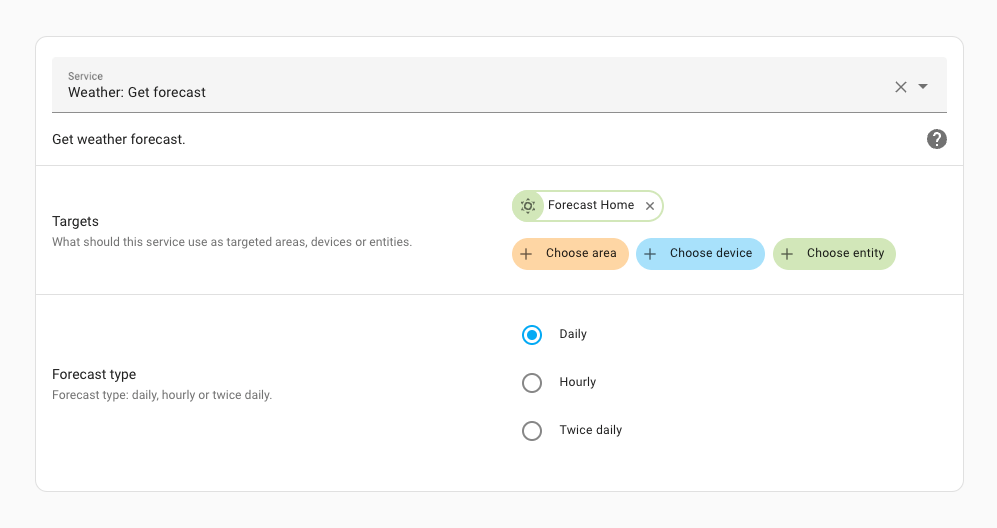 Screenshot of 服务 开发者工具 showing the weather forecast 服务.
If an 实体 supports multiple forecasts, you can choose which forecast you want to see in the more info dialog. In the weather 卡片 in your 仪表盘, you can also now pick what kind of weather forecast you want to show in that 卡片.
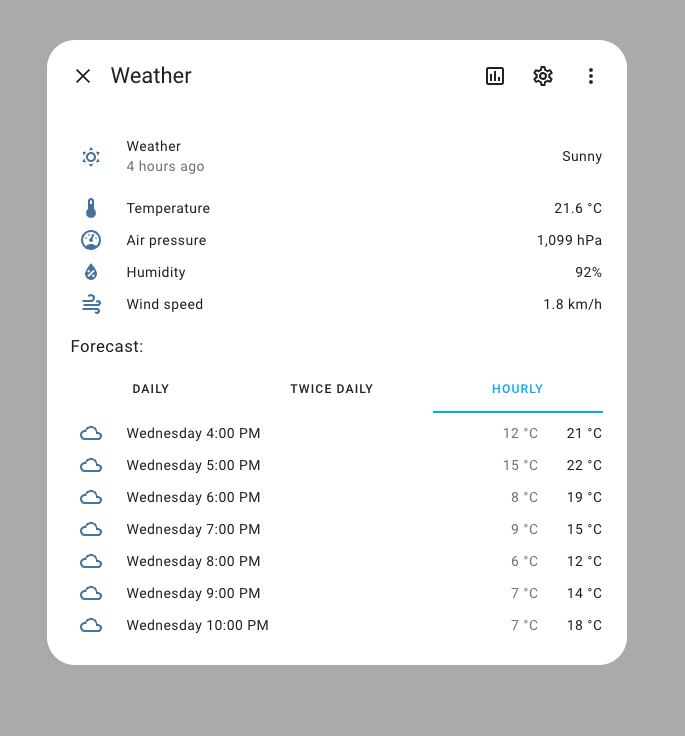 Screenshot of the weather more info dialog.
With this change, the forecast 属性 of the weather 实体 is deprecated, and will be removed in Home Assistant 核心 2024.3.
This will make it possible to have on-demand forecasts, that 更新 when you want them to, instead of them being updated all the time. It will also make the system faster; all 状态 data gets sent to your browser or mobile app every time it is opened so the 前端 has the latest 状态 of your 实体. The forecast 属性 makes the 状态 of weather 实体 very big, causing everything to be loaded slower.
While the way to access this data has changed and may impact your 自动化, you will not experience any loss in functionality. Even with this change, rest assured that the forecast 卡片 in your 仪表盘 will still work, they will now just use the 服务 to retrieve the forecast data asynchronously instead of reading it from the 状态 属性. The end result is that your 仪表盘 will load faster, and the 前端 will be leaner.
You can use the newly added action part of a template 实体 to fetch the forecast and use it in your template:
引导流程
While it is certain that Home Assistant is a great tool once you understand how it works, one part that was often overlooked is its associated learning curve. We are now actively working to flatten that curve so that you can get more from your home faster and simpler. This 发布 shows the first result of that effort, a new onboarding flow.
Something you probably have not seen for a while, but we gave our onboarding a fresh new look! It is shortened to get users in Home Assistant as fast as possible, so they can enjoy tinkering with their home faster!
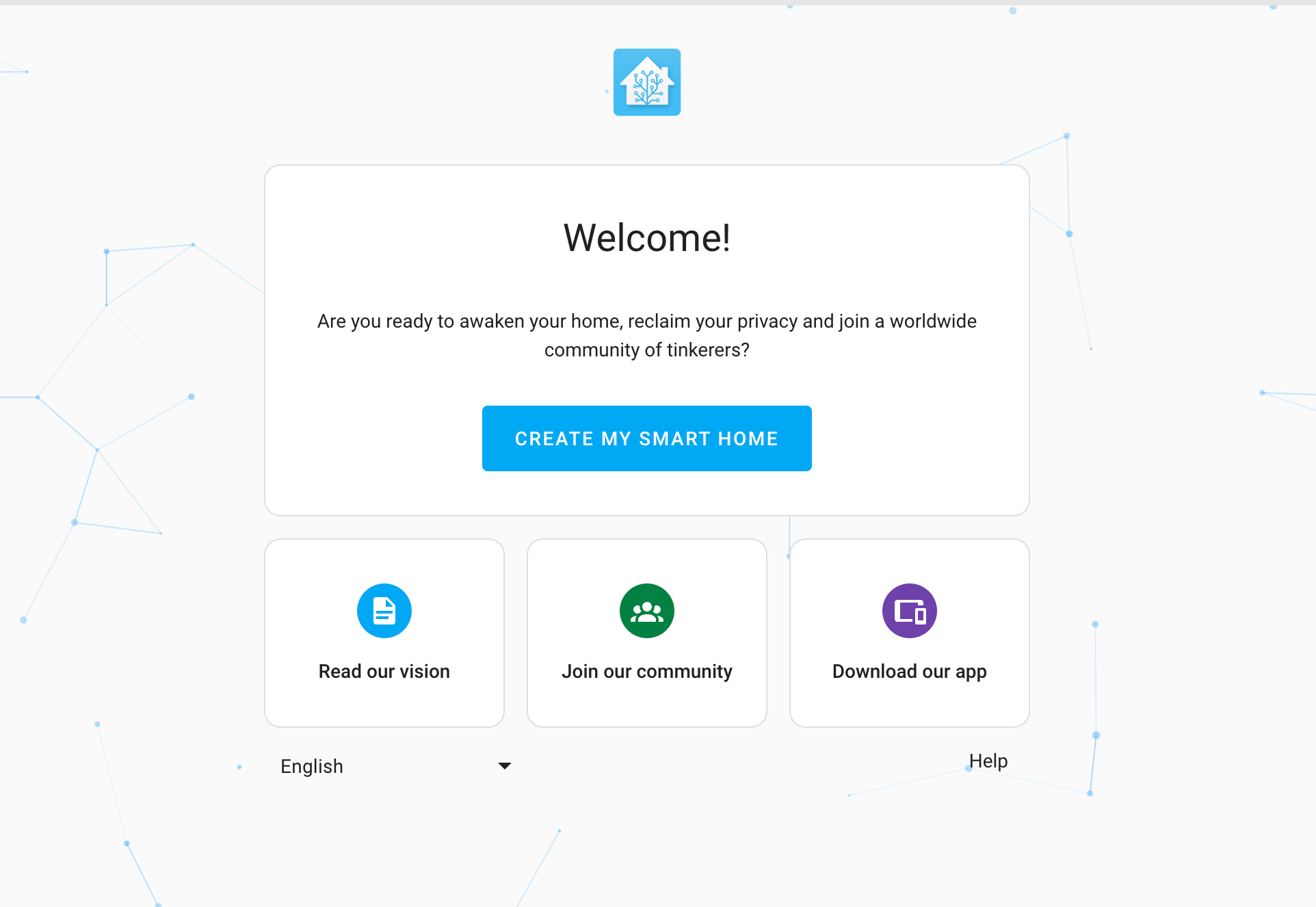 Screenshot of the onboarding screen.
其他值得注意的变更
There are many more improvements in this 发布; here are some of the other noteworthy changes this 发布:
- Enphase Envoy has gotten a lot of love this 发布, ensure it works perfectly with the latest firmware available. Thanks @bdraco and @cgarwood!
- The Shelly 集成 now supports the Shelly Gas Valve addon. Thanks @bieniu!
- @starkillerOG added zoom buttons and AI detection delay time controls to the Reolink 集成. Nice!
- You can now set separate damping factors for morning and evening in the Forecast Solar 集成. Thanks @joostlek!
- @Kane610 added a 重启 设备 button to the UniFi 集成. Thanks!
- The Tomorrow.io 集成 now reports humidity and dew point in its weather forecasts. Thanks @lymanepp!
- Support for soil moisture 传感器 was added to the Gardena 集成. Thanks @elupus!
- @timmo001 added a power 服务 to the System Bridge 集成. Thanks!
- If you change your password, you will be asked if you want to logout everywhere.
- The file and image upload elements have been revamped.
- You can now sort the options of an input select 实体. Thanks @karwosts!
- Local 蓝牙 has been optimized and is now faster, thanks @bdraco!
新集成
We welcome the following new 集成 in this 发布:
- Comelit SimpleHome, added by @chemelli74
Control your Comelit home 自动化 设备. - Lawn mower, added by @mikey0000
A new 实体 type, that allows 集成 to provide lawn mower 实体. - Schlage, added by @dknowles2
Use your Schlage WiFi smart 门锁 with Home Assistant. - Trafikverket 摄像头, added by @gjohansson-ST
Adds Swedish traffic 摄像头 feeds from Trafikverket. - Vodafone Station, added by @chemelli74
Provides 设备 tracker support for Vodafone Station router. - Yardian, added by @h3l1o5
Support for your Yardan Smart Sprinkler Controller.
This 发布 also has a new virtual 集成. Virtual 集成 are stubs that are handled by other (existing) 集成 to help with findability. These are new:
- Consolidated Edison (ConEd) provided by Opower
- Orange and Rockland Utilities (ORU) Opower provided by Opower
发布 2023.9.1 - September 8
- Fix the Hydrawise status 传感器 (@dknowles2 - #99271)
- Fix tradfri asyncio.wait (@cdce8p - #99730)
- Handle alexa invalid 温控 temp adjustment (@jbouwh - #99740)
- Revert "Bump pyoverkiz to 1.10.1 (#97916)" (@joostlek - #99742)
- Fix Freebox disk free space 传感器 (@Quentame - #99757)
- Fix Freebox Home battery 传感器 (@Quentame - #99756)
- Bump sense_energy to 0.12.1 (@bdraco - #99763)
- Add support for more busy codes for Epson (@pszafer - #99771)
- Bump
aiorecollectto 2023.09.0 (@bachya - #99780) - Bump pyenphase to 1.9.3 (@bdraco - #99787)
- Bump pylutron-caseta to v0.18.2 (@swamplynx - #99789)
- Fix missing dew point and humidity in tomorrowio forecasts (@lymanepp - #99793)
- Always set severity level flag on render_template 错误 events (@emontnemery - #99804)
- Improve 错误 handling in /api/状态 POST (@emontnemery - #99810)
- Use correct config entry id in Livisi (@joostlek - #99812)
- Fix missing name and identifiers for ELKM1 connected 设备 (@bdraco - #99828)
- Bump aiovodafone to 0.1.0 (@chemelli74 - #99851)
- Bump dbus-fast to 1.95.0 (@bdraco - #99749)
- Bump dbus-fast to 1.95.2 (@bdraco - #99852)
- Bump ZHA dependencies (@puddly - #99855)
- Fix NOAA tides 警告 (@jbouwh - #99856)
- 升级 蓝牙 deps to fix timeout behavior on py3.11 (@bdraco - #99879)
- 更新 前端 to 20230908.0 (@bramkragten - #99939)
- Bump pymodbus v3.5.0 (@janiversen - #99343)
- Bump pymodbus v.3.5.1 (@janiversen - #99940)
- Bump pyenphase to v1.11.0 (@joostlek - #99941)
- Fix key 错误 MQTT binary_sensor when no name is set (@jbouwh - #99943)
- Bump zeroconf to 0.93.1 (@bdraco - #99516)
- Bump zeroconf to 0.96.0 (@bdraco - #99549)
- Bump zeroconf to 0.97.0 (@bdraco - #99554)
- Bump zeroconf to 0.98.0 (@bdraco - #99748)
- Make WS command render_template not give up if initial render raises (@emontnemery - #99808)
- Bump hatasmota to 0.7.1 (@emontnemery - #99818)
- Bump millheater to 0.11.2 (@Danielhiversen - #99683)
发布 2023.9.2 - September 12
- Remove modbus pragma no 遮盖 and solve nan (@janiversen - #99221)
- Bugfix: Electric Kiwi reduce interval so oauth doesn't expire (@mikey0000 - #99489)
- Read modbus data before scan_interval (@janiversen - #99243)
- Make modbus retry fast on read 错误 (@janiversen - #99576)
- Fix Soma 遮盖 tilt (@ratsept - #99717)
- Cache 设备 触发器 info during ZHA startup (@puddly - #99764)
- Airthings BLE unique id migration (@LaStrada - #99832)
- 更新 RestrictedPython to 6.2 (@cdce8p - #99955)
- Bump bleak to 0.21.1 (@bdraco - #99960)
- Bump python-roborock to 33.2 (@Lash-L - #99962)
- Handle disconnects in zwave_js repair flow (@raman325 - #99964)
- Bump plugwise to v0.32.2 (@bouwew - #99973)
- Bump 蓝牙-auto-recovery to 1.2.3 (@bdraco - #99979)
- Avoid probing ipp printers for unique_id when it is available via mdns (@bdraco - #99982)
- Bump pymodbus to v3.5.2 (@janiversen - #99988)
- Bump pywaze to 0.4.0 (@eifinger - #99995)
- Bump systembridgeconnector to 3.8.2 (@timmo001 - #100051)
- Bump aiovodafone to 0.2.0 (@chemelli74 - #100062)
- Remove Comelit 报警 data retrieval (@chemelli74 - #100067)
- Fix addon slug validation (@mdegat01 - #100070)
- Remove duplicated word in enphase description text (@greiginsydney - #100098)
- Fix TriggerEntity.async_added_to_hass (@emontnemery - #100119)
- Bump hatasmota to 0.7.2 (@emontnemery - #100129)
- 更新 前端 to 20230911.0 (@bramkragten - #100139)
- Fix 设备 not always reporting IP - bump aiounifi to v62 (@Kane610 - #100149)
- Fix AVM Fritz!Tools 更新 实体 (@mib1185 - #100151)
- Bump ZHA dependencies (@puddly - #100156)
- Bump zwave-js-server-python to 0.51.2 (@raman325 - #100159)
- Adjust tasmota 传感器 设备 class and icon mapping (@emontnemery - #100168)
- Bump hatasmota to 0.7.3 (@emontnemery - #100169)
- Bump Ultraheat to 版本 0.5.7 (@vpathuis - #100172)
- Fix 实体 name 属性 on MQTT 实体 is not removed on 更新 (@jbouwh - #100187)
- Bump hass-nabucasa from 0.70.0 to 0.71.0 (@ludeeus - #100193)
发布 2023.9.3 - September 24
- Always 更新 unit of measurement of the utility_meter on 状态 change (@dgomes - #99102)
- Netgear catch no info 错误 (@starkillerOG - #100212)
- Bump python-roborock to 0.34.0 (@Lash-L - #100236)
- Bump pynetgear to 0.10.10 (@starkillerOG - #100242)
- Fix incorrect off peak translation key for Roborock (@Lash-L - #100246)
- Bump pyenphase to 1.11.2 (@cgarwood - #100249)
- Bump pyenphase to 1.11.3 (@cgarwood - #100255)
- Bump sensirion-ble to 0.1.1 (@akx - #100271)
- Future proof assist_pipeline.Pipeline (@emontnemery - #100277)
- Bump pyenphase to 1.11.4 (@cgarwood - #100288)
- Bump yalexs-ble to 2.3.0 (@bdraco - #100007)
- Bump yalexs to 1.9.0 (@bdraco - #100305)
- 更新 Mill library to 0.11.5, handle rate limiting (@Danielhiversen - #100315)
- Remove _next_refresh variable in 更新 coordinator (@elupus - #100323)
- Fix timeout issue in devolo_home_network (@Shutgun - #100350)
- Fix Airthings ble migration (@LaStrada - #100362)
- Try Reolink ONVIF long polling if ONVIF push not supported (@starkillerOG - #100375)
- Bump reolink-aio to 0.7.10 (@starkillerOG - #100376)
- Add missing timer 服务 translation (@steffenrapp - #100388)
- Fix current 条件 in IPMA (@dgomes - #100412)
- Bump yolink-api to 0.3.1 (@matrixd2 - #100426)
- Fix timer 重载 description (@edenhaus - #100433)
- bump pywaze to 0.5.0 (@eifinger - #100456)
- Fix 错误 is measurement is not sent by AirNow (@asymworks - #100477)
- Only get meteo france alert coordinator if it exists (@joostlek - #100493)
- Fix broken reconnect capability of fritzbox_callmonitor (@frimtec - #100526)
- Fix xiaomi_miio button platform regression (@rytilahti - #100527)
- Fix Roborock send command 服务 calling not being enum (@Lash-L - #100574)
- Adjust hassfest.manifest based on config.动作 (@raman325 - #100577)
- Fix ecobee aux_heat_off always returns to HEAT (@robinlee09201 - #100630)
- Bump python-roborock to 0.34.1 (@Lash-L - #100652)
- Bump zwave-js-server-python to 0.51.3 (@raman325 - #100665)
- Fix MQTT 灯光 rgbww 更新 without 状态 topic (@jbouwh - #100707)
- Bump aiocomelit to 0.0.8 (@chemelli74 - #100714)
- Fix handling of unit system change in 传感器 (@emontnemery - #100715)
- Bump ZHA dependencies (@puddly - #100732)
- Bump intents to 2023.9.22 (@synesthesiam - #100737)
- Fix weather template forecast 属性 (@gjohansson-ST - #100748)
- Fix rainbird unique id (@allenporter - #99704)
- Bump ring-doorbell to 0.7.3 (@sdb9696 - #100688)
- 更新 home-assistant/wheels to 2023.09.1 (@frenck - #100758)
- Bump pyschlage to 2023.9.0 (@dknowles2 - #99624)
- Bump pyschlage to 2023.9.1 (@dknowles2 - #100760)
- Add strong to 风扇 mode for Sensibo (@gjohansson-ST - #100773)
- 更新 home-assistant/builder to 2023.09.0 (@frenck - #100797)
- Fix Comelit 设备 info (@chemelli74 - #100587)
需要帮助?加入社区!
Home Assistant has a great community of users who are all more than willing to help each other out. So, join us!
Our very active Discord chat server is an excellent place to be at, and don't forget to join our amazing forums.
Found a bug or issue? Please report it in our issue tracker, to get it fixed! Or, check our help page for guidance for more places you can go.
Are you more into email? Sign-up for our Building the Open Home Newsletter to get the latest news about features, things happening in our community and other news about building an Open Home; straight into your inbox.
不向后兼容的变更
The "Refresh from cloud" button has been removed. Use the
homeassistant.update_entity 服务 with any BMW 实体 for a
full 重载 instead.
The doorbird_reset_favorites event is no longer fired when the clear webhook
is called. Note: this event was never documented.
Envoy versions < 3.9 (pre-API) are no longer supported as they require web scraping which is disallowed by ADR-0004.
To prevent cross-linked 设备, replacing an ESPHome 设备 with a different board is no longer allowed. Instead, delete the 集成 entry and re-add the new 设备 when the mac address of the board changes.
Only 开关 supported by the 摄像头 will be 创建. Non switchable 开关 have been removed.
(@RenierM26 - #95672) (文档)
You might get false positives for leak detected and high flow 传感器 if you have old unread 通知 in the Flume app.
Before, the leak detected and high flow 传感器 would only 触发器 until you read the 通知 in the Flume app which was too late for Home Assistant to take any automated 动作.
Now, they 触发器 regardless if you have read or not the 通知. They will remain active until you delete the 通知 in the Flume app, similar to the old behavior documented.
The previously deprecated 服务 hive.boost_heating has been removed.
(@gjohansson-ST - #97444) (文档)
Home Assistant can't be put in an iframe anymore by default. If you still want
to embed the Home Assistant interface in a frame, you can do so by disabling
use_x_frame_options by setting it to false in the http 配置.
The Météo-France weather 实体 have been updated:
- The
forecast状态 属性 is deprecated and will be removed in Home Assistant 核心 2024.3, you should instead use theweather.get_forecast服务. - The config entry option to select hourly or daily forecast can no longer be adjusted, but any existing 配置 of the forecast period will be respected until Home Assistant 核心 2024.3.
- Météo-France now provides a single weather 实体 which supports both hourly and daily forecast.
(@emontnemery - #98022) (文档)
Mill has moved to a new IoT solution and released a new API. The unique ID from the old API is no longer available, so all 设备 will be shown as new 设备. Support for the heater 风扇 will be added later.
(@Danielhiversen - #97497) (文档)
MQTT 设备 trackers no longer always 更新 when there is no 状态 change. This means that 自动化 that 触发器 on a 状态 change no longer are triggered if there is no change.
The CPU load 传感器 has been replaced, it is not a list of 3 values anymore, but there are now three single 传感器 for CPU load within last 1, 5, and 15 minutes.
The maximum_boiler_temperature 传感器 实体 has been replaced by a number
实体, allowing control as well.
(@CoMPaTech - #97203) (文档)
The additional schema 状态 属性 of the 温控 实体 have been removed. They have beeen previously replaced by a select 实体.
Start.ca limit, usage, and used_remaining 传感器 will no longer be 创建
when there's no bandwidth cap.
(@emontnemery - #98525) (文档)
All 属性 have been converted into their own 传感器. The original 传感器 is now renamed with suffix "Departure time".
Any 自动化 or 脚本 depending on these 属性 needs to be adjusted to use these new 传感器.
(@gjohansson-ST - #71432) (文档)
The 实体 naming logic has been updated to be less brittle. As a result,
some zwave_js 实体 that you haven't given a custom name to may be renamed.
Since they are registered in the 实体 registry, the 实体 IDs will not change and your 自动化 should therefore not be impacted by the change.
With this 发布, you will need to 更新 your zwave-js-server instance. You must use zwave-js-server 1.31.0 or greater (schema 31).
If you use the Z-Wave JS add-on, you need at least 版本 0.1.88. If you use the Z-Wave JS UI add-on, you need at least 版本 1.15.9. If you use the Z-Wave JS UI Docker 容器, you need at least 版本 8.23.2. If you run your own Docker 容器 or some other 安装 method, you will need to 更新 your zwave-js-server instance to at least 1.31.0.
If you are a custom 集成 developer and want to learn about breaking changes and new features available for your 集成: Be sure to follow our developer 博客. The following are the most notable for this 发布:
- 实体 状态 formatting
- HomeAssistant.init requires passing a string to it
- Numerical 传感器 are no longer allowed to set their 状态 to NaN or inf
- Weather 实体 forecast types
全部变更
Of course, there is a lot more in this 发布. You can find a list of all changes made here: Full changelog for Home Assistant 核心 2023.9