

2023.3: Dialogs!
Home Assistant 核心 2023.3! 🎉
February was a short month, resulting in a short 发布 cycle, but... That didn't stop anybody from stuffing this 发布 with many great improvements!
As the 发布 title most fittingly puts it, most features of this 发布 show up in dialogs. New dialogs, restyled dialogs, new features that appear in dialogs, and all sorts of new dialogues you can have with Assist. Something with "dialogs" all over these 发布 notes!
Besides dialogs, this 发布 brings in three new 集成, updates to Thread and Matter, and quite an impressive list of other noteworthy changes.
My personal favorite in this 发布 is, undoubtedly, the all-new 重启 dialog. It brings in proper choice, less navigation, and it looks slick! I am genuinely really loving and enjoying the result. 🤩
Enjoy the 发布!
../Frenck
- Restarting Home Assistant
- Asking Assist for the current 状态 of things
- Cleaner entities information dialogs
- New dialogs for 灯光, 开关 and siren entities
- sensor display precision
- New create automation dialog
- Thread & Matter
- Python 3.11 support
- Other noteworthy changes
- New integrations
- 发布 2023.3.1 - March 2
- 发布 2023.3.2 - March 8
- 发布 2023.3.3 - March 9
- 发布 2023.3.4 - March 13
- 发布 2023.3.5 - March 16
- 发布 2023.3.6 - March 22
- Need help? Join the community!
- Backward-incompatible changes
- All changes
Don't forget to join our 发布 party live stream on YouTube 1 March 2023, at 12:00 PST / 21:00 CET!
重启 Home Assistant
Since we started redesigning our menu structure (a little over a year ago), "Restarting" Home Assistant has been a source of discussion in our community. Home Assistant can be restarted, reloaded, rebooted, and powered off; it quickly became unclear what to use and when.
We've come up with a solution inspired by the good old Windows XP computer turn-off screen. @matthiasdebaat made a UX that has been implemented by @piitaya that will hopefully make this all better, more clear.
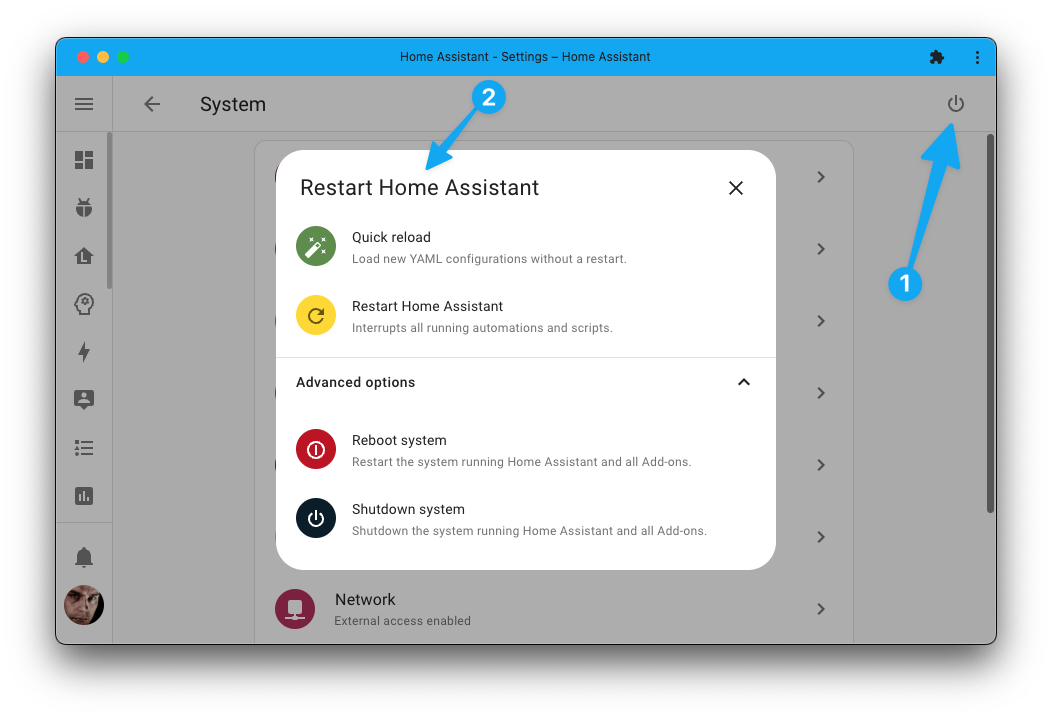
Nice, right? 🤩 What is entirely new is the first item shown: "Quick 重载". Quick 重载 calls all active 集成 in your system that support reloading YAML 配置 on the fly 🚀.
This means all 集成 individually listed as reloadable under the YAML tab in the 开发者工具 are reloaded simultaneously! Also, @frenck made quick 重载 available as a , so you can automate with it.
Lastly, another place for finding it more easily; the option to 重启 has also been added to the three-dotted overflow menu in the top right of the 设置 screen.
询问 Assist 当前状态
This 发布 updates Assist with the capability to ask for the 状态 of things around your home. For example:
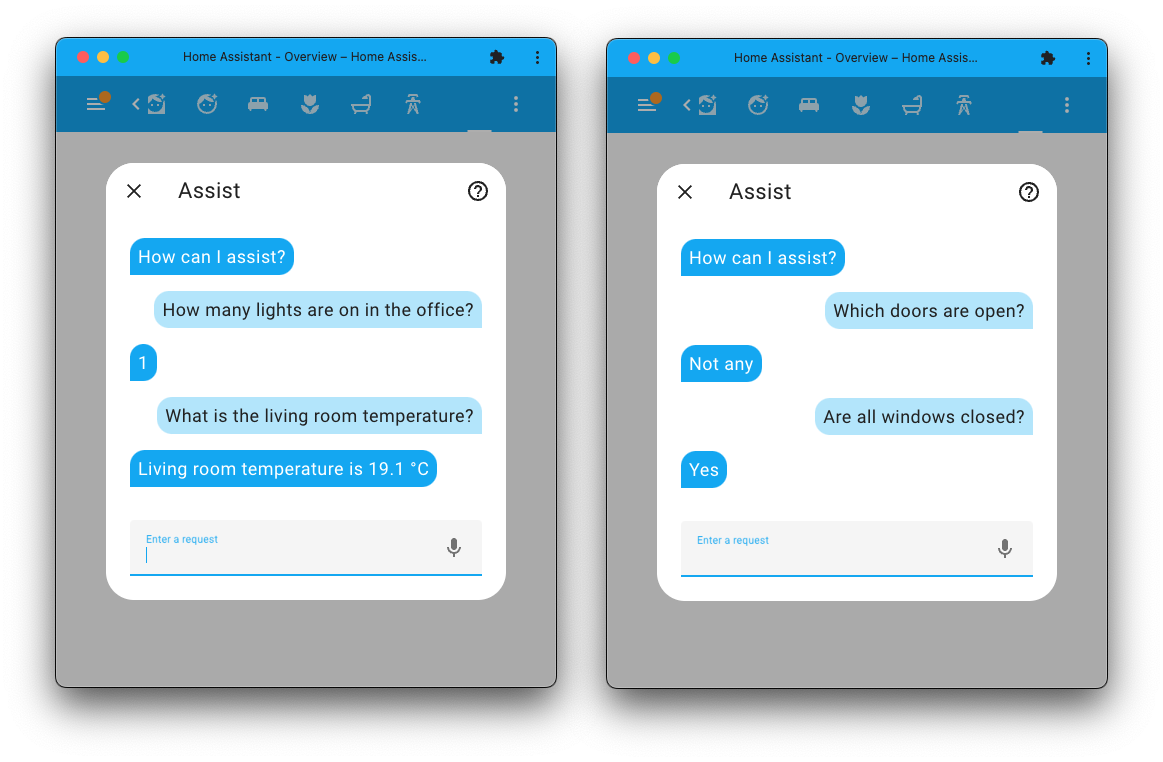
Intents for three types of questions have been added:
- Ask for the 状态 of a single 实体:
- "What is the outside temperature?"
- "Is the front door locked?"
- "What is the power consumption in the office?"
- Any or all questions:
- "Are any 灯光 on in the bedroom?"
- "Are all windows closed in the kitchen?"
- How many or which questions:
- "How many 灯光 are on in the office?"
- "Which doors are open?"
Thanks, @synesthesiam for implementing this, and thanks to language leaders and contributors for helping out providing translations for all these intents! ❤️
Want to help with adding support for these intents in your language? Please do! Read more about contributing sentences in our 文档.
更简洁的实体信息对话框
The 实体 information dialog (also known as the more-info dialog) got some nice improvements in this 发布.
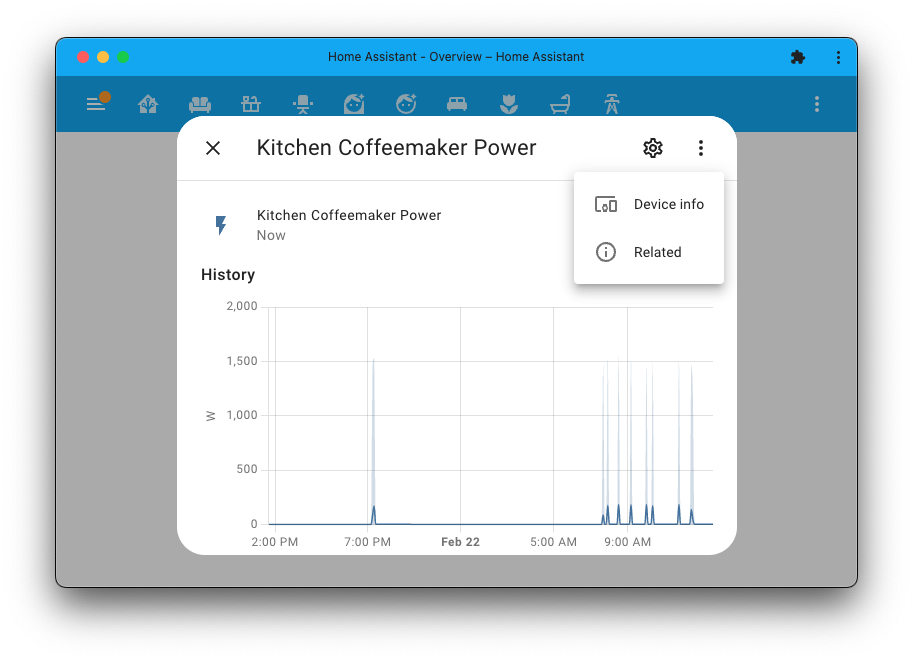
The "Info", "History", "设置", and "Related" tabs have been removed, which gives the dialog a much cleaner look. Icons for 设置 and history have been added in the top right to replace these tabs. The new three-dotted overflow menu can bring up related 实体 information and provides a direct link to the 设备 仪表盘 of the 设备 that provided this 实体.
Nice job @matthiasdebaat and @piitaya!
灯光、开关与警笛实体的新对话框
There is more to tell about this 发布's more-info dialogs. @matthiasdebaat and @piitaya have been working on the designs shared during the 状态 of the Open Home 2022. This 发布 brings in the first overhauls to the 实体 dialogs of 灯光, 开关, and siren 实体.
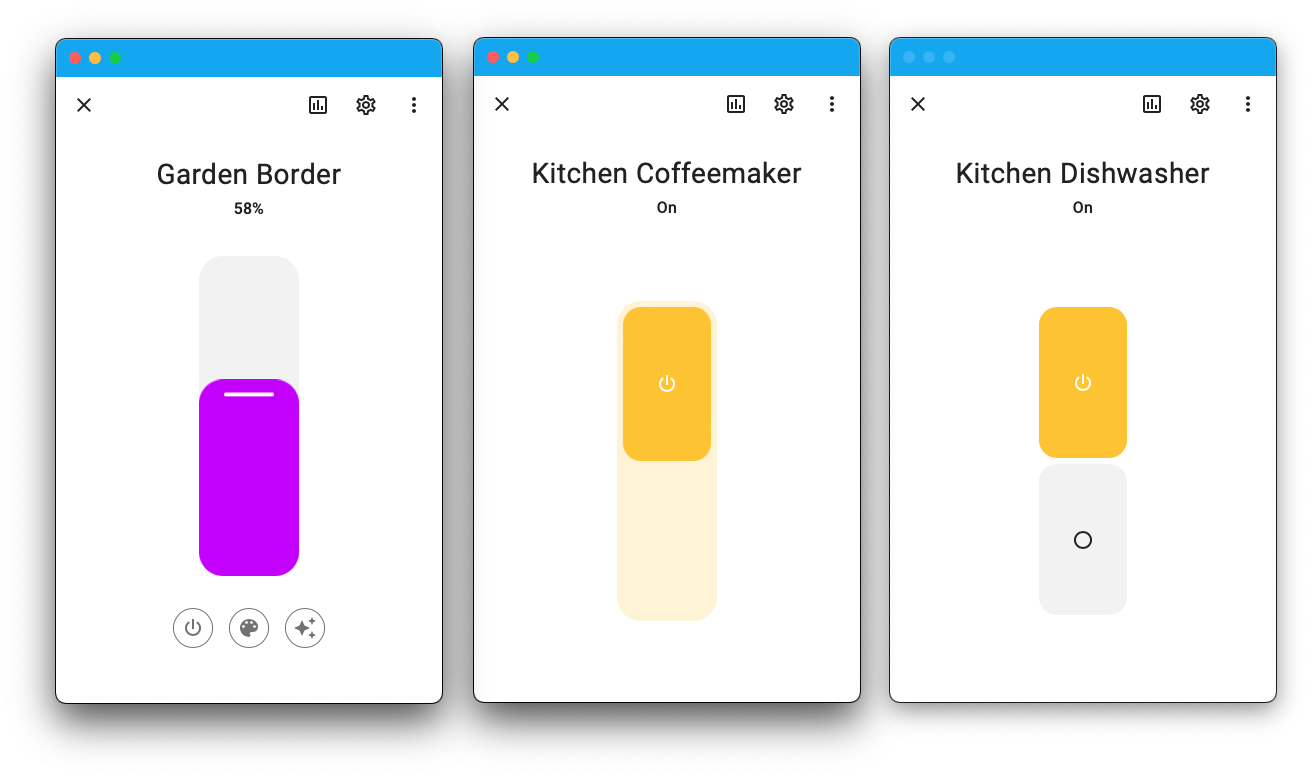
The new dialogs are nice and clean. The new sliders and buttons work absolutely magnificent on both desk and mobile. For the brightness slider, you can drag it all down without turning the 灯光 off, making it possible to dim your 灯光 to even the lowest point.
In case of a 灯光, additional controls for turning on/off, color (temperature), and effects appear right below the slider. In the top right, you'll find the new controls that come with the cleaner look we discussed in the previous paragraph.
传感器显示精度
Got a 传感器 that has too many decimals in its numeric value? Would you like to display it rounded to a single or maybe even no decimals?
Just create a template 传感器 change it directly from the UI!
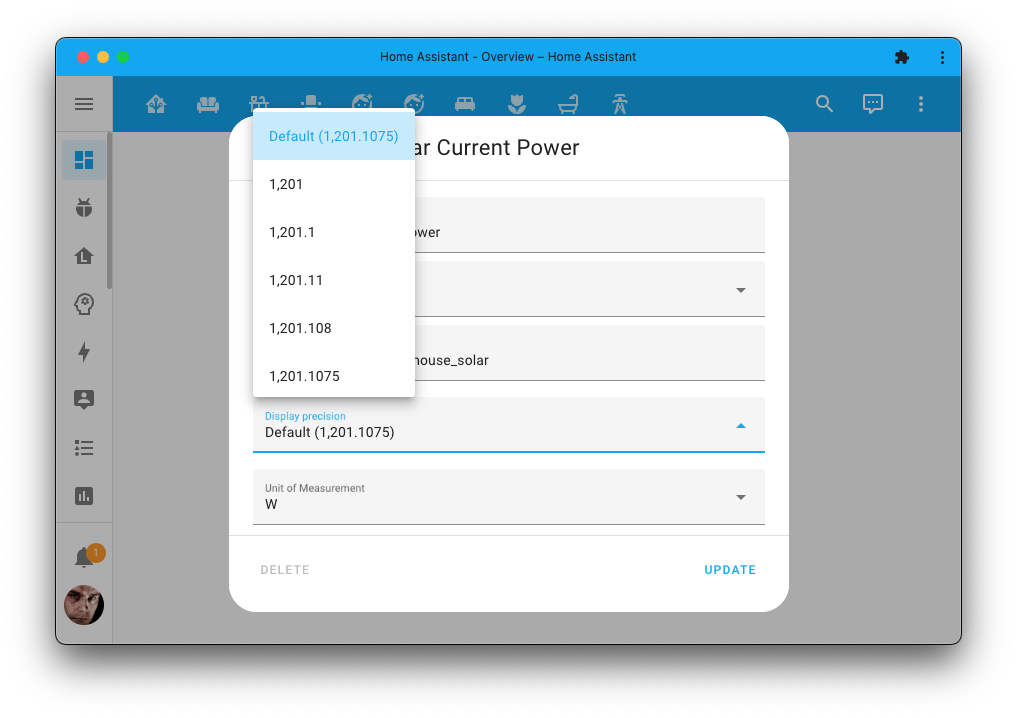
Thanks @emontnemery for building out this feature!
This has also been extended into 集成, which now can provide a more precise value while suggesting to, show it with less precision by default. This allows you to change it if you don't like the defaults.
You can also take advantage of the configured precision when writing templates,
as the states() function has been extended to help with that.
You can find more information on
formatting sensor 状态 in the templating 文档.
全新的创建自动化对话框
Let's continue the dialogs theme this 发布! As @piitaya also gave the dialog you see when you create a new 自动化, a facelift!
You can now quickly find and pick a Blueprint to use for your 自动化 or create one from scratch. The overall look and feel is much more modern, and fits our current design better.
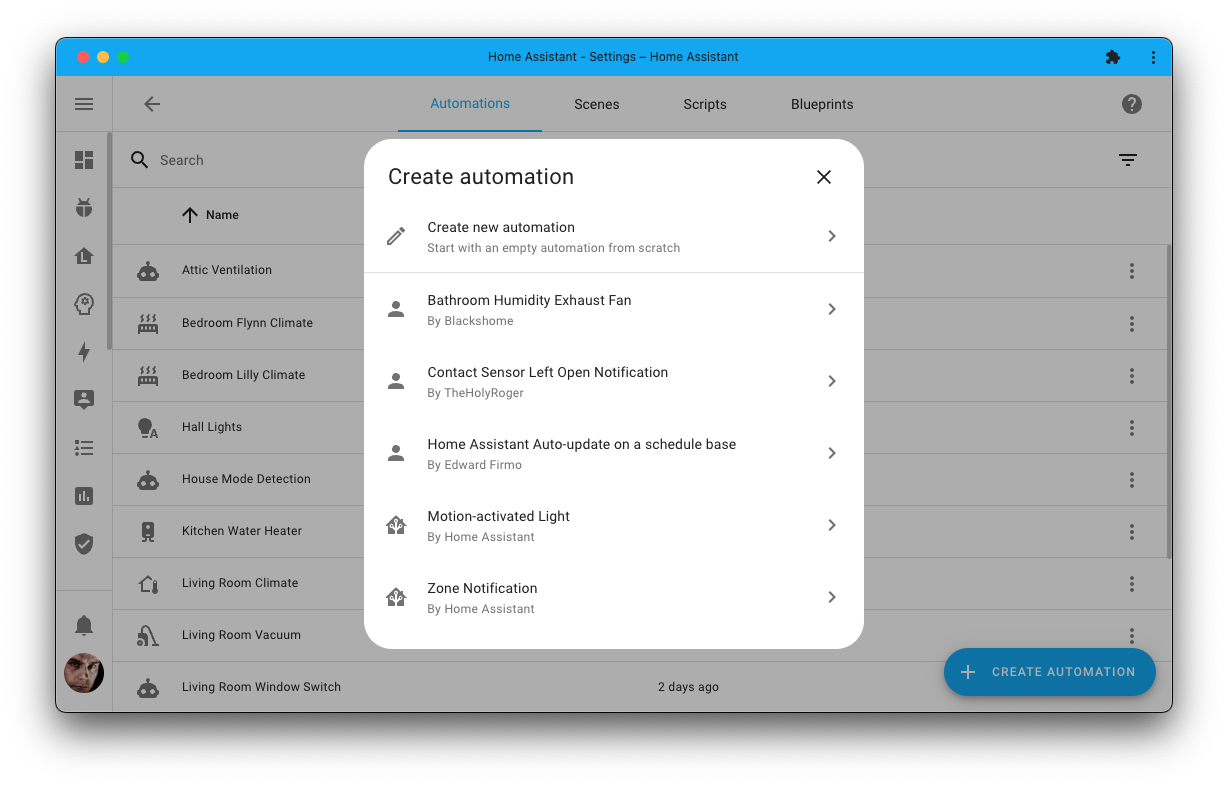
You may notice it now shows author information in this dialog. If you create Blueprints, you can now add author information to your Blueprint, which will be shown in this dialog.
Thread 与 Matter
Behind the 场景, a lot is happening; adding, extending and improving Thread & Matter support for Home Assistant.
A couple of weeks ago, we published an extensive 博客 article on where we're at. Some of the features mentioned in that 博客 post will become available today.
The most visual change is that the Thread integrations will now show up on your 设备 & 服务 仪表盘. The "配置" button on the Thread 卡片 will reveal the all-new Thread 面板.
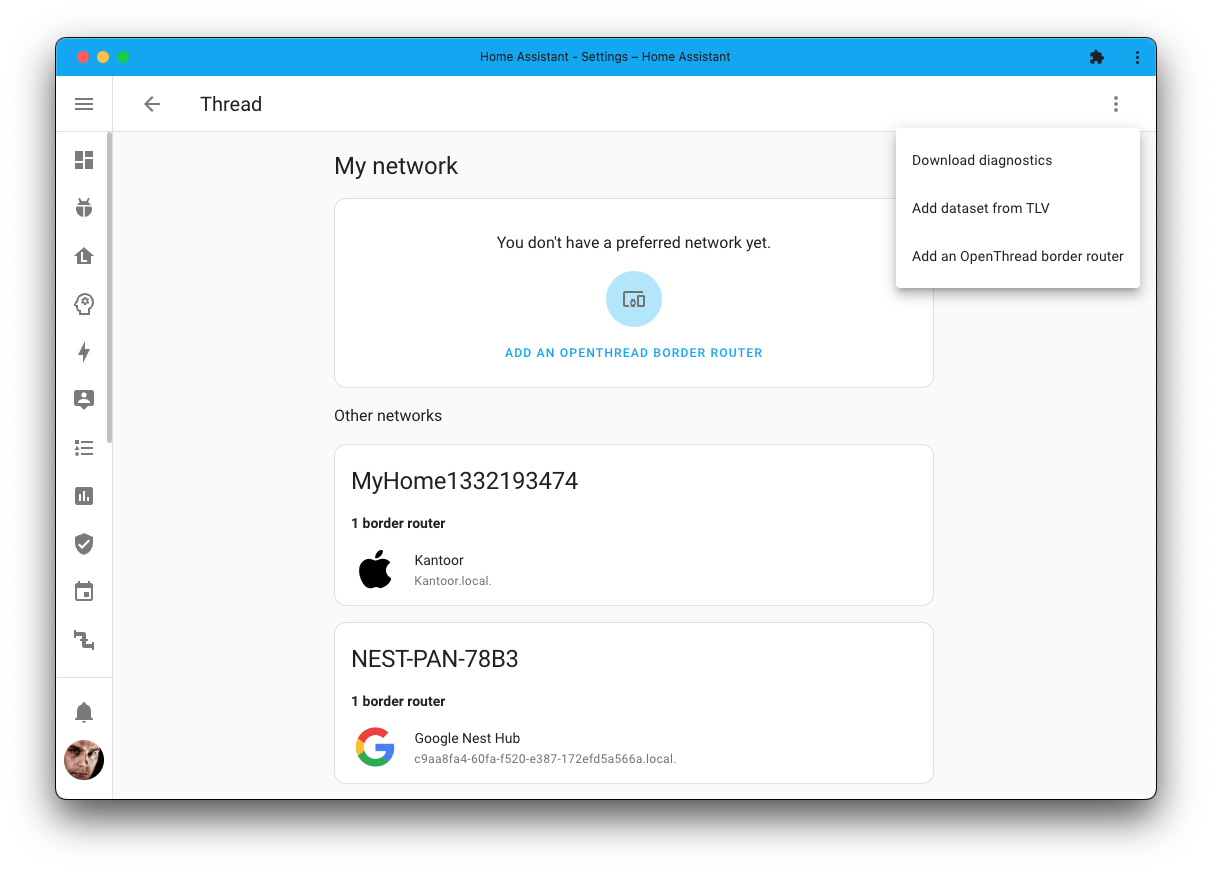
The Thread 面板 lets you view your Thread network(s) and provides controls to add an OpenThread border router. More importantly, an option to download diagnostics has been added in the three-dotted menu in the top right. This will help with finding, triaging, and fixing issues as the development on Thread continues.
As for Matter, it now supports connecting to Matter bridges! So, you can now connect, for example, your Hue hub over Matter!
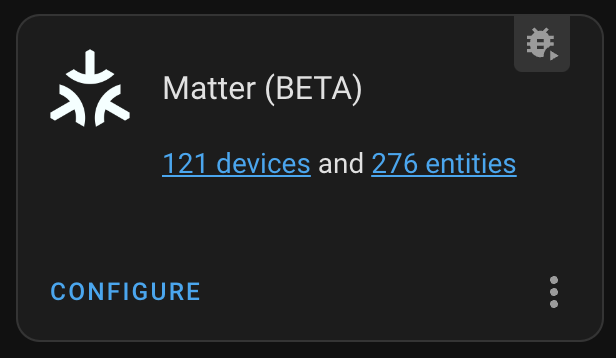 Two Philips Hue bridges connected using Matter, and it is fast!
Although, if you want to connect your Hue hub, we of course recommend using the dedicated Hue integrations, which will provide a much more stable and feature rich solution. Nevertheless, having bridge support is a huge milestone!
Adding a Matter 设备 is now also more logical. Just add a new 设备 from the 设备 & 服务 page, just like how you would add any other 设备 or 集成 to Home Assistant. Oh! Let's not forget about @ArturoGuerra, who added support for color 灯光 to Matter! Thanks!
Python 3.11 支持
Support for Python 3.11 is here! 🐍
This change is only interesting if you manually run Home Assistant directly in Python (the Home Assistant 核心 安装 method). If that is the case, you can now start using Home Assistant with Python 3.11, which should dramatically improve performance over previous Python versions.
We are also working on upgrading to Python 3.11 for our Home Assistant OS, 受监管模式, and 容器 安装 methods so we can provide the same performance improvements. We'll keep you posted.
其他值得注意的变化
There is much more juice in this 发布; here are some of the other noteworthy changes this 发布:
- You can now change the unit of measurement for a 传感器 that provides power readings. So, if you like your kW 传感器 to be displayed as W, that is now possible. Thanks, @emontnemery!
- All contributed translations are now automatically updated with each 发布! This includes patch releases. Thanks, @frenck.
- Faster it is! @bdraco keeps improving the performance, and this 发布 is no exception! The statistics should be almost instant now, which is notable on the energy 仪表盘. Lots of MQTT-related performance improvements too!
- The statistic graph 卡片 can now hide the legend, nice and clean @piitaya!
- You can now use templates in the
forparameter of 状态 条件. Thanks, @emontnemery! - Our (opt-in only) will now include the database engine and 版本 you use with your recorder. This helps us making database-related decisions and improvements. Thanks, @ludeeus!
- @marcelveldt added support for Smart 场景 (Natural 灯光) to the Philips Hue 集成. Nice!
- If your ONVIF 摄像头 supports it, it will now provide 开关 实体 for auto-focus, wiper, and IR 灯光. Thanks, @partofthething!
- The input select helper first, last, previous, and next 服务 are now also available on select 实体, thanks @frenck.
- It looks like @jesserockz took a small break from ESPHome to implement support for the SwitchBot Blind Tilt to the SwitchBot 集成. Thank you!
- The OpenAI Conversation 集成 now has options to customize it to your liking, thanks @bendews!
- @marcolivierarsenault added support for ecobee ventilator, awesome!
- The Reolink 集成 now provides 实体 to 更新 the firmware of your 摄像头, control zoom, and control auto-focus. Thanks @starkillerOG!
- KNX Data Secure support is added, and importing your Keyfile to use it is now super easy. Just upload it from your browser when configuring it in Home Assistant. Awesome @farmio!
- @thecode added support for Shelly Pro 3EM energy 传感器, nice!
- ScreenLogic now supports local push updates for almost all 实体. Thanks @dieselrabbit!
New 集成
We welcome the following new 集成 in this 发布:
- Dormakaba dKey, added by @emontnemery
Connect and control your Dormakaba dKey 蓝牙 Low Energy 门锁. - easyEnergy, added by @klaasnicolaas
Retrieves dynamic (hourly) energy & gas prices from the Dutch utility company easyEnergy. - TP-Link Omada SDN Controller, added by @MarkGodwin
Control your TP-Link Omada SDN 设备, such as network 开关, access points, and internet gateways.
发布 2023.3.1 - March 2
- 更新 pyTibber to 0.27.0 (@toini - #86940) (tibber docs) (breaking-change)
- Bump requests to 2.28.2 (@mitch-dc - #88956)
- Bump py-dormakaba-dkey to 1.0.4 (@emontnemery - #88992) (dormakaba_dkey docs)
- Fix KNX Keyfile upload (@farmio - #89029) (knx docs)
- 更新 orjson to 3.8.7 (@frenck - #89037)
- 更新 前端 to 20230302.0 (@piitaya - #89042) (前端 docs)
- Fix check on non numeric custom 传感器 设备 classes (@jbouwh - #89052) (传感器 docs)
- Bump nuheat to 1.0.1 (@mitch-dc - #88958) (nuheat docs)
发布 2023.3.2 - March 8
- Check type key of zone exists in geniushub (@warksit - #86798) (geniushub docs)
- Cache transient templates compiles provided via api (@bdraco - #89065) (websocket_api docs) (api docs) (mobile_app docs)
- Handle InnoDB deadlocks during migration (@bdraco - #89073) (recorder docs)
- Bump pyfibaro 版本 to 0.6.9 (@rappenze - #89120) (fibaro docs) (dependency)
- Fix host IP and scheme entry issues in TP-Link Omada (@MarkGodwin - #89130) (tplink_omada docs)
- Fix Tuya Python 3.11 compatibility issue (@frenck - #89189) (tuya docs)
- Bump aioesphomeapi to 13.4.2 (@bdraco - #89210) (esphome docs) (dependency)
- 更新 前端 to 20230306.0 (@bramkragten - #89227) (前端 docs)
- Fix conditional check (@cdce8p - #89231) (konnected docs)
- Bump sqlalchemy to 2.0.5post1 (@bdraco - #89253) (recorder docs) (sql docs) (dependency)
- Make sql subqueries threadsafe (@bdraco - #89254) (recorder docs)
- Bump python-snapcast to 2.3.2 (@luar123 - #89259) (snapcast docs) (dependency)
- Ignore DSL 实体 if SFR box is not adsl (@epenet - #89291) (sfr_box docs)
- Clean ZHA radio path with trailing whitespace (@puddly - #89299) (zha docs)
- Fix Insteon open issues with adding 设备 by address and missing events (@teharris1 - #89305) (insteon docs)
- Fix Thread diagnostics loading blocking the event loop (@bdraco - #89307) (Thread docs)
- Remove invalid 设备 class in air-Q 集成 (@Sibgatulin - #89329) (airq docs)
- Recreate iaqualink httpx client upon 服务 exception (@flz - #89341) (iaqualink docs)
- Fix 蓝牙 history and 设备 expire running in the executor (@bdraco - #89342) (蓝牙 docs)
- Fix setting Reolink focus (@starkillerOG - #89374) (reolink docs)
- Improve Supervisor API handling (@frenck - #89379) (hassio docs)
- Fix invalid 状态 class in litterrobot (@epenet - #89380) (litterrobot docs)
发布 2023.3.3 - March 9
- Fix MQTT rgb 灯光 brightness scaling (@jbouwh - #89264) (MQTT docs)
- Bump roombapy to 1.6.6 (@Dilski - #89366) (roomba docs)
- Bump pymazda to 0.3.8 (@bdr99 - #89387) (mazda docs)
- Allow enum as MQTT 传感器 device_class (@jbouwh - #89391) (MQTT docs)
- Add paths for add-on changelog and 文档 (@ludeeus - #89411) (hassio docs)
- 更新 前端 to 20230309.0 (@piitaya - #89446) (前端 docs)
- Fix Dormakaba dKey deadbolt 二元sensor (@emontnemery - #89447) (dormakaba_dkey docs)
发布 2023.3.4 - March 13
- Recode Home Assistant instance name to ascii for Jellyfin (@j-stienstra - #87368) (jellyfin docs)
- Fix gtfs with 2023.3 (sqlachemy 更新) (@vingerha - #89175) (gtfs docs)
- Reconnect on any ScreenLogic exception (@dieselrabbit - #89269) (screenlogic docs)
- Fix data migration never finishing when database has invalid datetimes (@bdraco - #89474) (recorder docs)
- Fix bug in fibaro 遮盖 (@rappenze - #89502) (fibaro docs)
- Bump pydeconz to v110 (@Kane610 - #89527) (deconz docs)
- Fix get_significant_states_with_session query looking at legacy columns (@bdraco - #89558) (recorder docs)
- Bump aiopvpc to 4.1.0 (@azogue - #89593) (pvpc_hourly_pricing docs)
- Increase maximum aiohttp connections to 4096 (@bdraco - #89611)
- Rename modules named repairs.py which are not repairs platforms (@emontnemery - #89618) (hassio docs) (bayesian docs)
- Improved "ON" 状态 check for
Use room sensor for cooling(@tomrennen - #89634) (nibe_heatpump docs) - Bump SQLAlchemy to 2.0.6 (@balloob - #89650) (recorder docs) (sql docs)
- Bump ZHA dependencies (@puddly - #89667) (zha docs)
发布 2023.3.5 - March 16
- ArestData does not have available (@zhangsheng377 - #88631) (arest docs)
- Bump aioesphomeapi to 13.5.0 (@bdraco - #89262) (esphome docs) (dependency)
- Handle int or mapping for off case in nibe cooling (@elupus - #89680) (nibe_heatpump docs)
- Secure modbus hub_collect remains valid (@janiversen - #89684) (modbus docs)
- 更新 to nibe 2.1.4 (@elupus - #89686) (nibe_heatpump docs) (dependency)
- Bump bond-async to 0.1.23 (@marciogranzotto - #89697) (bond docs) (dependency)
- Correct modbus serial method parameter (@janiversen - #89738) (modbus docs)
- Fix imap server push holding HA startup (@jbouwh - #89750) (imap docs)
- Bump aioesphomeapi to 13.5.1 (@bdraco - #89777) (esphome docs) (dependency)
- 更新 前端 to 20230309.1 (@bramkragten - #89802) (前端 docs)
发布 2023.3.6 - March 22
- Fix imap_email_content unknown status and replaying stale 状态 (@jbouwh - #89563) (imap_email_content docs)
- Bump aioharmony to 0.2.10 (@bdraco - #89831) (harmony docs)
- Correct missing wordswap for S series nibe (@elupus - #89866) (nibe_heatpump docs)
- Fix blocking MQTT entry unload (@jbouwh - #89922) (MQTT docs)
- Remove async_block_till_done in freebox (@bdraco - #89928) (freebox docs)
- Bump aiomusiccast to 0.14.8 (@micha91 - #89978) (yamaha_musiccast docs)
- Handle cancelation of wait_for_ble_connections_free in esphome 蓝牙 (@bdraco - #90014) (esphome docs)
- Bump yalexs_ble to 2.1.0 (@bdraco - #89772) (august docs) (yalexs_ble docs)
- Bump yalexs-ble to 2.1.1 (@bdraco - #90015) (yalexs_ble docs)
- Bump easyEnergy to v0.2.1 (@klaasnicolaas - #89630) (easyenergy docs)
- Bump easyEnergy to v0.2.2 (@klaasnicolaas - #90080) (easyenergy docs)
- Bump to oralb-ble 0.17.6 (@Lash-L - #90081) (oralb docs)
- Bump PySwitchbot to 0.37.4 (@bdraco - #90146) (switchbot docs)
- Always enforce URL param ordering for signed URLs (@balloob - #90148) (http docs)
需要帮助?加入社区!
Home Assistant has a great community of users who are all more than willing to help each other out. So, join us!
Our very active Discord chat server is an excellent place to be at, and don't forget to join our amazing forums.
Found a bug or issue? Please report it in our issue tracker, to get it fixed! Or, check our help page for guidance for more places you can go.
Are you more into email? Sign-up for our Building the Open Home Newsletter to get the latest news about features, things happening in our community and other news about building an Open Home; straight into your inbox.
不向后兼容的变更
Previously, all 实体 and areas were exposed to Assist's default agent. This is now restricted to 实体 of the following domains:
climatecoverfanhumidifierlightlockscenescriptsensorswitchvacuumwater_heater
Only areas with exposed 实体 will be exposed themselves. In the future, this will be customizable through the 前端.
(@synesthesiam - #88274) (文档)
A bug with the atmospheric pressure 传感器 设备 触发器 has been corrected. 自动化 using such 设备 触发器 will need to be adjusted/reconfigured.
The aux heat 切换 will now show as enabled when the 设备 is in "aux heat only" mode instead of only when it is running.
The previously deprecated YAML 配置 of the Fibaro 集成 has been removed.
Fibaro is now configured via the UI, any existing YAML 配置 has been imported in previous releases and can now be safely removed from your YAML 配置 files.
Inverter "Operation Mode" select values were changed to snake_case and localized.
- "General mode" ->
general - "Off grid mode" ->
off_grid - "备份 mode" ->
backup - "Eco mode" ->
eco - "Peak shaving" ->
peak_shaving - "Eco charge mode" ->
eco_charge - "Eco discharge mode" ->
eco_discharge
If you used these select values in your 自动化 or 脚本, you will need to adjust those to match this change.
VOC mappings in the HomeKit 集成 have been improved to use the IAQ guidelines for Europe released by the WHO (World Health Organization).
Reference: Sensirion_Gas_Sensors_SGP3x_TVOC_Concept.pdf
(@emanuelst - #87663) (文档)
With this 发布, you will need to 更新 your Matter Server instance.
You must use python-matter-server 3.0.0 or greater (schema 2).
- If you use the
Matter Serveradd-on, you need to have at least 版本4.0.0. - If you run your own Docker 容器, or some other 安装 method,
you will need to 更新 your
python-matter-serverinstance to at least3.0.0.
(@marcelveldt - #88607) (文档)
The behavior for receiving values on 传感器 that expect numeric* values has changed.
- A
'None'value or a value rendered to'None'will set such a 传感器 to anunknown状态. - Empty values on such 传感器 (
'') are ignored and will not affect the 状态 of the 传感器.
集成 need to be corrected to send the correct values if an 更新 is published and no valid 更新 value is available for the 传感器.
- Other 传感器 that do not expect a numeric value will still accept an empty string as a value.
* 传感器 expect numeric values if at least one of the following applies:
- A
device_classis set but is not adate,timestamp,enum, or any custom 设备 class. - A
state_classis set. - A
unit_of_measurementis set. - A
suggested_display_precisionis set.
The unit of measurement for the P1 gas consumed interval 传感器 is changed
from m³ to m³/h. Go to Developer Option --> Statistics for the options
on how to handle this change in your existing 安装.
The profiler.memory 服务 is unavailable when using Python 3.11, due to
an incompatibility with a needed dependency for this 服务. It will return
when the used guppy3 package becomes available with Python 3.11 compatibility.
Template 遮盖 using optimistic: false without value_template nor
position_template still updated 状态 optimistically. The 集成 now respects the optimistic setting of false. If you want to keep the
previous behavior, you must set the optimistic value to true,
or remove the optimistic declaration.
(@ylemoigne - #87925) (文档)
The unit of measurement was incorrectly set to mm while the
API is returning mm/h. The unit of measurement and 设备 class have now been corrected.
(@gjohansson-ST - #87308) (文档)
Labels used by custom projects for filtering are now case-sensitive.
Previously the labels were automatically lower-cased by the 集成,
but in Todoist a label like Test and test are considered unique.
Because of that labels will now be case sensitive in your 配置.
The event_id and event_score 状态 属性 are now excluded from being
recorded in the database. They remain available for use in 自动化
and 脚本.
The previously deprecated "Detected Object" 传感器 has been removed.
The 传感器 was removed because if multiple objects are detected at once (very common for package detection), Home Assistant could not be automated using the second detected object. The 传感器 has been split out from the single Detected Object 传感器 into multiple binary issues for each detection type.
The Wiffi unit of illuminance lux has been adjusted to the standard unit
Home Assistant uses lx.
With this 发布, you will need to 更新 your zwave-js-server instance.
You must use zwave-js-server 1.26.0 or greater (schema 26).
- If you use the
Z-Wave JSadd-on, you need at least 版本0.1.76. - If you use the
Z-Wave JS UIadd-on, you need at least 版本1.6.3. - If you use the
Z-Wave JS UIDocker 容器, you need at least 版本8.8.6. - If you run your own Docker 容器 or some other 安装 method,
you will need to 更新 your
zwave-js-serverinstance to at least1.26.0.
If you are a custom 集成 developer and want to learn about breaking changes and new features available for your 集成: Be sure to follow our developer 博客. The following are the most notable for this 发布:
- Added support for snapshot testing
- Custom tile features
- Deprecated callback signatures for MQTT subscribe removed
- Intent Responses and Whitespace
- Introducing drafting of PRs in our review process
- The HassGetState intent
- The number of decimals used when displaying a sensor 状态 is now configurable
- Translation files removed from 核心 repository
所有变更
Of course, there is a lot more in this 发布. You can find a list of all changes made here: Full changelog for Home Assistant 核心 2023.3