

2023.2:我能如何 Assist?
Home Assistant 核心 2023.2 来了!🎉
这次发布涵盖了 2023 年第一个开发月的成果,而且它给今年剩下的时间立下了一个相当高的标准!😅
毫无疑问,最惊艳的功能都和语音之年第一章有关。🎙️ 这部分内容很难在这篇发布博客里完整总结,所以我干脆不在开头里硬塞了,但说真的:这太让人兴奋了!😮
我这次个人最喜欢的内容,是我们与姊妹项目 ESPHome 之间又迈出了巨大一步,集成变得更加紧密。现在,创建并维护你自己的安全 DIY IoT 设备,已经轻松了很多。
既然说到精彩内容,你有没有注意到上方发布配图里那一大堆 logo?这次新增的集成真的很多!🤩
祝你享受这次发布!
../Frenck
PS:提醒一下,情人节快到了。记得把爱分享出去!❤️
- 认识一下:Assist!
- 流式历史记录
- 传感器分组
- 与 ESPHome 结合得更紧密了
- 其他值得注意的变化
- 新集成
- 现在可通过 UI 设置的集成
- 发布 2023.2.1 - February 2
- 发布 2023.2.2 - February 4
- 发布 2023.2.3 - February 7
- 发布 2023.2.4 - February 13
- 发布 2023.2.5 - February 15
- Need help? Join the community!
- Backward-incompatible changes
- Farewell to the following
- All changes
Don't forget to join our 发布 party live stream on YouTube 1 February 2023, at 12:00 PST / 21:00 CET!
认识一下:Assist!
现在正值 Home Assistant 的语音之年, 我们的目标是让用户能够用自己的语言控制 Home Assistant。 我们正与 Home Assistant 社区一起努力,为此打下坚实基础。
今天,我们想向你介绍:
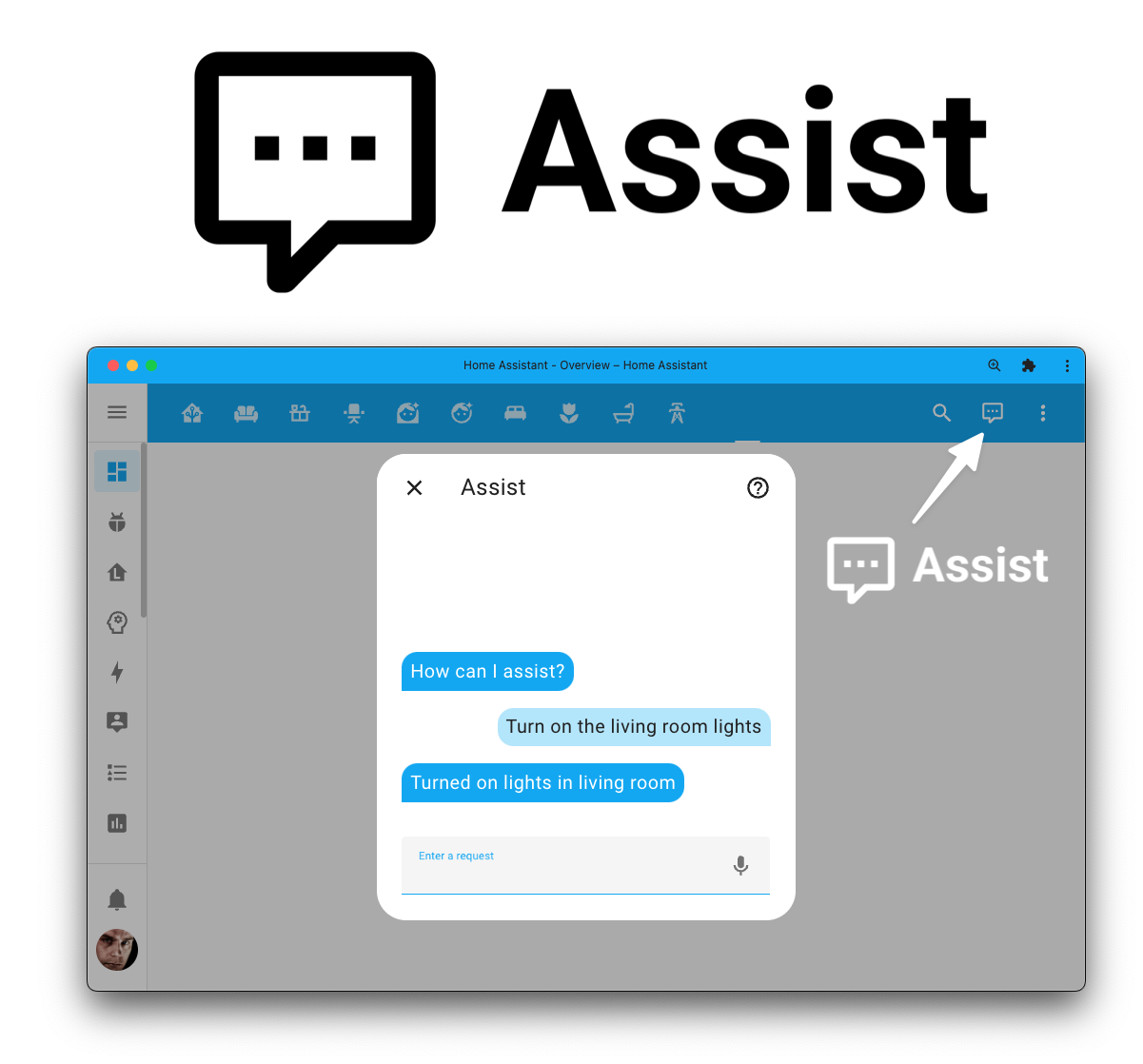
 Assist
让你可以使用自然语言来控制 Home Assistant。它由
Hassil 驱动,并使用来自
Home Assistant Intents 项目的句子数据
(由多达 112 位贡献者共同完成)。
Assist
让你可以使用自然语言来控制 Home Assistant。它由
Hassil 驱动,并使用来自
Home Assistant Intents 项目的句子数据
(由多达 112 位贡献者共同完成)。
我们相信,技术就应该拿来探索和玩耍,项目也应该尽早做到可用。 之后再与社区一起持续迭代和打磨。因此,今天我们带来了一个 可用的基础体验,而且 Assist 已经支持多达 22 种语言!
现在就试试吧,它默认已启用;只需点击新的 Assist 图标
,即可在你的仪表盘右上角开始使用它。
哦,对了,我们在开发过程中还顺手做出了一些很酷的新东西! 你可以在Assist 介绍页面里了解更多,也可以查看 第一章:Assist 博文, 或观看这场 YouTube 视频讲解(包含现场演示)。
流式历史记录
History 卡片 now 更新 live! We now stream the 状态 changes while they are happening and 更新 the graphs in real-time 😲
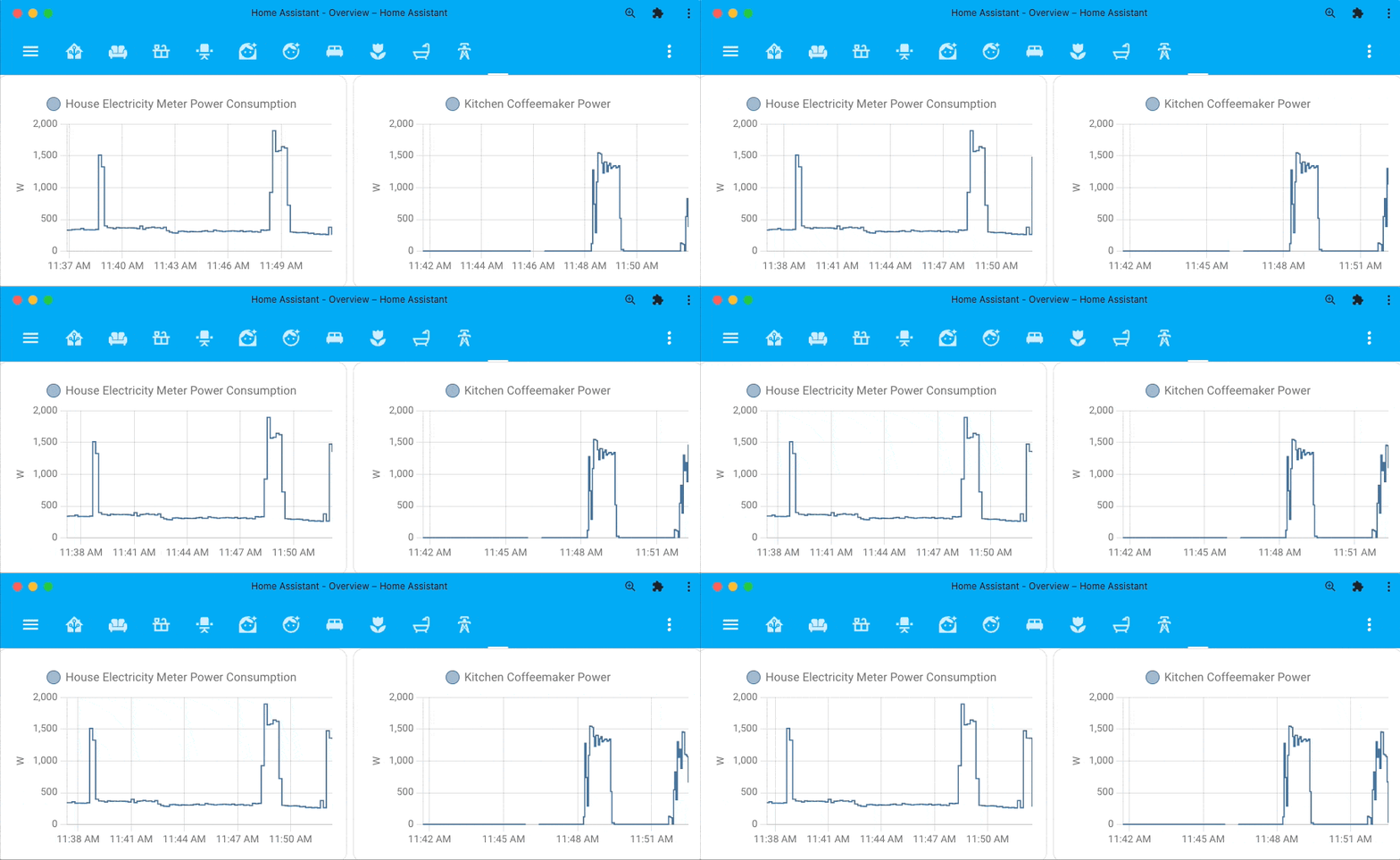 These history 卡片 now show live power usage, while I'm brewing a cup of coffee.
But this isn't just limited to history 卡片, your history 仪表盘 is now live too!
As a result of this all, we can now write less frequently to the database in our recorder. It took years of changes to get us to this point (thanks @bdraco 🙏). It greatly reduces resource usage and increases storage lifetimes significantly. The previously introduced live logbook and now the live history were the last pieces that made this possible.
As a side-effect, it should also resolve the authentication 错误 some people experienced re-opening the iOS companion app when using history 卡片.
传感器分组
The group helper now supports 传感器 too! 传感器 groups can combine 实体 with a numeric 状态, like sensor, number, and number helpers 实体.
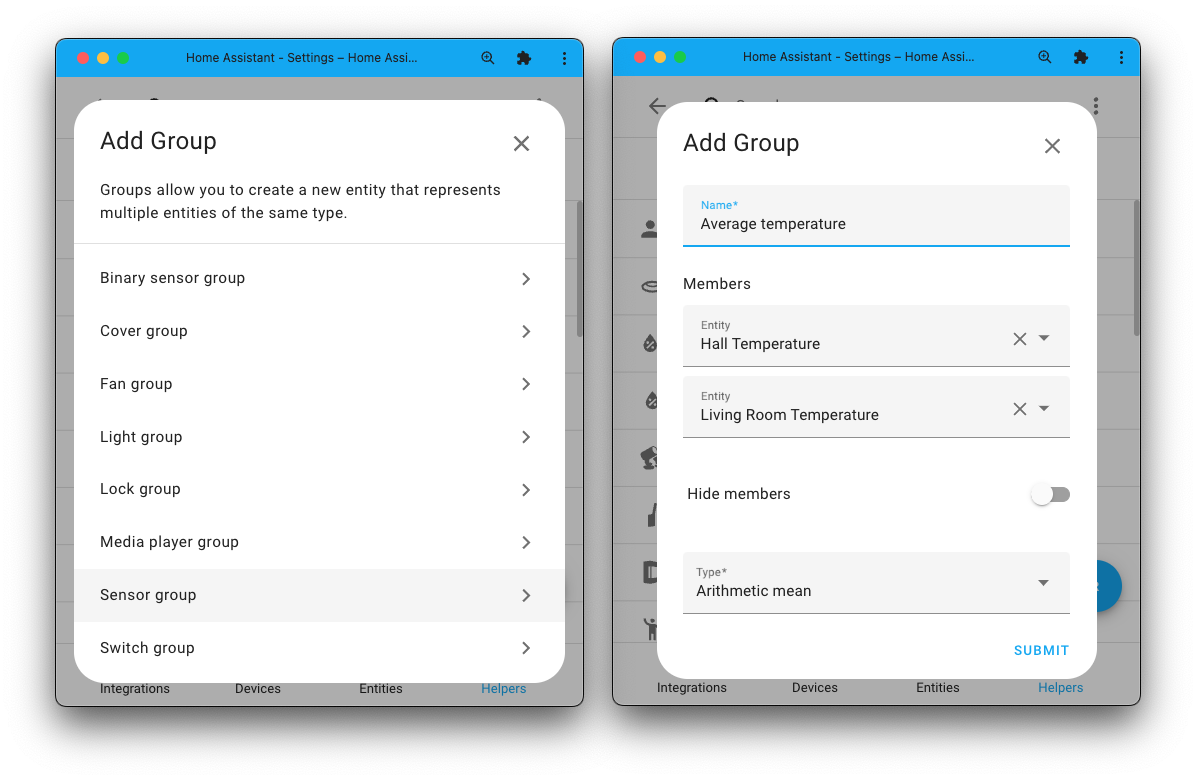
This feature is a revised, improved, and more logical 版本 of the "Min/Max" 集成 / "Combine the 状态 of several 传感器" helper. It is likely we are going to replace those with this new 传感器 group in the future.
Compared to those previously mentioned methods, the 传感器 groups have the additional options to hide their member 实体 and the option to ignore 传感器 that currently are not in a numeric 状态 (i.e., currently "unavailable" or "unknown").
与 ESPHome 结合得更紧密了
ESPHome already works really well with Home Assistant. Yet, this 发布 makes it even better!
If you are using the ESPHome add-on, we have some great improvements for you. The add-on and Home Assistant will now communicate with each other, bringing in many new features.
When you set up a new 设备 in ESPHome and next add it to Home Assistant, they will be able to exchange encryption keys. Removing the need for you to find, copy & paste those. Just a single click and the 设置 is done! 🚀
But that is not all. What is really mind-blowing, is that the ESPHome 集成 will now provide 更新 实体 when using the add-on!
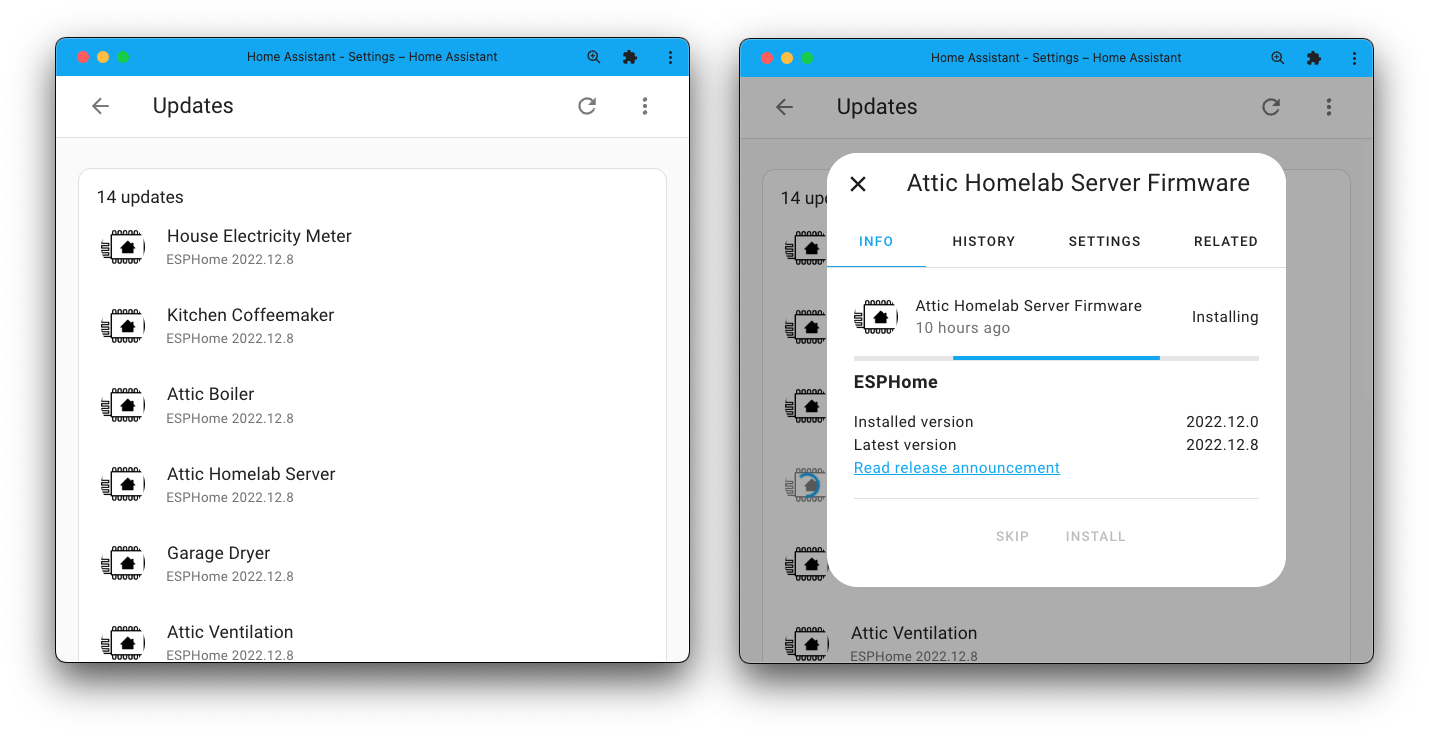
Right now, the 更新 实体 will only indicate if a 设备 needs updating. However, when the next major 发布 of ESPHome (2023.2) becomes available, it will support updating them too! Yes, at that point, you can 更新 your ESPHome 设备 directly from Home Assistant and even automate it!
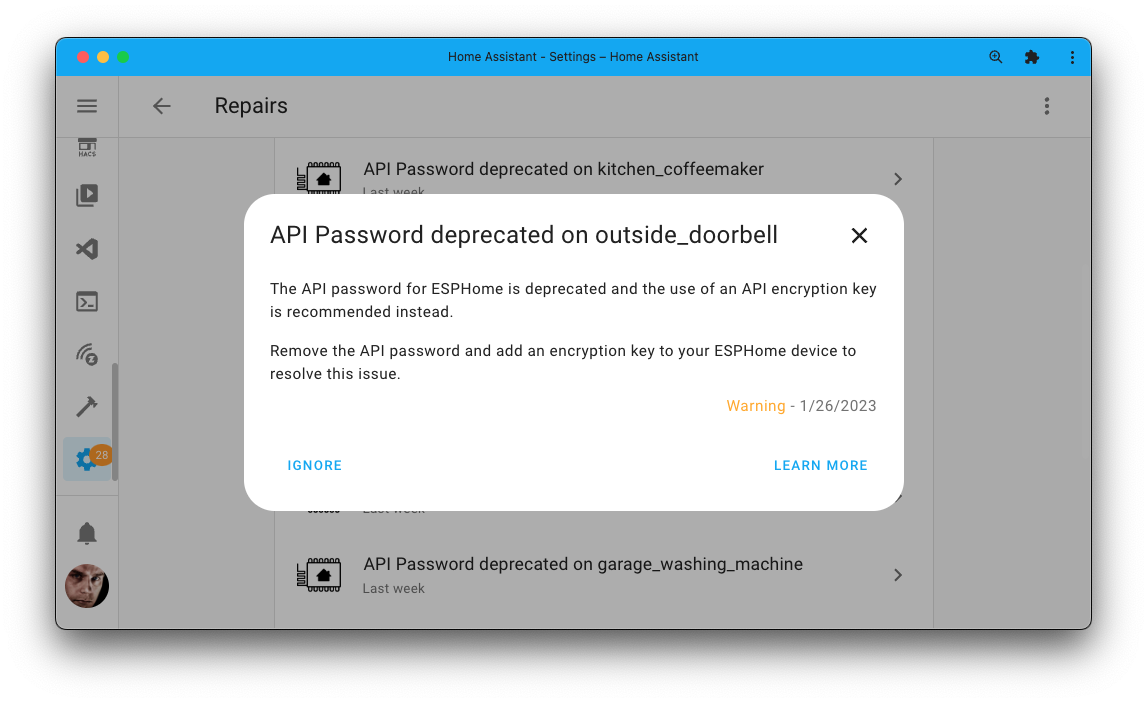
Also, ESPHome is deprecating the old password-based authentication for its API in favor of the more secure encryption key. If one of your ESPHome 设备 is still using a plain password, Home Assistant will notify you by creating an issue in your Repairs 仪表盘.
We've also prepared for the next 发布 of ESPHome (2023.2), in which you can add a friendly, more human name to your ESPHome 设备. Home Assistant will pick those up, making your ESPHome 设备 look better out-of-the-box!
其他值得注意的变化
There is much more juice in this 发布; here are some of the other noteworthy changes this 发布:
- You can now add aliases to your areas too! Our new Assist feature leverages this.
- Got an energy 传感器 in
Wh, but you'd like it to bekWh? You can now change the units of energy 传感器 in the 实体 设置. - Each 实体 in the 前端 has its own color, which is based on the current 实体 状态. We now have officially added support for themes to customize these.
- The most awesome 集成 of all, got even better. @Lash-L added support for the battery 状态 of your Oral-B toothbrush!
- The 自动化 & 脚本 UI now support selecting other 实体 for above/below in the numeric 状态 条件 & 触发器. Thanks, @karwosts!
- The Reolink 集成 now supports FLV streams, 摄像头 can be discovered on the network, but more importantly: 二元sensor! For things like motion, person, vehicle detection, and... Doorbell presses! Thanks, @starkillerOG!
- There is now a 服务 that allows for the creation of calendar events. So, you can now automate events to be added to your calendars! Amazing, @allenporter!
- When selecting multiple 实体 from a list in the UI, it will now exclude already added 实体. No more accidentally added duplicates! Thanks, @piitaya!
- @Kane610 added PoE power 传感器 to the UniFi Network 集成, nice!
- The Tile 卡片 now has a vertical option! Great, @TheZoker!
- Jellyfin now works with TV shows in the media browser. Thanks, @j-stienstra!
- We have bumped the CHIP/Matter SDK 版本 used by our Matter implementation to 1.0.0.2, which contains many fixes.
- From the Month of "What the heck?": Old-style groups can now remove 实体
from the group using the
group.set服务. Thanks, @gjohansson-ST! - You might have noticed a Thread and an Open Thread Border Router 集成 being added to this 发布. These are currently not for active use but for initial early development.
- The experimental multi-pan feature has been enabled again. Allowing to run both Zigbee and Thread using the single radio found in both Home Assistant Yellow and Home Assistant SkyConnect.
- The following 集成 now reached a Platinum level on the
集成 quality scale:
- Renault excellent job @epenet!
- HomeWizard Energy awesome work @DCSBL!
新集成
We welcome the following new 集成 in this 发布:
-
EnergyZero, added by @klaasnicolaas
Retrieves dynamic (hourly) energy & gas prices from the Dutch utility company EnergyZero. -
EufyLife, added by @bdr99
Integrate Eufy smart scales over 蓝牙. -
Everything but the Kitchen Sink, added by @emontnemery
This is a test 集成, which provides various odd and obscure 实体. It can be helpful for development purposes, but generally no use otherwise. -
Google Mail, added by @tkdrob
Provides 服务 to manage your Google Mail auto-response and provides a 通知 服务 to send (or draft) emails. -
LD2410 BLE, added by @930913
Integrates a $4 LD2410 蓝牙 mmWave 传感器, which works with our 蓝牙 proxies! -
Mopeka, added by @bdraco
Works with your Mopeka BLE propane tank monitors. -
OpenAI Conversation, added by @balloob
OpenAI 集成 that uses GPT-3 to showcase replacing the Home Assistant conversation agent. Note: It cannot control anything in your home. -
Read Your Meter Pro, added by @OnFreund
Pull in your water usage/meter readings from your Read Your Meter Pro account. -
Ruuvi Gateway, added by @akx
Integrates the Ruuvi Gateway that reads your Ruuvi 传感器. -
SFR Box, added by @epenet
Offers 集成 with the SFR broadband routers. -
Starlink, added by @boswelja
Starlink is a satellite internet constellation operated by SpaceX. Integrate your Starlink dish with Home Assistant. -
Stookwijzer, added by @fwestenberg
Stookwijzer advises wether to burn pallets or wood, or to use the barbecue. This can prevent health problems for people in the area (NL only). -
Zeversolar, added by @kvanzuijlen
Get power and energy information from your Zeversolar solar inverter locally.
This 发布 also has some new virtual 集成. Virtual 集成 are stubs that are handled by other (existing) 集成 to help with findability. These are new:
- ANWB Energie provided by EnergyZero, added by @klaasnicolaas
- Energie VanOns provided by EnergyZero, added by @klaasnicolaas
- Mijndomein Energie provided by EnergyZero, added by @klaasnicolaas
- Fire TV provided by Android TV, added by @jrieger
现在可通过 UI 设置的集成
The following 集成 are now available via the Home Assistant UI:
发布 2023.2.1 - February 2
- Support ISY994 Z-Wave motorized blinds as 遮盖 (@shbatm - #87102) (isy994 docs)
- Bump reolink_aio to 0.3.1 (@starkillerOG - #87118) (reolink docs)
- Bump reolink-aio to 0.3.2 (@starkillerOG - #87121) (reolink docs)
- Fix invalid 状态 class in renault (@epenet - #87135) (renault docs)
- Add missing converters to recorder statistics (@epenet - #87137) (recorder docs)
- Add missing supported features to Z-Wave.Me siren (@lawfulchaos - #87141) (zwave_me docs)
- Reolink unsubscribe webhook when first refresh fails (@starkillerOG - #87147) (reolink docs)
- Fix statistics graphs not loading with data_rate, electric_current, voltage, information, and unitless units (@bdraco - #87202) (recorder docs)
- Add Reauth config flow to honeywell (@mkmer - #86170) (honeywell docs)
- Bump AIOSomecomfort to 0.0.6 (@mkmer - #87203) (honeywell docs)
- 更新 前端 to 20230202.0 (@bramkragten - #87208) (前端 docs)
- Bump py-synologydsm-api to 2.1.1 (@mib1185 - #87211) (synology_dsm docs)
- Fix disabled 条件 within an 自动化 动作 (@karliemeads - #87213) (breaking-change)
发布 2023.2.2 - February 4
- Add missing mopeka translations (@bdraco - #87421) (mopeka docs)
- Fix call values in Aussie Broadband (@Bre77 - #87229) (aussie_broadband docs)
- Handle failed Sonos subscriptions better (@jjlawren - #87240) (sonos docs)
- Filesize timestamp remove 状态 class (@gjohansson-ST - #87247) (filesize docs)
- Bump reolink-aio to 0.3.4 (@starkillerOG - #87272) (reolink docs)
- Fix volume 状态 class in renault (@epenet - #87280) (renault docs)
- Bump sfrbox-api to 0.0.6 (@epenet - #87281) (sfr_box docs)
- Extend 状态 class 传感器 警告 with expected values (@frenck - #87294) (传感器 docs)
- Fix incorrect description in 传感器 group config flow (@frenck - #87298) (group docs)
- Don't override icon in 传感器 group when 设备 class is set (@frenck - #87304) (group docs)
- Fix Bravia TV refreshing zero volume level (@Drafteed - #87318) (braviatv docs)
- Fixed parser for zeversolar hardware 版本 M10 (@kvanzuijlen - #87319) (zeversolar docs)
- Fix code format issue in Yale Smart 报警 (@gjohansson-ST - #87323) (yale_smart_alarm docs)
- Bump py-synologydsm-api to 2.1.2 (@mib1185 - #87324) (synology_dsm docs)
- Bump oralb-ble to 0.17.2 (@Lash-L - #87355) (oralb docs)
- 更新 pylutron-caseta to 0.18.1 (@mdonoughe - #87361) (lutron_caseta docs)
- Fix exception when trying to poll a HomeKit 设备 over Thread with no active encryption context (@Jc2k - #87379) (homekit_controller docs)
- Fix Ruuvi Gateway data being ignored when system is not using UTC time (@akx - #87384) (ruuvi_gateway docs)
- Fix 状态 class in Enphase Envoy (@vpathuis - #87397) (enphase_envoy docs)
- Ignore invalid zeroconf names from 设备 with broken firmwares (@bdraco - #87414) (zeroconf docs)
- Disable mopeka accelerometer 传感器 by default (@bdraco - #87420) (mopeka docs)
- Bump aiohomekit to 2.4.6 (@bdraco - #87427) (homekit_controller docs)
- 更新 black to 23.1.0 (@frenck - #87188)
发布 2023.2.3 - February 7
- Speed up purge time with newer MariaDB versions (@bdraco - #87409) (recorder docs)
- Add missing name field to emulated_hue config (@gregoryhaynes - #87456) (emulated_hue docs)
- Bump lupupy to 0.2.7 (@majuss - #87469) (lupusec docs)
- Bump py-synologydsm-api to 2.1.4 (@mib1185 - #87471) (synology_dsm docs)
- Disable uptime 传感器 by default in Unifi (@tkdrob - #87484) (unifi docs)
- Add the correct loggers to velbus manifest.json (@Cereal2nd - #87488) (velbus docs)
- Fix recorder run history during schema migration and startup (@bdraco - #87492) (recorder docs)
- Bump xiaomi-ble to 0.16.1 (@Ernst79 - #87496) (xiaomi_ble docs)
- Bump jaraco.abode to 3.3.0 (@zim514 - #87498) (abode docs)
- Bump bimmer_connected to 0.12.1 (@rikroe - #87506) (bmw_connected_drive docs)
- Add LD2410BLE support for new firmware 版本 (@bencorrado - #87507) (ld2410_ble docs)
- Bump env_canada to 0.5.28 (@michaeldavie - #87509) (environment_canada docs)
- Optimize history.get_last_state_changes query (@bdraco - #87554) (recorder docs)
- OpenAI: Ignore 设备 without a name (@balloob - #87558) (openai_conversation docs)
- Bump oralb-ble to 0.17.4 (@Lash-L - #87570) (oralb docs)
- Fix Matter remove config entry 设备 (@MartinHjelmare - #87571) (Matter docs)
- Fix indent on slow_range_in_select for MySQL/MariaDB (@bdraco - #87581) (recorder docs)
- Fix LD2410 BLE detection with passive scans (@bdraco - #87584) (ld2410_ble docs)
- Bump inkbird-ble to 0.5.6 (@bdraco - #87590) (inkbird docs)
- Bump sensorpro-ble to 0.5.3 (@bdraco - #87591) (sensorpro docs)
- Bump thermopro-ble to 0.4.5 (@bdraco - #87592) (thermopro docs)
- Bump bluemaestro-ble to 0.2.3 (@bdraco - #87594) (bluemaestro docs)
- Bump sensorpush-ble to 1.5.5 (@bdraco - #87595) (sensorpush docs)
- Improve rainbird 设备 reliability by sending requests serially (@allenporter - #87603) (rainbird docs)
- Do not return cached values for 实体 状态 in emulated_hue (@Tho85 - #87642) (emulated_hue docs)
- Bump pyrainbird to 2.0.0 (@allenporter - #86851) (rainbird docs)
- Bump PyISY to 3.1.13, check portal for network buttons (@shbatm - #87650) (isy994 docs)
发布 2023.2.4 - February 13
- Netgear ssdp discovery abort if no serial (@starkillerOG - #87532) (netgear docs)
- Reolink unregistered webhook on unexpected 错误 (@starkillerOG - #87538) (reolink docs)
- Correct 传感器 恢复 实体 in modbus (@janiversen - #87563) (modbus docs)
- Upgrading volvooncall to 0.10.2 (@Gollam - #87572) (volvooncall docs)
- Keep sleepy xiaomi-ble 设备 that don't broadcast regularly available (@Ernst79 - #87654) (xiaomi_ble docs)
- Bump oralb-ble to 0.17.5 (@Lash-L - #87657) (oralb docs)
- Bump cryptography to 39.0.1 for CVE-2023-23931 (@bdraco - #87658)
- Bump yalexs_ble to 1.12.12 to fix reconnect when 服务 fail to resolve (@bdraco - #87664) (august docs) (yalexs_ble docs)
- Fix bad battery sense in ambient_station (@jpettitt - #87668) (ambient_station docs)
- Bump reolink-aio to 0.4.0 (@starkillerOG - #87733) (reolink docs)
- Bump aiolifx to 0.8.9 (@Djelibeybi - #87790) (lifx docs)
- Ensure recorder still shuts down if the final commit fails (@bdraco - #87799) (recorder docs)
- Bump pyipma to 3.0.6 (@dgomes - #87867) (ipma docs)
- Fix unbound variable in Group 传感器 (@gjohansson-ST - #87878) (group docs)
- Retrigger 蓝牙 discovery when calling async_rediscover_address (@bdraco - #87884) (蓝牙 docs)
- Fix iaqualink exception handling after 开关 to httpx (@flz - #87898) (iaqualink docs)
- Bump aioesphomeapi to 13.3.1 (@bdraco - #87969) (esphome docs)
发布 2023.2.5 - February 15
- 更新 tibber lib 0.26.13 (@Danielhiversen - #88018) (tibber docs)
- Bump
pyopenuvto 2023.02.0 (@bachya - #88039) (openuv docs) - Honeywell disable detergent level by default (@mkmer - #88040) (whirlpool docs)
- Bump AIOAladdinConnect 0.1.56 (@mkmer - #88041) (aladdin_connect docs)
- Handle 设备 reg fields not being valid data in openai conversion (@balloob - #88047) (openai_conversation docs)
- Bump pyoctoprintapi to 0.1.11 (@rfleming71 - #88052) (octoprint docs)
- Fixed float number validation in 传感器 component (@gertjanstulp - #88074) (传感器 docs)
- Statistics component fix device_class for incremental source 传感器 (@ThomDietrich - #88096) (statistics docs)
- 更新 orjson to resolve segmentation fault during JSON serialisation (@mgjbroadbent - #88119)
- Blebox fix thermobox reporting wrong 状态 (@riokuu - #88169) (blebox docs)
- Bump reolink-aio to 0.4.2 (@starkillerOG - #88175) (reolink docs)
- Bump python-Matter-server to 2.1.0 (@marcelveldt - #88192) (Matter docs)
需要帮助?加入社区!
Home Assistant has a great community of users who are all more than willing to help each other out. So, join us!
Our very active Discord chat server is an excellent place to be at, and don't forget to join our amazing forums.
Found a bug or issue? Please report it in our issue tracker, to get it fixed! Or, check our help page for guidance for more places you can go.
Are you more into email? Sign-up for our Building the Open Home Newsletter to get the latest news about features, things happening in our community and other news about building an Open Home; straight into your inbox.
不向后兼容的变更
Python 3.9 support has previously been deprecated and has now been removed. Home Assistant now requires Python 3.10 to run.
If you are using Home Assistant OS, Home Assistant 容器, or Home Assistant 受监管模式 安装 method, you don’t have to do anything. In those cases, we handle this all for you.
Your system has been using Python 3.10 for quite some time already.
If you are using MariaDB with Home Assistant recorder, please make sure
you run 10.5.17 , 10.6.9, 10.7.5, 10.8.4 (depending on which major
发布 you are using). If you are using the MariaDB 核心 add-on,
make sure to 更新 it to the latest 版本: 2.5.2.
Older versions of MariaDB suffer from a significant performance regression when retrieving history data or purging the database.
A disabled 条件, for example, in an 自动化 or 脚本, will no longer
always be a pass/True within an OR 条件. Instead, in those
cases, the 条件 will now have no effect when disabled.
(@karliemeads - #79718) (文档)
For the precipitation 实体, the unit was changed from mm to mm/h
(in to in/h), resulting in the need to fix the unit for long-term
statistics. You can do that in Developer Tools -> Stats.
If the language in the Home Assistant 设置 is set to Polish, the language
of the advice and description 属性 of the CAQI 实体 will change
from English to Polish.
If you are using these in your 自动化 or 脚本, you might need to adjust them to match this change.
The 状态 values of the Fitbit 传感器 实体 will change to remove any
thousands delimiters. For example, 1,500 will become 1500.
If you're using the 状态 of these 实体 in 自动化 or 脚本, you need to 更新 them to handle the new 状态 format.
(@sw-carlos-cristobal - #85251) (文档)
The scan/更新 interval for water values has been restored to match the Flume app.
To stay under Flume's API limits, the 设备 connection is now checked hourly, and 通知 are checked every 5 minutes.
The use_include_order YAML 配置 option has been removed.
This option was used to sort the history on the original history 面板 which, is no longer used. As it no longer has a function and only serves to slow down the response, it has been removed.
The IoTAWatt 集成 no longer provides 传感器 with the "Accumulated" suffix. The accumulated 传感器 have been introduced to support net energy export/import metering.
Newer versions of IoTaWatt provide "Integrators", which allow achieving the same more efficiently and with higher accuracy.
You should 配置 Integrators to calculate the net energy export and import.
The Matter 集成 now requires running Matter Server 版本 2.0.0.
If you're using the Matter Server add-on to run the Matter Server,
you will need 版本 3.0.0 of the add-on.
We had to change our vendor ID in the add-on; as a result, all 设备 need to be recommissioned.
(@MartinHjelmare - #86470) (文档)
The 状态 of air quality 传感器 have been standardized to match Home Assistant 核心 rules. This affects two 状态 of the 传感器 that NAM can provide:
very low, which now becamevery_lowvery high, which now becamevery_high
If you used those 状态 directly in your 自动化, 脚本, or templates; you would need to adjust those to match these changes.
The Pentair ScreenLogic 集成 now correctly categorizes all known 灯光. Removing any 灯光 that were previously incorrectly 创建 as 开关 实体 may be necessary.
(@dieselrabbit - #86608) (文档)
The previously deprecated YAML 配置 of the Pi-hole 集成 has been removed.
Pi-hole is now configured via the UI. Any existing YAML 配置 has been imported in previous releases and can now be safely removed from your YAML 配置 files.
The extra 状态 属性 "Domains blocked" has been removed from all 传感器. It is already exposed as its own dedicated 传感器.
If you used the 状态 属性 in your 自动化 or 脚本, you would need to adjust them to use the dedicated 传感器 instead.
Rainbird is now configured via the UI, and 配置 from YAML has been imported automatically.
However, there are a few notable changes:
- Custom per zone overrides for irrigation time are no longer supported.
- The Rain delay
binary_sensorthat duplicates the Rain delay timesensorhas been removed. You should move all uses to thesensorvalue and check for a non-zero value to get equivalent behavior. - The Rain
sensorthat duplicates the Rainbinary_sensorhas been removed. You may check thebinary_sensor状态 to get equivalent behavior.
Also, the way the "Rain Delay" is managed has changed. The Rain Delay, which
pauses irrigation for a specified number of days, is now managed with a number
实体 which can be controlled directly from the UI.
The existing 服务 call rainbird.set_rain_delay and the Raindelay 传感器
have been deprecated. Any existing 自动化 or 脚本 that make 服务
calls to rainbird.set_rain_delay will need to be replaced with a call
to number.set_value. Additionally, the existing 服务 call was updated to
require an 集成 entry 配置 since it previously had undefined
behavior, so it is recommended to move directly to the new number 服务 call.
(@allenporter - #85271 #86208) (文档)
The recorder's default commit interval has been increased to 5 seconds to reduce disk I/O and increase storage longevity.
As the history and logbook 集成 both support live streaming, which avoids the need to read the database after the initial sync, there is no remaining 核心 functionality that needs a lower commit interval.
The commit_interval can be adjusted
to a lower value in the event an 集成 has not been updated to watch for
events instead of reading the database and needs to read the database sooner.
The previously deprecated renault.charge_start 服务 has been removed.
Please use the dedicated start charge button 实体 to start the charge instead.
Sony Bravia TV media players no longer have fake (assumed) playing or paused
状态, and those are replaced with the on 状态.
If you have 自动化 or 脚本 that use the playing or paused 状态,
please 更新 them to be compatible with this change.
The source_list no longer contains a list of applications and TV channels.
Apps and channels have been separated from the input list and moved
to the Media Browser.
If you have 自动化 or 脚本 that use media_player.select_source to
开关 apps or channels on the Bravia TV, the 自动化 need to be
updated to use media_player.play_media 服务 instead.
The options flow has been removed from the 集成, as the only
configurable setting ignored_sources was no longer relevant
and incompatible with this change.
The previously deprecated YAML 配置 of the Spain electricity hourly pricing (PVPC) 集成 has been removed.
Spain electricity hourly pricing (PVPC) is now configured via the UI. Any existing YAML 配置 has been imported in previous releases and can now be safely removed from your YAML 配置 files.
The swing modes of Tado have changed. This is to standardize with other 集成, and so it can support translations.
ONbecame the lowercaseonOFFbecame the lowercaseoff
If you used these swing modes in your 自动化 or 脚本, you might need to adjust those to this change.
(@emontnemery - #84278) (文档)
All extra 状态 属性 from Twinkly 灯光 实体 have been removed.
They mostly added information about the 设备, not the actual 灯光 状态 itself.
ISY/IoX Variables have been moved from sensor 实体 to number 实体;
the existing sensor 实体 are deprecated and will be removed in a future
发布.
The isy994.set_variable 服务 has been deprecated in favor of using
the number 实体 to directly set the variable values.
Please 更新 any 仪表盘, 脚本, and 自动化 that may be using these 实体 or 服务.
实体 for INSTEON Aux Properties and 设备 Communication 错误 have been removed for nodes that are not the main (load) node.
On Level and Ramp Rate 传感器 have been removed for non-dimmable (non-light.)
设备. Only load 设备 receive communication 错误 updates and only
dimmable 设备 support OL and RR commands.
The other 实体 were previously added but did not receive valid 状态 from the ISY or end-设备. These 传感器 were disabled by default.
The previously deprecated YAML 配置 of the Uptime 集成 has been removed.
Uptime is now configured via the UI. Any existing YAML 配置 has been imported in previous releases and can now be safely removed from your YAML 配置 files.
When there is a connection 错误 with the receiver, the 设备 will now go into an unavailable 状态 until the connection has been restored.
The raw 状态/option values of the Yamaha MusicCast zone sleep select 实体
have been standardized to match Home Assistant 核心 rules.
The following 状态/options have been changed
120 min, which now became120_min90 min, which now became90_min60 min, which now became60_min30 min, which now became30_min
If you used those 状态/options directly in your 自动化, 脚本, or templates; you will need to adjust those to match these changes.
The previously deprecated YAML 配置 of the Zentralanstalt für Meteorologie und Geodynamik (ZAMG) 集成 has been removed.
Zentralanstalt für Meteorologie und Geodynamik (ZAMG) is now configured via the UI. Any existing YAML 配置 has been imported in previous releases and can now be safely removed from your YAML 配置 files.
(@killer0071234 - #86113) (文档)
The AnalogInput 传感器 实体 for certain Xiaomi plugs have been removed
from ZHA.
Properly working "Active power" and "Summation delivered" 传感器 are available to replace the older 实体. These newer 传感器 实体 can also be used in Home Assistant Energy 仪表盘.
(@TheJulianJES - #86261) (文档)
If you are a custom 集成 developer and want to learn about breaking changes and new features available for your 集成: Be sure to follow our developer 博客. The following are the most notable for this 发布:
- 蓝牙 updates for 2023.2 and later
- 遮盖 intents deprecated
- Database schema v32 updates
- Future proofing the Conversation 集成
- 传感器 实体 can now do rounding of numerical values
Farewell to the following
The following 集成 are also no longer available as of this 发布:
- Almond has been removed. It is in a non-working 状态, and the 服务 have been shut down.
- OpenALPR Local was previously deprecated and has now been removed. It doesn't work correctly and has no usage, according to our public analytics.
All changes
Of course, there is a lot more in this 发布. You can find a list of all changes made here: Full changelog for Home Assistant 核心 2023.2