

2022.8: You can fix it!
Home Assistant 核心 2022.8!🏖
虽然这段时间很多人都在享受来之不易的假期,但这似乎并没有让 Home Assistant 的开发和贡献放慢脚步。这次发布依旧内容满满!
我对新增的蓝牙支持感到超级兴奋,它为 Home Assistant 打开了一个全新的设备世界。 而我更期待的是新的修复功能和支持品牌功能,它们真的会带来巨大帮助 😃。
你知道这次发布最棒的地方是什么吗?这次宣布的所有主要功能和变化, 都在朝着我们当前的目标更进一步: 让整体体验更加顺畅。
享受这次发布吧!
../Frenck
- 修复功能登场:你可以修好它!
- 一流的蓝牙支持
- HomeKit 蓝牙支持
- 查找支持你设备的集成
- 更好的地图配色
- 其他值得注意的变化
- 新集成
- 现已可通过 UI 设置的集成
- 发布 2022.8.1 - August 4
- 发布 2022.8.2 - August 7
- 发布 2022.8.3 - August 9
- 发布 2022.8.4 - August 12
- 发布 2022.8.5 - August 15
- 发布 2022.8.6 - August 17
- 发布 2022.8.7 - August 25
- 需要帮助吗?加入社区!
- 向后不兼容的变更
- 告别以下内容
- 所有变更
错过了我们在 YouTube 上的发布派对直播?别担心!你可以直接在这里观看回放!
修复功能登场:你可以修好它!
一个我们希望你会喜欢的全新功能:修复(Repairs)!👷♂️
你可以在“设置”菜单中找到修复面板,它是 Home Assistant 用来通知你那些你可以(也应该)修复的问题的地方!
无论是系统当前已经检测到的问题,还是未来可能出现的问题, 例如由于使用了即将被移除的功能而导致的问题, 修复面板都会尽可能提示你。这些问题都是可操作且可由你解决的。
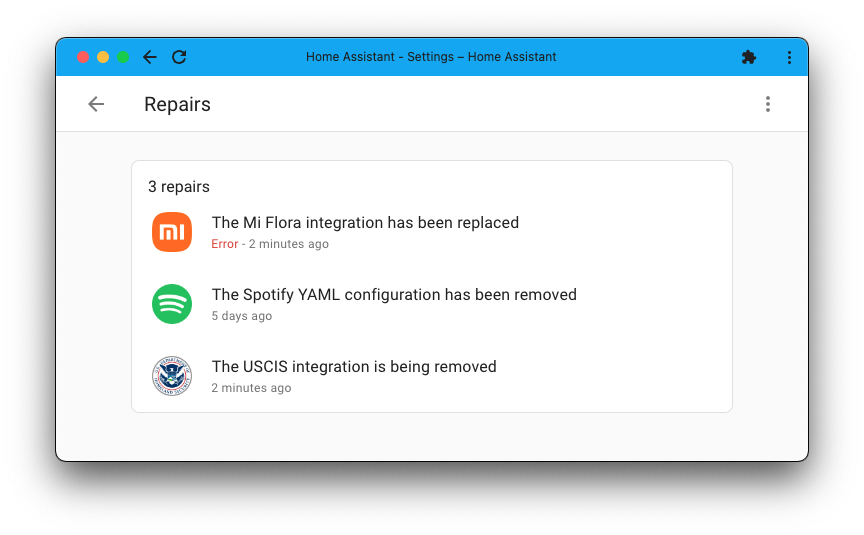
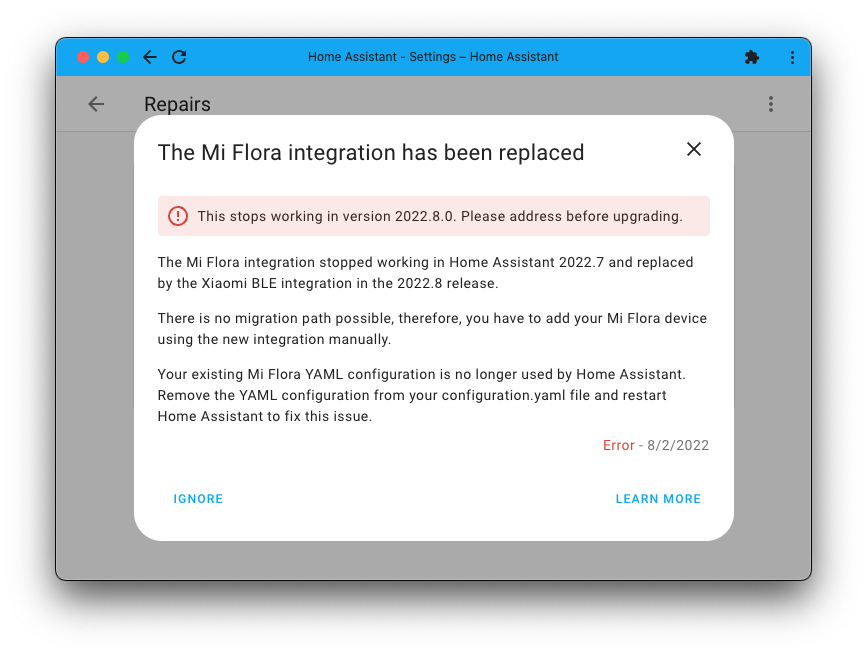
这些可修复的问题会根据你的 Home Assistant 实例量身定制,内容可能各不相同。 点击某个问题后,你会看到更多说明,以及修复它所需执行的操作。
有时这需要你手动介入,例如更新 YAML 配置; 而有时它会在征求你的确认或让你做出选择之后,自动为你完成修复。
这次发布目前可以检测大约 25 类问题;另外,如果发现与你系统匹配的 Home Assistant Alert,它也会显示在修复面板中。
新的修复功能有很多使用场景,你可以期待它在不久的将来继续扩展, 支持检测更多类型的问题。
一流的蓝牙支持
今天,我们很自豪地宣布:Home Assistant 现在拥有了一流的蓝牙支持!🥇
我们新增了全新的[蓝牙集成],为 Home Assistant 提供了非常出色的蓝牙支持, 包括自动发现新设备,以及推送设备更新的能力。
实现设备支持的集成现在可以非常容易地构建在这些能力之上, 这意味着 Home Assistant 终于拥有了一个坚实基础, 可以解锁对大量蓝牙设备的支持!
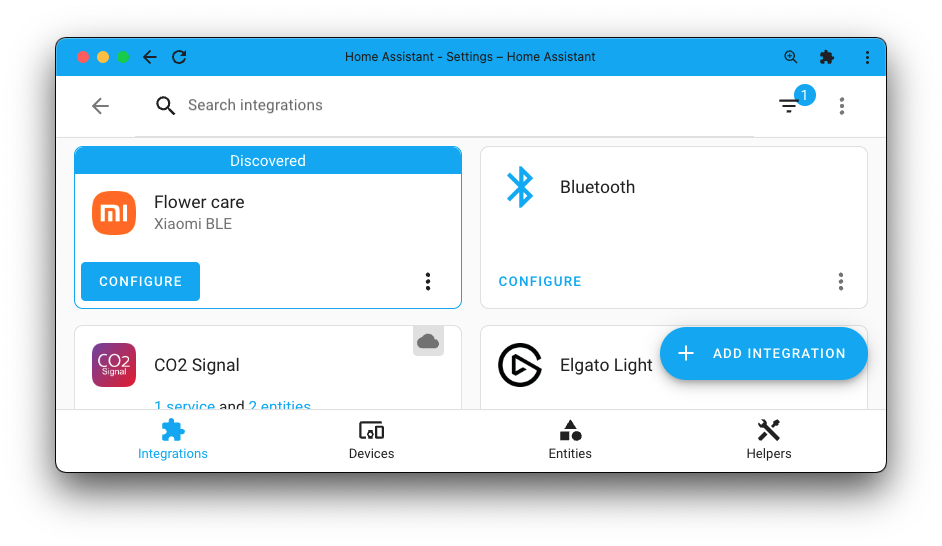
The screenshot below shows that the 蓝牙 集成 is set up, and it discovered a new 设备. In this case, it discovered a Mi Flora Flower care 传感器 设备.
A good example is the SwitchBot 集成. It has been updated to support the new 蓝牙 集成, and because of that, is now a push-based 集成 providing a much more stable experience.
This 发布 adds five 集成 built on this: SensorPush, Govee, INKBIRD, Moat, and Xiaomi BLE. The latter also provides support for the reasonably popular Mi Flora plant 传感器.
Suppose you are using the Home Assistant OS on a 树莓派 3 or 4, or are using a supported 蓝牙 adapter. In that case, the 蓝牙 集成 will work out of the box for new installations and is automatically discovered on existing setups.
Shout out to @bdraco for creating this fantastic new addition, @Ernst79 for providing implementation feedback, and his excellent work on the ble_monitor custom 集成, which was an inspiration for the 蓝牙 集成. Lastly, a shout out to @Jc2k for implementing the Xiaomi BLE 集成 that greatly helped with testing. Thanks guys! 🙏
HomeKit 蓝牙支持
To continue the story on 蓝牙, the HomeKit Controller now also supports 蓝牙 and leverages the above-mentioned new 蓝牙 集成 🎉
In case you didn't know, the HomeKit Controller 集成 allows you to connect to HomeKit-capable 设备 and integrate them directly into Home Assistant. Allowing you to monitor and control these 设备, they support push-based updates and, above all: Are entirely local!
You don't need to own or have an Apple phone or computer to use this!
Supporting HomeKit 蓝牙-capable 设备 is fantastic! It makes a lot of 设备 out there compatible with Home Assistant that have no other way of integrating. There are lots of door 门锁, wall plugs, and other smart 设备 that you can use now.
Thanks for the work on this @Jc2k and @bdraco!
查找支持你设备的集成
Some 集成 work with multiple different brands. This can happen because, for example, those 设备 share a communication protocol, are white-labeled and sold under numerous brand names, or may carry different brand names depending on where in the world they are sold.
For example, if you have a Luxaflex 遮盖, you can actually use it using the Hunter Douglas PowerView 集成. And this is not the only example; there are many more! The problem is, how would one know that?
To make setting up things in Home Assistant easier, 集成 can now support multiple brands! So, if you now add an 集成 in Home Assistant and search for Luxaflex, you will find one!
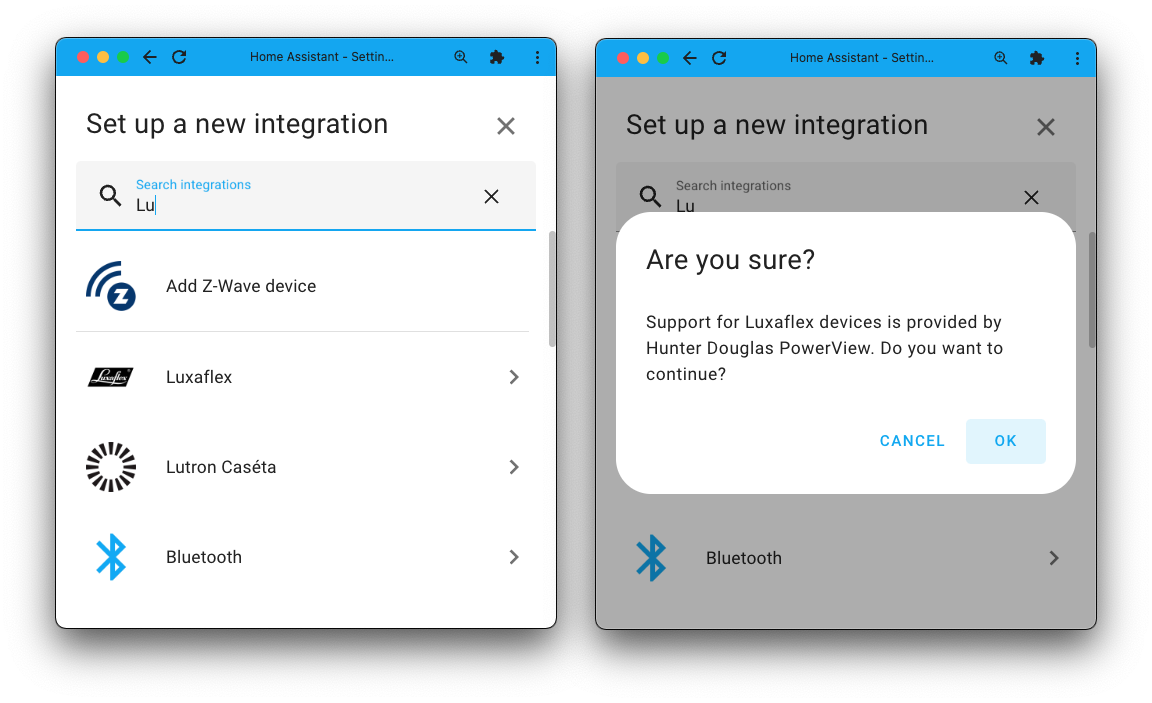
When you add a new 集成 that is supported by another 集成, Home Assistant will tell you which 集成 provides the support and guide you to set up that 集成.
更好的地图配色
Maps shown in Home Assistant have had a slight makeover and now use a new color palette. These new colors provide much greater contrast and significantly improve their readability.
Especially if you are using the dark mode in the user interface of Home Assistant, you will notice a big difference.
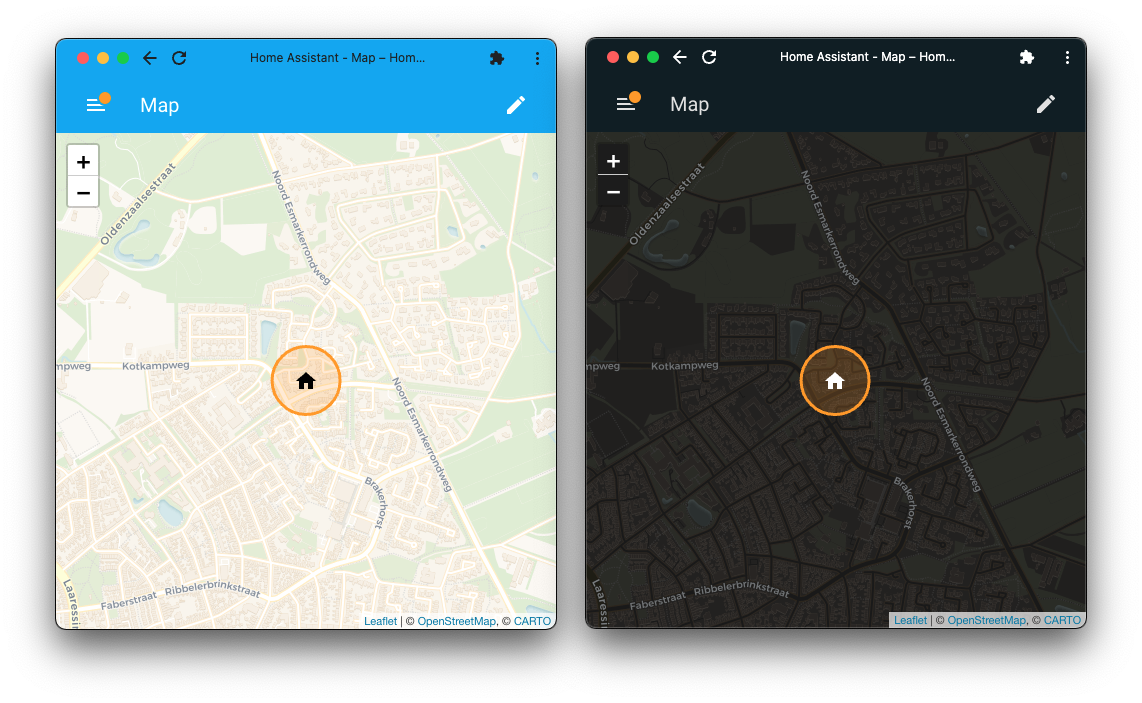
Thanks to @KTibow for getting the ball rolling on this one, @matthiasdebaat for providing UX feedback, and @bramkragten for making this change.
其他值得注意的变化
There is much more juice in this 发布; here are some of the other noteworthy changes this 发布:
- "Z-Wave JS" is now shown and known as "Z-Wave" in Home Assistant.
- The "System Health" setting menu item, has been moved to the "Repairs" 仪表盘, in the overflow menu (three dots in the top right).
- In the background, a project has been started to standardize the names of 实体 and 设备. This work is in progress and will take a long time to complete, as each possible 实体 has to be adjusted. But it will streamline experiences!
- You can now change the shown unit of measurement of number 实体 that provide a temperature. Thanks, @emontnemery!
- @frenck updated the events 开发者工具 to use YAML instead of JSON and added syntax highlighting.
- The LIFX 集成 got a significant overhaul, making it much more reliable. Thanks for the work on this in the past releases @bdraco and @Djelibeybi!
- The UniFi Network now has 更新 实体, allowing you to 更新 the firmware of UniFi 设备 directly from Home Assistant. Great addition @J3173!
- The Material Design Icons have been updated to v7.0.96, giving you 100 brand new icons to use 🤩 Thanks, @goyney!
- SwitchBot now supports Hygrometers (thanks @murtas) and door/contact 传感器 (thanks @bdraco)!
- @Noltari added 更新 实体 to the QNAP QSW 集成! Nice!
- @frenck added multifactor authentication support for Verisure. So now you can add more security to your Verisure 报警 system.
- HomeWizard Energy added support for Watermeters! Thanks, @DCSBL!
- Yolink now supports garage doors, nice @matrixd2!
- @simeon-simsoft for bidirectional Wallbox chargers, thank you!
- You can now view your current network connection details in the Network 设置 screen. Thanks, @zsarnett!
- Lutron Caséta now supports the Lutron RA3 Sunnata Keypads. Thanks, @danaues!
- @mkmer added a battery level 传感器 to Aladdin Connect, thank you!
- The Sensibo 集成 now supports the AirQ 传感器. Thanks, @gjohansson-ST!
新集成
We welcome the following new 集成 in this 发布:
- 蓝牙, added by @bdraco
- Govee 蓝牙, added by @bdraco
- Home Assistant Alerts, added by @emontnemery & @balloob
- INKBIRD, added by @bdraco
- Moat, added by @bdraco
- NextDNS, added by @bieniu
- Repairs, added by @emontnemery
- Rhasspy, added by @balloob
- SensorPush, added by @bdraco
- Xiaomi BLE, added by @Jc2k
现已可通过 UI 设置的集成
The following 集成 are now available via the Home Assistant UI:
- Anthem A/V Receivers, done by @Hyralex
- Bose SoundTouch, done by @kroimon
发布 2022.8.1 - August 4
- Fix zwave_js addon info (@MartinHjelmare - #76044) (hassio docs) (zwave_js docs)
- Bump bleak to 0.15.1 (@bdraco - #76136) (蓝牙 docs)
- Allow 温控 operation mode fan_only as custom mode in Alexa (@jbouwh - #76148) (alexa docs)
- Remove icon 属性 if 设备 class is set (@dgomes - #76161) ([集成 docs])
- Fix flux_led ignored entries not being respected (@bdraco - #76173) (flux_led docs)
- Fix race in 蓝牙 async_process_advertisements (@bdraco - #76176) (蓝牙 docs)
- Add repair item to remove no-longer-functioning Flu Near You 集成 (@bachya - #76177) (flunearyou docs) (deprecation)
- Fix arm away in Risco (@OnFreund - #76188) (risco docs)
- Fix nullable ip_address in mikrotik (@engrbm87 - #76197) (mikrotik docs)
- Mark RPI Power 二元sensor as diagnostic (@frenck - #76198) (rpi_power docs)
- BLE pairing reliablity fixes for HomeKit Controller (@bdraco - #76199) (homekit_controller docs) (dependency)
- Bump NextDNS library (@bieniu - #76207) (nextdns docs)
- Bump AIOAladdin Connect to 0.1.41 (@mkmer - #76217) (aladdin_connect docs) (dependency)
- Fix spelling of OpenWrt in luci 集成 manifest (@frenck - #76219) (luci docs)
- Fix Life360 recovery from server 错误 (@pnbruckner - #76231) (life360 docs)
- More explicitly call out special cases with SimpliSafe authorization code (@bachya - #76232) (simplisafe docs)
- Enable strict typing for HomeKit Controller config flow module (@Jc2k - #76233) (homekit_controller docs)
- Fix some homekit_controller pylint 警告 and (local only) test failures (@Jc2k - #76122) (homekit_controller docs)
发布 2022.8.2 - August 7
- 更新 gree to use the network component to set discovery interfaces (@Jc2k - #75812) (gree docs)
- Use stored philips_js system data on start (@elupus - #75981) (philips_js docs)
- Ensure 蓝牙 recovers if Dbus gets restarted (@bdraco - #76249) (蓝牙 docs)
- Fix default 传感器 names in NextDNS 集成 (@bieniu - #76264) (nextdns docs)
- Bump ZHA dependencies (@puddly - #76275) (zha docs)
- Bump pydeconz to v102 (@Kane610 - #76287) (deconz docs)
- Fix ZHA 灯光 color temp support (@dmulcahey - #76305) (zha docs)
- Bump pySwitchbot to 0.18.4 (@bdraco - #76322) (switchbot docs)
- Bump aiobafi6 to 0.7.2 to unblock #76328 (@jfroy - #76330) (baf docs)
- Postpone broadlink platform 开关 until config entry is ready (@elupus - #76371) (broadlink docs)
发布 2022.8.3 - August 9
- Add 调试 logging for unknown Notion 错误 (@bachya - #76395) (notion docs)
- Automatically enable common RainMachine restriction 实体 (@bachya - #76405) (rainmachine docs)
- Fix bug where RainMachine 实体 状态 don't populate on startup (@bachya - #76412) (rainmachine docs)
- Fix Govee 5185 Meat Thermometers with older firmware not being discovered (@bdraco - #76414) (govee_ble docs)
- Fix iCloud listeners (@epenet - #76437) (icloud docs)
- Bump 版本 of pyunifiprotect to 4.0.12 (@AngellusMortis - #76465) (unifiprotect docs)
- Bump aiohomekit to 1.2.6 (@bdraco - #76488) (homekit_controller docs)
- Fix inkbird ibbq2s that identify with xbbq (@bdraco - #76492) (inkbird docs)
- Bump govee-ble to 0.14.0 to fix H5052 传感器 (@bdraco - #76497) (govee_ble docs)
- Fix pairing with HK accessories that do not provide format for vendor chars (@bdraco - #76502) (homekit_controller docs)
- Fix #76283 (@ocalvo - #76531) (sms docs)
- Bump aiohomekit to 1.2.8 (@bdraco - #76532) (homekit_controller docs)
发布 2022.8.4 - August 12
- Bump ZHA dependencies (@puddly - #76565) (zha docs)
- Replaces aiohttp.hdrs CONTENT_TYPE with plain string for the Swisscom 集成 (@DeeVeX - #76568) (swisscom docs)
- Fix homekit_controller not noticing ip and port changes that zeroconf has found (@Jc2k - #76570) (homekit_controller docs)
- Fix Spotify deviding None value in current progress (@frenck - #76581) (spotify docs)
- Improve code quality in huawei_lte (@a-p-z - #76583) (huawei_lte docs)
- Fix Govee 5181 with old firmware (@bdraco - #76600) (govee_ble docs)
- Fix evohome preset modes (@MartinHjelmare - #76606) (evohome docs)
- Add missing _abort_if_unique_id_configured to ble 集成 (@bdraco - #76624) (govee_ble docs) (sensorpush docs) (inkbird docs) (xiaomi_ble docs) (moat docs)
- Fix non-awaited coroutine in BMW notify (@rikroe - #76664) (bmw_connected_drive docs)
发布 2022.8.5 - August 15
- 更新 systembridgeconnector to 3.4.4 (@timmo001 - #75362) (system_bridge docs)
- 🐛 Fix "The request content was malformed" 错误 in home_connect (@hansgoed - #76411) (home_connect docs)
- Bump pySwitchbot to 0.18.5 (@bdraco - #76640) (switchbot docs)
- Bump pySwitchbot to 0.18.6 to fix disconnect race (@bdraco - #76656) (switchbot docs)
- Bump pySwitchbot to 0.18.10 to handle empty data and disconnects (@bdraco - #76684) (switchbot docs)
- Fix google calendar disabled 实体 handling (@allenporter - #76699) (google docs)
- Motion Blinds fix OperationNotAllowed (@starkillerOG - #76712) (motion_blinds docs)
- 更新 xknx to 1.0.0 🎉 (@marvin-w - #76734) (knx docs)
- Bump aiohomekit to 1.2.10 (@bdraco - #76738) (homekit_controller docs)
- Fix bad data with inkbird bbq 传感器 (@bdraco - #76739) (inkbird docs)
- Bump bimmer_connected to 0.10.2 (@rikroe - #76751) (bmw_connected_drive docs)
- Bump aiohue to 4.5.0 (@marcelveldt - #76757) (hue docs)
- Fix stale data with SensorPush 传感器 (@bdraco - #76771) (sensorpush docs)
- Bump homeconnect to 0.7.2 (@BraveChicken1 - #76773) (home_connect docs)
- Bump aiohomekit to 1.2.11 (@bdraco - #76784) (homekit_controller docs)
- Fix 蓝牙 callback registration not surviving a 重载 (@bdraco - #76817) (蓝牙 docs)
- Correct referenced 实体 and 设备 for event 触发器 (@emontnemery - #76818) (自动化 docs)
- Fix lifx homekit discoveries not being ignorable or updating the IP (@bdraco - #76825) (lifx docs)
发布 2022.8.6 - August 17
- Fix displayed units for BMW Connected Drive (@rikroe - #76613) (bmw_connected_drive docs)
- Fix Overkiz startup order to prevent unnamed 设备 showing up (@iMicknl - #76695) (overkiz docs)
- Bump pynetgear to 0.10.7 (@starkillerOG - #76754) (netgear docs)
- Correct restoring of mobile_app 传感器 (@emontnemery - #76886) (mobile_app docs)
- Fix acmeda set 遮盖 tilt position (@epenet - #76927) (acmeda docs)
- Fix race in notify 设置 (@bdraco - #76954) (notify docs)
- Pass the real config for Discord (@tkdrob - #76959) (discord docs)
- Pass the real config for Slack (@tkdrob - #76960) (slack docs)
发布 2022.8.7 - August 25
- Add edl21 传感器 unit mapping for Hz (@StephanU - #76783) (edl21 docs)
- Change growatt server URL (@coffeedave - #76824) (growatt_server docs)
- Bump pySwitchbot to 0.18.12 (@bdraco - #77040) (switchbot docs)
- Bump pySwitchbot to 0.18.14 (@bdraco - #77090) (switchbot docs)
- Protect against an exception in Shelly 温控 platform (@bieniu - #77102) (shelly docs)
- Bump ZHA dependencies (@puddly - #77125) (zha docs)
- Minor deCONZ clean up (@Kane610 - #76323) (deconz docs)
- Fix level controllable output controls in deCONZ (@Kane610 - #77223) (deconz docs)
- Fix Aladdin connect multiple doors on one 设备 (@mkmer - #77226) (aladdin_connect docs)
- Fix met_eireann default wind speed unit (@donoghdb - #77229) (met_eireann docs)
- 更新 xknx to 1.0.1 (@farmio - #77244) (knx docs)
- Fix grid_export_limit unit for DT inverters (@mletenay - #77290) (goodwe docs)
- Add BLE 传感器 to Aladdin_connect (@mkmer - #76221) (aladdin_connect docs)
需要帮助吗?加入社区!
Home Assistant 拥有一个很棒的用户社区,大家都非常乐于互相帮助。 所以,欢迎加入我们!
我们非常活跃的 Discord 聊天服务器 是交流的绝佳去处, 也别忘了加入我们精彩的论坛。
发现 bug 或问题了吗?请在我们的 问题追踪器 中提交反馈,帮助我们修复它!或者查看帮助页面, 了解更多可获取帮助的地方。
你更喜欢邮件吗?欢迎订阅我们的 Building the Open Home Newsletter, 把最新功能、社区动态以及更多关于构建开放家庭的消息, 直接发送到你的收件箱。
向后不兼容的变更
Below is a listing of the breaking change for this 发布, per subject or 集成. Click on one of those to read more about the breaking change for that specific item.
Each AC will have its own 设备, different from the one previously 创建. Any 自动化 or 脚本 that target the 设备 will need to be corrected.
The previsouly deprecated 服务 advantage_air.set_myzone has been removed.
Use the available MyZone select 实体 instead.
Calendar description 属性 are no longer written into the recorder database.
(@allenporter - #75375) (文档)
The single HERE Travel Time 传感器 with 属性 is split up into separate 传感器 for Duration, Duration in Traffic, Route, Distance, Origin, Destination.
If you used the 实体 属性 in your 自动化 or 脚本, you will need to adapt them to this change.
The ecobee 风扇 mode number 实体 has been removed as HomeKit Controller now implements 风扇 mode on the 温控 实体 which replaces this functionality.
Each LIFX 设备 now has its own 集成 entry. The existing entry will be migrated to separate entries automatically as each 设备 is discovered, and will automatically be removed once all 设备 are found.
Migrating to an 集成 entry per 设备 allows Home Assistant to take care of discovery IP updates and retries, dramatically improving the 集成's reliability.
LIFX can now be configured manually by IP address. DHCP, HomeKit, and native discovery are supported for updating IP addresses to ensure we never lose track of a 设备.
Advanced YAML 配置 is deprecated and will be removed in a future 发布. Advanced YAML 配置 is no longer necessary as the integrations now fully utilizes Network 配置, and can also function without working discovery.
Timestamps in the Home Assistant 日志 file now include millisecond-level resolution.
脚本 or external 日志 system that rely on this will need to be updated to handle the extra decimal places.
In the latest Material Design Icons 更新, several icons have been renamed or removed. Removed and renamed icons will continue to work for the next two releases.
Please make sure you 更新 any use of the following MDI icons:
Removed:
mdi:android-messages- Usemdi:message-textinstead.mdi:book-variant-multiple- Usemdi:bookmark-box-multipleinstead.mdi:desktop-mac- Usemdi:monitorinstead.mdi:desktop-mac-dashboard- Usemdi:monitor-dashboardinstead.mdi:discordmdi:google-hometablet-android- Usemdi:tabletinstead.
Renamed:
mdi:diving-scubatomdi:diving-scuba-maskmdi:email-sendtomdi:email-arrow-rightmdi:email-send-outlinetomdi:email-arrow-right-outlinemdi:email-receivetomdi:email-arrow-leftmdi:email-receive-outlinetomdi:email-arrow-left-outlinemdi:format-textdirection-r-to-ltomdi:format-pilcrow-arrow-leftmdi:format-textdirection-l-to-rtomdi:format-pilcrow-arrow-rightmdi:globe-lighttomdi:globe-light-outlinemdi:google-controllertomdi:controllermdi:google-controller-offtomdi:controller-offmdi:lecturntomdi:lecternmdi:mosquetomdi:mosque-outlinemdi:receipttomdi:receipt-textmdi:receipt-outlinetomdi:receipt-text-outlinemdi:silotomdi:silo-outlinemdi:text-to-speechtomdi:microphone-messagemdi:text-to-speech-offtomdi:microphone-message-offmdi:timeline-helptomdi:timeline-questionmdi:timeline-help-outlinetomdi:timeline-question-outlinemdi:vector-pointtomdi:vector-point-select
The previously deprecated sonos.join and sonos.unjoin 服务 have been
removed in favor of the standard media_player.join and media_player.unjoin
服务.
The 蓝牙 integrations must be enabled before switchbot can be used. 蓝牙 is automatically discovered in most cases, but can be manually added from the integrations page if it is not.
The Time between updates (seconds) and How long to scan for advertisement data
options have been removed as they are no longer needed since the 集成
is now push instead of polling.
Carbon Monoxide 二元sensor have changed their 设备 class from
gas to co.
(@EnochPrime - #75649) (文档)
If you are a custom 集成 developer and want to learn about breaking changes and new features available for your 集成: Be sure to follow our developer 博客. The following are the most notable for this 发布:
告别以下内容
The following 集成 are also no longer available as of this 发布:
- XBee
- SoChain
- Google Play Music Desktop Player (GPMDP)
All three were previously disabled due to incompatibilities and have now been removed.
所有变更
Of course, there is a lot more in this 发布. You can find a list of all changes made here: Full changelog for Home Assistant 核心 2022.8