

2022.7:惊艳的性能表现
Home Assistant 核心 2022.7 来了!☀️
这个月既忙碌又令人兴奋!如果你错过了,我们举办了一个 Matter in Home Assistant workshop,以及一场关于将音频带入 Open Home 的 Let's get loud! 活动。 如果你还没看过,真的很值得补一下录像。
与此同时,我们也在为即将到来的 Matter 做准备,当然还有很快就会发布的 Home Assistant Yellow!💛 更多消息很快就会公布™。
这次发布绝对体现了我们一直在强调的 “streamlining experiences” 理念。 本次发布中的性能提升依旧惊艳!除此之外,也还有一些很棒的新功能值得探索。
这次发布的内容搭配得恰到好处!我相信你一定能在其中找到自己喜欢的东西。 那么闲话少说:祝你享受这次发布!
../Frenck
- 更好的稳定性与性能,以及 Python 3.10
- 直接从 Home Assistant 更新 Z-Wave 设备
- 关于页面现在也变漂亮了!
- 按照你的喜好更改天气单位
- 仪表卡片分段可显示标签而不是数值
- 代码编辑器现在会自动补全 MDI 图标
- 筛选历史面板
- 在模板中轻松将值转换为布尔值
- 其他值得注意的变化
- 新集成
- 现在可通过 UI 设置的集成
- 发布 2022.7.1 - July 7
- 发布 2022.7.2 - July 8
- 发布 2022.7.3 - July 10
- 发布 2022.7.4 - July 13
- 发布 2022.7.5 - July 14
- 发布 2022.7.6 - July 20
- 发布 2022.7.7 - July 26
- Need help? Join the community!
- Backward-incompatible changes
- Farewell to the following
- All changes
别忘了今天在 12:00 PDT / 21:00 CET 加入我们在 YouTube 上的发布派对直播!
更好的稳定性与性能,以及 Python 3.10
The quest to improve the performance of Home Assistant continues. For many releases, @bdraco has been analyzing every single aspect of Home Assistant and manages to make it faster every single 发布.
Usually, we have a section at the end of our 发布 notes informing you about the performance improvements made. The improvements in this 发布, however, are a big deal.
Our YAML & JSON tooling improved, using faster libraries and methods. JSON is used internally and for communication with the 前端, which is A LOT snappier now. If you use lots of YAML, you will undoubtedly notice this when starting Home Assistant or reloading things like your 自动化 🚀.
设备 with an 集成 错误 during startup that can self-recover will now do that instantly as soon as the 设备 is discovered.
We now use a better and faster encryption method for the HomeKit Accessory Protocol (HAP). It improves the performance of the HomeKit, HomeKit Controller, and Apple TV 集成 and prepares Home Assistant for iOS 16.
Lastly, @pvizeli has been working hard to ship Home Assistant on Python 3.10! Which also brings quite a performance improvement. If you run the Home Assistant Operating System or use our 容器 安装 method, you will automatically get this; there is no need to do anything. 🚀
直接从 Home Assistant 更新 Z-Wave 设备
All software has bugs, including the software on your Z-Wave 设备. But how to 更新 those? Have no fear! As of today, we have a solution for this!
Thanks to the hard work and collaboration between @AlCalzone from Z-Wave JS and @raman325 from Home Assistant, you can now 安装 updates on your Z-Wave 设备 directly from the Home Assistant interface!
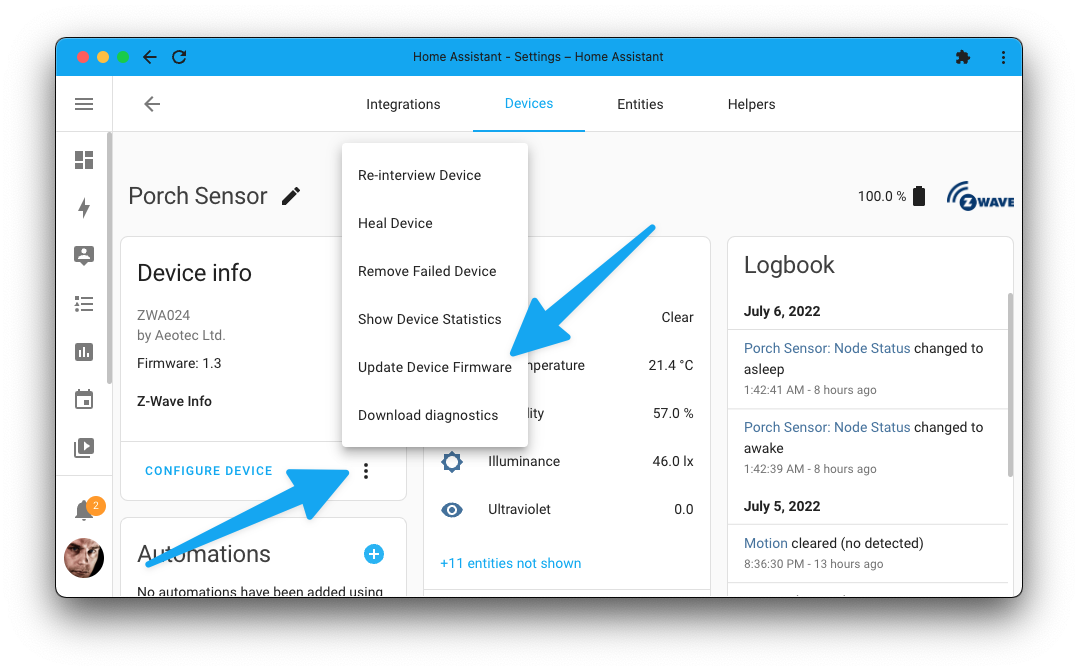
On the 设备 page of your Z-Wave 设备, there is now a menu item allowing you to 安装 Z-Wave firmware updates onto your 设备 manually.
Get a software 更新 for your Z-Wave 设备 from the manufacturer, and start an 更新 in Home Assistant, which allows you to upload the 更新 file you got from the manufacturer. The rest is pure magic!
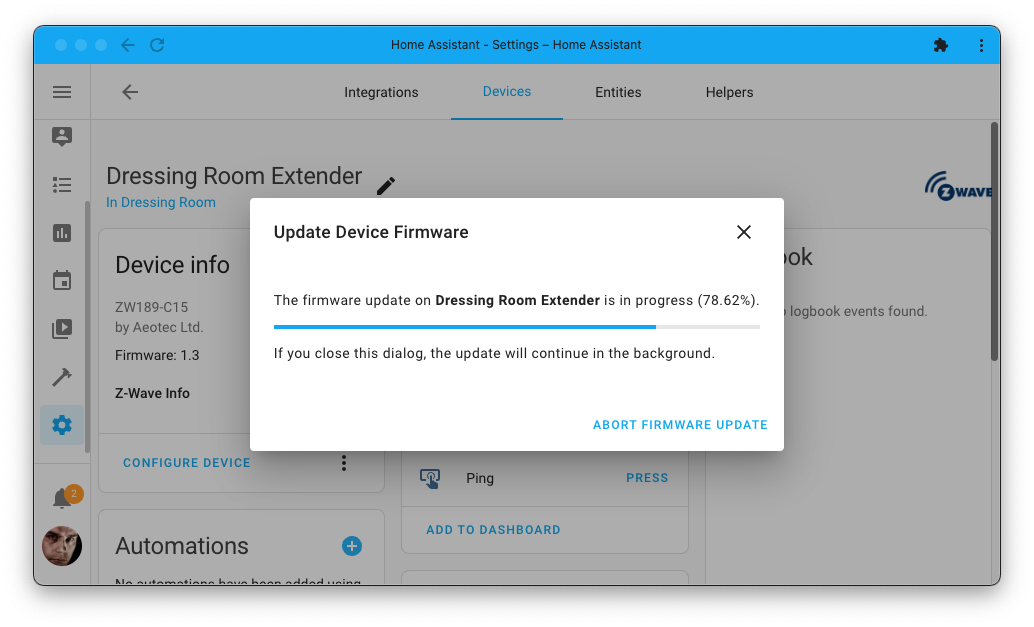
During 更新 安装, you'll be presented with the 更新's progress.
It is that easy 💪
关于页面现在也变漂亮了!
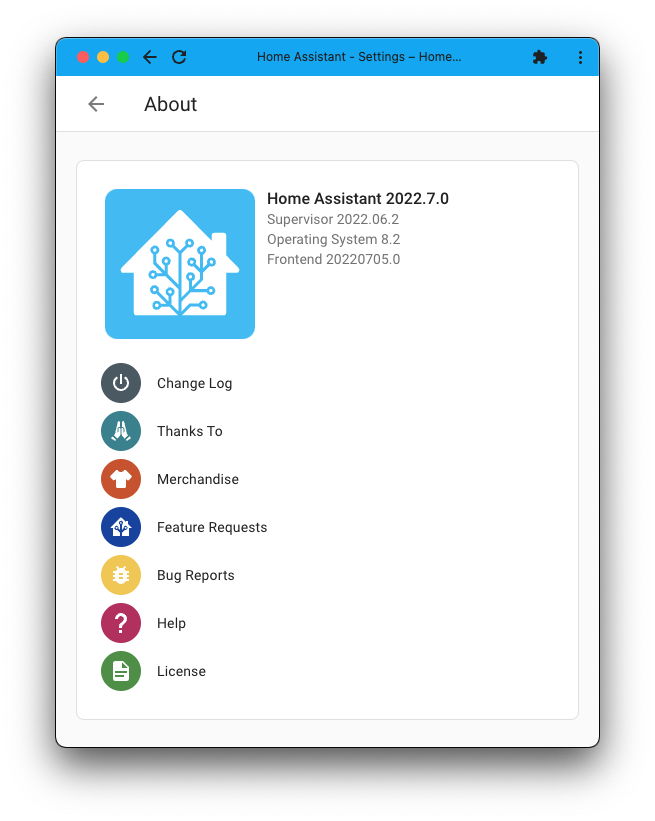
Have you ever looked at the about page in the Home Assistant 设置 menu?
It was probably one of the least visually appealing pages still in our menus, and @zsarnett seemed to agree. He made it a lot more cleaner and functional.
It now clearly shows the versions of the different components your instance is made up of, and provides a clean menu to all kinds of Home Assistant related links.
按照你的喜好更改天气单位
Home Assistant has many weather 服务 that can be integrated; it is great to have a choice! The differences between those are often their accuracy for your region and the units of measurement used for the different weather data points.
But what if you'd like the barometric pressure unit to be in mbar instead of hPa? Or maybe use m/s or knots instead of km/h for wind speed? No problem!
You can now change the units each weather 实体 uses! Not just temperature, but for all of the values a weather 实体 provides. When changing a unit, Home Assistant will take care of converting the values for you.
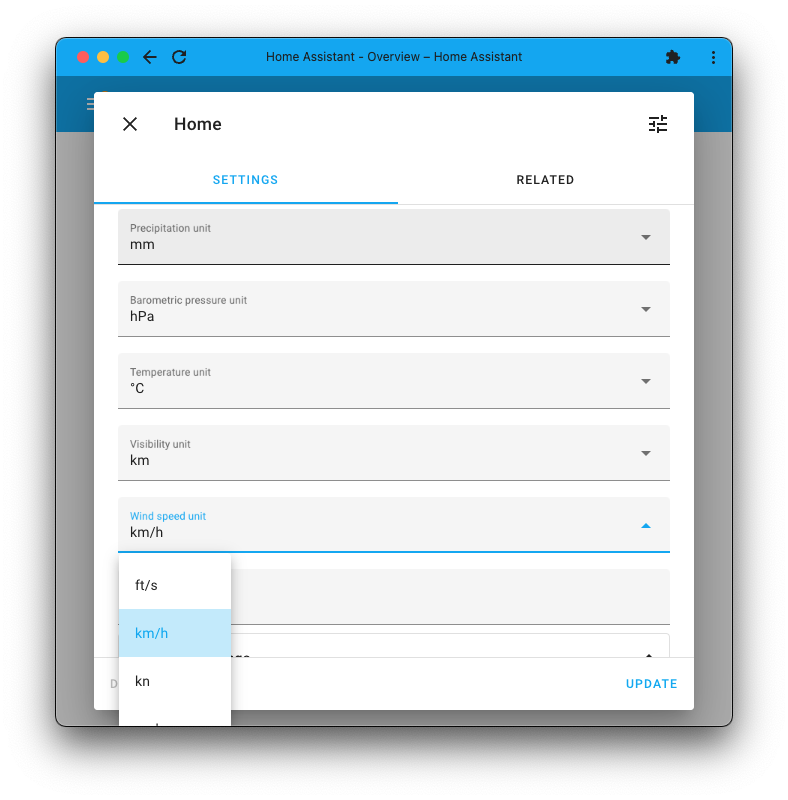
On a similar note, number 实体 that represent a temperature are now converted to the temperature unit used by the configured unit system.
Thanks @emontnemery and @gjohansson-ST for adding this and updating all existing weather 集成 to support this 👍.
仪表卡片分段可显示标签而不是数值
When displaying an 实体 gauge 卡片 on your 仪表盘, it would show the gauge with the 传感器 value. For example, if you'd use a humidity 传感器, it shows the humidity percentage in the middle of the gauge.
In the 2022.5 发布, we added segment support to our gauge 卡片. In this 发布, @kristjanbjarni added label support to those segments!
This means that if your segment has a label, the gauge 卡片 will show that label instead of the 传感器 value when it is in that range.
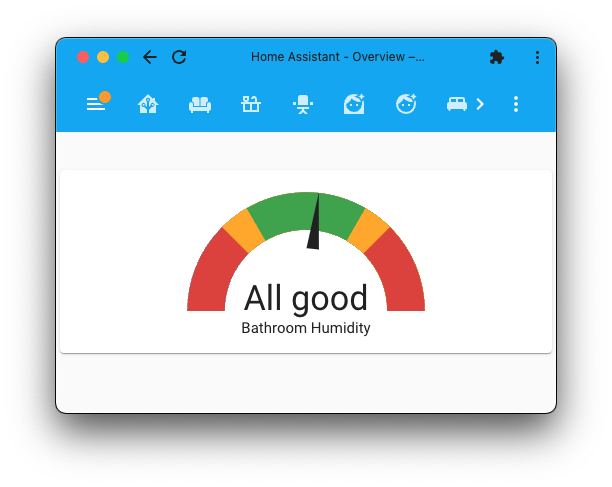
更多信息请查看我们的 仪表卡片文档。
代码编辑器现在会自动补全 MDI 图标
All of our code editors in the 前端 now have auto-completions for
MDI icons. Just start typing mdi: and it will help you find the exact icon
you need.
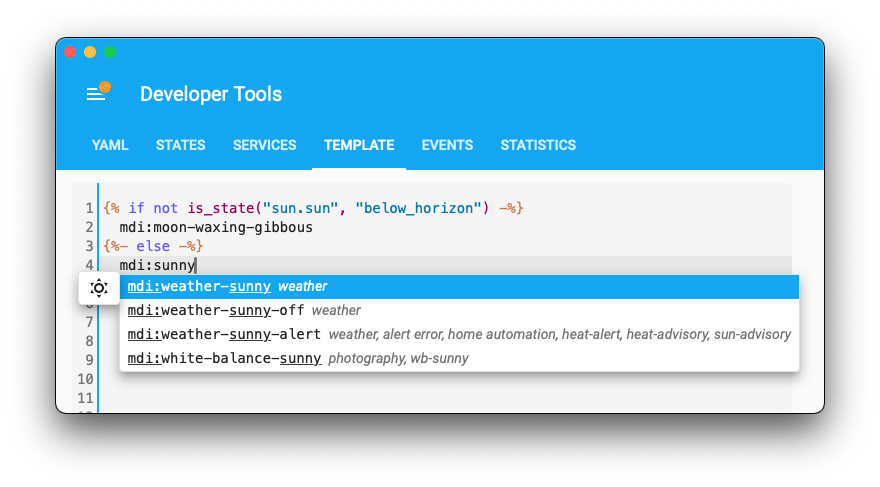
Like the normal icon picker, it supports searching on parts of the icon name, its aliases and categories. Additionally, it will show a little preview of the icon you are about to select, so you know you got the right one.
Thank you @bramkragten, this is a really nice addition!
筛选历史面板
If you have lots of 设备 and 实体 then the history 面板 can be long! Actually, it would become so large, that it becomes unpractical. You could always filter it down to a single 实体, but that is fairly limited as well. For this 发布, @D3v01dZA improved these filters.
The history can now be filtered by one or more 实体, by all 实体 of one or more areas, or by all 实体 of one or more 设备.
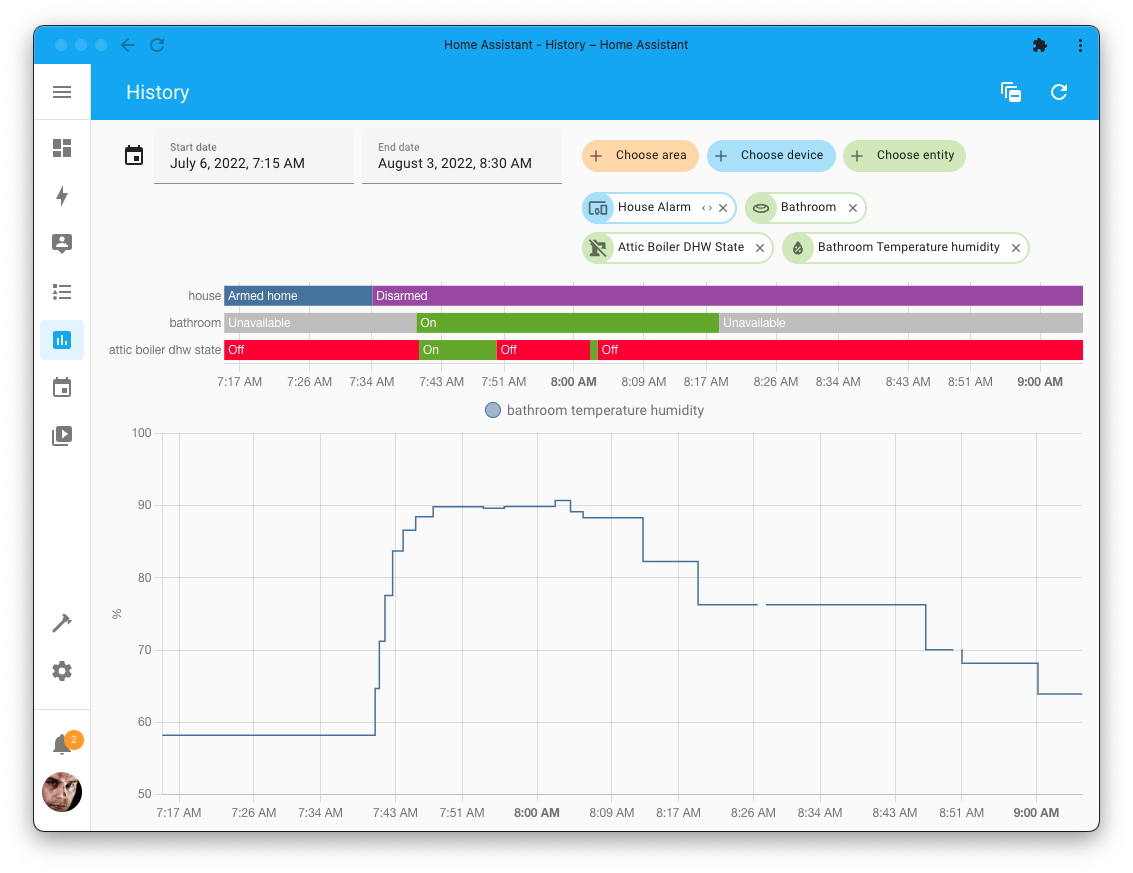
This is super helpful, as you can now view the history of all 实体 in, for example, your living room area quick and easy.
在模板中轻松将值转换为布尔值
If you are into templates, @pyos has a surprise for you: We now have a bool
function that can be used as a filter too!
If you are a bit into coding, this is not the standard bool(), but one that
is very specific for Home Assistant, making it very useful.
This bool method converts a value into a boolean and considers
Home Assistant's specific rules for truthy values. Some examples: "on" will
be considered true, and "disabled" will be considered false.
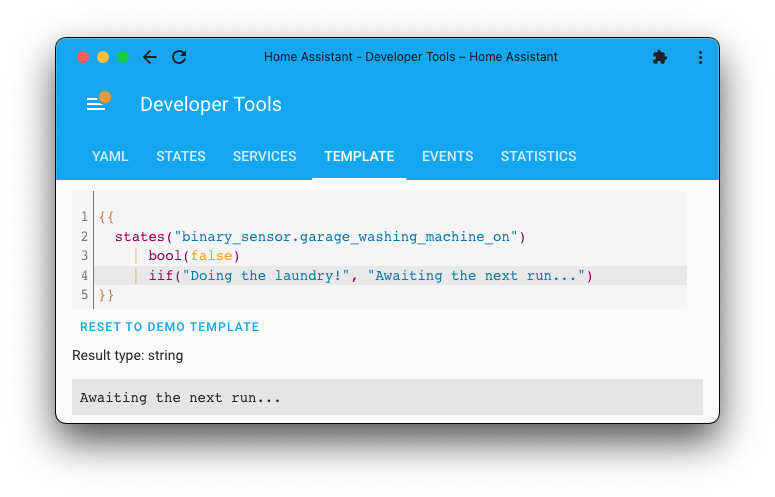
Using bool as a filter and combined with and iif
filter, you can quickly change, for example, 二元sensor values into any
text you'd like.
更多信息请查看我们的 模板文档。
其他值得注意的变化
There is much more juice in this 发布; here are some of the other noteworthy changes this 发布:
- The Material Design Icons have been updated to v6.9.96, giving you 100 and another 100 brand new icons to use 🤩 .
- You can now control the loudness and various additional surround-related 设置 of your Sonos speakers, thanks @jjlawren! 🔊
- You can now 触发器 Alexa routines from 开关, toggles, and buttons without the need to wrap them into a binary template 传感器 first. Fantastic addition, @mdegat01!
- The logbook live feeds will now automatically pause when you start scrolling and resume when you are back at the top again. Thanks, @bdraco!
- @matrixd2 extended YoLink; It now supports thermostats, valve controllers, 门锁, and vibration, CO, and Smoke 传感器!
- Jellyfin now supports movie collections in the media browser, thanks @j-stienstra!
- Thanks to @dmulcahey, the widely discussed Aqara FP1 传感器 is now supported by ZHA!
- @ghedo has been busy improving the Area 卡片. It can now show moisture/flood alerts, humidity, and shows an icon for temperature. Nice!
- @kingy444 added support for Top/Down, Bottom/Up to Hunter Douglas PowerView. Additionally, buttons to calibrate and jog (identify) have been added. @bdraco added support for polling in case the 设备 is mains powered.
- Thanks to @thrawnarn, you can now send polls via Telegram bot!
- The Home Connect 集成 now has whole collection of new 服务 that can be used to control and 配置 options of 设备 programs. Really nice, @BraveChicken1!
- If you have WiZ power plugs with power monitoring, these are now supported, thanks to @bdraco ⚡️.
- @gjohansson-ST added lots of love to Sensibo this 发布. Support for (split) timers, Pure Boost, improvements to setting temperature, bug fixes, and many more. Nice work!
- @iAutom8 made his first-time-ever 开源 contribution ❤️; And added support for additional temperature 传感器 in ViCare.
新集成
This 发布 does not include new 集成.
现在可通过 UI 设置的集成
The following 集成 are now available via the Home Assistant UI:
- Eight Sleep, done by @raman325
- Radio Thermostat, done by @bdraco
- Simplepush, done by @engrbm87
- SkyBell, done by @tkdrob
发布 2022.7.1 - July 7
- Bump deCONZ dependency to v96 (@Kane610 - #74460) (deconz docs)
- Bump satel_integra to 0.3.7 to fix compat with python 3.10 (@c-soft - #74543) (satel_integra docs)
- fjaraskupan: Make sure we stop bleak on Home Assistant stop (@elupus - #74545) (fjaraskupan docs)
- Minimize Sonos
media_player.unjointimeout (@jjlawren - #74549) (sonos docs) - Bump aioskybell to 22.7.0 (@tkdrob - #74559) (skybell docs)
- Bump pyenvisalink 版本 to 4.6 (@ufodone - #74561) (envisalink docs)
- ElkM1 bump lib to support Python 3.10 SSL (@gwww - #74569) (elkm1 docs)
- Fix openweathermap hourly forecast (@emontnemery - #74578) (openweathermap docs)
- Fix mix of aiohttp and requests in Bloomsky (@frenck - #74598) (bloomsky docs)
- 更新 aiokafka to 0.7.2 (@frenck - #74601) (apache_kafka docs)
- Poll cast groups when media player is added or reconnected (@emontnemery - #74610) (cast docs)
- Ikea Starkvind support all models (@arnemauer - #74615) (zha docs)
- 更新 前端 to 20220707.0 (@bramkragten - #74625) (前端 docs)
- Fix mix of aiohttp and requests in ZAMG (@frenck - #74628) (zamg docs)
- Fix smart energy polling for Tuya plugs (@TheJulianJES - #74640) (zha docs)
- Fix exception in doorbird logbook during startup (@bdraco - #74649) (doorbird docs)
- 更新 kaiterra-async-client to 1.0.0 (@Michsior14 - #74677) (kaiterra docs)
发布 2022.7.2 - July 8
- Add missing strings for here_travel_time (@eifinger - #74641) (here_travel_time docs)
- Add ssh-rsa as acceptable an host key algorithm (@siyuan-nz - #74684) (unifi_direct docs)
- Fix ZHA group not setting the correct color mode (@TheJulianJES - #74687) (zha docs)
- Bump deconz dependency to fix #74523 (@Kane610 - #74710) (deconz docs)
- Bump atomicwrites (@balloob - #74758)
- Bump regenmaschine to 2022.07.0 (@bachya - #74680) (rainmachine docs)
- Fix 错误 with HDD temperature report in Freebox 集成 (@BenoitAnastay - #74718) (freebox docs)
发布 2022.7.3 - July 10
- Fix Vicare One Time Charge (@oischinger - #74872) (vicare docs)
- Fix KeyError from zwave_js diagnostics (@kpine - #74579) (zwave_js docs)
- 更新 systembridgeconnector to 3.3.2 (@timmo001 - #74701) (system_bridge docs)
air_qualityandfilter_lifefixes for Pur131S (@jetpacktuxedo - #74740) (vesync docs)- 更新 pyCEC to 版本 0.5.2 (@inytar - #74742) (hdmi_cec docs)
- Bump pyezviz to 0.2.0.9 (@regevbr - #74755) (ezviz docs)
- 更新 aioqsw to v0.1.1 (@Noltari - #74784) (qnap_qsw docs)
- Bump python-gammu to 3.2.4 with Python 3.10 support (@PaulAnnekov - #74797) (sms docs)
- Bump deCONZ dependency to fix #74791 (@Kane610 - #74804) (deconz docs)
- Bump regenmaschine to 2022.07.1 (@bachya - #74815) (rainmachine docs)
- Fixed unit of measurement. #70121 (@StephanU - #74838) (edl21 docs)
- Bump rokuecp to 0.17.0 (@ctalkington - #74862) (roku docs)
- Bump pymazda to 0.3.6 (@bdr99 - #74863) (mazda docs)
- Fix Vicare One Time Charge (@oischinger - #74872) (vicare docs)
- Bump pysml to 0.0.8 (fixes #74382) (@DavidMStraub - #74875) (edl21 docs)
- Bump afsapi to 0.2.5 (@wlcrs - #74907) (frontier_silicon docs)
发布 2022.7.4 - July 13
- Migrate ecobee to native_* (@emontnemery - #74043) (ecobee docs)
- Migrate homematicip_cloud to native_* (@emontnemery - #74385) (homematicip_cloud docs)
- 更新 pyialarm to 2.2.0 (@RyuzakiKK - #74874) (ialarm docs)
- Correctly handle 设备 触发器 for missing ZHA 设备 (@Adminiuga - #74894) (zha docs)
- Remove pip --prefix workaround (@henryptung - #74922)
- Fix Pyload request content type headers (@iMarkus - #74957) (pyload docs)
- JSON serialize NamedTuple subclasses with aiohttp (@bdraco - #74971)
- Fix mix of aiohttp and requests in ClickSend TTS (@frenck - #74985) (clicksend_tts docs)
- Do not spam 日志 when Life360 member location is missing (@pnbruckner - #75029) (life360 docs)
- 升级 huawei-lte-api to 1.6.1 (@scop - #75030) (huawei_lte docs)
- Fix Ruckus Unleashed SSH connection failures (@gabe565 - #75032) (ruckus_unleashed docs)
- Bump afsapi to 0.2.6 (@wlcrs - #75041) (frontier_silicon docs)
- Bump homematicip to 1.0.4 (@hahn-th - #75053) (homematicip_cloud docs)
- Bump AIOAladdinConnect to 0.1.23 (@mkmer - #75065) (aladdin_connect docs)
- Fix Insteon thermostat issues (@teharris1 - #75079) (insteon docs)
- Fix missing ordered 状态 in universal media player (@Drafteed - #75099) (universal docs)
- Make sure 设备 tuple is a list on save (@elupus - #75103) (rfxtrx docs)
- Fix Powerview top shade open position (@kingy444 - #75110) (hunterdouglas_powerview docs)
- Bump ZHA dependencies (@puddly - #75133) (zha docs)
- Ensure SimpliSafe diagnostics redact the
codeoption (@bachya - #75137) (simplisafe docs) - Block bad pubnub 版本 (@balloob - #75138)
发布 2022.7.5 - July 14
- Address Blebox uniapi review sidenotes (@riokuu - #74298) (blebox docs)
- Fix Alexa: Only 触发器 doorbell event on actual 状态 change to "ON" (@Tho85 - #74924) (alexa docs)
- Fix Blebox 灯光 场景 (@riokuu - #75106) (blebox docs)
- Fix playback of hls 摄像头 in stream (@uvjustin - #75166) (stream docs)
- Bump 版本 of pyunifiprotect to 4.0.10 (@AngellusMortis - #75180) (unifiprotect docs)
- Bumped AIOAladdin Connect to 0.1.24 (@mkmer - #75182) (aladdin_connect docs)
- Bump zigpy from 0.47.2 to 0.47.3 (@puddly - #75194) (zha docs)
- Skip
iso4217版本 1.10, which includes a broken__init__.pyifile (@puddly - #75200) - Fix Hive power unit of measurement (@KJonline - #75210) (hive docs)
- Bump 前端 to 20220707.1 (@zsarnett - #75232) (前端 docs)
- Bump AIOAladdinConnect to 0.1.25 (@mkmer - #75235) (aladdin_connect docs)
- Bump pylitterbot to 2022.7.0 (@natekspencer - #75241) (litterrobot docs)
- Remove nest mac prefix that matches cast 设备 (@allenporter - #75108) (nest docs)
发布 2022.7.6 - July 20
- Fix ZHA 灯光 打开 issues (@dmulcahey - #75220) (zha docs)
- Fix aruba ssh host key algorithm (@apaperclip - #75224) (aruba docs)
- Force
_attr_native_valueto metric in bmw_connected_drive (@rikroe - #75225) (bmw_connected_drive docs) - Bump venstarcolortouch to 0.18 (@craftyguy - #75237) (venstar docs) (dependency)
- Improve UniFi Protect unauth handling (@AngellusMortis - #75269) (unifiprotect docs)
- 更新 pyotgw to 2.0.0 (@mvn23 - #75285) (opentherm_gw docs) (dependency)
- Add fixes for hive 灯光 (@KJonline - #75286) (hive docs)
- Bump bimmer_connected to 0.10.1 (@rikroe - #75287) (bmw_connected_drive docs) (dependency)
- Bump simplisafe-python to 2022.07.0 (@bachya - #75294) (simplisafe docs) (dependency)
- 升级 ness_alarm dependencies (@nickw444 - #75298) (ness_alarm docs)
- Use the orjson equivalent default encoder when save_json is passed the default encoder (@bdraco - #74377)
- Use default encoder when saving storage (@bdraco - #75319)
- Apply filter to libav.hls logging namespace (@uvjustin - #75330) (stream docs)
- Handle (and better 日志) more AirVisual cloud API 错误 (@bachya - #75332) (airvisual docs)
- Fix HKC 设备 触发器 (@bdraco - #75371) (homekit_controller docs)
- Bump AIOAladdinConnect to 0.1.27 (@mkmer - #75400) (aladdin_connect docs) (dependency)
- Bump pytomorrowio to 0.3.4 (@raman325 - #75478) (tomorrowio docs) (dependency)
- Bump pySwitchbot to 0.14.1 (@pascalwinters - #75487) (switchbot docs) (dependency)
- Fix Netgear 更新 实体 (@starkillerOG - #75496) (netgear docs)
- Fix - Forcast.solar issue on saving 设置 in options flow without api key (@klaasnicolaas - #75504) (forecast_solar docs)
- Fix failure to raise on bad YAML syntax from include files (@bdraco - #75510)
- Fix incorrect Ambient PWS lightning strike 传感器 状态 classes (@bachya - #75520) (ambient_station docs)
- Bump aioshelly to 2.0.1 (@thecode - #75523) (shelly docs) (dependency)
发布 2022.7.7 - July 26
- Fix hvv departures authentication (@vigonotion - #75146) (hvv_departures docs)
- Fix Epson wrong volume value (@pszafer - #75264) (epson docs)
- Change monoprice config flow to sync (@OnFreund - #75306) (monoprice docs)
- Round up for stream record lookback (@uvjustin - #75580) (stream docs)
- Revert SimpliSafe auth flow to the quasi-manual OAuth method from 2021.11.0 (@bachya - #75641) (simplisafe docs)
- 更新 pyotgw to 2.0.1 (@mvn23 - #75663) (opentherm_gw docs) (dependency)
- Fix AssertionError in RainMachine (@bachya - #75668) (rainmachine docs)
需要帮助?加入社区!
Home Assistant has a great community of users who are all more than willing to help each other out. So, join us!
Our very active Discord chat server is an excellent place to be at, and don't forget to join our amazing forums.
Found a bug or issue? Please report it in our issue tracker, to get it fixed! Or, check our help page for guidance for more places you can go.
Are you more into email? Sign-up for our Building the Open Home Newsletter to get the latest news about features, things happening in our community and other news about building an Open Home; straight into your inbox.
Backward-incompatible changes
以下列出了本次发布中的破坏性变更,按主题或集成分类。 点击任一条目即可查看该项变更的详细说明。
Home Assistant now ships with Python 3.10 for the following 安装 methods:
- Home Assistant Operating System
- Home Assistant 容器
- Home Assistant 受监管模式
You don't have to do anything; this will all happen automatically. However, this might be a breaking change in case you are using custom 集成 that does not support Python 3.10 yet.
Home Assistant is upgrading to Python 3.10 this 发布 and comes with a breaking change affecting multiple 集成.
Known affected 集成 at the time of writing:
- BeeWi SmartClim BLE 传感器
- 蓝牙 Tracker
- Elgato Avea
- EQ3 蓝牙 Smart Thermostats
- Leviton Decora
- Mi Flora
- Switchmate SimplySmart Home
- Zengge
These 集成 rely on the bluepy and pybluez libraries, which no longer
work in newer versions of Python. bluepy has seen its last 更新 in
December 2018 and hasn't
kept up with changes in the Python world.
Similar story with pybluez.
We can't mitigate this issue. If you are using one of these 集成, these will no longer work. We rather wanted to see a non-breaking solution, but we saw no backward compatible path or other solutions to aid this.
If you would like to help fix or 升级 one of these 集成, we would be grateful. We recommend migrating these 集成 onto the Bleak library instead.
All 实体 filters, as used by the following 集成:
Have been adjusted to make 实体 filters handle includes stronger than excludes.
Filters are now applied as follows when there are domain and glob includes (may also have excludes):
- 实体 listed in 实体 include: include
- Otherwise, 实体 listed in 实体 exclude: exclude
- Otherwise, 实体 matches glob include: include
- Otherwise, 实体 matches glob exclude: exclude
- Otherwise, 实体 matches domain include: include
- Otherwise: exclude
This applies to all (weather) 集成 providing weather 实体.
Previously the units for Weather had not been corresponding correctly with the 文档. These units are now aligned for pressure and wind speed:
- If the unit system is metric, the default pressure unit is
hPa, and the default wind speed unit iskm/h. - If the unit system is imperial, the default pressure unit is
inHg, and the default wind speed unit ismi/h.
(@gjohansson-ST - #73707) (文档)
The Eight Sleep 集成 migrated to 配置 via the UI. Configuring Eight Sleep via YAML 配置 has been deprecated and will be removed in a future Home Assistant 发布.
Your existing YAML 配置 is automatically imported on 升级 to this 发布; and thus can be safely removed from your YAML 配置 after upgrading.
The previously deprecated YAML 配置 of the Glances 集成 has been removed.
Glances is now configured via the UI, any existing YAML 配置 has been imported in previous releases and can now be safely removed from your YAML 配置 files.
The Google Calendar google.scan_for_calendars 服务 has been removed.
Similar functionality can be achieved with the
homeassistant.reload_config_entry 服务, which will 重载 the
集成 and load all new calendars from the API.
(@allenporter - #73010) (文档)
The Google Calendar add_event 服务 is deprecated and will be removed in
a future Home Assistant 发布.
A new 服务 create_event with equivalent functionality is its replacement,
which is an 实体-based 服务 that takes an 实体 as a target
(rather than a Google Calendar ID).
(@allenporter - #72473) (文档)
Google Calendars no longer supports 实体 customizations in the UI
when google_calendars.yaml specifies the same 实体 multiple times.
(@allenporter - #73715) (文档)
Top Down/Bottom Up shades will now have an 实体 to control each motor. You will need to manually remove any old 实体 by selecting the unavailable 实体 from the Home Assistant Interface, selecting "REMOVE 实体", and then confirming the removal by clicking "REMOVE".
- If you have 自动化 to set shade position based on 实体 ID, you will need to reconfigure these as the new 实体 will be named differently.
- If you only have 自动化 set to 触发器 场景 you do not need to reconfigure 自动化.
The previously deprecated YAML 配置 of the Islamic Prayer Times 集成 has been removed.
Islamic Prayer Times is now configured via the UI, any existing YAML 配置 has been imported in previous releases and can now be safely removed from your YAML 配置 files.
(@engrbm87 - [#7287248332]) (文档)
The Kostal Plenticore now has number 实体. Two existing 传感器 实体 have been promoted to this platform: "Battery min Soc" and "Battery min Home Consumption".
If you use these 传感器 实体 in your 自动化, 脚本, or 仪表盘, you will need to adjust these for this change.
The LG Soundbars 集成 migrated to 配置 via the UI. The automatic discovery of the 集成 via legacy discovery has been removed.
This change has no possible migration path; therefore, if you use this 集成, you will have to re-add it manually via the user interface.
(@MasonCrawford - #71153) (文档)
概述
The Life360 集成 has been converted from the old "legacy"
implementation (which uses known_devices.yaml) to the newer 实体 based
design, similar to what was done back in the 0.94.0 发布 to many other
设备 tracker 集成.
Due to this change, all your existing Life360 实体 will become non-functional, and there will be new 实体, with different 实体 IDs, that are functional.
Steps to replace old 实体 with new ones
- Edit the
known_devices.yamlfile in your 配置 directory to remove any Life360-related entries. Or, if there are only Life360 entries in this file, simply delete the file entirely. - 重启 Home Assistant. All the old, non-functional Life360 实体 should now be gone. (If you are still seeing the old 实体, try refreshing your browser.)
- Go to the 实体 page (under 设置 -> 设备 & 服务 -> 实体) and change the 实体 IDs for the new Life360 实体 as desired.
Removed/changed functionality
The previously deprecated YAML 配置 of the Life360 集成 has been removed.
Life360 is now configured via the UI. Any "advanced" options in
YAML 配置 will be imported. Once the migration is complete,
any life360 entries in YAML 配置 should be removed.
The following options are no longer supported:
circlesmemberserror_thresholdwarning_thresholdmax_update_wait(including thelife360_update_overdue&life360_update_restoredevents)show_as_state: moving
Additionally, the following 实体 属性 have been changed:
- Renamed:
battery->battery_level - Removed:
moving,raw_speed
If you have been using these 属性 in your 自动化 or 脚本, you'll need to adapt them to this change.
(@pnbruckner - #72461 #73904) (文档)
The start_engine, stop_engine, turn_on_hazard_lights,
turn_off_hazard_lights, start_charging, and stop_charging 服务 are
removed from the Mazda 集成.
They were deprecated in 2022.4 and replaced by button and 开关 实体.
Met Office doesn't provide precise visibility distance, only ranges - i.e., something like "Very good - 20-40 km".
This doesn't fit into the weather 实体 model, so it's now removed. The old value is still available in a separate 传感器 provided by 此integrations.
The previously deprecated YAML 配置 of the Mikrotik 集成 has been removed.
Mikrotik is now configured via the UI, any existing YAML 配置 has been imported in previous releases and can now be safely removed from your YAML 配置 files.
The previously deprecated YAML 配置 of the MySensors 集成 has been removed.
MySensors is now configured via the UI, any existing YAML 配置 has been imported in previous releases and can now be safely removed from your YAML 配置 files.
(@MartinHjelmare - #72761) (文档)
The Nest authentication method called "Desktop", "已安装 App" or "OOB" auth has been deprecated by Google and is scheduled to break existing users in October.
As a result, the Home Assistant Nest 集成 设置 has been streamlined to help make the transition easier for users. See the 集成 文档 for details.
The 配置 of the OAuth application credentials for the Nest 集成 has migrated to 配置 via the UI. Configuring Nest OAuth application credentials via YAML 配置 has been deprecated and will be removed in a future Home Assistant 发布.
If you were already using Web Auth, your existing Nest application credentials in the YAML 配置 are automatically imported on 升级 to this 发布; and thus can be safely removed from your YAML 配置 after upgrading.
(@allenporter - #73050) (文档)
The previously deprecated YAML 配置 of the 通知 for Android TV / Fire TV 集成 has been removed.
通知 for Android TV / Fire TV is now configured via the UI, any existing YAML 配置 has been imported in previous releases and can now be safely removed from your YAML 配置 files.
The previously deprecated YAML 配置 of the NZBGet 集成 has been removed.
NZBGet is now configured via the UI, any existing YAML 配置 has been imported in previous releases and can now be safely removed from your YAML 配置 files.
The Radio Thermostat 集成 migrated to 配置 via the UI. Configuring Radio Thermostat via YAML 配置 has been deprecated and will be removed in a future Home Assistant 发布.
Your existing YAML 配置 is automatically imported on 升级 to this 发布; and thus can be safely removed from your YAML 配置 after upgrading.
Radio Thermostat's hold mode is now configured using a 开关. This replaces
the original YAML 配置 option named hold_temp.
The 集成 now only synchronizes time when loaded if the hold mode is not active. Synchronizing the time when the hold mode is active causes the hold mode to disable unexpectedly.
The default scan interval of the scape 传感器 has been changed from 30 seconds to a more reasonable 10 minutes; This prevents unneeded hammering of websites by default.
The Simplepush 集成 migrated to 配置 via the UI. Configuring Simplepush via YAML 配置 has been deprecated and will be removed in a future Home Assistant 发布.
Your existing YAML 配置 is automatically imported on 升级 to this 发布; and thus can be safely removed from your YAML 配置 after upgrading.
The SkyBell 集成 migrated to 配置 via the UI. Configuring SkyBell via YAML 配置 has been deprecated and will be removed in a future Home Assistant 发布.
Your existing YAML 配置 is automatically imported on 升级 to this 发布; and thus can be safely removed from your YAML 配置 after upgrading.
After upgrading, each Skybell will now have a 设备 for each doorbell. Also, it has become unnecessary to prefix all 实体 with "SkyBell", this may change you existing 实体 after upgrading and you need to adjust your 自动化, 脚本 and 仪表盘 for this change.
The following SkyBell 实体 属性 have been split out into their own 传感器: last motion event, last button event, last check-in, motion threshold, video profile, Wi-Fi SSID, Wi-Fi status.
If you rely on these 属性 in your 自动化 or 脚本, you will need to adapt them to this change.
The following power 实体 属性 from the 温控 实体 for SmartThings Air Conditioner have been removed and added as separate 传感器:
power_consumption_startpower_consumption_endpower_consumption_powerpower_consumption_energy
If you currently use these 属性 in your 自动化 or 脚本, you'll need to adapt them to this change.
GSM signal 传感器 实体 was replaced with a set of more granular ones. The old 实体 will become unavailable after updating to this 发布.
(@PaulAnnekov - #70486) (文档)
- 此integrations now requires System Bridge 3.1.2 and above. Any older 版本 will no longer work.
- BIOS 版本, Idle, System, and User Load 传感器 have been removed. These are no longer available from System Bridge data modules.
- Command 服务 has been removed. This has been removed from System Bridge due to potential security issues.
- Open path and URL are now separate 服务. If you are using the
old
system_bridge.open服务, you will need to 更新 your 自动化 to use the new 服务(s). - GPU 实体 are from a new source, so they may have changed names slightly. Any 自动化 using these 实体 may need to be updated.
- GPU 风扇 speed is now measured in RPM instead of %.
The previously deprecated YAML 配置 of the Tautulli 集成 has been removed.
Tautulli is now configured via the UI, any existing YAML 配置 has been imported in previous releases and can now be safely removed from your YAML 配置 files.
实体 属性 of Tautulli 实体 have now been moved to their own 传感器.
If you currently use these 属性 in your 自动化 or 脚本, you'll need to adapt them to this change.
The previously deprecated YAML 配置 of the Transmission 集成 has been removed.
Transmission is now configured via the UI, any existing YAML 配置 has been imported in previous releases and can now be safely removed from your YAML 配置 files.
The new disk 传感器 pull from completely different data than the old ones. They should be largely compatible for functionality, but orphaned 传感器 may still be 创建. Any orphaned 传感器 can be safely deleted.
The 传感器' naming format has also changed to match what is shown in UniFi Protect. Additionally, the extra 状态 属性 for the model has been completely removed since now the slot numbers match what UniFi Protect displays.
(@AngellusMortis - #73104) (文档)
实体 that provided an "edit" 配置 interface for Protect 设备 (like the HDR 开关 or Recording Mode Select) have all now been replaced by regular 传感器 实体; if you do not have write access to that UniFi Protect 设备.
These 开关, select 实体, etc., never actually worked previously since the user did not have permission to change them, but you could read the status.
Any 实体 that are orphaned by this can be safely deleted.
(@AngellusMortis - #73765) (文档)
An "order of importance" between the 状态 of the children of Universal Media Player has been added. The active media player might change if some of the children are in "playing" and "paused" 状态, depending on the children's order.
The previously deprecated YAML 配置 of the UPnP/IGD 集成 has been removed.
UPnP/IGD is now configured via the UI, any existing YAML 配置 has been imported in previous releases and can now be safely removed from your YAML 配置 files.
The air_quality and filter_life 属性 have been removed from the 风扇
实体. Dedicated 传感器 实体 have replaced these 属性.
If you are currently using these 属性 in your 自动化 or 脚本, you'll need to adapt them to this change.
(@jetpacktuxedo - #72658) (文档)
Vesync 开关 that support energy monitoring will have their:
- Voltage 属性 moved from the 开关 实体 to a dedicated Voltage 传感器 实体
- Weekly, monthly and yearly moved from the 开关 实体 属性 into new energy 传感器.
If you used these 实体 属性 in your 自动化 or 脚本, you'd need to adapt them to this change.
With this 发布, you will need to 更新 your zwave-js-server instance.
- If you use the zwave_js add-on, you need at least 版本
0.1.64. - If you use the Z-Wave JS 2 MQTT add-on, you need at least 版本
0.44.0. - If you use the zwavejs2mqtt Docker 容器, you need at least 版本
6.13.0. - If you run your own Docker 容器 or some other 安装 method,
you will need to 更新 your zwave-js-server instance to at least
1.20.0.
(@raman325 - #73707 #73904) (文档)
If you are a custom 集成 developer and want to learn about breaking changes and new features available for your 集成: Be sure to follow our developer 博客. The following are the most notable for this 发布:
- Avoiding reloading config entries while they are setting up
- Deprecating Data Entry Flow constants
- Number 实体 refactoring to support unit conversion
- Weather 实体 refactoring to support unit conversions
Farewell to the following
The following 集成 are also no longer available as of this 发布:
- iAlarm XR has been removed on request by Antifurto365 (manufacturer).
- Somfy has been previously deprecated and now removed. Its cloud API was shut down on June 21st, 2022. Use the Overkiz integrations as a replacement.
All changes
Of course, there is a lot more in this 发布. You can find a list of all changes made here: Full changelog for Home Assistant 核心 2022.7