
自动化 YAML

自动化在 Home Assistant 中可以通过界面创建,但会以 YAML 格式存储。如果你想编辑某个自动化的 YAML,请选择该自动化,打开右上角菜单,然后选择 以 YAML 编辑

界面会将你的自动化写入 automations.yaml。该文件由界面管理,不应手动编辑。

你也可以直接在 configuration.yaml 或其他 YAML 文件中编写自动化。你可以通过在 configuration.yaml 中添加带标签的 automation 块来实现:

# UI 工作所需的配置
automation: !include automations.yaml

# 带标签的自动化块
automation kitchen:
  - triggers:
      - trigger: ...

你可以添加任意数量的带标签 automation 块。

alias: description: 自动化的友好名称。 required: false type: string id: description: 自定义唯一 ID,允许你在界面中更改名称和 entity_id,并启用调试跟踪。 required: false type: string description: description: 自定义的描述。 required: false default: '' type: string initial_state: description: 用于定义自动化启动时的状态。未设置时,状态将从上次运行中恢复。参见 自动化初始状态。 required: false type: boolean default: 从上次运行恢复 trace: description: "配置存储的跟踪值,目前只能配置 stored_traces。" required: false default: {} type: map keys: stored_traces: description: "存储的跟踪数量。参见 调试跟踪存储数量。" type: integer default: 5 required: false variables: description: "可在模板中使用的变量,包括 conditionsactions 中。" required: false default: {} type: map keys: PARAMETER_NAME: description: "变量的值。任何 YAML 都有效。也可以使用模板传递值给变量。" type: any trigger_variables: description: "可在 模板触发器 中使用的变量。" required: false default: {} type: map keys: PARAMETER_NAME: description: "变量的值。任何 YAML 都有效。只能使用 受限模板。" type: any mode: description: "控制当自动化仍在执行之前的一次或多次调用时,新调用会发生什么。参见 自动化模式。" required: false type: string default: single max: description: "控制同时执行和/或排队等待执行的最大运行次数。仅适用于 queuedparallel 模式。" required: false type: integer default: 10 max_exceeded: description: "当超过 max 时(对于 single 模式实际上是 1),将发出日志消息指示已发生此情况。此选项控制该日志消息的严重级别。有效选项列表请参见 日志级别。也可以指定 silent 来抑制消息输出。" required: false type: string default: 警告 triggers: description: "将启动自动化的触发器。可以添加多个触发器,当任一触发器触发时,自动化将启动。" required: true type: list keys: id: description: "一个 ID,可在自动化中用于确定哪个触发器导致自动化启动。" type: string required: false variables: description: "在条件和动作序列中可用的变量。" required: false default: {} type: map keys: PARAMETER_NAME: description: "变量的值。任何 YAML 都有效。也可以使用模板传递值给变量。" type: any conditions: description: 必须为 true 才能启动自动化的条件。默认情况下,所有列出的条件都必须为 true,你可以使用 逻辑条件 来更改此默认行为。 required: false type: list actions: description: "脚本中要执行的动作序列。" required: true type: list

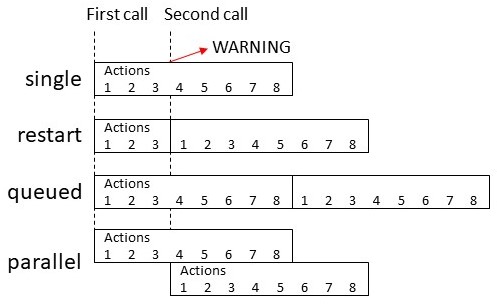
自动化模式
模式描述
single不启动新运行。发出警告。
restart先停止之前的运行,然后启动新运行。
queued在所有之前的运行完成后启动新运行。运行保证按排队顺序执行。
parallel与之前的运行并行启动新的独立运行。

YAML 示例

以下是一个基于 YAML 的自动化示例,你可以添加到 configuration.yaml 中。

# Example of entry in configuration.yaml
automation my_lights:
  # Turns on lights 1 hour before sunset if people are home
  # and if people get home between 16:00-23:00
  - alias: "Rule 1 Light on in the evening"
    triggers:
      # Prefix the first line of each trigger configuration
      # with a '-' to enter multiple
      - trigger: sun
        event: sunset
        offset: "-01:00:00"
      - trigger: state
        entity_id: all
        to: "home"
    conditions:
      # Prefix the first line of each condition configuration
      # with a '-'' to enter multiple
      - condition: state
        entity_id: all
        state: "home"
      - condition: time
        after: "16:00:00"
        before: "23:00:00"
    actions:
      # With a single action entry, we don't need a '-' before action - though you can if you want to
      - action: homeassistant.turn_on
        target:
          entity_id: group.living_room

  # Turn off lights when everybody leaves the house
  - alias: "Rule 2 - Away Mode"
    triggers:
      - trigger: state
        entity_id: all
        to: "not_home"
    actions:
      - action: light.turn_off
        target:
          entity_id: all

  # Notify when Paulus leaves the house in the evening
  - alias: "Leave Home notification"
    triggers:
      - trigger: zone
        event: leave
        zone: zone.home
        entity_id: device_tracker.paulus
    conditions:
      - condition: time
        after: "20:00"
    actions:
      - action: notify.notify
        data:
          message: "Paulus left the house"

  # Send a notification via Pushover with the event of a Xiaomi cube. Custom event from the Xiaomi integration.
  - alias: "Xiaomi Cube Action"
    initial_state: false
    triggers:
      - trigger: event
        event_type: cube_action
        event_data:
          entity_id: binary_sensor.cube_158d000103a3de
    actions:
      - action: notify.pushover
        data:
          title: "Cube event detected"
          message: "Cube has triggered this event: "

额外选项

直接在 YAML 中编写自动化时,你可以使用 UI 中不可用的高级选项。

自动化初始状态

启动时,自动化默认恢复上次 Home Assistant 运行时的状态。这可以通过 initial_state 选项控制。将其设置为 falsetrue 可强制初始状态为关闭或开启。

automation:
  - alias: "Automation Name"
    initial_state: false
    triggers:
      - trigger: ...

调试跟踪存储数量

使用 YAML 时,你可以配置自动化存储的调试跟踪数量。这通过 trace 下的 stored_traces 选项控制。将 stored_traces 设置为你希望为该自动化存储的跟踪数量。如果未指定,将使用默认值 5。

automation:
  - alias: "Automation Name"
    trace:
      stored_traces: 10
    triggers:
      - trigger: ...

将 YAML 自动化迁移到 automations.yaml

如果你想将手动编写的自动化迁移到编辑器中使用,需要将它们复制到 automations.yaml。确保 automations.yaml 仍然是一个列表!对于每个复制的自动化,你需要添加一个 id。这可以是任何字符串,只要它是唯一的。

# Example automations.yaml entry. Note, automations.yaml is always a list!
- id: my_unique_id  # <-- Required for editor to work, for automations created with the editor the id will be automatically generated.
  alias: "Hello world"
  triggers:
    - trigger: state
      entity_id: sun.sun
      from: below_horizon
      to: above_horizon
  conditions:
    - condition: numeric_state
      entity_id: sensor.temperature
      above: 17
      below: 25
      value_template: ""
  actions:
    - action: light.turn_on

删除自动化

当自动化仍然显示在 Home Assistant 仪表盘中,即使在 YAML 文件中已删除,你需要在 UI 中删除它们。

要完全删除它们,请前往 UI 设置 > 设备与服务 > 实体,在搜索框中查找或滚动找到该自动化。

勾选你想删除的自动化旁边的复选框,然后从屏幕右上角选择"删除选中项"。