

title: '2023.10:全新外观与更多 Tile 卡片功能!' description: '<a href=''/home-assistant/integrations/版本/2023.10''<img src=''/home-assistant/images/blog/2023-10/social.png'' style=''border: 0;box-shadow: none;''</a。' 更好的密码管理器支持,以及更多内容!
2023.10:全新外观与更多 Tile 卡片功能!

Home Assistant 核心 2023.10! 🎉
October! 🎃 It means we've just celebrated our birthday; we are now 10 years old! 🎂 In case you've missed our birthday YouTube stream with all the cool announcements, we've summed it all up in our 10 year Home Assistant 博客 post.
Even more exciting news, as this is Home Assistant's year of the voice: Chapter 4 of this endeavor has been announced and will be streamed live on YouTube on 12 October 2023, at 12:00 PDT / 21:00 CEST! Be sure to tune in! I've seen some early demos... All I'm going to say is: It is mind-blowing! 🤯
As for this 发布, because of all of the above, it is a bit smaller than usual in terms of features. I promise that chapter 4 is going to make it all worth it. Yet, it contains tons of updates, bug fixes, and a couple of beautiful new features for the tile 卡片! 🤩
Enjoy the 发布!
../Frenck
- 焕然一新的漂亮 Logo!
- 全新的 My Home Assistant 按钮
- 温控实体的全新 Tile 卡片功能
- Tile 卡片的选择实体功能
- 密码管理器与 Home Assistant
- 地图实体标记选项
- 其他值得注意的变更
- 新集成
- 现已支持通过 UI 配置的集成
- 发布 2023.10.1 - October 6
- 发布 2023.10.2 - October 12
- 发布 2023.10.3 - October 13
- 发布 2023.10.4 - October 21
- 发布 2023.10.5 - October 22
- 需要帮助?加入社区!
- 不向后兼容的变更
- 全部变更
Don't forget to join our 发布 party live stream on YouTube 4 October 2023, at 12:00 PDT / 21:00 CEST!
焕然一新的漂亮 Logo!
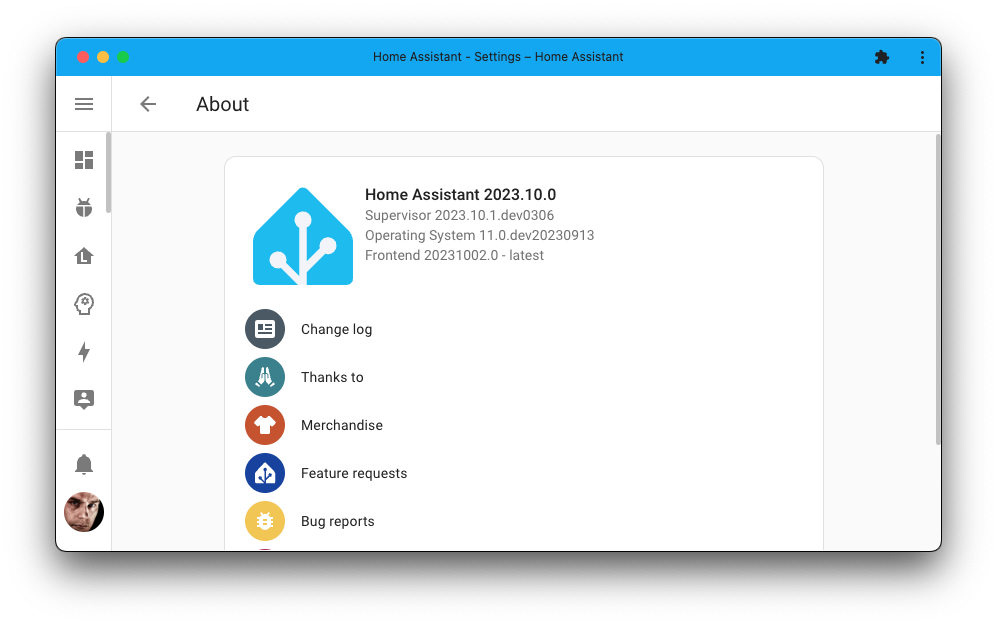
In case you've missed it, we have refreshed the Home Assistant logo! 🤩

This was done for the 10th anniversary of Home Assistant, and you can read all about this iteration in this 博客 post. You will start seeing this logo in many more places in the upcoming weeks, but, it is already included this 发布!
全新的 My Home Assistant 按钮
It is not just the logo that got a facelift; we have beautiful new buttons for My Home Assistant as well 🤩.

If you're unfamiliar with My Home Assistant, it's a free online tool that enables websites, 文档, chat platforms, and blogs to link to places on your Home Assistant server without knowing its address or being exposed to the internet. This ensures your privacy while still allowing a seamless experience.
In our 文档, you'll find those buttons to, for example, add a new 集成 to your Home Assistant with a single click! Try it yourself! This button below will open up your Home Assistant's interface and show the 集成 you have 已安装:
So, if you see these buttons showing up somewhere, you now know what they do! You can easily create your own buttons and links to share on the create link page.
温控实体的全新 Tile 卡片功能
In the last 发布, we added lots of new features for the tile 卡片, including features specifically for controlling your 温控 设备. This 发布, we are adding even more!
@Weissnix4711 contributed a feature that allows you to add buttons for the presets of your 温控 设备 to the tile 卡片. Next, @piitaya took it a step further: You can now select which presets you want to show and if you want them in a dropdown list instead of a series of buttons.
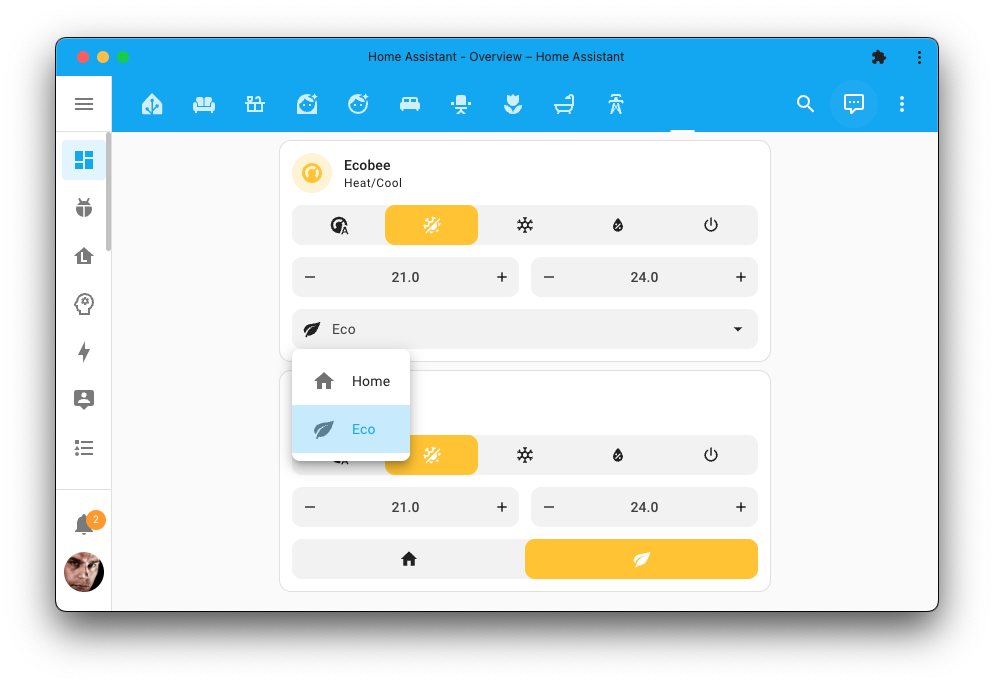
The screenshot above shows the same tile 卡片, but one with the buttons and one with the dropdown.
In the options for this tile 卡片 feature, you'll be given the choice if you prefer to show icons or if you rather have a dropdown. You can also pick which presets you want to show/hide.
Tile 卡片的选择实体功能
But there is more goodness for the tile 卡片. @piitaya also added the dropdown from above as a feature for the select 实体, allowing you to select an option from a list of options.
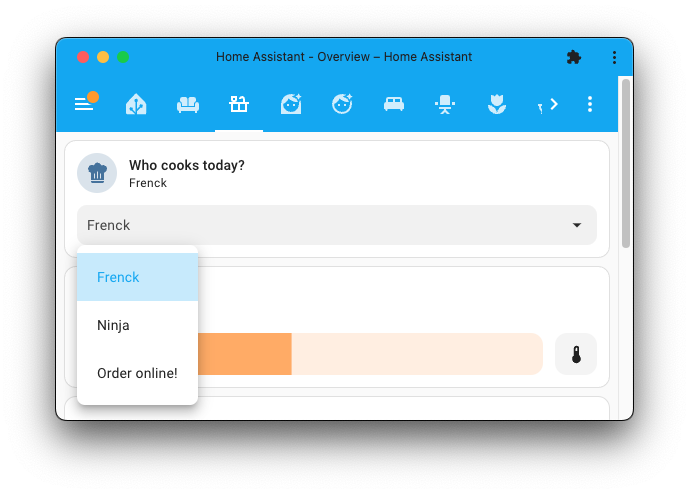
This feature can be used for any select 实体 but also your custom dropdown helpers! (also known as input_select 实体).
密码管理器与 Home Assistant
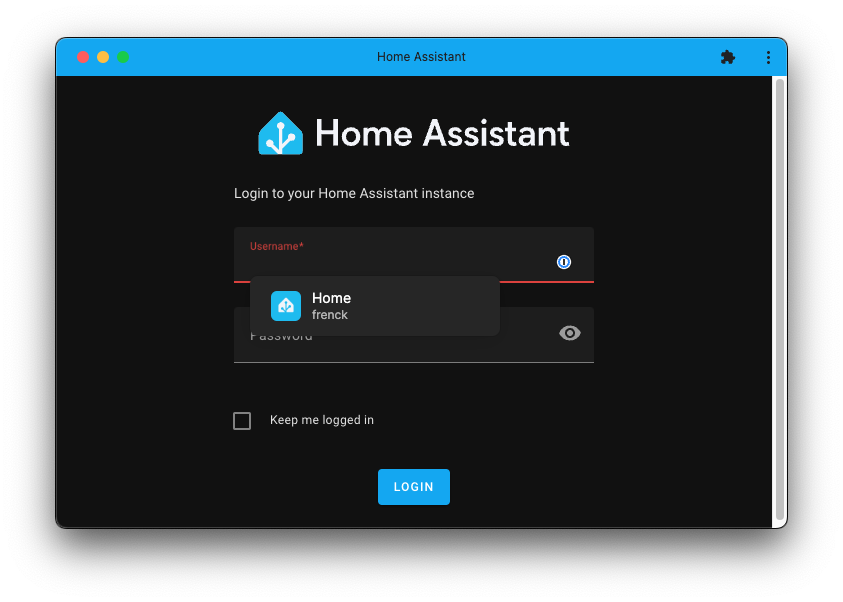
Using a password manager is arguably one of the best things you can do to improve your online security. But using them with Home Assistant, depending on which one you have been using, has been a bit of a pain.
If you've been using one of these password managers that had issues with Home Assistant, you'll be happy to know that this 发布 fixes that! For example, 1Password now works!
地图实体标记选项
The map 卡片 received new options (thanks @karwosts!) for your 实体 markers that are shown on the map.
You can now choose if you want the 实体 name to be rendered on the map or the 实体 状态, but you could also override the name altogether. You could, for example, show 状态 values, instead of the name, for the 实体 providing gas prices, so you can see where the cheapest gas is.
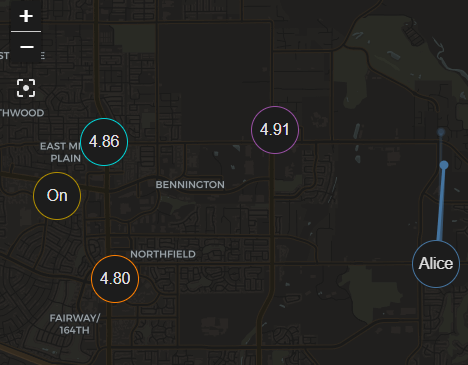
When centering the map, all 实体 on the map are taken into account. However, you can also exclude certain 实体 (for example, known outliers) that should not be considered when doing that.
This is currently only available in the YAML 配置 of the map 卡片. See our 文档 for the map 卡片 for more information.
其他值得注意的变更
There are many more improvements in this 发布; here are some of the other noteworthy changes this 发布:
- If you are using ESPHome, you will notice much smaller Home Assistant backups when you have the latest 版本 已安装!
- The HomeKit Bridge 集成 now supports media receivers! Thanks, @bdraco!
- @Lash-L keeps extending the Roborock 集成. In this 发布, water and last cleaned 传感器 have been added. Sweet!
- Withings received lots of love this 发布, thanks @joostlek! It is now easier to set up and now also works with the Home Assistant Cloud webhooks for push updates!
- @allenporter added calendar support to the Rain Bird 集成, allowing you to see your irrigation schedule in Home Assistant! Nice!
- The System Bridge 集成 now supports 通知! Thanks, @timmo001!
- @alexyao2015 added a button to Life360 to 触发器 a poll to 更新 the location information. Cool!
- The picture 实体 卡片 now has a fit mode option to control how the image fits into the 卡片. This lets you decide if the image is clipped, fitted, or stretched into the displayed 卡片. Thanks @karwosts!
- It's now easier than ever to collect Z-Wave 日志 for troubleshooting. Just enable 调试 logging!
新集成
We welcome the following new 集成 in this 发布:
- Apple WeatherKit, added by @tjhorner
Track the weather using Apple's WeatherKit API. - Ecoforest, added by @pjanuario
Monitor and control your Ecoforest fireplace. - IKEA IDÅSEN Desk, added by @abmantis
Connect and control the height of your IKEA IDÅSEN motorized desk. - Medcom 蓝牙, added by @elafargue
Integrates your Medcom radiation monitors. - Private BLE 设备, added by @Jc2k
Track your BLE 设备 that change their MAC address frequently. - SwitchBot Cloud, added by @SeraphicRav
Control your SwitchBot 设备 using the SwitchBot Cloud API. - WeatherFlow, added by @jeeftor
Integrate your WeatherFlow Tempest Weather System.
This 发布 also has a new virtual 集成. Virtual 集成 are stubs that are handled by other (existing) 集成 to help with findability. The following virtual 集成 has been added:
- Enmax Energy provided by Opower
现已支持通过 UI 配置的集成
The following 集成 are now available via the Home Assistant UI:
- AfterShip, done by @joostlek
- Color extractor, done by @joostlek
- Hunter Hydrawise, done by @dknowles2
- NextBus, done by @ViViDboarder
- Todoist, done by @allenporter
- Twitch, done by @joostlek
- World Air Quality Index (WAQI), done by @joostlek
发布 2023.10.1 - October 6
- 2023.10.0 (@frenck - #101386)
- Fix ZHA 设备 diagnostics 错误 for unknown unsupported 属性 (@TheJulianJES - #101239)
- Bump pyyardian to 1.1.1 (@h3l1o5 - #101363)
- Fix Withings translations (@joostlek - #101397)
- Raise vol.Invalid for invalid MQTT device_tracker config (@jbouwh - #101399)
- Bump dbus-fast to 2.11.1 (@bdraco - #101406)
- Add translation for Tamper 二元sensor (@joostlek - #101416)
- Add wake word cooldown to avoid duplicate wake-ups (@synesthesiam - #101417)
- Adjust WeatherFlow wind 传感器 to appropriately match native unit and library field (@natekspencer - #101418)
- Bump env_canada to v0.5.37 (@michaeldavie - #101435)
- Fix device_class.capitalize() in Point (@fredrike - #101440)
- SMA add missing 实体 descriptions (@rklomp - #101462)
- Fix Trafikverket 摄像头 if no location data (@gjohansson-ST - #101463)
- 更新 前端 to 20231005.0 (@piitaya - #101480)
- Bump zeroconf to 0.115.2 (@bdraco - #101482)
- bump pywaze to 0.5.1 sets timeout to 60s (@eifinger - #101487)
- Fix caching of latest short term stats after insertion of external stats (@bdraco - #101490)
- Fix key 错误 in config flow when duplicate stop names exist (@ViViDboarder - #101491)
- Fix bug in calendar 状态 where 报警 due to 报警 not scheduled (@allenporter - #101510)
- Fix for rainbird unique id (@allenporter - #101512)
- Limit waze_travel_time to 0.5call/s over all entries (@eifinger - #101514)
- Use config flow in color extractor tests (@joostlek - #101524)
- Delete existing Withings cloudhook (@joostlek - #101527)
- Modbus, wrong length when reading strings (@janiversen - #101529)
- 更新 LoqedAPI to handle invalid transitions better (@mikewoudenberg - #101534)
- Cancel callbacks on Withings entry unload (@joostlek - #101536)
- Bump HAP-python to 4.8.0 (@bdraco - #101538)
- Add Withings webhooks after a slight delay (@joostlek - #101542)
- Only import color extractor when domain is in config (@joostlek - #101522)
发布 2023.10.2 - October 12
The Mazda 集成 has been removed from Home Assistant. The library that Home Assistant uses to connect with their 服务 has been taken offline by Mazda.
- Improve handling of roon media players with fixed and incremental volume (@pavoni - #99819)
- Auto-fix common key entry issues during WeatherKit config flow (@tjhorner - #101504)
- Improve Ikea Idasen config flow 错误 messages (@abmantis - #101567)
- 更新 pyfronius to 0.7.2 (@farmio - #101571)
- 更新 ha-philipsjs to 3.1.1 (@elupus - #101574)
- 更新 aiohttp to 3.8.6 (@cdce8p - #101590)
- Additional fix for rainbird unique id (@allenporter - #101599)
- Fix compiling missing statistics losing rows (@bdraco - #101616)
- Bump systembridgeconnector to 3.8.4 (@timmo001 - #101621)
- 更新 pylutron-caseta to 0.18.3 (@mdonoughe - #101630)
- Add additional calendar 状态 报警 debugging (@allenporter - #101631)
- Abort config flow when invalid token is received (@joostlek - #101642)
- Fix MQTT sensor or binary_sensor 状态 not saved after expiry (@jbouwh - #101670)
- Fix Slack type 错误 for file upload (@tkdrob - #101720)
- 更新 eufylife-ble-client to 0.1.8 (@bdr99 - #101727)
- Add google calendar required feature for create event 服务 (@allenporter - #101741)
- Fix Airzone 温控 double setpoint (@Noltari - #101744)
- Bump screenlogicpy to 0.9.2 (@dieselrabbit - #101746)
- Fix typo in Ombi translation strings (@Betacart - #101747)
- Bump pyDuotecno to 2023.10.0 (@Cereal2nd - #101754)
- Subscribe to Withings webhooks outside of coordinator (@joostlek - #101759)
- Change BiDirectional Prefix (@hesselonline - #101764)
- Bump pyweatherflowudp to 1.4.5 (@natekspencer - #101770)
- Bump bimmer_connected to 0.14.1 (@rikroe - #101789)
- Bump env_canada to 0.6.0 (@michaeldavie - #101798)
- Await set value function in ScreenLogic number 实体 (@dieselrabbit - #101802)
- 更新 aioqsw to v0.3.5 (@Noltari - #101809)
- Dynamic wake word loading for Wyoming (@synesthesiam - #101827)
- Close existing UDP server for ESPHome voice assistant (@synesthesiam - #101845)
- Remove Mazda 集成 (@bdr99 - #101849)
- Bump Python-MyQ to v3.1.13 (@justinlindh - #101852)
- Fix translation key in Plugwise (@joostlek - #101862)
- Fix SMA incorrect 设备 class (@rklomp - #101866)
- Fix mysensors battery level 属性 (@MartinHjelmare - #101868)
- Fix typo in remember the milk strings (@Betacart - #101869)
- Only 重载 Withings config entry on reauth (@joostlek - #101638)
发布 2023.10.3 - October 13
- Downgrade aiohttp to 3.8.5 (@frenck - #101913)
- Add missing 风扇 mode in Sensibo (@gjohansson-ST - #101883)
- Uncancel task when swallowing CancelledError (@starkillerOG - #101884)
- Bump reolink-aio to 0.7.11 (@starkillerOG - #101886)
- Fix implicit 设备 name in wiz 开关 (@bdraco - #101914)
发布 2023.10.4 - October 21
- Fix Spotify media position 更新 value (@Archomeda - #100044)
- Fix 错误 handling on subscribe when MQTT is not initialized (@jbouwh - #101832)
- Bump aioesphomeapi to 17.1.4 (@bdraco - #101897)
- Bump aioesphomeapi to 17.1.5 (@bdraco - #101916)
- Fix Setpoint in Matter 温控 platform (@goloveychuk - #101929)
- 更新 zwave issue repair strings (@raman325 - #101940)
- Bump screenlogicpy to v0.9.3 (@dieselrabbit - #101957)
- Bump pynina to 0.3.3 (@DeerMaximum - #101960)
- Fix google_maps same last_seen bug (@pnbruckner - #101971)
- Bump aioesphomeapi to 17.2.0 (@bdraco - #101981)
- Bump aioesphomeapi to 18.0.1 (@bdraco - #102028)
- Fix bug in calendar 状态 transitions (@allenporter - #102083)
- Call disconnected callbacks from BT ESPHome client (@abmantis - #102084)
- Bump aioesphomeapi to 18.0.3 (@bdraco - #102085)
- Correct 传感器 状态 属性 and 设备 class in Velbus 传感器 (@Cereal2nd - #102099)
- Bump velbusaio to 2023.10.0 (@Cereal2nd - #102100)
- Bump zha-quirks to 0.0.105 (@TheJulianJES - #102113)
- Fix UniFi client tracker 实体 being unavailable when away on 重启 (@Kane610 - #102125)
- Send events for tts stream start/end (@jesserockz - #102139)
- Bump opower to 0.0.36 (@tronikos - #102150)
- Explicitly set 实体 name for VenstarSensor (@dseven - #102158)
- Don't warn about unknown pipeline events in ESPHome (@synesthesiam - #102174)
- Bump velbusaio to 2023.10.1 (@Cereal2nd - #102178)
- Bump aiowaqi to 2.1.0 (@joostlek - #102209)
- Handle timeouts on AEMET init (@Noltari - #102289)
- Bump pyduotecno to 2023.10.1 (@Cereal2nd - #102344)
- Bump ZHA dependencies (@puddly - #102358)
- Bump vehicle to 2.0.0 (@joostlek - #102379)
- 更新 aioairzone to v0.6.9 (@Noltari - #102383)
- Bump aioesphomeapi to 18.0.6 (@bdraco - #102195)
- Bump dbus-fast to 2.12.0 (@bdraco - #102206)
- Bump 蓝牙-data-tools to 1.13.0 (@bdraco - #102208)
- Fix temperature setting for multi-setpoint Z-Wave 设备 (@kpine - #102395)
- Bump aioesphomeapi to 18.0.7 (@bdraco - #102399)
发布 2023.10.5 - October 22
- Downgrade ZHA dependency bellows (@puddly - #102471)
- Bump async-upnp-client to 0.36.2 (@StevenLooman - #102472)
需要帮助?加入社区!
Home Assistant has a great community of users who are all more than willing to help each other out. So, join us!
Our very active Discord chat server is an excellent place to be at, and don't forget to join our amazing forums.
Found a bug or issue? Please report it in our issue tracker, to get it fixed! Or, check our help page for guidance for more places you can go.
Are you more into email? Sign-up for our Building the Open Home Newsletter to get the latest news about features, things happening in our community and other news about building an Open Home; straight into your inbox.
不向后兼容的变更
The HomeKit 集成 now supports media player receivers. HomeKit expects receivers to be paired in accessory mode. Existing receivers paired in bridge mode should be re-added in accessory mode.
The close_comm_on_error 配置 is no longer optional, sockets will
always be closed on 错误. Therefore, the close_comm_on_error is now
deprecated and will be removed in Home Assistant 2024.3.
(@janiversen - #99946) (文档)
An MQTT 门锁 with a configured 状态 topic will initialize with 状态
unknown instead of 状态 unlocked unless the 门锁 is set to optimistic mode.
MQTT 门锁 set to optimistic mode will still be initialized with
the unlocked 状态. You should check if your 自动化 are affected.
The option to set a custom scan interval in NZBGet via the options UI has been removed. The 更新 interval is now every 5 seconds.
If you want to 恢复 the custom scan interval behavior,
please see the homeassistant.update_entity 服务.
Some of the older 二元sensor and 传感器 from the OpenTherm gateway have been deprecated since January 2021. They have now been removed. Please use the new 二元sensor and 传感器 that have been 创建 since.
Some 实体 names have changed. The 集成 will migrate old 实体 to new names/IDs. You may have to manually 更新 old 实体 used in, for example, your 仪表盘.
Invalid 实体 such as "Saturation Index" are removed if the required equipment is not configured.
(@dieselrabbit - #92475) (文档)
The default name given to backups 创建 with the hassio.full_backup
and hassio.partial_backup 服务 are no longer the UTC date and time the
备份 was initiated. Instead, the local date and time are used for the name.
Any existing app you have 创建 in the Twitch Developer Portal to work with 此集成 must be updated to work with Home Assistant's UI authentication flow. 更新 the app's 配置 to include https://my.home-assistant.io/redirect/oauth in its list of "OAuth Redirect URLs"
(@joostlek - issue#101414) (文档)
Multiple WebSocket commands have been renamed based on this change in Z-Wave JS.
With this 发布, you will need to 更新 your zwave-js-server instance.
You must use zwave-js-server 1.32.0 or greater (schema 32).
- If you use the Z-Wave JS add-on, you need at least 版本
0.1.91. - If you use the Z-Wave JS UI add-on, you need at least 版本
2.0.0. - If you use the Z-Wave JS UI Docker 容器, you need at least 版本
9.0.0. - If you run your own Docker 容器 or some other 安装 method,
you will need to 更新 your zwave-js-server instance to at least
1.32.0.
If you are a custom 集成 developer and want to learn about breaking changes and new features available for your 集成: Be sure to follow our developer 博客. The following are the most notable for this 发布:
- Home Assistant is participating in Hacktoberfest 2023!
- New way of excluding 状态 属性 from recording
- The websocket command entities/source has been 修改
全部变更
Of course, there is a lot more in this 发布. You can find a list of all changes made here: Full changelog for Home Assistant 核心 2023.10