

title: '2023.7:可响应的服务' description: '<a href=''/home-assistant/integrations/版本/2023.7''<img src=''/home-assistant/images/blog/2023-07/social.png'' style=''border: 0;box-shadow: none;''</a。' 更快的蓝牙代理、仪表盘中的复制粘贴、全新的图像实体、打开 Assist 的仪表盘动作、 Matter 的温控支持等等!
2023.7:可响应的服务

Home Assistant 核心 2023.7! 🎉
上一个发布已经非常重磅,而这次也同样不例外!
这次发布为 Home Assistant 带来了一项我们认为是近几年最具颠覆性的变化之一: 服务现在可以返回数据了!🤯
这是一项非常基础但影响深远的改变,它将开启许多全新的用例, 也为无限可能打开大门。我对它感到无比兴奋!
但这还不是全部;还有很多内容在等着你!我个人特别喜欢的包括: 蓝牙代理现在快得惊人、仪表盘支持复制粘贴、新的句子触发器, 还有我很喜欢的一点:损坏的自动化不再凭空消失,而是会在 UI 中显示并标记为有问题。
总的来说,这是一次非常棒的发布,塞满了新功能和大量体验改进。
Enjoy the 发布!
../Frenck
- 服务现已可以响应
- 门锁的新实体对话框
- 句子触发器
- 打开 Assist 的动作
- 图像实体
- 能源仪表盘:自给自足率
- 仪表盘中的复制粘贴支持
- 选择要使用/显示的时区
- 集成仪表盘的迭代改进
- 不可用的自动化与脚本
- 新的脚本对话框
- 闪电般快速的蓝牙代理
- Matter 更新
- 降低遇到不向后兼容变更的风险
- 其他值得注意的变更
- 新集成
- 发布 2023.7.1 - July 6
- 发布 2023.7.2 - July 13
- 发布 2023.7.3 - July 21
- 现已支持通过 UI 配置的集成
- 需要帮助?加入社区!
- 不向后兼容的变更
- 告别以下内容
- 全部变更
Don't forget to join our 发布 party live stream on YouTube 5 July 2023, at 12:00 PDT / 21:00 CEST!
服务现已可以响应
服务 can now respond with data! 🎉
Yes, you read that right! This advanced feature is a huge step forward for Home Assistant and will allow for a lot of new possibilities. It is one of the biggest fundamental changes to Home Assistant made in the past years.
Calling a 服务 in an 自动化 or 脚本 was a one-way communication to control your 设备 and 服务. For example, 打开 a 灯光, or make an announcement on your speakers.
So, what is the use of a 服务 responding with data? Well, it could be used to ask for information from a 设备 or 服务. For example, you could ask Home Assistant which events are on your calendar today and use the answer from that 服务 call to create a 通知 or announcement.
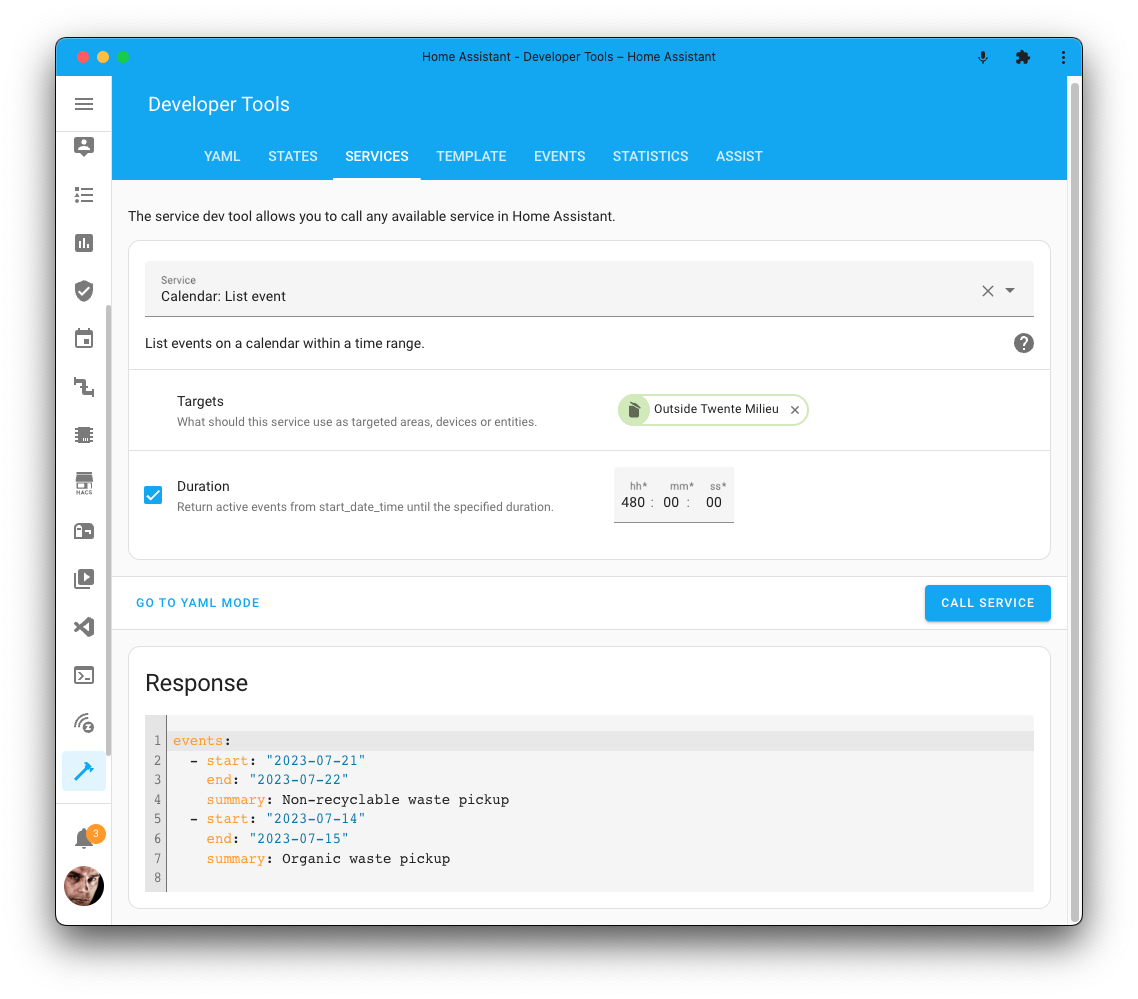
In this 发布, we have included two brand-new 服务 to play with 服务 responses:
-
- This 服务 allows you to ask Assist a command or question and get a response back.
-
- This 服务 enables you to ask Home Assistant for a list of events on your calendar.
If you combine those in an 自动化, in the morning, you could ask Home Assistant for today's calendar events, add things like weather information, send it to ChatGPT using the conversation process, and ask it to summarize it and use that response to send a 通知 to your phone.
@allenporter has put this all together for you in this Blueprint:
This is just one example, but the possibilities are endless! It is exciting to see what other creative use cases and new 服务 with responses will be added in the future!
This feature is also added to 脚本! So, you can make your 脚本 respond and use that response in your 自动化. This is a great way to make your 脚本 more dynamic and flexible.
A special thanks to @allenporter, who has been responsible for building out the larger part of this feature!
门锁的新实体对话框
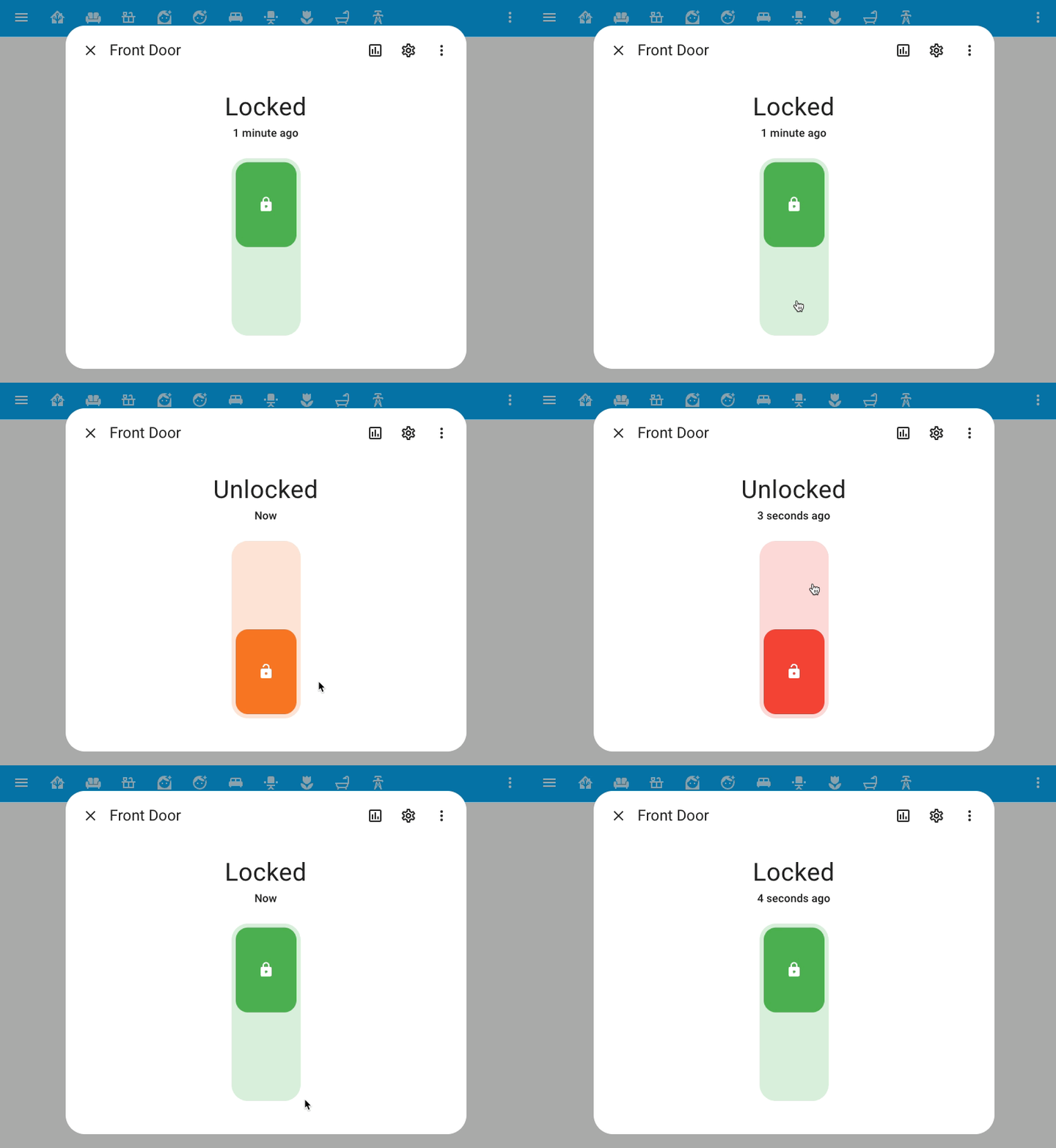
We are continuing to improve the 实体 dialogs. This time, we have reworked the 实体 dialog for 门锁. It looks great!
It looks similar to the 实体 dialog for the 开关, but it has a few extra features like asking for an unlock code and has a beautiful animation when it is (un)locking.
Sentence 触发器
Our Assist is getting more and more powerful! This time, we have added a new 触发器 to our 自动化 editor that allows you to 触发器 an 自动化 when a sentence is said to the default Assist conversation agent. 🤯
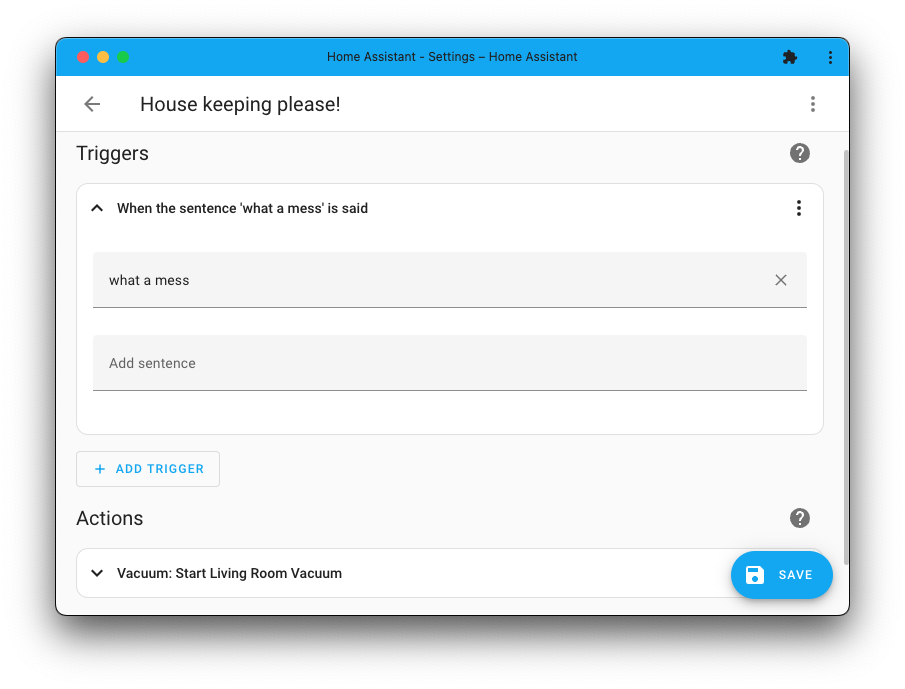
Creating an 自动化 based on something that is said, has never been easier. In the above screenshot, just mentioning "what a mess" will send out the living room 吸尘器 to start cleaning up the mess.
打开 Assist 的动作
Another one for the Year of the Voice, a brand new 动作 for use in 仪表盘 卡片, has been added: the Assist 动作!
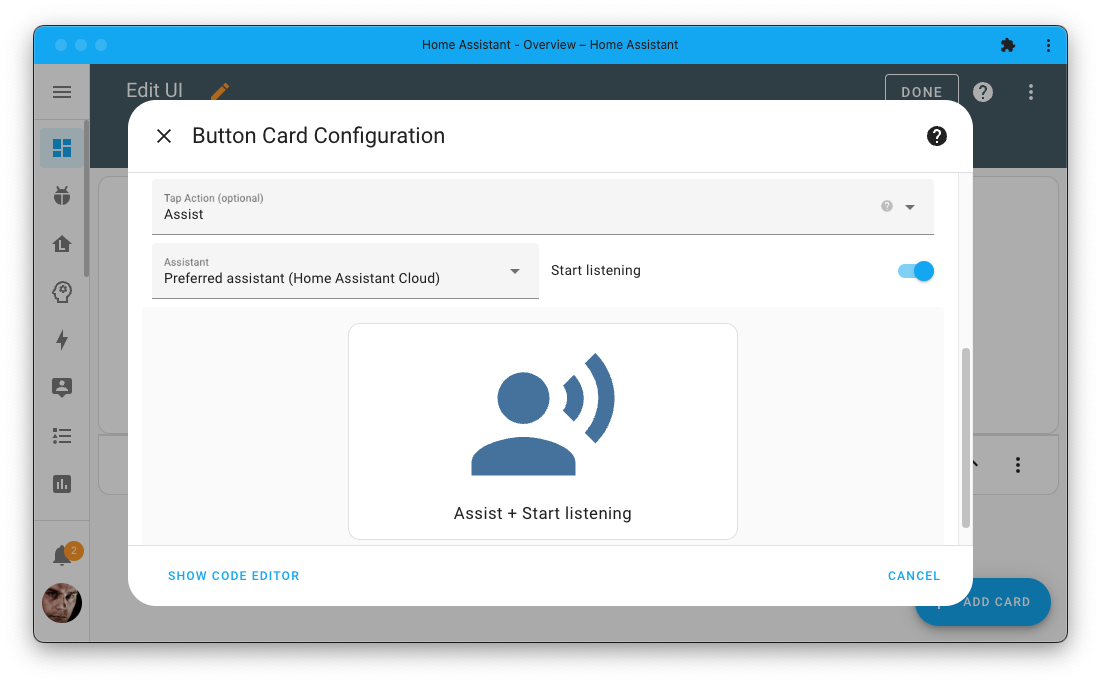
With this 动作, you can directly open Assist from your 仪表盘 using, for example, a button and even make Assist listen right away.
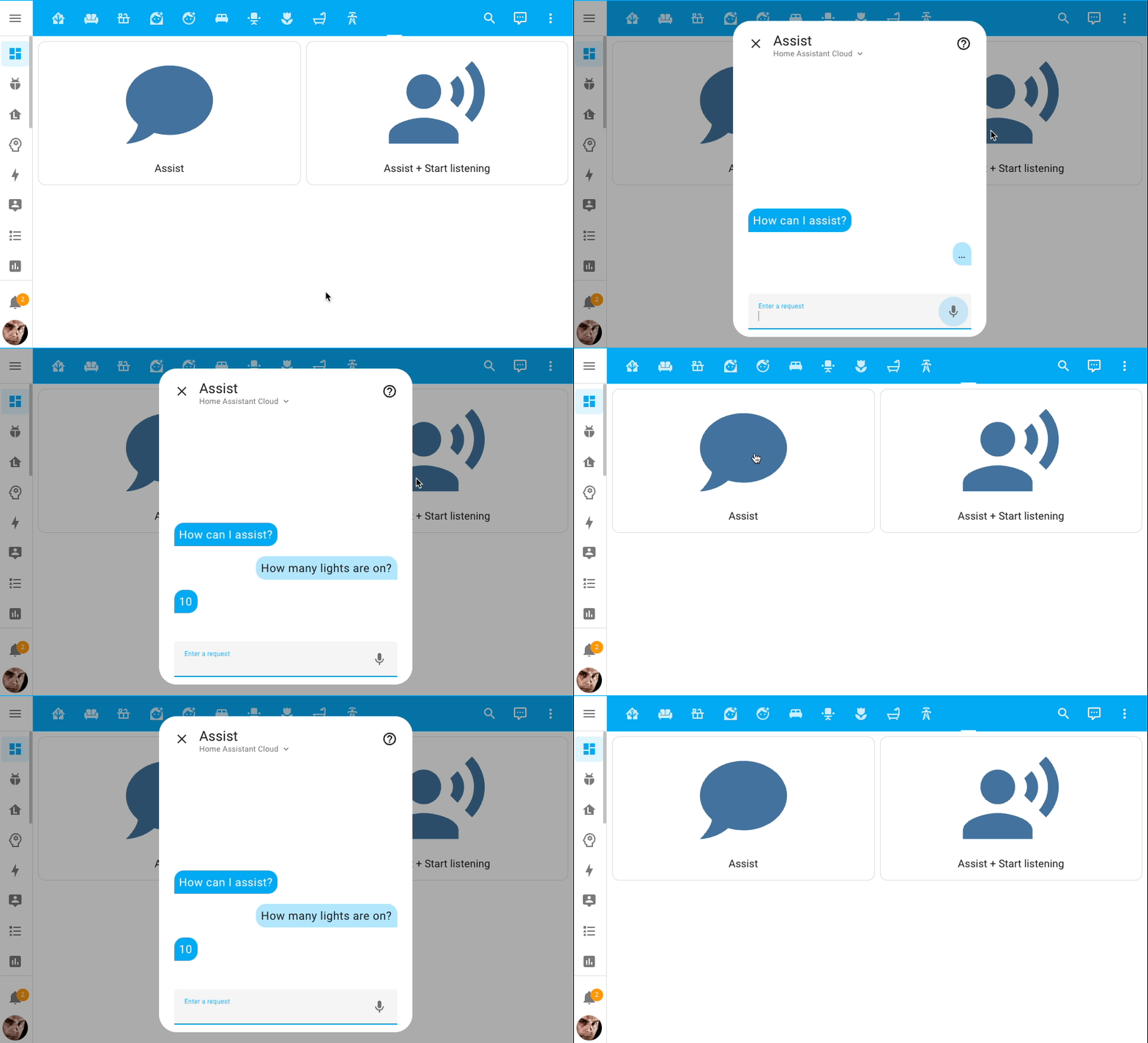
There are quite a few cases where this 动作 can be useful. For example, if you have a tablet mounted on the wall, you can use this 动作 to open Assist and start listening immediately using a single button touch.
图像实体
There is a brand new 实体 type in town: the image 实体.
The image 实体 is very similar to the 摄像头 实体, but instead of providing a live stream, it provides a single image. For example, a QR code that provides the Wi-Fi credentials for your guest network, a weather map, an image of the last motion detected by your 摄像头, or just the cute cat picture of the day!
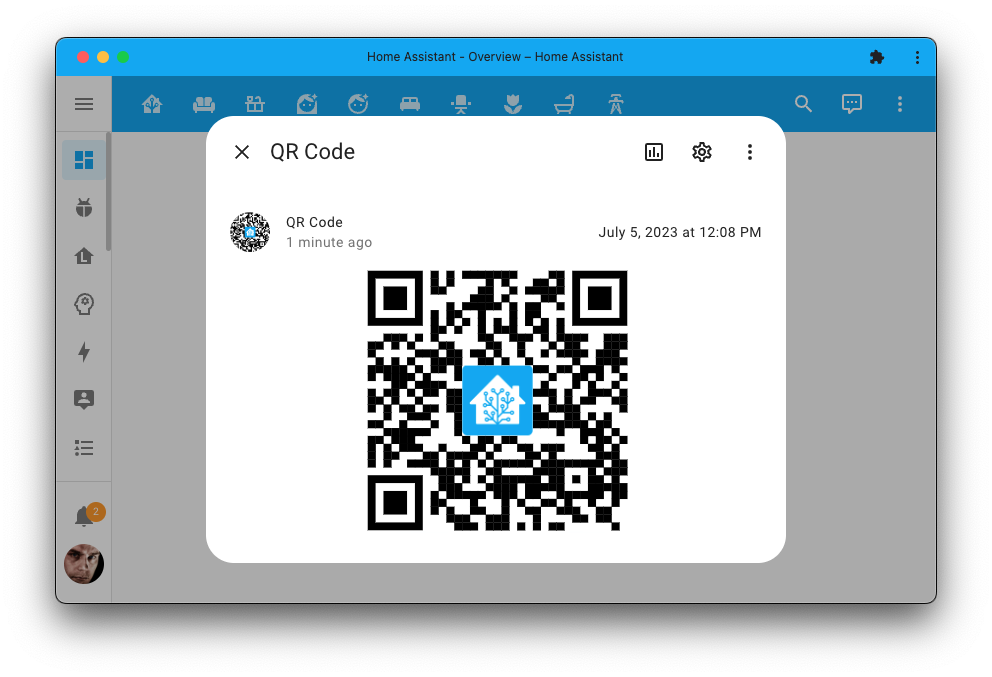
While the 摄像头 实体 provided similar functionality, we wanted to make an 实体 tailored for these specific use cases. An image 实体 is much more lightweight and efficient compared to the 摄像头 实体. Also, this keeps our 摄像头 实体 focused on providing actual 摄像头 feeds.
Support for this brand new 实体 has been added to the AVM Fritz!Box Tools (for guest network access), and the MQTT and Template integrations if you want to build your own.
能源仪表盘:自给自足率
The energy 仪表盘 has a new gauge, added by @TillFleisch: Self-sufficiency.
This gauge tells you how self-sufficient your home is. The more you take from the grid, the more the value will decrease.
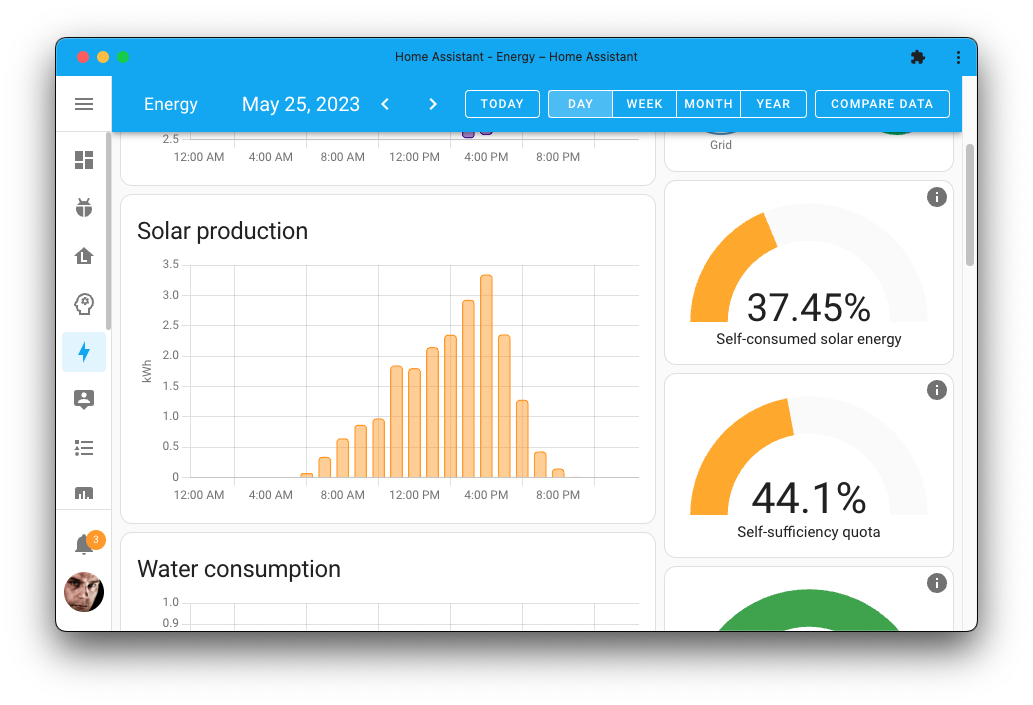
Increasing this value can be done by lowering your consumption from the grid, for example, by using the washing machine when the sun is shining and solar production is high or by creating 自动化 that 关闭 设备 when solar production is low. Another more drastic way is by adding more solar 面板 or battery storage.
仪表盘中的复制粘贴支持
In the previous 发布, @karwosts added the amazing copy 'n paste feature to our 自动化 and 脚本 editors. This 发布, he is back with the same feature for our 仪表盘!
You can now cut, copy, and paste 卡片 between your 仪表盘, views, and even inside other nested 卡片. This makes it a lot easier to reorganize your 仪表盘!
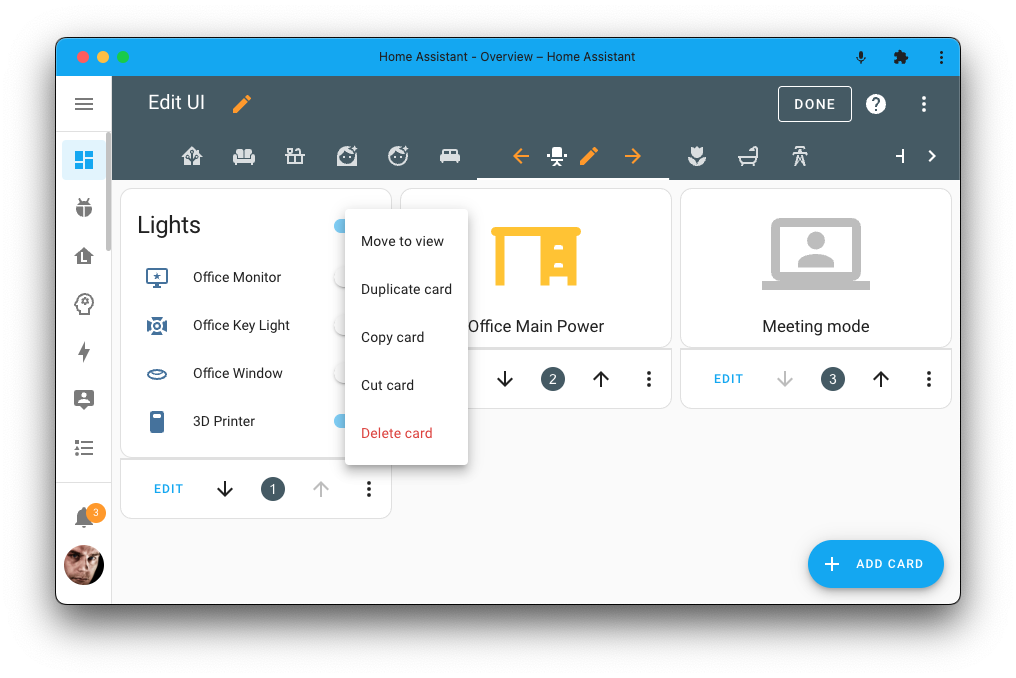
Just like with 自动化, select the 卡片 you want to cut or copy, and when adding a new 卡片 to your 仪表盘, you will see a new option to paste.
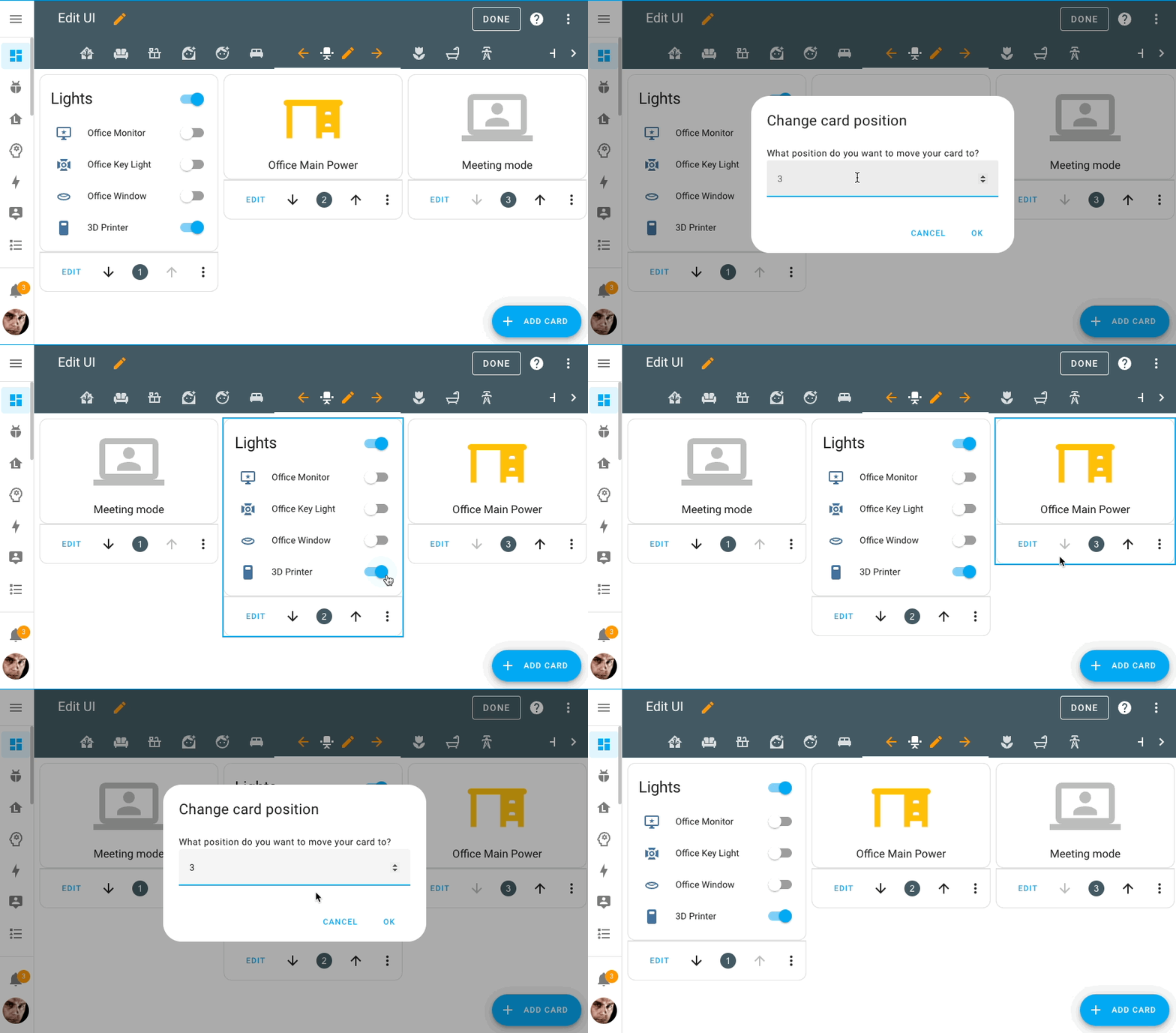
When reorganizing your 仪表盘 that use a masonry layout, it is mandatory to understand the order of the 卡片 across the different columns in your view. To make that easier we now show a positional number on the 卡片 when your 仪表盘 is in edit mode.
Added bonus: Who needs drag 'n drop when you've got click 'n ...teleport? Just kidding, of course; however, teleporting already makes things a lot easier! Click on the positional number to enter a new position for the 卡片.
选择要使用/显示的时区
You can now select which timezone the Home Assistant interface should use in your user profile. Useful when traveling or when you, for example, manage an instance for a relative in a different time zone.
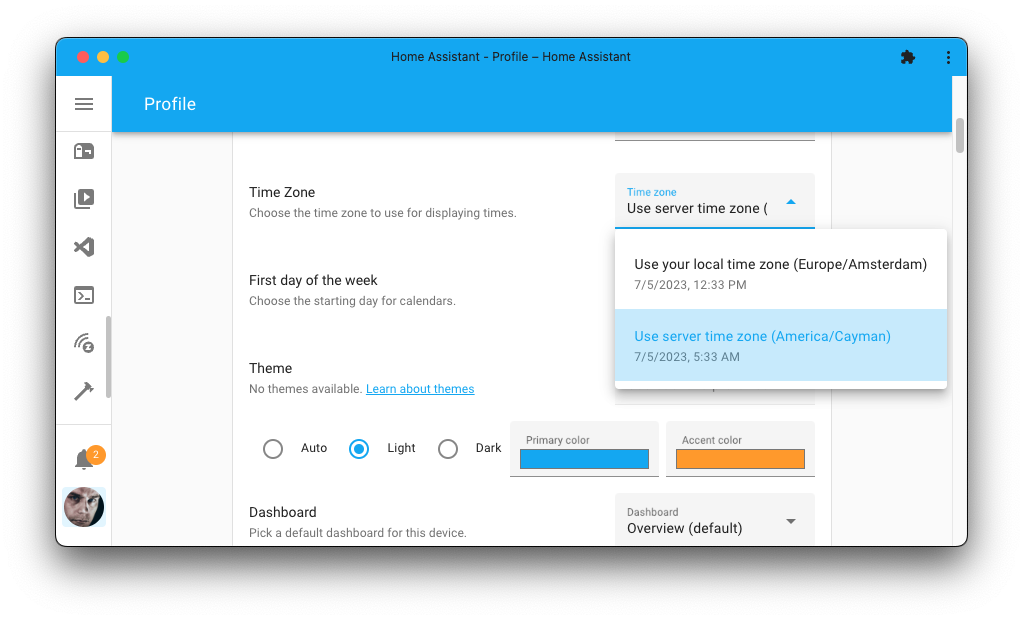
You can choose to use the timezone of your current location, or use the timezone that your Home Assistant server is in. The Home Assistant 前端 will adjust all of the date & times to the selected timezone.
集成仪表盘的迭代改进
In the last 发布, we introduced new integrations 仪表盘 & pages, which many of you really liked. Yet, there has been some feedback, and we have been working on improving it.
The main goal was to make it feel less busy, more familiar and consistent with all other UI you see in Home Assistant.
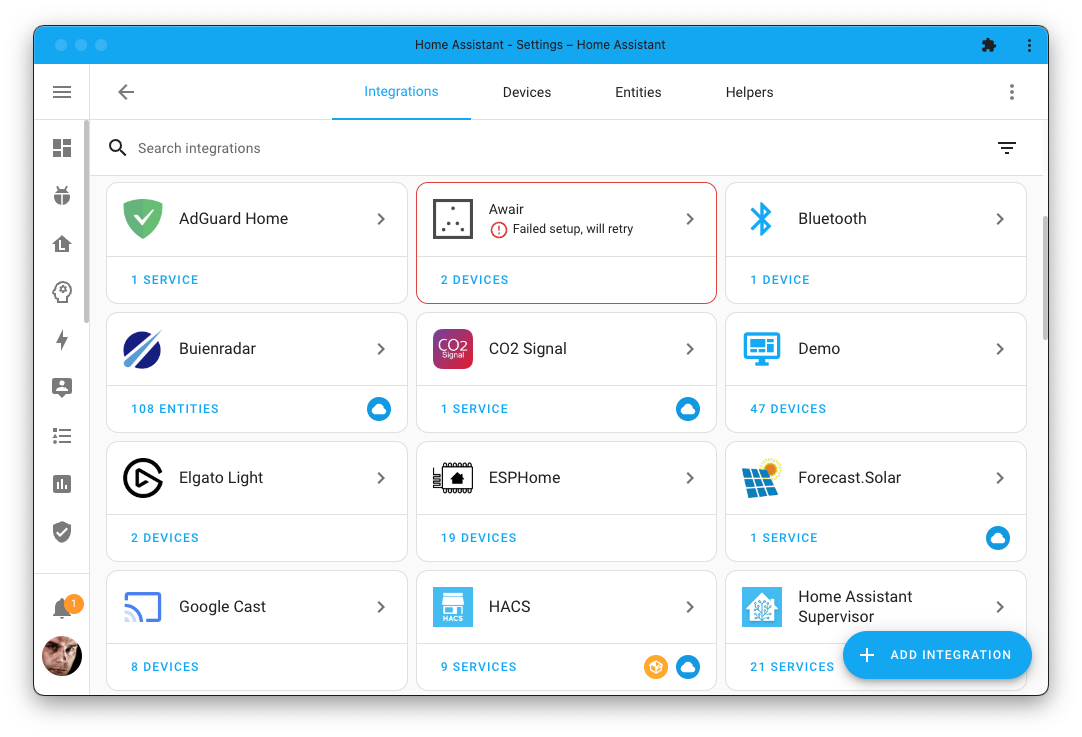
The 卡片 shown are now more consistent with the rest of Home Assistant and the full 集成 name and logo is now clickable. The cog, 设备 and 服务 items have been removed, and the indicators for custom 集成 and cloud 服务 are no longer overlapping the logos.
不可用的自动化与脚本
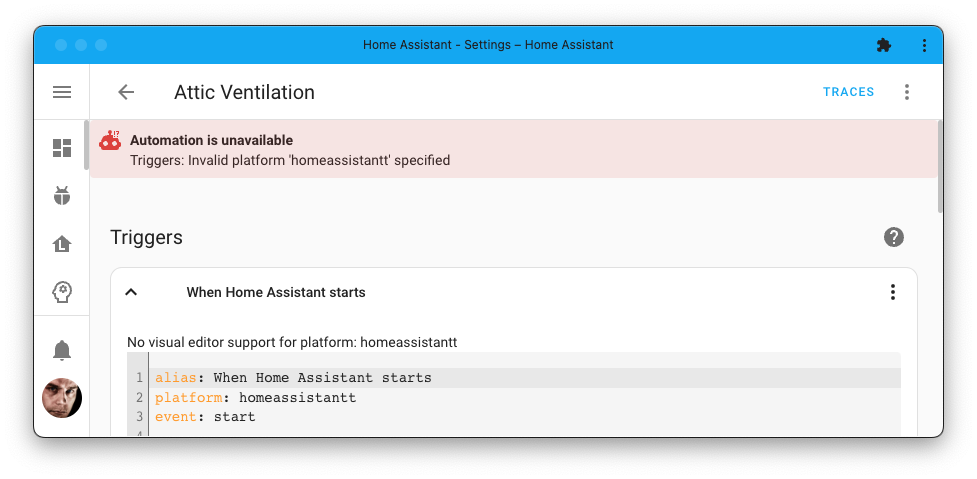
自动化 and 脚本 are awesome! They can add a lot of comfort to your home, making your home 自动化 feel like magic. But they have a weird quirk: if you made an 错误 in their 配置, they would just disappear from Home Assistant. 😞
This is no longer the case! 😀 If an 自动化 or 脚本 has an 错误, it will now show up as unavailable, accompanied by a red confused 自动化 robot.
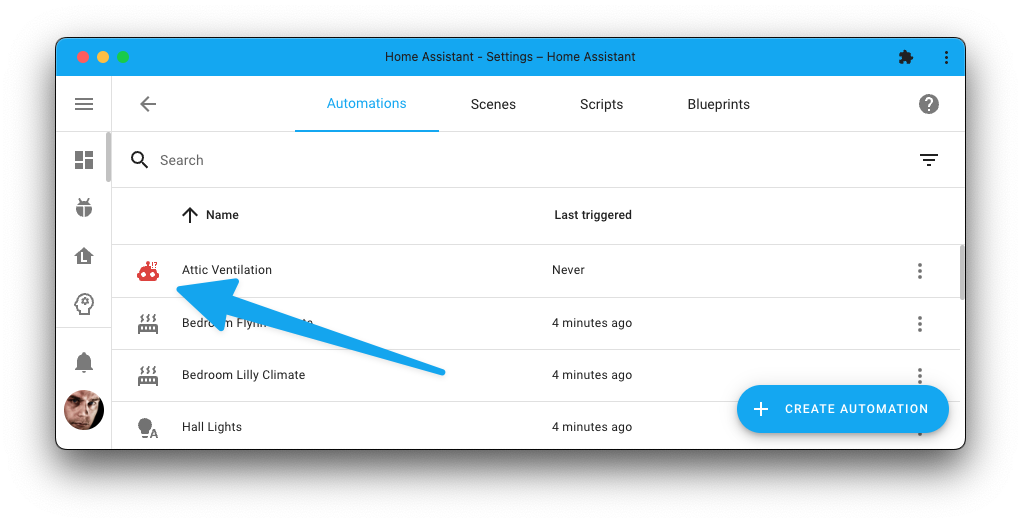
Selecting such an 自动化 will show you the details of the 错误 message so you know what is going on and what to fix.
新的脚本对话框
When you create a new 自动化, you’ll get a nice dialog where you can create a new one from scratch or use one of your imported blueprints as a starting point.
@karwosts has now added the same dialog to our 脚本 editor! 🎉
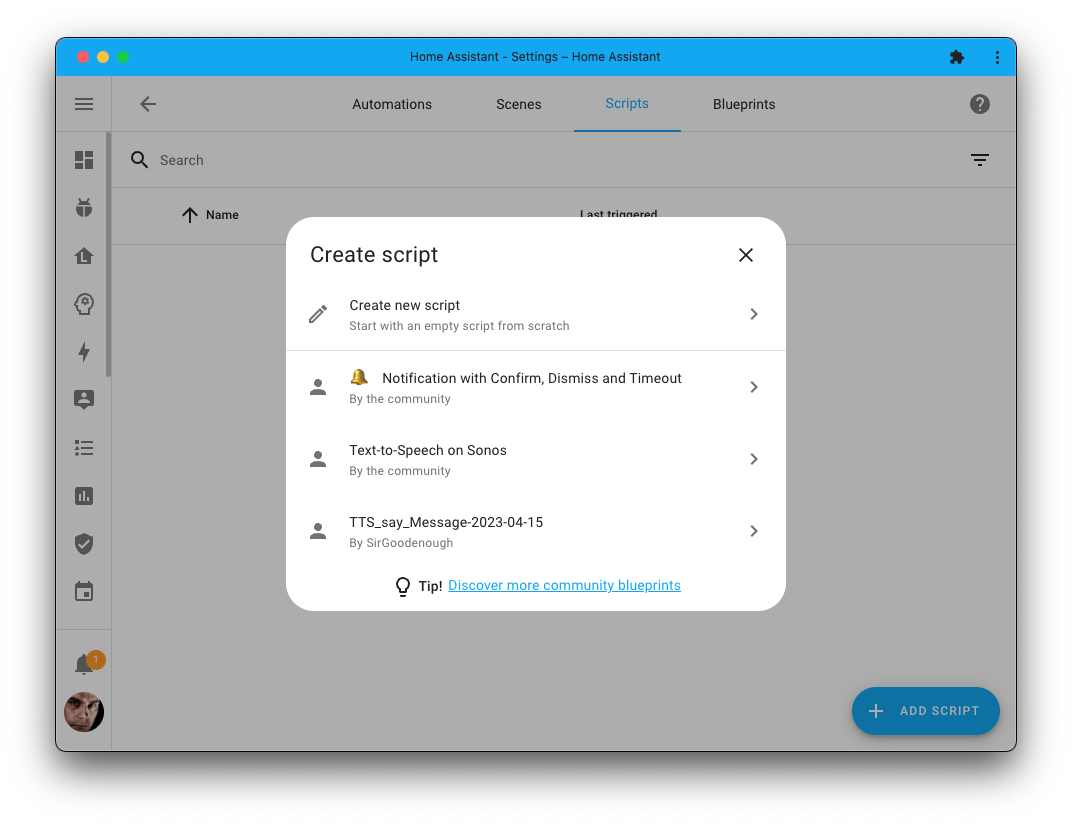
Being able to set up 脚本 from Blueprints is great, as combined with the brand new 服务 response feature, these become a lot more powerful and a lot more useful for sharing!
You can find new 脚本 Blueprints for you to use in the Blueprint Exchange on our community forum.
闪电般快速的蓝牙代理
A great way to extend the range of 蓝牙 for your Home Assistant set up is by using 蓝牙 proxies. These 蓝牙 proxies are now even faster! Like... really fast! 🚀
You can expect to see a 40-80% decrease in network traffic between Home Assistant and the proxy 设备. It now bundles and sends multiple 蓝牙 advertisements in bulk, instead of sending them one by one.
Another large contributor to the speed increase is that the processing of the advertisements is now done in Home Assistant instead of on the proxy 设备. A win-win; it is faster this way and contributes to making the ESP 设备 more stable and reliable.
For this to work, you need ESPHome 2023.6.0 or later.
Matter 更新
Quite a few significant changes have been made to the Matter 集成.
The biggest change can be found in the way subscriptions are handled. Especially on larger (Thread) networks, this will result in a much faster and more reliable experience. This also affects startup time, which is now blazing fast (from minutes to seconds).
Changes to connected Matter bridges are now instantly detected, so when adding a new 设备 to a bridge (like, for example, a connected Aqara M2 hub) the 设备 will show up immediately.
Last but most certainly not least: The Matter 集成 now supports 温控 设备! 🎉
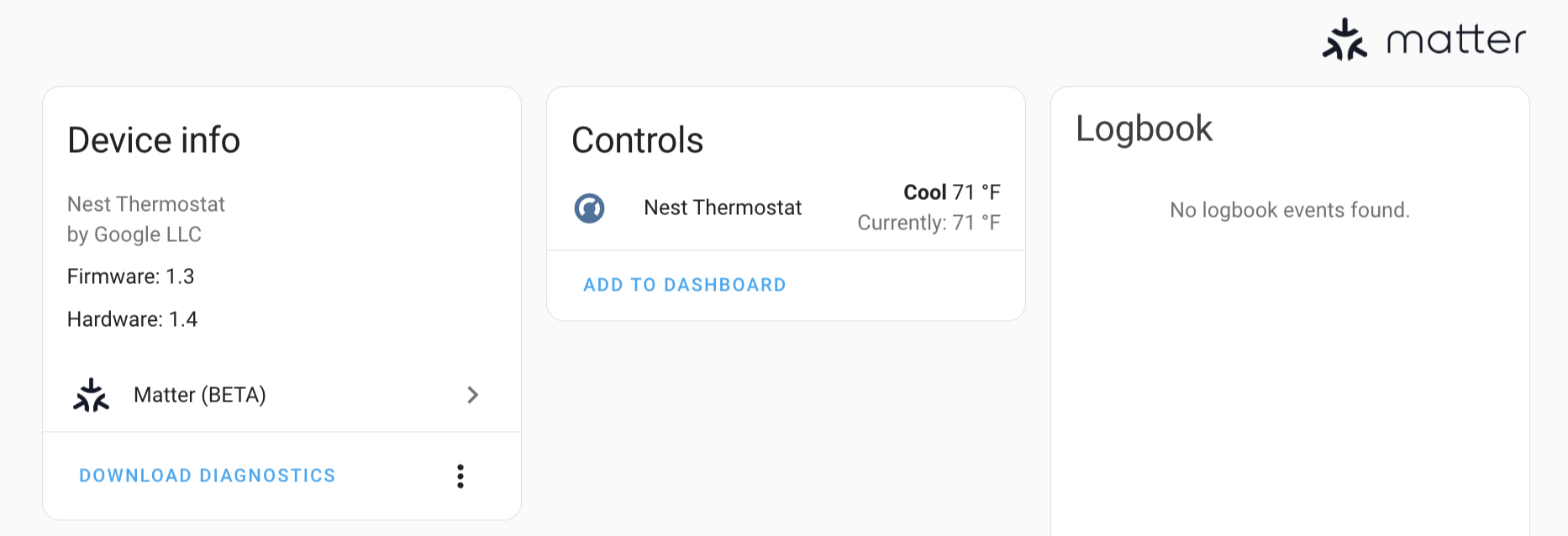 A Nest Thermostat connected as a Matter 温控 设备.
This means if you have a Nest Thermostat (not the E or learning ones) with the latest firmware, you can now use it directly with Home Assistant, entirely local without clouds!
降低遇到不向后兼容变更的风险
Backward-incompatible changes, nobody loves them, but they are sometimes necessary to move forward. We try to keep them to an absolute minimum, but sometimes they are inevitable.
However, we do want to reduce the risk of running into them. Therefore we have adopted a new policy for deprecating YAML 集成 配置 options.
We now require that a YAML 配置 option is deprecated for at least 6 months before being removed. This means you won’t be running into a hard-breaking change if you skip a 发布 or two.
To improve this further, if possible, an automatic migration is now required and an issue in the repairs 仪表盘 will be raised if the deprecation applies to your 配置.
其他值得注意的变更
There are many more improvements in this 发布; here are some of the other noteworthy changes this 发布:
- You can now use network storages that have guest access enabled, and support for older Samba versions has been added. Thanks, @ludeeus!
- When accessing the UI of an add-on via the 侧边栏 that hasn't been started yet, it will now ask if you want to start it. Nice, @mdegat01 and @bramkragten!
- The HomeKit Controller 集成 has been renamed to HomeKit 设备; this makes it clearer that the 集成 is to integrate HomeKit 设备 into Home Assistant.
- ESPHome now has support for 报警 Control 面板! Thanks @grahambrown11!
- @Petro31 added support for setting upper and lower limits on the compensation 集成. Cool!
- 加湿器 now have an 属性 for the current humidity, thanks @Shulyaka! @jbouwh updated the Google Assistant 集成 to support this. Additionally, he added support to the Xiaomi Miio, HomeKit 设备, Tuya and MQTT 集成. Awesome!
- @piitaya updated all existing 加湿器 卡片 to work with the above change, and adjusted them to be more in line with the existing 温控 卡片. Nice!
- The weather 实体 now supports more (forecast) 属性. It added support for apparent temperature, dew point, cloud coverage, and wind gust speed; Thanks, @gjohansson-ST, @vingerha, and @bieniu!
- The Apple TV 集成 now supports launching apps with deep links! Thanks @michalmo!
- @dougiteixeira adjusted the Derivative, Riemann sum integral, Threshold, and Utility Meter helper to add the helper to the source 设备. This makes them show up on the 设备 page of the 设备 the helper is using. Nice work!
- Sensirion BLE now supports the SHT4x and SHT3x 传感器, thanks @akx!
- The MQTT 集成 now has support for 热水器, thanks @hookedonunix!
- @Lash-L kept improving the Roborock 集成 and added cleaning area 传感器 and 开关 to control DnD mode. Thanks!
- We have a new 触发器 that allows 自动化 to 触发器 on the creation, deletion, or 更新 of persistent 通知! Thanks, @RoboMagus!
- You can now dismiss all persistent 通知 at once using the new dismiss all 服务 added by @Petro31!
新集成
We welcome the following new 集成 in this 发布:
- Discovergy, added by @jpbede
Read out your Discovergy gas and electricity meters. - Dremel 3D Printer, added by @tkdrob
Monitor your Dremel 3D printer and its printing progress. - Renson, added by @jimmyd-be
Monitor your Renson ventilation system. - Image, added by @emontnemery
A new 实体 type that is like a 摄像头, but specifically for images. - LOQED Touch Smart 门锁, added by @cpolhout and @mikewoudenberg
Control your LOQED smart 门锁.
发布 2023.7.1 - July 6
- Fix not including device_name in friendly name if it is None (@jbouwh - #95485)
- Handle 集成 with empty 服务 or failing to load during 服务 description enumeration (@bdraco - #95911)
- 更新 前端 to 20230705.1 (@bramkragten - #95913) (前端 docs)
- Make SwitchBot no_devices_found message more helpful (@bdraco - #95916) (switchbot docs)
- Migrate bracketed IP addresses in ZHA config entry (@puddly - #95917) (zha docs)
- Use 设备 name for Nuki (@joostlek - #95941) (nuki docs)
- Add explicit 设备 naming for Tuya 传感器 (@joostlek - #95944) (tuya docs)
- Fix 实体 name for Flick Electric (@joostlek - #95947) (flick_electric docs)
- Fix Matter exception NoneType in set_brightness for optional min/max level values (@neocolis - #95949) (Matter docs)
- Fix grouping feature for MusicCast (@micha91 - #95958) (yamaha_musiccast docs)
- Bump pyrainbird to 2.1.0 (@allenporter - #95968) (rainbird docs)
- Add missing qnap translation (@emontnemery - #95969) (qnap docs)
- Set correct
responsevalue in 服务 description whenasync_set_service_schemais used (@bramkragten - #95985) (脚本 docs) - Explicitly use 设备 name as 实体 name for Xiaomi 风扇 and 加湿器 (@jpbede - #95986) (xiaomi_miio docs)
- Make 脚本 服务 always respond when asked (@bramkragten - #95991) (脚本 docs)
- Fix 状态 of slimproto players (@marcelveldt - #96000) (slimproto docs)
发布 2023.7.2 - July 13
- Fix ESPHome deep sleep 设备 staying unavailable after unexpected disconnect (@bdraco - #96354) (esphome docs)
- Bump pydaikin 2.10.5 (@mover85 - #95656) (daikin docs)
- Bump pywemo from 0.9.1 to 1.1.0 (@esev - #95951) (wemo docs)
- Get MyStrom 设备 状态 before checking support (@joostlek - #96004) (mystrom docs)
- Refactor async_get_hass to rely on threading.local instead of a ContextVar (@jbouwh - #96005) (MQTT docs)
- Use explicit 设备 naming for Switchbot (@joostlek - #96011) (switchbot docs)
- Remove openhome from discovery component (@bazwilliams - #96021) (discovery docs)
- UPB explicit 设备 name (@joostlek - #96042) (upb docs)
- Use default MyStrom devicetype if not present (@joostlek - #96070) (mystrom docs)
- Fix implicit use of 设备 name in Slimproto (@frenck - #96081) (slimproto docs)
- Fix implicit 设备 name for RainMachine
update实体 (@bachya - #96094) (rainmachine docs) - Use explicit 设备 name for Yalexs BLE (@joostlek - #96105) (yalexs_ble docs)
- Fix reference to translation reference in buienradar translations (@jbouwh - #96119) (buienradar docs)
- Bump goalzero to 0.2.2 (@tkdrob - #96121) (goalzero docs)
- Fix implicitly using 设备 name in Yale Smart Living (@gjohansson-ST - #96161) (yale_smart_alarm docs)
- Bump bthome to 2.12.1 (@Ernst79 - #96166) (bthome docs)
- Use explicit 设备 name for Stookwijzer (@joostlek - #96184) (stookwijzer docs)
- Enable retries on rainbird 设备 by loading model and 版本 (@allenporter - #96190) (rainbird docs)
- Fix race fetching ESPHome 仪表盘 when there are no 设备 set up (@bdraco - #96196) (esphome docs)
- Bump Roborock to v0.30.0 (@Lash-L - #96268) (roborock docs)
- Use explicit 设备 naming for Escea (@joostlek - #96270) (escea docs)
- Fix ZHA serialization issue with 警告 设备 (@puddly - #96275) (zha docs)
- Bump reolink_aio to 0.7.3 (@starkillerOG - #96284) (reolink docs)
- Bump aiohomekit to 2.6.7 (@bdraco - #96291) (homekit_controller docs)
- Add has 实体 name to Blink (@joostlek - #96322) (blink docs)
- Fix extra verbiage in Ridwell rotating category 传感器 (@bachya - #96345) (ridwell docs)
- 更新 RestrictedPython to 6.1 (@frenck - #96358) (python_script docs)
- Add explicit 设备 naming to Led BLE (@joostlek - #96421) (led_ble docs)
- Always add guest WiFi qr code 实体 in AVM Fritz!Tools (@mib1185 - #96435) (fritz docs)
- Fix mixed case 服务 schema registration (@bdraco - #96448)
- Ensure ESPHome 仪表盘 connection recovers if its down when 核心 starts (@bdraco - #96449) (esphome docs)
发布 2023.7.3 - July 21
- Use 设备 class naming for SimpliSafe (@joostlek - #96093) (simplisafe docs)
- Always try PullPoint with ONVIF (@bdraco - #96377) (onvif docs)
- Bump vallox-websocket-api to 3.3.0 (@slovdahl - #96493) (vallox docs) (dependency)
- Fix Vallox 风扇 实体 naming (@slovdahl - #96494) (vallox docs)
- Bump devolo_plc_api to 1.3.2 (@Shutgun - #96499) (devolo_home_network docs) (dependency)
- Support MyStrom 开关 120 (@joostlek - #96535) (mystrom docs)
- Defer SSDP UPNP server start until the started event (@bdraco - #96555) (ssdp docs)
- Handle empty strings for ESPHome UOMs (@bdraco - #96556) (esphome docs)
- Bump onvif-zeep-async to 3.1.12 (@bdraco - #96560) (onvif docs) (dependency)
- Fix daikin missing key after migration (@mover85 - #96575) (daikin docs)
- Ensure androidtv_remote does not block startup of HA (@quthla - #96582) (androidtv_remote docs)
- Bump pyrainbird to 2.1.1 (@allenporter - #96601) (rainbird docs) (dependency)
- Bump pyrainbird to 3.0.0 (@allenporter - #96610) (rainbird docs) (dependency)
- Fix SmartThings 遮盖 Set Position (for window shades) (@andrewsayre - #96612) (smartthings docs) (dependency)
- Improve imap 错误 handling for config entry (@jbouwh - #96724) (imap docs)
- Use explicit 设备 name for Stookalert (@joostlek - #96755) (stookalert docs)
- Prevent otbr creating multiple config entries (@emontnemery - #96783) (otbr docs)
- Fix check for HA Yellow radio in otbr config flow (@emontnemery - #96789) (otbr docs)
- 更新 PyYAML to 6.0.1 (@cdce8p - #96800) (dependency)
- 更新 pycocotools to 2.0.6 (@cdce8p - #96831) (tensorflow docs) (dependency)
- Add username to Reauth flow in Honeywell (@mkmer - #96850) (honeywell docs)
- bump python-Roborock to 0.30.1 (@Lash-L - #96877) (roborock docs) (dependency)
- Avoid infinite loop on corrupt stream recording (@uvjustin - #96881) (stream docs)
- Bump AIOSomecomfort to 0.0.15 in Honeywell (@mkmer - #96904) (honeywell docs) (dependency)
- Fix timer 开关 in Sensibo (@gjohansson-ST - #96911) (sensibo docs)
- Disable wheels building for pycocotools (@frenck - #96937)
- Fix esphome 实体 ids in test (@bdraco - #96965) (esphome docs)
- Add custom bypass night arming to SIA 报警 codes (@etnoy - #95736) (sia docs)
- 升级 pymazda to 0.3.10 (@bdr99 - #96954) (mazda docs) (dependency)
- Fix OTBR tests on RC (@frenck - #96966) (otbr docs)
- 更新 aiohttp to 3.8.5 (@frenck - #96945) (dependency)
- Remove stateclass from Systemmonitor process 传感器 (@joostlek - #96973) (systemmonitor docs)
- Fix task leak on config entry unload/retry (@bdraco - #96981)
- Bump env_canada to v0.5.36 (@michaeldavie - #96987) (environment_canada docs)
- 更新 pyfibaro dependency (@rappenze - #97004) (fibaro docs) (dependency)
现已支持通过 UI 配置的集成
The following 集成 are now available via the Home Assistant UI:
- myStrom, done by @pail23
- Google Translate text-to-speech, done by @MartinHjelmare
- Linn / Openhome, done by @bazwilliams
- QNAP, done by @disforw
需要帮助?加入社区!
Home Assistant has a great community of users who are all more than willing to help each other out. So, join us!
Our very active Discord chat server is an excellent place to be at, and don't forget to join our amazing forums.
Found a bug or issue? Please report it in our issue tracker, to get it fixed! Or, check our help page for guidance for more places you can go.
Are you more into email? Sign-up for our Building the Open Home Newsletter to get the latest news about features, things happening in our community and other news about building an Open Home; straight into your inbox.
不向后兼容的变更
If you use the Home Assistant 容器 安装 method, for example, using Docker, please make sure you are using our official (multi-platform) images.
The correct and preferred image to use for our stable releases is:
ghcr.io/home-assistant/home-assistant:stable
Although not the preferred location by the Home Assistant project, the image is also available on DockerHub:
homeassistant/home-assistant:stable
The reason for mentioning this in this breaking change section is that we have seen usage of our internal, intermediate, platform build images. These images are not meant for use directly, and using the above listed images is strongly recommended.
As of this 发布, we no longer publish our intermediate platform images to DockerHub. This means that if you are using these images, you will no longer receive updates. Please use the above-listed images instead.
The previously deprecated YAML 配置 of the Bose SoundTouch 集成 has been removed.
Bose SoundTouch is now configured via the UI. Any existing YAML 配置 has been imported in previous releases and can now be safely removed from your YAML 配置 files.
(@gjohansson-ST - #94090) (文档)
When using the Assist shortcut on iOS, it will now always talk to Home Assistant conversation agent even if the OpenAI or Google LLM conversation 集成 are set up.
As an additional security hardening measure, the default for allowing ESPHome 设备 to make 服务 calls has changed. If you want to permit the ESPHome 设备 to make 服务 calls, it must be enabled in the options flow.
- For existing 设备, calling Home Assistant 服务 continues to be allowed.
- For newly configured 设备, it must now be enabled in the options flow.
The default name given to backups 创建 with the hassio.full_backup
and hassio.partial_backup 服务 is now longer "" but the date and time
the 备份 was initiated (%Y-%m-%d %H:%M:%S, for example,
"2023-07-05 13:37:42").
The behavior of Hyperion 灯光 has changed:
Turning off the 灯光 实体 will only clear the priority you have configured during the 集成 设置. Other Home Assistant independent 灯光 sources in Hyperion might still be active and cause 灯光 to be emitted. If you want to turn the 灯光 off entirely, regardless of active 灯光 sources, you can enable the switch.[instance]_led_device 实体 that acts as a global 开关.
External effects that are unrelated to the Hyperion 灯光 source (such as USB capture) have been removed from the 灯光 实体. To control them, enable the respective disabled-by-default 开关 实体.
If the initial temperature, min_temp, or max_temp is not set, the default
temperature will be converted to the set temperature_unit or system default
temperature unit if this is not degrees Celsius.
The behavior of MQTT 温控 when power_command_topic is set has been changed:
- The
hvac_mode状态 属性 is no longer optimistically set ifpower_command_topicis defined andclimate.turn_onorclimate.turn_offis called. - When
hvac_modeis changed,payload_onorpayload_offmessages will not be published on thepower_command_topic.
This also means power_command_topic is no longer deprecated.
The values for the source 属性 have changed. We wanted to show more user
friendly values for the source 属性, such as "Net Radio" instead
of "net_radio".
If you have any 自动化 depending on the source 状态 属性 of the
media player 实体, you will have to 更新 these. Calling the select_source
服务 will still be possible using the old source names.
(@micha91 - #74954) (文档)
The 属性 cloudiness has been replaced by the 属性 cloud_coverage.
Please 更新 any 自动化 or 脚本 that is using this 属性 to use the
newly added cloud_coverage 属性.
(@gjohansson-ST - #95096) (文档)
The previously deprecated YAML 配置 of the Slack 集成 has been removed.
Slack is now configured via the UI. Any existing YAML 配置 has been imported in previous releases and can now be safely removed from your YAML 配置 files.
(@gjohansson-ST - #94106) (文档)
The previously deprecated YAML 配置 of the Xbox 集成 has been removed.
Xbox is now configured via the UI. Any existing YAML 配置 has been imported in previous releases and can now be safely removed from your YAML 配置 files.
(@gjohansson-ST - #94094) (文档)
风扇 speed percentage for Honeywell(JE/Jasco) 39358 and Enbrighten(GE/Jasco) 55258 in wall 风扇 controllers are now mapped to levels (low, medium, high).
This may affect 脚本 or automatons setting 风扇 speeds to specific percentages.
(@jgrieger1 - #92371) (文档)
If you are a custom 集成 developer and want to learn about breaking changes and new features available for your 集成: Be sure to follow our developer 博客. The following are the most notable for this 发布:
告别以下内容
The following 集成 are also no longer available as of this 发布:
- SenseME has been removed. Big Ass 风扇 changed the protocol in a newer firmware in April 2022. The Big Ass 风扇 集成 can be used as a replacement, after updating to the latest firmware. (@bdraco - #94363)
全部变更
Of course, there is a lot more in this 发布. You can find a list of all changes made here: Full changelog for Home Assistant 核心 2023.7