

title: '2023.6: Network storage, favorite light colors, new 集成 仪表盘' description: '<a href=''/home-assistant/integrations/版本/2023.6''<img src=''/home-assistant/images/blog/2023-06/social.png'' style=''border: 0;box-shadow: none;''</a。' add your favorite colors to your lights, copy & paste support for automations, blazing speed through Python 3.11, and Matter and Z-Wave updates.
2023.6: Network storage, favorite light colors, new 集成 仪表盘
Home Assistant 核心 2023.6! 🎉
Get ready for a classic, old-fashioned, jam-packed 发布! 🤯
I am excited about so many things being shipped in this 发布 that it is hard to pick a favorite 😅 This 发布 has it all.
Being able to directly use and back up my Home Assistant 配置 to my network storage is absolutely incredible! But I also really enjoy the new and clean 集成 仪表盘 and pages.
The feature that greatly improved the Home Approval Factor in my household is definitely the addition of the new favorite colors in the 灯光 dialogs 🎨
Enjoy the 发布!
../Frenck
- Connect and use your existing network storage
- integrations 仪表盘 & pages
- 灯光 entities dialog improvements: favorite colors
- Added to the entities dialog: last changed
- Related information
- Copy 'n paste support in the automation editor
- Python 3.11 and significant performance upgrades
- Matter 1.1
- Z-Wave updates
- New entities! Date, time, date/time
- Other noteworthy changes
- New integrations
- integrations now available to set up from the UI
- 发布 2023.6.1 - June 8
- 发布 2023.6.2 - June 14
- 发布 2023.6.3 - June 23
- Need help? Join the community!
- Backward-incompatible changes
- Farewell to the following
- All changes
Don't forget to join our 发布 party live stream on YouTube 7 June 2023, at 12:00 PDT / 21:00 CEST!
连接并使用你现有的网络存储
Do you have a network storage in your home? Like a QNAP or Synology NAS? This 发布 adds the ability to add and use that storage with Home Assistant!
This long and highly requested feature is now available when running the Home Assistant Operating System. In the 设置 > System > Storage menu, you can now find a whole new set of controls to connect to your storage and use it to, for example, use your network share as a media source in Home Assistant.
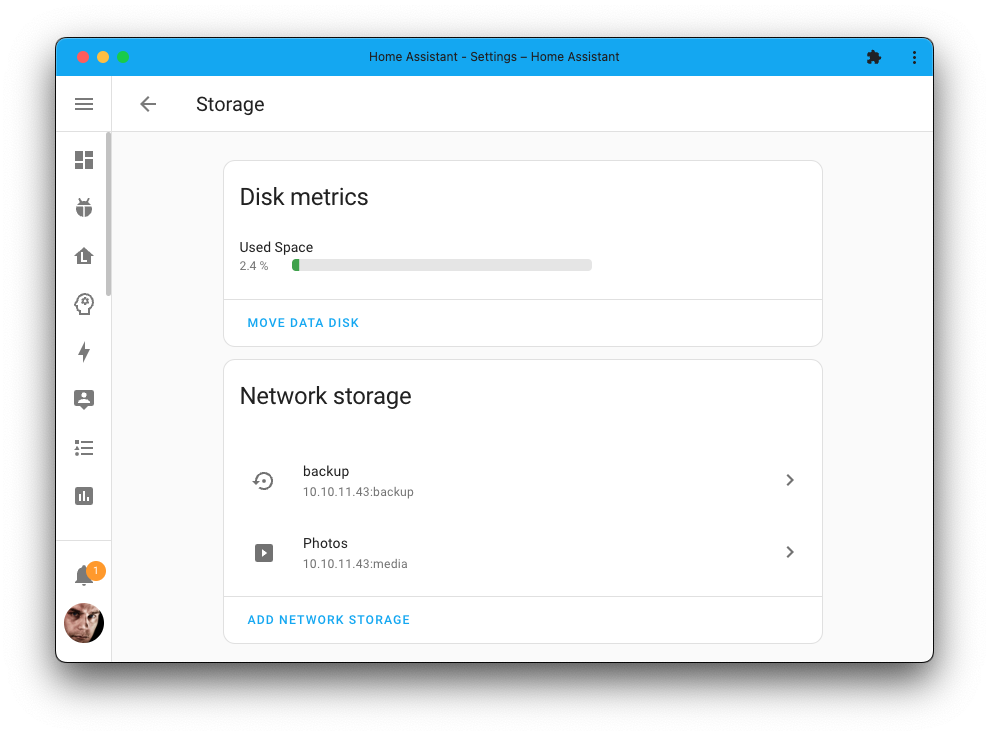
Even better: You can use it as a target for your backups so that when Home Assistant creates a 备份 for you, it will store it directly on your network storage.
Multiple network storages are also supported; if you like, you can easily add more.
集成仪表盘与详情页
The 集成 仪表盘 has gotten a major overhaul!
There have been quite some usability issues with the previous 版本 of the 集成 仪表盘. For example, if you use ESPHome with many 设备, you are undoubtedly familiar with the annoying scrolling in that little 卡片. Or, big 错误 messages stretching those 卡片 out, messing up the whole page.
This 发布 brings in a whole new 集成 仪表盘 that addresses many of these issues, aiming to provide a cleaner and more consistent experience.
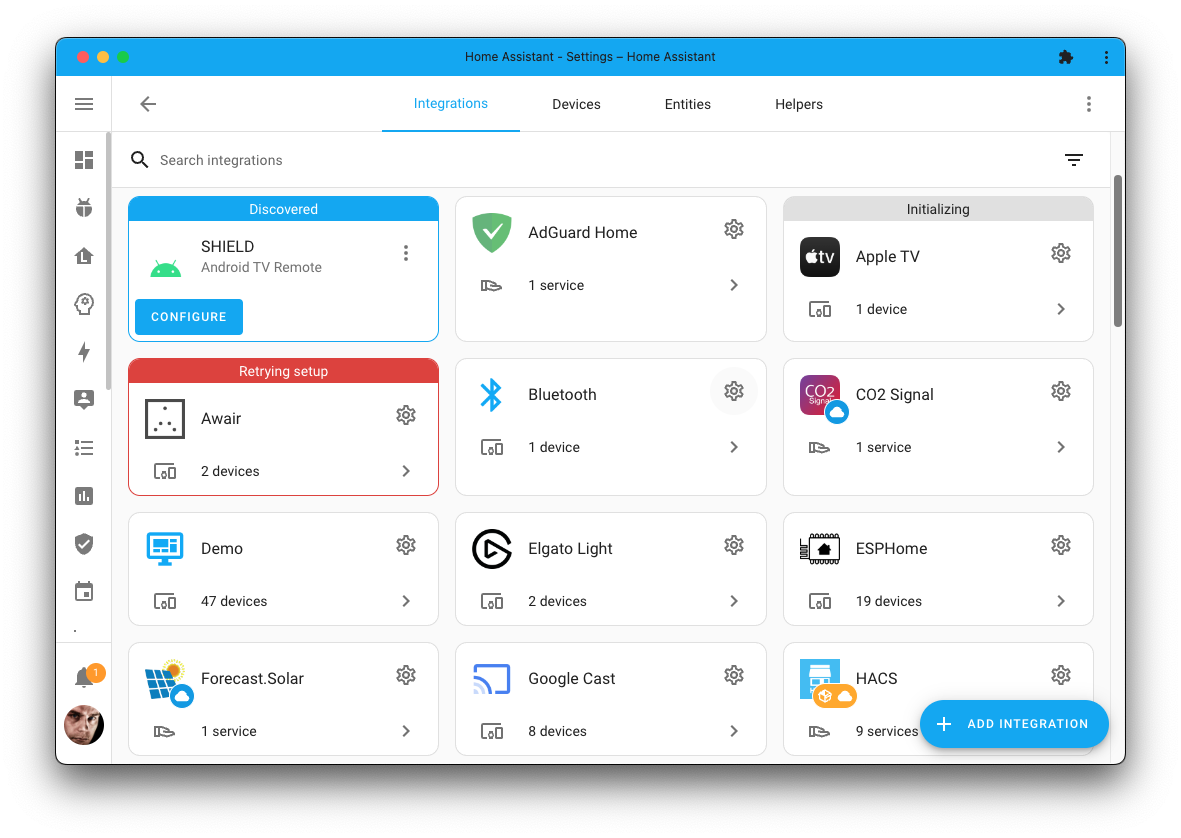
设备 based 集成, like ESPHome, are combined: no more scrolling. A failing 集成 no longer stretches the layout or makes the layout "jump" during retries. Custom 集成 and 集成 relying on the cloud are now more visibly marked.
Selecting the cog icon on the 集成 卡片 will bring you to a brand new 集成 page, showing all information about the 集成:
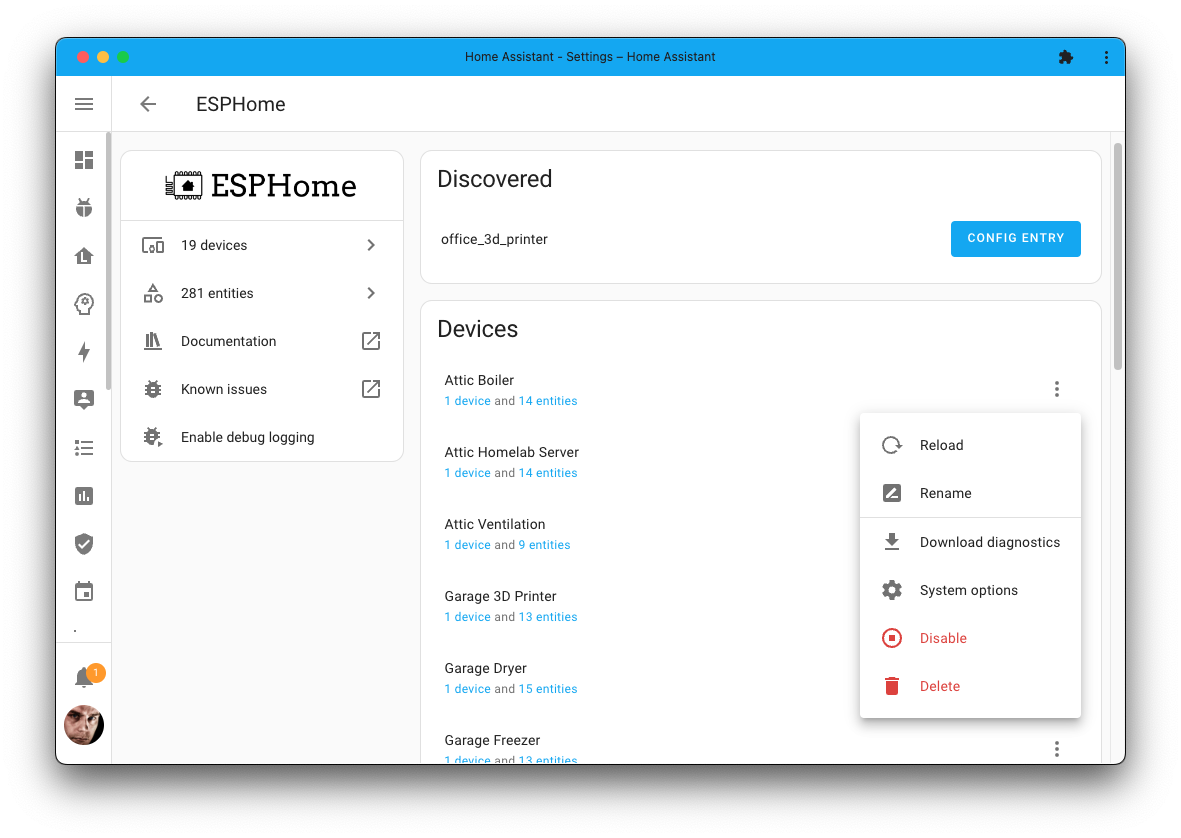
In the above example, the ESPHome 集成 page shows all 设备 此integrations has. All the information and options, previously squashed into the 集成 仪表盘, are now available here.
These brand new 集成 pages are helpful in other places in Home Assistant. For example, the 设备 pages can now link back directly to the 集成 that provided it.
灯光实体对话框改进:收藏颜色
Recently we introduced new controls in the 灯光 实体 dialog, and this 发布 iterates on the design by adding the current brightness, new controls, and adding favorite colors! 🎨
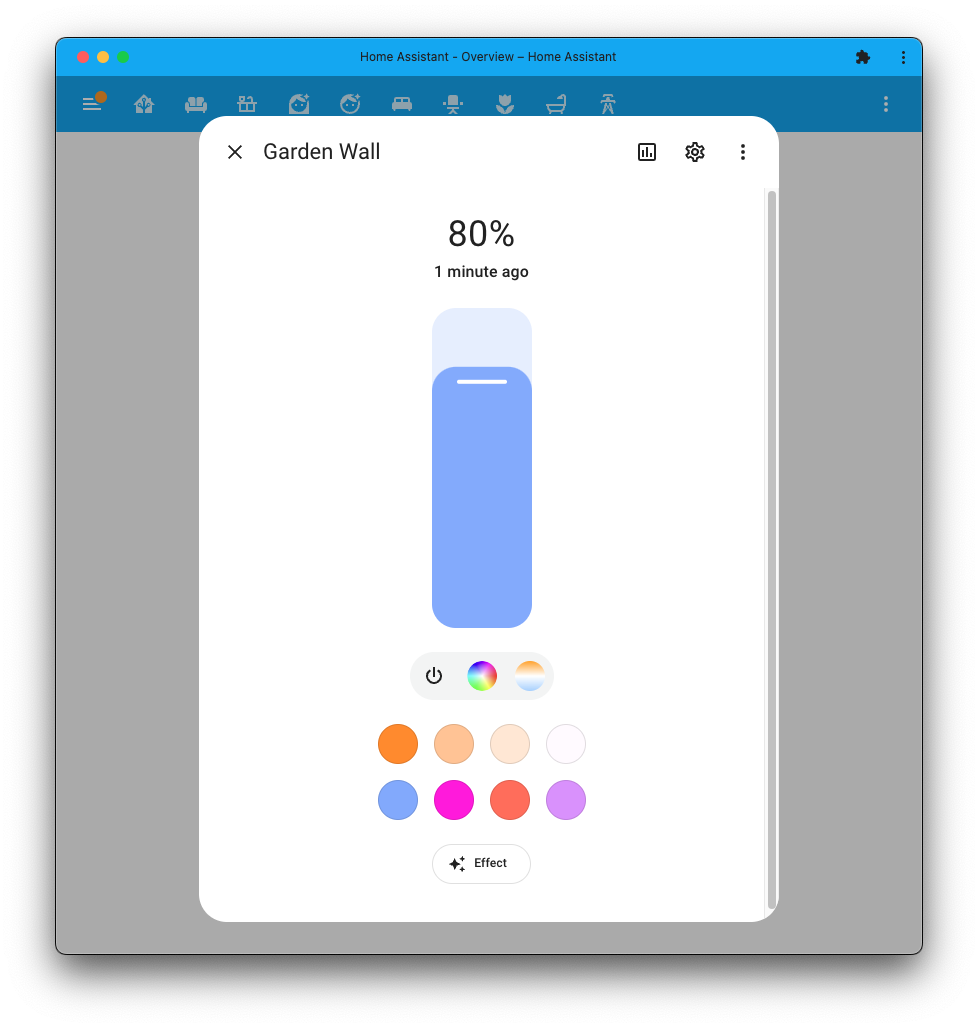
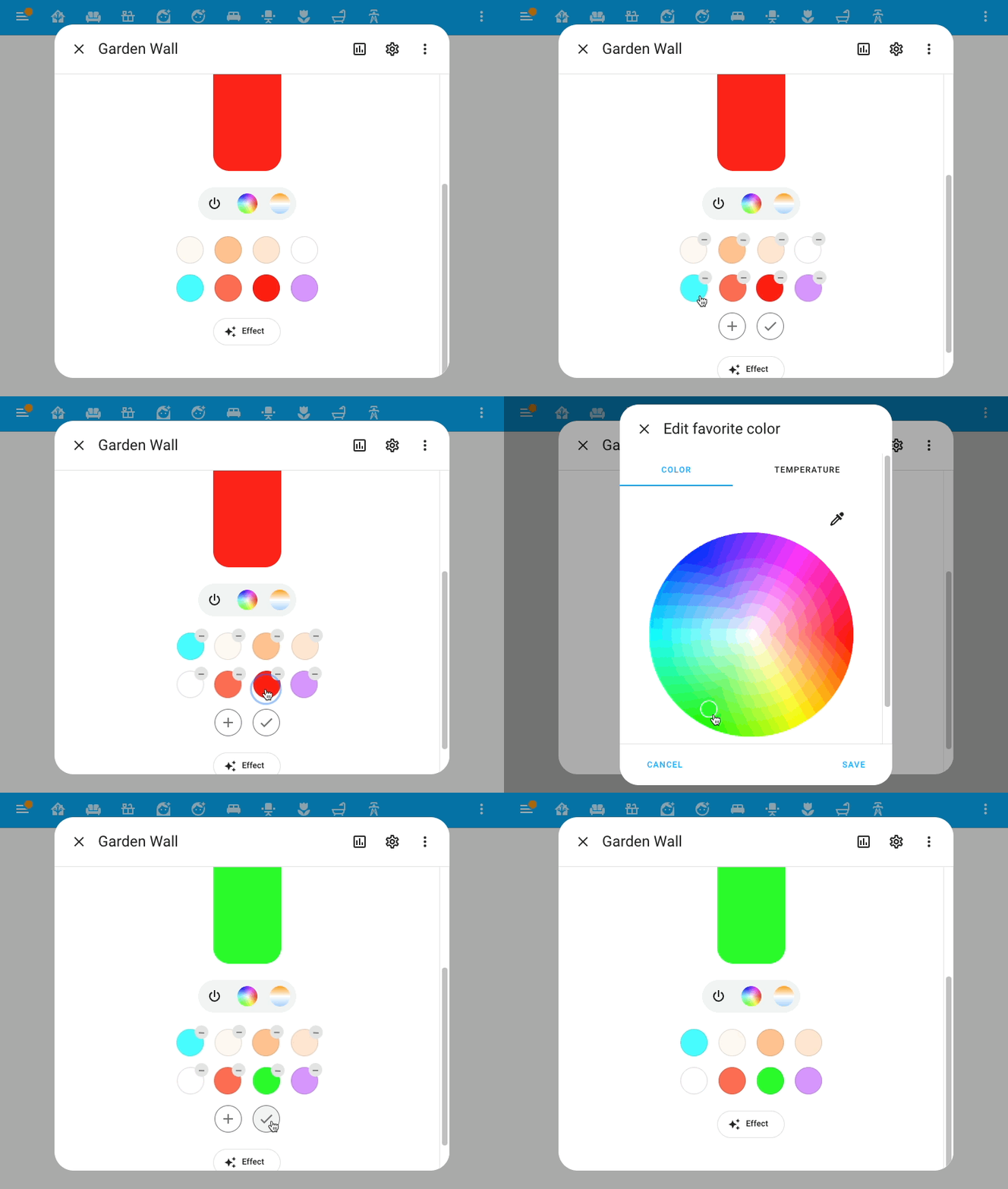
Each 灯光 (or 灯光 group) has its own set of colors. These colors can be added, changed, removed, and reorganized using drag-and-drop. To enter edit mode, select and hold one of the colors:
实体对话框新增:上次变更时间
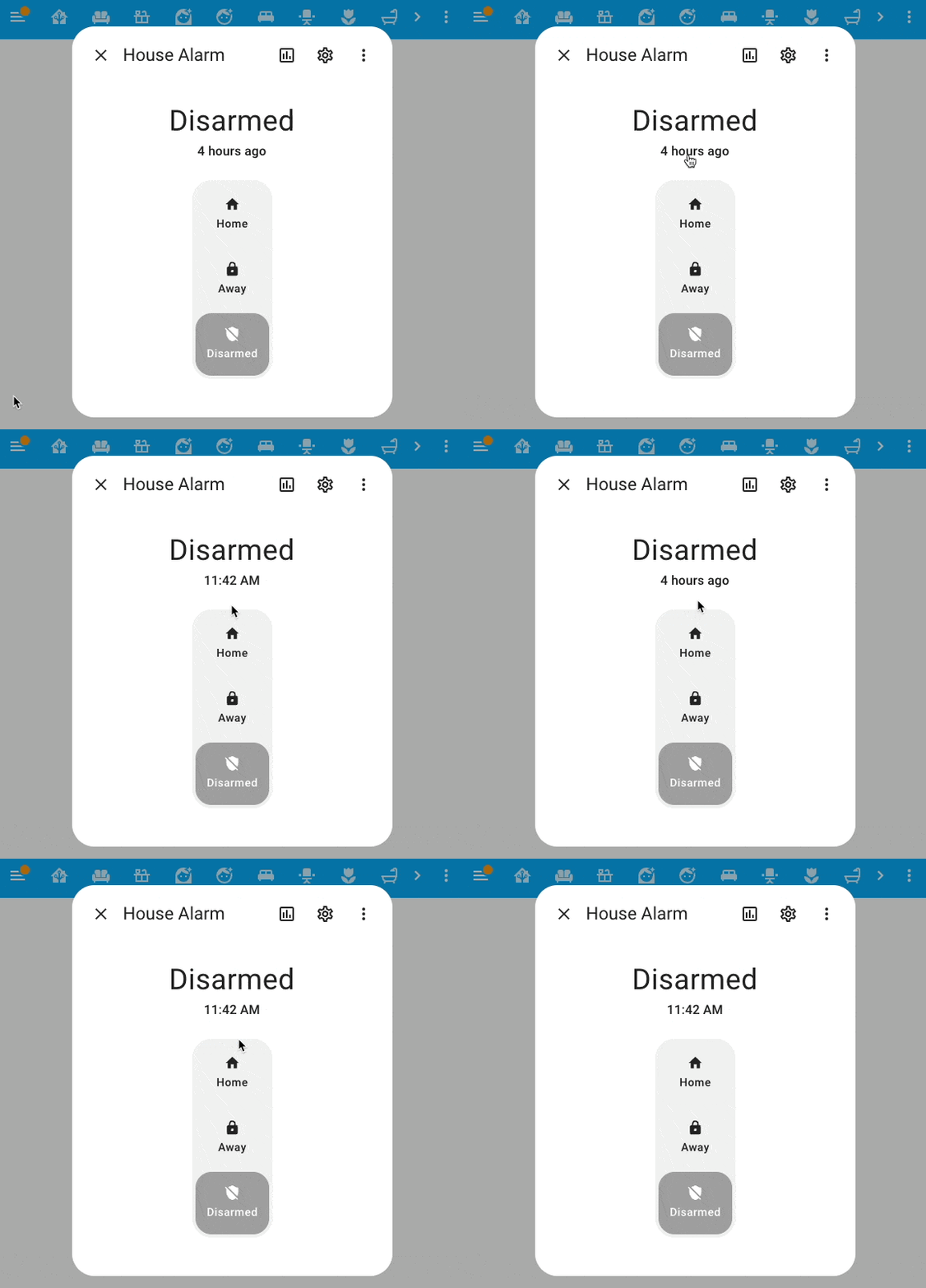
By popular request, the information on when an 实体 was last changed has been added back to the new 实体 information dialogs.
Not only that, @piitaya added a very nice easter egg! You can click on it to 切换 between the relative and absolute format!
关联信息
Which 自动化 is using that blueprint? Well, Home Assistant can now tell you that! On the 设置 > 自动化 & 场景 > Blueprints page, select the three dotted menu on any blueprint to discover which 自动化 are using that blueprint.
Not only that, if you accidentally try to remove a blueprint that is still in use, Home Assistant will stop you from removing it and tell you which 自动化 still rely on it.
Hold on; there is more related! The related items in the 实体 information dialog were improved as well. The old list of links is gone, and it now shows a way more modern view of all related items for an 实体:
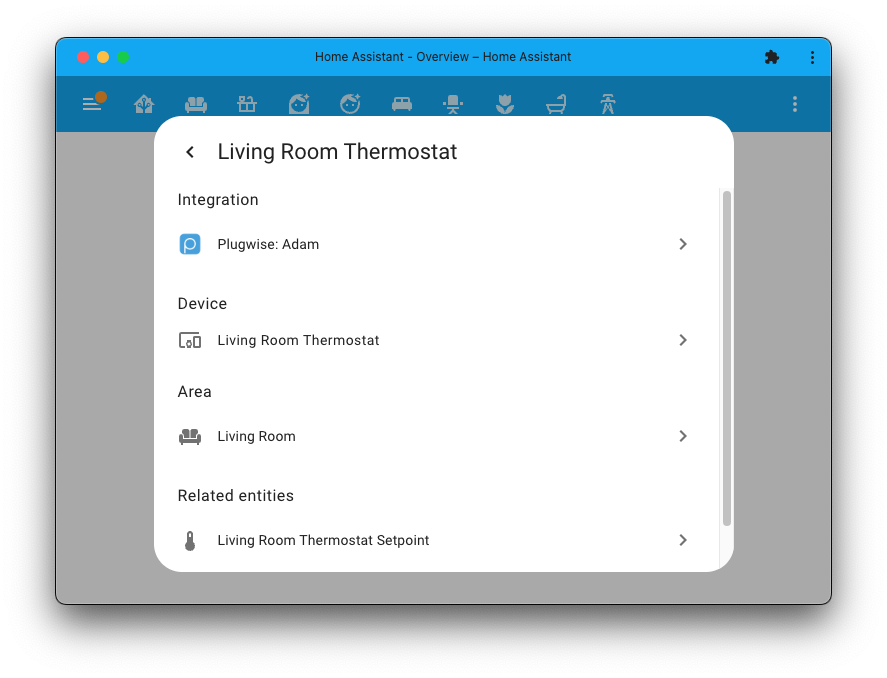
Notice how it nicely links back to the new 集成 page here too!
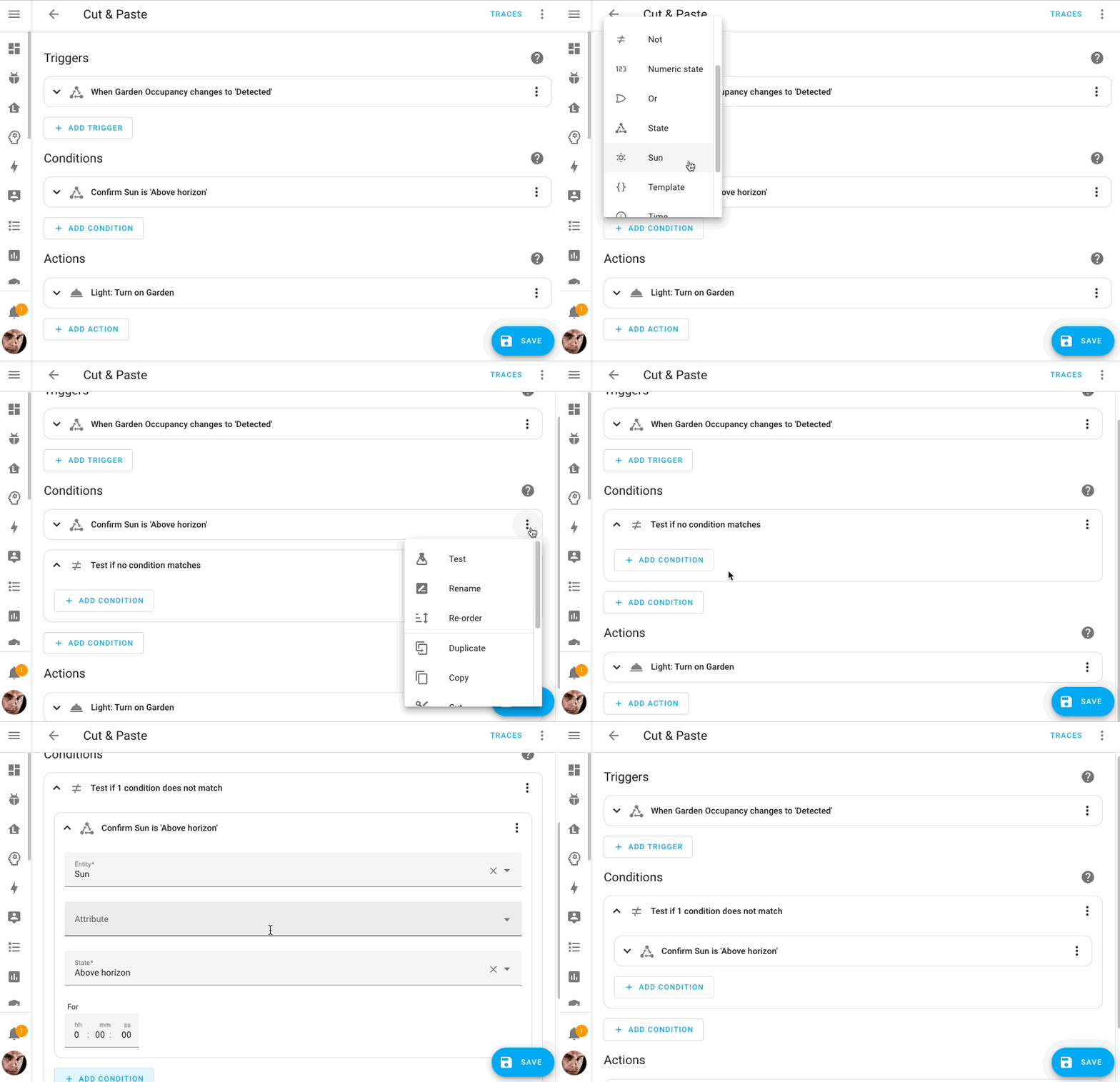
自动化编辑器中的复制粘贴支持
An amazing contribution by @karwosts in this 发布 that adds cut, copy & paste capabilities to the 自动化 and 脚本 editors!
You can now copy and paste any 触发器, 条件, and 动作 into different places of your 自动化 and even paste it into a different 自动化 altogether!
Python 3.11 与显著的性能提升
This 发布 ships running on Python 3.11! In case you are wondering, what is that? Well, Python is the language the 核心 of Home Assistant is written in.
Why it matters? It is seriously faster! 🚀
If you run the Home Assistant Operating System or are using the Home Assistant 容器 安装 type: You won't have to do anything as we handle the 升级 to Python 3.11 for you.
And that is not all in terms of performance. We've also upgraded internal parts, including a newer SQLite 版本 that should be faster. Oh! And, of course, @bdraco has been all over the place to optimize a lot (a lot lot).
This 发布 can be expected to be a lot faster (or less consuming) of resources at runtime.
Matter 1.1
The Matter implementation within Home Assistant is now based on the freshly released 1.1 版本 of the Matter standard. This brings a ton of stability fixes and improvements, but unfortunately, no new features.
Thanks to @Diegorro98, we do now have support for tilt 遮盖! Besides that, this Home Assistant 发布 ships with several generic bugfixes and optimizations; we've managed to squeeze out some additional performance to make 状态 updates for your Matter 设备 lightning-fast 🚀
All these stability improvements to both the Matter stack and our implementation did not go unnoticed:
Z-Wave 更新
There has been quite a bit of progress on Z-Wave in Home Assistant.
Thanks to @raman325, the 集成 reached platinum level 🏆 on our quality scale. This means the 集成 now does things right according to best practices which should mean a better user experience in general.
Have you ever turned on a Z-Wave 灯光 from the Home Assistant UI just to see the 切换 going off again after a couple of seconds, then after some more seconds seeing it going back to on? This long-standing issue (that even got the nickname flip/flop) for certain 设备, that are slow to respond to their 状态 has finally been addressed.
For those of you that like to automate everything, you can now automate not only the Z-Wave 设备 状态 but also the 设备 配置. We added 设备 配置 parameter 实体 so that almost every Z-Wave 设备 setting is now available as an 实体.
Not stopping there, we also added 实体 for 设备 connection statistics, which you can use to, for example, create a 通知 if a 设备 generates more than a certain amount of dropped messages. If you want to track a misbehaving 设备, you can enable these 传感器 to view the history of the connection performance.
In the background, @AlCalzone is working tirelessly on the Z-Wave JS driver, which is the foundation of our Z-Wave 集成. Among other things, some 设备 are now faster to interview during addition, and more 设备 can be configured.
新实体!日期、时间、日期时间
We welcome three new 实体 types in this 发布:
date, time & datetime.
These 实体 allow 集成 to provide date, time, or date/time input controls from the UI. They are very similar to the input datetime helper but are available for use by 集成.
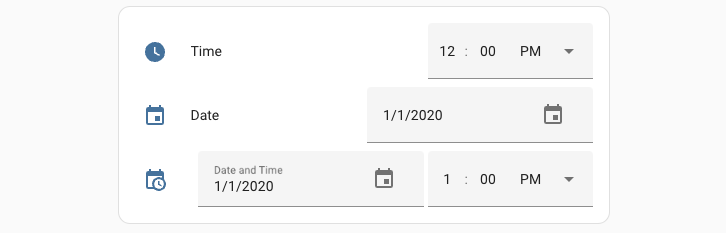 How the new time, date, and date/time 实体 will look like on your 仪表盘.
They are so new that no 集成 are using them yet, but you can expect to see usage in (custom) 集成 of these soon!
Thanks for creating those @raman325!
其他值得注意的变化
There are much more easter bunnies in this 发布; here are some of the other noteworthy changes this 发布:
- When using 服务 in the UI (like in the 自动化 editor), only options and 设置 available to the selected target 设备 & 实体 will be shown. This makes the UI much cleaner! Thanks, @emontnemery and @bramkragten!
- The Roborock 集成 (introduced in the previous 发布) received much love and now provides a wide range of new 实体. Thanks @Lash-L!
- The Android TV Remote 集成 now provides a media player 实体 too! Nice, @Drafteed!
- KNX now provides its own 面板, allowing you to upload your KNX project file, and offers a group monitor for live bus diagnostics. Information from the project is also used for 设备 触发器. Amazing @marvin-w and @farmio!
- @bdraco added the option to disable Webhooks for ONVIF in case your 摄像头 isn't fully following specifications.
- The variables 动作 is now also available in the 自动化 and 脚本 editors in the UI. Thanks, @piitaya
- The add-on 仪表盘 now has a search bar. Helpful, @bramkragten!
- The Samsung TV now has a remote 实体, allowing you to send remote key presses directly to your TV! Thanks @peitschie!
- The 状态 in the 开发者工具 now uses the 实体 ID in the 实体 ID picker. Thanks, @bramkragten!
- @gjohansson-ST added a 服务 to change a running timer helper, @frenck did something similar and added a 服务 to set the value of a counter helper.
- The AccuWeather 集成 now provides 传感器 for the weather 条件 and solar irradiance values. Thanks, @bieniu
- You can now 更新 your QNAP QSW directly from Home Assistant. Nice @Noltari!
- The BMW Connected Drive now allows you to 切换 温控 on/off and new 实体 related to the charging of your car. Thanks, @rikroe and @cpoulsen!
New 集成
We welcome the following new 集成 in this 发布:
- Airzone Cloud, added by @Noltari
温控 control for your Aidoo, Easyzone, or Flexa air conditioners. - Date, Time, and Date/Time, added by @raman325
New 实体 types that allow 集成 to provide date/time controls. - Electra Smart, added by @jafar-atili
Control your Electra Air air conditioner from Home Assistant. - Google Generative AI Conversation, added by @tronikos
A conversation agent powered by Google Generative AI. - JVC Projector, added by @SteveEasley
You can now automate your network controllable JVC Projector. - YouTube, added by @joostlek
Add your favorite YouTube channels as 传感器.
This 发布 also has a new virtual 集成. Virtual 集成 are stubs that are handled by other (existing) 集成 to help with findability. This one is new:
- Piper provided by Wyoming, added by @frenck
- Whisper provided by Wyoming, added by @frenck
- Yale Home provided by August, added by @bdraco
现已可通过 UI 设置的集成
The following 集成 are now available via the Home Assistant UI:
- Deutscher Wetterdienst (DWD) Weather 警告, done by @andarotajo
- GeoJSON, done by @exxamalte
- Last.fm, done by @joostlek
- Philips Dynalite, done by @ziv1234
发布 2023.6.1 - June 8
- Add 错误 handling to input_select 集成 (@j4n-e4t - #93940) (input_select docs)
- Fix OTBR reset (@emontnemery - #94157) (Thread docs) (otbr docs)
- Bump melnor-蓝牙 to fix a timezone issue (@vanstinator - #94159) (melnor docs)
- Fix Abode unit of measurement (@joostlek - #94168) (abode docs)
- Bump pyoverkiz to 1.8.0 (@iMicknl - #94176) (overkiz docs)
- Rename Local Media to My Media (@balloob - #94201) (media_source docs)
- Fix ambiclimate for Python 3.11 (@megakid - #94203) (ambiclimate docs)
- Require pydantic 1.10.8 or higher (@allenporter - #94208)
- Set httpx 日志 level to 警告 (@jpbede - #94217)
- 更新 aioairzone-cloud to v0.1.8 (@Noltari - #94223) (airzone_cloud docs)
- Bump python-opensky (@joostlek - #93916) (opensky docs)
- Bump python-opensky to 0.0.9 (@joostlek - #94224) (opensky docs)
- Bump pulsectl to 23.5.2 (@chatziko - #94227) (pulseaudio_loopback docs)
- Fix imap crash on email without subject (@jbouwh - #94230) (imap docs)
- Solve wrong return code from modbus. (@janiversen - #94234) (flexit docs)
- Catch exception when user has no lastfm friends (@joostlek - #94235) (lastfm docs)
- Bump aiohomekit to 2.6.5 (fixes python 3.11 regression) (@Jc2k - #94245) (homekit_controller docs)
- Retrieve friends in an async manner in Lastfm (@joostlek - #94255) (lastfm docs)
- 更新 前端 to 20230608.0 (@piitaya - #94256) (前端 docs)
- Bump unifiprotect to 4.10.2 (@AngellusMortis - #94263) (unifiprotect docs)
- Fix default value when logger used (@balloob - #94269) (logger docs)
- Fix repair issue about no yaml for config entries (@frenck - #94271)
- Restructure Insteon start-up (@teharris1 - #92818) (insteon docs)
- Fix Insteon startup for users with X10 设备 (@teharris1 - #94277) (insteon docs)
发布 2023.6.2 - June 14
- Change pyoppleio to pyoppleio-legacy (@tinysnake - #88050) (opple docs)
- Fix issue with Insteon linked 设备 maintaining current 状态 (@teharris1 - #94286) (insteon docs)
- Bump elkm1-lib to 2.2.5 (@gwww - #94296) (elkm1 docs)
- Bump pylitterbot to 2023.4.2 (@natekspencer - #94301) (litterrobot docs)
- 升级 sisyphus-control to 3.1.3 (@jkeljo - #94310) (sisyphus docs)
- fix: electrasmart - cast temperature to int in set_temperature (@jafar-atili - #94368) (electrasmart docs)
- Fix dep noaa-coops for noaa_tides (@jbouwh - #94370) (noaa_tides docs)
- Fix deprecated asyncio.wait use with coroutines (@syssi - #94371) (xiaomi_miio docs)
- 更新 xknxproject to 3.1.1 (@farmio - #94375) (knx docs)
- Re-add event listeners after Z-Wave server disconnection (@raman325 - #94383) (zwave_js docs)
- Fix ZHA binding api to actually return responses (@jasonkuster - #94388) (zha docs)
- Abort youtube 配置 if user has no channel (@joostlek - #94402) (youtube docs)
- 更新 knx-前端 to 2023.6.9.195839 (@farmio - #94404) (knx docs)
- Bump unifiprotect to 4.10.3 (@AngellusMortis - #94416) (unifiprotect docs)
- Fix: Xiaomi Miio 风扇, delay off countdown unit conversion (@golles - #94428) (xiaomi_miio docs)
- Add unit inference for Amps and VA in APCUPSD 集成 (@yuxincs - #94431) (apcupsd docs)
- Fix manual 更新 for Command Line (@gjohansson-ST - #94433) (command_line docs)
- Fix 重载 服务 in Command Line (@gjohansson-ST - #94436) (command_line docs)
- Set default value for endpoint in zwave 设备 自动化 (@raman325 - #94445) (zwave_js docs)
- Revert "Bump pydaikin 2.9.1 (#93635)" (@mover85 - #94469) (daikin docs)
- Bump russound_rio to 1.0.0 (@chphilli - #94500) (russound_rio docs)
- Fix 实体 and 设备 selector TypedDict's (@raman325 - #94510)
- Bump yalexs-ble to 2.1.18 (@bdraco - #94547) (august docs) (yalexs_ble docs)
- Bump
regenmaschineto 2023.06.0 (@bachya - #94554) (rainmachine docs) - 更新 Home Assistant base image to 2023.06.0 (@frenck - #94556)
- Catch InvalidAuthError in
shutdown()method for Shelly gen2 设备 (@bieniu - #94563) (shelly docs) - Fix keyboard_remote for python 3.11 (@lanrat - #94570) (keyboard_remote docs)
- Fix failed recovery in roku (@ctalkington - #94572) (roku docs)
- Fix failed recovery in ipp (@ctalkington - #94573) (ipp docs)
- Improve multipan 调试 logging (@emontnemery - #94580) (homeassistant_hardware docs)
发布 2023.6.3 - June 23
- Register Fully Kiosk 服务 regardless of 设置 result (@mheath - #88647) (fully_kiosk docs)
- Fortios 设备 tracker updates (@kimfrellsen - #92331) (fortios docs)
- Handle LastFM unavailable (@joostlek - #94456) (lastfm docs)
- Handle Insteon events correctly (@teharris1 - #94549) (insteon docs)
- Fix unit for Habitica text 传感器 (@atudor2 - #94550) (habitica docs)
- Bump minimum typing_extensions to 4.6.3 (@freeDom- - #94587) (dependency)
- Fix glances raid plugin data (@freeDom- - #94597) (glances docs)
- Make YouTube select lower quality thumbnails (@joostlek - #94652) (youtube docs)
- Add strings for YouTube reauthentication (@joostlek - #94655) (youtube docs)
- Fix 蓝牙 tracker asyncio usage (@d03n3rfr1tz3 - #94695) (bluetooth_tracker docs)
- Fix zwave_js 触发器 event reattach logic (@raman325 - #94702) (zwave_js docs)
- Fix 警告 from rapt_ble caused by payload 版本 2 (@sairon - #94718) (rapt_ble docs)
- Fix Totalconnect BinarySensorDeviceClass logic (@austinmroczek - #94772) (totalconnect docs)
- Bump HAP-python to 4.7.0 (@bdraco - #94812) (homekit docs) (dependency)
- Bump bthome to 2.12.0 (@Ernst79 - #94822) (bthome docs) (dependency)
- 更新 aioairzone to v0.6.4 (@Noltari - #94873) (airzone docs) (dependency)
- Bump ical to 4.5.4 (@allenporter - #94894) (local_calendar docs)
- Fix Meteo France blocked config entry when weather alert API fails (@Quentame - #94911) (meteo_france docs)
- Add 错误 handling to hassio issues (@epenet - #94951) (hassio docs)
- Bump Matter Server to 3.5.1: some small fixes and stability improvements (@marcelveldt - #94985) (Matter docs) (dependency)
- Fix zwave_js 设备 diagnostics dump (@raman325 - #94999) (zwave_js docs)
- Bump bimmer_connected to 0.13.7 (@rikroe - #95017) (bmw_connected_drive docs) (dependency)
- Fix goodwe midnight 错误 (@hmmbob - #95041) (goodwe docs)
- Fix removal of orphaned Matter 设备 (@marcelveldt - #95044) (Matter docs)
- Fix KNX 设备 触发器 passing info data (@farmio - #95076) (knx docs)
需要帮助?加入社区!
Home Assistant has a great community of users who are all more than willing to help each other out. So, join us!
Our very active Discord chat server is an excellent place to be at, and don't forget to join our amazing forums.
Found a bug or issue? Please report it in our issue tracker, to get it fixed! Or, check our help page for guidance for more places you can go.
Are you more into email? Sign-up for our Building the Open Home Newsletter to get the latest news about features, things happening in our community and other news about building an Open Home; straight into your inbox.
不向后兼容的变更
All Home Assistant versions, of which the Home Assistant project manages the Python 版本 for you, have been upgraded to Python 3.11. This affects the following 安装 types:
- Home Assistant Operating System
- Home Assistant 容器
- Home Assistant 受监管模式
This might affect you when using custom 集成, as those must be compatible with Python 3.11.
Furthermore, as of this 发布, Python 3.10 is deprecated, and support will be removed in Home Assistant 2023.8. This only affects you if you are running Home Assistant 核心 安装 type in your own Python virtual environment. Please 更新 your Python 版本 to Python 3.11.
If you run Home Assistant OS, Home Assistant 容器, or Home Assistant 受监管模式, we have taken care of this for you; you will be using Python 3.11 automatically on 升级.
sensor.ups_self_test_interval 传感器 now properly splits unit "days" from the
raw data. Previously, it would show 7 days as the 传感器 状态.
Now it shows 7 with a unit "Days".
The counter 实体 no longer 恢复 their previous manually set
配置 (using the - now deprecated - counter.configure 服务) on
Home Assistant startup. Instead, it will now use the 配置 as set in
the helper 配置 in the UI (or as configured YAML, if used).
This behavior is removed, as it caused 配置 issues, as the new 配置 was never applied again (but forever restored). This behavior was out of the ordinary for Home Assistant and thus now standardized.
The value of the counter is still restored and available across Home Assistant restarts.
The Command Line 集成 changes its YAML 配置 format from an old-style platform 配置 to a more modern 集成-style 配置 format.
For example, if you have a 二元sensor configured previously as:
That same 二元sensor is now configured under the command_line 集成
配置 as:
Note: While this is currently not yet a breaking change, it did raise questions during our beta testing period. Hence we have added this as a breaking change to provide more context.
(@gjohansson-ST - #92824) (文档)
The previously deprecated YAML 配置 of the D-Link Wi-Fi Smart Plugs 集成 has been removed.
D-Link Wi-Fi Smart Plugs are now configured via the UI. Any existing YAML 配置 has been imported in previous releases and can now be safely removed from your YAML 配置 files.
(@gjohansson-ST - #92590) (文档)
The previously deprecated YAML 配置 of the EDL21 集成 has been removed.
EDL21 is now configured via the UI. Any existing YAML 配置 has been imported in previous releases and can now be safely removed from your YAML 配置 files.
(@gjohansson-ST - #93551) (文档)
The 二元sensor providing "升级 available" information has been removed
and replaced by a new update 实体. If you use the 二元sensor in your
自动化, 脚本, or 仪表盘, you will need to adjust them to
this change.
(@RenierM26 - #85377) (文档)
The previously deprecated YAML 配置 of the Frontier Silicon 集成 has been removed.
Frontier Silicon is now configured via the UI. Any existing YAML 配置 has been imported in previous releases and can now be safely removed from your YAML 配置 files.
(@gjohansson-ST - #93552) (文档)
The Google Nest YAML 配置 has been fully removed. You should ensure you have imported your 配置 and credentials into the UI before upgrading.
Nest Desktop or OOB authentication, which was previously disabled by Google, has now been removed.
(@allenporter - #92311) (文档)
Home Assistant was still using the legacy Python pip package resolver, which has been removed. Due to upstream package conflicts, the IBM Watson TTS 集成 has been disabled.
The upstream project providing the libraries used has been notified repeatedly in, at least, the past two years; unfortunately, without response. We had no other choice than to disable 此integrations.
The default unit of measurement for manually set up 传感器 from IHC has been removed. Home Assistant now assumes all 传感器 with a unit of measurement set are a number. IHC 传感器 can be text, but because of the default unit of measurement, there is currently no way to get text 传感器 from IHC working.
This is a breaking fix because if you currently have temperature 传感器 without a unit of measurement set, you will have to set this for the 传感器.
LG Netcast media players no longer have fake (assumed) playing or paused
状态, and those are replaced with the on 状态.
If you used the playing or paused 状态 in your 自动化, you will need
to 更新 them to match this change.
The weather forecast provided by the weather 实体 has changed. The current day has been added to the forecast. If your 自动化 or 脚本 rely on the first day to be tomorrow, you need to adjust them.
MQTT 传感器 configurations that still use last_reset_topic will fail. The
support was deprecated in Home Assistant 2021.11 and is now removed. Users
should use last_reset_value_template instead.
The previously deprecated YAML 配置 of the Nextcloud 集成 has been removed.
Nextcloud is now configured via the UI. Any existing YAML 配置 has been imported in previous releases and can now be safely removed from your YAML 配置 files.
(@gjohansson-ST - #93550) (文档)
The previously deprecated YAML 配置 of the Obihai 集成 has been removed.
Obihai is now configured via the UI. Any existing YAML 配置 has been imported in previous releases and can now be safely removed from your YAML 配置 files.
(@gjohansson-ST - #93549) (文档)
Persistent 通知 are no longer stored in the 状态 machine. This means that we no longer create an 实体 for each persistent 通知.
If you used these 实体 in, for example, 自动化, 脚本, or templates, you won't be able to use these anymore.
The persistent_notification.mark_read 服务 has been removed.
The previously deprecated YAML 配置 of the Rain Bird 集成 has been removed.
Rain Bird is now configured via the UI. Any existing YAML 配置 has been imported in previous releases and can now be safely removed from your YAML 配置 files.
(@gjohansson-ST - #92599) (文档)
The previously deprecated rainbird.rain_delay 服务 for Rainbird has been
removed. Please 更新 any 自动化 or 脚本 depending on this 服务.
(@gjohansson-ST - #92601) (文档)
Home Assistant was still using the legacy Python pip package resolver, which has been removed. Due to upstream package conflicts, the Salda Smarty 集成 has been disabled.
The upstream project providing the libraries used has been notified repeatedly in, at least, the past two years; unfortunately, without response. We had no other choice than to disable 此integrations.
The previously deprecated YAML 配置 of the Samsung Smart TV 集成 has been removed.
Samsung Smart TV is now configured via the UI. Any existing YAML 配置 has been imported in previous releases and can now be safely removed from your YAML 配置 files.
The tampered and low battery status zone 属性 have been moved into their own dedicated 二元sensor. If you use these 属性 in your 自动化, 脚本, or 仪表盘, you will need to 更新 those to reflect this change.
(@austinmroczek - #73152) (文档)
The previously deprecated 传感器 实体 for Insteon 设备' On Level and
Ramp Rate, as well as ISY Variable 传感器, have been removed. Please use the
dedicated number and select 实体 instead.
The previously deprecated YAML 配置 of the Vallox 集成 has been removed.
Vallox is now configured via the UI. Any existing YAML 配置 has been imported in previous releases and can now be safely removed from your YAML 配置 files.
On/Off properties for the Indicator CC are no longer discovered as 实体.
They were previously discovered as 传感器 实体 which were not useful in cases where you wanted to change these values, and you would need to change the value for all three On/Off properties simultaneously in order for them to work, which wasn't supported with our existing discovery model.
For 设备 with the Entry control generic 设备 class, the Door lock mode
config parameter no longer gets 创建 as a sensor 实体 and will instead
get 创建 as a select 实体.
The Nice IBT4ZWAVE module was previously discovered as a 灯光, but now it is discovered as a 遮盖. The 灯光 实体 will be permanently unavailable and can be safely deleted.
If you have zwave_js 遮盖 实体 already and your 设备 supports Window Covering CC, you may see newly 创建 遮盖 实体. The old 遮盖 实体 can safely be deleted, but all customizations must be reapplied to the new 实体.
If you are a custom 集成 developer and want to learn about breaking changes and new features available for your 集成: Be sure to follow our developer 博客. The following are the most notable for this 发布:
告别以下集成
The following 集成 are also no longer available as of this 发布:
所有变更
Of course, there is a lot more in this 发布. You can find a list of all changes made here: Full changelog for Home Assistant 核心 2023.6