

0.117:Quick Bar、紧凑页眉、YAML 编辑器、Xbox 与模板类型
这趟列车还在继续前进……Home Assistant 核心 0.117 来了!
最近几个版本都很大,这次当然也不例外。不过这次真正有趣的地方,在于它包含了大量细小而实用的改进!我想这就是 Hacktoberfest 的成果吧!
今年 10 月我们看到了疯狂、甚至夸张数量的贡献,也见到了许多新面孔!到目前为止,我们已经处理了 500 多个文档 PR、700 多个核心 PR,以及 150 多个前端 PR!太惊人了!你们真的太棒了!
另外,Home Assistant Conference 也已经正式公布了! 如果你想在首届线上 Home Assistant 大会中担任讲者,记得在 10 月 31 日前提交你的议题。
最后,我在写这篇文章的时候,正好也在听 Home Assistant Podcast, 因为他们已经发布了 0.117 对应的节目。🎙 感谢你们一直以来的付出,真的总是听得很开心。
不得不说,我们真的拥有一个超棒的社区,不是吗?😍
../Frenck
PS:哦,今天晚些时候可能还会有点好玩!我们正在考虑在 Home Assistant YouTube 频道 上来一场 Home Assistant 直播 / 迷你发布派对 / 问答活动。 所以,记得留意我们的社交媒体公告。
- Stefan Agner joins Nabu Casa!
- Quick Bar
- Compact header
- 脚本 and automation YAML editor
- Xbox integrations
- Counters & Timers available as helpers in the UI
- Native types support for templates (Beta)
- Other noteworthy changes
- New integrations
- New Platforms
- integrations now available to set up from the UI
- 发布 0.117.1 - October 30
- 发布 0.117.2 - November 1
- 发布 0.117.3 - November 4
- 发布 0.117.4 - November 4
- 发布 0.117.5 - November 5
- 发布 0.117.6 - November 11
- If you need help...
- Backward-incompatible changes
- Farewell to the following
- All changes
Stefan Agner 加入 Nabu Casa!
今天我们很高兴地宣布,Nabu Casa 已经聘请 Stefan Agner 加入 Home Assistant 项目。
Stefan 专长于嵌入式系统和 Linux 内核,接下来他将主要负责改进和扩展 Home Assistant Operating System。
在业余时间里,他也非常喜欢折腾各种嵌入式相关的东西:从让 ARM Linux 内核用 Clang 构建,到使用 MicroPython 搭建传感器节点。
如果不是在折腾技术,那他大概就是在户外徒步,或者和朋友喝上一杯好啤酒。
欢迎 Stefan!我们非常高兴有你加入!
快速栏
Let me quickly find that 实体 that is not on my Lovelace 仪表盘... hold on... 配置 -> 实体, search for it... click the right one... Got it!
That isn't efficient, right? @donkawechico to the rescue! He added an exciting new feature to our 前端: the Quick Bar.
This new dialog allows you to quickly open an 实体 or run a command.
It can be launched anywhere in Home Assistant; with the keyboard shortcuts
e for 实体 and c for commands. You can 开关 between the 实体 and
command modes by removing or adding the > at the start of the search input.
The Quick Bar is similar to the Command Pallet you might know from Visual Studio Code. He even copied the filter algorithm from Visual Studio Code, so you can search what you need even faster.
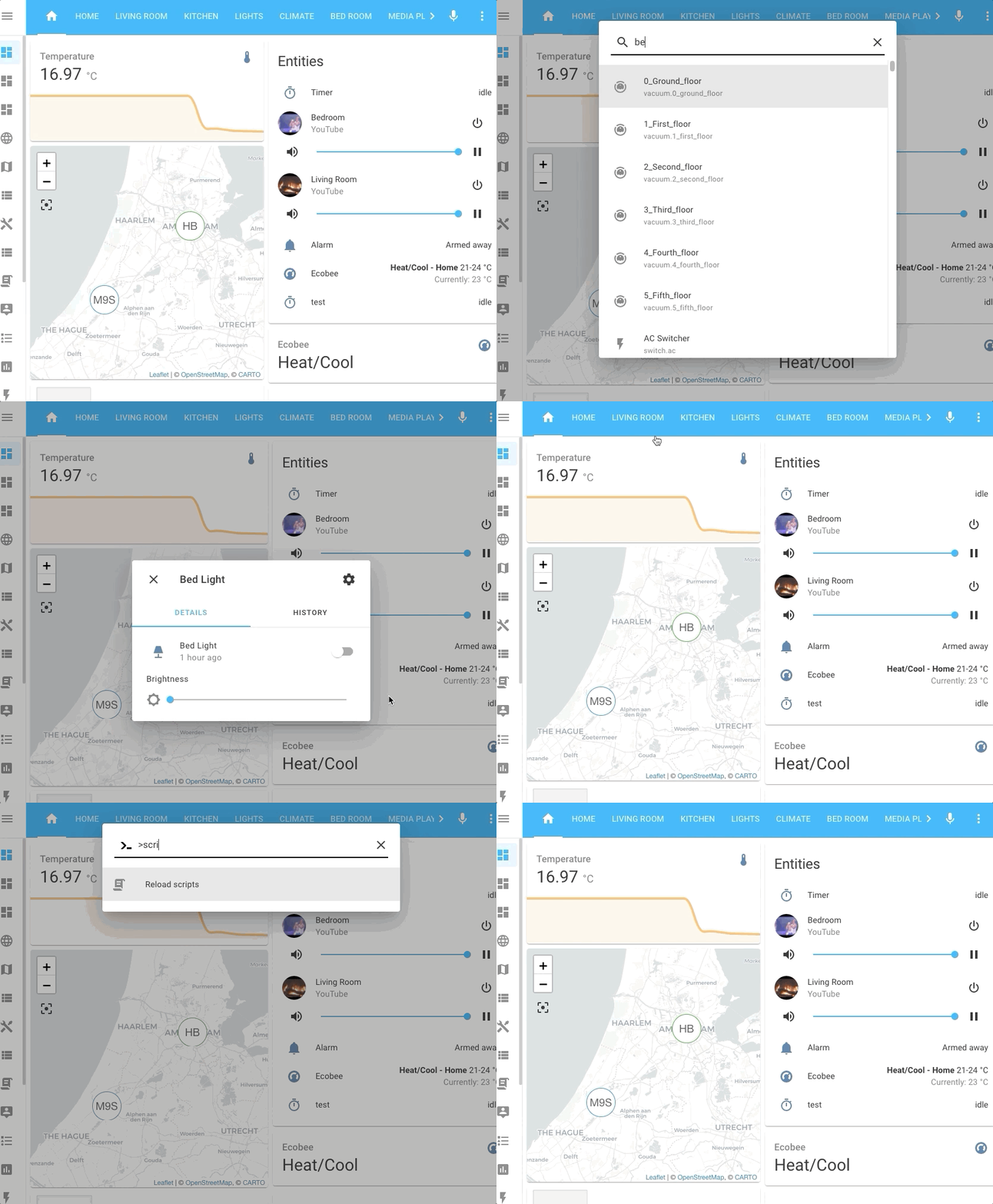 Screencapture of the Quick Bar.
The commands are currently limited to reloading YAML 配置 and restarting Home Assistant, but expect this to grow rapidly! The same goes for the keyboard shortcuts; the plan is to add more so you can quickly perform 动作 and navigate Home Assistant from anywhere with a couple of key presses!
Check the 文档 更多信息 and usage tips.
紧凑页眉
@maykar recently archived his immensely popular custom header repository, promising to bring parts of it to the 核心 of Home Assistant.
Well, he did; this 发布, our Lovelace header is compact! 🤩
He combined the two bars we had in 1 by replacing the 仪表盘 title with the tabs that used to be shown below it. He did a lot of work to make the tabs take up the least amount of space, while still being 用户 friendly.
We think it looks great! And, finally, welcome to 核心 @maykar!
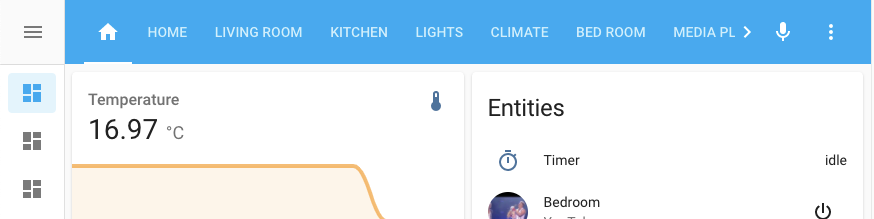 Screenshot of the compact header.
脚本和自动化 YAML 编辑器
@thomasloven added the ability to edit an entire 自动化 or 脚本 in the UI with YAML.
This is the perfect blend for people that want the best of both worlds, editing in the UI with the normal UI editor and for some more complicated 自动化, maybe edit it directly in YAML, all from the UI.
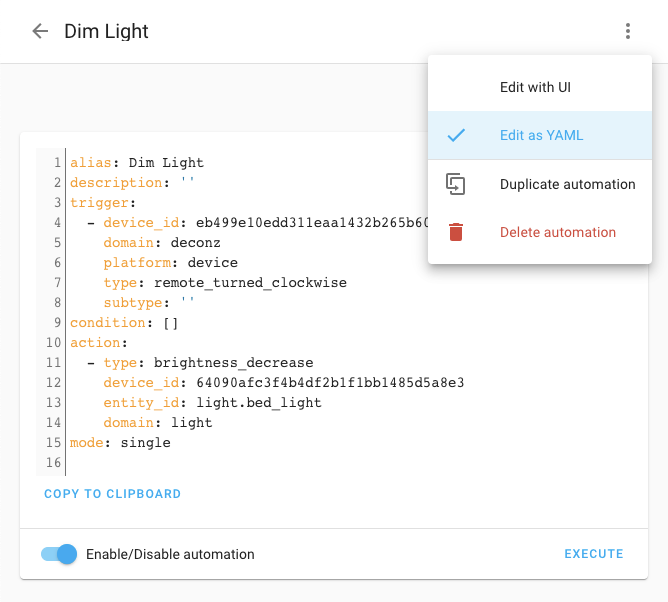 Screenshot of the new YAML 自动化 editor.
He also added a very useful copy 按钮 to make it easy to share your 自动化 with the community. You can then easily paste it back in the YAML editor and continue editing after switching to the UI mode.
Xbox 集成
Xbox now has a full blown 集成 in Home Assistant, which delivers 遥控器 control and tons of other features.
This awesome addition is 创建 by @hunterjm and he made this nice little video demonstrating his creation:
计数器和计时器现已可作为 UI 助手使用
A nice addition to the 助手 you can create and manage in the UI: Counters & Timers are now available! Thanks, @danimart1991!
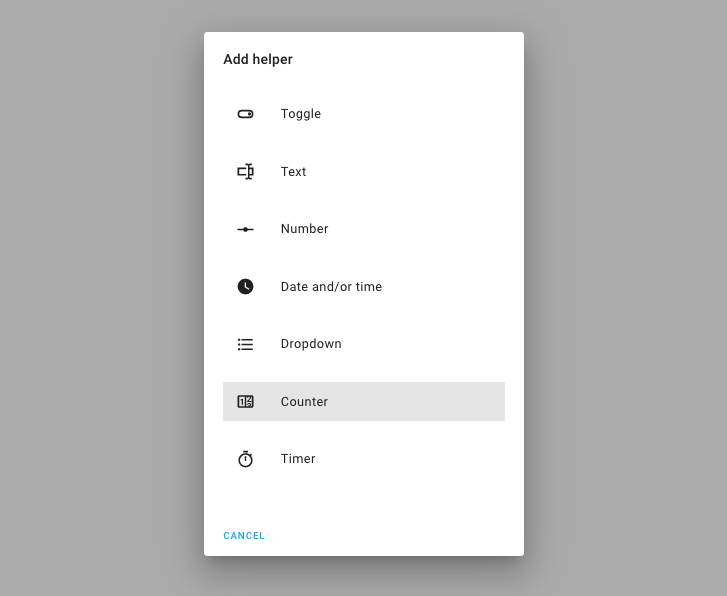 Screenshot of the new Counter & Timer 助手.
模板原生类型支持(测试版)
Ever tried to make a list of 实体 or set a RGB color via an 模板? If so, you probably would have learned, that it is not that simple. In Home Assistant, the result of a 模板 always have been a piece of text (a string), even if you made a list.
This 发布 adds support for native Python types in 模板. This means that 模板 now actually can create lists, or return a number!
For 0.117, native 模板 types will be a opt-in beta feature, that will become the default in the next 发布.
You can enable it, by disabling the legacy_template rendering in your
configuration.yaml:
After that, you can do things like this:
This is an extremely powerful change to our 模板 engine, that allow for more advanced future additions and can significantly reduce the complexity of existing 模板 in your set up.
It should be mostly compatible with your existing 模板, however, if you enable this feature, please be sure to check the backward-incompatible changes section.
We'd love to hear you experience with using this feature! And, if you run into, problems, please let us know.
其他值得注意的变化
It is Hacktoberfest, and a lot smaller, but noteworthy changes this 发布!
First a shout out to @spacegaier, he did a LOT of improvements (29!) this 发布. Visual tweaks, quality of life improvements and random fixes, like:
- Colors in the 日志 for 错误 and 警告
- Automatically fill the Lovelace resource type based on the extension of the URL
- Make more text translateable
- Make 属性 more 用户 friendly
- Show the number of hidden 实体 in the 实体 配置 page
- And a lot more!
But wait, there is more!
- @allenporter started working on adding Google Nest 设备 Access to the Nest 集成. It is a base to extend on, for example, there is no thermostat yet. Looking forward to the upcoming releases!
- You can now save 自动化, 脚本 and 场景 with
ctrl/cmd+s. Thanks, @gilsonmandalogo! - @mattmattmatt added the ability to dismiss all 通知 at once, and the 通知 pane will close when the last 通知 was dismissed.
- We improved compatibility and Home Assistant is now usable on more, mostly older, 设备.
- You can now search for the 实体 name in the 实体 picker besides the 实体 id, thanks @zsarnett!
- Thanks to @cgarwood, you can see the 配置 of OZW nodes straight from the UI!
- @bieniu added voltage, power factor and energy 传感器 to Shelly 集成.
- The Media Player platform now has a
repeat_set服务 that allows for changing the repeat mode. Sonos is the first 集成 that supports this 服务. Thanks @amelchio! - @amelchio also added support for playing Spotify URIs with the Sonos 集成.
- Thanks to @timmo001, the WLED 集成 now supports color palettes.
- You can now monitor the battery 状态 for your devolo Home Control 设备, thanks, @Shutgun!
- The Netatmo 集成 got some nice 天气 trend 传感器, thanks @cgtobi!
- Chromecast 设备 can now play Plex media using the standard
play_media服务. Nice work @jjlawren! - The media browser now supports the Squeezebox and Volumio 集成, thanks to @rajlaud and @OnFreund.
新集成
We welcome the following new 集成 this 发布:
- Advantage Air, added by @Bre77
- Gree, added by @cmroche
- Profiler, added by @bdraco
- Ruckus Unleashed, added by @gabe565
- Tasmota, added by @emontnemery
- Xbox, added by @hunterjm
新平台
The following 集成 got support for a new platform:
- deCONZ now has support for 门锁 and 风扇, added by @Kane610
- SimpliSafe now has a bunch of nice 传感器, thanks to @nzapponi
- TTS platforms can now be configured for 通知, thanks to @dgomes
- And similar, Persistent 通知 can now also be configured for 通知, thanks to @KevinCathcart
现在可通过 UI 设置的集成
The following 集成 are now available via the Home Assistant UI:
- RFXtrx, done by @RobBie1221
- UpCloud, done by @scop
- Cloudflare, done by @ctalkington
发布 0.117.1 - October 30
- Fix adding Virtual DSM system in synology_dsm (@mib1185 - #42523) (synology_dsm docs)
- Enable polling for DSMR derivative 实体 (@RobBie1221 - #42524) (dsmr docs)
- Bump aiohomekit to 0.2.54 (@Jc2k - #42532) (homekit_controller docs)
- Fix RMV giving wrong data and ignoring given parameters (@cgtobi - #42561) (rmvtransport docs)
- 更新 前端 to 20201021.4 (@bramkragten - #42590) (前端 docs)
- Fix MQTT 模板 灯光 (@emontnemery - #42598) (MQTT docs)
- Bump hatasmota to 0.0.25 (@emontnemery - #42605) (tasmota docs)
- 更新 greeclimate to 0.9.2 (@cmroche - #42616) (gree docs)
发布 0.117.2 - November 1
- Bump pwmled to v1.6.6 (@soldag - #42607) (rpi_gpio_pwm docs)
- Fix Fibaro HC2 温控 设备 missing temperature (@airthusiast - #42627)
- Fix geo_rss_events import statement (@exxamalte - #42629) (geo_rss_events docs)
- Bump pycfdns to 1.2.1 (@ludeeus - #42634) (cloudflare docs)
- Make sure Tasmota status 传感器 are disabled (@emontnemery - #42643) (tasmota docs)
- attempt to renew subscription immediately to stop endless loop if it fails after 设置 (@hunterjm - #42651) (onvif docs)
- Bump up ZHA dependencies (@Adminiuga - #42679) (zha docs)
- Fix canary 摄像头 实体 inheritance (@ctalkington - #42691) (canary docs)
- Use pylutron_caseta 0.7.1 (@mdonoughe - #42701) (lutron_caseta docs)
发布 0.117.3 - November 4
- Please set exact cryptography 版本 cryptography==3.2 (@onkelbeh - #42611)
- Fix broken maxcube component (@onkelbeh - #42674) (maxcube docs)
- Fix Vizio host string for zeroconf discovery (@raman325 - #42738) (vizio docs)
- Bump bimmer_connected to 0.7.10: fix login issues, add (PH)EV 服务 (@rikroe - #42747) (bmw_connected_drive docs)
- Bump pyairvisual to 5.0.4 (@bachya - #42760) (airvisual docs)
- Fix incorrect property usage for SimpliSafe (@bachya - #42770) (simplisafe docs)
- Force color or white mode exclusivity for Tasmota 灯光 (@emontnemery - #42772) (tasmota docs)
- Bump pyatmo to 4.2.0 (@cgtobi - #42774) (netatmo docs)
- Fix broken 2fa 认证 in synology_dsm (@mib1185 - #42775) (synology_dsm docs)
- Bump bimmer_connected to 0.7.11 (@rikroe - #42788) (bmw_connected_drive docs)
- Filter rfxtrx replace 设备 in option flow on existing config entry (@RobBie1221 - #42800) (rfxtrx docs)
- Fix rest 传感器 with resource 模板 (@bdraco - #42818) (rest docs)
- Fix evohome scheduling coroutines (@balloob - #42821) (evohome docs)
发布 0.117.4 - November 4
- 更新 greeclimate to 0.9.5 (@cmroche - #42796) (gree docs)
- Cleanup dispatchers when unloading rfxtrx (@RobBie1221 - #42803) (rfxtrx docs)
- Call coordinator.shutdown() when ConfigEntryNotReady (@bieniu - #42833) (brother docs)
发布 0.117.5 - November 5
- Bump hatasmota to 0.0.25.1 (@emontnemery - #42850) (tasmota docs)
- Clean up SimpliSafe 二元sensor implementation (@bachya - #42841) (simplisafe docs)
- Fix missing 传感器 exceptions in SimpliSafe (@bachya - #42845) (simplisafe docs)
- Fix missing/incorrect SimpliSafe 实体 (@bachya - #42846) (simplisafe docs)
- Fix Netatmo public 天气 传感器 bug (@cgtobi - #42858) (netatmo docs)
- Revert "Fix broken maxcube component" (@onkelbeh - #42859) (maxcube docs)
- Bump bimmer_connected to 0.7.12 (@rikroe - #42875) (bmw_connected_drive docs)
发布 0.117.6 - November 11
- Remove unneeded 状态 restoration of the physical 设备 in rpi_gpio_pwm 集成 (@soldag - #42804) (rpi_gpio_pwm docs)
- Bump pwmled to v1.6.7 (@soldag - #42903) (rpi_gpio_pwm docs)
- Bump gTTS-token to 1.1.4 (@hmmbob - #43015) (google_translate docs)
- Fix Plex auth issues by setting header (@jjlawren - #43081) (plex docs)
如果你需要帮助……
...don't hesitate to use our very active forums or join us for a little chat.
Experiencing issues introduced by this 发布? Please report them in our issue tracker. Make sure to fill in all fields of the issue 模板.
不向后兼容的变更
Below is a listing of the breaking change for this 发布, per subject or 集成. Click on one of those to read more about the breaking change for that specific item.
Cast
The host option for the cast 集成 has previously been deprecated and
is now removed. Configuring media players via the media_player platform was
also deprecated before, and removed in this 发布 as well.
If you use any of those above, you'll need to migrate to use the new 配置 method. Please see the cast 文档 on how to set this up.
(@emontnemery - #41402) (cast docs)
Cloudflare
Cloudflare is now available exclusively via the 集成 UI. This means it's no longer configured in YAML. Existing 配置 are not imported as API Tokens are now used to authenticate. Refer to 集成 文档 on how to 设置 via UI.
Elkm1
The bypassed 属性 of a 区域 传感器 is removed as it is no longer used.
The bypassed status of a 区域 can be determined when the logical_status of
a 区域 has a value of bypassed.
Auto-配置 now only configures elements that have a name or description associated with them. The previous mechanism for automatically detecting if element are configured on the ElkM1 面板 was to note any element that have 属性 different than the elkm1-lib's defaults. This is 错误 prone and made the library fragile when defaults change.
(@gwww - #41584 #42064) (elkm1 docs)
ISY994
This 更新 to PyISY adds native support for decimal precision in ISY Variable 传感器, any 模板 传感器 创建 to adjust the rounding or precision shown in Home Assistant should be updated/removed.
The way logging is handled in PyISY has been changed. If you previously set a
different logging level for homeassistant.components.isy994 in your logger
配置, you will also need to set the level for pyisy and/or
pyisy.events.
Two changes may cause some 实体 to change platforms; however, this should only affect NodeServer nodes:
-
ISY Nodes that use the ON/OFF unit of measurement and cannot be categorized/sorted by another method have been moved from
switchtobinary_sensorsince it cannot be confirmed if the 设备 supports DON/DOF commands. Theisy994.send_node_command服务 may be used to control these 设备 if you know they are controllable. -
The status of all nodes is now downloaded before sorting 设备, as a result some nodes which defaulted to
sensorwill now be correctly sorted.
传感器 values which use the ISY994's "index" unit of measurement (UOM=25) now report the "formatted" text value shown in the ISY Admin Console, instead of the integer index. If you have any 自动化 or 模板 relying on these values, they must be updated.
(@shbatm - #42043 #42050) (isy994 docs)
Modbus
温控 配置 was moved from the platform directly into the Modbus
集成. This change was required to meet the latest architecture requirements
of Home Assistant.
Example of previous YAML 配置:
Example of new YAML 配置:
(@vzahradnik - #32439) (modbus docs)
Netatmo
传感器 for raw battery values and string representation have been dropped.
(@cgtobi - #41321) (netatmo docs)
onewire
Despite the project name, the owfs package (which depends on fuse and exposes filesystem calls in the appropriate directory to this program itself) is NOT recommended for any real use, it has well 已知问题 with races etc.
The owfs/fuse implementation is therefore deprecated in favour of the owserver implementation.
Before this 发布:
After this 发布:
(@epenet - #42041) (onewire docs)
RainMachine
Per ADR-0010, this PR deprecates YAML 配置 for RainMachine until 0.119. If you already use the RainMachine 集成, you do not need to take 动作. Your 配置 has already been imported into the UI.
(@bachya - #41971) (rainmachine docs)
RFXtrx
The 集成 is now set up via the UI. YAML support has been limited to an (automatic) one-time import. You can safely remove the YAML 配置 after upgrading.
Options are now set through the UI (global options/add 设备/remove 设备/change 设备 options).
For newly added or detected 设备, device_class cannot be set.
Instead, it should be set by customizing 实体.
The 调试 key is removed as option for the 集成. Instead, 日志 level for the library can be set by configuring the logger (see below).
No 配置 changes are necessary, to keep existing configs working, the key is still accepted.
(@RobBie1221 - #39117) (rfxtrx docs)
SimpliSafe
Per ADR-0010, this PR deprecates YAML 配置 for SimpliSafe until 0.119. If you already use the SimpliSafe 集成, you do not need to take 动作. Your 配置 has already been imported into the UI.
(@bachya - #41896) (simplisafe docs)
Sonarr
Sonarr has fully transitioned to 配置 via UI. YAML 配置 is now no longer supported after being deprecated for several releases already.
(@ctalkington - #41904) (sonarr docs)
模板 - 自动更新的 now()
The entity_id: 属性 was recently removed from 模板 实体 because
the 模板 are now able to find all referenced 实体 automatically. This
removal introduced a new problem where 模板 using the current time could
no longer use entity_id: sensor.time to ensure periodic updates.
With apologies to those who have spent the last couple of releases adding workarounds to their 模板, we are now introducing an auto-refresh feature to time-based 模板.
It is thus no longer necessary to reference sensor.time, sensor.date or manually
更新 模板 实体 when now() or utcnow() is present in the 模板.
The 模板 will automatically be updated when:
- A referenced 实体 changes 状态.
- At the start of each minute when
now()orutcnow()is present in the 模板.
Please note, if you have a time-based 模板 where you do not want it to
更新 periodically it will now have to be reworked to not use now().
模板 - 原生类型(测试版)
模板 results can now rendered to native Python types, but only when the legacy 模板 rendering is disabled.
This feature will be opt-in for this 发布, the backward-incompatible changes below only apply if you explicitly enable this new feature.
A 模板 would always result in a string (text). This made it hard to use things like lists, or numbers as a result of a 模板. For example, returning a list of 实体 or a RGB/HS/XY color.
This change may impact your existing 模板, as 模板 now can return other types; For example, string, float, integer, boolean, lists or dictionaries.
The following 模板 can be impacted by this:
- 实体 with templated 属性. 属性 keep their native Python type, thus if the 属性 is used/processed in a 模板 again later, the type might be different.
- 模板 working with lists or mappings (dictionaries). Previously, such
collection would be returned as a text, for example
[1, 2, 3, 4, 5]. We've seen examples where such results are decoded using text processing again (e.g., by splitting the result on a,to get the separate values). The additional processing is no longer needed, as the returned value will be a collection now. - Note: The 实体 状态 in Home Assistant is always a text (string). Even with native types being supported in 模板 now, if a results is stored as a 实体 状态, they will be converted to an string.
模板 - 速率限制
Previously we implemented a rate limit of 1 更新 per minute for
states.DOMAIN in 模板. This has been changed to an 更新 once every second.
模板 using states (without a domain) still have a rate limit of 1 更新 per minute.
UpCloud
The UpCloud 集成 is now configured via the UI. Existing YAML 配置 is automatically imported after upgrading and can be safely removed afterward.
(@scop - #37941) (upcloud docs)
告别以下内容
- The Australian Bureau of Meteorology (BOM) 集成 has been removed. It was using webscraping to gather its data, which is not allowed. (@balloob - #41941)
所有变更
点击查看所有变更!
- Support adding Spotify share links to the Sonos queue (@amelchio - #40802) (sonos docs)
- Implement config and option flow for rfxtrx 集成 (@RobBie1221 - #39117) (rfxtrx docs) (breaking-change)
- Rewrite random unittest tests to pytest style test functions (@eliotw - #40920) (random docs)
- Bump 动作/设置-python from v2.1.2 to v2.1.3 (dependabot - #40921)
- 更新 天气 tests to pytest style (@Antetokounpo - #40917) (天气 docs)
- Abort deCONZ config flow if no radio hardware is connected (@Kane610 - #40811) (deconz docs)
- Improve logging to identify which deCONZ 设备 is at fault (@Kane610 - #40808) (deconz docs)
- Rewrite worldclock unittest tests to pytest style test functions (@eliotw - #40922) (worldclock docs)
- Add 门锁 support to deCONZ (@Kane610 - #40807) (deconz docs) (new-platform)
- Use DataUpdateCoordinator for canary (@ctalkington - #40691) (canary docs)
- Use direct 服务 calls in demo 温控 tests instead of 温控 common (@frenck - #40934) (demo docs)
- Common strings in Freebox config flow (@SNoof85 - #40938) (freebox docs)
- Use of reference strings in meteo france config flow (@SNoof85 - #40939)
- Add context to event 触发器 (@OnFreund - #40932) (homeassistant docs)
- Add voltage, power factor and energy returned 传感器 to Shelly 集成 (@bieniu - #40681) (shelly docs)
- Use common strings in roomba config flow (@springstan - #40948) (roomba docs)
- Use of reference strings for Airly config flow (@SNoof85 - #40946) (airly docs)
- Use translation references for gios config flow (@bieniu - #40952) (gios docs)
- Use common strings in adguard config flow (@springstan - #40942) (adguard docs)
- Use translation references for Brother config flow (@bieniu - #40953)
- Test reloading Webhook 触发器 (@balloob - #40950) (Webhook docs)
- Use translation references for BraviaTV config flow (@bieniu - #40955) (braviatv docs)
- Use common string in TPLink config flow (@epenet - #40958) (tplink docs)
- Use reference strings for Nut configflow (@SNoof85 - #40966) (nut docs)
- Use common strings in spotify config flow (@springstan - #40957) (spotify docs)
- Use common strings in MQTT config flow (@springstan - #40956) (MQTT docs)
- 升级 surepy to 0.2.6 (@epenet - #40964)
- Replace strings in atag component (@MBlokhuijzen - #40935) (atag docs)
- Add longitude and latitude common strings (@SNoof85 - #40963)
- Add missing unit for signal strength (@chemelli74 - #40436)
- Clean up goalzero (@tkdrob - #40817) (goalzero docs)
- Replace IP Address in strings.json (@MBlokhuijzen - #40968) (denonavr docs) (gogogate2 docs) (guardian docs) (powerwall docs) (ps4 docs)
- Replace strings in hvv_departures with references (@MBlokhuijzen - #40980) (hvv_departures docs)
- Add test coverage for modbus 开关 (coil part) (@janiversen - #40696) (modbus docs)
- Fix Rachio 开关 状态 when paused (@brg468 - #40984) (rachio docs)
- Improve deCONZ platforms (@Kane610 - #40986) (deconz docs)
- Minor fixes for Plex media browser (@jjlawren - #39878) (plex docs)
- Use reference strings in elkm1 strings.json (@MBlokhuijzen - #40996) (elkm1 docs)
- Replace references in august strings.json (@MBlokhuijzen - #40993) (august docs)
- Use single_instance_allowed for Webhook config flows (@springstan - #40965)
- Remove unnecessary instance 属性 in Plex reauth config flow (@jjlawren - #41000) (plex docs)
- Use references in airvisual strings.json (@daveychu - #41005) (airvisual docs)
- Rewrite remember_the_milk tests to pytest style tests (@igotinfected - #41002) (remember_the_milk docs)
- Use references in guardian strings.json (@daveychu - #40987) (guardian docs)
- Scaffold: correct import (@Danielhiversen - #40998)
- Improve patching for nzbget 传感器 tests (@ctalkington - #41032) (nzbget docs)
- Verify 模板 传感器 that reference other 模板 传感器 can 重载 (@bdraco - #41031) (模板 docs)
- Use string references for config flow in NWS (@MatthewFlamm - #41007) (nws docs)
- Use references in agent_dvr strings.json (@daveychu - #40999) (agent_dvr docs)
- 更新 strings.json (@SNoof85 - #40994) (hangouts docs)
- 更新 pyhomematic to 0.1.69 (@danielperna84 - #41010) (homematic docs)
- Allow processing data in CoordinatorEntity before writing 状态 (@balloob - #40926) (coolmaster docs)
- Use reference strings in Tibber (@Danielhiversen - #41038) (tibber docs)
- Clean deCONZ tests to depend less on 集成 code (@Kane610 - #41015) (deconz docs)
- Bump 动作/upload-artifact from v2.1.4 to v2.2.0 (dependabot - #41037)
- Use reference strings in Vilfo (@SNoof85 - #41039) (vilfo docs)
- 更新 config string for Tibber (@Danielhiversen - #41045) (tibber docs)
- Use reference strings in forked_daapd (@daveychu - #40989) (forked_daapd docs)
- Use reference strings in Wled (@SNoof85 - #40969) (wled docs)
- Bump pyvesync to 1.2.0 (@djtimca - #40978) (vesync docs)
- Fix the name of the translation key for Brother 集成 (@bieniu - #41054) (brother docs)
- Use references in isy994 strings.json (@daveychu - #40990) (isy994 docs)
- 更新 denonavr to 0.9.5 (@scarface-4711 - #41058) (denonavr docs)
- Use reference strings in Griddy (@SNoof85 - #41079) (griddy docs)
- Use already_configured_service in NWS strings (@MatthewFlamm - #41062) (nws docs)
- Use 核心 GitHub URL in contributing guidelines (@gerard33 - #41083)
- Use reference strings in Dexcom (@SNoof85 - #41072) (dexcom docs)
- Use reference strings in elgato (@SNoof85 - #41063) (elgato docs)
- Use reference strings in doorbird (@SNoof85 - #41061) (doorbird docs)
- Use reference strings in directv (@SNoof85 - #41059) (directv docs) (directv docs)
- Use reference strings in Glances (@SNoof85 - #41078) (glances docs)
- Use reference strings in Garmin Connect (@SNoof85 - #41076) (garmin_connect docs)
- Use reference strings in Flume (@SNoof85 - #41075) (flume docs)
- Use reference strings in Flick Electric (@SNoof85 - #41074) (flick_electric docs)
- Use reference strings in Firmata (@SNoof85 - #41073) (firmata docs)
- Use reference strings in Coolmaster (@SNoof85 - #41066) (coolmaster docs)
- Use reference strings in Bsblan (@SNoof85 - #41049) (bsblan docs)
- Use reference strings in Totalconnect (@SNoof85 - #41047) (totalconnect docs)
- Use reference strings in Sense (@SNoof85 - #41046) (sense docs)
- Use common strings for Rachio (@brg468 - #41090) (rachio docs)
- Use reference strings in JuiceNet (@MatejMecka - #41021) (juicenet docs)
- Use reference strings in Abode (@bieniu - #41004) (abode docs)
- Use reference strings in Huawei LTE (@SNoof85 - #41011) (huawei_lte docs)
- Use 核心 GitHub URL in all files (@springstan - #41089)
- Rewrite season 传感器 tests to pytest style (@ctalkington - #40918) (season docs)
- Use references in Neato translation strings (@MBlokhuijzen - #41009) (neato docs)
- Rewrite SQL tests to pytest style (@oxygen0211 - #41016) (sql docs)
- Spread the load on the Tibber server (@Danielhiversen - #40797) (tibber docs)
- 升级 flake8 to 3.8.4 (@scop - #41117)
- Use reference strings in sonos (@jasonmadigan - #41122) (sonos docs)
- Use common strings for Harmony config flow (@groot406 - #41094) (harmony docs)
- Use common Strings for Ambiclimate config flow (@Spartan-II-117 - #41100) (ambiclimate docs)
- Use reference strings for openweathermap (@pinkywafer - #41055) (openweathermap docs)
- 更新 strings.json (@SNoof85 - #41051) (cert_expiry docs)
- Use reference strings in lifx (@jasonmadigan - #41124) (lifx docs)
- Remove excessive logging (@hmmbob - #41120) (rest_command docs)
- 更新 common Strings (@scheric - #41131) (shopping_list docs)
- 更新 pyhomematic to 0.1.70 (@danielperna84 - #41108) (homematic docs)
- use common string for "Port" (@groot406 - #41104) (wiffi docs)
- Bump azure-servicebus to 0.50.3 (@hfurubotten - #41106) (azure_service_bus docs)
- Use common strings for Mikrotik config flow (@Spartan-II-117 - #41110) (mikrotik docs)
- Use reference strings in Wemo (@jasonmadigan - #41067) (wemo docs)
- Use reference strings in izone (@jasonmadigan - #41125) (izone docs)
- Use common strings in zha config flow (@scheric - #41127) (zha docs)
- Use common strings in Tado config flow (@scheric - #41128) (tado docs)
- Use common string in Ring config flow (@scheric - #41132) (ring docs)
- Use reference strings for Zoneminder config flow (@groot406 - #41103) (zoneminder docs)
- Use common strings for Sentry config flow (@groot406 - #41087) (sentry docs)
- Use common strings for Google Cast config flow (@Spartan-II-117 - #41086) (cast docs)
- Use common strings in Powerwall config flow (@groot406 - #41137) (powerwall docs)
- 更新 met config string (@Danielhiversen - #41048) (met docs)
- Use common string in Solarlog config flow (@scheric - #41130) (solarlog docs)
- Use common string in Melcloud config flow (@thijsdejong - #41134) (melcloud docs)
- Add api token to base strings for config flows (@springstan - #41133) (juicenet docs) (xiaomi_miio docs)
- Add name to base strings for config flows (@springstan - #40947)
- Add already_in_progress to base strings for config flows (@springstan - #40961)
- Replace minecraft translation strings with reference strings (@MatejMecka - #40997) (minecraft_server docs)
- Add ssl and verify_ssl to base strings for config flows (@springstan - #40944)
- Reorg channel handling for Homematic IP Cloud (@SukramJ - #41118) (homematicip_cloud docs)
- Use already configured key in harmony and mikrotik (@springstan - #41142) (harmony docs) (mikrotik docs)
- Use common strings for home connect config flow (@RobBie1221 - #41153) (home_connect docs)
- Use common strings for somfy config flow (@RobBie1221 - #41150) (somfy docs)
- Use common Strings for Acmeda Config Flow (@Spartan-II-117 - #41092) (acmeda docs)
- Use references in config flow of devolo_home_control (@Shutgun - #40949) (devolo_home_control docs)
- Lutron Caseta: 更新 for 灯光 transition and 遮盖 stop (@mdonoughe - #41155) (lutron_caseta docs)
- 更新 Kodi to no longer use protected methods (@cgtobi - #40788) (kodi docs)
- Use the shared Zeroconf instance in devolo_home_control (@Shutgun - #40800) (devolo_home_control docs)
- Indentify IKEA and Phillips motion 传感器 correctly (@abmantis - #41111) (zha docs)
- Fix kodi.add_to_playlist (@OnFreund - #41185) (kodi docs)
- Use common strings in hisense_aehw4a1 config flow (@scheric - #41190) (hisense_aehw4a1 docs)
- Bump 版本 to 0.117.0dev0 (@frenck - #40928)
- Use common strings in Geonetnz quakes config flow (@scheric - #41192) (geonetnz_quakes docs)
- Use reference strings in Coronavirus (@SNoof85 - #41057) (coronavirus docs)
- Use common strings in Icloud config flow (@scheric - #41188) (icloud docs)
- Rewrite simulated unittest tests to pytest style test functions (@eliotw - #41115) (simulated docs)
- Improve demo 风扇 platform tests (@frenck - #41123) (demo docs)
- Rewrite dte_energy_bridge unittest tests to pytest style test functions (@eliotw - #41116) (dte_energy_bridge docs)
- Rewrite aurora tests to pytest style (@ccatterina - #41144) (aurora docs)
- Rewrite ring unittest test to pytest (@arianahl - #41151) (ring docs)
- Rewite Radarr tests as in pytest style for #40879 (@ronanmu - #41145) (radarr docs)
- Refactor dsmr tests (@RobBie1221 - #39724) (dsmr docs)
- Fix flaky huawei test (@balloob - #41204) (huawei_lte docs)
- Use reference strings in Nexia (@SNoof85 - #41210) (nexia docs)
- Remove unnecessary should poll from media player classes (@springstan - #41220) (androidtv docs) (frontier_silicon docs) (openhome docs) (pandora docs) (yamaha_musiccast docs)
- Remove unnecessary should poll from 摄像头 classes (@springstan - #41228) (demo docs)
- Remove unnecessary should poll from 开关 classes (@springstan - #41218) (anel_pwrctrl docs) (digitalloggers docs) (hikvisioncam docs) (kankun docs) (mfi docs) (orvibo docs) (xiaomi_miio docs)
- Remove unnecessary should poll from 传感器 classes (@springstan - #41219) (fints docs) (history_stats docs) (influxdb docs) (twitch docs) (xiaomi_miio docs)
- Rewrite threshold unittest tests to pytest style test functions (@baget - #41141) (threshold docs)
- Remove unnecessary should poll from 二元sensor classes (@springstan - #41221) (concord232 docs) (maxcube docs)
- Fix spelling in telegram_bot 服务 (@NikoM87 - #41235) (telegram_bot docs)
- Rewrite transport_nsw 传感器 tests to pytest tests (@frangiz - #41169) (transport_nsw docs)
- Fix slack message icon override (@jeffaudio - #41212) (slack docs)
- Remove unnecessary should poll from 遮盖 classes (@springstan - #41231) (garadget docs)
- Remove unnecessary should poll from 灯光 classes (@springstan - #41229) (blinksticklight docs) (decora docs) (xiaomi_miio docs) (zengge docs)
- Use reference strings in Nuheat (@SNoof85 - #41213) (nuheat docs)
- Use reference strings in Myq (@SNoof85 - #41209) (myq docs)
- Add and fix some Huawei LTE type hints (@scop - #41196) (huawei_lte docs)
- Use reference strings in Samsung TV config flow (@zetvio - #41248) (samsungtv docs)
- Use references in blebox config flow (@zetvio - #41244) (blebox docs)
- Use reference strings in pvpc_hourly_pricing (@SNoof85 - #41214) (pvpc_hourly_pricing docs)
- Use reference strings in Tuya (@SNoof85 - #41236) (tuya docs)
- Return 属性 dict directly without temporary variable (@springstan - #41206)
- Axis remove orphan string (@davet2001 - #41166) (axis docs)
- Use common strings in Ecobee config flow (@scheric - #41257) (ecobee docs)
- Improve demo media player platform tests (@frenck - #41096) (demo docs)
- Use common strings for GDACS config flow (@djpremier - #41178) (gdacs docs)
- Use common strings for Lutron Caseta config flow (@TopdRob - #41241) (lutron_caseta docs)
- 设置 geo_location to only track the geo_location domain (@bdraco - #41254) (geo_location docs)
- Use common Strings for Z-Wave config flow (@Spartan-II-117 - #41161) (zwave docs)
- Rewrite zwave node 实体 tests to pytest style test function (@RobBie1221 - #41239) (zwave docs)
- Use reference strings in Tesla (@SNoof85 - #41238) (tesla docs)
- Use reference strings in Tradfri (@SNoof85 - #41237) (tradfri docs)
- Improve 模板 test 传感器 (@sycx2 - #41199) (模板 docs)
- Add Profiler 集成 (@bdraco - #41175) (profiler docs) (new-集成)
- Use common strings for Flu Near You config flow (@djpremier - #41174) (flunearyou docs)
- Avoid event data serialization during recorder that we throw away (@bdraco - #41217) (recorder docs)
- Use reference strings in Notion (@SNoof85 - #41211) (notion docs)
- Use common strings for Onvif config flow (@djpremier - #41170) (onvif docs)
- 开关 to asyncio.wait for slow 更新 警告 implementation (@bdraco - #41184)
- Use reference strings in rainmachine (@SNoof85 - #41216) (rainmachine docs)
- Use reference strings in HomematicIP Cloud #40578 (@TopdRob - #41243) (homematicip_cloud docs)
- Convert 状态 to dicts via as_dict only once (@bdraco - #41208)
- Use reference strings in Tesla (@SNoof85 - #41270) (tesla docs)
- Use reference strings in Rainmachine (@SNoof85 - #41272) (rainmachine docs)
- Use of reference strings in Goalzero config flow (@Pigotka - #41275) (goalzero docs)
- Use of reference strings in Heos config flow (@Pigotka - #41282) (heos docs)
- Reorder MQTT 二元sensor tests (@emontnemery - #41277) (MQTT docs)
- Bump pyvesync to 版本 1.2.1 (@djtimca - #41269) (vesync docs)
- Drop legacy_patchable_time from MQTT tests (@emontnemery - #41287) (MQTT docs)
- Add OZW node config parameters websocket commands (@raman325 - #40527) (ozw docs)
- 更新 strings.json (@SNoof85 - #41293) (local_ip docs)
- Use reference strings in iaqualink (@SNoof85 - #41292) (iaqualink docs)
- add common strings (@scheric - #41300) (hue docs)
- add strings (@scheric - #41297) (plugwise docs)
- Rewrite min_max unittest tests to pytest style test function (@arianahl - #41296) (min_max docs)
- Rewrite reddit tests to pytest style tests (@igotinfected - #41006) (reddit docs)
- Use reference strings in Hunter Douglas PowerView (@SNoof85 - #41291) (hunterdouglas_powerview docs)
- Indicate to 用户 that 遥控器 was turned off when call was attempted (@elupus - #40715) (broadlink docs)
- Fix reported temperatures in Maxcube (@Bre77 - #41259) (maxcube docs)
- Improve yessssms test 通知 (@sycx2 - #41283)
- Use reference strings in ambient_station (@SNoof85 - #41276) (ambient_station docs)
- Don't use asynctest directly (@balloob - #41306)
- Rewrite sigfox unittest tests to pytest (@frangiz - #41302) (sigfox docs)
- Use reference strings in Metoffice (@SNoof85 - #41295) (metoffice docs)
- Use reference strings in iqvia (@SNoof85 - #41289) (iqvia docs)
- Add pin to base strings for config flows (@springstan - #41202) (braviatv docs) (homematicip_cloud docs) (panasonic_viera docs) (risco docs) (vizio docs)
- Rewrite statsd unittest tests to pytest style test functions (@oxygen0211 - #41223) (statsd docs)
- Use of reference strings in Transmission config flow (@Pigotka - #41215) (transmission docs)
- Move isort, pylint, and pytest configs to pyproject.toml (@scop - #40335)
- Add reauth_successful to base strings (@SNoof85 - #41316)
- Use reference strings in konnected (@SNoof85 - #41290) (konnected docs)
- Rewrite zwave init tests to pytest style test function (phase 1) (@RobBie1221 - #41301) (zwave docs)
- 日志 设备 info in Broadlink 错误 messages (@felipediel - #41307) (broadlink docs)
- Add cancel_command 服务 for OpenZWave (@cgarwood - #41285) (ozw docs)
- Use common strings for Panasonic Viera (@TopdRob - #41268) (panasonic_viera docs)
- Use of reference strings in Almond config flow (@Pigotka - #41284) (almond docs)
- Add OZW WS API support for 门锁 (@raman325 - #41186) (ozw docs)
- Rewrite pushbullet unittest tests to pytest style test function (@arianahl - #41266) (pushbullet docs)
- Fix Netatmo rain 传感器 naming (@cgtobi - #41326) (netatmo docs)
- Fix Netatmo wind angle (@cgtobi - #41324) (netatmo docs)
- Use reference strings in Tile (@SNoof85 - #41328) (tile docs)
- Add Tasmota 集成 (@emontnemery - #39624) (tasmota docs) (new-集成)
- Rewrite uk_transport tests to use pytest style (@ronanmu - #41168) (uk_transport docs)
- Use name reference and fix already_configured string for GIOS 集成 (@bieniu - #41323) (gios docs)
- Improve 开关 模板 tests, remove common test 助手 (@frenck - #41322) (模板 docs)
- Rewrite imap_email_content tests to use pytest (@Edward-Knight - #41200) (imap_email_content docs)
- Handle somfy 错误 404 during 设置 (@tetienne - #41298) (somfy docs)
- Use dict syntax (@balloob - #41325)
- Add Netatmo 天气 trend 传感器 (@cgtobi - #41318) (netatmo docs)
- Fetch timers separately for xiaomi 吸尘器 (@rytilahti - #41330) (xiaomi_miio docs)
- Use reference strings in Synology_DSM (@SNoof85 - #41333) (synology_dsm docs)
- Add battery 状态 for devolo Home Control 设备 (@Shutgun - #41329) (devolo_home_control docs)
- Protect add/remove node 服务 from invalid instance ID (@cgarwood - #41334) (ozw docs)
- Use name translation reference in AccuWeather config flow (@bieniu - #41338) (accuweather docs)
- Use reference strings in Smappee (@SNoof85 - #41337) (smappee docs)
- 更新 axis to use common strings (@davet2001 - #41164) (axis docs)
- Return 属性 dict directly without temporary variable v2 (@springstan - #41271)
- Return empty dictionary at first for 属性 (@springstan - #41348)
- add common strings (@scheric - #41350) (arcam_fmj docs)
- Use reference strings in upnp (@SNoof85 - #41327) (upnp docs)
- Use reference strings in Upb (@SNoof85 - #41340) (upb docs)
- Use reference strings in Vesync (@SNoof85 - #41341) (vesync docs)
- Rewrite recorder unittest tests to pytest style test function (@arianahl - #41264) (recorder docs)
- Add ZHA Analog Input cluster for XBee (@Shulyaka - #41311) (zha docs)
- Bump hatasmota to 0.0.10, minor refactor of discovery (@emontnemery - #41331) (tasmota docs)
- Refactor deCONZ tests (@Kane610 - #41362) (deconz docs)
- Add native Python types support to 模板 (@frenck - #41227) (breaking-change)
- Allow playing Spotify URLs with Sonos (@amelchio - #41366) (sonos docs)
- Bump tuyaha to 0.0.8 (@PaulAnnekov - #41365) (tuya docs)
- Rewrite panel_iframe unittest tests to pytest style tests (@peleccom - #41368) (panel_iframe docs)
- Bump python-openzwave-MQTT to 1.2.2 (@cgarwood - #41357) (ozw docs)
- Add already_configured_location to base strings for config flows (@bieniu - #41335) (airly docs) (airvisual docs) (flunearyou docs) (openuv docs) (openweathermap docs)
- Add update_alarm to sonos 服务.yaml (@tkdrob - #41376) (sonos docs)
- Support of NEW 风扇 speed controller Leviton Decora ZW4SF-1BW (@yura505 - #41374) (zwave docs)
- Add CONF_API_TOKEN to constants (@ctalkington - #41379)
- Use reference strings in Withings (@SNoof85 - #41345) (withings docs)
- Add invalid_host to base strings for config flows (@bieniu - #41381) (braviatv docs) (broadlink docs) (dunehd docs) (goalzero docs) (xiaomi_aqara docs)
- Remove duplicate ATTR_USERNAME (@MatejMecka - #41386) (slack docs)
- Use reference strings in Smarthab (@SNoof85 - #41391) (smarthab docs)
- Add Tasmota 二元sensor (@emontnemery - #41380) (tasmota docs) (new-platform)
- Use common strings for Almond Config Flow (@Spartan-II-117 - #41097) (almond docs)
- Use reference strings in Alarmdecoder (@SNoof85 - #41392) (alarmdecoder docs)
- Enable MQTT discovery by default (@emontnemery - #41361) (MQTT docs) (breaking-change)
- Use common strings in Awair (@davet2001 - #41313) (awair docs)
- 更新 脚本 scaffold 模板 for config_flow_oauth2 (@allenporter - #41181)
- Use name translation reference in Airly config flow (@bieniu - #41319) (airly docs)
- Remove Netatmo unnecessary battery 传感器 (@cgtobi - #41321) (netatmo docs) (breaking-change)
- Make PR search link not show changes requested PRs (@KTibow - #41278)
- Use already_configured_location string in GIOS config flow (@bieniu - #41384) (gios docs)
- Reduce orm overhead by grouping object expiration (@bdraco - #41394) (recorder docs)
- Add common strings in Agent dvr config flow (@scheric - #41279) (agent_dvr docs)
- Baidu TTS: support more voices (@jyz0501 - #41393)
- Bump ElkM1 lib dependency. (@gwww - #41399) (elkm1 docs)
- Improve performance of generating non-cryptographically secure uuids (@bdraco - #41314)
- Determine how to run listeners at 设置 time instead of execution time (@bdraco - #41304)
- Remove deprecated host & platform 配置 for cast (@emontnemery - #41402) (cast docs) (breaking-change)
- Add MQTT 集成 discovery (@emontnemery - #41332) (MQTT docs) (tasmota docs)
- Prepare Plugwise 集成 for USB products (@CoMPaTech - #41201) (plugwise docs)
- Use common string names in ipp config flow (@scheric - #41409) (ipp docs)
- Add custom data type support into Modbus 温控 (@vzahradnik - #32439) (modbus docs) (breaking-change)
- Make async_step_discovery default for MQTT config flows (@emontnemery - #41414)
- Fix flapping pilight test (@bdraco - #41447) (pilight docs)
- 更新 nexia to use async_add_executor_job (@bdraco - #41451) (nexia docs)
- Fix group tests when run in parallel (@bdraco - #41446) (group docs)
- Remove useless try-except from Tasmota 二元sensor (@emontnemery - #41462) (tasmota docs)
- Cache matching MQTT subscriptions (@emontnemery - #41433) (MQTT docs)
- Support matching multiple 用户 ids in event 触发器 (@OnFreund - #41036) (homeassistant docs)
- 更新 roomba to use async_add_executor_job (@bdraco - #41448) (roomba docs)
- 更新 discovery to use async_add_executor_job (@bdraco - #41453) (discovery docs)
- 更新 config to use async_add_executor_job (@bdraco - #41452) (config docs)
- 更新 trend to use async_add_executor_job (@bdraco - #41454) (trend docs)
- 更新 风扇 to use async_add_executor_job (@bdraco - #41457) (风扇 docs)
- 更新 遮盖 to use async_add_executor_job (@bdraco - #41456) (遮盖 docs)
- 更新 门锁 to use async_add_executor_job (@bdraco - #41458) (门锁 docs)
- 更新 媒体播放器 to use async_add_executor_job (@bdraco - #41459) (媒体播放器 docs)
- 更新 filter to use async_add_executor_job (@bdraco - #41455) (filter docs)
- 更新 触发器 to use HassJob (@bdraco - #41450) (geo_location docs) (homeassistant docs) (litejet docs) (MQTT docs) (sun docs) (模板 docs) (Webhook docs) (区域 docs)
- Poll 状态 when Tasmota 设备 becomes available (@emontnemery - #41401) (tasmota docs)
- 更新 tesla_powerwall to 0.3.3 (@jrester - #41482) (powerwall docs)
- Use common strings in Atag config flow (@scheric - #41351) (atag docs)
- Change modbus tests to use pytest.mark.parametrize (@janiversen - #41486) (modbus docs)
- Optimize devolo 灯光 设备 (@2Fake - #41053) (devolo_home_control docs)
- Add active voltage 传感器 to Sense 集成 (@kbickar - #41112) (emulated_kasa docs) (sense docs)
- Use common strings in fritzbox config flow (@scheric - #41407) (fritzbox docs)
- Use common strings in tellduslive config flow (@scheric - #41408) (tellduslive docs)
- Add mute command to Bluesound 集成 (@willholdoway - #41501) (bluesound docs)
- Complete Huawei LTE type hints, make mypy check them (@scop - #41503) (huawei_lte docs)
- Add common strings in daikin config flow (@fredrike - #41419) (daikin docs)
- Return 属性 dict directly without temporary variable v3 (@springstan - #41502) (fibaro docs) (homematic docs) (lutron_caseta docs)
- Fix bool registers in modbus 集成 (@janiversen - #41506) (modbus docs)
- 更新 device_tracker to use async_add_executor_job (@bdraco - #41515) (device_tracker docs)
- 更新 通知 to use async_add_executor_job (@bdraco - #41516) (通知 docs)
- 更新 history tests to use async_add_executor_job (@bdraco - #41526) (history docs)
- Use async_add_hass_job for debouncer (@bdraco - #41449)
- Predetermine listener type for 脚本 change listeners (@bdraco - #41510)
- 更新 kodi 设备 触发器 to use async_run_hass_job (@bdraco - #41531) (kodi docs)
- 更新 arcam_fmj 设备 触发器 to use async_run_hass_job (@bdraco - #41530) (arcam_fmj docs)
- 更新 http to use async_add_executor_job (@bdraco - #41529) (http docs)
- 更新 wake_on_lan to use async_add_executor_job (@bdraco - #41528) (wake_on_lan docs)
- Set 创建 field when creating db events and 状态 (@bdraco - #41523) (recorder docs)
- Convert last remaining async_add_job in 灯光 to async_add_executor_job (@bdraco - #41518) (灯光 docs)
- Fully convert async_track_time_interval to use HassJob (@bdraco - #41513)
- 更新 discovery to use HassJob (@bdraco - #41511)
- Allow custom_serializer to recognize cv.string and cv.boolean to make config schema more reusable (@raman325 - #41532)
- Fix plant doing IO in the event loop. (@bdraco - #41527) (plant docs)
- Fix string parameter processing in parse_time_expression (#41468) (@4ybaka - #41469)
- Fix date parsing 模板 int in history stats (@frenck - #41476) (history_stats docs)
- 更新 translate develop to substitute references (@tefinger - #41445)
- Publish 状态 changes to Zabbix (@rusitschka - #36659) (zabbix docs)
- Use common strings in esphome config flow (@definitio - #41547) (esphome docs)
- Remove duplicated 属性 request from ZHA (@abmantis - #41442) (zha docs)
- Remove async_add_job from system_log tests (@bdraco - #41551) (system_log docs)
- Convert final async_add_job to async_add_executor_job in logbook tests (@bdraco - #41552) (logbook docs)
- 更新 python_script tests to use async_add_executor_job (@bdraco - #41553) (python_script docs)
- 更新 Onewire SysBus 集成 to use a 3rd party library (@epenet - #40943) (onewire docs)
- 升级 codecov to 2.1.10 (@frenck - #41562)
- Allow 用户 to 更新 their iCloud 密码 when auth fails (@raman325 - #39138) (icloud docs)
- Clean up some of the ozw tests (@firstof9 - #41578) (ozw docs)
- Add Ruckus Unleashed 集成 (@gabe565 - #40002) (ruckus_unleashed docs) (new-集成)
- Fix deCONZ IKEA TRÅDFRI 设备 name spelling (@scop - #41574) (deconz docs)
- Rewrite mhz19 unittest tests to pytest style tests (@peleccom - #41441) (mhz19 docs)
- Remove redundant flake8 max-line-length (@scop - #41596)
- Add device_class to Tibber 传感器 (@Danielhiversen - #41572) (tibber docs)
- add strings (@scheric - #41599) (ruckus_unleashed docs)
- 更新 Withings 集成 (add sleeps data) (@DiederikvandenB - #41504) (withings docs)
- Remove illuminance 传感器 for Xiaomi EU gateway (@javicalle - #41580) (xiaomi_miio docs)
- Fix async functions accidentally marked as callbacks (@bdraco - #41607) (atag docs) (cloud docs) (MQTT docs) (netatmo docs) (zha docs)
- 更新 icmplib to 1.2.2 (@bdraco - #41608) (ping docs)
- Remove icon for Tibber 传感器 (@Danielhiversen - #41604) (tibber docs)
- Add 设备 info to met (@balloob - #41611) (met docs)
- Add common strings in broadlink config flow (@chrillebile - #41602) (broadlink docs)
- Add rx mode to homematic.put_paramset 服务 (@rusitschka - #40065) (homematic docs)
- Add missing common strings (@chrillebile - #41621) (netatmo docs)
- Bump rachiopy to 1.0.3 and 更新 methods to handle changes (@brg468 - #41398) (rachio docs)
- Use common strings in Météo-France (@scheric - #41610) (meteo_france docs)
- Use common strings in iOS config flow (@scheric - #41644) (ios docs)
- Use common strings in profiler config flow (@chrillebile - #41642) (profiler docs)
- Use common strings in Nest config flow (@chrillebile - #41597) (nest docs)
- Use common strings in twentemilieu config flow (@scheric - #41647) (twentemilieu docs)
- Use common strings in risco config flow (@GauthamVarmaK - #41656) (risco docs)
- Use common strings in panasonic config flow (@chrillebile - #41641) (panasonic_viera docs)
- Use consistent "percent" naming in systemmonitor (@spacegaier - #41411) (systemmonitor docs)
- Use common strings in homematicip_cloud config flow (@GauthamVarmaK - #41658)
- Use common strings in ps4 config flow (@chrillebile - #41623) (ps4 docs)
- Use common strings in logi_circle config flow (@scheric - #41427) (logi_circle docs)
- Use common strings for AirVisual (@Spartan-II-117 - #41632) (airvisual docs)
- Bump brother to 0.1.18 (@bieniu - #41056) (brother docs)
- 更新 display categories in Alexa (@ochlocracy - #41626) (alexa docs)
- Reduce icmplib ping timeout to match ping binary behavior (@bdraco - #41620) (ping docs)
- Allow only one packet with no dts in stream init (@uvjustin - #41129) (stream docs)
- Adjust dts 警告 messages in stream (@uvjustin - #41467) (stream docs)
- Multiple Hue activate 场景 (@fnurgel - #41353) (hue docs)
- Prevent tplink missing 设备 and unavailable 状态 (@TheGardenMonkey - #39762) (tplink docs)
- Add config validator 助手 positive_float (@farmio - #41640)
- Clean up speedtest (@spacegaier - #41139) (speedtestdotnet docs)
- Add Tasmota 传感器 (@emontnemery - #41483) (tasmota docs) (new-platform)
- Bump greeneye_monitor to 2.1 (@drkp - #41692) (greeneye_monitor docs)
- Bump hatasmota to 0.0.13 (@emontnemery - #41705) (tasmota docs)
- Add Advantage Air 集成 (@Bre77 - #40159) (advantage_air docs) (new-集成)
- Use separate line for return statement in hue_activate_scene (@fnurgel - #41709) (hue docs)
- Refactor Modbus 开关 to provide a base for other 实体 (@vzahradnik - #33551) (modbus docs)
- 更新 zigpy-znp to 0.2.2 (@puddly - #41670) (zha docs)
- Fix too agressive .gitignore (@thomasloven - #41677)
- Cleanup unused loggers (components A-M) (@spacegaier - #41600)
- Rewrite Wake on LAN Tests to use pytest style (@ntilley905 - #41173) (wake_on_lan docs)
- Improve mobile app 模板 handling (@balloob - #41703) (mobile_app docs)
- Rewrite tests for 模板 二元sensor (@sycx2 - #41098) (模板 docs)
- Merge Tasmota 传感器 设备 class and icon maps (@emontnemery - #41706) (tasmota docs)
- Add support for SimpliSafe 传感器 (@nzapponi - #41080) (simplisafe docs) (new-platform)
- Add common strings in plaato config flow (@chrillebile - #41622) (plaato docs)
- Use common strings in Avri config flow (@scheric - #41717)
- Add 媒体播放器.repeat_set 服务 (@amelchio - #41435) (demo docs) (媒体播放器 docs)
- Add Sonos support for 媒体播放器.repeat_set 服务 (@amelchio - #41735) (sonos docs)
- Use native utc timezone for utcnow() (@bdraco - #41727)
- 升级 mypy to 0.790 (@scop - #41595)
- Fix 温控 platform in devolo Home Control (@Shutgun - #40746) (devolo_home_control docs)
- Use common strings in Griddy config flow (@scheric - #41716) (griddy docs)
- Add elkm1 bypass and 触发器 服务 (@gwww - #41584) (elkm1 docs) (breaking-change)
- Add support for Elexa Guardian paired 传感器 (@bachya - #37930) (guardian docs)
- Bump pynello to 2.0.3 (@pattyland - #41737) (nello docs) (nello docs)
- 更新 pypoint to use async http requests (@fredrike - #41546) (point docs)
- Bump pygti to 0.9.2 (@vigonotion - #41571) (hvv_departures docs)
- Replace old python extension with new pylance in devcontainer (@pvizeli - #41591)
- Add 通知 platform to TTS (@dgomes - #40028) (tts docs) (new-platform)
- Pass context to on/off 脚本 (@elupus - #40254) (lg_netcast docs) (philips_js docs) (wake_on_lan docs)
- Bump pwmled to 1.5.3 (@soldag - #41681) (rpi_gpio_pwm docs)
- Add 风扇 support to deCONZ (@Kane610 - #40806) (deconz docs) (new-platform)
- Add 设备 info to Panasonic Viera (@joogps - #41028) (panasonic_viera docs)
- Rewrite Facebook unit test to pytest style test function (@tkacikdominik - #41671) (facebook docs)
- Filter rfxtrx 配置 设备 option flow on existing config entry (@RobBie1221 - #40975) (rfxtrx docs)
- Add Palette to WLED Effect 服务 (@timmo001 - #41724) (wled docs)
- Reduce ORM overhead when the old 状态 was already written to the database (@bdraco - #41736) (recorder docs)
- 日志 exceptions in EntityPlatform.async_add_entities (@emontnemery - #41730)
- Add Xbox 集成 (@hunterjm - #41697) (xbox docs) (new-集成)
- Add nested 灯光 group test (@frenck - #41764) (group docs)
- 升级 sqlalchemy to 1.3.20 (@frenck - #41765) (recorder docs) (sql docs)
- Add Browse Media to Xbox (@hunterjm - #41776) (xbox docs)
- Bump hatasmota to 0.0.15 (@emontnemery - #41781) (tasmota docs)
- Improve deCONZ 风扇 platform handling unsupported commands (@Kane610 - #41779) (deconz docs)
- Rewrite homematic unittest tests to pytest style test functions (@thaohtp - #41766) (homematic docs)
- 更新 pyTibber to 0.15.7 (@Danielhiversen - #41722) (tibber docs)
- 更新 devolo-home-control-api to 0.15.1 (@Shutgun - #41783) (devolo_home_control docs)
- 更新 to zeroconf 0.28.6 to accomodate 设备 that are not strictly name compliant (@bdraco - #41784) (zeroconf docs)
- 更新 sun listeners to use HassJob (@bdraco - #41695)
- Rewrite configurator tests to pytest (@dvermd - #41731) (configurator docs)
- 更新 mjpeg 摄像头 to use async_add_executor_job (@bdraco - #41791) (mjpeg docs)
- Convert remaining async_add_job to async_add_executor_job in 媒体播放器 (@bdraco - #41790) (媒体播放器 docs)
- 更新 generic 摄像头 to use async_add_executor_job (@bdraco - #41787) (generic docs)
- Address cleanup commentary for Guardian Paired 传感器 (@bachya - #41785) (guardian docs)
- Improve deCONZ 温控 platform handling unsupported commands (@Kane610 - #41780) (deconz docs)
- 更新 uptime tests to pytest style (@mrwacky42 - #41077) (uptime docs)
- 更新 html5 to use async_add_executor_job (@bdraco - #41788) (html5 docs)
- 更新 cast to use async_add_executor_job (@bdraco - #41794) (cast docs)
- Remove unneeded context 开关 in dyson (@bdraco - #41793) (dyson docs)
- Fix canary test doing IO and failing when the cloud is offline (@bdraco - #41799) (canary docs)
- 更新 shopping_list to use async_add_executor_job (@bdraco - #41795) (shopping_list docs)
- Add 遥控器 实体 to Xbox 集成 (@hunterjm - #41809) (xbox docs) (new-platform)
- Use canary fixture for options flow test (@ctalkington - #41817) (canary docs)
- 更新 caldav to use async_add_executor_job (@bdraco - #41808) (caldav docs)
- 开关 legacy async_add_job to async_add_executor_job in wemo (@bdraco - #41807) (wemo docs)
- 更新 image_processing to use async_add_executor_job (@bdraco - #41810) (image_processing docs)
- Add test coverage for onewire (@epenet - #40786) (onewire docs)
- Only validate 实体 id if it did not exist on 状态 change (@bdraco - #41820)
- Convert 风扇 tests to pytest style (@mrwacky42 - #41631) (风扇 docs)
- Add gree 温控 集成 (@cmroche - #37498) (gree docs) (new-集成)
- Bump omnilogic to 0.4.2 (@djtimca - #41821) (omnilogic docs)
- Re-add forced 更新 in Panasonic Viera (@joogps - #41804) (panasonic_viera docs)
- Discover Plex clients using GDM (@jjlawren - #39053) (plex docs)
- Add Tasmota 灯光 (@emontnemery - #41485) (tasmota docs) (new-platform)
- Don't override proper data for UniFi Controller entry in 设备 registry (@Kane610 - #41834) (unifi docs)
- 开关 sabnzbd to use async_add_executor_job (@bdraco - #41835) (sabnzbd docs)
- Add Media Source to Xbox 集成 (@hunterjm - #41833) (media_source docs) (xbox docs)
- Use common strings in Tibber config flow (@scheric - #41837) (tibber docs)
- Use common strings in ovo_energy config flow (@scheric - #41838) (ovo_energy docs)
- Add Huawei LTE battery 传感器 (@scop - #41668) (huawei_lte docs)
- Mark Huawei LTE 传感器 with None value as unavailable (@scop - #41667) (huawei_lte docs)
- Use common strings in withings config flow (@scheric - #41770) (withings docs)
- Remove unnecessary check in Plex client scanning (@jjlawren - #41844) (plex docs)
- 更新 MQTT to use HassJob (@bdraco - #41796) (MQTT docs)
- Add influxdb config option 'measurement_attr' (@markbergsma - #36020) (influxdb docs)
- Revert 设备 触发器 modelid for Trådfri 遥控器 for deCONZ (@Kane610 - #41843) (deconz docs)
- Tibber, change time for fetching prices (@Danielhiversen - #41840) (tibber docs)
- Use common srings in xiaomi-miio (@briglx - #41864) (xiaomi_miio docs)
- Add basic 设备 information for UniFi clients 设备 registry entries (@Kane610 - #41839) (unifi docs)
- Fix flaky ONVIF test (@balloob - #41848) (onvif docs)
- Remove max and min temperature 传感器 (@cgtobi - #41859) (netatmo docs)
- Fix re-认证 in AirVisual (@bachya - #41801) (airvisual docs)
- Cleanup the min-max 传感器 (@balloob - #41851) (min_max docs)
- Forward client headers for proxied stream responses (@ludeeus - #41663) (hassio docs)
- Improve 模板 ratelimit performance (@bdraco - #41741)
- Add 遮盖 Platform to Advantage Air (@Bre77 - #41757) (advantage_air docs) (new-platform)
- Ruckus Unleashed Requested Changes (@gabe565 - #41824) (ruckus_unleashed docs)
- Fix machine 发布 builds (@pvizeli - #41879)
- Allow HomeKit to be configured in include mode from the UI (@bdraco - #41662) (homekit docs)
- Add media browser capability to volumio (@OnFreund - #40785) (volumio docs)
- 更新 remaining i2c 传感器 to use async_add_executor_job (@bdraco - #41860) (bh1750 docs) (bme280 docs) (bme680 docs) (htu21d docs)
- 更新 kira to use async_add_executor_job (@bdraco - #41847) (kira docs)
- 更新 mysensors to use async_add_executor_job (@bdraco - #41849) (mysensors docs)
- Bump 动作/设置-python from v2.1.3 to v2.1.4 (dependabot - #41873)
- Fix Plugwise hvac 动作 and mode (@CoMPaTech - #41550) (plugwise docs)
- Remove duplicated options handling in SimpliSafe (@bachya - #41806) (simplisafe docs)
- Support HomeKit accessory mode (@bdraco - #41679) (homekit docs)
- Add PRESSURE_CBAR to onewire constants (@epenet - #41826) (onewire docs)
- Properly disconnect from SimpliSafe websocket on HASS shutdown (@bachya - #41894) (simplisafe docs)
- Bump hatasmota to 0.0.16 (@emontnemery - #41902) (tasmota docs)
- Deprecate YAML config for SimpliSafe (0.119 removal) (@bachya - #41896) (simplisafe docs) (breaking-change)
- 更新 zhong_hong to use async_add_executor_job (@bdraco - #41846) (zhong_hong docs)
- Add persistent 通知 for reauth config flows (@raman325 - #41811)
- Minor code improvement for KEF (@basnijholt - #41885) (kef docs)
- Convert UpCloud to config flow, improve 错误 handling (@scop - #37941) (upcloud docs) (breaking-change)
- Add common string for reauth title (@bachya - #41865) (icloud docs) (simplisafe docs) (sonarr docs) (spotify docs) (withings docs)
- Rewrite 场景 unittest tests to pytest style test function (@arianahl - #41172) (场景 docs)
- Add supervisor set 插件 options 助手 (@MartinHjelmare - #41651) (hassio docs)
- Fix unhandled exception with SimpliSafe socket disconnection (@bachya - #41917) (simplisafe docs)
- Add ElkM1 time and counter 服务 and keypress event (@gwww - #41867) (elkm1 docs)
- Add 传感器 to Xbox 集成 (@hunterjm - #41868) (xbox docs) (new-platform)
- Remove sonarr reauth persistent 通知 (@ctalkington - #41911) (sonarr docs)
- Fix incorrect SimpliSafe websocket disconnect listener (@bachya - #41923) (simplisafe docs)
- Bump pyairvisual to 5.0.3 (@bachya - #41921) (airvisual docs)
- Code Quality improvements for Advantage Air 集成 (@Bre77 - #41861) (advantage_air docs)
- Add Tasmota 设备 触发器 (@emontnemery - #41590) (tasmota docs)
- Catch when old 实体 can't be serialized in Google Report 状态 (@balloob - #41916) (google_assistant docs)
- Catch it when files are ignored by coverage but shouldn't (@balloob - #41876)
- Don't try and store exceptions when the key is missing (@palfrey - #41803)
- Fix hvv_departures request time (@vigonotion - #40195) (hvv_departures docs)
- Add automatic keep-alive for IKEA Trådfri (@tbarnekov - #41778) (tradfri docs)
- Fix upcloud coverage that is breaking CI (@balloob - #41934)
- Remove 设置 platform functions from UniFi since they are no longer needed (@Kane610 - #41935) (unifi docs)
- 更新 featured 集成 screenshot in README (@gerard33 - #41085)
- Add game_icon to steam_online (@K-4U - #39947) (steam_online docs)
- Rewrite wsdot unittest tests to pytest style test functions (@bebleo - #41638) (wsdot docs)
- Rewrite fail2ban unittest tests to pytest style test functions (@CurrentThread - #41606) (fail2ban docs)
- Rewrite tod unittest tests to pytest style test functions (@CurrentThread - #41603) (tod docs)
- Removed unneccessary dependency on adafruit-blinka (@belidzs - #41768) (mcp23017 docs)
- Add deCONZ IKEA TRÅDFRI wireless dimmer fast rotate events (@scop - #41573) (deconz docs)
- 更新 homekit 摄像头 resolutions for tvOS 14 (@bdraco - #41914) (homekit docs)
- Add 设备 动作 to water_heater (@Liopun - #41417) (water_heater docs)
- Rewrite shell_command unittest tests to pytest style test function (@arianahl - #41274) (shell_command docs)
- 更新 litejet and zwave tests to use async_add_executor_job (@bdraco - #41927) (litejet docs) (zwave docs)
- Rewrite bayesian unittest tests to pytest style test functions. (@thaohtp - #41740) (bayesian docs)
- Rewrite proximity tests to be pytest functions (@arianahl - #41711) (proximity docs)
- 更新 google_translate to use async_add_executor_job (@bdraco - #41925) (google_translate docs)
- Use common strings in ovo energy config flow (@scheric - #41940) (ovo_energy docs)
- Rewrite folder unittest tests to pytest style test functions (@johanhammar - #41672) (folder docs)
- Improve 模板 test 门锁 (@sycx2 - #41195) (模板 docs)
- 更新 telegram_bot to use async_add_executor_job (@bdraco - #41924) (telegram_bot docs)
- Rewrite file unittest tests to pytest style test functions (@CurrentThread - #41616) (file docs)
- 更新 nest to use async_add_executor_job (@bdraco - #41926) (nest docs)
- Rewrite mold_indicator unittest tests to pytest style test functions (@CurrentThread - #41598) (mold_indicator docs)
- Bump cloud to 0.37.1 (@balloob - #41930) (cloud docs)
- Rewrite APNS tests to use pytest (@Edward-Knight - #41684) (apns docs)
- Remove deprecated YAML config from sonarr (@ctalkington - #41904) (sonarr docs) (breaking-change)
- Use common strings in Mill config flow (@scheric - #41836) (mill docs)
- Add missing Extended GTFS Route Types (@makuser - #40297) (gtfs docs)
- Rewrite smtp Unittest Tests To Pytest Style (@punitaojha - #41720) (smtp docs)
- Revert partial changes to deCONZ 集成 from earlier PR (@Kane610 - #41943) (deconz docs)
- Remove unneeded async_add_job from homematic (@bdraco - #41855) (homematic docs)
- Fix InfluxDB v2 API with write precision None (@RobBie1221 - #41937) (influxdb docs)
- No 更新 before adding 实体 in deCONZ (@Kane610 - #41948) (deconz docs)
- Properly unload SimpliSafe websocket listener (@bachya - #41952) (simplisafe docs)
- Fix timestamp overflow 错误 in stream (@uvjustin - #41951) (stream docs)
- Add Bancs de Brouillard in fog 条件 (@ioull - #41947) (meteo_france docs)
- Remove 更新 on add signalling in Axis 集成 (@Kane610 - #41956) (axis docs)
- Remove deprecated UniFi yaml 配置 support (@Kane610 - #41954) (unifi docs)
- Clean up SimpliSafe 设备 info and 传感器 creation (@bachya - #41920) (simplisafe docs)
- Add 二元sensor Platform to Advantage Air (@Bre77 - #41871) (advantage_air docs) (new-platform)
- Fix media source for Xbox 集成 (@hunterjm - #41959) (xbox docs)
- Wait Synology NAS boot before configuring (@Quentame - #41829) (synology_dsm docs)
- Add device_class to Panasonic Viera media player 实体 (@joogps - #41966) (panasonic_viera docs)
- Fix typo in comment in demo 集成 (@kukulich - #41955) (demo docs)
- Add arming 状态 to 模板 报警 control 面板 (@kukulich - #41964) (模板 docs)
- Deprecate YAML config for RainMachine (0.119 removal) (@bachya - #41971) (rainmachine docs) (breaking-change)
- Use common strings in Azure DevOps config flow (@ronal2do - #41974) (azure_devops docs)
- Fix schema for set_zigbee_cluster_attribute 服务 (@Adminiuga - #41850) (zha docs)
- Use skip_configuration flag to skip requests in ZHA (@abmantis - #41554) (zha docs)
- Convert rest 传感器 to async using httpx (@bdraco - #41973) (rest docs)
- Cleanup unused loggers (components N-Z + tests) (@spacegaier - #41982)
- Decouple RestData from rest.传感器 (@bdraco - #41980) (pvoutput docs) (rest docs) (scrape docs)
- Fix Sonos shuffle/repeat 状态 with Spotify Connect (@amelchio - #41939) (媒体播放器 docs) (sonos docs)
- Fix Tasmota stale docstring + print level (@emontnemery - #41992) (tasmota docs)
- Use common strings in emulated roku (@GauthamVarmaK - #41745) (emulated_roku docs)
- Use common strings in denonavr 集成 (@GauthamVarmaK - #41746) (denonavr docs)
- Remove BOM 集成 because it uses webscraping (@balloob - #41941)
- Bump oemthermostat to 1.1.1 (@Cadair - #41998) (oem docs)
- Use common string in GeoNet NZ Volcano (@ronal2do - #41981) (geonetnz_volcano docs)
- Prevent doorbird from creating many executor jobs (@bdraco - #41985) (doorbird docs)
- Prevent ios 传感器 updates from running in the executor (@bdraco - #41986)
- Migrate IQVIA to DataUpdateCoordinator (@bachya - #41970) (iqvia docs)
- Improve imports in deCONZ tests (@Kane610 - #41976) (deconz docs)
- Bump pychromecast to 7.5.1 (@emontnemery - #41991) (cast docs)
- Add 设备 classes to battery, illuminance and temperature miflora 传感器 (@marecabo - #41975) (miflora docs)
- Add 传感器 Platform to Advantage Air (@Bre77 - #41870) (advantage_air docs) (new-platform)
- Bump pyEmby to 1.7 (@mezz64 - #41984) (emby docs)
- Improve 设备 registry for host and deCONZ 服务 (@Kane610 - #41786) (deconz docs)
- Parse html in the executor for scrape 传感器 (@bdraco - #41987) (scrape docs)
- Move SimpliSafe REST API to DataUpdateCoordinator (@bachya - #41919) (simplisafe docs)
- Add low battery 传感器 for SimpliSafe 门锁 (@bachya - #42010) (simplisafe docs)
- Bump hatasmota to 0.0.18 (@emontnemery - #42000) (tasmota docs)
- Bump homeconnect to 0.6.3 (@DavidMStraub - #42022) (home_connect docs)
- Remove unused strings in deCONZ config flow (@ronal2do - #41978) (deconz docs)
- Improve RemoteEntity class (@felipediel - #40605) (遥控器 docs)
- 升级 PyISY to v2.1.0, add support for variable precision (@shbatm - #42043) (isy994 docs) (breaking-change)
- Fix incorrect initial 状态 with SimpliSafe 门锁 (@bachya - #42039) (simplisafe docs)
- Add 开关 platform to Advantage Air (@Bre77 - #41995) (advantage_air docs) (new-platform)
- Use common strings in xiaomi_aqara (@briglx - #41866) (xiaomi_aqara docs)
- Improve ISY994 NodeServer sorting and format 传感器 display values (@shbatm - #42050) (isy994 docs) (breaking-change)
- Reduce ssdp context 开关 into the executor (@bdraco - #42045) (ssdp docs)
- Convert flume to use DataUpdateCoordinator (@bdraco - #42017) (flume docs)
- Convert nuheat to use DataUpdateCoordinator (@bdraco - #42034) (nuheat docs)
- Use common strings in sharkiq config flow (@scheric - #41773) (sharkiq docs)
- Replace invalid credentials with common string invalid_auth (@ronal2do - #41997) (life360 docs) (simplisafe docs)
- Use common strings in ambiclimate config flow (@scheric - #41772) (ambiclimate docs)
- Set keyword arguments in DemoLight (@basnijholt - #42040) (demo docs)
- Disable less popular 实体 in devolo Home Control (@Shutgun - #41945) (devolo_home_control docs)
- Add support for Bond fireplaces with integrated 灯光 (@prystupa - #41255) (bond docs)
- Add tests for singleton decorator (@balloob - #42055)
- Remove double timeout from gogogate2 (@bdraco - #42052) (gogogate2 docs)
- ElkM1 fix auto-配置. (@gwww - #42064) (elkm1 docs) (breaking-change)
- 更新 ONVIF to Zeep 4.0/httpx (@hunterjm - #42020) (onvif docs)
- Do not guess app 状态 in Xbox 集成 (@hunterjm - #42067) (xbox docs)
- 更新 stream 集成 for Python 3.9 which removed isAlive from threading in favor of is_alive (@ColinRobbins - #42051) (stream docs)
- Add 实体 ID to time 触发器 (@balloob - #41933) (homeassistant docs)
- Increase coverage and optimize history skip_initial_state (@bdraco - #42014) (history docs)
- Sort Kodi BrowseMedia children TV Shows and Movies (@casenjo - #41377) (媒体播放器 docs)
- Suppress domain and all listeners during 模板 rate limit (@bdraco - #42005)
- Reduce domain 状态 rate limit to 1 per second (@bdraco - #42004) (breaking-change)
- Add httpx as a 核心 dep (@balloob - #42071) (rest docs)
- Implement time tracking in 模板 (@bdraco - #41147) (breaking-change)
- Rewrite logentries unittest tests to pytest style test functions (@thaohtp - #41852) (logentries docs)
- Rewrite datadog tests to pytest (@dvermd - #42059) (datadog docs)
- Geo rss test style (@oxygen0211 - #42038) (geo_rss_events docs)
- Migrated coinmarketcap tests to utilise pytests instead of unittests (@GenericStudent - #42013) (coinmarketcap docs)
- Rewrite efergy unittest tests to pytest style test functions. (@thaohtp - #41769) (efergy docs)
- Rewrite filesize unittest tests to pytest style test functions (@CurrentThread - #41421) (filesize docs)
- Rewrite time_date unittest tests to pytest style test functions (@sebasrp - #41149) (time_date docs)
- Rewrite openhardwaremonitor tests to pytest style test functions (@RobBie1221 - #41157) (openhardwaremonitor docs)
- Rewrite nsw_fuel_station tests to pytest style (@ronanmu - #41171) (nsw_fuel_station docs)
- Fix event test (@balloob - #42078)
- Don't swallow all 错误 when checking for config validator platform (@balloob - #42058)
- Bump codecov/codecov-动作 from v1.0.13 to v1.0.14 (dependabot - #42070)
- Bump androidtv to 0.0.51 (add support for Google TV 设备) (@JeffLIrion - #42047) (androidtv docs)
- Deprecate OWFS/FUSE implementation in onewire 集成 (@epenet - #42041) (onewire docs) (breaking-change)
- Fix onvif 传感器 detection and onvif stop 服务 call (@Rihan9 - #41949) (onvif docs)
- Axis lib migrates to httpx (@Kane610 - #42054) (axis docs)
- 更新 pymyq to 2.0.8 (@ehendrix23 - #42088) (myq docs)
- Add support for Tasmota status 传感器 (@emontnemery - #41782) (tasmota docs)
- Do not allow coroutines to be passed to HassJob (@balloob - #42073)
- Rewrite alert test to pytest (@peleccom - #41102) (alert docs)
- Rewrite 遥控器 unittest tests to pytest style test functions and remove legacy test 助手 (@CurrentThread - #41715) (demo docs) (遥控器 docs)
- Rewrite demo unittest tests to pytest style test functions (@CurrentThread - #41845) (demo docs)
- Move sleepiq tests to pytest style functions (@dmonego - #42018) (sleepiq docs)
- Allow Cast to play Plex media (@jjlawren - #41869) (cast docs)
- Bump lightwave to 0.19 (@ColinRobbins - #42033) (lightwave docs)
- Add browse media support to squeezebox 集成 (@rajlaud - #40642) (squeezebox docs)
- Adapt Axis 集成 to async HTTPx calls (@Kane610 - #42095) (axis docs)
- Set force_update property for DSMR 集成 (@wouterbaake - #42086) (dsmr docs)
- Set should_poll property for DSMR 集成 (@RobBie1221 - #42108) (dsmr docs)
- Add 灯光 group icon (@yuvalabou - #42091) (group docs)
- rewrite MQTT unittest tests to pytest style (@tim-werner - #42122) (MQTT docs)
- Remove logging from 状态 in flume (@bdraco - #42126) (flume docs)
- Add rachio 服务 to start multiple 区域 (@brg468 - #42092) (rachio docs)
- 更新 nuheat exception handling (@bdraco - #42127) (nuheat docs)
- Improve Advantage Air 集成 to Platinum quality (@Bre77 - #41996) (advantage_air docs)
- Add 属性 for 摄像头 灯光 状态 (@cgtobi - #40575) (netatmo docs)
- 更新 mqtt_eventstream tests to pytest style functions (@dmonego - #42119) (mqtt_eventstream docs)
- Bump androidtv to 0.0.52 (@JeffLIrion - #42155) (androidtv docs)
- 更新 Nest 集成 to support Google Nest 设备 Access (new API) (@allenporter - #41689) (nest docs)
- Rewrite zwave init tests to pytest style test function (phase 2) (@RobBie1221 - #41431) (zwave docs)
- Improve handling of ignored entries (@balloob - #42148) (hue docs) (progettihwsw docs) (tradfri docs)
- Use the beautiful ambient 灯光 icon (@dermotduffy - #42153) (hyperion docs)
- 升级 sentry-sdk to 0.19.1 (@frenck - #42132) (sentry docs)
- Handle Fritz exception and 日志 警告 (@JPHutchins - #42145) (fritz docs)
- Fix pico tts 错误 (@KevinCathcart - #41619) (tts docs)
- Add async_setup_entry to 日历 platform (@Olen - #42075) (日历 docs)
- Bump aioshelly library to 0.4.0 (@bieniu - #41905) (shelly docs)
- Use async_load_platform in test_discover_notify unittest (@CurrentThread - #42142) (demo docs)
- Clean up filesize unittest test file in test tear down (@CurrentThread - #42143) (filesize docs)
- Fallback to mac in Shelly config flow title (@OnFreund - #40783) (shelly docs)
- Align MQTT 灯光's default color temperature (@emontnemery - #41842) (MQTT docs)
- Add config flow for cloudflare (@ctalkington - #41167) (cloudflare docs) (breaking-change)
- Guard bad supported features for Google (@balloob - #42163) (google_assistant docs)
- Bump python-synology to 1.0.0 (@Quentame - #42161) (synology_dsm docs)
- Fix 状态 overwrite race 条件 where two platforms request the same entity_id (@bdraco - #42151)
- Add persistent_notification 服务 to the 通知 platform (@KevinCathcart - #40638) (通知 docs) (persistent_notification docs) (new-platform)
- Handle type 错误 in hunterdouglas_powerview (@jheddings - #42137) (hunterdouglas_powerview docs)
- Bump Axis dependency (@Kane610 - #42168) (axis docs)
- Add link to 日志 view in persistent 通知 (@spacegaier - #42060)
- 更新 base 图像 to 2020.10.0 (@pvizeli - #42167)
- 更新 前端 to 20201021.0 (@bramkragten - #42173) (前端 docs)
- Fix deCONZ 设备 refresh 服务 (@Kane610 - #42175) (deconz docs)
- Add counter and timer to default_config (@frenck - #42174) (default_config docs)
- Remove coordinator success from SimpliSafe availability calculation (@bachya - #42180) (simplisafe docs) (beta fix)
- Updated 前端 to 20201021.1 (@bramkragten - #42185) (前端 docs) (beta fix)
- Remove duplicated finalize_stream code in stream (@uvjustin - #42171) (stream docs) (beta fix)
- Avoid overloading the executor with 服务.yaml loads (@bdraco - #42172) (beta fix)
- Bump simplisafe-python to 9.5.1 (@bachya - #42179) (simplisafe docs) (beta fix)
- Fix precision of 温控 设备 in devolo Home Control (@Shutgun - #41832) (devolo_home_control docs) (beta fix)
- Add Netatmo 传感器 enable default (@cgtobi - #41928) (netatmo docs) (beta fix)
- Support reloading Tasmota config entries (@emontnemery - #42097) (tasmota docs) (beta fix)
- Set Vizio unique ID for discovery flow early and abort if configured to prevent duplicate discovery flows (@raman325 - #42194) (vizio docs) (beta fix)
- Fix bug for SimpliSafe 2 systems repeatedly saying "your 设置 have been synchronised" (@nzapponi - #42197) (simplisafe docs) (beta fix)
- Fix issue in python > 3.8.2 (@teharris1 - #42213) (insteon docs) (beta fix)
- Bump bimmer-connected to 0.7.8 to fix login issue (@rikroe - #42215) (bmw_connected_drive docs) (beta fix)
- Refresh now() 模板 on second=0 (@amelchio - #42225) (beta fix)
- Ensure websocket event serializer cache is effective if subscription iden differs (@bdraco - #42226) (websocket_api docs) (beta fix)
- 更新 前端 to 20201021.2 (@bramkragten - #42242) (前端 docs) (beta fix)
- 更新 ZHA dependencies (@Adminiuga - #42245) (zha docs) (beta fix)
- Fix MaryTTS filename extensions (@BrianWithAHat - #42228) (marytts docs) (beta fix)
- Fix polling of color for ZHA 灯光 not updating (@TheJulianJES - #42248) (zha docs) (beta fix)
- Fix is_on test for Tesla Charger 开关 (@alandtse - #42251) (tesla docs) (beta fix)
- Fix Tasmota relay acting as on/off 灯光 (@emontnemery - #42259) (tasmota docs) (beta fix)
- Ensure event listener 集成 do the queue insert as a callback (@bdraco - #42265) (influxdb docs) (watson_iot docs) (zabbix docs) (beta fix)
- Only 日志 xiaomi_miio 更新 exceptions once (@rytilahti - #41226) (xiaomi_miio docs) (beta fix)
- 更新 nest 集成 with fixes from initial PR (@allenporter - #42250) (nest docs) (beta fix)
- Fix Tesla 属性 refreshing (@alandtse - #42257) (tesla docs) (beta fix)
- Fix AVError and allow more missing DTS packets in stream (@uvjustin - #42277) (stream docs) (beta fix)
- Fix Tasmota CT 灯光 (@emontnemery - #42287) (tasmota docs) (beta fix)
- Fix reconfiguring of Tasmota 灯光 (@emontnemery - #42288) (tasmota docs) (beta fix)
- 升级 spotipy to 2.16.1 (@frenck - #42293) (spotify docs) (beta fix)
- Fix for Fibaro HC3 support, 温控 temp 传感器 and target temp (@airthusiast - #42300) (fibaro docs) (beta fix)
- Fix iCloud matching accounts (@Mic92 - #42303) (icloud docs) (beta fix)
- Bump pyhik to 0.2.8 (@mezz64 - #42322) (hikvision docs) (beta fix)
- Fix parameter issue in LCN 遮盖 close/stop (@alengwenus - #42342) (lcn docs) (beta fix)
- Ensure config entry platforms are excluded from 重载 (@bdraco - #42367) (beta fix)
- Change AfterShip polling interval from 5m to 15m (@dudyn5ky1 - #42360) (aftership docs) (beta fix)
- Store original result on 模板 results (@balloob - #42391) (beta fix)
- Bump hatasmota to 0.0.23 (@emontnemery - #42394) (tasmota docs) (beta fix)
- Bump libhdate depndency (@tsvi - #42396) (jewish_calendar docs) (beta fix)
- Fix CI (@balloob - #42397) (beta fix)
- Fix MQTT publish from a 脚本 with 模板 (@balloob - #42398) (MQTT docs) (beta fix)
- Allow skip parsing 模板 result (@frenck - #42401) (api docs) (shell_command docs) (模板 docs) (beta fix)
- Catch ValueError in google_translate (@balloob - #42405) (google_translate docs) (beta fix)
- Do not set up DSM when setting up Nest legacy (@balloob - #42406) (nest docs) (beta fix)
- Skip 模板 result parsing in several places (@frenck - #42408) (rest_command docs) (beta fix)
- Add missing config flow translation key for Nest (@frenck - #42423) (nest docs) (beta fix)
- Add retry for unavailable static tplink 设备 after HA starts (@TheGardenMonkey - #42247) (tplink docs) (beta fix)
- Make sure to clean up httpx session on failed connection to Axis 设备 (@Kane610 - #42428) (axis docs) (beta fix)
- Fix DLNA DMR media receiver when using Python 3.9 (@tsvi - #42430) (dlna_dmr docs) (beta fix)
- Remove title string from Xbox translations (@hunterjm - #42431) (xbox docs) (beta fix)
- Bump simplisafe-python to 9.6.0 (@bachya - #42437) (simplisafe docs) (beta fix)
- Improve Squeezebox media browser performance (@rajlaud - #42439) (squeezebox docs) (beta fix)
- Add 设备 info default values to Panasonic Viera (@joogps - #42441) (panasonic_viera docs) (beta fix)
- Fix hassio-版本 (@pvizeli - #42449) (beta fix)
- Fix DSM Surveillance Station when only home mode is enabled (@Quentame - #42456) (synology_dsm docs) (beta fix)
- Fix initial 状态 of pi4ioe (@balloob - #42459) (pi4ioe5v9xxxx docs) (beta fix)
- Bump hatasmota to 0.0.24 (@emontnemery - #42472) (tasmota docs) (beta fix)
- 更新 前端 to 20201021.3 (@bramkragten - #42486) (前端 docs) (beta fix)
- Make result wrappers more robust (@balloob - #42488) (beta fix)
- Bump cryptography to 3.2 (@balloob - #42489) (beta fix)
- Improve MQTT test (@balloob - #42490) (MQTT docs) (beta fix)
- Fix race in Tasmota discovery (@emontnemery - #42492) (tasmota docs) (beta fix)