

Light
Light 集成可让你跟踪并控制各种灯泡。请阅读对应灯光硬件的集成文档,了解如何启用它。
This light is a building block integration that cannot be added to Home Assistant directly, but is used and provided by other integrations. A building block integration differs from a typical integration that connects to a device or service. Instead, other integrations use this light building block to provide entities, actions, and other functionality that you can use in your automations or dashboards. If one of your integrations uses this building block, this page documents the functionality the light building block offers.
灯光实体的状态和属性
灯光实体可以具有以下状态:on 或 off。可用属性列表取决于具体设备。请参阅对应灯光的集成文档。
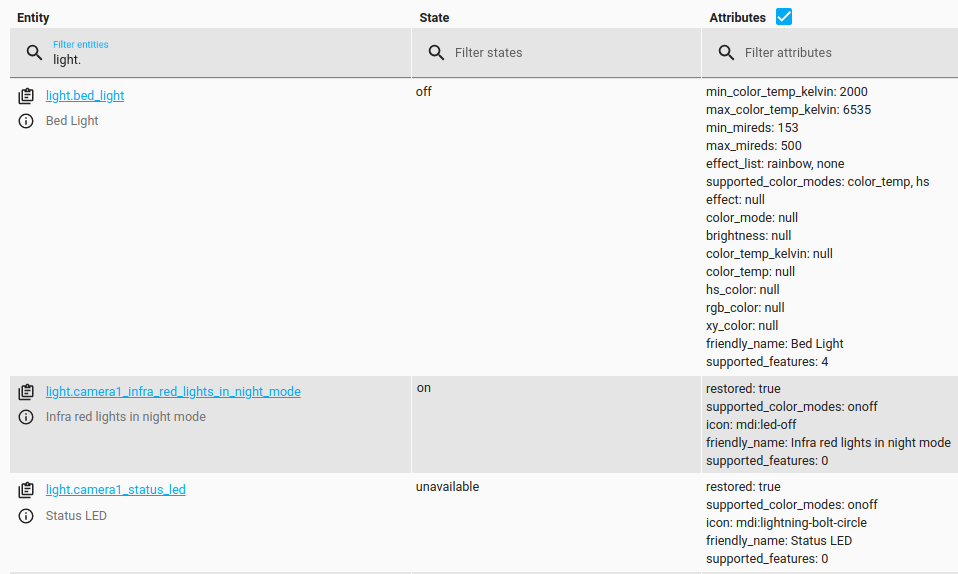 三盏灯的不同状态示例:`on`、`off` 或 `unavailable`。
默认开启值
若要设置灯光开启时的默认颜色、亮度和过渡值,请创建自定义 light_profiles.csv 文件。该文件通常位于包含 "configuration.yaml" 的默认配置文件夹中。
light_profiles.csv 必须包含表头,格式如下:
transition 字段为可选,可以省略。
要为每盏灯定义默认值,应在其实体标识符后添加 .default 后缀。例如,对于 light.ceiling_2,profile 字段应为 light.ceiling_2.default。若要为所有灯定义默认值,可使用标识符 group.all_lights.default。单独设置始终优先于 all_lights 的默认设置。
如果灯光实体已经处于 on 状态,那么默认配置文件中的亮度只有在动作数据属性 profile 中显式调用时才会生效,就像其他命名配置文件一样。除非在动作数据中另有指定,否则 transition 属性会应用于所有 light.turn_on、light.toggle 和 light.turn_off 动作。
动作 light.turn_on
打开一盏灯,或通过 groups 打开多盏灯。
大多数灯光并不支持所有属性。你可以查阅对应灯光的集成文档获取提示,但通常还是需要自行尝试以确认哪些设置有效。
要将属性应用到实体,你需要在配置中加入 data:。见下方示例。
如果未发送任何数据,且存在默认配置文件,则会应用该默认配置文件。
动作 light.turn_off
关闭一盏或多盏灯。
动作 light.toggle
切换一盏或多盏灯的状态。参数与 light.turn_on 动作相同。
注意:如果将 light.toggle 用于一组灯,它会分别切换每盏灯的状态。如果你希望这些灯被视为单个灯,请改用 Light Groups。