

title: "2025.6:蓝牙连接一目了然" description: '<lite-youtube videoid="fcqXortXBVk" videotitle="家庭助理2025.6发布派对"</lite-youtube。 本页属于 Home Assistant 中文博客与更新记录,适合了解版本演进、功能变更与社区动态。' 全新的蓝牙连接图来了!本次更新还改进了所有选择器、侧边栏管理体验、 以及直接从仪表盘加入或取消媒体播放器分组等功能,还有更多内容。
2025.6:蓝牙连接一目了然
家庭助理2025.6! 🎉 2025 年已经过去一半了,你相信吗?我个人不能,因为感觉我们刚刚开始这一年。不仅如此,今年还有很多令人兴奋的事情即将到来,我迫不及待地想与大家分享! 不管怎样,六月发布来了!比平常晚了一周,但这也意味着我们有额外的一周时间来完善和测试此发布。与上一个发布 一样,此发布充满了生活质量的改进! 上次发布我最喜欢的功能是新的实体选择器;在此发布中,我们改进了所有其他选择器!毫不奇怪,这再次成为我最喜欢的这篇文章。尽管直接从媒体播放器对媒体播放器进行分组的能力紧随其后。很高兴看到家庭助理如何变得越来越好,以及我们的社区如何不断为此做出贡献。 😍 如果您在家庭助理设置中利用蓝牙,您也会喜欢新的蓝牙连接图,该图显示了蓝牙设备的连接方式,包括蓝牙代理。蓝牙故障排除现在变得更加容易! 享受发布! ../Frenck PS:我们现在将再次恢复常规发布时间表,因此预计下一次发布将在 7 月的第一个星期三(7 月 2 日)进行。
- 改进所有“选择器”
- 了解蓝牙
- 实验区仪表盘的迭代
- 弃用安装方法和 32 位架构
- 集成
- 其他值得注意的变化
- 侧边栏改进
- 加入/unjoin媒体播放器组
- 重置/恢复实体 ID
- 补丁版本
- 需要帮助吗?加入社区!
- 向后不兼容的更改
- 所有更改
改进所有“选择器”
选择器是您用于选择实体设备、区域等的下拉菜单。选择器在 Home Assistant 中提示中,用于选择自动化、脚本和配置选项。上次发布,我们引入了一个新的实体选择器,它非常受欢迎!此发布通过根据您的反馈改进搜索体验来进一步改进。
更好的是,同样改进的搜索体验现在也适用于区域、类别、楼层、标签、用户和设备选择器!无论您选择什么,它们都是一致、快速且易于使用的。
那么设备选择器呢?它现在拥有全新的外观,配有制造商徽标和受实体选择器启发的造型。
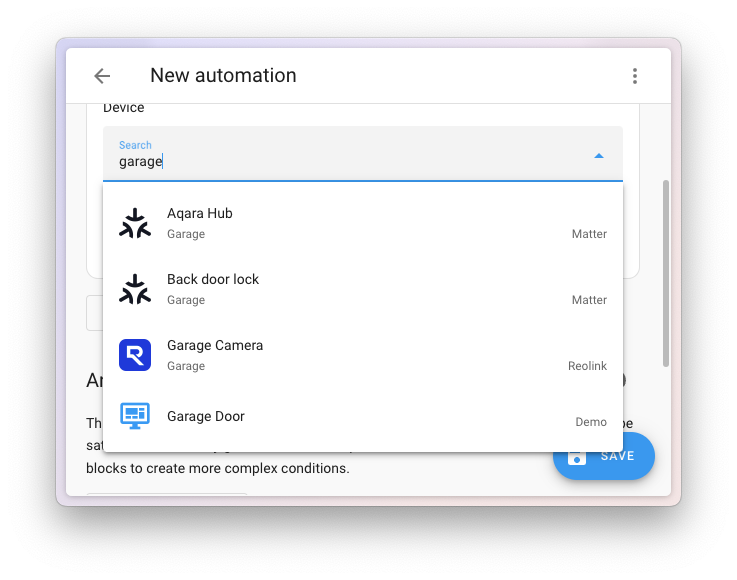
了解蓝牙
Home Assistant 拥有强大的蓝牙功能。借助像 ESPHome 蓝牙代理 这样的方案,你可以让蓝牙网络覆盖整个家庭。
本次发布对蓝牙集成进行了一些改进,帮助你更好地理解自己的蓝牙网络。蓝牙集成现在提供了可视化视图,显示蓝牙设备是如何连接到 Home Assistant 实例的,无论它们是直接连接到系统,还是通过蓝牙代理连接。
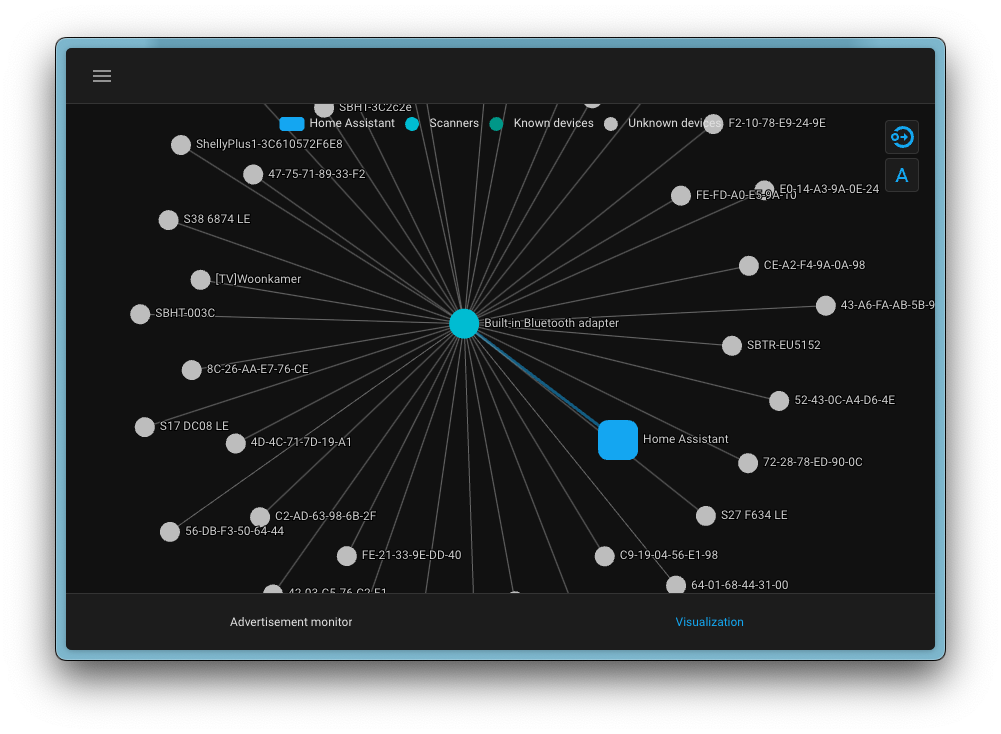
它不仅显示当前已连接的设备,还会显示在范围内、但 Home Assistant 尚未识别的设备。这是查看周边有哪些设备,以及它们可能通过哪里连接的好方法。
另外,既然蓝牙集成有了全新的可视化界面,原本就具备类似功能的 Zigbee 集成 也同步更新了视觉样式。这让整个 Home Assistant 的可视化体验更加一致。
实验区仪表盘的迭代
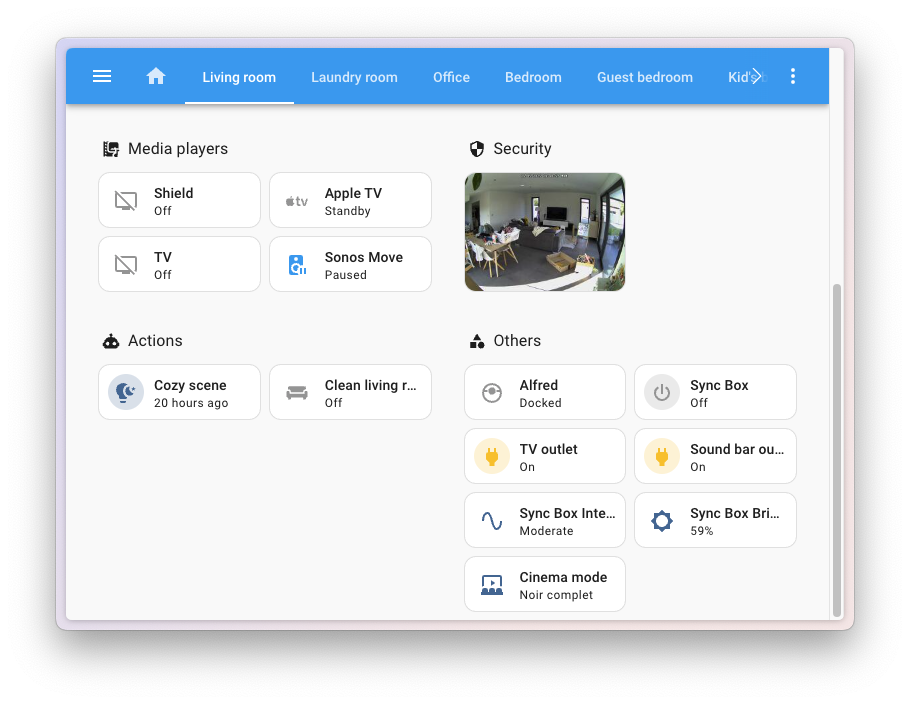
在四月份的发布中,我们推出了新的实验性区域仪表盘,它会根据您在家中设置的区域自动生成即用型仪表盘。它使用部分和平铺调整来实现现代、干净和直观的外观——只需单击几下即可为您构建。 由于这是实验性的,因此正在不断迭代。根据您的反馈,此版本带来了一些不错的更改,以巧妙地改进体验。 我们添加了一个新的“动作”部分,其中包括脚本、自动化和场景。我们还在“其他”部分添加了数字实体(和数字助手)、按钮实体(和按钮助手)、计数器和计时器助手。这使得在您所在区域的上下文中查找和管理您的自动化和场景变得更加容易。 最后,我们将“娱乐”部分重命名为“媒体播放器”。这更明确地表明,此部分专门针对您的播放器,可能不包括您的 DIY 街机👾。
弃用安装方法和 32 位架构
本发布引入了重要的弃用公告。虽然它们只影响一小部分用户,但让受影响的用户了解其影响非常重要。我们写了一篇详细博客,解释背后的原因、时间表,以及如何迁移。如果您认为自己可能受到影响,我强烈建议您阅读。
-
安装方法:Core 和 Supervised 安装方法现已正式弃用。这些属于高级部署方式,只被少数用户使用,因为它们涉及在 Python 环境中运行 Home Assistant,或在您自己的操作系统上安装 Supervisor。今后,我们将把支持重点放在更精简、也更易维护的安装方法上:Home Assistant OS 和 Home Assistant Container。
-
32 位架构:对旧版 32 位 CPU 架构(i386、armhf 和 armv7)的支持也已弃用。这些架构已经越来越少见,也给兼容性与性能维护带来了额外挑战。
为了帮助您平稳过渡,如果您的系统受到这些弃用的影响,Home Assistant 会在升级后创建一个修复问题。这条通知会显示在修复仪表盘中,并提供弃用说明以及如何迁移到受支持设置的指导。
需要注意的是,虽然这些安装方法和架构已经被弃用,但它们在接下来的六个月内仍会继续获得支持,直到 Home Assistant 2025.12 发布。之后您依然可以继续使用它们,但我们强烈建议您迁移。六个月支持期结束后,它们将变为不受支持状态,也就是说将不再获得更新或官方协助。
如果您没有收到这条修复通知,那您就不受影响。不过,如果您想再次确认,也可以查看这份指南。我们也提供了关于“弃用”和“不受支持”具体意味着什么的说明,以及如何迁移的详细信息。
集成
感谢社区不断带来新集成,并持续改进现有集成!你们都很棒 🥰
新集成
我们欢迎以下新集成加入本次发布:
- [Alexa 设备],由 [@chemelli74] 添加:连接并控制你的 Amazon 设备,如 Echo、Fire TV 和支持 Alexa 的设备。
- [Immich],由 [@mib1185] 添加:集成 [Immich App],这是一个自托管照片与视频备份解决方案,让你掌控自己的个人媒体。
- [Paperless-ngx],由 [@fvgarrel] 添加:连接到你的 [Paperless-ngx 系统],通过 Home Assistant 跟踪和管理数字文档。
- [Probe Plus],由 [@pantherale0] 添加:集成兼容 PROBE PLUS 应用的无线蓝牙食物温度计,把烹饪时的实时温度监控带入 Home Assistant。
- [Swing2Sleep Smarla],由 [@rlint-explicatis] 添加:集成 [Swing2Sleep] Smarla,这是一款智能电动摇篮,旨在帮助父母应对日常育儿。
- [Zimi Cloud Connect],由 [@mhannon11] 添加:连接 [Zimi Cloud] 设备,监控你的 Zimi 智能家居产品。 [@chemelli74]: https://github.com/chemelli74 [@fvgarrel]: https://github.com/fvgarrel [@mhannon11]: https://github.com/mhannon11 [@mib1185]: https://github.com/mib1185 [@pantherale0]: https://github.com/pantherale0 [@rlint-explicatis]: https://github.com/rlint-explicatis @starkillerOG: https://github.com/starkillerOG [Alexa 设备]: /integrations/alexa_devices [Immich App]: https://immich.app/ [Immich]: /integrations/immich [Paperless-ngx system]: https://docs.paperless-ngx.com/ [Paperless-ngx]: /integrations/paperless_ngx [Probe Plus]: /integrations/probe_plus [Swing2Sleep Smarla]: /integrations/smarla [Swing2Sleep]: https://swing2sleep.de/ [Zimi Cloud Connect]: /integrations/zimi [Zimi Cloud]: https://www.zimi.com.au/
此版本还加入了新的虚拟集成。虚拟集成由其他现有集成处理,用来提升可发现性。新增如下:
- Kaiser Nienhaus,由 Motionblinds 提供,由 @starkillerOG 添加
对现有集成的值得注意的改进
这次不仅有新集成加入,现有集成也在不断增强。以下是一些值得关注的改进:
- [@bdraco] 添加了对更新深度睡眠状态的 [ESPHome] 设备的支持。 对于电池供电设备来说这是一个非常受欢迎的改进!
- [Homee] 集成现在支持风扇并提供报警控制面板。 感谢您扩展其功能,[@Taraman17]!
- [遥感测量] 越来越好——[@Bre77] 添加了危险灯光二元传感器, 代客模式开关和信用余额传感器。好的!
- [@bieniu] 改进了 [Shelly] 集成,以将子设备用于多通道设备。 复杂设置的显着变化!
- [@joostlek] 对 [SmartThings] 集成进行了惊人的巨大改进,包括: 支持炉灶、炉灶、热水器、抽油烟机风扇速度、蒸汽壁橱模式、 冷冻室和冷藏室温度、洗衣机旋转和污垢水平、阀门位置、 热泵区气候和大气压力。惊人的!
- [Miele]凭借[@astrandb]的新功能继续闪耀,例如吸尘器支持, 烘干步骤传感器、洗衣机-烘干机程序阶段和炉盘传感器。 [@generic-named] 还添加了能源和水的预测——非常酷!
- [@agorecki] 在 [Airthings Cloud] 集成中加入了 Lux 传感器。
- [Squeezebox] 集成现已包含更新实体,感谢 [@pssc]!
- [@tedvdb] 在 [Whois] 集成中加入了状态传感器,简单但实用。
- [@zerzhang] 为 [SwitchBot] 加入了对机器人吸尘器的支持,以及新门锁型号:Lock Ultra 和 Lock Lite。
- [@danielvandenberg95] 更新了 [Sonos] 集成以在收藏夹下显示播放列表。 一次伟大的用户体验胜利!
- [Kostal Plenticore] 集成现在支持安装程序登录。 感谢您的改进,[@Schlauer-Hax]!
- [@Shulyaka] 添加了对 [Anthropic] Claude 4 的支持。欢迎来到未来!-最后,[@chemelli74]为[Comelit]温控集成添加了默认模式支持。 又一个美好生活品质的补充! [@agorecki]: https://github.com/agorecki [@astrandb]: https://github.com/astrandb [@bdraco]: https://github.com/bdraco [@bieniu]: https://github.com/bieniu [@Bre77]: https://github.com/Bre77 [@chemelli74]: https://github.com/chemelli74 [@danielvandenberg95]: https://github.com/danielvandenberg95 [@generically-named]: https://github.com/generically-named [@joostlek]: https://github.com/joostlek [@pssc]: https://github.com/pssc [@Schlauer-Hax]: https://github.com/Schlauer-Hax [@Shulyaka]: https://github.com/Shulyaka [@Taraman17]: https://github.com/Taraman17 [@tedvdb]: https://github.com/tedvdb [@zerzhang]: https://github.com/zerzhang [Airthings Cloud]: /integrations/airthings [Anthropic]: /integrations/anthropic [Comelit]: /integrations/comelit [ESPHome]: /integrations/esphome [Homee]: /integrations/homee [Kostal Plenticore]: /integrations/kostal_plenticore [Miele]: /integrations/miele [Shelly]: /integrations/shelly [SmartThings]: /integrations/smartthings [Sonos]: /integrations/sonos [Squeezebox]: /integrations/squeezebox [SwitchBot]: /integrations/switchbot [Teslemetry]: /integrations/teslemetry [Whois]: /integrations/whois
集成质量规模成就
我们对 Home Assistant 深感自豪的一件事,就是[集成质量量表]。这一体系有助于我们和贡献者确保 集成是高质量的、可维护的,并提供最好的可能 用户体验。 在本次发布中,我们庆祝以下集成提升了质量等级:
- 1 个集成达到金牌级 🥇
- [SwitchBot],感谢 [@zerzhang]
- 1 个集成达到银牌级 🥈
- [Shelly],感谢 [@bieniu] 对于这些集成及其维护者来说,这是一项巨大的成就。的 达到这些质量水平所需的努力和奉献精神是巨大的, 因为它涉及广泛的测试、文档、错误处理,并且经常 完整重写部分集成。 非常感谢所有参与的贡献者! 👏 [集成质量量表]: /docs/quality_scale/ [@astrandb]: https://github.com/astrandb [@bieniu]: https://github.com/bieniu [@zerzhang]: https://github.com/zerzhang [Miele]: /integrations/miele [Shelly]: /integrations/shelly [SwitchBot]: /integrations/switchbot
告别以下内容
以下集成也已在本次发布中停止提供:
- RTSPtoWebRTC 已被删除,因为它已被 go2rtc 集成取代。
其他值得注意的变化
本次发布还有更多改进;以下是其他一些值得注意的变化:
- 一个小而简洁的:[@balloob] 使得集成页面上显示的发现现在按标题排序。有帮助!
- 当您的订阅到期时,[Home Assistant Cloud]集成现在将提出修复问题,帮助确保您了解并且不会措手不及。,不错[@ludeeus]!- 更多备份改进! 🎉
- 如果并非所有附加组件或文件夹均已成功备份,家庭助理现在将提出修复问题。谢谢,[@emontnemery]!
- [@agners] 使得当附加组件自动更新时,备份现在可以正确创建为“附加组件”备份。伟大的!
- 添加了一个新的自动备份[事件实体]来跟踪系统所做的自动备份。 [@mib1185] 的精彩补充!
- [@lboue] 添加了对 [Matter] 泵设备类型的支持。另一个 添加到列表中——太棒了!
- 模板集成得到了很大的提升!
- [@Petro31] 为现代风扇、门锁、报警控制面板、吸尘器和遮盖模板添加了风格的 YAML 支持。好干净! - 您现在可以创建基于曲线的模板遮盖。是的,也是[@Petro31]!
- 在故障中使用
for时,现在支持trigger_variables选项。一个小而强大的功能。谢谢,[@Petro31]! - 新的模板过滤器!您现在可以使用
from_hex,并且base64_encode现在支持字节和字符串。来自 [@Petro31] 的方便补充!
- 在故障中使用
- 新的传感器功能:
- [@Passific] 添加了新的设备类别和无功电能单位。好的!
- 添加了新的能量距离单位 (Wh/km)。谢谢,[@frenck]!
- 传感器现在支持 mg/m³ 作为浓度单位 - [@frenck] 的另一个很好的补充!
- [@Arnie97] 添加了对 升 作为气体传感器单位的支持。非常感谢!
- 新的
recorder.get_statistics动作可让您直接查询统计数据 从录音机。强大的东西,[@Hypfer]! [@agners]: https://github.com/agners [@Arnie97]: https://github.com/Arnie97 [@balloob]: https://github.com/balloob [@emontnemery]: https://github.com/emontnemery [@frenck]: https://github.com/frenck [@Hypfer]: https://github.com/Hypfer [@lboue]: https://github.com/lboue [@ludeeus]: https://github.com/ludeeus [@mib1185]: https://github.com/mib1185 [@Passific]: https://github.com/Passific [@Petro31]: https://github.com/Petro31 [event 实体]: /integrations/event [Home Assistant Cloud]: /integrations/cloud [Matter]: /integrations/Matter [template 实体]: /integrations/template/
侧边栏改进
如果您不知道,您实际上可以调整 Home Assistant 侧边栏的内容。您可以通过按住侧边栏顶部的“Home Assistant”文本来更改顺序并显示 /hide 项目,或者转到您的用户个人资料页面并选择“更改顺序并隐藏侧边栏的项目”。此版本对此功能带来了一些急需的改进。当您自定义侧边栏时,它现在会弹出一个漂亮而干净的对话框,允许您拖放项目以更改其顺序,或通过单击项目旁边的眼睛图标来隐藏它们。
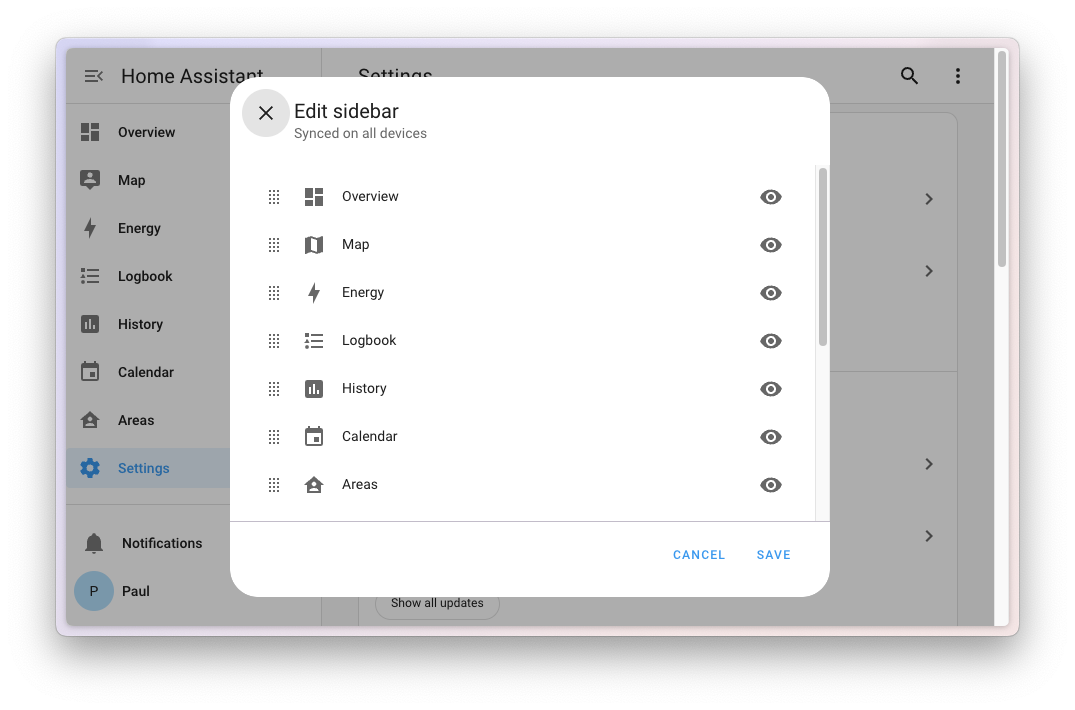
它最大的改进还不止这些!过去,侧边栏自定义有时只会应用在你当前使用的设备上;更麻烦的是,它偶尔还会丢失设置,或者在家庭网络与内部 URL 之间切换时,让[移动伴侣应用]中的配置“失忆”。这次,这个烦人的问题终于解决了!侧边栏自定义现在会存储在你的用户配置中,因此你的个性化布局会在所有使用 Home Assistant 的设备之间同步。
加入/取消媒体播放器分组
Home Assistant 中的媒体播放器可以为媒体播放器提供加入或取消加入一组媒体播放器的动作。这是动态控制媒体播放器及其所在组的好方法。但是,此功能有些限制,因为它只能在自动化或脚本等内容中使用动作。现在,[@AlexGustafsson] 改变了这一点! 🎉
现在,您可以使用媒体播放器调整来加入或取消加入媒体播放器组。这是直接从 UI 控制媒体播放器及其组的好方法。
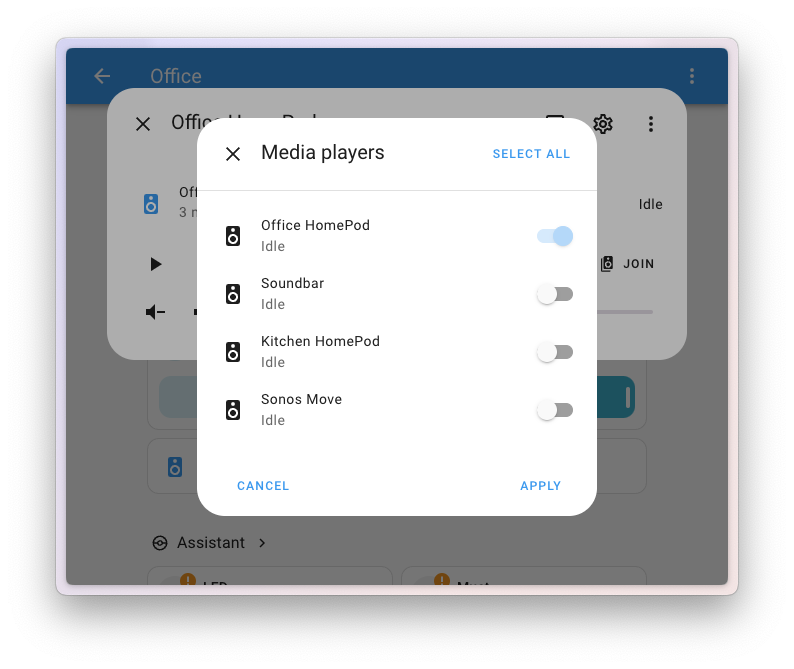
请注意,您只能加入或取消加入支持此功能的媒体播放器组。不幸的是,并非所有媒体播放器都支持此功能,因此它可能不适用于所有媒体播放器。 无论如何,亚历克斯的贡献令人惊叹! 👏 [@AlexGustafsson]: https://github.com/AlexGustafsson
重置/恢复实体ID
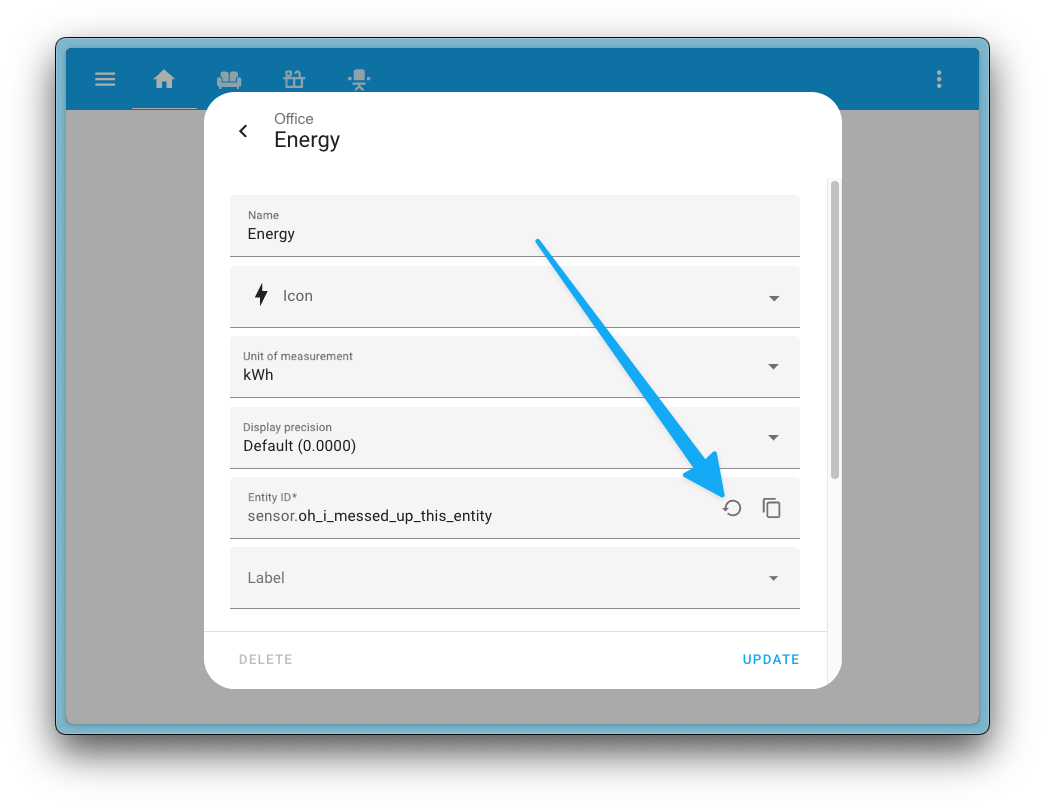
你现在可以将实体的ID恢复到原来的值。如果您已重命名实体并希望将其恢复为其原始实体 ID,则此功能非常有用。
此功能在实体配置对话框中可用,您现在可以在实体 ID 字段上找到“重置”图标。点击后,实体ID将恢复原值。另外,在设备页面右上角的三点菜单中,有一个名为“重新创建实体ID”的选项,可以将设备的所有实体ID重置为原始值。
补丁发布
我们在 6 月份发布了 Home Assistant 2025.6 的补丁版本。这些补丁版本仅包含错误修复。我们的目标是发布补丁 每周五发布。
2025年6月1日 - 6月13日
- 修复LIFX Ceiling SKY效果的调色板处理([@Djelibeybi] - [#146582])- 修复 xiaomi_miio 中风扇 is_on 状态 ([@epenet] - [#146592])- 在阿鲁巴岛删除 HostKeyAlgorithms ([@aethrvmn] - [#146619])- 更新前端至 20250531.3 ([@piitaya] - [#146638])
- 使用 aiohttp >= 3.12.7 修复 Vodafone Station 的 cookie ([@chemelli74] - [#146647])- 将唤醒lan升级到3.1.0 ([@epenet] - [#146655])- 将 hdate 更改为 1.1.2 ([@tsvi] - [#146659])- 将链接播放升级到 v0.2.12 ([@silamon] - [#146669])
- 在 Alexa 设备中过滤 WHA 设备的发言通知实体 ([@chemelli74] - [#146688])- 将 aioamazondevices 升级到 3.1.2 ([@chemelli74] - [#146690])- 通过取消 cookie 引用来修复 opower 以与 aiohttp>=3.12.7 一起使用 ([@tronikos] - [#146697])- 恢复本地日历中的扫描间隔更改([@allenporter] - [#146700])
- 部分恢复远程日历更新以修复日历不更新的问题 ([@allenporter] - [#146702])
- 忽略挥之不去的 pycares 关闭线程 ([@cdce8p] - [#146733])- 将 aiodns 提升至 3.5.0 ([@bdraco] - [#146758])- 修复 HomematicIP Cloud 中的限制问题 ([@hahn-th] - [#146683])[#145650]: https://github.com/home-assistant/核心/pull/145650 [#146582]: https://github.com/home-assistant/核心/pull/146582 [#146592]: https://github.com/home-assistant/核心/pull/146592 [#146619]: https://github.com/home-assistant/核心/pull/146619 [#146638]: https://github.com/home-assistant/核心/pull/146638 [#146647]: https://github.com/home-assistant/核心/pull/146647 [#146655]: https://github.com/home-assistant/核心/pull/146655 [#146659]: https://github.com/home-assistant/核心/pull/146659 [#146669]: https://github.com/home-assistant/核心/pull/146669 [#146683]: https://github.com/home-assistant/核心/pull/146683 [#146688]: https://github.com/home-assistant/核心/pull/146688 [#146690]: https://github.com/home-assistant/核心/pull/146690 [#146697]: https://github.com/home-assistant/核心/pull/146697 [#146700]: https://github.com/home-assistant/核心/pull/146700 [#146702]: https://github.com/home-assistant/核心/pull/146702 [#146733]: https://github.com/home-assistant/核心/pull/146733 [#146758]: https://github.com/home-assistant/核心/pull/146758 [@Djelibeybi]: https://github.com/Djelibeybi [@aethrvmn]: https://github.com/aethrvmn [@allenporter]: https://github.com/allenporter [@bdraco]: https://github.com/bdraco [@cdce8p]: https://github.com/cdce8p [@chemelli74]: https://github.com/chemelli74 [@epenet]: https://github.com/epenet [@frenck]: https://github.com/frenck [@hahn-th]: https://github.com/hahn-th [@piitaya]: https://github.com/piitaya [@silamon]: https://github.com/silamon [@tronikos]: https://github.com/tronikos [@tsvi]: https://github.com/tsvi
2025年6月2日 - 6月23日
- 来自Rachio日历事件中删除地址信息 ([@brg468] - [#145896])- 将 uiprotect 升级到 7.12.0 ([@RaHehl] - [#146337])- 将 uiprotect 升级到 7.13.0 ([@RaHehl] - [#146410])- 将 reolink-aio 升级到 0.14.0 (@starkillerOG - [#146566])- 将 pypck 提升至 0.8.7 ([@alengwenus] - [#146657])- 将 rokuecp 更新到 0.19.5 ([@ctalkington] - [#146788])- 使用 Shelly 主设备区域作为子设备的建议区域 ([@bieniu] - [#146810])- 修复 Minecraft 服务器中的阻止打开问题 ([@elmurato] - [#146820])- 将 aioamazondevices 升级到 3.1.3 ([@chemelli74] - [#146828])- 将 aiohttp 升级到 3.12.13 ([@bdraco] - [#146830])- 将运动盲区提升至 0.6.28 (@starkillerOG - [#146831])
- 将 pypck 提升至 0.8.8 ([@alengwenus] - [#146841])- 修复旧 Wallbox 型号中丢失的 ecosmart 钥匙 ([@hesselonline] - [#146847])- 将 bthome-ble 升级到 3.13.1 ([@Ernst79] - [#146871])- 将 reolink-aio 升级到 0.14.1 (@starkillerOG - [#146903])- 在 onedrive 中添加调试日志并进行更新 ([@zweckj] - [#146907])- Switchbot Cloud:修复传感器中的设备类型过滤([@SeraphicRav] - [#146945])- 将 pySmartThings 升级到 3.2.5 ([@joostlek] - [#146983])- 将升级到 10.0.4 ([@allenporter] - [#147005])- 修复 Service.async_get_all_descriptions 中 zip 的错误使用([@emontnemery] - [#147013])- 默认取消 Z-Wave CC 实体([@MartinHjelmare] - [#147018])- 修复第一代名称休眠设备的雪莉实体 ([@bieniu] - [#147019])- 取消Z-Wave休闲通知按钮([@MartinHjelmare] - [#147026])- 修复 onedrive 中的日志 ([@zweckj] - [#147029])- 将假期lib提升至0.75 ([@gjohansson-ST] - [#147043])- 将 aiohomeconnect 升级到 0.18.0 ([@Diegorro98] - [#147044])- 将 ZHA 提升至 0.0.60 ([@puddly] - [#147045])- 将 pylamarzocco 升级到 2.0.9 ([@zweckj] - [#147046])- 处理 lamarzocco 中的小部件([@zweckj] - [#147047])- 将 aioamazondevices 升级到 3.1.4 ([@chemelli74] - [#146883])- 将 aioamazondevices 升级到 3.1.12 ([@chemelli74] - [#147055])- 将 uiprotect 升级到版本 7.14.0 ([@RaHehl] - [#147102])- 改进先进的 Z-Wave 电池发现([@MartinHjelmare] - [#147127])- 修复遥测中的充电电缆二元传感器([@Bre77] - [#147136])
- [ci] 凹凸缓存密钥版本 ([@cdce8p] - [#147148])
- 将 homematicip 升级到 2.0.6 ([@hahn-th] - [#147151])- Wallbox 修复了 API 请求过多的问题 ([@hesselonline] - [#147197])- 将 deebot-client 升级到 13.4.0 ([@edenhaus] - [#147221])- 处理来自 traccar 客户端的新 JSON 负载 ([@ludeeus] - [#147254])- 将 aioamazondevices 升级到 3.1.14 ([@chemelli74] - [#147257])- 将 uiprotect 升级到版本 7.14.1 ([@RaHehl] - [#147280])- 将 aioesphomeapi 升级到 32.2.4 ([@synesthesiam] - [#147100])- 将 aioesphomeapi 提升到 33.0.0 ([@bdraco] - [#147296])- 修复了没有脚本支持的雪莉设备的重载 ([@chemelli74] - [#147344])- 将 Matter 协议添加到 Switchbot ([@joostlek] - [#147356])[#145650]: https://github.com/home-assistant/核心/pull/145650 [#145896]: https://github.com/home-assistant/核心/pull/145896 [#146337]: https://github.com/home-assistant/核心/pull/146337 [#146410]: https://github.com/home-assistant/核心/pull/146410 [#146566]: https://github.com/home-assistant/核心/pull/146566 [#146657]: https://github.com/home-assistant/核心/pull/146657 [#146764]: https://github.com/home-assistant/核心/pull/146764 [#146788]: https://github.com/home-assistant/核心/pull/146788 [#146810]: https://github.com/home-assistant/核心/pull/146810 [#146820]: https://github.com/home-assistant/核心/pull/146820 [#146828]: https://github.com/home-assistant/核心/pull/146828 [#146830]: https://github.com/home-assistant/核心/pull/146830 [#146831]: https://github.com/home-assistant/核心/pull/146831 [#146841]: https://github.com/home-assistant/核心/pull/146841 [#146847]: https://github.com/home-assistant/核心/pull/146847 [#146871]: https://github.com/home-assistant/核心/pull/146871 [#146883]: https://github.com/home-assistant/核心/pull/146883 [#146903]: https://github.com/home-assistant/核心/pull/146903 [#146907]: https://github.com/home-assistant/核心/pull/146907 [#146945]: https://github.com/home-assistant/核心/pull/146945 [#146983]: https://github.com/home-assistant/核心/pull/146983 [#147005]: https://github.com/home-assistant/核心/pull/147005 [#147013]: https://github.com/home-assistant/核心/pull/147013 [#147018]: https://github.com/home-assistant/核心/pull/147018 [#147019]: https://github.com/home-assistant/核心/pull/147019 [#147026]: https://github.com/home-assistant/核心/pull/147026 [#147029]: https://github.com/home-assistant/核心/pull/147029 [#147043]: https://github.com/home-assistant/核心/pull/147043 [#147044]: https://github.com/home-assistant/核心/pull/147044 [#147045]: https://github.com/home-assistant/核心/pull/147045 [#147046]: https://github.com/home-assistant/核心/pull/147046 [#147047]: https://github.com/home-assistant/核心/pull/147047 [#147055]: https://github.com/home-assistant/核心/pull/147055 [#147100]: https://github.com/home-assistant/核心/pull/147100 [#147102]: https://github.com/home-assistant/核心/pull/147102 [#147127]: https://github.com/home-assistant/核心/pull/147127 [#147136]: https://github.com/home-assistant/核心/pull/147136 [#147148]: https://github.com/home-assistant/核心/pull/147148 [#147151]: https://github.com/home-assistant/核心/pull/147151 [#147197]: https://github.com/home-assistant/核心/pull/147197 [#147221]: https://github.com/home-assistant/核心/pull/147221 [#147254]: https://github.com/home-assistant/核心/pull/147254 [#147257]: https://github.com/home-assistant/核心/pull/147257 [#147280]: https://github.com/home-assistant/核心/pull/147280 [#147296]: https://github.com/home-assistant/核心/pull/147296 [#147344]: https://github.com/home-assistant/核心/pull/147344 [#147356]: https://github.com/home-assistant/核心/pull/147356 [@Bre77]: https://github.com/Bre77 [@Diegorro98]: https://github.com/Diegorro98 [@Ernst79]: https://github.com/Ernst79 [@MartinHjelmare]: https://github.com/MartinHjelmare [@RaHehl]: https://github.com/RaHehl [@SeraphicRav]: https://github.com/SeraphicRav [@alengwenus]: https://github.com/alengwenus [@allenporter]: https://github.com/allenporter [@bdraco]: https://github.com/bdraco [@bieniu]: https://github.com/bieniu [@brg468]: https://github.com/brg468 [@cdce8p]: https://github.com/cdce8p [@chemelli74]: https://github.com/chemelli74 [@ctalkington]: https://github.com/ctalkington [@edenhaus]: https://github.com/edenhaus [@elmurato]: https://github.com/elmurato [@emontnemery]: https://github.com/emontnemery [@frenck]: https://github.com/frenck [@gjohansson-ST]: https://github.com/gjohansson-ST [@hahn-th]: https://github.com/hahn-th [@hesselonline]: https://github.com/hesselonline [@joostlek]: https://github.com/joostlek [@ludeeus]: https://github.com/ludeeus [@puddly]: https://github.com/puddly @starkillerOG: https://github.com/starkillerOG [@synesthesiam]: https://github.com/synesthesiam [@zweckj]: https://github.com/zweckj [alexa_devices docs]: /integrations/alexa_devices/ [bthome docs]: /integrations/bthome/ [ecovacs docs]: /integrations/ecovacs/ [esphome docs]: /integrations/esphome/ [holiday docs]: /integrations/holiday/ [home_connect docs]: /integrations/home_connect/ [homematicip_cloud docs]: /integrations/homematicip_cloud/ [lamarzocco docs]: /integrations/lamarzocco/ [lcn docs]: /integrations/lcn/ [local_calendar docs]: /integrations/local_calendar/ [local_todo docs]: /integrations/local_todo/ [minecraft_server docs]: /integrations/minecraft_server/ [motion_blinds docs]: /integrations/motion_blinds/ [onedrive docs]: /integrations/onedrive/ [rachio docs]: /integrations/rachio/ [remote_calendar docs]: /integrations/remote_calendar/ [reolink docs]: /integrations/reolink/ [roku docs]: /integrations/roku/ [shelly docs]: /integrations/shelly/ [smartthings docs]: /integrations/smartthings/ [switchbot_cloud docs]: /integrations/switchbot_cloud/ [teslemetry docs]: /integrations/teslemetry/ [traccar docs]: /integrations/traccar/ [unifiprotect docs]: /integrations/unifiprotect/ [wallbox docs]: /integrations/wallbox/ [workday docs]: /integrations/workday/ [zha docs]: /integrations/zha/ [zwave_js docs]: /integrations/zwave_js
2025年6月3日 - 6月24日
- 前端更新至 20250531.4 ([@bramkragten] - [#147414]) [#147414]: https://github.com/home-assistant/核心/pull/147414 [@bramkragten]: https://github.com/bramkragten
需要帮助吗?加入社区!
家庭助理拥有庞大的用户群体,他们都非常愿意互相帮助。那么,加入我们吧! 我们非常活跃的 Discord 聊天服务器 是一个绝佳的地方 ,并且不要忘记加入我们精彩的论坛。 发现错误或问题?请在我们的问题跟踪器 中报告该问题, 把它修好!或者,查看我们的帮助页面 以获取更多指导 你可以去的地方。 您更喜欢电子邮件吗? 订阅我们的“构建开放家庭通讯” 获取有关功能、社区中发生的事情的最新消息以及 有关建造开放之家的其他新闻;直接进入您的收件箱。
向后不兼容的更改
我们尽力避免对现有功能进行更改,这可能会导致 意外地影响您的家庭助理安装。不幸的是,有时,这是不可避免的。 我们始终确保记录这些更改,以使过渡变得简单 对你来说是可能的。此版本具有以下向后不兼容的更改: Met Office 已弃用此集成使用的 Datapoint API,导致其停止工作。为了解决此问题,它现已迁移到 DataHub API。要继续使用此集成,您需要提供新的 API 密钥,可以通过注册 DataHub 并订阅 全球现货数据集 来获取该密钥。免费订阅每天提供 360 个调用,这足以让此集成发挥作用。由于新的数据源,一些传感器发生了变化:
- 天气实体提供的每小时预报现在有实际的每小时条目,而不是旧版本中的每小时 3 小时
- 集成现在公开一个具有精确可见距离(以米为单位)的
visibility传感器,而不是显示范围和定性描述(例如“1-4 公里”和“差”)的visibility和visibility_distance传感器 - 集成不再暴露“每日”和“3小时”传感器;现在只有一组
- 集成传感器不再公开
Site ID、Site name和Sensor ID属性,因为这些属性不提供任何附加值 ([@avee87] - [#131425]) (文档) [@avee87]: https://github.com/avee87 [#131425]: https://github.com/home-assistant/核心/pull/131425
如果您是自定义集成开发人员并且想要了解更改和 可用于您的集成的新功能:请务必遵循我们的 [开发者博客][开发者博客]。本次发布最显著的变化如下:
所有更改
当然,这篇文章还有很多内容。您可以在此处找到所有更改的列表:Home Assistant Core 2025.6 的完整变更日志