

2024.3:像 Hot 一样拖放!🎉
Home Assistant Core 2024.3!🎉
是的,你没看错标题!我对此非常兴奋。已经是 谈论了很多年......我保证这是真的:
仪表盘拖放功能终于来了! 🎉
仪表盘部分的第一个实验版本支持拖放。 这对 Home Assistant 来说是一次巨大飞跃,也是一个更重要的里程碑!
但不要被这些龙与地下城蒙蔽了双眼;还有更多!
Assist 的新意图(我终于可以告诉我的吸尘器开始清洁!),使用 来自仪表盘的脚本输入/字段,以及个人的新能量图 设备。而这只是冰山一角!
享受发布!
../Frenck
PS:非常感谢并感谢 @bramkragten 和 @balloob 的组织 运行测试版以及所有帮助制作这些发布说明的人 发生在我缺席这个测试期间。 🥰
- 新的实验剖面视图
- 拖放动作和部分的重新排列!
- 通过用户输入从仪表盘运行脚本
- 单个设备的新能源图
- 辅助新句子
- 禁用 Home Assistant 远程用户界面的远程激活
- 翻译模板中的状态
- Home Assistant启动速度提高两倍
- 其他值得注意的变化
- 新集成
- 现在可以从 UI 设置集成
- 发布 2024.3.1 - 3 月 14 日
- 发布 2024.3.2 - 3 月 22 日
- 发布 2024.3.3 - 3 月 22 日
- 需要帮助吗?加入社区!
- 向后不兼容的更改
- 所有更改
不要忘记加入我们在 YouTube 上的发布派对直播 2024 年 3 月 6 日,格林尼治标准时间 20:00/太平洋标准时间 12:00/欧洲中部时间 21:00!
全新的实验性 Sections 视图
我们的仪表盘目前提供三种视图布局类型:面板、侧边栏 和 Masonry。过去一年里,我们一直在研究如何让仪表盘更容易定制、也更容易使用,而我们意识到现有布局并不适合这个目标。特别是,拖放式重新排列卡片与 Masonry 布局并不能很好地配合。
我们提出了一些解决方案,我们想分享的第一件事 与您一起的是一种称为“部分”的新视图布局类型。
Home Assistant 仪表盘通常信息量很大。用户经常会放入几十个按钮、开关、图表、指示器等卡片。
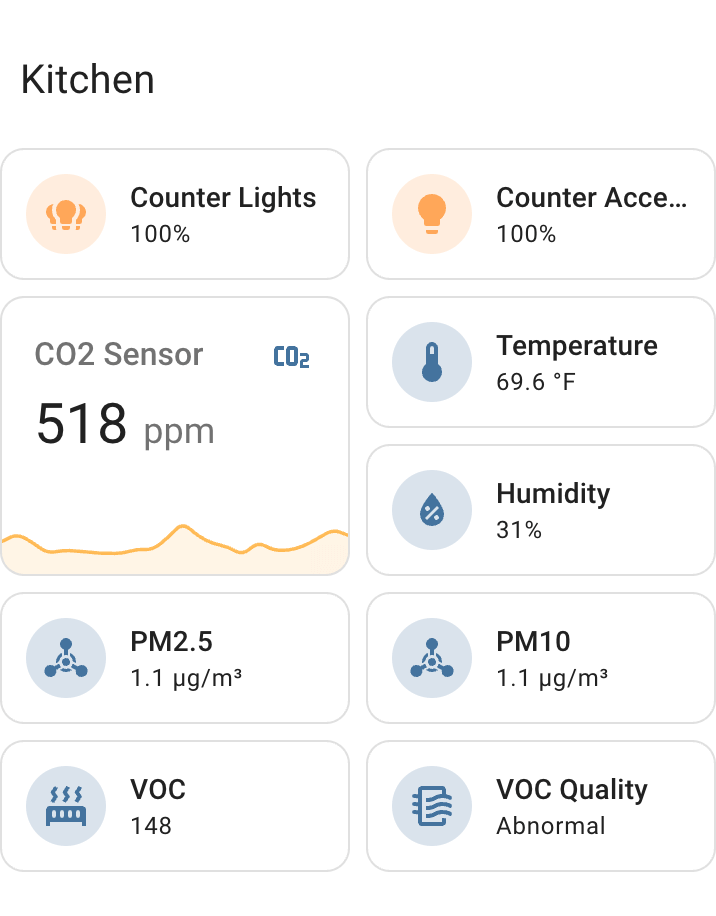 仪表盘部分示例
通过将卡片分组为“分区”,你可以减少需要逐一扫描的项目数量。 当你寻找某个特定的动作时需要仔细浏览,因为你会 能够先查找相关的组标题,然后将范围缩小到 扫描该特定组以获取信息。
通过将一个部分中的关系打包到具有固定列数的网格中, 截面内的相对位置不受 屏幕尺寸发生变化,因此保留了亮度的空间记忆, 带来更快、更轻松的体验。
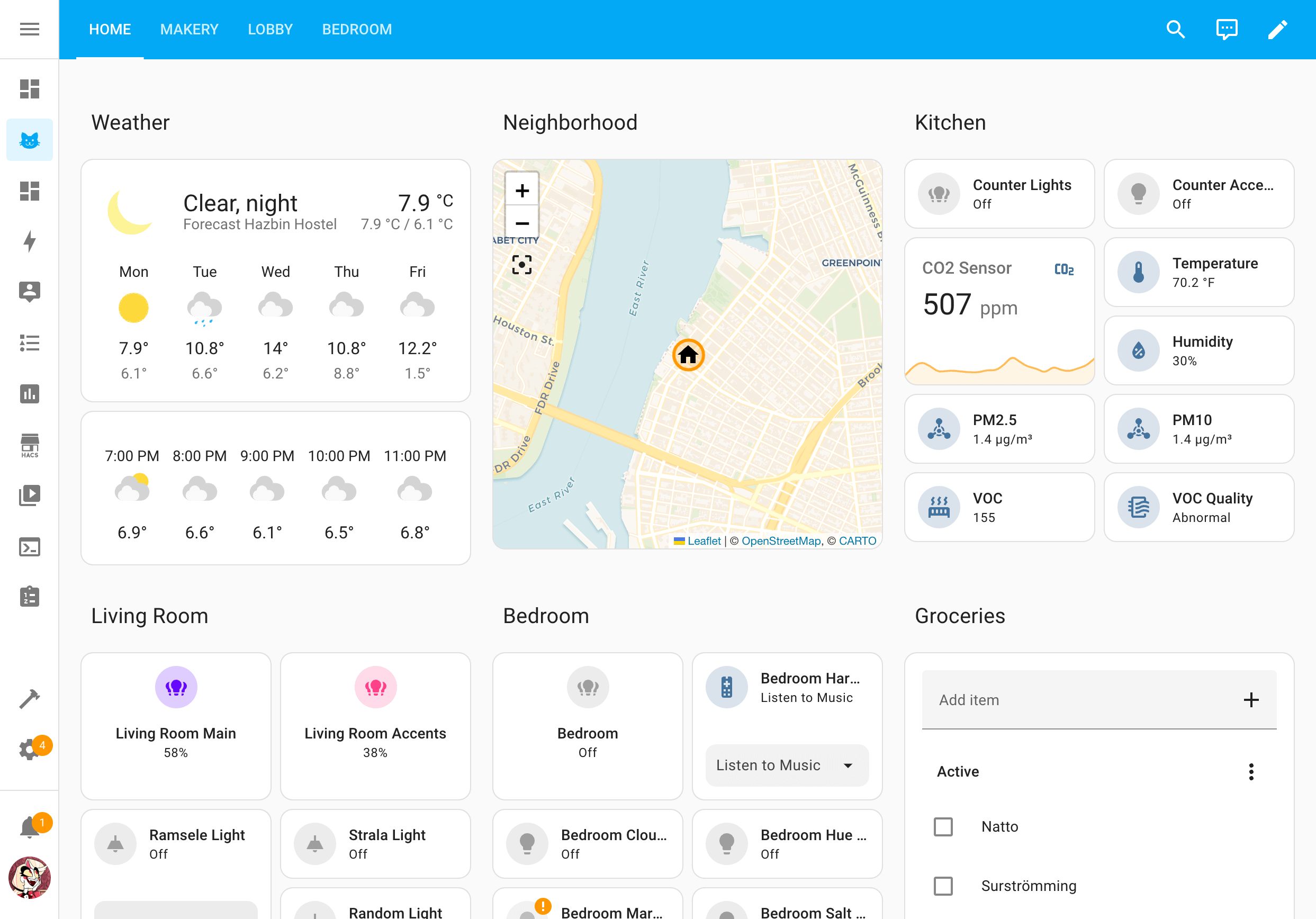 部分视图布局中完全填充的仪表盘
新剖面视图类型中的布局全部对齐在整齐的网格中,以确保 当屏幕尺寸变化时,它们的位置的一致性和可预测性。 目前,我们对三个调整位置进行了重新设计以适应网格: 瓷砖、传感器、 和按钮 响应。这些动作将占据右侧 网格中的空间量,而其他关联将占据整个宽度 目前默认的一个部分。此外,我们还调整了我们的 “添加调整”对话框默认推荐平铺调整 视图类型正在使用中。
:::警告 新的部分视图是实验性的!请勿在其上构建您的日常仪表盘!我们提前发布此内容是为了收集您的反馈。 :::
要开始使用新的剖面视图类型,请在您的 仪表盘并选择 Sections (experimental) 作为视图类型。 我们目前还无法迁移您当前的仪表盘。
更多信息,请查看我们关于新产品的博客文章 系列家庭认可的仪表盘:第一章。
拖放式重新排列动作和部分!
哇!终于!星星已经对齐,我们的实验性拖放 仪表盘功能终于来了! 🥲
使用新的剖面视图类型,我们终于可以实现一种排列方式 通过拖放手势直观且可预测的交互和部分 以及如何在创建易于操作的仪表盘时重新排列关联 导航并记住。您将不再需要祈祷和猜测反应在哪里 当他们改变订单时就会着陆!
如何拖放
当您的仪表盘处于编辑模式时:
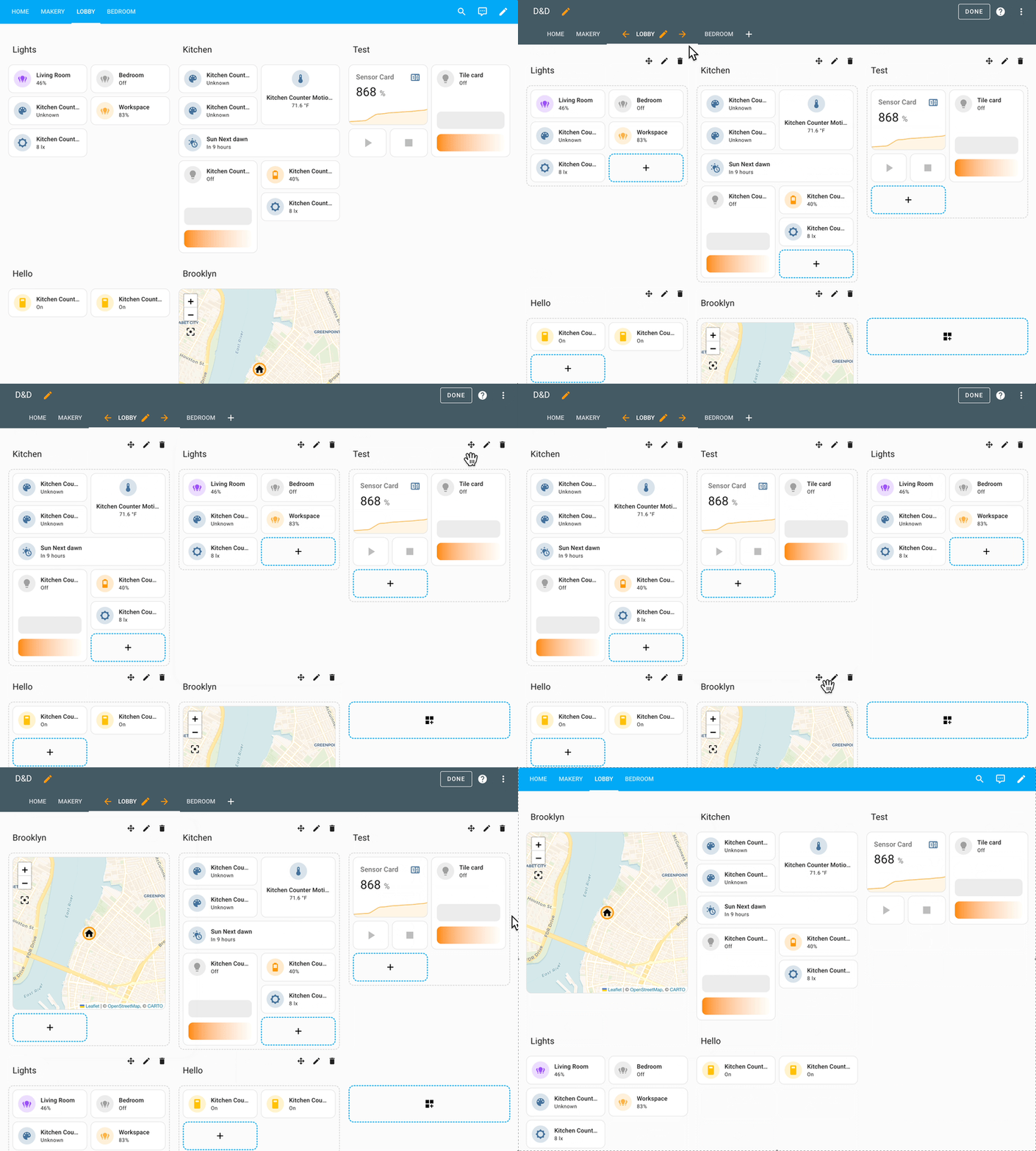 通过拖放重新排列部分
- 要重新排列部分,请点击并按住
 移动手柄,然后将光标或手指移向所需的位置
位置。其他部分将移开以避开所选位置
部分将会下降。
移动手柄,然后将光标或手指移向所需的位置
位置。其他部分将移开以避开所选位置
部分将会下降。
 通过拖放重新排列部分
- 要重新排列调节,请点击并按住调节上的任意位置,然后移动您的调节器 将光标或手指移向您想要的位置。
您不喜欢指令如此简短吗?简单 FTW! 🦄再次感谢保罗, 马蒂亚斯, 还有玛德琳娜!
使用用户输入从仪表盘运行脚本
在 Home Assistant 中,您可以捕捉一系列动作 以及以可重用的方式进行选择。 脚本非常强大,因为它们可以 有输入字段,允许您在脚本运行时发送数据。
脚本字段可以在脚本编辑器中定义,并在调用脚本时显示 自动化中的脚本。在本次发布中,脚本字段将可用 在仪表盘上点击脚本时会出现更多信息对话框。
这允许您提供输入字段并运行脚本,解锁 全新的可能性维度。
为了配合这一新功能,我们创建了两个蓝图来帮助您 开始在仪表盘上使用脚本:
公告消息:此蓝图允许您为以下内容创建公告脚本 您的仪表盘预先配置为特定的媒体播放器和文本转语音 发动机。激活后,它将询问用户播放消息。
Add to to-do list: This blueprint allows you to create a 脚本 to add an 预先配置到特定待办事项列表的待办事项列表中的项目。当激活时, 它会询问用户要添加的项目。
个人设备新能源图
深入研究能源数据是一种非常有趣的方法,可以找到减少能源消耗的方法 您家庭的能源使用和环境足迹。 🌱
缺少的砖块之一是查看能源消耗的能力 随着时间的推移,个人设备的数量。感谢 @karwosts,我们有了 能源仪表盘上的全新图表提供了这种见解!
使用这个新图表,您现在可以轻松找出哪些设备负责 随着时间的推移,您的能源使用量的哪一部分。
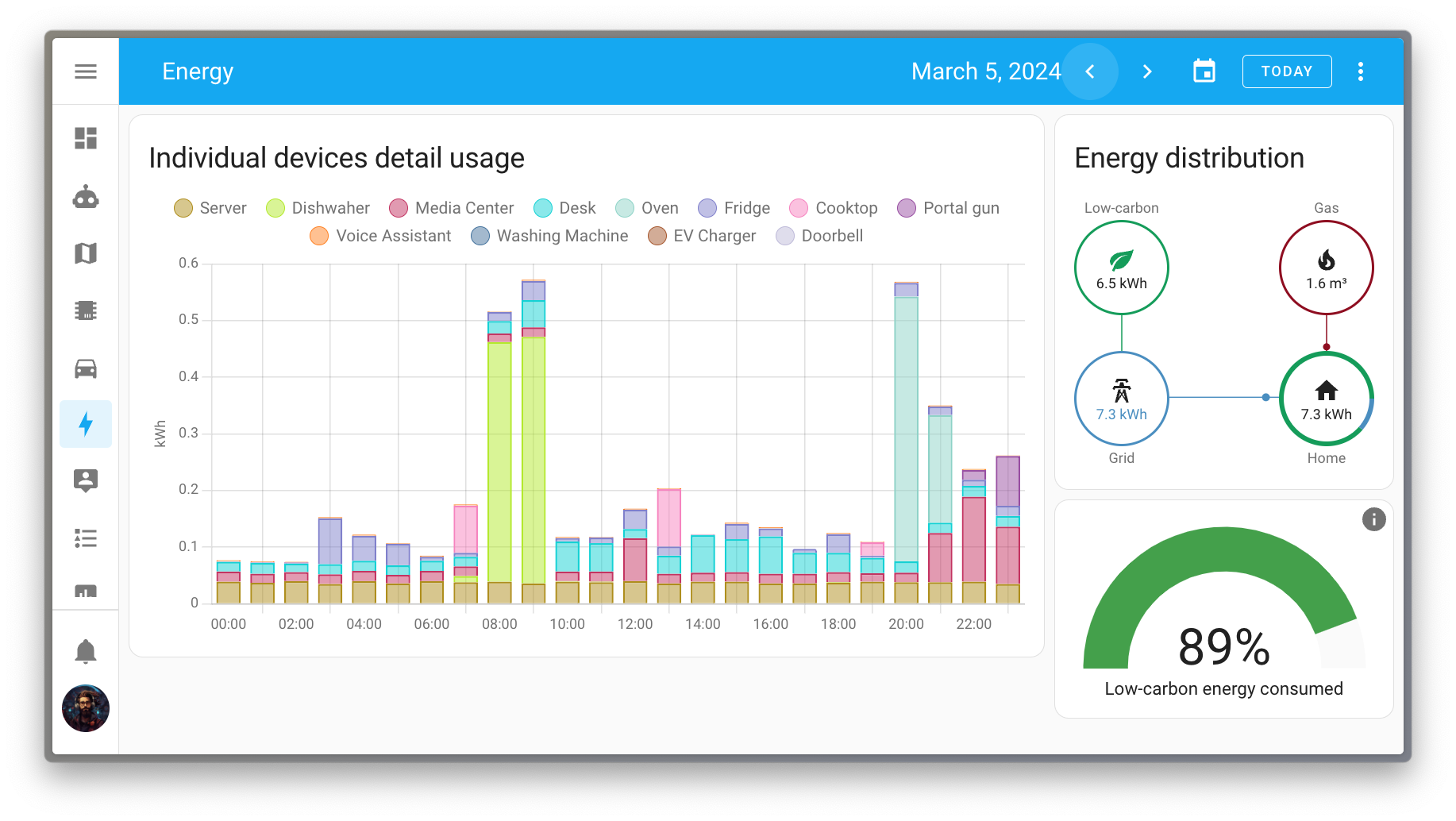
例如,在上图中,很容易看出洗碗机 负责早上的峰值,烤箱负责晚上的峰值。
协助的新句子
协助,我们的私人语音助手,这个月学到了一些技巧。
添加了对阀门的支持。您现在可以要求Assistance调整位置 阀门,或者只是完全打开或关闭阀门。
此外,还扩展了遮盖支撑,以支持对位置的控制 您的设备。目前,大多数语言仅支持单个用例 起点。通过定位单个设备来设置其位置 姓名:
将窗帘位置设置为 80%
我们正在努力扩大用例覆盖范围以设定位置 多个设备或完整区域,类似于可能的情况 开放句和封闭句。
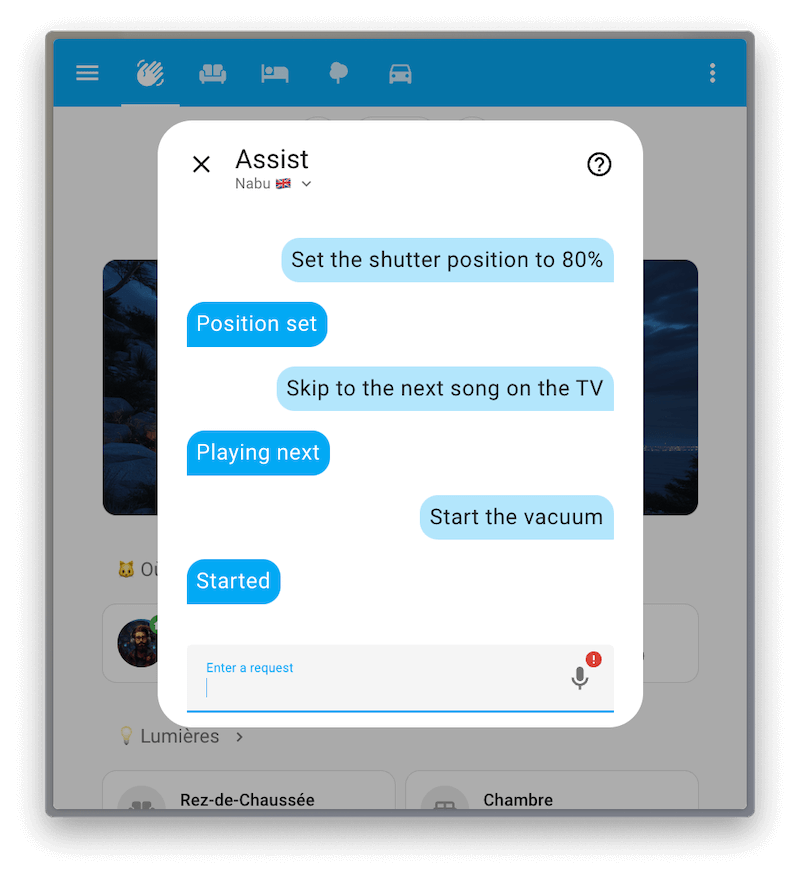
下一个新技巧可以被视为错误修复:直到今天还没有 可通过语音启动或停止吸尘器;现在可以了!协助知道 如何启动吸尘器并将其放回底座。这是一些例子 句子,如果你有一个名为 Dusty 的吸尘器清洁工:
开始尘土飞扬
将达斯蒂送回基地
最大的变化是媒体播放器。 Assist 现在可以暂停播放, 恢复播放,跳到下一个媒体,并设置媒体播放器的音量!请注意,目前这些句子仅限于针对单个 设备名称,例如:
跳至电视上的下一首歌曲
我们正在积极致力于扩展这些新意图的逻辑,以允许 您可以定位目标区域并仅影响所需的媒体播放器。
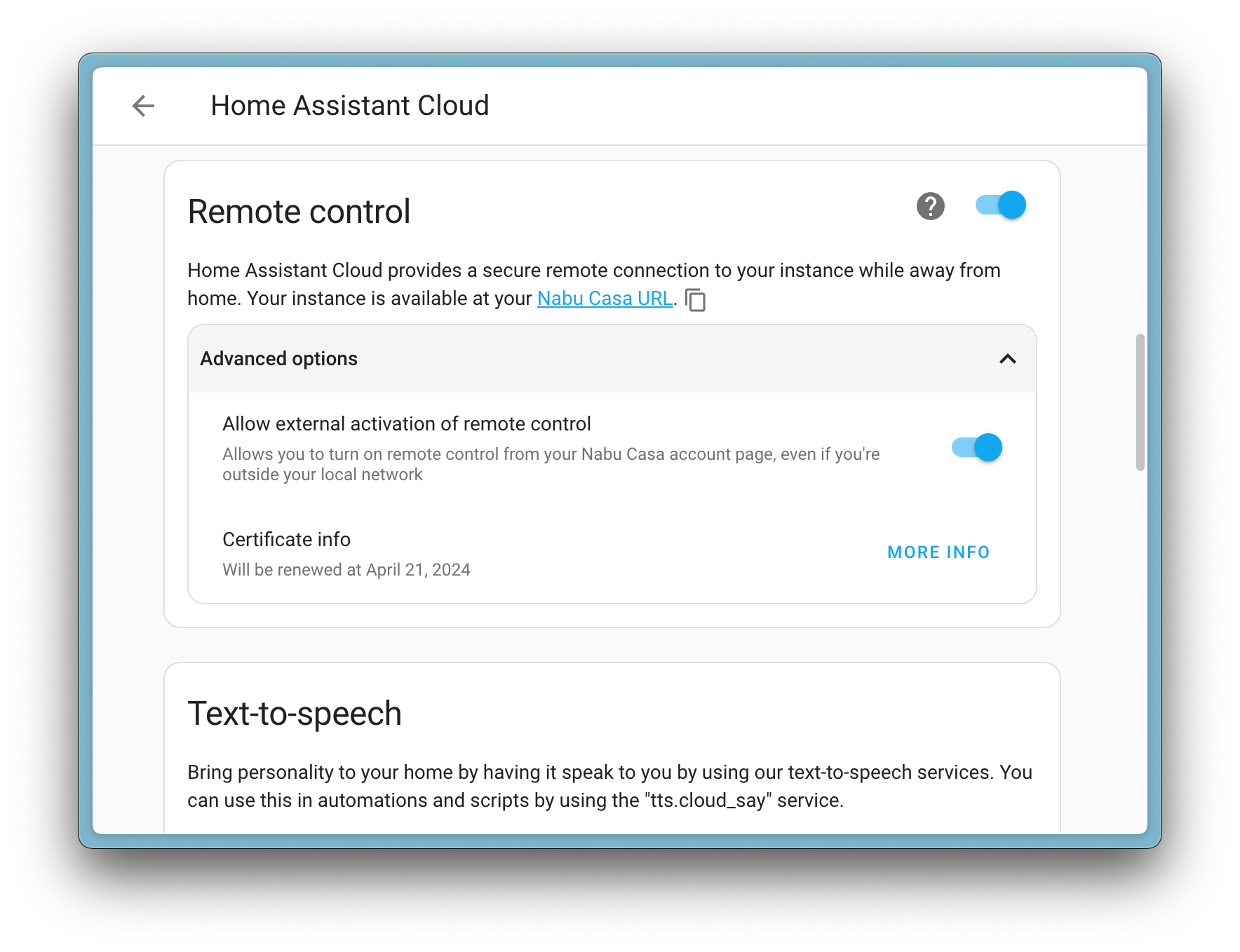
禁用 Home Assistant 远程用户界面的远程激活
如果您使用的是【Home Assistant云】(https://nabucasa.com),您可以访问 使用远程 UI 功能远程访问您的 Home Assistant 实例。
假设此功能由于某种原因被禁用,而您当前没有 在家里。在这种情况下,您可以通过以下方式远程启用远程用户界面功能: 登录您的 Nabu Casa 帐户 并 请求您的 Home Assistant 实例将其打开。
社区的反馈表明,这个功能并不总是需要的, 此版本添加了一个新选项来禁用远程激活 远程用户界面功能。一旦禁用,远程用户界面功能只能启用 从您的 Home Assistant 实例本地。
翻译模板中的状态
您是否使用自动化发送通知?如果是这样的话, @PiotrMachowski 可能只是添加了您需要的新内容!
一种新的模板方法,state_translated,直接翻译实体状态
从您的模板中!考虑这个模板示例:
上面的例子展示了两个实体的原始状态。然而,随着
新的 state_translated 方法,您可以以人类可读的形式获取状态:
更好的是,它使用 Home Assistant 实例的默认语言。所以, 如果您使用其他语言的 Home Assistant,翻译后的状态将 使用该语言。
Home Assistant 启动速度提高两倍
如果您不知道,每个发布 @bdraco 都会提高性能 关于Home Assistant的某些方面。他已经坚持了很长时间并且一直坚持 推动改进它。
事实上,它已经变得如此普遍,以至于我们并不总是强调 在我们的发布说明中,他为实现这个孤独的目标付出了巨大的努力。对不起!🙏
然而,在这篇文章中,他的努力令人震惊,以至于我们想要 大声喊出来:Home Assistant 现在的平均启动速度提高了一倍! 🚀
这是一个巨大的进步 @bdraco!感谢您的持续努力 让Home Assistant变得越来越快!❤️
其他含义的变化
本次发布还有更多改进;还有其他一些 本次发布的意义变更:
- [温控实体]现在有切换服务(
climate.toggle)。 谢谢@arturpragacz! - Matter 灯光现在支持转换,很好!谢谢,@marcelveldt!
- 我们听说您喜欢下载 CSV!因此,我们添加了下载功能 现在也可以将能源仪表盘数据保存为CSV文件!谢谢@karwosts!
- 自动 Zigbee 设备固件更新反馈和报告 在之前的发布中介绍过,本次发布带来了更严格和 更强大的更新系统ZHA。谢谢@dmulcahey和@puddly!
- Tessie 集成现在提供充电和范围传感器。 谢谢@Bre77!
- myUplink 设备现在可以直接从 Home Assistant 更新。 太棒了@astrandb!
- DuneHD 媒体播放器现在支持浏览媒体文件并播放它们。 谢谢@iliessens!
- [带!] 现在引入了一个新的“最近”列表。不错@miaucl!
- @lellky 创建设定点作为粉丝的数字实体 Flexit Nordic (BACnet)集成,谢谢!
- 调整长期统计数据的对话框现在具有自动异常值检测功能! 这是一个非常聪明且有用的补充。谢谢@karwosts!
新集成
我们欢迎本版本中的以下新集成:
- [Aprilaire],由 [@chamberlain2007]
添加 监视和控制您的 Aprilaire 恒温器。 - [Husqvarna 自动割草机],由 [@Thomas55555]
添加 Husqvarna Automower 集成允许您集成和控制 直接从Home Assistant获得您的割草机。 - [microBees],由 [@marcolettieri]ZZPH3Z 添加 控制您的 microBees 设备,例如插头和墙壁开关。
- [WeatherFlow Cloud],由 [@jeeftor]
添加 WeatherFlow Cloud 是现有[本地 WeatherFlow] 的替代方案 集成并从Tempest气象站获取数据。 - [Webmin],由 [@autinrd]
添加 监视 Webmin 管理服务器的 CPU 和内存使用情况。[@autinerd]: https://github.com/autinerd [@chamberlain2007]: https://github.com/chamberlain2007 [@jeeftor]: https://github.com/jeeftor [@marcolettieri]: https://github.com/marcolettieri [@Thomas55555]: https://github.com/Thomas55555 [Aprilaire]: /integrations/aprilaire [Husqvarna Automower]: /integrations/husqvarna_automower [local WeatherFlow]: /integrations/weatherflow [microBees]: /integrations/microbees [WeatherFlow Cloud]: /integrations/weatherflow_cloud [Webmin]: /integrations/webmin
此版本还有新的虚拟集成。虚拟集成是存根 通过其他(现有)集成处理以帮助找到。 添加了以下虚拟集成:
- Acomax,由 Motionblinds 提供
- [杜肯灯光],由 Opower 提供
- Krispol,由 Motionblinds 提供
- Madeco,由 Motionblinds 提供
- SamSam,由EnergyZero提供
- ZonderGas,由 EnergyZero 提供
集成现在可以从 UI 进行设置
现在可以通过 Home Assistant UI 使用以下集成:
-
[Velux],由 [@DeerMaximum] 完成[@DeerMaximum]: https://github.com/DeerMaximum [Velux]: /integrations/velux## 发布 2024.3.1 - 3 月 14 日 - 修复任选的 Jellyfin RunTimeTicks ([@j-stienstra] - [#108254]) -添加自动风扇模式图标 ([@mattmccormack] - [#110185])
-
忽略不支持使用信息的 AussieBroadband 服务 ([@FieldofClay] - [#110253])
-
为网络头媒体源使用习惯名称([@OnFreund] - [#110882])
-
通过始终使用唯一设备名称的 SSDP 发现来改进 upnp/igd 设备的发现 ([@StevenLooman] - [#111487])
-
将 numato 集成的 numato-gpio 依赖项更新到 v0.12.0 ([@clssn] - [#112272])
-
取消从发现信息更新 ZHA 协商器路径 (@puddly - [#112415])
-
将意图提升至 2024.3.6 ([@synesthesiam] - [#112515])
-
Weatherflow_cloud 支持 lib 碰撞 ([@jeeftor] - [#112262])
-
将weatherflow4py提升到0.1.14 ([@jeeftor] - [#112554])
-
恢复 Juicenet 集成 (@emontnemery - [#112578])
-
修复 Bring-api 中不支持的区域设置的错误过滤 ([@tr4nt0r] - [#112589])
-
在 tedee 集成中包含 pytedee_async 记录器 ([@zweckj] - [#112590])
-
当 modbus 配置为空时发出警告 modbus 配置 ([@janiversen] - [#112618])
-
modbus scan_interval:0 是正确的配置 ([@janivesen] - [#112619])
-
前端更新至 20240307.0 (@bramkragten - [#112620])
-
使 hass-nabucasa 成为核心要求(@emontnemery - [#112623])
-
将 aioautomower 升级到 2024.3.0 ([@Thomas55555] - [#112627])
-
将 pymodbus 升级到 v3.6.5 ([@janiversen] - [#112629])
-
将轴碰撞到 v52 (@Kane610 - [#112632])
-
更新 Loqed 帮助程序进行更多日志记录 ([@mikewoudenberg] - [#112646])
-
将weatherflow4py提升到0.1.17 ([@jeeftor] - [#112661])
-
将
aionotion升级到 2024.03.0 ([@bachya] - [#112675]) -
EnsureNotion在启动时保存新的刷新令牌([@bachya] - [#112676])
-
修复 tado 温服务控 ([@alinbalutoiu] - [#112686])
-
将
pysnmp-lextudio降级为5.0.34版本 ([@bieniu] - [#112696]) -
允许在不同的 modbus 实体中出现重复的名称 ([@janivesen] - [#112701])
-
重命名实体时防止数据库损坏(@bdraco - [#112718])
-
修复本地日历对空重复 ID 的处理([@allenporter] - [#112745])
-
将 pyenphase 升级到 1.19.2 ([@catsmanac] - [#112747])
-
将 bthome-ble 升级到 3.7.0 ([@thecode] - [#112783])
-
将
pysnmp-lextudio升级到版本6.0.9([@lextm] - [#112795]) -
将 openwrt-luci-rpc 版本提升到 1.1.17 ([@mrchi] - [#112796])
-
修复 google_asssistant 传感器状态报告 (@jbouwh - [#112838])
-
修复基本身份验证中缺少静态图像 URL 时的 MJPEG 回退问题 (@bdraco - [#112861])
-
将 boschshcpy 升级到 0.2.82 ([@FlyingFeng2021] - [#112890])
-
在 Hydrawise 中添加装载量的翻译占位符 ([@dknowles2] - [#113007])
-
将 bthome-ble 升级到 3.8.0 ([@Ernst79] - [#113008])
-
将轴碰撞到 v53 (@Kane610 - [#113019])
-
修复 GIOS 索引传感器的可用性 ([@bieniu] - [#113021])
-
将升级到7.0.1,并始终使用Home Assistant时区进行本地待办事项 dtstart ([@allenporter] - [#113034])
-
修复 rainforest_raven 中的一些手柄漏问题 ([@cottsay] - [#113035])
-
修复 viessmann 设备的 hvac_mode 加热冷却模式 ([@folke] - [#113054])
-
Components/gardena_bluetooth:提高可靠性([@alistair23] - [#113056])
-
修复控制 Hue 开关实体 (@marcelveldt - [#113064])
-
将 rova 升级到 0.4.1 ([@LukasdeBoer] - [#113066])
-
修复分组 Hue 灯光上的 colormode 属性 (@marcelveldt - [#113071])
-
将轴碰撞到 v54 (@Kane610 - [#113091])
-
将 aiodhcpwatcher 升级到 0.8.1 (@bdraco - [#113096])
-
将 pytedee_async 提升到 0.2.16 ([@zweckj] - [#113135])
-
将错误请求错误中的消息添加到 HassioAPIError ([@agners] - [#113144])
-
将意图提升至 2023.3.12 ([@synesthesiam] - [#113160])
-
将airthings_ble提升至0.7.1 ([@LaStrada] - [#113172])
-
将 rokuecp 提升至 0.19.2 ([@ctalkington] - [#113198])
-
将
brother库升级为4.0.2版本 ([@bieniu] - [#113235]) -
ZHA 中 2024.3.1 修复发布的修复程序导入错误 (@frenck - [#113250])
-
修复 Twitch 身份验证令牌刷新 ([@jonnybergdahl] - [#112833])
-
修复失败的谷歌诊断测试(@bdraco - [#113095])
-
添加 IPP 诊断 ([@ctalkington] - [#113205]) -应用失败建议,主管修复失败([@mdegat01] - [#113372])
-
主管在失败时发布更新重试 ([@mdegat01] - [#113373])
-
将记录器添加到 Husqvarna Automower ([@Thomas55555] - [#113381])
-
将 pyipp 提升至 0.15.0 ([@ctalkington] - [#113204])[#108254]: https://github.com/home-assistant/核心/pull/108254 [#110185]: https://github.com/home-assistant/核心/pull/110185 [#110253]: https://github.com/home-assistant/核心/pull/110253 [#110882]: https://github.com/home-assistant/核心/pull/110882 [#111133]: https://github.com/home-assistant/核心/pull/111133 [#111441]: https://github.com/home-assistant/核心/pull/111441 [#111487]: https://github.com/home-assistant/核心/pull/111487 [#111648]: https://github.com/home-assistant/核心/pull/111648 [#112262]: https://github.com/home-assistant/核心/pull/112262 [#112272]: https://github.com/home-assistant/核心/pull/112272 [#112415]: https://github.com/home-assistant/核心/pull/112415 [#112515]: https://github.com/home-assistant/核心/pull/112515 [#112516]: https://github.com/home-assistant/核心/pull/112516 [#112554]: https://github.com/home-assistant/核心/pull/112554 [#112578]: https://github.com/home-assistant/核心/pull/112578 [#112589]: https://github.com/home-assistant/核心/pull/112589 [#112590]: https://github.com/home-assistant/核心/pull/112590 [#112618]: https://github.com/home-assistant/核心/pull/112618 [#112619]: https://github.com/home-assistant/核心/pull/112619 [#112620]: https://github.com/home-assistant/核心/pull/112620 [#112623]: https://github.com/home-assistant/核心/pull/112623 [#112627]: https://github.com/home-assistant/核心/pull/112627 [#112629]: https://github.com/home-assistant/核心/pull/112629 [#112632]: https://github.com/home-assistant/核心/pull/112632 [#112646]: https://github.com/home-assistant/核心/pull/112646 [#112661]: https://github.com/home-assistant/核心/pull/112661 [#112675]: https://github.com/home-assistant/核心/pull/112675 [#112676]: https://github.com/home-assistant/核心/pull/112676 [#112686]: https://github.com/home-assistant/核心/pull/112686 [#112696]: https://github.com/home-assistant/核心/pull/112696 [#112701]: https://github.com/home-assistant/核心/pull/112701 [#112718]: https://github.com/home-assistant/核心/pull/112718 [#112745]: https://github.com/home-assistant/核心/pull/112745 [#112747]: https://github.com/home-assistant/核心/pull/112747 [#112783]: https://github.com/home-assistant/核心/pull/112783 [#112795]: https://github.com/home-assistant/核心/pull/112795 [#112796]: https://github.com/home-assistant/核心/pull/112796 [#112833]: https://github.com/home-assistant/核心/pull/112833 [#112838]: https://github.com/home-assistant/核心/pull/112838 [#112861]: https://github.com/home-assistant/核心/pull/112861 [#112890]: https://github.com/home-assistant/核心/pull/112890 [#113007]: https://github.com/home-assistant/核心/pull/113007 [#113008]: https://github.com/home-assistant/核心/pull/113008 [#113019]: https://github.com/home-assistant/核心/pull/113019 [#113021]: https://github.com/home-assistant/核心/pull/113021 [#113034]: https://github.com/home-assistant/核心/pull/113034 [#113035]: https://github.com/home-assistant/核心/pull/113035 [#113054]: https://github.com/home-assistant/核心/pull/113054 [#113056]: https://github.com/home-assistant/核心/pull/113056 [#113064]: https://github.com/home-assistant/核心/pull/113064 [#113066]: https://github.com/home-assistant/核心/pull/113066 [#113071]: https://github.com/home-assistant/核心/pull/113071 [#113091]: https://github.com/home-assistant/核心/pull/113091 [#113095]: https://github.com/home-assistant/核心/pull/113095 [#113096]: https://github.com/home-assistant/核心/pull/113096 [#113135]: https://github.com/home-assistant/核心/pull/113135 [#113144]: https://github.com/home-assistant/核心/pull/113144 [#113160]: https://github.com/home-assistant/核心/pull/113160 [#113172]: https://github.com/home-assistant/核心/pull/113172 [#113198]: https://github.com/home-assistant/核心/pull/113198 [#113204]: https://github.com/home-assistant/核心/pull/113204 [#113205]: https://github.com/home-assistant/核心/pull/113205 [#113235]: https://github.com/home-assistant/核心/pull/113235 [#113250]: https://github.com/home-assistant/核心/pull/113250 [#113372]: https://github.com/home-assistant/核心/pull/113372 [#113373]: https://github.com/home-assistant/核心/pull/113373 [#113381]: https://github.com/home-assistant/核心/pull/113381 [@Ernst79]: https://github.com/Ernst79 [@FieldofClay]: https://github.com/FieldofClay [@FlyingFeng2021]: https://github.com/FlyingFeng2021 @Kane610: https://github.com/Kane610 [@LaStrada]: https://github.com/LaStrada [@LukasdeBoer]: https://github.com/LukasdeBoer [@OnFreund]: https://github.com/OnFreund [@StevenLooman]: https://github.com/StevenLooman [@Thomas55555]: https://github.com/Thomas55555 [@agners]: https://github.com/agners [@alinbalutoiu]: https://github.com/alinbalutoiu [@alistair23]: https://github.com/alistair23 [@allenporter]: https://github.com/allenporter [@bachya]: https://github.com/bachya @balloob: https://github.com/balloob @bdraco: https://github.com/bdraco [@bieniu]: https://github.com/bieniu @bramkragten: https://github.com/bramkragten [@catsmanac]: https://github.com/catsmanac [@clssn]: https://github.com/clssn [@cottsay]: https://github.com/cottsay [@ctalkington]: https://github.com/ctalkington [@dknowles2]: https://github.com/dknowles2 @emontnemery: https://github.com/emontnemery [@folke]: https://github.com/folke @frenck: https://github.com/frenck [@j-stienstra]: https://github.com/j-stienstra [@janiversen]: https://github.com/janiversen @jbouwh: https://github.com/jbouwh [@jeeftor]: https://github.com/jeeftor [@jonnybergdahl]: https://github.com/jonnybergdahl [@lextm]: https://github.com/lextm @marcelveldt: https://github.com/marcelveldt [@mattmccormack]: https://github.com/mattmccormack [@mdegat01]: https://github.com/mdegat01 [@mikewoudenberg]: https://github.com/mikewoudenberg [@mrchi]: https://github.com/mrchi @puddly: https://github.com/puddly [@synesthesiam]: https://github.com/synesthesiam [@thecode]: https://github.com/thecode [@tr4nt0r]: https://github.com/tr4nt0r [@zweckj]: https://github.com/zweckj## 发布 2024.3.2 - 3 月 22 日
-
简化Notion访问更新(刷新令牌和用户配置ID)([@bachya] - [#112832])
-
将 aioautomower 升级到 2024.3.2 ([@Thomas55555] - [#113162])
-
将 aioautomower 升级到 2024.3.3 ([@Thomas55555] - [#113430])
-
检查 UniFi Protect 的 EA 发布通道 ([@AngellusMortis] - [#113432])
-
将
pysnmp-lextudio转换为版本6.0.11([@lextm] - [#113463]) -
Tado 修理热水器 ([@erwindouna] - [#113464])
-
将 aiodhcpwatcher 升级到 0.8.2 (@bdraco - [#113466])
-
将轴碰撞到 v55 (@Kane610 - [#113479])
-
将 croniter 升级到 2.0.2 ([@dgomes] - [#113494])
-
在 Risco init 中恢复设置通信延迟 ([@OnFreund] - [#113497])
-
将 Pyrisco 提升至 0.5.10 ([@OnFreund] - [#113505])
-
修复从模板活动脚本时丢失的上下文(@emontnemery - [#113523])
-
将 ical 升级到 7.0.3 以修复本地待办事项持续存在无效 DTSTART 值的问题 ([@allenporter] - [#113526])
-
修复 Airthings BLE 照度传感器名称 ([@joostlek] - [#113560])
-
使用 cfgChanged None 忽略 Shelly 块更新 ([@thecode] - [#113587])
-
在
Brother配置流程中捕获TimeoutError([@bieniu] - [#113593]) -
将轴碰撞到 v56 (@Kane610 - [#113608])
-
将 pyunifiprotect 升级到 5.0.1 ([@AngellusMortis] - [#113630])
-
将 pyunifiprotect 升级到 5.0.2 ([@AngellusMortis] - [#113651])
-
为 Shelly 电池传感器添加删除条件 ([@bieniu] - [#113703])
-
将 aioraven 提升至 0.5.2 ([@cottsay] - [#113714])
-
修复 onewire 中的未知值 ([@epenet] - [#113731])
-
凹凸 pymodbus v3.6.6 ([@janiversen] - [#113796])
-
Oncast media_player服务处理程序中捕获API错误(@emontnemery - [#113839])
-
将 pychromecast 升级到 14.0.1 (@emontnemery - [#113841])
-
修复演员阵容中的启动竞赛(@emontnemery - [#113843])
-
编辑 traccar 服务器地理区域([@ludeeus] - [#113861])
-
将 pytedee_async 升级到 0.2.17 ([@zweckj] - [#113933])
-
将轴碰撞到 v57 (@Kane610 - [#113952])[#111133]: https://github.com/home-assistant/核心/pull/111133 [#111441]: https://github.com/home-assistant/核心/pull/111441 [#111648]: https://github.com/home-assistant/核心/pull/111648 [#112516]: https://github.com/home-assistant/核心/pull/112516 [#112832]: https://github.com/home-assistant/核心/pull/112832 [#113162]: https://github.com/home-assistant/核心/pull/113162 [#113249]: https://github.com/home-assistant/核心/pull/113249 [#113430]: https://github.com/home-assistant/核心/pull/113430 [#113432]: https://github.com/home-assistant/核心/pull/113432 [#113463]: https://github.com/home-assistant/核心/pull/113463 [#113464]: https://github.com/home-assistant/核心/pull/113464 [#113466]: https://github.com/home-assistant/核心/pull/113466 [#113479]: https://github.com/home-assistant/核心/pull/113479 [#113494]: https://github.com/home-assistant/核心/pull/113494 [#113497]: https://github.com/home-assistant/核心/pull/113497 [#113505]: https://github.com/home-assistant/核心/pull/113505 [#113523]: https://github.com/home-assistant/核心/pull/113523 [#113526]: https://github.com/home-assistant/核心/pull/113526 [#113560]: https://github.com/home-assistant/核心/pull/113560 [#113587]: https://github.com/home-assistant/核心/pull/113587 [#113593]: https://github.com/home-assistant/核心/pull/113593 [#113608]: https://github.com/home-assistant/核心/pull/113608 [#113630]: https://github.com/home-assistant/核心/pull/113630 [#113651]: https://github.com/home-assistant/核心/pull/113651 [#113703]: https://github.com/home-assistant/核心/pull/113703 [#113714]: https://github.com/home-assistant/核心/pull/113714 [#113731]: https://github.com/home-assistant/核心/pull/113731 [#113796]: https://github.com/home-assistant/核心/pull/113796 [#113839]: https://github.com/home-assistant/核心/pull/113839 [#113841]: https://github.com/home-assistant/核心/pull/113841 [#113843]: https://github.com/home-assistant/核心/pull/113843 [#113861]: https://github.com/home-assistant/核心/pull/113861 [#113933]: https://github.com/home-assistant/核心/pull/113933 [#113952]: https://github.com/home-assistant/核心/pull/113952 [@AngellusMortis]: https://github.com/AngellusMortis @Kane610: https://github.com/Kane610 [@OnFreund]: https://github.com/OnFreund [@Thomas55555]: https://github.com/Thomas55555 [@allenporter]: https://github.com/allenporter [@bachya]: https://github.com/bachya @balloob: https://github.com/balloob @bdraco: https://github.com/bdraco [@bieniu]: https://github.com/bieniu [@cottsay]: https://github.com/cottsay [@dgomes]: https://github.com/dgomes @emontnemery: https://github.com/emontnemery [@epenet]: https://github.com/epenet [@erwindouna]: https://github.com/erwindouna @frenck: https://github.com/frenck [@janiversen]: https://github.com/janiversen [@joostlek]: https://github.com/joostlek [@lextm]: https://github.com/lextm [@ludeeus]: https://github.com/ludeeus [@thecode]: https://github.com/thecode [@zweckj]: https://github.com/zweckj
发布 2024.3.3 - 3 月 22 日
需要帮助吗?加入社区!
Home Assistant 拥有一个庞大的用户社区,他们都非常愿意 互相帮助。那么,加入我们吧!我们非常活跃的 Discord 聊天服务器 是一个绝佳的地方 ,并且不要忘记加入我们精彩的论坛。
发现错误或问题?请在我们的问题跟踪器 中报告它, 把它修好!或者,查看我们的帮助页面 以获取更多指导 你可以去的地方。
您更喜欢电子邮件吗? 订阅我们的“打造开放之家”时事通讯 获取有关功能、社区中发生的事情的最新消息以及 有关建造开放之家的其他新闻;直接进入您的收件箱。
向后不兼容的更改
中午之后无法获取当天的每日数据,并且
现在会了。 自动化和脚本依赖于 day[0] 进行检查
第二天的天气预报必须调整为使用 day[1]。
JuiceNet 集成已被删除。
Enel X 已从 JuiceNet 迁移到 JuicePass,渲染 JuiceNet 集成没用。 Juicenet 的背景和替代解决方案 集成可以在相关的 问题。
(@emontnemery - #111477)
met.no 集成之前为每个配置创建了两个实体 位置: 提供每日天气预报, 其中一个提供每小时天气预报。
met.no 集成现在只创建一个提供 每日和每小时天气预报。
(@emontnemery - #97023) (文档)
辅助热量已在 Home Assistant Core 2023.9 中弃用,现已从 MQTT温控。
对于 Z-Wave climate 实体,climate.turn_on 服务的行为
已经改变了。以前,服务将按以下顺序运行,具体取决于
是否满足相应的条件:
- 如果实体支持
off模式以及恰好一种附加模式,climate.turn_on会将模式设置为附加模式。 - 如果不满足1的条件并且至少有以下模式之一
可用时,服务会将模式设置为它找到的第一个模式
按指定顺序:
heat_cool、heat、cool。 - 如果不满足 1 和 2 的条件,服务将默默地不执行任何操作。
现在,服务按顺序遵循以下行为:
1.如果实体支持resume恒温模式,则将用于
恢复实体关闭前最后使用的模式。
2. 如果不满足1的条件并且实体在
Home Assistant,Home Assistant未重新启动,Home Assistant
记住最后一个“开启”模式并将其设置为该模式。Home Assistant
如果 Home Assistant 将无法将实体设置为之前的模式
从已经处于 off 模式的实体开始,因为集成将
不知道以前的模式是什么。
3. 如果不满足条件 1 和 2,并且至少满足以下条件之一
模式可用,服务将模式设置为它找到的第一个模式
按指定顺序:heat_cool、heat、cool
(上述条件 2 不变)。
4. 如果不满足1、2、3的条件,则模式将设置为第一种
它找到的支持模式(如 dry 或 fan_only)。(@raman325 - #109187) (文档)
如果您是一名自定义集成开发人员并且想要了解如何打破 可用于您的集成的更改和新功能:请务必遵循我们的 [开发者博客][开发博客]。以下是本次发布中最值得注意的内容:
所有更改
当然,这篇文章还有很多内容。您可以找到以下列表 此处所做的所有更改:Home Assistant Core 2024.3 的完整变更日志