

title: '2023.11:待办事项来了!' description: '<a href=''/home-assistant/integrations/版本/2023.11''<img src=''/home-assistant/images/blog/2023-11/social.png'' style=''border: 0;box-shadow: none;''</a。' Matter 1.2 来了!条件卡片新增条件,可自定义仪表盘;能源仪表盘可选任意日期范围; 还能以安全模式重启协助排障、直接在 Home Assistant 中配置 Improv Wi-Fi 设备,等等!
2023.11:待办事项来了!

Home Assistant 2023.11! 🎃
It seems like I forgot to come up with a 发布 title for this 发布 and left a placeholder in the title. If I only could have it on a to-do list somewhere... 🤔
Before we dive into this pretty massive 发布, I want to quickly look back at two amazing things that happened in the past month.
First, we presented chapter 4 of the Year of the Voice, which introduced the new wake word feature in Home Assistant. This really brings the voice assistant experience to the next level, and we are super excited about it! Like have you seen the R5-based voice assistant droid? 😍
Second, we had a security audit performed on Home Assistant by one of the top security auditors in the world! You can read all about it in the 博客 post. A big shout out to everybody subscribed to Home Assistant Cloud, as you enable us to do these things! 🥰
Alright, about this 发布! It is huge! I love the tile 卡片, and the ability to easily customize the information it shows now is just. 🤩 But mostly, I'm super stoked about the new to-do lists, which will probably become a very central part of my household.
Enjoy the 发布!
../Frenck
- 待办事项真不少!
- 购物清单现在也是待办了!
- 提供待办列表的集成
- Matter 1.2 来了!
- 自定义 Tile 卡片显示的信息
- 在能源仪表盘中选择任意日期范围
- 条件卡片的新条件
- 以安全模式重启
- 直接在 Home Assistant 中配置 Improv 设备!
- 在 UI 中为脚本配置字段
- 其他值得注意的变更
- 新集成
- 现已支持通过 UI 配置的集成
- 发布 2023.11.1 - November 4
- 发布 2023.11.2 - November 10
- 发布 2023.11.3 - November 22
- 需要帮助?加入社区!
- 不向后兼容的变更
- 告别以下内容
- 全部变更
Don't forget to join our 发布 party live stream on YouTube 1 November 2023, at 13:00 PDT / 21:00 CET!
待办事项真不少!
There are many things to do in our lives, which is what @allenporter realized, too! We now have a new 实体 type in Home Assistant: To-do list 实体!
A to-do list 实体 represents a list of tasks, and its 状态 is the amount of uncompleted tasks that are still open. You can create one or more to-do lists and view and manage them by selecting the new To-do lists item in the 侧边栏.
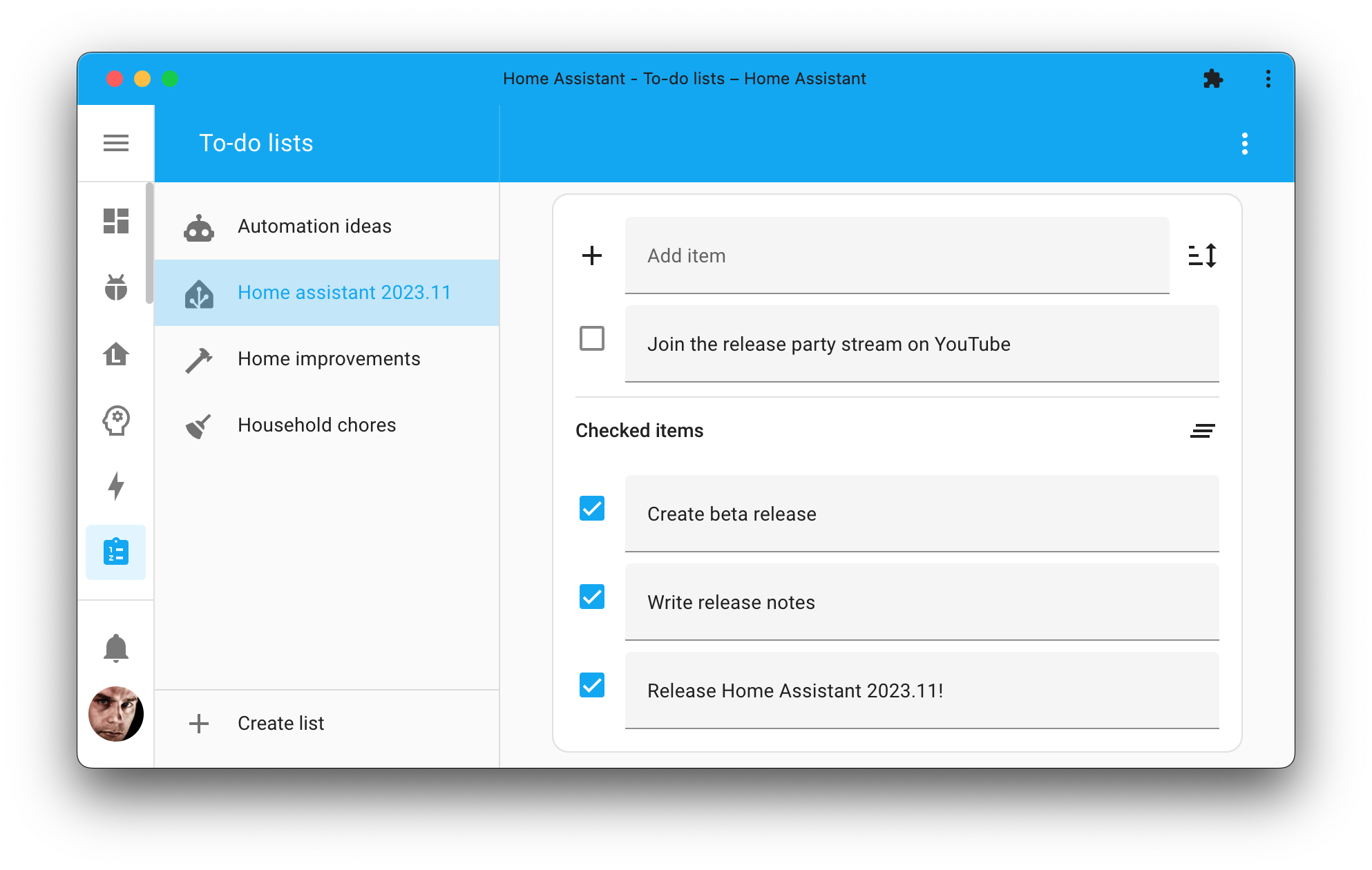
Besides the 实体, there are also new 服务 available allowing you to automate on your to-do lists as well. Use 自动化 to create, complete, or clean up tasks on your to-do lists.
So, what can you do with all of this? A lot! For example, you can create a to-do list for your groceries, automate a list of house chores for your kids or other household members, or automatically put a task on a list to replace the batteries of a 传感器 when it is low. You could even send a push 通知 to your phone when you are near the home improvement store and have items on a to-do list that you need to buy there.
Thanks @allenporter, and everyone involved, for this amazing addition to Home Assistant! We can now check this one off from our wishlist! ✔
购物清单现在也是待办了!
These to-do lists look a lot like the shopping list, right? Correct!
They are very much alike, and that is why we have moved the shopping list to a to-do list as well! Once you 升级 to this 发布, your existing shopping list will be automatically converted to a to-do list.
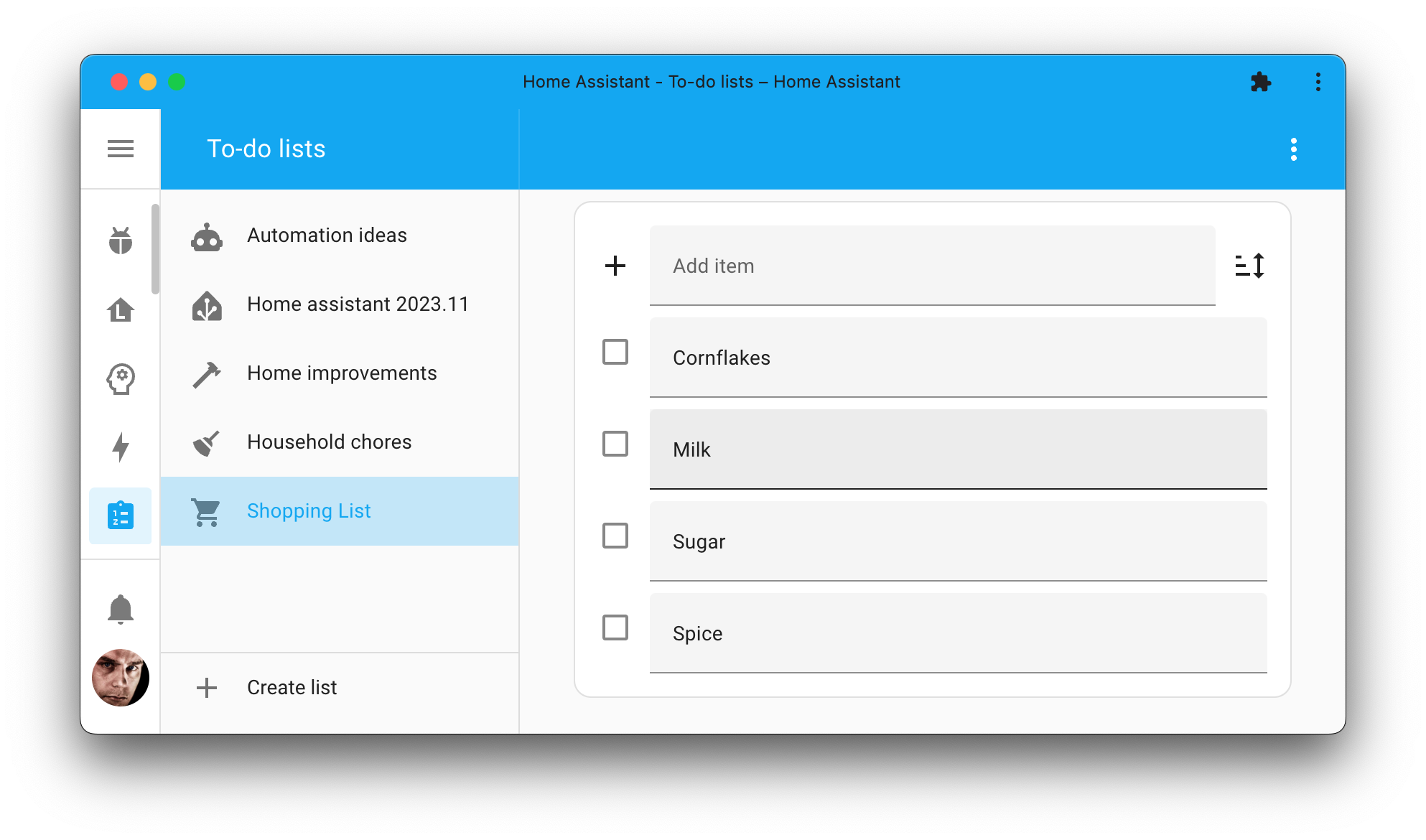
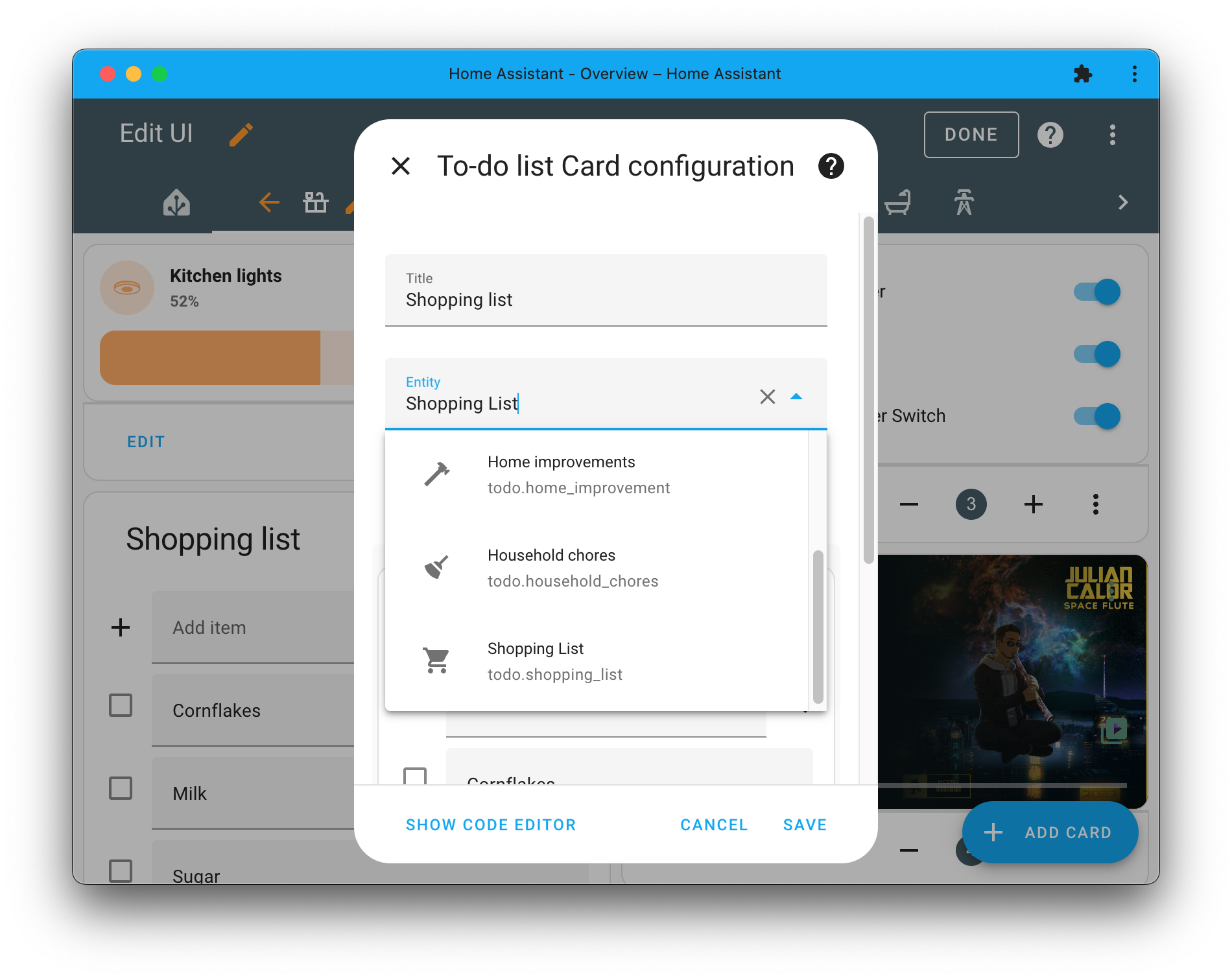
But that is not all; we also updated the Shopping list 卡片 for your 仪表盘, now fittingly named To-do list 卡片, to support multiple to-do lists. You can now select which to-do list you want to show on the 卡片 you've put in your 仪表盘.
提供待办列表的集成
But wait! There is more besides local to-do lists and shopping lists. Now that we have a to-do list 实体, we can also start using it with other 集成 that, for example, can get your to-do lists from an external 服务.
As of this 发布, you can bring in your Todoist and Google Tasks to-do lists to Home Assistant as well!
This is awesome, as it brings all these to-do lists together in one place, and above all, provides you with the power of Home Assistant to automate on them.
Matter 1.2 来了!
The Connectivity Standards Alliance has launched 版本 1.2 of the Matter specification, together with a new 版本 of the Official Matter SDK, which is not only prepared for new 设备 types but also contains all kinds of smaller stability- and bug fixes.

Although you can only benefit from the new 设备 types once actual 设备 are released, we have upgraded our Matter implementation to 版本 1.2 to benefit from the stability improvements and to be prepared for the new 设备 types.
Interesting fact: Did you know that Home Assistant is used as a test platform by many 设备 manufacturers? This potentially means that 设备 will be implemented and tested on the Home Assistant Matter controller before others; cool!
自定义 Tile 卡片显示的信息
Tile 卡片 now displays the 实体's 状态 information on the 卡片. But what if you want to display something else? @piitaya to the rescue!
You can now customize it to your liking. Show the 实体's 状态, any of its 属性, or a combination of both!
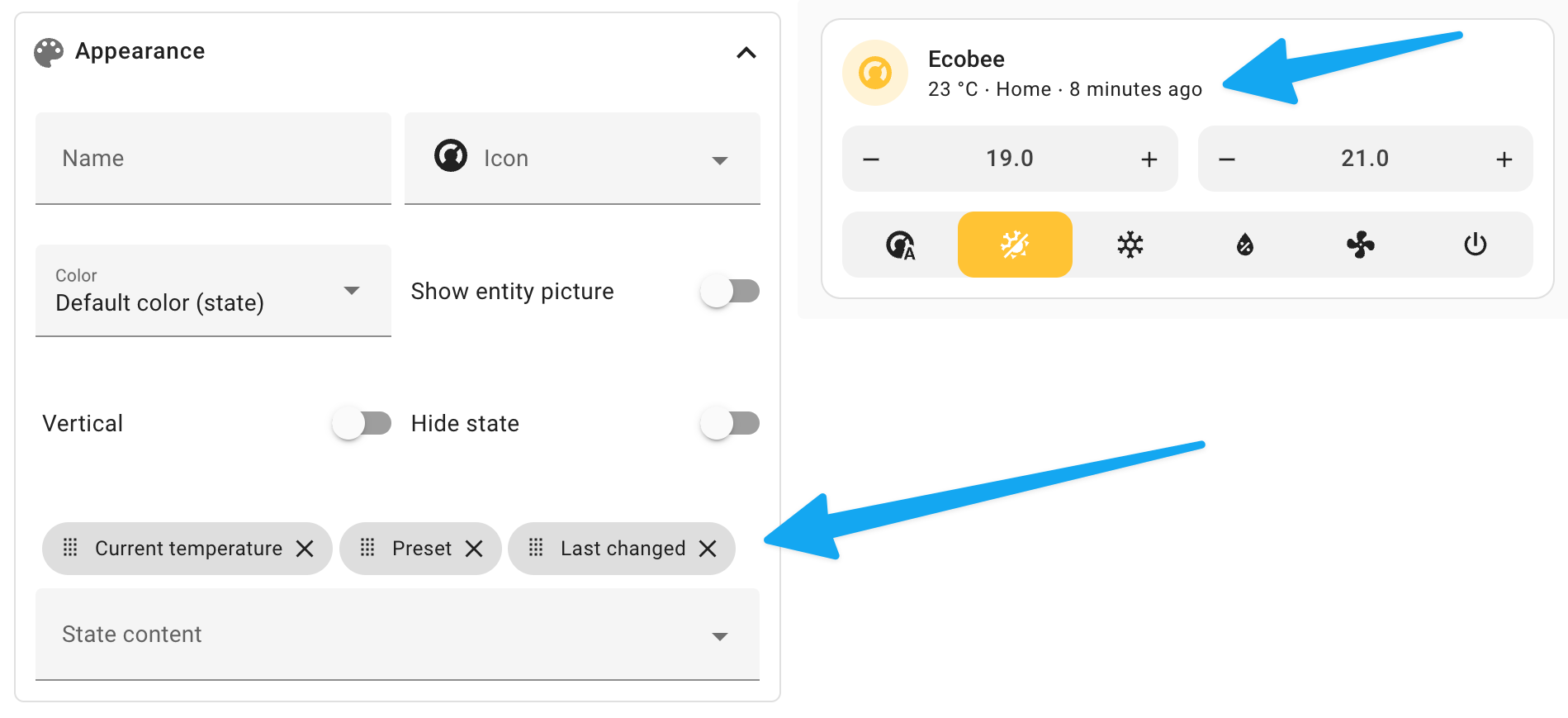 You can add any 属性 of the 实体 to the 状态 content of the tile 卡片.
This not only works for the 温控 实体 but for all 实体! You could, for example, add the brightness % of a 灯光 or the battery level of a 传感器. Simply add the 属性 to the 状态 content and drag and drop them in the order you want them to appear.
在能源仪表盘中选择任意日期范围
The energy 仪表盘 now allows you to select a custom date range. This allows you to see the energy usage of your home over a specific period.
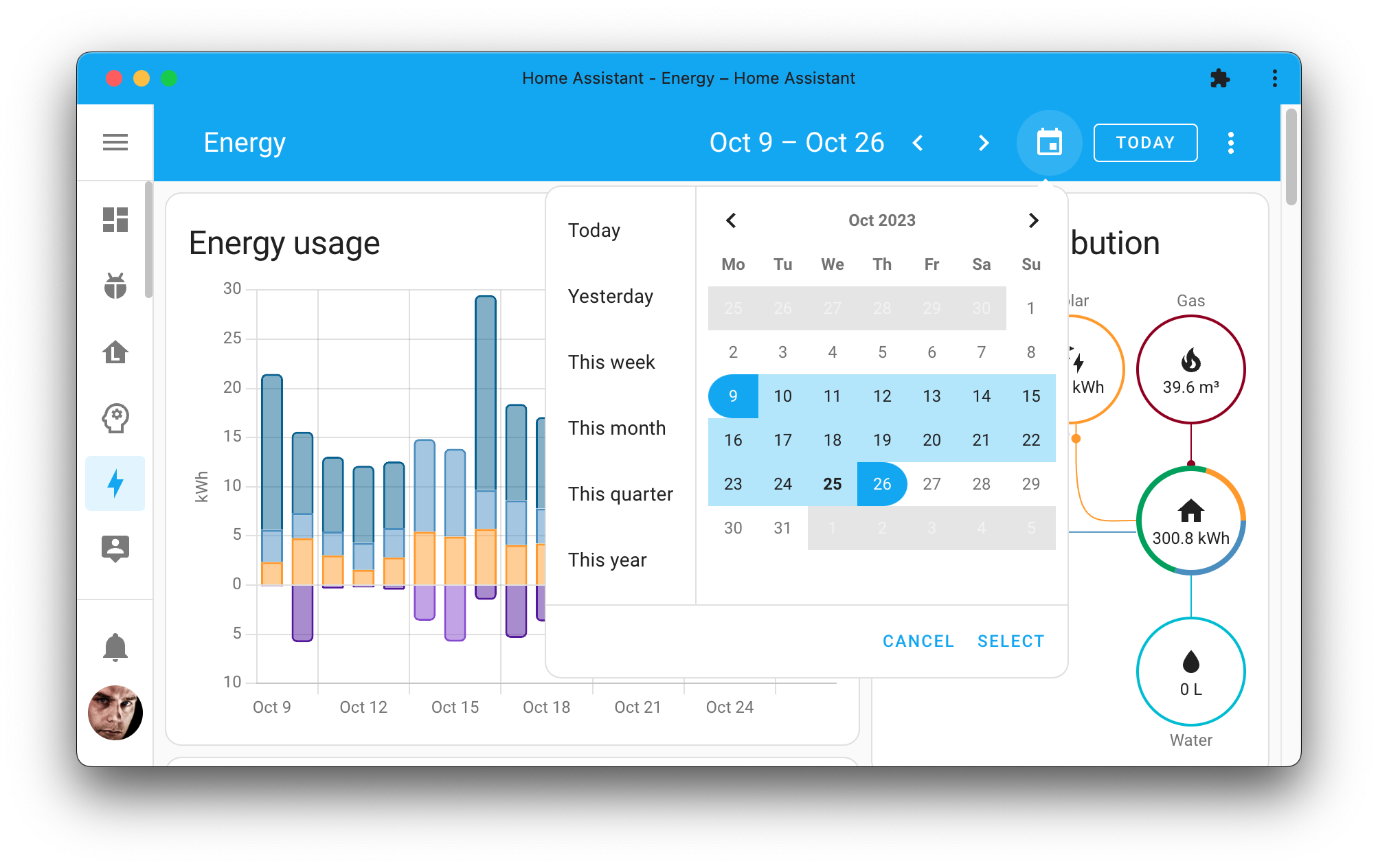
A great addition to the energy 仪表盘. Thanks, @TillFleisch!
条件卡片的新条件
The conditional 卡片 is a great way to show or hide 卡片 conditionally. For example, you can show a 卡片 only when the sun is setting or when you are home.
When using such a 状态, you also match it against multiple values. For example, you can show a 卡片 when the sun is setting or when the sun is below the horizon in a single 条件.
But even more interesting, @piitaya added a whole bunch of new 条件 to this 卡片 for you to use! Let's dive in...
User 条件
The user 条件 allows you to show or hide 卡片 based on the user who is currently logged in. Useful if you have multiple users in your Home Assistant instance and want to show or hide 卡片 based on who is looking at the 仪表盘.
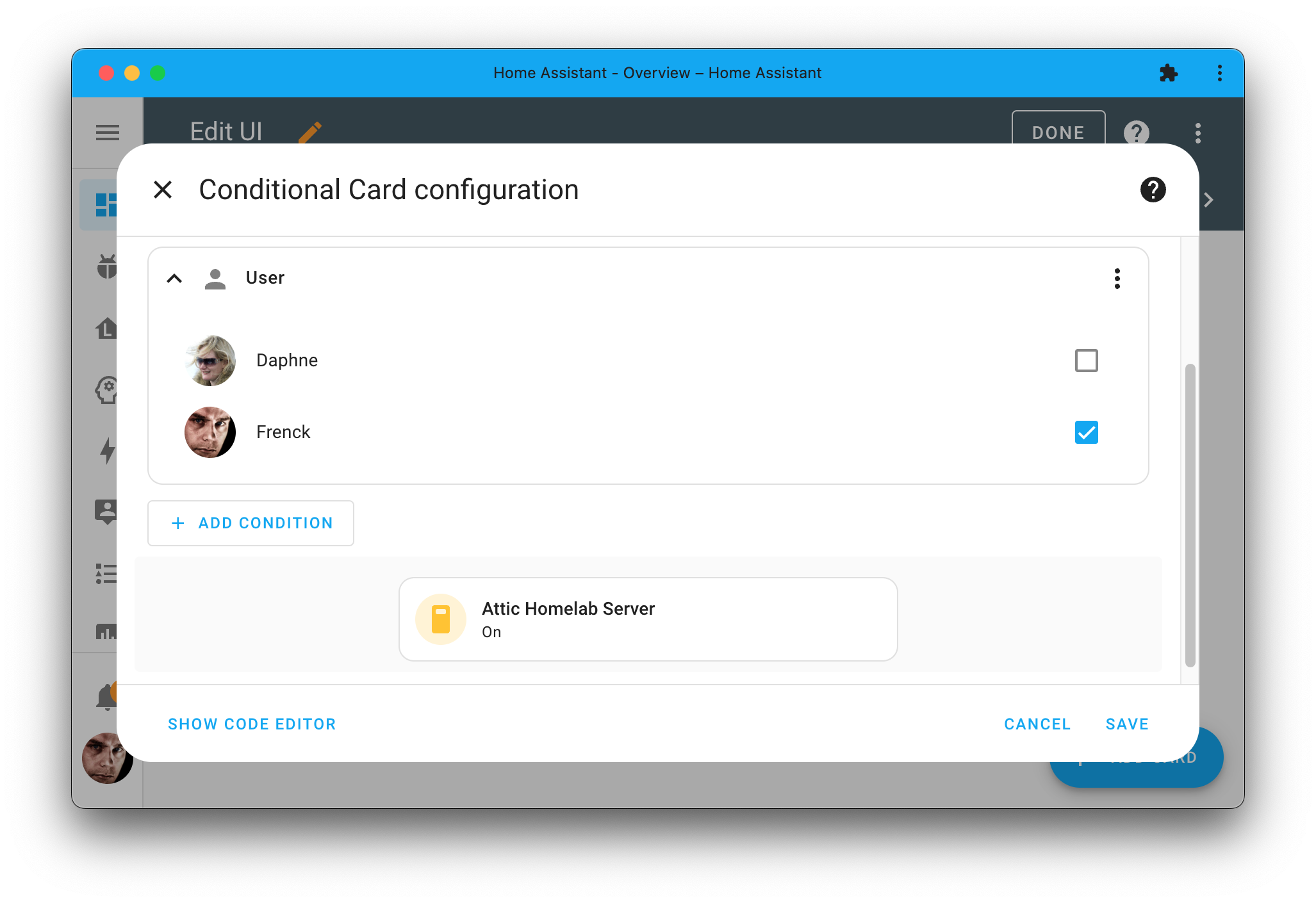
The screenshot above shows how the 卡片 is only shown when the user who is logged in is Frenck. It is hidden for all other users.
Numeric 状态 条件
Similar to the 状态 条件, the numeric 状态 条件 allows you to show or hide 卡片 based on the 状态 of an 实体, only this time, based on its numeric value. Useful if you want to show or hide 卡片 based on temperature, humidity, or any other numeric 实体.
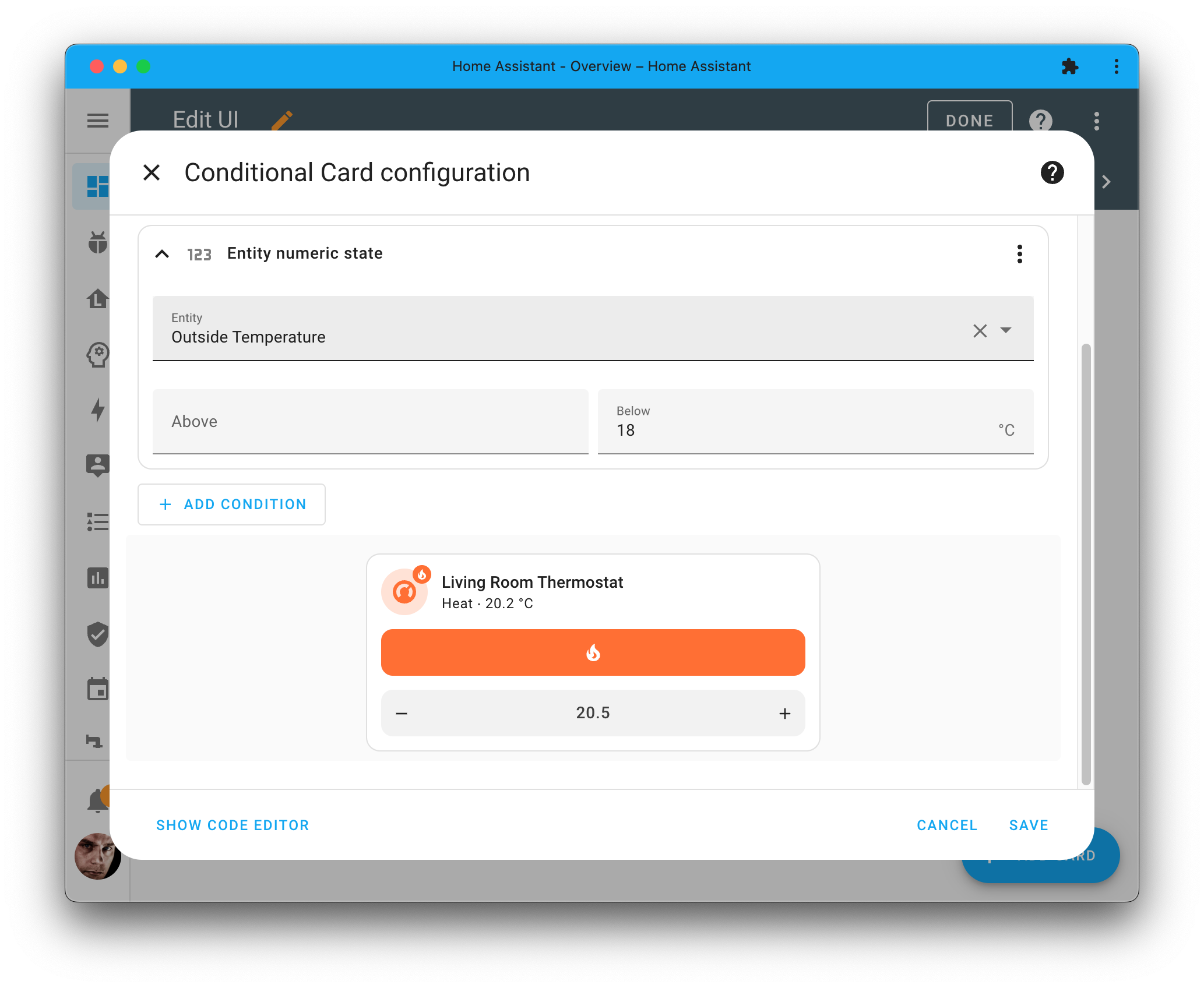
In the screenshot above, this thermostat 卡片 will only be shown on the 仪表盘 when the temperature outside has dropped below 18 degrees Celsius.
Screen 条件
Last but not least, the screen 条件 allows you to show or hide 卡片 based on the screen size of the 设备 you are viewing Home Assistant on.
For example, you could show some 卡片 only when viewing Home Assistant on a desktop or tablet and hide them when viewing Home Assistant on a mobile 设备.
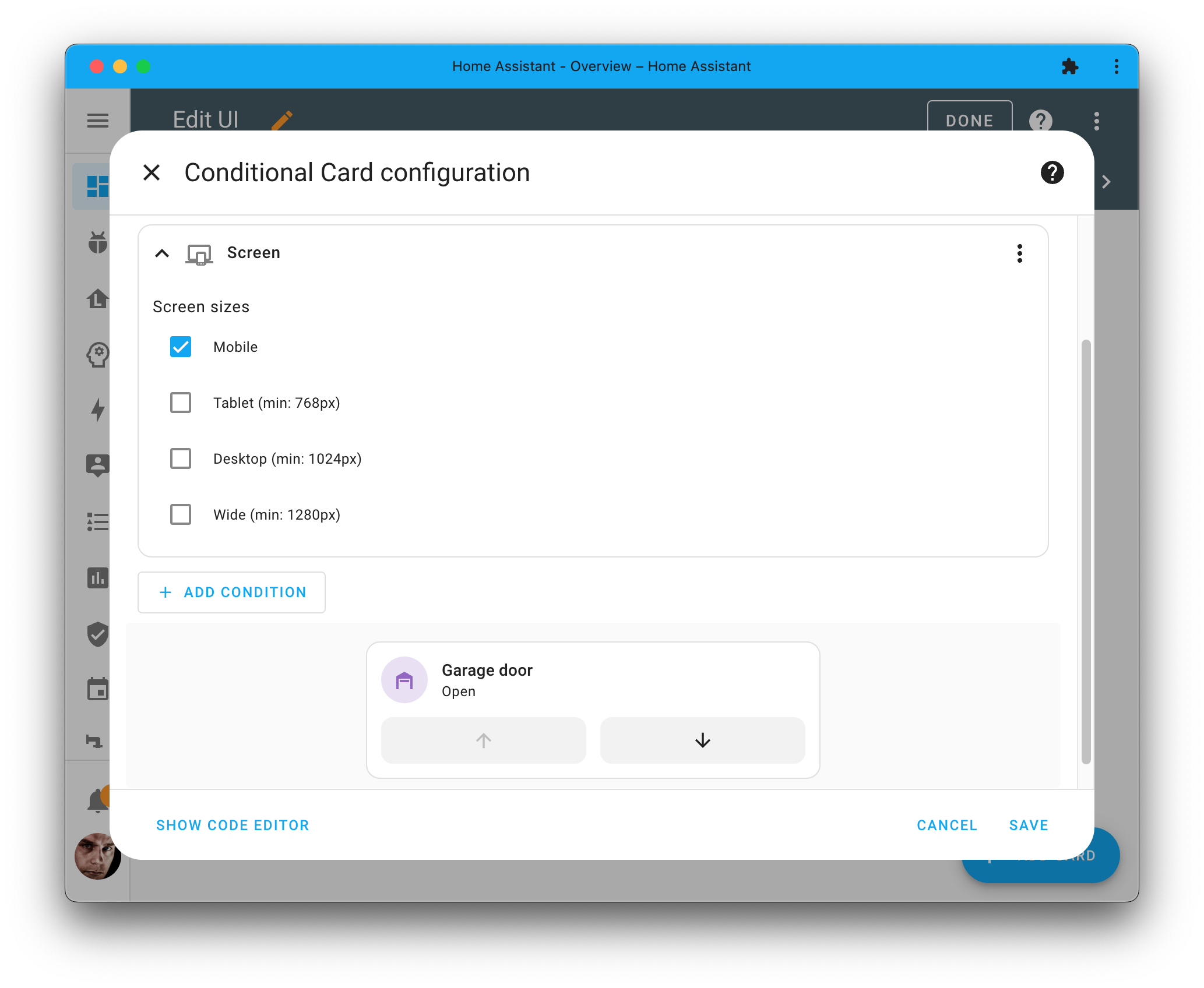
The screenshot shows how the control of the garage door is only shown on mobile, as it is most often used from mobile when arriving at home.
以安全模式重启
You can now 重启 Home Assistant in safe mode. This mode will disable all custom 集成 and custom 前端 resources (for example, custom 卡片 and themes).
It is useful if you are experiencing issues with your Home Assistant and want to quickly rule out custom 集成 or custom 仪表盘 resources as the cause of these issues.
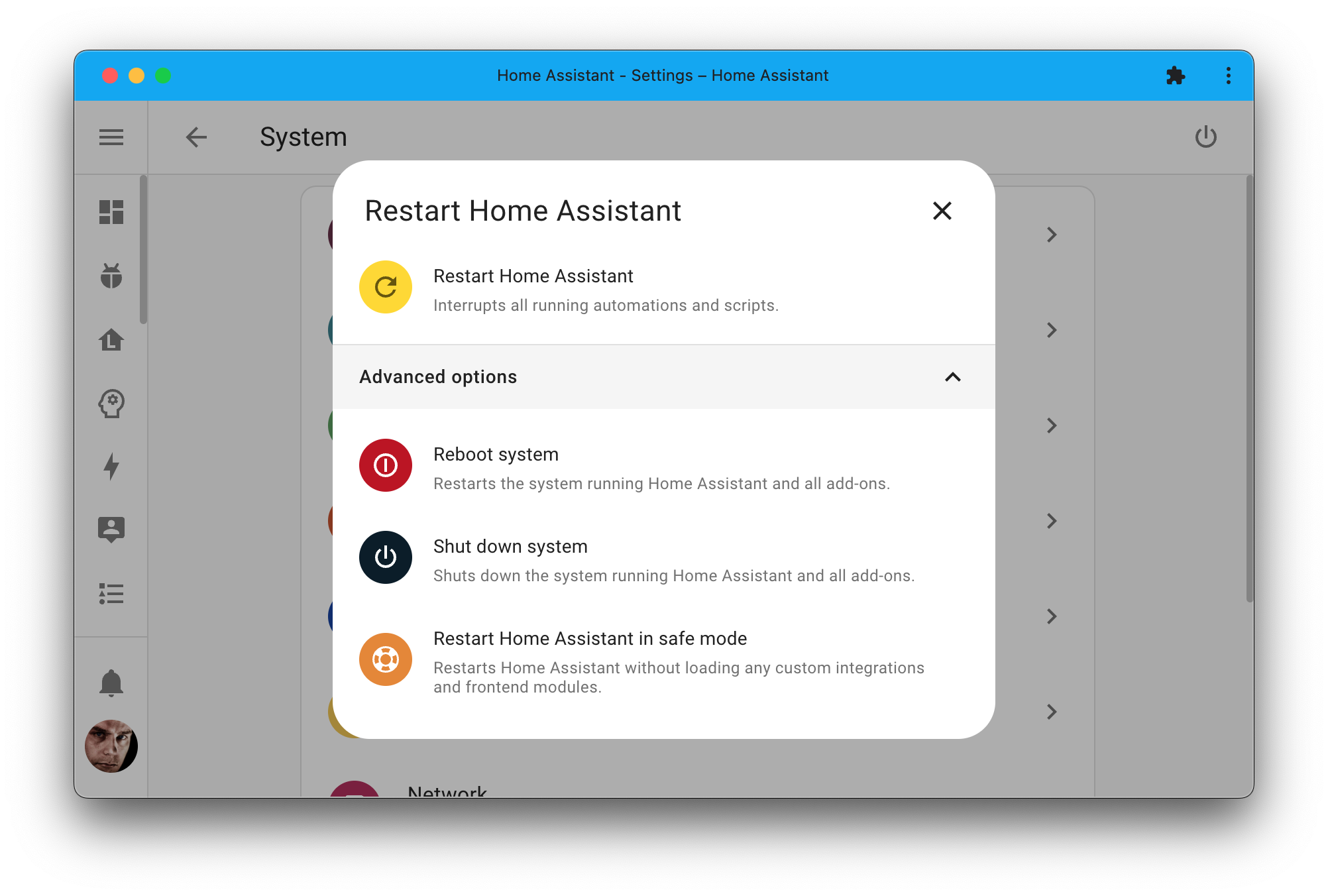
Want to get out of safe mode again? Just 重启 Home Assistant one more time, and everything will be back to normal.
This is helpful! Thanks, @emontnemery!
直接在 Home Assistant 中配置 Improv 设备!
If you bought a 设备 that supports Improv Wi-Fi over 蓝牙, and you are using 蓝牙 in Home Assistant, you can now set up your 设备 directly from Home Assistant itself!
Plug in the power of your brand-new 设备, and Home Assistant will discover it and help you set it up by connecting it to your Wi-Fi network and adding it to Home Assistant.
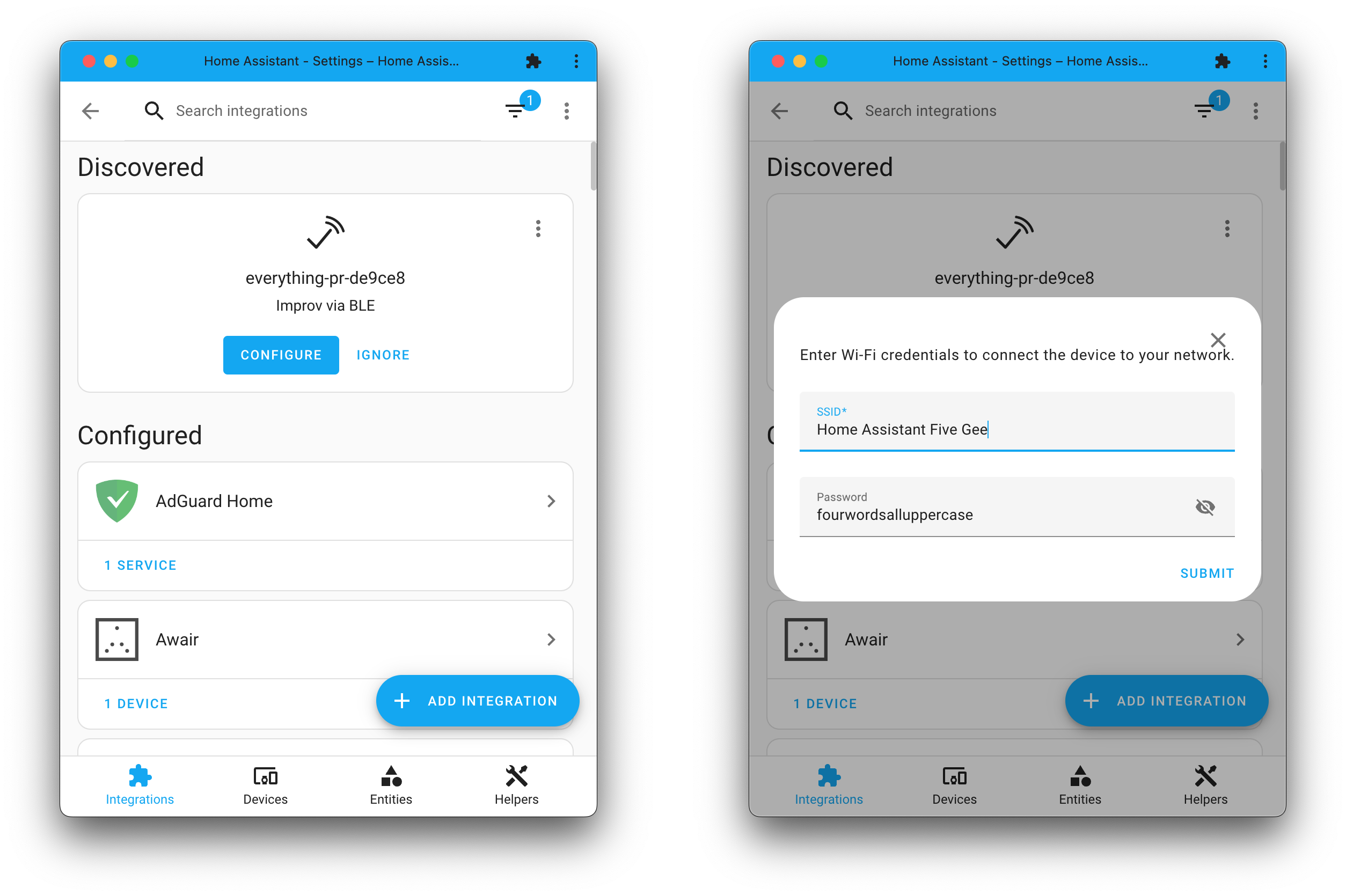
Improv Wi-Fi is a fully open standard that can be freely adopted and implemented by any hardware creator, no Matter how big or small. Improv Wi-Fi is also supported by ESPHome.
Nice job on this one @emontnemery!
在 UI 中为脚本配置字段
脚本 have a really neat feature: fields. Fields allow you to define variables in your 脚本 that you can pass in when calling your 脚本 as a 服务.
For example, you could create a 脚本 that sends a 通知 to a specific person and use a field to define the message you want to send.
These fields support our UI selectors, so you can provide a UI for your 脚本 fields. However, this was only available when you 创建 your 脚本 in YAML format.
But not anymore! Thanks to @karwosts, you can now also 配置 your 脚本 fields in the UI!
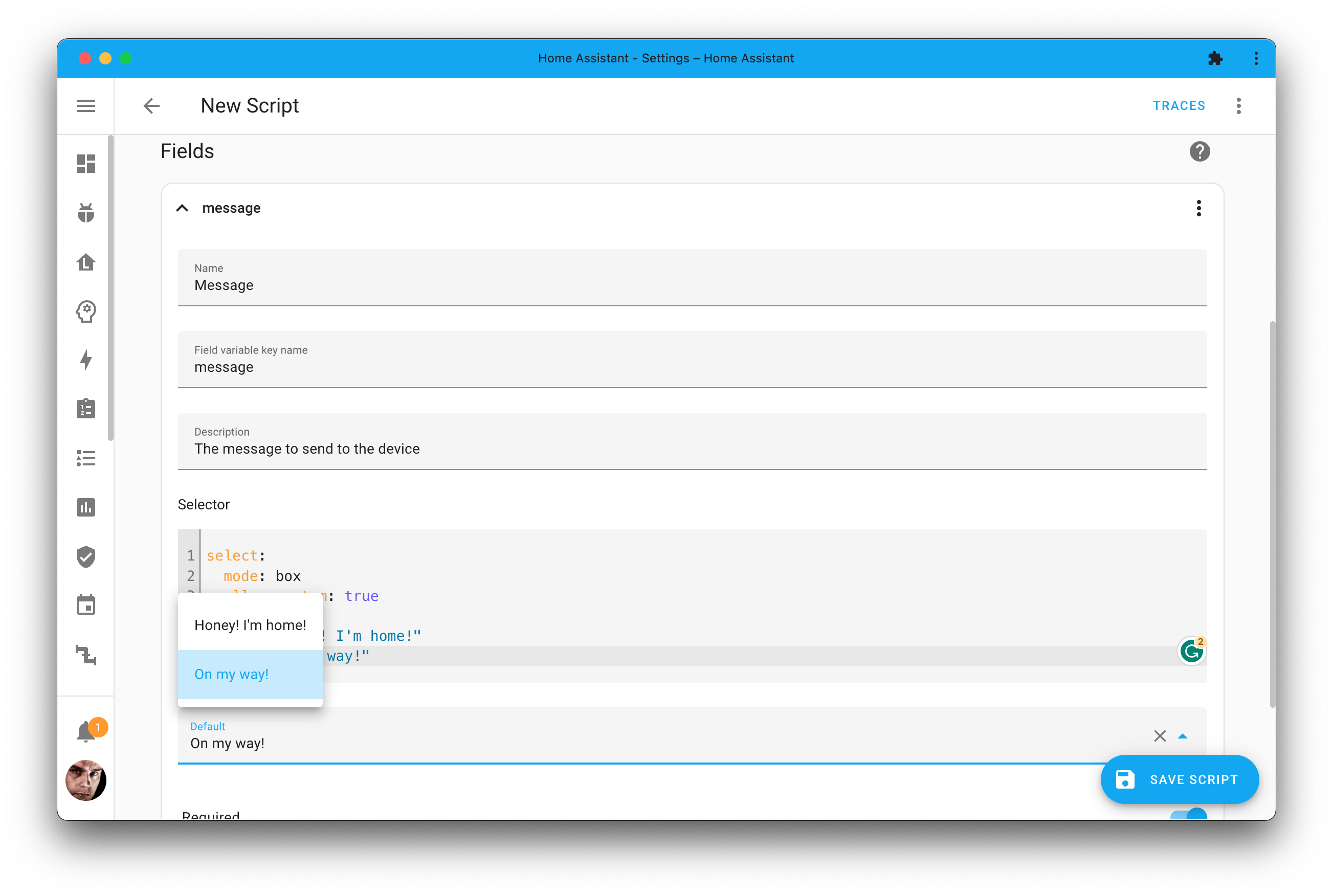
You can find the fields in the 脚本 editor when selecting the three dots in the top right corner of the editor and selecting Add fields from the drop-down menu.
其他值得注意的变更
There are many more improvements in this 发布; here are some of the other noteworthy changes this 发布:
- The HomeKit Bridge now handles changes in the capabilities of 设备 and the removal/addition of 设备 automatically! Thanks, @bdraco!
- The lovely new two-pane view you see in the to-do lists has also been added to the calendar 仪表盘. Nice @bramkragten!
- ZHA will now raise a repair issue if it finds out the network 设置 have changed externally. This helps you get up and running again in no time. Thanks, @puddly!
- @gjohansson-ST added a brand new country selector that can be used in your Blueprints and 脚本 fields. Nice!
- The Withings 集成 has reached the platinum quality mark. Thanks, @joostlek! Job well done!
- We now have better connection management for the IKEA IDÅSEN desk. Nice @abmantis!
- The Fitbit 集成 got a complete overhaul, can be set up via the UI, and now supports Fitbit nutrition 传感器. Thanks, @allenporter!
- The SwitchBot Cloud 集成 now supports 温控 设备. Thanks, @SeraphicRav!
- @rappenze added event 实体 support to the Fibaro 集成. Cool!
- The System Bridge 集成 now supports media players. Thanks, @timmo001!
- @raman325 extended our template engine with the ability to check the type of a variable. Super helpful for complex templates! Thanks!
新集成
We welcome the following new 集成 in this 发布:
- Google Tasks, added by @allenporter
Access your Google Tasks to-do list from the new to-do 仪表盘. - Improv BLE, added by @emontnemery
Get your Improv Wi-Fi enabled 设备 onboarding onto your Wi-Fi network with ease. - Local to-do list, added by @allenporter
Create and manage your own, Home Assistant, local to-do list. - Tami4 Edge / Edge+, added by @Guy293
Integrate your Tami water bar, boil water and get filter 传感器. - To-do list, added by @allenporter
New 实体 type that provides to-do list capabilties for other 集成 to use.
This 发布 also has a new virtual 集成. Virtual 集成 are stubs that are handled by other (existing) 集成 to help with findability. The following virtual 集成 have been added:
- Cribl, provided by Splunk
- Eastron, provided by HomeWizard Energy
- Portland General Electric provided by Opower
现已支持通过 UI 配置的集成
The following 集成 are now available via the Home Assistant UI:
- Fitbit, done by @allenporter
- Random, done by @joostlek
发布 2023.11.1 - November 4
- Bump python-holidays to 0.35 (@gjohansson-ST - #103092)
- Bump aiowaqi to 3.0.0 (@joostlek - #103166)
- Catch unexpected response in Honeywell (@mkmer - #103169)
- Fix roomba translation key mismatch (@Xitee1 - #103191)
- Fix roomba 错误 if battery stats are not available (@Xitee1 - #103196)
- Fix MQTT config validation 错误 handling (@jbouwh - #103210)
- Fix Fronius 实体 initialisation (@farmio - #103211)
- Bump pyenphase to 1.14.1 (@cgarwood - #103239)
- Remove measurement flag from timestamp in gardena 蓝牙 (@elupus - #103245)
- Fix Plugwise Schedule selection (@CoMPaTech - #103262)
- Bump yalexs-ble to 2.3.2 (@bdraco - #103267)
- add library logger info on ecoforest 集成 manifest (@pjanuario - #103274)
- Fix Matter 1.2 门锁 with specific unlatch/unbolt support (@marcelveldt - #103275)
- Fix firmware 更新 failure (@raman325 - #103277)
- Bump opower to 0.0.39 (@tronikos - #103292)
- Bump reolink-aio to 0.7.14 and improve typing of Reolink (@starkillerOG - #103129)
- Bump py_nextbusnext to v1.0.2 to fix TypeError (@ViViDboarder - #103214)
- Add 脚本 to convert zwave_js 设备 diagnostics to fixture (@raman325 - #102799)
- Fix typo in Todoist config flow (@jpbede - #103317)
- Remove extra from traccar webhook (@ludeeus - #103319)
- Report correct weather 条件 at night for Met (@jrieger - #103334)
- Handle UniFi traffic rules not supported on older versions (@Kane610 - #103346)
- Fix 传感器 unique id in Islamic prayer times (@engrbm87 - #103356)
- Fix zwave_js 遮盖 bug for Window Covering CC values (@raman325 - #103289)
发布 2023.11.2 - November 10
- Don't assume that the
sleepvalue is a dictionary in Tractive 集成 (@bieniu - #103138) - 更新 aioairzone-cloud to v0.3.2 (@Noltari - #103258)
- 更新 aioairzone-cloud to v0.3.5 (@Noltari - #103315)
- Handle null data in WeatherFlow 传感器 (@natekspencer - #103349)
- Handle smarttub 传感器 values being None (@mdz - #103385)
- Pin jaraco.functools to fix builds and CI (@bdraco - #103406)
- 更新 tailscale to 0.6.0 (@frenck - #103409)
- Bump pyatmo to v7.6.0 (@cgtobi - #103410)
- Fix serial in Flo 设备 information (@mib1185 - #103427)
- modbus Allow swap: byte for datatype: string. (@janiversen - #103441)
- Modbus set device_class in slaves (@janiversen - #103442)
- Fix KNX expose default value when 属性 is
None(@farmio - #103446) - Sort Withings sleep data on end date (@joostlek - #103454)
- Use right equipment identifier in DSMR 设置 (@dupondje - #103494)
- Fix litterrobot test failure due to time zone dependence (@mdz - #103444)
- Revert binary_sensor part of #103210 (@edenhaus - #103499)
- ESPHome: Add suggested_area from 设备 info (@jesserockz - #102834)
- Bump aioesphomeapi to 18.2.1 (@bdraco - #103156)
- Bump 蓝牙-data-tools to 0.14.0 (@bdraco - #103413)
- Bump blinkpy to 0.22.3 (@mkmer - #103438)
- Fix 5B Gas meter in dsmr (@dupondje - #103506)
- Fix invalid MAC in samsungtv (@epenet - #103512)
- Bump aioesphomeapi to 18.2.4 (@bdraco - #103552)
- Bump pyenphase to 1.14.2 (@cgarwood - #103553)
- 更新 dsmr-parser to 1.3.1 to fix parsing issues (@dupondje - #103572)
- fix: get_devices only checks for the first type (@suaveolent - #103583)
- Raise exception when data can't be fetched in Opensky (@joostlek - #103596)
- Bump yt-dlp to 2023.10.13 (@joostlek - #103616)
- Fix Reolink DHCP IP 更新 (@starkillerOG - #103654)
- Incease tplink 设置 timeout (@bdraco - #103671)
- Add name to Withings coordinator (@joostlek - #103692)
- 更新 前端 to 20231030.2 (@bramkragten - #103706)
发布 2023.11.3 - November 22
- Bump accuweather to 版本 2.0.1 (@bieniu - #103532)
- Remove rainbird yaml config test fixtures (@allenporter - #103607)
- 门锁 Withings token refresh (@joostlek - #103688)
- Bump accuweather to 版本 2.1.0 (@bieniu - #103744)
- Bump python-Matter-server to 4.0.2 (@bdraco - #103760)
- Bump subarulink to 0.7.9 (@G-Two - #103761)
- Fix discovery schema for Matter 开关 (@marcelveldt - #103762)
- Fix raising vol.Invalid during MQTT config validation instead of ValueError (@jbouwh - #103764)
- Fix race 条件 in Matter unsubscribe method (@marcelveldt - #103770)
- Fix typo in calendar translation (@jrieger - #103789)
- Fix Rainbird unique to use a more reliable source (mac address) (@allenporter - #101603)
- Bump pyOverkiz to 1.13.0 (@iMicknl - #103582)
- Bump pyOverkiz to 1.13.2 (@iMicknl - #103790)
- Bump aiocomelit to 0.5.2 (@chemelli74 - #103791)
- Bump velbusaio to 2023.11.0 (@Cereal2nd - #103798)
- Bump pyunifiprotect to 4.21.0 (@bdraco - #103832)
- Bump lupupy to 0.3.1 (@suaveolent - #103835)
- Bump gcal_sync to 6.0.1 (@allenporter - #103861)
- Fix bug in Fitbit config flow, and 开关 to prefer display name (@allenporter - #103869)
- Fix for Google Calendar API returning invalid RRULE:DATE rules (@allenporter - #103870)
- 更新 Fitbit to avoid a KeyError when
restingHeartRateis not present (@allenporter - #103872) - fix Comelit 遮盖 stop (@chemelli74 - #103911)
- Fix Coinbase for new API Structure (@TomBrien - #103930)
- Bump zwave-js-server-python to 0.54.0 (@raman325 - #103943)
- 更新 smarttub to 0.0.36 (@mdz - #103948)
- Fix duplicate Ban file entries (@fosterchuck - #103953)
- Fix openexchangerates form data description (@MartinHjelmare - #103974)
- Fix emulated_hue with None values (@bdraco - #104020)
- Fix netatmo authentication when using cloud authentication credentials (@deosrc - #104021)
- Fix 设备 tracker see gps accuracy selector (@MartinHjelmare - #104022)
- Bump pyenphase to 1.14.3 (@catsmanac - #104101)
- Fix ESPHome BLE client raising confusing 错误 when not connected (@bdraco - #104146)
- Fix memory leak in ESPHome disconnect callbacks (@bdraco - #104149)
- Add 调试 logging for which adapter is used to connect 蓝牙 设备 (@bdraco - #103264)
- Prevent 蓝牙 reconnects from blocking shutdown (@bdraco - #104150)
- Bump boschshcpy to 0.2.75 (@tschamm - #104159)
- Fix Local To-do list bug renaming items (@allenporter - #104182)
- Bump aiosomecomfort to 0.0.22 (@mkmer - #104202)
- Increase Tomato request timeout (@ertechdesign - #104203)
- Fix imap does not decode text body correctly (@jbouwh - #104217)
- Fix MQTT json 灯光 allows to set brightness value >255 (@jbouwh - #104220)
- Handle 属性 set to None in prometheus (@knyar - #104247)
- Catch ClientOSError in renault 集成 (@epenet - #104248)
- 恢复 removed guard for non-string inputs in Alexa (@jbouwh - #104263)
- Bump bimmer_connected to 0.14.3 (@rikroe - #104282)
- Bump pyrainbird to 4.0.1 (@allenporter - #104293)
- Bump pychromecast to 13.0.8 (@emontnemery - #104320)
- Bump ical to 6.0.0 (@allenporter - #103482)
- Bump ical to 6.1.0 (@allenporter - #103759)
需要帮助?加入社区!
Home Assistant has a great community of users who are all more than willing to help each other out. So, join us!
Our very active Discord chat server is an excellent place to be at, and don't forget to join our amazing forums.
Found a bug or issue? Please report it in our issue tracker, to get it fixed! Or, check our help page for guidance for more places you can go.
Are you more into email? Sign-up for our Building the Open Home Newsletter to get the latest news about features, things happening in our community and other news about building an Open Home; straight into your inbox.
不向后兼容的变更
In the unlikely event that you are using the demo 集成, you will need to ensure that your YAML 配置 for demo 集成 is only enabled via the 集成 domain key and not via the 实体 platform 配置. The latter has been removed.
(@gjohansson-ST - #100867) (文档)
The OpenUV "UV Level" 传感器 has updated its possible 状态 values so that translations can occur. The new values are:
extremehighlowmoderatevery_high
If you previously used the 状态 values of this 传感器 in your 自动化, you will need to 更新 them to use the new values.
The OpenWeatherMap rain and snow 传感器 now have a different unit
of measurement (mm/h instead of mm) and a different 设备
class (precipitation_itensity instead of precipitation).
(@MatteoGheza - #101485) (文档)
The option to set a custom polling interval has been removed. If are using
custom interval and really need it, you can use the homeassistant.update_entity
in an 自动化 to poll at your custom pace. See our 文档 on
defining a custom polling interval
更多信息.
Västtrafik has upgraded all infrastructure for handling external access, including handling user accounts for 3rd party applications.
This means that users of the older infrastructure now need to migrate to use the new environment. Create a new account at https://developer.vasttrafik.se, then create a new application and subscribe to the Planera Resa v4 API.
Next replace your old client identifier and secret in your Home Assistant 配置.
更多信息, see this official post from Västtrafik.
The VOC 设备 class has been removed from the air density 传感器, and its unit of measurement has been changed to kg/m³.
(@natekspencer - #101777) (文档)
The Withings sleep 传感器 will now show only the data from last night instead of an aggregation of the data since the day before noon.
The 状态 属性 of the WAQI air quality 传感器 have been moved to their own 传感器. The previous 状态 属性 are now deprecated and will be removed in 2024.5.
If you are using the 状态 属性 of the WAQI air quality 传感器, you will need to 更新 your 自动化 to use the new 传感器.
Improved support for King of 风扇 (Hampton Bay) breaks previous workarounds such as template 风扇 (example) or 自动化/脚本 that set 风扇 speed percentage or preset.
If you have an 自动化 that sets speed, it will now be at one speed higher. If you set the speed at 100% before, it would actually set the speed at 75%, but now it will be 100%. If you have an 自动化 that sets the preset to 'on' to get 100% speed, now the request will fail, and you will have to change the speed to 100% instead.
With this 发布, you will need to 更新 your zwave-js-server instance.
You must use zwave-js-server 1.33.0 or greater (schema 33).
- If you use the Z-Wave JS add-on, you need at least 版本
0.2.1. - If you use the Z-Wave JS UI add-on, you need at least 版本
2.2.3. - If you use the Z-Wave JS UI Docker 容器, you need at least 版本
9.2.3. - If you run your own Docker 容器 or some other 安装 method,
you will need to 更新 your zwave-js-server instance to at least
1.33.0.
Basic Command Class values were previously exposed as number 实体 and
were disabled by default. They are now exposed as light 实体
and are enabled by default.
If you have 脚本 or 自动化 that use any of these number 实体,
they should be updated to use the new light 实体 instead. Any previously
创建 number 实体 for this Command Class can safely be deleted once
you have validated that your 脚本 and 自动化 are up to date.
If you are a custom 集成 developer and want to learn about breaking changes and new features available for your 集成: Be sure to follow our developer 博客. The following are the most notable for this 发布:
告别以下内容
The following 集成 are also no longer available as of this 发布:
- Eight Sleep has been removed. The API has changed and is no longer accessible, making the 集成 unusable. (@raman325 - #102669)
- IMAP email content has been removed. This functionality is now available in the IMAP 集成. Users have been assisted to migrate to the new 集成 in the past months. (@jbouwh - #101233)
- Shiftr has been removed. Shiftr.io closed its platform and is no longer available. (@stefanroelofs - #102224)
全部变更
Of course, there is a lot more in this 发布. You can find a list of all changes made here: Full changelog for Home Assistant 核心 2023.11