

2022.2:让我们开始化繁为简!
现在说这个也许有点晚了,毕竟已经 2 月了……但既然这是今年的第一篇发布,我还是要说一句:
新年快乐 🥂
而且,因为我们跳过了 1 月发布,这次更新也就变成了一个大版本。超过 2500 次贡献,让这次发布成为我们至今推出过规模最大的一次!其中还包含 15 个全新集成,以及 13 个现有集成现在已经可以直接通过用户界面进行设置。
看到“向后不兼容变更”那一节时先别被吓到。内容确实很多,但大多数只是清理旧弃用项,或者是因为功能迁移到了 UI。用一次大扫除来开启新的一年,没有比这更合适的方式了 🧹
对了,如果你错过了,@balloob 上周发布了一篇关于 Home Assistant 2022 年重点方向的博客:Streamlining Experiences。我对此非常兴奋,也很期待这一年会把 Home Assistant 带向哪里!冲吧,2022!
你今年为自己的智能家居立下了什么新年计划?
祝你享受这次发布!
../Frenck
- Nabu Casa 近况更新
- 媒体体验改进
- 检查更新
- 集成与设备的诊断功能
- 查找已知问题以及报告新问题的位置
- 改进设备追踪器实体的处理方式
- 场景现在也有状态了
- 在配置面板中搜索
- 按钮辅助器与模板
- 模板增强
- 其他值得注意的变化
- 新集成
- 现在可通过 UI 设置的集成
- 发布 2022.2.1 - 2 月 3 日
- 发布 2022.2.2 - 2 月 4 日
- 发布 2022.2.3 - 2 月 6 日
- 发布 2022.2.4 - 2 月 8 日
- 发布 2022.2.5 - 2 月 9 日
- 发布 2022.2.6 - 2 月 11 日
- 发布 2022.2.7 - 2 月 15 日
- 发布 2022.2.8 - 2 月 16 日
- 发布 2022.2.9 - 2 月 18 日
- 需要帮助?
- 不向后兼容的变更
- 告别以下内容
- 全部变更
Nabu Casa 近况更新
在深入介绍这次发布之前,我们想先和你分享一些来自 Nabu Casa 的新闻与更新。
美国现已支持年付订阅
Home Assistant Cloud 的年付订阅能力, 自 Nabu Casa 成立以来一直是呼声最高的功能之一,并已在 12 月的 开放家庭现状 活动中宣布。
从今天起,美国用户已经可以订阅 Home Assistant Cloud 年付方案了。🎉
Read more about the announcement on the Nabu Casa website
基础设施改进
Nabu Casa 的新支付系统,是其正在逐步上线的全新云平台的一部分, 这也将为 Home Assistant Cloud 服务带来更多改进。
他们已经改进了远程访问基础设施,确保请求会尽可能路由到离你更近的位置。 上周他们还上线了更多基础设施优化,显著提升了 Google Assistant 和 Amazon Alexa 集成的速度。
Zack Barett 和 Mike Degatano 加入 Nabu Casa
我们也很高兴宣布,Zack Barett 和 Mike Degatano 将加入 Nabu Casa, 共同参与 Home Assistant 的开发。
Zack 将参与 Home Assistant 的多个方向, 包括 Home Assistant YouTube 频道 以及 Home Assistant 前端。
Mike 则会专注于扩展和改进 Home Assistant Supervisor 及其周边生态(例如内部插件和附加组件)。
欢迎加入!很高兴你们来到团队中!🎉
媒体体验改进
媒体浏览器现在被重命名为“媒体”。简单、直接,也更清爽。
此外,它现在在底部加入了一个漂亮的媒体控制栏,用于控制当前正在播放的内容:
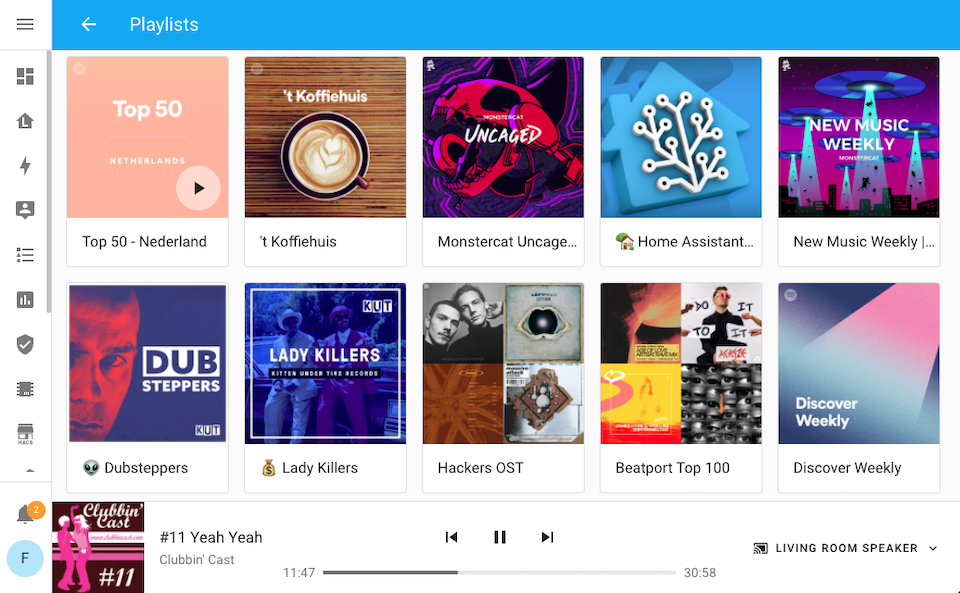
媒体浏览体验也得到了改进,并扩展了新的能力。浏览媒体时,浏览器地址栏中的 URL 会随之变化, 因此你现在可以把这些页面加入书签。某个集成也可以浏览由其他集成提供、且受支持的媒体来源。
例如,如果你已经设置了 Spotify 和 Sonos 集成, 现在就可以浏览你的 Spotify 内容并直接在 Sonos 设备上播放; Cast 现在也支持直接从浏览器播放 Plex 媒体。
Sonos、VLC(通过 Telnet)和 Roku 也新增了本地媒体播放支持! 如果再结合 VLC 附加组件使用,你甚至可以把 Home Assistant 设备变成一个本地媒体播放器。 下面的视频里,Zack 会演示这是如何实现的:
检查更新
在 Home Assistant Core、Operating System 或附加组件发布公告之后, 我们经常会看到一个问题:“为什么我还看不到更新?我要怎么更新?”
系统会每隔几小时自动检查一次更新。 不过,有时你可能不想等它自动完成,而是希望立刻手动检查。
这也让我们意识到,过去不同部分的更新检查入口分散在各处,不太容易找到。 因此,我们在主配置页面中加入了一个简单直观的“检查更新”按钮。
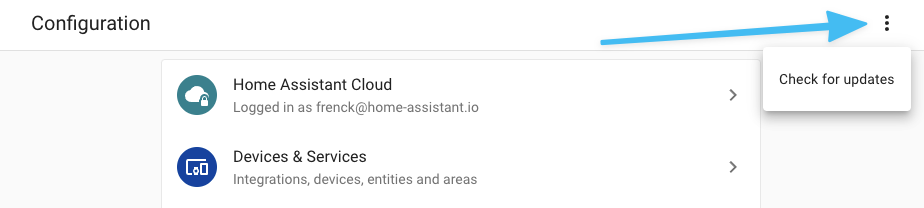 Checking for any 更新 is now just a single click.
该功能目前适用于 Home Assistant OS 和 Home Assistant 受监管模式安装方式。
集成与设备的诊断功能
To make debugging and reporting issues with 集成 or 设备 easier, both in terms of reporting it, and for 开发者 to fix them, we introduce: Diagnostics.
Diagnostics can be provided by 集成 and allow you to download diagnostic information about an 集成 or 设备 you have set up.
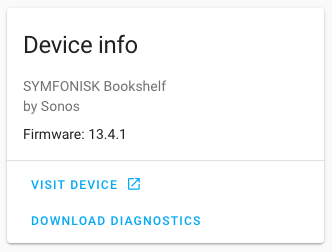 Screenshot of the Download Diagnostics button on the 设备 page
The downloadable diagnostics file can be viewed as a text file, and can be shared when reporting an issue in our issue tracker.
Diagnostics data can be extremely helpful in finding the root causes of an issue and getting them fixed. As a Matter of fact, it helped us pinpointing and fixing issues during the beta of this 发布.
The good news is that 61! 集成 already added support for this new diagnostics feature, including Z-Wave JS, ESPHome, Sonos, Shelly, WLED, Unifi, Nest, deCONZ, KNX, Tuya, Roku, Samsung TV, and many more!
查找已知问题以及报告新问题的位置
Are you experiencing an issue with an 集成? Want to know if your issue is already known and reported? Or, maybe you are not sure where our issue tracker can be found?
We added a small menu option to each 集成, helping with that.
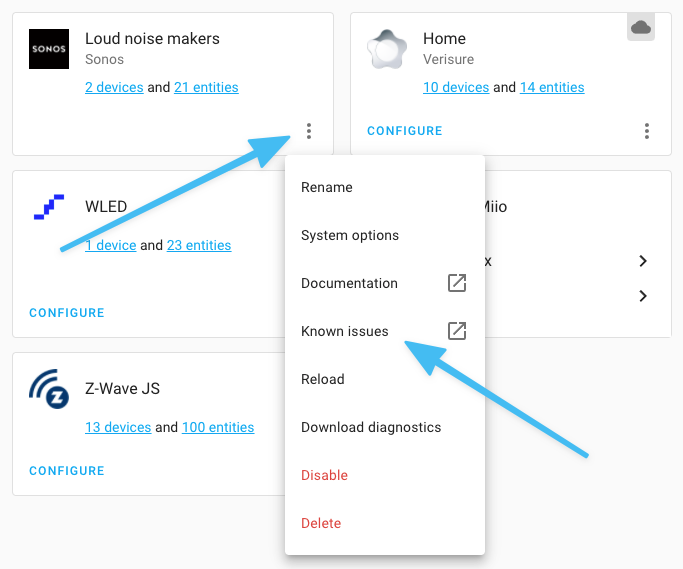 Clicking the "已知问题" item will open up our issue tracker for 此integrations.
This button will bring you to our issue tracker, showing all currently known and open issues for 此integrations.
Is your issue not listed? Well, if 此integrations提供 diagnostics, download those. Next, go back to issue tracker, using the new 已知问题 link, and click the "New issue" button in the top right corner to report your issue. Fill out the form and attach the diagnostics file by dragging and dropping it into the form.
改进设备追踪器实体的处理方式
If you run an 集成 that provides 设备 trackers from your router or something like the UniFi Network 集成, you are probably aware those can create many 实体!
This has been improved now. As of today, by default, only 设备 tracker 实体 that match up with an existing - known by Home Assistant - 设备 will be enabled by default. This keeps Home Assistant nice and tidy.
If Home Assistant does not know the 设备, but you still would like to track a specific one, that is still possible. In that case, you can enable the particular 设备 tracker 实体 you’d like to have.
场景现在也有状态了
场景 never had a 状态, well that is not entirely true, it would always say: "scening".
To make the 状态 of a 场景 more valuable, it will now have the last timestamp of when the 场景 was activated. This has a couple of advantages:
- You can see when a 场景 was last activated.
- History of when a 场景 was activated in the logbook, and who did that.
- You can now automate on a 场景 being activated.
The last one is pretty useful as a 场景 can now be used to 触发器 even more 动作 via 自动化. For example, you could start playing media or send a TTS announcement when a 场景 activated.
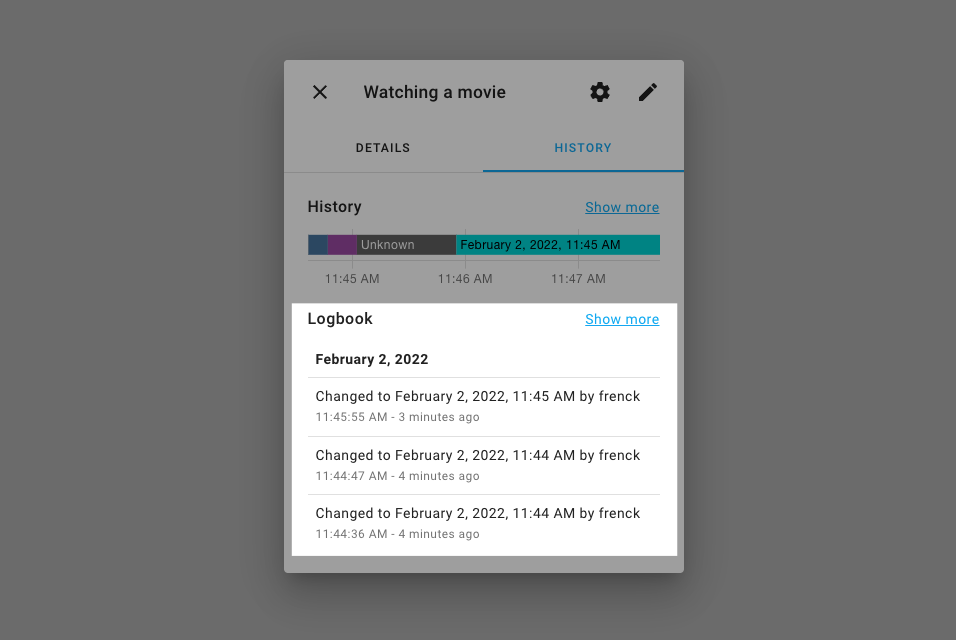 Now the 场景 has a 状态; it also got logbook entries.
在配置面板中搜索
There is now a search in the top right of the 配置 仪表盘, which opens the Quick Bar. This also works on mobile 设备.
It allows you to access and search forst about anything within Home Assistant. From accessing add-ons, 配置 面板, and even 实体 and 设备.
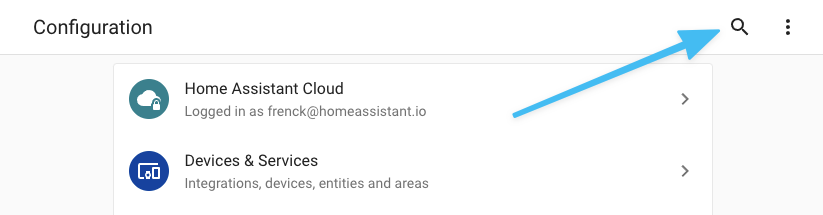
Tip: Did you know you can press c (for command) and e (for 实体) on you
keyboard from anywhere in Home Assistant to bring up that same Quick Bar?
按钮辅助器与模板
In the previous 发布, we introduced the button 实体. One of the most asked questions about the button has been: "How can I create my own button 实体?"
This 发布 introduces the button helper, and those can be 创建 via
the UI and using YAML ( as the input_button).
These button helpers can be used to 触发器 自动化 and we have ensured they work with Alexa, Google Assistant, and HomeKit.
Additionally, there is now a template 实体 for buttons available as well. Here is an example:
模板增强
There are a couple of nice enhancements to this 发布 for the more advanced use cases that stand out.
Shorthand 条件 notations in 动作
Shorthand 条件 notations are pretty helpful and are now supported in 条件 动作; For use in 自动化 and 脚本.
For example:
Immediate if (iif)
We now have an immediate if (iif)
template function and filter that can be used as a short alternative 版本
to an if/else statement.
These can help shortening a lot of if/else constructs that for example, return a "Yes" or "No" (or similar) value in templates. Some examples:
其他值得注意的变化
There is much more juice in this 发布; here are some of the other noteworthy changes this 发布:
-
When an 集成 has a single 设备, clicking on the "1 设备" link will now navigate to that 设备 directly and skip the addition page with a table showing 1 item. This makes navigating those cases quicker, thanks @balloob!
-
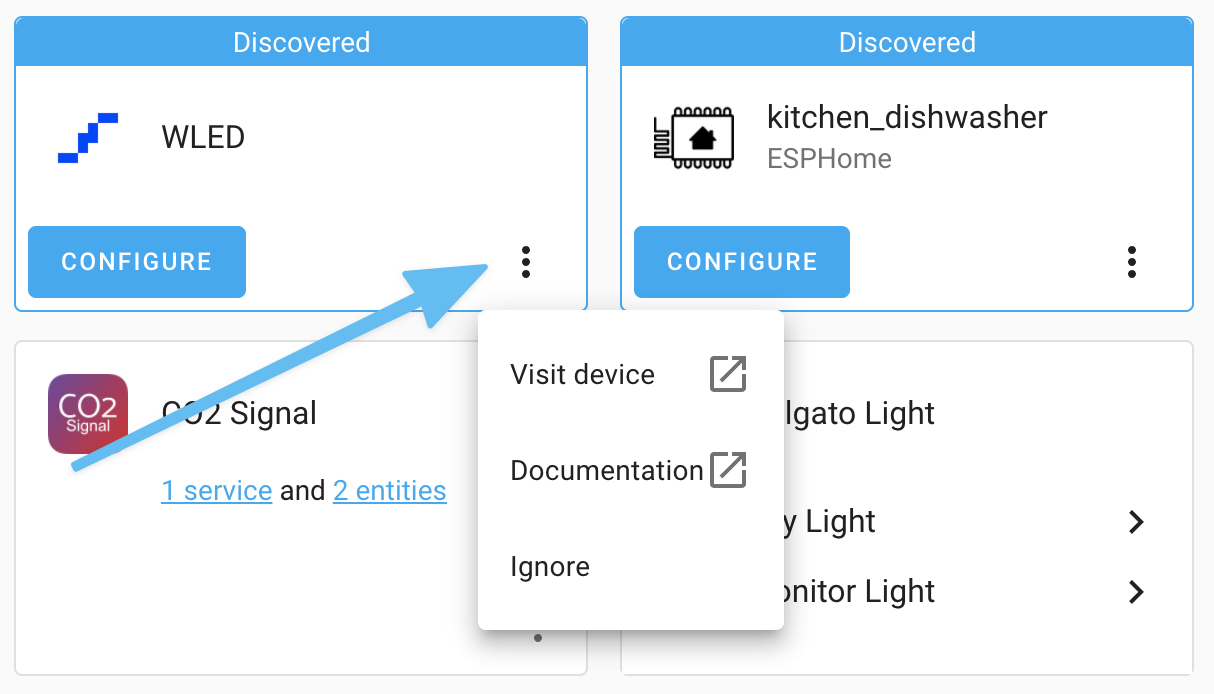
There is now a tiny menu on discovered 设备 and 服务, which allows you to visit the 设备/服务 and find the 文档 that belongs to this discovered item.
-
Editing 触发器 IDs in 自动化 has moved into the 触发器 menu, making the 自动化 editor a little more compact.
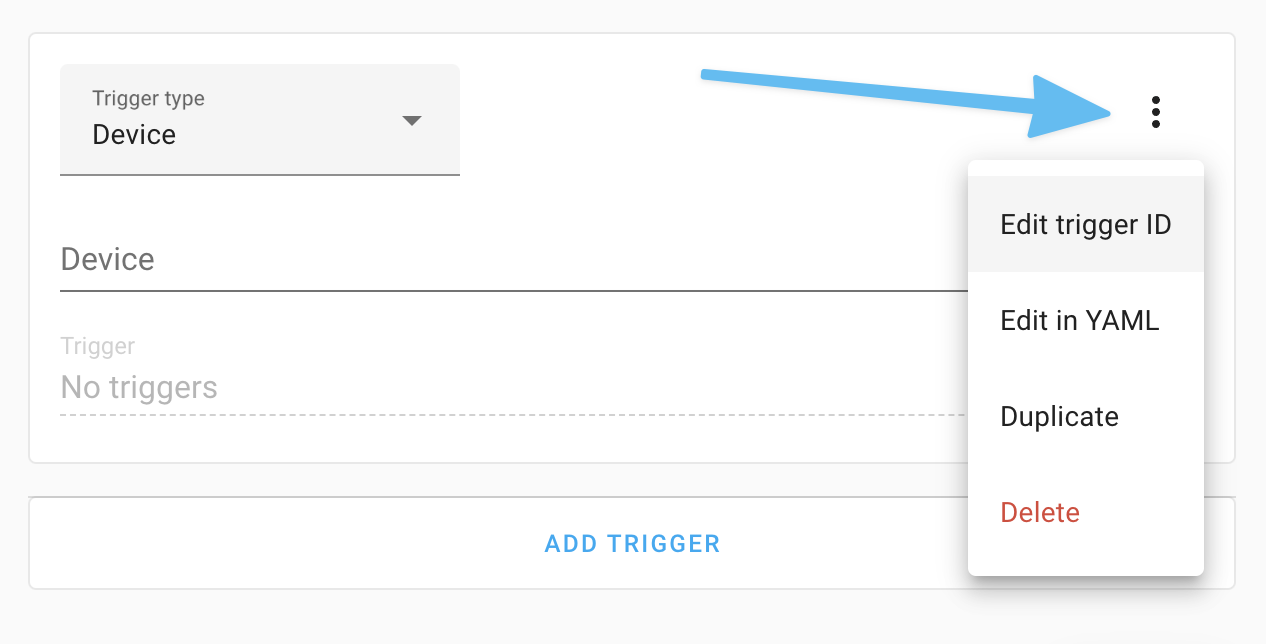
-
When viewing backups, it will now display the size of each 备份 in the table. Thanks, @ludeeus!
-
Thanks to @bramkragten, you can now select the period in the options of the statistics 卡片.
-
The Apple TV 集成 has been updated to support tvOS 15 and can now launch apps too! Thanks, @postlund!
-
Thanks to @bdraco, a 设备 can now also display its hardware 版本 in Home Assistant. The HomeKit, Xiaomi Miio, Bond, Roku, and WLED 集成 have already adopted this.
-
The Google Assistant 集成 can now be set up to use local fulfillment, thanks to @LoekSangers! Please note that this only applies to manual setups. This is already handled automatically when using the Home Assistant Cloud.
-
ZHA 设备 now have identify buttons, so you know which 灯光 you are dealing with, thanks @dmulcahey! (Tip: also nice for visual 通知)
-
We now enable Low Latency HLS (LL-HLS) by default to lower stream latency. Also, stream can now generate still images from a video feed. Generic 摄像头 can now use this and can be set up without the still_image_url option. FFmpeg 摄像头 users can consider using this as an alternative as it does not require multiple simultaneous 摄像头 connections. Thanks @uvjustin and @allenporter!
-
Magic Home (also known as FluxLED) had lots of improvements of love from @bdraco!
-
@Danielhiversen added support for local access to Adax and Mill heaters. Nice!
-
Tuya now supports Pet Feeders (thanks @vauriga), Circuit Breakers (thanks @slydiman), and 报警 (thanks @leeyuentuen). Additionally, support for 风扇 has been improved.
-
The generic thermostat 集成 now supports presets, thanks @brianegge!
-
Home Connect added support for refrigerators and cook processors, thanks @BraveChicken1 and @noxhirsch
-
@Shutgun added support for sirens to devolo Home Control.
-
Tibber added 传感器 for estimated hourly and monthly consumption, costs, and more! Thanks, @Danielhiversen!
-
We now have a
slugifytemplate filter, thanks to @ZephireNZ! -
@Petro31 make
is_numberavailable as tests in templates. -
Volumio has now repeat, repeat, repeat, ... support. Thanks, @m4rkireland!
-
@marcelveldt added a 服务 to the Hue 集成 for setting more advanced 场景 options. Thanks!
-
Sonos now has a 二元sensor that can tell you if the microphone is on or off. Helpful for a 通知 in case it shouldn't be on or off. Thanks, @jjlawren!
-
@sebfortier2288 add support for tilt 设备 to Soma. Nice!
-
Google Assistant now supports the curtain 设备 classes, thanks @emontnemery!
-
If you are using Synology DSM connected 摄像头, you can now select the quality of the snapshots taken. Thanks, @mib1185!
-
A whole bunch of 实体 have been added to 配置 Yamaha MusicCast, really nice @micha91!
-
Environment Canada now has an AQHI 传感器. Thanks, @gwww!
And honestly, this list is far from complete! There is so much this 发布. Feel free to check and search the "All Changes" section to find more!
This 发布 adds support for long-term statistics to the following 集成:
- August (thanks @bdraco)
- Buienradar (thanks @tedvdb)
- EDL21 (thanks @StephanU)
- GitHub (thanks @ludeeus)
- Hunter Douglas PowerView (thanks @bdraco)
- Kraken (thanks @eifinger)
- Mazda Connected 服务 (thanks @bdr99)
- Nexia/American Standard/Trane (thanks @bdraco)
- Pentair ScreenLogic (thanks @bdraco)
- 传感器.Community (thanks @frenck)
- SiteSage Emonitor (thanks @bdraco)
- Tesla Powerwall (thanks @bdraco)
And the following 集成 now have 实体 categories:
- Aurora ABB PowerOne Solar PV (thanks @davet2001)
- DSMR (thanks @starkillerOG)
- GitHub (thanks @ludeeus)
- Hyperion (thanks @starkillerOG)
- Kostal Plenticore Solar Inverter (thanks @stegm)
- Motion Blinds (thanks @starkillerOG)
- NETGEAR (thanks @starkillerOG)
新集成
We welcome the following new 集成 this 发布:
input_button, added by @frenck- Aseko Pool Live, added by @milanmeu
- Aussie Broadband, added by @nickw444
- Diagnostics, added by @balloob
- Elmax, added by @albertogeniola
- GoodWe, added by @mletenay
- HomeWizard Energy, added by @DCSBL
- IntelliFire, added by @jeeftor
- NINA, added by @DeerMaximum
- Oncue by Kohler, added by @bdraco
- Open-Meteo, added by @frenck
- Overkiz, added by @iMicknl
- RTSPtoWebRTC, added by @allenporter
- SenseME, added by @bdraco
- Steamist, added by @bdraco
- UniFi Protect, added by @AngellusMortis
现在可通过 UI 设置的集成
The following 集成 are now available via the Home Assistant UI:
- Android TV, done by @ollo69
- Azure Event Hub, done by@eavanvalkenburg
- CPU Speed, done by @frenck
- DNS IP, done by @gjohansson-ST
- GitHub, done by @ludeeus
- Launch Library, done by @DurgNomis-drol
- LG webOS Smart TV, done by @thecode
- PVOutput, done by @frenck
- Sensibo, done by @gjohansson-ST
- SolaX Power, done by @tokenize47
- Vallox, done by @slovdahl
- 版本, done by @ludeeus
- Whois, done by @frenck
发布 2022.2.1 - February 3
- Get wind speed unit from AccuWeather data (@bieniu - #65425) (accuweather docs)
- Fix Shodan 传感器 (@ColinRobbins - #65443) (shodan docs)
- Fix 脚本 / 自动化 repeat with count 0 fails (@mk-maddin - #65448)
- Fix
unknown alarm websocket event错误 for restored SimpliSafe connections (@bachya - #65457) (simplisafe docs) - Catch correct 错误 during OpenUV startup (@bachya - #65459) (openuv docs)
- Fix vanished checks on old Sonos firmware (@jjlawren - #65477) (sonos docs)
- Allow Flu Near You to re-attempt startup on 错误 (@bachya - #65481) (flunearyou docs)
- Bump pytile to 2022.02.0 (@bachya - #65482) (tile docs)
- Fix SIA availability (@eavanvalkenburg - #65509) (sia docs)
- Fix missing windspeed in Tuya 温控 (@frenck - #65511) (tuya docs)
- Return current 状态 if template throws (@jbouwh - #65534) (MQTT docs)
- Do not 更新 unifiprotect host from discovery if its not an ip (@bdraco - #65548) (unifiprotect docs)
- Fix data 更新 when guest client disappears in Fritz!Tools (@mib1185 - #65564) (fritz docs)
- Add missing Tuya 吸尘器 状态 (@frenck - #65567) (tuya docs)
- Add back resolvers config flow dnsip (@gjohansson-ST - #65570) (dnsip docs)
- Guard against empty Tuya data types (@frenck - #65571) (tuya docs)
- 更新 前端 to 20220203.0 (@bramkragten - #65572) (前端 docs) (breaking-change)
- Extend diagnostics data in Fritz!Tools (@mib1185 - #65573) (fritz docs)
- 更新 pvo to 0.2.1 (@frenck - #65584) (pvoutput docs)
- 日志 traceback in 调试 for Sonos unsubscribe 错误 (@jjlawren - #65596) (sonos docs)
- Fix lutron_caseta button events including area name in 设备 name (@bdraco - #65601) (lutron_caseta docs)
- Fix Shelly Plus i4 KeyError (@thecode - #65604) (shelly docs)
发布 2022.2.2 - February 4
- Bumped boschshcpy 0.2.28 to 0.2.29 (@tschamm - #65328) (bosch_shc docs)
- Add migration to migrate 'homewizard_energy' to 'homewizard' (@DCSBL - #65594) (homewizard docs)
- Raise when zwave_js 设备 自动化 fails validation (@raman325 - #65610) (zwave_js docs)
- Bump androidtv to 0.0.62 (@JeffLIrion - #65440)
- Bump androidtv to 0.0.63 (fix MAC issues) (@JeffLIrion - #65615)
- Bump homematicip to 1.0.2 (@balloob - #65620) (homematicip_cloud docs)
- Bump flux_led to 0.28.20 (@bdraco - #65621) (flux_led docs)
- Fix Z-Wave 灯光 (@alexanv1 - #65638) (zwave docs)
- Remove limit of amount of duplicated statistics (@emontnemery - #65641) (recorder docs)
- Don't use shared session during recorder migration (@emontnemery - #65672) (recorder docs)
- Improve recorder migration for PostgreSQL when columns already exist (@emontnemery - #65680) (recorder docs)
- Only remove duplicated statistics on 错误 (@emontnemery - #65653) (recorder docs)
- Bump renault-api to 0.1.8 (@epenet - #65670) (renault docs)
- Fix warm/cold reversal in rgbww_to_color_temperature (@bdraco - #65677)
- Call out 3rd party 容器 more clearly (@balloob - #65684)
- Fix "vevent" KeyError in caldav component again (@jkuettner - #65685) (caldav docs)
- Allow selecting own repositories (@ludeeus - #65695) (github docs)
- Move 场景 and button 恢复 to internal hook (@balloob - #65696) (场景 docs)
- Fix passing a string to 设备 registry disabled_by (@balloob - #65701) (config docs)
- Fix tuya diagnostics mutating cached 状态 objects (@balloob - #65708) (tuya docs)
- Depend on diagnostics in the 前端 (@frenck - #65710) (前端 docs) (default_config docs)
发布 2022.2.3 - February 6
- check wan access type (@mib1185 - #65389) (fritz docs)
- Fix OVO Energy NoneType 错误 occurring for some users (@timmo001 - #65714) (ovo_energy docs)
- Fix Amcrest 服务 calls (@flacjacket - #65717) (amcrest docs)
- Add coverage for color_rgbww_to_rgb, fix divzero case (@bdraco - #65721)
- Fix wind speed unit (@bieniu - #65723) (accuweather docs)
- Bump simplisafe-python to 2022.02.0 (@bachya - #65748) (simplisafe docs)
- Improve androidtv mac address handling and test coverage (@ollo69 - #65749) (androidtv docs)
- Add redacted subscription data to SimpliSafe diagnostics (@bachya - #65751) (simplisafe docs)
- Prevent multiple dhcp flows from being started for the same 设备/domain (@bdraco - #65753) (dhcp docs)
- 更新 Pillow to 9.0.1 (@frenck - #65779) (qrcode docs) (proxy docs) (seven_segments docs) (doods docs) (sighthound docs) (image docs)
- Fix the 重启 when the saj 设备 is down (@Smitplaza - #65796) (saj docs)
- Bump aioshelly to 1.0.9 (@thecode - #65803) (shelly docs)
- Fix legacy nest diagnostics to return empty rather than fail (@allenporter - #65824) (nest docs)
- Fix flash at 打开 with newer 0x04 Magic Home models (@bdraco - #65836) (flux_led docs)
- Fix Spotify, Tidal, Apple Music playback on Sonos groups (@jjlawren - #65838) (sonos docs)
- feat: bumped 版本 (@jeeftor - #65863) (intellifire docs)
- Fix loss of ability to control white channel in HomeKit on RGB&W 灯光 (@bdraco - #65864) (homekit docs)
- 更新 xknx to 0.19.2 - fix TCP tunnelling (@farmio - #65920) (knx docs)
- disabled_by can be None when updating 设备 (@ludeeus - #65934) (config docs)
- Improve 设备 shutdown and unload of Synology DSM 集成 (@mib1185 - #65936) (synology_dsm docs)
- Add diagnostics support to HomeKit (@bdraco - #65942) (homekit docs)
- Bump soco to 0.26.2 Bump soco to 0.26.2 (@mfrister - #65919)
发布 2022.2.4 - February 8
- Fix UPNP access to SSDP info (@balloob - #65728) (upnp docs)
- Fix TOD incorrectly determining the 状态 between sunrise and sunset (@nvx - #65884) (tod docs)
- Bump plexapi to 4.9.2 (@jjlawren - #65972) (plex docs)
- Add diagnostics to 版本 集成 (@ludeeus - #65999) (版本 docs)
- Suppress unwanted 错误 messages during recorder migration (@emontnemery - #66004) (recorder docs)
- Revert "Make idle chromecasts appear as idle instead of off" (@emontnemery - #66005) (cast docs)
- Use strings directly instead of Enums in 版本 config (@ludeeus - #66007) (版本 docs)
- Speed up deletion of duplicated statistics (@emontnemery - #66014) (recorder docs)
- Clean up Sonos unsubscribe/resubscribe exception handling and logging (@jjlawren - #66025) (sonos docs)
- Fix decoding discovery with old Magic Home firmwares (@bdraco - #66038) (flux_led docs)
- Fix race in MQTT sensor and binary_sensor expire_after (@emontnemery - #66040) (MQTT docs)
- Fix missing exception catch in august to prevent failed 设置 (@bdraco - #66045) (august docs)
- Fix schema for zwave_js WS API (@raman325 - #66052) (zwave_js docs)
- Fix cleanup of MQTT 调试 info (@emontnemery - #66104) (MQTT docs)
- Fix ENTITY_CATEGORIES_SCHEMA (@emontnemery - #66108)
发布 2022.2.5 - February 9
- Fix generic 摄像头 typo in attr_frame_interval (@davet2001 - #65390) (generic docs)
- Fix flaky homewizard test (@emontnemery - #65490) (homewizard docs)
- Change detection of router 设备 for Fritz (@chemelli74 - #65965) (fritz docs)
- Bump amcrest to 1.9.4 (@rkben - #66124) (amcrest docs)
- Fix system is loaded flag during reboot/shutdown of Synology DSM (@mib1185 - #66125) (synology_dsm docs)
- Bump simplisafe-python to 2022.02.1 (@bachya - #66140) (simplisafe docs)
- Fix MQTT 调试 info (@emontnemery - #66146) (MQTT docs)
发布 2022.2.6 - February 11
- Reduce Spotify API usage (@frenck - #66315) (spotify docs)
- Fix hdmi-cec initialization (@epenet - #66172) (hdmi_cec docs)
- Fix controlling nested groups (@emontnemery - #66176) (group docs)
- Bump aioesphomeapi from 10.8.1 to 10.8.2 (@OttoWinter - #66189) (esphome docs)
- Handle more Sonos favorites in media browser (@jjlawren - #66205) (sonos docs)
- Add missing nina 警告 (@DeerMaximum - #66211) (nina docs)
- bump py-synologydsm-api to 1.0.6 (@mib1185 - #66226) (synology_dsm docs)
- Bump aioaseko to 0.0.2 to fix issue (@milanmeu - #66240) (aseko_pool_live docs)
- Disable zone bypass 开关 feature (@ufodone - #66243) (envisalink docs)
- Catch ConnectionResetError when writing MJPEG in 摄像头 (@uvjustin - #66245) (摄像头 docs)
- Correct philips_js usage of the overloaded coordinator (@elupus - #66287) (philips_js docs)
- Fix august token refresh when data contains characters outside of latin1 (@bdraco - #66303)
- Bump python-nest to 4.2.0 for python 3.10 fixes (@allenporter - #66090) (nest docs)
- Bump google-nest-sdm to 1.7.0 (@allenporter - #66145) (nest docs)
- Bump google-nest-sdm to 1.7.1 (minor patch) (@allenporter - #66304) (nest docs)
- Add guard for invalid EntityCategory value (@ludeeus - #66316)
- bump motionblinds to 0.5.11 (@starkillerOG - #65988) (motion_blinds docs)
- bump motionblinds to 0.5.12 (@starkillerOG - #66323) (motion_blinds docs)
- Reduce number of parallel api calls to august (@bdraco - #66328) (august docs)
- Fix raspihats initialization (@epenet - #66330) (raspihats docs)
- Fix nest streams that get stuck broken (@allenporter - #66334) (stream docs)
- Fix PVOutput when no data is available (@frenck - #66338) (pvoutput docs)
- Fix CPUSpeed with missing info (@frenck - #66339) (cpuspeed docs)
- Add unique id to lutron caseta config entry when missing (@bdraco - #66346) (lutron_caseta docs)
发布 2022.2.7 - February 15
- Fix Spotify session token refresh (@frenck - #66390) (spotify docs)
- Correct modbus address limits (@uSlackr - #66367) (modbus docs)
- Fix mesh role for Fritz old 设备 (@chemelli74 - #66369) (fritz docs)
- Fix missing refactors of EntityCategory.XXX (@davet2001 - #66379) (zha docs) (fritzbox docs) (onvif docs) (fritz docs) (vicare docs) (goodwe docs)
- revert change in vizio logic to fix bug (@raman325 - #66424) (vizio docs)
- Reset the stream backoff timeout when the url updates (@allenporter - #66426) (stream docs)
- Increase switcher_kis timeouts (@thecode - #66465) (switcher_kis docs)
- Bump Advantage Air to 0.2.6 (@Bre77 - #65849) (advantage_air docs)
- Bump Advantage Air 0.3.0 (@Bre77 - #66488) (advantage_air docs)
- Fix utility meter 恢复 状态 (@dgomes - #66490) (utility_meter docs)
- Fix access to hass.data in hdmi-cec (@epenet - #66504) (hdmi_cec docs)
- Revert "Fix raspihats callbacks (#64122)" (@epenet - #66517) (raspihats docs)
- Fix flux_led 打开 with slow responding 设备 (@bdraco - #66527) (flux_led docs)
- Add fallback for serialnumber (@elupus - #66553) (philips_js docs)
- Fix Tuya 遮盖 without 状态 in their control data point (@frenck - #66564) (tuya docs)
- Override and disable nest stream
unavailablebehavior (@allenporter - #66571) (nest docs) - Bump aiohue to 版本 4.1.2 (@marcelveldt - #66609) (hue docs)
发布 2022.2.8 - February 16
- Bump pysher to 1.0.7 (@craigjmidwinter - #59445) (goalfeed docs)
- Bump aiohue to 4.2.0 (@balloob - #66670) (hue docs)
- Do not pass client session to Brunt (@frenck - #66671) (brunt docs)
- Fix type of value in MQTT 二元sensor (@bieniu - #66675) (MQTT docs)
- Cloud to avoid setting up Alexa/Google during 设置 phase (@balloob - #66676) (cloud docs)
- Fix last_activated timestamp on Hue 场景 (@marcelveldt - #66679) (hue docs)
- Add tests for samsungtv diagnostics (@epenet - #66563) (samsungtv docs)
- Cleanup samsungtv tests (@epenet - #66570) (samsungtv docs)
- Fix SamsungTVWS mocking in samsungtv tests (@epenet - #66650) (samsungtv docs)
- Fix token refresh in samsungtv (@epenet - #66533) (samsungtv docs)
- Fix scaling of numeric Tuya values (@SaSa1983 - #66644) (tuya docs)
- Add current temp fallback in Tuya 温控 (@frenck - #66664) (tuya docs)
发布 2022.2.9 - February 18
- Bump 前端 to 20220203.1 (@balloob - #66827) (前端 docs)
- Correct current temperature for tuya thermostats (@SaSa1983 - #66715) (tuya docs)
- Ensure new samsungtv token is updated in the config_entry (@epenet - #66731) (samsungtv docs)
- Bump pyinsteon to 1.0.16 (@teharris1 - #66759) (insteon docs)
- Fix webostv notify 服务 (@thecode - #66760) (webostv docs)
- Handle default notify data in webostv (@thecode - #66770) (webostv docs)
- Bump aiohue to 4.2.1 (@balloob - #66823) (hue docs)
需要帮助?
...欢迎随时使用我们非常活跃的论坛,或加入我们的 chat 聊聊。
如果你遇到了这个发布引入的问题,请在我们的 issue tracker 中反馈。请务必填写问题模板中的所有字段。
不向后兼容的变更
以下是这个发布中的破坏性变更清单,按主题或集成分类。 选择其中任意一项,即可阅读该项目的详细破坏性变更说明。
Energy 仪表盘的配置位置已调整。
它之前位于配置页面中的一个菜单项, 现在已经移动到“仪表盘”菜单项下。
这样一来,所有仪表盘的配置都集中在一个位置。
此前已弃用的 Python 3.8 支持现已移除。 Home Assistant 现在要求使用 Python 3.9 运行。
如果你使用的是 Home Assistant OS、Home Assistant 容器,或 Home Assistant 受监管模式安装方式,则无需执行任何操作。在这些场景下, 我们已为你处理好一切。你的系统其实已经使用 Python 3.9 有一段时间了。
从这个发布开始,所有直接与 GPIO 交互的集成都已被弃用。
原因有很多,其中之一是这些集成整体使用率较低。 对于大多数 Home Assistant 安装来说,GPIO 并不容易使用, 而且这类集成往往缺乏维护。
更多信息请参阅 架构决策记录 0019。
此外,当前也有许多项目比 Home Assistant 更适合处理 GPIO 相关场景。例如我们的姊妹项目 ESPHome, 以及 MQTT IO 项目等。
我们并不是禁止使用 GPIO,而是仅弃用并移除核心内置的 GPIO 功能集成。 我们欢迎自定义集成(现有的或新的)来提供替代方案。 不过在大多数场景下,我们更推荐使用专用硬件,比如 ESP 设备。
以下集成已被弃用,并将在 Home Assistant 核心 2022.4 中移除:
- BeagleBone Black GPIO
- BH1750
- Blinkt!
- Bosch BME280 Environmental 传感器
- Bosch BME680 Environmental 传感器
- Bosch BMP280 Environmental 传感器
- DHT 传感器
- Enviro pHAT
- HTU21D(F) 传感器
- mcp23017
- MH-Z19 CO2 传感器
- Orange Pi GPIO
- pcal9535a
- pi4ioe5v9xxxx
- PiFace Digital I/O (PFIO)
- Piglow
- pigpio Daemon PWM LED
- 树莓派 RF
- Rasphihats
- Sense HAT
- Sensirion SHT31
- Time of Flight
以下集成已被弃用,并将在 Home Assistant 核心 2022.6 中移除:
- 1-Wire (SysBus only!)
- 树莓派 GPIO
注意:1-Wire 是一个特殊情况,它同时支持 SysBus 和连接远程 owfs 服务器。 其中 SysBus 用法已弃用,但连接远程 owfs 服务器不受影响。
更新:有开发者告知我们,树莓派 GPIO 集成将通过 HACS 提供。
此前,binary_sensor 实体可拥有 on、off 状态,
在设备不可达时为 unavailable。
不过,与其他实体相比,它原本不支持 unknown 状态,
而这个发布已添加该状态。
因此,binary_sensor 实体现在可以拥有 on、off、unavailable 或 unknown 状态。
你可能需要调整自动化或脚本,以处理这个新的 unknown 状态。
(@frenck - #60193) (binary_sensor docs)
分组门锁的行为已反转:unlocked 现在映射为 on,locked 映射为 off。
这意味着:
- 如果一个跨域分组中包含门锁,只要其中任意门锁处于解锁状态,该组就会被视为
on。 - 如果一个纯门锁分组中任意门锁处于解锁状态,该组就会被视为“unlocked”。
(@emontnemery - #62580) (门锁 docs) (group docs)
此前,基于切换的实体(如 fan、light、switch、remote、siren、vacuum、humidifier)可拥有 on 或 off 状态,在设备不可达时为 unavailable。
但与其他实体相比,切换实体原本不支持 unknown 状态,现在这一点已改变。
目前,基于切换的实体可以拥有 on、off、unavailable 或 unknown 状态。
你可能需要调整自动化或脚本,以处理这个新的 unknown 状态。
Home Assistant 不再支持管理 PID 文件或创建守护进程。 使用自定义核心或容器安装的用户,可能需要更新启动脚本。
hass 命令不再支持 --runner 选项。
现在从 UI 请求重启时,程序始终会以退出码 100 退出。
你需要更新启动脚本来处理重启,例如我们的 Systemd 服务示例。
根据 ADR-0016,如果不是在受支持的操作系统上启动,
Home Assistant 会立即退出。受支持系统为 Linux(含 WSL)或 OSX。
我们新增了命令行参数 --ignore-os-check,用于覆盖此检查。
(@emontnemery - #64345) #64347) #64352)
advantage_air.set_myzone 服务已弃用,
并将在未来版本的 Home Assistant 中移除。
在受支持系统上,请改为在 MyZone 的 select 实体上使用 select.select_option 服务来修改该值。
(@Bre77 - #58777) (advantage_air docs)
Android TV 集成已迁移到通过 UI 进行配置。 通过 YAML 配置 Android TV 现已弃用, 并将在未来的 Home Assistant 发布中移除。
升级到此发布时,你现有的 YAML 配置会被自动导入; 因此升级后可以安全地从 YAML 配置中移除。
- Add config_flow to AndroidTV 集成 (@ollo69 - #54444) (androidtv docs) (breaking-change)
/api/discovery_info 端点已在 2021.10 弃用,
此后它只会返回空值。从这个版本开始,
/api/discovery_info 端点已被完全移除。
(@ludeeus - #64534) (api docs)
Apple iCloud 集成在更早前的发布中已迁移为通过 UI 配置。 现在,通过 YAML 配置 Apple iCloud 也已弃用, 并将在未来的 Home Assistant 发布中移除。
你现有的 YAML 配置已经自动导入; 因此可以安全地从 YAML 配置中移除。
(@epenet - #63875) (icloud docs)
Apple Push 通知服务(APNS)集成已弃用, 并将在 Home Assistant 2022.4 中移除。 请注意,这不会影响我们的移动端 Companion App, 因为它们的通知并不依赖此集成。
(@frenck - #64629) (apns docs)
此前已弃用的 Aurora ABB PowerOne Solar PV 集成 YAML 配置 现已移除。
Aurora ABB PowerOne Solar PV 现在通过 UI 配置。 任何现有 YAML 配置都已在之前的版本中导入, 现在可以安全地从 YAML 配置文件中移除。
(@tkdrob - #62317) (aurora_abb_powerone docs)
此前已弃用的 AVM FRITZ!Box Tools 集成 YAML 配置 现已移除。
AVM FRITZ!Box Tools 现在通过 UI 配置。 任何现有 YAML 配置都已在之前的版本中导入, 现在可以安全地从 YAML 配置文件中移除。
@epenet - #63857) (fritz docs)
reboot 与 reconnect 服务已弃用,并将在未来发布中移除。
请改用新提供的 button 实体。
(@chemelli74 - #61483) (fritz docs)
lock 和 devicelock 属性已从所有实体中移除,
现在会以独立传感器形式提供。
(@mib1185 - #60426) (fritzbox docs)
Azure Event Hub 集成已迁移到通过 UI 进行配置。 通过 YAML 配置 Azure Event Hub 现已弃用, 并将在未来的 Home Assistant 发布中移除。
升级到此发布时,你现有的 YAML 配置会被自动导入; 因此升级后可以安全地从 YAML 配置中移除。
(@eavanvalkenburg - #61155) (azure_event_hub docs)
charging_time_remaining(小时)已被
charging_end_time(时间戳)替代,
以减少 Home Assistant 状态机中的冗余。
你可能需要根据此变更调整自动化或脚本。
(@rikroe - #60942) (bmw_connected_drive docs)
所有 bmw_connected_drive.* 服务都已弃用。
请改用新的 button 实体,并通过 button.press 服务调用。
(@rikroe - #63136) (bmw_connected_drive docs)
自定义服务 start_increasing_brightness、start_decreasing_brightness 和 stop
现已弃用,并将在未来发布中移除。
请改用用于替代它们的新 button 实体。
(@bdraco - #64725) (bond docs)
此前已弃用的 Broadlink 集成 YAML 配置 现已移除。
Broadlink 现在通过 UI 配置。 任何现有 YAML 配置都已在之前的版本中导入, 现在可以安全地从 YAML 配置文件中移除。
(@tkdrob - #62341) (broadlink docs)
此前已弃用的 CO2 Signal 集成 YAML 配置 现已移除。
CO2 Signal 现在通过 UI 配置。 任何现有 YAML 配置都已在之前的版本中导入, 现在可以安全地从 YAML 配置文件中移除。
(@tkdrob - #62343) (co2signal docs)
CPU Speed 集成已迁移到通过 UI 进行配置。 通过 YAML 配置 CPU Speed 现已弃用, 并将在未来的 Home Assistant 发布中移除。
升级到此发布时,你现有的 YAML 配置会被自动导入; 因此升级后可以安全地从 YAML 配置中移除。
(@frenck - #62929) (cpuspeed docs)
此前已弃用的 DLNA Digital Media Renderer 集成 YAML 配置 现已移除。
DLNA Digital Media Renderer 现在通过 UI 配置。 任何现有 YAML 配置都已在之前的版本中导入, 现在可以安全地从 YAML 配置文件中移除。
(@tkdrob - #62344) (dlna_dmr docs)
DNS IP 集成已迁移到通过 UI 进行配置。 通过 YAML 配置 DNS IP 现已弃用, 并将在未来的 Home Assistant 发布中移除。
升级到此发布时,你现有的 YAML 配置会被自动导入; 因此升级后可以安全地从 YAML 配置中移除。
(@gjohansson-ST - #62843) (dnsip docs)
继电器和红外灯光开关已移除,并替换为对应的 button 实体。 任何通过这些开关来“打开”它们的脚本或自动化, 都应改为按下对应的按钮实体。
(@flacjacket - #63995) (doorbird docs)
适用于 DSMR 2.2 和 4 版本的 sensor.energy_consumption_total 传感器
已被移除。这些版本的电表本身不提供该数据,
因此可以安全删除该传感器。
你可能还需要清理设置中遗留的孤立实体。
(@rhpijnacker - #63436) (dsmr docs)
此前已弃用的 Efergy 集成 YAML 配置 现已移除。
Efergy 现在通过 UI 配置。任何现有的 YAML 配置 都已在此前版本中自动导入, 现在可以安全地从 YAML 配置文件中删除。
(@tkdrob - #61520) (efergy docs)
此前已弃用的 Enphase Envoy 集成 YAML 配置 现已移除。
Enphase Envoy 现在通过 UI 配置。任何现有的 YAML 配置 都已在此前版本中自动导入, 现在可以安全地从 YAML 配置文件中删除。
(@tkdrob - #61840) (enphase_envoy docs)
此前已弃用的 Environment Canada 集成 YAML 配置 现已移除。
Environment Canada 现在通过 UI 配置。任何现有的 YAML 配置 都已在此前版本中自动导入, 现在可以安全地从 YAML 配置文件中删除。
(@tkdrob - #61839) (environment_canada docs)
这些传感器不再提供额外状态属性 Timestamp,
请改用新的 timestamp 传感器,
可用于跟踪状态变化的自动化。
告警传感器(advisories、endings、statements、warnings 和 watches)
的状态现在表示该类型当前活跃告警数量,
额外状态属性则包含告警文本和告警时间戳。
这些属性命名为 alert_<x> 和 alert_time_<x>,
其中 <x> 表示告警序号,如 1、2 等。
(@gwww - #58615) (environment_canada docs)
这项变更主要影响自定义集成开发者。
由于所有核心风扇都已使用新的风扇实体模型,兼容层现已移除。 尚未迁移到新风扇模型的自定义集成可能会受到影响。更多信息见:
https://开发者.home-assistant.io/docs/core/entities/风扇/#deprecated-properties
为给用户留出更多时间更新自动化, 预设模式和百分比值在 2022.3 前仍会继续回译为旧版速度。
能耗数值现已作为独立传感器实体提供,
因此其他实体中的状态属性 current_energy_kwh 已被移除。
如果你依赖状态属性 current_energy_kwh,
需要改为使用新的能耗传感器。
(@rappenze - #63697) (fibaro docs)
此前已弃用的 Flume 集成 YAML 配置已被移除。
Flume 现在通过 UI 配置。任何现有 YAML 配置都已在此前版本中导入, 现在可以安全地从 YAML 配置文件中删除。
(@tkdrob - #61517) (flume docs)
该集成现在要求 FortiOS 6.4.3 或更高版本。
(@kimfrellsen - #61970) (fortios docs)
此前已弃用的 Foscam 集成 YAML 配置 现已移除。
Foscam 现在通过 UI 配置。任何现有 YAML 配置 都已在此前版本中自动导入, 现在可以安全地从 YAML 配置文件中删除。
(@tkdrob - #61761) (foscam docs)
foursquare.checkin 事件关联的数据,
现在可通过键为 text 的字典项获取。
如果你在自动化或脚本中使用该事件, 需要相应调整以适配此变更。
(@epenet - #63982) (foursquare docs)
github 传感器平台的 YAML 配置已被移除。
该配置无法自动迁移, 因此你需要手动从配置文件中删除, 并在集成面板中重新设置。
此前该集成会为每个仓库创建 1 个传感器, 现在已拆分为多个实体,且大多默认禁用 (你可以按需启用该集成提供的实体)。
GitHub Enterprise 支持也已移除。
(@ludeeus - #64190) (github docs)
此前已弃用的 Google Maps Travel Time 集成 YAML 配置 现已移除。
Google Maps Travel Time 现在通过 UI 配置。任何现有 YAML 配置都已在此前版本中自动导入, 现在可以安全地从 YAML 配置文件中删除。
(@tkdrob - #62468) (google_travel_time docs)
HomeKit 现在会自动排除带有实体类别的实体(例如配置类或诊断类实体), 除非你明确将其包含在内。
如需明确包含某个实体:
- YAML:将实体添加到
include_entities或include_entity_globs过滤字段。 - UI:在 UI 的包含模式中选择该实体。如果你当前使用排除模式,可额外创建一个使用包含模式的桥接器。
(@bdraco - #64492) (homekit docs)
此前已弃用的 Honeywell Total Connect Comfort 集成 YAML 配置 现已移除。
Honeywell Total Connect Comfort 现在通过 UI 配置。任何现有 YAML 配置都已在此前版本中自动导入, 现在可以安全地从 YAML 配置文件中删除。
(@tkdrob - #62469) (honeywell docs)
Home Assistant iOS/macOS 应用支持在通知本身中定义通知动作; iOS 集成中旧的推送分类定义方式现已弃用,并将在 2022.4 移除。
(@zacwest - #61078) (ios docs)
此前已弃用的 Keenetic NDMS2 Router 集成 YAML 配置 现已移除。
Keenetic NDMS2 Router 现在通过 UI 配置。任何现有 YAML 配置都已在此前版本中自动导入, 现在可以安全地从 YAML 配置文件中删除。
(@epenet - #63860) (keenetic_ndms2 docs)
Launch Library 集成已迁移为通过 UI 配置。 通过 YAML 配置 Launch Library 现已弃用, 并将在未来的 Home Assistant 发布中移除。
升级到此版本时,现有 YAML 配置会自动导入, 因此升级后可安全地从 YAML 配置中删除。
(@DurgNomis-drol - #62416) (launch_library docs)
当前传感器上的属性已调整。
这些属性名称已更新,以更准确描述所提供的信息
(例如 agency 更名为 provider,该术语更准确)。
同时新增了一些属性,用于提供更多事件发生地点信息。
stream 属性已迁移到新传感器中,
并更名为 stream_live,因为它表示流是否“正在直播”,
而不是流是否“可用”。
最后,launch_time 属性也已迁移为独立传感器。
这使我们能够为该新传感器添加发射窗口起止时间等信息作为属性。
该传感器也会包含 stream_live 属性。
(@DurgNomis-drol - #64203) (launch_library docs)
LG webOS Smart TV 集成已迁移为通过 UI 配置。 通过 YAML 配置 LG webOS Smart TV 现已弃用, 并将在未来的 Home Assistant 发布中移除。
升级到此版本时,现有 YAML 配置会自动导入, 因此升级后可以安全地从 YAML 配置中删除。
打开动作(通过 WakeOnLan 或 HDMI-CEC 打开电视)
此前使用 YAML 服务调用,
现已改为使用自定义自动化触发器 webostv.turn_on,
或在 UI 中配置的设备触发器自动化。
触发器自动化示例:
(@thecode - #64117) (webostv docs)
此前已弃用的 Logitech Squeezebox 集成 YAML 配置 现已移除。
Logitech Squeezebox 现在通过 UI 配置。任何现有 YAML 配置都已在此前版本中自动导入, 现在可以安全地从 YAML 配置文件中删除。
(@tkdrob - #62537) (squeezebox docs)
此前已弃用的 Magic Home 集成 YAML 配置 现已移除。
Magic Home 现在通过 UI 配置。任何现有 YAML 配置 都已在此前版本中自动导入, 现在可以安全地从 YAML 配置文件中删除。
(@tkdrob - #61844) (flux_led docs)
Media Player Classic Home Cinema(MPC-HC)集成已弃用, 并将在 Home Assistant 核心 2022.4 中移除。
该集成依据架构决策记录 0004移除。
(@frenck - #63598) (mpchc docs)
MQTT 灯光不再支持此前已弃用的 value_template;
请改用 state_value_template。
(@emontnemery - #62682) (MQTT docs)
此前 MQTT 温控仅在新模式与当前状态不同时,
才会发布到 hold_command_topic 或 away_mode_command_topic。
从这个发布开始,MQTT 会始终向两个命令主题发布
(hold_command_topic 与 away_mode_command_topic,若已定义),
从而让 MQTT 设备接收到的更新更可预测。
(@jbouwh - #63463) (MQTT docs)
温控平台的 send_if_off 配置参数已弃用。
该参数用于在当前运行模式为 HVAC_MODE_OFF 时限制发布。
依赖此功能的应用可能会受到影响。
(@jbouwh - #63814) (MQTT docs)
Nanoleaf 集成已在此前发布中迁移为通过 UI 配置。 通过 YAML 配置 Nanoleaf 现已弃用, 并将在未来的 Home Assistant 发布中移除。
你现有的 YAML 配置已自动导入, 因此可以安全地从 YAML 配置中删除。
(@milanmeu - #63404) (nanoleaf docs)
旧版 “Works With Nest API” 已弃用, 并将在 Home Assistant 核心 2022.5 中移除支持; 请改用我们的Smart Device Management API 文档。
(@allenporter - #63027) (nest docs)
此前已弃用的 NETGEAR 集成 YAML 配置 现已移除。
NETGEAR 现在通过 UI 配置。任何现有 YAML 配置都已在此前版本中自动导入, 现在可以安全地从 YAML 配置文件中删除。
(@epenet - #63862) (netgear docs)
启动充电的服务已弃用, 并由 button 实体替代。
请将现有自动化中的 nissan_leaf.start_charge 服务,
改为对新的 button.start_NICKNAME_charging 实体调用 button.press。
nissan_leaf.start_charge 服务现已弃用,
并将在未来发布中移除。
(@filcole - #62948) (nissan_leaf docs)
此前已弃用的 Nmap Tracker 集成 YAML 配置 现已移除。
Nmap Tracker 现在通过 UI 配置。任何现有 YAML 配置都已在此前版本中自动导入, 现在可以安全地从 YAML 配置文件中删除。
(@epenet - #63863) (nmap_tracker docs)
此前已弃用的 Nuki 集成 YAML 配置 现已移除。
Nuki 现在通过 UI 配置。任何现有 YAML 配置都已在此前版本中自动导入, 现在可以安全地从 YAML 配置文件中删除。
(@tkdrob - #62470) (nuki docs)
此前已弃用的 OpenGarage 集成 YAML 配置 现已移除。
OpenGarage 现在通过 UI 配置。任何现有 YAML 配置 都已在此前版本中自动导入, 现在可以安全地从 YAML 配置文件中删除。
- 移除 opengarage 已弃用的 YAML 配置 (@tkdrob - #61961) (opengarage docs) (breaking-change)
此前已弃用的 Philips TV 集成 YAML 配置 现已移除。
Philips TV 现在通过 UI 配置。任何现有 YAML 配置都已在此前版本中自动导入, 现在可以安全地从 YAML 配置文件中删除。
(@tkdrob - #62471) (philips_js docs)
PVOutput 集成已迁移为通过 UI 配置。 通过 YAML 配置 PVOutput 现已弃用, 并将在未来的 Home Assistant 发布中移除。
升级到此版本时,现有 YAML 配置会自动导入, 因此升级后可以安全地从 YAML 配置中删除。
此外,PVOutput 传感器上的所有传感器属性, 都已拆分为各自独立的专用传感器。
此变更适用于以下 PVOutput 属性:
energy_generationpower_generationenergy_consumptionpower_consumptionefficiencytemperaturevoltage
如果你的自动化或脚本依赖这些属性, 需要改为使用新的独立传感器。 这些属性目前仍可用,但已弃用,并将在 Home Assistant 核心 2022.4 中移除。
(@frenck - #62667 #62894) (pvoutput docs)
ReCollect Waste 不再将“next pickup”信息存储为“current pickup”传感器的属性; 现在两次收运信息都各自拥有独立传感器。
(@bachya - #62558) (recollect_waste docs)
此前已弃用的 Stookalert 集成 YAML 配置 现已移除。
Stookalert 现在通过 UI 配置。任何现有 YAML 配置都已在此前版本中自动导入, 现在可以安全地从 YAML 配置文件中删除。
(@frenck - #61007) (stookalert docs)
此前已弃用的 Samsung SyncThru Printer 集成 YAML 配置 现已移除。
Samsung SyncThru Printer 现在通过 UI 配置。任何现有 YAML 配置都已在此前版本中自动导入, 现在可以安全地从 YAML 配置文件中删除。
(@tkdrob - #62541) (syncthru docs)
Sensibo 集成已迁移为通过 UI 配置。 通过 YAML 配置 Sensibo 现已弃用, 并将在未来 Home Assistant 发布中移除。
升级到此版本时,现有 YAML 配置会自动导入, 因此升级后可以安全地从 YAML 配置中删除。
(@gjohansson-ST - #60900) (sensibo docs)
Luftdaten 集成已更名为 传感器.Community; 这也是 Luftdaten 项目的新名称。
此前已弃用的该集成 YAML 配置 现已移除。
传感器.Community 现在通过 UI 配置。任何现有 YAML 配置 都已在此前版本中自动导入, 现在可以安全地从 YAML 配置文件中删除。
(@frenck - #61748 #62865) (luftdaten docs)
此前已弃用的 SMA Solar 集成 YAML 配置 现已移除。
SMA Solar 现在通过 UI 配置。任何现有 YAML 配置都已在此前版本中自动导入, 现在可以安全地从 YAML 配置文件中删除。
SolaX Power 集成已迁移为通过 UI 配置。 通过 YAML 配置 SolaX Power 现已弃用, 并将在未来 Home Assistant 发布中移除。
升级到此版本时,现有 YAML 配置会自动导入, 因此升级后可以安全地从 YAML 配置中删除。
(@tokenize47 - #56620) (solax docs)
SwitchBot 集成已在此前发布中迁移为通过 UI 配置。 通过 YAML 配置 SwitchBot 现已弃用, 并将在未来 Home Assistant 发布中移除。
你现有的 YAML 配置已自动导入, 因此可以安全地从 YAML 配置中删除。
(@tkdrob - #62583) (switchbot docs)
reboot 和 shutdown 服务已弃用,并将在未来发布中移除。
请改用新的 button 实体。
(@mib1185 - #57352) (synology_dsm docs) (breaking-change)
模板触发的二元传感器应以 unknown 状态启动,
而不是始终以 false/off 启动。
这与其他模板传感器的行为保持一致。
(@amosyuen - #62769) (template docs)
此前已弃用的 TP-Link Kasa Smart 集成 YAML 配置 现已移除。
TP-Link Kasa Smart 现在通过 UI 配置。任何现有 YAML 配置都已在此前版本中自动导入, 现在可以安全地从 YAML 配置文件中删除。
(@bdraco - #62457) (tplink docs)
计划时间、预计时间和实际时间这些传感器属性 已修正为 UTC ISO 格式字符串,这也是 Home Assistant 的标准格式。
此前显示为 2021-12-23T09:07:00,
现在会正确显示为 2021-12-23T09:07:00+00:00。
这可能影响基于这些属性的模板或自动化。
(@gjohansson-ST - #62636) (trafikverket_train docs)
键 host 已从灯光实体的(额外)状态属性中移除。
(@RobBie1221 - #64139) (twinkly docs)
Vallox 集成已迁移为通过 UI 配置。 通过 YAML 配置 Vallox 现已弃用, 并将在未来 Home Assistant 发布中移除。
升级到此版本时,现有 YAML 配置会自动导入, 因此升级后可以安全地从 YAML 配置中删除。
(@slovdahl - #62780) (vallox docs)
版本集成已迁移为通过 UI 配置。 通过 YAML 配置版本集成现已弃用, 并将在未来 Home Assistant 发布中移除。
升级到此版本时,现有 YAML 配置会自动导入, 因此升级后可以安全地从 YAML 配置中删除。
此外,本地源的版本传感器已移除 source 和 channel 属性。
(@ludeeus - #54642 #64827) (版本 docs)
此前版本中,该集成会把 VeSync 插座的功率和能耗使用情况
作为 switch 实体上的状态属性暴露,
使用的是已弃用属性:current_power_w 和 today_energy_kwh。
在这个版本中,这两个属性已从 switch 实体中移除,
并拆分为两个新的诊断传感器实体,
它们都附属于同一设备。
基于状态属性机制的自动化和模板实体 应相应更新。
(@decompil3d - #61837) (vesync docs)
扫描间隔选项已移除, 因为默认值在几乎所有情况下都足够使用。
如果你确实需要更细粒度控制,
可在 Viessmann ViCare 集成的系统设置中禁用自动更新,
并通过 homeassistant.update_entity
服务自动轮询相关实体。
(@oischinger - #63343) (vicare docs)
如果已集成的 vizio 电视支持应用,且当前输入源为非应用输入
(如 HDMI-1),媒体播放器实体状态中将不再包含 app_id 和 app_name 属性。
当电视正在使用应用时,app_name 仍会始终显示,
app_id 则仍仅在应用无法识别时显示。
(@raman325 - #64025) (vizio docs)
此前已弃用的 VLC media player Telnet 集成 YAML 配置 现已移除。
VLC media player Telnet 现在通过 UI 配置。任何现有 YAML 配置都已在此前版本中自动导入, 现在可以安全地从 YAML 配置文件中删除。
(@tkdrob - #62542) (vlc_telnet docs)
此前已弃用的 Waze Travel Time 集成 YAML 配置 现已移除。
Waze Travel Time 现在通过 UI 配置。任何现有 YAML 配置都已在此前版本中自动导入, 现在可以安全地从 YAML 配置文件中删除。
(@tkdrob - #62543) (waze_travel_time docs)
此项仅与自定义集成开发者相关。
async_sign_path 的参数已变更。刷新令牌现在是关键字参数。
如果作为 HTTP 或 WebSocket 请求的一部分调用,
将自动使用用户的刷新令牌。
Whois 集成已迁移为通过 UI 配置。 通过 YAML 配置 Whois 现已弃用, 并将在未来 Home Assistant 发布中移除。
升级到此版本时,现有 YAML 配置会自动导入, 因此升级后可以安全地从 YAML 配置中删除。
(@frenck - #63069) (whois docs)
由于架构变更,要求 zwave-js-server 版本为 1.14.0 或更高。
请确保你使用的是最新版本的 zwave-js-server
(或提供它的相关附加组件)。
(@raman325 - #64407) (zwave_js docs)
这项变更仅影响自定义集成开发者。
目前 zeroconf 匹配仅支持 macaddress、model、manufacturer
这几个属性,以及 ZeroconfServiceInfo 中的 name。
由于属性由 zeroconf 服务自由定义, 可命名属性列表会随着时间不断增长。
现在匹配支持任意自定义属性。 所有属性匹配都必须使用小写,并支持通配符。
顶层键 model、manufacturer 和 macaddress
在 manifest.json 中现已弃用,
应迁移到 properties 字典中。
例如:
(@bdraco - #62133) (zeroconf docs)
告别以下集成
以下集成从这个发布开始不再可用:
- TaHoma 已移除。该集成已失效, 现由 Overkiz 集成替代。 (@iMicknl - #62607)
- Arduino 这个已长期弃用的集成现已移除。 (@frenck - #63406)
- EE Bright Box 已损坏并停用超过一年, 现已移除。(@epenet - #63839)
All changes
- 2022! Happy New Year! (@frenck - #60936)
- Updated code as per comment in #60676 (@Swamp-Ig - #60682) (izone docs)
- Remove legacy 风扇 compatibility shim (@bdraco - #59781) (风扇 docs) (demo docs) (template docs) (breaking-change)
- 更新 集成 to use
async_setup_platforms(@cdce8p - #60956) - Add unique_id to the statistics component (@ThomDietrich - #59205) (statistics docs)
- Address late review of eight_sleep (@raman325 - #60951) (eight_sleep docs)
- Improve asuswrt code readability (@Chen-IL - #60975) (asuswrt docs)
- Use platform enum (5) [P-R] (@cdce8p - #60943)
- Use platform enum (2) [E-G] (@cdce8p - #60933)
- Use platform enum (6) [S] (@cdce8p - #60944)
- Use platform enum (7) [T-Z] (@cdce8p - #60948)
- Use 状态 variable from mpchc (@infeeeee - #59341) (mpchc docs)
- Revert "Use language independent variable to read MPC-HC 状态" (@cgarwood - #60993) (mpchc docs)
- Fix missing test assertion in ZHA siren test (@dmulcahey - #61009) (zha docs)
- Fix panasonic_viera tests (@cdce8p - #60999) (panasonic_viera docs)
- Remove deprecated base 实体 classes (@frenck - #61006)
- Add nina 集成 (@DeerMaximum - #56647) (nina docs) (new-集成)
- Remove deprecated YAML 配置 from DSMR (@frenck - #61008) (dsmr docs)
- Address late review of Balboa (@garbled1 - #61004) (balboa docs)
- Add Venstar runtimes and battery 传感器 (@garbled1 - #60414) (venstar docs)
- Don't use ConfigEntry 更新 listener for Fronius (@farmio - #61017) (fronius docs)
- Prevent ZHA coordinator from showing unavailable (@dmulcahey - #61068) (zha docs)
- Adjust yeelight ssdp_listener tests (@epenet - #61065) (yeelight docs)
- Add Aseko Pool Live 集成 (@milanmeu - #56299)
- Use platform enum (4) [M-O] (@cdce8p - #60940)
- Use platform enum (3) [H-L] (@cdce8p - #60937)
- 更新 Apple TV 集成 to support tvOS 15 (@postlund - #58665) (apple_tv docs)
- Add Yamaha MusicCast Select 实体 (@micha91 - #60645) (yamaha_musiccast docs)
- Add max/min/step to NumberEntityDescription (@epenet - #61100) (xiaomi_miio docs) (number docs) (wallbox docs)
- Add Open-Meteo 集成 (@frenck - #60379) (open_meteo docs) (new-集成)
- Use dataclass properties in Zeroconf tests (@epenet - #61109) (zeroconf docs)
- Revert "Add Open-Meteo 集成 (#60379)" (@epenet - #61130) (open_meteo docs)
- Bump cache 版本 CI (@balloob - #61137)
- Block pytest_asyncio (@balloob - #61141)
- Add volume and tv metadata to Apple TV (@postlund - #61107) (apple_tv docs)
- Deprecate ios push config (in favor of inline 动作) (@zacwest - #61078) (ios docs) (breaking-change)
- Replace deprecated DEVICE_CLASS constants with new enums in Hue 集成 (@marcelveldt - #61149) (hue docs)
- Change ondilo_ico 更新 interval to 5 minutes (@Alex9779 - #61153) (ondilo_ico docs)
- Add Onewire diagnostic and config 开关 and binary_sensors (@garbled1 - #59309) (onewire docs)
- Fix flaky tests with unsynchronized stream
availableassertions (@allenporter - #61167) - Fix incorrect docstring in 自动化 trace code (@emontnemery - #61168)
- Minor deduplication of 条件 validation code (@emontnemery - #61170) (自动化 docs)
- Elmax 集成 (@albertogeniola - #59321) (elmax docs) (new-集成)
- 更新 MagicHome/flux_led OUIs for DHCP discovery (@bdraco - #61192) (flux_led docs)
- Add local access for Adax (@Danielhiversen - #60019) (adax docs)
- Use list comprehension in onewire 传感器 descriptions (@epenet - #61157) (onewire docs)
- Jewish Calendar: Do not convert datetimes to UTC (@balloob - #61222) (jewish_calendar docs)
- Bump 动作/upload-artifact from 2.2.4 to 2.3.0 (@dependabot - #61215)
- Updating naming for flux_led (@bdraco - #61187) (flux_led docs)
- Address late review of Adax (@Danielhiversen - #61200) (adax docs)
- Fix flaky tests around frame helper (@epenet - #61179)
- Attempt to fix flaky prometheus test (@emontnemery - #61242) (prometheus docs)
- Statistics refactor testcases in async pytest style (@ThomDietrich - #60935) (statistics docs)
- Refactor recorder queue handling (@emontnemery - #61161) (recorder docs)
- Use SensorDeviceClass and SensorStateClass enums in Aurora ABB (@davet2001 - #61245) (aurora_abb_powerone docs)
- Improve Sonos tests, begin adding coverage (@jjlawren - #61198) (sonos docs)
- Use new DeviceClass enums in ads (@epenet - #61249) (ads docs)
- Use new DeviceClass enums in acmeda (@epenet - #61248) (acmeda docs)
- Use new DeviceClass enums in accuweather (@epenet - #61246) (accuweather docs)
- Use new DeviceClass enums in abode (@epenet - #61244) (abode docs)
- Use attr* in whois 集成 (@milanmeu - #61250) (whois docs)
- Refactor Prometheus tests (@alim4r - #60451) (prometheus docs)
- Use new SensorDeviceClass enum in airvisual (@epenet - #61261) (airvisual docs)
- Use new DeviceClass, StateClass and EntityCategory enums in ambient_station (@epenet - #61266) (ambient_station docs)
- Use new BinarySensorDeviceClass enum in amcrest (@epenet - #61268) (amcrest docs)
- Use new SensorStateClass enum in amberelectric (@epenet - #61265) (amberelectric docs)
- Use new DeviceClass and StateClass enums in ambee (@epenet - #61264) (ambee docs)
- Use new CoverDeviceClass enum in aladdin_connect (@epenet - #61262) (aladdin_connect docs)
- Use new EntityCategory enum in airthings (@epenet - #61260) (airthings docs)
- Use new SensorStateClass enum in airnow (@epenet - #61259) (airnow docs)
- Use new DeviceClass and StateClass enums in airly (@epenet - #61258) (airly docs)
- Use new SensorDeviceClass enums in aemet (@epenet - #61256) (aemet docs)
- Use new DeviceClass and EntityCategory enums in advantage_air (@epenet - #61255) (advantage_air docs)
- Use new SensorDeviceClass in aqualogic (@epenet - #61272) (aqualogic docs)
- Remove 日志 flooding prevention logic from discovery info (@epenet - #61243) (zeroconf docs) (MQTT docs) (ssdp docs) (dhcp docs) (usb docs)
- Use new EntityCategory enum in Surepetcare (@Danielhiversen - #61282) (surepetcare docs)
- Use new SensorDeviceClass enum in awair (@epenet - #61290) (awair docs)
- Use new SensorDeviceClass in apcupsd (@epenet - #61271) (apcupsd docs)
- Use new SensorDeviceClass in arlo (@epenet - #61274) (arlo docs)
- Use new SensorDeviceClass in arwn (@epenet - #61275) (arwn docs)
- Use new DeviceClass and StateClass enums in aseko_pool_live (@epenet - #61276) (aseko_pool_live docs)
- Use new DeviceClass and StateClass enums in atome (@epenet - #61284) (atome docs)
- Use new SwitchDeviceClass in aten_pe (@epenet - #61281) (aten_pe docs)
- Use new EntityCategory enum in Tibber (@Danielhiversen - #61279) (tibber docs)
- Use new EntityCategory in rfxtrx (@Danielhiversen - #61295) (rfxtrx docs)
- Use new EntityCategory in Mill (@Danielhiversen - #61294) (mill docs)
- Use new BinarySensorDeviceClass enum in axis (@epenet - #61291) (axis docs)
- Use new BinarySensorDeviceClass enum in balboa (@epenet - #61292) (balboa docs)
- Use new EntityCategory in Tractive (@Danielhiversen - #61289) (tractive docs)
- Use new EntityCategory enum in Switchbot (@Danielhiversen - #61280) (switchbot docs)
- Use new EntityCategory in Opengarage (@Danielhiversen - #61285) (opengarage docs)
- Use new DeviceClass and EntityCategory enums in august (@epenet - #61288) (august docs)
- Use new SensorDeviceClass enum in atag (@epenet - #61278) (atag docs)
- Use attr* in android_ip_webcam (@epenet - #61270) (android_ip_webcam docs)
- Aurora ABB add 实体 category (@davet2001 - #61231) (aurora_abb_powerone docs)
- Use new DeviceClass enums in alexa (@epenet - #61263) (alexa docs)
- Use new CoverDeviceClass in bond (@epenet - #61322) (bond docs)
- Use new DeviceClass enums in bmw (@epenet - #61321) (bmw_connected_drive docs)
- Use new SensorDeviceClass enum in bmp280 (@epenet - #61320) (bmp280 docs)
- Use new SensorDeviceClass enum in bme280 (@epenet - #61319) (bme280 docs)
- Use SensorDeviceClass enum in beewi_smartclim (@epenet - #61313) (beewi_smartclim docs)
- Ues new SensorDeviceClass in bme680 (@epenet - #61318) (bme680 docs)
- Use DeviceClass and StateClass enums in broadlink (@epenet - #61326) (broadlink docs)
- Add 传感器 to Mill local heaters (@Danielhiversen - #61247) (mill docs)
- Use DeviceClass and StateClass enums in bbox (@epenet - #61309) (bbox docs)
- Use SensorDeviceClass enum in bh1750 (@epenet - #61314) (bh1750 docs)
- Use new DeviceClass enums in blink (@epenet - #61315) (blink docs)
- Use new DeviceClass enums in bloomsky (@epenet - #61316) (bloomsky docs)
- Use new DeviceClass enums in bosch_shc (@epenet - #61324) (bosch_shc docs)
- Use new MediaPlayerDeviceClass enum in braviatv (@epenet - #61325) (braviatv docs)
- Use new enums in brother (@epenet - #61327) (brother docs)
- Use new CoverDeviceClass enum in brunt (@epenet - #61328) (brunt docs)
- Use new SensorDeviceClass enum in buienradar (@epenet - #61329) (buienradar docs)
- Use new SensorDeviceClass enum in canary (@epenet - #61330) (canary docs)
- Use new SensorDeviceClass in cert_expiry (@epenet - #61331) (cert_expiry docs)
- Use new SensorStateClass enum in co2signal (@epenet - #61333) (co2signal docs)
- Use new DeviceClass and StateClass enums in comfoconnect (@epenet - #61334) (comfoconnect docs)
- Use new BinarySensorDeviceClass enum in concord232 (@epenet - #61335) (concord232 docs)
- Use new DeviceClass and EntityCategory enums in cloud (@epenet - #61332) (cloud docs)
- Use new SensorDeviceClass and SensorStateClass in velbus (@Cereal2nd - #61339) (velbus docs)
- Use new DeviceClass and StateClass enums in daikin (@epenet - #61340) (daikin docs)
- Use new DeviceClass and StateClass enums in darksky (@epenet - #61342) (darksky docs)
- Use attr* in delijn (@epenet - #61344) (delijn docs)
- Use new SensorDeviceClass enum in dht (@epenet - #61349) (dht docs)
- Use attr* in dte_energy_bridge (@epenet - #61353) (dte_energy_bridge docs)
- Use new SensorStateClass enum in dsmr_reader (@epenet - #61352) (dsmr_reader docs)
- Use new CoverDeviceClass enum in dynalite (@epenet - #61354) (dynalite docs)
- Use new enums in devolo_home_network (@epenet - #61348) (devolo_home_network docs)
- Use new MediaPlayerDeviceClass enum in directv (@epenet - #61351) (directv docs)
- Use new enums in devolo_home_control (@epenet - #61345) (devolo_home_control docs)
- Use attr* in abode (@epenet - #61357) (abode docs)
- Use new BinarySensorDeviceClass enum in digital_ocean (@epenet - #61350) (digital_ocean docs)
- Use new enums in deconz (@epenet - #61343) (deconz docs)
- Use new DeviceClass enums in blebox (@epenet - #61361) (blebox docs)
- Use new SensorDeviceClass enum in emonitor (@epenet - #61385) (emonitor docs)
- Improve type checking for rfxtrx (@elupus - #58837) (rfxtrx docs)
- Revert "Skip duplicated data when calculating fossil energy consumption (#60599)" (@emontnemery - #61323) (energy docs)
- Use new enums in energy (@epenet - #61386) (energy docs)
- Use find_coordinates in waze_travel_time (@eifinger - #61400) (waze_travel_time docs)
- Use new SensorDeviceClass in dsmr-reader (@epenet - #61371) (dsmr_reader docs)
- Use new DeviceClass and StateClass enums in ecobee (@epenet - #61372) (ecobee docs)
- Use new DeviceClass enums in econet (@epenet - #61375) (econet docs)
- Use new SensorDeviceClass enum in eddystone_temperature (@epenet - #61376) (eddystone_temperature docs)
- Use new DeviceClass and StateClass enums in efergy (@epenet - #61377) (efergy docs)
- Use new BinarySensorDeviceClass enum in egardia (@epenet - #61378) (egardia docs)
- Use new EntityCategory enum in elgato (@epenet - #61379) (elgato docs)
- Use new SensorStateClass in eliqonline (@epenet - #61380) (eliqonline docs)
- Use new SensorDeviceClass enum in ebusd (@epenet - #61374) (ebusd docs)
- Use new DeviceClass and StateClass enums in emoncms (@epenet - #61381) (emoncms docs)
- Use new DeviceClass and StateClass enums in enocean (@epenet - #61387) (enocean docs)
- Use new DeviceClass and StateClass in enphase_envoy (@epenet - #61388) (enphase_envoy docs)
- Use SensorDeviceClass in envirophat (@epenet - #61389) (envirophat docs)
- Use SensorDeviceClass in environment_canada (@epenet - #61390) (environment_canada docs)
- Mill, use native_value (@Danielhiversen - #61382) (mill docs)
- Use new DeviceClass enums in ezviz (@epenet - #61383) (ezviz docs)
- Use new enums in esphome (@epenet - #61391) (esphome docs)
- Optimise 状态 属性 in delijn (@epenet - #61424) (delijn docs)
- Speed up demo 门锁 tests (@emontnemery - #61425) (demo docs)
- Break long lines in discovery_info (@epenet - #61431)
- Use new DeviceClass enums in flipr (@epenet - #61439) (flipr docs)
- Use new SensorDeviceClass enum in foobot (@epenet - #61442) (foobot docs)
- Use new DeviceClass enums in fibaro (@epenet - #61437) (fibaro docs)
- Use new DeviceClass constants in flo (@epenet - #61440) (flo docs)
- Use new enums in forecast_solar (@epenet - #61443) (forecast_solar docs)
- Use new SensorDeviceClass enum in freebox (@epenet - #61444) (freebox docs)
- Use new enums in fjaraskupan (@epenet - #61438) (fjaraskupan docs)
- Use BinarySensorDeviceClass in ffmpeg (@epenet - #61436) (ffmpeg_noise docs) (ffmpeg_motion docs)
- Use new SensorStateClass enum in flunearyou (@epenet - #61441) (flunearyou docs)
- Use new enums in fritzbox (@epenet - #61447) (fritzbox docs)
- Use new enums in fritz (@epenet - #61446) (fritz docs)
- Add media_player platform to Lookin (@ANMalko - #61337) (lookin docs) (new-platform)
- Remove external library discovery call in Sonos (@jjlawren - #61461) (sonos docs)
- Add events and 设备 触发器 to LCN (@alengwenus - #58745) (lcn docs)
- Drop nmap_tracker code owner (@bdraco - #61476) (nmap_tracker docs)
- Pickup codeowner for lookin (@bdraco - #61474) (lookin docs)
- Use Platform enum in ZHA (@dmulcahey - #61016) (zha docs)
- Use async_on_unload from config entry in ZHA (@dmulcahey - #61015) (zha docs)
- Clean up 状态 class and 设备 class usage in ZHA (@dmulcahey - #61049) (zha docs)
- Add instant arming for totalconnect (@austinmroczek - #60156) (totalconnect docs)
- Reduce cpu requirements for apple_tv mdns and discovery (@bdraco - #61346) (apple_tv docs)
- Bump pylitterbot to 2021.12.0 (@natekspencer - #61536) (litterrobot docs)
- Refactor ZHA 实体 matching process (@Adminiuga - #60063) (zha docs)
- Use new enums in gogogate2 (@epenet - #61515) (gogogate2 docs)
- Use relative import within component for nest media source (@allenporter - #61571) (nest docs)
- 更新 HVAC 动作 handling in ZHA 温控 设备 (@dmulcahey - #61460) (zha docs)
- Fix totalconnect 服务 schema (@austinmroczek - #61595) (totalconnect docs)
- Fix freedompro tests (@cdce8p - #61012) (freedompro docs)
- Use relative imports [L-R] (@mib1185 - #61575)
- Use new SensorDeviceClass enum in gios (@epenet - #61609) (gios docs)
- Use new BinarySensorDeviceClass in eight_sleep (@epenet - #61610) (eight_sleep docs)
- Use new SensorDeviceClass enum in glances (@epenet - #61613) (glances docs)
- Use new enums in goalzero (@epenet - #61518) (goalzero docs)
- Use relative imports [S-Z] (@mib1185 - #61576)
- Bump blinkpy to 0.18.0 (@funkybunch - #61538) (blink docs)
- Use new enums in freedompro (@epenet - #61445) (freedompro docs)
- Use platform enum (8) [Misc] (@cdce8p - #61013)
- Bump pillow from 8.2.0 to 8.3.2 (@nohn - #61661)
- Remove duplicated statistics rows (@emontnemery - #61146) (recorder docs)
- 升级 hangups to 0.4.16 (@cdce8p - #61678) (hangouts docs)
- Add color mode support to zwave 灯光 (@emontnemery - #55264) (zwave docs)
- Use SwitchDeviceClass in gree (@epenet - #61656) (gree docs)
- Use SensorDeviceClass in gtfs (@epenet - #61657) (gtfs docs)
- Use new enums in guardian (@epenet - #61660) (guardian docs)
- Use new enums in homekit-controller (@epenet - #61689) (homekit_controller docs)
- Improve balboa tests (@MartinHjelmare - #61691) (balboa docs)
- Fix typo transponder in LCN (@LEJOUI - #61658) (lcn docs)
- Use new enums in growatt_server (@epenet - #61655) (growatt_server docs)
- Use SensorDeviceClass in greeneye-monitor (@epenet - #61653) (greeneye_monitor docs)
- Use new DeviceClass enum in geniushub (@epenet - #61608) (geniushub docs)
- 更新 sisyphus-control to 版本 3.1.2 (@jkeljo - #58198) (sisyphus docs)
- Use relative imports [A-H] (@mib1185 - #61574)
- Use BinarySensorDeviceClass in hikvision (@epenet - #61722) (hikvision docs)
- Use attr* in hddtemp (@epenet - #61721) (hddtemp docs)
- Use SensorStateClass in hassio (@epenet - #61720) (hassio docs)
- Fix updating apple_tv addresses (@bdraco - #61724) (apple_tv docs)
- Use async_on_unload for Nut update_listener (@ollo69 - #61589) (nut docs)
- Add configuration_url to syncthru 设备 (@scop - #61508) (syncthru docs)
- Remove deprecated yaml config from flume (@tkdrob - #61517) (flume docs) (breaking-change)
- Add support for app launching in Apple TV (@postlund - #61732) (apple_tv docs)
- Use attr* in garages_amsterdam (@epenet - #61605) (garages_amsterdam docs)
- Use new HumidifierDeviceClass enum in generic_hygrostat (@epenet - #61607) (generic_hygrostat docs)
- Use new DeviceClass enums in google-assistant (@epenet - #61611) (google_assistant docs)
- 升级 vehicle to 0.3.0 (@frenck - #61738) (rdw docs)
- 升级 sentry-sdk to 1.5.1 (@frenck - #61735) (sentry docs)
- Use attr* in danfoss_air (@epenet - #61341) (danfoss_air docs)
- Use attr* in ecoal_boiler (@epenet - #61363) (ecoal_boiler docs)
- Fix typo in wolflink strings.传感器.json (@lunmay - #61716) (wolflink docs)
- Typo fixes for Adax in strings.json (@lunmay - #61492) (adax docs)
- Upgrades Garages Amsterdam to v3.0.0 (@klaasnicolaas - #61734) (garages_amsterdam docs)
- 升级 black to 21.12b0 (@frenck - #61741)
- Use SensorDeviceClass enum in Luftdaten (@frenck - #61746) (luftdaten docs)
- Remove deprecated YAML 配置 from Luftdaten (@frenck - #61748) (luftdaten docs) (breaking-change)
- Use new SwitchDeviceClass enum in home-plus-control (@epenet - #61760) (home_plus_control docs)
- Use new enums in homematic (@epenet - #61765) (homematic docs)
- Use new enums in huisbaasje (@epenet - #61776) (huisbaasje docs)
- Use new SensorDeviceClass enum in homeassistant-触发器 (@epenet - #61764) (homeassistant docs)
- Use new enums in homematicip_cloud (@epenet - #61768) (homematicip_cloud docs)
- Use new SensorDeviceClass enum in hvv_departures (@epenet - #61780) (hvv_departures docs)
- Use new enums in huawei-lte (@epenet - #61771) (huawei_lte docs)
- Use new enums in hydrawise (@epenet - #61781) (hydrawise docs)
- Use new enums in hunterdouglas_powerview (@epenet - #61777) (hunterdouglas_powerview docs)
- Use new enums in hue (@epenet - #61772) (hue docs)
- Use SensorDeviceClass enum in htu21d (@epenet - #61770) (htu21d docs)
- Remove deprecated yaml from foscam (@tkdrob - #61761) (foscam docs) (breaking-change)
- Add twinkly DHCP support (@pvizeli - #61434) (twinkly docs)
- Use new DeviceClass enums in iaqualink (@epenet - #61805) (iaqualink docs)
- Use new enums in 集成 (@epenet - #61803) ([集成 docs])
- Use new SensorDeviceClass in ihc (@epenet - #61799) (ihc docs)
- Use SensorDeviceClass in incomfort (@epenet - #61800) (incomfort docs)
- Use new BinarySensorDeviceClass in insteon (@epenet - #61801) (insteon docs)
- Use new enums in iotawatt (@epenet - #61802) (iotawatt docs)
- Use SensorDeviceClass in icloud (@epenet - #61804) (icloud docs)
- Use new DeviceClass enums in hive (@epenet - #61758) (hive docs)
- Use new DeviceClass enum in home_connect (@epenet - #61759) (home_connect docs)
- Last reset is no longer deprecated (@Danielhiversen - #61816) (传感器 docs)
- Improve 警告 when a zone 触发器 is referencing a none-existing zone (@emontnemery - #61763) (zone docs)
- Use SensorStateClass in iqvia (@epenet - #61823) (iqvia docs)
- Use SensorDeviceClass in ipp (@epenet - #61822) (ipp docs)
- Use SensorDeviceClass in islamic_prayer_times (@epenet - #61824) (islamic_prayer_times docs)
- Use SensorDeviceClass in jewish-calendar (@epenet - #61827) (jewish_calendar docs)
- Revert pillow 8.3.2 (@MartinHjelmare - #61793) (qrcode docs) (tensorflow docs) (proxy docs) (seven_segments docs) (doods docs) (sighthound docs) (image docs)
- Use new CoverDeviceClass in knx (@epenet - #61868) (knx docs)
- Support publishing MQTT messages with raw bytes payloads (@jbouwh - #61090) (MQTT docs)
- Use new BinarySensorDeviceClass in keenetic_ndms2 (@epenet - #61867) (keenetic_ndms2 docs)
- Use new enums in keba (@epenet - #61869) (keba docs)
- Use new enums in kostal_plenticore (@epenet - #61871) (kostal_plenticore docs)
- Tidy up package constraint messages (@epenet - #61866)
- Use new DeviceClass enums in konnected (@epenet - #61870) (konnected docs)
- Remove deprecated yaml config from enphase envoy (@tkdrob - #61840) (enphase_envoy docs) (breaking-change)
- Use SensorDeviceClass in lacrosse (@epenet - #61879) (lacrosse docs)
- Use new enums in litterrobot (@epenet - #61884) (litterrobot docs)
- Use new DeviceClass enums in lutron_caseta (@epenet - #61887) (lutron_caseta docs)
- Use new enums in lookin (@epenet - #61885) (lookin docs)
- Use BinarySensorDeviceClass in lutron (@epenet - #61886) (lutron docs)
- Use _attr_attribution in meteoclimatic (@epenet - #61898) (meteoclimatic docs)
- Use new SensorDeviceClass in metoffice (@epenet - #61899) (metoffice docs)
- Use new SensorDeviceClass in meteoclimatic (@epenet - #61897) (meteoclimatic docs)
- Use new enums in meteo-france (@epenet - #61896) (meteo_france docs)
- Use new enums in melcloud (@epenet - #61894) (melcloud docs)
- Use new enums in lyric (@epenet - #61888) (lyric docs)
- Use new enums in miflora (@epenet - #61922) (miflora docs)
- Fix typo in template select (@emontnemery - #61919) (template docs)
- Use SensorDeviceClass in mhz19 (@epenet - #61923) (mhz19 docs)
- Use new BinarySensorDeviceClass in minecraft_server (@epenet - #61924) (minecraft_server docs)
- Use new SensorDeviceClass in mitemp-bt (@epenet - #61925) (mitemp_bt docs)
- Use new enums in modern_forms (@epenet - #61930) (modern_forms docs)
- Use new enums in motioneye (@epenet - #61932) (motioneye docs)
- Use new enums in myq (@epenet - #61933) (myq docs)
- Use new enums in mullvad (@epenet - #61934) (mullvad docs)
- Make config entry disabled_by an enum (@scop - #60445) (config docs) (zwave_js docs)
- Don't 日志 DB connection string on 错误 (@balloob - #61927) (recorder docs)
- Use new enums in notion (@epenet - #61950) (notion docs)
- Use new enums in nest (@epenet - #61942) (nest docs)
- A few RFLink tests (@javicalle - #58544) (rflink docs)
- Use RegistryEntryDisabler (@scop - #60436)
- Clean up dirt from recollect_waste yaml (@tkdrob - #61964) (recollect_waste docs)
- Use Enums in zoneminder (@tkdrob - #61975) (zoneminder docs)
- Use Enums in zamg (@tkdrob - #61976) (zamg docs)
- Use new BinarySensorDeviceClass in isy994 (@epenet - #61825) (isy994 docs)
- Use new enums in nexia (@epenet - #61952) (nexia docs)
- Bump pyatv to 0.9.8 (@postlund - #61959) (apple_tv docs)
- Bump 动作/upload-artifact from 2.3.0 to 2.3.1 (@dependabot - #62004)
- Use enums in wiffi (@tkdrob - #61984) (wiffi docs)
- Use enums in wirelesstag (@tkdrob - #61985) (wirelesstag docs)
- Use enums in wemo (@tkdrob - #61983) (wemo docs)
- Use enums in xbee (@tkdrob - #61982) (xbee docs)
- Use enums in xiaomi_aqara (@tkdrob - #61981) (xiaomi_aqara docs)
- Use enums in withings (@tkdrob - #61987) (withings docs)
- Use enums in wolflink (@tkdrob - #61988) (wolflink docs)
- Use enums in yandex_transport (@tkdrob - #61978) (yandex_transport docs)
- Use enums in velux (@tkdrob - #61991) (velux docs)
- Use enums in youless (@tkdrob - #61977) (youless docs)
- Use enums in vallox (@tkdrob - #61992) (vallox docs)
- Use enums in webostv (@tkdrob - #62000) (webostv docs)
- Use enums in waterfurnace (@tkdrob - #61999) (waterfurnace docs)
- Use enums in waqi (@tkdrob - #61998) (waqi docs)
- Use enums in vilfo (@tkdrob - #61995) (vilfo docs)
- Prevent apple_tv rediscovery from secondary identifiers (@bdraco - #61973) (apple_tv docs)
- Tweak comment for ENERGY 传感器 设备 class (@emontnemery - #62006) (传感器 docs)
- Use enums in vicare (@tkdrob - #61994) (vicare docs)
- Use new enums in mysensors (@epenet - #61935) (mysensors docs)
- Bump 版本 to 2022.2.0dev0 (@frenck - #62011)
- Add Tibber estimated hour consumption 传感器 (@Danielhiversen - #62003) (tibber docs)
- Add hardware 版本 to the 设备 registry (@bdraco - #61650)
- Use new enums in netgear (@epenet - #61943) (netgear docs)
- Add hardware 版本 support to homekit controller (@bdraco - #61743) (homekit_controller docs)
- Use enums in toon (@tkdrob - #62021) (toon docs)
- Use enums in tractive (@tkdrob - #62024) (tractive docs)
- Handle color temp to RGBWW conversion (@bdraco - #61473) (灯光 docs)
- Use enums in utility_meter (@tkdrob - #62033) (utility_meter docs)
- Use enums in upnp (@tkdrob - #62031) (upnp docs)
- Use enums in updated (@tkdrob - #62030) (updater docs)
- Use enums in unifi (@tkdrob - #62029) (unifi docs)
- Use 实体 category enums in tuya (@tkdrob - #62028) (tuya docs)
- Use enums in trafikverket_weatherstation (@tkdrob - #62027) (trafikverket_weatherstation docs)
- Use enums in trafikverket_train (@tkdrob - #62026) (trafikverket_train docs)
- Use enums in tradfri (@tkdrob - #62025) (tradfri docs)
- Use enums in tplink (@tkdrob - #62023) (tplink docs)
- Use enums in totalconnect (@tkdrob - #62022) (totalconnect docs)
- Use enums in tolo (@tkdrob - #62020) (tolo docs)
- Implement DataUpdateCoordinator for Fritz (@chemelli74 - #60909) (fritz docs)
- Add buttons and deprecate 服务 for Fritz (@chemelli74 - #61483) (fritz docs) (breaking-change)
- Fix mfi tests (@epenet - #61904) (mfi docs)
- Use enums in shelly (@tkdrob - #62035) (shelly docs)
- Use enums in ring (@tkdrob - #62041) (ring docs)
- Use enums in uptime (@tkdrob - #62032) (uptime docs)
- Use enums in skybell (@tkdrob - #62053) (skybell docs)
- use enums in skybeacon (@tkdrob - #62052) (skybeacon docs)
- Use enums in sensehat (@tkdrob - #62051) (sensehat docs)
- Use enums in senses (@tkdrob - #62050) (sense docs)
- Use enums in sht31 (@tkdrob - #62036) (sht31 docs)
- Use enums in simplisafe (@tkdrob - #62037) (simplisafe docs)
- Use enums in repetier (@tkdrob - #62038) (repetier docs)
- Use enums in rfxtrx (@tkdrob - #62039) (rfxtrx docs)
- Use enums in ridwell (@tkdrob - #62040) (ridwell docs)
- Use enums in risco (@tkdrob - #62042) (risco docs)
- Use enum in roku (@tkdrob - #62043) (roku docs)
- Use enums in rova (@tkdrob - #62044) (rova docs)
- Use enums in samsung_tv (@tkdrob - #62047) (samsungtv docs)
- Use enums in qnap (@tkdrob - #62055) (qnap docs)
- Use enums philips_js (@tkdrob - #62063) (philips_js docs)
- Use new enums in MQTT (@epenet - #61936) (MQTT docs)
- Use enums in rdw (@tkdrob - #62059) (rdw docs)
- Use new enums in mobile_app (@epenet - #61929) (mobile_app docs)
- Clean up upcloud (@tkdrob - #61971) (upcloud docs)
- Use new enums in nx584 (@epenet - #61948) (nx584 docs)
- Use DeviceClass Enum in concord232 schema (@epenet - #61968) (concord232 docs)
- Use DeviceClass Enum in ness-报警 schema (@epenet - #61969) (ness_alarm docs)
- Use enums for Panasonic Viera (@tkdrob - #62062) (panasonic_viera docs)
- Use enums in ovo_energy (@tkdrob - #62087) (ovo_energy docs)
- Use enums in oasa_telematics (@tkdrob - #62077) (oasa_telematics docs)
- Use enums in picnic (@tkdrob - #62065) (picnic docs)
- Use enums in ping (@tkdrob - #62066) (ping docs)
- Use enums in pluugwise (@tkdrob - #62067) (plugwise docs)
- Use new enums in nws (@epenet - #61947) (nws docs)
- Use new enums in neato (@epenet - #61939) (neato docs)
- Use SensorDeviceClass in mfi (@epenet - #61900) (mfi docs)
- Use enums in plaato (@tkdrob - #62069) (plaato docs)
- Minor refactor of template 风扇 (@emontnemery - #61856) (template docs)
- Use enums in rpi_power (@tkdrob - #62046) (rpi_power docs)
- Minor refactor of template 灯光 (@emontnemery - #61857) (template docs)
- Use enums in ozw (@tkdrob - #62088) (ozw docs)
- Minor refactor of template 门锁 (@emontnemery - #61858) (template docs)
- Minor refactor of template number (@emontnemery - #61863) (template docs)
- Use enums in openuv (@tkdrob - #62085) (openuv docs)
- Use enums in recollect_waste (@tkdrob - #62060) (recollect_waste docs)
- Use enums in rainmachine (@tkdrob - #62058) (rainmachine docs)
- Minor refactor of template weather (@emontnemery - #61861) (template docs)
- Minor refactor of template 报警 (@emontnemery - #61862) (template docs)
- Use enums in ondilo_ico (@tkdrob - #62081) (ondilo_ico docs)
- Use enums in poolsense (@tkdrob - #62071) (poolsense docs)
- Use enums in octoprint (@tkdrob - #62079) (octoprint docs)
- Minor refactor of template select (@emontnemery - #62091) (template docs)
- Minor refactor of template 开关 (@emontnemery - #61859) (template docs)
- Use enums in openverse (@tkdrob - #62082) (openevse docs)
- Use enums in venstar (@tkdrob - #61993) (venstar docs)
- Use enums in screenlogic (@tkdrob - #62049) (screenlogic docs)
- Use enums in Powerwall (@tkdrob - #62072) (powerwall docs)
- Add config flow to Azure Event Hub 集成 (@eavanvalkenburg - #61155) (azure_event_hub docs) (breaking-change)
- Minor refactor of template 吸尘器 (@emontnemery - #61860) (template docs)
- Use DeviceClass Enums in airly tests (@davet2001 - #61989) (airly docs)
- Use DeviceClass Enums in abode tests (@davet2001 - #61980) (abode docs)
- Use DeviceClass Enums in advantage_air tests (@davet2001 - #61986) (advantage_air docs)
- Use DeviceClass Enums in accuweather tests (@davet2001 - #61990) (accuweather docs)
- Add Open-Meteo 集成 (second attempt) (@frenck - #61742) (open_meteo docs) (new-集成)
- Use DeviceClass Enums in brother tests (@davet2001 - #62110) (brother docs)
- Use DeviceClass Enums in ambee tests (@davet2001 - #62108) (ambee docs)
- Small cleanup of Luftdaten constants (@frenck - #61757) (luftdaten docs)
- Improve tests for template 二元sensor (@emontnemery - #62103) (template docs)
- Use new enums in nzbget (@epenet - #61946) (nzbget docs)
- Use DeviceClass Enums in deconz tests (@davet2001 - #62114) (deconz docs)
- Use DeviceClass Enums in canary tests (@davet2001 - #62113) (canary docs)
- Handle None values in weather 实体 forecast (@rianadon - #61467) (weather docs)
- Use DeviceClass Enums in elgato tests (@davet2001 - #62121) (elgato docs)
- Tweak 核心 add_job and async_add_job docstrings (@emontnemery - #62112)
- Use DeviceClass Enums in arlo tests (@davet2001 - #62095) (arlo docs)
- Use enums in obihai (@tkdrob - #62078) (obihai docs)
- Use enums in opengarage (@tkdrob - #62083) (opengarage docs)
- Use enums in p1_monitor (@tkdrob - #62061) (p1_monitor docs)
- Use enums in pvoutput (@tkdrob - #62073) (pvoutput docs)
- Use enums in openweathermap (@tkdrob - #62086) (openweathermap docs)
- Use enums in Omnilogic (@tkdrob - #62080) (omnilogic docs)
- Use enums in opentherm_gw (@tkdrob - #62084) (opentherm_gw docs)
- Use enums in Point (@tkdrob - #62070) (point docs)
- Use enums in xiaomi_miio (@tkdrob - #61979) (xiaomi_miio docs)
- Use enums in pi_hole (@tkdrob - #62064) (pi_hole docs)
- Use enums in roomba (@tkdrob - #62045) (roomba docs)
- Use enums in rainforest_eagle (@tkdrob - #62057) (rainforest_eagle docs)
- Use new enums in netatmo (@epenet - #61941) (netatmo docs)
- Use new enums in netgear_lte (@epenet - #61955) (netgear_lte docs)
- Use new enums in nextbus (@epenet - #61954) (nextbus docs)
- Use new enums in nissan_leaf (@epenet - #61951) (nissan_leaf docs)
- Use new enums in neurio_energy (@epenet - #61953) (neurio_energy docs)
- Use new enums in nuki (@epenet - #61949) (nuki docs)
- Use new enums in motion_blinds (@epenet - #61931) (motion_blinds docs)
- Use attr** in lightwave (@epenet - #61881) (lightwave docs)
- Use attr** in linux-battery (@epenet - #61883) (linux_battery docs)
- Use _attr_attribution in flipr (@epenet - #61889) (flipr docs)
- Use _attr_attribution in goalzero (@epenet - #61890) (goalzero docs)
- Use attr** in meteoalarm (@epenet - #61895) (meteoalarm docs)
- Use new enums in nanoleaf (@epenet - #61938) (nanoleaf docs)
- Use new enums in nam (@epenet - #61940) (nam docs)
- Use new SensorDeviceClass in juicenet (@epenet - #61828) (juicenet docs)
- Use enums in satel_integra (@tkdrob - #62048) (satel_integra docs)
- Use DeviceClass Enum in KNX schema (@farmio - #61960) (knx docs)
- Use DeviceClass Enums in axis tests (@davet2001 - #62096) (axis docs)
- Use enums in rachio (@tkdrob - #62056) (rachio docs)
- Use enums in pvpc_hourly_pricing (@tkdrob - #62076) (pvpc_hourly_pricing docs)
- Use DeviceClass Enums in devolo_home_control tests (@davet2001 - #62116) (devolo_home_control docs)
- Use DeviceClass Enums in directv tests (@davet2001 - #62118) (directv docs)
- Use DeviceClass Enums in energy tests (@davet2001 - #62122) (energy docs)
- Use DeviceClass Enums in efergy tests (@davet2001 - #62119) (efergy docs)
- Use EntityCategory Enums in elkm1 (@davet2001 - #62123) (elkm1 docs)
- Use DeviceClass Enums in google_assistant tests (@davet2001 - #62142) (google_assistant docs)
- Use DeviceClass Enums in goalzero tests (@davet2001 - #62136) (goalzero docs)
- Use DeviceClass Enums in blebox tests (@davet2001 - #62109) (blebox docs)
- Use DeviceClass Enums in forecast_solar tests (@davet2001 - #62132) (forecast_solar docs)
- Use DeviceClass Enums in gios tests (@davet2001 - #62135) (gios docs)
- Use DeviceClass Enums in gogogate2 tests (@davet2001 - #62137) (gogogate2 docs)
- Use enums in 传感器 tests (@tkdrob - #62152) (传感器 docs)
- Use enums in helpers tests (@tkdrob - #62141)
- Use enums for testing_config (@tkdrob - #62140)
- Use enums in unifi tests (@tkdrob - #62151) (unifi docs)
- Fix threading 错误 in qwikswitch (@emontnemery - #62173) (qwikswitch docs)
- Move Solarlog 状态 to 实体 description (@Ernst79 - #62093) (solarlog docs)
- Use new SensorDeviceClass enum in climacell (@epenet - #61362) (climacell docs)
- Fix threading 错误 in demo 吸尘器 (@emontnemery - #62165) (demo docs)
- Use enums in wallbox (@tkdrob - #61997) (wallbox docs)
- Add Tibber peak hour, monthly consumption and monthly cost 传感器 (@Danielhiversen - #61853) (tibber docs)
- Fix threading 错误 in litejet (@emontnemery - #62185) (litejet docs)
- Fix threading 错误 in recorder tests (@emontnemery - #62187) (recorder docs)
- 更新 fortios device_tracker (@kimfrellsen - #61970) (fortios docs) (breaking-change)
- Add battery 实体 for Maxcube 设备 (@petslane - #58699) (maxcube docs)
- Upgrades P1 Monitor to v1.0.1 (@klaasnicolaas - #62201) (p1_monitor docs)
- Address late review of nina (@DeerMaximum - #61915) (nina docs)
- Use DeviceClass Enums in greeneye_monitor tests (@davet2001 - #62143) (greeneye_monitor docs)
- Fix codeowners for tests in hassfest (@frenck - #62204)
- Use enums in utility_meter tests (@tkdrob - #62190) (utility_meter docs)
- Fix Wemo create task for awaitable (@esev - #62159) (wemo docs)
- Use enums in roku tests (@tkdrob - #62196) (roku docs)
- Use enums in samsungtv tests (@tkdrob - #62195) (samsungtv docs)
- Fix threading 错误 in stream tests (@bdraco - #62221) (stream docs)
- Use new enums in sonos (@epenet - #62202) (sonos docs)
- Remove myself from yeelight codeowners (@rytilahti - #62239) (yeelight docs)
- Add Netgear 实体 category and 配置 url (@starkillerOG - #62260) (netgear docs)
- Add 实体 category to DSMR (@starkillerOG - #62262) (dsmr docs)
- Motion blinds add 实体 category (@starkillerOG - #62266) (motion_blinds docs)
- Hyperion add 实体 category (@starkillerOG - #62268) (hyperion docs)
- Add ATTR_HW_VERSION to homeassistant.const (@bdraco - #62258)
- Add software 版本 to screenlogic (@bdraco - #62255) (screenlogic docs)
- Use new enums in smarttub (@epenet - #62216) (smarttub docs)
- Use new enums in smart_meter_texas (@epenet - #62210) (smart_meter_texas docs)
- Use enums in statistics tests (@tkdrob - #62191) (statistics docs)
- Use new enums in smappee (@epenet - #62209) (smappee docs)
- Finish using enums in wled (@tkdrob - #62189) (wled docs)
- Add xiaomi miio gateway hw 版本 (@starkillerOG - #62274) (xiaomi_miio docs)
- 更新 rokuecp to 0.8.5 (@ctalkington - #62285) (roku docs)
- Move 设备 Class definition to Home Assistant for MusicCast Select 实体 (@micha91 - #61218) (yamaha_musiccast docs)
- Bump aioridwell to 2021.12.2 (@bachya - #62284) (ridwell docs)
- Use new DeviceClass enums in homekit (@epenet - #61665) (homekit docs)
- Add wemo config_flow test to get 100% coverage (@esev - #62158) (wemo docs)
- Fix hw_version not updating from an 实体 device_info (@bdraco - #62254)
- Add network support to flux_led discovery (@bdraco - #61132) (flux_led docs)
- Use DeviceClass Enums in homekit_controller tests (@davet2001 - #62219) (homekit_controller docs)
- Add a 开关 to opt-in to/opt-out of the next Ridwell pickup (@bachya - #62293) (ridwell docs)
- Add hardware 版本 to bond (@bdraco - #62256) (bond docs)
- Add support for enabling/disabling cloud access in flux_led (@bdraco - #61138) (flux_led docs)
- Speed up stream tests by 40-50% with shared data (@allenporter - #62300) (stream docs)
- Add pico remote support to non-pro lutron caseta bridges (@bdraco - #61032) (lutron_caseta docs)
- Persist nest media events to disk backed storage (@allenporter - #61641) (nest docs)
- Align zeroconf matching with ZeroconfServiceInfo (@bdraco - #62133) (zeroconf docs) (axis docs) (doorbird docs) (apple_tv docs) (samsungtv docs) (nam docs) (breaking-change)
- Cleanup tests for lcn events and 设备 触发器 (@alengwenus - #61719) (lcn docs)
- Don't add Fronius 实体 with unknown 状态 (@farmio - #62282) (fronius docs)
- Use enums in zwave_js (@tkdrob - #62130) (zwave_js docs)
- Add unique ID to config entry in Luftdaten (@frenck - #62176) (luftdaten docs)
- Use DeviceClass Enums in filter tests (@davet2001 - #62138) (filter docs)
- Finish using enums in srp_energy (@tkdrob - #62192) (srp_energy docs)
- Change unload for P1 Monitor (@klaasnicolaas - #62213) (p1_monitor docs)
- Use new enums in smarthab (@epenet - #62208) (smarthab docs)
- Cleanup attr** usage in uptime (@epenet - #62212) (uptime docs)
- Use attr** in slide (@epenet - #62206) (slide docs)
- Use new enums in saj (@epenet - #62205) (saj docs)
- Use new enums in sleepiq (@epenet - #62203) (sleepiq docs)
- Use _attr_attribution in poolsense (@epenet - #62180) (poolsense docs)
- Use attr** in openweathermap (@epenet - #62179) (openweathermap docs)
- Use _attr_attribution in sense (@epenet - #62181) (sense docs)
- Use enums in zwave (@tkdrob - #62131) (zwave docs)
- Remove deprecated yaml config from environment canada (@tkdrob - #61839) (environment_canada docs) (breaking-change)
- Support additional Apple TV 设备 types (@postlund - #61104) (apple_tv docs)
- Add additional guarding to color_rgb_to_rgbww (@bdraco - #62220)
- Add reboot button to Magic Home/flux_led (@bdraco - #62323) (flux_led docs)
- Move Magic Home/flux_led coordinator to its own module (@bdraco - #62324) (flux_led docs)
- Remove deprecated yaml config from opengarage (@tkdrob - #61961) (opengarage docs) (breaking-change)
- Add 开关 to enable/disable music mode in Magic Home/flux_led (@bdraco - #62320) (flux_led docs)
- Remove deprecated yaml config from aurora abb (@tkdrob - #62317) (aurora_abb_powerone docs) (breaking-change)
- Use enums for rest tests (@tkdrob - #62197) (rest docs)
- Make 核心 config source an enum (@scop - #61966)
- Mark 摄像头 unavailable when keepalive stream fails (@allenporter - #62294) (摄像头 docs) (stream docs)
- Bumped boschshcpy 0.2.19 to 0.2.27 (@tschamm - #62326) (bosch_shc docs)
- Remove deprecated yaml config from Efergy (@tkdrob - #61520) (efergy docs) (breaking-change)
- Use migration helper in Ridwell (@bachya - #62327) (ridwell docs)
- Add homekit discovery to ecobee (@bdraco - #62334) (ecobee docs)
- Use migration helper in RainMachine (@bachya - #62328) (rainmachine docs)
- Simplify nest test patch using new keyword (@allenporter - #62336) (nest docs)
- Add zeroconf discovery to ecobee for non-homekit models (@bdraco - #62335) (ecobee docs)
- Replace Guardian logged 错误 with HomeAssistantError in 服务 handlers (@bachya - #62342) (guardian docs)
- Remove deprecated yaml config from flux_led (@tkdrob - #61844) (flux_led docs) (breaking-change)
- Replace RainMachine logged 错误 with HomeAssistantError in 服务 handlers (@bachya - #62350) (rainmachine docs)
- Replace OpenUV logged 错误 with
HomeAssistantErrorin 服务 handlers (@bachya - #62349) (openuv docs) - Remove deprecated yaml config from enphase_envoy (@tkdrob - #62348) (enphase_envoy docs) (breaking-change)
- Re-add
binary_sensor属性 for AlarmDecoder that was inadvertently removed (@ajschmidt8 - #62351) (alarmdecoder docs) - Remove deprecated yaml config from broadlink (@tkdrob - #62341) (broadlink docs) (breaking-change)
- Fix typing for wemo (@esev - #62157) (wemo docs)
- Add a 摄像头 specific logger to help diagnose stream 错误 (@allenporter - #61647) (摄像头 docs) (stream docs)
- Support Plex resuming and playback offset (@jjlawren - #61468) (plex docs)
- Improve SSDP callback performance (@bdraco - #62359) (ssdp docs)
- Use the Platform enum in wemo (@esev - #62153) (wemo docs)
- Improve evil genius labs 错误 handling (@balloob - #62365) (evil_genius_labs docs)
- Use enums in smartthings (@tkdrob - #62198) (smartthings docs)
- Invalidate CI cache by bumping caching 版本 (@frenck - #62383)
- Fix typo in Kostal Plenticore 集成 实体 (@ThomDietrich - #62380) (kostal_plenticore docs)
- Replace SimpliSafe logged 错误 with
HomeAssistantErrorin 服务 handlers (@bachya - #62352) (simplisafe docs) - Add zones support to flux_led (@bdraco - #61072) (flux_led docs)
- Remove deprecated yaml config from co2signal (@tkdrob - #62343) (co2signal docs) (breaking-change)
- Use new enums in sms (@epenet - #62372) (sms docs)
- Remove deprecated yaml config from dlna_dmr (@tkdrob - #62344) (dlna_dmr docs) (breaking-change)
- Use attr** in linode (@epenet - #61882) (linode docs)
- Use new enums in spc (@epenet - #62384) (spc docs)
- Use new enums in soma (@epenet - #62377) (soma docs)
- Use _attr_attribution in synology_dsm (@epenet - #62382) (synology_dsm docs)
- Use new enums in solax (@epenet - #62376) (solax docs)
- Statistics component typing (@ThomDietrich - #60997) (statistics docs)
- Use new enums in solaredge_local (@epenet - #62374) (solaredge_local docs)
- Cleanup stale 设置 from CO2Signal (@frenck - #62395) (co2signal docs)
- Add input_button (@frenck - #62008) (demo docs) (default_config docs) (input_button docs) (new-集成)
- 更新 CODEOWNERS and correct iot class for Konnected (@heythisisnate - #62391)
- Use new enums in synology_dsm (@epenet - #62398) (synology_dsm docs)
- Use new enums in switcher_kis (@epenet - #62400) (switcher_kis docs)
- Use new enums in syncthru (@epenet - #62399) (syncthru docs)
- Use new enums in systemmonitor (@epenet - #62401) (systemmonitor docs)
- Use new enums in system_bridge (@epenet - #62402) (system_bridge docs)
- Use new enums in speedtestdotnet (@epenet - #62405) (speedtestdotnet docs)
- Use new enums in supla (@epenet - #62406) (supla docs)
- Use new enums in starline (@epenet - #62407) (starline docs)
- Use new enums in switchbot (@epenet - #62404) (switchbot docs)
- Use new enums in subaru (@epenet - #62403) (subaru docs)
- Use attr** in solax (@epenet - #62397) (solax docs)
- Use new enums in spider (@epenet - #62396) (spider docs)
- Use DeviceClass Enums in devolo_home_network tests (@davet2001 - #62117) (devolo_home_network docs)
- Use new enums in solaredge (@epenet - #62373) (solaredge docs)
- Use new enums in somfy (@epenet - #62378) (somfy docs)
- Use attr** in somfy-mylink (@epenet - #62381) (somfy_mylink docs)
- Use attr** in smarty (@epenet - #62371) (smarty docs)
- Make 设备 自动化 type an enum (@scop - #62354) (homekit docs) (mobile_app docs) (device_automation docs)
- 更新 "Code Coverage" task to use numprocesses (@epenet - #61449)
- Refactor kaiterra to use SensorEntityDescription (@epenet - #61865) (kaiterra docs)
- Use DeviceClass Enums in homekit (@davet2001 - #62218) (homekit docs)
- Fix Non-Thread-safe operation in wemo tests (@esev - #62418) (wemo docs)
- Add config_flow to AndroidTV 集成 (@ollo69 - #54444) (androidtv docs) (breaking-change)
- Use new enums in watttime (@epenet - #62430) (watttime docs)
- Use new enums in verisure (@epenet - #62433) (verisure docs)
- Use new enums in wled (@epenet - #62431) (wled docs)
- Use new enums in tesla_wall_connector (@epenet - #62434) (tesla_wall_connector docs)
- Use new enums in temper (@epenet - #62428) (temper docs)
- Use new enums in ted5000 (@epenet - #62425) (ted5000 docs)
- Use new enums in tasmota (@epenet - #62427) (tasmota docs)
- Use new enums in tellduslive (@epenet - #62426) (tellduslive docs)
- Add reauth flow to Tile (@bachya - #62415) (tile docs)
- Use new enums in tahoma (@epenet - #62424) (tahoma docs)
- Use new enums in tado (@epenet - #62423) (tado docs)
- Use attr** in tellstick 传感器 (@epenet - #62422) (tellstick docs)
- Use new enums in zwave_js (@epenet - #62432) (zwave_js docs)
- Use DeviceAutomationType in tests/components/[h-l]* (@scop - #62441)
- Use DeviceAutomationType in tests/components/[a-f]* (@scop - #62440)
- Use DeviceAutomationType in tests/components/[m-r]* (@scop - #62443)
- Use new enums in sma (@epenet - #62439) (sma docs)
- Add support for changing Magic Home socket power 恢复 状态 (@bdraco - #62301) (flux_led docs)
- Cast types in wemo rather than converting (@esev - #62454) (wemo docs)
- Remove deprecated yaml config from nuki (@tkdrob - #62470) (nuki docs) (breaking-change)
- Cleanup stale 设置/import from Nuki (@frenck - #62476) (nuki docs)
- Enable PYTHONASYNCIODEBUG in tests (@emontnemery - #62104)
- Use on_level when turning an Insteon dimmer on (@MZachmann - #62321) (insteon docs)
- Bump Docker/login-动作 from 1.10.0 to 1.12.0 (@dependabot - #62462)
- Remove deprecated yaml config from honeywell (@tkdrob - #62469) (honeywell docs) (breaking-change)
- Remove deprecated yaml config from google travel time (@tkdrob - #62468) (google_travel_time docs) (breaking-change)
- 更新 Solax library to 0.2.9 (@ppetru - #62464) (solax docs)
- Remove deprecated yaml config from philips_js (@tkdrob - #62471) (philips_js docs) (breaking-change)
- Remove legacy migration and yaml from tplink (@bdraco - #62457) (tplink docs) (breaking-change)
- Add slugify as a template filter (@ZephireNZ - #58724)
- Use DeviceAutomationType in tests/components/[s-z]* (@scop - #62450)
- Add USB discover for Sonoff Zigbee dongle plus (@OpenMyDog - #62171) (zha docs)
- Clean up ssdp flow in dlna_dmr (@tkdrob - #62466) (dlna_dmr docs)
- Add 设备 registry information to Blink 实体 (@decompil3d - #62449) (blink docs)
- Add set_music_mode 服务 to flux_led for detailed music mode control (@bdraco - #62429) (flux_led docs)
- Support shorthand templates in 条件 动作 (@emontnemery - #61177)
- Mark removed config schemas as removed (@frenck - #61014)
- Remove deprecated YAML 配置 from Stookalert (@frenck - #61007) (stookalert docs) (breaking-change)
- Deprecate mcp23017 集成 (ADR-0019) (@frenck - #62484) (mcp23017 docs) (breaking-change)
- Deprecate pcal9535a 集成 (ADR-0019) (@frenck - #62487) (pcal9535a docs) (breaking-change)
- Use SensorDeviceClass enum in 传感器 设备 自动化 (@emontnemery - #62480) (传感器 docs)
- Assert current 状态 of 脚本 条件 validation in tests (@emontnemery - #62486)
- Don't pollute config dir with deleted duplicated statistics (@emontnemery - #62489) (recorder docs)
- Save original + duplicate pairs when deleting duplicated statistics (@emontnemery - #62498) (recorder docs)
- Deprecate Sensirion SHT31 集成 (ADR-0019) (@frenck - #62496) (sht31 docs) (breaking-change)
- Deprecate DHT 传感器 集成 (ADR-0019) (@frenck - #62495) (dht docs) (breaking-change)
- Deprecate BH1750 集成 (ADR-0019) (@frenck - #62493) (bh1750 docs) (breaking-change)
- Wrap shorthand template 条件 during schema validation (@emontnemery - #62485)
- Improve 调试 日志 when 警告 about a dip in total_increasing 传感器 (@emontnemery - #62501) (传感器 docs)
- Deprecate pi4ioe5v9xxxx 集成 (ADR-0019) (@frenck - #62491) (pi4ioe5v9xxxx docs) (breaking-change)
- Add iif (immediate if) template function/filter (@frenck - #61428)
- Deprecate BeagleBone Black GPIO 集成 (ADR-0019) (@frenck - #62492) (bbb_gpio docs) (breaking-change)
- Use EntityCategory enum for MusicCast 实体 types (@micha91 - #62303) (yamaha_musiccast docs)
- Use DeviceClass Enums in iotawatt tests (@davet2001 - #62512) (iotawatt docs)
- Use DeviceClass Enums in 集成 tests (@davet2001 - #62511) ([集成 docs])
- Remaining DeviceAutomationType bits (@scop - #62508)
- Use SensorStateClass Enums in fritzbox tests (@davet2001 - #62134) (fritzbox docs)
- Use new enums in nzbget tests (@davet2001 - #62524) (nzbget docs)
- Use new enums in nam tests (@davet2001 - #62522) (nam docs)
- Use new enums in mysensors tests (@davet2001 - #62521) (mysensors docs)
- Use new enums in MQTT tests (@davet2001 - #62520) (MQTT docs)
- Fix backwards vol.Coerce order in flux_led (@bdraco - #62509) (flux_led docs)
- Use new enums in mobile_app tests (@davet2001 - #62517) (mobile_app docs)
- Implement DataUpdateCoordinator in luftdaten (@frenck - #62313) (luftdaten docs)
- Use enums in tasmota tests (@tkdrob - #62150) (tasmota docs)
- Remove deprecated yaml config from vlc_telnet (@tkdrob - #62542) (vlc_telnet docs) (breaking-change)
- Use platform enums in withings tests (@tkdrob - #62551) (withings docs)
- 更新 nest mac addresses based on newer generation hardware (@allenporter - #62525) (nest docs)
- Use platform enums in ring tests (@tkdrob - #62565) (ring docs)
- Put access to ffmpeg hass.data behind a method (@allenporter - #62570)
- Add correct callback annotation in configurator (@balloob - #62569) (configurator docs)
- Use enums for ozw tests (@davet2001 - #62547) (ozw docs)
- Use new enums in knx tests (@davet2001 - #62513) (knx docs)
- Change Brunt 遮盖 设备 class (@eavanvalkenburg - #62578) (brunt docs)
- Support setting Aqara Hub Volume via homekit_controller (@Jc2k - #62538) (homekit_controller docs)
- Use new enums in litterrobot tests (@davet2001 - #62515) (litterrobot docs)
- Use new enums in mfi tests (@davet2001 - #62516) (mfi docs)
- Use new enums in modbus tests (@davet2001 - #62518) (modbus docs)
- Use new enums in modern_forms tests (@davet2001 - #62519) (modern_forms docs)
- Use platform enums in utility_meter tests (@tkdrob - #62553) (utility_meter docs)
- Remove deprecated yaml config from squeezebox (@tkdrob - #62537) (squeezebox docs) (breaking-change)
- Add 状态 class support to Luftdaten (@frenck - #62585) (luftdaten docs)
- Flip behavior for grouped 门锁 (@emontnemery - #62580) (门锁 docs) (group docs) (breaking-change)
- Add strict typing to Luftdaten (@frenck - #62588) (luftdaten docs)
- Allow 二元sensor 状态 to be None (@frenck - #60193) (binary_sensor docs) (breaking-change)
- Round imperial values to two decimals in bmw_connected_drive (@rikroe - #62531) (bmw_connected_drive docs)
- Replace charging_time_remaining with charging_end_time in bmw_connected_drive (@rikroe - #60942) (bmw_connected_drive docs) (breaking-change)
- Improve config flow Luftdaten (@frenck - #62589) (luftdaten docs)
- Use platform enums in rest tests (@tkdrob - #62564) (rest docs)
- Use platform enums in vizio tests (@tkdrob - #62555) (vizio docs)
- Use platform enums in plex tests (@tkdrob - #62561) (plex docs)
- Store deleted duplicated statistics in .storage (@emontnemery - #62574) (recorder docs)
- Use new enums in p1_monitor tests (@davet2001 - #62548) (p1_monitor docs)
- Use new enums in picnic tests (@davet2001 - #62549) (picnic docs)
- Use new enums for prometheus tests (@davet2001 - #62550) (prometheus docs)
- Add get_image method to Stream (@uvjustin - #61918) (stream docs)
- Allow adding new 设备 to an Aqara hub via homekit_controller (@Jc2k - #62600) (homekit_controller docs)
- Bump pysma to 0.6.10 (@rklomp - #62599) (sma docs)
- Extract PVOutput logic into PyPi package (@frenck - #62625) (pvoutput docs)
- Derive mypy python_version from REQUIRED_PYTHON_VER (@scop - #62616)
- Add secondary codeowner to statistics 集成 (@ThomDietrich - #62622) (statistics docs)
- Implement config_Flow for Sensibo (@gjohansson-ST - #60900) (sensibo docs) (breaking-change)
- Improve Insteon responsiveness (@teharris1 - #62612) (insteon docs)
- Add deprecation 警告 to switchbot yaml config (@tkdrob - #62583) (switchbot docs) (breaking-change)
- Speed up connecting to legacy flux_led 设备 (@bdraco - #62614) (flux_led docs)
- Reduce boilerplate code in entry init of rfxtrx (@elupus - #58844) (rfxtrx docs)
- Use relative imports in 传感器 (@epenet - #62638) (传感器 docs)
- Bump async-upnp-client to 0.23.2 (@StevenLooman - #62634) (upnp docs) (yeelight docs) (dlna_dmr docs) (ssdp docs)
- Add input_button support to HomeKit (@frenck - #62590) (homekit docs)
- Bump PyISY to v3.0.1 (@shbatm - #62646) (isy994 docs)
- Add strict typing to PVOutput (@frenck - #62628) (pvoutput docs)
- Dismiss existing discoveries when a HomeKit 设备 is paired (@bdraco - #62632) (homekit_controller docs)
- Add base 集成 tests to Luftdaten (@frenck - #62594) (luftdaten docs)
- Increase test coverage for google calendar (@allenporter - #62648) (google docs)
- Add input_button support to Alexa (@frenck - #62592) (alexa docs)
- Add input_button support to Google Assistant (@frenck - #62593) (google_assistant docs)
- Azure Event Hub code improvements (@eavanvalkenburg - #62584)
- Remove unnecessary checks before calling os.makedirs (@emontnemery - #62576)
- Add 传感器 设备 classes for apparent and reactive power (@emontnemery - #62010) (传感器 docs) (template docs)
- Provide clearer feedback in Coinbase when authentication fails (@TomBrien - #62627) (coinbase docs)
- Correct extra 属性 trafikverket_train (@gjohansson-ST - #62636) (trafikverket_train docs) (breaking-change)
- Remove deprecated yaml config from Syncthru (@tkdrob - #62541) (syncthru docs) (breaking-change)
- 更新 flux_led dhcp matching for older 设备 (@bdraco - #62577) (flux_led docs)
- Support Tuya 遮盖 with operation mach_operate (@marcuslonnberg - #62650) (tuya docs)
- Use SensorDeviceClass in thermoworks_smoke (@epenet - #62637) (thermoworks_smoke docs)
- Add 传感器 tests to Luftdaten (@frenck - #62663) (luftdaten docs)
- Remove TaHoma 集成 (@iMicknl - #62607) (tahoma docs) (breaking-change)
- Add subfolder globbing to partial linters (@epenet - #62683)
- Reject MQTT 遮盖 discovery using unsupported tilt_invert_state (@emontnemery - #62680) (MQTT docs)
- Add Overkiz 集成 (with base + 传感器 实体) (@iMicknl - #62640) (overkiz docs) (new-集成)
- Add connectsense to homekit_controller (@ecoen66 - #62675) (homekit_controller docs)
- Fix pylint plugin which checks relative imports (@KapJI - #62693) (zha docs)
- Add DeviceInfo to Sensibo (@gjohansson-ST - #62668) (sensibo docs)
- Add config flow to 版本 集成 (@ludeeus - #54642) (版本 docs) (breaking-change)
- Use new enums in rdw tests (@davet2001 - #62707) (rdw docs)
- Use new enums in smartthings tests (@davet2001 - #62708) (smartthings docs)
- Review AndroidTV option flow strings (@ollo69 - #62601) (androidtv docs)
- Use new enums in huisbaasje tests (@davet2001 - #62714) (huisbaasje docs)
- Use new enums in zwave tests (@davet2001 - #62711) (zwave docs)
- Add identify buttons to ZHA 设备 (@dmulcahey - #61495) (zha docs)
- Add 门锁 实体 to Overkiz 集成 (@iMicknl - #62713) (overkiz docs) (new-platform)
- Add button 实体 to Overkiz 集成 (@iMicknl - #62719) (overkiz docs)
- Generic thermostat presets (@brianegge - #56080) (generic_thermostat docs)
- Add missing init.py to overkiz tests (@bdraco - #62727) (overkiz docs)
- Add basic type hints to advantage_air (@epenet - #62737) (advantage_air docs)
- Add basic type hints to abode (@epenet - #62730) (abode docs)
- Add basic type hints to ads (@epenet - #62738) (ads docs)
- CI: Use wheel to 安装 base requirements (@cdce8p - #62743)
- Fix HomeKit 传感器 更新 check (@br3sc4 - #62705) (homekit docs)
- 升级 vehicle to 0.3.1 (@frenck - #62747) (rdw docs)
- Use 门锁 in 摄像头.create_stream (@uvjustin - #62757) (摄像头 docs) (stream docs)
- Add number 实体 to Overkiz 集成 (@iMicknl - #62732) (overkiz docs)
- Store wemo 设备 sw_version & upnp connections (@esev - #62758) (wemo docs)
- Add lqi and rssi 传感器 back to ZHA (@dmulcahey - #62716) (zha docs)
- Add zwave_js support for Fortrezz SSA3 (@raman325 - #62765) (zwave_js docs)
- Add 设备 info to Luftdaten (@frenck - #62692) (luftdaten docs)
- Bump google-nest-sdm to 1.0.0 (@allenporter - #62783) (nest docs)
- Add unifiprotect 集成 (@AngellusMortis - #62697) (unifiprotect docs) (new-集成)
- Huawei LTE simplifications (@scop - #62770) (huawei_lte docs)
- Allow generic 摄像头 conf without still_image_url (@uvjustin - #62611) (generic docs)
- Bumped boschshcpy 0.2.27 to 0.2.28 (@tschamm - #62778) (bosch_shc docs)
- Add huawei_lte hardware 版本 (@scop - #62773) (huawei_lte docs)
- Cleanup HomeKit names to avoid unknown 错误 when adding (@bdraco - #62831) (homekit docs)
- Use ConfigEntryDisabler enum (@mib1185 - #62816) (config docs)
- Remove unused homekit.start 服务 (@bdraco - #62827) (homekit docs)
- 更新 to pycarwings 2.13 (@filcole - #62821) (nissan_leaf docs)
- Added XML RSS as Content-Type (@kristjanbjarni - #62822) (rest docs)
- Add 灯光 实体 to Overkiz 集成 (@iMicknl - #62835) (overkiz docs) (new-platform)
- Followup PR for UniFi Protect 集成 (@AngellusMortis - #62806) (unifiprotect docs)
- Bump mypy to 0.930 (@cgtobi - #62642)
- Add basic type hints to ffmpeg (@epenet - #62744) (ffmpeg docs)
- Refactor entity_category str types (@davet2001 - #62790) (MQTT docs) (neato docs) (shelly docs) (tasmota docs)
- Address feedback to Overkiz 集成 (@iMicknl - #62841) (overkiz docs)
- Code improvements Sensibo (@gjohansson-ST - #62810) (sensibo docs)
- Improve Elmax code quality (@albertogeniola - #61273) (elmax docs)
- Set a suggested_area on nest 设备 based on the Google Home room name (@allenporter - #62871) (nest docs)
- Init template 触发器 二元sensor to None instead of False (@amosyuen - #62769) (template docs) (breaking-change)
- 更新 to iaqualink 0.4.1 (@flz - #53745) (iaqualink docs)
- Add 配置 flow to PVOutput (@frenck - #62667) (pvoutput docs) (breaking-change)
- Add unique id to DHCP step in Config Flow for Overkiz (@iMicknl - #62847) (overkiz docs)
- Add myself as codeowner for Luftdaten (@frenck - #62888) (luftdaten docs)
- Fix missing power and energy 传感器 for 灯光 开关 in bosch_shc (@tschamm - #62802) (bosch_shc docs)
- Slightly improve Open-Meteo 配置 flow (@frenck - #62869) (open_meteo docs)
- Add basic support for EntityDescription in PVOutput (@frenck - #62887) (pvoutput docs)
- Add unique ID to PVOutput 实体 (@frenck - #62890) (pvoutput docs)
- Add 设置 type hints to sonos, unifi and wake_on_lan (@epenet - #62876) (sonos docs)
- Add type hint to adguard 服务 calls (@epenet - #62893) (adguard docs)
- Ensure 服务 calls are typed [a-d] (@epenet - #62891)
- Add basic type hints to xiaomi_miio (@epenet - #62889) (xiaomi_miio docs)
- Add 场景 实体 to Overkiz 集成 (@iMicknl - #62884) (overkiz docs) (new-platform)
- Extract 属性 into 传感器 for PVOutput (@frenck - #62894) (pvoutput docs) (breaking-change)
- Add basic type hints to nissan_leaf (@filcole - #62904) (nissan_leaf docs)
- Add 二元sensor 实体 to Overkiz 集成 (@iMicknl - #62913) (overkiz docs) (new-platform)
- Use shorthand 属性 in the CPU Speed 集成 (@frenck - #62896) (cpuspeed docs)
- Ensure 服务 calls are typed [o-r] (@epenet - #62920)
- Ensure 服务 calls are typed [v-z] (@epenet - #62923) (zwave docs) (velux docs) (wake_on_lan docs) (webostv docs) (vesync docs)
- Add strict typing to CPU Speed (@frenck - #62924) (cpuspeed docs)
- Ensure 服务 calls are typed [h-i] (@epenet - #62914)
- Ensure 服务 calls are typed [e-g] (@epenet - #62912)
- Ensure 服务 calls are typed [s-u] (@epenet - #62922)
- 更新 pvo to 0.2.0 (@frenck - #62926) (pvoutput docs)
- Ensure 服务 calls are typed [k-n] (@epenet - #62917)
- Deprecate Bosch BME680 Environmental 传感器 (ADR-0019) (@frenck - #62936) (bme680 docs) (breaking-change)
- Deprecate Bosch BMP280 Environmental 传感器 (ADR-0019) (@frenck - #62937) (bmp280 docs) (breaking-change)
- Add reauthentication handling to PVOutput (@frenck - #62932) (pvoutput docs)
- Fix incorrect 状态 class for Ambient PWS rain rate 传感器 (@bachya - #62946) (ambient_station docs)
- Add basic type hints to homekit_controller (@epenet - #62880) (homekit_controller docs)
- Add myself as codeowner for Whois (@frenck - #62958) (whois docs)
- Convert Vallox 集成 to config flow (@slovdahl - #62780) (vallox docs) (breaking-change)
- Use Platform constants all over the place 1/3 (@slovdahl - #62952)
- Add 配置 flow to CPU Speed (@frenck - #62929) (cpuspeed docs) (breaking-change)
- Deprecate HTU21D(F) 传感器 (ADR-0019) (@frenck - #62956) (htu21d docs) (breaking-change)
- Deprecate Time of Flight (ADR-0019) (@frenck - #62955) (tof docs) (breaking-change)
- Use Platform constants all over the place 2/3 (@slovdahl - #62953)
- Use Platform constants all over the place 3/3 (@slovdahl - #62954)
- Add strict typing to Whois (@frenck - #62959) (whois docs)
- Add CO 设备 class to binary_sensor 实体 model (@epenet - #61962) (binary_sensor docs)
- Deprecate Bosch BME280 Environmental 传感器 (ADR-0019) (@frenck - #62934) (bme280 docs) (breaking-change)
- Rename Luftdaten -> 传感器.Community (@frenck - #62865) (luftdaten docs) (breaking-change)
- Add 设备 info to PVOutput (@frenck - #62951) (pvoutput docs)
- Add basic type hints to command_line (@epenet - #62877) (command_line docs)
- Add unique ID to CPU Speed 传感器 (@frenck - #62961) (cpuspeed docs)
- Remove myself from proxmoxve component codeowners (@k4ds3 - #62963) (proxmoxve docs)
- Fix zwave_js ZWaveTiltCover docstring (@andre-richter - #62972) (zwave_js docs)
- Don't throw when a Zigbee 设备 has an unknown ZCL cluster (@Adminiuga - #62964) (zha docs)
- Add UniFi Protect media_player (@AngellusMortis - #62895) (unifiprotect docs) (new-platform)
- Bump google-nest-sdm to 1.1.0 (@allenporter - #62977) (nest docs)
- Add basic type hints to alexa (@epenet - #62878) (alexa docs)
- 重载 nest 集成 when new 设备 are added (@allenporter - #62976) (nest docs)
- Add type hints to nissan_leaf 集成 (@filcole - #62967) (nissan_leaf docs)
- Add basic type hints to cast (@epenet - #62746) (cast docs)
- Ensure 服务 calls are typed in homeassistant (@epenet - #62915) (homeassistant docs)
- Add unique id check in wiffi config flow (@mampfes - #60388) (wiffi docs)
- Clean up Tuya loggers (@frenck - #62999) (tuya docs)
- 更新 ZHA to use apparent power (@dmulcahey - #62990) (zha docs)
- Add unique id to nissanleaf 实体 (@filcole - #62824) (nissan_leaf docs)
- Fix Hue motion 传感器 状态 if 传感器 is disabled (@marcelveldt - #63000) (hue docs)
- Add 设置 type hints to plex (@epenet - #62883) (plex docs)
- Allow sending GroupValueResponse telegrams with knx.send 服务 (@MirkoLenz - #62639) (knx docs)
- Detect unsupported system in CPU Speed 集成 (@frenck - #63012) (cpuspeed docs)
- 更新 stream 错误 with additional 错误 information (@allenporter - #62900) (stream docs)
- 更新 legacy nest config flow tests to use modern best practices (@allenporter - #63019) (nest docs)
- Feedback from previous PR (@AngellusMortis - #63022) (unifiprotect docs)
- Add UniFi Protect button (@AngellusMortis - #63001) (unifiprotect docs)
- Add myself as codeowner for CPU Speed (@frenck - #63034) (cpuspeed docs)
- Ensure 服务 calls are typed [m-z] (@epenet - #63014)
- Add full test coverage to CPU Speed (@frenck - #63042) (cpuspeed docs)
- Deprecate the Legacy Works with Nest API (@allenporter - #63027) (nest docs) (breaking-change)
- Adds missing strings (@AngellusMortis - #63046) (unifiprotect docs)
- Fixes UniFi Protect reconnect issues (@AngellusMortis - #63047) (unifiprotect docs)
- Fix local_file partial tests (@epenet - #63023) (local_file docs)
- Introduce const file in Whois (@frenck - #63051) (whois docs)
- Catch bluetooth_tracker OSError (@atmurray - #60437) (bluetooth_tracker docs)
- CI: Cache pip wheels (@cdce8p - #62755)
- Vallox config flow follow-up fixes (@slovdahl - #63032) (vallox docs)
- Bump fritzconnection and remove workarounds (@chemelli74 - #63050) (fritz docs) (fritzbox_callmonitor docs)
- CI: Fix pip cache 恢复 key (@cdce8p - #63075)
- Address feedback to Overkiz 集成 (round 2) (@iMicknl - #63036) (overkiz docs)
- Refresh device_info for Shelly 设备 (@chemelli74 - #62899) (shelly docs)
- Fix unique id for Fritz buttons (@chemelli74 - #63072) (fritz docs)
- Bump library to 版本 1.0.7 (@bieniu - #63078) (shelly docs)
- Ensure 服务 calls are typed [a-j] (@epenet - #63013)
- Use StrEnum in Tuya constants (@frenck - #63073) (tuya docs)
- Use original PyAv in stream (@uvjustin - #63079) (stream docs)
- Add hw info for Shelly 设备 (@chemelli74 - #62643) (shelly docs)
- Ensure admin 服务 calls are typed (@epenet - #63093)
- Improve typing in 核心 服务 registration (@epenet - #63005)
- Add 配置 flow to Whois (@frenck - #63069) (whois docs) (breaking-change)
- Use mesh topology and add 3 more attr for Fritz (@chemelli74 - #63049) (fritz docs)
- Bumps pyunifiprotect to 1.4.8 (@AngellusMortis - #63113) (unifiprotect docs)
- Add init type hints [a] (@epenet - #63098)
- Bump google-nest-sdm to 1.2.0 (@allenporter - #63121) (nest docs)
- Bump pypck to 0.7.12 (@alengwenus - #63119) (lcn docs)
- Add init type hints [e] (@epenet - #63102)
- Remove deprecated Connection class from octoprint ConfigFlow (@milanmeu - #63117) (octoprint docs)
- Make Sonos 报警
unique_idunique with multiple households (@jjlawren - #62645) (sonos docs) - Add color mode support to 开关 灯光 (@frenck - #63124) (开关 docs)
- Cleanup 开关 灯光 (@frenck - #63127) (开关 docs)
- 更新 Adax-local to 0.1.3 (@Danielhiversen - #63129) (adax docs)
- Enable strict typing for Overkiz 集成 (@iMicknl - #63108) (overkiz docs)
- Add velbus USB dicovery (@Cereal2nd - #62596) (velbus docs)
- Mill, add HVAC_MODE_OFF for gen 3 heaters (@Danielhiversen - #63134) (mill docs)
- Bump google-nest-sdm to 1.2.1 (@allenporter - #63151) (nest docs)
- Add UniFi Protect 灯光 platform (@AngellusMortis - #63137) (unifiprotect docs) (new-platform)
- Implement an rtsp to webrtc registry in 摄像头 (@allenporter - #62962) (摄像头 docs) (nest docs) (amcrest docs) (doorbird docs) (onvif docs) (foscam docs)
- Clean up patching of 设置 platforms for UniFi Protect 集成 (@AngellusMortis - #63156) (unifiprotect docs)
- Adax, unique id and title should be string (@Danielhiversen - #63132) (adax docs)
- Bump mill-local to 0.1.1 and add 设备 info (@Danielhiversen - #63141) (mill docs)
- Add 实体 categories. (@stegm - #63165) (kostal_plenticore docs)
- Mill use walrus operator (@Danielhiversen - #63166) (mill docs)
- Move constants to const file for generic (@davet2001 - #63179) (generic docs)
- Keep 实体 状态 management within 实体 (@allenporter - #63183) (摄像头 docs) (breaking-change) (new-集成)
- Improve wiffi config flow handling (@mampfes - #63167) (wiffi docs)
- Add new buttons for Shelly Gas (@bieniu - #63099) (shelly docs)
- Add
rtsptowebrtc集成 (@allenporter - #59660) (webrtc docs) (new-集成) - Refactor enum zwave js tests (@davet2001 - #62712) (zwave_js docs)
- Add UniFi Protect 开关 platform (@AngellusMortis - #63177) (unifiprotect docs) (new-platform)
- Add init type hints [f-g] (@epenet - #63186)
- Add init type hints [n-o] (@epenet - #63190)
- 升级 flake8-noqa to 1.2.1 (@cdce8p - #63170)
- Add init type hints [t-u] (@epenet - #63194)
- Drop use of HomeAssistantType in elmax (@epenet - #63105) (elmax docs)
- Fix management of Fritz repeaters (@chemelli74 - #63110) (fritz docs)
- Use DeviceClass Enum in alarmdecoder schema (@epenet - #61967) (alarmdecoder docs)
- Run
gen_requirements_all脚本 on changes tosetup.py(@cdce8p - #63171) - Add init type hints [d] (@epenet - #63101)
- Add init type hints [v-z] (@epenet - #63195)
- Add init type hints [m] (@epenet - #63189)
- Add init type hints [s] (@epenet - #63193)
- Add init type hints [h-j] (@epenet - #63187)
- Add init type hints [k-l] (@epenet - #63188)
- Add init type hints [p-q] (@epenet - #63191)
- Add init type hints [r] (@epenet - #63192)
- Bump dsmr-parser dependency to 0.31 (@rhpijnacker - #63123) (dsmr docs)
- Add init type hints [b-c] (@epenet - #63100)
- Fix incorrect parameter name/hint in MQTT 温控 (@epenet - #63106) (MQTT docs)
- Revert nest reloading due to 门锁 up (@allenporter - #63206) (nest docs)
- Drop deprecated CONF_NAMES from onewire (@epenet - #61094) (onewire docs)
- Add type hint to reload_config in homeassistant 场景 (@epenet - #63094) (homeassistant docs)
- Ensure 服务 calls are typed in todoist (@epenet - #63020) (todoist docs)
- Make ATTR_ENTITY_ID required in local_file 服务 call (@epenet - #63017) (local_file docs)
- Add basic type hints to broadlink (@epenet - #62879) (broadlink docs)
- Introduce const file in Nissan Leaf (@filcole - #63082) (nissan_leaf docs)
- Use more narrow exception catching in
nest(@allenporter - #63225) (nest docs) - Bump google-nest-sdm to 1.3.0 (@allenporter - #63224) (nest docs)
- Add Oncue by Kohler 集成 (@bdraco - #63203) (oncue docs) (new-集成)
- Ensure 服务 calls are typed in remember-the-milk (@epenet - #63018) (remember_the_milk docs)
- Add UniFi Protect number platform (@AngellusMortis - #63220) (unifiprotect docs)
- Add missing schema to dominos order 服务 (@epenet - #63016) (dominos docs)
- Add entity_category to oncue 传感器 (@bdraco - #63231) (oncue docs)
- Add support for oncue connectivity 二元sensor (@bdraco - #63232) (oncue docs) (new-platform)
- Use shorthand 属性 in Tuya 摄像头 platform (@frenck - #63228) (tuya docs)
- Simplify nest reauth config flow (@allenporter - #63058) (nest docs)
- 更新 rokuecp to 0.9.0 (@ctalkington - #63234) (roku docs)
- Add link into statistics unit mismatch 警告 (@mdegat01 - #62217) (传感器 docs)
- Refactor static 属性 to class attrs for UniFi Protect (@AngellusMortis - #63236) (unifiprotect docs)
- Improve tests for generic 摄像头 (@davet2001 - #63197) (generic docs)
- Run
hassfeston changes to.strict-typing(@cdce8p - #63237) - Fix oncue string for already_configured (@bdraco - #63248) (oncue docs)
- Add hardware 版本 to Roku 设备 info (@ctalkington - #63249) (roku docs)
- Add binary_sensor platform to roku (@ctalkington - #63238) (roku docs) (new-platform)
- Add basic type hints to MQTT (@epenet - #62875) (MQTT docs)
- Add MQTT encoding support for publishing (@jbouwh - #62739) (MQTT docs)
- Add type hints to google_assistant (@epenet - #62748) (google_assistant docs)
- Add button platform to template 集成 (@raman325 - #61908) (template docs)
- Improve test coverage of template button (@emontnemery - #63265) (template docs)
- Add turned on or off 设备 触发器 to 切换 实体 (@emontnemery - #61089)
- Add alarm_control_panel 设置 type hints (@epenet - #63264)
- Add binary_sensor 设置 type hints [h-n] (@epenet - #63269)
- Add binary_sensor 设置 type hints [o-r] (@epenet - #63270)
- Add unique_id 配置 variable to command_line 集成 (@rautesamtr - #58596) (command_line docs)
- Fix relative import issue in device_automation (@epenet - #63274) (device_automation docs)
- Add air_quality 设置 type hints (@epenet - #63263) (demo docs) (norway_air docs) (opensensemap docs) (kaiterra docs) (nilu docs) (blebox docs)
- Add init type hints [misc] (@epenet - #63261)
- 更新 to pyoctoprintapi 1.7 (@rfleming71 - #63254) (octoprint docs)
- Bump caldav 版本 to 0.8.2 (@chpego - #63280) (caldav docs)
- Add 温控 设置 type hints [m-z] (@epenet - #63279)
- Add binary_sensor 设置 type hints [a-f] (@epenet - #63268)
- Add binary_sensor 设置 type hints [s-z] (@epenet - #63271)
- Add calendar 设置 type hints (@epenet - #63272) (google docs) (demo docs) (caldav docs) (todoist docs)
- Add strict typing to
core.py(4) - Misc (@cdce8p - #63242) - Add 摄像头 设置 type hints (@epenet - #63277)
- Add 温控 设置 type hints [a-l] (@epenet - #63278)
- Address late review comments for 版本 集成 (@ludeeus - #63283) (版本 docs)
- Bump async-upnp-client==0.23.3 (@StevenLooman - #63282) (upnp docs) (yeelight docs) (dlna_dmr docs) (ssdp docs)
- Downgrade OctoPrint printer disconnected 错误 (@timmo001 - #63076) (octoprint docs)
- Add eq3btsmart presets on, off, auto and manual mode (@bvweerd - #54586) (eq3btsmart docs)
- Add 灯光 设置 type hints [a-i] (@epenet - #63291)
- Add MQTT 实体 属性 command templates (@jbouwh - #61937) (MQTT docs)
- Add 风扇 设置 type hints (@epenet - #63287)
- Add 灯光 设置 type hints [l-r] (@epenet - #63292)
- Add 遮盖 设置 type hints (@epenet - #63285)
- Fix MQTT 遮盖 not using tilt_command_template (@jbouwh - #63080) (MQTT docs)
- Fix MQTT reloading and rework tests (@jbouwh - #62950) (MQTT docs)
- Add image_processing 设置 type hints (@epenet - #63290)
- Add 加湿器 设置 type hints (@epenet - #63289) (ecobee docs) (demo docs) (generic_hygrostat docs)
- Add device_tracker 设置 type hints (@epenet - #63286) (mobile_app docs) (starline docs) (mazda docs)
- Add 灯光 设置 type hints [s-z] (@epenet - #63293)
- Add 门锁 设置 type hints (@epenet - #63296)
- Add media_player 设置 type hints [a-l] (@epenet - #63297)
- MQTT rework on value templates (@jbouwh - #62105) (MQTT docs)
- Add MQTT encoding parameter for all subscribed topics (@jbouwh - #62263) (MQTT docs)
- Add media_player 设置 type hints [m-x] (@epenet - #63298)
- Add geo_location 设置 type hints (@epenet - #63288) (demo docs) (ign_sismologia docs) (qld_bushfire docs) (geo_json_events docs) (usgs_earthquakes_feed docs) (geonetnz_quakes docs) (gdacs docs)
- Add 设置 type hints to all template platforms (@epenet - #63295) (template docs)
- Add 设置 type hints to all demo platforms (@epenet - #63294) (demo docs)
- Add 设置 type hints to select, 吸尘器 and water_heater (@epenet - #63300) (hive docs) (ecovacs docs) (harmony docs) (econet docs) (incomfort docs) (vicare docs) (atag docs) (sharkiq docs)
- Add weather 设置 type hints (@epenet - #63301) (ecobee docs) (environment_canada docs) (ipma docs) (darksky docs) (aemet docs) (met_eireann docs)
- Add 开关 设置 type hints [a-f] (@epenet - #63302)
- Add 开关 设置 type hints [s-z] (@epenet - #63305)
- Skip raw encoding test for 遮盖 (@jbouwh - #63322) (MQTT docs)
- Fix typo in CPU Speed translation key (@frenck - #63284) (cpuspeed docs)
- Reject MQTT 灯光 discovery using unsupported value_template (@emontnemery - #62682) (MQTT docs) (breaking-change)
- Add 设置 type hints to number, remote and 场景 (@epenet - #63299)
- Cleanup handling of unsupported config keys in MQTT 风扇 (@emontnemery - #62681) (MQTT docs)
- Add 传感器 设置 type hints [w-z] (@epenet - #63308)
- Add 传感器 设置 type hints [s] (@epenet - #63310)
- Add 传感器 设置 type hints [r] (@epenet - #63312)
- Add 传感器 设置 type hints [m-n] (@epenet - #63314)
- Add 传感器 设置 type hints [o-q] (@epenet - #63313)
- Add 传感器 设置 type hints [i-l] (@epenet - #63315)
- Add 传感器 设置 type hints [g-h] (@epenet - #63316)
- Add 传感器 设置 type hints [c-d] (@epenet - #63318)
- Add 传感器 设置 type hints [a-b] (@epenet - #63319)
- Add 传感器 设置 type hints [e-f] (@epenet - #63317)
- Add 传感器 设置 type hints [t-v] (@epenet - #63309)
- Add basic type hints to acmeda (@epenet - #62736) (acmeda docs)
- Add 开关 设置 type hints [g-m] (@epenet - #63303)
- Add 开关 设置 type hints [n-r] (@epenet - #63304)
- Allow mobile app registrations only supporting websocket push (@balloob - #63208) (mobile_app docs)
- Weather units: climacell (1.3/4) (@rianadon - #61472) (climacell docs)
- Add UniFi Protect select platform (@AngellusMortis - #63337) (unifiprotect docs)
- Use enums in smartthings tests (@tkdrob - #62194) (smartthings docs)
- Address late review of #63238 (@ctalkington - #63358) (roku docs)
- Use built-in Jinja min and max filters in templates (@avee87 - #60327)
- Add SensorDeviceClass to statistics component, improve structures (@ThomDietrich - #62629) (statistics docs)
- Remove invalid return values in 设置 methods [r-z] (@epenet - #63365)
- Remove invalid return values in 设置 methods [a-h] (@epenet - #63362)
- Remove invalid return values in 设置 methods [i-p] (@epenet - #63363)
- Bump rtsp_to_webrtc to 0.4.0 (@allenporter - #63359) (rtsp_to_webrtc docs)
- Only rely on 设备 status when adding Tuya 实体 (@frenck - #63074) (tuya docs)
- Remove deprecated yaml config from waze_travel_time (@tkdrob - #62543) (waze_travel_time docs) (breaking-change)
- Add select 实体 to ZHA (@dmulcahey - #62718) (zha docs)
- Allow password-less login to jellyfin (@esev - #61646) (jellyfin docs)
- Add configuration_url for ONVIF (@esev - #61526) (onvif docs)
- Add MAC to WLED 设备 (@balloob - #63349) (wled docs)
- 更新 influxdb dependency to
5.3.1(@mdegat01 - #62228) (influxdb docs) (传感器 docs) - Simplify 设备 registry 更新 (@scop - #62868)
- Make review link exclude PRs with failing tests (@davet2001 - #63373)
- Fix
ensure_listtyping (@cdce8p - #63311) - Remove some unused TypeVars (@cdce8p - #63346) (energy docs)
- Add 设备 to Wallbox 集成 (@Eernie - #63011) (wallbox docs)
- Add support for Pet Feeder (cwwsq) in Tuya (@vauriga - #61359) (tuya docs)
- Add philips.灯光.hbulb support (@syssi - #62417) (xiaomi_miio docs)
- Remove deprecated yaml config from sma (@tkdrob - #62472) (sma docs) (breaking-change)
- Use 实体 class 属性 for Mazda 集成 (@bdr99 - #59869) (mazda docs)
- Add support for philips js screen 状态 (@elupus - #62775) (philips_js docs) (new-platform)
- Add hardware revision support to homekit (@bdraco - #63336) (homekit docs)
- Add little slack to CodeCov project/config-flows threshold (@frenck - #63379)
- Cleanup nest config flow (@allenporter - #63351) (nest docs)
- Convert Risco 传感器 状态 to timestamps (@OnFreund - #63139) (risco docs)
- Use BinarySensorDeviceClass enum in binary_sensor 设备 自动化 (@epenet - #62635) (binary_sensor docs)
- Offer 本地控制 option when there are multiple zeroconf homekit matches (@bdraco - #62649) (zeroconf docs)
- Implement retry for Netatmo webhook registration (@cgtobi - #62597) (netatmo docs)
- Set nest 温控 hvac_action to report idle when hvac mode is not off (@allenporter - #62811) (nest docs)
- Drop device_class in wallbox number (@epenet - #62438) (wallbox docs)
- Add counter 实体 support to Prometheus component (@rnurgaliyev - #62410) (prometheus docs)
- Keep flux_led 设备 time in sync (@bdraco - #63259) (flux_led docs)
- 更新 PyVicare to 2.15.0 (@tschnilo - #63342) (vicare docs)
- Add support for Add-on discovery in rtsp_to_webrtc (@allenporter - #63211) (rtsp_to_webrtc docs)
- Complete strict typing to 加湿器 实体 platform (@frenck - #61021) (device_automation docs) (加湿器 docs)
- Add strict typing to
core.py(2) - 状态 (@cdce8p - #63240) - Start using
ParamSpecfor decorator functions (@cdce8p - #63148) (sonos docs) (tplink docs) (dlna_dmr docs) (vlc_telnet docs) (zwave_js docs) (evil_genius_labs docs) - Add Picnic last_order_max_order_time 传感器 (@hmmbob - #63169) (picnic docs)
- Add support for Sonos microphone binary_sensor (@jjlawren - #63097) (sonos docs)
- Prometheus to support input_number (@yozik04 - #58964) (prometheus docs)
- Add strict typing to
core.py(6) - Implicit reexport (@cdce8p - #63345) - Parse Risco event time as local (@OnFreund - #63395) (risco docs)
- Simplify WLED config flow, use 设备 name for config entry (@frenck - #63377) (wled docs)
- Improve test coverage for PVOutput (@frenck - #63048) (pvoutput docs)
- Add unique_id to tellstick 设备 (@michaelarnauts - #63391) (tellstick docs)
- Add a 门锁 on nest stream URL creation to avoid multiple in flight at once (@allenporter - #63212) (nest docs)
- Add Goodwe solar inverter 集成 (@mletenay - #58503) (goodwe docs) (new-集成)
- Add 设置 type hints to august (@epenet - #63388) (august docs)
- Fix Heat 服务, bump pyEight to 0.2.0 (@mezz64 - #63405) (eight_sleep docs)
- Set the nest 配置 title to a user friendly name (@allenporter - #62886) (nest docs)
- Fix type hint in http register_view (@epenet - #63385) (http docs)
- Add additional 服务 to set advanced Hue 场景 options (@marcelveldt - #63035) (hue docs)
- Deprecate Nanoleaf YAML (@milanmeu - #63404) (nanoleaf docs) (breaking-change)
- Remove groups.yaml from default config (@emontnemery - #63366)
- Make 设备 tracker 实体 work better (@balloob - #63328) (device_tracker docs)
- 更新 holidays to 0.12 (@frenck - #63389) (workday docs)
- Remove deprecated Arduino 集成 (@frenck - #63406) (arduino docs) (breaking-change)
- Add external Tibber statistics (@Danielhiversen - #62249) (tibber docs)
- Add 传感器 tests to PVOutput (@frenck - #63400) (pvoutput docs)
- Add 设置 type hints [h] (@epenet - #63438) (homematic docs) (hangouts docs) (homeworks docs) (hikvision docs) (hp_ilo docs) (haveibeenpwned docs)
- Add 设置 type hints [i-k] (@epenet - #63444) (ios docs) (keyboard_remote docs) (ihc docs) (idteck_prox docs) (itach docs) ([集成 docs])
- Remove unused group config view (@emontnemery - #63434) (config docs)
- Add 设置 type hints to history (@epenet - #63441) (history docs)
- Add MAC to Roku 设备 (@ctalkington - #63422) (roku docs)
- Bump influxdb-client dependency to 1.24.0 (@mdegat01 - #63397)
- Fix internet access 开关 for Fritz Wi-Fi guest 设备 (@chemelli74 - #63407) (fritz docs)
- Add 设置 type hints [e] (@epenet - #63430) (elkm1 docs) (entur_public_transport docs) (eddystone_temperature docs)
- Add 设置 type hints to magicseaweed (@epenet - #63451) (magicseaweed docs)
- Add 设置 type hints [l] (@epenet - #63450)
- Add 设置 type hints [f] (@epenet - #63431) (feedreader docs) (file docs) (fail2ban docs) (fints docs) (folder docs) (filesize docs)
- Add 设置 type hints [g] (@epenet - #63432) (group docs) (gc100 docs) (garadget docs) (greenwave docs) (goodwe docs)
- Add 设置 type hints [a] (@epenet - #63424) (api docs) (asterisk_mbox docs) (anel_pwrctrl docs) (alpha_vantage docs) (arest docs) (airtouch4 docs)
- 升级 python_opendata_transport to 0.3.0 (@agners - #63409) (swiss_public_transport docs)
- Use imports from
core(@cdce8p - #63458) (modbus docs) (tradfri docs) (surepetcare docs) (aftership docs) (homeassistant docs) - Use imports from
helpers.typing(@cdce8p - #63459) (MQTT docs) (trafikverket_weatherstation docs) (sensibo docs) (yale_smart_alarm docs) (rainforest_eagle docs) (iotawatt docs) (airthings docs) - Import
image_processingconstants fromconst(@cdce8p - #63461) - Use SensorDeviceClass in
sensorandhelperspackages (@cdce8p - #63452) (传感器 docs) - Fix exception import locations (@cdce8p - #63454) (自动化 docs) (tplink docs) (samsungtv docs) (yale_smart_alarm docs) (azure_event_hub docs) (nam docs)
- Add support for curtain 设备 class to google assistant (@emontnemery - #63380) (google_assistant docs)
- Add 设置 type hints [b] (@epenet - #63427) (blinkt docs) (balboa docs) (bosch_shc docs)
- Add 设置 type hints [c-d] (@epenet - #63428) (coinbase docs) (daikin docs) (darksky docs) (cups docs) (dexcom docs) (compensation docs)
- Add 设置 type hints [m] (@epenet - #63456) (microsoft_face docs) (maxcube docs) (mqtt_statestream docs) (mochad docs) (mvglive docs) (mcp23017 docs) (mazda docs)
- Remove 调试 print (@chemelli74 - #63460)
- Remove colinodell as QNAP codeowner (@colinodell - #63474) (qnap docs)
- Improve nest 摄像头 failure handling on removal (@allenporter - #63207) (nest docs)
- Support media_player grouping 服务 for Sonos (@jjlawren - #63256) (sonos docs)
- Add 设置 type hints [o-q] (@epenet - #63465) (pilight docs) (qwikswitch docs) (qnap docs) (onkyo docs) (pyload docs) (pulseaudio_loopback docs) (pi4ioe5v9xxxx docs) (powerwall docs)
- Add 设置 type hints [r] (@epenet - #63472) (rpi_pfio docs) (roomba docs) (raincloud docs) (rpi_gpio docs) (rest docs) (rmvtransport docs) (rpi_rf docs)
- Add 设置 type hints [n] (@epenet - #63462) (nmbs docs) (netdata docs) (nx584 docs) (nederlandse_spoorwegen docs) (netio docs) (nexia docs)
- Use const imports [a-e] (@cdce8p - #63467)
- Use const imports [g-i] (@cdce8p - #63468) (input_select docs) (group docs) (hive docs)
- Add 设置 type hints [t-u] (@epenet - #63480) (thethingsnetwork docs) (tibber docs) (uk_transport docs) (tank_utility docs) (torque docs) (tmb docs)
- Add 设置 type hints [x-z] (@epenet - #63485) (zabbix docs) (zoneminder docs) (ziggo_mediabox_xl docs) (xbee docs)
- Use correct relative imports [n-z] (@cdce8p - #63471)
- Use correct relative imports [a-m] (@cdce8p - #63470)
- Add 设置 type hints [s] (part 2) (@epenet - #63479)
- Add 设置 type hints [s] (part 1) (@epenet - #63476) (shopping_list docs) (skybell docs) (sisyphus docs) (satel_integra docs) (scrape docs) (season docs)
- Add 设置 type hints to homeassistant (@epenet - #63439) (homeassistant docs)
- Add link flags for grpc armv7 wheels (@allenporter - #62779)
- Add unique id to flic buttons (@tomhennigan - #61496) (flic docs)
- Sort google_assistant consts (@emontnemery - #63487) (google_assistant docs)
- Support passing callbacks to start.async_at_start (@emontnemery - #63473)
- Use const imports [l-z] (@cdce8p - #63469)
- Add 设置 type hints [v-w] (@epenet - #63484)
- Add timeouts to CI jobs (@cdce8p - #63491)
- Fix 3rd party imports (@cdce8p - #63455) (MQTT docs) (goalzero docs)
- Mark PVOutput as platinum on the 集成 quality scale (@frenck - #63453) (pvoutput docs)
- UniFi Protect test refactoring (@AngellusMortis - #63486) (unifiprotect docs)
- Deprecate Sense HAT (ADR-0019) (@frenck - #63500) (sensehat docs) (breaking-change)
- Deprecate 树莓派 RF (ADR-0019) (@frenck - #63501) (rpi_rf docs) (breaking-change)
- Improve cleanup 服务 for Fritz (@chemelli74 - #61484) (fritz docs)
- Use Platform enum [emulated_hue] (@cdce8p - #63498) (emulated_hue docs)
- Add 配置 url to kostal plenticore (@stegm - #63502) (kostal_plenticore docs)
- Bump google-cloud-pubsub to 2.9.0 (@allenporter - #63493) (google_pubsub docs)
- Enable local fulfillment google assistant (@LoekSangers - #63218) (google_assistant docs)
- Add 'fire_event' command to websocket api (@niecore - #63378) (websocket_api docs)
- Improve server selection for Plex config flows (@jjlawren - #63408) (plex docs)
- Address late review of vicare config flow (@oischinger - #63343) (vicare docs) (breaking-change)
- Bump dsmr-parser dependency to 0.32 (@rhpijnacker - #63436) (dsmr docs) (breaking-change)
- Revert "Bump google-cloud-pubsub to 2.9.0 (to bump grpcio)" (@frenck - #63517) (google_pubsub docs)
- Revert "Add link flags for grpc armv7 wheels" (@allenporter - #63518)
- 升级 pynuki to 1.5.2 (@pree - #62866) (nuki docs)
- Add UniFi Protect binary_sensor platform (@AngellusMortis - #63489) (unifiprotect docs) (new-platform)
- Optimise sleep time for nissan leaf servers (@filcole - #62857) (nissan_leaf docs)
- Add button to start leaf charge (@filcole - #62948) (nissan_leaf docs) (breaking-change)
- Deprecate PiFace Digital I/O (PFIO) (ADR-0019) (@frenck - #63506) (rpi_pfio docs) (breaking-change)
- Deprecate Orange Pi GPIO (ADR-0019) (@frenck - #63507) (orangepi_gpio docs) (breaking-change)
- Deprecate MH-Z19 CO2 传感器 (ADR-0019) (@frenck - #63508) (mhz19 docs) (breaking-change)
- Deprecate Enviro pHAT (ADR-0019) (@frenck - #63509) (envirophat docs) (breaking-change)
- Deprecate Blinkt! (ADR-0019) (@frenck - #63510) (blinkt docs) (breaking-change)
- Deprecate pigpio Daemon PWM LED (ADR-0019) (@frenck - #63504) (rpi_gpio_pwm docs) (breaking-change)
- Deprecate 树莓派 GPIO (ADR-0019) (@frenck - #63503) (rpi_gpio docs) (breaking-change)
- Deprecate Piglow (ADR-0019) (@frenck - #63505) (piglow docs) (breaking-change)
- Add strict typing to
core.py(3) - 服务 (@cdce8p - #63241) - Consistently type/coerce 温控 humidity to be an int (@bdraco - #61456) (温控 docs) (breaking-change)
- Share common EntityTestHelpers in wemo tests (@esev - #62455) (wemo docs)
- Add tests that exercise nest dhcp discovery behavior (@allenporter - #62526) (nest docs)
- Add UniFi Protect 传感器 platform (@AngellusMortis - #63524) (unifiprotect docs) (new-platform)
- Add support for Steamist steam showers (@bdraco - #63251) (steamist docs) (new-集成)
- Add strict typing to 核心.py (1) - EventBus (@cdce8p - #63239) (netatmo docs) (met docs)
- Allow registering a webhook as local only (@balloob - #63516) (google_assistant docs) (webhook docs)
- Updated the support of Tuya Circuit Breaker 'dlq' (@slydiman - #63519) (tuya docs)
- Add button 实体 to bmw_connected_drive (@rikroe - #63136) (bmw_connected_drive docs) (breaking-change)
- Deprecate 1-Wire SysBus (ADR-0019) (@frenck - #63513) (onewire docs) (breaking-change)
- Fritz cleanup: part1 (naming) (@chemelli74 - #63535) (fritz docs)
- Bump greeneye_monitor to v3.0.1 (@jkeljo - #63531) (greeneye_monitor docs)
- Add link flags for grpc armv7 wheels (attempt #2) (@allenporter - #63521)
- Bump google-cloud-pubsub to 2.9.0 (attempt #2) (@allenporter - #63522) (google_pubsub docs)
- Move ReCollect Waste "next pickup" info to its own 传感器 (@bachya - #62558) (recollect_waste docs) (breaking-change)
- Code improvements to trafikverket_weatherstation (@gjohansson-ST - #62854) (trafikverket_weatherstation docs)
- 更新 PyTurboJPEG to 1.6.4 (@frenck - #63553) (摄像头 docs) (stream docs)
- Revert "Bump google-cloud-pubsub to 2.9.0 (attempt #2) (#63522)" (@allenporter - #63561) (google_pubsub docs)
- 更新 Numpy to 1.22.0 (@frenck - #63559) (opencv docs) (tensorflow docs) (trend docs) (iqvia docs) (compensation docs)
- Fix flux_led sync time (@cdce8p - #63554) (flux_led docs)
- 更新 requests to 2.27.1 (@frenck - #63552)
- UniFi Protect test 传感器 followup (@AngellusMortis - #63563) (unifiprotect docs)
- Use attr** in thermoworks-smoke (@epenet - #62436) (thermoworks_smoke docs)
- Rewrite vultr unittest to pytest (@epenet - #63367) (vultr docs)
- Isolate consts better to where they are used (@AngellusMortis - #63569) (unifiprotect docs)
- Fix cleanup 服务 to just run on loaded config entries in Fritz!Tools (@mib1185 - #63570) (fritz docs)
- Fix typing
TrackTemplateResultListener[helpers.event] (@cdce8p - #63541) (websocket_api docs) - Pickup code owner for flux_led (@bdraco - #63573) (flux_led docs)
- Fix missing 设备 name with legacy flux_led discovery (@bdraco - #62785) (flux_led docs)
- Improve callable typing [helpers.event] (@cdce8p - #63543) (netatmo docs) (wemo docs) (flux_led docs)
- Add 设备 配置 实体 to flux_led (@bdraco - #62786) (flux_led docs)
- Simplify groups (@emontnemery - #63477) (group docs)
- Revert "Use Platform enum [emulated_hue] (#63498)" (@cdce8p - #63576) (emulated_hue docs)
- Add missing TypeVar in vlc_telnet decorator (@cdce8p - #63587) (vlc_telnet docs)
- Add Kraken configuration_url (@eifinger - #63565) (kraken docs)
- Bump pybotvac 版本 for the neato 集成 (@simontegelid - #63586) (neato docs)
- Add support for Levoit 核心 300S air purifier to VeSync 集成 (@RefineryX - #62488) (vesync docs)
- Add SensorStateClass to Kraken 传感器 (@eifinger - #63590) (kraken docs)
- Add 状态 translations and icons to ClimaCell 传感器 (@raman325 - #63526) (climacell docs)
- Fix upnp 设备 not being reinitialized after 设备 changes location (@StevenLooman - #63133) (upnp docs)
- Weather units: Buienradar (1.2/4) (@rianadon - #61470) (buienradar docs)
- Make idle chromecasts appear as idle instead of off (@emontnemery - #61786) (cast docs)
- Tuya 报警 Initial commit (@leeyuentuen - #60080) (tuya docs) (new-platform) (new-集成)
- Add long term statistics to buienradar (@tedvdb - #58917) (buienradar docs)
- Move 门锁 and devicelock 属性 into 传感器 for all AVM Fritz!Smarthome 实体 (@mib1185 - #60426) (fritzbox docs) (breaking-change)
- Auto-设置 a few more IHC 设备 (@tausen - #58806) (ihc docs)
- Add daily energy usage 传感器 to daikin (@tofuSCHNITZEL - #61617) (daikin docs)
- Bump yalesmartalarmclient to v0.3.7 (@gjohansson-ST - #63596) (yale_smart_alarm docs)
- Fail CI when package init file is missing in component tests (@frenck - #63589)
- Add 设置 type hints [a-e] (@epenet - #63597) (alarmdecoder docs) (evohome docs) (asuswrt docs) (digitalloggers docs) (control4 docs)
- Add 设置 type hints [h-i] (@epenet - #63603) (homematicip_cloud docs) (harmony docs) (icloud docs) (heos docs) (izone docs) (iaqualink docs) (huisbaasje docs)
- Add 设置 type hints [k-m] (@epenet - #63605) (lyric docs) (meteo_france docs) (metoffice docs) (melcloud docs) (keenetic_ndms2 docs) (minecraft_server docs) (kostal_plenticore docs) (meteoclimatic docs)
- Add 设置 type hints [n-r] (@epenet - #63607) (ping docs) (nmap_tracker docs) (nws docs) (nsw_rural_fire_service_feed docs) (ruckus_unleashed docs) (picnic docs)
- Add 设置 type hints [s-t] (@epenet - #63613) (tado docs) (toon docs) (tuya docs) (twinkly docs) (traccar docs) (songpal docs) (system_bridge docs)
- Add 设置 type hints [v-y] (@epenet - #63614) (vultr docs) (yeelight docs) (wilight docs) (xbox docs)
- Add yale_smart_alarm config options flow (@gjohansson-ST - #54097) (yale_smart_alarm docs)
- Delete nest event image fetching and use same APIs as media player (@allenporter - #62789) (nest docs)
- Skip empty test directories in gen_requirements_all (@mdz - #62970)
- Add strict typing to
core.py(5) - Task (@cdce8p - #63243) (arcam_fmj docs) - Add 设置 type hints [f-g] (@epenet - #63599) (feedreader docs) (freebox docs) (gpslogger docs) (geniushub docs) (firmata docs) (fireservicerota docs) (flick_electric docs)
- Add missing
last_restin Tibber (@Danielhiversen - #61914) (tibber docs) - Case sensitive SQL queries checks (@dgomes - #62752) (sql docs)
- Teach call 服务 脚本 动作 about 实体 registry ids (@emontnemery - #61172)
- Use find_coordinates in google_travel_time (@eifinger - #61423) (google_travel_time docs)
- Use 实体 instead of 设备 for nissan leaf (@filcole - #63542) (nissan_leaf docs)
- Add SensorEntityClass support for Environment Canada 集成 (@gwww - #58615) (environment_canada docs) (breaking-change)
- Add new TRV Beca and proper Presets with new one Temporary Manual (@jacekk015 - #60337) (zha docs)
- Give 场景 last activated 状态 (@frenck - #62673) (场景 docs) (homeassistant docs)
- Allow sending webhooks via WS connection (@balloob - #62725) (cloud docs) (webhook docs)
- 更新 youtube_dl to 2021.12.17 (@frenck - #63592) (media_extractor docs)
- Bump pylgnetcast to 0.3.7 (@Drafteed - #63645) (lg_netcast docs)
- Revert "更新 Numpy to 1.22.0 (#63559)" (@frenck - #63648) (opencv docs) (tensorflow docs) (trend docs) (iqvia docs) (compensation docs)
- Add temp and minutes remaining 传感器 to steamist (@bdraco - #63653) (steamist docs) (new-platform)
- Add support for managing 2.4G remotes in flux_led (@bdraco - #63646) (flux_led docs) (new-platform)
- Add SenseME 集成 (@bdraco - #62909) (senseme docs) (new-集成)
- Improve typing for Overkiz 集成 and address late feedback (@iMicknl - #63483) (overkiz docs)
- Refactor Launch Library to use config flow (@DurgNomis-drol - #62416) (launch_library docs) (breaking-change)
- Bump pylaunches to 1.2.1 (@DurgNomis-drol - #63667) (launch_library docs)
- Bump pysml to 0.0.6 (@mtdcr - #63664) (edl21 docs)
- 更新 pyTibber to 0.21.7 (@Danielhiversen - #63663) (tibber docs)
- Use 设备 registry in aten_pe (@mtdcr - #61906) (aten_pe docs)
- Handle zwave_js metadata/value updates when the unit changes (@raman325 - #63579) (zwave_js docs)
- Deprecate Media Player Classic Home Cinema (ADR-0004) (@frenck - #63598) (mpchc docs) (breaking-change)
- Bump mypy to 0.931 (@cdce8p - #63673)
- Add types for HassJob [helpers.event] (@cdce8p - #63675)
- Bump awesomeversion to 22.1.0 (@ludeeus - #63676)
- Improve typing of Steamist 传感器 (@frenck - #63674) (steamist docs)
- Minor bugfixes for UniFi Protect (@AngellusMortis - #63475) (unifiprotect docs)
- Fritz cleanup: part2 (触发器 for button/服务) (@chemelli74 - #63564) (fritz docs)
- Move greeneye_monitor constants into their own file (@jkeljo - #63659) (greeneye_monitor docs)
- Fix the unregistration of Capability based MusicCast 实体 (@micha91 - #63665) (yamaha_musiccast docs)
- Use Platform enum [mysensors] (@cdce8p - #63687) (mysensors docs)
- Add button and deprecate 服务 for Fritz cleanup (@chemelli74 - #63692) (fritz docs)
- Fritz: small optimization (@chemelli74 - #63693) (fritz docs)
- Replace custom Tuya 设备 classes with StrEnum (@frenck - #63681) (tuya docs)
- Add UniFi Protect 摄像头 motion 传感器 and ThumbnailProxyView (@AngellusMortis - #63696) (unifiprotect docs)
- Use MediaPlayerDeviceClass for UniFi Protect media_player (@AngellusMortis - #63708) (unifiprotect docs)
- Remove package constraint to websockets (@thecode - #63703)
- Fix ParamSpec Callable return types (@cdce8p - #63701) (tplink docs) (dlna_dmr docs) (vlc_telnet docs) (zwave_js docs) (evil_genius_labs docs)
- Explicitely allow Platform enum in discovery helper (@epenet - #63571) (amcrest docs)
- Explicitely allow Platform enum in config_entries (@epenet - #63581)
- Add binary_sensor platform to SenseME (@bdraco - #63660) (senseme docs) (new-platform)
- Use Platform enum (@cdce8p - #63577)
- Eliminate redundant code in greeneye_monitor (@jkeljo - #63661) (greeneye_monitor docs)
- Improve multi-设备 test coverage for greeneye_monitor (@jkeljo - #63657) (greeneye_monitor docs)
- Tibber cost statistics (@Danielhiversen - #63626) (tibber docs)
- Use SensorEntityDescription in Mazda 集成 (@bdr99 - #63423) (mazda docs)
- Additional SenseME cleanups (@bdraco - #63748) (senseme docs)
- Add discovery support to steamist (@bdraco - #63707) (steamist docs)
- Bump pyskyqhub to 0.1.4 (@RogerSelwyn - #63734)
- Fix 温控 channel for Shelly (@chemelli74 - #63756) (shelly docs)
- Enable strict typing in browser (@epenet - #63760) (browser docs)
- Add 开关 platform to SenseME (@bdraco - #63719) (senseme docs) (new-platform)
- Refactor EntityDescriptions for UniFi Protect (@AngellusMortis - #63716) (unifiprotect docs)
- Raise if trying to store mocks in storage (@balloob - #63622)
- Add DeviceInfo to steamist (@bdraco - #63773) (steamist docs)
- Add 设置 type hints to emby (@epenet - #63784) (emby docs)
- Add 设置 type hints to aws (@epenet - #63781) (aws docs)
- Adjust migrate_entry in axis (@epenet - #63779) (axis docs)
- Add 设置 type hints to avion (@epenet - #63778) (avion docs)
- Cleanups for SenseME 开关 platform (@bdraco - #63774) (senseme docs)
- Bump py synologydsm api to 1.0.5 (@chpego - #63786) (synology_dsm docs)
- Add 设置 type hints to gpmdp (@epenet - #63787) (gpmdp docs)
- 更新 MQTT 灯光 schema template (@orcema - #62759) (MQTT docs)
- Use Platform enum in load_platform [a-l] (@epenet - #63750)
- Add 设置 type hints to hdmi_cec (@epenet - #63788) (hdmi_cec docs)
- Use Platform enum in load_platform [m-z] (@epenet - #63751)
- Adjust custom data location in hdmi_cec (@epenet - #63791) (hdmi_cec docs)
- Fix incorrect type hint in discovery helper (@epenet - #63789) (life360 docs)
- Enable strict typing for
core.py(@cdce8p - #63244) - Add is_number as a test for use in select, selectattr, reject, and re… (@Petro31 - #63732)
- Add DSMR config options for EasyMeter/Q3D (@Aeroid - #63669) (dsmr docs)
- Drop use of discovery_info in aquostv (@epenet - #63777) (aquostv docs)
- Address late Shelly review (@chemelli74 - #63754) (shelly docs)
- Allow self signed certs on octoprint server (@rfleming71 - #59213) (octoprint docs)
- Enable Google Assistant 状态 reporting by default (@emontnemery - #63801) (cloud docs)
- Support 4 channels 开关 (@sagioto - #63724) (tuya docs)
- 更新 PyTurboJPEG to 1.6.5 (@frenck - #63803) (摄像头 docs) (stream docs)
- Add 设置 type hints to mikrotik (@epenet - #63797) (mikrotik docs)
- Use local constant in netgear_lte config schema (@epenet - #63753) (netgear_lte docs)
- 更新 sentry-sdk to 1.5.2 (@frenck - #63821) (sentry docs)
- Add 设置 type hints to workday (@epenet - #63810) (workday docs)
- Add 设置 type hints to nx584 (@epenet - #63796) (nx584 docs)
- Add strict typing to abode (@tkdrob - #57673) (abode docs)
- Fix the translation strings for Tuya Select (@dougiteixeira - #63353) (tuya docs)
- Add
audio_delaynumber 实体 to Sonos (@jjlawren - #63566) (sonos docs) - Add 设置 type hints to supervisord (@epenet - #63807) (supervisord docs)
- Add type hints to async_setup_scanner (@epenet - #63826) (volvooncall docs) (icloud docs) (ping docs) (traccar docs) (meraki docs) (mqtt_json docs)
- Fix implicit reexport [dt_util] (@cdce8p - #63829) (device_tracker docs)
- Add 设置 type hints to season (@epenet - #63798) (season docs)
- Add 设置 type hints to yamaha (@epenet - #63811) (yamaha docs)
- Bump devolo-plc-api to 0.7.1 (@Shutgun - #63834) (devolo_home_network docs)
- Allow None agent in conversation (@epenet - #63761) (conversation docs) (almond docs)
- Resolve implicit imports (@cdce8p - #63832)
- Expose power & energy usage of VeSync outlets as separate 传感器 (@decompil3d - #61837) (vesync docs) (breaking-change) (new-platform)
- Remove unneeded boolean conversion from senseme (@frenck - #63783) (senseme docs)
- Remove ee brightbox 集成 (@epenet - #63839) (breaking-change)
- Add UniFi Protect global 服务 (@AngellusMortis - #63768) (unifiprotect docs)
- Fix incorrect type hint in async_setup_scanner (@epenet - #63833) (volvooncall docs) (icloud docs) (ping docs) (traccar docs) (meraki docs) (mqtt_json docs)
- Add xiaomi_miio 吸尘器 current cleaning cycle statistics 传感器 (@OGKevin - #61098) (xiaomi_miio docs)
- Remove deprecated async_get_scanner from netgear (@epenet - #63862) (netgear docs) (breaking-change)
- Fix invalid get_scanner return value in unify_direct (@epenet - #63855) (unifi_direct docs)
- Add type hint to get_scanner in ubus (@epenet - #63856) (ubus docs)
- Add type hints to get_scanner/async_get_scanner (@epenet - #63836)
- Add HomeWizard Energy 集成 (@DCSBL - #55812) (homewizard_energy docs) (new-集成)
- Add a stream_id parameter to the WebRTC provider (@allenporter - #63625) (摄像头 docs) (rtsp_to_webrtc docs)
- 升级 hangups to 0.4.17 (@cdce8p - #63871) (hangouts docs)
- Cleanup netgear platform schema (@epenet - #63873) (netgear docs)
- Deprecate iCloud YAML 配置 (@epenet - #63875) (icloud docs) (breaking-change)
- Remove deprecated async_get_scanner from nmap_tracker (@epenet - #63863) (nmap_tracker docs) (breaking-change)
- Remove deprecated async_get_scanner from keenetic_ndms2 (@epenet - #63860) (keenetic_ndms2 docs) (breaking-change)
- Remove deprecated async_get_scanner from fritz (@epenet - #63857) (fritz docs) (breaking-change)
- Fix MusicCast select current_option (@micha91 - #63668) (yamaha_musiccast docs)
- Remove last_reset from vesync 传感器 (@emontnemery - #63877) (vesync docs)
- Remove last_reset from vicare 传感器 (@emontnemery - #63879) (vicare docs)
- Generate supported python versions based on current and next required (@scop - #62618)
- Fix implicit reexport [helpers.条件] (@cdce8p - #63830) (binary_sensor docs) (传感器 docs) (device_automation docs)
- Add myself as codeowner for LaMetric (@frenck - #63887) (lametric docs)
- Drop Python 3.8 support (@frenck - #63883) (breaking-change)
- 更新 wheels builder to 2022.01.0 (@frenck - #63882)
- 更新 pyupgrade to v2.31.0 (@frenck - #63888)
- Add 设置 type hints to envisalink (@epenet - #63785) (envisalink docs)
- 更新 Python 版本 used for pylint (@cdce8p - #63895) (lupusec docs) (azure_event_hub docs) (homewizard docs)
- Drop last_reset 属性 for non 'total' 传感器 (@emontnemery - #63880) (传感器 docs) (breaking-change)
- Drop legacy support for 传感器 sum statistics (@emontnemery - #63884) (传感器 docs)
- 更新 Pillow to 9.0.0 (@frenck - #63894)
- Fix waqi config parsing (@epenet - #63897) (waqi docs)
- Avoid locking the database for non-SQLite backends (@agners - #63847) (recorder docs)
- 更新 pyhomematic to 0.1.77 (@danielperna84 - #63848) (homematic docs)
- Improve code quality alarm_control_panel in yale_smart_alarm (@gjohansson-ST - #63672) (yale_smart_alarm docs)
- Import persistent 通知 (part 4) (@emontnemery - #63901)
- Fix MQTT 温控 optimistic preset modes (@jbouwh - #63463) (MQTT docs) (breaking-change)
- Always send hvac_mode deprecate send_if_off (@jbouwh - #63814) (MQTT docs) (breaking-change)
- Import persistent 通知 part 1 (@emontnemery - #63898) (websocket_api docs)
- Bump google-cloud-pubsub to 2.9.0 (attempt #3) (@allenporter - #63911) (google_pubsub docs)
- Import websocket_api (part 2) (@emontnemery - #63906) (history docs) (config docs) (conversation docs) (前端 docs) (Lovelace docs) (html5 docs) (device_automation docs)
- Import websocket_api (part 3) (@emontnemery - #63907)
- Fix incorrect type hint in config_per_platform helper (@epenet - #63890) (device_tracker docs) (notify docs) (mailbox docs)
- Add type hints to setup_scanner (@epenet - #63825) (demo docs) (google_maps docs) (life360 docs) (aprs docs) (fleetgo docs)
- Move list to dict in versasense discovery (@epenet - #63809) (versasense docs)
- Replace hass.helpers: async_get_clientsession() (@frenck - #63910)
- Warn on
time.sleepin event loop (@farmio - #63766) (breaking-change) - Cleanup variable names in versasense (@epenet - #63914) (versasense docs)
- Import websocket_api (part 1) (@emontnemery - #63905) (摄像头 docs) (config docs) (cloud docs) (auth docs)
- Import persistent 通知 (part 3) (@emontnemery - #63900)
- Fix missing full test suite in CI some cases (@frenck - #63912)
- Implement 门锁 to yale_smart_alarm (@gjohansson-ST - #63643) (yale_smart_alarm docs) (new-platform)
- 更新 typing (2) [a-i] (@cdce8p - #63923)
- 更新 typing (1) (@cdce8p - #63922)
- 更新 typing (4) [u-z] (@cdce8p - #63925)
- 更新 typing (3) [k-t] (@cdce8p - #63924)
- 更新 typing (5) [tests] (@cdce8p - #63926)
- Use --py39-plus setting [pyupgrade] (@cdce8p - #63927)
- Add already_configured coverage to oncue (@bdraco - #63919) (oncue docs)
- Replace hass.helpers: async_call_later() (@frenck - #63929) (konnected docs) (evohome docs) (squeezebox docs) (sentry docs)
- Move
disallow-any-genericsto mypy.ini (@cdce8p - #63917) - Simplify UniFi Protect 服务 设置/cleanup (@AngellusMortis - #63908) (unifiprotect docs)
- Removes ThumbnailProxyView (@AngellusMortis - #63940) (unifiprotect docs) (breaking-change)
- Fritz: introduce wrapper.py - part 1 (传感器) (@chemelli74 - #63682) (fritz docs)
- Improve nest media player clip/image and event handling for multiple events in a short time range (@allenporter - #63149) (nest docs)
- 更新 typing - collections.abc (1) (@cdce8p - #63933)
- 更新 typing - collections.abc (3) (@cdce8p - #63947)
- Reduce roku poll rate by 5s (@ctalkington - #63952) (roku docs)
- 更新 rokuecp to 0.10.0 (@ctalkington - #63951) (roku docs)
- Add 设置 type hints (part 1) (@epenet - #63955)
- 更新 typing - collections.abc (2) (@cdce8p - #63934)
- Add 设置 type hints (part 2) (@epenet - #63960) (group docs) (demo docs)
- Add 设置 type hints in bluetooth_le_tracker (@epenet - #63828) (bluetooth_le_tracker docs)
- Add 设置 type hints (part 3) (@epenet - #63961) (netgear_lte docs) (opentherm_gw docs) (hyperion docs) (vesync docs)
- Remove dead code in Environment Canada 集成 (@gwww - #63946) (environment_canada docs)
- Add strict typing to LaMetric (@frenck - #63891) (lametric docs)
- Add 设置 type hints to mailbox (@epenet - #63792) (mailbox docs)
- CI: Print python 版本 (@cdce8p - #63968)
- Enable
deprecated-typing-aliascheck [pylint] (@cdce8p - #63935) - Improve typing [helpers.entity_registry] (@cdce8p - #63767)
- Bump brunt to 1.1.1 (@eavanvalkenburg - #63973) (brunt docs)
- Add 设置 type hints to mailboxes (@epenet - #63975) (asterisk_mbox docs) (asterisk_cdr docs)
- Fix typo in tuya select strings (@milanmeu - #63974)
- Fix discord component using userid as target (@kezziny - #63972) (discord docs)
- Use EntityDescription in launch_library (@DurgNomis-drol - #63685) (launch_library docs)
- Use Platform enum in load_platform [tests] (@epenet - #63904) (numato docs)
- Move DPI Group logic to UniFi 开关 platform (@Kane610 - #58761) (unifi docs)
- Expose WLED 配置 URL of discovered 设备 (@frenck - #63983) (wled docs)
- Revert "Weather units: climacell (1.3/4) (#61472)" (@frenck - #63842) (climacell docs)
- Revert "Weather units: Buienradar (1.2/4) (#61470)" (@frenck - #63843) (buienradar docs)
- 更新 shodan to 1.26.0 (@frenck - #63827) (shodan docs)
- Bump pyunifiprotect 版本 to 1.6.1 for UniFi Protect (@AngellusMortis - #63989) (unifiprotect docs)
- Add Chime Type select for UniFi Protect (@AngellusMortis - #63993) (unifiprotect docs)
- Enable package 摄像头 by default for UniFi Protect (@AngellusMortis - #63985) (unifiprotect docs)
- Fix HomeKit reporting/setting colors when white values are present (@bdraco - #63948) (homekit docs)
- Add support for changing the white strip type to flux_led (@bdraco - #63943) (flux_led docs)
- Add 灯光 platform to SenseME (@bdraco - #63772) (senseme docs) (new-platform)
- Fix reconnect rather than reauth when both HA and UniFi controller restarts at the same time (@Kane610 - #63994) (unifi docs)
- Remove unused pillow 8.2.0 constraint (@cdce8p - #64011)
- Address late review of VeSync (@decompil3d - #63945) (vesync docs)
- 升级 async_timeout to 4.0.2 (@cdce8p - #64008)
- 升级 yarl to 1.7.2 (@cdce8p - #64009)
- Simplify coordinator and import OverkizStateType (@iMicknl - #63969) (overkiz docs)
- Add 设置 type hints to proximity (@epenet - #63990) (proximity docs)
- Set event data as dict in foursquare.checkin event (@epenet - #63982) (foursquare docs) (breaking-change)
- Fix invalid type hint in discovery async_listen (@epenet - #63987) (sabnzbd docs)
- Ensure flux_led is reloaded when the ICtype is changed (@bdraco - #64016) (flux_led docs)
- Add content deeplinking support to roku (@ctalkington - #64010) (roku docs)
- Bump flux_led to 0.28.2 to fix older A3 not being able to 设置 (@bdraco - #64017) (flux_led docs)
- Improve UniFi Protect Smart 传感器 support (@AngellusMortis - #64019) (unifiprotect docs)
- Add 设置 type hints to rfxtrx (@epenet - #63963) (rfxtrx docs)
- Fix UniFi remove client 服务 if time stamps are not integers (@Kane610 - #63998) (unifi docs)
- Import persistent 通知 (part 2) (@emontnemery - #63899)
- Import persistent 通知 (part 5) (@emontnemery - #63902)
- Implement binary_sensor in yale_smart_alarm (@gjohansson-ST - #63937) (yale_smart_alarm docs) (new-platform)
- Add type hints to media_player (part 1) (@epenet - #64005) (media_player docs)
- Add type hints to media_player (part 2) (@epenet - #64006) (sonos docs) (plex docs) (kodi docs) (philips_js docs) (squeezebox docs)
- Use Platform enum in load_platform (@epenet - #63903)
- Remove constant DEFAULT_CONFIG from alexa tests (@emontnemery - #64031) (alexa docs)
- 更新 elgato to 3.0.0 (@frenck - #64033) (elgato docs)
- Add 设置 type hints to group (@epenet - #64002) (group docs)
- Elgato refactoring; add base 实体 (@frenck - #64034) (elgato docs)
- Remove unused serial number config entry data from Elgato (@frenck - #64035) (elgato docs)
- Simplify Overkiz coordinator (step 2) and address feedback (@iMicknl - #64028) (overkiz docs)
- 升级 oauth2client to 4.1.3 (@cdce8p - #64044) (google docs)
- Add typing to async_get_handler in demo (@epenet - #64029) (demo docs)
- 更新 wled to 0.11.0 (@frenck - #64048) (wled docs)
- Add 设置 type hints to 脚本 (@epenet - #64030) (脚本 docs)
- Adjust mailbox type hints (@epenet - #64051) (asterisk_mbox docs) (asterisk_cdr docs)
- Fix yamaha discovery (@epenet - #64056) (yamaha docs)
- Pin libcst==0.3.23 (@frenck - #64036)
- 更新 featured 集成 screenshot in README (@Hedda - #64046)
- Allow name-only location updates for mobile_app device_tracker (@zacwest - #62243) (mobile_app docs)
- Remove 警告 from compensation (@Petro31 - #63691) (compensation docs)
- Add support for setting RGB and RGBW values for Twinkly 灯光 (@RobBie1221 - #62337) (twinkly docs)
- Keep track of Alexa authorization status (@emontnemery - #63979) (alexa docs) (cloud docs)
- Remove Windows workarounds (@emontnemery - #64068)
- Remove Windows workarounds from wake_on_lan (@emontnemery - #64070) (wake_on_lan docs)
- Remove Windows workarounds from ping (@emontnemery - #64069) (ping docs)
- Remove 属性 from vizio 状态 when they don't make sense (@raman325 - #64025) (vizio docs) (breaking-change)
- Adjust device_tracker type hints (@epenet - #64054) (tomato docs) (arris_tg2492lg docs)
- Don't close HA aiohttp session in Overkiz Config Flow (@iMicknl - #64052) (overkiz docs)
- Run pre-commit 脚本 on constraint changes (@cdce8p - #64073)
- Add gjohansson-ST as codeowner to trafikverket_train (@gjohansson-ST - #64081) (trafikverket_train docs)
- 升级 vallox-websocket-api to 2.9.0 (@cdce8p - #64055) (vallox docs)
- Enable strict typing for trafikverket_weatherstation (@gjohansson-ST - #64080)
- 升级 pyserial-asyncio to 0.6 (@cdce8p - #64041) (zha docs) (serial docs)
- 更新 to goodwe library v0.2.15 (@mletenay - #64089) (goodwe docs)
- Add select 实体 to Overkiz 集成 (@iMicknl - #62916) (overkiz docs)
- Fix pre-commit gen_requirements_all files regex (@cdce8p - #64095)
- Use Platform enum in scaffold templates (@ludeeus - #64091)
- Address late review of Minor AndroidTV config flow (@ollo69 - #64088) (androidtv docs)
- Bump pytradfri to 8.0.1 and fix 风扇 preset mode "Auto" bug (@ggravlingen - #63920) (tradfri docs)
- Add select platform to senseme (@bdraco - #64086) (senseme docs)
- Explicitly allow Mapping type hint in config entry async_update_entry (@epenet - #63986) (ps4 docs)
- Add 灯光 platform to LOOKin (@ANMalko - #64076) (lookin docs) (new-platform)
- Add thumbnails to nest media player (@allenporter - #62532) (nest docs)
- Pin python-engineio and python-socketio (@cdce8p - #64074)
- Ezviz dependancy to 0.2.0.6 (@RenierM26 - #64100) (ezviz docs)
- Bump google-nest-sdm to 1.4.0 (@allenporter - #64098) (nest docs)
- Import 前端 (@epenet - #64104)
- Move list to dict in repetier discovery (@epenet - #64001) (repetier docs)
- Move list to dict in supla discovery (@epenet - #63805) (supla docs)
- Rename cloud's AlexaConfig to CloudAlexaConfig (@emontnemery - #64065) (cloud docs)
- Bump aiogithubapi to 22.1.0 (@ludeeus - #64109) (github docs)
- Import webhook (@epenet - #64102)
- Add type hints to tts (@epenet - #64050) (tts docs)
- Add DeviceInfo to trafikverket_weatherstation (@gjohansson-ST - #64083) (trafikverket_weatherstation docs)
- Cleanup ADS constants and add type hints (@epenet - #63390) (ads docs)
- Import webhook in netatmo (@epenet - #64105) (netatmo docs)
- Deprecate Raspihats (ADR-0019) (@epenet - #64113) (raspihats docs) (breaking-change)
- Bump aprslib to 0.7.0 (@thecode - #64093) (aprs docs)
- Import onboarding (@epenet - #64115) (前端 docs) (auth docs) (onboarding docs)
- Import cloud (@epenet - #64116)
- Add 设置 type hints to raspihats (@epenet - #63988) (raspihats docs)
- 升级 enturclient to 0.2.3 (@cdce8p - #64121) (entur_public_transport docs)
- 升级 boto3 to 1.20.24 + aiobotocore to 2.1.0 (@cdce8p - #64045) (route53 docs) (amazon_polly docs) (aws docs)
- Modernize Elgato tests (@frenck - #64060) (elgato docs)
- Allow browsing favorites in Sonos media browser (@balloob - #64082) (sonos docs)
- Fix initial HomeWizard 集成 issues (@DCSBL - #63921) (homewizard docs)
- Implement DeviceInfo in smhi (@gjohansson-ST - #64126) (smhi docs)
- Add test cases for Tradfri 遮盖 platform (@ggravlingen - #64072) (tradfri docs)
- add @mib1185 as codeowner (@mib1185 - #64134) (fritz docs)
- Cleanups in Twinkly code (@RobBie1221 - #64139) (twinkly docs) (breaking-change)
- Bump greeclimate to 1.0.2 (@cmroche - #64138) (gree docs)
- Add missing type annotation for launch library (@DurgNomis-drol - #64131) (launch_library docs)
- Add LG webOS Smart TV config flow support (@thecode - #64117) (webostv docs) (breaking-change)
- Guard for timeout 错误 during wled discovery (@balloob - #64130) (wled docs)
- Add energy and additional 传感器 to oncue (@bdraco - #64097) (oncue docs)
- Fix package 摄像头 snapshot (@AngellusMortis - #64145) (unifiprotect docs)
- Fix media_player power 状态 (@ANMalko - #64136) (lookin docs)
- Code cleanups for lookin (@bdraco - #64106) (lookin docs)
- Add play media URL support to roku (@ctalkington - #64021) (roku docs)
- Use dataclass properties in webostv discovery (@thecode - #64159) (webostv docs)
- Use hass.async_create_task rather than hass.loop.create_task in deconz (@Kane610 - #64158) (unifi docs)
- Add test cases for Tradfri 风扇 platform (@ggravlingen - #64135) (tradfri docs)
- Add test cases for Tradfri 开关 platform (@ggravlingen - #64156) (tradfri docs)
- Add test cases for Tradfri 传感器 platform (@ggravlingen - #64165) (tradfri docs)
- Fix changed port on Netgear R7000 (@starkillerOG - #64012) (netgear docs)
- Add HomeConnect Refrigerator (@BraveChicken1 - #63850) (home_connect docs)
- Set unique id for config entry in smhi (@gjohansson-ST - #63547) (smhi docs)
- Change doorbird relay/IR 开关 to button (@flacjacket - #63995) (doorbird docs) (breaking-change)
- Add electric vehicle 传感器 to Mazda 集成 (@bdr99 - #64099) (mazda docs)
- Add TimeCold and TimeWarm programs to HomeConnect dryer (@Sdahl1234 - #63330) (home_connect docs)
- Bump google-nest-sdm to 1.5.0 and add nest mp4 clip transcoding to animated gif (@allenporter - #64155) (nest docs)
- Change carbon monoxide 设备 class to CO for deCONZ 集成 (@Kane610 - #64185) (deconz docs)
- Drop aemet isoformat() from timestamps (@Noltari - #62793) (aemet docs)
- Remove myself from CODEOWNERS (@Noltari - #64188) (tado docs) (ubus docs) (aemet docs)
- Remove unneeded update_before_add from nexia (@bdraco - #64187) (nexia docs)
- 升级 miflora to 0.7.2 (@cdce8p - #64179) (miflora docs)
- Fix misuse of cast for Shelly Valve (@chemelli74 - #64181) (shelly docs)
- Run pre-commit
hassfeston changes to 脚本 files (@cdce8p - #64195) - 更新 iot_class (@gerard33 - #64202) (dsmr_reader docs)
- 更新 nexia 温控 platform to use newer standards (@bdraco - #64186) (nexia docs)
- Refactor homekit_controller tests to reduce duplication. (@Jc2k - #64198)
- Move list to dict in iperf3 discovery (@epenet - #64204)
- Add 开关 platform to nexia (@bdraco - #64205) (nexia docs)
- Enable strict typing in webostv (@thecode - #64193)
- Register MAC connection for Elgato 设备 (@frenck - #64201) (elgato docs)
- Check discovery_info is available and add 设置 type hints (@epenet - #63782) (ebusd docs)
- Fix 核心 重启 due to change in relative imports (@thecode - #64209)
- Fix bug when starting a RainMachine zone via 服务 call (@bachya - #64213) (rainmachine docs)
- Fix duplicate code in nexia 温控 platform (@bdraco - #64220) (nexia docs)
- Cleanup code config flow smhi (@gjohansson-ST - #64197) (smhi docs)
- Fix bug with too-long pause durations for RainMachine (@bachya - #64218) (rainmachine docs)
- Add 传感器 platform to roku (@ctalkington - #64214) (roku docs) (new-platform)
- Fix 加湿器 状态 错误 in HomeKit (@qqaatw - #61432) (homekit docs)
- Defer to 摄像头 implementation for non-WebRTC 摄像头 (@allenporter - #63182) (nest docs)
- Bump Glances to 0.3.4 to fix async_timeout passing loop (@GuyKh - #62090) (glances docs)
- Fix tests and add 设置 type in feedreader (@epenet - #64280) (feedreader docs)
- Fix raspihats callbacks (@epenet - #64122) (raspihats docs)
- WeMo 状态 changes are seen by all coordinator 实体 (@esev - #64228) (wemo docs)
- Implement entity_descriptions in SIA (@eavanvalkenburg - #63130) (sia docs)
- Add Shelly Gen2 polling for sesnors missing push updates (@thecode - #64171) (shelly docs)
- spelling: components/fritz (@jsoref - #64259) (fritz docs)
- spelling: components/denonavr (@jsoref - #64244) (denonavr docs)
- spelling: components/bond (@jsoref - #64272)
- spelling: components/fronius (@jsoref - #64274) (fronius docs)
- CI: Add job for
pip check(@cdce8p - #64058) - Bump pyaftership to 21.11.0 (@ludeeus - #64294) (aftership docs)
- Fix comments, improve readability in Cloud (@emontnemery - #64291) (cloud docs) (google_assistant docs)
- Fix comments in Alexa (@emontnemery - #64289) (alexa docs) (cloud docs)
- Move list to dict in utility-meter discovery (@epenet - #63808) (utility_meter docs)
- Use assignment expression for unload_ok in scaffold templates (@ludeeus - #64286)
- Bump async-upnp-client to 0.23.4 (@chishm - #64287) (upnp docs) (yeelight docs) (dlna_dmr docs) (ssdp docs)
- spelling: components/elkm1 (@jsoref - #64252) (elkm1 docs)
- Bump pyunifiprotect 版本 to 3.1.1 for UniFi Protect (@AngellusMortis - #64297) (unifiprotect docs)
- spelling: components/azure_event_hub (@jsoref - #64229) (azure_event_hub docs)
- spelling: components/blueprint (@jsoref - #64271) (blueprint docs)
- spelling: components/eafm (@jsoref - #64257) (eafm docs)
- spelling: components/gdacs (@jsoref - #64275) (gdacs docs)
- spelling: components/brother (@jsoref - #64273) (brother docs)
- spelling: components/forecast_solar (@jsoref - #64261) (forecast_solar docs)
- spelling: components/flick_electric (@jsoref - #64262) (flick_electric docs)
- spelling: components/geonetnz_quakes (@jsoref - #64276)
- spelling: components/demo (@jsoref - #64245) (demo docs)
- spelling: components/accuweather (@jsoref - #64264) (accuweather docs)
- spelling: components/ecovacs (@jsoref - #64253) (ecovacs docs)
- spelling: components/freedompro (@jsoref - #64260) (freedompro docs)
- spelling: components/gogogate2 (@jsoref - #64278) (gogogate2 docs)
- spelling: components/devolo_home_network (@jsoref - #64243) (devolo_home_network docs)
- spelling: components/balboa (@jsoref - #64270) (balboa docs)
- spelling: components/apns (@jsoref - #64269) (apns docs)
- spelling: components/airvisual (@jsoref - #64265) (airvisual docs)
- spelling: components/androidtv (@jsoref - #64267)
- spelling: components/ecobee (@jsoref - #64255) (ecobee docs)
- spelling: components/emonitor (@jsoref - #64251) (emonitor docs)
- spelling: components/eufy (@jsoref - #64248) (eufy docs)
- spelling: components/fritzbox (@jsoref - #64258) (fritzbox docs)
- spelling: components/climacell (@jsoref - #64240) (climacell docs)
- spelling: components/ambiclimate (@jsoref - #64227) (ambiclimate docs)
- spelling: components/asuswrt (@jsoref - #64233) (asuswrt docs)
- spelling: components/buienradar (@jsoref - #64235) (buienradar docs)
- spelling: components/bmw_connected_drive (@jsoref - #64236) (bmw_connected_drive docs)
- spelling: components/coolmaster (@jsoref - #64237) (coolmaster docs)
- spelling: components/apple_tv (@jsoref - #64234) (apple_tv docs)
- spelling: components/awair (@jsoref - #64230) (awair docs)
- spelling: components/aurora_abb_powerone (@jsoref - #64231)
- spelling: components/august (@jsoref - #64232) (august docs)
- spelling: components/conversation (@jsoref - #64238) (conversation docs)
- spelling: components/摄像头 (@jsoref - #64242) (摄像头 docs)
- Change value of device_automation constant (@emontnemery - #64296)
- Add changed 状态 设备 触发器 to media_player 实体 (@emontnemery - #64304) (media_player docs)
- spelling: components/analytics (@jsoref - #64268) (analytics docs)
- Suppress Alexa 状态 reports when not authorized (@emontnemery - #64064) (alexa docs) (cloud docs)
- Add webostv 100% tests 遮盖 for 触发器 (@thecode - #64301) (webostv docs)
- Fix webostv YAML migration failure if the 实体 is removed (@thecode - #64290) (webostv docs)
- Add 开关 实体 to Overkiz 集成 (@iMicknl - #64000)
- Remove Windows workarounds from tests/utils/test_json.py (@emontnemery - #64311)
- Add Air Quality PPB 传感器 to deCONZ 集成 (@Kane610 - #64164) (deconz docs)
- Code quality improvements smhi (@gjohansson-ST - #64312) (smhi docs)
- Add additional buttons to Overkiz 集成 (@iMicknl - #64321) (overkiz docs)
- Address late feedback to Overkiz (move to constants) (@iMicknl - #64324) (overkiz docs)
- Finish deduplicating homekit_controller enumeration tests (@Jc2k - #64306) (homekit_controller docs)
- Add new 二元sensor description to Overkiz 集成 (@iMicknl - #64322) (overkiz docs)
- Refactor some 传感器 and add translations to Overkiz (@iMicknl - #64108) (overkiz docs)
- Cleans up various asserts/type ignores for UniFi Protect (@AngellusMortis - #63824) (unifiprotect docs)
- Add low battery 二元sensor to deCONZ 集成 (@Kane610 - #64168) (deconz docs)
- Remove tado from mypy ignored modules (@epenet - #64333) (tado docs)
- spelling: components/airly (@jsoref - #64266) (airly docs)
- Exception handling config flow yale_smart_alarm (@gjohansson-ST - #63623) (yale_smart_alarm docs)
- Add diagnostics 集成 (@balloob - #64330) (default_config docs) (diagnostics docs) (new-集成)
- Add zwave_js support for diagnostics (@raman325 - #64336) (zwave_js docs)
- Import tts (@epenet - #64212) (tts docs) (cast docs)
- Clean last usages of old config flow handlers decorator (@frenck - #64329) (homematicip_cloud docs) (hangouts docs) (almond docs)
- Bump google-nest-sdm 1.5.1 (@allenporter - #64334) (nest docs)
- Cleanup nest auth registration, moving out of init.py (@allenporter - #63350) (nest docs)
- Enable Alexa 状态 reporting by default (@emontnemery - #63802) (cloud docs)
- Fix media player image url password logged (@MartinHjelmare - #64293) (media_player docs)
- Remove Windows workarounds from 前端 (@emontnemery - #64343) (前端 docs)
- Fix webostv media next/previous 服务 (@thecode - #64355) (webostv docs)
- Cleanup mypy ignored modules (@epenet - #64341)
- Remove 集成 from mypy ignored modules (@epenet - #64358) (doorbird docs) (foscam docs) (enphase_envoy docs) (fortios docs) (flo docs)
- Remove --daemon and --pid-file option from main.py (@emontnemery - #64345)
- Remove --runner option from main.py (@emontnemery - #64347)
- Bump pypck to 0.7.13 (@alengwenus - #64368) (lcn docs)
- Import configurator (@epenet - #64211)
- Add discovery support to unifiprotect (@bdraco - #64340) (unifiprotect docs)
- Netgear try all ports (@starkillerOG - #64170) (netgear docs)
- Revamp github 集成 (@ludeeus - #64190) (github docs) (breaking-change)
- Add two new 传感器 to Launch Library (@DurgNomis-drol - #64203) (launch_library docs) (breaking-change)
- Add evil genius labs diagnostics (@balloob - #64339) (evil_genius_labs docs)
- 更新 xknx to 0.19.0 (@farmio - #64379) (knx docs)
- Add diagnostics support to Tuya (@frenck - #64374) (tuya docs)
- Fix unifi discovery, add Dream Machine SE (@bdraco - #64377) (unifi docs)
- 更新 pre-commit to 2.17.0 (@frenck - #64378)
- Add daily weather forecasts to Open-Meteo 集成 (@frenck - #63677) (open_meteo docs)
- Validate operating system is supported (@emontnemery - #64352)
- Add 设备 registry cleanup to github (@ludeeus - #64380) (github docs)
- Add launch status 传感器 for launch_library (@DurgNomis-drol - #64382) (launch_library docs)
- Add 实体 options to 实体 registry (@emontnemery - #64350)
- Remove http dependency from system 日志 (@balloob - #64386) (system_log docs)
- Automatically add entry title as name placeholder in reauth (@frenck - #64078) (pvoutput docs)
- Cleanup unifiprotect discovery name (@bdraco - #64389) (unifiprotect docs)
- Bump 前端 to 20220118.0 (@balloob - #64388) (前端 docs)
- Bump unifi-discovery to 1.1.0 (@bdraco - #64391) (unifiprotect docs)
- Use unifi direct connect w/ssl verify for unifiprotect when possible (@bdraco - #64395) (unifiprotect docs)
- Fix situation where 'model' can be None (string) in Overkiz (@iMicknl - #64320) (overkiz docs)
- Convert some tests to async and drop usage get_test_home_assistant (@balloob - #64394) (microsoft_face docs) (摄像头 docs) (logbook docs) (aprs docs)
- Add 摄像头 play stream support to roku (@ctalkington - #64153) (roku docs)
- Add HomeConnect Freezer (@BraveChicken1 - #63851) (home_connect docs)
- Use async_create_task for microsoft_face tests (@balloob - #64409) (microsoft_face docs)
- Bump zwave-js-server-python to 0.34.0 (@raman325 - #64407) (zwave_js docs) (breaking-change)
- Add 设置 type hints (platforms) (@epenet - #64354) (zha docs) (philips_js docs) (denonavr docs) (arcam_fmj docs)
- Unifi protect discovery cleanups (@bdraco - #64413) (unifiprotect docs)
- Remove 集成 from mypy ignored modules (part 2) (@epenet - #64367)
- Use wemo enums in 风扇 实体 (@esev - #64397) (wemo docs)
- spelling: components/emulated_hue (@jsoref - #64250) (emulated_hue docs)
- Add launch mission 传感器 for launch_library (@DurgNomis-drol - #64387) (launch_library docs)
- Add diagnostic information for nest (@allenporter - #64405) (nest docs)
- Clean up Launch Library consts (@ludeeus - #64420) (launch_library docs)
- Make launch library lambdas single line (@ludeeus - #64424) (launch_library docs)
- Remove 集成 from mypy ignored modules (part 3) (@epenet - #64414) (kodi docs) (keenetic_ndms2 docs) (litejet docs) (kaiterra docs) (kulersky docs) (motion_blinds docs)
- Add AQHI 传感器 for Environment Canada (@gwww - #63644) (environment_canada docs)
- Add diagnostics to the 核心 files (@epenet - #64417)
- Address late Netgear review comments (@starkillerOG - #64428) (netgear docs)
- Add webostv 100% tests coverage for notify (@thecode - #64412) (webostv docs)
- Convert discovery tests to async (@balloob - #64411)
- Get rid of name collision in iaqualink tests (@flz - #63642) (iaqualink docs)
- Remove 集成 from mypy ignored modules (part 4) (@epenet - #64435) (onboarding docs) (ness_alarm docs) (nuki docs) (nws docs) (ovo_energy docs) (nightscout docs)
- Add diagnostics to GitHub 集成 (@ludeeus - #64385) (github docs)
- Fix source ip detection in unifi-discovery (@bdraco - #64419) (unifiprotect docs)
- Add HVAC modes of 温控 实体 to Prometheus exporter (@rnurgaliyev - #62144) (prometheus docs)
- Improved stream url and removed dependency on track numbers (@Djowie - #64079) (jellyfin docs)
- Allow to skip artist level in media hierarchy (@j-stienstra - #64160) (jellyfin docs)
- Move logger to constants (@iMicknl - #64431) (overkiz docs)
- fix: 17track package summary status is not updated when there are no more packages in that summary (@regevbr - #64421) (seventeentrack docs)
- Fix the Android TV volume mute 服务 (@JeffLIrion - #64403) (androidtv docs)
- Bump Lightwave 版本 - Improved 错误 Handling (@ColinRobbins - #64452) (lightwave docs)
- Add 设置 type hints (init) (@epenet - #64351)
- Signal messenger attachments as bytes support (@burnsie-la - #62311) (signal_messenger docs)
- Catch exceptions when trying to enable Alexa (@emontnemery - #64438) (cloud docs)
- Prevent race when loading cloud config (@emontnemery - #64437) (cloud docs)
- Extract fibaro 开关 energy 属性 into 传感器 (@rappenze - #63697) (fibaro docs) (breaking-change)
- spelling: components/cast (@jsoref - #64241) (cast docs)
- Clean up AirVisual tests (@bachya - #64402) (airvisual docs)
- Add
restrict_wateringandunrestrict_watering服务 to RainMachine (@bachya - #64219) (rainmachine docs) - 更新 shodan to 1.26.1 (@frenck - #64457) (shodan docs)
- Adjust tests for removing github 设备 (@ludeeus - #64448) (github docs)
- Initial Tuya support for FSD based 风扇 (@candreacchio - #64283) (tuya docs) (new-集成)
- Improve code quality trafikverket_train (@gjohansson-ST - #62677) (trafikverket_train docs)
- Remove ping from mypy ignored modules (@epenet - #64439) (ping docs)
- Add webostv YAML to config flow migration 警告 (@thecode - #64450) (webostv docs)
- spelling: components/abode (@jsoref - #64263) (abode docs)
- Add diagnostics to KNX (@farmio - #64471) (knx docs)
- Remove somfy from mypy ignore list (@epenet - #64462) (somfy docs)
- Make 设置 tests async (@balloob - #64456)
- Add libturbojpeg0 to dev-容器 (@mib1185 - #64466)
- Add Volumio repeat support (@m4rkireland - #64132)
- Streamline
hass.datastorage for AirVisual (@bachya - #64476) (airvisual docs) - Perform some more AirVisual test cleanup (@bachya - #64470) (airvisual docs)
- Address stateless 开关 feedback in Overkiz 集成 (@iMicknl - #64430) (overkiz docs)
- Add redacted constant in diagnostics (@frenck - #64473) (tuya docs) (evil_genius_labs docs) (diagnostics docs)
- Remove verisure from mypy ignore list (@epenet - #64475) (verisure docs)
- Add edl21 传感器 状态 class and 设备 class (@StephanU - #56968) (edl21 docs)
- Small cleanup of Shodan (@frenck - #64467) (shodan docs)
- Use callback for async_cleanup_device_registry (@ludeeus - #64481) (github docs)
- Add diagnostics for the AirVisual 集成 (@bachya - #64479) (airvisual docs)
- Remove unnecessary AirVisual 属性 constants (@bachya - #64483) (airvisual docs)
- Add diagnostics to Overkiz 集成 (@iMicknl - #64427) (overkiz docs)
- Add diagnostics to Netatmo 集成 (@cgtobi - #64392) (netatmo docs)
- Clean up Ambient PWS tests (@bachya - #64486) (ambient_station docs)
- Fix attr spelling 错误 in Nest SDM SensorBase (@iMicknl - #64490) (nest docs)
- Add diagnostics to Ambient PWS (@bachya - #64489) (ambient_station docs) (airvisual docs)
- Fix incorrect docstring in AirVisual test (@bachya - #64496)
- Add support for 设备 diagnostics (@raman325 - #64344) (diagnostics docs)
- Add explicit branching in AirVisual diagnostics (@bachya - #64493) (airvisual docs)
- Pass 设备 entry to async_get_device_diagnostics instead of device_id (@raman325 - #64501) (diagnostics docs)
- Drop slash from media source directories (@balloob - #64499) (media_source docs)
- Add support for checking if an 实体 is explicitly included in an 实体 filter (@bdraco - #64463)
- Remove vera from mypy ignore list (@epenet - #64474) (vera docs)
- Remove sma from mypy ignore list (@epenet - #64510) (sma docs)
- Add 实体 category support to HomeKit (@bdraco - #64492) (homekit docs) (breaking-change)
- Remove rachio from mypy ignore list (@epenet - #64521) (rachio docs)
- Remove screenlogic from mypy ignore list (@epenet - #64512) (screenlogic docs)
- Strip whitespace in nest cloud project id (@allenporter - #64503) (nest docs)
- Remove ruckus unleashed from mypy ignore list (@epenet - #64513) (ruckus_unleashed docs)
- Fix incorrect preset mode in senseme (@bdraco - #64526) (senseme docs)
- Remove search from mypy ignore list (@epenet - #64507) (search docs)
- Bump unifi-discovery to 1.1.2 to fix exception on missing mac (@bdraco - #64527) (unifiprotect docs)
- Bump aiosenseme to 0.6.1 to fix parser (@bdraco - #64520) (senseme docs)
- Expose UniFi controller 配置 url from discovered entry (@Kane610 - #64514) (unifi docs)
- Remove sense from mypy ignore list (@epenet - #64508) (sense docs)
- Remove point from mypy ignore list (@epenet - #64524) (point docs)
- Bump aioesphomeapi to 10.7.0 (@jesserockz - #64495) (esphome docs)
- Address late review in screenlogic (@epenet - #64529) (screenlogic docs)
- Fix rtsp-to-webrtc bug in calling client library (@allenporter - #64502) (rtsp_to_webrtc docs)
- Remove pioneer from mypy ignore list (@epenet - #64515) (pioneer docs)
- Remove sharkiq from mypy ignore list (@epenet - #64509) (sharkiq docs)
- Expose Axis 设备 配置 url from discovered entry (@Kane610 - #64517) (axis docs)
- Remove plum lightpad from mypy ignore list (@epenet - #64523) (plum_lightpad docs)
- Remove stt from mypy ignore list (@epenet - #64468) (stt docs)
- Remove system_log from mypy ignore list (@epenet - #64469) (system_log docs)
- Remove plaato from mypy ignore list (@epenet - #64516) (plaato docs)
- Add Intellifire Gas Fireplace 集成 (@jeeftor - #63637) (intellifire docs) (new-集成)
- Remove smartthings from mypy ignore list (@epenet - #64511) (smartthings docs)
- Abort rtsp_to_webrtc config flow on 错误 during add-on discovery (@allenporter - #64500) (rtsp_to_webrtc docs)
- Remove plugwise from mypy ignore list (@epenet - #64525) (plugwise docs)
- Replace whois library in Whois 集成 (@frenck - #63227) (whois docs)
- Add zwave_js 设备 diagnostics (@raman325 - #64504)
- Import MQTT (@epenet - #64543) (owntracks docs)
- 更新 pytest-timeout to 2.1.0 (@frenck - #64533)
- Import webhook in toon (@epenet - #64544) (toon docs)
- Fix braviatv tests doing IO (@thecode - #64549) (braviatv docs)
- Add 设备 diagnostics support to Tuya (@frenck - #64537) (tuya docs)
- Let the new wrapper just extend the
FritzBoxToolsclass (@mib1185 - #64133) (fritz docs) - Run scheduled workflows only in the home-assistant organization (@slovdahl - #64085)
- Import panel_custom (@epenet - #64541) (hassio docs)
- Import 摄像头 (@epenet - #64540) (google_assistant docs) (homekit docs) (mobile_app docs)
- Cleanup logger in sharkiq (@epenet - #64552) (sharkiq docs)
- Expose deCONZ 配置 url from discovered entry (@Kane610 - #64519) (deconz docs)
- Remove the deprecated discovery_info endpoint (@ludeeus - #64534) (api docs) (breaking-change)
- MQTT Remove unused and not tested code (@jbouwh - #64550) (MQTT docs)
- Address after merge review comments on IntelliFire (@frenck - #64553) (intellifire docs)
- Import auth, hassio and person in onboarding (@epenet - #64542) (onboarding docs)
- Improve code coverage MQTT 集成 (@jbouwh - #64546) (MQTT docs)
- Address late review in sharkiq config flow (@epenet - #64554) (sharkiq docs)
- Add siren platform to devolo Home Control (@Shutgun - #53400) (devolo_home_control docs)
- Add vicare solar collector and pump information (@bairnhard - #64178) (vicare docs)
- Add dishwasher program to Home Connect 集成 (@jan-loeffler - #61237) (home_connect docs)
- Handle missing values in alpha_vantage 传感器 (@martin3000 - #63632) (alpha_vantage docs)
- Tibber diagnostics (@Danielhiversen - #64472) (tibber docs)
- Fix onboarding (@epenet - #64557) (onboarding docs)
- Fix 错误 when trying to enable Alexa (@emontnemery - #64536) (cloud docs)
- Move CONF_COMMAND_TEMPLATE to .const (@jbouwh - #64558) (MQTT docs)
- Use EntityCategory enum in Overkiz (@iMicknl - #64565) (overkiz docs)
- Convert remaining TTS tests to async (@balloob - #64505) (voicerss docs) (marytts docs) (yandextts docs)
- Convert remaining image processing tests to async (@balloob - #64506) (openalpr_cloud docs) (openalpr_local docs)
- Fix bug for zwave_js diagnostics (@raman325 - #64568)
- Import hassio (@epenet - #64561) (http docs) (updater docs) (hassio docs) (ozw docs)
- Remove default value of async_add_entities in devolo Home Control (@Shutgun - #64574) (devolo_home_control docs)
- Add support for Soma Tilt 设备 (@sebfortier2288 - #49734) (soma docs)
- Fix atag slow tests (@thecode - #64567) (atag docs)
- Remove ring from mypy ignore list (@epenet - #64522) (ring docs)
- Add diagnostics to Renault 集成 (@epenet - #64531) (renault docs) (diagnostics docs)
- Add last_reset for Sense trend 传感器 (@kbickar - #63490) (sense docs) (emulated_kasa docs)
- Implement config flow dnsip (@gjohansson-ST - #62843) (dnsip docs) (breaking-change)
- Add 版本 info to zwave js 设备 diagnostics (@raman325 - #64573) (zwave_js docs)
- Convert last media player tests to async (@balloob - #64572) (universal docs) (blackbird docs)
- 更新 wled to 0.12.0 (@frenck - #64580) (wled docs)
- Ignore further ssdp:alive message if connection fails in dlna_dmr (@chishm - #59891) (dlna_dmr docs)
- Add diagnostics support to Sonos (@jjlawren - #64576) (sonos docs)
- Introduce new redact helper (@balloob - #64579) (netatmo docs) (ambient_station docs) (airvisual docs) (renault docs) (evil_genius_labs docs) (diagnostics docs)
- Mark Switcher as a platinum quality 集成 (@thecode - #64584) (switcher_kis docs)
- Fix switcher_kis test sleep time patching (@thecode - #64582) (switcher_kis docs)
- Add diagnostics to deCONZ 集成 (@Kane610 - #64585) (deconz docs)
- Add 版本 constraint for google-auth (@cdce8p - #64583)
- Improve Sonos diagnostics (@jjlawren - #64586) (sonos docs)
- Change webostv iot class to local push (@thecode - #64593) (webostv docs)
- Clean up Flu Near You tests (@bachya - #64575) (flunearyou docs)
- Use return_value in Flu Near You config flow tests (@bachya - #64596) (flunearyou docs)
- Clean up Guardian config flow tests (@bachya - #64598)
- Clean up IQVIA config flow tests (@bachya - #64601) (iqvia docs)
- Add Aussie Broadband 集成 (@nickw444 - #53552) (aussie_broadband docs) (new-集成)
- Add diagnostics to IQVIA (@bachya - #64602) (iqvia docs)
- Revert "Add 版本 constraint for google-auth (#64583)" (@allenporter - #64605)
- Add diagnostics to Elexa Guardian (@bachya - #64599) (guardian docs)
- Don't import from 集成
.const(@bachya - #64608) (ambient_station docs) (airvisual docs) (flunearyou docs) - Handle WLED 设备 with CCT channels (@frenck - #64581) (wled docs)
- Bump fiblary3 to 0.1.8 (@rappenze - #64577) (fibaro docs)
- 更新 Netatmo diagnostics (@cgtobi - #64610) (netatmo docs)
- Add 开关 platform to HomeWizard Energy (@DCSBL - #64084) (homewizard docs) (new-platform)
- Add ToDoist Assignee option for new task 服务 (@Lyr3x - #63918) (todoist docs)
- Scrape HTML 属性 that are not key/val pairs (@MizterB - #58247) (scrape docs)
- Fix incorrect usage of ToggleEntity in 开关 platforms (@frenck - #64620)
- Add diagnostics support to TwenteMilieu (@frenck - #64627) (twentemilieu docs)
- 更新 sentry-dsk to 1.5.3 (@frenck - #64630) (sentry docs)
- Deprecate Apple Push 通知 服务 (APNS) (@frenck - #64629) (apns docs) (breaking-change)
- Add diagnostics to Brother 集成 (@bieniu - #64478) (brother docs)
- Attempt to fix flaky upnp test (@emontnemery - #64617) (upnp docs)
- 更新 hassfest dependency check (@balloob - #64638)
- Store remote domain in Cloud preferences (@emontnemery - #64532) (cloud docs)
- Attempt to fix flaky nam test (@emontnemery - #64613) (nam docs)
- Add Home Assistant Content user (@balloob - #64337) (http docs) (websocket_api docs) (auth docs) (cast docs) (media_source docs) (breaking-change)
- Add DataUpdateCoordinator to Elgato (@frenck - #64642) (elgato docs)
- Add rainforest diagnostics (@balloob - #64647) (rainforest_eagle docs)
- Fix UniFi Protect test 警告 (@AngellusMortis - #64650) (unifiprotect docs)
- Add note to unifiprotect flow that a local user is required (@bdraco - #64651) (unifiprotect docs)
- 更新 of the ihcsdk to 2.7.5 (@dingusdk - #64631) (ihc docs)
- Fix flaky upnp test (@balloob - #64656) (upnp docs)
- Add CO2signal diagnostics (@balloob - #64646) (co2signal docs)
- Add diagnostics platform to AVM Fritz!Smarthome (@mib1185 - #64657) (fritzbox docs)
- Some tweaks for media source (@balloob - #64641) (media_player docs) (media_source docs)
- Add diagnostics to Synology DSM 集成 (@mib1185 - #64480) (synology_dsm docs)
- Feature/voc olinc smart adapter vp3 power measurement (@beele - #64571) (homekit_controller docs)
- Fix tilt-position for HmIPW-DRBL4 (@danielperna84 - #64208) (homematic docs)
- 更新 luftdaten to 0.7.2 (@frenck - #64662) (luftdaten docs)
- 更新 codespell to 2.1.0 (@frenck - #64661) (recorder docs) (wemo docs)
- Allow Sonos to browse and play local media via media browser (@balloob - #64603)
- Add local media browser to VLC (@balloob - #64655) (media_source docs) (vlc_telnet docs)
- 更新 emoji to 1.6.3 (@frenck - #64663) (mobile_app docs)
- Bump up ZHA dependencies (@Adminiuga - #64676) (zha docs)
- Bump flux_led to fix setting strip order on SK6812RGBW (@bdraco - #64671) (flux_led docs)
- Fix music mode and on with older 0x08 flux_led models (@bdraco - #64672) (flux_led docs)
- rfxtrx: bump to 0.27.1 (@elupus - #64666) (rfxtrx docs)
- 更新 of the ihcsdk to 2.7.6 (@dingusdk - #64664) (ihc docs)
- bump motionblinds to 0.5.10 (@starkillerOG - #64695) (motion_blinds docs)
- Add diagnostics support to PVOutput (@frenck - #64625) (pvoutput docs)
- Add diagnostics support to Open-Meteo (@frenck - #64645) (open_meteo docs)
- Bump bsblan python lib v0.5.0 (@liudger - #64702)
- Change ssdp scanning interval to 2 minutes (@bdraco - #64688) (ssdp docs)
- Fix webostv media player (@thecode - #64690) (webostv docs)
- Refactor roku tests (@ctalkington - #64498) (roku docs)
- Add tests for LCN 开关 platform (@alengwenus - #52590) (lcn docs)
- Remove system info from KNX diagnostic (@marvin-w - #64721) (knx docs)
- Fix small inconsistency in OpenUV data storage (@bachya - #64717) (openuv docs)
- Fix webserver responsiveness where there are a lot of discoveries (@bdraco - #64719)
- Discard duplicate sonos events (@jjlawren - #64722) (sonos docs)
- Clean up OpenUV config flow tests (@bachya - #64715)
- 更新 版本 requirements for httpcore and anyio (@uvjustin - #64711)
- Add webostv 100% tests coverage for media player (@thecode - #64723) (webostv docs)
- Add diagnostics platform to Shelly (@mib1185 - #64660) (shelly docs)
- Add diagnostics to OpenUV (@bachya - #64716) (openuv docs)
- Motionblinds improvements (@starkillerOG - #64698) (motion_blinds docs)
- Migrate amcrest 集成 to new async API (@flacjacket - #56294) (amcrest docs)
- Add 设备 Info to Aussie Broadband (@Bre77 - #64673) (aussie_broadband docs)
- Use
_attr_*properties for Doorbird 摄像头 (@flacjacket - #64734) (doorbird docs) - Make 服务 functions async (@dingusdk - #64705) (ihc docs)
- 更新 the 状态 of the amcrest 摄像头 on every 更新 (@flacjacket - #56284) (amcrest docs)
- Fix MultiDict typing with multidict-6.0.0 (@bdraco - #64733)
- Add button platform to bond to replace custom 服务 (@bdraco - #64725) (bond docs) (breaking-change)
- Refactor nest test_init_sdm tests to use fixtures with varied config types (@allenporter - #64736) (nest docs)
- Fix flux_led reloading too quickly after an operating mode change (@bdraco - #64591) (flux_led docs)
- Remove system info from deCONZ diagnostics (@Kane610 - #64704) (deconz docs)
- Prevent lookin polling when push updates are coming in (@bdraco - #64687) (lookin docs)
- 升级 rokuecp to 0.11.0 (@ctalkington - #64740) (roku docs)
- 更新 nest media player 设备 thumbnails (@allenporter - #64738) (nest docs)
- Refactor Tuya DPCode and data type handling (@frenck - #64707) (tuya docs)
- Add diagnostics support to Tailscale (@frenck - #64649) (tailscale docs)
- Add diagnostics support to 传感器.Community (@frenck - #64636) (luftdaten docs)
- Add diagnostics support to Elgato (@frenck - #64652) (elgato docs)
- Add diagnostics to NAM (@bieniu - #64743) (nam docs)
- Add 警告 when calling deprecated bond 服务 (@bdraco - #64744) (bond docs)
- Improve seperation of lookin udp listener and typing (@bdraco - #64742)
- Enhancements for diagnostics platform (@mib1185 - #64670) (diagnostics docs)
- Clean up Notion config tests (@bachya - #64669) (notion docs)
- Clean up AirVisual config flow tests (@bachya - #64714) (airvisual docs)
- 更新 pipdeptree to 2.2.1 (@frenck - #64746)
- Bump tensorflow to be compatible with python3.9 (@dshokouhi - #64732) (tensorflow docs)
- Redact possibly sensitive information in deCONZ diagnostics data (@Kane610 - #64754) (deconz docs)
- Allow toggles (开关) 状态 to be None (@frenck - #64621) (breaking-change)
- Diagnostics extended info adjustment (@frenck - #64752) (diagnostics docs)
- Add command template for MQTT button (@jbouwh - #63838) (MQTT docs)
- Move call_action to AvmWrapper for Fritz (@chemelli74 - #64667) (fritz docs)
- Add diagnostics support to UniFi Network 集成 (@Kane610 - #64640) (unifi docs)
- Bump dwdwfsapi to 1.0.5 (@stephan192 - #64766) (dwd_weather_warnings docs)
- Add 服务 send command in Tuya 吸尘器 (@dougiteixeira - #63417) (tuya docs)
- Expose 实体 设备 temperature from cluster in ZHA (@rforro - #64189) (zha docs)
- Enable Low Latency HLS (LL-HLS) by default to lower stream latency (@allenporter - #64643) (stream docs)
- Simplify hass data in acmeda (@tkdrob - #62479) (acmeda docs)
- Fix webostv sources import from YAML (@thecode - #64768) (webostv docs)
- Add vicare one-time charge (@oischinger - #64376) (vicare docs)
- Add tests for LCN 灯光 platform (@alengwenus - #64741) (lcn docs)
- Fix ESPHome ReconnectLogic to make faster connection when 设备 comes online (@jesserockz - #64697) (esphome docs)
- Clean up RainMachine tests (@bachya - #64785)
- Add option to select quality of 摄像头 snapshots taken from Synology DSM connected 摄像头 (@mib1185 - #58306) (synology_dsm docs)
- Use friendly name instead of hostname in Tailscale 集成 (@bdr99 - #64682) (tailscale docs)
- Add HUB_TEST_ACCESSORY_ID const for homekit_controller tests (@Jc2k - #64750) (homekit_controller docs)
- Add diagnostics support to Axis 集成 (@Kane610 - #64637) (axis docs)
- Add diagnostics support for homekit_controller (@Jc2k - #64773) (homekit_controller docs)
- De-duplicate generation of DeviceInfo data in homekit_controller (@Jc2k - #64751) (homekit_controller docs)
- Revert "Don't import from 集成
.const(#64608)" (@bachya - #64793) (ambient_station docs) (airvisual docs) (flunearyou docs) - Redact usernames in UniFi diagnostics (@Kane610 - #64794) (unifi docs)
- Use whole config entry in deCONZ diagnostics (@Kane610 - #64795) (deconz docs)
- Revert fix MultiDict typing with multidict-6.0.0 (#64733) (@mib1185 - #64792)
- Use basic 实体 属性 in fibaro 集成 (@rappenze - #64784) (fibaro docs)
- Add support for preset modes to bond 风扇 (@bdraco - #64786) (bond docs)
- Add diagnostics support to roku (@ctalkington - #64729) (roku docs)
- Allow homekit_controller to handle 设备 registry entries for 设备 with poor serial numbers (@Jc2k - #64749) (homekit_controller docs)
- Bump pysml to 0.0.7 (@mtdcr - #64798) (edl21 docs)
- bump total_connect_client to 2022.1 (@austinmroczek - #64797) (totalconnect docs)
- Add diagnostics support to Verisure (@frenck - #64789) (verisure docs)
- Add diagnostics support to RDW (@frenck - #64787)
- Add diagnostics support to Stookalert (@frenck - #64747) (stookalert docs)
- Add diagnostics support to CPU Speed (@frenck - #64745) (cpuspeed docs)
- spelling: components/coinbase (@jsoref - #64239) (coinbase docs)
- 更新 denonavr to 版本 0.10.10 (@ol-iver - #64805) (denonavr docs)
- 更新 nest 温控 and 传感器 test fixtures (@allenporter - #64800) (nest docs)
- Bump pymazda to 0.3.1 (@bdr99 - #64807) (mazda docs)
- Easier identification of 设备 with homekit_controller (@Jc2k - #64804) (homekit_controller docs)
- Revert "Allow setting 实体 options with config/entity_registry/更新" (@emontnemery - #64693)
- Start depreciation of custom 服务 in Advantage Air (@Bre77 - #58777) (advantage_air docs) (breaking-change)
- Fix unexpected color mode 开关 in flux_led when brightness is near 0 (@bdraco - #64812) (flux_led docs)
- Bump plexapi to 4.9.0 (@jjlawren - #64818) (plex docs)
- Add webostv 100% tests coverage for init (@thecode - #64801) (webostv docs)
- ESPHome prevent connecting to different hosts when IP reassigned (@OttoWinter - #64559) (esphome docs)
- 更新 method names reflecting changes in UniFi library (@Kane610 - #64817) (unifi docs)
- Tuya: Add support for turning smart heater LEDs on and off (@alexanv1 - #64739) (tuya docs)
- Make 传感器 name consistent with other homekit_controller 实体 names (@Jc2k - #64821) (homekit_controller docs)
- Bump flux_led to 0.28.11 (@bdraco - #64823) (flux_led docs)
- Add coordinator data to Renault diagnostics (@epenet - #64783) (renault docs)
- Mark webOS TV as a platinum quality 集成 (@thecode - #64587) (webostv docs)
- Fix DPCode in battery support check for 吸尘器 Tuya (@dougiteixeira - #64806) (tuya docs)
- Bump httpx to 0.21.3 and pin requirements for httpcore, anyio, and h11 (@uvjustin - #64822)
- Remove source and channel 属性 from local 版本 (@ludeeus - #64827) (版本 docs) (breaking-change)
- Add diagnostics to RainMachine (@bachya - #64788) (rainmachine docs)
- vicare: Fix dynamic unit of measurement (@oischinger - #64782) (vicare docs)
- Add more vicare 二元sensor and clean up constants (@oischinger - #64780) (vicare docs)
- Support systems w/o circuits (@oischinger - #64779) (vicare docs)
- vicare: Add support for hybrid 设备 (@oischinger - #64776)
- Use shorthand 属性 in shelly 遮盖 (@epenet - #64829) (shelly docs)
- Increase BleBox timeout (@maxcanna - #64760) (blebox docs)
- Add pylint to pre-commit hooks (@mib1185 - #64665)
- Move autosetup out of init.py (@dingusdk - #64761) (ihc docs)
- Use Etag in GitHub coordinator updates (@ludeeus - #64449) (github docs)
- Add missing voices to Amazon Polly (@aomann - #64708)
- Add diagnostics to Mazda 集成 (@bdr99 - #64606) (mazda docs)
- Add type hint to RegistryEntry.entity_category (@epenet - #64618)
- Add long-term battery and discharge 传感器 for energy 面板 to kostal_plenticore (@ngdio - #62761) (kostal_plenticore docs)
- Fix import for new AWS aiobotocore lib (@chemelli74 - #64769)
- spelling: components/ezviz (@jsoref - #64247) (ezviz docs)
- Use zeroconf for scanning in apple_tv (@bdraco - #64528) (apple_tv docs)
- Clean up webostv tests (@thecode - #64833) (webostv docs)
- Drop use of deprecated ENTITY_CATEGORIES (@epenet - #64607) (alexa docs) (cloud docs) (google_assistant docs) (homekit docs)
- Add pylint plugin to enforce type hints (@epenet - #64313)
- Make UniFi bandwidth 传感器 be about current transfer rather than total transfer (@Kane610 - #64701) (unifi docs)
- Only show music files for Cast Audio in media browser (@balloob - #64683) (cast docs)
- Point updates (@fredrike - #64748)
- Add diagnostics to Nanoleaf (@ludeeus - #64835) (nanoleaf docs)
- Fix 错误 in Tuya diagnostics (@dougiteixeira - #64808)
- Add Home Connect CookProcessor (Bosch Cookit) (@noxhirsch - #62445) (home_connect docs)
- Bump soco to 0.26.0 (@jjlawren - #64819) (sonos docs)
- Add a reboot button for ONVIF 设备 (@esev - #61522) (onvif docs)
- UniFi events aren't reliable for 设备 tracker usage, use last_seen instead (@Kane610 - #64147) (unifi docs)
- Fix units not being pulled from source 传感器 (@rsteckler - #63639) ([集成 docs])
- Add 实体 description support to WHOIS 集成 (@frenck - #64619) (whois docs)
- Teach TemplateEntity 实体 name (@emontnemery - #62175) (template docs)
- Clean up ReCollect Waste config flow tests (@bachya - #64813) (recollect_waste docs)
- Add diagnostics to Notion (@bachya - #64713) (notion docs)
- Add diagnostics to Flu Near You (@bachya - #64597) (flunearyou docs)
- Add diagnostics to ReCollect Waste (@bachya - #64814) (recollect_waste docs)
- Add GPS direction to BMW ConnectedDrive device_tracker (@rikroe - #63744) (bmw_connected_drive docs)
- Render icon and picture templates at 设置 (@emontnemery - #64838) (template docs)
- Clean up post-merge review comments (@bachya - #64842) (flunearyou docs) (notion docs)
- Clarify cloud docstring (@emontnemery - #64841) (cloud docs)
- Allow roku to browse and play local media (@ctalkington - #64799) (roku docs)
- Improve tests for Overkiz config flow (@iMicknl - #64624)
- Fix bond buttons where an argument is required (@bdraco - #64781) (bond docs)
- Use entity_description in shelly rest 传感器 (@epenet - #64843) (shelly docs)
- Add additional energy 传感器 to Eve Energy (@Jc2k - #64826) (homekit_controller docs)
- Cleanup GitHub 传感器 classes and descriptions (@ludeeus - #64853) (github docs)
- Add data 更新 coordinator to Whois (@frenck - #64846) (whois docs)
- Adjust pylint plugin to enforce platform type hints (@epenet - #64836)
- Add 遮盖 platform to Overkiz 集成 (@iMicknl - #64564) (overkiz docs) (new-platform)
- Add diagnostics support to Whois (@frenck - #64855) (whois docs)
- Add whois diagnostics to coveragerc (@ludeeus - #64857)
- Add additional 传感器 to Whois (@frenck - #64854) (whois docs)
- Bump aioshelly to 1.0.8 (@thecode - #64864) (shelly docs)
- Create tasks to load Amcrest platforms (@flacjacket - #64848) (amcrest docs)
- Address late review in 实体 registry (@epenet - #64851)
- Add support for converting to and from mmHg (@emontnemery - #64844)
- Add diagnostics to Launch Library (@ludeeus - #64871) (launch_library docs)
- Avoid creating bond stop 动作 button when there are no other buttons (@bdraco - #64869) (bond docs)
- Clean up Tile config flow tests (@bachya - #64866) (tile docs)
- Clean up Ridwell config flow tests (@bachya - #64858) (ridwell docs)
- Teach TemplateEntity unique_id (@emontnemery - #64837) (template docs)
- Bump plexapi to 4.9.1 (@jjlawren - #64872) (plex docs)
- Bump 版本 pyunifiprotect to 3.2.0 (@AngellusMortis - #64874)
- Add basic Doorlock support for UniFi protect (@AngellusMortis - #64877) (unifiprotect docs)
- Bump 前端 to 20220124.0 (@balloob - #64878) (前端 docs)
- Adds enabled entity_ids associated with each speaker (@jjlawren - #64876)
- Remove unused fixture in RainMachine config flow test (@bachya - #64881) (rainmachine docs)
- Add outlets to UniFi 开关 platform (@Kane610 - #64859) (unifi docs)
- Fix Shelly 温控 实体 状态 (@bieniu - #64756) (shelly docs)
- Bump aiodiscover to 1.4.7 to fix finding the gateway on MacOS (@bdraco - #64893) (dhcp docs)
- Changing the Return to home in Tuya 吸尘器 (@dougiteixeira - #64810) (tuya docs)
- Add 二元sensor for Vallox post heater (@viiru- - #59762) (vallox docs) (new-platform)
- Bump rtsp-to-webrtc to 0.5.0 (diagnostics support) (@allenporter - #64889) (rtsp_to_webrtc docs)
- Add init tests for Whois (@frenck - #64862) (whois docs)
- Refactor Tuya 风扇 (@frenck - #64765) (tuya docs)
- Clean up WattTime config flow tests (@bachya - #64885) (watttime docs)
- Replace Synology DSM 服务 with buttons (@mib1185 - #57352) (synology_dsm docs) (breaking-change) (new-platform)
- Add event statistics to Sonos diagnostics (@jjlawren - #64845) (sonos docs)
- 更新 pylint to 2.12.2 (@frenck - #64896)
- Fix extra data for AWS sns 服务 (@chemelli74 - #64771) (aws docs)
- Include entity_id in Alexa 状态 report 错误 日志 (@emontnemery - #64898) (alexa docs)
- Add support for DS2760 1-Wire TypeK Thermocouple (@droberg - #63222) (onewire docs)
- Ignore draft releases for GitHub 传感器 (@ludeeus - #64906) (github docs)
- Use 集成 properties for custom 集成 listing in diagnostics (@ludeeus - #64908) (diagnostics docs)
- Use shorthand 属性 in shelly 灯光 (@epenet - #64831) (shelly docs)
- Use entity_description in shelly rpc 传感器 (@epenet - #64895) (shelly docs)
- Add diagnostics to UptimeRobot (@ludeeus - #64905) (uptimerobot docs)
- Add diagnostics for Coinbase (@TomBrien - #64900)
- Fix duplicate metrics in prometheus (@alim4r - #61355) (prometheus docs)
- Add 二元sensor for smoke 报警 test 状态 (@Kane610 - #64873) (deconz docs)
- 更新 _TrackStateChangeFiltered 实体 listener with new 实体 (@emontnemery - #64909) (geo_location docs)
- Adjust pylint plugin to enforce device_tracker type hints (@epenet - #64903)
- Bump rflink to 0.0.62 (@thecode - #64911) (rflink docs)
- Add 门锁 support for unifiprotect Doorlock (@AngellusMortis - #64882) (unifiprotect docs) (new-platform)
- Add full test coverage to Whois (@frenck - #64899) (whois docs)
- Add zeroconf to overkiz 集成 (@egguy - #64907) (overkiz docs)
- Add dhcp discovery to senseme (@bdraco - #64894) (senseme docs)
- Bump home-assistant/wheels to 2021.01 to pick up grpc changes (@allenporter - #64917)
- Bump ZHA quirks to 0.0.66 (@dmulcahey - #64915) (zha docs)
- Add Elgato hw 版本 to 设备 info (@frenck - #64922) (elgato docs)
- Bump pylaunches to 1.3.0 (@DurgNomis-drol - #64923) (launch_library docs)
- Allow browsing the Spotify media player in Sonos (@balloob - #64921) (sonos docs) (spotify docs)
- Add "Recommended" and radio station support to Plex media browser (@jjlawren - #64057) (plex docs)
- Bump pyoverkiz to 1.3.0 in Overkiz 集成 (fixes auth issues) (@iMicknl - #64937) (overkiz docs)
- Add reauth flow to Overkiz 集成 (@iMicknl - #64622) (overkiz docs)
- Add WLED hw 版本 to 设备 info (@frenck - #64924) (wled docs)
- Create zone bypass 开关 for DSC 面板 (@ufodone - #63200) (envisalink docs) (new-platform)
- Add per-设备 diagnostics to Sonos (@jjlawren - #64912) (sonos docs)
- Add 状态 class to screenlogic 传感器 (@bdraco - #64941) (screenlogic docs)
- Add 状态 class to powerwall charge 传感器 (@bdraco - #64939) (powerwall docs)
- Add 状态 class to hunterdouglas_powerview (@bdraco - #64936) (hunterdouglas_powerview docs)
- Small cleanups to gogogate2 (@bdraco - #64935) (gogogate2 docs)
- Add 状态 class to emonitor 传感器 (@bdraco - #64934) (emonitor docs)
- Add 状态 class to nexia 传感器 (@bdraco - #64932) (nexia docs)
- Add 状态 classes to august 传感器 (@bdraco - #64931) (august docs)
- Catch all exceptions on import component/platform (@balloob - #64930)
- Add 'compile translations' task to VSCode tasks (@iMicknl - #64933)
- Decouple initial refreshes in 设置 for Environment Canada (@gwww - #64946) (environment_canada docs)
- Use local Sonos API for Plex music playback (@jjlawren - #63357) (sonos docs) (cast docs) (plex docs)
- Add support for TCP tunneling connections to KNX (@marvin-w - #64928) (knx docs)
- Add diagnostics to Tile (@bachya - #64875) (tile docs)
- Add diagnostics to Ridwell (@bachya - #64863) (ridwell docs)
- Expose if HTTP is configured for SSL (@balloob - #64940) (cloud docs)
- Change the name of the 吸尘器 开关 voice (@dougiteixeira - #64948)
- Some media source things (@balloob - #64954)
- Limit GitHub API calls during 设置 (@ludeeus - #64956) (github docs)
- 更新 home-assistant/wheels to 2021.01.2 (@frenck - #64958)
- Cleanup tests for AWS (@chemelli74 - #64943) (aws docs)
- Add unique_id to modbus 实体 (@Tathar - #64634) (modbus docs)
- Enable
no_implicit_reexportfor 核心 files [mypy] (@cdce8p - #63820) - Add solax config flow (@tokenize47 - #56620) (solax docs)
- Prevent race when loading cloud config (@emontnemery - #64901) (cloud docs)
- Add backlight controls for Tuya curtain 开关 (@frenck - #64961) (tuya docs)
- Set 实体 category on Tuya backlights (@frenck - #64962) (tuya docs)
- Fix send command in 吸尘器 Tuya (@dougiteixeira - #64949) (tuya docs)
- Fix use of implicit re-export in env canada (@frenck - #64964) (environment_canada docs)
- Add next starship launch 传感器 to launch_library (@DurgNomis-drol - #64929) (launch_library docs)
- Complementing the Tuya 风扇 (fs) category (@dougiteixeira - #64947) (tuya docs)
- Use entity_description in shelly block 传感器 (@epenet - #64897) (shelly docs)
- Add starship event 传感器 (@DurgNomis-drol - #64965) (launch_library docs)
- Correct netatmo startup (@emontnemery - #64970) (netatmo docs)
- Drop owntracks import flow (@emontnemery - #64967) (owntracks docs)
- Add diagnostics to WattTime (@bachya - #64887) (watttime docs)
- Fix custom message for UniFi Protect doorbell select (@AngellusMortis - #64971) (unifiprotect docs)
- Add IntelliFire 传感器 (@jeeftor - #64600) (intellifire docs) (new-platform)
- Check for empty 发布 array (@ludeeus - #64973) (github docs)
- Add detailed status for UptimeRobot (@chemelli74 - #64879) (uptimerobot docs) (new-platform)
- Bump pyoverkiz to 1.3.1 (to fix bugs) (@iMicknl - #64979) (overkiz docs)
- Fix battery 传感器 in Overkiz 集成 (@iMicknl - #64980) (overkiz docs)
- Change zone's 状态 to be number of person 实体 in the zone (@emontnemery - #64910) (zone docs)
- Store new spotify client in hass.data (@balloob - #64984) (spotify docs)
- Only 日志 exception in GitHub when something unexpected raised (@ludeeus - #64974) (github docs)
- Fix Shelly HT invalid value on 传感器 错误 (@thecode - #64982) (shelly docs)
- Disable google_assistant local SDK if SSL is enabled (@emontnemery - #64983) (google_assistant docs)
- Fix circles in person 集成 (@balloob - #64991) (zone docs)
- 更新 前端 to 20220126.0 (@bramkragten - #64990) (前端 docs)
- Support Plex in Sonos media browser (@jjlawren - #64951) (sonos docs) (plex docs)
- Support Plex in Cast media browser (@jjlawren - #64994) (cast docs)
- Fix media classes (@balloob - #64993) (sonos docs)
- Abort webhook flow when not connected to Home Assistant cloud (@emontnemery - #64963)
- Fix Plex media class in Cast media browser (@balloob - #64995) (cast docs)
- Make toon fall back to webhooks if cloud is not available (@emontnemery - #64981) (toon docs)
- Abort rachio config entry 设置 when not connected to cloud (@emontnemery - #64975) (rachio docs)
- Abort plaato flows when not connected to Home Assistant cloud (@emontnemery - #64969) (plaato docs)
- Abort owntracks config flow when not connected to Home Assistant cloud (@emontnemery - #64968) (owntracks docs)
- Fix MQTT 温控 动作 null 警告 (@jbouwh - #64658) (beta fix)
- 更新 Arris TG2492LG dependency to 1.2.1 (@vanbalken - #64999) (arris_tg2492lg docs) (beta fix)
- Add diagnostics download to ESPHome (@jesserockz - #65008) (esphome docs) (beta fix)
- Handle Tuya sendings strings instead of numeric values (@frenck - #65009) (tuya docs) (beta fix)
- Bump flux_led to fix push updates on newer 设备 (@bdraco - #65011) (flux_led docs) (beta fix)
- Set ping data to None instead of False (@ludeeus - #65013) (ping docs) (beta fix)
- Bump pymazda to 0.3.2 (@bdr99 - #65025) (mazda docs) (beta fix)
- Catch connection reset 错误 (@balloob - #65027) (hassio docs) (beta fix)
- 更新 rokuecp to 0.12.0 (@ctalkington - #65030) (roku docs) (beta fix)
- Fix Shelly battery powered 设备 unavailable (@thecode - #65031) (shelly docs) (beta fix)
- Correct zone 状态 (@emontnemery - #65040) (device_tracker docs) (zone docs) (beta fix)
- Unset Alexa authorized flag in additional case (@emontnemery - #65044) (cloud docs) (beta fix)
- Add
flow_titlefor HomeWizard Energy (@DCSBL - #65047) (homewizard docs) (beta fix) - Fix typo in 实体 name for launchlibrary (@DurgNomis-drol - #65048) (launch_library docs) (beta fix)
- Fix notify leaving zone blueprint (@MartinHjelmare - #65056) (自动化 docs) (beta fix)
- Remove
backports.zoneinfodependency (@cdce8p - #65069) (beta fix) - 更新 PyVicare to 2.16.1 (@oischinger - #65073) (vicare docs) (beta fix)
- Guard browsing Spotify if 设置 failed (@jjlawren - #65074) (spotify docs) (beta fix)
- Bump 前端 to 20220127.0 (@balloob - #65075) (前端 docs) (beta fix)
- 更新 Renault to 0.1.7 (@epenet - #65076) (renault docs) (beta fix)
- Check explicitly for None value in Overkiz 集成 (@tetienne - #65045) (overkiz docs) (beta fix)
- Better names for energy related homekit_controller 传感器 (@Jc2k - #65055) (homekit_controller docs) (beta fix)
- Fix Shelly detached 开关 自动化 触发器 (@thecode - #65059) (shelly docs) (beta fix)
- Add diagnostics support to P1 Monitor (@klaasnicolaas - #65060) (p1_monitor docs) (beta fix)
- Support unpairing homekit accessories from homekit_controller (@Jc2k - #65065) (homekit_controller docs) (beta fix)
- Fix Yale optionsflow (@gjohansson-ST - #65072) (yale_smart_alarm docs) (beta fix)
- Reconnect client 服务 tried to connect even if 设备 didn't exist (@Kane610 - #65082) (unifi docs) (beta fix)
- Add support for proxy-selected intent (@balloob - #65094) (google_assistant docs) (beta fix)
- Fix Shelly 1/1PM external temperature 传感器 unavailable (@thecode - #65096) (shelly docs) (beta fix)
- Downgrade homekit linked humidity 传感器 错误 to 调试 (@bdraco - #65098) (homekit docs) (beta fix)
- Handle vicare I/O in executor (@oischinger - #65105) (vicare docs) (beta fix)
- Fix cast support for browsing local media source (@emontnemery - #65115) (cast docs) (beta fix)
- Goodwe - fix value 错误 (@starkillerOG - #65121) (goodwe docs) (beta fix)
- Handle FritzInternalError exception for Fritz (@chemelli74 - #65124) (fritz docs) (beta fix)
- Add diagnostics support to onewire (@epenet - #65131) (onewire docs) (beta fix)
- Use new withings oauth2 refresh token endpoint (@nbogojevic - #65134) (withings docs) (beta fix)
- Bump google-nest-sdm to 1.6.0 (diagnostics) (@allenporter - #65135) (nest docs) (beta fix)
- Add diagnostics for rtsp_to_webrtc (@allenporter - #65138) (rtsp_to_webrtc docs) (beta fix)
- Move
install_requirestosetup.cfg(@cdce8p - #65095) (beta fix) - Move 版本 metadata key to 设置.cfg (@cdce8p - #65091) (beta fix)
- Move
project_urlstosetup.cfg(@cdce8p - #65129) (beta fix) - 更新 nest diagnostics (@allenporter - #65141) (nest docs) (beta fix)
- Use isolated build environments (@cdce8p - #65145) (beta fix)
- Fix excepton for SamsungTV getting 设备 info (@chemelli74 - #65151) (samsungtv docs) (beta fix)
- Fix status for Fritz 设备 tracker (@chemelli74 - #65152) (fritz docs) (beta fix)
- Move remaining keys to
setup.cfg(@cdce8p - #65154) (beta fix) - Fix setting speed of Tuya 风扇 (@frenck - #65155) (tuya docs) (beta fix)
- Add OUI for KL430 tplink 灯光 strip to discovery (@bdraco - #65159) (tplink docs) (beta fix)
- Add dhcp discovery to oncue (@bdraco - #65160) (oncue docs) (beta fix)
- Add additional roomba OUIs to DHCP discovery (@bdraco - #65161) (roomba docs) (beta fix)
- Add additional blink OUIs to DHCP discovery (@bdraco - #65162) (blink docs) (beta fix)
- Fix uncaught exception during isy994 dhcp discovery with ignored entry (@bdraco - #65165) (isy994 docs) (beta fix)
- Add tests for KNX diagnostic and expose (@marvin-w - #64938) (knx docs) (beta fix)
- Fix KNX Expose for strings longer than 14 bytes (@marvin-w - #63026) (knx docs) (beta fix)
- Minor refactoring of cast media_player (@emontnemery - #65125) (cast docs) (beta fix)
- Aqara 恢复 door 传感器 状态 on start (@starkillerOG - #65128) (xiaomi_aqara docs) (beta fix)
- Clean up SimpliSafe config flow tests (@bachya - #65167) (beta fix)
- Ensure diagnostics redaction can handle lists of lists (@bachya - #65170) (diagnostics docs) (beta fix)
- Add diagnostics to SimpliSafe (@bachya - #65171) (simplisafe docs) (beta fix)
- Better manage of nested lists (@Kane610 - #65176) (unifi docs) (beta fix)
- Fix "internet access" 开关 for Fritz connected 设备 without known IP address (@mib1185 - #65190) (fritz docs) (beta fix)
- Fix webostv 配置 sources when selected source is missing (@thecode - #65195) (webostv docs) (beta fix)
- Add logic to avoid creating the same 场景 multiple times (@Kane610 - #65207) (deconz docs) (beta fix)
- Add activity statistics to Sonos diagnostics (@jjlawren - #65214) (sonos docs) (beta fix)
- Fix senseme 风扇 灯光 (@bdraco - #65217) (senseme docs) (beta fix)
- Increase the timeout for flux_led directed discovery (@bdraco - #65222) (flux_led docs) (beta fix)
- Use .json.txt for diagnostics download filetype (@ludeeus - #65236) (beta fix)
- Fix webostv live TV source missing when configuring sources (@thecode - #65243) (webostv docs) (beta fix)
- Fix powerwall login retry when hitting rate limit (@bdraco - #65245) (powerwall docs) (beta fix)
- Fix flux_led not generating unique ids when discovery fails (@bdraco - #65250) (flux_led docs) (beta fix)
- Fix debugpy blocking the event loop at startup (@bdraco - #65252) (debugpy docs) (beta fix)
- Handle missing attrs in whois results (@bdraco - #65254) (whois docs) (beta fix)
- Simplify whois value_fn (@bdraco - #65265) (whois docs) (beta fix)
- Bump aiowebostv to 0.1.2 (@thecode - #65267) (webostv docs) (beta fix)
- Fix flick_electric auth failures (@ZephireNZ - #65274) (flick_electric docs) (beta fix)
- 更新 xknx to 0.19.1 (@farmio - #65275) (knx docs) (beta fix)
- Bump python-kasa to 0.4.1 for tplink 集成 (@rytilahti - #64123) (tplink docs) (beta fix)
- Add diagnostics to Advantage Air (@Bre77 - #65006) (advantage_air docs) (beta fix)
- Send 通知 to alert of Sonos networking issues (@jjlawren - #65084) (sonos docs) (beta fix)
- Add cast platform for extending Google Cast media_player (@emontnemery - #65149) (cast docs) (plex docs) (beta fix)
- Tuya 风扇 percentage fix (@fOmey - #65225) (tuya docs) (beta fix)
- Increase august timeout and make failure to sync at startup non-fatal (@bdraco - #65281) (august docs) (beta fix)
- Bump pyatmo to v.6.2.4 (@cgtobi - #65285) (netatmo docs) (beta fix)
- Correct cast media browse filter for audio groups (@emontnemery - #65288) (cast docs) (beta fix)
- Bump pynetgear to 0.9.1 (@starkillerOG - #65290) (netgear docs) (beta fix)
- Bump pyoverkiz to 1.3.2 (@iMicknl - #65293) (overkiz docs) (beta fix)
- Fix HomeWizard unclosed clientsession 错误 when closing Home Assistant (@DCSBL - #65296) (homewizard docs) (beta fix)
- Add HomeWizard diagnostics (@DCSBL - #65297) (homewizard docs) (beta fix) (new-集成)
- 更新 adguard to 0.5.1 (@frenck - #65305) (adguard docs) (beta fix)
- 更新 wled to 0.13.0 (@frenck - #65312) (wled docs) (beta fix)
- Fix missing expiration data in Whois information (@frenck - #65313) (whois docs) (beta fix)
- Improve reliability of august 设置 with recent api changes (@bdraco - #65314) (august docs) (beta fix)
- Bump androidtv to 0.0.61 (@JeffLIrion - #65315) (beta fix)
- Add diagnostics support to WLED (@frenck - #65317) (wled docs) (beta fix)
- 更新 tailscale to 0.2.0 (@frenck - #65318) (tailscale docs) (beta fix)
- Ensure PVOutput connection 错误 is logged (@frenck - #65319) (pvoutput docs) (beta fix)
- Bump pyps4-2ndscreen to 1.3.1 (@pascalwinters - #65320) (ps4 docs) (beta fix)
- Alexa to handle brightness and catch exceptions (@balloob - #65322) (alexa docs) (beta fix)
- Fritz tests cleanup (@chemelli74 - #65054) (fritz docs) (beta fix)
- Improve debugging and 错误 handling in Fritz!Tools (@mib1185 - #65324) (fritz docs) (beta fix)
- Fix guardian being rediscovered via dhcp (@bdraco - #65332) (guardian docs) (beta fix)
- Add diagnostics support to Fritz (@chemelli74 - #65334) (fritz docs) (beta fix)
- Prevent unifiprotect from being rediscovered on UDM-PROs (@bdraco - #65335) (unifiprotect docs) (beta fix)
- Bump 版本 tag on async_timeout 警告 (@balloob - #65339) (beta fix)
- Bump aiohue to 4.0.1 (@balloob - #65340) (hue docs) (beta fix)
- Bump zeroconf to 0.38.3 (@bdraco - #65341) (zeroconf docs) (beta fix)
- Add diagnostics for SamsungTV (@chemelli74 - #65342) (samsungtv docs) (beta fix)
- I zone, you zone, we zoning (@balloob - #65344) (zone docs) (beta fix)
- Fix MotionEye config flow (@ZuluWhiskey - #64360) (motioneye docs) (beta fix)
- Fix honeywell hold mode (@schreyack - #65327) (honeywell docs) (beta fix)
- Simplify unifi cleanup logic (@balloob - #65345) (unifi docs) (beta fix)
- Improve CastProtocol (@emontnemery - #65357) (cast docs) (plex docs) (beta fix)
- Fix options for dnsip (@gjohansson-ST - #65369) (dnsip docs) (beta fix)
- Allow removing keys from 自动化 (@bramkragten - #65374) (config docs) (beta fix)
- Fix wan_access 开关 for disconnected 设备 in Fritz!Tools (@mib1185 - #65378) (fritz docs) (beta fix)
- Redact host address in UniFi diagnostics (@Kane610 - #65379) (unifi docs) (beta fix)
- Bump 前端 to 20220201.0 (@balloob - #65380) (前端 docs) (beta fix)
- Report unmet dependencies for failing config flows (@emontnemery - #65061) (beta fix)
- Fix MQTT expire_after effects after reloading (@jbouwh - #65359) (MQTT docs) (beta fix)
- Handle brightness being None for senseme (@bdraco - #65372) (senseme docs) (beta fix)
- Detect battery-operated Sonos 设备 going offline (@jjlawren - #65382) (sonos docs) (beta fix)
- Fix disconnect bug in Apple TV 集成 (@postlund - #65385) (apple_tv docs) (beta fix)
- Sort Apple TV app list by name (@postlund - #65386) (apple_tv docs) (beta fix)
- Fix Sonos diagnostics with offline 设备 (@jjlawren - #65393) (sonos docs) (beta fix)
- Bump lutron_caseta to 0.13.1 to fix 设置 when no button 设备 are present (@bdraco - #65400) (lutron_caseta docs) (beta fix)
- Ensure unifiprotect discovery can be ignored (@bdraco - #65406) (unifiprotect docs) (beta fix)
- Bump aladdin_connect to 0.4 to fix 集成 for some users due to API changes (@shoejosh - #65407) (aladdin_connect docs) (beta fix)
- Don't warn on time.sleep injected by the debugger (@emontnemery - #65420) (beta fix)
- Bump velbus-aio to 2022.2.1 (@Cereal2nd - #65422) (velbus docs) (beta fix)
- Stringify MQTT payload in MQTT/调试/info WS response (@emontnemery - #65429) (MQTT docs) (beta fix)
- 更新 前端 to 20220202.0 (@bramkragten - #65432) (前端 docs) (beta fix)