

title: '2021.12:全新配置菜单、按钮实体与惊艳的区域卡片!' description: '<a href=''/home-assistant/integrations/版本/2021.12''<img src=''/home-assistant/images/blog/2021-12/social.png'' style=''border: 0;box-shadow: none;''</a。' 仅限本地用户,以及蓝图脚本。
2021.12:全新配置菜单、按钮实体与惊艳的区域卡片!
Home Assistant 核心 2021.12,也就是 2021 年的最后一个发布,来了;而我真的觉得,这次发布里一定有属于每个人的节日礼物!
随着假期季到来,项目也该稍微放慢一点脚步,和家人一起享受时光。再过几周,2022 年就要到了!
在这份 2021 年最后的发布说明里,我最想说的只有一句:谢谢你。
谢谢你一直陪着这个项目。谢谢你的贡献,也谢谢你报告问题。谢谢你在论坛、聊天群、Reddit,或任何地方帮助其他 Home Assistant 用户。谢谢你分享自己的经验、想法、自动化、脚本、YouTube 视频和博客;最重要的是: 谢谢你使用 Home Assistant ❤️
假期愉快,也请你在 2021 年最后一次:好好享受这次发布!
../Frenck
附注:因为假期安排,我们将跳过 1 月发布。所以 2022 年的第一个发布,将会是 2022 年 2 月 2 日,星期三。
- 全新的配置面板
- 按钮实体
- 重新设计的区域面板与区域 Lovelace 卡片
- 只能从本地网络登录的用户
- Z-Wave JS SmartStart 与实体分类
- 蓝图脚本
- 对任意但仅状态变化进行触发
- Cast 问题已解决
- 其他值得注意的变化
- 新集成
- 现在可在 UI 中配置的集成
- 发布 2021.12.1 - December 12
- 发布 2021.12.2 - December 15
- 发布 2021.12.3 - December 17
- 发布 2021.12.4 - December 20
- 发布 2021.12.5 - December 23
- 发布 2021.12.6 - December 27
- 发布 2021.12.7 - December 29
- 发布 2021.12.8 - January 4
- 发布 2021.12.9 - January 10
- 发布 2021.12.10 - January 17
- 如果你需要帮助……
- 破坏性变更
- 自定义集成开发者更新
- 向以下集成告别
- 全部变更
全新的配置面板
配置面板已经全面翻新。现在的布局更紧凑、分组更清晰,还加入了一些颜色点缀,让你能更快找到自己要找的项目。
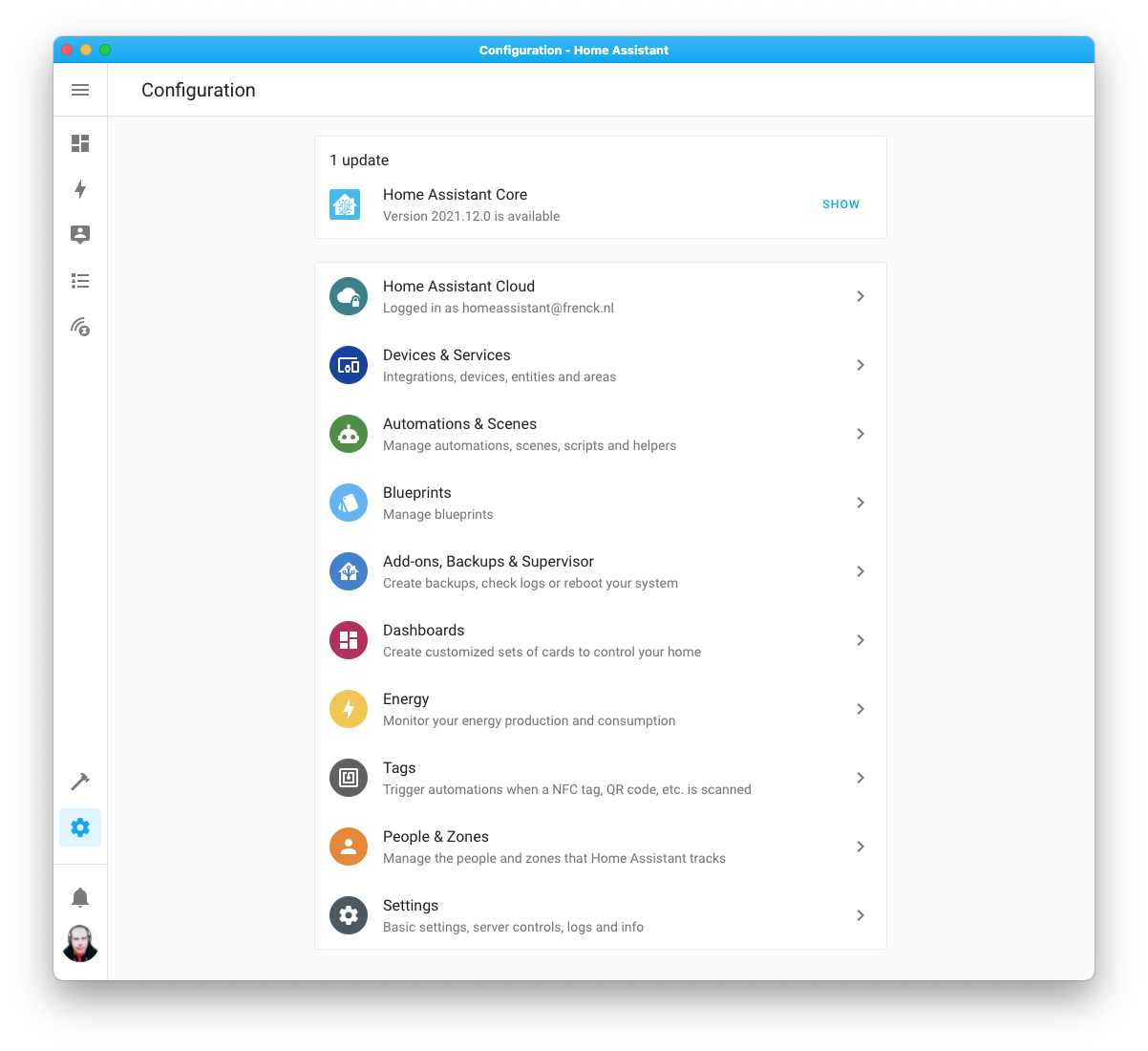
Supervisor 面板以及它在侧边栏中的入口都已移除,并整合进了配置面板。所有 OS、核心和附加组件更新,现在都会显示在配置面板顶部。
如果你正在使用我们的 Android、iOS 或 macOS Companion 应用,用来配置这些应用的侧边栏菜单也已经移动到了配置面板中。
所有与配置相关的内容,现在都整齐地集中在一个地方 🤘
按钮实体
我们引入了一种新的实体:按钮实体。 没错,就是按钮。你可以拿它做什么?按下去!
Home Assistant 里原本已经有开关实体,但开关是有状态的:不是开,就是关。而按钮更像是按压式按钮,也就是无状态或瞬时型开关。
按钮实体可以由集成提供,适用于像下面这些场景:
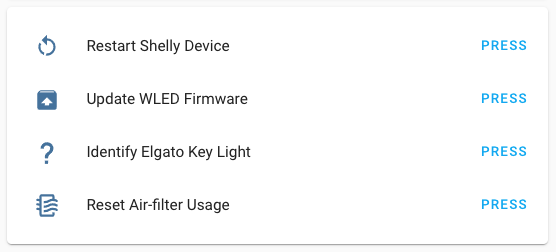 按钮实体的示例用法。
这些事情都可以由 Home Assistant 触发,但它们本身并没有明确的开或关状态。
我们已经为 Google Assistant、Alexa 和 HomeKit 加入了对按钮实体的支持;这意味着你现在可以通过喜欢的语音助手来“按下”这些按钮。
在这个版本中,MQTT 和 KNX 已经加入了按钮支持。Shelly、WLED、Elgato、Litter-Robot、TOLO Sauna、Tuya、Renault 和 NAM 集成也都新增了按钮实体。
另外,ESPHome 2021.12 也已经完整支持按钮了!除了重启按钮以外,你现在还可以在 ESPHome 中创建按钮实体,用来从 Home Assistant 触发你的 DIY 项目中的某些动作。
重新设计的区域面板与区域 Lovelace 卡片
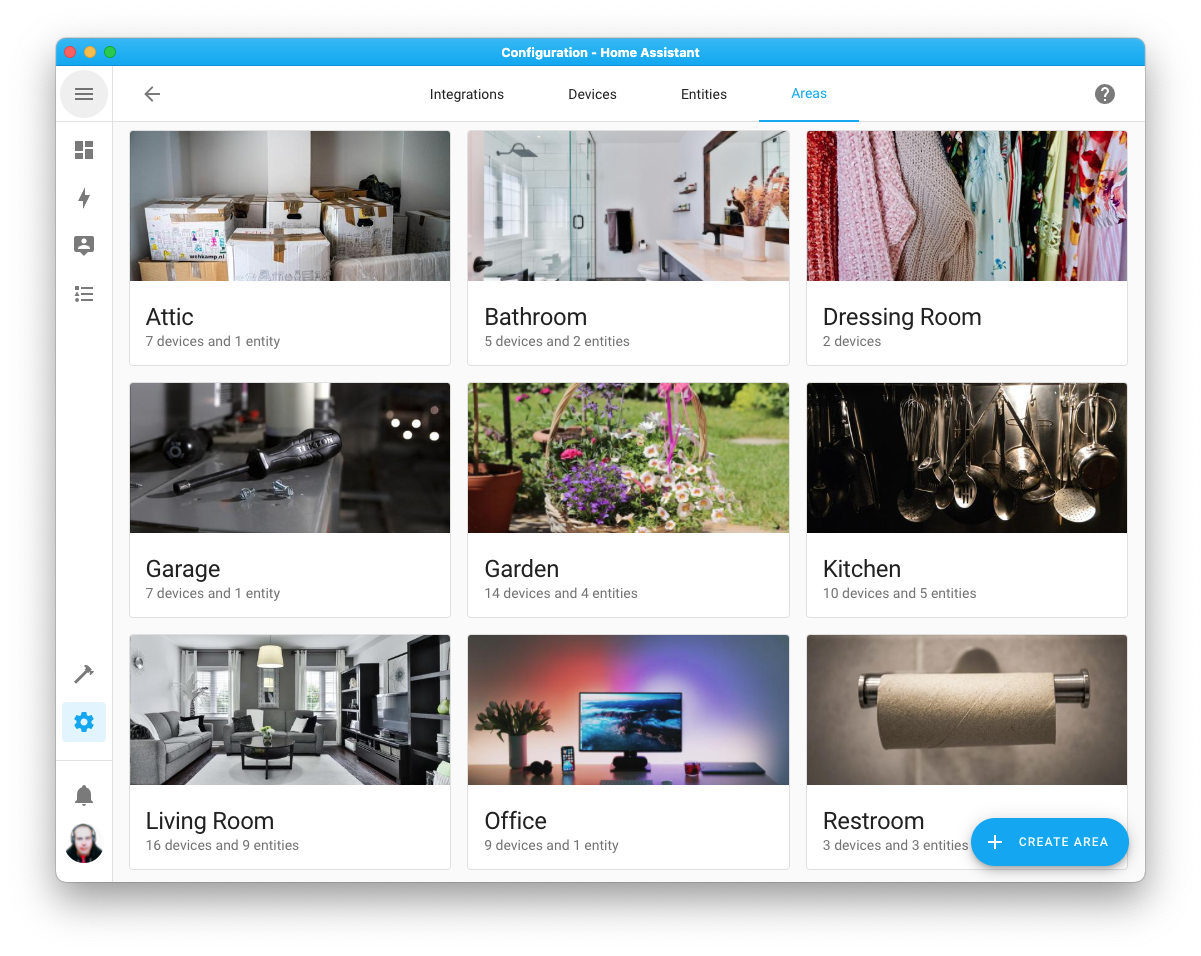
区域面板已经重新设计了。它不再只是一个区域列表,而是会为每个区域显示一张卡片。卡片上还能展示该区域的图片。
等等,图片?没错!你现在可以直接在 Home Assistant 前端为区域上传图片。所以它最终看起来可以像这样:
但这还不是全部,@zsarnett 还创建了一张全新的区域 Lovelace 卡片。它会使用你为该区域上传的图片,并自动填入分配到该区域中的设备实体。
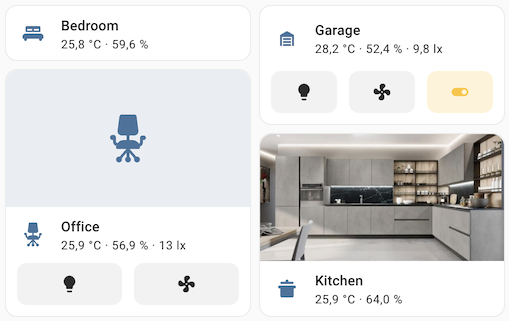 新的区域 Lovelace 卡片截图。
只能从本地网络登录的用户
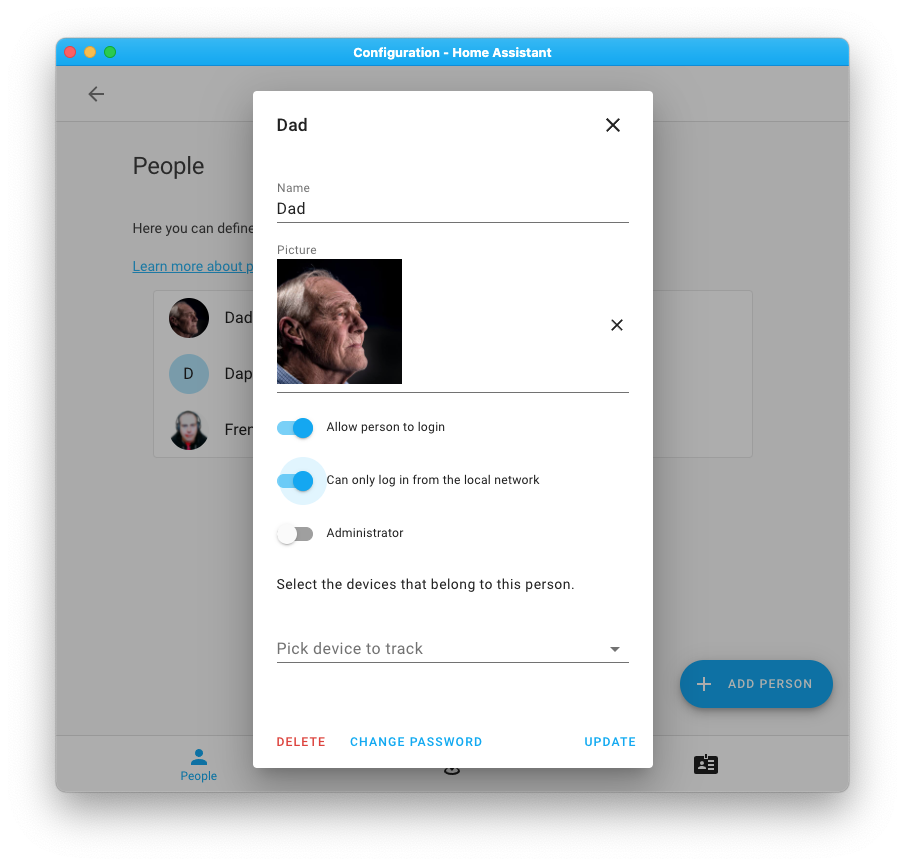
这个新功能可以让你创建一种用户:他们只能从本地网络登录,而不能通过互联网或云端登录。
如果你有一些并不总是在家的用户,或者有一个专门给墙面平板使用、永远不需要远程登录的账户,这个功能就会很实用。
Z-Wave JS SmartStart 与实体分类
现在,借助 Z-Wave JS 对 Z-Wave SmartStart 的支持,你在 Home Assistant 中设置 Z-Wave 设备比以往任何时候都更简单。
如果你有支持 SmartStart 的 Z-Wave 控制棒和设备,现在只需要扫描设备上的二维码,不管是用摄像头,还是用安装了 Home Assistant Companion 应用的手机,都能完成设备设置。
把设备加入你的 Z-Wave 网络,从来没有这么轻松过。
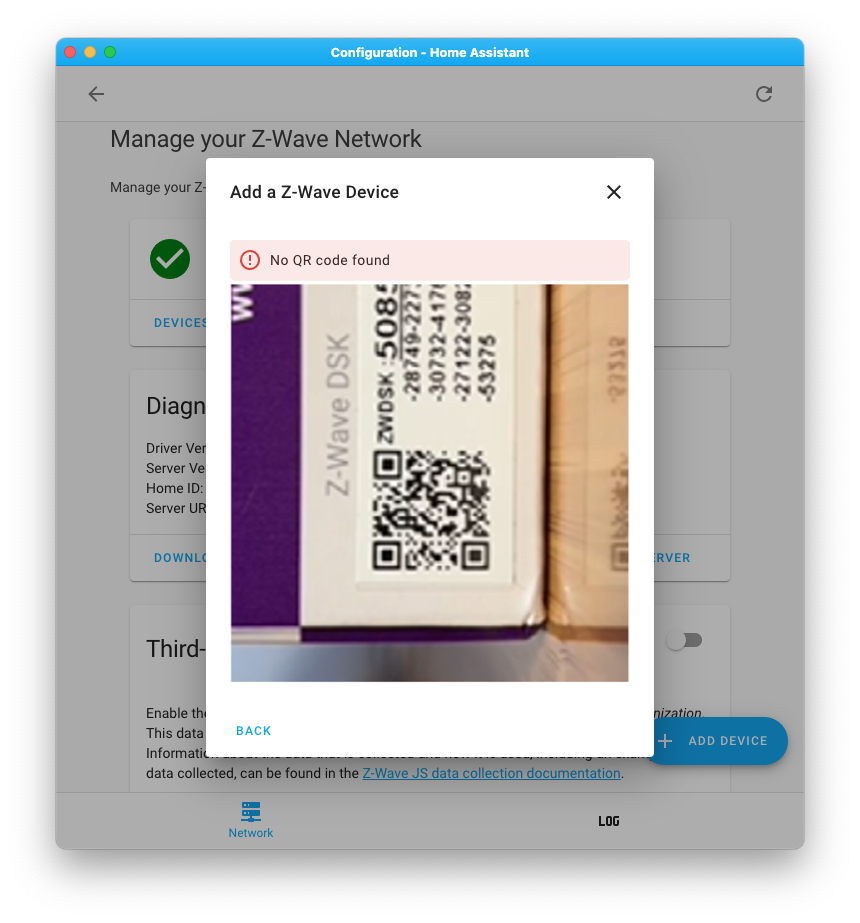
另外,Z-Wave JS 也已经支持实体分类,所以你的 Z-Wave 传感器现在会被整齐地组织起来。
蓝图脚本
其实这个功能已经在 Home Assistant 核心 2021.11 中上线了,但我们完全忘了提……这可太丢人了……现在补上!
你现在可以为脚本创建、提供和分享蓝图了!它的工作方式和自动化蓝图完全一样,只不过这次提供的是脚本。
脚本蓝图可以像现在的自动化蓝图一样被分享和导入。它们对于其他 Home Assistant 用户会非常有帮助,因为这些脚本可以被重复用于其他自动化中。
对任意但仅状态变化进行触发
直到现在,如果你想写一个自动化,让它在某个实体的任意状态变化时触发、但不在属性变化时触发,几乎都必须额外加条件才能实现。
现在我们终于加入了一种方法,让你可以对任意状态变化进行触发,而不会因为属性变化而触发。如果你设置 from 或 to,但将它留空,它就会匹配任意状态变化,同时忽略属性变化。
上面的例子只有在客厅媒体播放器的状态发生变化时才会触发,而不会在它的任意属性变化时触发。
同样的语法也支持属性。如果你想在某个特定属性的任意变化时触发,也可以使用类似写法:
上面的例子只有在客厅媒体播放器的音量等级变化时才会触发。
Cast 问题已解决
你可能已经注意到,Home Assistant 里的 Google Cast 功能此前存在一些问题。比如把 Lovelace 仪表板投射出去时,稳定性并没有达到应有的水平。
好消息是,这些投射问题现在已经解决了!
虽然这本质上只是一个 bug 修复,但我们认为它的影响足够大,值得在发布说明中特别提一下。
其他值得注意的变化
这次发布当然还有很多内容,下面是其中一些值得关注的变化:
- The Hue 集成 now only uses the v2 API when talking to compatible hubs. This means that all 灯光 updates and remote presses are instantly available in Home Assistant, and 场景 are now also natively supported. Amazing job, thanks @marcelveldt!
- @farmio completely rewrote the Fronius 集成 adding support for all the latest, and greatest Home Assistant offers. Nice!
- Besides supporting the new button 实体, ESPHome now also supports setting the mode and unit of measurement on number 实体. Thanks, @jesserockz!
- Magic Home (Flux LED) got lots of love from @bdraco, adding support for new 设备 and features along the way.
- @jbouwh improved the
as_datetimetemplate method, which now supports the UNIX timestamp. - The motionEye 集成 added 传感器 and 服务, thank you @dermotduffy.
- WLED 设备 can now be restarted and upgraded from Home Assistant.
- @chemelli74 added the 温控 platform support for Shelly, and @mib1185 added support for rebooting and upgrading Shelly 设备.
- 实体 provided by the Vallox 集成 now have unique IDs and can be adjusted from the UI. Thanks @viiru-!
- The Pi-hole 集成 now has a 二元sensor to indicate an 更新 is available, added by @andreasbrett.
- System Bridge has two new 服务 for sending keyboard events to the remote machine, added by @timmo001.
- @klada added support for media player groups to Denon HEOS.
- The REST platform now supports templates for its headers and query parameters. Thanks, @koying.
- Mill now supports its 3rd generation heaters, thanks @Danielhiversen
- @hmmbob added support for
ms-MY,nl-BE,pa-INto Google TTS. - Nanoleaf now pushes updates into Home Assistant, thanks @milanmeu.
- @micha91 extended Yamaha MusicCast with number 实体 for controlling equalizers, dialogue volume/lift, and the display brightness.
- The Levoit 核心 400S air purifier is now supported by the VeSync 集成, thanks for that @jparchem.
- The 状态 of number helpers is now exposed to Prometheus. Nice, @alim4r!
- @tschamm added support for shutter controls to Bosch SHC.
- 通知 for Android TV can now send a 通知 with custom icons; Awesome adding @redahb!
- MQTT has seen multiple improvements in this 发布:
- The select and number platforms now have
command_templatesupport (@jbouwh) - 开关 now support
device_class(@koying) - MQTT platforms can now set the
object_idoption (@Smeagolworms4) - Selects can now have a single or no options (@emontnemery)
- Added '触发器' support for 报警 Control 面板 (@XaF)
- Added
lock.opensupport (@Hypnos3)
- The select and number platforms now have
This 发布 adds support for long-term statistics to the following 集成:
- Coinbase (thanks @TomBrien)
- Daikin (thanks @werkstrom)
- Darksky (thanks @jjlawren)
- devolo Home Control (thanks @Shutgun)
- HomeMatic (thanks @chriss158)
- Wallbox (thanks @hesselonline)
And the following 集成 now have 实体 categories:
- AVM FRITZ!SmartHome (thanks, @mib1185)
- devolo Home Network (thanks, @Shutgun)
- Litter-Robot (thanks, @natekspencer)
- Network UPS Tools (thanks, @drthanwho)
- Rituals Perfume Genie (thanks, @milanmeu)
- Switchbot (thanks, @DCSBL)
- Z-Wave JS (thanks, @MartinHjelmare)
新集成
欢迎以下新集成加入这次发布:
- Balboa Spa, added by @garbled1
- Button, added by @frenck
- devolo Home Network, added by @Shutgun
- Evil Genius Labs, added by @balloob
- Jellyfin, added by @j-stienstra
- RDW, added by @frenck
- Ridwell, added by @bachya
- Tailscale, added by @frenck
- Tesla Wall Connector, added by @einarhauks
- TOLO Sauna, added by @MatthiasLohr
现在可在 UI 中配置的集成
以下集成现在可以直接通过 Home Assistant UI 进行设置:
- Fronius, done by @farmio
- Trafikverket Weather Station, done by @gjohansson-ST
- Viessmann ViCare, done by @oischinger
此外,KNX 现在也已经可以部分通过 UI 进行设置。连接部分可在 UI 中完成,而实体依旧像以前一样通过 YAML 配置。由 @marvin-w 完成。
发布 2021.12.1 - December 12
- Fix Sonos sub & surround 开关 状态 reporting (@jjlawren - #61531) (sonos docs)
- 更新 logic for nest media source
can_playfor events (@allenporter - #61537) (nest docs) - Fix HomeKit 遮盖 with 设备 class window and no tilt (@bdraco - #61566) (homekit docs)
- 更新 前端 to 20211212.0 (@bramkragten - #61577) (前端 docs)
- Fix Hue transition calculation (@marcelveldt - #61581) (hue docs)
- enable grouped 灯光 if enabled in previous 集成 (@marcelveldt - #61582) (hue docs)
- Only publish nest 摄像头 event messages once per Thread and bump nest 版本 (@allenporter - #61587) (nest docs)
- Fix for failing Solarlog 集成 in HA 2021.12 (@Ernst79 - #61602) (solarlog docs)
- Fix availability for 3th party Hue 灯光 (@marcelveldt - #61603) (hue docs)
- Bump aiopvapi to 1.6.19 to fix async_timeout passing loop (@bdraco - #61618) (hunterdouglas_powerview docs)
- Bump aiohue to 3.0.3 (@balloob - #61627) (hue docs)
发布 2021.12.2 - December 15
- Bump pysmappee to 0.2.29 (@bsmappee - #61160) (smappee docs)
- 升级 lupupy to 0.0.24 (@majuss - #61598) (lupusec docs)
- Suppress 错误 for legacy nest api when using media source (@allenporter - #61629) (nest docs)
- Bump total_connect_client to 2021.12 (@austinmroczek - #61634) (totalconnect docs)
- Add additional-tag to machine builds (@ludeeus - #61693)
- Bump aiohue to 3.0.4 (@balloob - #61709) (hue docs)
- 更新 pymelcloud to 2.5.6 (@vilppuvuorinen - #61717) (melcloud docs)
- Add check for incompatible 设备 触发器 in Hue 集成 (@marcelveldt - #61726) (hue docs)
- Fix turn_off with transition for grouped Hue 灯光 (@marcelveldt - #61728) (hue docs)
- Fix Flash effect for Hue 灯光 (@marcelveldt - #61733) (hue docs)
- Blacklist availability check for a 灯光 at startup in Hue 集成 (@marcelveldt - #61737) (hue docs)
- 升级 tailscale to 0.1.5 (@frenck - #61744) (tailscale docs)
- Bump brunt package to 1.0.1 (@eavanvalkenburg - #61784) (brunt docs)
- Fix ZHA unoccupied setpoints. (@MattWestb - #61791) (zha docs)
- Don't override pychromecast MediaController's APP ID (@emontnemery - #61796) (cast docs)
- Bump pychromecast to 10.2.1 (@emontnemery - #61811) (cast docs)
- Tibber, 更新 library, fixes #61525 (@Danielhiversen - #61813) (tibber docs)
- Bump python-miio to 0.5.9.2 (@rytilahti - #61831) (xiaomi_miio docs)
- Ensure SimpliSafe websocket reconnects upon new token (@bachya - #61835) (simplisafe docs)
- Allow setting local_ip for knx routing connections (@marvin-w - #61836) (knx docs)
- Fix broken Environment Canada (@michaeldavie - #61848) (environment_canada docs)
- Bump google-nest-sdm to 0.4.8 (@allenporter - #61851) (nest docs)
- Bump aiohue to 3.0.5 (@marcelveldt - #61875) (hue docs)
- 更新 前端 to 20211215.0 (@bramkragten - #61877) (前端 docs)
发布 2021.12.3 - December 17
- 更新 ebusdpy 版本 (@sindudas - #59899) (ebusd docs)
- Nextbus upcoming sort as integer (@ViViDboarder - #61416) (nextbus docs)
- Add 恢复 logic to Shelly 温控 platform (@chemelli74 - #61632) (shelly docs)
- Fix OwnetError preventing onewire initialisation (@epenet - #61696) (onewire docs)
- Fix notify platform 设置 for KNX (@marvin-w - #61842) (knx docs)
- Bump aiohue to 3.0.6 (@marcelveldt - #61974) (hue docs)
- Brunt dependency bump to 1.0.2 (@eavanvalkenburg - #62014) (brunt docs)
- Bump flux_led to 0.26.15 (@bdraco - #62017) (flux_led docs)
- Fix none-check in template 灯光 (@emontnemery - #62089) (template docs)
- Add missing timezone information (@DeerMaximum - #62106) (vallox docs)
- Improve availability for Shelly Valve (@chemelli74 - #62129) (shelly docs)
- Fix Non-Thread-safe operation in homekit 灯光 events (@bdraco - #62147) (homekit docs)
- Fix Non-Thread-safe operation in logbook (@bdraco - #62148) (logbook docs)
- Bump google-nest-sdm to 0.4.9 (@allenporter - #62160) (nest docs)
- Add guard in call to activate_scene in Hue (@marcelveldt - #62177) (hue docs)
- Fix threading 错误 in 脚本 with repeat or choose 动作 (@emontnemery - #62168)
- Fix threading 错误 in zha (@emontnemery - #62170) (zha docs)
发布 2021.12.4 - December 20
- Honeywell unique id fix (@rdfurman - #59393) (honeywell docs)
- Add vicare strings (@oischinger - #61593) (vicare docs)
- Fix "vevent" KeyError in caldav component (@jkuettner - #61718) (caldav docs)
- Silently retry Fronius inverter endpoint 2 times (@farmio - #61826) (fronius docs)
- Avoid setting nexia humidity to the same value since it causes the api to fail (@bdraco - #61843) (nexia docs)
- Force Lyric token refresh on first authentication failure (@timmo001 - #62100) (lyric docs)
- Bump pydexcom to 0.2.2 (@gagebenne - #62207) (dexcom docs)
- Fix spurious RainMachine config entry 重载 (@bachya - #62215) (rainmachine docs)
- Fix bug in which SimpliSafe websocket won't reconnect on 错误 (@bachya - #62241) (simplisafe docs)
- bump pynetgear to 0.8.0 (@starkillerOG - #62261) (netgear docs)
- Fix logging for Shelly 温控 platform (@chemelli74 - #62264) (shelly docs)
- 升级 tailscale to 0.1.6 (@frenck - #62267) (tailscale docs)
- Fix fitbit no SSL URL handling (@MartinHjelmare - #62270) (fitbit docs)
- Fix Non-Thread-safe operation in rflink binary_sensor (@bdraco - #62286) (rflink docs)
- Fix Non-Thread-safe operation in zwave node_added (@bdraco - #62287) (zwave docs)
- Bump flux_led to 0.27.8 to fix discovery of older 设备 (@bdraco - #62292) (flux_led docs)
- Bump async-upnp-client to 0.23.0 (@Flameeyes - #62223) (upnp docs) (yeelight docs) (dlna_dmr docs) (ssdp docs)
- 更新 async-upnp-client library to 0.23.1 (@chishm - #62298) (upnp docs) (yeelight docs) (dlna_dmr docs) (ssdp docs)
- Bump ring to 0.7.2 (@balloob - #62299) (ring docs)
- Fix missing brightness for Velbus 实体 (@wlcrs - #62314) (velbus docs)
- Fix velbus 温控 current temp (@Cereal2nd - #62329) (velbus docs)
- Ensure existing SimpliSafe websocket tasks are cancelled appropriately (@bachya - #62347) (simplisafe docs)
- Bump pywemo==0.7.0 (@esev - #62360) (wemo docs)
- Bump voluptuous_serialize to 2.5.0 (@balloob - #62363)
- Don't use the homeassistant media app when casting media (@emontnemery - #62385) (cast docs)
- Bump brunt to 1.1.0 (@eavanvalkenburg - #62386) (brunt docs)
- 更新 前端 to 20211220.0 (@bramkragten - #62389) (前端 docs)
- Bump pychromecast to 10.2.2 (@emontnemery - #62390) (cast docs)
- 更新 xknx to 0.18.14 (@farmio - #62411) (knx docs)
- Invalidate CI cache when bumping dependencies, part 2 (@frenck - #62412)
- Invalidate CI cache when bumping dependencies (@frenck - #62394)
- Make it possible to 打开 audio only google cast 设备 (@emontnemery - #62420) (cast docs)
- Bump bimmer_connected to 0.8.7 (@rikroe - #62435) (bmw_connected_drive docs)
- bump aiohue to 3.0.7 (@marcelveldt - #62444) (hue docs)
- Change Hue availability blacklist logic a bit (@marcelveldt - #62446) (hue docs)
发布 2021.12.5 - December 23
- Require RPi.GPIO and bump adafruit-circuitpython-dht to 3.7.0 in dht (@TheGardenMonkey - #61751) (dht docs)
- Fix deconz 灯光 服务 parameter handling (@schmyd - #62128) (deconz docs)
- Fix broken Vallox 集成 in 2021.12 (@andre-richter - #62308) (vallox docs)
- Fix Sonos updating when 实体 are disabled (@jjlawren - #62456) (sonos docs)
- Fix repetier crash when printer is offline (@ShadowBr0ther - #62490) (repetier docs)
- Bump soco to 0.25.1 (@jjlawren - #62523) (sonos docs)
- 更新 xknx to 版本 0.18.15 (@marvin-w - #62557) (knx docs)
- Bump pytile to 2021.12.0 (@bachya - #62559) (tile docs)
- Bump flux_led to 0.27.12 to fix legacy cct controllers (@bdraco - #62573) (flux_led docs)
- Fix missing object assignment for Fritz (@chemelli74 - #62575) (fritz docs)
- Fix timezone trafikverket_train (@gjohansson-ST - #62582) (trafikverket_train docs)
- Improve google cast 状态 reporting (@emontnemery - #62587) (cast docs)
- Fix pvpc_hourly_pricing by changing data source and modernise 集成 (@azogue - #62591) (pvpc_hourly_pricing docs)
- Bump flux_led to 0.27.13 to fix discovery of legacy 设备 (@bdraco - #62613) (flux_led docs)
- Fix missing exception handling from upstream lib in Fritz (@chemelli74 - #62617) (fritz docs)
- Round Hue transition to steps of 100ms (@krys1976 - #62619) (hue docs)
- Bump aiohue to 3.0.8 (@balloob - #62651) (hue docs)
- Bump aiohue to 3.0.9 (@marcelveldt - #62658) (hue docs)
- Bump aiohue to 3.0.10 (@marcelveldt - #62664) (hue docs)
- Adjust Hue retry logic to changes in the aiohue library (@marcelveldt - #62665) (hue docs)
- Fix Hue button events (@marcelveldt - #62669) (hue docs)
- Never use availability workaround for certified Hue 设备 (@marcelveldt - #62676) (hue docs)
- Fix Hue docstring (@marcelveldt - #62684) (hue docs)
发布 2021.12.6 - December 27
- Fix picnic 传感器 time unit (@corneyl - #62437) (picnic docs)
- Bump soco to 0.25.2 (@jjlawren - #62691) (sonos docs)
- Bump zeroconf to 0.38.1 (@bdraco - #62720) (zeroconf docs)
- Fix TypeError of 吸尘器 battery level None (@htmltiger - #62722) (google_assistant docs)
- Add return for certified 设备 to not apply availability check (@flfue - #62728) (hue docs)
- Bump roombapy to 1.6.4 (@freekode - #62741) (roomba docs)
- Add missing 实体 category for gen2 设备 (@chemelli74 - #62812) (shelly docs)
- 升级 youless library to 版本 0.16 (@gjong - #62837) (youless docs)
- 更新 tuya-iot-py-sdk to 0.6.6 (@frenck - #62858) (tuya docs)
- Fix keyerror when no previous Picnic orders exist (@corneyl - #62870) (picnic docs)
- 更新 前端 to 20211227.0 (@bramkragten - #62874) (前端 docs)
发布 2021.12.7 - December 29
- Fix unique_id of nuki config entry (@pree - #62840) (nuki docs)
- Bump python-smarttub dependency to 0.0.29 (@mdz - #62968) (smarttub docs)
- Bump flux_led to 0.27.21 (@bdraco - #62971) (flux_led docs)
- Send commands to Hue grouped 灯光 all at once (@marcelveldt - #62973) (hue docs)
- Remove duplicate filter for Hue button events (@marcelveldt - #62974) (hue docs)
- 更新 前端 to 20211229.0 (@bramkragten - #62981) (前端 docs)
- Bump aiohue to 3.0.11 (@marcelveldt - #62983) (hue docs)
- Gracefully handle unknown HVAC mode in Tuya (@frenck - #62984) (tuya docs)
- Fix short flash effect in Hue 集成 (@marcelveldt - #62988) (hue docs)
- Fix incorrect unit of measurement access in Tuya (@frenck - #62989) (tuya docs)
- Fix Tuya data type information in 灯光 (@frenck - #62993) (tuya docs)
- Fix Tuya data type information in 温控 (@frenck - #62994) (tuya docs)
- Gracefully handle missing preset mode in Tuya 风扇 (@frenck - #62996) (tuya docs)
- Normalize Hue colortemp if value outside of bounds (@marcelveldt - #62998) (hue docs)
- Hotfix for Nuki 集成 tests (@frenck - #63007) (nuki docs)
- Fix night mode 开关 状态 on Sonos (@jjlawren - #63009) (sonos docs)
- Add missing migration for Sonos speech enhancement 开关 实体 (@jjlawren - #63010) (sonos docs)
发布 2021.12.8 - January 4
- 更新 版本 of iZone library to add some bug fixes (@Swamp-Ig - #61548) (izone docs)
- Fix Tuya 吸尘器 display battery level (@dougiteixeira - #61643) (tuya docs)
- 更新 no_ip URL (@fabaff - #62477) (no_ip docs)
- Do not create a number LED brightness 实体 for Xiaomi Miio 设备 that do not support it (@bieniu - #62819) (xiaomi_miio docs)
- Fix local_ip handling in KNX options flow (@marvin-w - #62969) (knx docs)
- Fix reporting correct colormode for 3rd party Hue 灯光 (@marcelveldt - #63015) (hue docs)
- Hue allow per-设备 availability override (@marcelveldt - #63025) (hue docs)
- Bump pyatmo to 6.2.1 (@cgtobi - #62291) (netatmo docs)
- Bump pyatmo to v6.2.2 (@cgtobi - #63053) (netatmo docs)
- Ignore serial number "blank" from NUT (@ollo69 - #63066) (nut docs)
- Bump greeclimate to 1.0.1 (@cmroche - #63092) (gree docs)
- Fix Shelly 错误 fetching 设备 触发器 for sleeping 设备 (@thecode - #63103) (shelly docs)
- Fix systemmonitor CPU temp for Armbian on PineA64 (@ktaragorn - #63111) (systemmonitor docs)
- Fix CO/CO2 传感器 mixup in Google Assistant (@ryborg - #63152) (google_assistant docs)
- Bump flux_led to 0.27.28 to fix missing white channel on SK6812RGBW strips (@bdraco - #63154) (flux_led docs)
- Add default Fronius logger model for v0 API (@trdischat - #63184) (fronius docs)
- Prevent doorbird 集成 from overloading the 设备 on startup (@bdraco - #63253) (doorbird docs)
- Bump flux_led to 0.27.32 to fix incorrect strip order on A2 设备 (@bdraco - #63262) (flux_led docs)
- Sisyphus: Fix bad super call (@balloob - #63327) (sisyphus docs)
- Fix status type in Shelly 温控 platform (@bieniu - #63347) (shelly docs)
- Bump micloud to 0.5 (@starkillerOG - #63348) (xiaomi_miio docs)
- Work around ingress glitch with 304 responses (@masto - #63355) (hassio docs)
- Fix Hue grouped 灯光 color_mode calculation (@marcelveldt - #63374) (hue docs)
- Fix missing timezone in GTFS timestamp 传感器 (@frenck - #63401) (gtfs docs)
- Handle missing monitored users in Plex options (#63411) @jjlawren
- Handle no enabled ipv4 addresses in the network 集成 (#63416) @bdraco
发布 2021.12.9 - January 10
- Bump pychromecast to 10.2.3 (@emontnemery - #63429) (cast docs)
- Bump flux_led to 0.27.40 to fix SK6812RGBW white level reporting (@bdraco - #63435) (flux_led docs)
- Fix incorrect access to 实体 registry in Xiaomi Miio (@frenck - #63446) (xiaomi_miio docs)
- Pickup screenlogic codeowner (@bdraco - #61477) (screenlogic docs)
- Bump screenlogicpy (@dieselrabbit - #63533) (screenlogic docs)
- Bump soco to 0.25.3 (@jjlawren - #63548) (sonos docs)
- Fix KeyError during call to homekit.unpair (@bdraco - #63627) (homekit docs)
- Ensure selected 实体 is pre-selected in homekit options flow (@bdraco - #63628) (homekit docs)
- Bump flux_led to 0.27.41 (@bdraco - #63638) (flux_led docs)
- Add default mode 'auto' for tradfri starkvind air purifier on 打开 (@leahoswald - #63641) (tradfri docs)
- Bump flux_led to 0.27.42 (@bdraco - #63651) (flux_led docs)
- Split august motion and image capture 二元sensor (@bdraco - #62154) (august docs)
- Bump yalexs to 1.1.16 (@bdraco - #62700) (august docs)
- Fix august 门锁 failing to 门锁/unlock (@bdraco - #63652) (august docs)
- Switchbot Set initial 状态 for 开关 (@RenierM26 - #63654) (switchbot docs)
- Fix Tuya 温控 c_f DP not being a string (@frenck - #63680) (tuya docs)
- Fix Netgear used method 版本 (@starkillerOG - #63686) (netgear docs)
- Bump flux_led to 0.27.44 to fix CCT ceiling 灯光 (@bdraco - #63712) (flux_led docs)
- Bump PySwitchbot to 0.13.2 (@RenierM26 - #63713) (switchbot docs)
- Bump WazeRouteCalculator to 0.14 (@k-korn - #63718) (waze_travel_time docs)
- Fix zwave_js 设备 动作 (@raman325 - #63769) (zwave_js docs)
- Add client metadata to cloud register (@ludeeus - #63794) (cloud docs)
- Support Tuya strip 灯光 with correct values for saturation and brightness (@Knodd - #63812) (tuya docs)
- Bump flux_led to 0.27.45 to fix missing controls on ZJ21410 models (@bdraco - #63854) (flux_led docs)
- Bump aioharmony to 0.2.9 (@bdraco - #63858) (harmony docs)
- Bump 前端 to 20211229.1 (@balloob - #63866) (前端 docs)
发布 2021.12.10 - January 17
- Avoid removing zwave_js 设备 for non-ready nodes (@kpine - #59964) (zwave_js docs)
- Convert siri requests for target heating cooling 状态 auto to a valid mode (@bdraco - #60220) (homekit docs)
- dlna_dmr: Allow for upnp 属性 with None contents (@chishm - #63892) (dlna_dmr docs)
- Convert disabled_by to DeviceEntryDisabler on load (@agners - #63944) (deconz docs) (picnic docs)
- Fix homekit options being mutated during config_flow/migration (@bdraco - #64003)
- Bump nexia to 0.9.13 to fix setting emergency heat (@bdraco - #64020) (nexia docs)
- Bump flux_led to 0.28.3 to fix setting colorloop on older models (@bdraco - #64094) (flux_led docs)
- Fix changing the preset mode (@bieniu - #64119) (shelly docs)
- Fix flux_led 打开 when brightness is zero on newer 设备 (@bdraco - #64129) (flux_led docs)
- Ensure august status is current when 集成 loads (@bdraco - #64027) (august docs)
- Fix august 门锁/unlock with older bridges (@bdraco - #64143) (august docs)
- Ignore unavailable 实体 when creating zwave_js 设备 动作 list (@raman325 - #64184) (zwave_js docs)
- Fix KNX onboarding when there is no yaml config defined yet (@farmio - #64216) (knx docs)
- Bump bimmer_connected to 0.8.10 (@rikroe - #64314) (bmw_connected_drive docs)
- Ensure status is correct at start for older august bridges (@bdraco - #64144) (august docs)
- Bump flux_led to 0.28.4 to fix setting white temp on 0x35 设备 (@bdraco - #64326) (flux_led docs)
- Orphaned MAC addresses breaks UniFi options flow (@Kane610 - #64327) (unifi docs)
如果你需要帮助……
……欢迎随时使用我们非常活跃的 论坛,或者加入我们的 聊天频道。
如果你遇到了这次发布引入的问题,请到我们的 issue tracker 提交反馈,并确保填写问题模板中的所有字段。
破坏性变更
下面按主题或集成列出了本次发布中的破坏性变更。点击对应项目即可阅读该条变更的更多说明。
The customize.yaml UI (customization) has been removed. The YAML 配置
for this is recommended and remains available. To customize 实体, use the 实体 设置 available via the icon in the top right of the 实体 "more info" dialog (when clicking on an 实体). 实体 设置 now also allows customizing device_class for certain binary_sensor and cover cases.
A small explanation why it has been removed:
With customize, one is changing the 状态 machine directly, without any checks. This comes at a risk. Additionally, for many use cases (like: name, icon, 设备 class) one should edit the 实体 via the UI instead, which is possible for the greater part of the 实体 nowadays.
The old customize UI is confusing in many ways and has a level of power that, if wielded incorrectly, can have unforeseen consequences. Someone found and used the customize UI first, and then things are out of sync throughout the UI, as the internal 实体 registry would show the old values.
The customize UI also relied on setting up an include and YAML 配置 to begin with; which already made it an advanced feature.
Therefore, the customize UI was removed and remains available as an advanced
YAML feature, additionally we have added the capability, to adjust
the common device_class changes using the "Show as" feature while
editing the 实体 from UI.
The Supervisor 面板 has been merged into the 配置 面板. The separate menu item from the 侧边栏 has been removed.
The binary_sensor with "running" device_class that was provided for the
Home Assistant Operating System 设备 did not work and has now been removed;
If you have added this to templates or 自动化, remove it from
your 配置.
(@ludeeus - #60597) (hassio docs)
The Companion App 配置 has been merged into the 配置 面板. The separate menu item from the 侧边栏 has been removed.
The HVAC mode for zone 温控 实体 was set to FAN or OFF, because the
actual HVAC mode is set for the entire ducted AC system. However, using 风扇
means the Google Home app won't let you set a target temperature,
so it has been changed to AUTO instead.
(@Bre77 - #52816) (advantage_air docs)
The following 服务/传感器 have been removed due to not being available using the My BMW API:
alltrips_*lasttrips_*chargingconnectiontypecharginginductivepositioninglastchargingendreasonlastchargingendresultmaxelectricrange
属性 of binary_sensor.doors and binary_sensor.windows do not start
with door/window anymore.
notify requires a location 属性 at data.location, as the MyBMW API
only supports sending POI and not messages.
The find_vehicle 服务 will always send the location of your
Home Assistant instance to BMW.
(@rikroe - #59881 #60938) (bmw_connected_drive docs)
The Brunt 集成 migrated the connection 设置 to 配置 via the UI. Configuring the connection to the Brunt API via YAML 配置 has been deprecated and will be removed in a future Home Assistant 发布.
Your existing connection YAML 配置 is automatically imported on 升级 to this 发布; and thus can be safely removed from your YAML 配置 after upgrading.
Additionally, the Brunt 集成 can now be reloaded via the 集成 screen in the 前端 and will also 重载 if a Brunt 设备 is removed from your account.
(@eavanvalkenburg - #49714) (brunt docs)
The Fronius 集成 migrated to 配置 via the UI. Configuring Fronius via YAML 配置 has been deprecated and will be removed in a future Home Assistant 发布.
Your existing YAML 配置 is automatically imported on 升级 to this 发布; and thus can be safely removed from your YAML 配置 after upgrading.
This change will remove manual 配置 of Fronius 设备 IDs. Connected SolarNet 设备 will be detected automatically on startup.
(@farmio - #59686) (fronius docs)
Guardian 服务 have been reorganized and now utilize a Home Assistant selector (设备 ID) instead of using a Guardian 实体.
(@bachya - #58632) (guardian docs)
This 发布 removes the air quality from HomeKit Controller as the platform has been previously deprecated.
The air quality values have been broken out as their own 传感器 starting from September, making them easier to incorporate in your 仪表盘 widgets, graphs, and 自动化. These should be used instead.
(@Jc2k - #60480) (homekit_controller docs)
Events for Hue remotes/开关
Philips/Signify streamlined the events that are emitted for remotes/开关;
these are now no longer 设备 specific but more generic. This means that if
you're relying on the hue_event to 触发器 events emitted by these 设备,
the event_data will now be slightly different. To easily identify what
events get emitted by your Hue remotes, Open 开发者工具 and subscribe
to the hue_event.
灯光 实体 for Hue rooms/zones
实体 for Hue groups (zones/rooms) will be imported but in a disabled 状态 by default. The 集成 option to enable Hue groups has been phased out in favor of the default Home Assistant functionality to enable/disable 实体.
To enable any (new) 灯光 实体 for Hue groups: Open 设置 --> 集成 --> Hue --> 实体 --> Click one of the disabled 实体 and enable it.
Existing Hue group 灯光 for rooms/zones will be migrated as enabled 实体.
Legacy Hue groups of type LightGroup (which are not visible in the official Hue
app) will no longer be supported!
实体 for Hue 场景
If you create any 场景 for your Hue zones/rooms, these will now be automatically imported to Home Assistant as 场景 实体, including support for the new Hue Dynamic 场景. You can disable any 场景 实体 you don't like to use in Home Assistant (or delete them in the Hue app).
(@marcelveldt - #58996) (hue docs)
The KNX 集成 migrated the connection 设置 to 配置 via the UI. Configuring the connection to the KNX bus via YAML 配置 has been deprecated and will be removed in a future Home Assistant 发布.
Your existing connection YAML 配置 is automatically imported on 升级 to this 发布; and thus can be safely removed from your YAML 配置 after upgrading.
Additionally, the KNX 集成 can now be reloaded via the 集成
screen in the 前端, and thus the knx.reload 服务 has been removed.
(@marvin-w - #59377) (knx docs)
The last_knx_update 属性 has been removed from the KNX 传感器 and
二元sensor. The last_update 属性 can be used alternatively.
If you are relying on this 属性 in your 自动化 or 脚本, you will need to adjust them to this change.
The 配置 key event_filter is now deprecated and will be removed in a
future 版本 of Home Assistant. Please use the new event config key instead.
The "Battery Strategy" 传感器 has been removed from the Kostal Plenticore
集成. It is replaced by a switch and a select 实体 to allow setting
the battery charging 设置 from Home Assistant.
(@slowflyer - #56529) (kostal_plenticore docs)
The litterrobot.reset_waste_drawer and litterrobot.set_wait_time 服务
are deprecated and replaced by dedicated button 实体; please use
those instead.
(@natekspencer - #59734) (litterrobot docs)
The previously deprecated MDI icons, now have been removed.
The following icons have been removed:
adobe-acrobatadobeamazon-alexaamazonandroid-autoandroid-debug-bridgebandcampbattlenetbloggerbuffercash-usd-outlinecash-usdcellphone-android(alternative:cellphone)cellphone-iphone(alternative:cellphone)concourse-cicurrency-usd-circlecurrency-usd-circle-outlinedo-not-disturb-off(alternative:minus-circle-off)do-not-disturb(alternative:minus-circle)doubanfile-pdf(alternative:file-pdf-box)file-pdf-outline(alternative:file-pdf-box)file-pdf-box-outline(alternative:file-pdf-box)google-photoshome-currency-usdlaptop-chromebook(alternative:laptop)laptop-mac(alternative:laptop)laptop-windows(alternative:laptop)microsoft-edge-legacymicrosoft-yammerpdf-box(alternative:file-pdf-box)plus-one(alternative:numeric-positive-1)poll-box(alternative:chart-box)poll-box-outline(alternative:chart-box-outline)tablet-ipad(alternative:tablet)telegramuntappdvkxamarian-outlinexingy-combinator
The following icons have been renamed:
apple-airplaytocast-variantapplicationtoapplication-outlineapplication-cogtoapplication-cog-outlineapplication-settingstoapplication-settings-outlinebolnisi-crosstocross-bolnisiboom-gate-uptoboom-gate-arrow-upboom-gate-up-outlinetoboom-gate-arrow-up-outlineboom-gate-downtoboom-gate-arrow-downboom-gate-down-outlinetoboom-gate-arrow-down-outlinebuddhismtodharmachakracellphone-erasetocellphone-removeceltic-crosstocross-celticchristianitytocrosschristianity-outlinetocross-outlinefacetoface-manface-outlinetoface-man-outlineface-profile-womantoface-woman-profileface-shimmertoface-man-shimmerface-shimmer-outlinetoface-man-shimmer-outlineflash-circletolightning-bolt-circlefloor-lamp-varianttofloor-lamp-torchiere-variantgiftofile-gif-boxgradienttogradient-verticalhandtohand-front-righthand-lefttohand-back-lefthand-righttohand-back-righthinduismtoomhuman-greetingtohuman-greeting-variantiframetoapplication-bracketsiframe-outlinetoapplication-brackets-outlineiframe-arraytoapplication-arrayiframe-array-outlinetoapplication-array-outlineiframe-bracestoapplication-bracesiframe-braces-outlinetoapplication-braces-outlineiframe-parenthesestoapplication-parenthesesiframe-parentheses-outlinetoapplication-parentheses-outlineiframe-variabletoapplication-variableiframe-variable-outlinetoapplication-variable-outlineislamtostar-crescentjudaismtostar-davidmonitor-cleantomonitor-shimmerpharmacytomortar-pestle-plussparklestoshimmerteachtohuman-male-boardtelevision-cleantotelevision-shimmertext-subjecttotext-longtwitter-retweettorepeat-variantvoice-offtoaccount-voice-off
The following previously deprecated MQTT 风扇 options are no longer supported and have been removed:
payload_high_speedpayload_low_speedpayload_medium_speedspeed_command_topicspeed_listspeed_state_topicspeed_value_template
(@jbouwh - #58992) (MQTT docs)
The 通知 for Android TV 集成 allows you to send custom
通知 to Android TV 设备. Sending a file along with the
通知, allows you to send image files that will show up above
the 通知.
Now that support for icons has been added in the same way as images, the file
option has been renamed to image to properly identify what you're sending
with the 通知.
As such, code and 自动化 that use the file option for an image have to
refer to image from now on.
(@redahb - #60159) (nfandroidtv docs)
Screenlogic SCG levels have moved to the number platform to support setting of
these values. The 传感器 实体 that previously represented these values will
need to be manually deleted in Configuration -> Entities.
(@dieselrabbit - #60872) (screenlogic docs)
The previously deprecated YAML 配置 of the Phone Modem 集成 has been removed. Phone Modem is now configured via the UI, any existing YAML 配置 has been imported in previous releases and can now be safely removed from your YAML 配置 files.
(@tkdrob - #59526) (modem_callerid docs)
The rainmachine.disable_program, rainmachine.enable_program,
rainmachine.disable_zone, and rainmachine.enable_zone 服务 have been
removed.
Instead, new 配置 开关 related to each 实体 can be used to enable/disable the program/zone.
(@bachya - #59617) (rainmachine docs)
The renault.charge_start 服务 is deprecated and replaced by a dedicated
start charge button 实体; please use that 实体 to start
the charge instead.
(@epenet - #59383) (renault docs)
SimpliSafe 服务 have been reorganized and now utilize a Home Assistant selector (设备 ID) instead of using a SimpliSafe system ID.
(@bachya - #58722) (simplisafe docs)
Previously when the inverter was not supplying any power, the 传感器 showed as
Unknown. These 传感器 will now show the value of 0, making it more useful
for graphs or calculations.
The sonos.set_option 服务 has been removed along with the bass_level
and treble_level 属性 on media_player 实体.
Controls for bass and treble adjustments have been moved to
dedicated number 实体.
(@jjlawren - #60498) (sonos docs)
All statistical characteristics were removed from 传感器 属性 and are
now selectable through state_characteristic as the 状态 of the 传感器.
The parameter state_characteristic will become mandatory in a future 发布.
Please adapt the 配置 of your statistics 传感器(s) and expose the
characteristic you are interested in directly through state_characteristic.
Existing template 传感器 to access individual characteristics can be removed.
In case you are interested in multiple characteristics, you need to define
multiple statistics 传感器.
Many characteristics were renamed and additional ones were added, including a few for binary source 传感器. Consider opening a feature request if your use case is not directly covered.
(@ThomDietrich - #59867) (statistics docs)
The timestamp_local and timestamp_utc template functions/filters have
changed their output format. The timestamp is now formatted to iso standards
and contains timezone information.
Previously a timestamp from these would look like: 2016-07-21 16:39:04.
Now it is formatted as: 2016-07-21T16:39:04+01:00.
This change may break templates that need a specific format, in those cases,
you can use the timestamp_custom template filter instead.
The Trafikverket Weather Station 集成 migrated to 配置 via the UI. Configuring Trafikverket Weather Station via YAML 配置 has been deprecated and will be removed in a future Home Assistant 发布.
Your existing YAML 配置 is automatically imported on 升级 to this 发布; and thus can be safely removed from your YAML 配置 after upgrading.
(@gjohansson-ST - #60078) (trafikverket_weatherstation docs)
Due to the modernization of the Twente Milieu 集成; the
twentemilieu.update 服务 has been removed.
You can now use the homeassistant.update_entity 服务 with the
Twente Milieu 集成 as a replacement for the removed 服务.
(@frenck - #59632) (twentemilieu docs)
The previously deprecated YAML 配置 of the RVelbus 集成 has been removed.
Velbus is now configured via the UI, any existing YAML 配置 has been imported in previous releases and can now be safely removed from your YAML 配置 files.
(@Cereal2nd - #60411) (velbus docs)
The Viessmann ViCare 集成 migrated to 配置 via the UI. Configuring Viessmann ViCare via YAML 配置 has been deprecated and will be removed in a future Home Assistant 发布.
Your existing YAML 配置 is automatically imported on 升级 to this 发布; and thus can be safely removed from your YAML 配置 after upgrading.
(@oischinger - #56691) (vicare docs)
The led_count and max_power 属性 have been removed from the 传感器
实体 that provides the estimated current of the WLED 设备. These have been
replaced by their own 传感器 实体.
If you have been using the 属性 in your 自动化 or 脚本, you'll need to adjust those to reflect these changes.
(@frenck - #58839) (wled docs)
The speed, palette name, intensity, and reverse effect indicator
属性 have been removed from the WLED 灯光 实体.
They all have been replaced by their own, dedicated, number and 开关 实体.
If you rely on these 属性 in your 自动化 or 脚本, you'll need to adjust those to this change.
(@frenck - #60535) (wled docs)
The wled.effect and wled.preset 服务 have been removed.
For both 服务, full replacements are available as normal 实体 in
Home Assistant.
If you are still using these 服务 in your 自动化 or 脚本, please replace them with 服务 calls to their native 实体 instead.
(@frenck - #60537) (wled docs)
Only one Home Assistant 设备 was 创建 for a Yamaha MusicCast 设备, and the media player 实体 of all zones were part of this 设备.
As of this 发布, every zone media player will be located in its own Home Assistant 设备. For single zone 设备, nothing will change and all your 自动化, 脚本, 场景, etc., should work in the same way as before.
A new 设备 will be 创建 for multi-zone 设备 for every non-main zone
(e.g., zone2 or zone3). The media_player of the main-zone will remain
in the original 设备 with all its properties, 脚本, 自动化 and 场景,
configured for it.
For other zones, you will have to set the area of the newly generated 设备 for the various zones manually. If you 创建 脚本, 自动化, or 场景 with the 设备 as a target and want them to work for non-main zones, you will have to add the newly added 设备 as a target to your 脚本/自动化/场景.
If you used the media player 实体 as a target, everything should still work like before.
(@micha91 - #58285) (yamaha_musiccast docs)
Some 实体 have been marked as 配置 实体, e.g., default tone of siren 设备 and protection mode of smart plugs.
配置 实体:
- Are not included in a 服务 call targeting a whole 设备 or area.
- Are, by default, not exposed to Google Assistant or Alexa.
- Are shown on a separate 卡片 on the 设备 配置 page.
- Do not show up on the automatically generated Lovelace 仪表盘.
(@MartinHjelmare - #59157 #58703 #59474) (zwave_js docs)
Updates for custom 集成 开发者
If you are a custom 集成 developer, we have some updates in this 发布 that you may want to take into account for your 集成.
Below is a listing of the breaking change for this 发布, per subject. Click on one of those to read more about the breaking change for that specific item.
mqtt.async_publish is now a coroutine and custom 集成 calling this
function needs to be adjusted accordingly.
(@emontnemery - #58441)
The, previously deprecated, homeassistant.const.HTTP_* HTTP status constants
have been removed, use stdlib http.HTTPStatus instead.
Removed util.get_local_ip() in favor of components.network.async_get_source_ip().
Previous implementation was determining local IP based on the routing versus a fixed public ip "8.8.8.8". The new function instead allows to choose the destination and determine local_ip based on the source interface needed to get there.
(@chemelli74 - #58669)
When using datetime and date 设备 classes in 传感器, the returned native
value must (respectively) be a datetime or date Python object.
Returning an iso formatted date(time) string in these cases is now deprecated and will write a deprecation 警告 in the 日志. This fallback/backward compatibility will be removed in Home Assistant 2022.2.
The (outdated) customize 前端 has been removed, and thus the (now unused) API endpoints for customizing have been removed from the Home Assistant API as well.
The use of the MODE_* constants in the number 实体 platform is deprecated.
Please use the NumberMode enum instead.
The use of the DEVICE_CLASS_* constants and DEVICE_CLASSES constants in
all 实体 platforms, has now been depreacted. Instead, use the equavalent
DeviceClass StrEnum provided by each platform.
Example:
(@frenck - #60655 #60658 #60656 #60654 #60651 #60706 #60709 #60720)
Removed two (long time) deprecated helpers:
homeassistant.util.sanitize_filenamehomeassistant.util.sanitize_path
The value of ATTR_HA_MATCHING_DOMAINS constant has been updated to replace the hash (-) with underscore (_):
- Old value:
x-homeassistant-matching-domains - New value:
x_homeassistant_matching_domains
MQTT, DHCP, ZerConf, USB and SSDP discovery now provides a dataclass object, instead of using a dictionary.
The dataclass objects have implemented dictionary access for temporary backwards compatibility during this deprecation period.
Dataclasses provided by discovery type:
- MQTT:
MqttServiceInfo(#60191) - DHCP:
DhcpServiceInfo(#60136) - USB:
UsbServiceInfo(#60140) - ZeroConf:
ZeroconfServiceInfo(#60206) - SSDP:
SsdpServiceInfo(#59931)
(@epenet)
向以下集成告别
The following 集成 are no longer available as of this 发布:
- Dyson has been removed. The 集成 has been broken for a long time now, so its time for it to go, (@epenet - #59401)
- IOTA has been removed. The protocol is no longer compatible/usable with 此integrations. (@lambtho12 - #59380
- Loop Energy has been removed. Loop has shutdown their API in November 2020. (@cgarwood- #61175)
- myChevrolet has been removed. It has been broken for 6 months and GM keeps actively hardening their authentication; preventing the 集成 to work. (@sdague - #59629)
全部变更
- Bump 版本 to 2021.12.0dev0 (@frenck - #58546)
- Register LCN 设备 in 设备 registry (@alengwenus - #53143) (lcn docs)
- Get the registry using the callback method (@balloob - #58542)
- Avoid 服务 call in MQTT async_publish function (@emontnemery - #58441) (breaking-change)
- Add additional MAC address pattern for Guardian DHCP discovery (@bachya - #58562) (guardian docs)
- Use DeviceInfo in soma (@epenet - #58572) (soma docs)
- Use DeviceInfo in somfy-mylink (@epenet - #58573) (somfy_mylink docs)
- Use DeviceInfo in spider (@epenet - #58575) (spider docs)
- Use DeviceInfo in starline (@epenet - #58576) (starline docs)
- Use DeviceInfo in switchbot (@epenet - #58578) (switchbot docs)
- Use DeviceInfo in songpal (@epenet - #58574) (songpal docs)
- Remove incorrect use of iscoroutinefunction from duckdns (@emontnemery - #58585) (duckdns docs)
- Bump hatasmota to 0.3.0 (@emontnemery - #58592) (tasmota docs)
- Use DeviceInfo in switcher-kis (@epenet - #58579) (switcher_kis docs)
- Use DeviceInfo in syncthing (@epenet - #58580) (syncthing docs)
- Use DeviceInfo in syncthru (@epenet - #58581) (syncthru docs)
- Use DeviceInfo in system-bridge (@epenet - #58582) (system_bridge docs)
- Add 实体 category 'system' (@emontnemery - #58595) (energy docs)
- Use DeviceInfo in tasmota (@epenet - #58604) (tasmota docs)
- Use constants in acmeda config flow (@epenet - #58590) (acmeda docs)
- Use DeviceInfo in subaru (@epenet - #58577) (subaru docs)
- Use DeviceInfo in tado (@epenet - #58603) (tado docs)
- Use DeviceInfo in toon (@epenet - #58605) (toon docs)
- Use DeviceInfo in tplink (@epenet - #58606) (tplink docs)
- Use DeviceInfo in twentemilieu (@epenet - #58608) (twentemilieu docs)
- Use DeviceInfo in twinkly (@epenet - #58609) (twinkly docs)
- Use DeviceInfo in vizio (@epenet - #58617) (vizio docs)
- Use DeviceInfo in vlc-telnet (@epenet - #58618) (vlc_telnet docs)
- Use DeviceInfo in volumio (@epenet - #58619) (volumio docs)
- Use DeviceInfo in unifi (@epenet - #58620) (unifi docs)
- Use DeviceInfo in upb (@epenet - #58621) (upb docs)
- Add DHCP Discovery for SimpliSafe (@bachya - #58560) (simplisafe docs)
- Use constants in control4 config flow (@epenet - #58602) (control4 docs)
- Adding newly supported language codes to Google TTS (@hmmbob - #58607) (google_cloud docs)
- Open and close tilt for Fibaro 设备 in zwave_js (@pail23 - #58435) (zwave_js docs)
- Add devolo home network 集成 (@Shutgun - #45866) (devolo_home_network docs) (new-集成)
- Add missing SimpliSafe config flow test (@bachya - #58563) (simplisafe docs)
- Add more dlna_dmr media_player 服务 and 属性 (@chishm - #57827) (dlna_dmr docs)
- Use DeviceInfo in wemo (@epenet - #58638) (wemo docs)
- Use DeviceInfo in waze-travel-time (@epenet - #58637) (waze_travel_time docs)
- Use DeviceInfo in wiffi (@epenet - #58639) (wiffi docs)
- Use DeviceInfo in xbox (@epenet - #58640) (xbox docs)
- Use DeviceInfo in xiaomi-miio (@epenet - #58642) (xiaomi_miio docs)
- Use DeviceInfo in yale-smart-报警 (@epenet - #58644) (yale_smart_alarm docs)
- Use DeviceInfo in youless (@epenet - #58645) (youless docs)
- Use DeviceInfo in zerproc (@epenet - #58647) (zerproc docs)
- Add a Preset mode for Honeywell permanent hold (@schreyack - #58060) (honeywell docs)
- Use DeviceInfo in zwave-js (@epenet - #58649) (zwave_js docs)
- Add 'delta_values' option to utility_meter (@eddyg - #54964) (utility_meter docs)
- Add support for Levoit 核心 400S air purifier to VeSync 集成 (@jparchem - #57126) (vesync docs)
- Avoid circular import in network 集成 (@bdraco - #58655) (network docs)
- Add zwave_js 二元sensor descriptions (@MartinHjelmare - #58641) (zwave_js docs)
- 更新 greeneye_monitor 传感器 状态 when first connected to a monitor (@jkeljo - #58587) (greeneye_monitor docs)
- Add select platform to Litter-Robot 集成 (@natekspencer - #58323) (litterrobot docs)
- Support reverse proxying of motionEye streams (@dermotduffy - #53440) (motioneye docs)
- Add motionEye 传感器 platform (@dermotduffy - #53415) (motioneye docs) (new-platform)
- Add REST sensor/binary_sensor/开关 templated headers & params (@koying - #54426) (rest docs)
- Enable strict typing for greeneye_monitor (@jkeljo - #58571) (greeneye_monitor docs)
- Fix lcn in place 更新 of config entry data (@alengwenus - #58729) (lcn docs)
- Add myself as codeowner of bluesound (@thrawnarn - #58733) (bluesound docs)
- 更新 Mill library, add support for generation 3 heaters. #58536 (@Danielhiversen - #58738) (mill docs)
- Add motionEye 服务 (@dermotduffy - #53411) (motioneye docs)
- Get Litter-Robot to 100% code coverage and minor code cleanup (@natekspencer - #58704) (litterrobot docs)
- Add Ridwell 集成 (@bachya - #57590) (ridwell docs) (new-集成)
- Use assignment expressions 31 (@cdce8p - #58715)
- Use assignment expressions 32 (@cdce8p - #58716)
- Use assignment expressions 29 (@cdce8p - #58713)
- Use assignment expressions 33 (@cdce8p - #58717)
- Use assignment expressions 30 (@cdce8p - #58714)
- Add AUCTION coin (@bastgau - #58709) (coinbase docs)
- Add init for growatt 传感器 types (@muppet3000 - #58749) (growatt_server docs) (new-集成)
- Serve nest placeholder image from disk rather than generate on the fly (@allenporter - #58663) (nest docs)
- 开关 to 更新 coordinator, and bump venstarcolortouch to 0.15 (@garbled1 - #58601) (venstar docs)
- Fix litterrobot 吸尘器 base class (@cdce8p - #58765) (litterrobot docs)
- Use EntityDescription - wallbox (@cdce8p - #58690) (wallbox docs)
- Fix some typing issues in greeneye_monitor (@jkeljo - #58788) (greeneye_monitor docs)
- Correct fjaraskupan post merge review comments (@elupus - #58796) (fjaraskupan docs)
- Improve code quality of the Broadlink 灯光 platform (@felipediel - #58790) (broadlink docs)
- Improve code quality of the Broadlink 开关 platform (@felipediel - #58794) (broadlink docs)
- Remove
last_knx_updateextra_state_attribute from KNX BinarySensor and 传感器 (@farmio - #58786) (knx docs) (breaking-change) - Add zeroconf ATTR constants (@epenet - #58671) (zeroconf docs) (hue docs)
- Bump async-upnp-client to 0.22.11 (@chishm - #58803) (upnp docs) (yeelight docs) (dlna_dmr docs) (ssdp docs)
- Cleanup old config entry migration from Météo-France (@Quentame - #58809) (meteo_france docs)
- Add motionEye media browser (@dermotduffy - #53436) (motioneye docs)
- Use assignment expressions 35 (@cdce8p - #58824)
- Use assignment expressions 36 (@cdce8p - #58825)
- Use assignment expressions 37 (@cdce8p - #58827)
- Use assignment expressions 38 (@cdce8p - #58828)
- Use assignment expressions 39 (@cdce8p - #58829)
- Use assignment expressions 34 (@cdce8p - #58823)
- Cleanup old 实体.unique_id migration from Synology DSM (@Quentame - #58811) (synology_dsm docs)
- Address late review of venstar (@garbled1 - #58813) (venstar docs)
- Make general code quality improvements in the Broadlink 集成 (@felipediel - #58848) (broadlink docs)
- Migrate attribution 属性 for Zestimate (@frenck - #58854) (zestimate docs)
- 升级 coverage to 6.1.1 (@frenck - #58855)
- Add device_class for GEM power and voltage 传感器 (@garbled1 - #58764) (greeneye_monitor docs)
- 升级 black to 21.10b0 (@frenck - #58870)
- Use attr and 实体 descriptions for Twente Milieu 传感器 (@frenck - #58871) (twentemilieu docs)
- Move WLED 传感器 to 实体 descriptions (@frenck - #58839) (wled docs) (breaking-change)
- Perform some AirVisual code cleanup (@bachya - #58858) (airvisual docs)
- Perform some WattTime code cleanup (@bachya - #58869) (watttime docs)
- Perform some Tile code cleanup (@bachya - #58868) (tile docs)
- Perform some SimpliSafe code cleanup (@bachya - #58867) (simplisafe docs)
- Set internal quality_scale for the hassio 集成 (@ludeeus - #58881) (hassio docs)
- Simplify requests in the Broadlink 集成 (@felipediel - #58850) (broadlink docs)
- Use attr shorthand in greeneye_monitor 传感器 (@jkeljo - #58784) (greeneye_monitor docs)
- Add type annotations to OpenWeatherMap (@carstenschroeder - #58802) (openweathermap docs)
- Check for uncaught 服务 not found exceptions (@balloob - #58010)
- Use entity_registry async_get for AsusWrt (@ollo69 - #58885) (asuswrt docs)
- 更新 xknx to 0.18.12 (@marvin-w - #58891) (knx docs)
- Use async_track_utc_time_change to schedule short term statistics (@emontnemery - #58903) (recorder docs)
- Add classes for new Homematic devicetypes/设备 (HmIP-SMI, HmIP-DRSI1) (@emufan - #57521) (homematic docs)
- Add type annotations for MET (@carstenschroeder - #58804) (met docs)
- Move fixtures part 1 (@balloob - #58902)
- Split wallbox 传感器 type and number type (@hesselonline - #58807) (wallbox docs)
- Address late review of motionEye 服务 (@dermotduffy - #58924) (motioneye docs)
- Add home/not_home icons to Asuswrt trackers (@Mariusthvdb - #58883) (asuswrt docs)
- Add command_template to MQTT select platform (@jbouwh - #58934) (MQTT docs)
- Add device_class to MQTT 开关 (@koying - #58931) (MQTT docs)
- Use freezegun in DST tests (@emontnemery - #58939)
- Add command_template to MQTT number platform (@jbouwh - #58949) (MQTT docs)
- Add support for TP-Link KL400L5 (@dlangerm - #58944) (tplink docs)
- Use zeroconf 属性 (A-D) (@epenet - #58835)
- Use zeroconf HaServiceInfo in tests (A-D) (@epenet - #58836) (apple_tv docs)
- Address late review of motionEye media browser (@dermotduffy - #58925) (motioneye docs)
- Bump 动作/checkout from 2.3.5 to 2.4.0 (@dependabot - #58978)
- Aurora abb improvements (@davet2001 - #58504) (aurora_abb_powerone docs)
- Add 状态 class to wallbox component (@hesselonline - #58801) (wallbox docs)
- 升级 yamllint to 1.26.3 (@frenck - #59047)
- 升级 isort to 5.10.0 (@frenck - #59046)
- Refactor velbus 灯光 code to make it more clear and readable (@Cereal2nd - #58483) (velbus docs)
- Add typing info to velbus (part 1) (@Cereal2nd - #59041) (velbus docs)
- 升级 restrictedpython to 5.2a1.dev0 (@frenck - #59049) (python_script docs)
- Bump to aiohttp 3.8.0 (@bdraco - #58974) (breaking-change)
- Use 实体 category and 状态 class in devolo Home Network (@Shutgun - #59071) (devolo_home_network docs)
- Add recorder status WS API (@emontnemery - #58989) (recorder docs)
- Add Button 实体 component platform (@frenck - #57642) (demo docs) (button docs) (new-集成)
- MQTT 风扇 fail deprecated options for classic speeds (@jbouwh - #58992) (MQTT docs) (breaking-change)
- Minor tweak of cv.deprecated + cv.removed (@emontnemery - #59095)
- 升级 mitemp_bt to 0.0.5 (@frenck - #59054) (mitemp_bt docs)
- Use entity_category in litterrobot (@natekspencer - #59074) (litterrobot docs)
- Add tests for KNX 灯光 (@farmio - #58912) (knx docs)
- Add tests for KNX 场景 (@marvin-w - #58900) (knx docs)
- Add test for KNX weather 实体 (@marvin-w - #58898) (knx docs)
- Revamp nest authentication config flows and remove need for redirect urls (@allenporter - #59033) (nest docs)
- Remove unused KeywordStyleAdapter (@emontnemery - #59091)
- Improve recorder migration tests (@emontnemery - #59075) (recorder docs)
- Use zeroconf 属性 in enphase-envoy (@epenet - #58961) (enphase_envoy docs)
- Move async_migration_in_progress (@emontnemery - #59087) (recorder docs) (hassio docs) (homeassistant docs)
- Adjust recorder tests according to #59087 (@emontnemery - #59143) (recorder docs)
- Add binary_sensor to venstar to track alerts (@garbled1 - #58831) (venstar docs) (new-platform)
- Bump pyhaversion from 21.10.0 to 21.11.1 (@ludeeus - #59147) (版本 docs)
- Use 实体 category in devolo Home Control (@Shutgun - #59104) (devolo_home_control docs)
- Type vlc_telnet strictly (@MartinHjelmare - #59154) (vlc_telnet docs)
- Address venstar review comments (@marvin-w - #59151) (venstar docs)
- Add zwave_js select 实体 category (@MartinHjelmare - #59157) (zwave_js docs) (breaking-change)
- Add 配置 URL to Spider (@peternijssen - #59171) (spider docs)
- Tests for the Fronius 集成 (@farmio - #57269) (fronius docs)
- Fix regression after merging fixtures with old path (@marvin-w - #59187) (fronius docs)
- Bump pyefergy to 0.1.4 (@tkdrob - #59219) (efergy docs)
- Bump aiolyric to v1.0.8 (@timmo001 - #59228) (lyric docs)
- Bump systembridge to v2.2.1 (@timmo001 - #59229) (system_bridge docs)
- Bump RMVtransport to v0.3.3 (@cgtobi - #59210) (rmvtransport docs)
- Reduce code duplication in gogogate2 (@bdraco - #59165) (gogogate2 docs)
- add constant CONF_SLEEP_PERIOD (@mib1185 - #59195) (shelly docs)
- 升级 numpy to 1.21.4 (@frenck - #59188) (opencv docs) (tensorflow docs) (trend docs) (iqvia docs) (compensation docs)
- Fix typing in devolo Home Network (@Shutgun - #59238) (devolo_home_network docs)
- Address post-merge Ridwell code review (@bachya - #58857) (ridwell docs)
- Add decoded telegram payload to knx_event 服务 (@farmio - #57621) (knx docs) (breaking-change)
- Add RDW Vehicle information 集成 (@frenck - #59240) (rdw docs) (new-集成)
- Remove deprecated usages of HomeAssistantType (@marvin-w - #59241) (rfxtrx docs) (netgear docs)
- Rewrite signal_messenger unittest to pytest (@arozans - #57777) (signal_messenger docs)
- Bump pyEmby to 1.8 (@mezz64 - #59267) (emby docs)
- Fix typing issues - wallbox.number (@cdce8p - #59286) (wallbox docs)
- Fix udp ports (@micha91 - #59293) (yamaha_musiccast docs)
- 升级 async-upnp-client to 0.22.12 (@frenck - #59284) (upnp docs) (yeelight docs) (dlna_dmr docs) (ssdp docs)
- Add support for matching the zeroconf model property (@bdraco - #58922) (zeroconf docs)
- Clean up transmission empty 容器 evaluation (@jshank - #59304) (transmission docs)
- Bump up ZHA dependencies (@Adminiuga - #59314) (zha docs)
- Improve support for flux_led pixel/RBM controllers (@bdraco - #59325) (flux_led docs)
- Change zone HVAC mode in Advantage Air (@Bre77 - #52816) (advantage_air docs) (breaking-change)
- Add long-term statistics support for homematic 传感器 (@chriss158 - #57396) (homematic docs)
- Add MQTT object_id option (@Smeagolworms4 - #58728) (MQTT docs) (加湿器 docs)
- Allow overriding ensure_ascii in the "to_json" template filter (@koying - #54527)
- Correct name of end apc 传感器 (@mib1185 - #59200) (apcupsd docs)
- Use DeviceInfo in velbus (@epenet - #58622) (velbus docs)
- Add Evil Genius Labs 集成 (@balloob - #58720) (evil_genius_labs docs) (new-集成)
- System Bridge - Add 配置 URL (@timmo001 - #59320) (system_bridge docs)
- Set tradfri 实体 to non-available when hub is not available (@janiversen - #59278) (tradfri docs)
- Add Water Content Measurement clusters (@majkrzak - #59300) (zha docs)
- Bump pytradfri to v7.2.0. (@janiversen - #59342) (tradfri docs)
- Cleanup Shelly 灯光 - use separate sets for dual mode and effects (@thecode - #59363) (shelly docs)
- Add Shelly Gen1 beta_version 属性 to firmware 更新 传感器 (@thecode - #59359) (shelly docs)
- Fix statistics startup 错误 for None value 状态 (@ThomDietrich - #59199) (statistics docs)
- Fix statistics precision handling (@ThomDietrich - #59202) (statistics docs)
- Use zeroconf 属性 in freebox (@epenet - #58967) (freebox docs)
- Add tests for goalzero (@tkdrob - #57008) (goalzero docs)
- System Bridge - Handle OSError for switched off 设备 (@timmo001 - #59312) (system_bridge docs)
- Store SB data Class. (@RenierM26 - #59266) (switchbot docs)
- Switchbot bump api 版本 (@RenierM26 - #59398) (switchbot docs)
- Add 状态 class to Coinbase 传感器 (@TomBrien - #59109) (coinbase docs)
- Add speed conversion function & add speed to units system (@rianadon - #53846) (met docs) (nws docs) (climacell docs) (met_eireann docs)
- Dyson removal (@epenet - #59401) (dyson docs) (breaking-change)
- IOTA removal (@lambtho12 - #59380) (iota docs) (breaking-change)
- Removing trailing
\in tts 实体 description (@howardjohn - #59313) (tts docs) - Bump aioasuswrt to 1.4.0 (@Chen-IL - #59357) (asuswrt docs)
- Return False from 状态 条件 on missing 属性 (@emontnemery - #59405)
- Revert "Add tests for goalzero" (@tkdrob - #59407) (goalzero docs)
- Add MQTT button (@emontnemery - #59348) (MQTT docs)
- Don't use template in 遮盖 设备 条件 (@emontnemery - #59408) (遮盖 docs)
- Add category diagnostic to Switchbot 'calibrated' 二元sensor (@DCSBL - #59409) (switchbot docs)
- Change Coinbase account 状态 class to total (@TomBrien - #59404) (coinbase docs)
- Catch connection 错误 that makes tradfri hang in startup (@janiversen - #59368) (tradfri docs)
- Remove const.HTTP_* status constants (@scop - #58380) (breaking-change)
- Bump pycfdns from 1.2.1 to 1.2.2 (@ludeeus - #59416) (cloudflare docs)
- Bump pyuptimerobot from 21.9.0 to 21.11.0 (@ludeeus - #59418) (uptimerobot docs)
- Simplify 设置 of tradfri 实体 (@janiversen - #59343) (tradfri docs)
- Bump pylaunches from 1.0.0 to 1.2.0 (@ludeeus - #59420) (launch_library docs)
- Remove unneeded dynamic lookup of domain (@emontnemery - #59423) (wake_on_lan docs) (template docs) (lg_netcast docs)
- Add periods to statistics_during_period ws (@bramkragten - #59425) (history docs)
- Bump pytautulli from 21.10.0 to 21.11.0 (@ludeeus - #59426) (tautulli docs)
- Bump pytraccar from 0.9.0 to 0.10.0 (@ludeeus - #59429) (traccar docs)
- 更新 python-ecobee-api to 0.2.14 (@bjpetit - #59381) (ecobee docs)
- Improve Shelly color mode 开关 for dual mode bulbs (@g-kiss - #58971) (shelly docs)
- Add 实体 categories to most NUT 实体 (@drthanwho - #58798) (nut docs)
- Add zwave_js 二元sensor 实体 category (@MartinHjelmare - #58703) (zwave_js docs) (breaking-change)
- Move onewire 设备 compatibility checks (@epenet - #59338) (onewire docs)
- Fix CORS (@bramkragten - #59360) (http docs)
- 升级 colorlog to 6.6.0 (@frenck - #59440)
- 升级 debugpy to 1.5.1 (@frenck - #59436) (debugpy docs)
- Bump zigpy-znp from 0.5.4 to 0.6.1 (@puddly - #59442) (zha docs)
- Bump pyefergy to 0.1.5 (@tkdrob - #59439) (efergy docs)
- Bump goalzero to 0.2.1 (@tkdrob - #59437) (goalzero docs)
- 升级 pipdeptree to 2.2.0 (@frenck - #59438)
- Use unknown 状态 for octoprint temperature 传感器 with None value (@rfleming71 - #59130) (octoprint docs)
- Allow dict as input to zwave_js.set_value 服务 (@kreene1987 - #59370) (zwave_js docs)
- Huawei LTE 传感器 updates (@scop - #59374) (huawei_lte docs)
- Remove 'UnicodeDecodeError' exception in AsusWrt (@ollo69 - #59447) (asuswrt docs)
- Minor refactor of template 二元sensor (@emontnemery - #59432) (template docs)
- Bump google-nest-sdm to 0.3.9 (@allenporter - #59458) (nest docs)
- MQTT 遮盖 切换 add stop function (@CubieMedia - #59233) (遮盖 docs)
- Add support for PRESSURE_CBAR (centibars) (@garbled1 - #58762) (onewire docs)
- 升级 jinja2 to 3.0.3 (@frenck - #59468)
- Add Azure DevOps coordinator and 实体 description (@timmo001 - #54978) (azure_devops docs)
- Remove resources selection from Nut config flow (@ollo69 - #59450) (nut docs)
- Rename zeroconf 服务 info (@epenet - #59467)
- Gogogate2 Battery 传感器 Should Use % Unit For Compatibility (@NickM-27 - #59434) (gogogate2 docs)
- Google Cast: Use own media player app (@bramkragten - #55524) (google_assistant docs) (cast docs)
- Add Button platform to KNX 集成 (@farmio - #59082) (knx docs)
- Bump sqlalchemy to 1.4.26 (@bdraco - #59527) (recorder docs) (sql docs)
- Make yaml file writes safer (@bdraco - #59384) (config docs)
- 升级 pyupgrade to v2.29.0 (@frenck - #59499)
- Add 二元sensor platform to RDW Vehicle information (@frenck - #59253) (rdw docs) (new-platform)
- Add button 实体 platform (重启 button) to WLED (@frenck - #59086) (wled docs)
- Make util.color._match_max_scale public (@farmio - #59207)
- Suppress media status when the Lovelace cast app is active (@emontnemery - #59481) (cast docs)
- Minor refactor of template 传感器 (@emontnemery - #59466) (template docs)
- Minor refactor of energy validator (@emontnemery - #58209) (recorder docs) (energy docs)
- Set PARALLEL_UPDATES for ping 二元sensor (@mynameisdaniel32 - #59524) (ping docs)
- Improve test coverage (@emontnemery - #59531) (cast docs)
- Make some 设备 动作 tests more explicit (@emontnemery - #59469) (遮盖 docs) (灯光 docs) (alarm_control_panel docs)
- Don't allow turning on audio only chromecasts (@emontnemery - #59495) (cast docs)
- Add tests to bring greeneye_monitor to 99% coverage (@jkeljo - #58661) (greeneye_monitor docs)
- Velbus typing part 2 (@Cereal2nd - #59148) (velbus docs)
- Drop STEP_ID constants from data_entry_flow (@epenet - #59497) (acmeda docs) (control4 docs)
- Add available property to statistics component (@ThomDietrich - #59203) (statistics docs)
- Bump cryptography 35.0.0 (@pvizeli - #59541)
- Test 传感器 unit conversion (@emontnemery - #59546) (传感器 docs)
- Fix KNX 温控 实体 hvac 动作 without controller_mode (@farmio - #59522) (knx docs)
- Bump crownstone-cloud to v1.4.9 (@RicArch97 - #59500) (crownstone docs)
- 升级 coverage to 6.1.2 (@frenck - #59530)
- Add tilt support to bond 遮盖 (@bdraco - #59505) (bond docs)
- Bump async_timeout to 4.0.1 (@bdraco - #59565)
- Fix CORS 错误 in emulated_hue (@balloob - #59570) (emulated_hue docs) (http docs)
- Fix issue with ranges in requirements with hassfest (@ludeeus - #59470)
- Block cloud explicitely from trusted networks (@balloob - #59333)
- Add Nut 设备 explicitly to the 设备 registry (@ollo69 - #59525) (nut docs)
- Add ZigStar Zigbee Coordinator audodiscovery (@mercenaruss - #59559) (zha docs)
- Bump aiogithubapi from 21.8.0 to 21.11.0 (@ludeeus - #59582) (github docs)
- Add Jellyfin 集成 (@j-stienstra - #44401) (jellyfin docs) (new-集成)
- Correct end time for monthly statistics summary (@emontnemery - #59551) (recorder docs)
- 更新 vehicle to 0.2.0 (@frenck - #59583) (rdw docs)
- 更新 elgato to 2.2.0 (@frenck - #59585) (elgato docs)
- Cleanup extra dict from hass data in Elgato (@frenck - #59587) (elgato docs)
- Bump Airthings library (@Danielhiversen - #59595) (airthings docs)
- Bump Adax library (@Danielhiversen - #59592) (adax docs)
- Bump pyMetno to 0.9.0 (@Danielhiversen - #59609) (met docs)
- Revert "Bump async_timeout to 4.0.1" (@bdraco - #59601)
- Bump open-garage to 0.2.0 (@Danielhiversen - #59608) (opengarage docs)
- 升级 twentemilieu to 0.4.2 (@frenck - #59599) (twentemilieu docs)
- Remove unused stream_type 属性 (@allenporter - #59625) (摄像头 docs)
- Add System Bridge keyboard 服务 (@timmo001 - #53893) (system_bridge docs)
- Remove yaml config from modem_callerid (@tkdrob - #59526) (modem_callerid docs) (breaking-change)
- Add button platform to Elgato (@frenck - #59628) (elgato docs)
- Add 配置 URL for Ambient PWS (@bachya - #59616) (ambient_station docs)
- Fix broken Ambient PWS config entry migration (@bachya - #59618) (ambient_station docs)
- Fix inverted tuya doorcontact_state (@hudcap - #59427) (tuya docs)
- 升级 wled to 0.9.0 (@frenck - #59635) (wled docs)
- Modernize/Simplify Twente Milieu (@frenck - #59632) (twentemilieu docs) (breaking-change)
- 升级 pytest-timeout to 2.0.1 (@frenck - #59646)
- Switchbot "in memory" 状态 for push mode 开关 (@RenierM26 - #58750) (switchbot docs)
- 更新 sense library 版本 number (@kbickar - #59454) (sense docs) (emulated_kasa docs)
- 更新 xknx to 0.18.13 (@farmio - #59658) (knx docs)
- Add TP-Link LED control for Kasa plugs and strips (@XaF - #59621) (tplink docs)
- Bump pymysensors to 0.22.1 (@gorbunovav - #59521) (mysensors docs)
- Check early for empty passages in delijn (@ericvb - #59612) (delijn docs)
- Handle KeyError in getuser (@ludeeus - #59667)
- Remove mychevy component (@sdague - #59629) (mychevy docs) (breaking-change)
- Add test coverage to Twente Milieu (@frenck - #59640) (twentemilieu docs)
- Bump pyezviz to 0.1.9.8 (@regevbr - #58873) (ezviz docs)
- Add configuration_url to deCONZ 设备 when entry source is addon (@Kane610 - #59598) (deconz docs)
- Fix ESPHome 状态 watching when new 状态 is None (@jesserockz - #59528) (esphome docs)
- Pass exit code to s6-init (@agners - #59545)
- Fix unpatched timeout in gree config flow tests (@tkdrob - #59449) (gree docs)
- Add Toon Humidity 传感器 (@tizzen33 - #59488) (toon docs)
- Add Camila, a missing Amazon Polly voice for Brazilian Portuguese (@arthurgeek - #59346) (amazon_polly docs)
- Check Honeywell Lyric token is valid before updating data (@timmo001 - #59310) (lyric docs)
- Add 实体 categorisation to AVM Fritz!Smarthome 设备 (@mib1185 - #59287) (fritzbox docs)
- Bump pykodi to 0.2.7 (@csgitmeup - #59251) (kodi docs)
- Drop block on local proxies from HA Cloud (@balloob - #59334) (cloud docs)
- Fix IAD and vis for DS2438 1wire 传感器 (@JumpmanJunior - #59126) (onewire docs)
- 更新 surepetcare 服务.yaml (@flyize - #58892) (surepetcare docs)
- Set MaxCube 温控 properties using class attr properties (@petslane - #58910) (maxcube docs)
- Perform some RainMachine code cleanup (@bachya - #58865) (rainmachine docs)
- Perform some OpenUV code cleanup (@bachya - #58864) (openuv docs)
- Perform some Guardian code cleanup (@bachya - #58861) (guardian docs)
- Perform some Notion code cleanup (@bachya - #58863) (notion docs)
- Perform some Flu Near You code cleanup (@bachya - #58860) (flunearyou docs)
- Perform some IQVIA code cleanup (@bachya - #58862) (iqvia docs)
- Refactor nest test ConfigEntry 设置 in config flow tests (@allenporter - #59459) (nest docs)
- Perform some ReCollect Waste code cleanup (@bachya - #58866) (recollect_waste docs)
- Add typing to deCONZ 场景 platform and deCONZ 服务 (@Kane610 - #59603) (deconz docs)
- Add smartthings configuration_url (@tkdrob - #58676) (smartthings docs)
- Set measurement entity_class for darksky temp & humidity (@jjlawren - #59512) (darksky docs)
- 升级 wled to 0.10.0 (@frenck - #59669) (wled docs)
- Use octoprint printer flag status to check if printer is printing (@rfleming71 - #59663) (octoprint docs)
- Pre-factor nest subscriber to library (@allenporter - #59462) (nest docs)
- bump total_connect_client to 2021.11.4 (@austinmroczek - #59695) (totalconnect docs)
- Bump philips js to 2.7.6 (@elupus - #59690) (philips_js docs)
- fix(luftdaten): air pressure is reported in pascal instead of hecto pascal (@muggenhor - #59687) (luftdaten docs)
- Use atomicwrites for mission critical 核心 files (@bdraco - #59606) (config docs) (network docs)
- Bump simplisafe-python to 2021.11.0 (@bachya - #59692) (simplisafe docs)
- Correct initial 更新 of async_track_template_result (@emontnemery - #59705) (template docs)
- Fix telnet fast 状态 更新 (@zentale - #59681) (telnet docs)
- Add frequency 设备 class for 传感器 (@epenet - #59700) (传感器 docs)
- Bump pychromecast to 9.4.0 (@emontnemery - #59716) (cast docs)
- Add button 实体 to Renault (@epenet - #59383) (renault docs) (breaking-change)
- Fix relative import in MySensors (@hypnosiss - #59710) (mysensors docs)
- Add Reauth flow to Wallbox 集成 (@hesselonline - #58743) (wallbox docs)
- Add unique id's to Vallox 实体 (@viiru- - #58459) (vallox docs)
- Adjust async_step_zeroconf signature for strict typing (@epenet - #59503)
- Replace util.get_local_ip in favor of components.network.async_get_source_ip() - part 4 (@chemelli74 - #58669) (http docs) (breaking-change)
- Fix totalconnect config flow (@austinmroczek - #59461) (totalconnect docs)
- Bump Tibber library to 0.21.0 (@Danielhiversen - #59732) (tibber docs)
- Use zeroconf 属性 in elgato (@epenet - #58958) (elgato docs)
- Add button to litterrobot (@natekspencer - #59734) (litterrobot docs) (breaking-change)
- Show cast as playing when an app without media support is active (@emontnemery - #59714) (cast docs)
- Use zeroconf 属性 in forked-daapd (@epenet - #58966) (forked_daapd docs)
- Use zeroconf 属性 in esphome (@epenet - #58963) (esphome docs)
- Fix KNX rgb(w) color (@farmio - #51060) (knx docs)
- Use ZeroconfServiceInfo in doorbird (@epenet - #59737) (doorbird docs)
- Use ZeroconfServiceInfo in guardian (@epenet - #59741) (guardian docs)
- Use ZeroconfServiceInfo in freebox (@epenet - #59739) (freebox docs)
- Fix KNX individual 灯光 tests (@farmio - #59749) (knx docs)
- Adjust async_step_homekit signature for strict typing (@epenet - #59745) (tradfri docs) (rainmachine docs) (nanoleaf docs)
- Add support for property 属性 shorthand in 风扇 实体 (@mib1185 - #59649) (风扇 docs)
- 升级 spotipy to 2.19.0 (@frenck - #59728) (spotify docs)
- Allow triggering on all 状态 changes, ignoring 属性 (@emontnemery - #59713) (homeassistant docs)
- Use ZeroconfServiceInfo in bosch_shc (@epenet - #58957) (bosch_shc docs)
- Perform some Ambient PWS code cleanup (@bachya - #58859) (ambient_station docs)
- Adjust async_step_dhcp signature for strict typing (@epenet - #59751) (dhcp docs)
- Add typing to deCONZ 风扇 and 灯光 platforms (@Kane610 - #59607) (deconz docs)
- Adjust async_step_mqtt signature for strict typing (@epenet - #59761) (MQTT docs) (gogogate2 docs)
- Removed deprecated "device_state_attributes" for Amberelectric (@chemelli74 - #59672) (amberelectric docs)
- Add topic_template for MQTT.publish (@davidjb - #53743) (MQTT docs)
- Add Hive 报警 Support (@KJonline - #59670) (hive docs) (new-platform)
- Add tests for goalzero (@tkdrob - #59446) (goalzero docs)
- Fix MQTT undefined 错误 (@tkdrob - #59787) (MQTT docs)
- Add type hints to Siren and 开关 deCONZ platforms (@Kane610 - #59602) (deconz docs)
- Always fire event for known 设备 in rfxtrx (@elupus - #58845) (rfxtrx docs)
- Adjust async_step_usb signature for strict typing (@epenet - #59773) (modem_callerid docs) (zwave_js docs) (usb docs)
- Add WLED firmware 升级 button (@frenck - #59793) (wled docs)
- Add typing to deCONZ 报警 Control 面板 and 二元sensor platforms (@Kane610 - #59611) (deconz docs)
- Refactor of Hue 集成 with full V2 support (@marcelveldt - #58996) (hue docs) (breaking-change) (new-集成)
- Add entity_category to Rituals 实体 (@milanmeu - #59756) (rituals_perfume_genie docs)
- Use ZeroconfServiceInfo in enphase-envoy (@epenet - #59738) (enphase_envoy docs)
- Add
configuration_urlto SMA 集成 (@rklomp - #59638) (sma docs) - Fix deCONZ 温控 offset display if offset is zero (@crabmanX - #59803) (deconz docs)
- Bump motioneye-client to v0.3.12 (@dermotduffy - #59811) (motioneye docs)
- Bump pychromecast to 10.1.0 (@emontnemery - #59719) (cast docs)
- Enable basic type checking for cloud (@emontnemery - #55337) (cloud docs)
- 升级 black to 21.11b0 (@frenck - #59823)
- Move creation of DeviceInfo outside try statement in SMA (@rklomp - #59821) (sma docs)
- Bump zwave-js-server-python to 0.32.0 (@raman325 - #59727) (zwave_js docs)
- Allow selection of statistics 状态 characteristic (@ThomDietrich - #49960) (statistics docs)
- Add more zwave_js 二元sensor descriptions (@MartinHjelmare - #59474) (zwave_js docs) (breaking-change)
- Prefer YAML config mode in Lovelace system_health (@ludeeus - #59835) (Lovelace docs)
- Add typing to deCONZ 温控 and 遮盖 platforms (@Kane610 - #59610) (deconz docs)
- Add typing to deCONZ Number and 传感器 platforms (@Kane610 - #59604) (deconz docs)
- Add typing to deCONZ 门锁 and Logbook platforms (@Kane610 - #59605) (deconz docs)
- bump motionblinds to 0.5.8 (@starkillerOG - #59834) (motion_blinds docs)
- Add explicit unit mapping for zwave_js meters and 传感器 (@raman325 - #59659) (zwave_js docs)
- Bump 前端 to 20211117.0 (@balloob - #59851) (前端 docs)
- Ensure
last_event_sensor_typein SimpliSafe 实体 is lowercased (@bachya - #59864) (simplisafe docs) - Bump Nettigo Air Monitor 后端 library (@bieniu - #59675) (nam docs)
- Bump pysma to 0.6.9 (@rklomp - #59848) (sma docs) (breaking-change)
- Add input_number 状态 to prometheus metrics (@alim4r - #56507) (prometheus docs)
- Remove the need for generics in greeneye_monitor.传感器 (@jkeljo - #58782) (greeneye_monitor docs)
- Remove -bb option from tox and ci (@uvjustin - #59846)
- Bump 动作/设置-python from 2.2.2 to 2.3.0 (@dependabot - #59873)
- 更新 minio dependency to 5.0.10 (@tkislan - #59878)
- Bump httpx from 0.19.0 to 0.21.0 (@uvjustin - #59723)
- Don't mock all of pychromecast in tests (@emontnemery - #59839) (cast docs)
- 升级 sentry-sdk to 1.5.0 (@frenck - #59842) (sentry docs)
- Sort some entity_registry code (@emontnemery - #59876) (config docs)
- Scsgate logging from warn(deprecated) to 警告 (@chemelli74 - #59862) (scsgate docs)
- Add 遮盖 platform to bosch_shc 集成 (@tschamm - #51443) (bosch_shc docs) (new-platform)
- Add datetime object as valid StateType (@frenck - #52671) (breaking-change)
- Small tweak of TriggerEntity typing (@emontnemery - #59875) (template docs)
- Fix Nissan Leaf default 状态 (@bwduncan - #59866) (nissan_leaf docs)
- Use correct Nissan leaf device_class (@bwduncan - #59889) (nissan_leaf docs)
- Use native datetime value in ESPHome 传感器 (@frenck - #59896) (esphome docs)
- Use native date value in Twente Milieu 传感器 (@frenck - #59897) (twentemilieu docs)
- Move Kostal Plenticore writable 设置 from 传感器 to select widget or 开关 (@slowflyer - #56529) (kostal_plenticore docs) (breaking-change) (new-platform)
- Add speed to units system (@rianadon - #58437) (met docs) (nws docs) (climacell docs) (met_eireann docs)
- Use native date value in Renault 传感器 (@epenet - #59900) (renault docs)
- Add type hints to SSDP (@epenet - #59840) (ssdp docs) (breaking-change)
- Ensure powerview 设置 is retried on 502 错误 (@bdraco - #59847) (hunterdouglas_powerview docs)
- Add minor 版本 support to storage.Store (@emontnemery - #59882)
- Fix shorthand native value type in 传感器 实体 component (@frenck - #59908) (传感器 docs)
- Add additional bulb ouis to flux_led (@bdraco - #59868) (flux_led docs)
- Use ZeroconfServiceInfo in gogogate2 (@epenet - #59746) (gogogate2 docs)
- Use native datetime value in Forecast Solar 传感器 (@frenck - #59913) (forecast_solar docs)
- Use native datetime value in Tasmota 传感器 (@frenck - #59915) (tasmota docs)
- Use native datetime value in Jewish Calendar 传感器 (@frenck - #59917) (jewish_calendar docs)
- Use native datetime value in Uptime 传感器 (@frenck - #59916) (uptime docs)
- Use native datetime value in WLED 传感器 (@frenck - #59907) (wled docs)
- Use native datetime value in RDW 传感器 (@frenck - #59914)
- Use native datetime value in OctoPrint 传感器 (@frenck - #59927) (octoprint docs)
- Yeelight add 状态 check to set_mode 服务 (@starkillerOG - #59884) (yeelight docs)
- Brunt package 更新 with async, data 更新 coordinator and config flow (@eavanvalkenburg - #49714) (brunt docs) (breaking-change)
- Remove zwave_js 遮盖 workaround (@pail23 - #59939) (zwave_js docs)
- Add apparent_power for ZHA ElectricalMeasurement (@N0ciple - #59857) (zha docs)
- Bump zeroconf to 0.37.0 (@bdraco - #59932) (zeroconf docs)
- Migrate appropriate Ridwell 传感器 to use datetime 状态 objects (@bachya - #59944) (ridwell docs)
- Use an assumed 开关 状态 until refresh callback is complete (@natekspencer - #59805) (litterrobot docs)
- Mill local access (@Danielhiversen - #59549) (mill docs)
- Use native datetime value in UniFi 传感器 (@frenck - #59926) (unifi docs)
- Use native datetime value inMobile App 传感器 (@frenck - #59945) (mobile_app docs)
- Prevent executor overload when starting many homekit instances (@bdraco - #59950) (homekit docs)
- Add energy support to Neurio_Energy (@deftdawg - #54445) (neurio_energy docs)
- Add accumulated precipitation to unit system (@rianadon - #59657)
- Optimise use of ZeroconfServiceInfo (@epenet - #59966) (freebox docs) (forked_daapd docs)
- Use DhcpServiceInfo in guardian tests (@epenet - #59970) (guardian docs)
- Use DhcpServiceInfo in goalzero tests (@epenet - #59969) (goalzero docs)
- Use DhcpServiceInfo in gogogate2 (@epenet - #59968) (gogogate2 docs)
- Use DhcpServiceInfo in broadlink (@epenet - #59961) (broadlink docs)
- 升级 pyatmo to 6.2.0 (@frenck - #59975) (netatmo docs)
- Use DhcpServiceInfo in flux_led (@epenet - #59967) (flux_led docs)
- Use DhcpServiceInfo in emonitor (@epenet - #59965) (emonitor docs)
- Use DhcpServiceInfo in dhcp tests (@epenet - #59962) (dhcp docs)
- Bump entity_registry store 版本 to 1.2 (@emontnemery - #59912)
- Use ServiceInfo in hunterdouglas_powerview (@epenet - #59981) (hunterdouglas_powerview docs)
- Use ZeroconfServiceInfo in homekit_controller (@epenet - #59979) (homekit_controller docs)
- Use DhcpServiceInfo in isy994 (@epenet - #59982) (isy994 docs)
- Yeelight disable polling (@starkillerOG - #59885) (yeelight docs)
- Use ZeroconfServiceInfo in lutron_caseta (@epenet - #59988) (lutron_caseta docs)
- Use ZeroconfServiceInfo in lookin (@epenet - #59987) (lookin docs)
- Use ZeroconfServiceInfo in kodi (@epenet - #59984) (kodi docs)
- Use ZeroconfServiceInfo in ipp (@epenet - #59983) (ipp docs)
- Bump devolo_plc_api to 0.6.3 (@Shutgun - #59991) (devolo_home_network docs)
- Fix late comment correcting kwargs should always be Any in deCONZ 遮盖 (@Kane610 - #59997) (deconz docs)
- Bump Mill library (@Danielhiversen - #59995) (mill docs)
- Correct supported_features and model for Mill (@Danielhiversen - #59996)
- Migrate appropriate ReCollect Waste 传感器 to use datetime 状态 objects (@bachya - #59943) (recollect_waste docs)
- Migrate appropriate Ambient PWS 传感器 to use datetime 状态 objects (@bachya - #59942) (ambient_station docs)
- Add long-term statistics support for devolo Home Control (@Shutgun - #57612) (devolo_home_control docs)
- Add 配置 url to august (@bdraco - #60013) (august docs)
- Add id constant for homekit discovery (@epenet - #59986) (zeroconf docs) (homekit_controller docs) (gogogate2 docs)
- Address late review of kostal plenticore (@slowflyer - #59998) (kostal_plenticore docs)
- Add config and options flow to KNX 集成 (@marvin-w - #59377) (knx docs) (breaking-change)
- Add 集成 filtering and 错误 if 核心 options to helpers.frame.report (@scop - #60009) (zeroconf docs)
- Add harmony 配置 url (@bdraco - #60014) (harmony docs)
- Add WLED reverse effect 开关 (@frenck - #59778) (wled docs)
- Code quality improvements for KNX 集成 (@marvin-w - #60024) (knx docs)
- Add WLED Live Override controls (@frenck - #59783) (wled docs)
- Add haa vendor extensions (@jaredhobbs - #59750) (homekit_controller docs)
- KNX christmas cleaning #2 - remove old migrations (@marvin-w - #60026) (knx docs)
- Add configuration_url to lutron_caseta (@bdraco - #60015) (lutron_caseta docs)
- Use ZeroconfServiceInfo in hue (@epenet - #59980) (hue docs)
- Add integration_entities template helper (@marcelveldt - #59841)
- Fix for deviceless 实体 in Hue 集成 (@marcelveldt - #59820) (hue docs)
- Add guard for already migrated Hue 实体 (@marcelveldt - #59930) (hue docs)
- Bump aioshelly to 1.0.5 (@chemelli74 - #60058) (shelly docs)
- Explicitly cast the SOMA API response to an integer (@Djelibeybi - #60071) (soma docs)
- Use ZeroconfServiceInfo in rainmachine (@epenet - #60055) (rainmachine docs)
- Bump google-nest-sdm to 0.4.0 (@allenporter - #60068) (nest docs)
- Use ZeroconfServiceInfo in netatmo tests (@epenet - #60048) (netatmo docs)
- Detail reason for ConfigEntryNotReady (@chemelli74 - #60062) (shelly docs)
- Use ZeroconfServiceInfo in nam (@epenet - #60044) (nam docs)
- Fix 传感器 for HmIP-DLD (@danielperna84 - #59804) (homematic docs)
- Improve coordinator for yale_smart_alarm (@gjohansson-ST - #54091) (yale_smart_alarm docs)
- Add support for HEOS groups (@klada - #32568) (heos docs)
- Use ZeroconfServiceInfo in nanoleaf (@epenet - #60045) (nanoleaf docs)
- Use DhcpServiceInfo in roomba (@epenet - #60056) (roomba docs)
- Use ZeroconfServiceInfo in rachio (@epenet - #60054) (rachio docs)
- Use DhcpServiceInfo in powerwall (@epenet - #60051) (powerwall docs)
- Use ZeroconfServiceInfo in octoprint (@epenet - #60049) (octoprint docs)
- Use DhcpServiceInfo in nuki (@epenet - #60046) (nuki docs)
- Use ZeroconfServiceInfo in modern_forms (@epenet - #60043) (modern_forms docs)
- Use ZeroconfServiceInfo in roku (@epenet - #60053) (roku docs)
- Use DhcpServiceInfo in axis (@epenet - #60092) (axis docs)
- Use ZeroconfServiceInfo in nut (@epenet - #60047) (nut docs)
- Use ZeroconfServiceInfo in sonos (@epenet - #60095) (sonos docs)
- Use ZeroconfServiceInfo in smappee (@epenet - #60096) (smappee docs)
- Use ServiceInfo in samsungtv tests (@epenet - #60097) (samsungtv docs)
- Use ZeroconfServiceInfo in system_bridge (@epenet - #60102)
- Use ZeroconfServiceInfo in shelly (@epenet - #60098) (shelly docs)
- Use DhcpServiceInfo in screenlogic (@epenet - #60103) (screenlogic docs)
- Use DhcpServiceInfo in somfy_mylink (@epenet - #60099) (somfy_mylink docs)
- Use DhcpServiceInfo in squeezebox (@epenet - #60100)
- Add 温控 platform to Shelly (@chemelli74 - #59712) (shelly docs) (new-platform)
- Allow atome reauthentication on 错误 (@jugla - #59452) (atome docs)
- Use format_mac for AsusWRT ScannerEntity Mac Address (@ollo69 - #54959) (asuswrt docs)
- Create new usb constants (@epenet - #60086) (usb docs)
- Set Sonos availability based on activity and discovery (@jjlawren - #59994) (sonos docs)
- Bump ezviz api 0.2.0.5 (@RenierM26 - #60090)
- Fix bugs causing SimpliSafe 实体 to incorrectly show
unavailable(@bachya - #59955) (simplisafe docs) - Improve some 实体 registry tests (@emontnemery - #59902) (config docs)
- Use DhcpServiceInfo in verisure tests (@epenet - #60117) (verisure docs)
- Use ZeroconfServiceInfo in volumio (@epenet - #60116) (volumio docs)
- Use ZeroconfServiceInfo in tradfri (@epenet - #60112) (tradfri docs)
- Use DhcpServiceInfo in tplink (@epenet - #60114) (tplink docs)
- Use ZeroconfServiceInfo in tado (@epenet - #60111) (tado docs)
- Cleanup customize API endpoint (@frenck - #59824) (config docs) (breaking-change)
- Fix logger setting Yale Smart Living (@gjohansson-ST - #60033) (yale_smart_alarm docs)
- Use ZeroconfServiceInfo in plugwise (@epenet - #60050) (plugwise docs)
- Add 二元sensor platform to WLED (@frenck - #59798) (wled docs) (new-platform)
- 更新 CODEOWNERS for tradfri (@janiversen - #60023) (tradfri docs)
- Add vicare config flow (@oischinger - #56691) (vicare docs) (breaking-change)
- Use ServiceInfo in yeelight (@epenet - #60127)
- Use ZeroconfServiceInfo in xiaomi_miio (@epenet - #60132) (xiaomi_miio docs)
- Use ZeroconfServiceInfo in xiaomi_aqara (@epenet - #60131) (xiaomi_aqara docs)
- Use ZeroconfServiceInfo in wled (@epenet - #60130) (wled docs)
- 传感器: Handle local->UTC conversion and reject timezoneless timestamps (@frenck - #59971) (传感器 docs)
- Revert "Create new usb constants (#60086)" (@epenet - #60137) (usb docs)
- Add support to 实体 registry for overriding device_class (@emontnemery - #59985) (config docs)
- Add support for calculating daily and monthly fossil energy consumption (@emontnemery - #59588) (recorder docs) (energy docs)
- Change 设备 entry type to an StrEnum (@scop - #59940)
- Improve startup of unavailable template 实体 (@emontnemery - #59827)
- 升级 aionanoleaf to 0.0.4 (@milanmeu - #60160)
- Fix missing pending 状态 for SimpliSafe (@bachya - #60151)
- Fix bug with how SimpliSafe 门锁's respond to websocket events (@bachya - #60152) (simplisafe docs)
- Bump 实体 registry 版本 to 1.3 (@emontnemery - #60164)
- Add button support to HomeKit (@frenck - #60165) (homekit docs)
- Add 传感器 to venstar 集成 (@garbled1 - #58851) (venstar docs) (new-platform)
- Add Button platform to Nanoleaf (@milanmeu - #60169) (nanoleaf docs)
- Add support for adjusting flux_led effects speed (@bdraco - #59679) (flux_led docs)
- Include model name in flux_led discovery when available (@bdraco - #60105) (flux_led docs)
- Bump 前端 to 20211123.0 (@balloob - #60184) (前端 docs)
- Alter RainMachine to enable/disable program/zones via separate 开关 (@bachya - #59617) (rainmachine docs) (breaking-change)
- Remove legacy executor usage from HomeKit tests (@bdraco - #60180) (homekit docs)
- Add button support to Google Assistant (@frenck - #60158) (google_assistant docs)
- Use dataclass for MqttServiceInfo (@epenet - #60191) (MQTT docs) (breaking-change)
- Bump 动作/cache from 2.1.6 to 2.1.7 (@dependabot - #60189)
- Remove via_device links when a 设备 is removed (@emontnemery - #60153)
- Use DeviceEntryType in non-typechecked code too (@scop - #58646)
- Add GitHub 动作 concurrency limits (@frenck - #60194)
- GitHub 动作: Don't run test suite if basic linters fails (@frenck - #60197)
- Fix missing mocking (@chemelli74 - #60181) (samsungtv docs)
- Use dataclass for DhcpServiceInfo (@epenet - #60136) (dhcp docs) (breaking-change)
- Add Yamaha MusicCast zone specific 设备 (@micha91 - #58285) (yamaha_musiccast docs) (breaking-change)
- 更新 ZeroconfServiceInfo in tests (a-f) (@epenet - #60212)
- Adjust CI to split tests into 6 groups (@frenck - #60198)
- Bump pychromecast to 10.1.1 (@emontnemery - #60214) (cast docs)
- 更新 ZeroconfServiceInfo in tests (g-m) (@epenet - #60217) (lutron_caseta docs) (hue docs) (homekit_controller docs) (gogogate2 docs) (hunterdouglas_powerview docs) (modern_forms docs)
- Use BaseServiceInfo inheritance in MqttServiceInfo (@epenet - #60207) (MQTT docs)
- Bump zwave-js-server-python to 0.33.0 (@raman325 - #60213) (zwave_js docs)
- Use native datetime value in Shelly 传感器 (@mib1185 - #60179) (shelly docs)
- Add button support to Alexa (@frenck - #60163) (alexa docs)
- 更新 ZeroconfServiceInfo in tests (n-t) (@epenet - #60219)
- Use dataclass for UsbServiceInfo (@epenet - #60140) (usb docs) (breaking-change)
- 更新 ZeroconfServiceInfo in tests (t-z) (@epenet - #60221) (tradfri docs) (xiaomi_aqara docs) (yeelight docs) (xiaomi_miio docs) (volumio docs) (wled docs)
- Ensure homekit 设置 messages run in event loop (@bdraco - #60226) (homekit docs)
- Split up yeelight code into multiple files (@bdraco - #59990) (yeelight docs)
- Fully migrate to 属性 shorthand in velbus (@Cereal2nd - #59797) (velbus docs)
- Use native datetime value in Synology DSM 传感器 (@mib1185 - #60176) (synology_dsm docs)
- Use native datetime value in AVM Fritz!Tools 传感器 (@mib1185 - #60233) (fritz docs)
- Remove unneeded pylint disables (@scop - #60235) (knx docs) (environment_canada docs)
- Add daikin 传感器 状态 class (@werkstrom - #60145) (daikin docs)
- Use native datetime value in Systemmonitor 传感器 (@mib1185 - #60236) (systemmonitor docs)
- Avoid 错误 when AirNow API does not return all expected pollutants (@asymworks - #60232) (airnow docs)
- Consistent capitalization for Synology DSM 实体 names (@spacegaier - #60237) (synology_dsm docs)
- Use MqttServiceInfo in tasmota (@epenet - #60113) (tasmota docs)
- Use native datetime value in MQTT 传感器 (@frenck - #59923) (MQTT docs)
- Limit homekit sources to prevent exceeding 100 limit (@bdraco - #59743) (homekit docs)
- Bump librouteros 版本 to 3.2.0 (@slackr31337 - #60066) (mikrotik docs)
- Bumped 版本 of wirelesstagpy to 0.8.0 (@sergeymaysak - #60125) (wirelesstag docs)
- Bump 设备 registry 版本 to 1.2 (@emontnemery - #60199)
- Reduce flux_led 灯光 打开 complexity (@bdraco - #60139) (flux_led docs)
- Enable strict typing - wallbox (@cdce8p - #59301) (wallbox docs)
- Add 设备 registry entry for MetOffice (@avee87 - #58683) (metoffice docs)
- Enable basic type checking for awair (@emontnemery - #55046) (awair docs)
- Use native datetime value in IPP 传感器 (@mib1185 - #60234) (ipp docs)
- Use dataclass for ZeroconfServiceInfo (@epenet - #60206) (breaking-change)
- Add pi_hole 实体 "available_updates" (@andreasbrett - #56181) (pi_hole docs)
- Use 属性 shortcuts in Samsung TV 集成 (@mib1185 - #60171) (samsungtv docs)
- Use pychromecast CastInfo type in cast 集成 (@emontnemery - #60205) (cast docs)
- Add LED brightness for Xiaomi Miio ZA5 风扇 (@bieniu - #60134) (xiaomi_miio docs)
- Use native datetime value in NAM uptime 传感器 (@bieniu - #60241) (nam docs)
- Add hjjcy 设备 category to Tuya 集成 (@skynetua - #60224) (tuya docs)
- Run partial test suite in CI if 核心 untouched (@frenck - #60230)
- Make partial test suite not waiting for linters (@frenck - #60254)
- Add slow tests list to VScode task code coverage (@chemelli74 - #60183)
- Add partial codecov flag to CI to 触发器 carryforward coverage (@frenck - #60256)
- Rewrite Fronius 集成 (@farmio - #59686) (fronius docs) (breaking-change)
- Temporary disable partial runs in CI (@frenck - #60258)
- Add 配置 实体 to Tuya 吸尘器 (sd) (@cvroque - #59936) (tuya docs)
- Fix socket usage in Aprs test (@chemelli74 - #60253) (aprs docs)
- Decouple BroadlinkDevice.available property (@felipediel - #58853) (broadlink docs)
- Add stable ID to 实体 registry entries (@emontnemery - #60218)
- Use UsbServiceInfo in modem_callerid (@epenet - #60268) (modem_callerid docs)
- 更新 base image 2021.11.0 (@pvizeli - #60227)
- Change output template filters
timestamp_localandtimestamp_utcto isoformat (@jbouwh - #60269) (breaking-change) - Add UNIX timestamp detection to
as_datetimetemplate filter (@jbouwh - #60126) - Revert "Add type hints to SSDP (#59840)" (@epenet - #60270) (ssdp docs)
- Correct 实体 category on UPS type in NUT (@frenck - #60277)
- Add comments to 实体 category constants (@emontnemery - #60276)
- Disable less popular Fronius 实体 by default (@farmio - #60264) (fronius docs)
- Fix init slow tests for SamsungTV (@chemelli74 - #60245) (samsungtv docs)
- Use configured speed ranges for HomeSeer FC200+ 风扇 controllers in zwave_js (@mkowalchuk - #59697) (zwave_js docs) (breaking-change)
- Fix Konnected multiple discovery of 面板 (@h2zero - #59953) (konnected docs)
- CI: Combine smaller linters into a single job (@frenck - #60279)
- Add additional statistics characteristics, remove 属性 (@ThomDietrich - #59867) (statistics docs)
- 更新 ssdp matching_domain constant (@epenet - #60283) (ssdp docs) (breaking-change)
- Use UsbServiceInfo and ZeroconfServiceInfo in zha (@epenet - #60266) (zha docs)
- Use UsbServiceInfo in zwave-js (@epenet - #60267) (zwave_js docs)
- Use UTC timestamp in uptime 传感器 (@frenck - #60240) (uptime docs)
- Add bytes support for bitwise template operations (@jbouwh - #60211)
- Partial CI workflows: take 2 (@frenck - #60294)
- CI: Fix full suite on 核心 file changes (@frenck - #60299)
- CI: Fix test groups when running full CI suite (@frenck - #60300)
- Use native datetime value in OpenWeatherMap 传感器 (@frenck - #60303)
- Add support for adjusting effect brightness in flux_led (@bdraco - #60247) (flux_led docs)
- Refactor zeroconf matching to be more DRY (@bdraco - #60293) (zeroconf docs)
- Allow MQTT selects to have a single or no options (@emontnemery - #60281) (MQTT docs)
- Bump openwrt-luci-rpc from 1.1.8 to 1.1.11 (@FaserF - #60124) (luci docs)
- Add TOLO Sauna (tolo) 集成 (@MatthiasLohr - #55619) (tolosauna docs) (new-集成)
- Add button platform to Tuya (@frenck - #60304) (tuya docs)
- Add tolo 灯光 platform (@MatthiasLohr - #60305) (tolo docs) (new-platform)
- Support numeric 传感器 with no unit_of_measurement in prometheus (@alim4r - #60157) (prometheus docs)
- Make 设备 entry disabled by an enum (@scop - #60239) (config docs)
- Move 传感器 stuff to the 传感器 platform in Brother 集成 (@bieniu - #60306) (brother docs)
- More tests optimizations for SamsungTV (@chemelli74 - #60297) (samsungtv docs)
- Add wirelesstag ambient temperature 传感器 for Outdoor Probe (@sergeymaysak - #60243) (wirelesstag docs)
- Fix BMW ConnectedDrive, 更新 to My BMW API (@rikroe - #59881) (bmw_connected_drive docs) (breaking-change)
- fix 配置 url (@farmio - #60311) (fronius docs)
- Use async_validate_actions_config helper in 脚本 (@emontnemery - #60287) (脚本 docs)
- Use DeviceEntryType in Metoffice (@avee87 - #60252) (metoffice docs)
- Adjust async_step_discovery methods for BaseServiceInfo (@epenet - #60285)
- Use random effect from flux_led library (@bdraco - #60312) (flux_led docs)
- Introduce SsdpServiceInfo for ssdp discovery (@epenet - #60284) (ssdp docs) (arcam_fmj docs)
- Replace returned STATE_UNKNOWN by None (@ThomDietrich - #60324) (statistics docs)
- Fix image build issues (@pvizeli - #60319)
- Add tolo 传感器 platform (@MatthiasLohr - #60308) (tolo docs) (new-platform)
- Fix exception in august if bridge is missing (@bdraco - #60316) (august docs)
- Add "nextchange" 传感器 to AVM FRITZ!Smarthome 设备 (@refinedcranberry - #58274) (fritzbox docs)
- 更新 flux_led to use async_set_brightness in the lib (@bdraco - #60315) (flux_led docs)
- CI: fix linters on partial runs with multiple components (@epenet - #60331)
- Use SsdpServiceInfo for ssdp tests (part 1) (@epenet - #60320)
- Add tolo select platform (@MatthiasLohr - #60326) (tolo docs)
- Adjust/Fix CI coverage reporting (@frenck - #60329)
- Remove unknown 属性 instead of marking STATE_UNKNOWN (@ThomDietrich - #60325) (statistics docs)
- Only accept valid hvac 动作 sent via MQTT (@Grennith - #59919) (MQTT docs)
- Add missing MQTT 门锁.open (@Hypnos3 - #60022) (MQTT docs)
- Add shorthand 属性 support to 摄像头 platform (@frenck - #59837) (摄像头 docs) (demo docs)
- Add 通知 for Android TV icon support (@redahb - #60159) (nfandroidtv docs) (breaking-change)
- Use SsdpServiceInfo for ssdp tests (part 2) (@epenet - #60322) (axis docs) (octoprint docs) (yeelight docs) (nanoleaf docs) (ssdp docs)
- CI: Only carry forward full-suite test coverage (@frenck - #60344)
- Fix slow yeelight discovery test (@bdraco - #60346) (yeelight docs)
- SSDP 属性 can be present but empty (@epenet - #60340) (upnp docs) (hue docs) (wilight docs)
- Use SsdpServiceInfo for ssdp tests (part 3) (@epenet - #60334)
- Fix overridden 状态 methods - 摄像头 (@cdce8p - #60352) (homekit_controller docs) (push docs)
- Fix slow config_flow test in AVM Fritz!SmartHome (@mib1185 - #60348) (fritzbox docs)
- Add Balboa Spa 集成 (@garbled1 - #59234) (balboa docs) (new-集成)
- Fix slow config_flow test in bond (@mib1185 - #60355) (bond docs)
- CI: Move bandit into the other linters job (@frenck - #60357)
- Add support for flux_led 0xA2 设备 (@bdraco - #60361) (flux_led docs)
- Add commands to Tuya 吸尘器 (sd) (@cvroque - #60351) (tuya docs)
- CI: GitHub Annotate slow tests in partial test runs (@frenck - #60359)
- CI: Add partial run support to pyupgrade (@frenck - #60362)
- Add tolo button platform (@MatthiasLohr - #60345) (tolo docs)
- Import Callable from collections.abc (@cdce8p - #60354)
- Fix slow config_flow test in Dune HD (@mib1185 - #60366) (dunehd docs)
- Add tolo binary_sensor platform (@MatthiasLohr - #60365) (tolo docs) (new-platform)
- Add configuration_url to AdGuard Home 集成 (@mdawsonuk - #60356) (adguard docs)
- Fix slow config_flow test in squeezebox (@mib1185 - #60373) (squeezebox docs)
- Fix slow config_flow test in Twinkly (@mib1185 - #60374) (twinkly docs)
- Add configuration_url to Waze Travel Time (@mdawsonuk - #60376) (waze_travel_time docs)
- Fix slow config_flow test in upnp (@mib1185 - #60377) (upnp docs)
- Added configuration_url for Met Eireann 集成 (@mdawsonuk - #60380) (met_eireann docs)
- 升级 pylint to 2.12.1 (@cdce8p - #60375)
- Use SsdpServiceInfo for SOURCE_SSDP tests (part 4) (@epenet - #60339) (upnp docs) (hue docs) (konnected docs) (denonavr docs) (ssdp docs) (wilight docs)
- Fix slow config_flow test in devolo Home Network (@mib1185 - #60364) (devolo_home_network docs)
- Added configuration_url to Met.no 集成 (@mdawsonuk - #60378) (met docs)
- 更新 rokuecp to 0.8.4 (@ctalkington - #57259) (roku docs)
- Add configuration_url to Nanoleaf 集成 (@mdawsonuk - #60372) (nanoleaf docs)
- Bump sqlalchemy to 1.4.27 (@bdraco - #60383) (recorder docs) (sql docs)
- Fix flux_led effect brightness in A2,A3 models (@bdraco - #60386) (flux_led docs)
- Bump python-smarttub dependency to 0.0.28 (@mdz - #60391) (smarttub docs)
- Remove myself as codeowner from Hue (@frenck - #60395) (hue docs)
- Remove unused OrderedEnum (@emontnemery - #60392)
- Add configuration_url to AccuWeather 集成 (@mdawsonuk - #60381) (accuweather docs)
- Bump awesomeversion from 21.10.1 to 21.11.0 (@ludeeus - #60401)
- Correct validation of 条件 in 脚本 and 自动化 (@emontnemery - #60403)
- Correct validation of repeats in 脚本 and 自动化 (@emontnemery - #60318)
- Add button to 触发器 ota firmware 更新 for Shelly 设备 (@mib1185 - #58757) (shelly docs)
- Rename various usages of UniFi to better identify only UniFi Network (@AngellusMortis - #59568) (unifi docs)
- Use mysensors child description as 实体 name (@bcelary - #60420) (mysensors docs)
- Bump acmeda 集成 aiopulse dependency 版本 to 0.4.3 (@atmurray - #60434) (acmeda docs)
- Bump crownstone-sse to 2.0.3 (@RicArch97 - #60428) (crownstone docs)
- Remove unused constant in Tibber (@Danielhiversen - #60439) (tibber docs)
- Logging issue workaround for fritzconnection library (@chemelli74 - #60448) (fritz docs) (fritzbox_callmonitor docs)
- Bump flux_led to 0.25.0 (@bdraco - #60460) (flux_led docs)
- Bump flux_led to 0.25.1 (@bdraco - #60463) (flux_led docs)
- 更新 PyTurboJPEG to v1.6.3 (@skandalfo - #60400) (摄像头 docs)
- don't issue requests for non-existing 设备 (@farmio - #60416) (fronius docs)
- Bump up ZHA dependencies (@Adminiuga - #60474) (zha docs)
- Fix flux_led discovery missing responses (@bdraco - #60464) (flux_led docs)
- 更新 buienradar library to 1.0.5 (@mjj4791 - #60473) (buienradar docs)
- Fix Shelly dual mode bulb mode 开关 (@g-kiss - #60471) (shelly docs)
- Remove store user as auth result (@balloob - #60468)
- 更新 pymelcloud to 2.5.5 (@vilppuvuorinen - #60484) (melcloud docs)
- Remove optional validation when creating 条件 (@emontnemery - #60481)
- 升级 restrictedpython to 5.2 (@frenck - #60493) (python_script docs)
- Fix climacell hourly and nowcast forecasts (@raman325 - #60454) (climacell docs)
- Address late review of tolo 集成 (@MatthiasLohr - #60453) (tolo docs)
- Bump wirelesstagpy to 0.8.1 (@sergeymaysak - #60472) (wirelesstag docs)
- Add Tesla Wall Connector 集成 (@einarhauks - #60000) (tesla_wall_connector docs) (new-集成)
- Add Yamaha MusicCast number 实体 (@micha91 - #60093) (yamaha_musiccast docs)
- Fix Docker prefix for meta image (@pvizeli - #60495)
- Fix DeprecationWarning for asyncio.wait() in mysensors (@mib1185 - #60512) (mysensors docs)
- Fix & 更新 for latest Shelly Valve firmware (@chemelli74 - #60458)
- Set internal quality_scale for the safe_mode 集成 (@ludeeus - #60526) (safe_mode docs)
- Bump flux_led to 0.25.2 (@bdraco - #60519) (flux_led docs)
- Replace Tibber STATE_CLASS_TOTAL_INCREASING with STATE_CLASS_TOTAL for not strictly increasing 传感器 (@Danielhiversen - #60501) (tibber docs)
- Add zwave_js speed configurations for GE/Jasco 12730 and 14287 风扇 (@mkowalchuk - #60517) (zwave_js docs) (breaking-change)
- Add configuration_url to bond (@bdraco - #60523) (bond docs)
- 100% test coverage for Fronius 集成 (@farmio - #60515) (fronius docs)
- Add removal versions and backcompat constants for 设备 registry enum changes (@scop - #60421)
- Esphome/button (@jesserockz - #60522) (esphome docs)
- Redact ?auth= url parameters in stream sources when logged (@allenporter - #60438) (stream docs)
- Fix missing name for ESPHome reauth dialog (@jesserockz - #60508) (esphome docs)
- Remove obsolete 灯光 属性 from WLED (@frenck - #60535) (wled docs) (breaking-change)
- 升级 black to 21.11b1 (@frenck - #60532)
- 升级 coverage to 6.2.0 (@frenck - #60530)
- Add '触发器' support for MQTT 报警 Control 面板 (@XaF - #60525) (MQTT docs)
- 升级 wled to 0.10.1 (@frenck - #60542) (wled docs)
- Add native unit types for weather 实体 (@rianadon - #59533) (weather docs)
- Remove custom WLED 服务 (@frenck - #60537) (wled docs) (breaking-change)
- Move Sonos bass & treble controls to number 实体 (@jjlawren - #60498) (sonos docs) (breaking-change)
- Add get method to DhcpServiceInfo (@epenet - #60527) (dhcp docs)
- Add new name handling for Shelly RPC 设备 (@chemelli74 - #60539) (shelly docs)
- Add wiffi 设备 配置 url support (@mampfes - #60367) (wiffi docs)
- Remove 配置.yaml support for the velbus component (@Cereal2nd - #60411) (velbus docs) (breaking-change)
- Fix brightness support for Tuya dimmers that use the 灯光 ("dj") category (@alexanv1 - #60385) (tuya docs)
- Add Tuya Fingerbot 设备 support (@PlusPlus-ua - #59880) (tuya docs)
- Use find_coordinates in here_travel_time (@eifinger - #59938) (here_travel_time docs)
- Bump aiopvpc to 2.2.4 to fix price 传感器 属性 for pvpc_hourly_pricing (@azogue - #60012) (pvpc_hourly_pricing docs)
- Add 传感器 to Tesla Wall Connector 集成 (@einarhauks - #60507) (tesla_wall_connector docs) (new-platform)
- Use dataclass for SsdpServiceInfo (@epenet - #59931) (ssdp docs) (breaking-change)
- Add tolo 风扇 platform (@MatthiasLohr - #60502) (tolo docs) (new-platform)
- Add get method to ZeroconfServiceInfo (@epenet - #60528) (zeroconf docs)
- Use ZeroconfServiceInfo in vizio (@epenet - #60115) (vizio docs)
- Correct recorder migration._add_columns for PostgreSQL (@emontnemery - #60547) (recorder docs)
- Don't wait for Google Assistant 服务 calls when reporting 状态 (@emontnemery - #59832) (google_assistant docs)
- Add reboot button to Shelly 设备 (@mib1185 - #60417) (shelly docs)
- Use correct value for current temperature for AVM Fritz!Smarthome thermostat 设备 (@mib1185 - #60510) (fritzbox docs)
- Add
buttonplatform to NAM 集成 (@bieniu - #60410) (nam docs) - Add local only users (@balloob - #57598) (config docs) (auth docs)
- Fix ingress for non admin (@ludeeus - #60120) (hassio docs)
- Add 设备 class support for button 实体 (@frenck - #60560) (button docs)
- Fix Flo returning stale data (@dmulcahey - #60491) (flo docs)
- Bump 前端 to 20211129.0 (@balloob - #60564) (前端 docs)
- Avoid probing configured ipp 设备 at discovery (@bdraco - #60551) (ipp docs)
- Add an available property on Stream (@allenporter - #60429) (stream docs)
- Use dataclass properties in arcam_fmj discovery (@epenet - #60562) (arcam_fmj docs)
- Split StreamState class out of SegmentBuffer (@allenporter - #60423) (stream docs)
- 更新
nestconfig flow to dramatically simplify end user 设置 with automated pub/sub subscription creation (@allenporter - #59260) (nest docs) - Add an 实体 服务 for saving nest event related snapshots (@allenporter - #58369) (摄像头 docs) (nest docs)
- Use dataclass properties in rainmachine discovery (@epenet - #60578) (rainmachine docs)
- Use dataclass properties in system_bridge discovery (@epenet - #60576) (system_bridge docs)
- Use dataclass properties in volumio discovery (@epenet - #60575) (volumio docs)
- Use dataclass properties in apple_tv discovery (@epenet - #60557) (apple_tv docs)
- Add configuration_url to 集成 (@klaasnicolaas - #60565) (p1_monitor docs)
- Esphome button 设备 class (@jesserockz - #60569) (esphome docs)
- Bump 动作/设置-python from 2.3.0 to 2.3.1 (@dependabot - #60572)
- Use dataclass properties in octoprint discovery (@epenet - #60579) (octoprint docs)
- Use dataclass properties in wled discovery (@epenet - #60573) (wled docs)
- Use dataclass properties in roku discovery (@epenet - #60577) (roku docs)
- Use dataclass properties in elgato discovery (@epenet - #60588) (elgato docs)
- Use dataclass properties in nam discovery (@epenet - #60596) (nam docs)
- Ensure ESPHome 设备 classes are valid (@frenck - #60594)
- Use dataclass properties in brother discovery (@epenet - #60601) (brother docs)
- Use dataclass properties in devolo_home_control discovery (@epenet - #60600) (devolo_home_control docs)
- Use dataclass properties in guardian discovery (@epenet - #60586) (guardian docs)
- Use dataclass properties in lookin discovery (@epenet - #60585) (lookin docs)
- Use dataclass properties in nut discovery (@epenet - #60603) (nut docs)
- Use dataclass properties in modern_forms discovery (@epenet - #60584) (modern_forms docs)
- Use dataclass properties in forked_daapd discovery (@epenet - #60587) (forked_daapd docs)
- Use dataclass properties in daikin discovery (@epenet - #60589) (daikin docs)
- Use dataclass properties in bosch_shc discovery (@epenet - #60559) (bosch_shc docs)
- Use dataclass properties in bond discovery (@epenet - #60590) (bond docs)
- Use dataclass properties in shelly discovery (@epenet - #60593) (shelly docs)
- Use dataclass properties in smappee discovery (@epenet - #60602) (smappee docs)
- Use dataclass properties in esphome discovery (@epenet - #60606) (esphome docs)
- Use dataclass properties in devolo_home_network discovery (@epenet - #60608) (devolo_home_network docs)
- Use dataclass properties in tradfri discovery (@epenet - #60592) (tradfri docs)
- Add support for Kogan smart blinds to Tuya (@Chybby - #60552) (tuya docs)
- Fix StrEnum backport return type issue (@frenck - #60610)
- Migrate button 设备 classes to StrEnum (@frenck - #60611) (esphome docs) (button docs)
- Add button 设备 classes to WLED (@frenck - #60613) (wled docs)
- Migrate number mode to StrEnum (@frenck - #60614) (knx docs) (demo docs) (flux_led docs) (number docs) (breaking-change)
- Add MQTT 传感器 configurable 状态 encoding for sensor and binary_sensor platform (@jbouwh - #60447) (MQTT docs)
- Allow template int filter to render from a bytes based integer (@jbouwh - #60452)
- Fix 设备 class shorthand attr in ButtonEntity (@frenck - #60622) (button docs)
- Support unit of measurement in ESPHome numbers (@jesserockz - #60591) (esphome docs)
- Add button 设备 classes to HomeKit Controller (@frenck - #60620) (homekit_controller docs)
- Add button 设备 classes to Shelly (@frenck - #60625) (shelly docs)
- Fix test naming 开关 (@jbouwh - #60630) (MQTT docs)
- Use dataclass properties in enphase_envoy discovery (@epenet - #60627) (enphase_envoy docs)
- Use dataclass properties in plugwise discovery (@epenet - #60631) (plugwise docs)
- Use dataclass properties in homekit_controller discovery (@epenet - #60626) (homekit_controller docs)
- Add button 设备 classes to MQTT (@frenck - #60628) (MQTT docs)
- Remove homekit_controller's air quality 实体 in favor of separate 传感器 实体 (@Jc2k - #60480) (homekit_controller docs) (breaking-change)
- Revert "Add an 实体 服务 for saving nest event related snapshots" (@allenporter - #60632) (nest docs)
- Use dataclass properties in hunterdouglas discovery (@epenet - #60605) (hunterdouglas_powerview docs)
- Use dataclass properties in kodi discovery (@epenet - #60634) (kodi docs)
- Add return type annotation to StrEnum (@cdce8p - #60624)
- Use dataclass properties in freebox discovery (@epenet - #60635) (freebox docs)
- Use dataclass properties in xiaomi_aqara discovery (@epenet - #60636) (xiaomi_aqara docs)
- Use dataclass properties in hue discovery (@epenet - #60598) (hue docs)
- Correct Temper USB 传感器 IoT class (@davet2001 - #60619) (temper docs)
- Use dataclass properties in tado discovery (@epenet - #60641) (tado docs)
- Use dataclass properties in rachio discovery (@epenet - #60637) (rachio docs)
- Use dataclass properties in doorbird discovery (@epenet - #60639) (doorbird docs)
- 二元sensor platform for the Balboa Spa (@garbled1 - #60409) (balboa docs) (new-platform)
- Use dataclass properties in nanoleaf discovery (@epenet - #60580) (nanoleaf docs)
- Use dataclass properties in sonos discovery (@epenet - #60633) (sonos docs)
- Use dataclass properties in gogogate2 discovery (@epenet - #60607) (gogogate2 docs)
- Change unnecessary Sonos coroutine to callback (@jjlawren - #60643) (sonos docs)
- Hue handle 设备 更新 (@marcelveldt - #60612) (hue docs)
- Remove running binary_sensor for HAOS (@ludeeus - #60597) (hassio docs) (breaking-change)
- Config flow for trafikverket_weatherstation (@gjohansson-ST - #60078) (trafikverket_weatherstation docs) (breaking-change)
- Add mode to ESPHome numbers (@jesserockz - #60653) (esphome docs)
- Fix fields being None for discord notify 服务 (@jesserockz - #59736) (discord docs)
- Use dataclass properties in axis discovery (@epenet - #60558) (axis docs)
- Mark calendar as a base platform (@ludeeus - #60660)
- Fix ADR 0003 issues in trafikverket_weatherstation (@gjohansson-ST - #60664) (trafikverket_weatherstation docs)
- Migrate 遮盖 设备 classes to StrEnum (@frenck - #60655) (遮盖 docs) (demo docs) (breaking-change)
- Migrate 开关 设备 classes to StrEnum (@frenck - #60658) (开关 docs) (demo docs) (breaking-change)
- 升级 aionanoleaf to 0.1.1 (@milanmeu - #60670) (nanoleaf docs)
- Fix yale_smart_alarm strings (@gjohansson-ST - #60657) (yale_smart_alarm docs)
- Add button 设备 classes to NAM (@frenck - #60621) (nam docs)
- Migrate media player 设备 classes to StrEnum (@frenck - #60656) (media_player docs) (breaking-change)
- 更新 IZone to new 版本 of library (@Swamp-Ig - #60676) (izone docs)
- Bump xiaomi_miio dependency (@rytilahti - #60650) (xiaomi_miio docs)
- Migrate 传感器 设备 classes to StrEnum (@frenck - #60654) (demo docs) (传感器 docs) (breaking-change)
- Migrate 二元sensor 设备 classes to StrEnum (@frenck - #60651) (demo docs) (binary_sensor docs) (upcloud docs) (sia docs) (breaking-change)
- Fix key reference placeholder (@LEJOUI - #60681) (nest docs)
- 升级 pre-commit to 2.16.0 (@frenck - #60680)
- 更新 screenlogic use asyncio API (@dieselrabbit - #60466) (screenlogic docs)
- Use dataclass properties in yeelight discovery (@epenet - #60640) (yeelight docs)
- Use 设备 class enums in WLED (@frenck - #60684) (wled docs)
- Use 设备 class enums in Verisure (@frenck - #60685) (verisure docs)
- Use 设备 class enums in TwenteMilieu (@frenck - #60686) (twentemilieu docs)
- Use 设备 class enum in UptimeRobot (@ludeeus - #60688) (uptimerobot docs)
- Use dataclass properties in emonitor discovery (@epenet - #60695) (emonitor docs)
- Use 设备 class enum in Supervisor (@ludeeus - #60687) (hassio docs)
- Use 设备 class enum in Mill (@Danielhiversen - #60699) (mill docs)
- Use 设备 class enum in Tractive (@Danielhiversen - #60700) (tractive docs)
- Use 设备 class enum in Surepetcare (@Danielhiversen - #60701) (surepetcare docs)
- Use 设备 class enum in Open Garage (@Danielhiversen - #60702) (opengarage docs)
- Use 设备 class enum in Airthings (@Danielhiversen - #60704) (airthings docs)
- Use 设备 class enum in Tibber (@Danielhiversen - #60705) (tibber docs)
- Use dataclass properties in goalzero discovery (@epenet - #60703) (goalzero docs)
- Use dataclass properties in fritzbox discovery (@epenet - #60698) (fritzbox docs)
- Use dataclass properties in directv discovery (@epenet - #60692) (directv docs)
- Use dataclass properties in guardian discovery (@epenet - #60710) (guardian docs)
- Use dataclass properties in heos discovery (@epenet - #60712) (heos docs)
- Add SmartStart provisioning support to zwave_js WS API (@raman325 - #59037) (zwave_js docs)
- Migrate 加湿器 设备 classes to StrEnum (@frenck - #60706) (demo docs) (加湿器 docs) (breaking-change)
- Migrate 传感器 状态 classes to StrEnum (@frenck - #60709) (demo docs) (传感器 docs) (breaking-change)
- Drop base ATTR constants in zeroconf (@epenet - #60561) (zeroconf docs)
- Use dataclass properties in konnected discovery (@epenet - #60717) (konnected docs)
- Fix point 设备 identifiers (@fredrike - #60719) (point docs)
- Guard config flow coverage in Codecov (@frenck - #60718)
- Add tuya zndb 设备 category (@skynetua - #59477) (tuya docs)
- Extend Docker build caching opportunities (@agners - #60661)
- 更新 pyfronius to 0.7.1 (@farmio - #60722) (fronius docs)
- Handle 错误 response to be None (@balloob - #60679) (auth docs)
- Migrate 实体 categories to StrEnum (@frenck - #60720) (breaking-change)
- Use 状态 class enum in Opengarage (@Danielhiversen - #60727) (opengarage docs)
- Use 状态 class enum in Airthings (@Danielhiversen - #60728) (airthings docs)
- Use dataclass properties in broadlink discovery (@epenet - #60689) (broadlink docs)
- Use dataclass properties in keenetic_ndms2 discovery (@epenet - #60716) (keenetic_ndms2 docs)
- Use dataclass properties in hyperion discovery (@epenet - #60714) (hyperion docs)
- Use dataclass properties in huawei_lte discovery (@epenet - #60713) (huawei_lte docs)
- Use dataclass properties in harmony discovery (@epenet - #60711) (harmony docs)
- Use dataclass properties in fritz discovery (@epenet - #60697) (fritz docs)
- Use dataclass properties in denonavr discovery (@epenet - #60691) (denonavr docs)
- Use dataclass properties in netgear discovery (@epenet - #60730) (netgear docs)
- Add Tailscale 集成 (@frenck - #59764) (tailscale docs) (new-集成)
- Fix tests for Hue 集成 (@marcelveldt - #60683) (hue docs)
- Use 状态 class enum in Tibber (@Danielhiversen - #60729) (tibber docs)
- Use dataclass properties in screenlogic discovery (@epenet - #60735) (screenlogic docs)
- Use dataclass properties in roomba discovery (@epenet - #60734) (roomba docs)
- Refactor Tesla wall connector config flow (@einarhauks - #60755) (tesla_wall_connector docs)
- Use dataclass properties in samsungtv discovery (@epenet - #60595) (samsungtv docs)
- Add compatibility tests for DhcpServiceInfo (@epenet - #60752) (dhcp docs)
- Add compatibility tests for UsbServiceInfo (@epenet - #60753) (usb docs)
- Enable 警告 for UsbServiceInfo (@epenet - #60757) (usb docs)
- Enable 警告 for ZeroconfServiceInfo (@epenet - #60759) (zeroconf docs)
- Enable 警告 for DhcpServiceInfo (@epenet - #60750) (dhcp docs)
- Add compatibility tests for MqttServiceInfo (@epenet - #60754) (MQTT docs)
- Add 传感器 platform to Tailscale (@frenck - #60751) (tailscale docs) (new-platform)
- Use 状态 class enum for Coinbase (@TomBrien - #60764) (coinbase docs)
- Use 设备 class enum in Onewire (@epenet - #60766) (onewire docs)
- Use 设备 class enum in Rituals (@milanmeu - #60767) (rituals_perfume_genie docs)
- Use 设备 and 状态 class enum for Renault (@epenet - #60768) (renault docs)
- Use 状态 class enum for Onewire (@epenet - #60770) (onewire docs)
- Use dataclass properties in isy994 discovery (@epenet - #60715) (isy994 docs)
- Use dataclass properties in flux_led discovery (@epenet - #60696) (flux_led docs)
- Use dataclass properties in songpal discovery (@epenet - #60737) (songpal docs)
- Use dataclass properties in squeezebox discovery (@epenet - #60738) (squeezebox docs)
- Use 状态 class enum in Mill (@Danielhiversen - #60726) (mill docs)
- Use dataclass properties in unifi discovery (@epenet - #60743) (unifi docs)
- Use dataclass properties in tplink discovery (@epenet - #60742) (tplink docs)
- Use dataclass properties in synology_dsm discovery (@epenet - #60740) (synology_dsm docs)
- Use 状态 and 设备 class enum in Rfxtrx (@Danielhiversen - #60773) (rfxtrx docs)
- Use dataclass properties in wilight discovery (@epenet - #60748) (wilight docs)
- Tesla wall connector config flow refactor continued (@einarhauks - #60774) (tesla_wall_connector docs)
- Better 警告 if unit of 传感器 is unsupported for its 设备 class (@xpac1985 - #60665) (传感器 docs)
- Use 设备 class enums in Netatmo (@cgtobi - #60723) (netatmo docs)
- Use dataclass properties in nuki discovery (@epenet - #60731) (nuki docs)
- Use dataclass properties in powerwall discovery (@epenet - #60732) (powerwall docs)
- Use ssdp namespace in roku (@epenet - #60733) (roku docs)
- Use dataclass properties in somfy_mylink discovery (@epenet - #60736) (somfy_mylink docs)
- Clean up Netatmo 温控 platform (@cgtobi - #60694) (netatmo docs)
- Use dataclass properties in yamaha_musiccast discovery (@epenet - #60749) (yamaha_musiccast docs)
- Remove cleanup_registry from onewire (@epenet - #60546) (onewire docs)
- Use dataclass properties in syncthru discovery (@epenet - #60739) (syncthru docs)
- Bump py17track to 2021.12.1 (@bachya - #60762) (seventeentrack docs)
- Add typing to deCONZ init and config flow (@Kane610 - #59999)
- 升级 vehicle to 0.2.2 (@frenck - #60763) (rdw docs)
- Remove power 传感器 from Tesla Wall Connector (@einarhauks - #60775) (tesla_wall_connector docs)
- Enable 警告 for SsdpServiceInfo (@epenet - #60756) (ssdp docs)
- Use dataclass properties in deconz discovery (@epenet - #60690) (deconz docs)
- Use dataclass properties in vicare discovery (@epenet - #60746) (vicare docs)
- Use dataclass properties in tesla_wall_connector discovery (@epenet - #60741) (tesla_wall_connector docs)
- Use 状态 class enums in Netatmo (@cgtobi - #60725) (netatmo docs)
- 升级 hole to 0.7.0 (@frenck - #60779) (pi_hole docs)
- 升级 aiohttp to 3.8.1 (@frenck - #60778)
- Use dataclass properties in dlna_dmr discovery (@epenet - #60693) (dlna_dmr docs)
- Map OpenWeatherMap weather 条件
721toFoginstead ofExceptional(@ericmai624 - #60518) (openweathermap docs) - 升级 tailscale to 0.1.3 (@frenck - #60780) (tailscale docs)
- Use dataclass properties in upnp discovery (@epenet - #60744) (upnp docs)
- Use dataclass properties in tolo discovery (@epenet - #60784) (tolo docs)
- Add more Tractive 传感器 (@Danielhiversen - #55170) (tractive docs)
- Use dataclass properties in songpal discovery (@epenet - #60786) (songpal docs)
- Fix yeelight discovery (@bdraco - #60783) (yeelight docs)
- Add tests to hassio binary_sensor platform (@ludeeus - #60609) (hassio docs)
- Use dataclass properties in hyperion (@epenet - #60792) (hyperion docs)
- Improve Sonos activity tracking (@jjlawren - #60642) (sonos docs)
- Cleanup here_travel_time tests (@eifinger - #60529) (here_travel_time docs)
- Make sure 实体 inherit disabled 设备 (@elupus - #60469)
- Fix trafikverket_weatherstation (@gjohansson-ST - #60772) (trafikverket_weatherstation docs)
- Bump 前端 to 20211201.0 (@balloob - #60801) (前端 docs)
- Only unload RainMachine 服务 if the last config entry is loaded (@bachya - #60805) (rainmachine docs)
- Use 状态 class enums in AsusWrt (@ollo69 - #60808) (asuswrt docs)
- Use 实体 category enum in Rituals (@milanmeu - #60809) (rituals_perfume_genie docs)
- Use 状态 and 设备 class enums in Nut (@ollo69 - #60810) (nut docs)
- Use 状态/设备/entities category enums in Tuya (@frenck - #60788) (tuya docs)
- 更新 tesla_wall_connector lib to 版本 1.0.0 (@einarhauks - #60776) (tesla_wall_connector docs)
- Use precipitation probability in MetOffice forecasts (@avee87 - #58677) (metoffice docs)
- Add day/night markers to MetOffice daily forecast (@avee87 - #58679) (metoffice docs)
- Extend 实体 provided by Tailscale (@frenck - #60785) (tailscale docs)
- Bump pydexcom 版本 to 0.2.1 (@gagebenne - #60812) (dexcom docs)
- Use 设备/状态 class enums in DSMR (@frenck - #60791) (dsmr docs)
- Use 设备 class enum in Stookalert (@frenck - #60789) (stookalert docs)
- Add support for Nanoleaf push updates (@milanmeu - #60708) (nanoleaf docs)
- Use 状态 class enums in AccuWeather (@cgtobi - #60813) (accuweather docs)
- Use 状态 class enums in Advantage Air (@cgtobi - #60815) (advantage_air docs)
- 升级 apprise to 0.9.6 (@frenck - #60816) (apprise docs)
- Add binary characteristics, add deprecation 警告 for optional state_characteristic parameter (@ThomDietrich - #60402) (statistics docs)
- Use 状态 class enums in aemet (@cgtobi - #60817) (aemet docs)
- Use callback instead of coroutine function (@milanmeu - #60821) (nanoleaf docs)
- Use 状态 class enums in airvisual (@cgtobi - #60819) (airvisual docs)
- Fix old model network suffix for Fritz (@chemelli74 - #60802) (fritz docs)
- 升级 twentemilieu to 0.5.0 (@frenck - #60820) (twentemilieu docs)
- Add support for Christmas Tree pickup to TwenteMilieu (@frenck - #60822) (twentemilieu docs)
- Add MQTT availability template and encoding (@jbouwh - #60470)
- 更新 Netatmo 温控 platform (@cgtobi - #59974) (netatmo docs)
- 更新 flux_led for upstream strict typing (@bdraco - #60800) (flux_led docs)
- Add support for Ohmpilots to Fronius 集成 (@farmio - #60765) (fronius docs)
- Use Enums in EntityDescriptions in Fronius (@farmio - #60832) (fronius docs)
- Teach 状态 触发器 about 实体 registry ids (@emontnemery - #60271) (homeassistant docs)
- Run partial tests without coverage for Python 3.8 (@frenck - #60827)
- Bump xiaomi_miio dependency (@rytilahti - #60807) (xiaomi_miio docs)
- 升级 guppy3 to 3.1.2 (@frenck - #60842) (profiler docs)
- Simplify zwave_js USB discovery add-on form (@MartinHjelmare - #60845) (zwave_js docs)
- Add configuration_url to Forecast.Solar 集成 (@mdawsonuk - #60384) (forecast_solar docs)
- Set _attr_is_on to True for avion on init (@kylehild - #60433) (avion docs)
- Make 实体 registry disabled_by an enum (@scop - #60424)
- Add Platform StrEnum to entity_platform (@frenck - #60818) (wled docs)
- Import helpers in Sonos instead of accessing
hass(@jjlawren - #60848) (sonos docs) - Fix Shelly 设备 name for older firmware (@thecode - #60826) (shelly docs)
- Teach numeric 状态 触发器 about 实体 registry ids (@emontnemery - #60835) (homeassistant docs)
- Tidy up ssdp_location parsing (@epenet - #60846) (huawei_lte docs) (heos docs)
- Use dataclass properties in dlna_dmr (@epenet - #60794) (dlna_dmr docs)
- Use dataclass properties in yamaha_musiccast (@epenet - #60787) (yamaha_musiccast docs)
- Ensure sonos ssdp callbacks use dataclass methods (@bdraco - #60782) (sonos docs)
- Generate external statistics in demo component (@emontnemery - #58470) (demo docs)
- CI: Upload coverage results in a single step (@frenck - #60834)
- Do not print full traceback during Sonos resubscription failure (@jjlawren - #60644) (sonos docs)
- Tuya 吸尘器: Adjusted comand PAUSE (@dougiteixeira - #60849) (tuya docs)
- Minor refactor of template 遮盖 (@emontnemery - #59537) (template docs)
- Teach zone 触发器 about 实体 registry ids (@emontnemery - #60838) (device_tracker docs) (zone docs)
- Adding presets for new tuya TRV (@MattWestb - #60408) (zha docs)
- Bump ZHA dependencies (@dmulcahey - #60852) (zha docs)
- Fix Ring 传感器 with timestamp class returning a string (@balloob - #60850) (ring docs)
- Reorganize SimpliSafe 服务 (@bachya - #58722) (simplisafe docs) (breaking-change)
- Introduce HassioServiceInfo (@epenet - #60844) (hassio docs)
- Add 配置 URL for SimpliSafe (@bachya - #60860) (simplisafe docs)
- Reorganize Guardian 服务 (@bachya - #58632) (guardian docs) (breaking-change)
- Use HassioServiceInfo in ozw tests (@epenet - #60864) (ozw docs)
- Use HassioServiceInfo in zwave_js tests (@epenet - #60863) (zwave_js docs)
- Use HassioServiceInfo in motioneye tests (@epenet - #60861) (motioneye docs)
- Use HassioServiceInfo in adguard tests (@epenet - #60866) (adguard docs)
- Use HassioServiceInfo in MQTT tests (@epenet - #60865) (MQTT docs)
- Revert "Use HassioServiceInfo in MQTT tests" (@bdraco - #60867) (MQTT docs)
- Use HassioServiceInfo in deconz tests (@epenet - #60868) (deconz docs)
- Clean up deprecated sanitize_filename and sanitize_path (@frenck - #60859) (breaking-change)
- Add PPB VOC 传感器 to ZHA (@dmulcahey - #60853) (zha docs)
- Move Platform StrEnum to const (@frenck - #60857) (wled docs)
- Revert "Move Platform StrEnum to const" (@frenck - #60875) (wled docs)
- Revert "Allow template int filter to render from a bytes based integer" (@emontnemery - #60855)
- Teach 状态 and numeric_state 条件 about 实体 registry ids (@emontnemery - #60841)
- Bump 前端 to 20211202.0 (@balloob - #60877) (前端 docs)
- Bump ZHA dependency zigpy-znp from 0.6.1 to 0.6.3 (@puddly - #60871) (zha docs)
- Move screenlogic SCG levels to number platform (@dieselrabbit - #60872) (screenlogic docs) (breaking-change)
- Limit parallel updates for screenlogic number ents (@dieselrabbit - #60886) (screenlogic docs)
- Use dataclass properties in upnp (@epenet - #60893) (upnp docs)
- Use 实体 category enums in Nut (@ollo69 - #60883) (nut docs)
- Use 实体 category enums in AsusWrt (@ollo69 - #60882) (asuswrt docs)
- Use dataclass properties in system_bridge tests (@epenet - #60888) (system_bridge docs)
- Revert "Add bytes support for bitwise template operations" (@emontnemery - #60854)
- Use dataclass properties in keenetic_ndms2 tests (@epenet - #60892) (keenetic_ndms2 docs)
- Use dataclass properties in homekit_controller tests (@epenet - #60891) (homekit_controller docs)
- Use dataclass properties in devolo_home_network tests (@epenet - #60889) (devolo_home_network docs)
- Add template filters pack and unpack (@jbouwh - #60836)
- Move StrEnum to homeassistant.backports and move Platform to homeassistant.const (@marvin-w - #60880)
- Use native datetime value in Brother uptime 传感器 (@bieniu - #60363) (brother docs)
- 更新 tuya 遮盖, fix Up/down position (@leeyuentuen - #59858) (tuya docs)
- Remove Supervisor 面板 title and icon (@ludeeus - #60894) (hassio docs)
- Mark config schema as removed in Verisure (@frenck - #60896) (verisure docs)
- Use dataclass for HassioServiceInfo (@epenet - #60824) (hassio docs)
- Use dataclass properties in zwave_js (@epenet - #60913) (zwave_js docs)
- Bump pytradfri to 7.2.1 (@MartinHjelmare - #60910) (tradfri docs)
- Bump soco to 0.25.0 (@jjlawren - #60915) (sonos docs)
- Add Sonos subwoofer and surround on/off controls (@jjlawren - #60918) (sonos docs)
- Return if user is local only (@bramkragten - #60917) (config docs)
- Use platform enum (1) [A-D] (@cdce8p - #60908)
- Correct validation of 条件 in 脚本 and 自动化 (@emontnemery - #60890)
- Temporarily disable CI concurrency (@frenck - #60926)
- Use EntityCategory enum in Onewire (@epenet - #60907) (onewire docs)
- Use dataclass properties in yeelight (@epenet - #60912) (yeelight docs)
- Use new Platform enum in Onewire (@epenet - #60904) (onewire docs)
- Use new Platform enum in Renault (@epenet - #60903) (renault docs)
- DHCP discovery for Fronius 集成 (@farmio - #60806) (fronius docs)
- Use new Platform enum in KNX (@marvin-w - #60902) (knx docs)
- Use 状态 class enum for DHT (@yanuino - #60916) (dht docs)
- Add battery 传感器 for Netatmo 温控 设备 (@cgtobi - #60911) (netatmo docs)
- Revert "Temporarily disable CI concurrency" (@frenck - #60928)
- Implement privacy_mode for amcrest 集成 (@pjrt - #57210) (amcrest docs)
- Add command_line icon_template (@Mariusthvdb - #58877) (command_line docs)
- Add audio input format 传感器 to Sonos HT 设备 (@jjlawren - #60884) (sonos docs)
- Enable basic type checking for climacell (@emontnemery - #55334) (climacell docs)
- 更新 前端 to 20211203.0 (@bramkragten - #60925) (前端 docs)
- Add support for siren 实体 in ZHA (@dmulcahey - #60920) (zha docs)
- Allow use of relative_time as a filter (@frenck - #60923)
- Move MqttServiceInfo to init.py (@epenet - #60905) (MQTT docs) (tasmota docs)
- Add more Tuya 吸尘器 传感器 and select 实体 (@dougiteixeira - #60927) (tuya docs)
- Add quality scale for Fronius (@farmio - #60531) (fronius docs)
- Add Nest Battery Cam event clip support with a Nest MediaSource (@allenporter - #60073) (nest docs)
- Use _attrs where possible in Sonos (@jjlawren - #60931) (sonos docs)
- Re-add-tests with new filters removed with #60854 (@jbouwh - #60895) (MQTT docs)
- 更新 volvooncall, add hybrid plug status (@decompil3d - #58919) (volvooncall docs)
- Fix amcrest pylint issue (@cdce8p - #60932) (amcrest docs)
- Clean up eight_sleep code (@raman325 - #58508) (eight_sleep docs)
- Gree 更新 设备 ips when changed (@cmroche - #57876) (gree docs)
- Reduce flux_led dhcp matching complexity (@bdraco - #60934) (flux_led docs)
- Add temperature 传感器 for Asuswrt (@Chen-IL - #58303) (asuswrt docs)
- Fix BMW Connected Drive (@rikroe - #60938) (bmw_connected_drive docs) (breaking-change) (beta fix)
- Fix nzbget datetime return value (@raman325 - #60953) (nzbget docs) (beta fix)
- Add missing SimpliSafe 服务 information (@bachya - #60958) (simplisafe docs) (beta fix)
- Ensure that inactive RainMachine 开关 that is toggled on is toggled back off (@bachya - #60959) (rainmachine docs) (beta fix)
- Fix statistics registering at start callback (@balloob - #60963) (statistics docs) (beta fix)
- Correctly type the SSDP callback function (@balloob - #60964) (yeelight docs) (beta fix)
- Handle invalid 设备 registry entry type (@balloob - #60966) (beta fix)
- Fix yeelight name changing to ip address if discovery fails (@bdraco - #60967) (yeelight docs) (beta fix)
- 升级 luftdaten to 0.7.1 (@frenck - #60970) (luftdaten docs) (beta fix)
- 升级 netdata to 1.0.1 (@frenck - #60971) (netdata docs) (beta fix)
- Fix dimmable effects for flux_led model 0x33 v9+ (@bdraco - #60972) (flux_led docs) (beta fix)
- Fix flood 灯光 not turning on/off with flux_led (@bdraco - #60973) (flux_led docs) (beta fix)
- Revert metoffice weather daytime (@MartinHjelmare - #60978) (metoffice docs) (beta fix)
- Fix Xiaomi Miio providing strings as timestamps (@frenck - #60979) (beta fix)
- Only report deprecated device_state_attributes once (@frenck - #60980) (beta fix)
- Fix DSMR Reader providing strings as timestamps (@frenck - #60988) (dsmr_reader docs) (beta fix)
- Fix str for 设备 registry entry_type 警告 caused by 核心 (@frenck - #60989) (config docs) (beta fix)
- Fix typo in state_characteristic 警告 (@frenck - #60990) (statistics docs) (beta fix)
- Fix translations for binary_sensor tampered 设备 触发器 (@emontnemery - #60996) (binary_sensor docs) (beta fix)
- Add missing local_ip to KNX config flow and options flow (@marvin-w - #61018) (knx docs) (beta fix)
- Improve nest media source event timestamp display (@allenporter - #61027) (nest docs) (beta fix)
- Fix lutron caseta discovery with newer firmwares (@bdraco - #61029) (lutron_caseta docs) (beta fix)
- Bump nest to 版本 0.4.2 (@allenporter - #61036) (nest docs) (beta fix)
- Use STATE_DOCKED for emptying the bin for xiaomi_miio.吸尘器 (@rytilahti - #60513) (xiaomi_miio docs) (beta fix)
- Handle unknown/unavailable 状态 for mobile_app (@frenck - #60974) (mobile_app docs) (beta fix)
- Catch ConnectionResetError (@zathras777 - #60987) (hassio docs) (beta fix)
- 更新 flux_led models database to fix 打开 for newer models (@bdraco - #61005) (flux_led docs) (beta fix)
- Fix Hue config flow (@marcelveldt - #61028) (hue docs) (beta fix)
- Fix Hue migration (@marcelveldt - #61030) (hue docs) (beta fix)
- Add guard for empty mac address in Hue 集成 (@marcelveldt - #61037) (hue docs) (beta fix)
- Disable options flow for Hue V2 bridges (@marcelveldt - #61045) (hue docs) (beta fix)
- Fetch media for events for rendering in the nest media player (@allenporter - #61056) (nest docs) (beta fix)
- Fix previous setting briefly appearing on newer flux_led 设备 when turning on (@schreyack - #60004) (flux_led docs) (beta fix)
- Add media player volume control in
fr-FRwith Alexa (@RomRider - #60489) (alexa docs) (beta fix) - Add 调试 logging for pip 安装 command (@allenporter - #61057) (beta fix)
- Fix mispelling in SimpliSafe 服务 description (@bachya - #61058) (simplisafe docs) (beta fix)
- Fix regression in nest event media player with multiple 设备 (@allenporter - #61064) (nest docs) (beta fix)
- Bump flux_led to 0.25.17 to fix missing push messages on 0xA3 models (@bdraco - #61070) (flux_led docs) (beta fix)
- Add 3157100-E model to Centralite thermostat (@Adminiuga - #61073) (zha docs) (beta fix)
- Abort flux_led discovery if another 设备 gets the ip (@bdraco - #61074) (flux_led docs) (beta fix)
- Deprecate
system_idparameter in SimpliSafe 服务 calls (@bachya - #61076) (simplisafe docs) (breaking-change) (beta fix) - Fix yandex transport for Belarus (@peleccom - #61080) (yandex_transport docs) (beta fix)
- Remove unnecessary explicit use of OrderedDict in nest media source (@allenporter - #61054) (nest docs) (beta fix)
- Coalesce nest media source preview clips by session and bump google-nest-sdm (@allenporter - #61081) (nest docs) (beta fix)
- Bump enphase_envoy to 0.20.1 (@bdraco - #61082) (enphase_envoy docs) (beta fix)
- Fix missing unique id in enphase_envoy (@bdraco - #61083) (enphase_envoy docs) (beta fix)
- Provide a hint on which username to use for enphase_envoy (@bdraco - #61084) (enphase_envoy docs) (beta fix)
- Prevent 日志 flooding in frame helper (@epenet - #61085) (beta fix)
- Fix migration of 实体 of Hue 集成 (@marcelveldt - #61095) (hue docs) (beta fix)
- Improve zwave_js add-on config flow description (@MartinHjelmare - #61099) (zwave_js docs) (beta fix)
- Fix CO2 calculation when data is missing (@emontnemery - #61106) (energy docs) (beta fix)
- Bump aiohue to 3.0.2 (@balloob - #61115) (hue docs) (beta fix)
- Return native timestamps for home connect (@balloob - #61116) (home_connect docs) (beta fix)
- Remove colon from default 实体 name in Hue 集成 (@marcelveldt - #61118) (hue docs) (beta fix)
- Bump simplisafe-python to 2021.12.0 (@bachya - #61121) (simplisafe docs) (beta fix)
- Improve Sonos activity 调试 logging (@jjlawren - #61122) (sonos docs) (beta fix)
- Deprecate
entity_idparameter in Guardian 服务 calls (@bachya - #61129) (guardian docs) (breaking-change) (beta fix) - Bump 前端 to 20211206.0 (@balloob - #61133) (前端 docs) (beta fix)
- Improve code quality trafikverket_weatherstation (@gjohansson-ST - #61044) (trafikverket_weatherstation docs) (beta fix)
- Bump hatasmota to 0.3.1 (@emontnemery - #61120) (tasmota docs) (beta fix)
- Fix point availability (@fredrike - #61144) (point docs) (beta fix)
- Change check for existence of options flow (@marcelveldt - #61147) (config docs) (beta fix)
- Guard against missing 状态 in Alexa 状态 updates (@emontnemery - #61152) (alexa docs) (beta fix)
- Fix Netatmo 温控 issue (@cgtobi - #61154) (netatmo docs) (beta fix)
- Bump py17track to 2021.12.2 (@bachya - #61166) (seventeentrack docs) (beta fix)
- Display energy in wh instead of kWh (@einarhauks - #61169) (tesla_wall_connector docs) (beta fix)
- Bump nest to 0.4.5 to fix media player event expiration (@allenporter - #61174) (nest docs) (beta fix)
- Remove loopenergy 集成 (@cgarwood - #61175) (loopenergy docs) (breaking-change) (beta fix)
- Skip duplicated data when calculating fossil energy consumption (@emontnemery - #60599) (energy docs) (beta fix)
- Fix pvoutput template use and REST integer parsing (@jbouwh - #61171) (rest docs) (pvoutput docs) (beta fix)
- Rephrase 升级 通知 message to avoid installing Python 3.10 (@roqvist - #61181) (beta fix)
- Fix uncaught exception in bond config flow (@bdraco - #61184) (beta fix)
- Bump ZHA dependency zigpy-znp from 0.6.3 to 0.6.4 (@puddly - #61194) (zha docs) (beta fix)
- Fix 日志 spam from flux_led 0x08 设备 when in music mode (@bdraco - #61196) (flux_led docs) (beta fix)
- Fix Rova using strings as timestamp (@balloob - #61201) (rova docs) (beta fix)
- Fix bbox timestamp (@balloob - #61202) (bbox docs) (beta fix)
- Fix flipr timestamp 传感器 (@balloob - #61203) (flipr docs) (beta fix)
- Fix gtfs timestamp 传感器 (@balloob - #61204) (gtfs docs) (beta fix)
- Fix hvv_departures timestamp 传感器 (@balloob - #61205) (hvv_departures docs) (beta fix)
- Fix hydrawise timestamp 传感器 (@balloob - #61206) (hydrawise docs) (beta fix)
- Fix islamic prayer times timestamp 传感器 (@balloob - #61207) (islamic_prayer_times docs) (beta fix)
- Fix litterrobot timestamp 传感器 (@balloob - #61208) (litterrobot docs) (beta fix)
- Fix lyric timestamp 传感器 (@balloob - #61209) (lyric docs) (beta fix)
- Fix meteo_france timestamp 传感器 (@balloob - #61210) (meteo_france docs) (beta fix)
- Fix modern_forms timestmap 传感器 (@balloob - #61211) (modern_forms docs) (beta fix)
- Fix nextbus timestamp 传感器 (@balloob - #61212) (nextbus docs) (beta fix)
- Fix oasa_telematics timestamp 传感器 (@balloob - #61213) (oasa_telematics docs) (beta fix)
- Fix repetier timestamp 传感器 (@balloob - #61214) (repetier docs) (beta fix)
- Fix vallox timestamp 传感器 (@balloob - #61216) (vallox docs) (beta fix)
- Fix yandex_transport timestamp 传感器 (@balloob - #61217) (yandex_transport docs) (beta fix)
- Fix follow-up review comment for bbox (@balloob - #61219) (bbox docs) (beta fix)
- don't convert GTFS timestamp to UTC in timestamp 传感器 (@balloob - #61221) (gtfs docs) (beta fix)
- Allow to 门锁 SQLite database during 备份 (@agners - #60874) (recorder docs) (beta fix)
- Fix date/datetime support for templates (@frenck - #61088) (template docs) (beta fix)
- Display nest media events using local time (@allenporter - #61143) (nest docs) (beta fix)
- Correct 状态 class for Tasmota 传感器 (@emontnemery - #61236) (tasmota docs) (beta fix)
- Fix smartthings timestamp 传感器 (@balloob - #61254) (smartthings docs) (beta fix)
- Guard cannot connect during Tuya init (@balloob - #61267) (tuya docs) (beta fix)
- Use correct template parameter in Rest template rendering (@balloob - #61269) (rest docs) (beta fix)
- Bump flux_led to 0.26.3 (@bdraco - #61287) (flux_led docs) (beta fix)
- 恢复 rest 集成 ability to follow http redirects (@bdraco - #61293) (rest docs) (beta fix)
- Rest fixes (@balloob - #61296) (rest docs) (pvoutput docs) (beta fix)
- Introduce only_supervisor for @websocket_api.ws_require_user() (@agners - #61298) (recorder docs) (websocket_api docs) (hassio docs) (beta fix)
- Fix rova timezone (@balloob - #61302) (rova docs) (beta fix)
- Fix regression in Tuya 遮盖 is_closed logic (@hudcap - #61303) (tuya docs) (beta fix)
- Fix lookin failing to 设置 during firmware updates (@bdraco - #61305) (lookin docs) (beta fix)
- Fix hue groups inheritance (@balloob - #61308) (hue docs) (beta fix)
- Fix CO2signal 错误 handling (@balloob - #61311) (co2signal docs) (beta fix)
- 升级 tailscale to 0.1.4 (@frenck - #61338) (tailscale docs) (beta fix)
- 更新 tesla-wall-connector to v1.0.1 (@einarhauks - #61392) (tesla_wall_connector docs) (beta fix)
- Add default value for signal_repetitions in 遮盖 (@bigbadblunt - #61393) (rfxtrx docs) (beta fix)
- Fix Sonos radio handling during polling (@jjlawren - #61401) (sonos docs) (beta fix)
- Consolidate SimpliSafe config flow forms into one (@bachya - #61402) (simplisafe docs) (beta fix)
- Bump 前端 to 20211209.0 (@balloob - #61406) (前端 docs) (beta fix)
- Assign docs URL to a placeholder in SimpliSafe config flow (@bachya - #61410) (simplisafe docs) (beta fix)
- Disable lupusec (@balloob - #61142) (lupusec docs) (breaking-change) (beta fix)
- Add 2 new CN-Hysen TRVs (@MattWestb - #61002) (zha docs) (beta fix)
- add missing unit of measurement in Smappee (@bsmappee - #61365) (smappee docs) (beta fix)
- Fix Tuya 遮盖 open/close commands (@hudcap - #61369) (tuya docs) (beta fix)
- Remove energy 实体 again in Smappee local 集成 (@bsmappee - #61373) (smappee docs) (beta fix)
- Fix unique_id of S0 meters connected to Fronius inverters (@farmio - #61408) (fronius docs) (beta fix)
- Fix lookin set temperature when 设备 is off (@bdraco - #61411) (lookin docs) (beta fix)
- Bump simplisafe-python to 2021.12.1 (@bachya - #61412) (simplisafe docs) (beta fix)
- Fix flux_led discovery with older models (@bdraco - #61413) (flux_led docs) (beta fix)
- Fix older v1 dimmable flux_led bulbs not turning on (@bdraco - #61414) (flux_led docs) (beta fix)
- Correct 设备 class for Tasmota dewpoint 传感器 (@emontnemery - #61420) (tasmota docs) (beta fix)
- Correct recorder.statistics.get_last_statistics (@emontnemery - #61421) (recorder docs) (传感器 docs) (beta fix)
- Correct rest 传感器 configured to generate timestamps (@emontnemery - #61429) (传感器 docs) (rest docs) (template docs) (beta fix)
- Interim fix (@chemelli74 - #61435) (shelly docs) (beta fix)
- Bump ZHA quirks to 0.0.65 (@dmulcahey - #61458) (zha docs) (beta fix)
- Small fix for 设备 触发器 and events on Hue 集成 (@marcelveldt - #61462) (hue docs) (beta fix)
- Fix non-threadsafe call to async_fire in telegram_bot (@bdraco - #61465) (telegram_bot docs) (beta fix)
- Fix exception in color_rgb_to_rgbww (@bdraco - #61466) (beta fix)
- Fix missing color modes for Magic Home Ceiling 灯光 CCT (0xE1) (@bdraco - #61478) (flux_led docs) (beta fix)
- Fix typo in Hue 设备 触发器 - use enum value (@marcelveldt - #61498) (hue docs) (beta fix)
- 更新 前端 to 20211211.0 (@bramkragten - #61499) (前端 docs) (beta fix)