

title: '2021.11:图标选择器、设备链接与实体分类' description: '<a href=''/home-assistant/integrations/版本/2021.11''<img src=''/home-assistant/images/blog/2021-11/social.png'' style=''border: 0;box-shadow: none;''</a。' 以及全新的实体分类方式!
2021.11:图标选择器、设备链接与实体分类
十一点(.11),也就意味着现在是十一月了!🥶(当然,如果你在地球另一边,也可能是 🏖。)
这也意味着:这是今年倒数第二个发布……
Hacktoberfest 结束啦!在十月,人们会通过为项目(比如 Home Assistant)做贡献来庆祝开源。我这个月看到了很多新面孔和新贡献者。想对你们说一句:欢迎!谢谢你贡献自己的空闲时间;谢谢你成为英雄!❤️
而且,还有另一群不那么显眼的英雄。在幕后,有一大群贡献者正在持续改进大量 Home Assistant 代码,让项目代码库的稳定性、可读性和可维护性都在提升。事实上,如果按贡献数量来算,这次发布很可能也是史上规模最大的版本之一。很多工作你平时不会注意到,但它们确实一直在发生。很神奇吧?又是一群英雄!❤️
对我个人来说,这也是疯狂的一个月。上次发布后,看到很多人反馈新的 Tuya 集成存在问题,我其实挺难过的。于是我跑了很多店,买了不少 Tuya 设备,又花了大量时间通过扩展设备支持来改进体验。希望我做的这些,已经足够让 Tuya 集成变得可用了。
而这次发布……终于加入了我愿望清单里放了很久的一项功能:图标选择器!😍 看到它真的实现太酷了,它很漂亮、非常好用,而且还支持第三方图标集!🤩
顺便剧透一点内部消息:你可能想把 12 月 11 日(周六)欧洲中部时间晚上 8 点的 Home Assistant State of the Union 2021 先空出来!
祝你享受这次发布!
../Frenck
- 夏令时问题
- 访问设备和服务
- 实体分类
- 图标选择器
- Tuya 更新
- 一些实用的新模板过滤器
- 其他值得注意的变化
- 新集成
- 现在可在 UI 中配置的集成
- 发布 2021.11.1 - November 5
- 发布 2021.11.2 - November 9
- 发布 2021.11.3 - November 11
- 发布 2021.11.4 - November 15
- 发布 2021.11.5 - November 19
- If you need help...
- Backward-incompatible changes
- Farewell to the following
- All changes
夏令时问题
如果你所在的地区已经切换了夏令时(DST),你可能已经遇到这个问题了。如果你还没有切换,那这条消息对你尤其重要。
上周末,我们遇到了一个与夏令时切换有关的 bug,可能会导致 Home Assistant 崩溃,或者 CPU 负载明显升高。如果你已经遇到了这个问题,重启 Home Assistant 就能解决。
这次发布带来了更永久的修复,能防止这个问题再次发生。如果你现在还无法升级到 2021.11,我们也发布了带有同样修复的 Home Assistant 2021.10.7。
所以,如果你所在地区接下来还要进行夏令时或冬令时切换,请务必升级!
访问设备和服务
你的设备明明有 Web 界面,但你偏偏想不起它在局域网里的地址(IP)……于是你开始猜地址、翻路由器、打开应用查、甚至扫描整个网络……是不是很熟悉?很烦人,对吧?
从今天开始,集成可以直接提供设备或服务的 URL,让你快速进入设备的管理或配置页面。
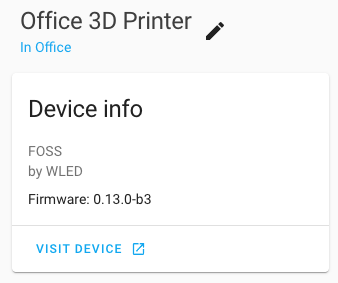 WLED 现在带有一个按钮,可直接跳转到该设备的 WLED Web 界面。
如果某个集成为多个设备提供同一个 Web 界面,它甚至还能深链到该设备对应的具体页面。
已经有 50 多个! 集成支持了这个功能,真的太棒了!随便举几个例子:MQTT、Tasmota、WLED、Synology、Plex、Netatmo、Pi-hole、RainMachine、Plugwise、Sure Petcare、Axis、UniFi Controller、FRITZ!Box,还有很多很多!
如果你是自定义集成开发者,也可以为自己的集成加入这个功能;在我们的开发者博客中了解详情。
实体分类
自从我们引入“设备”这个概念之后,系统里创建的实体越来越多,这当然是件好事!这意味着我们可以围绕更多设备功能来做自动化。不过,这也带来了一些新问题,比如自动生成的仪表板变得更杂乱、没用到的实体被暴露给语音助手,或者在操作整个区域时不小心把一些本不该动的东西也一起打开或关闭。让我用一个例子来解释最后这一点。
我们来想象一个墙插。它可以通过一个开关实体来开关电源;但与此同时,我这个墙插还有另一个开关,用来启用一个控制实体按键的儿童锁。现在,如果我把这个设备放在客厅区域里,然后执行“关闭客厅所有开关”,结果就会把墙插本身和儿童锁一起关掉!这显然不是我们想要的,对吧?
为了解决这些问题(以及更多类似问题),我们引入了:实体分类。
没有分类的实体现在会被视为主要实体,也就是你日常会使用、并期望设备具备的那些实体,比如电源开关。除此之外,实体还可以被标记为配置实体或诊断实体。配置实体用于提供设备设置选项,而诊断实体则用于提供设备相关信息。
拿一个灯泡来举例。灯光实体本身就是主要实体;但那个用来设置上电行为的 select 实体,其实是设备设置的一部分,因此属于配置实体。而提供灯泡信号强度的传感器,则属于诊断实体。
再看一个更直观的例子,来自 Sonos Move 音箱的设备页面:
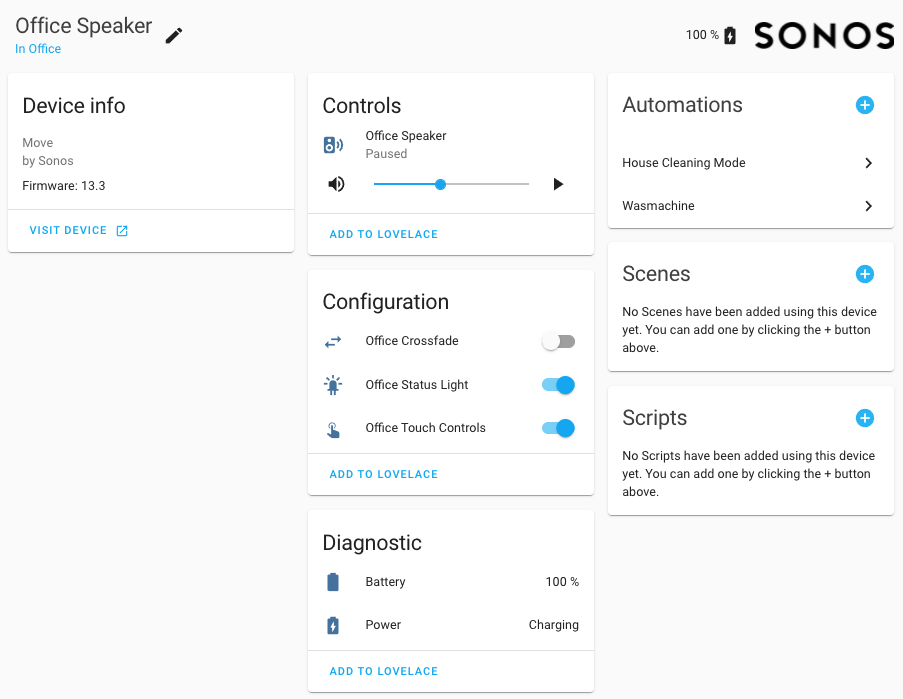 现在已经按实体分类展示的 Sonos 设备页面截图。
在上面的画面中,你可以看到 Sonos 音箱本身是主要控制实体,而那些提供设备配置选项的实体,以及提供设备本身诊断信息的实体,现在都被清晰地区分开来了。
对于这些非主要实体(也就是配置实体或诊断实体),我们现在会这样处理:
- 非主要实体会从自动生成的 Lovelace 仪表板中隐藏。这样可以减少杂乱,让自动生成的仪表板更适合日常使用。
- 非主要实体默认不会暴露给 Amazon Alexa 或 Google Assistant。当然你仍然可以手动暴露它们,但默认情况下我们不会把它们发给这些语音助手。
- 当服务调用以设备或设备所在区域为目标时,非主要实体不会被一起调用。只有在显式指定实体 ID 时,它们才会被调用。
请注意,上面这些内容都属于破坏性变更,在本文后面的破坏性变更部分也有列出。
和前面提到的“访问设备或服务”功能一样,这个新的组织能力也已经被很多维护者采用:60 多个集成!比如 Sonos、Z-Wave JS、Shelly、SwitchBot、deCONZ、Neato、Netatmo、August、MQTT、Hue、Roomba、Tibber、AirVisual、KNX、motionEye 等等。哦,对了,ESPHome 很快也会加入这个名单!
如果你是自定义集成开发者,也可以为自己的集成加入这个功能;在我们的开发者博客中了解详情。
图标选择器
为实体配上合适又好看的图标,会极大影响你的 Home Assistant 界面观感。
过去找图标这件事其实挺别扭的。你得跑去 Material Design Icons 网站找图标,记住代码,再把 mdi:<code> 填进实体里。体验并不理想,尤其是图标那么多,你的浏览器有时都未必愿意好好打开那个网站。
感谢 @piitaya 的出色工作,我们现在终于有了一个漂亮、好用、聪明又快速的图标选择器!是的,你现在可以直接在 Home Assistant 界面中搜索并选择图标了。
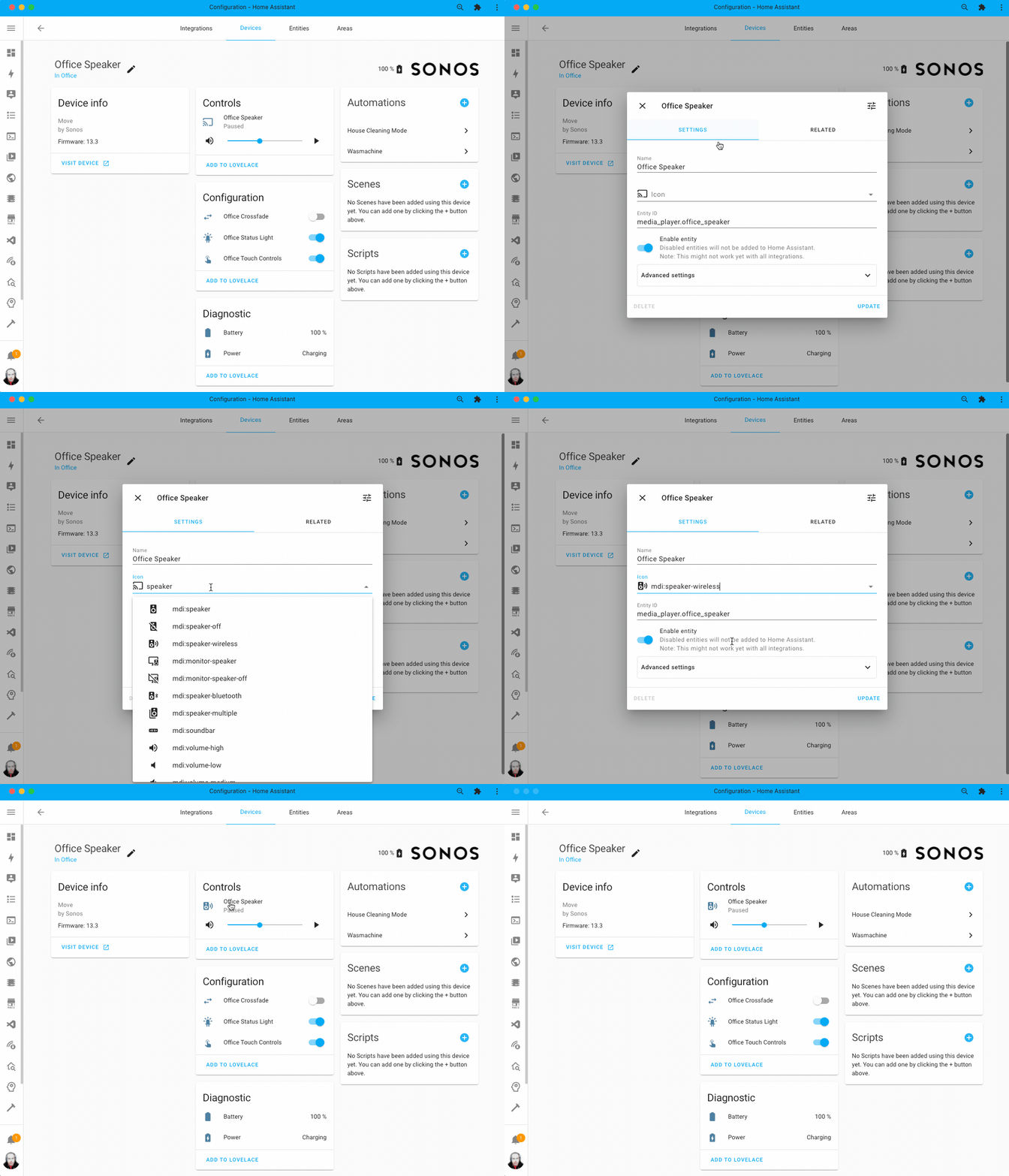 新图标选择器实际使用中的录屏。
当你开始输入时,它不仅会查找匹配 MDI 代码的图标,也会搜索图标的别名和分类。这样一来,你会更容易找到自己想要的图标。
第三方自定义图标集也可以使用这个功能;不过前提是图标集作者为它加入兼容支持。比如 arallsopp 的 Hue icons 就已经支持了。
Tuya 更新
上一个发布中,我们更新了 Tuya 集成,让它改用官方 API,而不是即将被移除的旧 API。遗憾的是,这次更新没有达到我们的标准,在这里我们想向你道歉。
Tuya 最初计划在 12 月弃用旧 API,留给用户 2 个月迁移时间。这个时间并不宽裕,所以我们决定继续推进新版集成的发布。后来 Tuya 把旧 API 下线时间又往后推了 6 个月,但那时我们已经来不及回头再发布旧版集成了。
更新后的 Tuya 集成存在一些 bug,而且与旧版集成及各种可用自定义组件相比,也缺少一些功能。这让部分用户体验并不好。为此,@frenck 花了大量时间,把 Tuya 集成提升到最新标准,并加入了大量新功能与 bug 修复。
现在几乎所有 Home Assistant 实体平台都已经支持了,包括(二元)传感器、遮盖、吸尘器,甚至连摄像头都有!不过也请理解,Tuya 的设备种类和变体非常多,所以仍然还有不少工作要做;但至少在这个版本中,我们已经尽最大努力打下了一个扎实的基础。
最后再补充一句:有人抱怨这个集成依赖云端。实际上,我们一直都同时支持本地 API 和云 API 的集成。基于云 API 的集成,让更多人无需把家中所有设备都换掉,也能开始使用 Home Assistant。虽然我们更推荐本地方案,但选择使用依赖云端的设备,还是完全本地的设备,本来就该由每个人自己决定。
一些实用的新模板过滤器
对于更进阶的用户来说,这次发布也带来了一些很有帮助的模板增强!
先从 @Petro31 添加的新 today_at 过滤器/函数说起。它可以让你快速得到“今天某个具体时间点”的 DateTime。如果你需要把它和另一个 DateTime 做比较,这会非常方便。比如:
接下来是 @raman325,他新增了 area_entities 和 area_devices 过滤器及函数,让你可以拿到某个区域中的所有设备或实体。这些方法会返回一个列表,你可以直接遍历它。
最后,@Petro31 还新增了一个 average 过滤器和函数。它的作用就和名字一样……会计算你传入列表的平均值。
其他值得注意的变化
这次发布当然还有更多内容,下面是其中一些值得关注的变化:
- 自动化和脚本的调试追踪现在会被保存下来!这样你在重启 Home Assistant 后也不会丢失它们了。感谢 @emontnemery。
- @frenck 对 number 实体做了改进,它现在可以显示为滑块,而不只是输入框。Home Assistant 会自动判断哪种呈现方式更合适。
- Add support for 风扇 groups! Thanks @bdraco!
- Thanks to @ludeeus, the Supervisor 集成 now has 二元sensor that can tell you which add-on is running or not.
- @allenporter 这次发布真的让我们惊艳了一把,他为 Home Assistant 带来了 WebRTC 串流和摄像头的初步支持。
- 而且这背后还有个非常好的理由:他还为 Home Assistant 加入了对 Nest Battery 摄像头和 Nest Battery Doorbell 摄像头的支持!感谢 @allenporter!
- 现在你登录 Home Assistant 时,已经有了一个“保持登录状态”的复选框!太棒了,感谢 @MartinTuroci。
- @goyney 将 Material Design Icons 更新到了 v6.4.95,确保我们的新图标选择器中拥有最新可用图标。
- Sure PetCare now supports the Felaqua 设备, thanks @benleb!
- The MQTT number platform now has support for providing a unit of measurement and resetting the number field (by @frenck and @emontnemery).
- The Broadlink 集成 added 传感器 for voltage, current, overload, and total consumption. Thanks @felipediel!
- WLED now has the much requested sliders for speed & intensity controls. Thanks, @rytilahti!
- OpenGarage has seen lots of updates and love from @Danielhiversen, adding lots of 传感器 in the process.
- With the recent improvements made to the VLC media player 集成 and add-on, there is now a way to get TTS working by connecting some speakers to your Blue, ODROID or 树莓派. Thanks, @mib1185 & @MartinHjelmare!
长期统计支持一直都是呼声很高的功能;这次发布为以下集成加入了长期统计支持:
- AEMET (thanks @Noltari)
- Efery (thanks @tkdrob)
- EnOcean (thanks @davidlb)
- Gogogate2 (thanks @thomas-svrts)
- Huisbaasje (thanks @dennisschroer)
- Nest (thanks @allenporter)
- Ondilo ICO (thanks @TheNogl)
- OpenWeatherMap (thanks @dkt01)
- Plugwise (thanks @bouwew)
- REST (thanks @koying)
- Scrape 传感器 (thanks @lukas-hetzenecker)
- Tado (thanks @Noltari)
- Tado 传感器 (thanks #58111)
- WAQI (thanks @davidlb)
新集成
欢迎以下新集成加入这次发布:
现在可在 UI 中配置的集成
以下集成现在可以直接通过 Home Assistant UI 进行设置:
- Aurora ABB Solar PV, done by @davet2001
- Efergy, done by @tkdrob
- Flux LED, done by @icemanch and @bdraco
- OctoPrint, done by @rfleming71
- Stookalert, done by @frenck
- Venstar, done by @garbled1
- VLC Media Player Telnet, done by @MartinHjelmare
发布 2021.11.1 - November 5
- Swap sharkiq 吸尘器 is_docked with is_charging (@tomgie - #58975) (sharkiq docs)
- Fix mop 属性 for unified mop and water box in Xiaomi Miio (@OGKevin - #58990) (xiaomi_miio docs)
- Fix timedelta-based 传感器 for xiaomi_miio (@rytilahti - #58995) (xiaomi_miio docs)
- Bump aiopvpc to 2.2.1 (@azogue - #59008) (pvpc_hourly_pricing docs)
- Accept all roborock 吸尘器 models for xiaomi_miio (@rytilahti - #59018) (xiaomi_miio docs)
- Fix Nut resources option migration (@ollo69 - #59020) (nut docs)
- Environment Canada config_flow fix (@gwww - #59029) (environment_canada docs)
- Bump velbus-aio to 2021.11.0 (@Cereal2nd - #59040) (velbus docs)
- Constrain urllib3 to >=1.26.5 (@frenck - #59043)
- Correct migration to recorder schema 22 (@emontnemery - #59048) (recorder docs)
- Increase time to authorize OctoPrint (@frenck - #59051) (octoprint docs)
- Remove use_time 传感器 from mjjsq humidifers (@rytilahti - #59066) (xiaomi_miio docs)
- Change minimum supported SQLite 版本 to 3.31.0 (@emontnemery - #59073) (recorder docs)
- Correct rescheduling of ExternalStatisticsTask (@emontnemery - #59076) (recorder docs)
- Bump flux_led to 0.24.14 (@bdraco - #59121) (flux_led docs)
发布 2021.11.2 - November 9
- Bump total_connect_client to 2021.11.2 (@austinmroczek - #58818) (totalconnect docs)
- Adjust frag_duration setting in stream (@uvjustin - #59135) (stream docs)
- Bump flux_led to 0.24.15 (@bdraco - #59159) (flux_led docs)
- Bump aioguardian to 2021.11.0 (@bachya - #59161) (guardian docs)
- Guard against flaky SimpliSafe API calls (@bachya - #59175) (simplisafe docs)
- Guard against missing data in ReCollect Waste (@bachya - #59177) (recollect_waste docs)
- Change ReCollect Waste 设备 class to date (@bachya - #59180) (recollect_waste docs)
- bump aioshelly to 1.0.4 (@mib1185 - #59209) (shelly docs)
- Bump flux_led to 0.24.17 (@bdraco - #59211) (flux_led docs)
- Fix tradfri group reachable access (@janiversen - #59217) (tradfri docs)
- Increase timeout for fetching 摄像头 data on Synology DSM (@mib1185 - #59237) (synology_dsm docs)
- Add Battery 传感器 regardless if the battery_percent_remaining 属性 is supported or not (@Adminiuga - #59264) (zha docs)
- Fix 条件 for fritz 集成 (@chemelli74 - #59281) (fritz docs)
- Remove illuminance 传感器 (@bieniu - #59305) (xiaomi_miio docs)
- Revert "Use DeviceInfo in shelly (#58520)" (@thecode - #59315) (shelly docs)
- Support generic xiaomi_miio 吸尘器 (@OGKevin - #59317) (xiaomi_miio docs)
- Bump paho-MQTT to 1.6.1 (@emontnemery - #59339) (MQTT docs) (shiftr docs)
- Bump velbusaio to 2021.11.6 (@Cereal2nd - #59353) (velbus docs)
- 更新 前端 to 20211108.0 (@bramkragten - #59364) (前端 docs)
发布 2021.11.3 - November 11
- Fix rpi_camera 设置 hanging on initialization (@enegaard - #59316) (rpi_camera docs)
- Fix 状态 of sense net_production 传感器 (@kbickar - #59391) (sense docs) (emulated_kasa docs)
- 更新 前端 to 20211109.0 (@bramkragten - #59451) (前端 docs)
- Fix zeroconf with sonos v1 firmware (@bdraco - #59460) (sonos docs)
- Ignore None 状态 in state_change_event (@dgomes - #59485) ([集成 docs])
- Fix wirelesstag 开关 arm/disarm (@sergeymaysak - #59515) (wirelesstag docs)
- Remove incomplete segment on stream 重启 (@uvjustin - #59532) (stream docs)
发布 2021.11.4 - November 15
- Air visual : robustness at startup when evaluate time interval (@jugla - #59544) (airvisual docs)
- Override api url in norway_air (@ludeeus - #59573) (norway_air docs) (met docs)
- Fix firmware status check for Fritz (@chemelli74 - #59578) (fritz docs)
- Always use a step size of 1 for Z-Wave js 风扇 (@mkowalchuk - #59622) (zwave_js docs)
- Fix favorite RPM max value in Xiaomi Miio (@bieniu - #59631) (xiaomi_miio docs)
- Bump zeroconf to 0.36.12 (@bdraco - #59133) (zeroconf docs)
- Bump zeroconf to 0.36.13 (@bdraco - #59644) (zeroconf docs)
- Bump greecliamate to 0.12.4 (@cmroche - #59645) (gree docs)
- Ensure flux_led bulbs 打开 even if brightness is 0 (@bdraco - #59661)
- 更新 aiolookin to 0.0.4 版本 (@ANMalko - #59684) (lookin docs)
- Fix bug in AirVisual re-auth (@bachya - #59685) (airvisual docs)
- Bump greeclimate to 0.12.5 (@cmroche - #59730) (gree docs)
- Bump flux_led to 0.24.21 (@bdraco - #59662) (flux_led docs)
- Bump flux_led to 0.24.24 (@bdraco - #59740) (flux_led docs)
- Fix invalid string syntax in French OwnTracks config flow (@spacegaier - #59752) (owntracks docs)
发布 2021.11.5 - November 19
- Use source list property instead of the 属性 in Denon AVR 集成 (@bieniu - #59768) (denonavr docs)
- Fix typo in 属性 for Fritz (@chemelli74 - #59791) (fritz docs)
- Fix Netgear init 错误 on orbi models (@starkillerOG - #59799) (netgear docs)
- Bump velbusaio to 2021.11.7 (@Cereal2nd - #59817) (velbus docs)
- Fix invalid string syntax in OwnTracks config flow translations (@spacegaier - #59838) (owntracks docs)
- Strip out deleted 实体 when configuring homekit (@bdraco - #59844) (homekit docs)
- Bugfix in Tuya Number value scaling (@PlusPlus-ua - #59903) (tuya docs)
- Fix Tuya back scaling in 温控 and Humidifer 实体 (@frenck - #59909) (tuya docs)
- Store: copy pending data (@balloob - #59934)
- Remove test_check_package_version_does_not_match (@emontnemery - #59785)
如果你需要帮助……
……欢迎随时使用我们非常活跃的 论坛,或者加入我们的 聊天频道。
如果你遇到了这次发布引入的问题,请到我们的 issue tracker 提交反馈,并确保填写问题模板中的所有字段。
破坏性变更
下面按主题或集成列出了本次发布中的破坏性变更。点击对应项目即可阅读该条变更的更多说明。
实体 that are now shown on the 设备 page on the configuration or diagnostic
section, will no longer be targeted and called by 服务 calls that target
the specific 设备 or area the 设备 or 实体 is in.
If you need to make a 服务 call to these 实体, you will need to call them by their 实体 ID explicitly.
Please note: This does not apply to 实体 groups, as groups are explicitly based on 实体 (unlike areas) and thus still work as before.
(@emontnemery - #57671)
实体 that are now shown on the 设备 page on the configuration or diagnostic
section, will no longer be exposed by default to Amazon Alexa or Google Assistant.
If you want to expose these 实体, you'll need to expose them explicitly.
The Home Assistant project has now explicitly defined a set of databases that are supported by the recorder.
We now support the following databases:
- MariaDB ≥ 10.3
- MySQL ≥ 8.0
- PostgreSQL ≥ 12
- SQLite ≥ 3.32.1
All other databases and database versions are now deprecated.
If your used or configured database doesn't match any of the above requirements, a 警告 will be logged. As of Home Assistant 2022.1, the recorder will no longer connect to an unsupported database.
(@emontnemery - #58161) (recorder docs)
It is no longer possible to filter out state_changed events from the
recorder's event_types exclude filter.
A 警告 will be logged in Home Assistant 核心 2021.11 and the 配置 will be rejected in Home Assistant 核心 2022.2.
Python 3.8 has been deprecated because Python 3.10 has been released. Support will be dropped in Home Assistant 2022.1.
Support for Python 3.10 hasn't completed yet, however we aim to complete that before the 3.8 deprecation period has ended. It is advised to 升级 to Python 3.9 at this point.
If you run Home Assistant OS, 受监管模式 or the 容器 安装 type: No 动作 is required from your end, we will take care of this for you.
The Aurora ABB Solar PV 集成 migrated to 配置 via the UI. Configuring Aurora ABB Solar PV via YAML 配置 has been deprecated and will be removed in a future Home Assistant 发布.
Your existing YAML 配置 is automatically imported on 升级 to this 发布; and thus can be safely removed from your YAML 配置 after upgrading.
(@davet2001 - #36300) (aurora_abb_powerone docs)
AVM FRITZ!Box Tools 服务 now ask for a device_id and no longer for an entity_id.
Please review your 自动化 and 脚本 accordingly.
(@chemelli74 - #58005) (fritz docs)
The DLNA Digital Media Renderer 集成 migrated to 配置 via the UI. Configuring DLNA Digital Media Renderer via YAML 配置 has been deprecated and will be removed in a future Home Assistant 发布.
Your existing YAML 配置 is automatically imported on 升级 to this 发布; Please check the 集成 配置 page for imported DLNA-DMR 配置. Once it has been migrated, it can be safely removed from your YAML 配置.
(@chishm - #56886) (dlna_dmr docs)
The Efergy 集成 has been migrated to 配置 via the UI. Configuring Efergy via YAML 配置 has now been deprecated and will be removed in a future Home Assistant 发布.
Your existing YAML 配置 is automatically imported on 升级 to this 发布; and thus can be safely removed from your YAML 配置 after upgrading.
Additionally, the following 传感器 names have changed:
- Energy Usage is now Power Usage.
- Any configured energy period, for example, monthly was Energy Consumed is now Monthly Consumption.
- Any configured cost period, for example, monthly was Energy Cost is now Monthly Energy Cost.
- Per-设备 Usage is now Power Usage with the 传感器 id trailing.
(@tkdrob - #56890) (efergy docs)
The Environment Canada 集成 has been migrated to 配置 via the UI. Configuring Environment Canada via YAML 配置 has now been deprecated and will be removed in a future Home Assistant 发布.
Your existing YAML 配置 is automatically imported on 升级 to this 发布; and thus can be safely removed from your YAML 配置 after upgrading.
Additionally, non-loop radar images are no longer supported; 传感器 实体 now have the location of the station as a part of the 传感器's 实体 name.
(@gwww - #57127) (environment_canada docs)
The Flux LED 集成 has been migrated to 配置 via the UI. Configuring Flux LED via YAML 配置 has now been deprecated and will be removed in a future Home Assistant 发布.
Your existing YAML 配置 is automatically imported on 升级 to this 发布; and thus can be safely removed from your YAML 配置 after upgrading.
(@icemanch - #56354) (flux_led docs)
The previously deprecated HomeKit 配置 options safe_mode,
zeroconf_default_interface, and auto_start have now been removed.
If you still have these options in your YAML 配置, you must be remove them from your YAML 配置.
When the option list of a Dropdown helper / input_select is updated,
it will try to maintain the currently selected option, if the selected
option also is present in the new options provided; otherwise it will
reset to the first option from the newly provided list.
Previously, when a new list of options was provided, it would always reset to the first item of the list.
(@frenck - #53334) (input_select docs)
Previously, IQVIA supported long-term statistics for the Asthma Index: Tomorrow
传感器. This is incorrect: long-term statistics are meant for actual,
current measurements (not future forecasts). Therefore, long-term statistics
support has been removed for this 传感器.
(@bachya - #57687) (iqvia docs)
The Itho Daalderop Spider 集成 previously migrated to 配置 via the UI. Configuring Itho Daalderop Spider via YAML 配置 has now been deprecated and will be removed in a future Home Assistant 发布.
Your existing YAML 配置 has been automatically imported; and thus can be safely removed from your YAML 配置 after upgrading.
(@peternijssen - #57974) (spider docs)
The default voice is changed to JennyNeural; The previous default ZiraRUS
(Standard Voice) is no longer supported in eastus or any other region that
has rolled out GA neural voices as Standard voices become deprecated.
(@tylergibson - #58499) (microsoft docs)
The OctoPrint 集成 migrated to 配置 via the UI. Configuring OctoPrint via YAML 配置 has been deprecated and will be removed in a future Home Assistant 发布.
Your existing YAML 配置 is automatically imported on 升级 to this 发布; and thus can be safely removed from your YAML 配置 after upgrading.
The following 传感器 have been removed:
sensor.<printer>_time_remainingsensor.<printer>_time_elapsed
The following 传感器 have been added:
sensor.octoprint_start_timesensor.octoprint_estimated_finish_time
(@rfleming71 - #58040) (octoprint docs)
The 属性 (wifi_signal and distance_sensor) for OpenGarage 遮盖
are removed and replaced by individual 传感器.
Also, door_state is removed as an 属性, but you can use the 状态
directly instead.
Please 更新 any 自动化 or 脚本 that depend on the removed 属性.
(@Danielhiversen - #57976) (opengarage docs)
The OpenZWave (ozw) 集成 is being marked as deprecated. The upstream
project is not currently being maintained, and has not reached stable status.
We recommend transitioning to the Z-Wave JS integrations.
While the 集成 is not currently slated for removal, it will no longer be receiving updates and may be removed at a later date.
See the Z-Wave JS migration 文档 更多信息.
Screenlogic 灯光 have moved to the 灯光 platform. The 开关 that
previously represented these 灯光 will need to manually be deleted in
Configuration >> Entities. If you are using these 开关 实体 in
your 自动化 or 脚本, you will need to 更新 those to use the new
灯光 实体 instead.
The 状态 is now refreshed with a short delay to ensure the toggles do not flip/flop between 状态 as the controller takes ~600ms to make the change.
(@bdraco - #55467) (screenlogic docs)
The 传感器 状态 属性 of modem_callerid 集成 are now only
populated when the values are known.
If you use these 属性 in your 自动化 or 脚本, you'll need to adjust those to be able to handle missing 属性.
(@tkdrob - #57774) (modem_callerid docs)
The previously deprecated YAML 配置 of the Rainforest Eagle 集成 has been removed.
Rainforest Eagle is now configured via the UI, any existing YAML 配置 has been imported in previous releases and can now be safely removed from your YAML 配置 files.
(@frenck - #57636) (rainforest_eagle docs)
RainMachine 服务 have been reorganized and now utilize a Home Assistant target (实体 ID) or selector (设备 ID) instead of using an internal RainMachine identifier.
Additionally, 服务 are restricted to only the targets that apply:
设备 服务 (i.e., must be provided a 设备 ID)
pause_wateringstop_allunpause_watering
实体 服务 (i.e., must be provided an associated 开关 实体 ID [either a program or a zone])
disable_programdisable_zoneenable_programenable_zonestart_programstart_zonestop_programstop_zone
(@bachya - #57145) (rainmachine docs)
The last_update 状态 属性 has been moved to a stand-alone 实体
(and dropped from battery and location entities). If you used this 属性
in your 脚本 or 自动化; you'll need to adjust those to this change.
(@epenet - #57750) (renault docs)
SimpliSafe requires a new web-based authentication method. When starting up, Home Assistant will automatically prompt you to re-authorize your instance.
(@bachya - #57212) (simplisafe docs)
The SolarEdge 集成 now provides unique IDs for its 实体, so the 实体 are now visible and customizable in the Home Assistant 前端.
Some names have been corrected as they had incorrect descriptions. This may cause some of your 实体 IDs provided by SolarEdge to have changed this 发布.
In case you have been using these 实体 in your 自动化, 脚本, or 仪表盘, you can either rename those 实体 IDs to the old 实体 ID or adjust the places you've used them accordingly.
Additionally, if a 传感器 you used disappeared, it might have been disabled by default during 升级. Please be sure to check if the 实体 is enabled in that case.
(@terminet85 - #55902) - (@purcell-lab - #58773)
The sonos.set_option 服务 has been removed and replaced with
individual switch 实体 which both control the features and display
if currently enabled.
The night_sound and speech_enhance 属性 on the
Sonos media_player 实体 are also removed.
If you are using those in your 自动化 or 脚本, you'll need to replace
these with the new switch 实体.
(@jjlawren - #54502) (sonos docs)
The Stookalert 集成 has been migrated to 配置 via the UI. Configuring Stookalert via YAML 配置 has now been deprecated and will be removed in a future Home Assistant 发布.
Your existing YAML 配置 is automatically imported on 升级 to this 发布; and thus can be safely removed from your YAML 配置 after upgrading.
(@frenck - #57119) (stookalert docs)
The 2021.09 发布 deprecated the usage of "snapshot" in the Supervisor (hassio)
集成 and was scheduled to be removed in 2021.11, that is now.
Old 服务 and 服务 data that contained "snapshot" has now been removed, and you need to 更新 your 配置 if you use any of these to continue to use it.
If you used the snapshot argument for the 恢复 服务 you now have to replace that with slug
Example:
(@ludeeus - #57652) (hassio docs)
The previously deprecated YAML 配置 of the UptimeRobot 集成 has been removed.
UptimeRobot is now configured via the UI, any existing YAML 配置 has been imported in previous releases and can now be safely removed from your YAML 配置 files.
(@ludeeus - #57761) (uptimerobot docs)
The offset parameter for utility_meter 传感器 is now limited to at most
27 days. If you used more then 27 days you must now migrate to cron.
(@dgomes - #55625) (utility_meter docs)
The Venstar 集成 migrated to 配置 via the UI. Configuring Venstar via YAML 配置 has been deprecated and will be removed in a future Home Assistant 发布.
Your existing YAML 配置 is automatically imported on 升级 to this 发布; and thus can be safely removed from your YAML 配置 after upgrading.
The humidifer and timeout options have been removed, and thus ignored when importing your YAML 配置 into the UI.
(@garbled1 - #58152) (venstar docs)
Due to upstream library updates, a breaking change was introduced that required
changes to sensor and binary_sensor 实体.
Circuit, Burner and Compressor have been separated out from the "main" 设备. Multiple circuits and burners now allow "duplicate 传感器", we've added the circuit or burner number as suffix.
Most of you should not see a difference, but complex installations (with more than one circuit and/or burner), will have multiple 实体, suffixed with their burner or 实体 IDs.
For example, if you have two circuits instead of a single climate.vicare
实体 you will now instead have two 实体:
climate.vicare_1climate.vicare_2
This will provide you more control, but requires you to adapt your existing 脚本 and 自动化 to use the new 实体 IDs.
The same has been done for sensor, binary_sensor and water_heater 实体.
Also, note that 二元sensor might be 创建 twice since the unique IDs for
those 实体 have changed. Please remove the old disabled binary_sensor
实体, in case you encounter this.
(@oischinger - #57700) (vicare docs)
The VLC media player Telnet 集成 migrated to 配置 via the UI. Configuring VLC media player Telnet via YAML 配置 has been deprecated and will be removed in a future Home Assistant 发布.
Your existing YAML 配置 is automatically imported on 升级 to this 发布; and thus can be safely removed from your YAML 配置 after upgrading.
(@MartinHjelmare - #57513) (vlc_telnet docs)
属性 from the 吸尘器 实体 have been replaced with 传感器.
This means that all your references to these 属性 must be replaced with its 传感器 in your 自动化, 脚本 and 仪表盘.
Some 传感器 have been disabled by default and need manual enablement,
once the 集成 has been set up. For example, the 属性
mop_attached: true has now been replaced with
binary_sensor.<NAME>_mop_attached.
(@OGKevin - #54990) (xiaomi_miio docs)
The option to override the Yeelight model will only appear if the detected model is not in the database. Otherwise, it will be hidden.
(@bdraco - #56967) (yeelight docs)
向以下集成告别
The following 集成 are no longer available as of this 发布:
- Essent has been removed. The API is no longer usable for 此integrations and has therefore been removed. (@TheLastProject - #56991)
- Lyft has been previously deprecated and now removed. API keys are no longer being provided. (@frenck - #57638)
- Nello has been removed. The 服务 are no longer available, and have been offline for over 6 months. (@pattyland - #57926)
- Huawei Router has been removed. It relies on web scraping, which is no longer allowed. (@yuvalabou - #57136)
- Wink has been previously deprecated and now removed. (@frenck - #57634)
全部变更
- Bump 版本 to 2021.11.0dev0 (@frenck - #56835)
- Strictly type Nanoleaf (@milanmeu - #56852) (nanoleaf docs)
- Add 设备 Info to Nanoleaf (@milanmeu - #56856) (nanoleaf docs)
- Add long-term statistics support for rain 传感器 (@cgtobi - #56847) (netatmo docs)
- removing excess variable (@lanrat - #56849) (keyboard_remote docs)
- Rename 状态 to value_fn - picnic 传感器 (@cdce8p - #56889) (picnic docs)
- Deduplicate controls of UniFi 服务 (@Kane610 - #56834) (unifi docs)
- Add kPa as a pressure unit (@gwww - #56885)
- Remove some redundant code from trace (@emontnemery - #56883) (trace docs)
- Use HTTPStatus instead of HTTP_* consts in aiohttp web response statuses (@scop - #56541)
- Enable template icons for template numbers (@JeffLIrion - #56154) (template docs)
- Improve deCONZ 服务 code quality (@Kane610 - #56904) (deconz docs)
- Use HTTPStatus instead of HTTP_* constants in various test mocks (@scop - #56543)
- Bump fritzconnection to 1.7.0 (@chemelli74 - #56924) (fritz docs) (fritzbox_callmonitor docs)
- Add SSDP discovery to Nanoleaf (@milanmeu - #56907) (nanoleaf docs)
- Get min and max color temperature for Nanoleaf 灯光 from library (@milanmeu - #56863) (nanoleaf docs)
- 升级 watchdog to 2.1.6 (@frenck - #56933) (folder_watcher docs)
- 更新 denonavr codeowner (@ol-iver - #56940) (denonavr docs)
- Use NamedTuple - iqvia Rating (@cdce8p - #56943) (iqvia docs)
- 日志 when Nanoleaf is unavailable (@milanmeu - #56921) (nanoleaf docs)
- Remove injected logger in Ambient PWS and OpenUV (@bachya - #56920) (openuv docs) (ambient_station docs)
- Flux led config flow (@icemanch - #56354) (flux_led docs) (breaking-change)
- Remove icon if device_class is defined - homekit_controller (@cdce8p - #56946) (homekit_controller docs)
- Sia package 更新 to 3.0.2 (@eavanvalkenburg - #56896) (sia docs)
- ZHA support for additional 实体 on ElectricalMeasurement ZCL cluster (@Adminiuga - #56909) (zha docs)
- Add strict typing to Tractive 集成 (@bieniu - #56948) (tractive docs)
- Bump gios library to 2.1.0 (@bieniu - #56984) (gios docs)
- 更新 surepetcare test (@Danielhiversen - #56871) (surepetcare docs)
- 更新 pyhomematic to 0.1.75 (@danielperna84 - #56995) (homematic docs)
- Support connecting to ElkM1 over TLS 1.2 (@gwww - #56887) (elkm1 docs)
- Bump nettigo_air_monitor library to 版本 1.1.0 (@bieniu - #56952) (nam docs)
- Use Final type only when needed in Tractive (@bieniu - #57000) (tractive docs)
- Minor improvements to deCONZ 灯光 platform (@Kane610 - #56953) (deconz docs)
- Use EntityDescription - homekit_controller (@cdce8p - #56945) (homekit_controller docs)
- Fix tractive flaky test (@balloob - #57026) (tractive docs)
- Remove Essent 集成 (@TheLastProject - #56991) (essent docs) (breaking-change)
- Prevent opening of sockets in kira tests (@emontnemery - #57038) (kira docs)
- Use NamedTuple for homekit valve type + 服务 info (@cdce8p - #56944) (homekit docs)
- Use hass_client_no_auth test fixture in additional tests (@emontnemery - #57037)
- Use NamedTuple for darksky 条件 picture (@cdce8p - #56942) (darksky docs)
- 升级 coverage to 6.0 (@frenck - #57041)
- Mock out network.util.async_get_source_ip in tests (@emontnemery - #57039) (local_ip docs)
- Fix multiline lambda formatting - homekit_controller (@cdce8p - #57046) (homekit_controller docs)
- Use NamedTuple for repetier API methods (@cdce8p - #56941) (repetier docs)
- Add ZHA HVAC 动作 传感器 (@Adminiuga - #57021) (zha docs)
- Prevent tplink from opening sockets in tests (@bdraco - #57058) (tplink docs)
- Prevent dlna_dmr from opening sockets in tests (@bdraco - #57059) (dlna_dmr docs)
- Activate mypy for rpi_power (@Misiu - #57047) (rpi_power docs)
- Bump nest 0.3.7 to prepare for WebRTC support (@allenporter - #57089) (nest docs)
- Deprecate Python 3.8 (@balloob - #57079) (breaking-change)
- Additional place to use isinstance rather than do a string compare (@Kane610 - #57094) (deconz docs)
- 升级 jinja2 to 3.0.2 (@frenck - #57095)
- 升级 sentry-sdk to 1.4.3 (@frenck - #57096) (sentry docs)
- 升级 debugpy to 1.5.0 (@frenck - #57098) (debugpy docs)
- Prevent opening of sockets in MQTT tests (@emontnemery - #57101) (MQTT docs)
- Fix color util links to Philips Hue 文档 (@bokub - #57099)
- Add additional properties to node_status WS cmd (@raman325 - #56927) (zwave_js docs)
- Use current config entry standards for OpenUV (@bachya - #57137) (openuv docs)
- Add support for POLY and RLY in Coinbase (@TomBrien - #57144) (coinbase docs)
- Add additional 设备 to flux_led discovery (@bdraco - #57086) (flux_led docs)
- Block tests from opening sockets (@emontnemery - #55516)
- Write flux_led 状态 after turning on/off (@bdraco - #57152) (flux_led docs)
- Add sw_version and model to flux_led 设备 info (@bdraco - #56958) (flux_led docs)
- Add missing return type to async_unload_entry and async_setup_entry (@Misiu - #57115)
- Add home-assistant/核心 as codeowner for recorder (@emontnemery - #57224) (recorder docs)
- 升级 coverage to 6.0.1 (@frenck - #57235)
- Toon, support Energy 仪表盘 by default (@frenck - #57233) (toon docs)
- Ensure that WattTime is strictly typed (@bachya - #57130)
- Improve deCONZ signal strings (@Kane610 - #57140) (deconz docs)
- Refactor persistent 通知 to no longer route all data via a 服务 (@balloob - #57157) (persistent_notification docs) (breaking-change)
- Allow resetting an MQTT number (@emontnemery - #57161) (MQTT docs)
- Use EntityDescription - darksky (@cdce8p - #57083) (darksky docs)
- Enable template icons for template selects (@JeffLIrion - #57092) (template docs)
- Refactor Xiaomi 吸尘器 to 传感器 (@OGKevin - #54990) (xiaomi_miio docs) (breaking-change)
- 升级 ambee to 0.4.0 (@frenck - #57264) (ambee docs)
- Use current config entry standards for Ambient PWS (@bachya - #57133) (ambient_station docs)
- Improve dlna_dmr code quality (@chishm - #56886) (dlna_dmr docs) (breaking-change)
- Motion_blinds fix up button not available for unidirection blinds (@starkillerOG - #57266) (motion_blinds docs)
- Add WebSocket API for intiting a WebRTC stream (@allenporter - #57034) (摄像头 docs)
- Use _attr in 17track (@yuvalabou - #57187) (seventeentrack docs)
- Add config flow to Stookalert (@frenck - #57119) (stookalert docs) (breaking-change)
- Drop more persistent 通知 patches (@balloob - #57295) (dlna_dmr docs) (waze_travel_time docs) (google_travel_time docs) (vizio docs) (climacell docs)
- Disconnect websockets after token is revoked (@dboslee - #57091) (websocket_api docs)
- Reorganize RainMachine 服务 (@bachya - #57145) (rainmachine docs) (breaking-change)
- Add 设备 info to nws (@MatthewFlamm - #57153) (nws docs)
- Use built-in logic for options handler in AirVisual (@bachya - #57131) (airvisual docs)
- Use current config entry standards for SimpliSafe (@bachya - #57141) (simplisafe docs)
- Bump greeclimate to 0.11.9 (@cmroche - #57358) (gree docs)
- Handle prepare timeout in websocket API (@balloob - #55989) (websocket_api docs)
- Add Sure Petcare Felaqua 设备 (@benleb - #56823) (surepetcare docs)
- Add Shelly config entry 重载 on 设备 config change (@thecode - #57356) (shelly docs)
- Create 设备 for Growatt (@indykoning - #57068) (growatt_server docs)
- Add -9999 错误 fix back in Xiaomi Miio (@bieniu - #57399) (xiaomi_miio docs)
- Add System Bridge display 传感器 (@timmo001 - #57019) (system_bridge docs)
- Improve Whirlpool component code quality (@abmantis - #57357) (whirlpool docs)
- Flux led color support (@icemanch - #57353) (flux_led docs)
- Convert flux_led to use asyncio (@bdraco - #57440) (flux_led docs)
- 更新 pyfronius to 0.7.0 (@farmio - #57279) (fronius docs)
- Bump aiodiscover to 2.4.5 (@bdraco - #57439) (dhcp docs)
- 升级 rvx to 0.7.0 (@spahlimi - #57430) (yamaha docs)
- Bump pytautulli to 21.10.0 (@tkdrob - #57449) (tautulli docs)
- Add config flow for efergy (@tkdrob - #56890) (efergy docs) (breaking-change)
- Use _attr for Suez water (@yuvalabou - #57278) (suez_water docs)
- Add test of lazy_error in modbus (@janiversen - #57170) (modbus docs)
- 更新 somecomfort library to 0.7.0 (@rdfurman - #57214) (honeywell docs)
- Add Netgear ssid and conn_ap_mac 传感器 (@starkillerOG - #57226) (netgear docs)
- Bump Daikin 版本, catch new exception during config_flow (@fredrike - #57080) (daikin docs)
- Add xiaomi 吸尘器 -9999 fix back (@OGKevin - #57473) (xiaomi_miio docs)
- Add energy management for efergy (@tkdrob - #57472) (efergy docs)
- Don't override methods marked as final (@cdce8p - #57477)
- Use EntityDescription - openweathermap (@cdce8p - #56888) (openweathermap docs)
- Add dhcp support for tplink KP401 (@bdraco - #57456) (tplink docs)
- Use current config entry standards for AirVisual (@bachya - #57132) (airvisual docs)
- Bump
nettigo_air_monitorlibrary to 版本 1.1.1 (@bieniu - #57483) (nam docs) - 开关 to config_flow for Environment Canada (@gwww - #57127) (environment_canada docs) (breaking-change)
- Add the 开关 platform to flux_led (@bdraco - #57444) (flux_led docs) (new-platform)
- Add DHCP discovery for additional Zengge 设备, generic magichome strips (@bdraco - #57408) (flux_led docs)
- Use 实体 description for Ezviz 传感器 (@RenierM26 - #56634) (ezviz docs)
- Streamline modbus before 100% coverage. (@janiversen - #57478) (modbus docs)
- Add ability to re-auth WattTime (@bachya - #56582) (watttime docs)
- Fix watttime config flow and tests (@MartinHjelmare - #57498) (watttime docs)
- Move attribution 属性 to 实体 base class (@frenck - #57492) (weather docs) (air_quality docs)
- Allow MQTT discovery availability shortcut (@jbouwh - #57479) (MQTT docs)
- Override the jinja2 int filter (@emontnemery - #57470)
- Fix Tuya 错误 when removing 设备 (@frenck - #57512) (tuya docs)
- Pass 设备 manager directly in Tuya registry cleanup (@frenck - #57511) (tuya docs)
- 实体 属性 cleanup in Tuya base 实体 (@frenck - #57510) (tuya docs)
- Migrate attribution 属性 for Picnic (@frenck - #57507) (picnic docs)
- Migrate attribution 属性 for AmberElectric (@frenck - #57505) (amberelectric docs)
- Migrate attribution 属性 for UptimeRobot (@frenck - #57508) (uptimerobot docs)
- Migrate attribution 属性 for Arlo (@frenck - #57504) (arlo docs)
- Migrate attribution 属性 for Stookalert (@frenck - #57503) (stookalert docs)
- 升级 flake8-comprehensions to 3.7.0 (@frenck - #57520)
- 升级 coverage to 6.0.2 (@frenck - #57518)
- Add statistics support to nest 传感器 (@allenporter - #57393) (nest docs)
- Bump
accuweatherlibrary to 版本 0.3.0 (@bieniu - #57497) (accuweather docs) - MQTT rework constants (@jbouwh - #57529) (MQTT docs)
- Move all Tuya 设备 handling into 设备 listener class (@frenck - #57523) (tuya docs)
- Move Tuya remap method from base to 灯光 实体 class (@frenck - #57527) (tuya docs)
- Use EntityDescription - bmw_connected_drive (@cdce8p - #56861) (bmw_connected_drive docs)
- Alphabetize parts of 设备 registry code (@emontnemery - #57532) (config docs)
- Tweaks to Tuya base 实体 (@frenck - #57526) (tuya docs)
- Use Tuya endpoints values from upstream library (@frenck - #57537) (tuya docs)
- Bump pytradfri to 7.0.7 (@janiversen - #57543) (tradfri docs)
- 更新 flake8 related packages (@cdce8p - #57538)
- Add 服务 to Rainmachine to push weather data from Home Assistant (@shbatm - #57354) (rainmachine docs)
- Refactor Tuya 设备 handling (@frenck - #57545) (tuya docs)
- Search for areas, 设备 and 实体 in 脚本 choose 动作 (@emontnemery - #57554)
- Add statistics tests for 传感器 with changing 设备 class (@emontnemery - #57317) (传感器 docs)
- Replace all Tuya 设备 property constants with an Enum (@frenck - #57559) (tuya docs)
- Always include start point for statistics (@emontnemery - #57182) (recorder docs) (传感器 docs)
- Refresh the bond token if it has changed and available (@bdraco - #57583) (bond docs)
- Fix single channel controllers with flux_led (@bdraco - #57458) (flux_led docs)
- Use a human readable model name in flux_led (@bdraco - #57519) (flux_led docs)
- Warn user if Gateway is already paired (@janiversen - #57530) (tradfri docs)
- Add Nest WebRTC and support Nest Battery 摄像头 and Nest Battery Doorbell (@allenporter - #57299) (摄像头 docs) (nest docs)
- Add a use_time 传感器 for Xiaomi_miio 加湿器 (@jbouwh - #57560) (xiaomi_miio docs)
- Add unique_id support for eq3btsmart (@lkempf - #57603) (eq3btsmart docs)
- Add support for multiple Whirlpool airconditioners (@abmantis - #57588) (whirlpool docs)
- Improve 警告 prints for 传感器 statistics (@emontnemery - #57605) (传感器 docs)
- Bump 版本 (@Cereal2nd - #57607) (velbus docs)
- Use gather ipv wait to remove credentials to catch exceptions (@balloob - #57596)
- Guard linking credential that is already linked (@balloob - #57595) (auth docs)
- Prevent event loop delay / instability from discovery (@bdraco - #57463) (zeroconf docs) (ssdp docs)
- Clarify that only HTTPS can be used in fitbit (@ammgws - #57116) (fitbit docs)
- ESPHome move ReconnectLogic to aioesphomeapi (@OttoWinter - #57601) (esphome docs)
- Provide device_id in hue_event (@krys1976 - #56982) (hue docs)
- Refactor Tuya 温控 platform (@frenck - #57609) (温控 docs) (tuya docs)
- Modbus baseplatform.py and Validators.py 100% coverage (activate coverage) (@janiversen - #57546) (modbus docs)
- Use EntityDescription in Tuya 开关 platform (@frenck - #57581) (tuya docs)
- Remove 调试 日志 (@balloob - #57619)
- Add 二元sensor platform to Tuya (@frenck - #57623) (tuya docs) (new-platform)
- 更新 tests searching for areas referenced in 自动化 (@emontnemery - #57558)
- Remove myself as code owner from Toon (@frenck - #57625) (toon docs)
- Use classmethod in Tuya TypeData classes (@frenck - #57627) (tuya docs)
- Prettify Tuya 实体 class names (@frenck - #57629) (tuya docs)
- Use entity_registry_enabled_default for Nut 传感器 (@ollo69 - #56854) (nut docs)
- Remove deprecated Wink 集成 (@frenck - #57634) (discovery docs) (wink docs) (breaking-change)
- Nut: Use coordinator data, code cleanup and add test coverage (@ollo69 - #57643) (nut docs)
- Correct 状态 classes for systemmonitor 传感器 (@mib1185 - #57615) (systemmonitor docs)
- Remove YAML 配置 from Rainforest Eagle (@frenck - #57636) (rainforest_eagle docs) (breaking-change)
- Use HTTPStatus instead of HTTP_* int constants in mobile_app responses (@scop - #56418) (mobile_app docs)
- Use reference strings in soma (@jasonmadigan - #57564) (soma docs)
- 升级 pyyaml to 6.0 (@frenck - #57648)
- Remove snapshot from hassio 集成 (@ludeeus - #57652) (hassio docs) (breaking-change)
- Add config and diagnostic 实体 (@emontnemery - #57528) (config docs)
- Bump flux_led to 0.24.5 (@bdraco - #57653) (flux_led docs)
- Late review comments. (@janiversen - #57654) (modbus docs)
- Migrate attribution 属性 for bbox (@frenck - #57650) (bbox docs)
- Migrate attribution 属性 for bitcoin (@frenck - #57651) (bitcoin docs)
- Migrate attribution 属性 for Aftership (@frenck - #57649) (aftership docs)
- Remove deprecated Lyft 集成 (@frenck - #57638) (lyft docs) (breaking-change)
- Only pass libav logger messages when stream logger is set to 调试 (@uvjustin - #57616) (stream docs)
- Add select platform to Tuya (@frenck - #57674) (tuya docs)
- Clean up unused loggers (@tkdrob - #57662)
- 更新 xknx to 版本 0.18.10 (@marvin-w - #57635) (knx docs)
- Add support for 设备 配置 URL (@emontnemery - #57539) (config docs)
- Fix lint issue (@balloob - #57694)
- Add 传感器 platform to Tuya (@frenck - #57668) (tuya docs) (new-platform)
- Port unmerged fixes from tuya_v2 (@pabigot - #57624) (tuya docs)
- Add number platform to Tuya (@frenck - #57672) (tuya docs)
- Add 实体 category to WLED (@balloob - #57693) (wled docs)
- Add 服务 配置 URL to Stookalert (@frenck - #57697) (stookalert docs)
- Add 设备 配置 URL to Plugwise (@frenck - #57696) (plugwise docs)
- Add 服务 配置 URL to Spotify (@frenck - #57701) (spotify docs)
- Bump 前端 to 20211014.0 (@balloob - #57706) (前端 docs)
- Add support for 实体 categories to NUT 实体 (@mib1185 - #57689) (nut docs)
- Add support for 实体 categories to Synology DSM 实体 (@mib1185 - #57690) (synology_dsm docs)
- Optimize 更新 calls for AVM Fritz!Smarthome 设备 (@mib1185 - #57579) (fritzbox docs)
- Skip auto-更新 when fqdn and ssl-verfiy is used for Synology DSM (@mib1185 - #57568) (synology_dsm docs)
- Add url to CO2signal (@balloob - #57703) (co2signal docs)
- Add 配置 url to Synology DSM (@mib1185 - #57704) (synology_dsm docs)
- Add state_class to EnOcean 传感器 (@davidlb - #57666) (enocean docs)
- Remove long-term statistics from IQVIA forecast 传感器 (@bachya - #57687) (iqvia docs) (breaking-change)
- Add 实体 category to Shelly (@bieniu - #57705) (shelly docs)
- Add strict typing to goalzero (@tkdrob - #57680) (goalzero docs)
- Add configuration_url to Uptime Robot (@ludeeus - #57709) (uptimerobot docs)
- push motionblinds to 0.5.6 (@starkillerOG - #57707) (motion_blinds docs)
- Add 服务 配置 URL to Verisure (@frenck - #57713) (verisure docs)
- Add 服务 配置 URL to Speedtest.net (@frenck - #57715) (speedtestdotnet docs)
- Fix platform typo in Tuya const (@ludeeus - #57716) (tuya docs)
- Add 设备 配置 URL to WLED (@frenck - #57692) (wled docs)
- Change name from Uptime Robot to UptimeRobot (@ludeeus - #57714) (uptimerobot docs)
- Xiaomi Miio appropriatly raise ConfigEntryAuthFailed/ConfigEntryNotReady (@starkillerOG - #54696) (xiaomi_miio docs)
- Add 实体 category to Xiaomi Miio (@bieniu - #57719) (xiaomi_miio docs)
- Add 实体 category to Tractive (@bieniu - #57720) (tractive docs)
- Add 实体 category to Brother (@bieniu - #57728) (brother docs)
- Add 服务 配置 URL to MQTT (@frenck - #57731) (MQTT docs)
- Add Shelly "已安装 版本" extra 状态 属性 to Gen2 firmware 更新 传感器 (@thecode - #57722) (shelly docs)
- Add 配置 url to Pi hole (@mib1185 - #57718) (pi_hole docs)
- Add configuration_url to gogogate2 (@bdraco - #57739) (gogogate2 docs)
- Add 配置 url to nexia (@bdraco - #57740) (nexia docs)
- Add discovery support for single channel magichome controllers (@bdraco - #57736) (flux_led docs)
- COnvert DATA_TYPE to enum. (@janiversen - #57699) (modbus docs)
- Add 实体 category to cloud (@balloob - #57747) (cloud docs)
- Add onewire support for DS2413 (@ronalterde - #55921) (onewire docs)
- Fix WLED exception on close (@balloob - #57752) (wled docs)
- Fix signature for hassio.restore_partial 服务 (@avee87 - #57735) (hassio docs)
- Add 文档 link for Supervisor 集成 (@avee87 - #57733) (hassio docs)
- Centralize 实体 naming for Tuya 实体 (@frenck - #57755) (tuya docs)
- Add 配置 URL to Brother (@bieniu - #57726) (brother docs)
- Minor tweak of entityfilter typing (@emontnemery - #57756)
- Activate strict typing for nfandroidtv (@tkdrob - #57743) (nfandroidtv docs)
- Move Tuya value scaling into IntegerTypeData (@frenck - #57757) (tuya docs)
- Add 配置 url to rachio (@bdraco - #57738) (rachio docs)
- Renamed variables in Tuya (@frenck - #57759) (tuya docs)
- Add 实体 category to Nettigo Air Monitor 实体 (@bieniu - #57698) (nam docs)
- Remove YAML import from UptimeRobot (@ludeeus - #57761) (uptimerobot docs) (breaking-change)
- Swap order of int template helper kwargs (@Petro31 - #57729)
- Add support for 实体 categories to MQTT 实体 (@emontnemery - #57656) (MQTT docs)
- Add renault last activity 传感器 (@epenet - #57750) (renault docs) (breaking-change)
- Don't add indirectly referenced config 实体 to 服务 calls (@emontnemery - #57671) (homekit docs) (homeassistant docs) (breaking-change)
- Don't expose config or diagnostic 实体 to Amazon Alexa by default (@emontnemery - #57770) (alexa docs)
- Don't expose config or diagnostic 实体 to Google Assistant (@emontnemery - #57669) (google_assistant docs) (breaking-change)
- Don't expose config or diagnostic 实体 to cloud (@emontnemery - #57771) (cloud docs) (breaking-change)
- Fix modem_callerid test 警告 (@MartinHjelmare - #57760) (modem_callerid docs)
- Clean startup of modbus by moving 服务 schemas (@janiversen - #57763) (modbus docs)
- Add 设备 class to temperature 传感器 for octoprint (@firstof9 - #56997) (octoprint docs)
- Merge bmw_connected_drive metric and imperial 传感器 types (@cdce8p - #56910) (bmw_connected_drive docs)
- Add PIR Detector (pir) 设备 support to Tuya (@frenck - #57784) (tuya docs)
- Identify onetime listeners (@balloob - #57751)
- Add vlc telnet config flow (@MartinHjelmare - #57513) (vlc_telnet docs) (breaking-change)
- Add Emergency Button (sos) 设备 support to Tuya (@frenck - #57794) (tuya docs)
- Use assignment expressions 10 (@cdce8p - #57791) (emulated_hue docs) (风扇 docs) (group docs) (google_assistant docs) (device_automation docs)
- Add siren platform to Tuya (@frenck - #57780) (tuya docs)
- Add Luminance 传感器 (ldcg) 设备 support to Tuya (@frenck - #57797) (tuya docs)
- Don't use cast when possible for goalzero (@tkdrob - #57742) (goalzero docs)
- Add float32 test to modbus (@janiversen - #57805) (modbus docs)
- Add 配置 URL to RainMachine (@bachya - #57732) (rainmachine docs)
- Discover plex via zeroconf (@bdraco - #57825) (plex docs)
- Add configuration_url to Sense (@bdraco - #57814) (sense docs)
- Avoid exposing effects to flux_led 灯光 that do not support them (@bdraco - #57810) (flux_led docs)
- Add myself as codeowner for Tuya (@frenck - #57837) (tuya docs)
- Fix vlc_telnet disconnect on unload (@MartinHjelmare - #57836) (vlc_telnet docs)
- Make sure Tile data storage conforms to standards (@bachya - #57818) (tile docs)
- Make sure ReCollect Waste data storage conforms to standards (@bachya - #57817) (recollect_waste docs)
- Add 配置 URL to Efergy (@tkdrob - #57839) (efergy docs)
- Add support for 设备 配置 URL to Nettigo Air Monitor 集成 (@bieniu - #57695) (nam docs)
- Bump pytradfri to v.7.1.0 (@janiversen - #57861) (tradfri docs)
- Add support for 'freeze' mode in Tuya thermostats (wk) (@frenck - #57851) (tuya docs)
- Add new mac vendor to sense DHCP (@tkdrob - #57858) (sense docs)
- Add tamper 设备 class for 二元sensor (@frenck - #57632) (binary_sensor docs)
- Use DeviceInfo class (@Danielhiversen - #57868) (tibber docs) (surepetcare docs) (mill docs) (opengarage docs) (tractive docs)
- 恢复 dhcp discovery support to tuya (@bdraco - #57826) (tuya docs)
- Avoid probing brother 设备 that have an existing config entry (@bdraco - #57829) (brother docs)
- Set 状态 class in JuiceNet component (@b-pass - #57870) (juicenet docs)
- Add hassio discovery to VLC telnet (@mib1185 - #57815) (vlc_telnet docs)
- Add 摄像头 platform to Tuya (@frenck - #57865) (tuya docs) (new-platform)
- Use separate weather 条件 for clear night in MetOffice forecasts (@avee87 - #55135) (metoffice docs)
- Decrease
timeoutandupdate_intervalin Xiaomi Miio 集成 (@bieniu - #57339) (xiaomi_miio docs) - Add additional models to flux_led DHCP discovery (@bdraco - #57881) (flux_led docs)
- Add use time 传感器 for air purifiers (@bieniu - #57775) (xiaomi_miio docs)
- Make sure AirVisual data storage conforms to standards (@bachya - #57806) (airvisual docs)
- Make sure OpenUV data storage conforms to standards (@bachya - #57813) (openuv docs)
- Make sure Notion data storage conforms to standards (@bachya - #57812) (notion docs)
- 更新 xknx to 0.18.11 and fix flaky test (@marvin-w - #57877) (knx docs)
- Add 传感器 category for rssi and battery (@elupus - #57848) (rfxtrx docs)
- Bump pymodbus to 2.5.3. (@janiversen - #57887) (modbus docs)
- Bump pypoint (@fredrike - #57888) (point docs)
- Improve lutron caseta 错误 reporting when bridge is offline (@bdraco - #57832) (lutron_caseta docs)
- Do not probe
nam设备 if the host is already configured (@bieniu - #57843) (nam docs) - Bump
brotherlibrary to 版本 1.1.0 (@bieniu - #57892) (brother docs) - Fix mode_callerid 属性 (@tkdrob - #57774) (modem_callerid docs) (breaking-change)
- push motionblinds to 0.5.7 (@starkillerOG - #57902) (motion_blinds docs)
- Fix order of arguments in rainmachine 传感器 (@bdraco - #57895) (rainmachine docs)
- Add the correct 设备 class to deCONZ Tamper 实体 (@Kane610 - #57834) (deconz docs)
- Add unit/device_class validation and normalization to Tuya (@frenck - #57913) (tuya docs)
- Add category diagnostic to Tibber signal 传感器 (@Danielhiversen - #57840) (tibber docs)
- Add category diagnostic to Surepetcare battery 传感器 (@Danielhiversen - #57852) (surepetcare docs)
- Add category diagnostic to Switchbot battery and signal 传感器 (@Danielhiversen - #57854) (switchbot docs)
- Airthings 实体 category diagnostic (@Danielhiversen - #57850) (airthings docs)
- Add 设备 info to Adax (@Danielhiversen - #57907) (adax docs)
- Use attr_device_info and add init tests for nut (@ollo69 - #57725) (nut docs)
- Set
nest摄像头 always on STATE_STREAMING (@allenporter - #57882) (nest docs) - Improve nest 错误 handling for websocket streams (@allenporter - #57885) (nest docs)
- Add category diagnostic to Surepetcare 二元sensor (@Danielhiversen - #57908) (surepetcare docs)
- Opengarage dataupdater (@Danielhiversen - #56931) (opengarage docs)
- Fix bond reloading on zeroconf discovery when host has not changed (@bdraco - #57799) (bond docs)
- Use assignment expressions 05 (@cdce8p - #57785)
- Use assignment expressions 08 (@cdce8p - #57788)
- Use assignment expressions 06 (@cdce8p - #57786)
- Use assignment expressions 03 (@cdce8p - #57710)
- Use assignment expressions 11 (@cdce8p - #57792)
- Use assignment expressions 09 (@cdce8p - #57790)
- Use assignment expressions 07 (@cdce8p - #57787)
- Add support for push updates to flux_led (@bdraco - #57890) (flux_led docs)
- Adax attr (@Danielhiversen - #57867) (adax docs)
- Add Vibration 传感器 (zd) 设备 support to Tuya (@frenck - #57795) (tuya docs)
- Use EntityDescription - bmw_connected_drive 传感器 (@cdce8p - #57796) (bmw_connected_drive docs)
- Fix additional nest camera_sdm_tests to use STATE_STREAMING (@allenporter - #57920) (nest docs)
- Bump broadlink to 0.18.0 (@felipediel - #57929) (broadlink docs)
- Rename
stream_typetofrontend_stream_type(@allenporter - #57923) (摄像头 docs) (nest docs) - New 服务 reconnect_client for UniFi 集成 (@Kane610 - #57570) (unifi docs)
- Bump 动作/checkout from 2.3.4 to 2.3.5 (@dependabot - #57947)
- Tuya tweaks to 实体 category, registry enabled, icons & 设备 classes (@frenck - #57949) (tuya docs)
- Use pytest fixtures on Renault tests (@epenet - #57955) (renault docs)
- Use assignment expressions 15 (@cdce8p - #57961)
- Add 配置 url to Tasmota (@emontnemery - #57957) (tasmota docs)
- Use assignment expressions 19 (@cdce8p - #57968)
- Use assignment expressions 18 (@cdce8p - #57967)
- Bump hatasmota to 0.2.21 (@emontnemery - #57966) (tasmota docs)
- Support 设备 and 状态 classes for WAQI 传感器 (@davidlb - #57762) (waqi docs)
- Bump flux_led to 0.24.8 (@bdraco - #57934) (flux_led docs)
- Mark spider YAML 配置 as deprecated (@peternijssen - #57974) (spider docs) (breaking-change)
- Use pytest fixtures on Onewire tests (@epenet - #57973) (onewire docs)
- Add Nut missing tests for config flow (@ollo69 - #57964) (nut docs)
- Refactor Tuya 灯光 platform (@frenck - #57980) (tuya docs)
- Bump pysma to 0.6.7 (@rklomp - #57978) (sma docs)
- Bump pychromecast to 9.3.0 (@emontnemery - #57991) (cast docs)
- Bump fjaraskupan to 1.0.2 (@elupus - #57992) (fjaraskupan docs)
- Pickup codeowner for bond (@bdraco - #57995) (bond docs)
- Add 吸尘器 platform to Tuya (@frenck - #57996) (tuya docs) (new-platform)
- Motion blinds add interface and wait_for_push options (@starkillerOG - #50067) (motion_blinds docs)
- Add to the Broadlink 集成 support for voltage, current, overload and total consumption 传感器 (@felipediel - #53628) (broadlink docs)
- Add 配置 url to Juicenet (@jesserockz - #57999) (juicenet docs)
- Bump flux_led to 0.24.9 (@bdraco - #58006) (flux_led docs)
- BMW: Fix check_control_message short description (@rikroe - #57998) (bmw_connected_drive docs)
- Include webhook_id in mobile_app's notify registration_info (@zacwest - #58007) (mobile_app docs)
- Add configuration_url and entity_category to Fritz (@chemelli74 - #58004) (fritz docs)
- Mark Tasmota status 传感器 as diagnostic 传感器 (@emontnemery - #57958) (tasmota docs)
- Use assignment expressions 16 (@cdce8p - #57962)
- Change 警告 to info when modbus is ready (@janiversen - #57953) (modbus docs)
- 日志 unhandled loop exception traces when asyncio 调试 is on (@bdraco - #57602)
- Add support for daily and monthly statistics (@emontnemery - #57576) (recorder docs) (传感器 docs)
- Fix issue parsing color effect None in flux_led (@brianegge - #57979) (flux_led docs)
- Add 服务 to stop air conditioning to bmw_connected_drive (@rikroe - #57772) (bmw_connected_drive docs)
- Add init tests for agent dvr (@tkdrob - #57022) (agent_dvr docs)
- Preventing working with incomplete discoveries from user config flow in upnp (@StevenLooman - #57994) (upnp docs)
- Open garage 传感器 (@Danielhiversen - #57976) (opengarage docs) (breaking-change) (new-platform)
- Rework Onewire tests to enable disabled 实体 (@epenet - #58014) (onewire docs)
- Store 自动化 and 脚本 traces (@emontnemery - #56894) (自动化 docs) (脚本 docs) (trace docs)
- Remove 设备 category filtering from Tuya init (@frenck - #58019) (tuya docs)
- MQTT 报警 control 面板 - Enable remote code validation (@jbouwh - #57764) (MQTT docs)
- Deprecate OpenZWave in manifest (@MartinHjelmare - #57987) (ozw docs) (breaking-change)
- Add 加湿器 platform to Tuya (@frenck - #58025) (tuya docs)
- Add 实体 category to Hue (@balloob - #58011) (hue docs)
- Rewrite test for feedreader (@briglx - #57292) (feedreader docs)
- Add 配置 url to Airthings (@Danielhiversen - #58041) (airthings docs)
- Add 遮盖 platform to Tuya (@frenck - #58045) (tuya docs) (new-platform)
- Add 配置 url to Tractive (@Danielhiversen - #58038) (tractive docs)
- Add 配置 url to Surepetcare (@Danielhiversen - #58039) (surepetcare docs)
- Add more info to OpenGarage 设备 info (@Danielhiversen - #58037) (opengarage docs)
- Add MWh as an energy unit (@emontnemery - #58034) (传感器 docs)
- Add Water Detector (sj) 设备 support to Tuya (@frenck - #58049) (tuya docs)
- Add more 传感器 to Opengarage (@Danielhiversen - #58042) (opengarage docs)
- Clean up self references from Tuya 温控 platform constructor (@frenck - #58051) (tuya docs)
- Add 实体 category and 状态 class to mobile app (@balloob - #58012) (mobile_app docs)
- Use constants in Onewire tests (@epenet - #58017) (onewire docs)
- Add support for kPa to 传感器 statistics (@emontnemery - #58032) (传感器 docs)
- Fix clickatell send_error 错误 check (@scop - #57985) (clickatell docs)
- Migrate SimpliSafe to new web-based authentication (@bachya - #57212) (simplisafe docs) (breaking-change)
- Rework RainMachine 实体 ID generation (@bachya - #58055) (rainmachine docs)
- Add Human Presence 传感器 (hps) 设备 support to Tuya (@frenck - #58054) (tuya docs)
- Bump flux_led to 0.24.11 (@bdraco - #58020) (flux_led docs)
- Add volume_up and volume_down to musiccast (@vigonotion - #57919) (yamaha_musiccast docs)
- Bump flux_led to 0.24.12 (@bdraco - #58071) (flux_led docs)
- Remove legacy tests in onewire (@epenet - #58075) (onewire docs)
- Assign 实体 category diagnostics to deCONZ battery 传感器 (@Kane610 - #58077) (deconz docs)
- Bump pychromecast to 9.3.1 (@emontnemery - #58035) (cast docs)
- Address late review of unifi (@Kane610 - #58080) (unifi docs)
- Don't use deprecated methods of retrieving registries in deCONZ (@Kane610 - #58081) (deconz docs)
- Add deCONZ number config 实体 for Hue motion 传感器 delay (@Kane610 - #58076) (deconz docs)
- Cleanup duplicate code in Onewire tests (@epenet - #58082) (onewire docs)
- Don't use deprecated ways of retrieving registries in Axis (@Kane610 - #58083) (axis docs)
- Patch for Alexa percentage_step to precision (@jbouwh - #58062) (alexa docs)
- Fix supported_features behaviour for 风扇 platform (@jbouwh - #58065) (template docs)
- Activate tradfri in coverage and clean conftest for tradfri (@janiversen - #58058) (tradfri docs)
- Please pylint for modbus test (@janiversen - #58089) (modbus docs)
- Add CO2 Detector (co2bj) 设备 support to Tuya (@frenck - #58093) (tuya docs)
- Add state_class to current bandwith 传感器 for bbox 集成 (@davidlb - #58086) (bbox docs)
- Simplify signalling for updating available property of deCONZ 实体 (@Kane610 - #58078) (deconz docs)
- Bump ismartgate to 4.0.3 (@bdraco - #58073) (gogogate2 docs)
- bitwise and for test supported_features (@jbouwh - #58097) (template docs)
- Report orphaned statistics in statistic validation (@emontnemery - #57324) (recorder docs) (传感器 docs)
- Report all unrecorded 传感器 in statistics tool (@emontnemery - #58092) (传感器 docs)
- Purge short term statistics (@emontnemery - #58028) (recorder docs)
- Fix issue where Number still would send force_update to super method (@Kane610 - #58110) (deconz docs)
- Use assignment expressions 17 (@cdce8p - #57963)
- Fix referenced before assignment 错误 in sonos speaker (@tkdrob - #57924) (sonos docs)
- Use assignment expressions 21 (@cdce8p - #57970)
- Complete Ceiling 灯光 (xdd) 设备 support for Tuya (@frenck - #58095) (tuya docs)
- Complete 开关/Socket/Power Strip 设备 support for Tuya (@frenck - #58106) (tuya docs)
- Ensure lutron_caseta 触发器 can still be attached in 设置 retry 状态 (@bdraco - #57873) (lutron_caseta docs)
- Bump hdate to 0.10.4 (@yuvalabou - #58121) (jewish_calendar docs)
- Assign 实体 category diagnostics to deCONZ tampering 传感器 (@Kane610 - #58112) (deconz docs)
- Add 实体 categories for appropriate SimpliSafe 实体 (@bachya - #58108) (simplisafe docs)
- Add 配置 url to Sonarr (@jesserockz - #58085) (sonarr docs)
- Correct unit_of_measurement for statistics 传感器 (@emontnemery - #58023) (statistics docs)
- Use assignment expressions 20 (@cdce8p - #57969) (MQTT docs) (zha docs) (buienradar docs) (upb docs) (debugpy docs)
- Add Formaldehyde Detector (jqbj) 设备 support to Tuya (@frenck - #58118) (tuya docs)
- Add Dimmer 开关 (tgkg) 设备 support to Tuya (@frenck - #58134) (tuya docs)
- Use assignment expressions 12 (@cdce8p - #57937)
- Add 实体 categories for appropriate RainMachine 实体 (@bachya - #58107) (rainmachine docs)
- Add 实体 categories for appropriate Notion 实体 (@bachya - #58105) (notion docs)
- Add 实体 categories for appropriate Guardian 实体 (@bachya - #58104) (guardian docs)
- Add 实体 categories for appropriate Ambient PWS 实体 (@bachya - #58100) (ambient_station docs)
- Report modbus buffer too small or too big to unpack (@janiversen - #57838) (modbus docs)
- Fix connect_fail test and modbus.py 100% coverage (@janiversen - #57894) (modbus docs)
- Add 实体 categories for appropriate AirVisual 实体 (@bachya - #58102) (airvisual docs)
- Add
configuration_urlto Denon AVR 集成 (@bieniu - #58116) (denonavr docs) - Move Screenlogic 灯光 to the 灯光 platform (@bdraco - #55467) (screenlogic docs) (breaking-change) (new-platform)
- Run tests with -X dev and -bb (@scop - #58079)
- Bump 前端 to 20211020.0 (@balloob - #58139) (前端 docs)
- Add auto slider/box mode to number 实体 (@frenck - #57737) (demo docs) (number docs)
- Add
configuration_urlto Sonos 设备 (@jjlawren - #58148) (sonos docs) - Add
configuration_urlto Plex 集成 (@jjlawren - #58149) (plex docs) - Add missing names for notify 服务 fields (@spacegaier - #58154) (notify docs)
- Remove accidental blanks from Shelly 触发器 type translations (@spacegaier - #58151) (shelly docs)
- 更新 pyhomematic to 0.1.76 (@danielperna84 - #58136) (homematic docs)
- input_datetime: Move has_date, has_time to capability_attributes (@balloob - #58138) (input_datetime docs)
- Use assignment expressions 14 (@cdce8p - #57939)
- Use assignment expressions 13 (@cdce8p - #57938)
- Add 实体 categories to goalzero (@tkdrob - #57906) (goalzero docs)
- Use assignment expressions 22 (@cdce8p - #57971)
- Add 设备 Type Energy to Srp Energy 传感器 (@briglx - #58147) (srp_energy docs)
- Address late review for Fritz entity_category (@chemelli74 - #58141) (fritz docs)
- Clean up SimpliSafe 实体 inheritance structure (@bachya - #58063) (simplisafe docs)
- Revert "Swap order of int template helper kwargs (#57729)" (@emontnemery - #58015)
- Add long-term statistics for AEMET 传感器 (@Noltari - #57844) (aemet docs)
- Add LOOKin 集成 (@ANMalko - #58125) (lookin docs) (new-集成)
- Improve SSDP discovery compatibility when 设备 was discovery through an SSDP advertisement (@StevenLooman - #58133) (ssdp docs)
- Bump async-upnp-client to 0.22.9 (@bdraco - #58185) (upnp docs) (yeelight docs) (dlna_dmr docs) (ssdp docs)
- Add 温控 platform to lookin (@ANMalko - #58175) (lookin docs) (new-platform)
- Move notify 设置 to legacy (@MartinHjelmare - #58033) (notify docs)
- Remove unreachable code in data_entry_flow.py (@bdraco - #58193)
- Allow setting the nexia run mode with the hvac mode (@bdraco - #57940) (nexia docs)
- Cleanup lookin 实体 MRO and inheritance (@bdraco - #58194) (lookin docs)
- Tweak energy validator (@emontnemery - #58018) (energy docs)
- Fjaraskupan 实体 categories (@elupus - #57846) (fjaraskupan docs)
- Add long-term statistics for Tado 传感器 (@Noltari - #58111) (tado docs)
- Add
configuration_urlto AsusWrt 集成 (@bieniu - #58172) (asuswrt docs) - Add support for 设备 配置 URL to Axis 设备 (@Kane610 - #58176) (axis docs)
- Use assignment expressions 23 (@cdce8p - #58180)
- Add
configuration_urlto Netatmo 设备 (@cgtobi - #58160) (netatmo docs) - Use assignment expressions 27 (@cdce8p - #58188)
- Use assignment expressions 26 (@cdce8p - #58187)
- Use DeviceInfo on zha (@epenet - #58202) (zha docs)
- Use assignment expressions 25 (@cdce8p - #58182)
- Use DeviceInfo on zwave (@epenet - #58183) (zwave docs)
- Bump google-nest-sdm to 0.3.8 (@allenporter - #58186) (nest docs)
- Fix registration UI to work for Israel 设备 (@tomer-w - #58192) (tuya docs)
- Cleanup 设备 registration in Onewire (@epenet - #58101) (onewire docs)
- Use DeviceInfo on components with via_device (H) (@epenet - #58211) (hive docs) (hue docs) (homematicip_cloud docs) (hunterdouglas_powerview docs)
- Remove black color name for 灯光 dropdowns (@TomBrien - #58207) (灯光 docs)
- Make sure IQVIA data storage conforms to standards (@bachya - #57811) (iqvia docs)
- Use DeviceInfo on components with via_device (A-G) (@epenet - #58210) (deconz docs) (elkm1 docs) (freebox docs) (directv docs) (fritz docs) (acmeda docs) (guardian docs) (bosch_shc docs)
- Make sure RainMachine data storage conforms to standards (@bachya - #57816) (rainmachine docs)
- Make sure Ambient PWS data storage conforms to standards (@bachya - #57807) (ambient_station docs)
- Add memory/cpu percentage to Supervisor addons 实体 (@avee87 - #57468) (hassio docs)
- Make sure Guardian data storage conforms to standards (@bachya - #57809) (guardian docs)
- Use DeviceInfo on components with via_device (I-T) (@epenet - #58212)
- Use DeviceInfo on components with via_device (R-X) (@epenet - #58213) (tado docs) (toon docs) (xiaomi_aqara docs) (simplisafe docs) (somfy docs) (xiaomi_miio docs) (synology_dsm docs) (wilight docs) (sia docs) (roon docs) (ruckus_unleashed docs)
- Use assignment expressions 28 (@cdce8p - #58189)
- Use assignment expressions 24 (@cdce8p - #58181)
- Add Smoke Detector (ywbj) 设备 support to Tuya (@regevbr - #58170) (tuya docs)
- Enable long-term statistics for OpenWeatherMap 传感器 (@dkt01 - #57781) (openweathermap docs)
- Use HTTPStatus instead of HTTP_ consts and magic values in components/a* (@scop - #57988)
- Gogogate2 add statistics (@thomas-svrts - #58178) (gogogate2 docs)
- Warn if state_changed events are excluded from recorder (@emontnemery - #58021) (recorder docs) (breaking-change)
- Support for Fritz!DECT 500 lightbulbs (@flabbamann - #52830) (fritzbox docs) (new-platform)
- 开关 Fritz to 设备 selector for 服务 (@chemelli74 - #58005) (fritz docs) (breaking-change)
- Rework octoprint (@rfleming71 - #58040) (octoprint docs) (breaking-change)
- Use HTTPStatus instead of HTTP_ consts and magic values in comp.../[de]* (@scop - #57990)
- Use DeviceInfo class - A (@tkdrob - #57859)
- Use DeviceInfo Class D (@tkdrob - #58218)
- Use DeviceInfo on components with via_device (@epenet - #58222) (tellduslive docs) (homekit_controller docs) (myq docs) (onewire docs) (ozw docs) (bond docs)
- Fix fritzbox tests (@flabbamann - #58227) (fritzbox docs)
- Use DeviceInfo on components with configuration_url (@epenet - #58223)
- Add strict typing to efergy (@tkdrob - #57682)
- Consolidate ESPHome icon-handling code into EsphomeEntity (@paulmonigatti - #57744) (esphome docs)
- Fix unit of measurement for P1 Montior (@klaasnicolaas - #57495) (p1_monitor docs)
- Bump pylgnetcast to 0.3.4 (@Drafteed - #58233) (lg_netcast docs)
- Fix plugwise longterm statistics (@bouwew - #58127) (plugwise docs)
- Use value_fn for bmw_connected_drive binary_sensor (@cdce8p - #57540) (bmw_connected_drive docs)
- Index in-progress flows to avoid linear search (@bdraco - #58146) (zha docs) (auth docs) (point docs) (smartthings docs) (withings docs)
- Add product ID to model for Tuya (@frenck - #58235) (tuya docs)
- Add support for 设备 配置 URL to deCONZ gateway (@Kane610 - #58184) (deconz docs)
- Use HTTPStatus instead of HTTP_ consts and magic values in comp.../[bc]* (@scop - #57989)
- 更新 naming scheme for Renault 实体 (@epenet - #57922) (renault docs)
- Add datetime_today template method (@Petro31 - #57435)
- Add area_entities and area_devices template functions/filters (@raman325 - #55228)
- Add support for 设备 配置 URL to UniFi Controller (@Kane610 - #58237) (unifi docs)
- Add 警告 when 实体 used in template doesn't exist (@avee87 - #57316)
- Enable strict typing in lookin (@bdraco - #58238) (lookin docs)
- Add support for min/max dimmer brightness in Tuya (@frenck - #58165) (tuya docs)
- 恢复 the previous 状态 of a KNX 二元sensor (@marvin-w - #57891) (knx docs)
- Nello removal (@pattyland - #57926) (nello docs) (breaking-change)
- Use 属性 octoprint (@cdce8p - #58241) (octoprint docs)
- Add statistics support to Huisbaasje (@dennisschroer - #54651) (huisbaasje docs)
- Add strict typing to modem_callerid (@tkdrob - #57683) (modem_callerid docs)
- Fix Fibaro 灯光 features (@rik-v - #56385) (fibaro docs)
- Use http.HTTPStatus in components/f* (@scop - #58244)
- Bump arcam library to 0.12 with new series support (@elupus - #53843) (arcam_fmj docs)
- ISS cleanup (@yuvalabou - #55801) (iss docs)
- Discovery ignores DLNA DMR 设备 when they are better supported by another 集成 (@chishm - #57363) (dlna_dmr docs) (ssdp docs)
- Add state_class support to Rest (@koying - #58026) (rest docs)
- Use http.HTTPStatus in components/[ikl]* (@scop - #58248)
- Improve Discord notifier (@nihaals - #52523) (discord docs)
- Fully type Jewish Calendar (@yuvalabou - #56232) (jewish_calendar docs)
- Apple TV power management (@itairaz1 - #51520) (apple_tv docs)
- Spelling & grammar improvements to bug_report.yml (@JJJ - #56800)
- Add additional nest stream test coverage (@allenporter - #58013) (nest docs)
- Allow different voices in Watson TTS calls (@drinfernoo - #56811) (watson_tts docs)
- Use http.HTTPStatus in components/m* (@scop - #58251)
- Add grid 服务 active 传感器 to telsa powerwall 集成 (@some-guy-in-oz - #56317) (powerwall docs)
- Bump velbusaio to 2021.10.6 (@Cereal2nd - #58168) (velbus docs)
- 更新 ismartgate dependency (@NickM-27 - #58259) (gogogate2 docs)
- Change precision of Nest 传感器 (@michaeldavie - #56993) (nest docs)
- Fix format bug in nest 日志 statement (@allenporter - #58263) (nest docs)
- Fix a bug in a nest test that causes side effects for other tests (@allenporter - #58264) (nest docs)
- Rename tests filenames to conform to Home Assistant standards (@allenporter - #58266) (nest docs)
- Bump greeclimate to 0.12.2 (@cmroche - #58256) (gree docs)
- Fix yandex captcha detecting (@devbis - #56132) (yandex_transport docs)
- Use DeviceInfo Class B-C (@tkdrob - #58217)
- Use DeviceInfo Class E (@tkdrob - #58230)
- Use DeviceInfo Class F-G (@tkdrob - #58255)
- Use DeviceInfo on components with suggested_area (@epenet - #58225) (tado docs) (nuheat docs) (august docs) (roku docs) (sonos docs) (hunterdouglas_powerview docs) (devolo_home_control docs)
- Address Watson TTS review comment (@frenck - #58277) (watson_tts docs)
- Use regex instead of partition to section package definition (@ludeeus - #58278)
- Bump awesomeversion from 21.8.1 to 21.10.1 (@ludeeus - #58258)
- Ensure all 设备 show up in Tuya (@frenck - #58280) (tuya docs)
- Fix modem callerid callback (@tkdrob - #58275) (modem_callerid docs)
- 更新 tesla_powerwall to 0.3.12 (@jrester - #58284) (powerwall docs)
- Use DeviceInfo Class H (@tkdrob - #58276)
- 更新 aiolookin to 0.0.3 版本 (@ANMalko - #58249) (lookin docs)
- Add CO Detector (cobj) 设备 support to Tuya (@frenck - #58292) (tuya docs)
- Add Gas Detector (rqbj) 设备 support to Tuya (@frenck - #58293) (tuya docs)
- Add Pressure 传感器 (ylcg) 设备 support to Tuya (@frenck - #58294) (tuya docs)
- Complete Heater (qn) 设备 support to Tuya (@frenck - #58296) (tuya docs)
- Make sure Flu Near You data storage conforms to standards (@bachya - #57808) (flunearyou docs)
- Use http.HTTPStatus in components/[gh]* (@scop - #58246)
- Use DeviceInfo Class I-K (@tkdrob - #58300)
- Use http.HTTPStatus in components/s* (@scop - #58291)
- Ensure zeroconf uses the newest non-link local address in discovery (@bdraco - #58257) (zeroconf docs)
- Use http.HTTPStatus in components/r* (@scop - #58288)
- Use HTTPStatus in components/[nop]* (@scop - #58279)
- Add new 属性 constants for DeviceInfo registration (@epenet - #58289) (netatmo docs) (isy994 docs) (apple_tv docs) (plugwise docs) (bond docs) (zwave_js docs)
- Allow 服务 data template to return a dict (@koying - #57105)
- Complete Smart 摄像头 (sp) 设备 support to Tuya (@frenck - #58301) (tuya docs)
- Add 开关 platform to Tuya 灯光 (dj) 设备 (@fOmey - #58196) (tuya docs)
- OpenGarage 二元sensor (@Danielhiversen - #58030) (opengarage docs) (new-platform)
- Bump pylitterbot to 2021.10.1 (@natekspencer - #58307) (litterrobot docs)
- Expose Sonos features as 开关 实体 (@jjlawren - #54502) (sonos docs) (breaking-change)
- Filter by connections instead of identifiers for Shelly (@chemelli74 - #58305) (shelly docs)
- Configurable mode for KNX number 实体 (@farmio - #58268) (knx docs)
- Use http.HTTPStatus in components/[tuv]* (@scop - #58325)
- Pull configuration_url from library in gogogate2 (@bdraco - #58318) (gogogate2 docs)
- Use DeviceInfo Class N-O (@tkdrob - #58314)
- Move
configuration_urlabbreviation to MQTTDEVICE_ABBREVIATIONSconst (@bieniu - #58313) (MQTT docs) - Fix bug in MediaSource definintion and enable strict type checking (@allenporter - #58321) (netatmo docs) (media_source docs) (xbox docs)
- Complete removal of auto_start, zeroconf_default_interface, and safe_mode from HomeKit (@bdraco - #58320) (breaking-change)
- Complete Solar 灯光 (tyndj) 设备 support to Tuya (@frenck - #58302) (tuya docs)
- Add long-term statistics for Ondilo ICO (@TheNogl - #58290) (ondilo_ico docs)
- Add VOC 传感器 (voc) 设备 support to Tuya (@frenck - #58332) (tuya docs)
- Add Methane Detector (jwbj) 设备 support to Tuya (@frenck - #58328) (tuya docs)
- Add PM2.5 传感器 (pm25) 设备 support to Tuya (@frenck - #58329) (tuya docs)
- Add more Huawei LTE 传感器 状态 classes (@scop - #57983) (huawei_lte docs)
- Use http.HTTPStatus in components/[wxyz]* (@scop - #58330)
- Support suburban railways stations in yandex transport (@devbis - #58281) (yandex_transport docs)
- Extend Tuya 加湿器 (@alexanv1 - #58260) (tuya docs)
- Pin pytest-github-动作-annotate-failures to fix broken CI (@frenck - #58351)
- add BitronVideo AV2021 ZHA stick (@javicalle - #58337) (zha docs)
- feat: Add unit of measurement to KNX number platform (@marvin-w - #58353) (knx docs)
- Fix lookin 设备 validation in config flow (@bdraco - #58349) (lookin docs)
- Use DataUpdateCoordinator in Vallox (@andre-richter - #56966) (vallox docs)
- Allow advanced Plex
play_mediasearch options (@jjlawren - #56226) (plex docs) - Fix lookin push updates when 传感器 实体 disabled (@bdraco - #58346) (lookin docs)
- Add 警告 if Sonos not linked to Plex (@jjlawren - #58150) (plex docs)
- Set Sonos 报警 and battery 实体 categories (@jjlawren - #58340) (sonos docs)
- Add Cell 状态 传感器 to Vallox (@andre-richter - #58358) (vallox docs)
- Add support for 实体 category for necessary KNX platforms (@marvin-w - #58357) (knx docs)
- Fix EXT-X-PROGRAM-DATE-TIME in stream (@uvjustin - #58036) (stream docs)
- Add 实体 category to MyQ (@balloob - #58377) (myq docs)
- Initial support for Tradfri STARKVIND Air purifier (@ggravlingen - #58295) (tradfri docs) (new-platform)
- Fix 配置 url in gogogate2 (@bdraco - #58365) (gogogate2 docs)
- Bump pytradfri to 7.1.1 (@janiversen - #58379) (tradfri docs)
- Add 实体 category to august (@bdraco - #58359) (august docs)
- Add 实体 category to roomba (@bdraco - #58362) (roomba docs)
- Add 实体 category to gogogate2 (@bdraco - #58366) (gogogate2 docs)
- Add 实体 category to elkm1 (@bdraco - #58364) (elkm1 docs)
- Add Temperature and Humidity 传感器 (wsdcg) 设备 support to Tuya (@frenck - #58335) (tuya docs)
- Add configuration_url to isy994 (@bdraco - #58372) (isy994 docs)
- Add 实体 category to Neato (@chemelli74 - #58367) (neato docs)
- Add support for unit of measurement in MQTT number platform (@frenck - #58343) (MQTT docs)
- 升级 youless library to fix LS110 power total is not a number (@gjong - #58333) (youless docs)
- Minor cleanups for Vallox (@andre-richter - #58384) (vallox docs)
- Adjust DeviceInfo registration on zwave_js (@epenet - #58391) (zwave_js docs)
- 升级 Tuya IoT Python SDK to 0.6.3 (@frenck - #58240) (tuya docs)
- Bump async-upnp-client to 0.22.10 (@StevenLooman - #58387) (upnp docs) (yeelight docs) (dlna_dmr docs) (ssdp docs)
- Use DeviceInfo in control4 (@epenet - #58388) (control4 docs)
- Use DeviceInfo on accuweather (@epenet - #58394) (accuweather docs)
- Add 实体 categories to Netatmo (@cgtobi - #58383) (netatmo docs)
- Run nuki bidge.info() on executor (@sagioto - #58345) (nuki docs)
- Add 实体 category to nut battery (@bdraco - #58363) (nut docs)
- Add 实体 category to hunterdouglas_powerview (@bdraco - #58368) (hunterdouglas_powerview docs)
- Add 实体 category to MotionEye (@chemelli74 - #58370) (motioneye docs)
- Add 实体 category to Advantage Air (@Bre77 - #58371) (advantage_air docs)
- Use DeviceInfo on awair (@epenet - #58395) (awair docs)
- Use DeviceInfo on hassio (@epenet - #58397) (hassio docs)
- Use DeviceInfo on esphome (@epenet - #58396) (esphome docs)
- Use DeviceInfo in huawei-lte (@epenet - #58398) (huawei_lte docs)
- Add configuration_url to upnp 设备 (@StevenLooman - #58385) (upnp docs)
- 更新 PyVicare to 2.13.0 (@oischinger - #57700) (vicare docs) (breaking-change)
- Use DeviceInfo in MQTT (@epenet - #58389) (MQTT docs)
- Allow extra keys in MQTT discovery messages (@emontnemery - #58390) (MQTT docs)
- Add Smart Kettle (bh) 设备 support to Tuya (@frenck - #58347) (tuya docs)
- Drop unused ATTR_ENTRY_TYPE constant (@epenet - #58400) (forecast_solar docs)
- Use DeviceInfo in asuswrt (@epenet - #58399) (asuswrt docs)
- Advantage Air fix logic for motion 传感器 (@Bre77 - #58376) (advantage_air docs)
- Use constants in renault tests (@epenet - #58406) (renault docs)
- Use ATTR_VIA_DEVICE constant in onewire tests (@epenet - #58405) (onewire docs)
- Meteofrance - Add state_class to appropriate 传感器 (@davidlb - #58401) (meteo_france docs)
- Bump up ZHA dependencies (@Adminiuga - #58409) (zha docs)
- 日志 correct ZHA channel initialization step (@Adminiuga - #58410) (zha docs)
- Add state_class/entity_category to Verisure (@frenck - #58403) (verisure docs)
- Add zwave_js 传感器 实体 categories (@MartinHjelmare - #58416) (zwave_js docs) (breaking-change)
- Use DeviceInfo Class P-R (@tkdrob - #58324)
- 更新 PyVicare to 2.13.1 (@oischinger - #58422) (vicare docs)
- bump pylgnetcast to 0.3.5 (@Drafteed - #58419) (lg_netcast docs)
- 开关 to UpdateCoordinator for eight sleep (@raman325 - #52614) (eight_sleep docs)
- Complete Air Conditioner (kt) 设备 support for Tuya (@frenck - #58417) (tuya docs)
- Add running 设备 class to 二元sensor (@ludeeus - #58423) (binary_sensor docs)
- Use DeviceInfo Class L-M (@tkdrob - #58312)
- Fix updating 传感器 on unlinked Plex server (@jjlawren - #58418) (plex docs)
- Add config flow to venstar (@garbled1 - #58152) (venstar docs) (breaking-change)
- Add WattTime config option for showing the monitored location on the map (@bachya - #57129) (watttime docs)
- Set entity_category for node status 传感器 (@raman325 - #58434) (zwave_js docs)
- Add 二元sensor to add-ons to show if they are running (@ludeeus - #58120) (hassio docs)
- Re-add support for realtime SimpliSafe websocket (@bachya - #58061) (simplisafe docs)
- Ensure domain is correct format (@balloob - #58429)
- dlna_dmr won't support 设备 that don't provide all DMR 服务 (@chishm - #58374) (dlna_dmr docs) (ssdp docs)
- Aurora abb (solar) configflow (@davet2001 - #36300) (aurora_abb_powerone docs) (breaking-change)
- Use class 属性 instead of property decorator (@raman325 - #58448) (zwave_js docs)
- Fix flux_led with RGB/W bulbs (model 0x44) (@bdraco - #58438) (flux_led docs)
- Refactor input_select (@frenck - #53334) (input_select docs) (breaking-change)
- Fix Aurora abb incorrect attr (@tkdrob - #58450) (aurora_abb_powerone docs)
- Add typehints to eight_sleep (@raman325 - #58442) (eight_sleep docs)
- Add all kraken 实体 on startup (@eifinger - #58027) (kraken docs)
- Add speed & intensity controls to wled (@rytilahti - #56862) (wled docs)
- Add support for external statistics (@emontnemery - #56607) (recorder docs) (传感器 docs)
- Add support for 风扇 groups (@bdraco - #57941) (group docs) (new-platform)
- Allow homeassistant prefix for 设备 info 配置 url (@ludeeus - #58414) (hassio docs)
- Remove redundant value test in KNX Number 实体 (@farmio - #58455) (knx docs)
- Fix velbus 温控 (@Cereal2nd - #58408) (velbus docs)
- Use NamedTuple in Vallox service_to_method mapping (@andre-richter - #58361) (vallox docs)
- Automatic spider supported 风扇 speed and hvac (@peternijssen - #58308) (spider docs)
- Address late review of velbus (@Cereal2nd - #58463) (velbus docs)
- Use http.HTTPStatus in util.aiohttp (@scop - #58456)
- Clean up rounding in Ecobee 集成 (@bjpetit - #56319) (ecobee docs)
- Add device_class and state_class as optional 属性 to the scrape 传感器, to support statistics (@lukas-hetzenecker - #58164) (scrape docs)
- Warn when recorder connects to an unsupported database (@emontnemery - #58161) (recorder docs) (breaking-change)
- Use async_on_unload in Netatmo (@cgtobi - #58461) (netatmo docs)
- Corrections for external statistics (@emontnemery - #58469) (recorder docs)
- Validate 设备 自动化 capablities WS calls (@balloob - #58444)
- Add entity_category to SmartThings 传感器 (@allenporter - #58375) (smartthings docs)
- Add offset support to time 触发器 (@RobertMe - #56838) (homeassistant docs)
- Add reauth for Netatmo when token or token scope is invalid (@cgtobi - #57487) (netatmo docs)
- Register Coinbase 服务 in 设备 Registry and provide 配置 URL (@TomBrien - #58472) (coinbase docs)
- Publish nest event ids in 摄像头 related events (@allenporter - #58299) (nest docs)
- Add some more required/optional tags to 条件 schemas (@balloob - #58424)
- Fjaraskupan number 实体 for periodic venting (@elupus - #58179) (fjaraskupan docs)
- Add vlc telnet 错误 handler decorator (@MartinHjelmare - #58468) (vlc_telnet docs)
- Fix mysensors metric/non-metric gateway (@MartinHjelmare - #58476) (mysensors docs)
- Limit add-on stats to add-ons that are running (@ludeeus - #58479) (hassio docs)
- Support Energy 传感器 and Statistics in Homematic IP Cloud 集成 (@FlavorFx - #57734) (homematicip_cloud docs)
- dlna_dmr will gracefully handle 设备's rejection of subscription attempt (@chishm - #58451) (dlna_dmr docs)
- Bump ZHA quirks 版本 to 0.0.63 (@dmulcahey - #58478) (zha docs)
- Add 实体 category to UniFi 传感器 and 开关 (@Kane610 - #58484) (unifi docs)
- Enable type checking - bmw_connected_drive (@cdce8p - #58310) (bmw_connected_drive docs)
- Remove Huawei Router (ADR-0004) (@yuvalabou - #57136) (huawei_router docs) (breaking-change)
- Bump pyotp to 2.6.0 (@chrillebile - #58413) (otp docs)
- Add translations for binary_sensor 设备 classes (@spacegaier - #58471) (binary_sensor docs)
- Fix overriding the yeelight model if it is not known (@bdraco - #56967) (yeelight docs) (breaking-change)
- Add Mill Sense Air 传感器 (@Danielhiversen - #57776) (mill docs)
- Allow data sources to affect client tracker 状态 after reconnecting to UniFi controller (@Kane610 - #58269) (unifi docs)
- Fix device_info for xiaomi_aqara (@epenet - #58465) (xiaomi_aqara docs)
- Minor cleanup on stream (@uvjustin - #58486) (stream docs)
- Fix flaky UPNP test (@emontnemery - #58493) (upnp docs)
- Add average template function and filter (@Petro31 - #57727)
- Bump 前端 to 20211026.0 (@balloob - #58500) (前端 docs)
- Add async lib and DataUpdateCoordinator for environment_canada (@gwww - #57746) (environment_canada docs) (breaking-change)
- Bump aioambient to 2021.10.0 (@bachya - #58494) (ambient_station docs)
- Add 实体 categories to esphome (@jesserockz - #58495) (esphome docs)
- Add Select platform to Advantage Air (@Bre77 - #54747) (advantage_air docs)
- Broadlink 集成 add support for LB1 (@L-I-Am - #50953) (broadlink docs) (new-platform)
- Fix endpoints issues for Tuya 集成 (@zlinoliver - #58411) (tuya docs)
- Fix Microsoft tts defaults to resolve broken 设置 (@tylergibson - #58499) (microsoft docs) (breaking-change)
- Fix min_humidity and max_humidity in homekit_controller (@yeahme49 - #58507) (homekit_controller docs)
- Bump quantum_gateway to v0.0.6 (@cisasteelersfan - #58452) (quantum_gateway docs)
- Retry yeelight 设置 later if first 更新 fails (@bdraco - #58446) (yeelight docs)
- Add myStrom LED Strip support extending rgblamp bulb_type (@asansano - #57322) (mystrom docs)
- Fix issue where UniFi DPI groups 状态 wasn't being updated (@Kane610 - #58502) (unifi docs)
- Use PyAV fork and set hvc1 codec tag for H.265 (@uvjustin - #58309) (stream docs)
- Refactor Growatt 传感器 types (@muppet3000 - #56544) (growatt_server docs)
- Fix available for Mill (@Danielhiversen - #58510) (mill docs)
- Use constants for 设备 registry checks (@epenet - #58514) (nest docs) (arcam_fmj docs)
- Fritz clean device_tracker 服务 (@chemelli74 - #56535) (fritz docs)
- Adjust onewire 设备 manufacturer (@epenet - #58515) (onewire docs)
- Fix media_player grouping while media_player is off (@vigonotion - #58070) (media_player docs)
- Use DeviceInfo in screenlogic (@epenet - #58518) (screenlogic docs)
- Use DeviceInfo in sharkiq (@epenet - #58519) (sharkiq docs)
- Use DeviceInfo in shelly (@epenet - #58520) (shelly docs)
- Move WLED palette to config 实体 category (@frenck - #58517) (wled docs)
- Use DeviceInfo in sms (@epenet - #58525) (sms docs)
- Use DeviceInfo in smarttub (@epenet - #58524) (smarttub docs)
- Use DeviceInfo in smartthings (@epenet - #58523) (smappee docs)
- Use DeviceInfo in sma (@epenet - #58521) (sma docs)
- Handle accessories without a serial number in homekit_controller (@bdraco - #58498) (homekit_controller docs)
- Simplify utility_meter code base with croniter (@dgomes - #55625) (utility_meter docs) (breaking-change)
- Revert "Add 警告 when 实体 used in template doesn't exist" (@frenck - #58527)
- Use DeviceInfo in solarlog (@epenet - #58526) (solarlog docs)
- Fix Vicare unique_ids (@oischinger - #58531) (vicare docs)
- Increase setMode flexibility (@oischinger - #58491) (vicare docs)
- Use DeviceInfo in smappee (@epenet - #58522) (smappee docs)
- Add new orange pi boards to orangepi 集成 (@drizzle1 - #58392) (orangepi_gpio docs)
- Simplify recorder PgSQL 版本 checks (@emontnemery - #58533) (recorder docs)
- Allow specifying a super template for async_track_template_result (@emontnemery - #58477) (websocket_api docs) (template docs) (universal docs) (bayesian docs)
- Correct changes in Allow extra keys in MQTT discovery messages (@emontnemery - #58534) (MQTT docs)
- Add Solar Edge 实体 设备 and 状态 class (@terminet85 - #55902) (breaking-change)
- Add kWh as cost option for gas (@ColinRobbins - #58426) (energy docs)
- When tradfri 设备 goes offline set attr_available false (@janiversen - #58487) (tradfri docs)
- Fix energy cost 传感器 for MWh + improve tests (@emontnemery - #58540) (energy docs)
- Allow storing picture in area registry (@balloob - #58539) (config docs)
- Add multi-partition support for TotalConnect (@austinmroczek - #55429) (totalconnect docs)
- Adjust onewire 设备 model (@epenet - #58516) (onewire docs)
- Enable strict typing - bmw_connected_drive (@cdce8p - #58506) (bmw_connected_drive docs)
- Serialize dates and times to isoformat (@emontnemery - #58157)
- Add Number platform to Wallbox (@hesselonline - #52786) (wallbox docs)
- Blink arm 摄像头 (@yeahme49 - #56474) (blink docs)
- Support ViCare energy units (@oischinger - #58433) (vicare docs)
- 更新 前端 to 20211027.0 (@bramkragten - #58545) (前端 docs)
- Fix ZeroDivisionError on freebox/传感器 (@davelowper - #57077) (freebox docs) (beta fix)
- Allow initialized callback to have arguments (@inytar - #58129) (hdmi_cec docs) (beta fix)
- Add an image placeholder for Nest WebRTC 摄像头 (@allenporter - #58250) (nest docs) (beta fix)
- Reduce rainmachine intervals to avoid 设备 overload (@bdraco - #58319) (rainmachine docs) (beta fix)
- Return the real MAC address for LIFX bulbs with newer firmware (@Djelibeybi - #58511) (lifx docs) (beta fix)
- Add tplink KP303 to discovery (@bdraco - #58548) (tplink docs) (beta fix)
- Add 服务 配置 URL to Doorbird (@Tommatheussen - #58549) (doorbird docs) (beta fix)
- Add 实体 category to ZHA battery (@balloob - #58553) (zha docs) (beta fix)
- Add
configuration_urlto Freebox 集成 (@Quentame - #58555) (freebox docs) (beta fix) - Add
configuration_urlto iCloud 集成 (@Quentame - #58557) (icloud docs) (beta fix) - Allow configuration_url to be removed/nullified from 设备 registry (@jesserockz - #58564) (beta fix)
- Add configuration_url to ESPHome (@jesserockz - #58565) (esphome docs) (beta fix)
- Fix default value for host in octoprint config flow (@balloob - #58568) (octoprint docs) (beta fix)
- Add
configuration_urlto Huawei LTE 集成 (@chmielowiec - #58584) (huawei_lte docs) (beta fix) - Add ROCKROBO_S5_MAX to xiaomi_miio 吸尘器 models (@OGKevin - #58591) (xiaomi_miio docs) (beta fix)
- Add configuration_url to devolo Home Control (@Shutgun - #58594) (devolo_home_control docs) (beta fix)
- Fix missing config string in sense (@tkdrob - #58597) (sense docs) (beta fix)
- Fix uncaught exception in sense and retry later (@bdraco - #58623) (sense docs) (beta fix)
- Add 实体 category for load 传感器 to AsusWRT (@Chen-IL - #58625) (asuswrt docs) (beta fix)
- Add package constraint to websockets (@bdraco - #58626) (beta fix)
- Fix missing triggered 状态 in SimpliSafe 报警 control 面板 (@bachya - #58628) (simplisafe docs) (beta fix)
- 更新 前端 to 20211028.0 (@bramkragten - #58629) (前端 docs) (beta fix)
- Improve ViCare energy units (@oischinger - #58630) (vicare docs) (beta fix)
- Migrate Tuya unique IDs for 开关 & 灯光 (@frenck - #58631) (tuya docs) (beta fix)
- Fix incorrect RainMachine 服务 helper (@bachya - #58633) (rainmachine docs) (beta fix)
- Bump greeclimate to 0.12.3 (@cmroche - #58635) (gree docs) (beta fix)
- Fix missing temperature level on Tuya Heater (qn) 设备 (@frenck - #58643) (tuya docs) (beta fix)
- Bump pyhik to 0.3.0 (@mezz64 - #58659) (hikvision docs) (beta fix)
- 更新 灯光 turn_on schema to coerce colors to tuple before asserting sequence type (@emontnemery - #58670) (group docs) (beta fix)
- Convert RGBW and RGBWW colors in 灯光 turn_on calls (@emontnemery - #58680) (灯光 docs) (beta fix)
- Fix regression in MQTT discovery (@emontnemery - #58684) (MQTT docs) (beta fix)
- Fix spelling of OctoPrint (@frenck - #58686) (octoprint docs) (beta fix)
- Fix OctoPrint config flow schema (@frenck - #58688) (octoprint docs) (beta fix)
- Fix round - wallbox (@cdce8p - #58689) (wallbox docs) (beta fix)
- Fix OctoPrint SSDP URL parsing and discovered values (@frenck - #58698) (octoprint docs) (beta fix)
- Avoid doorbird 设备 probe during discovery for known 设备 (@bdraco - #58701) (doorbird docs) (beta fix)
- Disable polling Sonos 开关 by default (@jjlawren - #58705) (sonos docs) (beta fix)
- Bump aioambient to 2021.10.1 (@bachya - #58708) (ambient_station docs) (beta fix)
- 重载 服务: remove 实体 before disconnection (@farmio - #58712) (knx docs) (beta fix)
- Fix bug with volumes in SimpliSafe set_system_properties 服务 (@bachya - #58721) (simplisafe docs) (beta fix)
- Improve handling of invalid serial numbers in HomeKit Controller (@bdraco - #58723) (homekit_controller docs) (beta fix)
- Add 配置 url to AVM Fritz!Smarthome (@mib1185 - #57711) (fritzbox docs) (beta fix)
- Mobile app to 更新 实体 registry on re-register 传感器 (@balloob - #58378) (mobile_app docs) (beta fix)
- Coerce to tuple before asserting the sequence (@emontnemery - #58672) (opencv docs) (lifx docs) (yeelight docs) (flux_led docs) (beta fix)
- Add ROCKROBO_S4 to xiaomi_miio vaccum models (@OGKevin - #58682) (xiaomi_miio docs) (beta fix)
- Set Netatmo max default temperature (@cgtobi - #58718) (netatmo docs) (beta fix)
- Fix bluesound player internally used id (@thrawnarn - #58732) (bluesound docs) (beta fix)
- Add additional test coverage for RYSE smartbridges with HK (@bdraco - #58746) (homekit_controller docs) (beta fix)
- Bump nad_receiver to 版本 0.3.0 (@Kapernicus - #58751) (nad docs) (beta fix)
- Add configuration_url to OctoPrint (@frenck - #58753) (octoprint docs) (beta fix)
- Bump zeroconf 0.36.11 (@bdraco - #58755) (zeroconf docs) (beta fix)
- Fix channel.send in Discord (@mib1185 - #58756) (discord docs) (beta fix)
- Fix solaredge energy 传感器 names (@purcell-lab - #58773) (solaredge docs) (breaking-change) (beta fix)
- Workaround brightness transition delay from off in older yeelight models (@bdraco - #58774) (yeelight docs) (beta fix)
- dlna_dmr: less eager discovery (@chishm - #58780) (dlna_dmr docs) (beta fix)
- Add ROCKROBO_E2 to supported 吸尘器 for xiaomi_miio (@OGKevin - #58817) (xiaomi_miio docs) (beta fix)
- Fix Plugwise not updating config entry with discovery information (@frenck - #58819) (plugwise docs) (beta fix)
- Bump pyefergy to 0.1.3 (@tkdrob - #58821) (efergy docs) (beta fix)
- Improve part metadata in stream (@uvjustin - #58822) (stream docs) (beta fix)
- Add
configuration_urlto GIOS 集成 (@bieniu - #58840) (gios docs) (beta fix) - Fix OpenWeatherMap options not being initialized the first time (@mback2k - #58736) (openweathermap docs) (beta fix)
- Add ROCKROBO_S4_MAX to supported xiaomi 吸尘器 (@OGKevin - #58826) (xiaomi_miio docs) (beta fix)
- Fix renamed solaredge 传感器 keys (@purcell-lab - #58875) (solaredge docs) (beta fix)
- Handle
Nonevalues in Xiaomi Miio 集成 (@bieniu - #58880) (xiaomi_miio docs) (beta fix) - Fix find_next_time_expression_time (@OttoWinter - #58894) (beta fix)
- Fix color temp selection when brightness changed in Tuya 灯光 (@pabigot - #58341) (tuya docs) (beta fix)
- Fix incorrect 实体 category in Advantage Air (@frenck - #58754) (advantage_air docs) (beta fix)
- Add ROCKROBO_S6_PURE to supported 吸尘器 for xiaomi_miio (@OGKevin - #58901) (xiaomi_miio docs) (beta fix)
- Bump pyinsteon to 1.0.13 (@teharris1 - #58908) (insteon docs) (beta fix)
- Add
configuration_urlto Airly 集成 (@bieniu - #58911) (airly docs) (beta fix) - Fix recursive limit in find_next_time_expression_time (@bdraco - #58914) (beta fix)
- Add libav.mpegts to logging filter (@uvjustin - #58937) (stream docs) (beta fix)
- Revert "Add offset support to time 触发器" (@emontnemery - #58947) (homeassistant docs) (beta fix)
- Extend Tuya Dimmer (tgq) support (@frenck - #58951) (tuya docs) (beta fix)
- Add support for IoT 开关 (tdq) in Tuya (@frenck - #58952) (tuya docs) (beta fix)
- Add 设备 配置 URL to Solar-日志 (@Ernst79 - #58954) (solarlog docs) (beta fix)
- Fix unique_id of derived sent-传感器 (@kodsnutten - #58298) (upnp docs) (breaking-change) (beta fix)
- Aurora abb energy metering (@davet2001 - #58454) (aurora_abb_powerone docs) (beta fix)
- Aurora abb defer unique_id assignment during yaml import (@davet2001 - #58887) (aurora_abb_powerone docs) (beta fix)
- Add missing ZMW currency (@tkdrob - #58959) (beta fix)
- Fix broken ViCare burner & compressor 传感器 (@oischinger - #58962) (vicare docs) (beta fix)
- Bump pyMill to 0.7.4 (@Danielhiversen - #58977) (mill docs) (beta fix)
- Fix battery_is_charging 传感器 on system bridge (@arksega - #58980) (system_bridge docs) (beta fix)
- 更新 前端 to 20211103.0 (@bramkragten - #58988) (前端 docs) (beta fix)