

title: '2021.10.0:Z-Wave S2 支持、Tuya、安全 ESPHome 与 400 个新图标' description: '<a href=''/home-assistant/integrations/版本/2021.10''<img src=''/home-assistant/images/blog/2021-10/social.png'' style=''border: 0;box-shadow: none;''</a。' 以及 400 个新的 MDI 图标!
2021.10.0:Z-Wave S2 支持、Tuya、安全 ESPHome 与 400 个新图标
十月!我太喜欢这个月份了!
对你们中的大多数人来说(和我一样),这意味着冬天要来了。大家又会更多待在室内。这不正是多花点时间折腾智能家的绝佳理由吗?😃
这也是通过参加 Hacktoberfest 来庆祝开源的月份!如果你为任何开源项目提交 4 次贡献(比如 Home Assistant 😘),就能拿到一件免费的 T 恤!
对 Home Assistant 项目来说,这意味着又是忙碌的一个月。不过没关系,看到新朋友参与贡献总是件很棒的事!
与此同时,Home Assistant 已经 8 岁了!真不可思议!而今年的生日公告更是让人兴奋(下面会讲到更多)。
回到这次发布本身:Z-Wave JS 又更进一步了!如果你家里有 Z-Wave 网络,却还没开始用 Z-Wave JS……那么……也许现在就是下定决心切换的时候了。你不会后悔的。
这次发布还带来了大家讨论很多的全新 Tuya 集成,而且它是由 Tuya 官方自己支持的!我很期待它接下来会发展成什么样。
当然,今天稍晚我们也会直播 2021.10 发布派对!欢迎在欧洲中部夏令时间 21:00 加入我们:https://youtu.be/QWy4jWzKUEw。
祝你享受这次发布!
../Frenck
- Home Assistant Yellow
- Z-Wave JS 更新!
- 新的 Tuya 集成
- 更新后的 Material Design Icons
- ESPHome 的加密通信支持
- 其他值得注意的变化
- 新集成
- 现在可在 UI 中配置的集成
- 发布 2021.10.1 - October 7
- 发布 2021.10.2 - October 8
- 发布 2021.10.3 - October 10
- 发布 2021.10.4 - October 11
- 发布 2021.10.5 - October 15
- 发布 2021.10.6 - October 18
- 发布 2021.10.7 - November 1
- 如果你需要帮助……
- 破坏性变更
- 向以下集成告别
- 全部变更
Home Assistant Yellow
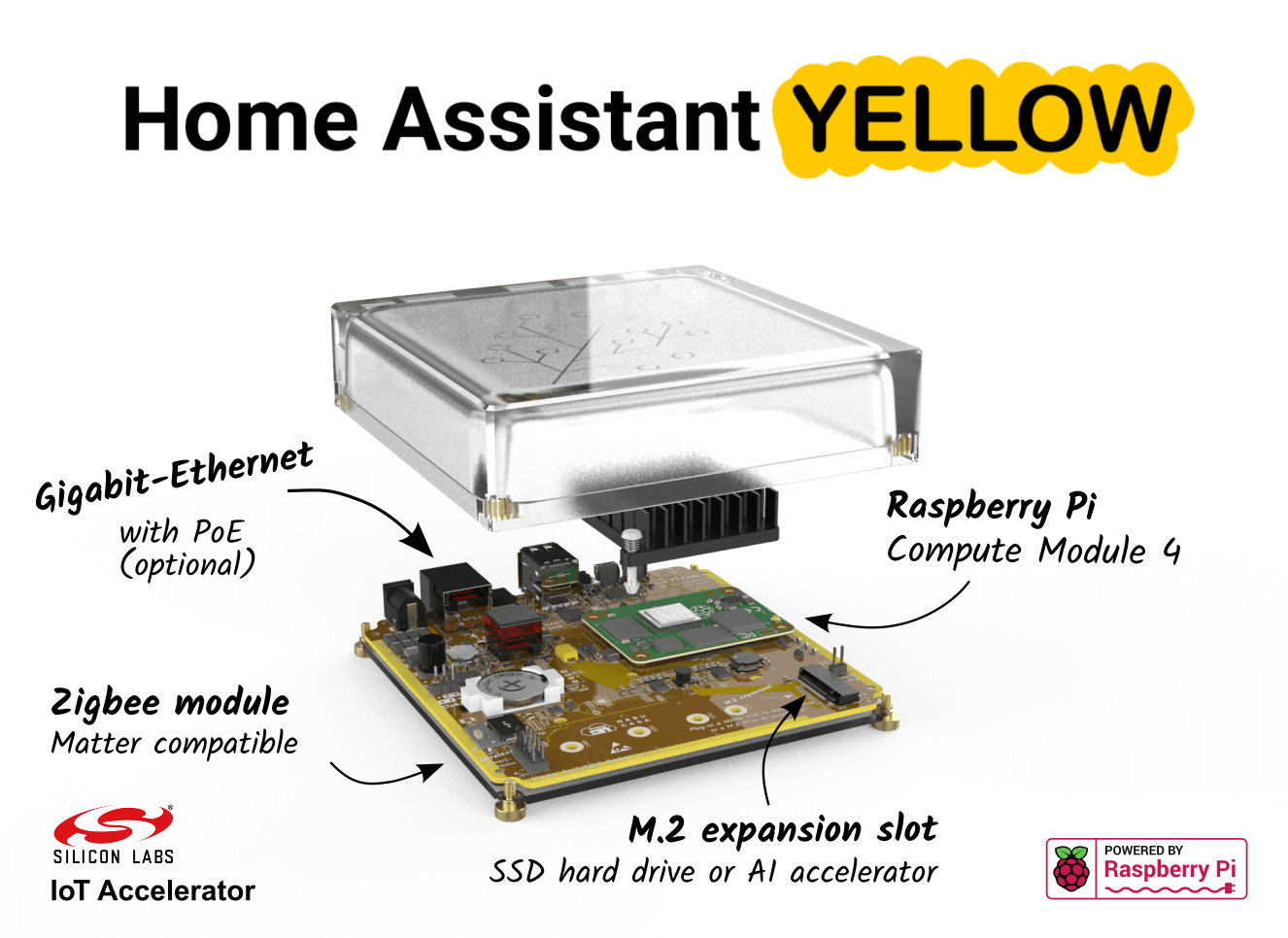
如果你错过了这条消息:Home Assistant 已经 8 岁了!🥳 为了庆祝这件事,我们正式发布了 Home Assistant Yellow!
Home Assistant Yellow 通过众筹活动启动,而且已经达成了筹资目标!这实在太棒了!
而且……你现在依然可以支持这项众筹,入手属于你自己的 Home Assistant Yellow!
Go to campaign on CrowdSupply »
Z-Wave JS 更新!
这次发布里,我们有两个很棒的 Z-Wave JS 更新想和你分享。
现在支持 S2
安全性是我们都非常在意的事情。像门锁、会触发报警系统的运动传感器这类设备,我们都不希望它们被篡改。对于 Z-Wave 设备来说,这一点同样重要!
从这个版本开始,Home Assistant 的 Z-Wave JS 集成支持 S2 了!
S2 是 Security 2 的简称,是 Z-Wave 设备的新一代安全标准,它会为网络中的每台设备提供不同的密钥。它是此前 S0 版本更安全的升级版。
除了更安全之外,支持 S2 的设备通常也更可靠、续航更好,并且相比 S0 延迟更低。
Z-Wave JS 集成会自动选择当前可用且最合适的安全方式。
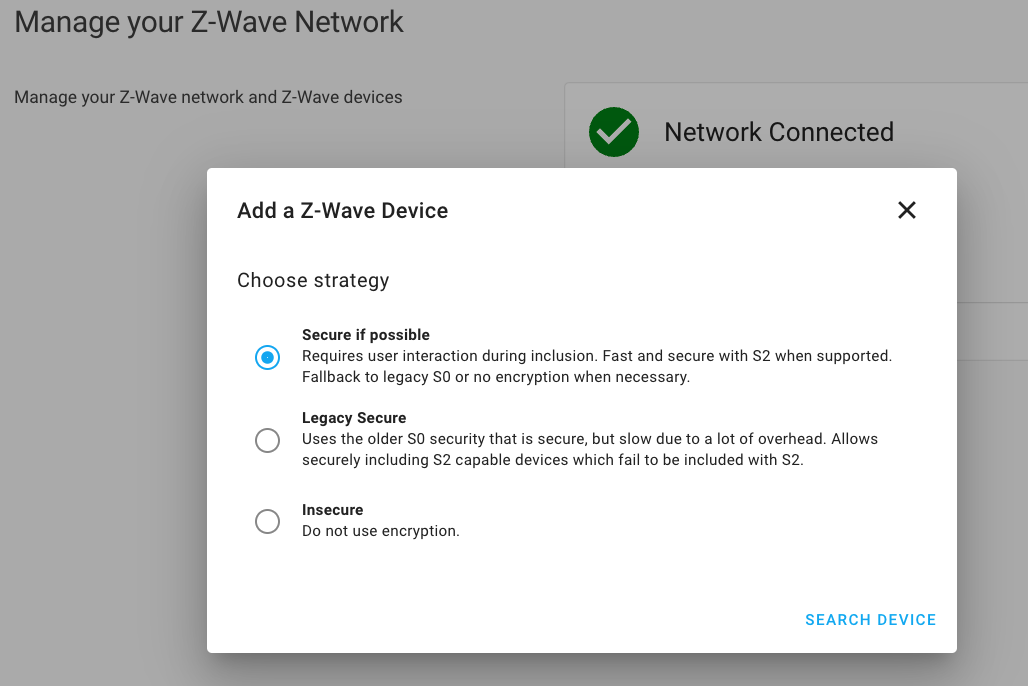 添加新的 Z-Wave 设备时,会自动使用最佳可用安全方式。
如果你在这次更新前,就已经把支持 S2 的 Z-Wave 设备配对到了 Home Assistant,那么你需要重新配对它们,才能启用新的 S2 功能。
从旧版 Z-Wave 集成迁移的向导
你还在使用旧的、已经弃用的 zwave 集成吗?如果是,那你可能一直因为迁移工作量而迟迟没有升级到 Z-Wave JS。现在也许该重新考虑了……
Home Assistant 现在为旧版 Z-Wave 集成用户提供了迁移向导,可以更轻松地迁移到新的 Z-Wave JS 集成。
为了避免意外情况,向导会明确告诉你它将执行什么、哪些内容能迁移、哪些不能迁移。
旧版且已弃用的 Z-Wave 集成仍会在技术允许的范围内继续工作,但不会再获得更新。
新的 Tuya 集成
没错!Tuya 集成已经升级到了全新版本:由 Tuya 自己的开发团队开发并维护!
目前,它已经支持灯光、开关、场景、风扇和温控设备。和旧版集成相比,遮盖支持暂时还缺席,我们希望能在后续发布中补上。另外,这个新集成现在还会主动把更新推送到 Home Assistant!
如果你之前已经在使用 Tuya 集成,那么这次需要从头重新设置,因为这个集成已经被完全重写,并且改用了不同的 API。
更多信息,请参阅 Tuya 集成文档。
更新后的 Material Design Icons
Material Design Icons 已经更新到 v6!
这个新版本的 MDI 带来了将近 400 个新图标(其中还有 75 个以上是专门为 Home Assistant 标注的)❤️
 这次发布加入了一些非常实用的新 MDI 图标!
v6 中有一些图标被移除或重命名了,不过我们确保它们在接下来的两个版本中仍然可用。如果你正在使用受影响的图标,Home Assistant 会在日志中写入警告。更多信息请查看下方的破坏性变更部分。
ESPHome 的加密通信支持
ESPHome 与 ESPHome 集成现在已经支持彼此之间的加密通信。@OttoWinter 一直在努力把这层加密加入 ESPHome API,而它使用的是 noise protocol。
除了这个版本的 Home Assistant 之外,你还需要至少 ESPHome 2021.9.0,并为你的 ESPHome 设备开启加密通信配置。
太棒了,@OttoWinter!
关于如何配置的更多信息,请查看 ESPHome 文档。
其他值得注意的变化
这次发布还有很多内容,下面是其中一些值得关注的变化:
-
能源仪表板现在支持以 kWh 为单位的燃气传感器。
-
我们还提供了一个新的长期统计开发者工具。当你需要排查或修复统计相关的问题或警告时,它会很有帮助。
-
Shelly 团队最近很忙,加入了对新一代 Shelly 设备的支持,也就是所谓的 Gen2 或 Plus 设备(基于 WebSocket RPC)。
-
TP-Link Kasa Smart 集成得到了大量改进:支持更多新设备、可通过 UI 配置,并加入了设备发现功能。它还修复了那个著名又令人头疼的 “unavailable” bug!感谢 @rytilahti!
-
@Aohzan 为 Logitech Harmony 集成加入了一个可切换活动的 select 实体,非常实用!
-
HomeKit now supports the
selectandinput_select实体, thanks to @ha0y! -
@Kane610 为 deCONZ 加入了对 Siren 实体的支持。
-
manual 报警控制面板现在支持度假模式了,感谢 @mbo18!
-
@koying 新增了一个模板方法
regex_findall,可以返回正则表达式的全部匹配结果列表。 -
@emontnemery 还带来了更多模板增强,新增了
is_number函数和过滤器,可快速判断一个值是不是数字。 -
Lovelace 实体卡片现在支持在实体处于激活状态时让图标变色(
state_color)。感谢 @spacegaier。 -
SwitchBot 集成也得到了 @RenierM26 的大力改进!加入了不少新平台,还支持通过 UI 配置,干得漂亮!
新集成
欢迎以下新集成加入这次发布:
- Airthings, added by @Danielhiversen
- Amberelectric, added by @madpilot
- Crownstone, added by @RicArch97
- WattTime, added by @bachya
- Whirlpool Sixth Sense, added by @abmantis
现在可在 UI 中配置的集成
以下集成现在可以直接通过 Home Assistant UI 进行设置:
- DLNA-DMR, done by @chishm
- Modem Caller ID, done by @tkdrob
- Netgear, done by @starkillerOG
- OpenGarage, done by @Danielhiversen
- Sure Petcare, done by @Danielhiversen
- SwitchBot, done by @RenierM26
发布 2021.10.1 - October 7
- Recreate the powerwall session/object when attempting relogin (@bdraco - #56935) (powerwall docs)
- 更新 led brightness select 状态 only if valid data is available, Xiaomi Miio 集成 (@bieniu - #57197) (xiaomi_miio docs)
- Convert val to str when needed while calling zwave_js.set_value (@raman325 - #57216) (zwave_js docs)
- Discover tplink 设备 periodically (@bdraco - #57221) (tplink docs)
- Correct SQL query generated by get_metadata_with_session (@emontnemery - #57225) (recorder docs)
- Fix netgear config flow import (@MartinHjelmare - #57253) (netgear docs)
- Validate initial value for input_datetime (@emontnemery - #57256) (input_datetime docs)
- Bump Mill library to 0.6.1 (@Danielhiversen - #57261) (mill docs)
- Fix RGB only (no color temp) 设备 with tplink (@bdraco - #57267) (tplink docs)
- 更新 前端 to 20211007.0 (@bramkragten - #57268) (前端 docs)
- Fix transition handling for tplink 灯光 (@rytilahti - #57272) (tplink docs)
- Bump HAP-python to 4.30 (@bdraco - #57284) (homekit docs)
- Stopgap fix for inconsistent upstream API of tplink dimmers (@rytilahti - #57285) (tplink docs)
- Bump yeelight to 0.7.7 (@bdraco - #57290) (yeelight docs)
发布 2021.10.2 - October 8
- Netgear fix port and 设备 model beeing overwritten (@starkillerOG - #57277) (netgear docs)
- Fix Nanoleaf 灯光 turn_off transition (@milanmeu - #57305) (nanoleaf docs)
- Migrate tplink hosts that were previously imported from yaml (@bdraco - #57308) (tplink docs)
- 升级 aionanoleaf to 0.0.3 to fix deadlock (@milanmeu - #57312) (nanoleaf docs)
- Improve 状态 of 遮盖 groups (@emontnemery - #57313) (group docs)
- Fix multiple upnp/ssdp issues (@StevenLooman - #57314) (upnp docs) (yeelight docs) (dlna_dmr docs) (ssdp docs)
- Guard for bad last reset (@balloob - #57344) (传感器 docs)
发布 2021.10.3 - October 10
- Catch 错误 for efergy (@tkdrob - #57326) (efergy docs)
- Use 开关 format unique ids for tplink dimmers (@bdraco - #57346) (tplink docs)
- Fix Shelly RGB/W supported color mode detection (@thecode - #57359) (shelly docs)
- Bump pynws to 1.3.2 (@MatthewFlamm - #57361) (nws docs)
- Bump Switchbot library (@RenierM26 - #57367) (switchbot docs)
- Bump pyhaversion to 21.10.0 (@ludeeus - #57377) (版本 docs)
- 更新 前端 to 20211007.1 (@bramkragten - #57385) (前端 docs)
- Do all of dhcp scapy startup in the executor (@bdraco - #57392) (dhcp docs)
- Remove executor calls in isy994 as its fully async (@bdraco - #57394) (isy994 docs)
- Fix default parameter values for 服务 opentherm_gw.set_clock (@mvn23 - #57397) (opentherm_gw docs)
- Fix
opentherm_gw.set_clocktimeparameter name (@mvn23 - #57398) (opentherm_gw docs) - 恢复 yeelight workaround for failing to 更新 状态 after on/off (@bdraco - #57400) (yeelight docs)
- Fix Shelly button filter empty event (@thecode - #57427) (shelly docs)
- Fix Shelly button type in roller mode (@thecode - #57429) (shelly docs)
- Bump zeroconf to 0.36.8 (@bdraco - #57451) (zeroconf docs)
- Fix netgear renamed mdi icons (@thecode - #57431) (netgear docs)
发布 2021.10.4 - October 11
- 升级 youless library to fix missing 传感器 LS110 (@gjong - #57366) (youless docs)
- Fix Netgear orbi port in ssdp discovery (@starkillerOG - #57432) (netgear docs)
- Fix upnp creating derived 传感器 (@StevenLooman - #57436) (upnp docs)
- Fix referenced before assignment in modem_callerid (@tkdrob - #57460) (modem_callerid docs)
- 升级 aiomusiccast to tolererate not decodable characters (@micha91 - #57461) (yamaha_musiccast docs)
- Detect if mysql and sqlite support row_number (@emontnemery - #57475) (recorder docs) (传感器 docs)
- Bump youtube-dl to 2021.06.06 (@chpego - #57490) (media_extractor docs)
- Simplify yeelight 设置 to improve reliability (@bdraco - #57500) (yeelight docs)
发布 2021.10.5 - October 15
- 日志 reason for DLNA-DMR 设备 becoming unavailable (@chishm - #57516) (dlna_dmr docs)
- Bump Mill library to 0.6.2 (@Danielhiversen - #57533) (mill docs)
- Fix Fast.com autoupdate (@Z1ni - #57552) (fastdotcom docs)
- Bump simplisafe-python to 11.0.7 (@bachya - #57573) (simplisafe docs)
- Correct detection of row_number support for MariaDB (@emontnemery - #57663) (recorder docs)
- Ensure Notion 设备 name is stored as a string (@bachya - #57670) (notion docs)
- Bump spiderpy to 1.4.3 (@peternijssen - #57675) (spider docs)
- Fix Shelly humidity 传感器 available 条件 (@thecode - #57721) (shelly docs)
- Reconnect and retry yeelight commands after previous WiFi drop out (@bdraco - #57741) (yeelight docs)
- Always send color/temp when switching from an effect in yeelight (@bdraco - #57745) (yeelight docs)
- Fix Youless 状态 class for power total 传感器 (@gjong - #57758) (youless docs)
- Fix broken upnp derived 传感器 reporting b/s instead of kb/s (@StevenLooman - #57681) (upnp docs)
发布 2021.10.6 - October 18
- Avoid setting up harmony websocket from discovery (@bdraco - #57589) (harmony docs)
- Fix 设备 class for energy plugwise 传感器 (@squio - #57803) (plugwise docs)
- Prevent yeelight discovery from overloading the bulb (@bdraco - #57820) (yeelight docs)
- Bump bond-api to 0.1.14 (@bdraco - #57874) (bond docs)
- Revert "Fix bmw_conntected_drive check_control_message short description" (@cdce8p - #57928) (bmw_connected_drive docs)
- Fix bug that prevents multiple instances of Tile (@bachya - #57942) (tile docs)
发布 2021.10.7 - November 1
- Fix Tuya 文档 URL (@ludeeus - #57889)
- Fix netgear NoneType and discovery (@starkillerOG - #57904)
- Abort keenetic SSDP discovery if the unique id is already 设置 or ignored (@foxel - #58009)
- Fix Yamaha MusicCast media_stop (@micha91 - #58024)
- Sleep between 设备 requests to detect socket closes (@chishm - #58087)
- Fix template 传感器 when name template doesn't render (@emontnemery - #58088)
- Bump pymazda to 0.2.2 (@bdr99 - #58113)
- Abort Fritz config flow for configured hostnames (@chemelli74 - #58140)
- Fix find_next_time_expression_time (@OttoWinter - #58894)
如果你需要帮助……
……欢迎随时使用我们非常活跃的 论坛,或者加入我们的 聊天频道。
如果你遇到了这次发布引入的问题,请到我们的 issue tracker 提交反馈,并确保填写问题模板中的所有字段。
破坏性变更
下面按主题或集成列出了本次发布中的破坏性变更。点击对应项目即可阅读该条变更的更多说明。
The following template filters and functions will now 日志 a 警告 instead of silently returning the input if the input is invalid and no default value is specified:
acosas_timestampasinatanatan2cosfloatlogmultiplyroundsinsqrtstrptimetantimestamp_customtimestamp_localtimestamp_utc
The float filter will now 日志 a 警告 instead of silently returning 0 if
the input is invalid and no default value is specified.
In Home Assistant 核心 2021.12 the template will fail to render if no default value is specified. You can specify a default value by passing to the filter like this: ``.
(@emontnemery - #56453)
The Material Design Icons have been upgraded to v6, which brings in around 400 new icons and removes and renames some others.
The removed and renamed icons will keep working for this and the next release, Home Assistant will write a warning to the logs in case you are using one of the removed or renamed icons.
The following icons have been removed:
adobe-acrobatadobeamazon-alexaamazonandroid-autoandroid-调试-bridgebandcampbattlenetbloggerbuffercash-usd-outlinecash-usdcellphone-android(alternative:cellphone)cellphone-iphone(alternative:cellphone)concourse-cicurrency-usd-circlecurrency-usd-circle-outlinedo-not-disturb-off(alternative:minus-circle-off)do-not-disturb(alternative:minus-circle)doubanfile-pdf(alternative:file-pdf-box)file-pdf-outline(alternative:file-pdf-box)file-pdf-box-outline(alternative:file-pdf-box)google-photoshome-currency-usdlaptop-chromebook(alternative:laptop)laptop-mac(alternative:laptop)laptop-windows(alternative:laptop)microsoft-edge-legacymicrosoft-yammerpdf-box(alternative:file-pdf-box)plus-one(alternative:numeric-positive-1)poll-box(alternative:chart-box)poll-box-outline(alternative:chart-box-outline)tablet-ipad(alternative:tablet)telegramuntappdvkxamarian-outlinexingy-combinator
The following icons have been renamed:
apple-airplaytocast-variantapplicationtoapplication-outlineapplication-cogtoapplication-cog-outlineapplication-设置toapplication-设置-outlinebolnisi-crosstocross-bolnisiboom-gate-uptoboom-gate-arrow-upboom-gate-up-outlinetoboom-gate-arrow-up-outlineboom-gate-downtoboom-gate-arrow-downboom-gate-down-outlinetoboom-gate-arrow-down-outlinebuddhismtodharmachakracellphone-erasetocellphone-removeceltic-crosstocross-celticchristianitytocrosschristianity-outlinetocross-outlinefacetoface-manface-outlinetoface-man-outlineface-profile-womantoface-woman-profileface-shimmertoface-man-shimmerface-shimmer-outlinetoface-man-shimmer-outlineflash-circletolightning-bolt-circlefloor-lamp-varianttofloor-lamp-torchiere-variantgiftofile-gif-boxgradienttogradient-verticalhandtohand-front-righthand-lefttohand-back-lefthand-righttohand-back-righthinduismtoomhuman-greetingtohuman-greeting-variantiframetoapplication-bracketsiframe-outlinetoapplication-brackets-outlineiframe-arraytoapplication-arrayiframe-array-outlinetoapplication-array-outlineiframe-bracestoapplication-bracesiframe-braces-outlinetoapplication-braces-outlineiframe-parenthesestoapplication-parenthesesiframe-parentheses-outlinetoapplication-parentheses-outlineiframe-variabletoapplication-variableiframe-variable-outlinetoapplication-variable-outlineislamtostar-crescentjudaismtostar-davidmonitor-cleantomonitor-shimmerpharmacytomortar-pestle-plussparklestoshimmerteachtohuman-male-boardtelevision-cleantotelevision-shimmertext-subjecttotext-longtwitter-retweettorepeat-variantvoice-offtoaccount-voice-off
Removes the support for legacy fan speeds.
Using speeds ('off', 'low', 'medium' or 'high') for the 风扇 platform became
deprecated with Home Assistant Core 2021.07, while preset modes and percentage
support was added.
(@jbouwh - #55174) (alexa docs)
In order to introduce the new link status binary 传感器, the previous
connectivity 传感器 has been renamed to connection.
Please check both your Lovelace 配置 and your automations to reflect this change.
(@chemelli74 - #55446) (fritz docs)
The API endpoint /api/discovery_info now only return blank values.
This endpoint is scheduled to be removed in Home Assistant Core 2022.1.
As a regular user of Home Assistant, this change should not affect you.
(@ludeeus - #56097) (api docs)
The DLNA Digital Media Renderer 集成 migrated to 配置 via the UI. Configuring DLNA Digital Media Renderer via YAML 配置 has been deprecated and will be removed in a future Home Assistant release.
Your existing YAML 配置 is automatically imported on upgrade to this release; and thus can be safely removed from your YAML 配置 after upgrading.
(@chishm - #55267) (dlna_dmr docs)
When an iOS 设备 wakes up it has to refresh all the A records for each paired accessory. When there are many paired accessories this can result in HomeKit timing out before it can refresh all the records and declaring some accessories unavailable.
We now use the same server name for all HomeKit bridges and accessories on a single Home Assistant instance. This allows the system to avoid doing multiple lookups since it only needs to find one A record when waking from sleep.
iOS 设备 and Home Hubs (Apple TVs / HomePods / iPads) may cache the server name even if it expires and may require a reboot to see the new name. If this is the case, accessories may show unavailable when outside the home until ALL home hubs are rebooted.
The polling interval of the Honeywell Lyric 集成 has been decreased to 300 seconds to reduce chances of hitting API limit.
(@timmo001 - #56393) (lyric docs)
The (non-working) pressure 传感器 has been removed.
(@fredrike - #56934) (point docs)
The Modem Caller ID 集成 migrated to 配置 via the UI. Configuring Modem Caller ID via YAML 配置 has been deprecated and will be removed in a future Home Assistant release.
Your existing YAML 配置 is automatically imported on upgrade to this release; and thus can be safely removed from your YAML 配置 after upgrading.
(@tkdrob - #46677) (modem_callerid docs)
The Moon 实体 would never have a primary moon phase state. So the state of the moon would go from Waxing gibbous directly to Waning gibbous, without being Full Moon in between.
Now the Moon 实体 will correctly have the primary moon phases: New Moon, First Quarter, Full Moon and Third Quarter.
If you have automations relying on the state of the moon, please review them to check if they still behave as intended.
(@stefanroelofs - #55518) (moon docs)
The NETGEAR 集成 migrated to 配置 via the UI. Configuring NETGEAR via YAML 配置 has been deprecated and will be removed in a future Home Assistant release.
Your existing YAML 配置 is automatically imported on upgrade to this release; and thus can be safely removed from your YAML 配置 after upgrading.
(@starkillerOG - #54479) (netgear docs)
The extra attribute 状态 is removed from all 传感器, since it is already exposed as an own 传感器.
If you relied on this attribute for your automations or script, you might need to adjust to this change.
(@mib1185 - #56078) (nut docs)
The OpenGarage 集成 has previously been migrated to 配置 via the UI. Configuring OpenGarage via YAML 配置 has now been deprecated and will be removed in a future Home Assistant release.
Your existing YAML 配置 is automatically imported on upgrade to this release; and thus can be safely removed from your YAML 配置 after upgrading.
(@Danielhiversen - #56829) (opengarage docs)
The extra attribute domains_blocked is removed from all 传感器, since it is already exposed as an own 传感器.
If you relied on this attribute in your automations or script, you need to adjust those to match this change.
(@mib1185 - #56076) (pi_hole docs)
The previously deprecated YAML 配置 of the ReCollect Waste 集成 has been removed.
ReCollect Waste is now configured via the UI, any existing YAML 配置 has been imported in previous releases and can now be safely removed from your YAML 配置 files.
(@bachya - #55426) (recollect_waste docs)
The extra state attribute last_update has been normalized to the UTC timezone.
If you have any 自动化 or scripts that relied on this, you might need to adjust those to take this into account.
(@epenet - #54745) (renault docs)
sensor.charge_mode has been moved to select.charge_mode (note: unique_id is unchanged).
(@epenet - #55494) (renault docs)
The previously deprecated YAML 配置 of the RFXCOM RFXtrx 集成 has been removed.
RFXCOM RFXtrx is now configured via the UI, any existing YAML 配置 has been imported in previous releases and can now be safely removed from your YAML 配置 files.
(@elupus - #54173) (rfxtrx docs)
The previously deprecated YAML 配置 of the Speedtest.net 集成 has been removed.
Speedtest.net is now configured via the UI, any existing YAML 配置 has been imported in previous releases and can now be safely removed from your YAML 配置 files.
(@engrbm87 - #55642) (speedtestdotnet docs)
The Sure Petcare 集成 has previously been migrated to 配置 via the UI. Configuring Sure Petcare via YAML 配置 has now been deprecated and will be removed in a future Home Assistant release.
Your existing YAML 配置 is automatically imported on upgrade to this release; and thus can be safely removed from your YAML 配置 after upgrading.
(@Danielhiversen - #56209) (surepetcare docs)
The following additional state attributes have been removed from the existing 传感器:
availablefilesystemload_averageload_idleload_systemload_usermountsizetypeused
You should update any automations and scripts that depend on these state attribute to use the separate 传感器 available for these states.
(@timmo001 - #53892) (system_bridge docs)
The TP-Link Kasa Smart 集成 migrated to 配置 via the UI. Configuring TP-Link Kasa Smart via YAML 配置 has been deprecated and will be removed in a future Home Assistant release.
Your existing YAML 配置 is automatically imported on upgrade to this release; and thus can be safely removed from your YAML 配置 after upgrading.
(@rytilahti - #56701) (tplink docs)
The previous Tuya API is no longer maintained by Tuya officially and the new 集成 will be officially maintained by the Tuya Developer Team.
If you used the 集成 before this release, you'd need to set it up again from scratch. To do that, remove any existing instances from the 集成 仪表盘. After that, use our documentation for guidance on setting up the new 集成.
The cover platform is not ready for this release but will be included later. If you have cover 设备, they will not available for control at the moment.
(@zlinoliver - #56820) (tuya docs)
UPnP/IGD 集成 no longer supports the local_ip 配置 option.
If you still have this configured in your YAML 配置, please remove it.
(@StevenLooman - #55540) (upnp docs)
The Velbus 集成 migrated to 配置 via the UI. Configuring Velbus via YAML 配置 has been deprecated and will be removed in a future Home Assistant release.
The Velbus 服务 calls will now need an interface parameter,
this is to allow support for multiple Velbus connections. If you are using
Velbus 服务 in your automations or scripts, you may been to adjust
those to this change.
(@Cereal2nd - #54032) (velbus docs)
The model and mode attributes have been removed.
The preset_mode attribute is available in place of the mode attribute.
The 设备 model is available in the 设备 info window.
(@bieniu - #55846) (xiaomi_miio docs)
The unused ruamel.yaml utility functions have been removed. They were never
in use nor documented. If your custom 集成 relied on ruamel.yaml being
installed, make sure it's part of your manifest.
向以下集成告别
The following 集成 are no longer available as of this release:
- Trackr has been removed. The API is no longer available and has therefore been removed. (@FuzzyMistborn - #55917)
- Tesla has been removed due to increased Tesla login security preventing third-parties to log in. (@alandtse - #55988)
全部变更
- Use EntityDescription - renault (@epenet - #55061) (renault docs)
- Bump version to 2021.10.0dev0 (@frenck - #55227)
- Remove un-needed asserts on hass in Amecrest (@flacjacket - #55244) (amcrest docs)
- Remove option and range checks in Rituals 集成 (@milanmeu - #55222) (rituals_perfume_genie docs)
- Be tolerant of Wemo insight_param keys that might not exist (@esev - #55232) (wemo docs)
- Change entity_timers to be a local variable. (@janiversen - #55258) (modbus docs)
- Move AirlySensorEntityDescription to 传感器 platform (@bieniu - #55277) (airly docs)
- Add CONF_STATE_CLASS to
sensor/__init__.py(@farmio - #54106) (mqtt docs) (knx docs) (template docs) - Address late review for Renault 集成 (@epenet - #55230) (renault docs)
- Renault code quality improvements (@epenet - #55313) (renault docs)
- Adjust zha comment to be readable (@bdraco - #55330) (zha docs)
- Use EntityDescription - fritzbox (@mib1185 - #55104) (fritzbox docs)
- Add data update coordinator to the Tautulli 集成 (@ludeeus - #54706) (tautulli docs)
- Address late review for Xiaomi Miio number platform (@bieniu - #55275) (xiaomi_miio docs)
- Add shutdown test. (@janiversen - #55357) (modbus docs)
- Activate mypy for sonar (@janiversen - #55327) (sonarr docs)
- Add select 实体 to Logitech Harmony (@Aohzan - #53943) (harmony docs)
- Re-配置 possibilities for Synology DSM (@mib1185 - #53285) (synology_dsm docs)
- Solve modbus shutdown racing condition (@janiversen - #55373) (modbus docs)
- Address late fritzbox comments (@mib1185 - #55388) (fritzbox docs)
- Remove legacy discovery after_dependencies from apple_tv (@bdraco - #55390) (apple_tv docs)
- Prevent storage loads from monopolizing the executor pool (@bdraco - #55389)
- Add ll hls to stream (@uvjustin - #49608) (stream docs) (generic docs)
- Simplify calcuation of Notion binary 传感器 state (@bachya - #55387) (notion docs)
- OVO Energy - Post #54952 Cleanup (@timmo001 - #55393) (ovo_energy docs)
- Use EntityDescription - ambient_station (@bachya - #55366) (ambient_station docs)
- Enable basic type checking for cert_expiry (@emontnemery - #55335) (cert_expiry docs)
- Only return not return None (@Kane610 - #55423) (unifi docs)
- Add myself to Vallox codeowners (@andre-richter - #55428) (vallox docs)
- Give ReCollect Waste 传感器 a friendlier label (@bachya - #55427) (recollect_waste docs)
- Deprecate YAML config for ReCollect Waste (@bachya - #55426) (recollect_waste docs) (breaking-change)
- Remove byte-range addressed parts in stream (@uvjustin - #55396) (stream docs)
- System Bridge 2.5.0 - Additional 传感器 (@timmo001 - #53892) (system_bridge docs) (breaking-change)
- Correct setup of system_bridge 传感器 (@emontnemery - #55442) (system_bridge docs)
- Use AwesomeVersion for account link 服务 check (@ludeeus - #55449) (cloud docs)
- Refactor vallox constants (@andre-richter - #55456) (vallox docs)
- Whole-string match reqs in comment_requirement (@TheBassEngineer - #55192)
- Add long-term statistics for SimpliSafe 传感器 (@bachya - #55419) (simplisafe docs)
- Add -term statistics for Notion 传感器 (@bachya - #55414) (notion docs)
- Use EntityDescription - qnap (@cdce8p - #55410) (qnap docs)
- Add input_select and select domain support for HomeKit (@ha0y - #54760) (homekit docs)
- Fix Zone 2 and Zone 3 detection in onkyo (@Feliksas - #55471) (onkyo docs)
- Renault code quality improvements (@epenet - #55454) (renault docs)
- Add TLX daily power meter. for Growatt (@JasperPlant - #55445) (growatt_server docs)
- Allow device_id template function to use 设备 name as input (@raman325 - #55474)
- Add support for Xiaomi Miio Air Purifier 3C (@bieniu - #55484) (xiaomi_miio docs)
- Improvements to the solarlog 集成 (@Ernst79 - #55405) (solarlog docs)
- Add vacation mode to manual alarm_control_panel (@mbo18 - #55340) (demo docs) (manual docs)
- Add 服务 to Renault 集成 (@epenet - #54820) (renault docs)
- Mock setup in spotify tests (@ludeeus - #55515) (spotify docs)
- Fix moon phases (@stefanroelofs - #55518) (moon docs) (breaking-change)
- Add 设备 tracker platform to Renault 集成 (@epenet - #54745) (renault docs) (breaking-change) (new-platform)
- Add remote server to cloud system health (@ludeeus - #55506) (cloud docs)
- Add select platform to Renault 集成 (@epenet - #55494) (renault docs) (breaking-change)
- Open garage, add closing and opening to state (@Danielhiversen - #55372) (opengarage docs)
- OpenGarage, change to attributes (@Danielhiversen - #55528) (opengarage docs)
- Bump cloud to 0.47.1 (@balloob - #55312) (cloud docs) (google_assistant docs)
- Use respx.mock in generic camera tests (@emontnemery - #55521) (generic docs)
- Fix zeroconf mock and use it in CI group 1's tests (@emontnemery - #55526) (homekit_controller docs) (esphome docs) (devolo_home_control docs) (bosch_shc docs)
- Add additional test coverage for zwave_js meter 传感器 (@raman325 - #55465) (zwave_js docs)
- Add test fixture for unauthenticated HTTP client (@emontnemery - #55561) (almond docs)
- Use hass_client_no_auth test fixture in 集成 a-g (@emontnemery - #55581)
- Use hass_client_no_auth test fixture in 集成 h-p (@emontnemery - #55583)
- Use hass_client_no_auth test fixture in 集成 s-x (@emontnemery - #55585)
- Prevent 3rd party lib from opening sockets in broadlink tests (@emontnemery - #55593) (broadlink docs)
- Fix url lookup in telegram_bot webhook (@ludeeus - #55587) (telegram_bot docs)
- Prevent 3rd party lib from opening sockets in epson tests (@emontnemery - #55595) (epson docs)
- Prevent 3rd party lib from opening sockets in freedompro tests (@emontnemery - #55596) (freedompro docs)
- Mock sockets in the network 集成 tests (@bdraco - #55594) (network docs)
- Mock out network.util.async_get_source_ip in tests (@emontnemery - #55592)
- Bump pysmappee to 0.2.27 (@bsmappee - #55257) (smappee docs)
- Prevent 3rd party lib from opening sockets in broadlink tests (@emontnemery - #55636) (broadlink docs)
- Minor cleanup in Waze travel times (@yuvalabou - #55422) (waze_travel_time docs)
- Clean holiday attributes code in Jewish calendar (@yuvalabou - #55080) (jewish_calendar docs)
- Remove wheels for alpine 3.13 (@pvizeli - #55650)
- Add upnp 传感器 for IP, Status, and Uptime (@ehendrix23 - #54780) (upnp docs)
- Always show state for the updater binary_sensor (@ludeeus - #55584) (updater docs)
- Use NamedTuple for color temperature range (@cdce8p - #55626) (tplink docs)
- Remove dead fritzbox code (@cdce8p - #55617) (fritzbox docs)
- Use EntityDescription - freebox (@cdce8p - #55675) (freebox docs)
- Use EntityDescription - luftdaten (@cdce8p - #55676) (luftdaten docs)
- Use EntityDescription - faa_delays (@cdce8p - #55678) (faa_delays docs)
- Use EntityDescription - econet (@cdce8p - #55680) (econet docs)
- Use EntityDescription - iperf3 (@cdce8p - #55681) (iperf3 docs)
- Fix Rachio 服务 missing with 1st generation controllers (@brg468 - #55679) (rachio docs)
- Use EntityDescription - picnic (@cdce8p - #55682) (picnic docs)
- Use EntityDescription - discogs (@cdce8p - #55683) (discogs docs)
- Use EntityDescription - airnow (@cdce8p - #55684) (airnow docs)
- Use EntityDescription - synology_dsm (@cdce8p - #55407) (synology_dsm docs)
- System Bridge - Set 设备 class for binary 传感器 (@timmo001 - #55688) (system_bridge docs)
- Update template/test_binary_sensor.py to use pytest (@janiversen - #55220) (template docs)
- Use NamedTuple for api endpoint settings (@cdce8p - #55694) (hassio docs)
- Use NamedTuple for touchline preset mode settings (@cdce8p - #55695) (touchline docs)
- Use NamedTuple for light color mode mapping (@cdce8p - #55696) ([light docs])
- Type scaffold PLATFORMS (@OldShaterhan - #55699)
- Add reauth to Renault config flow (@epenet - #55547) (renault docs)
- 自动化 trigger info type hint improvements (@scop - #55402)
- Delay state update after switch is toggled for TP-Link HS210 设备 (@mib1185 - #55671) (tplink docs)
- Avoid creating sockets in homekit port available tests (@bdraco - #55668) (homekit docs)
- Drop unused ruamel (@balloob - #55672) (breaking-change)
- Update template/test_sensor.py to use pytest (@janiversen - #55288) (template docs)
- Use NamedTuple for RGBColor (@cdce8p - #55698)
- Add bluez to the devcontainer (@chemelli74 - #55469)
- Use NamedTuple for device_automation details (@cdce8p - #55697) (device_automation docs)
- Add caplog setup fixture. (@janiversen - #55714) (template docs)
- Bump motion_blinds to 0.5.5 (@starkillerOG - #55710) (motion_blinds docs)
- Remove deprecated device_state_attributes (@cdce8p - #55734) (group docs) (gogogate2 docs) (nws docs) (plaato docs) (flipr docs)
- Handle unknown preset mode in generic thermostat (@brianegge - #55588) (generic_thermostat docs)
- Tag Hue errors as format strings (@balloob - #55751) (hue docs)
- ADD: generalize regex_findall (@koying - #54584)
- Protect Huawei LTE against None ltedl/ulfreq (@scop - #54411) (huawei_lte docs)
- Optimize ZHA ZCL attribute reporting 配置 (@Adminiuga - #55796) (zha docs)
- Update to denonavr version 0.10.9 (@ol-iver - #55805) (denonavr docs)
- Drop logger 服务 fields because keys are dynamic (@balloob - #55750) (logger docs)
- ZHA: Added support for ZigBee Simple 传感器 设备 and Binary Input c… (@wsowa - #55819) (zha docs)
- Bump envoy_reader API to 0.20.0 (@gtdiehl - #55822) (enphase_envoy docs)
- Change fix property to _attr for tradfri (@janiversen - #55691) (tradfri docs)
- Use EntityDescription - vilfo (@cdce8p - #55746) (vilfo docs)
- Use EntityDescription - awair (@cdce8p - #55747) (awair docs)
- Use EntityDescription - vultr (@cdce8p - #55789) (vultr docs)
- Use EntityDescription - meteoclimatic (@cdce8p - #55792) (meteoclimatic docs)
- Use EntityDescription - sabnzbd (@cdce8p - #55788) (sabnzbd docs)
- Use EntityDescription - aemet (@cdce8p - #55744) (aemet docs)
- Use EntityDescription - apcupsd (@cdce8p - #55790) (apcupsd docs)
- Alexa - Remove legacy speed support for fan platform (@jbouwh - #55174) (alexa docs) (breaking-change)
- Add 服务 descriptions for supervisor backup restore 服务 (@spacegaier - #52766) (hassio docs)
- Use EntityDescription - poolsense (@cdce8p - #55743) (poolsense docs)
- Use EntityDescription - aqualogic (@cdce8p - #55791) (aqualogic docs)
- Refactor exception handling in Vallox (@andre-richter - #55461) (vallox docs)
- Migrate emulated_hue tests from unittest to pytest (@emontnemery - #55794) (emulated_hue docs)
- Shutdown the container on abnormal signals (@agners - #55660)
- Replace zigpy-cc with zigpy-znp (@puddly - #55828) (zha docs)
- Add motion_blinds VerticalBlind and cleanup (@starkillerOG - #55774) (motion_blinds docs)
- Re-add state_class total to 传感器 (@emontnemery - #55103) (recorder docs) (history docs) (传感器 docs)
- Make scapy imports in DHCP local (@emontnemery - #55647) (dhcp docs)
- Replace util.get_local_ip in favor of components.network.async_get_source_ip() - part 2 (@chemelli74 - #53368) (emulated_hue docs) (breaking-change)
- Use
async_update_entryin config unit test instead of modifyingdata(@puddly - #55855) (zha docs) - Set state class to total for 集成 传感器 (@emontnemery - #55872) ([集成 docs])
- Refactor ZHA tests (@Adminiuga - #55844) (zha docs)
- Bump hass-nabucasa 49 (@balloob - #55823) (cloud docs)
- Fix assignment of amcrest camera model (@flacjacket - #55266) (amcrest docs)
- Set state class to total for net utility_meter 传感器 (@emontnemery - #55877) (utility_meter docs)
- Rewrite re-auth mechanism in Synology DSM 集成 (@mib1185 - #54298) (synology_dsm docs)
- Add Flipr binary 传感器 (@cnico - #53525) (flipr docs) (new-platform)
- Add date 设备 class (@scop - #55887)
- Address comment in 集成 Riemann sum PR #55875 (@dgomes - #55895) ([集成 docs])
- Fix upnp add_entities (@cdce8p - #55904) (upnp docs)
- Remove Trackr 集成 (API removed) (@FuzzyMistborn - #55917) (trackr docs) (breaking-change)
- Use EntityDescription - zoneminder (@cdce8p - #55922) (zoneminder docs)
- Use EntityDescription - incomfort (@cdce8p - #55930) (incomfort docs)
- Use EntityDescription - repetier (@cdce8p - #55926) (repetier docs)
- Use EntityDescription - konnected (@cdce8p - #55923) (konnected docs)
- deprecated unit_of_measurement (@dgomes - #55876) ([集成 docs])
- Bump pillow to 8.3.2 (@balloob - #55970) (qrcode docs) (tensorflow docs) (proxy docs) (seven_segments docs) (doods docs) (sighthound docs) (image docs)
- Consistent lower-case spelling of "optional" (@spacegaier - #55976) (tesla docs) (yeelight docs) (plex docs) (nightscout docs) (flick_electric docs)
- Address review comment from #55833 (@emontnemery - #55985) (google_assistant docs)
- Remove tesla 集成 (@alandtse - #55988) (tesla docs) (breaking-change)
- Rfxtrx drop yaml 配置 (@elupus - #54173) (rfxtrx docs) (breaking-change)
- Add sum_decrease and sum_increase statistics (@emontnemery - #55850) (recorder docs) (传感器 docs)
- Address post merge review of flipr binary 传感器 (@cnico - #55983) (flipr docs)
- Add mypy to elkm1. (@janiversen - #55964) (elkm1 docs)
- Add state class to Smart Meter Texas 传感器 (@adamfeldman - #55665) (smart_meter_texas docs)
- Add state belief 服务 to bond 集成 (@joshs85 - #54735) (bond docs)
- Add iotawatt high-accuracy energy readout 传感器 (@jyavenard - #55512) (iotawatt docs)
- Add package constraint anyio>=3.3.1 (@uvjustin - #55997)
- Change character set of statistics_meta table to utf8 (@emontnemery - #56011) (recorder docs)
- Make sure character set of events, states tables is utf8 (@emontnemery - #56012) (recorder docs)
- Fix zwave_js/node_state WS API command (@raman325 - #55979) (zwave_js docs)
- Bump pysma to 0.6.6 & Fix Unit Checks (@popoviciri - #56018) (sma docs)
- Exclude @overload from coverage (@emontnemery - #56021)
- Fix state class for zwave_js energy 实体 (@raman325 - #56026) (zwave_js docs)
- Really change character set of statistics_meta table to utf8 (@emontnemery - #56029) (recorder docs)
- Report 集成 that block startup wrap up (@bdraco - #56003)
- Add nut Watts datapoint (@wranglatang - #55491) (nut docs)
- Surepetcare, use DataUpdateCoordinator (@Danielhiversen - #55982) (surepetcare docs)
- Add support for state class total to energy cost 传感器 (@emontnemery - #55955) (energy docs)
- Fix compounds in 传感器 设备 class comments (@oxan - #55900) (传感器 docs)
- Fix circular import of scapy in dhcp (@bdraco - #56040) (dhcp docs)
- Revert "Suppress last_reset deprecation warning for energy cost 传感器 (#56037)" (@emontnemery - #56042)
- Surepetcare, fix late review (@Danielhiversen - #56065) (surepetcare docs)
- Revert "Bump pillow to 8.3.2 (#55970)" (@ludeeus - #56048) (qrcode docs) (tensorflow docs) (proxy docs) (seven_segments docs) (doods docs) (sighthound docs) (image docs)
- Wait for 实体 when updating energy preferences (@emontnemery - #56057) (energy docs)
- Handle logout prefs update for Google/Alexa (@balloob - #56045) (cloud docs)
- Update template/test_trigger.py to use pytest (@janiversen - #55950) (template docs)
- Updated changes for aioshelly 1.0.0 (@thecode - #56083) (shelly docs)
- Handle 实体 creation on new added zwave_js value (@raman325 - #55987) (zwave_js docs)
- Remove unnecessary extra attribute from NUT 传感器 (@mib1185 - #56078) (nut docs) (breaking-change)
- Add state_class to Ecobee 传感器 (@bjpetit - #55996) (ecobee docs)
- Update pymelcloud to 2.5.4 (@vilppuvuorinen - #56096) (melcloud docs)
- Add view to get installation type during onboarding (@ludeeus - #56095) (onboarding docs)
- Enforce strict typing for IQVIA (@bachya - #53408) (iqvia docs)
- Bump awesomeversion to 21.8.1 (@KapJI - #55817)
- Update template/test_lock.py to use pytest (@janiversen - #56102) (template docs)
- Fix attribute access on None on startup in ESPHome (@oxan - #56105) (esphome docs)
- Bump frontend to 20210911.0 (@balloob - #56115) ([frontend docs])
- Blank out discovery info (@ludeeus - #56097) (api docs) (breaking-change)
- New icon names based on MDI 6.1.95 (@kukulich - #56085) (history docs) (xiaomi_miio docs) (miflora docs)
- Add config flow support for RPC 设备 (@thecode - #56118)
- Move parts of ssdp to async_upnp_client (@StevenLooman - #55540) (upnp docs) (sonos docs) (dlna_dmr docs) (ssdp docs) (breaking-change)
- Bump HAP-python to 4.2.1 (@bdraco - #55804) (homekit docs)
- Use the same server name for all HomeKit bridges (@bdraco - #55860) (breaking-change)
- Add audio support option to HomeKit camera UI config flow (@xdissent - #56107) (homekit docs)
- Surepetcare, upgrade library (@Danielhiversen - #56067) (surepetcare docs)
- Don't return a unique_id if Lutron doesn't have a UUID for the 设备. (@cdheiser - #56113) (lutron docs)
- Use EntityDescription - xiaomi_aqara (@cdce8p - #55931) (xiaomi_aqara docs)
- Don't cache HomeKit camera stream source from 实体 (@xdissent - #56136) (homekit docs)
- Use EntityDescription - iqvia (@bachya - #55218) (iqvia docs)
- Fix listener leak in HomeKit on reload (@bdraco - #56143) (homekit docs)
- Prefer more targeted matchers in USB discovery (@bdraco - #56142) (usb docs)
- use fixtures. (@janiversen - #56130) (template docs)
- Changed wording of bond state belief feature from belief to tracked state (@joshs85 - #56147) (bond docs)
- Add zeroconf discovery to Hue (@balloob - #55358) (hue docs)
- Fix polling on online Amcrest binary 传感器 (@flacjacket - #56106) (amcrest docs)
- Update pymodbus fixtures to use autospec (@janiversen - #55686) (modbus docs)
- Switch velbus from python-velbus to velbusaio (@Cereal2nd - #54032) (velbus docs) (breaking-change)
- Add switch support for RPC 设备 (@thecode - #56153) (shelly docs)
- Include end time of statistics data points in API response (@emontnemery - #56063) (recorder docs)
- Add statistics validation (@emontnemery - #56020) (recorder docs) (history docs) (传感器 docs)
- Use list comprehension in onewire 实体 descriptions (@epenet - #56168) (onewire docs)
- Support hvac mode in melcloud climate.set_temperature 服务 (@vilppuvuorinen - #56082) (melcloud docs)
- Add component for binary 传感器 groups (@brianegge - #55365) (group docs) (new-platform)
- Netgear config flow (@starkillerOG - #54479) (netgear docs) (breaking-change)
- Update icons for MDI 6 (@bramkragten - #56170) (homematic docs) (coinbase docs) (habitica docs) (icloud docs) (jewish_calendar docs) (ebox docs) (fido docs)
- Do not set assumed state for binary 传感器 groups (@emontnemery - #56190) (group docs)
- Use 实体 description and set state class to all System Monitor 传感器 (@mib1185 - #56140) (systemmonitor docs)
- Surepetcare config flow (@Danielhiversen - #56127) (surepetcare docs)
- Add Whirlpool 集成 (@abmantis - #48346) (whirlpool docs) (new-集成)
- Add description to match TubesZB Coordinators for USB Discovery (@tube0013 - #56201) (zha docs)
- Add Config Flow to Modem Caller ID 集成 (@tkdrob - #46677) (modem_callerid docs) (breaking-change)
- Bump up zha dependencies (@Adminiuga - #56206) (zha docs)
- Clean up Surepetcare binary 传感器 (@Danielhiversen - #56070) (surepetcare docs)
- Bump codecov/codecov-action from 2.0.3 to 2.1.0 (@dependabot - #56210)
- Add 服务 to stop/restart modbus (@janiversen - #55599) (modbus docs)
- Enforce 设备 class for gas and energy 传感器 used by energy 仪表盘 (@emontnemery - #56218) (energy docs)
- Add Crownstone 集成 (@RicArch97 - #50677) (crownstone docs) (new-集成)
- Add long-term statistics for AirNow 传感器 (@bachya - #56230) (airnow docs)
- Use EntityDescription - vicare (@cdce8p - #55932) (vicare docs)
- Update template/alarm_control_panel.py to use pytest (@janiversen - #56229) (template docs)
- Add long-term statistics for RainMachine 传感器 (@bachya - #55418) (rainmachine docs)
- Update template/test_weather.py to use pytest (@janiversen - #56223) (template docs)
- Add long-term statistics for AirVisual 传感器 (@bachya - #55415) (airvisual docs)
- Add long-term statistics for Flu Near You 传感器 (@bachya - #55416) (flunearyou docs)
- Update template/test_fan.py to use pytest (@janiversen - #56215) (template docs)
- Bump zeroconf to 0.36.3 (@bdraco - #56233) (zeroconf docs)
- Bump aiohue to 2.6.2 (@balloob - #56234) (hue docs)
- Clean up upnp YAML config (@StevenLooman - #56200) (upnp docs)
- Adjust charging_power unit (@epenet - #56167) (renault docs)
- generic_hygrostat: enable tests (@Shulyaka - #56193)
- Activate mypy for directv (@janiversen - #55963) (directv docs)
- Deprecate Surepetcare yaml config (@Danielhiversen - #56209) (surepetcare docs) (breaking-change)
- Fix Surepetcare string reference (@Danielhiversen - #56262) (surepetcare docs)
- Bump amcrest version to 1.9.2 (@flacjacket - #56281) (amcrest docs)
- Upgrade pylast from 4.2.0 to 4.2.1 (@inverse - #56015) (lastfm docs)
- Add 5-minute statistics for 传感器 (@emontnemery - #56006) (recorder docs) (history docs) (传感器 docs)
- Allow smaller step size for input number (@emontnemery - #56211) (input_number docs)
- Delay startup for
cert_expiryto allow for self checks (@jjlawren - #56266) (cert_expiry docs) - Fix return value of preset_mode in hive climate (@Drae - #56247) (hive docs)
- Fix Meteoalarm expired alerts (@koying - #56255) (meteoalarm docs)
- Address Switcher late review comments (@thecode - #56264) (switcher_kis docs)
- Activate mypy for gpmdp. (@janiversen - #55967) (gpmdp docs)
- Update template/test_light.py to use pytest (@janiversen - #56300) (template docs)
- Mock out zeroconf in homekit_controller tests (@emontnemery - #56307) (homekit_controller docs)
- Add unique id to amcrest 传感器 (@flacjacket - #55243) (amcrest docs)
- Bump zeroconf to 0.36.4 (@bdraco - #56314) (zeroconf docs)
- Prevent 3rd party lib from opening sockets in sia tests (@emontnemery - #56325) (sia docs)
- Prevent 3rd party lib from opening sockets in zeroconf tests (@emontnemery - #56324) (zeroconf docs)
- Prevent 3rd party lib from opening sockets in ping tests (@emontnemery - #56329) (ping docs)
- Prevent 3rd party lib from opening sockets in wallbox tests (@emontnemery - #56308)
- Prevent 3rd party lib from opening sockets in cloud tests (@emontnemery - #56328) (cloud docs)
- Prevent 3rd party lib from opening sockets in ps4 tests (@emontnemery - #56330) (ps4 docs)
- Prevent 3rd party lib from opening sockets in rfxtrx tests (@emontnemery - #56331) (rfxtrx docs)
- Add Shelly RPC 传感器 and binary 传感器 platforms (@thecode - #56253) (shelly docs)
- Prevent 3rd party lib from opening sockets in wilight tests (@emontnemery - #56310) (wilight docs)
- Rfxtrx 设备 triggers and actions (@elupus - #47909) (rfxtrx docs)
- Avoid creating sockets in homekit port available tests (@emontnemery - #56342) (homekit docs)
- AutomationTriggerInfo as type in rfxtrx (@Danielhiversen - #56353) (rfxtrx docs)
- Refactor ZHA HVAC thermostat channel (@Adminiuga - #56238) (zha docs)
- Index config entries by domain (@bdraco - #56316)
- Fix netgear strings (@milanmeu - #56351) (netgear docs)
- Update template/test_init.py to use pytest (@janiversen - #56336) (template docs)
- Bump up ZHA dependencies (@Adminiuga - #56359) (zha docs)
- Strict typing for SamsungTV (@chemelli74 - #53585) (samsungtv docs)
- Standardize yeelight exception handling (@bdraco - #56362) (yeelight docs)
- Allow IntegrationNotFound when checking config in safe mode (@bdraco - #56283)
- Update amcrest version to 1.9.3 (@flacjacket - #56348) (amcrest docs)
- Modbus 实体 update does not occur until after scan_interval (@janiversen - #56221) (modbus docs)
- Reflect changes to pydeconz v84 (@Kane610 - #56361) (deconz docs)
- Do not reload the isy994 on ip change since there is already a reload listener (@bdraco - #54602) (isy994 docs)
- Mock out network.util.async_get_source_ip in tests (@emontnemery - #56339) (sonos docs) (default_config docs)
- Prevent 3rd party lib from opening sockets in glances tests (@emontnemery - #56345) (glances docs)
- Activate mypy. (@janiversen - #55965) (entur_public_transport docs)
- Update pylint to 2.11.1 (@cdce8p - #56364)
- Address late review of samsungtv (@chemelli74 - #56382) (samsungtv docs)
- Fix dangerous brackets (@cdce8p - #56384) (asuswrt docs) (radiotherm docs) (screenlogic docs)
- Surepetcare, 服务 to set pet location (@Danielhiversen - #56198) (surepetcare docs)
- Add Shiba Inu coin to coinbase (@DrToxic - #56304) (coinbase docs)
- Fix creating
cert_expiryconfigs during runtime (@jjlawren - #56298) (cert_expiry docs) - Add config flow to Switchbot (@RenierM26 - #50653) (switchbot docs) (new-platform)
- Strictly type 传感器.py (@janiversen - #56388) (tradfri docs)
- Strictly type binary_sensor.py. (@janiversen - #56376) (modbus docs)
- deCONZ use siren platform (@Kane610 - #56397) (deconz docs)
- Use hass_client_no_auth test fixture in withings tests (@emontnemery - #56337) (withings docs)
- Bump pyTibber to 0.19.1 (@Danielhiversen - #56405) (tibber docs)
- Use hass_client_no_auth test fixture in nest tests (@emontnemery - #56326) (nest docs)
- Add strict typing to tradfri init and switch (@janiversen - #56002) (tradfri docs)
- Use EntityDescription - august (@cdce8p - #56395) (august docs)
- Use assignment expressions 01 (@cdce8p - #56394)
- Increase Lyric update interval to 300 seconds (@timmo001 - #56393) (lyric docs) (breaking-change)
- Improve Surepetcare set_pet_location 服务 (@Danielhiversen - #56401) (surepetcare docs)
- Bump zeroconf to 0.36.5 (@bdraco - #56413) (zeroconf docs)
- Prevent 3rd party lib from opening sockets in smhi tests (@emontnemery - #56335) (smhi docs)
- Prevent 3rd party lib from opening sockets in samsungtv tests (@emontnemery - #56334) (samsungtv docs)
- Remove leftover debug prints in tests (@bdraco - #56409) (zeroconf docs) (homekit docs)
- Use
_attr_*for the GitHub 集成 (@ludeeus - #56419) (github docs) - Use attrs in Xiaomi Miio humidifier platform (@bieniu - #56371) (xiaomi_miio docs)
- Add tests for Rituals Perfume Genie number, select and binary_sensor platforms (@milanmeu - #55224) (rituals_perfume_genie docs)
- Surepetcare, strict typing (@Danielhiversen - #56425) (surepetcare docs)
- Bump zeroconf to 0.36.6 (@bdraco - #56438) (zeroconf docs)
- restore float and not string (@dgomes - #56406) (utility_meter docs)
- Strictly type 传感器.py. (@janiversen - #56377) (modbus docs)
- Add missing generic-x86-64 image (@mbo18 - #56424) ([version docs])
- ESPHome Noise Transport Encryption support (@OttoWinter - #56216) (esphome docs)
- Prevent opening of sockets in onboarding tests (@emontnemery - #56443) (onboarding docs)
- Make tradfri base_class.py strictly typed (@janiversen - #56341) (tradfri docs)
- Rework Xiaomi Miio fan platform (@bieniu - #55846) (xiaomi_miio docs) (breaking-change)
- Strictly type modbus base_platform.py (@janiversen - #56343) (modbus docs)
- Prevent opening sockets in panasonic_viera tests (@emontnemery - #56441) (panasonic_viera docs)
- Improve statistics validation (@emontnemery - #56457) (recorder docs) (传感器 docs)
- Use EntityDescription - flume (@cdce8p - #56433) (flume docs)
- Strictly type modbus.py. (@janiversen - #56375) (modbus docs)
- Improve yeelight stability by moving timeout handling to upstream library (@bdraco - #56432) (yeelight docs)
- Improve Shelly light application/consumption type handling (@thecode - #56461) (shelly docs)
- Strictly type tradfri light.py (@janiversen - #56389) (tradfri docs)
- Add Shelly RPC 设备 trigger and logbook platforms (@thecode - #56428) (shelly docs)
- Remove xiaomi_aqara entity_description property (@cdce8p - #56456) (xiaomi_aqara docs)
- Fix recorder Oracle DB models (@mciupak - #55564) (recorder docs)
- Add WattTime 集成 (@bachya - #56149) (watttime docs) (new-集成)
- Deprecate passing template to notify (@balloob - #56069) (notify docs) (breaking-change)
- Correct Alexa scene activation (@elliotmoso - #56469) (alexa docs)
- Support unicode in SMS messages (@ocalvo - #56468) (sms docs)
- Upgrade cryptography to 3.4.8 (@pvizeli - #56481)
- Strictly type tradfri cover.py (@janiversen - #56390) (tradfri docs)
- Strictly type modbus init.py, validator.py (@janiversen - #56378) (modbus docs)
- typo (@jcgoette - #56477)
- Strictly type tradfri config_flow.py (@janiversen - #56391) (tradfri docs)
- Add cover platform to switchbot (@RenierM26 - #56414) (switchbot docs) (new-platform)
- Remove redundant aiohttp response status=200 kwargs (@scop - #56417)
- Prevent 3rd party lib from opening sockets in google_assistant tests (@emontnemery - #56346) (google_assistant docs)
- Avoid deadlock on shutdown when a task is shielded from cancelation (@bdraco - #56499)
- raise PlatformNotReady when speakers unreachable (@basnijholt - #56508) (kef docs)
- Use EntityDescription - efergy (@tkdrob - #54210) (efergy docs)
- Optimise requests to the tado servers (@niklasastrom - #56261) (tado docs)
- Add extra power meter for YouLess (@roelvanderark - #56528) (youless docs)
- Split Netatmo camera persons by home (@cgtobi - #55598) (netatmo docs)
- Convert image_processing tests to pytest (@emontnemery - #56451) (image_processing docs)
- Simplify cloud request connection handling (@balloob - #56243) (cloud docs)
- Allow camera usage with HA cloud (@cgtobi - #56533) (netatmo docs)
- ZHA channel ZCL attributes initialization (@Adminiuga - #56476) (zha docs)
- Fix flaky srp energy test (@balloob - #56536) (srp_energy docs)
- Prefer HTTPStatus over int in HA view JSON functions (@scop - #56504)
- Minor refactoring of periodic statistics (@emontnemery - #56492) (recorder docs) (传感器 docs)
- Register Google assistant energy storage trait (@Sian-Lee-SA - #56520) (google_assistant docs)
- Fix validation of cost 实体 for energy 仪表盘 (@emontnemery - #56219) (energy docs)
- Allow confirming local push notifications (@balloob - #54947) (websocket_api docs) (mobile_app docs)
- Bump frontend to 20210922.0 (@balloob - #56546) ([frontend docs])
- Energy validation: Require last_reset attribute to be set for state_class measurement energy and cost 传感器 (@emontnemery - #56254) (energy docs)
- Address Crownstone review comments (@RicArch97 - #56485) (crownstone docs)
- Add comments to recorder statistics code (@emontnemery - #56545) (recorder docs)
- Update zeroconf to 0.36.7 (@bdraco - #56553) (zeroconf docs)
- Upgrade PyTurboJPEG to 1.6.1 (@frenck - #56571) ([camera docs])
- Upgrade pre-commit to 2.14.1 (@frenck - #56569)
- Upgrade watchdog to 2.1.5 (@frenck - #56572) (folder_watcher docs)
- Upgrade colorlog to 6.4.1 (@frenck - #56573)
- Bump aiohomekit to 0.6.3 (@Jc2k - #56574) (homekit_controller docs)
- Upgrade black to 21.9b0 (@frenck - #56575)
- Use EntityDescription - kraken (@cdce8p - #56436) (kraken docs)
- Add long-term statistics for OpenUV 传感器 (@bachya - #55417) (openuv docs)
- Enable strict typing for the tautulli 集成 (@ludeeus - #55448) (tautulli docs)
- Use EntityDescription - solaredge_local (@cdce8p - #56434) (solaredge_local docs)
- strictly type: fan.py, light.py, switch.py. (@janiversen - #56379) (modbus docs)
- Activate mypy for Vallox (@andre-richter - #55874) (vallox docs)
- Create but disable-by-default RPM and GPM 传感器 (@dieselrabbit - #56549) (screenlogic docs)
- Upgrade apprise to 0.9.5.1 (@frenck - #56577)
- Use EntityDescription - fitbit (@cdce8p - #55925) (fitbit docs)
- Add date device_class to Twente Milieu 传感器 (@frenck - #56579) (twentemilieu docs)
- Upgrade debugpy to 1.4.3 (@frenck - #56576) (debugpy docs)
- Remove config for
Speedtest.net(@engrbm87 - #55642) (speedtestdotnet docs) (breaking-change) - Add Surepetcare 实体 class (@Danielhiversen - #56430) (surepetcare docs)
- Airthings (@Danielhiversen - #56578) (airthings docs) (new-集成)
- Add 传感器 to switchbot platform (@RenierM26 - #56416) (switchbot docs) (new-platform)
- Assume Fritz!Smarthome 设备 as unavailable (@mib1185 - #56542) (fritzbox docs)
- Convert Nanoleaf 集成 to use Async library aionanoleaf (@milanmeu - #56548) (nanoleaf docs)
- Add binary_sensor to switchbot (@RenierM26 - #56415) (switchbot docs) (new-platform)
- Alexa fix Fan support and cleanup (@jbouwh - #56053) (alexa docs)
- Rework Tractive 集成 init (@bieniu - #55741) (tractive docs)
- Convert last_reset timestamps to UTC (@emontnemery - #56561) (传感器 docs)
- Add migration for 5-minute statistics (@emontnemery - #56585) (recorder docs)
- Add 设备 info to Surepetcare (@Danielhiversen - #56600) (surepetcare docs)
- Upgrade pytest to 6.2.5 (@frenck - #56603)
- Move efergy api to pyefergy (@tkdrob - #56594) (efergy docs)
- Bump velbus-aio to 2021.9.4 (@Cereal2nd - #56478) (velbus docs)
- Set Switchbot _attr_is_closed on init (@RenierM26 - #56611) (switchbot docs)
- update SIA package (@eavanvalkenburg - #56615) (sia docs)
- Bump goalzero to 0.2.0 (@tkdrob - #56613) (goalzero docs)
- Add ability to re-auth Notion (@bachya - #55616) (notion docs)
- Add
state_classand useSensorEntityDescriptionfor comfoconnect (@michaelarnauts - #54066) (comfoconnect docs) - Reuse zwave_js 设备 when replacing removed node with same node (@raman325 - #56599) (zwave_js docs)
- Bump fjäråskupan to 1.0.1 (@elupus - #56628) (fjaraskupan docs)
- Use SurePetcareEntity for surepetcare binary 传感器 (@Danielhiversen - #56601) (surepetcare docs)
- Upgrade pipdeptree to 2.1.0 (@frenck - #56637)
- Upgrade pyupgrade to v2.27.0 (@frenck - #56638)
- Add state_class_measurement to nws (@MatthewFlamm - #56629) (nws docs)
- Update python-smarttub to 0.0.27 (@mdz - #56626) (smarttub docs)
- Upgrade pytest-xdist to 2.4.0 (@frenck - #56606)
- Upgrade numpy to 1.21.2 (@frenck - #56640) (opencv docs) (tensorflow docs) (trend docs) (iqvia docs) (compensation docs)
- Ignore config directory symlink in development (@frenck - #56639)
- Simplify state update for Flu Near You (@bachya - #56650) (flunearyou docs)
- Fix state_class for deCONZ power 传感器 (@Kane610 - #56586) (deconz docs)
- Revert "Simplify state update for Flu Near You (#56650)" (@bachya - #56662) (flunearyou docs)
- Simplify native value and attributes properties for Flu Near You (@bachya - #56665) (flunearyou docs)
- Correct the 设备 name for Airthings (@Danielhiversen - #56655) (airthings docs)
- Upgrade ciso8601 to 2.2.0 (@fabaff - #56678)
- Upgrade pre-commit to 2.15.0 (@frenck - #56677)
- Upgrade emoji to 1.5.0 (@fabaff - #56684) (mobile_app docs)
- Use EntityDescription - sht31 (@cdce8p - #56435) (sht31 docs)
- Expose the ability to move an 实体/设备 between config entries (@bdraco - #56661)
- Avoid enabling ipv6 dual stack for zeroconf on unsupported platforms (@bdraco - #56584) (zeroconf docs)
- Ensure yeelight can be unloaded when 设备 is offline (@bdraco - #56464) (yeelight docs)
- Upgrade voluptuous to 0.12.2 (@fabaff - #56680)
- Add support for multilevel switch CC select 实体 (@raman325 - #56656) (zwave_js docs)
- Implement retry and backoff strategy for requirements install (@bdraco - #56580)
- Optimize SSDP matching (@bdraco - #56622) (ssdp docs)
- Ensure sonos always gets ssdp callbacks from searches (@bdraco - #56591) (ssdp docs)
- Drop defusedxml dep from ssdp manifest (@bdraco - #56699) (ssdp docs)
- Set certifi to >=2021.5.30 (@fabaff - #56679)
- Upgrade requests to 2.26.0 (@fabaff - #56683)
- Upgrade discord.py to 1.7.3 (@fabaff - #56686) (discord docs)
- Upgrade TwitterAPI to 2.7.5 (@fabaff - #56687) (twitter docs)
- Upgrade sendgrid to 6.8.2 (@fabaff - #56688) (sendgrid docs)
- Avoid checking if a package is installed if it already failed (@bdraco - #56698)
- Bump home-assistant/builder from 2021.07.0 to 2021.09.0 (@dependabot - #56704)
- SSDP starts config flow only for alive 设备 (@chishm - #56551) (ssdp docs)
- Upgrade praw to 7.4.0 (@fabaff - #56682) (reddit docs)
- Add is_number template filter and function (@emontnemery - #56705)
- Upgrade sentry-sdk to 1.4.1 (@frenck - #56707)
- Simplify native value property for WattTime (@bachya - #56664) (watttime docs)
- Don't round in energy cost 传感器 (@emontnemery - #56258) (energy docs)
- Remove UniFi config entry reference from 设备 when removing last 实体 of said 设备 (@Kane610 - #56501) (unifi docs)
- Improve Sonos handling of TuneIn stations (@jjlawren - #56479) (sonos docs)
- Don't reset meter when last_reset is set to None (@emontnemery - #56609) (传感器 docs)
- Add current and latest firmware info to Synology_dsm (@chemelli74 - #56460) (synology_dsm docs)
- Strictly type modbus climate.py (@janiversen - #56380) (modbus docs)
- Strictly type modbus cover.py (@janiversen - #56381) (modbus docs)
- Remove unnecessary extra attribute from Pi-hole 传感器 (@mib1185 - #56076) (pi_hole docs) (breaking-change)
- Use EntityDescription - tellduslive (@cdce8p - #55928) (tellduslive docs)
- Add node 传感器 status icons (@Mariusthvdb - #56137) (zwave_js docs)
- Add more 传感器 types for airthings 设备 (@k1rd3rf - #56706)
- Use EntityDescription - hydrawise (@cdce8p - #55924) (hydrawise docs)
- Add UPNP 设备 connection for Sonos (@chishm - #56702) (sonos docs)
- Upgrade lupupy to 0.0.21 (@frenck - #56636) (lupusec docs)
- Minor cleanup and test coverage improvement for MQTT (@emontnemery - #55265) (mqtt docs)
- Add state_class measurements in wiffi 集成 (@mampfes - #54279) (wiffi docs)
- Improve migration to recorder schema version 21 (@emontnemery - #56204) (recorder docs)
- Use EntityDescription - toon (@cdce8p - #55035) (toon docs)
- Use EntityDescription - meteo_france (@cdce8p - #55677)
- Use 实体 attributes for vizio 集成 (@raman325 - #56093) (vizio docs)
- Use EntityDescription - daikin (@cdce8p - #55929) (daikin docs)
- Patch coinbase (@bastgau - #56426) (coinbase docs)
- Bump elkm1-lib to 1.0.0 (@hungnguyenm - #56703) (elkm1 docs)
- Rework TPLink 集成 to use python-kasa (@rytilahti - #56701) (tplink docs) (breaking-change)
- Discover Switchbot MAC in config flow (@RenierM26 - #56616) (switchbot docs)
- Config-flow for DLNA-DMR 集成 (@chishm - #55267) (discovery docs) (dlna_dmr docs) (breaking-change)
- Add usb discovery for tubeszb ch340B serial 设备 (@tube0013 - #56719) (zha docs)
- Add WS API for removing statistics for a list of statistic_ids (@emontnemery - #55078) (recorder docs) (history docs)
- Define
unit_of_measurementof allutility_meter传感器 on HA start (@dgomes - #56112) (utility_meter docs) - Add WS API for updating unit_of_measurement in statistics metadata (@emontnemery - #56184) (recorder docs)
- Add dhcp support for TPLink KL60 and EP40 (@bdraco - #56726) (tplink docs)
- Add api to the network 集成 to get ipv4 broadcast addresses (@bdraco - #56722) (network docs)
- Amberelectric (@madpilot - #56448) (amberelectric docs) (new-集成)
- Activate fault handler (@ocalvo - #56550)
- Tweak list_statistic_ids (@emontnemery - #55845) (recorder docs) (传感器 docs)
- Add support for zwave_js 设备 actions (@raman325 - #53038) (zwave_js docs)
- Bump dessant/lock-threads from 2.1.2 to 3 (@dependabot - #56727)
- Bump WazeRouteCalculator to 0.13 (@regevbr - #56718) (waze_travel_time docs)
- Inherit Filter 传感器 state_class from source 传感器 (@dgomes - #56407) (filter docs)
- Refactor Sonos alarms and favorites updating (@jjlawren - #55529) (sonos docs)
- Add binary 传感器 platform to Tractive 集成 (@bieniu - #56635) (tractive docs) (new-platform)
- Update YouLess library for support for PVOutput firmware (@gjong - #55784) (youless docs)
- Add raid monitoring to glances (@Adi146 - #56623) (glances docs)
- Adjust lock 配置 (@ludeeus - #56731)
- Add support for pedestal MIOT fans to Xiaomi Miio 集成 (@bieniu - #56555) (xiaomi_miio docs)
- Add network support to tplink for discovery across subnets (@bdraco - #56721) (tplink docs)
- Explictly close the TPLink SmartDevice protocol on unload (@bdraco - #56743) (tplink docs)
- Clean up Nanoleaf (@milanmeu - #56732) (nanoleaf docs)
- Add proper S2 support for adding zwave_js nodes (@raman325 - #56516) (zwave_js docs)
- Use NamedTuple for intesishome swing settings (@cdce8p - #56752) (intesishome docs)
- Use NamedTuple for esphome 服务 metadata (@cdce8p - #56754) (esphome docs)
- Use NamedTuple for discovery 服务 details (@cdce8p - #56751) (discovery docs)
- Use NamedTuple for xbox media type details (@cdce8p - #56753) (xbox docs)
- Provide most media metadata in DlnaDmrEntity (@chishm - #56728) (dlna_dmr docs)
- Add coverage to verify tplink unique ids (@bdraco - #56746) (tplink docs)
- Adding price spike binary 传感器 to the Amber electric 集成 (@madpilot - #56736) (amberelectric docs)
- Add zeroconf support for yeelight (@joaophi - #56758) (yeelight docs)
- Fritz honor sys option pref_disable_new_entities (@chemelli74 - #56740) (fritz docs)
- Fix cover group to handle unknown state properly (@regevbr - #56739) (group docs)
- Remove timeout for backup 服务 (@ludeeus - #56763) (hassio docs)
- Upgrade holidays to 0.11.3 (@fabaff - #56762) (workday docs)
- Upgrade beautifulsoup4 to 4.10.0 (@fabaff - #56764) (scrape docs)
- Tweak DB migration to schema version 21 (@emontnemery - #56767) (recorder docs)
- Add missing voltage 传感器 in Shelly 集成 (@bieniu - #56773) (shelly docs)
- Fix energy validation when not tracking costs (@frenck - #56768) (energy docs)
- Import Callable from collections.abc (2) (@cdce8p - #56776)
- Set strict typing for modbus. (@janiversen - #56779)
- Import Callable from collections.abc (4) (@cdce8p - #56778)
- Import Callable from collections.abc (3) (@cdce8p - #56777)
- Import Callable from collections.abc (1) (@cdce8p - #56775)
- Add code_format to template alarm (@avee87 - #56700) (template docs)
- Optimize _get_states_with_session (@emontnemery - #56734) (recorder docs)
- Migrate Vallox to new fan 实体 model (@andre-richter - #56663) (vallox docs)
- Remove automatic splitting of net meters from statistics (@emontnemery - #56772) (recorder docs) (history docs) (传感器 docs)
- Open garage, add config flow (@Danielhiversen - #55290) (opengarage docs)
- Add zwave to zwave_js migration (@MartinHjelmare - #56159) (zwave docs) (ozw docs) (zwave_js docs)
- Add Surepetcare locks (@Danielhiversen - #56396) (surepetcare docs) (new-platform)
- Add "Summation Delivered" 传感器 for SmartEnergy metering ZHA channel (@Adminiuga - #56666) (zha docs)
- Bump aiodiscover to 1.4.4 to fix mac matching with leading 0s (@bdraco - #56791) (dhcp docs)
- Add long-term statistics for Guardian 传感器 (@bachya - #55413) (guardian docs)
- Warn if template functions fail and no default is specified (@emontnemery - #56453) (breaking-change)
- Plex media browser improvements (@jjlawren - #56312) (plex docs)
- Minor cleanup of recorder statistics code (@emontnemery - #55339) (recorder docs)
- Wait for yeelight internal state to change before update after on/off (@bdraco - #56795) (yeelight docs)
- Add switch platform to Tractive 集成 (@bieniu - #55517) (tractive docs) (new-platform)
- Use isinstance to verify class in deCONZ 集成 (@Kane610 - #56794) (deconz docs)
- Bump zwave-js-server-python to 0.31.1 (@raman325 - #56517) (zwave_js docs)
- Fix honeywell connection error (@rdfurman - #56757) (honeywell docs)
- Bump holidays to 0.11.3.1 (@MartinHjelmare - #56804) (workday docs)
- Fallback to state machine in statistics (@emontnemery - #56785) (传感器 docs)
- Manage s2 keys in zwave_js (@MartinHjelmare - #56783) (zwave_js docs)
- Fix zwave_js config flow import step (@MartinHjelmare - #56808) (zwave_js docs)
- Get the currency from the api (@joaophi - #56806) (growatt_server docs)
- Add latest added media as Plex library 传感器 attribute (@jjlawren - #56235) (plex docs)
- Switch to using constants wherever possible in zwave_js (@raman325 - #56518) (zwave_js docs)
- Bump ZHA quirks module to 0.0.62 (@dmulcahey - #56809) (zha docs)
- Fix dhcp discovery matching due to deferred imports (@bdraco - #56814) (dhcp docs)
- Add device_info to
Speedtestdotnetand some code cleanup (@engrbm87 - #56612) (speedtestdotnet docs) - Use EntityDescription - smappee (@cdce8p - #56747) (smappee docs)
- Add keyboard event type to keyboard_remote (@lanrat - #56668) (keyboard_remote docs)
- Handle UpnpError exceptions when getting WAN status and external IP address (@ehendrix23 - #56744) (upnp docs)
- Fritz new binary 传感器 for link and firmware status + code cleanup (@chemelli74 - #55446) (fritz docs) (breaking-change)
- Add long-term statistics for Ambient PWS 传感器 (@bachya - #55412) (ambient_station docs)
- Use 实体 descriptions for sonarr (@ctalkington - #55818) (sonarr docs)
- Add some huawei_lte 传感器 state classifications (@scop - #55601) (huawei_lte docs)
- Change state_class so older Envoys can use Energy 仪表盘 (@gtdiehl - #55383) (enphase_envoy docs)
- Fix Onvif PTZ for Imou cameras (@timn - #56592) (onvif docs)
- Add DC voltage and current to Kostal inverter (@Mas2112 - #54878) (kostal_plenticore docs)
- Correct unit of measurement for qbittorrent data rate 传感器 (@acshef - #55758) (qbittorrent docs)
- Add Fritz!DECT 440 humidity 传感器 (@jloehr - #54597) (fritzbox docs)
- Tuya v2 集成 Release (@zlinoliver - #56820) (tuya docs) (breaking-change)
- Remove dead code from ESPHome light 实体 (@oxan - #55519) (esphome docs)
- Rename var to compliant name in August 集成 (@chemelli74 - #56812) (august docs)
- Fix hue turning on eWeLink switch (@logan893 - #56318) (hue docs)
- Fix OVO Energy reporting consumption as cost (@deosrc - #55856) (ovo_energy docs)
- Remove webostv 服务 description github link (@FunctionalHacker - #53502) (webostv docs)
- Update viaggiatreno component due to API changes (@bluviolin - #56463) (viaggiatreno docs)
- Add Kraken delay after first update to avoid limit (@eifinger - #55736) (kraken docs)
- Add resolution to Amcrest camera unique id (@flacjacket - #56207) (amcrest docs)
- Adjust state class of solaredge lifetime energy 传感器 (@emontnemery - #56825) (solaredge docs)
- Adjust state class of growatt_server lifetime energy 传感器 (@emontnemery - #56826) (growatt_server docs)
- Deprecated open garage yaml config (@Danielhiversen - #56829) (opengarage docs) (breaking-change)
- Bump surepy to 0.7.2 (@Danielhiversen - #56828) (surepetcare docs)
- 服务 to remove clients from UniFi Controller (@Kane610 - #56717) (unifi docs)
- Update frontend to 20210930.0 (@bramkragten - #56827) ([frontend docs])
- Correctly handle offline and unsupported printers during setup (@nielstron - #55894) (syncthru docs)
- Warn if total_increasing 传感器 has negative states (@emontnemery - #56564) (传感器 docs)
- Bump Mill library (@Danielhiversen - #56833) (mill docs)
- Surepetcare reauthorize (@Danielhiversen - #56402) (surepetcare docs)
- Optimize statistics generation (@emontnemery - #56821) (recorder docs) (history docs) (传感器 docs)
- Add locking state to surepetcare locks (@Danielhiversen - #56830) (surepetcare docs)
- Add strings for new zwave_js config flow keys (@raman325 - #56844) (zwave_js docs) (beta fix)
- Upgrade aionanoleaf to 0.0.2 (@milanmeu - #56845) (nanoleaf docs) (beta fix)
- Correct database migration to schema version 22 (@emontnemery - #56848) (recorder docs) (beta fix)
- Adjust state class of solarlog yield and consumption 传感器 (@emontnemery - #56824) (solarlog docs) (beta fix)
- Handle missing serial extended parameters in crownstone (@RicArch97 - #56864) (crownstone docs) (beta fix)
- Opengarage bug fix (@Danielhiversen - #56869) (opengarage docs) (beta fix)
- Fix check_control_message short description (@cdce8p - #56876) (bmw_connected_drive docs) (beta fix)
- Bump aioesphomeapi from 9.1.0 to 9.1.2 (@OttoWinter - #56879) (esphome docs) (beta fix)
- Fix bmw_connected_drive battery icon (@cdce8p - #56884) (bmw_connected_drive docs) (beta fix)
- Revert fritz pref_disable_new_entities handling (@chemelli74 - #56891) (fritz docs) (beta fix)
- Use native unit of measurement in deCONZ 传感器 (@Kane610 - #56897) (deconz docs) (beta fix)
- CLIPGenericFlag should be deCONZ 传感器 not binary 传感器 (@Kane610 - #56901) (deconz docs) (beta fix)
- Fix vicare binary 传感器 (@crazyfx1 - #56912) (vicare docs) (beta fix)
- Set unique id while SSDP discovery of Synology DSM (@mib1185 - #56914) (synology_dsm docs) (beta fix)
- Address beta review comments for WattTime (@bachya - #56919) (watttime docs) (beta fix)
- Bump pynws: fix unit code bug (@MatthewFlamm - #56923) (nws docs) (beta fix)
- Fix Switchbot unsupported SB types (@RenierM26 - #56928) (switchbot docs) (beta fix)
- Fix
Unable to serialize to JSON错误 in Xiaomi Miio (@bieniu - #56929) (xiaomi_miio docs) (beta fix) - Add DHCP support for TPLink KL430, KP115 (@bdraco - #56932) (tplink docs) (beta fix)
- 更新 pypoint to use v5 of 后端 API (@fredrike - #56934) (point docs) (breaking-change) (beta fix)
- Bump PyFlume to 0.6.5 to fix compat with new JWT (@bdraco - #56936) (flume docs) (beta fix)
- Add sleep_period to 日志 for easier debugging (@chemelli74 - #56949) (shelly docs) (beta fix)
- Add dhcp discovery for TPLink EP10 (@bdraco - #56955) (tplink docs) (beta fix)
- 更新 前端 to 20211002.0 (@bramkragten - #56963) (前端 docs) (beta fix)
- Disable discovery for dlna_dmr until it is more selective (@chishm - #56950) (dlna_dmr docs) (beta fix)
- Fix Tuya v2 风扇 percentage (@zlinoliver - #56954) (tuya docs) (beta fix)
- Fix yeelight 状态 when controlled outside of Home Assistant (@bdraco - #56964) (yeelight docs) (beta fix)
- Fix incorrect handling of hass.data in WattTime 设置 (@bachya - #56971) (watttime docs) (beta fix)
- Bump aioshelly to 1.0.2 (@thecode - #56980) (shelly docs) (beta fix)
- Fix upnp invalid key in ssdp discovery_info (@StevenLooman - #56986) (upnp docs) (beta fix)
- Bump async-upnp-client to 0.22.5 (@StevenLooman - #56989) (upnp docs) (yeelight docs) (dlna_dmr docs) (ssdp docs) (beta fix)
- Use pycarwings2.12 for Nissan Leaf 集成 (@filcole - #56996) (nissan_leaf docs) (beta fix)
- Round tplink energy 传感器 to prevent insignificant updates (@bdraco - #56999) (tplink docs) (beta fix)
- Bump yeelight to 0.7.6 (@bdraco - #57009) (yeelight docs) (beta fix)
- Ignore utility_meter 恢复 状态 if 状态 is invalid (@dgomes - #57010) (utility_meter docs) (beta fix)
- Bump pyatmo to v6.1.0 (@cgtobi - #57014) (netatmo docs) (beta fix)
- Meteofrance fix #56975 (@oncleben31 - #57016) (meteo_france docs) (beta fix)
- Fix 摄像头 tests (@cgtobi - #57020) (netatmo docs) (beta fix)
- Add DHCP support for TPLink KP400 (@bdraco - #57023) (tplink docs) (beta fix)
- Shorten album titles when browsing artist (@jjlawren - #57027) (plex docs) (beta fix)
- Evict purged 状态 from recorder's old_state cache (@emontnemery - #56877) (recorder docs) (beta fix)
- Fix Tuya v2 login issue (@zlinoliver - #56973) (tuya docs) (beta fix)
- Mark auth voluptuous schema fields as required (@balloob - #57003) (beta fix)
- Bump zwave-js-server-python to 0.31.2 (@raman325 - #57007) (zwave_js docs) (beta fix)
- Universal media player: consider unknown as inactive child 状态 (@koying - #57029) (universal docs) (beta fix)
- ESPHome fix zeroconf add_listener issue (@OttoWinter - #57031) (esphome docs) (beta fix)
- Bump aioesphomeapi from 9.1.2 to 9.1.4 (@OttoWinter - #57036) (esphome docs) (beta fix)
- Prevent opening of sockets in watttime tests (@emontnemery - #57040) (watttime docs) (beta fix)
- Rewrite tuya config flow (@ludeeus - #57043) (tuya docs) (beta fix)
- Improve 传感器 statistics validation (@emontnemery - #56892) (传感器 docs) (beta fix)
- 更新 esphome reconnect logic to use newer RecordUpdateListener logic (@bdraco - #57057) (esphome docs) (beta fix)
- Fix: Shelly Gen2 - filter unsupported 传感器 (@thecode - #57065) (shelly docs) (beta fix)
- 更新 前端 to 20211004.0 (@bramkragten - #57073) (前端 docs) (beta fix)
- Fix energy gas price validation (@balloob - #57075) (energy docs) (beta fix)
- Fix Growatt login invalid auth response (@indykoning - #57071) (growatt_server docs) (beta fix)
- Prevent Tuya from accidentally logging credentials in 调试 mode (@frenck - #57100) (tuya docs) (beta fix)
- Small code styling tweaks for Tuya (@frenck - #57102) (tuya docs) (beta fix)
- Remove Python shebang line from Tuya 集成 files (@frenck - #57103) (tuya docs) (beta fix)
- Bump aioesphomeapi from 9.1.4 to 9.1.5 (@OttoWinter - #57106) (esphome docs) (beta fix)
- 更新 Tuya code owners (@balloob - #57078) (tuya docs) (beta fix)
- Bump tuya-iot-py-sdk to 0.5.0 (@frenck - #57110) (tuya docs) (beta fix)
- 更新 tesla_powerwall to 0.3.11 (@jrester - #57112) (powerwall docs) (beta fix)
- Bump aiohue to 2.6.3 (@balloob - #57125) (hue docs) (beta fix)
- Fix yeelight connection when bulb stops responding to SSDP (@bdraco - #57138) (yeelight docs) (beta fix)
- Reinstate asking for country in Tuya flow (@balloob - #57142) (tuya docs) (beta fix)
- Bump zwave-js-server-python to 0.31.3 (@raman325 - #57143) (zwave_js docs) (beta fix)
- Updated amberelectic 属性 to reflect unit change to $/kWh (@mindmelting - #57109) (amberelectric docs) (beta fix)
- Fix Fritz shutdown race 条件 (@chemelli74 - #57148) (fritz docs) (beta fix)
- Fix SamsungTV shutdown race 条件 (@chemelli74 - #57149) (samsungtv docs) (beta fix)
- Guard upnp create 设备 (@balloob - #57156) (upnp docs) (beta fix)
- Bump netdisco to 3.0.0 (@balloob - #56903) (discovery docs) (beta fix)