

title: '2021.9.0:更多能源功能、USB 发现与模板 ❤️' description: '<a href=''/home-assistant/integrations/版本/2021.9''<img src=''/home-assistant/images/blog/2021-09/social.png'' style=''border: 0;box-shadow: none;''</a。' 带来更多长期统计、USB 发现,以及更高级的模板功能
2021.9.0:更多能源功能、USB 发现与模板 ❤️
上一个发布中,我们推出了家庭能源管理功能,而我们收到的反馈与回应也让我们非常开心 ❤️! 在这个版本中,我们加入了许多大家期待已久的功能,让它变得更加实用,同时也有更多集成开始支持它 ⚡️。
我个人也非常喜欢上个版本带来的长期统计和统计卡片,而这一次我更高兴的是,我们终于可以把它们用在更多传感器上了。
祝你享受这次又一次精彩的发布!别忘了稍后收看 YouTube 上的 2021.9 发布派对(欧洲中部时间晚上 9 点),了解这次发布的更多内容!
- 家庭能源管理更新
- 所有传感器都能使用长期统计
- USB 发现
- Z-Wave JS 更新
- 新的模板实体:Number 和 Select
- 新的区域模板函数
- 其他值得注意的变化
- 新集成
- 现在可在 UI 中配置的集成
- 发布 2021.9.1 - September 2
- 发布 2021.9.2 - September 3
- 发布 2021.9.3 - September 4
- 发布 2021.9.4 - September 6
- 发布 2021.9.5 - September 8
- 发布 2021.9.6 - September 11
- 发布 2021.9.7 - September 18
- 如果你需要帮助……
- 破坏性变更
- 全部变更
家庭能源管理更新
在上一个发布中,我们把全新的家庭能源管理功能带到了 Home Assistant,很高兴看到你喜欢它!
我们也看到不少人在 Facebook 和 Twitter 等社交平台上分享自己的能源仪表板,这真的太棒了。也欢迎你晒出自己的仪表板截图和你的故事!
在这次发布中,这个故事继续向前。以下就是我们这次为你准备的内容:
按时间范围查看能耗
能源仪表板的第一版一次只能显示一天的数据。 这当然很好!但如果你想看看这一周、这个月,甚至这一整年的表现呢?
现在可以了!你现在可以在仪表板右上角选择想查看的分组周期:天、周、月或年。
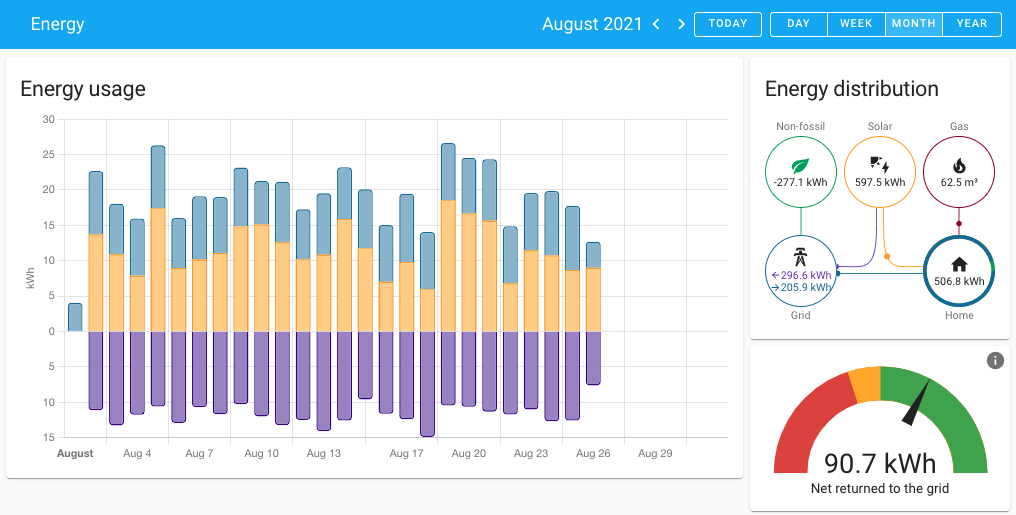 新版能源仪表板中的时间范围选择。
箭头按钮可以让你在这些周期之间前后切换。比如当你按“月”查看时,箭头按钮就会带你整个月整个月地向前或向后浏览。
追踪燃气使用量
在一些国家,住宅会接入燃气。燃气可用于烧热水、烹饪,以及为房屋供暖。如果你的家中接了燃气,我们有个好消息告诉你!
也许你已经从上一张截图里发现了:从这个版本开始,我们加入了对燃气使用量监控的支持。
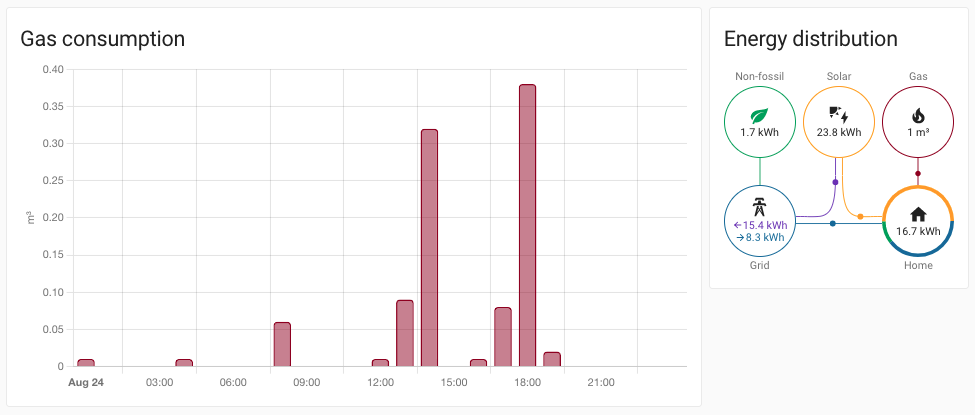 新版能源仪表板中的燃气使用监控。
在某些国家,燃气表有标准化方式可在本地读取燃气用量,或通过电表提供这些信息。比如在荷兰、比利时和卢森堡,你可以使用 SlimmeLezer 来获取燃气使用数据。
支持家庭电池
安装太阳能板是为家庭发电的好方法。 但问题来了:那些当下用不掉的太阳能发电,要存到哪里呢?
对很多人来说,答案就是大容量家庭电池,用来把电储存起来,以便在阳光无法提供电力的时候使用,比如夜晚。
很多人都提出了这个需求,因此我们现在已在 Home Assistant 的能源管理中加入了家庭电池支持。
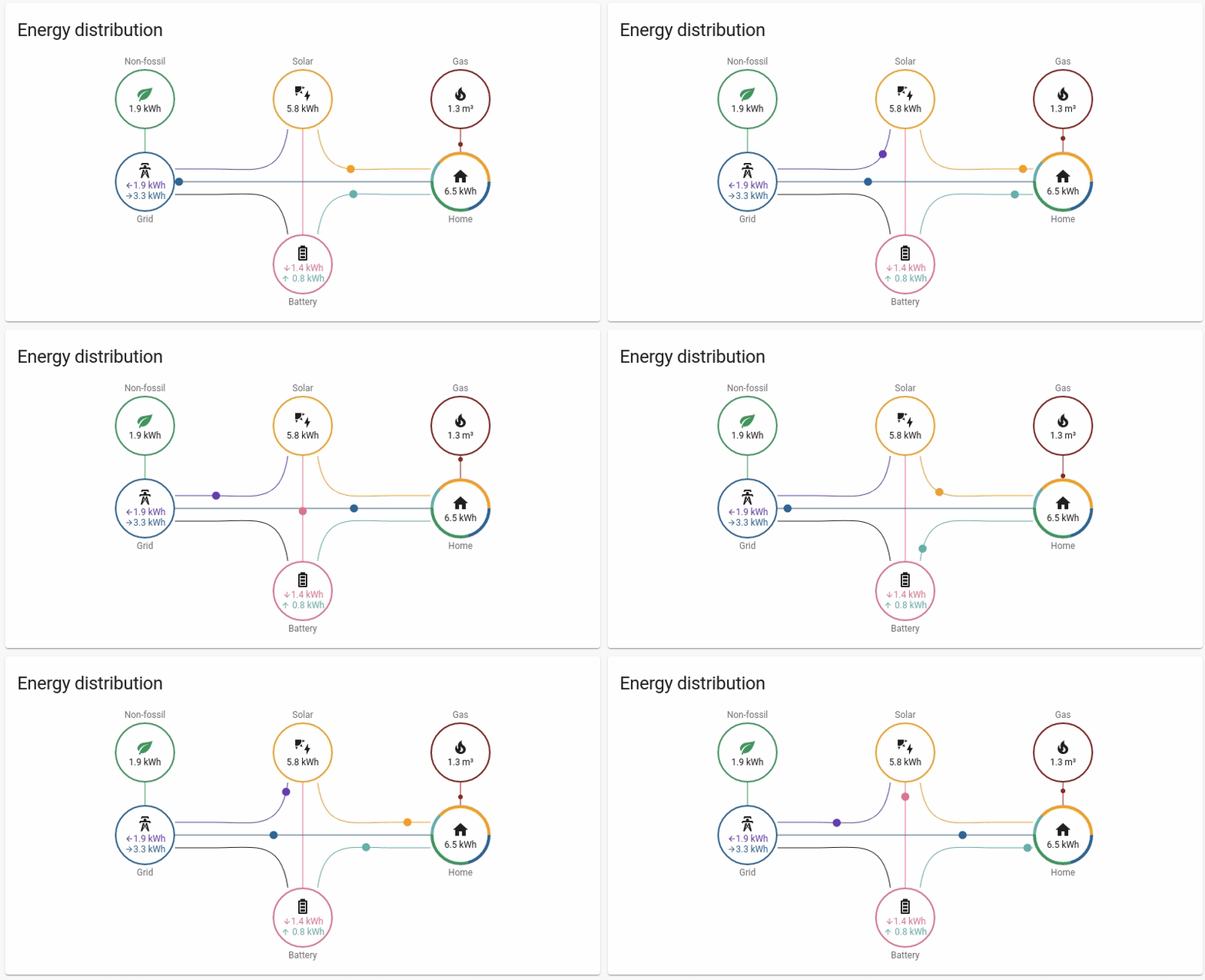 家庭电池纳入能源流向分配的动画演示。
更多集成加入支持
当我们推出家庭能源管理这样的大功能时,我们知道你一定想立刻上手体验。虽然我们在首发时已经准备并更新了很多集成,但仍然还有不少集成需要继续补上支持。
结果就是,我们收到了大量请求,希望几乎所有还没支持的集成都能尽快加入…… :) 而这些请求中,有很多已经在这次发布中实现了。
例如,Kostal Plenticore Solar Inverter、PVOutput、Fronius、SolaX Power、Growatt、Solar-Log、YouLess、Emoncms、Modbus 等许多集成都已经加入了对这些能源功能的支持。
如果你是自定义集成开发者,也想加入支持,请务必看看我们的开发者博客,了解最新的变更。
所有传感器都能使用长期统计
在上一个发布中,我们为传感器引入了长期统计,同时还带来了一张很漂亮的 Lovelace 卡片。不过在上个版本中,这项功能只限于温度、湿度、功率和能耗相关的传感器。
而从这个版本开始,长期统计功能已经向所有传感器开放!
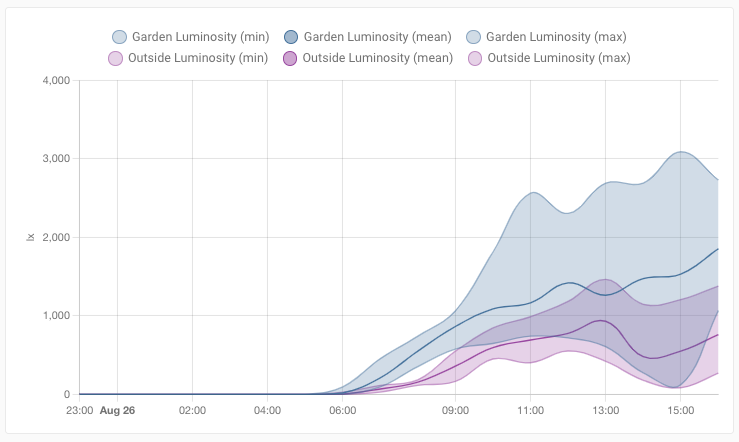 展示花园与房屋前方照度对比的统计图截图。
只要集成声明其传感器支持长期统计,这项功能就能生效。幸运的是,已经有很多集成完成了这项支持。
USB 发现
感谢 @bdraco,Home Assistant 现在可以发现 USB 设备,以及能与该设备配合使用的集成。这让你在 Home Assistant 中设置 Z-Wave 或 Zigbee 之类的功能变得轻松多了!
例如,如果你把新的 Nortek HubZ USB 棒插到运行 Home Assistant 的机器上,系统就会自动发现它并通知你。
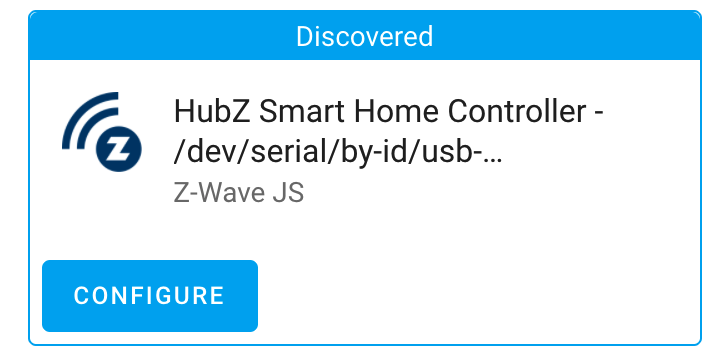 发现可与 Z-Wave JS 配合使用的 USB 设备截图。
现在你只需要点一下“配置”按钮,就能完成 Z-Wave JS 集成的设置!非常顺手!
目前,USB 发现支持已经加入 Z-Wave JS 和 ZHA 两个集成。
Z-Wave JS 更新
如果你有 Z-Wave 警笛或门铃设备,你大概知道,过去等待 Home Assistant 为 Sound Switch CC(命令类)加入实体支持有多让人抓狂。原因很简单:上游 Z-Wave JS 项目发展得实在太快了,速度往往比 Home Assistant 跟进的速度还快。
有时候也可能是 Home Assistant 无法,或暂时不太可能,直接支持你关心的那个特定命令类。但无论如何,这都不该阻止你为这些设备编写自动化!
因此,在这次发布中,我们引入了新的 zwave_js.value_updated 自动化触发器类型,它可以让你基于 Z-Wave JS 支持的任意命令类值来触发自动化!
如果你想在 UI 中使用这种触发器类型,需要通过设备自动化来操作;如果你是用 YAML 编写自动化,则可以直接使用这个触发器。
而 Z-Wave JS 集成的更新还不止这些,我们还有更多内容要分享!
- 受够了孩子去拨那个本来已经全自动化的开关?现在你可以使用 Protection Command Class 的新
select实体来禁用本地操作。 - 不想每次启动警笛时都重新指定音调和音量?现在你可以通过
number实体设置默认音量,通过select实体设置默认音调。 - 我们让
zwave_js.*服务变得更灵活了:现在它们支持把区域 ID 和group实体作为输入! - 我们还把基础 CC 值从
sensor实体改成了可直接控制的number实体。
新的模板实体:Number 和 Select
没错!模板集成现在又多了两个你可以使用的新平台!
感谢 @raman325,你现在可以自己创建模板 select 和 number 实体了!这为构建更高级的用户界面打开了很大的空间 :)
例子胜过千言万语,下面给你两个例子,它们都基于一条 WLED 灯带。你可以把 WLED 灯带中的某些功能抽出来,变成独立实体。
哦!而且它们也可以和新的触发器模板一起使用!更多可用选项,请查看文档。
新的区域模板函数
我们新增了两个模板函数,让你在 YAML 中处理区域时更轻松一些。
-
area_id("value")会返回给定值对应的区域 ID。value可以是设备 ID、实体 ID,或区域名称。这个函数也可以作为过滤器使用。 -
area_name("value")会返回给定值对应的区域名称。value可以是设备 ID、实体 ID,或区域 ID。这个函数同样也可以作为过滤器使用。
感谢 @raman325!
其他值得注意的变化
这次发布当然还有更多内容,下面是其中一些值得关注的变化:
- @balloob 为能源配置界面加入了更多校验,并补充了更多警告/错误提示;@ludeeus 则为这类消息设计了漂亮的新样式。
- 如果 Home Assistant 离线,错过了生成能源/长期统计的时机?现在不会了!Home Assistant 会在启动时自动补算,感谢 @emontnemery!
- 感谢 @bdraco,摄像头图像现在可以按你当前查看设备/屏幕的分辨率进行缩放;此外,它们只会在可见时更新。这让摄像头在各种带宽环境下都更实用了。
- The Shelly 集成 now supports transitions for 灯光! Thanks @bieniu!
- Yeelight now supports local push (instead of polling), awesome @starkillerOG!
- @emontnemery upgraded DSMR to support Swedish smart energy meters! Nice!
- For Yamaha MusicCast, @micha91 has unlocked the Media Browser features!
- The Rainforest Eagle will now provide pricing data if that is available, thanks @balloob!
- @giannello added the ability to ask your Google Home where your 吸尘器 cleaner is :)
- If you use the shopping list feature of Home Assistant, you can now remove all completed items at once using a 服务 call. Thanks, @GrumpyMeow!
- @bdraco 为 HomeKit 加入了一项新的高级功能,允许把设备事件转发给 HomeKit,从而解锁触发 HomeKit 自动化或场景的能力。
- 感谢 @ludeeus,现在当 UI 处于深色模式时,我们可以使用不同的品牌图片。
- 如果你有 Sonos 音箱,现在可以通过服务调用来调节低音和高音,感谢 @Tigger2014!
- Utility Meter 的周期配置现在借助新的 cron 模式选项变得非常灵活,@dgomes 干得漂亮!
- Bond 现在提供了新的服务,可用于开始/停止提高或降低灯光亮度。感谢 @bdraco!
新集成
欢迎以下新集成加入这次发布:
- AirTouch 4, added by @LonePurpleWolf
- Fjäråskupan, added by @elupus
- P1 Monitor, added by @klaasnicolaas
- IoTaWatt, added by @gtdiehl
- Tractive, added by @zhulik
- USB Discovery, added by @bdraco
现在可在 UI 中配置的集成
以下集成现在可以直接通过 Home Assistant UI 进行设置:
- Nanoleaf, done by @milanmeu
- Nmap Tracker, done by @bdraco
- Rainforest EAGLE-200, done by @balloob
- Uptime Robot, done by @ludeeus
发布 2021.9.1 - September 2
- Bump pyuptimerobot to 21.9.0 (@ludeeus - #55546) (uptimerobot docs)
- xiaomi_miio: bump python-miio dependency (@rytilahti - #55549) (xiaomi_miio docs)
- Pick right coordinator (@Adminiuga - #55555) (zha docs)
- Correct duplicate address. (@janiversen - #55578) (modbus docs)
- Downgrade sqlite-libs on Docker image (@pvizeli - #55591)
发布 2021.9.2 - September 3
- Ignore missing 设备 when in ssdp unsee (@bdraco - #55553) (ssdp docs)
- Disable observer for USB on 容器 (@pvizeli - #55570) (usb docs)
- Fix CONFIG_SCHEMA validation in Speedtest.net (@mib1185 - #55612) (speedtestdotnet docs)
- Narrow zwave_js USB discovery (@bdraco - #55613) (zwave_js docs)
- Fix template 传感器 availability (@balloob - #55635) (template docs)
- Better handle invalid 触发器 config (@balloob - #55637) (hue docs) (device_automation docs)
- Guard for unexpected exceptions in 设备 自动化 (@balloob - #55639) (device_automation docs)
- Fix Starline 传感器 状态 AttributeError (@Anonym-tsk - #55654) (starline docs)
- Fix hdmi_cec 开关 (@ludeeus - #55666) (hdmi_cec docs)
- Guard for doRollover failing (@balloob - #55669)
发布 2021.9.3 - September 4
- better detect legacy eagly 设备 (@balloob - #55706) (rainforest_eagle docs)
- Handle negative numbers in 传感器 long term statistics (@emontnemery - #55708) (传感器 docs)
- Handle Fritz InternalError (@chemelli74 - #55711) (fritz docs)
- Fix LIFX firmware 版本 information (@amelchio - #55713) (lifx docs)
- Fix SamsungTV sendkey when not connected (@chemelli74 - #55723) (samsungtv docs)
发布 2021.9.4 - September 6
- Fix 开关 name 属性 for thinkingcleaner (@Joshi425 - #55730) (thinkingcleaner docs)
- Fix logbook entity_matches_only query mode (@tathamoddie - #55761) (logbook docs)
- Allow same IP if ports are different on modbus (@janiversen - #55766) (modbus docs)
- Allow same address different register types in modbus (@janiversen - #55767) (modbus docs)
- Fix xiaomi miio Air Quality Monitor initialization (@bieniu - #55773) (xiaomi_miio docs)
- Fix incomfort min/max temperatures (@zxdavb - #55806) (incomfort docs)
- 升级 pymazda to 0.2.1 (@bdr99 - #55820) (mazda docs)
- Bump zwave-js-server-python to 0.30.0 (@MartinHjelmare - #55831) (zwave_js docs)
- Fix a lazy preset mode 更新 for Xiaomi Miio 风扇 (@bieniu - #55837) (xiaomi_miio docs)
- Fix typo in in rfxtrx Barometer 传感器 (@mrwhite31 - #55839) (rfxtrx docs)
- Surepetcare, bug fix (@Danielhiversen - #55842) (surepetcare docs)
- Fix target humidity step for Xiaomi MJJSQ 加湿器 (@bieniu - #55858) (xiaomi_miio docs)
- Fix exception during rediscovery of ignored zha config entries (@bdraco - #55859) (zha docs)
- 集成 传感器 unit of measurement overwrite (@dgomes - #55869) ([集成 docs])
发布 2021.9.5 - September 8
- Try to avoid rate limiting in honeywell (@rdfurman - #55304) (honeywell docs)
- Edit unit of measurement for gas/electricity supplier prices (@pascalwinters - #55771) (dsmr_reader docs)
- 集成 传感器 Initial 状态 (@dgomes - #55875) ([集成 docs])
- Fix available property for Xiaomi Miio 风扇 platform (@bieniu - #55889) (xiaomi_miio docs)
- Allow multiple template.select platform entries (@raman325 - #55908) (template docs)
- Bump aioswitcher to 2.0.5 (@thecode - #55934) (switcher_kis docs)
- Do not let one bad statistic spoil the bunch (@emontnemery - #55942) (recorder docs)
- Do not allow
infornan传感器 状态 in statistics (@emontnemery - #55943) (传感器 docs) - Fix handling of imperial units in long term statistics (@emontnemery - #55959) (recorder docs) (传感器 docs)
- Fix gas validation (@balloob - #55886) (energy docs)
- Add support for 状态 class measurement to energy cost 传感器 (@emontnemery - #55962) (energy docs)
- Add significant change support to AQI type 传感器 (@emontnemery - #55833) (灯光 docs) (google_assistant docs) (传感器 docs)
发布 2021.9.6 - September 11
- Correct confusing 日志 message in 传感器 statistics (@emontnemery - #56016) (传感器 docs)
- Suppress last_reset deprecation 警告 for energy cost 传感器 (@emontnemery - #56037) (传感器 docs)
- Fix UDP message handling by upgrading aiomusiccast to 0.9.2 (@micha91 - #56041) (yamaha_musiccast docs)
- Bump amcrest 版本 to 1.8.1 (@flacjacket - #56058) (amcrest docs)
- Fix singleton not working with falsey values (@balloob - #56072)
- Bump pymyq to 3.1.4 (@ehendrix23 - #56089) (myq docs)
发布 2021.9.7 - September 18
- Support incoming SMS messages via polling (@ocalvo - #54237) (sms docs)
- Fix generic thermostat 开关 状态 initialization (@brianegge - #56073) (generic_thermostat docs)
- Bump growattServer to 1.1.0 (@muppet3000 - #56084) (growatt_server docs)
- Ensure rainmachine 设备 name is a string (@bdraco - #56121) (rainmachine docs)
- Bump pykodi to 0.2.6 (@mxilievski - #56148) (kodi docs)
- Bump plexapi to 4.7.1 (@jjlawren - #56163) (plex docs)
- 更新 Docker base image to 2021.09.0 (@ludeeus - #56191)
- Fix HomeKit requests with hvac mode and temperature in the same call (@bdraco - #56239) (homekit docs)
- Bump pyopenuv to 2.2.1 (@bachya - #56270) (openuv docs)
- Bump pychromecast to 9.2.1 (@emontnemery - #56296) (cast docs)
- Avoid sending Standby when already off (@elupus - #56306) (philips_js docs)
- Bump aioswitcher to 2.0.6 (@thecode - #56358) (switcher_kis docs)
- Fix yeelight nightlight mode (@bdraco - #56363) (yeelight docs)
- Fetch the data a second time when -9999 错误 occurs in Xiaomi Miio 集成 (@bieniu - #56288) (xiaomi_miio docs)
如果你需要帮助……
……欢迎随时使用我们非常活跃的 论坛,或者加入我们的 聊天频道。
如果你遇到了这次发布引入的问题,请到我们的 issue tracker 提交反馈,并确保填写问题模板中的所有字段。
破坏性变更
下面按主题或集成列出了本次发布中的破坏性变更。点击对应项目即可阅读该条变更的更多说明。
The previously deprecated YAML 配置 of the 1-Wire 集成 has been removed.
1-Wire is now configured via the UI, any existing YAML 配置 has been imported in previous releases and can now be safely removed from your YAML 配置 files.
(@epenet - #53728) (onewire docs)
The 属性 of the 开关 provided by AVM FRITZ!Box Tools have been adjusted to match the naming rules and schema of Home Assistant.
If you relied on one of these 属性 in your 自动化 or 脚本, you'll need to adopt to this change.
(@AaronDavidSchneider - #54842) (fritz docs)
The unit of measurement of gas 传感器 for DSMR has changed from m3 to m³.
(@bramkragten - #54110) (dsmr docs)
The previously deprecated YAML 配置 of the Epson 集成 has been removed.
Epson is now configured via the UI, any existing YAML 配置 has been imported in previous releases and can now be safely removed from your YAML 配置 files.
(@pszafer - #55045) (epson docs)
The previously deprecated YAML 配置 of the Growatt 集成 has been removed.
Growatt is now configured via the UI, any existing YAML 配置 has been imported in previous releases and can now be safely removed from your YAML 配置 files.
(@frenck - #54325) (growatt_server docs)
The underlying HomeKit protocol 版本 has changed from 版本 1.0 to 版本 1.1.
摄像头 with motion 传感器 and some other accessories may need to be reset using
the homekit.reset_accessory 服务 or unpaired and paired again.
If after unpairing with your iOS the QR code does not show, the pairings can
manually be removed with the homekit.unpair 服务 using the 开发者工具.
(@bdraco - #53780) (homekit docs)
A future 发布 (currently scheduled for 2021.12.0) will remove the (deprecated) air quality platform from the HomeKit Controller 集成.
Starting from this 发布 the air quality values have been broken out as their own 传感器, making them easier to incorporate in your 仪表盘 widgets, graphs and 自动化.
If you relied on an air quality 实体 (provided by the HomeKit Controller 集成) in your 自动化 or 脚本, you'll need to adopt to this change.
(@Jc2k - #54673) (homekit_controller docs)
The legacy code, which imported hosts from a JSON file have been removed. If you relied on that, please follow the instructions to 设置 the hosts (can be detected automatically).
To avoid this, 升级 to 2021.8.x first (which will automatically import the hosts from the JSON file) and then 升级 to latest 发布.
(@janiversen - #54452) (tradfri docs)
If (and only if) you currently attempt to make use of the (previously ambiguous) Lutron button events in an 自动化, then you will need to 开关 to the new, unambiguous name. That said, since the current events are ambiguous they are not very useful.
(@nickovs - #53666) (lutron docs)
MQTT 风扇 no longer supports the legacy speeds (OFF, LOW, MEDIUM, HIGH). With 发布 2021.3 the support for legacy speeds was announced to be removed after a quarter (2021.7).
With removing the legacy speeds support, 集成 that rely on MQTT 风扇 platform that still use legacy speeds would break because they can not be 设置 if deprecated 属性 are used. This includes the MQTT auto discovery.
To prevent that these 集成 will fail to 设置, the deprecated 属性 listed here are still allowed in the config:
payload_high_speedpayload_low_speedpayload_medium_speedspeed_command_topicspeedsspeed_state_topicspeed_value_template
(@jbouwh - #54768) (MQTT docs)
The last_reset_topic 配置 variable for MQTT 传感器 is deprecated, last_reset_value_template is still supported but will use the state_topic if no last_reset_topic is configured.
In Home Assistant 核心 2021.10, it will no longer be possible to 配置 a last_reset_topic.
(@emontnemery - #55463) (MQTT docs)
MySensors 灯光 no longer supports deprecated white_value, use rgbw_color
instead.
(@emontnemery - #52068) (mysensors docs)
The Nanoleaf 集成 migrated to 配置 via the UI. Configuring Nanoleaf via YAML 配置 has been deprecated and will be removed in a future Home Assistant 发布.
Your existing YAML 配置 is automatically imported on 升级 to this 发布; and thus can be safely removed from your YAML 配置 after upgrading.
If you have configured Nanoleaf with the discovery 集成: You can remove
discovery: from your YAML 配置 if you only used it for Nanoleaf.
The .nanoleaf.conf file in your 配置 folder is no longer used,
you can delete it after upgrading.
(@milanmeu - #52199) (nanoleaf docs)
The Nmap Tracker 集成 migrated to 配置 via the UI. Configuring Nmap Tracker via YAML 配置 has been deprecated and will be removed in a future Home Assistant 发布.
Your existing YAML 配置 is automatically imported on 升级 to this 发布; and thus can be safely removed from your YAML 配置 after upgrading.
To disable creation of new 实体, use the the system option to disable new 实体 for the config entry, and manually enable 实体 as needed.
(@bdraco - #54715) (nmap_tracker docs)
These 属性 have been removed and replaced with full 传感器 for both gas and electricity:
start_timeend_time
If you relied on one of these 属性 in your 自动化 or 脚本, you'll need to adopt to this change.
(@timmo001 - #54952) (ovo_energy docs)
The Rainforest Eagle-200 集成 migrated to 配置 via the UI. Configuring Rainforest Eagle-200 via YAML 配置 has been deprecated and will be removed in a future Home Assistant 发布.
Your existing YAML 配置 is automatically imported on 升级 to this 发布; and thus can be safely removed from your YAML 配置 after upgrading.
(@balloob - #54846) (rainforest_eagle docs)
SimpliSafe 门锁 no longer have a jammed 属性; instead, when jammed,
they will show a jammed 状态.
If you are currently using the jammed 属性 in your 自动化 or 脚本,
you'll need to adapt them to this change.
(@bachya - #54006) (simplisafe docs)
The power and energy 属性 from 开关 实体 have been removed and replaced by 传感器.
If you relied on these 属性 in your 自动化, 脚本 or Lovelace 仪表盘, you'll need to 更新 your 配置 to match this change.
(@bsmappee - #54329) (smappee docs)
The Watt-peak unit of measurement has changed to W.
(@Ernst79 - #55110) (solarlog docs)
The usage of "snapshot" is deprecated, from now "备份" is used instead.
- The 服务
snapshot_fullis now namedbackup_full, the 服务snapshot_fullwill be removed in Home Assistant 2021.11. - The 服务
snapshot_partialis now namedbackup_partial, the 服务snapshot_partialwill be removed in Home Assistant 2021.11. - Using
snapshotin the data for therestore_fullandrestore_partial服务 is deprecated and will be removed in Home Assistant 2021.11, usesluginstead.
Old examples:
New examples:
(@ludeeus - #53851) (hassio docs) (zwave_js docs)
The Tesla Powerwall 属性 for energy_exported_(in_kW) and
energy_imported_(in_kW) have been converted to their own energy 传感器.
If you relied on those 属性 in your 自动化 or 脚本, you'll need to adapt them to this change.
(@bdraco - #54018) (powerwall docs)
The unit of measurement of gas and water 传感器 for Toon has changed from m3 to m³.
(@bramkragten - #54110) (toon docs)
The previously deprecated YAML 配置 of the UpCloud 集成 has been removed.
UpCloud is now configured via the UI, any existing YAML 配置 has been imported in previous releases and can now be safely removed from your YAML 配置 files.
(@scop - #54516) (upcloud docs)
The Uptime Robot 集成 migrated to 配置 via the UI. Configuring Uptime Robot via YAML 配置 has been deprecated and will be removed in a future Home Assistant 发布.
Your existing YAML 配置 is automatically imported on 升级 to this 发布; and thus can be safely removed from your YAML 配置 after upgrading.
(@ludeeus - #53938) (uptimerobot docs)
The Wink 集成 has been deprecated and is pending removal in Home Assistant 2021.11.
Their developer portal, needed for obtaining an API token, has been taken offline and their customer support has confirmed no new token or client/secret can be obtained. This makes it impossible to use 此integrations.
(@frenck - #54496) (wink docs)
The following 风扇 实体 属性 temperature, humidity, aqi,
purify volume, filter life remaining, filter hours used, co2,
illuminance, motor speed and motor2 speed have been migrated to their own
传感器 实体.
If you relied on those 属性 in your 自动化 or 脚本, you'll need to adapt them to this change.
The filter_rfid_product_id and filter_rfid_tag 风扇 实体 属性
have been removed as they are of little use to keep around.
(@bieniu - #54564) (xiaomi_miio docs)
The 服务 fan_set_led_brightness is removed and the Led Brightness
select 实体 has been 创建 instead.
If you relied on this 服务 in your 自动化 or 脚本, you'll need to adapt them to this change.
(@bieniu - #54702) (xiaomi_miio docs)
The previously (deprecated and old style) speeds, speed list and speed 服务 have been removed.
(@SmaginPV - #54182) (xiaomi_miio docs)
The 服务 fan_set_buzzer_on, fan_set_buzzer_off, fan_set_led_on,
fan_set_led_off, fan_set_child_lock_on, fan_set_child_lock_off,
fan_set_auto_detect_on, fan_set_auto_detect_off, fan_set_learn_mode_on
and fan_set_learn_mode_off have been removed.
开关 实体 have been 创建 to replace those.
If you relied on one of these 服务 in your 自动化 or 脚本, you'll need to adapt them to this change.
(@bieniu - #54834) (xiaomi_miio docs)
The previously deprecated YAML 配置 of the Xiaomi Miio 集成 has
been removed (with the exception of the remote platform).
Xiaomi Miio is now configured via the UI, any existing YAML 配置 has been imported in previous releases and can now be safely removed from your YAML 配置 files.
(@rytilahti - #54930) (xiaomi_miio docs)
The 服务 fan_set_favorite_level, fan_set_fan_level, and fan_set_volume
have been removed and number 实体 have been 创建 instead.
If you relied on one of these 服务 in your 自动化 or 脚本, you'll need to adapt them to this change.
(@bieniu - #54977) (xiaomi_miio docs)
The Basic CC always comes with two values, currentValue and targetValue.
We currently only have a discovery schema for currentValue which creates a
传感器, making these Basic CC values noninteractive. As of this 发布 we will
create a number platform 实体 for Basic CC values instead of 传感器.
(@raman325 - #54512) (zwave_js docs)
If you have 创建 an 自动化 with the zwave_js 设备 条件
Current value of a Z-Wave Value for the CONFIGURATION Command Class,
your 自动化 will no longer work.
Instead, you should use the Config parameter 设备 条件 for the value
you were trying to use for your 条件.
(@raman325 - #54962) (zwave_js docs)
This breaking change is only relevant to custom 集成 authors!
The function signature for async_camera_image and camera_image has changed
to include a width and height.
The goal of the change is to reduce the overhead of sending large images that will only be displayed as small images as this can quickly consume hundred of megabytes of bandwidth / mobile data allocation. Scaling should be done on a best effort basis and is not a strict requirement as the existing behavior of falling back to scaling at the display layer is preserved.
-
集成 should pass on the width and height if the underlying 摄像头 is capable of scaling the image.
-
集成 may choose to ignore the height parameter in order to preserve aspect ratio
-
If the 集成 cannot scale the image and returns a jpeg image, it will automatically be scaled by the 摄像头 集成 when requested.
This breaking change is only relevant to custom 集成 authors!
Although not a breaking change from a user's perspective, this is a significant change from a developer's perspective.
Temperature conversions are moving from the Entity base class to the
SensorEntity base class.
Additionally, we have two new properties, native_value (which replaces state)
and native_unit_of_measurement which replaces unit_of_measurement.
Read all about it in the developer 博客:
https://开发者.home-assistant.io/博客/2021/08/12/sensor_temperature_conversion/
(@emontnemery - #48261) (abode docs) (传感器 docs)
Additionally, a new 传感器 状态 class has been introduced: total_increasing.
This changes the measurement 状态 class that was used in conjunction with the
last_reset 属性. 更多信息 about his can be found in the
developer 博客 about it:
https://开发者.home-assistant.io/博客/2021/08/16/state_class_total/
全部变更
- Add renault 集成 (@epenet - #39605) (renault docs) (new-集成)
- Bump 版本 to 2021.9.0dev0 (@frenck - #53638)
- Correct typing in Zerproc and activate mypy (@milanmeu - #53642) (zerproc docs)
- Fix Lutron button events to have unambiguous names (@nickovs - #53666) (lutron docs) (breaking-change)
- Clean up Surpetcare (@Danielhiversen - #53699) (surepetcare docs)
- Replace lists with tuples (2) (@cdce8p - #53685)
- wemo 灯光 brightness fixes (@esev - #53740) (wemo docs)
- Remove YAML 配置 from onewire (@epenet - #53728) (onewire docs) (breaking-change)
- Use constants for device_info in Onewire 集成 (@epenet - #53724) (onewire docs)
- Use constants for device_info in Renault 集成 (@epenet - #53714) (renault docs)
- fix flakky test (@dgomes - #53750) (prosegur docs)
- 更新 集成 Fints with activate mypy, use attr_variables (@janiversen - #53706) (fints docs)
- Fix flaky netatmo tests (@cgtobi - #53644) (netatmo docs)
- Improve 灯光 场景 support for white mode (@emontnemery - #53768) (灯光 docs)
- Bump vallox-websocket-api to 2.8.1 (@timmo001 - #53463) (vallox docs)
- Revert "Improve 灯光 场景 support for white mode (#53768)" (@balloob - #53782) (灯光 docs)
- Simplify DATA_TYPE -> struct conversion. (@janiversen - #53805) (modbus docs)
- Activate mypy for hdmi_cec (@janiversen - #53763) (hdmi_cec docs)
- Bump Amcrest 版本 to 1.8.0 (@flacjacket - #53784) (amcrest docs)
- Please mypy. (@janiversen - #53786) (marytts docs)
- Rename snapshot -> 备份 (@ludeeus - #53851) (hassio docs) (zwave_js docs) (breaking-change)
- Activate mypy for Sony Songpal (@milanmeu - #53655)
- Convert @property to _attr_variable for hdmi_sec (@janiversen - #53816) (hdmi_cec docs)
- Activate mypy for Norway_air (@janiversen - #53787) (norway_air docs)
- Bump HAP-python to 4.0.0 (@bdraco - #53780) (homekit docs) (breaking-change)
- Improve Universal media player 切换 default behavior (@TastyPi - #49395) (universal docs)
- Use homeassistant.const instead of 集成 const for device_info ATTR_ (@milanmeu - #53703)
- Late review on hdmi_cec (#53763) (@janiversen - #53863) (hdmi_cec docs)
- Add edl21 OBIS IDs for DZG DWS76 (@pdcemulator - #53029) (edl21 docs)
- Add 状态 class measurement to all suitable 传感器 on Speedtest.net (@mib1185 - #53693) (speedtestdotnet docs)
- Add support for MJJSQ 加湿器 for Xiaomi MIIO 集成 (@bieniu - #53807) (xiaomi_miio docs)
- System Bridge v2.3.0+ - Data from WebSocket (@timmo001 - #53443) (system_bridge docs)
- Add meta 容器 data to rootfs (@pvizeli - #53903)
- Use SensorEntityDescription class for Xiaomi Miio (@bieniu - #53890) (xiaomi_miio docs)
- Add support for Eve Degree's air pressure 传感器 (@Jc2k - #53891) (homekit_controller docs)
- Allow esphome 实体 to be disabled by default (@jesserockz - #53898) (esphome docs)
- Stream API requests to the supervisor (@ludeeus - #53909) (hassio docs)
- Check for torrents in queue before calling the api stop_torrent() (@jshank - #53895) (transmission docs)
- Add "stop watering" 服务 to rachio (@adamjernst - #53764) (rachio docs)
- Add target high/low temperatures to prometheus 集成 (@mdz - #50071) (prometheus docs)
- Enable mypy for Yamaha (@janiversen - #53920) (yamaha docs)
- Use the github context when writing metafile (@ludeeus - #53928)
- Validate Select option before calling 实体 method (@jbouwh - #52352) (demo docs) (select docs)
- Add xiaomi miio lumi.gateway.aqhm01 support (@starkillerOG - #53929) (xiaomi_miio docs)
- Validate Number value before calling 实体 method (@jbouwh - #52343) (number docs)
- Use
NumberEntityDescriptionfor Xiaomi Miio (@bieniu - #53911) (xiaomi_miio docs) - Late review. (@janiversen - #53933) (yamaha docs)
- 升级 anthemav dependency to 1.2.0 (@Hyralex - #53931) (anthemav docs)
- Remove Xiaomi_miio number value validation (@jbouwh - #53934) (xiaomi_miio docs)
- Remove Xiaomi_miio select option validation (@jbouwh - #53936) (xiaomi_miio docs)
- Activate mypy for LG webOS Smart TV (@milanmeu - #53958) (webostv docs)
- Add config flow to uptimerobot (@ludeeus - #53938) (uptimerobot docs) (breaking-change)
- Add support for jammed status to SimpliSafe 门锁 (@bachya - #54006) (simplisafe docs) (breaking-change)
- Don't double-validate KNX select options (@farmio - #54020) (knx docs)
- Use SwitchEntityDescription instead of EntityDescription in the motionEye 集成 (@dermotduffy - #54019) (motioneye docs)
- Activate mypy for Reddit (@milanmeu - #53949) (reddit docs)
- Activate mypy for Updater (@milanmeu - #53950) (updater docs)
- Add vscode task code coverage (@mib1185 - #53783)
- Bump pyuptimerobot to 21.8.1 (@ludeeus - #53995) (uptimerobot docs)
- Add 状态 class support to Netatmo (@frenck - #54051) (netatmo docs)
- Add tractive 集成 (@zhulik - #51002) (tractive docs) (new-集成)
- Activate mypy for Cloudflare (@milanmeu - #54041) (cloudflare docs)
- Add unique_id to Uptime Robot config_flow (@ludeeus - #54055) (uptimerobot docs)
- Bump py-nextbusnext to 0.1.5 (@ViViDboarder - #53924) (nextbus docs)
- Add some metadata to pvoutput energy 传感器 (@balloob - #54074) (pvoutput docs)
- Add
state_classfor KNX 传感器 (@farmio - #53996) (knx docs) - We shouldn't add measurement without last_reset to metered 实体 (@balloob - #54087) (pvoutput docs)
- Run coordinator config_entry_first_refresh in rituals_perfume_genie 设置 (@milanmeu - #54080) (rituals_perfume_genie docs)
- Test knx 传感器 (@farmio - #54090) (knx docs)
- Test KNX 二元sensor (@farmio - #53820) (knx docs)
- Fix jinja 警告 (@balloob - #54109)
- Fix Squeezebox dhcp discovery (@rajlaud - #54137) (squeezebox docs)
- Ignore Coinbase vault wallets (@TomBrien - #54133) (coinbase docs)
- Add statistics support for the PVOutput 传感器 (@zoeisnowooze - #54149) (pvoutput docs)
- Convert to using 传感器 descriptors (@elupus - #54115) (rfxtrx docs)
- Use SensorEntityDescription for AsusWRT 传感器 (@ollo69 - #54111) (asuswrt docs)
- Add 状态 class and last reset in kostal_plenticore (@gianklug - #54084) (kostal_plenticore docs)
- Flexit component fix for updated modbus (@jorgror - #53583) (flexit docs)
- Correct 设备 class typo in rfxtrx (@elupus - #54200) (rfxtrx docs)
- Bump ha-philipsjs to 2.7.5 (@elupus - #54176) (philips_js docs)
- Fix Neato reauth flow when token expired (@chemelli74 - #52843) (neato docs)
- Raise ConfigEntryNotReady for Neato API 错误 (@chemelli74 - #54227) (neato docs)
- Change 更新 interval from 60s to 10s for Uptime Robot (@ludeeus - #54230) (uptimerobot docs)
- Set 实体 as unavailable if last 更新 was not successful (@ludeeus - #54229) (uptimerobot docs)
- Handle added and removed monitors (@ludeeus - #54228) (uptimerobot docs)
- OVO Energy Long-term Statistics (@timmo001 - #54157) (ovo_energy docs)
- Add enumerate to builtins in python_script component (@rjulius23 - #54244) (python_script docs)
- Add more Fritz 传感器 for DSL connections (@Schmidsfeld - #53198) (fritz docs)
- Fix 设备 registry lookup in uptimerobot (@ludeeus - #54256) (uptimerobot docs)
- Remove monitor checks in Uptime Robot 实体 (@ludeeus - #54259) (uptimerobot docs)
- Strict typing for Neato (@chemelli74 - #53633) (neato docs)
- Add missing
motor_speed传感器 for Xiaomi Miio 加湿器 CA1 and CB1 (@bieniu - #54264) (xiaomi_miio docs) - Add re-authentication to Uptime Robot (@ludeeus - #54226) (uptimerobot docs)
- Add modbus get_hub (@janiversen - #54277) (modbus docs) (flexit docs)
- Convert last properties in modbus to _attr_variable (@janiversen - #53919) (modbus docs)
- Bump google-nest-sdm to 0.3.6 (@allenporter - #54287) (nest docs)
- 更新 DeviceInfo static types (@allenporter - #54276) (nest docs)
- Fix inconsistent supported_features return in demo 门锁 (@bdraco - #54300) (demo docs)
- Fix SQLAlchemy test 警告 (@balloob - #54116) (recorder docs)
- Add siren support for available tones provided as a dict (@raman325 - #54198) (siren docs)
- Add
unique_idanddevice_infofor SMS 传感器 (@bieniu - #54257) (sms docs) - Ensure internal/external URL have no path (@balloob - #54304) (config docs)
- Fix external internal url 核心 check (@MartinHjelmare - #54310)
- Convert base_config_test in modbus to existing Pytest.fixture (@janiversen - #53836) (modbus docs)
- Use SensorEntityDescription for arlo (@janiversen - #54223) (arlo docs)
- 更新 服务.yaml for matrix 服务 to fix Data field being replaced by [object Object] in UI (@cpw - #54296) (matrix docs)
- Remove icon where device_class is defined. (@janiversen - #54323) (arlo docs)
- Use dict for zwave_js siren.available_tones (@raman325 - #54305) (zwave_js docs)
- Remove deprecated YAML 配置 from Growatt (@frenck - #54325) (growatt_server docs) (breaking-change)
- Clean up zwave_js RGB code (@firstof9 - #54336) (zwave_js docs)
- Add 灯光 transition for Shelly 集成 (@bieniu - #54327) (shelly docs)
- Yeelight local push updates (@starkillerOG - #51160) (yeelight docs)
- Use EntityDescription - pi_hole (@cdce8p - #54319) (pi_hole docs)
- Use EntityDescription - abode (@cdce8p - #54321) (abode docs)
- Remove useless 属性 in devolo Home Control (@Shutgun - #54284) (devolo_home_control docs)
- Remove HomeKit event guards (@bdraco - #54343) (homekit docs)
- Use EntityDescription - growatt_server (@cdce8p - #54316) (growatt_server docs)
- Use EntityDescription - bitcoin (@cdce8p - #54320) (bitcoin docs)
- Add
binary_sensorplatform for Xiaomi Miio 集成 (@bieniu - #54096) (xiaomi_miio docs) (new-platform) - Minor motionEye readability improvement (@dermotduffy - #54251) (motioneye docs)
- 更新 pyupgrade to 2.23.3 (@mplemay - #54179)
- Add Save Persistent 状态 服务 (@r-t-s - #53881) (homeassistant docs)
- Add powerwall import and export 传感器 (@bdraco - #54018) (powerwall docs) (breaking-change)
- 版本 传感器 实体 cleanup (@ludeeus - #53915) (版本 docs)
- AsusWRT remove default EntityDescription property (@ollo69 - #54367) (asuswrt docs)
- Use EntityDescription - juicenet (@cdce8p - #54362) (juicenet docs)
- 升级 codecov to 2.1.12 (@frenck - #54370)
- 升级 debugpy to 1.4.1 (@frenck - #54369) (debugpy docs)
- Bump pymodbus 版本 to 2.5.3rc1 (@janiversen - #54318) (modbus docs)
- Activate mypy for Filter (@milanmeu - #54044) (filter docs)
- Activate mypy for Alexa (@milanmeu - #54042) (alexa docs)
- Activate mypy for Pilight (@milanmeu - #53956) (pilight docs)
- Activate mypy for SiteSage Emonitor (@milanmeu - #54040) (emonitor docs)
- Activate mypy for Smart Meter Texas (@milanmeu - #53954) (smart_meter_texas docs)
- Activate mypy for Solar-日志 (@milanmeu - #53952) (solarlog docs)
- Using VCN 安装 as 动作 (@pvizeli - #54383)
- Activate mypy for google_maps (@janiversen - #53725) (google_maps docs)
- Activate mypy for Proxmox VE (@milanmeu - #53955) (proxmoxve docs)
- Use
_attr_*for Launch Library (@ludeeus - #54388) (launch_library docs) - Apply suggested changes to tidy juicenet 传感器 code (@jesserockz - #54390) (juicenet docs)
- Xiaomi miio add coordinator to 风扇 platform (@jbouwh - #54366) (xiaomi_miio docs)
- Activate mypy from amcrest and make the needed changes (@janiversen - #54392) (amcrest docs)
- Remove useless check in launch_library (@ludeeus - #54393) (launch_library docs)
- Adjust 版本 tests (@ludeeus - #54391) (版本 docs)
- Mill cleanup (@Danielhiversen - #54396) (mill docs)
- Add 100% test coverage for Uptime Robot (@ludeeus - #54314) (uptimerobot docs)
- 更新 the Qubino Flush Shutter fixture (@deiger - #54387) (zwave_js docs)
- Use EntityDescription - ios (@cdce8p - #54359) (ios docs)
- Fix pi_hole 传感器 icon (@cdce8p - #54403) (pi_hole docs)
- Support unloading/reloading Sonos (@jjlawren - #54418) (sonos docs)
- Mark Uptime Robot as a platinum quality 集成 (@ludeeus - #54408) (uptimerobot docs)
- Add myself as codeowner to tradfri (IKEA stuff) (@janiversen - #54415) (tradfri docs)
- Refactor pi_hole icon usage (@cdce8p - #54420) (pi_hole docs)
- Add api to device_automation to return all matching 设备 (@bdraco - #53361) (device_automation docs)
- Improve HomeKit Color with Color Temp implementation (@bdraco - #54371) (homekit docs)
- Avoid increasing yeelight rate limit when the 状态 is already set (@bdraco - #54410) (yeelight docs)
- Pass width and height when requesting 摄像头 snapshot (@bdraco - #53835) (breaking-change)
- Add support for width and height to ffmpeg based 摄像头 snapshots (@bdraco - #53837)
- Activate mypy for Trådfri (@janiversen - #54416) (tradfri docs)
- Advantage Air code cleanup (@Bre77 - #54449) (advantage_air docs)
- Bump aioambient to 1.2.6 (@bachya - #54442) (ambient_station docs)
- Move temperature conversions to 传感器 base class (1/8) (@emontnemery - #48261) (abode docs) (传感器 docs) (breaking-change)
- Remove legacy code. (@janiversen - #54452) (tradfri docs) (breaking-change)
- Use monitor name for uptimerobot 设备 registry (@ludeeus - #54456) (uptimerobot docs)
- Replace prepare_service_call with a simpler fixture in modbus (@janiversen - #53975) (modbus docs)
- Use SensorEntityDescription and set 状态 class measurement for NUT 传感器 (@mib1185 - #54269) (nut docs)
- Remove empty currency from discovery info (@frenck - #54478) (api docs)
- Ensure 摄像头 handles non-jpeg image sources correctly (@bdraco - #54474) (摄像头 docs) (demo docs)
- Complete mysensors 传感器 coverage (@MartinHjelmare - #54471) (mysensors docs)
- Fix arlo platform schema (@cdce8p - #54470) (arlo docs)
- 升级 isort to 5.9.3 (@frenck - #54481)
- Fix possible unhandled IQVIA exception with allergy outlook data (@bachya - #54477) (iqvia docs)
- Add battery support to energy (@bramkragten - #54432) (energy docs)
- Move temperature conversions to 实体 base class (2/8) (@emontnemery - #54468)
- Move temperature conversions to 实体 base class (7/8) (@emontnemery - #54482)
- Add 设备 class
gasand enable statistics for it (@bramkragten - #54110) (recorder docs) (toon docs) (传感器 docs) (dsmr docs) (breaking-change) - Move temperature conversions to 传感器 base class (8/8) (@emontnemery - #54483)
- Move temperature conversions to 传感器 base class (4/8) (@emontnemery - #54472)
- Refactor Fronius 传感器 设备 class and long term statistics (@nielstron - #54185) (fronius docs)
- Use EntityDescription - blink (@cdce8p - #54360) (blink docs)
- Deprecate Wink 集成 (@frenck - #54496) (wink docs) (breaking-change)
- Use 实体 class 属性 for Adax (@Danielhiversen - #54501) (adax docs)
- Move temperature conversions to 传感器 base class (5/8) (@emontnemery - #54475)
- Move temperature conversions to 传感器 base class (3/8) (@emontnemery - #54469)
- Move temperature conversions to 传感器 base class (6/8) (@emontnemery - #54476)
- 日志 gathered exceptions during Sonos unsubscriptions (@jjlawren - #54190) (sonos docs)
- Remove unused import step in OpenUV config flow (@bachya - #54554) (openuv docs)
- Cleanup Sonos grouping event callback method (@jjlawren - #54542) (sonos docs)
- Remove obsolete upcloud YAML config support (@scop - #54516) (upcloud docs) (breaking-change)
- Add state_class 属性 to keba 集成 (@carstenschroeder - #54271) (keba docs)
- Updated ZHA to also poll Philips Hue 灯光 with new firmware (@TheJulianJES - #54513) (zha docs)
- Add support for total and total_increasing 传感器 状态 classes (@emontnemery - #54523) (传感器 docs)
- Fix for 'list index out of range' (@DCSBL - #54588) (solaredge_local docs)
- Use ssdp callbacks in upnp (@StevenLooman - #53840) (upnp docs)
- Add gas support to energy (@bramkragten - #54560) (energy docs)
- 更新 前端 to 20210813.0 (@bramkragten - #54603) (前端 docs)
- Skip Sonos zeroconf availability check in non-timeout scenarios (@jjlawren - #54425) (sonos docs)
- Bump python-miio to 0.5.7 (@rytilahti - #54601) (xiaomi_miio docs)
- Add MySensors S_MOISTURE type as 传感器 (@janjurca - #54583) (mysensors docs)
- Move temperature conversions to 传感器 base class - new 集成 (@emontnemery - #54623) (传感器 docs)
- 更新 pyhomematic to 0.1.74 (@danielperna84 - #54613) (homematic docs)
- Add 传感器 platform for Xiaomi Miio 风扇 (@bieniu - #54564) (xiaomi_miio docs) (breaking-change)
- Add new OUIs to august for yale branded connect bridges (@bdraco - #54637) (august docs)
- Add siren, number, and weather to base platform list (@raman325 - #54665)
- Fix typo in xiaomi_miio cloud_login_error string (@nickstamat - #54661) (xiaomi_miio docs)
- Bump zeroconf to 0.35.1 (@bdraco - #54666) (zeroconf docs)
- Address late review of nut 集成 (@mib1185 - #54606) (nut docs)
- Use buffer at stream start with unsupported audio (@allenporter - #54672) (stream docs)
- Address late review of Flipr (@cnico - #54668) (flipr docs)
- Add
water levelandwater tank detached传感器 for Xiaomi Miio 加湿器 (@bieniu - #54625) (xiaomi_miio docs) - Add code owner to GitHub 集成 (@timmo001 - #54689) (github docs)
- Activate mypy in lifx (@janiversen - #54540)
- Renault test optimisation (@epenet - #53705) (renault docs)
- Improve Tractive (@Danielhiversen - #54532) (tractive docs)
- Bump adb-shell to 0.4.0 (@JeffLIrion - #54575)
- Renault code quality improvements (@epenet - #53680) (renault docs)
- Fix typo in Todoist 服务 description (@serenewaffles - #54662) (todoist docs)
- Fix event type names for non-specified Traccar events (@bogdal - #54561) (traccar docs)
- 更新 mill to use 状态 class total (@Danielhiversen - #54581) (mill docs)
- Allow non-admin users to call history/list_statistic_ids (@ludeeus - #54698) (history docs)
- 更新 melcloud to use 状态 class total increasing (@Danielhiversen - #54607) (melcloud docs)
- Bump pytautulli (@ludeeus - #54594) (tautulli docs)
- Set correct ESPHome color mode when setting color temperature (@oxan - #54596) (esphome docs)
- Remove last_reset 属性 from dsmr_reader 传感器 (@emontnemery - #54700) (dsmr_reader docs)
- Allow specifying discovery without a config flow (@balloob - #54677) (rainforest_eagle docs)
- Refactor mysensors 传感器 description (@MartinHjelmare - #54522) (mysensors docs)
- Bump simplisafe-python to 11.0.4 (@bachya - #54701) (simplisafe docs)
- 更新 Toon to use new 状态 classes (@frenck - #54705) (toon docs)
- Use zwave_js.number platform for Basic CC values (@raman325 - #54512) (zwave_js docs) (breaking-change)
- Remove last_reset 属性 from dsmr 传感器 (@emontnemery - #54699) (dsmr docs)
- Fix TypeError when 温控 component sets 风扇 modes to None (@brianegge - #54709) (google_assistant docs)
- Create zwave-js select platform and discover additional siren values (@raman325 - #53018) (zwave_js docs) (new-platform)
- Fix AsusWRT scanner 实体 DeviceInfo (@ollo69 - #54648) (asuswrt docs)
- Add 灯光 platform to MyQ (@ehendrix23 - #54611) (myq docs) (new-platform)
- 升级 pre-commit to 2.14.0 (@frenck - #54719)
- Convert nmap_tracker to be a config flow (@bdraco - #54715) (nmap_tracker docs) (breaking-change)
- 升级 mypy to 0.910 and types-* (@scop - #54574)
- Use EntityDescription - qbittorrent (@cdce8p - #54428) (qbittorrent docs)
- Use EntityDescription - point (@cdce8p - #54363) (point docs)
- Activate mypy in sabnzbd (@janiversen - #54539) (sabnzbd docs)
- Avoid some implicit generic Anys (@scop - #54577)
- Active mypy for netio (@janiversen - #54543) (netio docs)
- Add 设备 classes that were part of deprecated air quality 实体 (@Jc2k - #54075) (传感器 docs)
- Use 状态 class total increasing for TPLink smart plugs (@mib1185 - #54723) (tplink docs)
- Bump zeroconf to 0.36.0 (@bdraco - #54720) (zeroconf docs)
- Remove last_reset 属性 from FritzBoxEnergySensor (@emontnemery - #54644) (fritzbox docs)
- Use EntityDescription - logi_circle (@cdce8p - #54429) (logi_circle docs)
- Activate mypy for sesame (@janiversen - #54546) (sesame docs)
- Use EntityDescription - mitemp_bt (@cdce8p - #54503) (mitemp_bt docs)
- Add DEVICE_CLASS_UPDATE to 二元sensor (@mib1185 - #53945) (binary_sensor docs)
- Fix Google Calendar event loading (@Bert-R - #54231) (google docs)
- Add 设备 class 更新 to the updater binary_sensor (@ludeeus - #54732) (updater docs)
- Add 设备 class 更新 to hassio 更新 实体 (@ludeeus - #54733) (hassio docs)
- 更新 deCONZ to use new 状态 classes (@frenck - #54729) (deconz docs)
- Add 状态 classes to Vallox 传感器 (@andre-richter - #54297) (vallox docs)
- Activate mypy for google_pubsub (@janiversen - #54649) (google_pubsub docs)
- Energy support for Solax inverters (@ppetru - #54654) (solax docs)
- Use PM1, PM25 and PM10 设备 classes in Nettigo Air Monitor 集成 (@bieniu - #54741) (nam docs)
- Use DEVICE_CLASS_UPDATE in Shelly 集成 (@bieniu - #54746) (shelly docs)
- Use 实体 descriptions for hassio 实体 (@ludeeus - #54749) (hassio docs)
- Relax zwave_js 门锁 discovery rules to 遮盖 more use cases (@raman325 - #54710) (zwave_js docs)
- DSMR: Remove icon from 传感器 with gas 设备 class (@frenck - #54752) (dsmr docs)
- Bump pyfronius 版本 to 0.5.5 (@nielstron - #54758) (fronius docs)
- Solax 0.2.8 (@squishykid - #54759) (solax docs)
- Toon: Remove icon from 传感器 with gas 设备 class (@frenck - #54753) (toon docs)
- Deprecate homekit_controller's air quality 实体 in favor of separate 传感器 实体 (@Jc2k - #54673) (homekit_controller docs) (breaking-change)
- Airtouch4 集成 (@LonePurpleWolf - #43513) (airtouch4 docs) (new-集成)
- Add zwave_js Protection CC select 实体 (@raman325 - #54717) (zwave_js docs)
- Use DEVICE_CLASS_UPDATE in Synology DSM (@mib1185 - #54769) (synology_dsm docs)
- Use path helper method for principal file in google_pubsub (@frenck - #54744) (google_pubsub docs)
- Add upnp 二元sensor for connectivity status (@ehendrix23 - #54489) (upnp docs)
- set common test 实体 name. (@janiversen - #54697) (modbus docs)
- Tractive, 更新 library (@Danielhiversen - #54775) (tractive docs)
- Fix goalzero 传感器 not using SensorEntity class (@tkdrob - #54773) (goalzero docs)
- Fix connectivity issue in the Youless 集成 (@gjong - #54764) (youless docs)
- Force STATE_CLASS_TOTAL_INCREASING to reset to 0 (@emontnemery - #54751) (传感器 docs)
- Rfxtrx,STATE_CLASS_TOTAL_INCREASING (@Danielhiversen - #54776) (rfxtrx docs)
- Improve myq 错误 handling for opening/closing 遮盖 (@ehendrix23 - #54724) (myq docs)
- 更新 SolarEdge to use new 状态 classes (@frenck - #54731) (solaredge docs)
- Use AQI, PM1, PM25, PM10 设备 classes in Airly (@bieniu - #54742) (airly docs)
- Use new 设备 classes in GIOS 集成 (@bieniu - #54743) (gios docs)
- Adjust yeelight homekit model (@bdraco - #54783) (yeelight docs)
- 更新 sense_energy to 版本 0.9.2 (@crkochan - #54787) (sense docs) (emulated_kasa docs)
- Bump dessant/门锁-threads from 2.1.1 to 2.1.2 (@dependabot - #54791)
- Remove STATE_CLASS_TOTAL and last_reset from 传感器 (@emontnemery - #54755) (传感器 docs)
- Add Gas 设备 class to DSMR Reader (@frenck - #54748) (dsmr_reader docs)
- Tibber data coordinator (@Danielhiversen - #53619) (tibber docs)
- Add select platform for Xiaomi Miio 风扇 (@bieniu - #54702) (xiaomi_miio docs) (breaking-change)
- Bump async-upnp-client to 0.20.0, adapt to backward-incompatible changes (@bdraco - #54782) (upnp docs) (dlna_dmr docs) (ssdp docs)
- Remove unused last_reset from Toon (@emontnemery - #54798) (toon docs)
- Remove last_reset and 更新 状态 class for Atome energy (@emontnemery - #54801) (atome docs)
- Remove distro from updater requirements (@ludeeus - #54804) (updater docs)
- Ensure 设备 entry in Renault 集成 (@epenet - #54797) (renault docs)
- Adjust modbus constants names (@janiversen - #54792) (modbus docs)
- Remove last_reset 属性 from fritz 传感器 (@emontnemery - #54806) (fritz docs)
- Remove last_reset 属性 and set 状态 class to total_increasing for Shelly energy 传感器 (@emontnemery - #54800) (shelly docs)
- ConfigType and async_setup/设置 type hint improvements (@scop - #54739)
- Remove
last_reset属性 and set 状态 class tototal_increasingfor Ovo cost and energy 传感器 (@emontnemery - #54807) (ovo_energy docs) - Remove
last_reset属性 and set 状态 class tototal_increasingfor powerwall energy 传感器 (@emontnemery - #54808) (powerwall docs) - Remove
last_reset属性 and set 状态 class tototal_increasingfor PVOutput energy 传感器 (@emontnemery - #54809) (pvoutput docs) - Remove
last_reset属性 and set 状态 class tototal_increasingfor rainforest energy 传感器 (@emontnemery - #54810) (rainforest_eagle docs) - Remove last_reset 属性 from devolo energy 传感器 (@emontnemery - #54803) (devolo_home_control docs)
- Remove last_reset 属性 from sma energy 传感器 (@emontnemery - #54814) (sma docs)
- Remove last_reset 属性 and set 状态 class to total_increasing for tibber energy 传感器 (@emontnemery - #54799) (tibber docs)
- Remove last_reset 属性 from kostal_plenticore energy 传感器 (@emontnemery - #54817) (kostal_plenticore docs)
- Remove
last_reset属性 and set 状态 class tototal_increasingfor zwave_js energy 传感器 (@emontnemery - #54818) (zwave_js docs) - Activate mypy for Panasonic_viera (@janiversen - #54547) (panasonic_viera docs)
- Remove deprecated Xiaomi Miio 风扇 speeds (@SmaginPV - #54182) (xiaomi_miio docs) (breaking-change)
- Remove last_reset 属性 and set 状态 class to total_increasing for 集成 传感器 (@Danielhiversen - #54815) ([集成 docs])
- Remove
last_reset属性 and set 状态 class tototal_increasingfor spider energy 传感器 (@emontnemery - #54822) (spider docs) - Treat Huawei LTE 错误 code 100006 as unsupported functionality (@scop - #54253) (huawei_lte docs)
- Remove
last_reset属性 and set 状态 class tototal_increasingfor sense energy 传感器 (@emontnemery - #54825) (sense docs) - Remove last_reset 属性 from wemo energy 传感器 (@emontnemery - #54821) (wemo docs)
- Remove last_reset 属性 from keba energy 传感器 (@emontnemery - #54828) (keba docs)
- Remove
last_reset属性 and set 状态 class tototal_increasingfor fronius energy 传感器 (@emontnemery - #54830) (fronius docs) - Remove
last_reset属性 and set 状态 class tototal_increasingfor saj energy 传感器 (@emontnemery - #54813) (saj docs) - Remove
last_reset属性 and set 状态 class tototal_increasingfor mysensors energy 传感器 (@emontnemery - #54827) (mysensors docs) - Remove
last_reset属性 and set 状态 class tototal_increasingfor smartthings energy 传感器 (@emontnemery - #54824) (smartthings docs) - Only show zwave_js command classes that are on the node (@raman325 - #54794) (zwave_js docs)
- Remove
last_reset属性 from and set 状态 class tototal_increasingfor enphase_envoy energy 传感器 (@emontnemery - #54831) (enphase_envoy docs) - Fix 集成 传感器 sometimes not getting device_class or unit_of_measurement (@thomasloven - #54802) ([集成 docs])
- Exclude global scope IPv6 when setting up zeroconf interfaces (@bdraco - #54632) (zeroconf docs)
- Remove last_reset 属性 from tasmota energy 传感器 (@emontnemery - #54836) (tasmota docs)
- Make yeelight discovery async (@bdraco - #54711) (yeelight docs)
- Remove unnecessary signal during zwave_js.reset_meter 服务 call (@raman325 - #54837) (zwave_js docs)
- Bump yeelight quality scale to platinum with 开关 to async local push (@bdraco - #54589) (yeelight docs)
- Add new network apis to reduce code duplication (@bdraco - #54832) (zeroconf docs) (ssdp docs) (network docs)
- Add energy validation (@balloob - #54567) (recorder docs) (energy docs)
- Deprecate last_reset options in MQTT 传感器 (@emontnemery - #54840) (MQTT docs)
- Mill data coordinator (@Danielhiversen - #53603) (mill docs)
- Remove stale references to last_reset (@emontnemery - #54838) (mysensors docs) (dsmr docs) (kostal_plenticore docs)
- Bump 前端 to 20210818.0 (@balloob - #54851) (前端 docs)
- Drop tado codeowner (@bdraco - #54849) (tado docs)
- 更新 PULL_REQUEST_TEMPLATE.md (@squishykid - #54762)
- Improve MyQ code quality through creation of MyQ 实体 (@ehendrix23 - #54728) (myq docs)
- Rework goalzero for EntityDescription (@tkdrob - #54786) (goalzero docs)
- Always mock SubscriptionRegistry & DiscoveryResponder for wemo tests (@esev - #53967) (wemo docs)
- Bump pywemo to 0.6.7 (@esev - #54862) (wemo docs)
- Add 二元sensor platform to Renault 集成 (@epenet - #54750) (renault docs) (new-platform)
- Check for duplicate 实体 name/address in modbus 实体 (@janiversen - #54669) (modbus docs)
- Add support for Swedish smart electricity meters to DSMR (@emontnemery - #54630) (dsmr docs)
- Minor cleanup of SensorEntity (@emontnemery - #54624) (传感器 docs)
- Add missing id to yeelights that were 设置 manually (@bdraco - #54855) (yeelight docs)
- Add config flow to Rainforest EAGLE-200 (@balloob - #54846) (rainforest_eagle docs) (breaking-change)
- Yamaha Musiccast Media Browser feature (@micha91 - #54864) (yamaha_musiccast docs)
- Add Rainforest Eagle tests and price (@balloob - #54887) (rainforest_eagle docs)
- Improve 设备 动作 type hinting (@scop - #54850)
- Allow 集成 to define 触发器 platforms with a subtype (@raman325 - #54861)
- Compile missing statistics (@emontnemery - #54690) (recorder docs)
- Add P1 Monitor 集成 (@klaasnicolaas - #54738) (p1_monitor docs) (new-集成)
- Add energy management support to Growatt server 集成 (@maschel - #54174) (growatt_server docs)
- Support group 实体 in zwave_js 服务 calls (@raman325 - #54903) (zwave_js docs)
- Clean up AsusWRT if check (@ollo69 - #54896) (asuswrt docs)
- Fix Lyric cool mode (@muchtall - #54856) (lyric docs)
- 更新 nmap_tracker to use the network 集成 (@bdraco - #54877) (nmap_tracker docs)
- Fjäråskupan kitchen 风扇 (@elupus - #53140) (fjaraskupan docs) (new-集成)
- Add growatt total state_class for storage (@JasperPlant - #54913) (growatt_server docs)
- Fix image_processing selectors (@tkdrob - #54915) (image_processing docs)
- Add
switchplatform for Xiaomi Miio 风扇 (@bieniu - #54834) (xiaomi_miio docs) (breaking-change) - Improve DSMR shutdown (@emontnemery - #54922) (dsmr docs)
- Warn if unit_of_measurement is set on instances of SensorEntityDescription (@emontnemery - #54867) (传感器 docs)
- Ask for host because EAGLE mdns doesn't work in HA OS (@balloob - #54905) (rainforest_eagle docs)
- Add HomeKit and DHCP to DISCOVERY_SOURCES in config_entries (@bdraco - #54923)
- Make 日志 rollover at startup (@janiversen - #54865)
- Set quality level of modbus to gold (@janiversen - #54926) (modbus docs)
- Add support for area ID in zwave_js 服务 calls (@raman325 - #54940) (zwave_js docs)
- Enable basic type checking for asuswrt (@emontnemery - #54929) (asuswrt docs)
- Enable basic type checking for aemet (@emontnemery - #54925) (aemet docs)
- Remove deprecated async_setup_platforms() for xiaomi_miio (@rytilahti - #54930) (xiaomi_miio docs) (breaking-change)
- Add fjäråskupan binary_sensor (@elupus - #54920) (fjaraskupan docs) (new-platform)
- Bump zwave-js-server-python to 0.29.0 (@raman325 - #54931) (zwave_js docs)
- Add support for USB discovery (@bdraco - #54904) (default_config docs) (usb docs) (new-集成)
- Add zwave_js.value_updated 自动化 触发器 (@raman325 - #54897) (zwave_js docs)
- Fix Google Calendar auth user code expire time comparison (@slovdahl - #54893) (google docs)
- Improve 设备 条件 type hinting (@scop - #54906)
- Use 实体 descriptions for zwave_js 传感器 (@raman325 - #53744) (zwave_js docs)
- Fix Watson TTS to use correct API (@GuyKh - #54916) (watson_tts docs)
- Extract smappee 开关 energy 属性 into 传感器 (@bsmappee - #54329) (smappee docs) (breaking-change)
- Use a static collection of forwarded 属性 (@samueltardieu - #54870) (group docs)
- Normalize the display name of yeelight 设备 (@bdraco - #54883) (yeelight docs)
- Handle case where location_name is set to "" for zeroconf (@bdraco - #54880) (zeroconf docs)
- Make yeelight aware of the network 集成 (@bdraco - #54854) (yeelight docs)
- Add support for USB discovery to ZHA (@bdraco - #54935) (zha docs)
- Remove 配置 CC as choice in zwave_js value 设备 条件 (@raman325 - #54962) (zwave_js docs) (breaking-change)
- Add zwave_js 设备 触发器 for any zwave value (@raman325 - #54958) (zwave_js docs)
- Improve Command Class choices for zwave_js 设备 触发器 and 条件 (@raman325 - #54970) (zwave_js docs)
- Replace *args and **kwargs type hint collections with value types (@scop - #54955) (netatmo docs) (rainmachine docs) (simplisafe docs) (switcher_kis docs) (guardian docs) (zwave_js docs)
- Add fjäråskupan 灯光 实体 (@elupus - #54918) (fjaraskupan docs) (new-platform)
- 更新 pylint to 2.10.1 (@cdce8p - #54963)
- Add fjäråskupan 传感器 (@elupus - #54921) (fjaraskupan docs) (new-platform)
- Enable basic type checking for adguard (@emontnemery - #54924) (adguard docs)
- Enable basic type checking for analytics (@emontnemery - #54928) (analytics docs)
- Enable basic type checking for atag (@emontnemery - #54933) (atag docs)
- Remove unused string in P1 Monitor (@klaasnicolaas - #54911) (p1_monitor docs)
- Various type hint related improvements (@scop - #54971) (http docs) (hassio docs) (actiontec docs)
- Minor refactoring of keba 集成 (@carstenschroeder - #54976) (keba docs)
- Move get_serial_by_id and human_readable_device_name to usb (@bdraco - #54968) (zha docs) (usb docs)
- Gracefully handle udev not available via OSError when setting up usb (@bdraco - #54967) (usb docs)
- Add lazy_error_count to modbus (@janiversen - #54412) (modbus docs)
- Add support for USB discovery to zwave_js (@bdraco - #54938) (zwave_js docs)
- Bump sqlalchemy to 1.4.23 (@bdraco - #54980) (recorder docs) (sql docs)
- Add
numberplatform for Xiaomi Miio 风扇 (@bieniu - #54977) (xiaomi_miio docs) (breaking-change) - Set unique id to amcrest serial number (@brianegge - #54675) (amcrest docs)
- Use DataUpdateCoordinator for wemo (@esev - #54866) (wemo docs)
- Activate mypy for homematicip_cloud (@janiversen - #54950) (homematicip_cloud docs)
- Use EntityDescription - buienradar (@cdce8p - #54317) (buienradar docs)
- Use EntityDescription - nzbget (@cdce8p - #54427) (nzbget docs)
- Use EntityDescription - trafikverket_weatherstation (@cdce8p - #54430) (trafikverket_weatherstation docs)
- Use EntityDescription - starline (@cdce8p - #54431) (starline docs)
- Use EntityDescription - envirophat (@cdce8p - #54944) (envirophat docs)
- Fix nmap_tracker typing (@bdraco - #54858) (nmap_tracker docs)
- Fix recorder shutdown race and i/o in event loop (@bdraco - #54979) (recorder docs)
- Synology 传感器 name clarification (@chemelli74 - #54262) (synology_dsm docs)
- VSCode 开关 to terminal.integrated.profiles (@mib1185 - #54301)
- Remove ctalkington from directv codeowner (@ctalkington - #54988) (directv docs)
- Add known 设备 to USB Vendor / Product IDs (@bdraco - #54986) (zha docs) (zwave_js docs)
- Use EntityDescription - google_wifi (@cdce8p - #54941) (google_wifi docs)
- 开关 periodic USB scanning to on-demand websocket when observer is not available (@bdraco - #54953) (usb docs)
- 升级 PyTurboJPEG to 1.5.2 (@frenck - #54992) (摄像头 docs)
- Bump python-yeelight to 0.7.3 (@bdraco - #54982) (yeelight docs)
- Fix manual 设置 when roomba is on different subnet (@jorgror - #54639) (roomba docs)
- Add missing BYN currency (@frenck - #55001)
- Fix incorrect power 设备 class on energy 传感器 in Smappee (@frenck - #54994) (smappee docs)
- 升级 apprise to 0.9.4 (@frenck - #55002) (apprise docs)
- 升级 watchdog to 2.1.4 (@frenck - #54993) (folder_watcher docs)
- Skip trying the pyudev observer when using standalone Docker for usb (@bdraco - #54987) (usb docs)
- Add support for logger info in fronius 集成 (@nielstron - #54795) (fronius docs)
- Remove base_test from modbus test harness (@janiversen - #55018) (modbus docs)
- Add state_class to relevant 传感器 in Danfoss Air (@JonasPed - #54847) (danfoss_air docs)
- Add 二元sensor for WeMo Insight & Maker (@esev - #55000) (wemo docs)
- Add silver quality scale to goalzero (@tkdrob - #53299) (goalzero docs)
- Use EntityDescription - openuv (@cdce8p - #55022) (openuv docs)
- Improve 设备 触发器 type hinting (@scop - #54907)
- Fix P1 Monitor requirement in manifest (@frenck - #55027) (p1_monitor docs)
- Add support for bridge accessory unavailability (@bdraco - #52207) (homekit_controller docs)
- Use EntityDescription - ring (@cdce8p - #55023) (ring docs)
- Add Zigbee connection for wemo bridge 灯光 (@esev - #53813) (wemo docs)
- Fix validation for zwave_js 设备 触发器 and 条件 (@raman325 - #54974) (zwave_js docs)
- Clean up unused ipp logger (@tkdrob - #55039) (ipp docs)
- Complete config flow tests for sense (@tkdrob - #55040) (sense docs)
- Enable basic type checking for almond (@emontnemery - #54927) (almond docs)
- Remove deprecated YAML 配置 from Epson (@pszafer - #55045) (epson docs) (breaking-change)
- Alpine 3.14 (@pvizeli - #55049)
- Growatt server 集成 add TLX support (@JasperPlant - #54844) (growatt_server docs)
- Add 设备 class for volatile organic compounds (@Jc2k - #55050) (传感器 docs)
- Fix DSMR startup logic (@emontnemery - #55051)
- Prefer discovered usb 设备 over add-on config in zwave_js (@MartinHjelmare - #55056) (zwave_js docs)
- Please mypy. (@janiversen - #55069) (smarty docs)
- Enable basic type checking for azure_event_hub (@emontnemery - #55047) (azure_event_hub docs)
- Pass session to forecast constructor (@klaasnicolaas - #55075) (forecast_solar docs)
- Add support for white to 灯光 groups (@emontnemery - #55082) (group docs)
- Use EntityDescription - rainmachine (@cdce8p - #55021) (rainmachine docs)
- 更新 pylint to 2.10.2 (@cdce8p - #55089)
- 恢复 last_triggered 状态 in 脚本 (@frenck - #55071) (脚本 docs)
- Use EntityDescription - ecobee (@cdce8p - #55088) (ecobee docs)
- Use EntityDescription - wirelesstag (@cdce8p - #55065) (wirelesstag docs)
- Activate mypy for timer (@janiversen - #55058) (timer docs)
- Activate mypy for volumio (@janiversen - #55054) (volumio docs)
- Add volatile organic compounds to homekit_controller (@Jc2k - #55093) (homekit_controller docs)
- Use EntityDescription - travisci (@cdce8p - #55038) (travisci docs)
- Use EntityDescription - fido (@cdce8p - #55037) (fido docs)
- 更新 报警 control 面板 and deconz 报警 event to reflect the finalized implementation in deCONZ (@Kane610 - #54936) (deconz docs)
- Activate mypy for velbus (@janiversen - #55055) (velbus docs)
- Bump HAP-python to 4.1.0 (@bdraco - #55005) (homekit docs)
- Use EntityDescription - pushbullet (@cdce8p - #54999) (pushbullet docs)
- Use EntityDescription - deluge (@cdce8p - #55085) (deluge docs)
- Use EntityDescription - openevse (@cdce8p - #55084) (openevse docs)
- Activate mypy for tuya (@janiversen - #55057) (tuya docs)
- Use EntityDescription - foobot (@cdce8p - #54996) (foobot docs)
- Add state_class and device_class to Solarlog platform (@Ernst79 - #53946) (solarlog docs)
- 更新 YouLess 集成 for long time measurements (@gjong - #54767) (youless docs)
- Use EntityDescription - bbox (@cdce8p - #55064) (bbox docs)
- Use EntityDescription - radarr (@cdce8p - #54997) (radarr docs)
- Use EntityDescription - miflora (@cdce8p - #55020) (miflora docs)
- Use EntityDescription - amcrest (@cdce8p - #54998) (amcrest docs)
- Use EntityDescription - startca (@cdce8p - #55036) (startca docs)
- Use EntityDescription - sensehat (@cdce8p - #54995) (envirophat docs) (sensehat docs)
- Use EntityDescription - magicseaweed (@cdce8p - #54943) (magicseaweed docs)
- Use EntityDescription - dovado (@cdce8p - #54945) (dovado docs)
- Use EntityDescription - zamg (@cdce8p - #54942) (zamg docs)
- Use EntityDescription - enocean (@cdce8p - #55087) (enocean docs)
- Bump pymyq to 3.1.3 (@bdraco - #55099) (myq docs)
- Fix TypeError in Xiaomi Miio 风扇 platform (@bieniu - #55091) (xiaomi_miio docs)
- Activate mypy for smarttub (@janiversen - #55070)
- Activate mypy for wink (@janiversen - #55077) (wink docs)
- Use EntityDescription - volkszaehler (@cdce8p - #55034) (volkszaehler docs)
- Activate mypy for synology_srm (@janiversen - #55059) (synology_srm docs)
- Use EntityDescription - ombi (@cdce8p - #55086) (ombi docs)
- Use EntityDescription - thinkingcleaner (@cdce8p - #55068) (thinkingcleaner docs)
- Break out mock of pymodbus return from mock_modbus to new fixture (@janiversen - #55063) (modbus docs)
- Add
sensorplatform for Tractive 集成 (@bieniu - #54143) (tractive docs) (new-platform) - Add multi 设备 support back to honeywell (@rdfurman - #54003) (honeywell docs)
- Add support for Google Assistant's LocatorTrait for 吸尘器 cleaners (@giannello - #55015) (google_assistant docs)
- Bump httpx to 0.19.0 (@bdraco - #55106)
- Fix updating 设备 path from discovery in zha (@bdraco - #55124) (zha docs)
- Bump aioesphomeapi to 7.0.0 (@jesserockz - #55129) (esphome docs)
- Fix race that allowed multiple config flows with the same unique id (@bdraco - #55131)
- Mark eagle 实体 as unavailable if connection with meter losts (@balloob - #55102) (rainforest_eagle docs)
- Validate requirements format in hassfest (@balloob - #55094) (gc100 docs)
- Guard for unparsable date time (@balloob - #55108) (hue docs)
- Bump Forecast Solar to v2.1.0 (@klaasnicolaas - #55121) (forecast_solar docs)
- Pin google-api-核心 to avoid new 版本 of grpcio (@allenporter - #55115)
- Use EntityDescription - Vallox (@andre-richter - #54891) (vallox docs)
- Use 开关 instead of 切换 实体 (@cdce8p - #55111) (thinkingcleaner docs)
- Use EntityDescription - rtorrent (@cdce8p - #55067) (rtorrent docs)
- Use EntityDescription - comed_hourly_pricing (@cdce8p - #55066) (comed_hourly_pricing docs)
- Use EntityDescription - broadlink (@cdce8p - #55019) (broadlink docs)
- Use EntityDescription - onewire (@epenet - #55003) (onewire docs)
- Ensure 摄像头 scaling always produces an image of at least the requested width and height (@bdraco - #55033) (摄像头 docs)
- Change Solarlog Watt-peak to Watt (@Ernst79 - #55110) (solarlog docs) (breaking-change)
- Fix bug removing API key on Forecast Solar (@klaasnicolaas - #55119) (forecast_solar docs)
- Set statistics columns to double precision (@emontnemery - #55053) (recorder docs)
- 更新 base image for Alpine 3.14 (@pvizeli - #55137)
- Remove MQTT 风扇 legacy speeds (@jbouwh - #54768) (MQTT docs) (breaking-change)
- Activate mypy for surepetcare (@janiversen - #55079) (surepetcare docs)
- Activate mypy for todoist (@janiversen - #55096) (todoist docs)
- Please mypy in gtfs and implement needed changes (@janiversen - #54328) (gtfs docs)
- Add deCONZ support for Sonoff SNZB-01 开关 (@JasperS2307 - #54919) (deconz docs)
- Provide unique IDs for Lutron 实体 (@cdheiser - #51395) (lutron docs)
- Test KNX 风扇 (@farmio - #53621) (knx docs)
- Fallback to try all known Plex servers if none marked present (@jjlawren - #53643) (plex docs)
- SMA: Add statistics support for power 传感器 (@andre-richter - #54422) (sma docs)
- Configurable default
hvac_modefor KNX 温控 (@farmio - #54289) (knx docs) - OVO Energy - 传感器 实体 Descriptions (@timmo001 - #54952) (ovo_energy docs) (breaking-change)
- Implementation of new Vacation mode for MQTT-based 报警 面板 (@posixx - #53561) (MQTT docs) (alarm_control_panel docs) (manual_mqtt docs)
- Fix Tasmota MQTT discovery flow (@emontnemery - #55140) (tasmota docs)
- 更新 amcrest to use 二元sensor 实体 description (@flacjacket - #55092) (amcrest docs)
- Convert template/吸尘器 to pytest with fixtures (@janiversen - #54841) (template docs)
- Revert "Please mypy in gtfs and implement needed changes (#54328)" (@janiversen - #55148) (gtfs docs)
- Fix min value for Xiaomi Miio volume 实体 (@bieniu - #55139) (xiaomi_miio docs)
- Convert number value to int in Xiaomi Miio (@bieniu - #55145) (xiaomi_miio docs)
- Fix statistics for 传感器 setting last_reset (@emontnemery - #55136) (recorder docs) (history docs) (传感器 docs) (energy docs)
- Allow small dip in total_increasing 传感器 without detecting a reset (@emontnemery - #55153) (传感器 docs) (energy docs)
- Adjust yeelight homekit model match (@bdraco - #55159) (yeelight docs)
- Handle missing mac address in syncthru (@nielstron - #55154) (syncthru docs)
- Deduplicate code in MQTT alarm_control_panel tests (@emontnemery - #55149) (MQTT docs)
- Improve Tasmota MQTT discovery flow (@emontnemery - #55147) (tasmota docs)
- Address late review of Fritz 开关 (@AaronDavidSchneider - #54842) (fritz docs)
- Move to aiogithubapi any async for the GitHub 集成 (@ludeeus - #55143) (github docs)
- Use a debouncer when updating ZHA group 状态 (@Adminiuga - #53263) (zha docs)
- Remove temperature conversion - dht (@cdce8p - #55161) (dht docs)
- Remove temperature conversion - bme280 (@cdce8p - #55162) (bme280 docs)
- Remove temperature conversion - bme680 (@cdce8p - #55163) (bme680 docs)
- Remove temperature conversion - htu21d (@cdce8p - #55165) (htu21d docs)
- Add missing baseclass for rituals perfume genie 实体 (@milanmeu - #55166) (rituals_perfume_genie docs)
- Convert Nanoleaf yaml and discovery to config flow (@milanmeu - #52199) (nanoleaf docs) (breaking-change)
- 更新 版本 for smart-meter-texas to 0.4.7 (@meyerrj - #54493) (smart_meter_texas docs)
- Fix Sonos missing group member race 条件 on startup (@jjlawren - #55158) (sonos docs)
- 更新 ZHA config entry radio detection (@Adminiuga - #55128) (zha docs)
- Add ability to 配置 OpenUV "protection window" UV indices (@bachya - #54562) (openuv docs)
- Remove unreachable code in OpenUV (@bachya - #55181) (openuv docs)
- Fix recorder test (@balloob - #55169) (传感器 docs)
- Bump codecov/codecov-动作 from 2.0.2 to 2.0.3 (@dependabot - #55194)
- Add statistics for emoncms power and energy feeds (@lukewaite - #55109) (emoncms docs)
- Use EntityDescription - dht (@cdce8p - #55183) (dht docs)
- Remove temperature conversion - mhz19 (@cdce8p - #55164) (mhz19 docs)
- Activate mypy in gtfs (followup on reverted #54328) (@janiversen - #55195) (gtfs docs)
- Use EntityDescription - guardian (@bachya - #55118) (guardian docs)
- Use EntityDescription - htu21d (@cdce8p - #55186) (htu21d docs)
- Use EntityDescription - bme680 (@cdce8p - #55185) (bme680 docs)
- Use EntityDescription - bme280 (@cdce8p - #55184) (bme280 docs)
- Use EntityDescription - notion (@bachya - #55120) (notion docs)
- Use EntityDescription - airvisual (@bachya - #55125) (airvisual docs)
- Use EntityDescription - flunearyou (@bachya - #55126) (flunearyou docs)
- Updating IBM Watson SDK (@rutkai - #54914) (watson_tts docs)
- Add account type to Forecast.Solar 集成 (@klaasnicolaas - #55175) (forecast_solar docs)
- Remove temperature conversion - temper (@cdce8p - #55188) (temper docs)
- Fix rainforest eagle incorrectly fetch conncted first try (@balloob - #55193) (rainforest_eagle docs)
- Add configurable
state_classto Modbus 传感器 (@farmio - #54103) (modbus docs) - Refactor Jewish Calendar to use EntityDescription (@yuvalabou - #54852) (jewish_calendar docs)
- Remember 状态 of MQTT availability topics when reconfiguring (@emontnemery - #55199) (MQTT docs)
- Add 服务 to clear completed shoppinglist items (@GrumpyMeow - #55032) (shopping_list docs)
- Check for duplicate host/port and 集成 name in modbus (@janiversen - #54664) (modbus docs)
- Fix name - temper (@cdce8p - #55189) (temper docs)
- Extract 属性 names out of vol.Optional when validating 实体 服务 schema (@bnordli - #55157)
- Generate statistics for all 传感器 with a supported state_class (@emontnemery - #54882) (recorder docs) (传感器 docs)
- Warn if a 传感器 with state_class_total has a decreasing value (@emontnemery - #55197) (传感器 docs) (energy docs)
- Add type annotations to amcrest 集成 (@flacjacket - #54761) (amcrest docs)
- Activate mypy for switchbot (@janiversen - #55196) (switchbot docs)
- Use EntityDescription - mhz19 (@cdce8p - #55187) (mhz19 docs)
- Tasmota - Cleanup tests involving legacy 风扇 speed (@jbouwh - #55202) (tasmota docs)
- Utility meter, add STATE_CLASS_TOTAL_INCREASING (@Danielhiversen - #54871) (utility_meter docs)
- Clean up usage of EntityDescription in OpenUV (@bachya - #55127) (openuv docs)
- Cancel 实体 timers. (@janiversen - #55141) (modbus docs)
- Remove redundant str cast - 传感器 value conversion (@cdce8p - #55204) (传感器 docs)
- Fix last_reset in utility_meter (@emontnemery - #55209) (utility_meter docs)
- Remove should poll property from Xiaomi Miio 风扇 platform (@bieniu - #55201) (xiaomi_miio docs)
- ESPHome 传感器 use total_increasing 状态 class (@OttoWinter - #55208) (esphome docs)
- Fix Fjäråskupan RSSI 传感器 unit (@emontnemery - #55210) (fjaraskupan docs)
- Prevent setting _attr_unit_of_measurement in subclasses of SensorEntity (@emontnemery - #55211) (传感器 docs)
- Ignore unsupported MeasureType-s from Withings (@denismilanovic - #55205) (withings docs)
- Report average of position and tilt_position for 遮盖 groups (@emontnemery - #52713) (group docs)
- Remove temperature conversion - synology_dsm (@cdce8p - #55214) (synology_dsm docs)
- Finish EntityDescription implementation for RainMachine (@bachya - #55180) (rainmachine docs)
- Remove temperature conversion - sht31 (@cdce8p - #55213) (sht31 docs)
- Support 设备 触发器 in HomeKit (@bdraco - #53869) (homekit docs)
- Change logging to do rollover() instead of rotate() (@janiversen - #55177)
- Implement color_mode support for mysensors (@emontnemery - #52068) (mysensors docs) (breaking-change)
- Address review of Nanoleaf Config Flow (@milanmeu - #55215) (nanoleaf docs)
- Sonos add bass & treble EQ option (@Tigger2014 - #53978) (sonos docs)
- Add support for Xiaomi Miio pedestal 风扇 (@bieniu - #55114) (xiaomi_miio docs)
- Support for EnergyStorageTrait for 吸尘器 cleaners (@giannello - #55134) (google_assistant docs)
- Add tests for Rituals init, 传感器 and 开关 (@milanmeu - #52406) (rituals_perfume_genie docs)
- Honeywell Lyric - 实体 Descriptions (@timmo001 - #54956) (lyric docs)
- Add select platform to template 集成 (@raman325 - #54835) (template docs) (new-platform)
- Add number platform to template 集成 (@raman325 - #54789) (template docs) (new-platform)
- Bump 前端 to 20210825.0 (@balloob - #55221) (前端 docs)
- Add an energy solar platform for solar forecasts (@balloob - #54576) (energy docs) (forecast_solar docs)
- Add missing convert to 风扇/灯光/开关 modbus platform (@janiversen - #55203) (modbus docs)
- Add template functions to get area_id and area_name (@raman325 - #54248)
- Add "cron patterns" to define utility_meter cycles (@dgomes - #46795) (utility_meter docs)
- Add Nanoleaf reauth flow (@milanmeu - #55217) (nanoleaf docs)
- Convert color temperature to visible color in 灯光 (@bdraco - #55219) (灯光 docs)
- Add 服务 to bond to start and stop increase/decrease brightness (@bdraco - #55006) (bond docs)
- Set up polling task with subscriptions in Sonos (@jjlawren - #54355) (sonos docs) (beta fix)
- Remove temperature conversion - tado (@cdce8p - #55231) (tado docs) (beta fix)
- Limit USB discovery to specific manufacturer/description/serial_number matches (@bdraco - #55236) (zha docs) (usb docs) (beta fix)
- Only warn once per 实体 when the async_camera_image signature needs to be updated (@bdraco - #55238) (摄像头 docs) (beta fix)
- Defer zha auto 配置 probe until after clicking 配置 (@bdraco - #55239) (zha docs) (beta fix)
- Bump up ZHA dependencies (@Adminiuga - #55242) (zha docs) (beta fix)
- Abort zha usb discovery if deconz is 设置 (@bdraco - #55245) (zha docs) (beta fix)
- Only postfix image name for 容器 (@ludeeus - #55248) (版本 docs) (beta fix)
- Fix double precision float for postgresql (@emontnemery - #55249) (recorder docs) (beta fix)
- Fix MQTT add-on discovery to be ignorable (@frenck - #55250) (MQTT docs) (beta fix)
- Warn if a 传感器 with state_class_total has a decreasing value twice (@emontnemery - #55251) (传感器 docs) (beta fix)
- Don't create DSL 传感器 for 设备 that don't support DSL (@TheZoker - #55269) (fritz docs) (beta fix)
- Fix AttributeError for non-MIOT Xiaomi Miio purifiers (@bieniu - #55271) (xiaomi_miio docs) (beta fix)
- Improve performance of ring 摄像头 still images (@prwood80 - #53803) (ring docs) (beta fix)
- Fix unique_id conflict in smarttthings (@firstof9 - #55235) (smartthings docs) (beta fix)
- Fix some yeelights showing wrong 状态 after on/off (@bdraco - #55279) (yeelight docs) (beta fix)
- Fix yeelight brightness when nightlight 开关 is disabled (@bdraco - #55278) (yeelight docs) (beta fix)
- Ensure yeelight model is set in the config entry (@bdraco - #55281) (yeelight docs) (beta fix)
- Set yeelight capabilities from external discovery (@bdraco - #55280) (yeelight docs) (beta fix)
- Bump ring to 0.7.1 (@balloob - #55282) (ring docs) (beta fix)
- Gracefully handle pyudev failing to filter on WSL (@bdraco - #55286) (usb docs) (beta fix)
- Correct flash 灯光 livarno when use hue (@realPy - #55294) (hue docs) (beta fix)
- Fix creation of new nmap tracker 实体 (@bdraco - #55297) (nmap_tracker docs) (beta fix)
- Bump bimmer_connected to 0.7.20 (@rikroe - #55299) (bmw_connected_drive docs) (beta fix)
- Bump aiorecollect to 1.0.8 (@bachya - #55300) (recollect_waste docs) (beta fix)
- Bump simplisafe-python to 11.0.5 (@bachya - #55306) (simplisafe docs) (beta fix)
- Always send powerview move command in case shade is out of sync (@bdraco - #55308) (hunterdouglas_powerview docs) (beta fix)
- Fix lifx model to be a string (@bdraco - #55309) (lifx docs) (beta fix)
- Handle statistics for 传感器 with changing 状态 class (@emontnemery - #55316) (recorder docs) (传感器 docs) (beta fix)
- Fix sonos 报警 schema (@tkdrob - #55318) (sonos docs) (beta fix)
- Fix reauth for sonarr (@ctalkington - #55329) (sonarr docs) (beta fix)
- Add modbus name to log_error (@janiversen - #55336) (modbus docs) (beta fix)
- Retrigger config flow when the ssdp location changes for a UDN (@bdraco - #55343) (ssdp docs) (beta fix)
- 升级 aiolifx to 0.6.10 (@amelchio - #55344) (lifx docs) (beta fix)
- Ensure yeelights resync 状态 if they are busy on first connect (@bdraco - #55333) (yeelight docs) (beta fix)
- Listen to node events in the zwave_js node status 传感器 (@raman325 - #55341) (zwave_js docs) (beta fix)
- Tractive name (@Danielhiversen - #55342) (tractive docs) (beta fix)
- Convert solarlog to coordinator (@balloob - #55345) (solarlog docs) (beta fix)
- Ensure ReCollect Waste starts up even if no future pickup is found (@bachya - #55349) (recollect_waste docs) (beta fix)
- Fix wolflink super call (@balloob - #55359) (wolflink docs) (beta fix)
- Bump pylitterbot to 2021.8.1 (@natekspencer - #55360) (litterrobot docs) (beta fix)
- close connection on connection retry, bump onvif lib (@hunterjm - #55363) (onvif docs) (beta fix)
- Pin regex to 2021.8.28 (@ludeeus - #55368) (beta fix)
- Address late review for Tractive 集成 (@bieniu - #55371) (tractive docs) (beta fix)
- Handle incorrect values reported by some Shelly 设备 (@mkrasowski - #55042) (shelly docs) (beta fix)
- Implement import of consider_home in nmap_tracker to avoid breaking change (@bdraco - #55379) (nmap_tracker docs) (beta fix)
- Bump simplisafe-python to 11.0.6 (@bachya - #55385) (simplisafe docs) (beta fix)
- Show device_id in HomeKit when the 设备 registry entry is missing a name (@bdraco - #55391) (homekit docs) (beta fix)
- Fix device_class - qnap drive_temp 传感器 (@cdce8p - #55409) (qnap docs) (beta fix)
- Ensure ReCollect Waste shows pickups for midnight on the actual day (@bachya - #55424) (recollect_waste docs) (beta fix)
- Bump zeroconf to 0.36.1 (@bdraco - #55425) (zeroconf docs) (beta fix)
- 更新 实体 names for P1 Monitor 集成 (@klaasnicolaas - #55430) (p1_monitor docs) (beta fix)
- Make zwave_js discovery 日志 message more descriptive (@raman325 - #55432) (zwave_js docs) (beta fix)
- Add Sense energy 传感器 (@crkochan - #54833) (sense docs) (beta fix)
- Don't set zwave_js 传感器 设备 class to energy when unit is wrong (@raman325 - #55434) (zwave_js docs) (beta fix)
- Improve statistics 错误 messages when 传感器's unit is changing (@emontnemery - #55436) (传感器 docs) (beta fix)
- Fix crash in buienradar 传感器 due to self.hass not set (@emontnemery - #55438) (buienradar docs) (beta fix)
- Fix exception when shutting down DSMR (@emontnemery - #55441) (dsmr docs) (beta fix)
- Fix noise/attenuation units to UI display for Fritz (@chemelli74 - #55447) (fritz docs) (beta fix)
- Revert "Deprecate last_reset options in MQTT 传感器" (@emontnemery - #55457) (MQTT docs) (beta fix)
- Bump zeroconf to 0.36.2 (@bdraco - #55459) (zeroconf docs) (beta fix)
- Bump zwave-js-server-python to 0.29.1 (@raman325 - #55460) (zwave_js docs) (beta fix)
- Add IoTaWatt 集成 (@gtdiehl - #55364) (iotawatt docs) (beta fix) (new-集成)
- Fix race in MQTT 传感器 when last_reset_topic is configured (@emontnemery - #55463) (MQTT docs) (beta fix) (breaking-change)
- Bump pyopenuv to 2.2.0 (@bachya - #55464) (openuv docs) (beta fix)
- Bump pyiqvia to 1.1.0 (@bachya - #55466) (iqvia docs) (beta fix)
- Bump aioambient to 1.3.0 (@bachya - #55468) (ambient_station docs) (beta fix)
- Fix area_id and area_name template functions (@raman325 - #55470) (beta fix)
- 更新 前端 to 20210830.0 (@bramkragten - #55472) (前端 docs) (beta fix)
- Wemo Insight 设备 need polling when off (@esev - #55348) (wemo docs) (beta fix)
- Make new cycles for 传感器 sum statistics start with 0 as zero-point (@emontnemery - #55473) (传感器 docs) (beta fix)
- Add Eagle 200 name back (@balloob - #55477) (rainforest_eagle docs) (beta fix)
- Assistant 传感器 (@mjg59 - #55480) (google_assistant docs) (beta fix)
- Fix ArestSwitchBase missing is on 属性 (@uvjustin - #55483) (arest docs) (beta fix)
- Increase YouLess polling interval (@gjong - #55490) (youless docs) (beta fix)
- Remove Youless native unit of measurement (@gjong - #55492) (youless docs) (beta fix)
- Add cache-control headers to supervisor entrypoint (@ludeeus - #55493) (hassio docs) (beta fix)
- Correct sum statistics when only last_reset has changed (@emontnemery - #55498) (传感器 docs) (beta fix)
- Improve 日志 for sum statistics (@emontnemery - #55502) (传感器 docs) (beta fix)
- Added trailing slash to US growatt URL (@muppet3000 - #55504) (growatt_server docs) (beta fix)
- Fix BroadlinkSwitch._attr_assumed_state (@felipediel - #55505) (broadlink docs) (beta fix)
- Add missing 设备 class for temperature 传感器 in Advantage Air (@Bre77 - #55508) (advantage_air docs) (beta fix)
- Fix None support_color_modes TypeError (@brianegge - #55497) (灯光 docs) (beta fix)
- ESPHome 灯光 color mode use capabilities (@OttoWinter - #55206) (esphome docs) (beta fix)
- Tweaks for the iotawatt 集成 (@balloob - #55510) (iotawatt docs) (beta fix)