

2021.8.0:感受能源的力量 ⚡️
八月快乐!☀️
Home Assistant 核心 2021.8 来了,而这正是我期待了好几个月的发布!这里面有太多让人兴奋的新内容,我都不知道该从哪里开始说起。
最令人兴奋的部分,是 Home Assistant 新增了一个全新的核心关注点:
Home Energy management.
这对很多人来说都意义重大,不管你是为了环保,还是单纯想省点钱(或者两者都有 😬)。想到未来它会成为一个持续投入的重点,我真的觉得很棒。
但除了能源管理本身,我也很期待它带来的那些“副产品”。很多为 Energy 打造出来的东西,其实也都可以复用到其他场景!这不正是我们的风格吗?
我们得到了长期统计、全新又漂亮而且速度飞快的图表,以及 Lovelace 的一种新布局选项。所有这些构件都可以被自定义和复用。我很期待看到大家会怎样把它们玩出花来。
总之,祝你享受这次发布!也别忘了稍后参加 YouTube 上的发布派对,活动将在今天稍晚的欧洲中部时间晚上 9 点开始。
../Frenck
- Matthias de Baat joins Nabu Casa
- Home Energy Management!
- 长期统计
- 侧边栏视图
- Gauge 卡片现在支持指针模式
- 核心货币设置
- 警报器
- 上锁、解锁与卡住
- 脚本/automation/Templates
- 其他值得注意的变化
- 新集成
- 新平台
- 现已支持通过 UI 设置的集成
- 发布 2021.8.1 - August 4
- 发布 2021.8.2 - August 5
- 发布 2021.8.3 - August 6
- 发布 2021.8.4 - August 8
- 发布 2021.8.5 - August 9
- 发布 2021.8.6 - August 10
- 发布 2021.8.7 - August 15
- 发布 2021.8.8 - August 18
- 如果你需要帮助……
- 破坏性变更
- 向以下集成告别
- 全部变更
Matthias de Baat 加入 Nabu Casa
先宣布一则消息:Matthias de Baat 将加入 Nabu Casa 团队,作为 UX 设计师参与 Home Assistant 的工作。
UX 是 “User Experience(用户体验)” 的缩写,这正是 Matthias 的专业领域,也是他接下来要重点改进的方向。他的目标是让 Home Assistant 更易用,并让所有人都能更方便地使用它。他会建立设计流程与工具体系、进行用户研究,并产出设计方案。
如果你有兴趣加入 Home Assistant 用户研究小组,可以填写 Matthias 准备好的这份 Google 表单 来表达你的意愿。
欢迎 Matthias!很高兴你加入我们!
但等等!还有更多!
ESPHome 的创始人 Otto Winter 也会在暑假期间加入 Nabu Casa!欢迎 Otto!这个夏天注定会非常精彩!
Home Energy Management!
这个功能非常重要,它是一个全新方向的开始。Home Assistant 将为你提供关于家庭能源使用情况的洞察。
不过,这件事不该只用发布说明里的一小段来介绍,它值得拥有自己的一篇博客!所以,现在请先暂停阅读这篇发布说明,去看看 Paulus 为此写的那篇文章:
阅读这篇介绍 Home Assistant 全新家庭能源管理功能的博客
长期统计
如果使用 recorder 长时间存储传感器数据,你的数据库会增长得非常快(特别是当你有很多频繁更新的传感器时!)。
在前几个版本中,我们一直在努力改善这个问题,并为在数据库中追踪统计数据打下基础;而在这次发布中,我们正式把它广泛开放出来!
集成现在可以告诉 Home Assistant 某个传感器数值代表的类型,从而让我们能以更高效的方式处理并存储这些数据。每小时,我们会计算平均值、最大/最小值,或该小时内产生的差值,并只把这些结果存进长期统计中。
这些统计数据是新 Energy 仪表板的重要基础之一,不过它们也可以用于别的地方:比如全新的 Lovelace statistics graph 卡片。
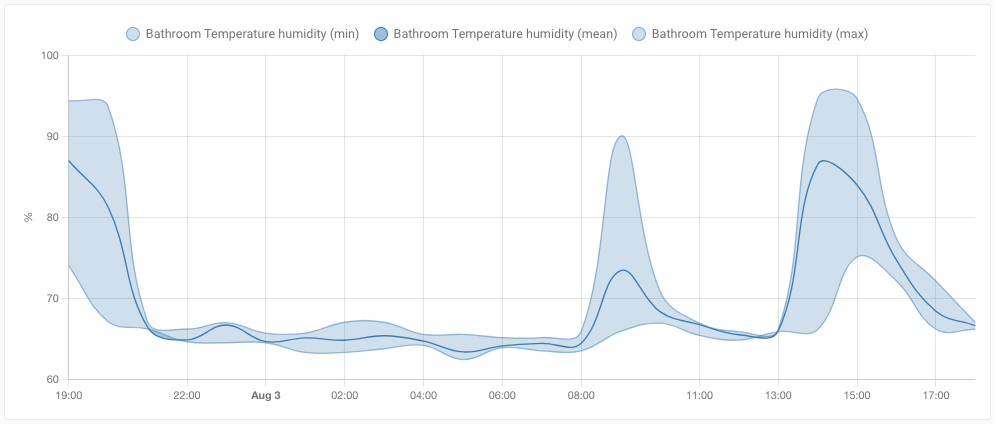 Screenshot of the new Lovelace statistics graph 卡片.
这张卡片可以绘制非常漂亮的图表,让你把任意已存储的长期统计数据可视化出来。它可以渲染为折线图或柱状图。柱状图适合那些具有累计值的 metered 实体,而折线图则非常适合展示实体的 mean、min 和 max。
目前长期统计的支持范围还比较有限。我们预计会在接下来的版本中逐步开放到更多测量类型,同时也会有更多集成加入对这些新测量类型的支持。
侧边栏视图
你在 Lovelace 中看到的默认布局(也是我们大多数人平时用的布局)叫做 “masonry”。我们也有一种 panel 视图/布局,可以让单个卡片铺满整个视图。这次发布带来了一种全新的视图布局:侧边栏。
这个新的侧边栏视图有两列:左侧是一列较宽的主区域,右侧是一列较窄的附加区域。它非常适合显示图表(比如那张漂亮的新统计图卡片)或地图这类较大的卡片,同时在右侧放上一些附带信息的小卡片。
新的 Energy 仪表板已经使用了这种新视图布局;当然,它同样也可以用在其他 Lovelace 仪表板中。
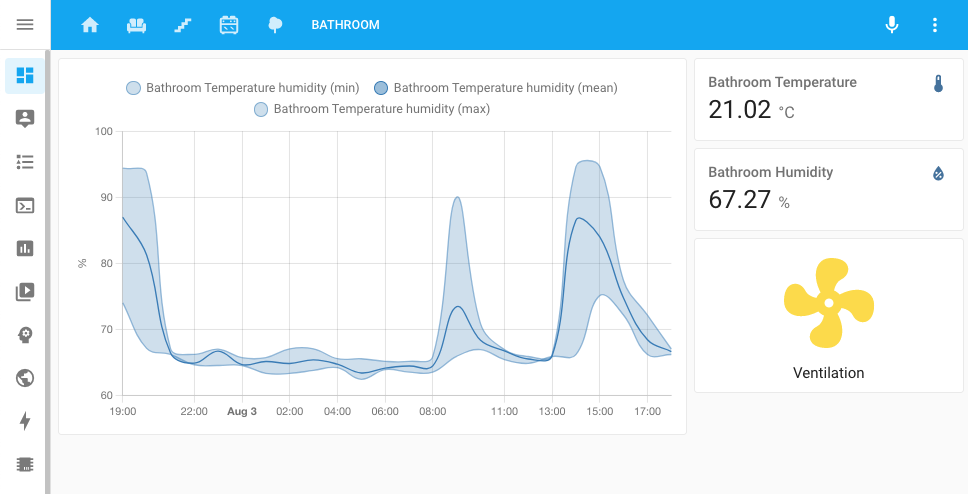 Screenshot of new Lovelace 侧边栏 view layout.
Gauge 卡片现在支持指针模式
Lovelace gauge 卡片迎来了一项很棒的小增强:指针模式!
在指针模式下,它不再只是显示一个数值并填充部分仪表,而是会显示完整仪表盘,并用指针指出当前值。而且,如果你在 gauge 卡片配置中设置了严重级别,它也会始终显示出来。
 Screenshot of the Gauge 卡片 in needle mode with severity configured.
这些设置现在可以直接在 Lovelace UI 编辑器中完成;更多信息和示例可以查看 Gauge 卡片文档。
核心货币设置
为了支持财务数值的显示,我们为 Home Assistant 新增了一项设置,让你可以定义在需要你提供货币信息时,Home Assistant 应该使用哪种货币。
你可以在 Home Assistant 的常规设置中找到这个新的货币设置。
这项设置会被用于新能耗功能中的费用计算。
警报器
在上一个发布中,我们介绍了 select 实体;而这一次,我们带来了 siren 实体!🚨
Thanks to @raman325 for adding this noisemaker to the family! He also implemented the first 集成 to add support for Sirens: the Z-Wave JS 集成. So, if you have a Z-Wave enabled Siren, you can now control it.
上锁、解锁与卡住
多亏了 @bdraco,Home Assistant 里的门锁从今天开始变得更聪明了一点。除了 locked 和 unlocked 状态之外,现在还新增了 locking、unlocking 以及 jammed 状态支持。
Support for these new 状态 has been added to the August, HomeKit Controller and template 集成. Additionally, HomeKit, Alexa and Google Assistant have been made compatible and aware for these 状态 as well.
脚本 / 自动化 / 模板
这次发布为脚本、自动化和模板带来了一些新功能。
this
当一个自动化或脚本被触发运行时,现在会有一个新的变量可用:this。这个变量包含当前正在运行的自动化或脚本的状态对象,让你可以直接访问与该自动化相关的信息。感谢 @r-t-s!
设备模板函数
如果你喜欢手写 YAML 自动化、也会用模板,并且需要设备 ID 或设备信息,那你大概已经知道:这些 ID 很难找,而设备信息往往又根本拿不到。
@raman325 added some new template functions that can be helpful when working with 设备.
device_entities(device_id)returns a list of 实体 associated with a given 设备 ID (can also be used as a filter).device_attr(device_or_entity_id, attr_name)returns the value ofattr_namefor the given 设备 ID or 实体 ID.is_device_attr(device_or_entity_id, attr_name, attr_value)returns whether the value ofattr_namefor the given 设备 ID or 实体 ID matchesattr_value.device_id(entity_id)returns the 设备 ID for a given 实体 ID (can also be used as a filter).
感谢这些强大的新功能!
其他值得注意的变化
这次发布还有很多内容;下面是其中一些同样值得关注的变化:
- Thanks to @firstof9, Z-Wave JS now has support for transitions with 灯光!
- More Z-Wave JS improvements by @raman325. He added support for 设备 触发器 and 条件. Thanks!
- You can now assign a unique ID to 灯光, 遮盖 and media player groups, allowing you to manage them from the Home Assistant 前端 and assign them to an area!
- The motionEye 集成 now has support for motion detection, thanks @dermotduffy
- ZHA can now work with Formaldehyde and VOC level 传感器, thanks @Adminiuga
- @posixx added a new feature for 集成 that provide 报警 面板; those 集成 can now 更新 to support Vacation mode!
- Rainbird now has a 服务 to change the rain delay, thanks @Kr0llx!
- If you are using BMW Connected Drive, @EddyK69 added a lot of trip 传感器.
- Sonos snapshots now behave, are more robust and work as expected. Additionally, support for controlling crossfade has been added, thanks @jjlawren!
- WLED now supports controlling the new playlists features introduced in WLED 0.13.
- @farmio added support for KNX 灯光 that use HS-colors, thanks!
- And @joncar added support for transitions to LiteJet 灯光, awesome!
- If you have MFA on your Tesla account, thanks to @BreakingBread0, the 集成 now supports that.
- When using the Netatmo 集成, you can now control the schedule it should be using with a select 实体. Thanks, @cgtobi!
- @janiversen added more data types to modus and added array write to the 打开/off capabilities of Modbus 开关, 风扇 and 灯光.
- Advantage Air now has temperature 传感器 for each zone, thanks @Bre77!
- Gree 温控 now has 开关 to support more modes, thanks to @cmroche!
- You can now remove holidays from the workday 传感器 by name instead of date. This is useful for holidays they don't have a fixed date each year. Thanks @matthewgottlieb!
- HomeKit will not auto-recreated TVs when sources are out of sync. One thinsg less to worry about, thanks @bdraco
- @jbouwh has drastically reworked and extended the 加湿器 support for the Xiaomi Miio 集成. Amazing job!
新集成
欢迎以下新集成加入本次发布:
- Adax, added by @Danielhiversen
- Energy, added by the Home Assistant 核心 team
- Flipr, added by @cnico
- Generic Hygrostat, added by @Shulyaka
- Prosegur, added by @dgomes
- Siren, added by @raman325
- YouLess, added by @gjong
- Renault, added by @epenet
新平台
以下集成新增了对新平台的支持:
- Belkin WeMo added 传感器 for energy usage. Added by @esev
- Freedompro now supports 二元sensor, 传感器, 开关, 门锁, 遮盖, 温控 and 风扇! Added by @stefano055415
- GIOŚ now has 传感器 for replacing the air quality platform, added by @bieniu
- Goal Zero Yeti, added 传感器 that provide a lot of information, added by @tkdrob
- Itho Daalderop Spider, added 传感器 for energy usages. Added by @peternijssen
- Mill, added support for 传感器 for its energy consumption, added by @Danielhiversen
- motionEye now exposes 开关, added by @dermotduffy
- TP-Link Kasa Smart added 传感器 for energy usage. Added by @mib1185
- Velux now supports 灯光, added by @bramstroker
- Z-Wave JS now supports sirens, added by @raman325
现已支持通过 UI 设置的集成
以下集成现在可以直接通过 Home Assistant UI 进行设置:
- CO2 Signal, done by @Danielhiversen
- Honeywell Total Connect Comfort (US), done by @rdfurman
- 通知 for Android TV / Fire TV, done by @tkdrob
- Switcher, done by @thecode
- Yale Smart Living, done by @gjohansson-ST
发布 2021.8.1 - August 4
- Fix Panasonic Viera TV going unavailable when turned off (@Hyralex - #53788) (panasonic_viera docs)
- Add temporary fix to modbus to solve upstream problem (@janiversen - #53857) (modbus docs)
- Fix attr_unit_of_measurement in 更新 of apcupsd 实体 (@mib1185 - #53947) (apcupsd docs)
- Fix coordinator not defined in yale_smart_alarm (@gjohansson-ST - #53973) (yale_smart_alarm docs)
- Fix divider for Fritz 传感器 (@chemelli74 - #53980) (fritz docs)
- Fix empty sonos_group 实体 属性 on startup (@jjlawren - #53985) (sonos docs)
- 更新 前端 to 20210804.0 (@bramkragten - #53997) (前端 docs)
发布 2021.8.2 - August 5
- Bump pylitterbot to 2021.8.0 (@natekspencer - #54000) (litterrobot docs)
- Add missing 设备 class to SAJ energy 传感器 (@frenck - #54048) (saj docs)
- Handle empty software 版本 when setting up HomeKit (@bdraco - #54068) (homekit docs)
- Bump up ZHA dependencies (@puddly - #54079) (zha docs)
- Packages to support config platforms (@balloob - #54085) (自动化 docs) (脚本 docs) (template docs)
- Fix Shelly last_reset (@thecode - #54101) (shelly docs)
- Two fixes (@chemelli74 - #54102) (fritz docs)
- Increase time before 场景 and 脚本 HomeKit 实体 are reset (@bdraco - #54105) (homekit docs)
- Bump zeroconf to 0.33.3 (@bdraco - #54108) (zeroconf docs)
发布 2021.8.3 - August 6
- Gracefully handle additional GSM 错误 (@ocalvo - #54114) (sms docs)
- Handle software 版本 being None when setting up HomeKit accessories (@nzapponi - #54130) (homekit docs)
- Fix 传感器 PLATFORM_SCHEMA for ebox and enphase_envoy (@mib1185 - #54142) (enphase_envoy docs)
- Fetch interface index from network 集成 instead of socket.if_nametoindex in zeroconf (@bdraco - #54152) (zeroconf docs) (network docs)
- Bump zeroconf to 0.33.4 to ensure zeroconf can startup when ipv6 is disabled (@bdraco - #54165) (zeroconf docs)
发布 2021.8.4 - August 8
- Add missing
motor_speed传感器 for Xiaomi Miio 加湿器 CA1 and CB1 (@bieniu - #54202) - Fix 更新 实体 prior to adding (@Trinnik - #54015) (aladdin_connect docs)
- Fix androidtv media_image_hash (@tkdrob - #54188) (androidtv docs)
- Solve missing automatic 更新 of struct 配置 in modbus (@janiversen - #54193) (modbus docs)
- 更新 const.py (@Mk4242 - #54195) (ebusd docs)
- Add parameter to delay sending of requests in modbus (@janiversen - #54203) (modbus docs)
- Bugfix: Bring back unique IDs for ADS 遮盖 after #52488 (@carstenschroeder - #54212) (ads docs)
- Don't block motionEye 设置 on NoURLAvailableError (@dermotduffy - #54225) (motioneye docs)
- Pin google-cloud-pubsub to an older 版本 (@allenporter - #54239)
发布 2021.8.5 - August 9
- Fix 摄像头 状态 and 属性 for agent_dvr (@tkdrob - #54049) (agent_dvr docs)
- Force an attempted subscribe on speaker reboot (@geuben - #54100) (sonos docs)
- Fix login to BMW 服务 for rest_of_world and north_america (@rikroe - #54261) (bmw_connected_drive docs)
- Always set interfaces explicitly when IPv6 is present (@bdraco - #54268) (zeroconf docs)
- Fix atom 集成 for long term statistics (@ZeGuigui - #54285) (atome docs)
- Use correct 状态 属性 for alarmdecoder 二元sensor (@tkdrob - #54286) (alarmdecoder docs)
- Bump soco to 0.23.3 (@jjlawren - #54288) (sonos docs)
- Fix ondilo_ico name 属性 (@cdce8p - #54290) (ondilo_ico docs)
- Bump zeroconf to 0.34.3 (@bdraco - #54294) (zeroconf docs)
- Ensure hunterdouglas_powerview model type is a string (@bdraco - #54299) (hunterdouglas_powerview docs)
- Remove zwave_js transition on individual color channels (@firstof9 - #54303) (zwave_js docs)
- Restores unit_of_measurement (@dgomes - #54335) ([集成 docs])
- Fix xiaomi air fresh 风扇 preset modes (@jbouwh - #54342) (xiaomi_miio docs)
- 更新 前端 to 20210809.0 (@bramkragten - #54350) (前端 docs)
- Fix Xiaomi-miio turn 风扇 on with speed, percentage or preset (@jbouwh - #54353) (xiaomi_miio docs)
- Fix aqualogic 状态 属性 更新 (@dailow - #54354) (aqualogic docs)
- Cast SimpliSafe 版本 number as a string in 设备 info (@bachya - #54356) (simplisafe docs)
- Do not process forwarded for headers for cloud requests (@balloob - #54364) (http docs) (cloud docs)
- Revert "Use 实体 class 属性 for Bluesound (#53033)" (@balloob - #54365) (bluesound docs)
- 更新 Climacell rate limit (@raman325 - #54373) (climacell docs)
- Fix race 条件 in Advantage Air (@Bre77 - #53439) (advantage_air docs)
发布 2021.8.6 - August 10
- Handle CO2Signal response value being None (@balloob - #54377) (co2signal docs)
- Fix Canary 传感器 状态 (@ludeeus - #54380) (canary docs)
- Re-add Tibber notify 服务 name (@Danielhiversen - #54401) (tibber docs)
- Bump hass_nabucasa to 0.46.0 (@balloob - #54421) (cloud docs)
- Bump pyopenuv to 2.1.0 (@bachya - #54436) (openuv docs)
发布 2021.8.7 - August 15
- Use pycarwings2 2.11 (@filcole - #54424) (nissan_leaf docs)
- Fix Huawei LTE 实体 状态 updating (@scop - #54447) (huawei_lte docs)
- Strip 属性 whitespace in universal media_player (@0xFelix - #54451) (universal docs)
- Bump 通知-android-tv to 0.1.3 (@tkdrob - #54462) (nfandroidtv docs)
- Updates to bump MyQ to 3.1.2 (@ehendrix23 - #54488) (myq docs)
- Add missing PRESSURE_BAR conversion (@Danielhiversen - #54497)
- Treat temporary 错误 as 警告 for Tesla (@alandtse - #54515) (tesla docs)
- Fix 属性 not showing after using 实体 class 属性 (@gerard33 - #54558) (bmw_connected_drive docs)
- 升级 qnapstats library to 0.4.0 (@colinodell - #54571) (qnap docs)
- Fix bug in ambiclimate (@Danielhiversen - #54579) (ambiclimate docs)
- Fix Tibber last reset (@Danielhiversen - #54582) (tibber docs)
- Adax, 更新 requirements (@Danielhiversen - #54587) (adax docs)
- Clamp color temperature to supported range in ESPHome 灯光 (@oxan - #54595) (esphome docs)
- Bump zeroconf to 0.35.0 (@bdraco - #54604) (zeroconf docs)
- Bump py-synologydsm-api to 1.0.4 (@mib1185 - #54610) (synology_dsm docs)
- Guard partial 升级 (@balloob - #54617) (http docs)
- Solve 开关/verify register type convert problem in modbus (@janiversen - #54645) (modbus docs)
- Send color_brightness to ESPHome 设备 on 1.20 (pre-color_mode) (@jesserockz - #54670) (esphome docs)
发布 2021.8.8 - August 18
- Fix TPLink emeter reset not updating (@TomBrien - #54848) (tplink docs)
- Fix tplink doing I/O in event loop and optimize (@rytilahti - #54570) (tplink docs)
- Fix 'in' comparisons vesync 灯光 (@cdce8p - #54614) (vesync docs)
- 更新 PyMetEireann to 2021.8.0 (@DylanGore - #54693) (met_eireann docs)
- Fix BMW remote 服务 in rest_of_world & north_america (@rikroe - #54726) (bmw_connected_drive docs)
- Fix HomeKit 遮盖 creation with tilt position, open/close, no set position (@bdraco - #54727) (homekit docs)
如果你需要帮助……
……欢迎随时使用我们非常活跃的论坛,或者加入我们的聊天频道。
如果你遇到了这次发布引入的问题,请到我们的 issue tracker 提交反馈,并确保填写问题模板中的所有字段。
破坏性变更
Below is a listing of the breaking change for this 发布, per subject or 集成. Click on one of those to read more about the breaking change for that specific item.
The previously deprecated YAML 配置 of the Abode 集成 has been removed.
Abode is now configured via the UI, any existing YAML 配置 has been imported in previous releases and can now be safely removed from your YAML 配置 files.
(@frenck - #52357) (abode docs)
The Air Quality platform has been marked as deprecated, therefore the
air_quality 实体 has been removed and replaced with sensor 实体.
If you used the air_quality 实体 in your 自动化, 脚本 or Lovelace
仪表盘, you'll need to 更新 your 配置 to match this change.
(@bachya - #52349) (airvisual docs)
状态 for the "Pollutant Level" and "Main Pollutant" 实体 have changed; 自动化 that depended on the old 状态 will need to be updated.
Pollutant Level:
Good -> goodModerate -> moderateUnhealthy -> unhealthyUnhealthy for sensitive groups -> unhealthy_sensitiveVery unhealthy -> very_unhealthyHazardous -> hazardous
Pollutant Label:
Carbon Monoxide -> coNitrogen Dioxide -> n2Ozone -> o3PM10 -> p1PM2.5 -> p2Sulfur Dioxide -> s2
(@bachya - #53133) (airvisual docs)
The previously deprecated YAML 配置 of the Ambient Weather Station 集成 has been removed.
Ambient Weather Station is now configured via the UI, any existing YAML 配置 has been imported in previous releases and can now be safely removed from your YAML 配置 files.
(@bachya - #52459) (ambient_station docs)
In order to optimize 设备 load and avoid exhausting available connections,
fritz_netmonitor has been merged into fritz.
Please remove your YAML existing 配置 and 配置 the new 集成.
(@chemelli74 - #52264) (fritz docs)
The profile 开关 introduced in the previous 发布 have been removed as they where incompatible with the Home Assistant architectural design rules.
Instead, you can now block every 设备 connected individually.
(@AaronDavidSchneider - #52721) (fritz docs)
The power and energy 属性 from 开关 实体 have been removed and replaced by 传感器.
If you relied on these 属性 in your 自动化, 脚本 or Lovelace 仪表盘, you'll need to 更新 your 配置 to match this change.
(@mib1185 - #52562) (fritzbox docs)
The YAML 配置 for 此integrations has changed. Instead of a 传感器 config with platform section, an 集成 配置 section under the 集成 domain key should be used.
Before:
After:
(@Kuzj - #48775) (bme280 docs)
The power and energy 属性 from 开关 实体 have been removed and replaced by 传感器.
If you relied on these 属性 in your 自动化, 脚本 or Lovelace 仪表盘, you'll need to 更新 your 配置 to match this change.
(@Danielhiversen - #53342) (broadlink docs)
The previously deprecated YAML 配置 of the Buienradar 集成 has been removed.
Buienradar is now configured via the UI, any existing YAML 配置 has been imported in previous releases and can now be safely removed from your YAML 配置 files.
(@frenck - #52939) (buienradar docs)
The CO2 Signal 集成 migrated to 配置 via the UI. Configuring CO2 Signal via YAML 配置 has been deprecated and will be removed in a future Home Assistant 发布.
Your existing YAML 配置 is automatically imported on 升级 to this 发布; and thus can be safely removed from your YAML 配置 after upgrading.
(@Danielhiversen - #53193) (co2signal docs)
Demo 开关 实体 no longer reports current_power_w and today_energy_kwh 属性.
(@thecode - #52424) (demo docs)
The consumptions 属性 from the 开关 实体 have been removed and replaced by 传感器.
If you relied on these 属性 in your 自动化, 脚本 or Lovelace 仪表盘, you'll need to 更新 your 配置 to match this change.
(@Shutgun - #53335) (devolo_home_control docs)
The Air Quality platform has been marked as deprecated, therefore the
air_quality 实体 has been removed and replaced with sensor 实体.
If you used the air_quality 实体 in your 自动化, 脚本 or Lovelace
仪表盘, you'll need to 更新 your 配置 to match this change.
(@bieniu - #52295) (gios docs)
Home Assistant will no longer expose the legacy 风扇 speeds to Google Assistant.
If you use 风扇 with with Google Assistant, you'll need to resync your 设备.
Ask you Google 设备 to Sync my device or 触发器 an 更新 via
the google_assistant.request_sync 服务.
(@elupus - #53105) (google_assistant docs)
Previously the on/off 开关 provided to HomeKit by 脚本, would enable or
disable a 脚本. This likely was not what is expected as
Hey Siri turn on "script" would appear to do nothing.
Pressing a 脚本 开关 in HomeKit now runs the 脚本 instead.
(@bdraco - #53106) (homekit docs)
HomeKit Controller was using the wrong ID to track some 传感器. The following are affected:
- Koogeek or Eve power 传感器 (added in Jan 2021)
- The temperature 传感器 added alongside homekit 温控 设备 (added in Jul 2021, the 温控 entities itself is not affected)
If you have one of these you may need to remove a stale 实体 registry entry and you may need to fix the names of these 实体 as customizations may be lost.
(@Jc2k - #53848) (homekit_controller docs)
If you have a power 传感器 for a Eve Energy or Koogeek P1EU/SW2, the units for
that 传感器 has changed from watts to W to properly follow
Home Assistant standards.
(@Jc2k - #53877) (homekit_controller docs)
The Honeywell 集成 migrated to 配置 via the UI. Configuring Honeywell via YAML 配置 has been deprecated and will be removed in a future Home Assistant 发布.
Your existing YAML 配置 is automatically imported on 升级 to this 发布; and thus can be safely removed from your YAML 配置 after upgrading.
(@rdfurman - #50731) (honeywell docs)
Routers currently in unauthenticated mode need to be provided credentials for duration of one successful startup in order to retrieve a unique id from the API. Unauthenticated mode can then be enabled for subsequent starts in 集成 options.
(@scop - #49878) (huawei_lte docs)
The power and energy 属性 from 开关 实体 have been removed and replaced by 传感器.
If you relied on these 属性 in your 自动化, 脚本 or Lovelace 仪表盘, you'll need to 更新 your 配置 to match this change.
(@peternijssen - #53397) (spider docs)
The Jewish Calendar 集成 returned a datetime format that wasn't properly formatted according to ISO standards. This has been adjusted.
If you rely on manually parsing of dates that are returned from 此integrations, you might need to adjust your templates to incorporate this change.
(@frenck - #52722) (jewish_calendar docs)
The Lyft 集成 has been deprecated and is pending removal in Home Assistant 核心 2021.10.0. It is considered impossible to obtain API keys to be able to use 此integrations.
(@frenck - #53005) (lyft docs)
The consumption_today and consumption_total from the 温控 实体 have
been removed and replace by 传感器.
If you relied on these 属性 in your 自动化, 脚本 or Lovelace 仪表盘, you'll need to 更新 your 配置 to match this change.
(@Danielhiversen - #52311) (mill docs)
All 实体 are set to unavailable during loading of modbus 集成 and
remain so until data is received. 实体 with scan_interval = 0
(entities without polling) are always available, to allow 服务 calls.
The old 配置 style with setting scan_interval: 9999 will cause the
实体 to be unavailable for 9999 seconds.
(@janiversen - #53155) (modbus docs)
The power and energy 属性 from 开关 实体 have been removed.
If you relied on these 开关 属性 in your 自动化, 脚本 or Lovelace 仪表盘, you'll need to 更新 your 配置 to match this change.
This measurement (S_POWER, V_WATT) will still be reported as previously
by the power 传感器 实体.
(@MartinHjelmare - #53566) (mysensors docs)
This includes a few changes to the names of the exported Prometheus metrics, which now better align with Prometheus naming guidelines:
- Default value for the
namespace配置 variable is nowhomeassistant, and all metric names now have a defaulthomeassistant_prefix. - Some metrics have been renamed:
light_staterenamed tolight_brightness_percent.temperature_crenamed toclimate_target_temperature_celsius.current_temperature_crenamed toclimate_current_temperature_celsius.- 传感器 metrics now have a
sensor_name prefix. - Temperature 传感器 metrics now have a
_celsiusunit suffix (as opposed to just_c).
Note, that users that don't currently explicitly set the namespace variable
will see names changed for all exported metrics. If keeping existing metric
names is important to you, you can adjust your Home Assistant and Prometheus
配置 as described below.
To keep metrics exported without the homeassistant_ prefix, explicitly set an
empty namespace in Home Assistant 配置:
To revert the other metric name changes, you can use metric_relabel_configs
in your Prometheus 配置 file to rename the metrics after scraping.
This set of relabeling rules
is a good starting point, but please note that if you set a non-empty namespace
in Home Assistant you will need to adjust these rules accordingly.
(@knyar - #50156) (prometheus docs)
The previously deprecated 风扇 speed and room size 属性 have been removed. They have now have got their own 实体.
(@milanmeu - #53611) (rituals_perfume_genie docs)
The previously deprecated YAML 配置 of the Synology DSM 集成 has been removed.
Synology DSM is now configured via the UI, any existing YAML 配置 has been imported in previous releases and can now be safely removed from your YAML 配置 files.
(@mib1185 - #53197) (synology_dsm docs)
The previously deprecated YAML 配置 of the Tibber 集成 has been removed.
Tibber is now configured via the UI, any existing YAML 配置 has been imported in previous releases and can now be safely removed from your YAML 配置 files.
(@Danielhiversen - #53235) (tibber docs)
The power and energy 属性 from 开关 实体 have been removed and
replaced by 传感器. This applies to all five extra 属性 about energy
(current_power_w, total_energy_kwh, today_energy_kwh, voltage, current_a).
If you relied on these 属性 in your 自动化, 脚本 or Lovelace 仪表盘, you'll need to 更新 your 配置 to match this change.
(@mib1185 - #53596) (tplink docs)
The previously deprecated YAML 配置 of the VeSync 集成 has been removed.
VeSync is now configured via the UI, any existing YAML 配置 has been imported in previous releases and can now be safely removed from your YAML 配置 files.
(@frenck - #52358) (vesync docs)
Viessmann introduced a new API to control their 设备. The original (inofficial API) was shut down which rendered the Home Assistant 集成 useless. This breaking change restores the 集成 functionality
This involves adding a new client_id parameter. It must be set with an API
key from the Viessmann developer portal.
Please register and create your private API key. Follow these steps to create your API key:
- Register and login in the Viessmann Developer Portal.
- In the menu navigate to API Keys.
- Create a new OAuth client using following data:
- Copy the Client ID to the 配置, e.g.
client_id="XXXXXXXXXXXXXX"
Please not that not all previous properties are available in the new API. Missing properties were removed and might be added later if they are available again.
(@oischinger - #53281) (vicare docs)
The wled.preset 服务 has been deprecated. In the previous Home Assistant
发布, support for an select 实体 that provides access to presets
has been added, use that 实体 in your 自动化 and 脚本 instead.
(@frenck - #53383) (wled docs)
The playlist 属性 from the WLED 灯光 实体 has been removed and
replaced by a playlist select 实体 instead of the 属性.
If you relied on the 属性 in your 自动化 or 脚本, you need to adjust those to use the new 实体 instead.
(@frenck - #53381) (wled docs)
Existing Xiaomi Mi 自动化 using the platform specific 服务 for 加湿器 will have a breaking change. You need to change their 自动化 to use new 服务. Existing 风扇 实体 will be automatically replaced with new humidity 实体.
The 实体 name is migrated from the 风扇 实体 name. The 风扇 entity_id will change because the platform will change.
For the related 实体 the old 风扇 实体 name will be prepended to the new 实体.
Example:
实体 with entity_id "风扇.my_device" and name "My 加湿器" will migrate
to an 实体 with entity_id "加湿器.my_humidifier" and name "My 加湿器".
A 传感器 for humidity will have a name like "My 加湿器 Humidity".
(@jbouwh - #52366) (xiaomi_miio docs)
The CYale Smart Living 集成 migrated to 配置 via the UI. Configuring Yale Smart Living via YAML 配置 has been deprecated and will be removed in a future Home Assistant 发布.
Your existing YAML 配置 is automatically imported on 升级 to this 发布; and thus can be safely removed from your YAML 配置 after upgrading.
(@gjohansson-ST - #50850) (yale_smart_alarm docs)
Z-Wave JS 实体 will now be in an unavailable 状态 when the parent node
is considered dead by Z-Wave JS. This may impact existing 自动化 because
Home Assistant will block 服务 calls to unavailable 实体.
A node can potentially be revived by sending a ping to it, therefore you can
use the new node status 传感器 (disabled by default) to track node status and
use the zwave_js.ping_node 服务 to try to revive the node.
The node status 传感器 will always be available even when the node is dead.
(@raman325 - #48017) (zwave_js docs)
向以下集成告别
The following 集成 are no longer available as of this 发布:
- Weather Underground has been unavailable and in a non-working 状态 and has therefore been removed. (@frenck - #52999)
- Garmin Connect has been removed. Due to API changes, it stopped working and cannot function without violating Home Assistant design rules. Garmin will not allow 开源 projects to their official APIs. (@cyberjunky - #52808) (garmin_connect docs)
全部变更
- Bump 版本 to 2021.8.0dev0 (@frenck - #52346)
- Use attrs instead of property for Jewish Calendar (@yuvalabou - #52333) (jewish_calendar docs)
- Remove deprecated YAML 配置 from Abode (@frenck - #52357) (abode docs) (breaking-change)
- Remove deprecated YAML 配置 from VeSync (@frenck - #52358) (vesync docs) (breaking-change)
- Remove redundant property definitions in Ambient PWS (@bachya - #52350) (ambient_station docs)
- Remove redundant property definitions in IQVIA (@bachya - #52378) (iqvia docs)
- Remove redundant property definitions in Flu Near You (@bachya - #52377)
- Add motion detection support to motionEye (@dermotduffy - #49665) (motioneye docs)
- Remove redundant property definitions in Notion (@bachya - #52367) (notion docs)
- Bump pyfritzhome to 6.2.0 (@flabbamann - #52345) (fritzbox docs)
- Demo: Explicitly return None when no extra 状态 属性 set (@frenck - #52390) (demo docs)
- Add support for Formaldehyde and VOC level 传感器 (@Adminiuga - #52232) (zha docs)
- Allow combining value_template and position_template for template 遮盖 (@emontnemery - #52383) (template docs)
- Vacation Mode on 报警 面板 (@posixx - #45980) (alarm_control_panel docs)
- Use 属性 instead of properties for uptime (@yuvalabou - #52398) (uptime docs)
- Remove redundant property definitions in Guardian (@bachya - #52361) (guardian docs)
- Remove redundant property definitions in OpenUV (@bachya - #52379) (openuv docs)
- Clean up netatmo 传感器 data processing (@cgtobi - #52403) (netatmo docs)
- Add rainbird set_rain_delay 服务 (@Kr0llx - #52369) (rainbird docs)
- Remove boilerplate code in favour of 属性 in Netatmo 集成 (@cgtobi - #52395) (netatmo docs)
- Enable basic type checking for Tasmota (@emontnemery - #52435) (tasmota docs)
- Add 传感器 platform to goalzero (@tkdrob - #49835) (goalzero docs) (new-platform)
- Demo: remove deprecated 开关 实体 properties (@thecode - #52424) (demo docs) (breaking-change)
- Remove redundant property definitions in ReCollect Waste (@bachya - #52368) (recollect_waste docs)
- Add static typing to devolo_home_control (@Shutgun - #52396) (devolo_home_control docs)
- Replace custom listener with helper in ReCollect Waste (@bachya - #52445) (recollect_waste docs)
- Merge fritzbox_netmonitor 集成 into fritz (@chemelli74 - #52264) (fritz docs) (fritzbox_netmonitor docs) (breaking-change)
- Improve typing in Sony Bravia TV 集成 (@bieniu - #52438) (braviatv docs)
- Enable basic type checking for 温控 (@emontnemery - #52470) (温控 docs)
- Enable basic type checking for gogogate2 (@emontnemery - #52467) (gogogate2 docs)
- Enable basic type checking for trace (@emontnemery - #52468)
- Replace custom listener with helper in SimpliSafe (@bachya - #52457) (simplisafe docs)
- Remove redundant property definitions in SimpliSafe (@bachya - #52458) (simplisafe docs)
- Remove redundant property definitions in RainMachine (@bachya - #52456) (rainmachine docs)
- Remove redundant property definitions in Tile (@bachya - #52448) (tile docs)
- Enable basic type checking for 脚本 (@emontnemery - #52476)
- Deprecate YAML config for Ambient PWs (2021.9.0 removal) (@bachya - #52459) (ambient_station docs) (breaking-change)
- Mark 实体 for dead zwave_js nodes as unavailable (@raman325 - #48017) (zwave_js docs) (breaking-change)
- 更新 devolo-home-control-api (@Shutgun - #52497) (devolo_home_control docs)
- Add basic typing to ezviz 摄像头 platform (@RenierM26 - #52492) (ezviz docs)
- Use 实体 class 属性 for airnow (@tkdrob - #52502) (airnow docs)
- Migrate GIOS air_quality platform to 传感器 (@bieniu - #52295) (gios docs) (breaking-change) (new-platform)
- Migrate AirVisual
air_qualityplatform tosensorplatform (@bachya - #52349) (airvisual docs) (breaking-change) - Use 实体 class 属性 for ambiclimate (@tkdrob - #52521) (ambiclimate docs)
- Use 实体 class 属性 for aemet (@tkdrob - #52499) (aemet docs)
- Use 实体 class 属性 for alpha_vantage (@tkdrob - #52520) (alpha_vantage docs)
- Use 实体 class 属性 for alert (@tkdrob - #52518) (alert docs)
- Add type checking and 实体 属性 for Fast.com (@yuvalabou - #52524) (fastdotcom docs)
- Enable basic typing for roku (@ctalkington - #52478) (roku docs)
- Use 实体 class 属性 for abode (@tkdrob - #52427) (abode docs)
- Enable basic type checking for MQTT (@emontnemery - #52463) (MQTT docs)
- Use 实体 class 属性 for aftership (@tkdrob - #52500) (aftership docs)
- Fix CI failing due to Shell Command exception (@thecode - #52483) (shell_command docs)
- Rename goalzero 传感器 (@tkdrob - #52452) (goalzero docs)
- Enable basic type checking for Google cast (@emontnemery - #52434) (cast docs)
- Enable basic type checking for the homeassistant component (@emontnemery - #52464) (homeassistant docs)
- Use 实体 class 属性 for accuweather (@tkdrob - #52431) (accuweather docs)
- Add type annotations and shorten 传感器 names on ezviz 传感器 platforms (@RenierM26 - #52475) (ezviz docs)
- Fully type Tag component (@yuvalabou - #52540) (tag docs)
- Use 实体 class 属性 for ads (@tkdrob - #52488) (ads docs)
- Use dataclasses in netatmo data handler (@cgtobi - #52537) (netatmo docs)
- Disable flaky shell_command test (@thecode - #52564) (shell_command docs)
- Use 实体 class 属性 for aladdin_connect (@tkdrob - #52516) (aladdin_connect docs)
- Add type hints to LCN (@alengwenus - #52509) (lcn docs)
- Bump gios to 版本 1.0.2 (@bieniu - #52576) (gios docs)
- Wheels v2021.07.0 (@pvizeli - #52580)
- Minor improvements of util.percentage typing (@emontnemery - #52581)
- Improve config entry title for GIOS 集成 (@bieniu - #52583) (gios docs)
- Minor improvements of MQTT typing (@emontnemery - #52578) (MQTT docs) (mysensors docs)
- Add type annotations to init and coordinator. Minor cleanups. (@RenierM26 - #52506) (ezviz docs)
- Enable strict typing for Fritz (@chemelli74 - #50668) (fritz docs)
- Clean up alarmdecoder (@tkdrob - #52517) (alarmdecoder docs)
- Bump hatasmota to 0.2.20 (@emontnemery - #52591) (tasmota docs)
- Add home-assistant/核心 as codeowner for the template 集成 (@emontnemery - #52592) (template docs)
- Use HA location name as
namein GIOS 集成 (@bieniu - #52585) (gios docs) - 升级 numpy to 1.21.0 (@frenck - #52586) (compensation docs) (iqvia docs) (opencv docs) (tensorflow docs) (trend docs)
- Enable basic type checking for 风扇 (@emontnemery - #52471) (风扇 docs)
- Remove unnecessary async_setup method for Guardian (@bachya - #52597) (guardian docs)
- Add type annotations to Ambient PWS (@bachya - #52596) (ambient_station docs)
- Python 3.9.6 / Base image 2021.07.0 (@pvizeli - #52605)
- Bump opencv to 4.5.2.54 (@pvizeli - #52630) (opencv docs)
- Fix Waze Travel Time tests (@thecode - #52663) (waze_travel_time docs)
- Refactor decompression timestamp validation logic in stream component (@allenporter - #52462) (stream docs)
- Add missing type annotations to Guardian (@bachya - #52598) (guardian docs)
- Add missing type annotations to Notion (@bachya - #52599) (notion docs)
- Add missing type annotations to ReCollect Waste (@bachya - #52600) (recollect_waste docs)
- Use 实体 class 属性 for anel_pwrctrl (@tkdrob - #52594) (anel_pwrctrl docs)
- Use 实体 class 属性 for avion (@tkdrob - #52696) (avion docs)
- Use 实体 class 属性 for aurora_abb_power (@tkdrob - #52692) (aurora_abb_powerone docs)
- Use class properties in netatmo (@cgtobi - #52705) (netatmo docs)
- Use 实体 class 属性 for Aten pe (@tkdrob - #52687) (aten_pe docs)
- Hint for str type instead of explicitly casting to str (@alengwenus - #52712) (lcn docs)
- Use 实体 class 属性 for anthemav (@tkdrob - #52602) (anthemav docs)
- Use 实体 class 属性 for apcupsd (@tkdrob - #52662) (apcupsd docs)
- 升级 Fronius dependency to 0.5.3 (@nielstron - #52737) (fronius docs)
- Use 实体 class 属性 for aurora (@tkdrob - #52690) (aurora docs)
- Add 设备 info to Freedompro (@stefano055415 - #52715) (freedompro docs)
- Add transition support to zwave_js 灯光 (@firstof9 - #52160) (zwave_js docs)
- Fix pylint issue with stream component c-extension (@cdce8p - #52847) (stream docs)
- Rename preview task to run (@balloob - #52857)
- Use 实体 class 属性 for bbb_gpio (@tkdrob - #52837) (bbb_gpio docs)
- Use 实体 class 属性 for bayesian (@tkdrob - #52831) (bayesian docs)
- Use 实体 class 属性 for Beewi smartclim (@tkdrob - #52839) (beewi_smartclim docs)
- Use 实体 class 属性 for azure_devops (@tkdrob - #52698) (azure_devops docs)
- Use 实体 class 属性 for arlo (@tkdrob - #52681) (arlo docs)
- Add AllTrips 传感器 for BMW Connected Drive (@EddyK69 - #50420) (bmw_connected_drive docs)
- Add siren platform (@raman325 - #48309) (demo docs) (siren docs) (new-集成)
- Add 设备 classes to homematicip_cloud 遮盖 (@LeszekSwirski - #52793) (homematicip_cloud docs)
- Initial support for zwave_js 设备 条件 (@raman325 - #52003) (zwave_js docs)
- Implement stable unique id for Huawei LTE, requires credentials on 设置 (@scop - #49878) (huawei_lte docs) (breaking-change)
- Add more data_types to modbus (@janiversen - #52423) (modbus docs)
- Fix Soundbar exclusion from SamsungTV (@chemelli74 - #51023) (samsungtv docs)
- Use 实体 class 属性 for Blinksticklight (@tkdrob - #52892) (blinksticklight docs)
- Use 实体 class 属性 for Bh1750 (@tkdrob - #52886) (bh1750 docs)
- Import Protocol from typing (@cdce8p - #52848)
- Use 实体 class 属性 for Bizkaibus (@tkdrob - #52888) (bizkaibus docs)
- Bump dessant/门锁-threads from 2.0.3 to 2.1.1 (@dependabot - #52899)
- Use 实体 class 属性 for Bitcoin (@tkdrob - #52887) (bitcoin docs)
- Improve testing of option flow in Coinbase (@TomBrien - #52870) (coinbase docs)
- Add some type hints for webhook component (@cgtobi - #52895) (webhook docs)
- Improve typing of Tasmota (2/3) (@emontnemery - #52747) (tasmota docs)
- Use 实体 class 属性 for apple_tv (@tkdrob - #52664) (apple_tv docs)
- Set device_class on temperature 传感器 R-Z (@emontnemery - #52920)
- Improve typing of Tasmota (3/3) (@emontnemery - #52748) (tasmota docs)
- 升级 sentry-sdk to 1.3.0 (@frenck - #52926) (sentry docs)
- Correct Wrong "raise" in modbus validators. (@janiversen - #52924) (modbus docs)
- Improve typing of Tasmota (1/3) (@emontnemery - #52746) (MQTT docs) (tasmota docs)
- Add array write to turn_on/off in modbus 开关/风扇/灯光 (@janiversen - #52582) (modbus docs)
- Set device_class on temperature 传感器 F-K (@emontnemery - #52918) (foobot docs) (fritzbox docs) (glances docs) (hddtemp docs) (ihc docs) (juicenet docs) (kaiterra docs)
- Use properties instead of raw data in the rituals 集成 (@milanmeu - #52587) (rituals_perfume_genie docs)
- Set device_class on temperature 传感器 L-Q (@emontnemery - #52919) (lacrosse docs) (luftdaten docs) (mfi docs) (mysensors docs) (notion docs) (openevse docs) (qnap docs)
- Poll Nissan servers for battery updates (@bwduncan - #44826) (nissan_leaf docs)
- Set device_class on temperature 传感器 A-E (@emontnemery - #49524)
- Use 实体 class 属性 for bbox (@tkdrob - #52838) (bbox docs)
- Use 实体 class 属性 for Blockchain (@tkdrob - #52894) (blockchain docs)
- Use 实体 class 属性 for Blebox (@tkdrob - #52890) (blebox docs)
- ESPHome enable static type checking (@OttoWinter - #52348) (esphome docs)
- Use 实体 class 属性 for Plex (@jjlawren - #52617) (plex docs)
- String formatting cleanups (@scop - #52937)
- Use 实体 class 属性 for aqualogic (@tkdrob - #52668) (aqualogic docs)
- Add schedule selector for Netatmo (@cgtobi - #52909) (netatmo docs)
- Fix siren 打开 parameter filtering (@raman325 - #52947) (siren docs)
- Handle FailedCommand exceptions in zwave_js WS API (@raman325 - #52461) (zwave_js docs)
- Change behavior of Z-Wave JS 服务 (@raman325 - #52941) (zwave_js docs)
- Minor test coverage improvement of mfi and zwave 传感器 (@emontnemery - #52935) (mfi docs) (zwave docs)
- Add 开关 support to Freedompro (@stefano055415 - #52727) (freedompro docs) (new-集成) (new-platform)
- Expose async_get_source_ip in the network 集成 (@bdraco - #52901) (network docs)
- 开关 to using entry.async_on_remove (@raman325 - #52952) (zwave_js docs)
- Return empty when listing statistic_ids for unsupported statistic (@emontnemery - #52954) (history docs) (recorder docs)
- Fix modbus 温控 precision 配置 variable (@Kirchoff - #52651) (modbus docs)
- Validate tone is valid when processing siren.turn_on 服务 call (@raman325 - #52953) (demo docs) (siren docs)
- Improve docstring for async_get_device_class_lookup (@emontnemery - #52921)
- Add generic hygrostat 集成 (@Shulyaka - #36759) (generic_hygrostat docs) (new-集成)
- Add 传感器 support to Freedompro (@stefano055415 - #52726) (freedompro docs) (new-集成) (new-platform)
- Set device_class on additional temperature 传感器 (@emontnemery - #52960) (dht docs) (ecobee docs) (htu21d docs) (mhz19 docs) (mysensors docs) (temper docs) (thermoworks_smoke docs) (waterfurnace docs)
- Use 实体 class 属性 for 自动化 (@tkdrob - #52694) (自动化 docs)
- Add binary_sensor support to Freedompro (@stefano055415 - #52717) (freedompro docs) (new-集成) (new-platform)
- Fix flume converagerc (@tkdrob - #52975)
- Set 设备 class for climacell temperature 传感器 (@emontnemery - #52965) (climacell docs)
- Additional fixes for siren platform (@raman325 - #52971) (siren docs)
- Use 实体 class 属性 for aquostv (@tkdrob - #52670) (aquostv docs)
- Use 实体 class 属性 for Blackbird (@tkdrob - #52889) (blackbird docs)
- Add missing 设备 classes for climacell 传感器 (@raman325 - #52979) (climacell docs)
- Enable basic type checking for recorder (@emontnemery - #52440) (recorder docs)
- Use 实体 class 属性 for august (@tkdrob - #52744) (august docs)
- Make zwave_js value updated event logic more performant (@raman325 - #52997) (zwave_js docs)
- Remove flume for allowed ignore coverage violations (@frenck - #53001)
- Remove defunct Weather Underground 集成 (@frenck - #52999) (wunderground docs) (breaking-change)
- 更新 homekit to use network 集成 (@bdraco - #52946) (homekit docs) (network docs)
- Include future statistics in history/list_statistic_ids (@emontnemery - #52942) (history docs) (recorder docs) (传感器 docs)
- Deprecate Lyft 集成 (@frenck - #53005) (lyft docs) (breaking-change)
- 更新 statistics meta data on entity_id change (@emontnemery - #52755) (recorder docs)
- Add support for Z-Wave JS siren (@raman325 - #52948) (zwave_js docs)
- Add missing test coverage for sirens (@raman325 - #53014) (siren docs)
- Add zwave_js 设备 触发器 (@raman325 - #51968) (zwave_js docs)
- Pylint 2.9.3 (@Danielhiversen - #52972)
- Use 实体 class 属性 for Co2signal (@Danielhiversen - #53032) (co2signal docs)
- Support user-defined base currency for Coinbase exchange rate 传感器 (@TomBrien - #52879) (coinbase docs)
- Remove deprecated YAML 配置 from Buienradar (@frenck - #52939) (buienradar docs) (breaking-change)
- Bump 动作/stale from 3.0.19 to 4 (@dependabot - #53042)
- Clean up freedompro (@tkdrob - #52992) (freedompro docs)
- Add 门锁 support Freedompro (@stefano055415 - #52725) (freedompro docs) (new-集成) (new-platform)
- Use 实体 class 属性 for bme680 (@tkdrob - #53037) (bme680 docs)
- Use 实体 class 属性 for arcam_fmj (@tkdrob - #52675) (arcam_fmj docs)
- Add MQTT 加湿器 platform 集成 (@jbouwh - #52828) (加湿器 docs) (MQTT docs) (new-集成)
- Use 实体 class 属性 for Bmp280 (@tkdrob - #53036) (bmp280 docs)
- Handle missing peername (@ludeeus - #53052) (hassio docs)
- Use 实体 class 属性 for agent_dvr (@tkdrob - #52501) (agent_dvr docs)
- Use 实体 class 属性 for Bloomsky (@tkdrob - #53030) (bloomsky docs)
- Use 实体 class 属性 for androidtv (@tkdrob - #52531) (androidtv docs)
- Generate const files for config flow scaffolds (@balloob - #53064)
- Fix google test coverage (@tkdrob - #53060)
- Use Utility Meter configured name as friendly name (@rklomp - #53051) (utility_meter docs)
- Rewrite mocking in devolo Home Control tests (@Shutgun - #53011) (devolo_home_control docs)
- 更新 name from "generic" to "generic 摄像头" (@hmmbob - #53080) (generic docs)
- Add 遮盖 support to Freedompro (@stefano055415 - #52723) (freedompro docs) (new-集成) (new-platform)
- Revert "Fix google test coverage (#53060)" (@tkdrob - #53085)
- Replace fritz profile 开关 by per 设备 parental control 开关 (@AaronDavidSchneider - #52721) (fritz docs) (breaking-change)
- Add 风扇 support to Freedompro (@stefano055415 - #52724) (freedompro docs) (new-集成) (new-platform)
- Add On/Off as target values for zwave_js 遮盖 stop 动作 (@p4p3r - #52881) (zwave_js docs)
- 更新 Plugwise Config Flow (@bouwew - #47563) (plugwise docs)
- Fix units for Fritz network 传感器 (@chemelli74 - #53026) (fritz docs)
- Use 实体 class 属性 for Bond (@tkdrob - #53055) (bond docs)
- 日志 source of discovery in Sonos (@jjlawren - #53101) (sonos docs)
- Replace local Barrier CC constants with library enums (@kpine - #53109) (zwave_js docs)
- Bump library 版本 for Advantage Air (@Bre77 - #52813) (advantage_air docs)
- Add more Gree 开关 (@cmroche - #49629) (gree docs)
- Add new unit types for better type checking (@cdce8p - #53124) (温控 docs) (devolo_home_control docs) (esphome docs) (fritzbox docs) (lcn docs) (mysensors docs) (zwave_js docs)
- Improve 错误 message when HomeKit does not support an 实体 (@bdraco - #53129) (homekit docs)
- Bump greeclimate to 0.11.8 (@cmroche - #53148) (gree docs)
- Fix home_connect test coverage (@tkdrob - #53086)
- Fix home plus control coverage (@tkdrob - #53087)
- Use 实体 class 属性 for bosch_shc (@tkdrob - #53057) (bosch_shc docs)
- Add support for tilt only 遮盖 to HomeKit (@bdraco - #53130) (homekit docs)
- Use 实体 class 属性 for arwn (@tkdrob - #52683) (arwn docs)
- Use 实体 class 属性 for Blink (@tkdrob - #52891) (blink docs)
- Use 实体 class 属性 for blinkt (@tkdrob - #52893) (blinkt docs)
- 更新 pylutron-caseta to 0.11.0 (@defunctzombie - #53160) (lutron_caseta docs)
- Fix hisense_aehw4a1 test exclusion (@tkdrob - #53084)
- Add _attr_state_class (@Bre77 - #52815) (advantage_air docs)
- Show the name of the domain in HomeKit when selecting to include (@bdraco - #53169) (homekit docs)
- Please mypy. (@janiversen - #53142) (alarmdecoder docs)
- Bump zeroconf to 0.33.0 (@bdraco - #53174) (zeroconf docs)
- 升级 pyupgrade to 2.21.2, apply its changes (@scop - #52987)
- Bump google-nest-sdm to 0.3.0 (@allenporter - #53172) (nest docs)
- Add CO2 and efficiency 传感器 to Vallox (@viiru- - #48923) (vallox docs)
- Run pyupgrade on homekit config_flow (@bdraco - #53180) (homekit docs)
- Cleanup redundant coveragerc entries (@tkdrob - #53171)
- Execute 脚本 from HomeKit (@bdraco - #53106) (homekit docs) (breaking-change)
- Bump zeroconf to 0.33.1 (@bdraco - #53179) (zeroconf docs)
- Activate mypy for eafm (@janiversen - #53184)
- Correct typing in control4 and activate mypy (@janiversen - #53156) (control4 docs)
- Add Switcher config flow discovery support (@thecode - #52316) (switcher_kis docs)
- Add sound pressure unit constants (dB + dBa) (@cdce8p - #53159) (awair docs) (demo docs) (isy994 docs) (mysensors docs) (netatmo docs) (point docs)
- Add pylint CodeStyle extension (@cdce8p - #53147)
- Bugfix current temperature in gree 温控 (@cmroche - #53149) (gree docs)
- Correct typing in azure_devops and activate mypy (@janiversen - #53152) (azure_devops docs)
- Use 实体 class 属性 for avea (@tkdrob - #52695) (avea docs)
- Activate mypy in aurora (@janiversen - #53150) (aurora docs)
- Modify AirVisual 状态 to be translatable (@bachya - #53133) (airvisual docs) (breaking-change)
- Use 实体 class 属性 for Citybikes (@tkdrob - #53167) (citybikes docs)
- 升级 black to 21.7b0 (@frenck - #53192)
- Remove I/O in Plex tests (@jjlawren - #53196) (plex docs)
- 升级 numpy to 1.21.1 (@frenck - #53194) (compensation docs) (iqvia docs) (opencv docs) (tensorflow docs) (trend docs)
- 升级 holidays to 0.11.2 (@frenck - #53191) (workday docs)
- Correct typing in bsblan and activate mypy (@janiversen - #53153) (bsblan docs)
- Remove yaml support from Synology DSM (@mib1185 - #53197) (synology_dsm docs) (breaking-change)
- Use 实体 class 属性 for bme280 (@tkdrob - #53035) (bme280 docs)
- Use 实体 class 属性 for buienradar (@tkdrob - #53166) (buienradar docs)
- Add honeywell config flow (@rdfurman - #50731) (honeywell docs) (breaking-change)
- Fix issues after pylint 更新 (@cdce8p - #53205) (xiaomi_miio docs)
- 开关 to dataclass from dictionary for climacell 传感器 definitions (@raman325 - #53168) (climacell docs)
- Co2signal configflow (@Danielhiversen - #53193) (co2signal docs) (breaking-change)
- Refactor KNX tests (@farmio - #53183) (knx docs)
- Small 日志 addition for samsungtv (@chemelli74 - #53206) (samsungtv docs)
- Remove duplicate functions in modbus 温控/传感器. (@janiversen - #53141) (modbus docs)
- 升级 modbus to quality level "silver". (@janiversen - #53186) (modbus docs)
- mypy cleanup for homeassistant.components.nest (@allenporter - #53214) (nest docs)
- Increase interval to stop Connection reset by peer (@aav7fl - #53202) (mutesync docs)
- Mark ZHA 灯光 methods as a callbacks (@Adminiuga - #53170) (zha docs)
- Bump codecov/codecov-动作 from 1.5.2 to 2.0.1 (@dependabot - #53216)
- Correct typing and activate mypy. (@janiversen - #53217) (huisbaasje docs)
- Add support for options in zwave_js.set_value 服务 (@raman325 - #53212) (zwave_js docs)
- Use 实体 class 属性 for acer_projector (@tkdrob - #52432) (acer_projector docs)
- 更新 python-typing-更新 to v0.3.5 (@cdce8p - #53223)
- Use 实体 class 属性 for Brottsplatskartan (@tkdrob - #53163) (brottsplatskartan docs)
- Tibber, accumulated reward (@Danielhiversen - #53195) (tibber docs)
- Review comments on earlier merge. (@janiversen - #53221) (azure_devops docs) (insteon docs)
- Add unique ID support to 灯光, 遮盖 and media player groups (@frenck - #53225) (group docs)
- Revert new unit types (@cdce8p - #53226)
- Use 实体 class 属性 for Brunt (@tkdrob - #53164) (brunt docs)
- Add new electrical unit constants (mV + mA) (@cdce8p - #53158)
- Correct typing in Insteon and activate mypy (@janiversen - #53222) (insteon docs)
- Address style issues in nest typing (@allenporter - #53236) (nest docs)
- Address late review of Co2 signal (@Danielhiversen - #53232) (co2signal docs)
- Tibber use dataclass (@Danielhiversen - #53233) (tibber docs)
- 更新 门锁 实体 to support locking, unlocking, jammed (@bdraco - #51455) (门锁 docs)
- Add typing in dynalite and activate mypy (@janiversen - #53238) (dynalite docs)
- Add friendly name to Fritz profile 开关 (@chemelli74 - #53190) (fritz docs)
- Add last reset and 状态 class to rainforest eagle (@balloob - #52951) (rainforest_eagle docs)
- Address late review of Ambiclimate, code clean up (@Danielhiversen - #53231) (ambiclimate docs)
- Fix typing for climacell dataclass (@raman325 - #53240) (climacell docs)
- Rename and reorganize electric unit constants (@cdce8p - #53243) (breaking-change)
- Tibber, remove yaml support (@Danielhiversen - #53235) (tibber docs) (breaking-change)
- Use unit constants (@cdce8p - #53244) (fritz docs) (powerwall docs)
- Melcloud use NamedTuple (@Danielhiversen - #53234) (melcloud docs)
- Correct set_temperature in modbus 温控 (@janiversen - #52923) (modbus docs)
- Cleanup regroup handling in Sonos (@jjlawren - #53241) (sonos docs)
- Fix alert infinite loop on repeat interval of 0 (@PeteRager - #52628) (alert docs)
- 更新 requirement of homematicip_cloud component to v1.0.1 (@web-dc - #51407) (homematicip_cloud docs)
- Fix modbus setting string as temperature in 温控 platform (@frenck - #53249) (modbus docs)
- Add extra 状态 属性 to goalzero (@tkdrob - #52932) (goalzero docs)
- 更新 BlinkStick to 1.2.0 (@jtitley - #52244) (blinksticklight docs)
- Type _attr_extra_state_attributes as a MutableMapping (@bachya - #52616)
- Advantage Air add zone temperature 传感器 (@Bre77 - #51941) (advantage_air docs)
- Avoid supplemental discovery of ignored upnp entry (@StevenLooman - #53250) (upnp docs)
- Bump pylitterbot to 2021.7.2 (@natekspencer - #53254) (litterrobot docs)
- Ensure Ambient PWS is strictly typed (@bachya - #53251)
- Correct typing in edl21 and activate mypy. (@janiversen - #53188) (edl21 docs)
- 更新 alexa 门锁 to support locking, unlocking, jammed (@bdraco - #52841) (alexa docs)
- Recreate HomeKit accessories when calling the reset_accessory 服务 (@bdraco - #53199) (homekit docs)
- Auto recreate HomeKit TVs when the sources are out of sync (@bdraco - #53208) (homekit docs)
- Bump httpx to 0.18.2 (@bdraco - #53257)
- 更新 august to support locking, unlocking, jammed (@bdraco - #52814) (august docs)
- 更新 google assistant 门锁 to support locking, unlocking, jammed (@bdraco - #52820) (google_assistant docs)
- 更新 template 门锁 to support locking, unlocking, jammed (@bdraco - #52817) (template docs)
- 更新 homekit controller 门锁 to support locking, unlocking, jammed (@bdraco - #52821) (homekit_controller docs)
- 更新 homekit 门锁 to support locking, unlocking, jammed (@bdraco - #52819) (homekit docs)
- Drop support for 风扇 speeds and support reverse (@elupus - #53105) (google_assistant docs) (breaking-change)
- Make additional input for zwave_js 设备 触发器 optional (@raman325 - #53134) (zwave_js docs)
- Convert Mill consumption 属性 to 传感器 (@Danielhiversen - #52311) (mill docs) (breaking-change) (new-platform)
- Set modbus 实体 to non-available unless scan_interval=0 (@janiversen - #53155) (modbus docs) (breaking-change)
- Calculate count automatically in modbus platforms (@janiversen - #53116) (modbus docs)
- Netatmo, use nameclass (@Danielhiversen - #53247) (netatmo docs)
- Code quality improvements for goalzero (@tkdrob - #53260) (goalzero docs)
- Fix lint on dev (@balloob - #53265) (mill docs)
- Tibber, use nameclass (@Danielhiversen - #53242) (tibber docs)
- Fix MQTT to allow setting an unknown Select 状态 (@frenck - #53227) (MQTT docs)
- Allow for alternative external Growatt servers (@muppet3000 - #53102) (growatt_server docs)
- Adax heaters (@Danielhiversen - #50998) (adax docs) (new-集成)
- Use 实体 class 属性 for arduino (@tkdrob - #52677) (arduino docs)
- Use 实体 class 属性 for atag (@tkdrob - #52686) (atag docs)
- Add config flow to nfandroidtv (@tkdrob - #51280) (nfandroidtv docs)
- Use 实体 class 属性 for airvisual (@tkdrob - #52503) (airvisual docs)
- Use 实体 class 属性 for Bmw connected drive (@tkdrob - #53054) (bmw_connected_drive docs)
- Use 实体 class 属性 for arest (@tkdrob - #52678) (arest docs)
- Use 实体 class 属性 for Broadlink (@tkdrob - #53058) (broadlink docs)
- Add reauth flow to Synology DSM (@mib1185 - #53204) (synology_dsm docs)
- Improve typing in Shelly 集成 (@bieniu - #52544) (shelly docs)
- Fix incorrect unit (@cdce8p - #53274) (fritz docs)
- Fix similar network names for Fritz (@chemelli74 - #53278) (fritz docs)
- Use 实体 class 属性 for Bsblan (@tkdrob - #53165) (bsblan docs)
- Convert skybell to use NamedTuple (@janiversen - #53269) (skybell docs)
- Convert ebox to use NamedTuple (@janiversen - #53272) (ebox docs)
- Add new unit constants (@cdce8p - #53258) (ambient_station docs) (arwn docs) (huawei_lte docs)
- Refactor goalzero (@tkdrob - #53282) (goalzero docs)
- Flipr 集成 (@cnico - #46582) (flipr docs) (new-集成)
- Add missing type annotations to Airvisual (@bachya - #52615) (airvisual docs)
- Add refresh after turning 开关 on or off and type annotations to ezviz (@RenierM26 - #52469) (ezviz docs)
- 升级 PyNaCl to 1.4.0 (@frenck - #53287) (mobile_app docs) (owntracks docs)
- Use None instead of STATE_UNKNOWN in template 门锁 (@bdraco - #53286) (template docs)
- Add type annotations for Netatmo (@cgtobi - #52811) (netatmo docs)
- Add WS API to access solar forecast data (@balloob - #53264) (forecast_solar docs)
- Test KNX 开关 (@farmio - #53289) (knx docs)
- Migrate forecast solar to v2 (@balloob - #53259) (forecast_solar docs)
- Avoid dataclass incompat with mock spec (@balloob - #53298) (forecast_solar docs)
- Use NamedTuple - nws (@cdce8p - #53293) (nws docs)
- Use NamedTuple - metoffice (@cdce8p - #53294) (metoffice docs)
- Use NamedTuple - glances (@cdce8p - #53297) (glances docs)
- Use NamedTuple - ondilo_ico (@cdce8p - #53296) (ondilo_ico docs)
- Use NamedTuple - epsonworkforce (@cdce8p - #53295) (epsonworkforce docs)
- Ensure Guardian is strictly typed (@bachya - #53253) (guardian docs)
- Bump zwave-js-server-python to 0.28.0 (@raman325 - #53302) (zwave_js docs)
- Block title in strings.json unless internal or allowed (@balloob - #53304)
- Add support for updating the ISY ip address from discovery (@bdraco - #53290) (isy994 docs)
- Use 实体 class 属性 for Bluesound (@tkdrob - #53033) (bluesound docs)
- Disable speeds for first gen Xiaomi_miio air purifiers (@jbouwh - #52772) (xiaomi_miio docs)
- Use NamedTuple - brother (@cdce8p - #53330) (brother docs)
- Speedtestdotnet code cleanup and type hints (@engrbm87 - #52533) (speedtestdotnet docs)
- Use NamedTuple - rova (@cdce8p - #53292) (rova docs)
- Add a homekit.unpair 服务 to forcefully remove pairings (@bdraco - #53303) (homekit docs)
- Remove energy 属性 from 开关 platform in devolo Home Control (@Shutgun - #53335) (devolo_home_control docs) (breaking-change)
- 开关 wirelesstag to use cloud push (@sergeymaysak - #50984) (wirelesstag docs)
- Add Automate Pulse Hub v2 support (@sillyfrog - #39501) (automate docs) (new-集成)
- Use 实体 class 属性 for caldav (@tkdrob - #53332) (caldav docs)
- Use NamedTuple - rainbird (@cdce8p - #53329) (rainbird docs)
- 升级 wled to 0.7.3 (@frenck - #53340) (wled docs)
- Fritzbox enable temp 传感器 (@mib1185 - #52558) (fritzbox docs)
- Add 状态 class and last reset to consumption 传感器 in devolo Home Control (@Shutgun - #53337) (devolo_home_control docs)
- Fix for issue #53031 (@MrHarcombe - #53343) (metoffice docs)
- Making Pytest default for VS code (@chemelli74 - #53203)
- Handle more Sonos snapshot 恢复 scenarios (@jjlawren - #53277) (sonos docs) (breaking-change)
- Bump aionotion to 3.0.2 (@bachya - #53354) (notion docs)
- Create APIs for Insteon 面板 (@teharris1 - #49785) (insteon docs) (new-集成)
- Replace util.get_local_ip in favor of components.network.async_get_source_ip() - part 1 (@chemelli74 - #52980) (breaking-change)
- Do not automatically add title to strings.json (@balloob - #53350)
- 更新 to PyVicare 1.0 (@oischinger - #53281) (vicare docs) (breaking-change)
- Use 实体 class 属性 for canary (@tkdrob - #53333) (canary docs)
- Store JSON in database in compact format (@frenck - #53364) (recorder docs)
- Bump HAP-python to 3.5.2 (@bdraco - #53362) (homekit docs)
- Move Sonos to upstream SoCo (@amelchio - #53351) (sonos docs)
- Use 实体 class 属性 for Cert expiry (@tkdrob - #53363) (cert_expiry docs)
- Add motionEye 开关 (@dermotduffy - #52491) (motioneye docs) (new-platform)
- Move Fritzbox power, energy and temperature 开关 属性 to 传感器 (@mib1185 - #52562) (fritzbox docs) (breaking-change)
- 升级 wled to 0.8.0 (@frenck - #53376) (wled docs)
- Send initial status in zwave_js WS API cmds to subscribe to updates (@raman325 - #53386) (zwave_js docs)
- Add new input to zwave_js.multicast_set_value 服务 (@raman325 - #53369) (zwave_js docs)
- Support group events for AC 开关 and 二元sensor. Fixes #53065. (@bnordli - #53384) (rfxtrx docs)
- 升级 debugpy to 1.4.0 (@frenck - #53284) (debugpy docs)
- Add support for power data from Koogeek SW2 via homekit_controller (@Jc2k - #53378) (homekit_controller docs)
- Enforce strict typing for Notion (@bachya - #53355) (notion docs)
- Convert CO2Signal to data 更新 coordinator and add fossil fuel percentage (@balloob - #53370) (co2signal docs)
- Use class 属性 in devolo Home Control (@Shutgun - #53360) (devolo_home_control docs)
- Handle homekit accessories where the pairing flag is wrong (@Jc2k - #53385) (homekit_controller docs)
- Use 实体 class 属性 for asuswrt (@tkdrob - #52685) (asuswrt docs)
- Fix motionEye 开关 refresh bug (@dermotduffy - #53413) (motioneye docs)
- Add missing string interpolation (@samueltardieu - #53422) (zha docs)
- Add transition to LiteJet (@joncar - #47657)
- Use 实体 class 属性 for advantage_air (@tkdrob - #52498) (advantage_air docs)
- Test KNX 服务 (@farmio - #53367) (knx docs)
- Ensure PyPI packages can still be 已安装 on high latency connections (@bdraco - #53365)
- 更新 Plugwise config_flow once more (@bouwew - #53423) (plugwise docs)
- Bump to py-synologydsm-api 1.0.3 (@mib1185 - #53402) (synology_dsm docs)
- Enforce strict typing for OpenUV (@bachya - #53409) (openuv docs)
- Test KNX select (@farmio - #53371) (knx docs)
- 升级 open-garage to 0.1.5 (@davidjb - #53412) (opengarage docs)
- Add support for Velux 灯光 设备 (@bramstroker - #49338) (velux docs) (new-platform)
- Ensure HomeKit accessories are started again after reset (@bdraco - #53372) (homekit docs)
- Add yale_smart_alarm config flow and coordinator (@gjohansson-ST - #50850) (yale_smart_alarm docs) (breaking-change)
- Bump yalesmartalarmclient to 0.3.4 (@gjohansson-ST - #53431) (yale_smart_alarm docs)
- Add myself to webOS TV codeowners (@thecode - #53428) (webostv docs)
- Use 实体 class 属性 for climacell (@tkdrob - #53444) (climacell docs)
- Fix System Bridge unique key for filesystem 传感器 (@timmo001 - #53446) (system_bridge docs)
- Address late review of Adax (@Danielhiversen - #53456) (adax docs)
- Fix wan/设备 uptime and add state_class to counters for Fritz (@chemelli74 - #52574) (fritz docs)
- Pass clientsession. (@dermotduffy - #53455) (motioneye docs)
- Bump aioambient to 1.2.4 (@timmo001 - #53467) (ambient_station docs)
- Bugfix package 0.3.4 (@gjohansson-ST - #53470) (yale_smart_alarm docs)
- Codereview fixes. (@dermotduffy - #53452) (motioneye docs)
- Feature/google calendar read only support (@BottlecapDave - #52790) (google docs)
- Late review comment in edl21 (@janiversen - #53464) (edl21 docs)
- Bump up ZHA dependencies (@Adminiuga - #53472) (zha docs)
- Fix flakey august pubnub test (@bdraco - #53474) (august docs)
- Reduce repetitive noise in Sonos 调试 日志 (@jjlawren - #53352) (sonos docs)
- Bump codecov/codecov-动作 from 2.0.1 to 2.0.2 (@dependabot - #53487)
- Allow zeroconf name change if there is another Home Assistant running on the local network (@bdraco - #53476) (zeroconf docs)
- Deprecate wled.preset 服务 (@frenck - #53383) (wled docs) (breaking-change)
- Add WLED playlist support (@frenck - #53381) (wled docs) (breaking-change)
- Add 状态 class measurement to 传感器 where suitable for Synology DSM (@mib1185 - #53468) (synology_dsm docs)
- 更新 pyupgrade to v2.23.0 (@cdce8p - #53495)
- Reduce min scan interval to 10s for InfluxDB (@broadcasttechie - #53276) (influxdb docs)
- Address late review of homekit_controller (@Jc2k - #53492) (homekit_controller docs)
- 更新 pylint to 2.9.5 (@cdce8p - #53496)
- Add MAC to SamsungTV when missing (@chemelli74 - #53479) (samsungtv docs)
- Increase pool max size for urllib3 in Fritz 集成 (@chemelli74 - #53461) (fritz docs)
- Broadlink, remove attr_current_power_w and add 传感器 (@Danielhiversen - #53342) (broadlink docs) (breaking-change)
- Support controlling Flowerbud spray level via homekit_controller (@Jc2k - #53493) (homekit_controller docs)
- Support energy/power 传感器 in the WeMo component (@esev - #53419) (wemo docs) (new-platform)
- Add zwave_js WS API commands to get statistics (@raman325 - #53393) (zwave_js docs)
- Add energy 集成 (@bramkragten - #52001) (default_config docs) (energy docs) (history docs) (websocket_api docs) (new-集成)
- Mark energy 集成 as internal (@frenck - #53513) (energy docs)
- Add country code to co2signal 状态 属性 (@balloob - #53512) (co2signal docs)
- Bump motioneye-client 版本 to v0.3.11 (@dermotduffy - #53504) (motioneye docs)
- Musiccast grouping fixes (@micha91 - #52339) (yamaha_musiccast docs)
- Rename Prometheus metrics to conform with naming guidelines (@knyar - #50156) (prometheus docs) (breaking-change)
- Change 集成 modbus to use _attr variables (@janiversen - #53511) (modbus docs)
- Use 实体 class 属性 for cloud (@tkdrob - #53445) (cloud docs)
- Add crossfade control support to Sonos (@jjlawren - #53228) (sonos docs)
- Add SensorEntityDescription class (@frenck - #53357) (ambee docs) (传感器 docs)
- Make sure that vocolinc flowerbud humidity 传感器 is exposed (via homekit_controller) (@Jc2k - #53518) (homekit_controller docs)
- xknx 0.18.9 (@farmio - #53519) (knx docs)
- Fix typo in codeowners (@oxan - #53520) (coronavirus docs) (energy docs)
- 更新 前端 to 20210726.0 (@bramkragten - #53522) (前端 docs)
- Add description classes to 实体 components (@frenck - #53521)
- Address late review comments on Netatmo (@cgtobi - #53524) (netatmo docs)
- Fix Rituals Perfume Genie 传感器 icons (@milanmeu - #53517) (rituals_perfume_genie docs)
- 升级 pyrituals to 0.0.6 (@milanmeu - #53527) (rituals_perfume_genie docs)
- Adjust typing of _attr_extra_state_attributes (@frenck - #53529) (airvisual docs) (guardian docs) (netatmo docs) (openuv docs) (sia docs)
- Increase static type coverage for nest 集成 (@allenporter - #53475) (nest docs)
- Use EntityDescription - nws (@cdce8p - #53523) (nws docs)
- Add MFA Capability to Tesla 集成 (@BreakingBread0 - #53245) (tesla docs)
- Ensure Jewish Calendar returns an iso formatted timestamp (@frenck - #52722) (jewish_calendar docs) (breaking-change)
- Clean wemo 传感器 属性 (@esev - #53532) (wemo docs)
- 更新 nexia to 0.9.11 (@mdz - #53534) (nexia docs)
- Enforce strict typing for Flu Near You (@bachya - #53407) (flunearyou docs)
- Enforce strict typing for RainMachine (@bachya - #53414) (rainmachine docs)
- Add select 实体 to ESPHome (@jesserockz - #53526) (esphome docs)
- Enable strict typing for Rituals Perfume Genie (@milanmeu - #53543) (rituals_perfume_genie docs)
- Enforce strict typing for Tile (@bachya - #53410) (tile docs)
- Use SensorEntityDescription for wemo (@esev - #53537) (wemo docs)
- Use SensorEntityDescription in Airly 集成 (@bieniu - #53540) (airly docs)
- Use SensorEntityDescription in Nettigo Air Monitor (@bieniu - #53539) (nam docs)
- Replace HomeAssistantType with HomeAssistant (@milanmeu - #53545) (hyperion docs) (lcn docs) (meteoclimatic docs) (modern_forms docs) (philips_js docs) (siren docs) (yamaha_musiccast docs)
- Remove incorrect use of ConfigType in config flows (@milanmeu - #53544)
- UniFi lies about the client being noted, using the real note instead if it exists (@Kane610 - #53542) (unifi docs)
- 更新 spider 集成 to support HEM (@peternijssen - #53397) (spider docs) (breaking-change) (new-platform)
- Replace ServiceCallType with ServiceCall in lcn 服务 (@milanmeu - #53547) (lcn docs)
- Use 实体 descriptions classes in DSMR (@frenck - #53549) (dsmr docs)
- 升级 Rituals Perfume Genie to quality level "silver" (@milanmeu - #53550) (rituals_perfume_genie docs)
- Use EntityDescription - metoffice (@cdce8p - #53555) (metoffice docs)
- Ignore Sonos Boost 设备 during discovery v2 (@jjlawren - #53358) (sonos docs)
- Use EntityDescription - glances (@cdce8p - #53559) (glances docs)
- Use SensorEntityDescription in Brother 集成 (@bieniu - #53558) (brother docs)
- Add initial 版本 for the YouLess 集成 (@gjong - #41942) (youless docs) (new-集成)
- Use EntityDescription - epsonworkforce (@cdce8p - #53556) (epsonworkforce docs)
- Use 实体 descriptions classes in Forecast.Solar (@frenck - #53553) (forecast_solar docs)
- Refactor the logic for peeking into the start of the stream (@allenporter - #52699) (stream docs)
- Use EntityDescription - rainbird (@cdce8p - #53560) (rainbird docs)
- Bump matrix-client to 0.4.0 (@johansmitsnl - #53508) (matrix docs)
- Use EntityDescription - ebox (@cdce8p - #53565) (ebox docs)
- Split color temp and color into separate HomeKit 服务 when a 灯光 supports both (@bdraco - #53471) (homekit docs)
- Bump
gioslibrary to 版本 2.0 (@bieniu - #53557) (gios docs) - Use EntityDescription - rova (@cdce8p - #53531) (rova docs)
- Fix various zeroconf IPv6 compatibility issues (@vfreex - #53505) (network docs) (zeroconf docs)
- KNX: Support for HS-color 灯光 (@farmio - #53538) (knx docs)
- Add more mysensors 传感器 属性 (@MartinHjelmare - #53566) (mysensors docs) (breaking-change)
- Use EntityDescription - skybell (@cdce8p - #53564) (skybell docs)
- Use 实体 class 属性 for Cast (@tkdrob - #53348) (cast docs)
- Use EntityDescription - tibber (@cdce8p - #53569) (tibber docs)
- Use 实体 class 属性 for clementine (@tkdrob - #53405) (clementine docs)
- Allow removing workday holidays by name (@matthewgottlieb - #52700) (workday docs)
- Move the coordinator logic to the BroadlinkEntity class (@felipediel - #53571) (broadlink docs)
- Bump yalexs to 1.1.13 to fix august doorsense offline at startup (@bdraco - #53574) (august docs)
- Replace util.get_local_ip in favor of components.network.async_get_source_ip() - part 3 (@chemelli74 - #53424) (emulated_roku docs) (breaking-change)
- Bump pyairvisual to 5.0.9 (@bachya - #53578) (airvisual docs)
- Remove garmin_connect 集成 (@cyberjunky - #52808) (garmin_connect docs) (breaking-change)
- Create stats for all 传感器 that have % unit and are measurement (@balloob - #53576) (传感器 docs)
- Enforce strict typing for SimpliSafe (@bachya - #53417) (simplisafe docs)
- Add Prosegur 报警 (@dgomes - #44679) (prosegur docs) (new-集成)
- Refactor bme280, add SPI support (@Kuzj - #48775) (bme280 docs) (breaking-change)
- Rename snapshot -> 备份 (@ludeeus - #51629) (hassio docs) (breaking-change)
- Use EntityDescription - ondilo_ico (@cdce8p - #53579) (ondilo_ico docs)
- Use EntityDescription - dwd_weather_warnings (@cdce8p - #53580) (dwd_weather_warnings docs)
- Use EntityDescription - climacell (@cdce8p - #53573) (climacell docs)
- Use EntityDescription - melcloud (@cdce8p - #53572) (melcloud docs)
- Add DeviceRegistry template functions (@raman325 - #53131)
- Bump 前端 to 20210727.0 (@balloob - #53591) (前端 docs)
- Add statistics support for SMA energy 传感器 (@bramkragten - #53589) (sma docs)
- Add currency to location data (@ludeeus - #53575) (config docs) (ps4 docs)
- Fix mypy type for timestamp validator (@allenporter - #53598) (stream docs)
- Use EntityDescription - netatmo (@cdce8p - #53568) (netatmo docs)
- Use SensorEntityDescription in GIOS 集成 (@bieniu - #53581) (gios docs)
- Bump plexapi to 4.7.0 (@jjlawren - #53597) (plex docs)
- Improve CO2Signal 错误 handling (@balloob - #53602) (co2signal docs)
- Enforce strict typing for ReCollect Waste (@bachya - #53356) (recollect_waste docs)
- Add currency 核心 配置 (@frenck - #53541) (api docs) (config docs)
- Use the new EntityDescription for motionEye 开关 (@dermotduffy - #53536) (motioneye docs)
- Add this variable for use by 自动化 and 脚本 templates (@r-t-s - #52774) (自动化 docs) (脚本 docs)
- Enable strict static type checking for nest 集成 (@allenporter - #53535) (nest docs)
- Skip 'None' values when restoring 温控 场景 (@allenporter - #53484) (温控 docs)
- Fix missing encoding with open() (@cdce8p - #53593)
- Combine some stream test mocks (@allenporter - #53600) (stream docs)
- Use SensorEntityDescription in AccuWeather 集成 (@bieniu - #53604) (accuweather docs)
- Pin pandas to 1.3.0 (@pvizeli - #53607)
- Xiaomi_Miio 加湿器 rework (@jbouwh - #52366) (xiaomi_miio docs) (breaking-change)
- Remove unnecessary
init_integration()call in NAM tests (@bieniu - #53609) (nam docs) - Add mixin classes for required keys in EntityDescription (@cdce8p - #53610) (climacell docs) (melcloud docs) (netatmo docs)
- Remove Rituals DiffuserSwitch extra_state_attributes (@milanmeu - #53611) (rituals_perfume_genie docs) (breaking-change)
- Clean 设备 initialization 日志 for Xiaomi Miio 加湿器 (@bieniu - #53612) (xiaomi_miio docs)
- Auto reset on value going back to 0 in ESPHome (@jesserockz - #53592) (esphome docs)
- Add Khadas VIM3 (@agners - #53616)
- Bump zeroconf to 0.33.2 (@bdraco - #53625) (zeroconf docs)
- Remove currency from energy, use 核心 config (@bramkragten - #53615) (energy docs)
- Fix broadlink creating duplicate unique IDs (2) (@felipediel - #53622) (broadlink docs)
- Add deCONZ support for Legrand Self-e ZGP 开关 (@fredericseiler - #53008) (deconz docs)
- 升级 ns-api to 3.0.5 (@Danielhiversen - #53620) (nederlandse_spoorwegen docs)
- Remove CONNECTION_CLASS from Yale Smart 报警 ConfigFlow (@milanmeu - #53629) (yale_smart_alarm docs)
- Test KNX events (@farmio - #53433) (knx docs)
- Fix Yale Smart 报警 strings (@milanmeu - #53627) (yale_smart_alarm docs)
- Include advertise_addr in Sonos 日志 when used (@jjlawren - #53617) (sonos docs)
- Add 温控 support to Freedompro (@stefano055415 - #52720) (freedompro docs) (new-集成) (new-platform)
- Use 实体 class 属性 for cmus (@tkdrob - #53458) (cmus docs)
- Bump 前端 to 20210728.0 (@balloob - #53634) (前端 docs)
- Only declare powerwall login failure after 5 attempts (@bdraco - #53635) (powerwall docs)
- Add CameraEntityDescription to 摄像头 集成 (@janiversen - #53636) (摄像头 docs)
- Fix missing supported_features when only custom presets for ESPHome (@OttoWinter - #53632) (esphome docs)
- Tado, 设置 to return False and not ConfigEntryNotReady on RuntimeError (@milanmeu - #53637) (tado docs)
- Add renault 集成 (@epenet - #39605) (renault docs) (new-集成)
- Add zwave_js.reset_meter 服务 (@raman325 - #53390) (zwave_js docs) (beta fix)
- Fix invalid homekit 状态 when arming (@bdraco - #53646) (homekit docs) (beta fix)
- Add last reset to enphase 传感器 (@balloob - #53653) (enphase_envoy docs) (beta fix)
- Add last reset to Shelly (@balloob - #53654) (shelly docs) (beta fix)
- Bump aiolip to 1.1.6 to fix timeout with ident (@bdraco - #53660) (lutron_caseta docs) (beta fix)
- Add 设备 class energy and last reset to sense (@bdraco - #53667) (sense docs) (beta fix)
- Allow uploading large snapshots (@sabeechen - #53528) (hassio docs) (beta fix)
- Move TP-Link power and energy 开关 属性 to 传感器 (@mib1185 - #53596) (tplink docs) (breaking-change) (beta fix) (new-platform)
- Add enabled 属性 to zwave_js discovery model (@raman325 - #53645) (zwave_js docs) (beta fix)
- Prosegur code quality improvements (@dgomes - #53647) (prosegur docs) (beta fix)
- Fix unhandled exception with Guardian paired 传感器 coordinators (@bachya - #53663) (guardian docs) (beta fix)
- Add energy support for zwave_js meter CC 实体 (@raman325 - #53665) (zwave_js docs) (beta fix)
- Skip each ssdp listener that fails to bind (@bdraco - #53670) (ssdp docs) (beta fix)
- pyWeMo 版本 bump (0.6.6) (@esev - #53671) (wemo docs) (beta fix)
- Bump nest to 版本 0.3.5 (@allenporter - #53672) (nest docs) (beta fix)
- Fix
last_reset_topicconfig replacesstate_topicfor 传感器 platform (@bieniu - #53677) (MQTT docs) (beta fix) - Only disable a 设备 if all associated config entries are disabled (@Kane610 - #53681) (beta fix)
- Bump bimmer_connected to 0.7.16 to fix parking 灯光 issue (@gerard33 - #53687) (bmw_connected_drive docs) (beta fix)
- Fix problem with telegram_bot (@Andrew55529 - #53690) (telegram_bot docs) (beta fix)
- Surepetcare, bug fix (@Danielhiversen - #53695) (surepetcare docs) (beta fix)
- Energy round (@Danielhiversen - #53696) (energy docs) (beta fix)
- 集成. Add 设备 class, last_reset, state_class (@Danielhiversen - #53698) ([集成 docs]) (beta fix)
- Revert "Add Automate Pulse Hub v2 support (#39501)" (@MartinHjelmare - #53704) (automate docs) (beta fix)
- Set 状态 class measurement also for Total Energy for AVM Fritz!Smarthome 设备 (@mib1185 - #53707) (fritzbox docs) (beta fix)
- Add last reset to Shelly's energy 实体 (@chemelli74 - #53710) (shelly docs) (beta fix)
- Add 状态 class support to DSMR Reader (@frenck - #53715) (dsmr_reader docs) (beta fix) (new-集成)
- Fix zwave_js meter 传感器 状态 class (@MartinHjelmare - #53716) (zwave_js docs) (beta fix)
- Bump 前端 to 20210729.0 (@balloob - #53717) (前端 docs) (beta fix)
- Fix SolarEdge statistics; missing device_class (@frenck - #53720) (solaredge docs) (beta fix)
- Fix DSMR reconnecting loop without timeout (@frenck - #53722) (dsmr docs) (beta fix)
- Fix zwave_js current and voltage meter 传感器 设备 class (@MartinHjelmare - #53723) (zwave_js docs) (beta fix)
- Fix effect selector of 灯光.turn_on 服务 (@frenck - #53726) (灯光 docs) (beta fix)
- Revert "Allow uploading large snapshots (#53528)" (@balloob - #53729) (hassio docs) (beta fix)
- Bump pyatv to 0.8.2 (@ryanjohnsontv - #53659) (beta fix)
- Extract smartthings 开关 energy 属性 into 传感器 (@mib1185 - #53719) (smartthings docs) (beta fix)
- Add energy 设备 class to deCONZ consumption 传感器 (@Kane610 - #53731) (beta fix)
- Bump up ZHA dependencies (@Adminiuga - #53732) (zha docs) (beta fix)
- Fix exception handling in DataUpdateCoordinator in TP-Link (@mib1185 - #53734) (tplink docs) (beta fix)
- Only allow one Mazda vehicle status request at a time (@bdr99 - #53736) (mazda docs) (beta fix)
- Apply left suggestions #53596 for TP-Link (@mib1185 - #53737) (tplink docs) (beta fix)
- Fix Xiaomi 加湿器 name migration (@jbouwh - #53738) (xiaomi_miio docs) (beta fix)
- Fix Xiaomi-miio 开关 platform 设置 (@jbouwh - #53739) (xiaomi_miio docs) (beta fix)
- Add energy 属性 to Fronius (@balloob - #53741) (fronius docs) (beta fix)
- Fix non monotonic dts 错误 in stream (@uvjustin - #53712) (stream docs) (beta fix)
- Cost 传感器 handle consumption 传感器 in Wh (@balloob - #53746) (energy docs) (beta fix)
- Revert "Rename snapshot -> 备份" (@ludeeus - #53751) (hassio docs) (zwave_js docs) (beta fix)
- Bump HAP-python to 3.6.0 (@bdraco - #53754) (homekit docs) (beta fix)
- Fix Xiaomi Miio 加湿器 mode change (@bieniu - #53757) (xiaomi_miio docs) (beta fix)
- Fix Xiaomi-miio 加湿器 write the 状态 back when turning on or off (@jbouwh - #53771) (xiaomi_miio docs) (beta fix)
- Fix parsing of non-string values in Slack data (@bachya - #53775) (slack docs) (beta fix)
- 更新 前端 to 20210730.0 (@bramkragten - #53778) (前端 docs) (beta fix)
- Bump Hue and only fire events for button presses (@balloob - #53781) (hue docs) (beta fix)
- Do not block 设置 of TP-Link when 设备 unreachable (@mib1185 - #53770) (tplink docs) (beta fix)
- Fix name migration of the Xiaomi Miio 加湿器 (@bieniu - #53790) (xiaomi_miio docs) (beta fix)
- Fix onkyo UnboundLocalError (@andreasbrett - #53793) (onkyo docs) (beta fix)
- Remove
ledfrom Xiaomi Miio 加湿器 features (@bieniu - #53796) (xiaomi_miio docs) (beta fix) - ForecastSolar - power production now w not k w (@B-Hartley - #53797) (forecast_solar docs) (beta fix)
- Clean Xiaomi Miio 加湿器 服务 (@bieniu - #53806) (xiaomi_miio docs) (beta fix)
- Fix file path 错误 in nfandroidtv (@tkdrob - #53814) (nfandroidtv docs) (beta fix)
- 更新 前端 to 20210801.0 (@bramkragten - #53841) (前端 docs) (beta fix)
- Add energy consumption 传感器 to smartthings 设备 (@firstof9 - #53759) (smartthings docs) (beta fix)
- Fix 错误 in homekit_controller causing some 实体 to get an incorrect unique id (@Jc2k - #53848) (homekit_controller docs) (breaking-change) (beta fix)
- Fix Radiothermostat hold value updates (@vinnyfuria - #53656) (radiotherm docs) (beta fix)
- Fix missing default reconnect interval in dsmr (@Emilv2 - #53760) (dsmr docs) (beta fix)
- Fix entry 设置 for Broadlink SP4 传感器 (@felipediel - #53765) (broadlink docs) (beta fix)
- Bump pysma to 0.6.5 (@rklomp - #53792) (sma docs) (beta fix)
- Fix TP-Link smart strip 设备 (@mib1185 - #53799) (tplink docs) (beta fix)
- Add STATE_CLASS_MEASUREMENT to Tibber (@Danielhiversen - #53802) (tibber docs) (beta fix)
- Fix crash when AVM FRITZ!SmartHome 设备 are unreachable (@mib1185 - #53809) (fritzbox docs) (beta fix)
- Add base energy analytics (@ludeeus - #53855) (analytics docs) (beta fix)
- Allow combinations write_coil/read_coils and write_coils/read_coil for modbus 开关 (@janiversen - #53856) (modbus docs) (beta fix)
- Add RPi.GPIO dependency to rpi_rf 集成 (@frenck - #53858) (rpi_rf docs) (beta fix)
- Fix cloud accountlinking replacing token data (@frenck - #53865) (cloud docs) (beta fix)
- Add measurement 状态 class to ZHA power 设备 (@frenck - #53866) (zha docs) (beta fix)
- Fix growat server config entry missing URL key (@frenck - #53867) (growatt_server docs) (beta fix)
- Fix issue when data is None (@ludeeus - #53875) (energy docs) (beta fix)
- Bump 前端 to 20210802.0 (@balloob - #53876) (前端 docs) (beta fix)
- Fix watts unit for homekit_controller power 传感器 (@Jc2k - #53877) (homekit_controller docs) (breaking-change) (beta fix)
- ESPHome implement 灯光 color modes (@OttoWinter - #53854) (esphome docs) (beta fix)
- Bump aiohue to 2.6.1 (@balloob - #53887) (hue docs) (beta fix)
- Handle powerConsumption reports with null value (@firstof9 - #53888) (smartthings docs) (beta fix)
- Only show a SimpliSafe code entry when one exists (@bachya - #53894) (simplisafe docs) (beta fix)
- Bump 前端 to 20210803.0 (@balloob - #53897) (前端 docs) (beta fix)
- Add user to homeassistant system health (@ludeeus - #53902) (homeassistant docs) (beta fix)
- Bump aioesphomeapi to 6.0.1 (@jesserockz - #53905) (esphome docs) (beta fix)
- Bump pyroon to 0.0.38 (@pavoni - #53906) (roon docs) (beta fix)
- Use
SelectEntityDescriptionfor Xiaomi Miio 集成 (@bieniu - #53907) (beta fix) - Handle scenario where SimpliSafe code is falsey (@bachya - #53912) (simplisafe docs) (beta fix)
- Enforce maximum length for HomeKit characteristics (@bdraco - #53913) (homekit docs) (beta fix)
- Handle Shelly get name on uninitialized 设备 (@balloob - #53917) (shelly docs) (beta fix)
- Limit API usage for Uptime Robot (@ludeeus - #53918) (uptimerobot docs) (beta fix)
- Limit zwave_js meter 传感器 last reset (@MartinHjelmare - #53921) (zwave_js docs) (beta fix)
- 更新 前端 to 20210803.2 (@bramkragten - #53923) (前端 docs) (beta fix)
- Address review comments for 53918 (@ludeeus - #53927) (uptimerobot docs) (beta fix)