

2021.7:全新实体、触发器 ID 与脚本调试
七月快乐,也意味着 Home Assistant 核心 2021.7 来了!
这是一次很有意思的发布,带来了一堆小惊喜,让创建自动化、脚本以及编写模板都变得更轻松。这些东西总是会让我特别开心。主要原因嘛,毕竟我就是拿 Home Assistant 来做自动化的 😁
此外,我们还要向一种全新的实体类型说声“你好!”👋 这真的非常令人兴奋,我已经迫不及待想看看未来大家会怎么使用它了。
最后,我还想特别感谢一下 @klaasnicolaas!在过去几个月里,他一直在 Nabu Casa 实习。除了负责社区精选内容之外,他还做了很多很棒的东西,并会在接下来的 Home Assistant 发布中陆续上线。
现在他的实习已经结束了,而且还拿到了很不错的成绩。不过看起来,他还是留下了一份小礼物才离开:他贡献了 Forecast.Solar 集成,为你的太阳能板带来了发电量预测功能。真的很酷!
好了,就这些!祝你享受这次发布!
../Frenck
- 新实体:Select
- 触发器 条件 and 触发器 IDs
- 脚本调试
- 在触发器和条件中引用其他实体
- 在模板中处理日期
- Docker 容器的系列版本标签
- 其他值得注意的变化
- 新集成
- 新平台
- 现已支持通过 UI 设置的集成
- 发布 2021.7.1 - July 8
- 发布 2021.7.2 - July 12
- 发布 2021.7.3 - July 16
- 发布 2021.7.4 - July 21
- 如果你需要帮助……
- 破坏性变更
- 全部变更
新实体:Select
在这次发布中,我们欢迎 select 实体加入 Home Assistant 大家庭。select 实体和下拉辅助器(也就是 input_select)算是近亲。
不同之处在于,input_select 是由你自己配置和管理的,而 select 实体则由集成提供。
这意味着,集成现在可以提供带有可选项的实体。它既可以在 Lovelace 界面中使用,也可以在自动化里通过服务调用,还能通过 Google Assistant 使用。
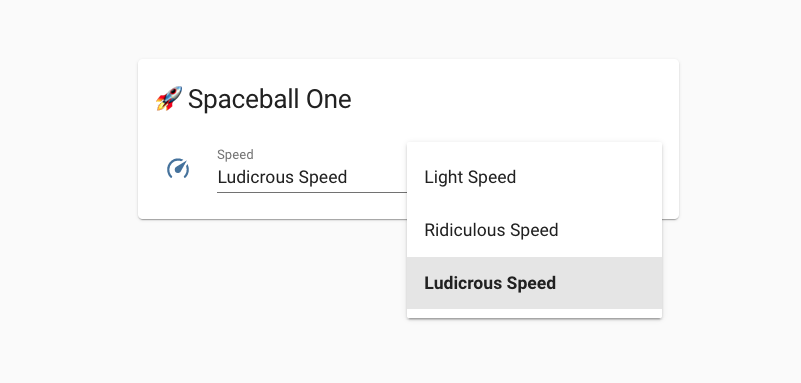 Screenshot of a select 实体, providing a choice from a list of options.
从这次发布开始,一些集成已经率先实现了首批 select 实体。MQTT 和 KNX 已经可以使用它;WLED 用它来提供用户预设的选择与启用控制;而在 Rituals Perfume Genie 中,你现在可以用它来调整香薰机的房间大小。
触发器条件与触发器 ID
如果你正在用 YAML 创建比较复杂的自动化,那你大概对这个场景不陌生。想象一个很大的自动化,里面有一堆触发器。那么,你要怎么知道到底是哪个触发器真正触发了这个自动化呢?
你现在可以给触发器分配一个 id,当自动化被触发时,这个 id 会一并传入自动化,从而让你可以基于它来做判断。
上面的例子会在两种情况下触发同一个自动化:大门打开时,以及大门持续打开 10 分钟时(大概是忘了关)。每个触发器都有自己的 ID。
现在,新的触发器条件来了!你可以根据“是哪一个触发器触发了自动化”来添加条件。
你可以在所有其他条件可用的地方使用这个触发器条件,包括像从一组动作中进行选择这样的场景。
如果你更喜欢通过 UI 创建和管理自动化,也完全没问题!这些新功能也已经加入自动化编辑器了!
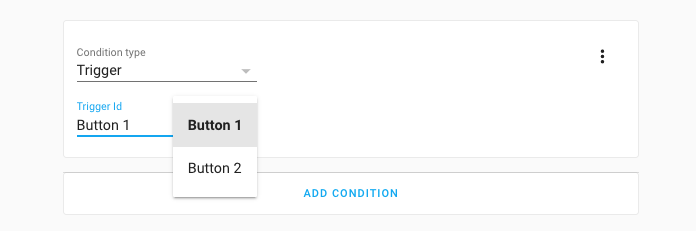 Screenshot of using a 触发器 条件 in the 自动化 editor.
脚本调试
在 Home Assistant 核心 2021.4 中,我们加入了自动化调试能力。而在这次发布中,我们把同样强大的工具也带给了脚本!
所以下次当你再疑惑“为什么这个脚本没执行?”、“它为什么会这样运行?”、“这脚本到底在搞什么?”时,这个功能就能帮上忙了。
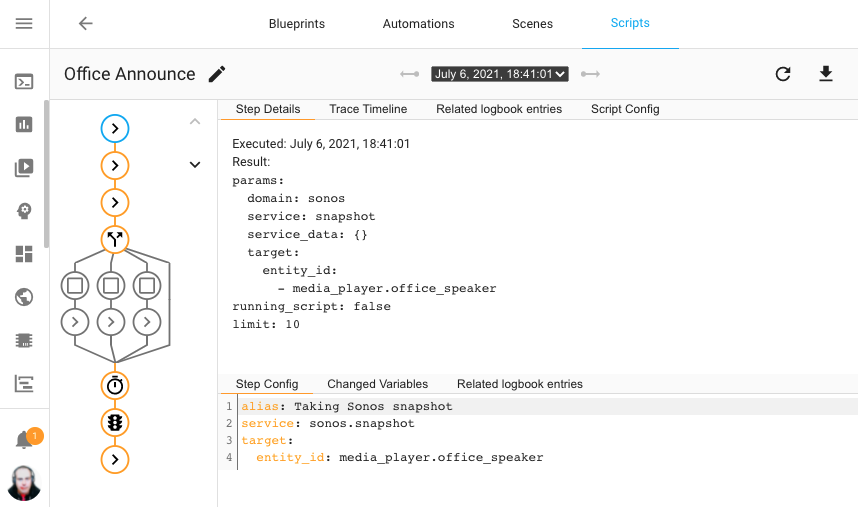 Screenshot of using the new 脚本 debugger on my office announce 脚本.
上面的截图展示了一次脚本的历史运行记录。它会用一张交互式图形展示脚本中的每一步,并高亮显示实际走过的路径。图中的每个节点都可以点击,从而查看脚本序列中该步骤发生了什么。
在触发器和条件中引用其他实体
这是对脚本和自动化的一项小改动,但可能会非常有帮助。现在,你可以在数值状态触发器和条件的 above/below 值中引用其他实体。传感器和 number 实体都可以使用。
例如,你现在可以在室外温度高于室内温度时触发一个自动化。
数值状态条件同样支持这一能力。
此外,时间条件现在也支持类似能力:可以在 before 和 after 选项中使用其他提供时间值的传感器。时间触发器在之前的发布中就已经支持这一点了。
在模板中处理日期
如果你曾经试过在模板里处理日期,那你大概知道这有多麻烦。说实话,这个问题也永远不会彻底消失,时间、日期和时区本来就是一群复杂的小怪兽。
不过我们意识到,在模板中使用日期和时间最麻烦的地方,其实是把传感器状态或文本转换成 datetime。这次发布新增了一个小巧的模板方法来帮助你完成这件事:as_datetime。
它既可以作为过滤器使用,也可以作为方法使用。下面是一个计算“距离我的驾照到期还有多少天”的示例:
Docker 容器的系列版本标签
如果你使用的是 Home Assistant 容器安装方式,我们通常建议你使用特定的版本标签;但这也意味着,每次我们发布新的补丁版本时,你都得手动更新标签。
感谢 @kmdm,从这次发布开始,除了现有的所有标签之外,我们还提供了一个系列版本标签,它会始终指向该发布系列中的最新补丁版本。
2021.7 这个标签会始终指向七月发布系列中的最新补丁版本,即使它实际对应的是 2021.7.2。
其他值得注意的变化
这次发布还有很多内容;下面是其中一些同样值得关注的变化:
- Z-Wave JS got quite a few updates this 发布:
- A new
zwave_js.multicast_set_valueis available, allowing to issue a set value command via multicast. Thanks, @raman325! - Each node now has a status 传感器 available and can be pinged using the
new
zwave_js.ping服务. Added by @raman325. - The Z-Wave JS 配置 面板 now has a "Heal Network" button, thanks @cgarwood!
- Z-Wave JS Server connection can now be re-configured from the Z-Wave JS 配置 面板, added by @MartinHjelmare.
- Z-Wave JS 日志 can now be downloaded, thanks @raman325!
- A new
- The Google Assistant 集成 now has support for 风扇 speed percentages and preset modes. Thanks, @jbouwh!
- @jbouwh didn't stop there and added 风扇 preset mode support to Alexa too!
- The Philips TV 集成 now supports Ambilights, added by @elupus.
- Yamaha MusicCast 集成 now supports grouping 服务, thanks @micha91!
- @raman325 added a whole bunch of 传感器 to the ClimaCell 集成!
- WLED now supports local push. Updates are now instantly both ways. Also, the master 灯光 can be kept and added support for controlling user presets.
- Setting up Xiaomi 设备 has gotten way easier! There is no need to do difficult things to get the tokens. Instead, Home Assistant can now extract the tokens from a Xiaomi Cloud account. Thanks, @starkillerOG!
- More Xiaomi updates, @jbouwh added support for 风扇 percentage-based speeds and preset modes.
- @RenierM26 added a lot of new 服务 to the Ezviz 集成, thanks!
- Tibber had quite a few improvements and now provides a power factor 传感器, added by @Danielhiversen!
- Google Translate TTS now supports the Bulgarian language, thanks @hristo-atanasov!
- If you have a SmartTube, you can now reset your reminders, thanks @mdz!
- KNX had quite a lot of updates and added support for XY-color 灯光, thanks @farmio.
- @OttoWinter added support for presets, custom presets and custom 风扇 modes for 温控 controls in ESPHome. Awesome!
- Nuki now has a 服务 to enable/disable continuous mode, thanks @anaisbetts!
- @cgomesu added quantiles to Statistics 集成, thanks!
- The Home Assistant login page now better support password manager, thanks, @rianadon!
新集成
欢迎以下新集成加入本次发布:
- Ambee, added by @frenck
- Forecast.Solar, added by @klaasnicolaas
- Freedompro, added by @stefano055415
- Modern Forms, added by @wonderslug
- Select, added by @frenck
新平台
以下集成新增了对新平台的支持:
- AVM FRITZ!Box Tools now has 开关 available, added by @chemelli74
- Bosch SHC has now several 传感器 for their 设备, added by @tschamm
- Groups now support creating Media Player groups, added by @definitio
- Hyperion can now provide a 摄像头 feed with the live image, added by @dermotduffy
- KNX added support for number and the new select 实体, added by @farmio
- Meteoclimatic now provides 传感器 with weather information, added by @adrianmo
- MQTT got support for the new select 实体, added by @emontnemery
- Rituals Perfume Genie added a number and select 实体 to adjust your diffuser, added by @milanmeu
- SIA 报警 Systems now provides various 二元sensor, added by @eavanvalkenburg
- Sony Bravia TV now offers a remote 实体, added by @Drafteed
- Switcher now provides 传感器, added by @thecode
- WLED now exposes color palettes and presets using select 实体, added by @frenck
现已支持通过 UI 设置的集成
以下集成现在可以直接通过 Home Assistant UI 进行设置:
- Coinbase, done by @TomBrien
- DSMR Slimme Meter, done by @RobBie1221
- Yamaha MusicCast, done by @vigonotion
发布 2021.7.1 - July 8
- Fix 服务 registration typo in Nuki 集成 (@anaisbetts - #52631) (nuki docs)
- Fix Fritz default consider home value (@chemelli74 - #52648) (fritz docs)
- Handle KeyError when accessing 设备 information (@ludeeus - #52650) (ecovacs docs)
- Warn if
interface_addrremains in Sonos 配置 (@jjlawren - #52652) (sonos docs) - Ignore unused keys from Sonos 设备 properties callback (@jjlawren - #52660) (sonos docs)
- Ensure Forecast.Solar returns an iso formatted timestamp (@frenck - #52669) (forecast_solar docs)
- Use iso-formatted times in MetOffice weather forecast (@avee87 - #52672) (metoffice docs)
- Fix precipitation calculation for hourly forecast (@agners - #52676) (openweathermap docs)
- Move recorder.py import to runtime (@uvjustin - #52682) (stream docs)
- Bump simplisafe-python to 11.0.1 (@bachya - #52684) (simplisafe docs)
- pyWeMo 版本 bump (0.6.5) (@esev - #52701) (wemo docs)
- Bump pylutron to 0.2.8 fixing python 3.9 incompatibility (@JonGilmore - #52702) (lutron docs)
- Add check for _client existence in modbus (@janiversen - #52719) (modbus docs)
- Fix KNX 风扇 features (@Tommatheussen - #52732) (风扇 docs)
- Esphome fix 摄像头 image (@jesserockz - #52738) (esphome docs)
发布 2021.7.2 - July 12
- Ignore Sonos Boost 设备 during discovery (@jjlawren - #52845) (sonos docs)
- Add zeroconf discovery to Sonos (@bdraco - #52655) (sonos docs)
- Remove scale calculation for climacell cloud 遮盖 (@apaperclip - #52752) (climacell docs)
- Fix homebridge 设备 becoming unavailable frequently (@Jc2k - #52753) (homekit_controller docs)
- Fix nexia thermostats humidify without dehumidify support (@bdraco - #52758) (nexia docs)
- Support certain homekit 设备 that emit invalid JSON (@Jc2k - #52759) (homekit_controller docs)
- Send ssdp requests to ipv4 broadcast as well (@bdraco - #52760) (ssdp docs)
- Bump dependency to properly handle current and voltage not being reported on some zhapower endpoints (@Kane610 - #52764) (deconz docs)
- 升级 pymazda to 0.2.0 (@bdr99 - #52775)
- Fix ESPHome 摄像头 not merging image packets (@OttoWinter - #52783) (esphome docs)
- Fix Neato parameter for token refresh (@chemelli74 - #52785) (neato docs)
- Add the Trane brand to nexia (@bdraco - #52805) (nexia docs)
- Bump python-fireservicerota to 0.0.42 (@cyberjunky - #52807) (fireservicerota docs)
- Bump up ZHA depdencies (@Adminiuga - #52818) (zha docs)
- 更新 arcam lib to 0.7.0 (@elupus - #52829) (arcam_fmj docs)
- Bump aiohomekit to 0.5.1 to solve performance regression (@bdraco - #52878) (homekit_controller docs)
- Bump pyhaversion to 21.7.0 (@ludeeus - #52880) (版本 docs)
- Prefer using xy over hs when supported by 灯光 (@Kane610 - #52883) (deconz docs)
- Bump zwave-js-server-python to 0.27.1 (@raman325 - #52885) (zwave_js docs)
- Surepetcare, fix set_lock_state (@Danielhiversen - #52912) (surepetcare docs)
- Bump pyinsteon to 1.0.11 (@teharris1 - #52927) (insteon docs)
- Fix recorder purge with sqlite3 < 3.32.0 (@bdraco - #52929)
- Bump pysonos to 0.0.52 (@jjlawren - #52934) (sonos docs)
发布 2021.7.3 - July 16
- 更新 ZHA to support zigpy 0.34.0 设备 initialization (@puddly - #52610) (zha docs)
- copy() --> deepcopy(). (@janiversen - #52794) (modbus docs)
- only allow one active call in each platform. (@janiversen - #52823) (modbus docs)
- Bump pyatv to 0.8.1 (@doug-hoffman - #52849) (apple_tv docs)
- Handle dhcp packets without a hostname (@bdraco - #52882) (dhcp docs)
- Add OUIs for legacy samsungtv (@bdraco - #52928) (samsungtv docs)
- Bump python-fireservicerota to 0.0.43 (@cyberjunky - #52966) (fireservicerota docs)
- More graceful exception handling in Plex library 传感器 (@jjlawren - #52969) (plex docs)
- Fix issue connecting to Insteon Hub v2 (@teharris1 - #52970) (insteon docs)
- Bump pysma to 0.6.4 (@rklomp - #52973) (sma docs)
- 更新 pyrainbird to 0.4.3 (@peternijssen - #52990) (rainbird docs)
- Bump pypck to 0.7.10 (@alengwenus - #53013) (lcn docs)
- fix for timestamp not present in SIA (@eavanvalkenburg - #53015) (sia docs)
- Co2signal, set SCAN_INTERVAL (@Danielhiversen - #53023) (co2signal docs)
- Another SIA fix for timestamp not present. (@eavanvalkenburg - #53045)
- Fix knx expose feature not correctly falling back to default value (@da-anda - #53046) (knx docs)
- Expose Spotify as a 服务 (@balloob - #53063)
- Increase polling interval to prevent reaching daily limit (@vlebourl - #53066) (home_plus_control docs)
- Add 灯光 white parameter to 灯光/服务.yaml (@emontnemery - #53075) (灯光 docs)
发布 2021.7.4 - July 21
- Allow pymodbus to reconnect in running system (not startup) (@janiversen - #53020) (modbus docs)
- Fix groups reporting incorrect supported color modes (@Kane610 - #53088) (deconz docs)
- Handle all WeMo ensure_long_press_virtual_device exceptions (@esev - #53094) (wemo docs)
- Fix remote rpi gpio input type (@jgriff2 - #53108) (remote_rpi_gpio docs)
- More restrictive 状态 updates of UniFi uptime 传感器 (@Kane610 - #53111) (unifi docs)
- Bump simplisafe-python to 11.0.2 (@bachya - #53121) (simplisafe docs)
- Bump nexia to 0.9.10 to fix asair login (@bdraco - #53122) (nexia docs)
- Bump surepy to 0.7.0 (@benleb - #53123) (surepetcare docs)
- 升级 pysonos to 0.0.53 (@amelchio - #53137) (sonos docs)
- Correctly detect is not home (@balloob - #53279) (device_tracker docs)
- 升级 to async-upnp-client==0.19.1 (@StevenLooman - #53288) (dlna_dmr docs) (ssdp docs) (upnp docs)
- Fix homekit 门锁 not being 创建 from when 设置 from the UI (@bdraco - #53301) (homekit docs)
如果你需要帮助……
……欢迎随时使用我们非常活跃的论坛,或者加入我们的聊天频道。
如果你遇到了这次发布引入的问题,请到我们的 issue tracker 提交反馈,并确保填写问题模板中的所有字段。
破坏性变更
下面按主题或集成列出了本次发布中的破坏性变更。点击对应项目即可阅读该条变更的更多说明。
Home Assistant will now block HTTP requests when a misconfigured reverse proxy, or misconfigured Home Assistant instance when using a reverse proxy, has been detected.
If you are using a reverse proxy, please make sure you have configured
use_x_forwarded_for and trusted_proxies in your HTTP 集成
配置.
更多信息, see the HTTP integrations 文档.
Additionally, access to Home Assistant from the same IP address as a trusted proxy will be rejected if the request is marked as forwarded.
(@frenck - #51839) (http docs)
Our Docker images are now based on Alpine 3.13 and run Python 3.9.
This is mainly interesting if you running custom Docker 容器 based on our 容器.
If you are using Home Assistant 容器, Home Assistant OS or the Home Assistant 受监管模式 安装 method, you will automatically get this 更新 on 升级 and no additional interaction is needed.
Please note, that Alpine 3.13 on ARM 设备 running a 32-bits operating
system (armhf/armv7), requires your Docker 版本 to be at least 19.03.9
(although, we recommend updating to an even higher 版本). Additionally,
you need to have libseccomp 2.42 or newer.
The AirQuality platform has been marked as deprecated. The air_quality 实体
is removed and replaced with 传感器 实体. You will need to 更新 their
自动化 and 仪表盘 if you have been using the air_quality 实体
of Airly.
(@bieniu - #52225) (airly docs)
When using 此integrations with IoTHub, the event_hub_name is now
a required field can be filled by the DeviceID when using IoTHub.
(@eavanvalkenburg - #52049) (azure_event_hub docs)
Our Docker 容器 has limited support for CEC drivers to those provided by the Linux kernel. This applies to the Home Assistant 容器, Home Assistant OS and Home Assistant 受监管模式 安装 types.
This will 遮盖 most CEC drivers out there.
The Coinbase 集成 migrated to 配置 via the UI. Configuring Coinbase via YAML 配置 has been deprecated and will be removed in a future Home Assistant 发布. Your existing YAML 配置 is automatically imported on 升级 to this 发布; and thus can be safely removed from your YAML 配置 after upgrading.
(@TomBrien - #45354) (coinbase docs)
Only accounts explicitly included in account_balance_currencies will be
loaded. Excluding the option will no longer load all provided accounts as
Coinbase's API now provides at least 29 accounts even if they are not
configured in your API 设置 on Coinbase.
(@TomBrien - #51981) (coinbase docs)
The statistics table is a Home Assistant data table that is not exposed or used by Home Assistant yet and is part of an alpha / feature that is in development. However, it does exist and you might already want to check it out or find a use for it.
In this 发布, the content of this table is reset. This does not impact any 状态 history and this data isn't used by Home Assistant as of yet.
If you have no idea what this message is about, you can safely ignore it. We have merely listed this to be complete in our backward-incompatible changes report.
(@emontnemery - #52331) (history docs)
Configuring the DSMR 集成 via YAML has been deprecated and will be removed in Home Assistant 2021.9. If you have an existing YAML 配置 for the DSMR platform is will be imported into the UI automatically on 升级. You can safely remove the DSMR YAML 配置 after upgrading Home Assistant.
(@frenck - #52179) (dsmr docs)
The Hourly Gas Consumption 传感器 has been removed from the DSMR 集成. This 传感器 was calculated and it is not an actual datapoint from the energy meter.
If you are looking for a replacement, you can use the Derivative integrations to re-create the hourly (or any other timeframe) 传感器 based on the total Gas consumption 传感器.
(@frenck - #52147) (dsmr docs)
-
The 集成 has been disabled since it requires an old 版本 of the
websocket-clientlibrary which is incompatible with the requirements of other 集成 that are actively maintained. -
It's not clear if 此integrations still works with the gpmdp app that now only supports YouTube Music. If there's someone that uses the 集成 successfully and wants to take on the maintenance task that is required to get the 集成 in a compatible 状态, please create an issue to discuss the future of 此integrations.
(@MartinHjelmare - #51509) (gpmdp docs)
The Growatt API has changed individual PV array units from Watts to Kilowatts. This change is to 更新 the units used for these values in Home Assistant, therefore the units for these values will change.
(@muppet3000 - #52021) (growatt_server docs)
Kuler Sky 灯光 no longer supports the deprecated white_value 属性 for
its 灯光. Use the rgbw_color 属性 instead.
(@emontnemery - #52080) (kulersky docs)
You can no longer use the 2 letters of your country code, but must now use the complete country name in your 配置. To find out which country names you can use, please look at meteoalarm.org.
(@rolfberkenbosch - #51383) (meteoalarm docs)
As announced in 2021.4, the “old style” YAML was deprecated and now removed:
Example “old style” 配置, that is now invalid:
Same 配置 in valid new style:
(@janiversen - #51117) (modbus docs)
The coil and register 配置 options are changed to address and (if not default) input_type.
Previous 配置 example:
The new 配置 looks like this:
(@janiversen - #51154) (modbus docs)
The 配置 属性 curent_temp_register and current_temp_register_type
are changed to address and input_type in order for all platforms to have a
common configurations.
Before this PR, this was legal:
This changes to:
(@janiversen - #51202) (modbus docs)
Modbus 传感器 ‘reverse_order’ is no longer supported, please use ‘swap’ instead.
Old 配置:
New 配置:
(@janiversen - #51665) (modbus docs)
data_count is no longer supported, please use count.
No longer supported:
Please change it to:
(@janiversen - #51668) (modbus docs)
It's no longer possible to set 属性 defined in the base component
via a configured json_attributes_topic.
For example, a 灯光 no longer accepts brightness via the json_attribute_topic.
This was unintended and an undocumented functionality that lead to
unexpected behavior.
This change applies to all supported MQTT platforms.
(@emontnemery - #52242 #52278 #52280 #52285 #52286 #52283 #52289 #52291 #52290 #52288 #52282 #52279) (MQTT docs)
The AirQuality platform has been marked as deprecated. The air_quality
实体 will be deleted and replaced with sensor 实体.
You need to 更新 your 自动化 and 仪表盘 if you have been using
these air_quality 实体 in those.
Open Z-Wave 灯光 no longer support the deprecated white_value 属性,
use rgbw_color instead.
(@emontnemery - #52063) (ozw docs)
Prometheus is now converting temperatures in °F to °C. If you are relying on
temperature_c being in Fahrenheit, you will need to make adjustments,
for example by doing a unit conversion in a PromQL query.
(@masto - #52212) (prometheus docs)
The underlying library that is used for the database connections, has been updated. This fixes a bug, that might be a breaking change for you.
If you use an @ in your database username or password, you will have to
adjust your database connection string to use %40 instead.
Database connection strings are considered URLs, thus special characters need
to be encoded. %40 is the URL encoded 版本 of @.
The 开关 extra 状态 属性 fan_speed and room_size will be removed in
the next 发布. As of this 发布, both 属性 are available as 实体,
making it possible to change the value with Home Assistant.
(@milanmeu - #51993) (rituals_perfume_genie docs)
From April 2020, the Sony Bravia TV 集成 has been automatically importing your import of existing YAML configurations. Now we have removed this option for migration. Your existing 配置 has been imported to the UI already and can now be safely removed from your YAML 配置 files.
(@bieniu - #52141) (braviatv docs)
With the change to the new, and unique, electric tariff 2.0TD, if you previously had configured multiple PVPC 传感器 monitoring prices for more than one of the old tariffs, only the first one will survive. This means if you have any 自动化 or 脚本 that depends on these removed 传感器, you might need to adjust them.
(@azogue - #51789) (pvpc_hourly_pricing docs)
Tasmota doesn't support independent control of all four channels of an RGBW 灯光,
so rgbw_color was a very poor fit for it and gave counter-intuitive results.
Tasmota 灯光 supporting color and white will now be added as a 灯光 supporting
color modes hs and white, not as a 灯光 supporting color_mode rgbw.
now supports setting white instead.
场景 setting a Tasmota 灯光 can be updated by using the 场景 UI editor.
自动化 setting a Tasmota 灯光 need to be updated manually, to set a 灯光 to white mode do:
(@emontnemery - #51608) (tasmota docs)
In preparation for multi-设备 support, 配置 via the UI and support for discovery; 此integrations is migrating 实体 属性 into 传感器 to be later added as 设备 实体. The following 开关 实体 属性 migrated to 传感器:
(@thecode - #51964) (switcher_kis docs)
The 集成 has been rewritten from the ground up and is now configurable via the user interface only. Existing platform YAML config will automatically be imported into the user interface on 升级 and can be safely removed from the YAML 配置 after the 升级 has been completed.
(@vigonotion - #51561) (yamaha_musiccast docs)
The IPv6 配置 option has been deprecated in favor of the 设置 provided by the network 集成.
(@bdraco - #51173) (zeroconf docs)
全部变更
- Refactor ModbusRegisterSensor class to get hub and 配置 (@yury-sannikov - #50234) (modbus docs)
- Bump 版本 to 2021.7.0dev0 (@frenck - #51116)
- Change stream sequence number to start from 0 (@uvjustin - #51101) (stream docs)
- 升级 pysonos to 0.0.50 (@amelchio - #51125) (sonos docs)
- After merge, review. (@janiversen - #51139) (modbus docs)
- Bump pysma 版本 to 0.5.0 (@rklomp - #51098) (sma docs)
- Add missing function signature (@ollo69 - #51153) (asuswrt docs)
- Clean up Local IP 集成 (@frenck - #51126) (local_ip docs)
- Clean up DNS IP 集成 (@frenck - #51143) (dnsip docs)
- 更新 sia tests (@eavanvalkenburg - #51151) (sia docs)
- Normalize async_setup_entry (@tkdrob - #51161)
- Add myself to Switcher codeowners (@thecode - #51158) (switcher_kis docs)
- Use bool annotations for 设置 entries (@tkdrob - #51166)
- Define 温控 实体 属性 as class variables (@frenck - #51006) (温控 docs) (toon docs)
- Add zwave_js.multicast_set_value 服务 (@raman325 - #51115) (zwave_js docs)
- Fix totalconnect test calling public host (@jjlawren - #51138) (totalconnect docs)
- Adjust segment duration calculation in stream (@uvjustin - #51149) (stream docs)
- Use 实体 class vars in SolarEdge (@frenck - #51123) (solaredge docs)
- Define alarm_control_panel 实体 属性 as class variables (@frenck - #51120) (alarm_control_panel docs) (verisure docs)
- Bump 动作/cache from 2.1.5 to 2.1.6 (@dependabot - #51185)
- Clean up Speedtest.net 传感器 (@frenck - #51124) (speedtestdotnet docs)
- Bump config 版本 to 2 for AVM Fritz Tools (@mib1185 - #51176) (fritz docs)
- Remove old config from 遮盖, including tests (@janiversen - #51118) (modbus docs)
- Move modbus schema validators to validators.py (@janiversen - #51121) (modbus docs)
- Remove "old" config from modbus binary_sensor (@janiversen - #51117) (modbus docs) (breaking-change)
- Define media_player 实体 属性 as class variables (@frenck - #51192) (dunehd docs) (heos docs) (media_player docs) (spotify docs)
- Change 遮盖 to use address/input_type (@janiversen - #51154) (modbus docs) (breaking-change)
- Add missing outdoor temperature unit for Tado (@Noltari - #51197) (tado docs)
- Revert "Bump config 版本 to 2 for AVM Fritz Tools (#51176)" (@ludeeus - #51193) (fritz docs)
- Set Registry name parameter to Hashable type (@MartinHjelmare - #51203)
- Address late review of Mazda 服务 (@bdr99 - #51178) (mazda docs)
- Adjust modbus 温控 to use address/input_type (@janiversen - #51202) (modbus docs) (breaking-change)
- Add separate ozone 传感器 for climacell (@raman325 - #51182) (climacell docs)
- Decrease nsw fuel request volume (@nickw444 - #49552) (nsw_fuel_station docs)
- Add network and callback support to SSDP (@bdraco - #51019) (dlna_dmr docs) (network docs) (ssdp docs) (upnp docs) (new-集成)
- Remove incorrect check in Alexa for SERVICE_ALARM_DISARM fail (@emontnemery - #51224) (alexa docs)
- Add discovery by manufacturer to Nettigo Air Monitor 集成 (@bieniu - #51155) (nam docs)
- Use flow result type constants more (@scop - #51122) (auth docs) (MQTT docs) (mysensors docs)
- Remove double schema validation in network (@bdraco - #51219) (network docs)
- Define CoverEntity 实体 属性 as class variables (@frenck - #51236) (遮盖 docs) (zwave_js docs)
- Replace sonos discovery Thread with ssdp callback registration (@bdraco - #51033) (network docs) (sonos docs) (ssdp docs) (new-集成)
- Cleanup unneeded variable assignment in ezviz (@frenck - #51239) (ezviz docs)
- Cleanup commented code + comprehensions in iOS (@frenck - #51238) (ios docs)
- Small tweaks to LaCrosse (@frenck - #51249) (lacrosse docs)
- Add gui config option consider 设备 unavailable (@rsegers - #51218) (zha docs)
- 更新 HLS playlist in stream (@uvjustin - #51191) (stream docs)
- Handle empty ssdp descriptions in the cache (@bdraco - #51253) (ssdp docs)
- Small optimization in 实体 registry enabled deConz method (@frenck - #51250) (deconz docs)
- Clean up SmartTub (@mdz - #51257) (smarttub docs)
- Use 实体 class vars for Mill (@Danielhiversen - #51264) (mill docs)
- Only 调试 日志 new Sonos SSDP discoveries (@jjlawren - #51247) (sonos docs)
- Add zwave_js node status 传感器 (@raman325 - #51181) (zwave_js docs)
- Simplify 设备 动作 code (@emontnemery - #51263)
- Simplify 设备 条件 code (@emontnemery - #51266)
- Move 灯光 helper get_supported_color_modes (@emontnemery - #51269) (灯光 docs)
- Collection of changing 实体 properties to class 属性 (@frenck - #51248)
- 更新 to pygtfs 0.1.6 (@mazzy89 - #51267) (gtfs docs)
- 实体 属性 + typing fix in deCONZ 报警 control 面板 (@frenck - #51241) (deconz docs)
- Add support for 状态 class for Airly 传感器 (@bieniu - #51285) (airly docs)
- Processing of messages from channel by telegram_bot (@NikoM87 - #51274) (telegram_bot docs)
- AppleTV typo in 错误 通知 (@adrum - #51300) (apple_tv docs)
- 升级 black to 21.5b2 (@frenck - #51297)
- Alexa 风扇 preset_mode support (@jbouwh - #50466) (alexa docs)
- Philips TV ambilight support (@elupus - #44867) (philips_js docs)
- 升级 pylint to 2.8.3 (@frenck - #51308)
- KNX: move some Schema to schema.py (@farmio - #51307) (knx docs)
- KNX: Support for XY-color 灯光 (@farmio - #51306) (knx docs)
- Refactor yeelight 集成 to use only flows (@danielrheinbay - #51255) (yeelight docs)
- Define SwitchEntity 实体 属性 as class variables (@frenck - #51232) (开关 docs)
- 开关 to using 实体 class 属性 where possible in zwave_js (@raman325 - #51207) (zwave_js docs)
- Improve config validation for key_value_schemas (@balloob - #49429)
- Bump aioswitcher to 1.2.3 (@thecode - #51324) (switcher_kis docs)
- Collection of changing 实体 properties to class 属性 - 2 (@frenck - #51345)
- Use 实体 class vars for Melcloud (@Danielhiversen - #51351) (melcloud docs)
- SolarEdge: Move coordinators out of 传感器 platform (@frenck - #51348) (solaredge docs)
- Bump hangups to 0.4.14 (@MartinHjelmare - #51355) (hangouts docs)
- Move pymodbus test fixtures to test_init (@janiversen - #51244) (modbus docs)
- Define ToggleEntity 实体 属性 as class variables (@frenck - #51231)
- Add binary_sensor tests for devolo Home Control (@Shutgun - #49843) (devolo_home_control docs)
- Mark 状态 final in BinarySensorEntity (@frenck - #51234) (binary_sensor docs)
- 更新 ping to use asyncio function in icmplib (@bdraco - #50808) (ping docs)
- Add Hyperion 摄像头 feed (@dermotduffy - #46516) (hyperion docs) (new-platform)
- Add media_player.group (@definitio - #38855) (group docs) (new-集成) (new-platform)
- Add support for 风扇 speed percentage and preset modes to google_assistant 集成 (@jbouwh - #50283) (google_assistant docs)
- Fix HLS idle timer in stream (@uvjustin - #51372) (stream docs)
- Add 二元sensor platform to SIA 集成 (@eavanvalkenburg - #51206) (sia docs) (new-platform)
- Remove is_standby from SwitchEntity (@emontnemery - #51400) (hdmi_cec docs) (开关 docs)
- Add bosch shc platforms for 传感器 设备 (@tschamm - #50720) (bosch_shc docs) (new-platform)
- Bumped to boschshcpy==0.2.19 (@tschamm - #51416) (bosch_shc docs)
- Allow registering a callback to ssdp that matches any key value (@bdraco - #51382) (ssdp docs)
- Pin jinja (@balloob - #51434)
- Bump aiohue to 2.5.1 (@balloob - #51447) (hue docs)
- Small fixes in SIA (@eavanvalkenburg - #51401) (sia docs)
- Address Hyperion 摄像头 post-merge code review (@dermotduffy - #51457) (hyperion docs)
- Allow unlimited scan_interval in modbus (@janiversen - #51471) (modbus docs)
- Allow number/传感器 实体 in numeric 状态 条件/触发器 (@frenck - #51439) (homeassistant docs)
- Bump islamic-prayer-times to 0.0.5 (@uchagani - #51174)
- Remove empty tests for ping now that the code in icmplib is used (@bdraco - #51454) (ping docs)
- Ensure ssdp can callback messages that do not have an ST (@bdraco - #51436) (ssdp docs)
- Disable gpmdp 集成 (@MartinHjelmare - #51509) (gpmdp docs) (breaking-change)
- Bump mcstatus to 6.0.0 (@MartinHjelmare - #51517) (minecraft_server docs)
- Fix mysensors typing (@MartinHjelmare - #51518) (mysensors docs)
- Check initial connect() worked in modbus (@janiversen - #51470) (modbus docs)
- Add fix delay after send/request to allow RS485 adapter to 开关 in modbus (@janiversen - #51417) (modbus docs)
- Clean mysensors on_unload (@MartinHjelmare - #51521) (mysensors docs)
- Add retries/retry_on_empty 配置 parameters to Modbus (@janiversen - #51412) (modbus docs)
- Add color_mode white (@emontnemery - #51411) (灯光 docs)
- Add workaround for missing cleaning time in roomba (@drinfernoo - #51163) (roomba docs)
- Ensure from future import annotations in irobot_base (@bdraco - #51554) (roomba docs)
- Add lightwave state_class and unique_id properties (@ColinRobbins - #51544) (lightwave docs)
- 更新 pyhomematic to 0.1.73 (@danielperna84 - #51551) (homematic docs)
- Replace supported_features property with class 属性 in deCONZ 灯光 实体 (@Kane610 - #51558) (deconz docs)
- Cleanup of Toon (@frenck - #51230) (toon docs)
- Allow referencing 传感器 实体 for before/after in time 条件 (@frenck - #51444)
- Bump home-assistant/wheels from 2021.05.4 to 2021.06.0 (@dependabot - #51569)
- Add easy converting string timestamps/dates to datetime objects in templates (@frenck - #51576)
- Clean mysensors gateway type selection (@MartinHjelmare - #51531) (mysensors docs)
- Type mysensors strictly (@MartinHjelmare - #51535) (mysensors docs)
- Bump nad_receiver to 版本 0.2.0 (@andreas-amlabs - #51381) (nad docs)
- Bump aio_georss_gdacs to 0.5 (@exxamalte - #51577) (gdacs docs)
- Bump meteoalertapi to 0.2.0 (@rolfberkenbosch - #51383) (meteoalarm docs) (breaking-change)
- Fully type 开关 实体 component (@frenck - #51586) (开关 docs)
- Add support for color_mode white to demo 灯光 (@emontnemery - #51575) (demo docs)
- Move remaining code out of netdisco to eliminate as SSDP dependency (@bdraco - #51588) (ssdp docs)
- Use supported color modes in Axis 集成 (@Kane610 - #51557) (axis docs)
- Correctly support use of Farenheit in Gree 温控 component (@cmroche - #50260) (gree docs)
- Bump georss_qld_bushfire_alert_client to 0.5 (@exxamalte - #51596) (qld_bushfire docs)
- Fix kraken I/O and sleep in tests (@MartinHjelmare - #51599) (kraken docs)
- Fix misaligned high/low temperatures in weather 卡片 (@michaeldavie - #49826) (environment_canada docs)
- Add Rituals number platform (@milanmeu - #49723) (rituals_perfume_genie docs)
- Detect Sonos reboots and recreate subscriptions (@jjlawren - #51377) (sonos docs)
- Bump aio_geojson_geonetnz_volcano to v0.6 (@exxamalte - #51602) (geonetnz_volcano docs)
- Modern Forms 集成 initial pass - 风扇 (@wonderslug - #51317) (modern_forms docs) (new-集成)
- Remove value_template from MQTT_RW_PLATFORM_SCHEMA (@emontnemery - #51590) (MQTT docs)
- Deprecate support for undocumented value_template in MQTT 灯光 (@emontnemery - #51589) (MQTT docs)
- Small 实体 属性 cleanup in AirVisual (@frenck - #51601) (airvisual docs)
- Address late review of nsw fuel station (@nickw444 - #51619) (nsw_fuel_station docs)
- Fix mysensors tests typing (@MartinHjelmare - #51621) (mysensors docs)
- Static typing for Zodiac (@yuvalabou - #51622) (zodiac docs)
- Bump sqlalchemy to 1.4.17 (@bdraco - #51593) (recorder docs) (sql docs)
- Add support for color_mode white to tasmota 灯光 (@emontnemery - #51608) (灯光 docs) (tasmota docs)
- Use baseimage 2021.06.0 / Python 3.9 - Alpine 3.13 (@pvizeli - #51628) (breaking-change)
- Fix mysensors awesomeversion strategy usage (@MartinHjelmare - #51627) (mysensors docs)
- 更新 Machine support of python 3.9 / Kernel CEC (@pvizeli - #51637) (breaking-change)
- Bump hatasmota to 0.2.16 (@emontnemery - #51623) (tasmota docs)
- Populate upnp 设备 from ssdp (@bdraco - #51221) (upnp docs)
- 升级 wled to 0.5.0 (@frenck - #51632) (wled docs)
- Improve editing of 设备 自动化 referencing non-added 传感器 (@emontnemery - #51312) (传感器 docs)
- Bump codecov/codecov-动作 from 1.5.0 to 1.5.2 (@dependabot - #51652)
- Emulate color_temp for 灯光 which support color or white (@emontnemery - #51654) (灯光 docs)
- Increase test coverage in Brother 集成 (@bieniu - #51657) (brother docs)
- Add 设备 触发器 support for Philips Hue Wall 开关 Module (@cklagenberg - #51574) (hue docs)
- Tweak 灯光.valid_supported_color_modes (@emontnemery - #51659) (灯光 docs)
- Add Ambee 集成 (@frenck - #51645) (ambee docs) (new-集成)
- Add color mode support to WLED (@frenck - #51648) (wled docs)
- Remove ASUS.gpio / not working with new GCC (@pvizeli - #51662)
- Convert ecobee pressure to local units (@rianadon - #51379) (ecobee docs)
- 更新 xknx to 版本 0.18.5 (@farmio - #51644) (knx docs)
- Static typing for Uptime (@yuvalabou - #51638) (uptime docs)
- Create Docker series 版本 tag YYYY.M (@kmdm - #51615)
- Bump pysonos to 0.0.51 (@jjlawren - #51669) (sonos docs)
- Restructure WLED 集成 (@frenck - #51667) (wled docs)
- Add 100% test coverage to Ambee 集成 (@frenck - #51670) (ambee docs)
- Clean up unused Sonos subscriptions (@jjlawren - #51583) (sonos docs)
- 升级 ambee to 0.3.0 (@frenck - #51676) (ambee docs)
- Correct comment in MQTT 风扇 (@emontnemery - #51682) (MQTT docs)
- Use supported color modes in deCONZ 集成 (@Kane610 - #51656) (deconz docs)
- Clean up unloads (@tkdrob - #51688) (modern_forms docs) (wallbox docs)
- Improve editing of 设备 触发器 referencing non-added 遮盖 (@emontnemery - #51703) (遮盖 docs)
- Improve editing of 设备 触发器 referencing non-added 二元sensor (@emontnemery - #51700) (binary_sensor docs)
- Add 设备 触发器 for IKEA Trådfri Shortcut button to deCONZ (@Kane610 - #51680) (deconz docs)
- Add pollen 传感器 to Ambee (@frenck - #51702) (ambee docs)
- Use attrs instead of properties in Nettigo Air Monitor 集成 (@bieniu - #51705) (nam docs)
- Increase Ambee 更新 interval to 1 hour (@frenck - #51708) (ambee docs)
- Revert "Set Fahrenheit reporting precision to tenths for Homekit Controller 温控 实体 (#50415)" (@Jc2k - #51698) (homekit_controller docs) (breaking-change)
- Add Supervisor 重启 add-on helper (@MartinHjelmare - #51717) (hassio docs)
- Rename 设备 触发器 base schema to DEVICE_TRIGGER_BASE_SCHEMA (@emontnemery - #51719)
- Replace properties with attr in Axis 集成 (@Kane610 - #51686) (axis docs)
- Secure not to activate multiple venv in pre_commit hook (@janiversen - #51715)
- Use attrs instead of properties in Airly 集成 (@bieniu - #51712) (airly docs)
- Add support for state_class (@bieniu - #51512) (brother docs)
- Static typing for no_ip 集成 (@yuvalabou - #51694) (no_ip docs)
- Reduce modbus schemas and add delay to 风扇/灯光 (@janiversen - #51664) (modbus docs)
- Add base schema for 触发器 (@emontnemery - #51727)
- Improve editing of 设备 动作 referencing non-added HVAC (@emontnemery - #51706) (温控 docs)
- Mock WLED in all WLED tests (@frenck - #51724) (wled docs)
- Remove reverse_order (replaced by generic swap) (@janiversen - #51665) (modbus docs) (breaking-change)
- Add 100% test coverage to WLED 集成 (@frenck - #51743) (wled docs)
- Clean up redudant exceptions from handlers (@frenck - #51741)
- Bump georss_generic_client to v0.6 (@exxamalte - #51745) (geo_rss_events docs)
- Spelling fixes (@scop - #51642)
- Use attrs instead of properties in Brother (@bieniu - #51742) (brother docs)
- Use attrs instead of properties in sonarr (@ctalkington - #51737) (sonarr docs)
- Use attrs instead of properties in roku (@ctalkington - #51735) (roku docs)
- Add 触发器 条件 (@emontnemery - #51710)
- Add Ecobee 加湿器 device_info and unique_id (@bjpetit - #51504) (ecobee docs)
- WLED WebSocket support - local push updates (@frenck - #51683) (wled docs)
- Tweak 设备 动作 scaffold, fix typo (@emontnemery - #51751) (温控 docs)
- xknx 0.18.6 (@farmio - #51758) (knx docs)
- Refactor zwave_js disconnect client helper (@MartinHjelmare - #51718) (zwave_js docs)
- Bump aio_geojson_nsw_rfs_incidents to v0.4 (@exxamalte - #51770) (nsw_rural_fire_service_feed docs)
- Refactor zwave_js config flow (@MartinHjelmare - #51720) (zwave_js docs)
- Add timedelta option for async_call_later (@eavanvalkenburg - #50164)
- Allow keeping master 灯光 in WLED (@frenck - #51759) (wled docs)
- Add re-authentication support to Ambee (@frenck - #51773) (ambee docs)
- Improve editing of 设备 动作 referencing non-added 门锁 (@emontnemery - #51750) (门锁 docs)
- Improve editing of 设备 动作 referencing non-added 遮盖 (@emontnemery - #51748) (遮盖 docs)
- 升级 black to 21.6b0 (@frenck - #51785)
- 升级 wled to 0.6.0 (@frenck - #51783) (wled docs)
- Improve editing of 设备 动作 referencing non-added 报警 (@emontnemery - #51747) (alarm_control_panel docs)
- Improve editing of 设备 触发器 referencing non-added 报警 (@emontnemery - #51701) (alarm_control_panel docs)
- Mark Ambee as a platinum quality 集成 (@frenck - #51779) (ambee docs)
- Remove connection classes (@milanmeu - #51801) (growatt_server docs) (kraken docs) (modern_forms docs) (synology_dsm docs) (system_bridge docs)
- Fix Roomba strings step_id rename (@milanmeu - #51744) (roomba docs)
- Cleanup switcher_kis - move to consts (@thecode - #51807) (switcher_kis docs)
- Strict types - first part (@chemelli74 - #51479) (fritz docs)
- Bump androidtv to 0.0.60 (@JeffLIrion - #51812)
- Refactor stream to create partial segments (@uvjustin - #51282) (stream docs)
- Catch AsusWRT UnicodeDecodeError in get_nvram call (@ollo69 - #51811) (asuswrt docs)
- Set playlist name on playing Sonos media (@jjlawren - #51685) (sonos docs)
- Improve 错误 when HomeKit accessory underlying 实体 is missing (@bdraco - #51713) (homekit docs)
- Bump up ZHA dependencies (@Adminiuga - #51765) (zha docs)
- Pass metadata when casting an app (@blawford - #51148) (cast docs)
- Rewrite of Yamaha musiccast 集成 (@vigonotion - #51561) (yamaha_musiccast docs) (breaking-change)
- Do not return an exception in modbus (@janiversen - #51829) (modbus docs)
- Improve editing of 设备 条件 referencing non-added 报警 (@emontnemery - #51830) (alarm_control_panel docs)
- Create dataclass to mock entry 设置 in Broadlink tests (@felipediel - #50134) (broadlink docs)
- Bump georss_ign_sismologia_client to v0.3 (@exxamalte - #51838) (ign_sismologia docs)
- Improve editing of 设备 条件 referencing non-added 加湿器 (@emontnemery - #51834) (加湿器 docs)
- Improve editing of 设备 条件 referencing non-added 遮盖 (@emontnemery - #51833) (遮盖 docs)
- Improve editing of 设备 条件 referencing non-added 传感器 (@emontnemery - #51835) (传感器 docs)
- Improve editing of 设备 条件 referencing non-added 二元sensor (@emontnemery - #51831) (binary_sensor docs)
- Correct trace path for 触发器 with custom id (@emontnemery - #51847)
- Bump aio_geojson_geonetnz_quakes to v0.13 (@exxamalte - #51846) (geonetnz_quakes docs)
- Improve type hints in stream (@uvjustin - #51837) (stream docs)
- Migrate the name for the hassio user (@ludeeus - #51771) (hassio docs)
- Define HumidifierEntity 实体 属性 as class variables (@frenck - #51841) (demo docs) (加湿器 docs)
- Define NumberEntity 实体 属性 as class variables (@frenck - #51842) (demo docs) (number docs)
- Create zwave_js node status 传感器 when the node is added (@raman325 - #51850) (zwave_js docs)
- Add 警告 during playback if Plex token missing (@jjlawren - #51853) (plex docs)
- Add missing languages to Microsoft TTS (@yllar - #51774) (microsoft docs)
- Cleanup of code reviews from initial modern forms (@wonderslug - #51794) (modern_forms docs)
- Add zwave_js ping node 服务 (@raman325 - #51435) (zwave_js docs)
- Add zwave_js WS API cmds to get node 状态 and 版本 info (@raman325 - #51396) (zwave_js docs)
- Add Xiaomi Miio EU gateway support (@starkillerOG - #47955) (xiaomi_miio docs)
- 更新 fortios 设备 tracker to support FortiOS 7.0 (@kimfrellsen - #51640) (fortios docs)
- Add selectors to BMW Connected Drive 服务 definitions (@rikroe - #47065) (bmw_connected_drive docs)
- Improve editing of 设备 条件 referencing non-added HVAC (@emontnemery - #51832) (温控 docs)
- Require admin for new node status WS API command (@raman325 - #51863) (zwave_js docs)
- Enable asyncio debugging from debugpy 集成 (@emontnemery - #51880) (debugpy docs)
- Additional units for HM-ES-TX-WM with ES-IEC (@climblinne - #50713) (homematic docs)
- 恢复 状态 of KNX 开关 (@farmio - #51761) (knx docs)
- Don't create unsupported pump 传感器 (@dieselrabbit - #51828) (screenlogic docs)
- Add 服务 to ezviz 集成 (@RenierM26 - #48984) (ezviz docs) (new-platform)
- 升级 pytest-cov to 2.12.1 (@frenck - #51886)
- 升级 codecov to 2.1.11 (@frenck - #51885)
- Add current hvac_action to KNX 温控 (@farmio - #51464) (knx docs)
- 升级 pillow to 8.2.0 (@frenck - #51897)
- Add a menu_cursor 服务 to the yamaha component (@esev - #44819) (yamaha docs)
- Mark config flow fields as required (@milanmeu - #51898) (flo docs) (goalzero docs) (mutesync docs) (ring docs) (risco docs) (roon docs) (ruckus_unleashed docs)
- Speed up record stream audio test (@uvjustin - #51901) (stream docs)
- Use 实体 class vars in 开关 demo (@frenck - #51906) (demo docs)
- Fix typo in min/max mired(s) 实体 class 属性 (@frenck - #51921) (灯光 docs)
- Support receiving long-press events from WeMo 设备 (@esev - #45503) (wemo docs)
- Add swap to 温控 and change data_count -> count in modbus (@janiversen - #51668) (modbus docs) (breaking-change)
- Clean up 灯光 group (@frenck - #51922) (group docs)
- 升级 mypy to 0.902 (@frenck - #51907)
- Clean up 遮盖 group (@frenck - #51924) (group docs)
- Refactor Sonos 报警 and favorites into system-level coordinators (@jjlawren - #51757) (sonos docs)
- Support bitmask as a value (@raman325 - #51892) (zwave_js docs)
- Raise bad request when receiving HTTP request from untrusted proxy (@frenck - #51839) (http docs) (breaking-change)
- Support Wolflink reconnection after unexpected failure (@adamkrol93 - #47011) (wolflink docs)
- Clean ezviz 错误 handling in 服务 (@RenierM26 - #51945) (ezviz docs)
- Bump 动作/upload-artifact from 2.2.3 to 2.2.4 (@dependabot - #51946)
- Bump plexapi to 4.6.1 (@jjlawren - #51936) (plex docs)
- Adopt new electricity tariffs in pvpc hourly pricing (@azogue - #51789) (pvpc_hourly_pricing docs) (breaking-change)
- Type entry 设置/unload for 实体 components (@frenck - #51912)
- Define WeatherEntity 实体 属性 as class variables (@frenck - #51899) (weather docs)
- Define WaterHeaterEntity 实体 属性 as class variables (@frenck - #51903) (demo docs) (water_heater docs)
- Define RemoteEntity 实体 属性 as class variables (@frenck - #51904) (remote docs)
- Improve editing of 设备 动作 referencing non-added 加湿器 (@emontnemery - #51749) (加湿器 docs)
- Add autospec to modbus mock, in order to use getattr (@janiversen - #51813) (modbus docs)
- Ecobee logging cleanup (@bjpetit - #51754) (ecobee docs)
- Improve Sonos Spotify/Tidal support, add 服务 exceptions (@jjlawren - #51871) (sonos docs)
- Define LockEntity 实体 属性 as class variables (@frenck - #51909) (demo docs) (门锁 docs)
- Add Mutesync dynamic 更新 interval and catch invalid response values (@bramkragten - #50764) (mutesync docs)
- Use test fixture for 配置 testing (@janiversen - #51803) (modbus docs)
- Add remote control platform to BraviaTV (@Drafteed - #50845) (braviatv docs) (new-platform)
- Fully type binary_sensor 实体 component (@frenck - #51957)
- Fully type 门锁 实体 component (@frenck - #51958) (门锁 docs)
- Adjust zwave_js WS API commands for logging (@raman325 - #51096) (zwave_js docs)
- Add deconz support for Lidl Smart Door Bell HG06668 (@T0mWz - #51949) (deconz docs)
- Handle disconnected ecobee thermostat in 加湿器 and remote 传感器 (@bjpetit - #51873) (ecobee docs)
- Convert if/elif chains to dicts in modbus (@janiversen - #51962) (modbus docs)
- Add Select 实体 component platform (@frenck - #51849) (demo docs) (select docs) (new-集成)
- Type homeassistant 触发器 event (@MartinHjelmare - #51979) (homeassistant docs)
- Add 设备 触发器 support to Select 实体 (@frenck - #51987) (select docs)
- Add reproduce 状态 to select 实体 (@frenck - #51977) (select docs)
- Add significant change support to select 实体 (@frenck - #51978) (select docs)
- Add 设备 动作 support to Select 实体 (@frenck - #51990) (select docs)
- Allow fetching multiple statistics (@balloob - #51996) (history docs) (recorder docs)
- Add WS API for listing available statistic ids (@emontnemery - #51984) (history docs) (recorder docs)
- Add Select 实体 support to Google Assistant (@frenck - #51997) (google_assistant docs)
- Add 设备 条件 support to Select 实体 (@frenck - #51992) (select docs)
- Force SimpliSafe to reauthenticate with a password (@bachya - #51528) (simplisafe docs)
- 更新 xknx to 0.18.7 (@farmio - #52000) (knx docs)
- Fix not awaiting async super method in KNX 温控 (@farmio - #52005) (knx docs)
- Use 实体 sources to find related 实体 in Search (@bramkragten - #51966) (search docs)
- Fix IoT class (@Oderik - #52008) (min_max docs)
- Small WLED cleanups (@frenck - #52014) (wled docs)
- Clean up stream refactor (@uvjustin - #51951) (stream docs)
- 升级 async_upnp_client to 0.19.0 (@StevenLooman - #52019) (dlna_dmr docs) (ssdp docs) (upnp docs)
- Remove undo listener variable in sonarr (@ctalkington - #52042) (sonarr docs)
- Remove undo_listener variable in Sony Bravia TV 集成 (@bieniu - #52033) (braviatv docs)
- Remove
undo_listenervariable in AccuWeather 集成 (@bieniu - #52032) (accuweather docs) - Bump adb-shell to 0.3.4 (@JeffLIrion - #52044)
- 升级 wled to 0.7.0 (@frenck - #52017) (wled docs)
- Modern Forms 灯光 platform (@wonderslug - #51857) (modern_forms docs) (new-platform)
- Improve editing of 设备 自动化 referring non added select 实体 (@emontnemery - #52047) (alarm_control_panel docs) (select docs)
- 更新 温控.py (@MattWestb - #52065) (zha docs)
- Fix zwave_js migration logic (@raman325 - #52070) (zwave_js docs)
- Move zwave_js migration tests into new module (@raman325 - #52075) (zwave_js docs)
- ESPHome rework EsphomeEnumMapper for safe enum mappings (@OttoWinter - #51975) (esphome docs)
- Modern Forms 灯光 platform code cleanup (@wonderslug - #52058) (modern_forms docs)
- Static typing for PiHole (@yuvalabou - #51681) (pi_hole docs)
- Add support for color_mode white to MQTT 灯光 basic schema (@emontnemery - #51484) (灯光 docs) (MQTT docs)
- Adjust Growatt PV units from W to kW (@muppet3000 - #52021) (growatt_server docs) (breaking-change)
- Bump Nettigo Air Monitor library (@bieniu - #52085) (nam docs)
- Migrate Switcher 实体 属性 to 传感器 (@thecode - #51964) (switcher_kis docs) (breaking-change) (new-platform)
- Improve deCONZ 灯光 supported_color_modes and tests (@Kane610 - #51933) (deconz docs)
- Make attestation of supported features easier to read (deCONZ test) (@Kane610 - #52096) (deconz docs)
- Use HS color instead of RGB color for Tasmota 灯光 (@emontnemery - #52052) (tasmota docs)
- Handle ConnectionError if proxmoxve host is not reachable (@maurerle - #51970) (proxmoxve docs)
- Get running event loop in debugpy (@frenck - #52091) (debugpy docs)
- Add 状态 class to powerwall (@balloob - #52102) (powerwall docs)
- Add 状态 class to Sense (@balloob - #52104) (sense docs)
- Xiaomi_miio 风扇 percentage based speeds and preset_modes (@jbouwh - #51791) (xiaomi_miio docs)
- Add @jesserockz to ESPHome codeowners (@jesserockz - #52115)
- Add 状态 class to Huisbaasje (@frenck - #52114) (huisbaasje docs)
- Catch exception for failed webhook drop for netatmo (@cgtobi - #52119) (netatmo docs)
- Add monetary 传感器 设备 class (@emontnemery - #52087) (传感器 docs)
- 更新 MQTT number to treat received payload as UTF-8 (@emontnemery - #52121) (MQTT docs)
- Pass the hass object to all MQTT component constructors (@emontnemery - #52124) (MQTT docs)
- Use attrs instead of properties in Bravia TV 集成 (@bieniu - #52045) (braviatv docs)
- Bump pyatmo 版本 (@cgtobi - #52112) (netatmo docs)
- Warn when receiving message on illegal MQTT discovery topic (@emontnemery - #52106) (MQTT docs)
- Use attrs instead of properties for directv (@ctalkington - #51918) (directv docs)
- Add number 实体 to KNX (@farmio - #51786) (knx docs)
- Fix ezviz options flow test patch (@MartinHjelmare - #52125) (ezviz docs)
- Add 状态 class to Atome Linky, use class 属性 (@frenck - #52107) (atome docs)
- Add 状态 class to Neurio energy (@frenck - #52117) (neurio_energy docs)
- Add 状态 class to JuiceNet (@frenck - #52116) (juicenet docs)
- Add 状态 class to Aurora ABB Solar PV (@frenck - #52108) (aurora_abb_powerone docs)
- Add 状态 class to The Energy Detective TED5000 (@frenck - #52109) (ted5000 docs)
- Add 状态 class to DTE Energy Bridge (@frenck - #52110) (dte_energy_bridge docs)
- Add 状态 class to Eliqonline (@frenck - #52111) (eliqonline docs)
- Add 状态 class to Enphase Envoy (@frenck - #52113) (enphase_envoy docs)
- Share struct validator between 传感器 and 温控 (@janiversen - #51935) (modbus docs)
- Use more attr instead of properties in deCONZ 集成 (@Kane610 - #52098) (deconz docs)
- Allow defining 状态 class for template 传感器 (@balloob - #52130) (template docs)
- Change dynamic segment handling of WLED (@frenck - #52018) (wled docs)
- Bump Docker/login-动作 from 1.9.0 to 1.10.0 (@dependabot - #52140)
- Add config flow step user to dsmr (@RobBie1221 - #50318) (dsmr docs)
- Add KNX select 实体 (@farmio - #52026) (knx docs)
- Remove YAML 配置 import from Sony Bravia TV (@bieniu - #52141) (braviatv docs) (breaking-change)
- DSMR: Adding myself to the codeowners (@frenck - #52144) (dsmr docs)
- Fix missing azure event hub instance name (@eavanvalkenburg - #52049) (azure_event_hub docs) (breaking-change)
- DSMR: Small cleanup; use 实体 class 属性 (@frenck - #52143) (dsmr docs)
- DSMR: Typing cleanup in init & config flow (@frenck - #52145) (dsmr docs)
- Add zwave_js options flow to reconfigure server (@MartinHjelmare - #51840) (zwave_js docs)
- DSMR: Remove Gas derivative 传感器 (@frenck - #52147) (dsmr docs) (breaking-change)
- Type 前端 strictly (@MartinHjelmare - #52148) (前端 docs)
- Filter MQTT JSON 属性 (@emontnemery - #52076) (MQTT docs)
- DSMR: Refactor 传感器 creation, added typing to 传感器 (@frenck - #52153) (dsmr docs)
- Second part of Strict types for Fritz (@chemelli74 - #52086) (fritz docs)
- Fix Xiaomi Miio missing gateway info (@starkillerOG - #52146) (xiaomi_miio docs)
- Add MQTT select (@emontnemery - #52120) (MQTT docs)
- DSMR: 设备/状态 classes, icons, less common disabled by default (@frenck - #52159) (dsmr docs)
- Add mac address to samsungtv config entry data if missing (@bdraco - #51634) (samsungtv docs)
- Add Color Palette Select 实体 to WLED (@frenck - #51994) (wled docs)
- DSMR: Complete full strictly typed (@frenck - #52162) (dsmr docs)
- Tibber, correct generate a 0-timestamp (@Danielhiversen - #52165) (tibber docs)
- Toon, correct generate a 0-timestamp (@Danielhiversen - #52167) (toon docs)
- Remove
air_qualityplatform from Nettigo Air Monitor 集成 (@bieniu - #52152) (nam docs) (breaking-change) - Add preset support to WLED (@frenck - #52170) (wled docs)
- Handle connection being closed in legacy samsungtv (@bdraco - #52137) (samsungtv docs)
- Create a base class for broadlink 实体 (@bdraco - #52132) (broadlink docs)
- Add support for state_class to AccuWeather 集成 (@bieniu - #51510) (accuweather docs)
- Simplify WLED segment tracking (@frenck - #52174) (wled docs)
- Clean up input_boolean, removing typing exceptions (@frenck - #52181) (input_boolean docs)
- Fix typo in Nettigo Air Monitor 集成 (@bieniu - #52182) (nam docs)
- Add day-consumption fixed cost 传感器 in dsmr_reader (@depl0y - #52178) (dsmr_reader docs)
- DSMR: Add deprecation 警告 for YAML 配置 (@frenck - #52179) (dsmr docs) (breaking-change)
- Add color_mode support to yeelight 灯光 (@emontnemery - #51973) (yeelight docs)
- Stream requests to ingress (@ludeeus - #52184) (hassio docs)
- Improve Xiaomi Miio 错误 handling (@starkillerOG - #52009) (xiaomi_miio docs)
- Abort samsungtv config flow for existing hosts when the unique id is set (@bdraco - #52138) (samsungtv docs)
- Avoid drift in recorder purge cut-off (@PeteBa - #52135) (recorder docs)
- Use 实体 class vars in Broadlink (@Danielhiversen - #52177) (broadlink docs)
- Add retries for tplink discovery (@appleguru - #52015) (tplink docs)
- Address late review of Switcher 传感器 migration (@thecode - #52186) (switcher_kis docs)
- Fix deprecation 警告 in discord notifier (@ludeeus - #52197) (discord docs)
- Cleanup KNX 集成 (@farmio - #52168) (knx docs)
- Correct keyerror exception. (@janiversen - #52150) (modbus docs)
- Clean up strings.json (@milanmeu - #52202) (arcam_fmj docs) (directv docs) (kraken docs) (roku docs)
- Fix habitica regression (@ASMfreaK - #52097) (habitica docs)
- Surepetcare, Use 实体 class vars and some clean up (@Danielhiversen - #52205) (surepetcare docs)
- Add Forecast Solar 集成 (@klaasnicolaas - #52158) (forecast_solar docs) (new-集成)
- 升级 pyrituals 0.0.3 -> 0.0.4 (@milanmeu - #52209) (rituals_perfume_genie docs)
- Tibber power factor (@Danielhiversen - #52223) (tibber docs)
- 升级 watchdog to 2.1.3 (@frenck - #52224) (folder_watcher docs)
- DSMR: Use entry unload to unsub 更新 listener (@frenck - #52220) (dsmr docs)
- Clean up Surepetcare 传感器 (@Danielhiversen - #52219) (surepetcare docs)
- Clean up surepetcare 二元sensor (@Danielhiversen - #52217) (surepetcare docs)
- Add idle hvac_action to KNX 温控 (@farmio - #52006) (knx docs)
- Add respond_to_read option to KNX 开关 (@farmio - #51790) (knx docs)
- Remove Rituals room size number 实体 (@milanmeu - #52200) (rituals_perfume_genie docs)
- Add 状态 属性 to SmartTub reminders for days remaining (@mdz - #51825) (smarttub docs)
- 更新 base image to 2021.06.2 (@ryansun96 - #52190)
- Reject requests from the proxy itself (@elupus - #52073) (http docs) (breaking-change)
- 更新 pyfronius to 0.5.2 (@nielstron - #52216) (fronius docs)
- Make PjLink power 切换 more robust (@shocklateboy92 - #51821) (pjlink docs)
- Add mysensors 传感器 platform test foundation (@MartinHjelmare - #51548) (mysensors docs)
- Fix isy994 风扇 when 打开 is not called with a percentage (@bdraco - #49531) (isy994 docs)
- Bulgarian language added in Google Translate TTS (@hristo-atanasov - #51985) (google_translate docs)
- Add 服务 to reset SmartTub reminders (@mdz - #51824) (smarttub docs)
- Implement color_mode support for ozw (@emontnemery - #52063) (ozw docs) (breaking-change)
- Add new climacell 传感器 (@raman325 - #52079) (climacell docs)
- Add forecasts to MetOffice 集成 (@avee87 - #50876) (metoffice docs)
- Refactor wallbox tests (@hesselonline - #51094) (wallbox docs)
- AsusWRT code improvements for 传感器 and related tests (@ollo69 - #51822) (asuswrt docs)
- Add support for 4th 风扇 speed in izone A/C systems (@SgtBatten - #51969) (温控 docs) (izone docs)
- Allow creating ZHA groups with specific IDs (@puddly - #50781) (zha docs)
- Make Philips TV notify 服务 optional (@elupus - #50691) (philips_js docs)
- Remove undo listener variable in cloudflare (@ctalkington - #52227) (cloudflare docs)
- Fix Fahrenheit to Celsius conversion in Prometheus exporter (@masto - #52212) (prometheus docs) (breaking-change)
- Support dynamic schema validation in 设备 条件 and 动作 (@raman325 - #52007) (device_automation docs)
- Modern forms 开关 platform (@wonderslug - #52061) (modern_forms docs) (new-platform)
- Remove
air_qualityplatform from Airly 集成 (@bieniu - #52225) (airly docs) (breaking-change) - Add value_template support to MQTT number (@emontnemery - #52155) (MQTT docs)
- 更新 cloudflare test helpers (@ctalkington - #52235) (cloudflare docs)
- Add re-authentication support to cloudflare (@ctalkington - #51787) (cloudflare docs)
- Add hvac_action to Daikin AC (@myhomeiot - #52035) (daikin docs)
- Add "auto" HVAC mode to Advantage Air (@Bre77 - #51693) (advantage_air docs)
- Change "Not adding 实体" 日志 level to 调试 (@thecode - #52240)
- Convert openweathermap dewpoint from kelvin to celcius (@devfaz - #51893) (openweathermap docs)
- Suppress duplicate mdns discovery from netdisco (@bdraco - #52099) (discovery docs)
- Fix unique_id generation for AtwZoneSensors (@vilppuvuorinen - #51227) (melcloud docs)
- Convert nmap_tracker to be a config flow (@bdraco - #50429) (nmap_tracker docs) (breaking-change)
- Add support for overriding SMTP recipient(s) in a 服务 call (@billsq - #47611) (smtp docs)
- Fix timezones in Environment Canada hourly forecasts (@michaeldavie - #51917) (environment_canada docs)
- ESPHome 温控 add preset, custom preset, custom 风扇 mode (@OttoWinter - #52133) (esphome docs)
- Removal of stale add-on 设备 on startup (@ludeeus - #52245) (hassio docs)
- Yamaha musiccast grouping-服务 (@micha91 - #51952) (yamaha_musiccast docs)
- 更新 new effect before calculating color on Philips TV (@elupus - #52072) (philips_js docs)
- Filter MQTT 灯光 JSON 属性 (@emontnemery - #52242) (MQTT docs) (breaking-change)
- Add reauth config flow to devolo Home Control (@Shutgun - #49697) (devolo_home_control docs)
- 更新 SMA 设备 info on 设置 (@rklomp - #51159) (sma docs)
- Bump hatasmota to 0.2.19 (@emontnemery - #52246) (tasmota docs)
- Don't copy result to new list (@ludeeus - #52248) (hassio docs)
- Add config flow for Coinbase (@TomBrien - #45354) (coinbase docs) (breaking-change)
- Merge onvif host/auth step, allow skipping scan (@xuefer - #49660) (onvif docs)
- Use pysma exceptions (@rklomp - #52252) (sma docs)
- Add tests for LCN 集成 设置 (@alengwenus - #48070) (lcn docs)
- Provide correct defaults for CoinBase options flow (@TomBrien - #52255) (coinbase docs)
- Change DiffuserRoomSize number 实体 to select 实体 (@milanmeu - #51993) (rituals_perfume_genie docs) (breaking-change)
- Only load requested coinbase accounts (@TomBrien - #51981) (coinbase docs) (breaking-change)
- Cleanup KNX supported_features for 温控, 遮盖 and 风扇 (@farmio - #52218) (knx docs)
- Add OAuth 2.0 Bearer Token authentication to send_file for telegram_bot (@fnoorian - #46567) (telegram_bot docs)
- 更新 Tile unique ID to include username (@bachya - #52175) (tile docs)
- Add AsusWRT load average 传感器 (@ollo69 - #52230) (asuswrt docs)
- Add secondary temperature 传感器 to homekit_controller (@Jc2k - #52194) (homekit_controller docs)
- change processor_temperature icon (@Mariusthvdb - #52256) (systemmonitor docs)
- Clean up Rituals Perfume Genie 集成 (@milanmeu - #52266) (rituals_perfume_genie docs)
- Bump zwave_js_server to 0.27.0 (@raman325 - #52267) (zwave_js docs)
- Remove bachya as 17track.net codeowner (@bachya - #52262)
- Tibber, add 设备 class monetary to accumulated cost (@Danielhiversen - #52259) (tibber docs)
- Add fixture to handle mock 恢复 状态 (@janiversen - #52198) (modbus docs)
- Let 温控 use base_struct_schema. (@janiversen - #52154) (modbus docs)
- Add 状态 class support to SolarEdge (@frenck - #52271) (solaredge docs)
- Add 状态 class support to SAJ Solar Inverter (@frenck - #52261) (saj docs)
- Small tweaks to Rituals Perfume Genie (@frenck - #52269) (rituals_perfume_genie docs)
- Demo: 传感器 improvements (@frenck - #52263) (demo docs)
- Reduce Ring TTL (@balloob - #52277) (ring docs)
- Fix caldav TZ interpretation of all day events (@franc6 - #48642) (caldav docs)
- Clean up Onvif steps (@xuefer - #52254) (onvif docs)
- Use attrs instead of properties for ipp (@ctalkington - #52270) (ipp docs)
- Add 传感器 platform to Modern Forms 集成 (@wonderslug - #52249) (modern_forms docs) (new-platform)
- Fix bug in detecting RainMachine zone soil type (@bachya - #52273) (rainmachine docs)
- 更新 RainMachine sprinkler and vegetation types (@bachya - #52274) (rainmachine docs)
- Fix values of RainMachine Freeze Protection and Hot Days 二元sensor (@bachya - #52275) (rainmachine docs)
- Filter MQTT 报警 JSON 属性 (@emontnemery - #52278) (MQTT docs) (breaking-change)
- Filter MQTT 温控 JSON 属性 (@emontnemery - #52280) (MQTT docs) (breaking-change)
- Support setting hvac_mode and temp in same homekit_controller set_temperature 服务 call (@Jc2k - #52195) (homekit_controller docs)
- Filter MQTT 门锁 JSON 属性 (@emontnemery - #52285) (MQTT docs) (breaking-change)
- Filter MQTT number JSON 属性 (@emontnemery - #52286) (MQTT docs) (breaking-change)
- Filter MQTT 风扇 JSON 属性 (@emontnemery - #52283) (MQTT docs) (breaking-change)
- Filter MQTT 传感器 JSON 属性 (@emontnemery - #52289) (MQTT docs) (breaking-change)
- Filter MQTT 吸尘器 JSON 属性 (@emontnemery - #52291) (MQTT docs) (breaking-change) (new-platform)
- Filter MQTT 开关 JSON 属性 (@emontnemery - #52290) (MQTT docs) (breaking-change)
- Filter MQTT select JSON 属性 (@emontnemery - #52288) (MQTT docs) (breaking-change)
- Demo: Remote improvements (@frenck - #52265) (demo docs)
- Add test to MQTT 设备 tracker (@emontnemery - #52292) (MQTT docs)
- Filter MQTT 遮盖 JSON 属性 (@emontnemery - #52282) (MQTT docs) (breaking-change)
- Filter MQTT 摄像头 JSON 属性 (@emontnemery - #52279) (MQTT docs) (breaking-change)
- Normalize energy statistics to kWh (@emontnemery - #52238) (传感器 docs)
- Small clean up for Motion Blinds (@frenck - #52281) (motion_blinds docs)
- Add 传感器 platform to Meteoclimatic 集成 (@adrianmo - #51467) (meteoclimatic docs) (new-platform)
- Add number 实体 to ESPHome (@jesserockz - #52241) (esphome docs)
- Compile statistics for power 传感器 (@emontnemery - #52299) (传感器 docs)
- Allow None value return type for Number 实体 状态 value (@frenck - #52302) (number docs) (zwave_js docs)
- Bump hass-nabucasa to 0.44.0 (@ludeeus - #52303) (cloud docs)
- Disable dependency checks and tests for disabled EE Brightbox 集成 (@frenck - #52304) (ee_brightbox docs)
- Implement color_mode support for kulersky (@emontnemery - #52080) (kulersky docs) (breaking-change)
- Fix Garmin Connect 传感器 dependency import (@frenck - #52306) (garmin_connect docs)
- Coinbase code quality improvements from review (@TomBrien - #52307) (coinbase docs)
- Add 开关 platform to Fritz (@chemelli74 - #51610) (fritz docs) (new-platform)
- Skip updating tplink bulb 状态 if the new 状态 not reported by the 设备 (@rytilahti - #52310) (tplink docs)
- Fix Todoist incorrect end date when task has no time (@Koenkk - #52258) (todoist docs)
- Add Melcloud 设备 class and 状态 class (@Danielhiversen - #52276) (melcloud docs)
- ESPHome Migrate to dataclasses (@OttoWinter - #52305) (esphome docs)
- Fix small inconsistencies in RainMachine vegetation and sprinkler types (@bachya - #52313) (rainmachine docs)
- Disable import of disabled eebrightbox in tests (@frenck - #52314) (ee_brightbox docs)
- Stop build wheels for python38 (@pvizeli - #52309)
- Refactor Tile 实体 unique ID migration to use helper (@bachya - #52315) (tile docs)
- 升级 nmap tracker with forked package for compatibility (@frenck - #52300) (nmap_tracker docs)
- Bump enturclient to v0.2.2 (@hfurubotten - #52321) (entur_public_transport docs)
- Fix esphome startup with missing api_version key (@bdraco - #52324) (esphome docs)
- Normalize pressure statistics to Pa (@emontnemery - #52298) (传感器 docs)
- ESPHome delete store data when unloading entry (@OttoWinter - #52296) (esphome docs)
- Fix Mill consumption data (@Danielhiversen - #52320) (mill docs)
- Fix point ConnectionTimeout during startup (@fredrike - #52322) (point docs)
- Deprecate IPv6 zeroconf setting in favor of the network 集成 (@bdraco - #51173) (zeroconf docs) (breaking-change)
- Add quantiles to Statistics 集成 (@cgomesu - #52189) (statistics docs)
- Create 服务 to enable Continuous Mode on Nuki Opener (@anaisbetts - #51861) (nuki docs)
- Speed up lookup of AirVisual pollutant labels, levels, and units (@bachya - #52327) (airvisual docs)
- Add Modern Forms 二元sensor platform (@wonderslug - #52312) (modern_forms docs) (new-platform)
- Fix MusicCast subwoofers (@vigonotion - #52335) (yamaha_musiccast docs)
- Add Freedompro (@stefano055415 - #46332) (freedompro docs) (new-集成)
- Add statistics meta data table (@emontnemery - #52331) (history docs) (recorder docs) (传感器 docs) (breaking-change)
- 更新 前端 to 20210630.0 (@bramkragten - #52336) (前端 docs)
- Normalize temperature statistics to °C (@emontnemery - #52297) (recorder docs) (传感器 docs)
- review comments. (@janiversen - #52337) (modbus docs)
- Convert units when fetching statistics (@emontnemery - #52338) (recorder docs)
- xknx 0.18.8 (@farmio - #52340) (knx docs)
- Report target unit in statistics meta data (@emontnemery - #52341) (history docs) (recorder docs)
- Add screenlogic reconnect (@bshep - #52022) (screenlogic docs) (beta fix)
- 更新 homekit_controller to use async zeroconf (@bdraco - #52330) (homekit_controller docs) (beta fix)
- Bump bt_proximity (@FrederikBolding - #52364) (bluetooth_tracker docs) (beta fix)
- Bump pyatmo to v5.2.0 (@cgtobi - #52365) (netatmo docs) (beta fix)
- Bump up ZHA dependencies (@Adminiuga - #52374) (zha docs) (beta fix)
- Fix missing default latitude/longitude/elevation in OpenUV config flow (@bachya - #52380) (openuv docs) (beta fix)
- Improve 传感器 statistics tests (@emontnemery - #52386) (recorder docs) (传感器 docs) (beta fix)
- Reject trusted network access from proxies (@elupus - #52388) (http docs) (beta fix)
- Fix MQTT 遮盖 optimistic mode (@emontnemery - #52392) (MQTT docs) (beta fix)
- Fix 传感器 statistics collection with empty 状态 (@emontnemery - #52393) (传感器 docs) (beta fix)
- Bump pysma to 0.6.1 (@rklomp - #52401) (sma docs) (beta fix)
- Add 更新 listener to Coinbase (@TomBrien - #52404) (coinbase docs) (beta fix)
- 升级 wled to 0.7.1 (@frenck - #52405) (wled docs) (beta fix)
- Bump eight sleep dependency to fix bug (@raman325 - #52408) (eight_sleep docs) (beta fix)
- Import track_new_devices and scan_interval from yaml for nmap_tracker (@bdraco - #52409) (nmap_tracker docs) (beta fix)
- Drop statistic_id and source columns from statistics table (@emontnemery - #52417) (recorder docs) (传感器 docs) (beta fix)
- 升级 aioimaplib to 0.9.0 (@frenck - #52422) (imap docs) (beta fix)
- Fix typo in forecast_solar strings (@milanmeu - #52430) (forecast_solar docs) (beta fix)
- Avoid duplicated database queries when fetching statistics (@emontnemery - #52433) (recorder docs) (beta fix)
- Correct recorder table arguments (@emontnemery - #52436) (recorder docs) (beta fix)
- Abort existing reauth flow on entry removal (@frenck - #52407) (beta fix)
- Fix Fritz call deflection list (@chemelli74 - #52443) (fritz docs) (beta fix)
- Fix Statistics recorder migration order (@frenck - #52449) (recorder docs) (beta fix)
- Bump gios library to 版本 1.0.2 (@bieniu - #52527) (gios docs) (beta fix)
- Fix Statistics recorder migration path by dropping in pairs (@frenck - #52453) (recorder docs) (beta fix)
- Bump aiohomekit to 0.4.1 (@bdraco - #52472) (homekit_controller docs) (beta fix)
- Revert "Force SimpliSafe to reauthenticate with a password (#51528)" (@bachya - #52484) (simplisafe docs) (beta fix)
- Remove empty hosts and excludes from nmap 配置 (@bdraco - #52489) (nmap_tracker docs) (beta fix)
- Fix MODBUS connection type rtuovertcp does not connect (@janiversen - #52505) (modbus docs) (beta fix)
- Bump HAP-python to 3.5.1 (@bdraco - #52508) (homekit docs) (beta fix)
- Remove problematic/redudant db migration happning schema 15 (@frenck - #52541) (recorder docs) (beta fix)
- 更新 list of supported Coinbase wallet currencies (@TomBrien - #52545) (coinbase docs) (beta fix)
- Bump zeroconf to 0.32.1 (@bdraco - #52547) (zeroconf docs) (beta fix)
- Bump pysma 版本 to 0.6.2 (@rklomp - #52553) (sma docs) (beta fix)
- 更新 the ip/port in the homekit_controller config entry when it changes (@bdraco - #52554) (homekit_controller docs) (beta fix)
- Bump up zha dependencies (@Adminiuga - #52555) (zha docs) (beta fix)
- Bump aiohomekit to 0.4.2 (@bdraco - #52560) (homekit_controller docs) (beta fix)
- Fix unavailable 实体 capable of triggering non-numerical 警告 in Threshold 传感器 (@frenck - #52563) (threshold docs) (beta fix)
- Bump pyeight 版本 to 0.1.9 (@raman325 - #52568) (eight_sleep docs) (beta fix)
- 更新 前端 to 20210706.0 (@bramkragten - #52577) (前端 docs) (beta fix)
- 更新 Somfy to reduce calls to /site entrypoint (@tetienne - #51572) (somfy docs) (beta fix)
- Don't raise when setting HVAC mode without a mode ZwaveValue (@raman325 - #52444) (zwave_js docs) (beta fix)
- Fix Sensibo timeout exceptions (@thecode - #52513) (sensibo docs) (beta fix)
- Fix 更新 of Xiaomi Miio 吸尘器 taking too long (@ondras12345 - #52539) (xiaomi_miio docs) (beta fix)
- Fresh attempt at SimpliSafe auto-relogin (@bachya - #52567) (simplisafe docs) (beta fix)
- Revert nmap_tracker to 2021.6 版本 (@bdraco - #52573) (nmap_tracker docs) (beta fix)
- Make use of entry id rather than unique id when storing deconz entry in hass.data (@Kane610 - #52584) (deconz docs) (beta fix)
- Fix Fritz Wi-Fi 6 networks with same name as other Wi-Fi (@chemelli74 - #52588) (fritz docs) (beta fix)
- Fix mysensors rgb 灯光 (@firstof9 - #52604) (mysensors docs) (beta fix)
- Bump up ZHA dependencies (@Adminiuga - #52611) (zha docs) (beta fix)
- Fix deadlock at shutdown with python 3.9 (@bdraco - #52613) (beta fix)
- Fix broadlink creating duplicate unique IDs (@frenck - #52621) (broadlink docs) (beta fix)
- 更新 前端 to 20210707.0 (@bramkragten - #52624) (前端 docs) (beta fix)