

Power-up your ESP8266 and ESP32 projects: browser-based installation and configure
ESP8266 and ESP32 are microcontrollers made by the Chinese company Espressif. Microcontrollers are teeny tiny computers with little processor power, memory and space that can interact with 传感器, send infrared commands and many other things.
With the ESP 设备 Espressif has achieved something formidable: their 设备 have Wi-Fi, are compatible with code for the popular Arduino microcontroller and they are cheap. Like, $5-including-shipping-from-China-cheap (AliExpress) or $15 for 2 on Amazon cheap. So cheap that they are the de facto standard for microcontrollers used in IoT products, both for manufacturers and creators in the DIY space.
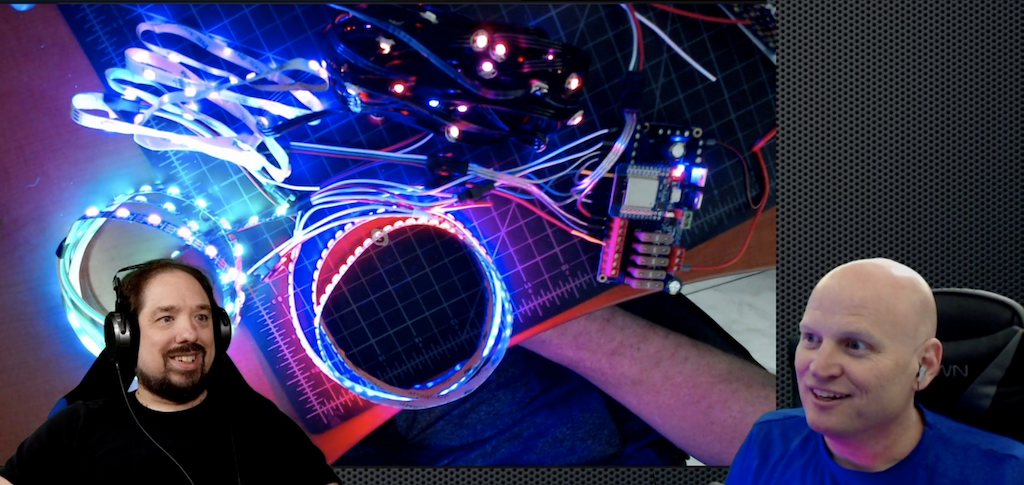 Quindor and DrZzs playing with an ESP32-based QuinLED running WLED
(YouTube)
Quindor and DrZzs playing with an ESP32-based QuinLED running WLED
(YouTube)
Microcontrollers are just computers and so are nothing without their software. 开源 software like ESPHome, WLED and Tasmota allow users to turn their ESP8266 and ESP32 设备 into powerful little machines that can gather information and control 设备. In your home, microcontrollers are the eyes and ears while Home Assistant is the brain.
But these projects all have a common problem: it is difficult to get started. We identified three pain points:
- Installing the software on the microcontroller.
- Connecting the microcontroller to your wireless network.
- 配置 the software on the microcontroller.
These pain points stand in the way for creators to reach a wider audience. It’s our mission to make local home 自动化 succeed, and these projects, and all the possibilities that they unlock, are an important part of this.
Today, we are introducing some things to make using microcontrollers easier.
Using terms everybody understands
We are going to start using words that a user understands instead of forcing the technical terms on them. Terms like “firmware” and “flashing” are the correct terminology but for inexperienced users they do more harm than good. They will make the user feel uncomfortable before they even start.
So instead of “upload firmware” we’ve updated the ESPHome 仪表盘 to talk about “installing”. We are encouraging other projects to do the same.
Things will get more technical as a user continues playing with microcontrollers. But this change might just be that little thing why they will actually continue.
ESP Web Tools: Installing projects on your microcontroller via the browser
We have 创建 ESP Web Tools. ESP Web Tools allows project websites to offer a great onboarding by enabling users to 安装 the software on their microcontrollers via their browser. All the user has to do is connect their microcontroller to their computer and hit the 安装 button on the website. ESP Web Tools will automatically select the right build for your microcontroller and 安装 it.
This works for both the ESP8266 and ESP32 and with any project for these 设备. This technology is powered by Web Serial, a web standard for serial communication that is part of Google Chrome and Microsoft Edge.
ESP Web Tools Web has already been adopted as part of the onboarding by WLED and ESPEasy.
Learn how to add ESP Web Tools to your website
If you have an ESP32 or ESP8266 设备 handy, you can try it out right here:
ESP Web Tools uses code written by @MakerMelissa from Adafruit. We’re currently relying on an enhanced fork that can fit a wider range of use cases, including ours. We have a pull request open to get our changes contributed back.
Note: We don’t like to use technology that is not available in all browsers and cannot be made available in other ways. However, in this case the benefits outweigh the cons. We hope that Firefox and WebKit add support for Web Serial in the future.
Improv Wi-Fi: Open standard to provision Wi-Fi credentials via 蓝牙 Low Energy
We have 创建 Improv Wi-Fi. Improv Wi-Fi is a free and open standard that anyone can use to offer a user-friendly way for users to connect their 设备 to the wireless network.
For 开源 firmware there are two popular ways of getting a 设备 to connect to your wireless network. The 设备 sets up a wireless network and you need to connect to it via your phone or laptop, or the user compiles the network and password into the firmware before installing it on the ESP. Both methods are difficult and 错误 prone, they offer a bad user experience.
If you look at off-the-shelf products, you see another approach: send Wi-Fi credentials to the 设备 via 蓝牙 Low Energy (BLE). BLE allows the user to get instant feedback if something goes wrong. This technology is used in many products, but there is no open standard that is free to implement. Improv Wi-Fi is an open standard that is free to implement.
开源 projects often host their control interface as a website on the ESP 设备. Improv Wi-Fi supports this and when provisioning is done, the user can be redirected to a URL to finish onboarding.
Improv Wi-Fi can be used today to provision ESP32 microcontrollers running ESPHome (ESP8266 设备 do not support BLE). Users will soon be able to provision 设备 with the Improv Wi-Fi 服务 via the Home Assistant Android and iOS apps. All these implementations are 开源 and can be used in your projects.
Improv Wi-Fi is also available for the web in the form of a button that can be added to your website. This will allow users to 配置 and set up a 设备 from any browser that supports Web 蓝牙.
If you’ve used the 安装 button in the previous section but have not yet connected it to the wireless network, you can onboard that 设备 here:
ESPHome 仪表盘: simplified and streamlined
With ESPHome users don’t program microcontrollers, they 配置 them. Tell ESPHome there is a temperature 传感器 on pin 3 of your ESP 设备 and ESPHome will 安装 custom software on your ESP 设备 that makes this information available in Home Assistant.
The ESPHome 仪表盘 has been updated with a simplified and streamlined wizard for new configurations. You now enter the name of your project and your Wi-Fi credentials and it will 安装 it on your ESP 设备 via the browser. After that all further updates will happen wirelessly.
ESPHome: embracing projects
We want to make it easy for creators to sell ESPHome powered products that offer a great user experience. ESPHome projects embrace 本地控制 and integrate nicely with Home Assistant, and so each extra ESPHome product that our users can buy is a win.
To make it easier to keep creators and users connected once a product is 已安装, projects can now add a project identifier and 版本 to their firmware (docs). With today’s 发布 this information will be available in the 设备 information, logging output and the mDNS discovery info.
The goal is to integrate the projects tighter into the ESPHome 仪表盘 by showing the project’s logo, link to the 文档 and issue pages and allow installing updates.
Why we build this
Home Assistant’s mission is to make local home 自动化 a viable alternative to cloud based solutions and accessible to everyone.
To make this mission a reality, we started the company Nabu Casa. Together with the community, Nabu Casa develops Home Assistant and ESPHome and is funded solely by people that support this mission. No investors or loans.
If you want to help fund our work, subscribe to Home Assistant Cloud.