

2021.6:什么都有一点
什么都有一点。这大概是形容这次发布最合适的方式。它内容满满,到处都是各种小而实用的新功能!
Sonos 得到了不少增强,Hue 现在支持推送更新,UI 加入了许多易用性改进,MQTT 新增了不少属性,主题现在也支持模式了……说真的,这个清单我可以一直讲下去。
所以,这次没有那种特别重磅的大功能(也许下个版本正在酝酿中……),但这依然是一场适合所有人的优秀发布。绝对值得你去“All changes”里翻翻自己常用的集成。
../Frenck
- 支持自定义深色模式主题
- Collapsed 属性
- 时间格式设置
- 为任意集成禁用轮询更新
- 网络集成
- 其他值得注意的变化
- 新集成
- 新平台
- 现已支持通过 UI 设置的集成
- 发布 2021.6.1 - June 3
- 发布 2021.6.2 - June 4
- 发布 2021.6.3 - June 7
- 发布 2021.6.4 - June 11
- 发布 2021.6.5 - June 15
- 发布 2021.6.6 - June 20
- If you need help...
- Backward-incompatible changes
- Farewell to the following
- All changes
支持自定义深色模式主题
以前,所有主题都会自动以我们的浅色主题为基础。现在开始,主题也可以基于默认深色主题来构建了!
不仅如此,@spacegaier 还加入了对“单个主题同时支持深色与浅色模式”的支持! 这样一来,Home Assistant 就能自动为你的自定义主题选择深色或浅色模式。
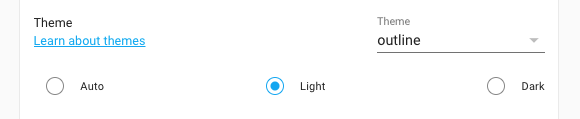 Screenshot of a custom theme supporting both 灯光 & dark mode.
如果你是主题开发者,可以在前端文档中了解更多实现方式。
哦,当然,你现有的所有主题也都会像以前一样继续正常工作。
可折叠属性
有些实体会提供很多属性,并显示在用户界面中。大多数时候,你其实并不需要查看它们,而且这些属性里常常包含技术性数据,只会让界面显得更杂乱。
为了让“更多信息”实体对话框更整洁,这些属性现在会默认折叠成一条栏位,选中后才会展开显示。
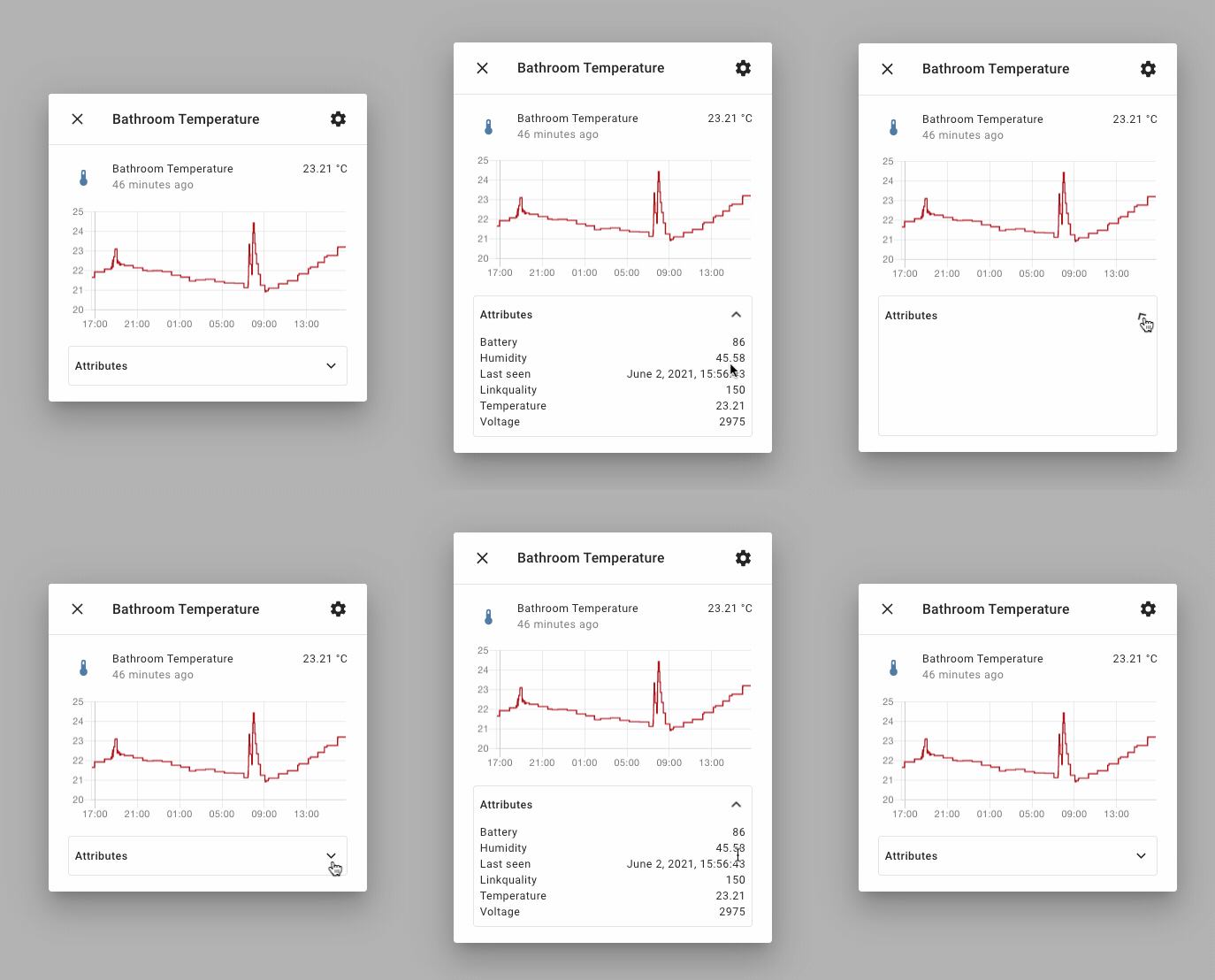 Screen recording of the collapsible 实体 属性.
时间格式设置
在前几个版本里,我们加入了数字格式选择功能,让你可以决定 Home Assistant 显示数字时使用的格式。很棒吧! 但……时间格式怎么办呢?
这个问题在那次发布时被反复提起,很多人也希望时间格式能拥有同样的自定义能力, 例如偏好使用 24 小时制的人。
那么,这次你可以感谢 @spacegaier:
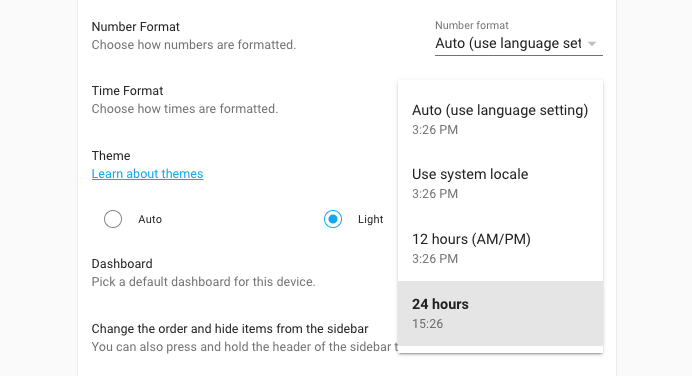 Screenshot of new time format setting.
你可以在自己的用户个人资料中找到这项新设置。
为任意集成禁用轮询更新
一个反复被提到的功能请求,是希望许多集成都能提供控制轮询频率的能力。
例如,如果某个集成使用的是按调用付费的 API,而你又不需要过于频繁的更新, 那把轮询频率调低就能帮你节省开销。
另一个常见需求是电池供电设备,或者某些你只希望白天轮询、夜里不轮询的设备。
这次发布中,我们为所有集成都加入了通过系统选项禁用轮询的支持;没错,是所有集成。
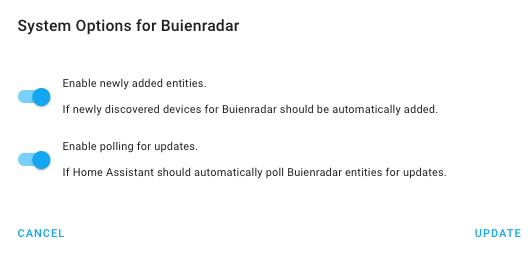 Screenshot of the system options of an 集成 showing the disable polling option.
等等?禁用轮询?!是的 :)
比如,我们收到过很多不同诉求:有人想调整轮询频率(也就是 scan interval), 也有人希望按固定计划轮询,或者只在其他输入触发时才轮询(例如由运动传感器触发)。
因此,我们决定提供尽可能高的灵活性,来覆盖你能想到的各种用法。禁用轮询后,Home Assistant 会停止自动轮询。不过,你依然可以使用
homeassistant.update_entity
服务 on those 实体 to 触发器 a poll for information.
这意味着,一旦你为某个集成禁用了轮询,就可以通过自动化完全自定义何时轮询该集成。一切都可以基于你自己的时间表、条件或触发器来控制。
网络集成
这次发布加入了一个新的网络集成,由 @bdraco 创建,用来帮助其他 Home Assistant 集成获取与你网络相关的正确信息。
它还为你提供了一个统一位置,用来告诉 Home Assistant 你的网络情况。 这是一个高级功能,因此只有在你的用户资料中启用了高级模式时才会显示。
大多数情况下,你可能并不需要修改这些设置,因为 Home Assistant 默认会自动检测正确配置。 但如果你的网络结构更复杂,比如有多个网卡或 VLAN,现在你就可以手动选择 Home Assistant 集成应使用的接口。
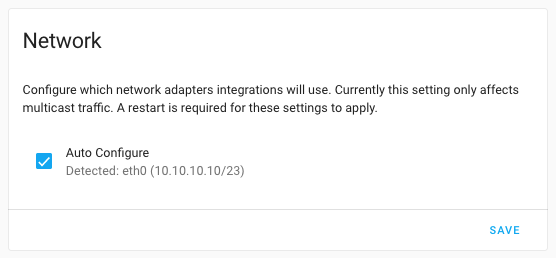 Screenshot of new Home Assistant Network 设置 in the general 配置.
请注意,这是一项需要其他集成逐步接入的新功能。目前还不是所有集成都已经会遵循这些设置。
其他值得注意的变化
这次发布还有很多内容;下面是其中一些同样值得关注的变化:
- 过去几周里,Modbus 从 @janiversen 那里收获了满满的关爱,特别感谢他持续不断地改进这个集成!
- The Hue 集成 now supports push updates! Blazing fast response times if you are using that platform.
- @balloob and @bdraco have been working on replacing date/time/timezone handling in Home Assistant. Right on time.
- All 服务, for all 集成, now have updated information for their 服务 calls. This means all 服务 calls now have a nice new UI. Amazing job @tkdrob!
- Support for the new colors modes is slowly expanding. This 发布 Elgato, Z-Wave JS, KNX and MQTT have added support.
- Sonos got some love from @mountainsandcode, @AaronDavidSchneider and @jjlawren. A lot of fixes and improvements, but also added support for controlling the 状态 of the hardware buttons and controlling your Sonos 报警!
- The developer 状态 tools, now shows the
name of the 实体 additional to the 实体 ID. Searching/filtering the list
now supports wildcards (
*). Thanks, @spacegaier! - Thanks to @PeteBa, there is now a
recorder.purge_entities服务 that allows you to purge data from the recorder database for specified 实体. - Watson TTS has added a bunch of new voices to choose from, thanks @demikl!
- Ding dong! @bdraco added support for doorbell buttons to the HomeKit Controller 集成.
- BMW Connected Drive, now provides a bunch of 传感器 about your last trip. Thanks, @EddyK69!
- @emericklaw added a new feature that allows you to duplicate a 场景!
- My Home Assistant now supports linking to the Ingress interface of an add-on!
- 灯光 templates now have support for effects, transitions and a bunch more properties, thanks to @jacekpaszkowski!
- VeSync now supports Etekcity 灯光 bulbs, thanks @sdrapha.
- The universal media player now supports overriding a lot of commands! Thanks for adding that @Drafteed!
- @mdz continues expanding the SmartTub 集成 adding 服务 to change filtration 设置 and snoozing reminders.
- The Elgato 集成 now supports the new Elgato LED strips.
- If you are into Oracle DB, @mciupak made sure our recorder can now use that.
- Z-Wave JS 集成 now shows progress when adding or re-interviewing a 设备. Thanks, @cgarwood!
- The Nexia 集成 now also supports controlling American Standard thermostat, added by @bdraco.
- @Drafteed added support for changing channels on your LG NetCast TV, thanks!
- @mib1185 ensured that the UX for counters and number helpers look nice!
新集成
欢迎以下新集成加入本次发布:
- Bosch Smart Home Controller, added by @tschamm
- Garages Amsterdam, added by @klaasnicolaas
- Kraken, added by @eifinger
- Meteoclimatic, added by @adrianmo
- Nettigo Air Monitor, added by @bieniu
- Network 配置, added by @bdraco
- SIA 报警 Systems, added by @eavanvalkenburg
- Syncthing, added by @zhulik
- System Bridge, added by @timmo001
- Wallbox, added by @hesselonline
新平台
以下集成新增了对新平台的支持:
- Goal Zero Yeti now has 开关 to control outlets, added by @tkdrob
- OmniLogic added 开关 to control relays and pumps, done by @djtimca
- Mazda Connected 服务 can now control 门锁, thanks to @bdr99
- AVM FRITZ!Box Tools added a 二元sensor to indicate connectivity and 传感器 for uptime and external IP. Added by @chemelli74
- Modbus now supports 灯光 & 风扇, added by @vzahradnik
- Sonos now has 开关 to control enable/disable 报警, added by @AaronDavidSchneider
现已支持通过 UI 设置的集成
以下集成现在可以直接通过 Home Assistant UI 进行设置:
- Buienradar, done by @RobBie1221
- Growatt, done by @indykoning
发布 2021.6.1 - June 3
- Fix last activity consideration for AVM Fritz!Tools 设备 tracker (@mib1185 - #51375) (fritz docs)
- Handle Sonos connection issues better when polling (@jjlawren - #51376) (sonos docs)
- Fix no value 错误 for heatit 温控 实体 (@raman325 - #51392) (zwave_js docs)
- Fix Tibber Pulse 设备 name and 传感器 更新 (@Danielhiversen - #51402) (tibber docs)
- Fix shopping list "complete all" 服务 name (@spacegaier - #51406) (shopping_list docs)
- Bump aiohomekit to 0.2.67 (fixes #51391) (@Jc2k - #51418) (homekit_controller docs)
- Bump zwave-js-server-python to 0.26.1 (@raman325 - #51425) (zwave_js docs)
- 更新 前端 to 20210603.0 (@bramkragten - #51442) (前端 docs)
发布 2021.6.2 - June 4
- Hot fix 版本 of Apply modbus interval patch (@balloob - #51487) (modbus docs)
- 更新 to iaqualink 0.3.90 (@flz - #51452) (iaqualink docs)
- Retry isy994 设置 later if isy.initialize times out (@bdraco - #51453) (isy994 docs)
- xknx 0.18.3 (@farmio - #51277) (knx docs)
- 更新 xknx to 版本 0.18.4 (@farmio - #51459) (knx docs)
- Bump aiolyric to 1.0.7 (@timmo001 - #51473) (lyric docs)
- Improve logging for SamsungTV (@chemelli74 - #51477) (samsungtv docs)
- 升级 elgato to 2.1.1 (@frenck - #51483) (elgato docs)
- Protect our user agent (@balloob - #51486)
发布 2021.6.3 - June 7
- Use a single job to ping all 设备 in the Broadlink 集成 (@felipediel - #51466) (broadlink docs)
- Fix loop in tod 二元sensor (@bdraco - #51491) (tod docs)
- AsusWRT fix keyerror when firmver is missing from info (@timmo001 - #51499) (asuswrt docs)
- Handle missing options in foreign_key for MSSQL (@bdraco - #51503) (recorder docs)
- Fix missing Tibber power production (@Danielhiversen - #51505) (tibber docs)
- Bump garminconnect_aio to 0.1.4 (@cyberjunky - #51507) (garmin_connect docs)
- Bump pyialarm to 1.8.1 (@RyuzakiKK - #51519) (ialarm docs)
- Improve 日志 message when zone missing in geolocation 触发器 (@exxamalte - #51522) (geo_location docs)
- Ensure host is always set with samsungtv SSDP discovery (@bdraco - #51527) (samsungtv docs)
- Bump aiorecollect to 1.0.5 (@bachya - #51538) (recollect_waste docs)
- Fix garmin_connect config flow multiple account creation (@cyberjunky - #51542) (garmin_connect docs)
- Bump dwdwfsapi to 1.0.4 (@stephan192 - #51556) (dwd_weather_warnings docs)
- Increase isy 设置 timeout to 60s (@bdraco - #51559) (isy994 docs)
- Fix Sonos 恢复 calls (@jjlawren - #51565) (sonos docs)
- 更新 builder to 2021.06.2 (@pvizeli - #51582)
- Fix deprecated value_template for MQTT 灯光 (@emontnemery - #51587) (MQTT docs)
发布 2021.6.4 - June 11
- Fix Sonos battery 传感器 on S1 firmware (@jjlawren - #51585) (sonos docs)
- Handle missing section ID for Plex clips (@jjlawren - #51598) (plex docs)
- Reduce ovo_energy polling rate to be less aggressive (@blastoise186 - #51613) (ovo_energy docs)
- Do not 配置 Shelly config entry 创建 by custom component (@bieniu - #51616) (shelly docs)
- Fix Onvif get_time_zone from 设备 (@pszafer - #51620)
- Ensure samsungtv reloads after reauth (@bdraco - #51714) (samsungtv docs)
- Fix race 条件 in samsungtv 关闭 (@bdraco - #51716) (samsungtv docs)
发布 2021.6.5 - June 15
- Replace garminconnect_aio with garminconnect_ha (@cyberjunky - #51730) (garmin_connect docs)
- Bump pydaikin, fix airbase issues (@fredrike - #51797) (daikin docs)
- Add httpcore with 版本 0.13.3 (@ludeeus - #51799)
- Bump pyialarm to 1.9.0 (@RyuzakiKK - #51804) (ialarm docs)
发布 2021.6.6 - June 20
- Fix whois expiration date (@kantselovich - #51868) (whois docs)
- Add Omnilogic 开关 defaults for max_speed and min_speed (@djtimca - #51889) (omnilogic docs)
- Bump pyRFXtrx to 0.27.0 (@RobBie1221 - #51911) (rfxtrx docs)
- Bump pydaikin to 2.4.3 (@fredrike - #51926) (daikin docs)
- Fix AccuWeather 传感器 updates (@bieniu - #52031) (accuweather docs)
- Fix double subscriptions for local push 通知 (@balloob - #52039) (mobile_app docs)
- Catch unexpected battery 更新 payloads on Sonos (@jjlawren - #52040) (sonos docs)
如果你需要帮助……
……欢迎随时使用我们非常活跃的论坛,或者加入我们的聊天频道。
如果你遇到了这次发布引入的问题,请到我们的 issue tracker 提交反馈,并确保填写问题模板中的所有字段。
Backward-incompatible changes
This 发布 has an unusual amount of backward-incompatible changes to report. Don't worry, most won't have a noticeable impact and are part of a cleanup effort. However, we do want to report them all, just to be complete and transparent.
集成 that removed deprecated YAML import
The following 集成 had deprecated their YAML import support in the past, and now removed it. Your YAML 配置 has been imported into the UI 配置 in previous releases.
If you still have one of the following 集成 configured in your YAML 配置, you can now safely remove it from your YAML 配置.
集成 that deprecated YAML import
The following 集成 now deprecated importing YAML 配置 into the UI. Your YAML 配置 already has been imported into the UI and the YAML 配置 can be safely removed.
The import functionality for these 集成 will be removed in Home Assistant 核心 2021.8. Using YAML configurations for these 集成 will write a deprecation 警告 in the Home Assistant 日志 files during this deprecation period.
- 1-Wire
- Abode
- Canary
- Denon HEOS
- Epson
- Freebox
- Glances
- Growatt
- Hive
- Islamic Prayer Timer
- Jandy iAqualink
- JuiceNet
- Luftdaten
- MELCloud
- Meteo-France
- MikroTik
- NZBGet
- Pi-hole
- Plum Lightpad
- SmartHab
- Soma Connect
- Spain electricity hourly pricing (PVPC)
- Speedtest.net
- Synology DSM
- Tibber
- Transmission
- VeSync
Other backward-incompatible changes
Below is a listing of the other breaking change for this 发布, per subject or 集成. Click on one of those to read more about the breaking change for that specific item.
Home Assistant will now warn when a misconfigured reverse proxy, or misconfigured Home Assistant instance when using a reverse proxy, has been detected.
These 警告 will become an 错误 in Home Assistant 2021.7.
If you are using a reverse proxy, and see these 警告, please make sure you
have configured use_x_forwarded_for and trusted_proxies in your HTTP
集成 配置.
更多信息, see the HTTP integrations 文档.
We upgraded our 前端 to use Lit 2.0. During the beta we have noticed some
custom 卡片 or views are using LitElement and lit-html from our components.
This is not a recommended practice, and might now cause the custom 卡片 to break this 发布. If you encounter issues with a custom 卡片, please report this issue with the custom 卡片 developer.
Additional information about this change and information for custom 卡片 开发者 on how to 升级 their 卡片, can be found in our developer 博客:
As mentioned in every 发布 since 2021.3, custom 集成 will require a 版本 key in their manifest file.
As of this 发布, if that 版本 key is missing in the manifest, the custom 集成 will no longer be loaded.
For more details see our developer 博客 about it
Support for OWFS has been dropped (obsolete since 0.117).
This part of the implementation did not conform to policy regarding 3rd-party libraries of Home Assistant.
(@epenet - #50121) (onewire docs)
Alexa EqualizerController has been disabled for Denon AVR since it caused Alexa to be unable to discover any 设备.
(@starkillerOG - #49628) (Alexa docs)
Since in most cases, the amount of really wanted to be tracked 设备 is quite lower than the overall count of 设备, device_tracker 实体 will be disabled by default. You need to specifically enable wanted device_tracker, even newly detected 设备.
(@mib1185 - #50791) (fritz docs)
Blebox 灯光 no longer supports the deprecated white_value, use rgbw_color instead.
(@emontnemery - #49562) (blebox docs)
Buienradar is now configurable via the UI and has deprecated support for the YAML 配置. Your existing YAML 配置 will be imported once.
When you have a weather and 传感器 设置 for same coordinates, they will be merged into one 集成 instance. Only one 摄像头 配置 will be imported.
Following things are changed:
- The
forecastkey of the weather platform is deprecated, forecast data is fetched in the same API call and to be in line with ADR-0003, all available data is exposed. - Weather, 传感器 and 摄像头 domain are 设置 in one 集成. For new entries, 传感器 and 摄像头 实体 are disabled by default.
- Dimension for 摄像头 images is fixed to 700 pixels.
(@RobBie1221 - #37796) (buienradar docs)
The 集成 library requirement has requirements that are conflicting with requirements of other 集成. The library maintainer hasn't responded to our issues for 10 months.
The 集成 is therefore disabled until the library has been fixed and Home Assistant updated with a new library 版本.
(@MartinHjelmare - #51069) (ee_brightbox docs)
Epson 集成 doesn't allow port set anymore. It uses port 80 and 3629 for communication.
(@pszafer - #45434) (epson docs)
The 12V, AC, and USB 二元sensor are now 开关. You should 更新 any 自动化 and 脚本 that depend on these moved 实体.
Before: binary_sensor.yeti_ac_port_status
After: switch.yeti_ac_port_status
(@tkdrob - #48612) (goalzero docs)
HomeKit Controller climate 设备 will change the reported temperature
precision for their current_temperature 属性 from whole degrees to
0.1 degree increments when the system is in Fahrenheit mode.
自动化 which assume whole-number reporting precision may need adjustments.
(@jjlawren - #50415) (homekit_controller docs)
The create_temperature_sensors option for 温控 设备 is now deprecated.
Please use a template 传感器 instead.
This option 创建 传感器 实体 out of 温控 配置. This will not work anymore when 传感器 实体 are also only generated from 配置.
The create_sensors option for weather 实体 is now deprecated.
Please use template 传感器 instead.
This option 创建 传感器 实体 out of weather 配置. This will not work anymore when 传感器 实体 are also only generated from 配置.
The unit of measurement for the Luftdaten pressure 传感器 has been adjusted from
pascal (Pa) to hectopascal (hPa). The value is still the same, the unit displayed
in Home Assistant was wrong and now corrected.
If you have 自动化 or record data from 此integrations (externally), you might need to adjust to this change.
The old 配置 style for 开关 is no longer supported
The new 配置 style have changed, to secure against illegal configurations:
(@janiversen - #49386) (modbus docs)
scan_interval, if used, in any Modbus platform cannot be lower than 5 seconds.
Adjustment is done automatically with a 警告 if needed.
Modbus timeout, if used, is automatically adjusted (with a 警告) to not be
higher than lowest scan interval - 1 second.
(@janiversen - #50363) (modbus docs)
Peviously deprecated features of MQTT 遮盖 have been removed:
- Using
value_templateto use for extracting position is no longer allowed an 错误 will be raised if this 配置 is used, Instead of usingvalue_template,position_templateshould be used. tilt_invert_stateis removed, insteadtilt_minandtilt_maxshould be used, 错误 will be raised if this is found in 配置.
(@thecode - #50263) (MQTT docs)
If you use MQTT with the CloudMQTT broker 服务 and have not configured a certificate for MQTT, you now need to adjust to the following:
(@balloob - #51112) (MQTT docs)
Network adapter 配置 has moved to the UI. Users that previously used a custom zeroconf interface 配置 may need to adjust the 设置 in the UI.
(@bdraco - #50874) (network docs)
The 设备 associated with Sonos speakers will report a different firmware 版本, switching to the more common formatted 版本 number from now on.
(@jjlawren - #50861) (Sonos docs)
Support for the TensorFlow 集成 is now deprecated on the Home Assistant OS, 受监管模式 & 容器 安装 types.
Support for it will be removed in Home Assistant 2021.7.
The use of the TensorFlow 集成 on the Home Assistant 核心 安装 type, will remain available.
属性 for the Tibber Pulse 传感器 are removed and replaced by separate 传感器.
Additionally the unique ID are changed, which might have caused changes to the 实体 IDs.
You need to to check you 实体 and 自动化 and adjust them to these changes.
(@Danielhiversen - #50418) (tibber docs)
This changes the behavior of turning a bulb when no parameters are defined. Turning on a bulb without additional parameters will now result in a "Last On" 状态 rather than any sort of preset that may have been set in Kasa.
(@gabrialdestruir - #50334) (tplink docs)
The last_reset 状态 属性 of utility_meter 传感器 are now in UTC and
stored as a string.
自动化 and 脚本 accessing the last_reset 状态 属性 may need to
be updated.
(@emontnemery - #51067 #50851) (utility_meter docs)
Z-Wave JS 灯光 no longer support the deprecated white_value, use rgbw_color instead.
(@emontnemery - #49588) (zwave_js docs)
Users should 更新 zwave-js-server to 1.7.0 or higher. If the official Home Assistant Z-Wave JS add-on is used, add-on 版本 0.1.23 and higher will include zwave-js-server 1.7.0.
(@MartinHjelmare - #51341) (zwave_js docs)
Farewell to the following
The following 集成 are no longer available as of this 发布:
- LIFX Legacy has been removed, use the LIFX 集成 instead. (@frenck - #50069)
- N26 has been removed due to 3rd party API limitations. (@zhulik - #50292)
- Spot Crime access to their API cannot be gained anymore. (@frenck - #50361)
All changes
- Add 开关 platform to goalzero (@tkdrob - #48612) (goalzero docs) (breaking-change) (new-platform)
- Bump 版本 to 2021.6.0dev0 (@frenck - #49830)
- Remove references to hass.data in harmony tests (@mkeesey - #49836) (harmony docs)
- Validate if modules in mypy config exist (@KapJI - #49810)
- Relax type annotation for DataUpdateCoordinator data (@KapJI - #49827)
- 升级 py-cpuinfo to 8.0.0 (@fabaff - #49833) (cpuspeed docs)
- Add onboarded key to analytics WS command (@ludeeus - #49751) (analytics docs)
- 升级 black to 21.4b2 (@frenck - #49841)
- Define AddEntitiesCallback type (@KapJI - #49812)
- Remove example entry from PR template (@frenck - #49842)
- Disable strict type checks for tests (@KapJI - #49851) (device_automation docs) (generic_thermostat docs) (hive docs) (homekit_controller docs) (maxcube docs)
- Add codeowners for DHT (@TheGardenMonkey - #49855) (dht docs)
- Add Omnilogic 开关 platform (@djtimca - #42116) (omnilogic docs) (new-platform)
- Improve type annotations for the Brother 集成 (@bieniu - #49771) (brother docs)
- Rename FlowResultDict in scaffold template (@KapJI - #49858)
- Complete modbus 设备 response tests (@janiversen - #49633) (modbus docs)
- Add additional Sonos codeowner (@jjlawren - #49879) (sonos docs)
- Cleanup of unused connection_class logic (@frenck - #49865)
- Do not pass hass.data to Sonos 实体 (@jjlawren - #49881) (sonos docs)
- Allow str 1..n-tuples in 设备 registry identifier type hints (@scop - #49864) (huawei_lte docs) (syncthru docs) (zwave_js docs)
- Add color_mode support to zwave_js 灯光 (@emontnemery - #49588) (zwave_js docs) (breaking-change)
- 升级 pytest-xdist to 2.2.1 (@frenck - #49904)
- Split long string in DuneHD test (@bieniu - #49900) (dunehd docs)
- Add 设备 specific discovery for Heatit Z-TRM3 thermostat (@raman325 - #49804) (zwave_js docs)
- Remove unused code from Brother config flow (@bieniu - #49889) (brother docs)
- Restructure modbus 开关, and solve read/write conflicts (@janiversen - #49386) (modbus docs) (breaking-change)
- Use AddEntitiesCallback type, pt.2 (@KapJI - #49921)
- Enable strict typing for the Elgato 集成 (@frenck - #49920) (elgato docs)
- Make CoordinatorEntity generic (@KapJI - #49854)
- Start Modbus 遮盖 timer independent if there is a 状态 to 恢复 (@janiversen - #49919) (modbus docs)
- Make 设备 info a TypedDict (@scop - #49670) (bond docs) (huawei_lte docs) (hyperion docs) (zwave_js docs)
- Clean up config entry handlers decorator from config flows (@frenck - #49932)
- Reduce homekit executor calls at start (@bdraco - #49925) (homekit docs)
- Use 设备 registry CONNECTION_* constants (@scop - #49923) (deconz docs) (MQTT docs) (point docs) (sonos docs) (tasmota docs)
- Avoid writing esphome data if its already up to date on disk (@bdraco - #49933) (esphome docs)
- Repair elgato types (@dermotduffy - #49936) (elgato docs)
- Clean up connection classes in 集成 A-C (@frenck - #49888)
- Clean up connection classes in 集成 D-G (@frenck - #49890)
- Clean up connection classes in 集成 H-L (@frenck - #49891)
- Clean up connection classes in 集成 M-O (@frenck - #49892)
- Clean up connection classes in 集成 T-Z (@frenck - #49894)
- Clean up connection classes in 集成 P-S (@frenck - #49893)
- Remove unused imports in fritz, nest, and somfy to fix CI (@bdraco - #49940) (fritz docs) (nest docs)
- 更新 LG Netcast to use new 后端 library (@Drafteed - #49927) (lg_netcast docs)
- Please mypy (axis). (@janiversen - #49949) (axis docs)
- Fix ihc typing (@janiversen - #49946) (ihc docs)
- Remove YAML support from sense (@bdraco - #49935) (sense docs) (breaking-change)
- Remove ServiceCallType alias from codebase (@frenck - #49844)
- Improve 设备 registry internal typing (@scop - #49924)
- Replace dict with DeviceInfo (@milanmeu - #49950)
- Enable homeassistant.update_entity 服务 for all modbus platforms (@janiversen - #49918) (modbus docs)
- Improves UX of Utility Meter 服务 (@dgomes - #48556) (utility_meter docs)
- Add zeroconf discovery to rachio (@bdraco - #49973) (rachio docs)
- 升级 elgato to 2.1.0 (@frenck - #49975) (elgato docs)
- Add dhcp discovery to tado (@bdraco - #49992) (tado docs)
- Abstract Rituals API data processing to PyPI (@milanmeu - #49872) (rituals_perfume_genie docs)
- Make hassfest 服务 validation faster (@balloob - #50003)
- Add reauth support to myq (@bdraco - #49998) (myq docs)
- Defer writing http config until after startup has calmed down (@bdraco - #50000) (http docs)
- 更新 smhi package to 1.0.15 (@helto4real - #49987) (smhi docs)
- 升级 maxcube-api dependency to 0.4.3 (@unaiur - #49982) (maxcube docs)
- Fix types for shell command (@dermotduffy - #50004) (shell_command docs)
- Add color modes to KNX 灯光 (@farmio - #49883) (knx docs)
- Add unique_id to TotalConnect alarm_control_panel (@austinmroczek - #49961) (totalconnect docs)
- Add dhcp discovery to hunterdouglas_powerview (@bdraco - #49993) (hunterdouglas_powerview docs)
- Title and internal descriptions updates for Fritzbox (@chemelli74 - #49047) (fritzbox docs)
- Add typing to async_register_entity_service (@frenck - #50015) (zwave_js docs)
- Improve type annotations in Brother 集成 (@bieniu - #49989) (brother docs)
- Add small async_get_current_platform helper method (@frenck - #50014) (wled docs)
- Add Identify 服务 to Elgato 集成 (@frenck - #49990) (elgato docs)
- Migrate to async_get_current_platform everywhere (@frenck - #50034)
- 恢复 dictionary constants in Elgato 设备 info (@frenck - #50013) (elgato docs)
- Create separate entries for each component in mypy.ini (@KapJI - #50030)
- Add reauth support to flume (@bdraco - #49991) (flume docs)
- 升级 Tibber library, new grid prices for Glitre Energi (@Danielhiversen - #50029) (tibber docs)
- Fix modbus typing (@janiversen - #49938) (modbus docs)
- Create Fritz 设备 and connectivity 传感器 (@chemelli74 - #49699) (fritz docs) (new-platform)
- Enable mypy for motionEye (aye aye!) (@dermotduffy - #49738) (motioneye docs)
- Add SyncThru 二元sensor (@nielstron - #48114) (syncthru docs)
- Use last_step marker on UniFi options flow (@Kane610 - #50053) (unifi docs)
- Bump codecov/codecov-动作 from v1.4.1 to v1.5.0 (@dependabot - #50061)
- Add 配置 flow for Buienradar 集成 (@RobBie1221 - #37796) (buienradar docs) (breaking-change)
- Fix and enable type checks in Rituals Perfume Genie (@milanmeu - #49947) (rituals_perfume_genie docs)
- Use AddEntitiesCallback type, pt.4 (@KapJI - #49955) (here_travel_time docs) (knx docs) (sma docs) (开关 docs) (switcher_kis docs) (systemmonitor docs)
- Clean up stale config schema from deCONZ (@frenck - #50081) (deconz docs)
- Finalize clean up connection classes (@frenck - #49895)
- 升级 pytest to 6.2.4 (@frenck - #50077)
- Remove YAML 配置 from DoorBird (@frenck - #50082) (doorbird docs) (breaking-change)
- Bump zigpy-znp from 0.4.0 to 0.5.1 (@puddly - #50086) (zha docs)
- Deprecate speedtest.net YAML config (@frenck - #50072) (speedtestdotnet docs) (breaking-change)
- Remove stale config schema from ESPHome 集成 (@frenck - #50083) (esphome docs)
- Remove YAML 配置 from Daikin (@frenck - #50080) (daikin docs) (breaking-change)
- Remove deprecated LIFX Legacy 集成 (@frenck - #50069) (lifx_legacy docs) (breaking-change)
- Deprecate Abode YAML 配置 (@frenck - #50075) (abode docs) (breaking-change)
- Fix updating owner user/auth (@bramkragten - #50087) (config docs)
- Use AddEntitiesCallback type, pt.3 (@KapJI - #49953)
- Cleanup modbus binary_sensor signature (@janiversen - #49809) (modbus docs)
- 升级 yamllint to 1.26.1 (@frenck - #50060)
- Clean up deprecation message & config schema from Cloudflare (@frenck - #50079) (cloudflare docs)
- Clean up pylint comments (@frenck - #49334) (notify docs)
- Improve buienradar tests (@RobBie1221 - #50101) (buienradar docs)
- 升级 black to 21.5b0 (@frenck - #50102)
- 升级 luftdaten to 0.6.5 (@frenck - #50103) (luftdaten docs)
- 升级 pyupgrade to v2.14.0 (@frenck - #50059)
- Remove YAML 配置 from Verisure (@frenck - #50076) (verisure docs) (breaking-change)
- Deprecate Glances YAML 配置 (@frenck - #50085) (glances docs) (breaking-change)
- Deprecate Denon HEOS YAML 配置 (@frenck - #50104) (heos docs) (breaking-change)
- Deprecate Freebox YAML 配置 (@frenck - #50084) (freebox docs) (breaking-change)
- Allign 错误 handling for 重启 for hassio with 核心 (@ludeeus - #50114) (hassio docs)
- Drop OWFS support in onewire (@epenet - #50121) (onewire docs) (breaking-change)
- System Bridge 集成 (@timmo001 - #48156) (system_bridge docs) (new-集成)
- Add support for Elgato 灯光 Strip (@frenck - #49988) (elgato docs)
- Bump zeroconf to 0.30.0 to fix Thread safety race (@bdraco - #50130) (zeroconf docs)
- Adjust GRPC wheel build (@pvizeli - #50119)
- Improve translation strings for MQTT config and option flows (@emontnemery - #50018) (MQTT docs)
- Use shared httpx client in gogogate2 (@bdraco - #45575) (gogogate2 docs)
- Strictly type Twente Milieu 集成 (@frenck - #50062) (twentemilieu docs)
- Deprecate Canary YAML 配置 (@frenck - #50078) (canary docs) (breaking-change)
- Allow passing options in config flow entry creation (@frenck - #49912)
- Add rainmachine discovery (@bdraco - #49970) (rainmachine docs)
- Bump PyRMVtransport to 0.2.3 (@cgtobi - #50183) (rmvtransport docs)
- 升级 TwitterAPI to 2.7.3 (@fabaff - #50195) (twitter docs)
- Bump netdisco to 2.8.3 for compat with latest zeroconf (@bdraco - #50212) (discovery docs) (ssdp docs)
- 升级 discord.py to 1.7.2 (@fabaff - #50201) (discord docs)
- 升级 praw to 7.2.0 (@fabaff - #50197) (reddit docs)
- 升级 slixmpp to 1.7.1 (@fabaff - #50192) (xmpp docs)
- 升级 sendgrid to 6.7.0 (@fabaff - #50194) (sendgrid docs)
- Add optimistic closing/opening to gogogate2 (@bdraco - #42048) (gogogate2 docs)
- Bump
gioslibrary (@bieniu - #50145) (gios docs) - Remove simplisafe websocket (@bachya - #50213) (simplisafe docs)
- Deprecate onewire YAML 配置 (@epenet - #50151) (onewire docs) (breaking-change)
- Add Nettigo Air Monitor 集成 (@bieniu - #49099) (nettigo docs) (new-集成)
- Add Fritz 传感器 (@chemelli74 - #50055) (fritz docs) (new-platform)
- Improve type annotations for Airly 集成 (@bieniu - #49898) (airly docs)
- Small cleanups to rainmachine get_client_controller (@bdraco - #50250) (rainmachine docs)
- Improve Google Cast options flow (@emontnemery - #50028) (cast docs)
- Fix modbus 开关 problems (@janiversen - #50117) (modbus docs)
- Add yaml key to Shelly to allow CoAP port customization (@chemelli74 - #48729) (shelly docs)
- Add 传感器 state_class property (@emontnemery - #50063) (hue docs) (传感器 docs)
- Fix Epson config flow unique_id (@pszafer - #45434) (epson docs) (breaking-change)
- Small code cleanup for Shelly (@chemelli74 - #50270) (shelly docs)
- Add 服务 target to Rachio (@brg468 - #49913) (rachio docs)
- Migrate from pytz to python-dateutil (@bdraco - #49643)
- pywilight 更新 (@leofig-rj - #50207) (wilight docs)
- Add configurable delay between connect and first request in modbus (@janiversen - #50124) (modbus docs)
- Add syncthing 集成 (@zhulik - #38331) (syncthing docs) (new-集成)
- Remove the N26 集成 (@zhulik - #50292) (n26 docs) (breaking-change)
- Add targets and selectors to 服务 (A) (@tkdrob - #49818)
- Additional System Bridge 传感器 (@timmo001 - #50274) (system_bridge docs)
- Fix unit of measurement from Pa to hPa (@hubbergit - #49664) (luftdaten docs) (breaking-change)
- Add iCloud discovery (@bdraco - #50304) (icloud docs)
- Add zeroconf discovery to powerview (@bdraco - #50308) (hunterdouglas_powerview docs)
- Remove YAML support from gogogate2/ismartgate (@bdraco - #50312) (gogogate2 docs) (breaking-change)
- Remove YAML 配置 from SolarEdge (@frenck - #50105) (solaredge docs) (breaking-change)
- Add tplink 灯光 setting ignore default (@gabrialdestruir - #50334) (tplink docs) (breaking-change)
- Add dhcp discovery to tplink (@bdraco - #50303) (tplink docs)
- Deprecate Hive YAML 配置 (@frenck - #50357) (hive docs) (breaking-change)
- Add LastTrip 传感器 for BMW Connected Drive (@EddyK69 - #45906) (bmw_connected_drive docs)
- Enable type checks for 摄像头 platform (@KapJI - #50179) (摄像头 docs)
- 升级 debugpy to 1.3.0 (@frenck - #50356) (debugpy docs)
- Deprecate Pi-hole YAML 配置 (@frenck - #50358) (pi_hole docs) (breaking-change)
- Fix types for WLED (@dermotduffy - #50001) (wled docs)
- Fix Shelly type hints (@thecode - #50322) (shelly docs)
- Do not use async_* in a modbus sync function (@janiversen - #50343) (modbus docs)
- Remove YAML 配置 from Tuya (@frenck - #50360) (tuya docs) (breaking-change)
- Deprecate Luftdaten YAML 配置 (@frenck - #50365) (luftdaten docs) (breaking-change)
- Deprecate Synology DSM YAML 配置 (@frenck - #50366) (synology_dsm docs) (breaking-change)
- 升级 watchdog to 1.1.0 (@frenck - #50351) (folder_watcher docs)
- 升级 sentry-sdk to 1.1.0 (@frenck - #50349) (sentry docs)
- Add zwave_js support for HeatIt Z-TRM2fx (@raman325 - #50317) (zwave_js docs)
- Add selectors to webostv 服务 (@tkdrob - #50239) (webostv docs)
- 升级 attrs to 21.2.0 (@frenck - #50374)
- Remove defunct Spot Crime 集成 (@frenck - #50361) (spotcrime docs) (breaking-change)
- Improve typing for synology_dsm (@mib1185 - #49656) (synology_dsm docs)
- 升级 requests-mock to 1.9.2 (@frenck - #50377)
- 升级 async_upnp_client to 0.17.0 (@StevenLooman - #50371) (dlna_dmr docs) (ssdp docs) (upnp docs)
- Loosen flume dhcp discovery matching (@bdraco - #50379) (flume docs)
- Remove YAML 配置 from Somfy MyLink (@frenck - #50359) (somfy_mylink docs) (breaking-change)
- Type hint 设备 registry identifiers as set of str 2-tuples (@scop - #50355) (airly docs) (huawei_lte docs) (syncthru docs)
- Fix synology_dsm typing (@KapJI - #50399) (synology_dsm docs)
- Enable some strict mypy checks globally (@KapJI - #50398) (dyson docs)
- Enable strict type checks for 摄像头 platform (@KapJI - #50395) (摄像头 docs) (stream docs) (synology_dsm docs)
- Add smhi wind gust speed and thunder probability (@crallian - #50328) (smhi docs)
- Use zoneinfo instead of dateutil (@balloob - #50387)
- Handle relation between scan_interval and pymodbus timeout in modbus (@janiversen - #50363) (modbus docs) (breaking-change)
- Bump Pyhiveapi (@KJonline - #50368) (hive docs)
- Add Growatt Server Config flow (@indykoning - #41303) (growatt_server docs) (breaking-change)
- Add missing type hints in http component (@KapJI - #50411) (http docs)
- Add dhcp support to guardian (@bdraco - #50378) (guardian docs)
- Include mac address in roomba 设备 info when available (@bdraco - #50437) (roomba docs)
- Include mac address in rainmachine 设备 info (@bdraco - #50438) (rainmachine docs)
- 实体.device_info typing fixes (@scop - #49974) (esphome docs) (mobile_app docs) (onewire docs) (starline docs)
- Remove redundant names from config flow titles (@bdraco - #50380)
- Refactor history component (@emontnemery - #50287) (history docs) (recorder docs)
- Migrate wheels builder to GitHub 动作 (@ludeeus - #50445)
- Fix .env_file name (@ludeeus - #50447)
- Add ignore_diff to workflow_dispatch 触发器 (@ludeeus - #50449)
- Use empty requirements_diff for schedule and workflow_dispatch (@ludeeus - #50450)
- Add 配置.yaml deprecation 警告 to Epson (@pszafer - #50403) (epson docs) (breaking-change)
- Fix compare syntax (@ludeeus - #50451)
- Don't generate mypy.ini if 错误 are found (@KapJI - #50456)
- Clean twentemilieu config flow tests (@MartinHjelmare - #50460) (twentemilieu docs)
- pyTibber revert (@Danielhiversen - #50462) (tibber docs)
- Remove pytest-mock dependency (@chemelli74 - #50400) (fritz docs)
- Clean somfy config flow tests (@MartinHjelmare - #50461) (somfy docs)
- Fix event 动作 return value typing (@MartinHjelmare - #50353)
- Improve type annotations for GIOS 集成 (@bieniu - #50454) (gios docs)
- Replace hand-rolled binary search with bisect_left (@pganssle - #50410)
- Enable strict type checks for onewire (@epenet - #50422) (onewire docs)
- Improve types for Fritz (@chemelli74 - #50327) (fritz docs)
- Use async zeroconf registration functions (@bdraco - #50168) (homekit_controller docs) (zeroconf docs)
- Remove unused ignore in fritz (@bdraco - #50469) (fritz docs)
- Move 核心 Sonos functionality out of 实体 (@jjlawren - #50277) (sonos docs)
- Reduce boilerplate to abort for matching config entries (@bdraco - #50186)
- Add fail-fast for wheel (@pvizeli - #50487)
- Add Fritz 服务 (@chemelli74 - #50056) (fritz docs)
- Handle transport 错误 when updating media via events (@jjlawren - #50481) (sonos docs)
- Fix Sonos const comparison (@jjlawren - #50482) (sonos docs)
- Improve 灯光 tests for brightness step and profiles (@karliemeads - #49887) (灯光 docs)
- New overrides in universal media player (@Drafteed - #48611) (universal docs)
- Add dhcp discovery support to isy994 (@bdraco - #50488) (isy994 docs)
- Add dhcp discovery to smartthings (@bdraco - #50306) (smartthings docs)
- Add dhcp support to iSmartGate (@bdraco - #50309) (gogogate2 docs)
- Fix Netatmo selector for setting persons being at home (@cgtobi - #50373) (netatmo docs)
- Remove unused py_noaa dependency (@karliemeads - #50494)
- Fix mypy for Fritz after #50056, #50327 conflict (@chemelli74 - #50497) (fritz docs)
- Fix dhcp generated conflict (@bdraco - #50498)
- Add discovery to yeelight (@bdraco - #50385) (yeelight docs)
- Ensure zeroconf does not generate config flows when matching 属性 are missing (@bdraco - #50208) (zeroconf docs)
- Bump python-juicenet package to 1.0.2 (@jesserockz - #50505) (juicenet docs)
- Fix vizio 集成 (@raman325 - #50436) (vizio docs)
- Only return empty string if non-fixable 错误 (@balloob - #50508)
- Bump 动作/checkout from 2 to 2.3.4 (@dependabot - #50510)
- Pin wheels build 版本 (@ludeeus - #50515)
- Ditch secret to wheels server (@pvizeli - #50516)
- Add stop for demo players (@definitio - #50485) (demo docs)
- Bump Docker/login-动作 from 1 to 1.9.0 (@dependabot - #50509)
- Add targets and selectors for 服务 (F) (@tkdrob - #50191)
- Remove azure-pipelines-ci.yml (@ludeeus - #50519)
- Move translations from Azure to GitHub 动作 (@ludeeus - #50518)
- 更新 usage of async_entries to use _async_current_entries (@bdraco - #50187)
- 更新 wheels builder to 2021.05.2 (@pvizeli - #50520)
- 升级 aioesphomeapi to 2.7.0 (@frenck - #50522) (esphome docs)
- Migrate emulate_hue to use storage to fix I/O in event loop (@bdraco - #50473) (emulated_hue docs)
- Add missing type hints in entity_platform (@KapJI - #50453)
- Refactor SolarEdge config flow tests (@frenck - #50467) (solaredge docs)
- Set state_class for demo 传感器 (@emontnemery - #50523) (demo docs)
- Tibber 传感器 (@Danielhiversen - #50418) (tibber docs) (breaking-change)
- Add targets and selectors for 服务 (G-H) (@tkdrob - #50524)
- Bump pysonos to 0.0.46 (@jjlawren - #50544) (sonos docs)
- Add vesync Core200S air purifier (@kdanthony - #50216) (vesync docs)
- Drop nuheat code owner (@bdraco - #50319) (nuheat docs)
- Fix spelling in Cast and Growatt (@LEJOUI - #50555) (cast docs) (growatt_server docs)
- Fix issue with quotes (@ludeeus - #50571)
- Use requirements for constraints (@pvizeli - #50558)
- Powerwall add Current 属性 (@quielb - #50550) (powerwall docs)
- Ensure isy994 is only discovered once (@bdraco - #50577) (isy994 docs)
- Revert "Use requirements for constraints" (@pvizeli - #50576)
- Bump
brotherlibrary (@bieniu - #50572) (brother docs) - Fix SonarrEntity docstring (@tkdrob - #50568) (sonarr docs)
- Enable type checks for stream component (@KapJI - #50527) (stream docs)
- Add support for tracking 实体 属性 in ESPHome (@frenck - #50528) (esphome docs)
- Small tweaks to improve homekit_controller startup time (@bdraco - #50590) (homekit_controller docs)
- Cleanup unused CONFIG_SCHEMA from kmtronic (@frenck - #50567) (kmtronic docs)
- Bump pymodbus to v2.5.2 (@janiversen - #50582) (modbus docs)
- Roll back #47852 (shield httpx in generic) (@uvjustin - #50562) (generic docs)
- Add 门锁 platform to the Mazda 集成 (@bdr99 - #50548) (mazda docs) (new-platform)
- Yeelight: Do not 日志 错误 when cannot connect (@balloob - #50592) (yeelight docs)
- Use mypy-friendly conditional import for zoneinfo (@KapJI - #50444)
- Bump accuweather library (@bieniu - #50573) (accuweather docs)
- Bump growattServer library (@muppet3000 - #50588) (growatt_server docs)
- Address late review for Omnilogic 开关 (@djtimca - #50404) (omnilogic docs) (new-platform)
- Add "close_comm_on_error" to modbus 配置 (@janiversen - #50583) (modbus docs)
- 升级 evdev to 1.4.0 (@frenck - #50601) (keyboard_remote docs)
- Refactor AdGuard config flow tests (@frenck - #50566) (adguard docs)
- Add AEMET conditional station updates (@Noltari - #50227) (aemet docs)
- Add targets and selectors for 服务 (B-C) (@tkdrob - #50189)
- 更新 wheel 动作 to 2021.05.3 (@pvizeli - #50607)
- GRPC is fixed, don't need a workaround (@pvizeli - #50605)
- Add bosch_shc supporting Bosch Smart Home Controller (@tschamm - #34063) (boschshc docs) (new-集成)
- Deprecate SmartHab YAML 配置 (@frenck - #50602) (smarthab docs) (breaking-change)
- Add interview feedback for Z-Wave JS add node websocket (@cgarwood - #50384) (zwave_js docs)
- Remove unused config schema & logger from totalconnect (@frenck - #50604) (totalconnect docs)
- Deprecate NZBGet YAML 配置 (@frenck - #50603) (nzbget docs) (breaking-change)
- Add 集成 kraken (@eifinger - #31114) (kraken docs) (new-集成)
- Add missing requirements and target to sonos 服务 (@tkdrob - #50552) (sonos docs)
- Fritz code quality improvements from #48287 and #50055 (@chemelli74 - #50479) (fritz docs)
- Add DHCP support to goalzero (@tkdrob - #50425) (goalzero docs)
- Add targets and selectors for 服务 (I-K) (@tkdrob - #50542)
- Add Etekcity VeSync 灯光 bulbs to Homeassistant (@sdrapha - #50272) (vesync docs)
- Fix grpc Alpine 3.13 / i386 (@pvizeli - #50623)
- Add support for Hue push updates (@balloob - #50591) (hue docs)
- Fix oauth2 helper user step typing (@MartinHjelmare - #50618)
- Sort effect lists in 灯光 groups (@frenck - #50620) (group docs)
- UpCloud API and typing 更新 (@scop - #50624) (upcloud docs)
- Add targets and selectors for 服务 (P-R) (@tkdrob - #50628)
- Add targets and selectors for 服务 (S-T) (@tkdrob - #50629)
- Add strict typing to fritzbox (@mib1185 - #50486) (fritzbox docs)
- Add targets and selectors for 服务 (D-E) (@tkdrob - #50190)
- Add targets and selectors for 服务 (N-O) (@tkdrob - #50608)
- Add targets and selectors for 服务 (U-W) (@tkdrob - #50630)
- Add targets and selectors for 服务 (L-M) (@tkdrob - #50543)
- Fix roon 服务.yaml (@tkdrob - #50638) (roon docs)
- Deprecate MELCloud YAML 配置 (@frenck - #50645) (melcloud docs) (breaking-change)
- Deprecate Jandy iAqualink YAML 配置 (@frenck - #50644) (iaqualink docs) (breaking-change)
- Deprecate Tibber YAML 配置 (@frenck - #50646) (tibber docs) (breaking-change)
- Deprecate Transmission YAML 配置 (@frenck - #50648) (transmission docs) (breaking-change)
- 更新 Hue IoT Class to Local Push (@frenck - #50637) (hue docs)
- Remove YAML 配置 from Local IP (@frenck - #50642) (local_ip docs) (breaking-change)
- Deprecate Mikrotik YAML 配置 (@frenck - #50649) (mikrotik docs) (breaking-change)
- Deprecate Plum Lightpad YAML 配置 (@frenck - #50650) (plum_lightpad docs) (breaking-change)
- Deprecate Soma Connect YAML 配置 (@frenck - #50651) (soma docs) (breaking-change)
- Deprecate VeSync YAML 配置 (@frenck - #50652) (vesync docs) (breaking-change)
- Deprecate Islamic Prayer Times YAML 配置 (@frenck - #50654) (islamic_prayer_times docs) (breaking-change)
- Deprecate JuiceNet YAML 配置 (@frenck - #50655) (juicenet docs) (breaking-change)
- Deprecate Meteo-France YAML 配置 (@frenck - #50658) (meteo_france docs) (breaking-change)
- 升级 watchdog to 2.1.1 (@frenck - #50659) (folder_watcher docs)
- Bump OpenCV 4.4.0.42 (@pvizeli - #50640) (opencv docs)
- 升级 black to 21.5b1 (@frenck - #50661)
- Flic bump lib to 2.0.3 (@DavidDeSloovere - #50483) (flic docs)
- 升级 flake8 to 3.9.2 (@frenck - #50664)
- 升级 flake8-comprehensions to 3.5.0 (@frenck - #50665)
- 升级 pyupgrade to v2.15.0 (@frenck - #50666)
- Deprecate PVPC YAML 配置 (@frenck - #50656) (pvpc_hourly_pricing docs) (breaking-change)
- Add support for asair brand to nexia (@bdraco - #50504) (nexia docs)
- Fix smhi retry (@MartinHjelmare - #50673) (smhi docs)
- Add targets and selectors for 服务 (X-Z) (@tkdrob - #50639) (xiaomi_aqara docs) (xiaomi_miio docs) (yamaha docs) (yeelight docs) (zone docs) (zoneminder docs) (zwave docs)
- 升级 numpy to 1.20.3 (@frenck - #50660) (compensation docs) (iqvia docs) (opencv docs) (tensorflow docs) (trend docs)
- Add PV3 / DC3 传感器 to Kostal Plenticore (@SaSa1983 - #50614) (kostal_plenticore docs)
- 升级 pylint to 2.8.2 (@frenck - #50669) (sentry docs)
- 升级 defusedxml to 0.7.1 (@frenck - #50671) (ihc docs) (namecheapdns docs) (ohmconnect docs) (ssdp docs)
- 升级 PyTurboJPEG to 1.5.0 (@frenck - #50670) (homekit docs)
- Fix modbus blocking threads (@janiversen - #50619) (modbus docs)
- Add strict type annotations to acer_projector (@mib1185 - #50657) (acer_projector docs)
- Clean smhi tests (@MartinHjelmare - #50681) (smhi docs)
- Add SSL support to TCP 集成 (@fopina - #48060) (tcp docs)
- Add Garages Amsterdam 集成 (@klaasnicolaas - #43157) (garages_amsterdam docs) (new-集成)
- Sonos improve radio metadata handling (@jjlawren - #50493) (sonos docs)
- Clean up unused method from SolarEdge tests (@frenck - #50684) (solaredge docs)
- Fix smhi typing (@MartinHjelmare - #50690) (smhi docs)
- Use mock_restore_state in testing of modbus 传感器 (@janiversen - #50455) (modbus docs)
- Add color effect to Shelly's color 设备 (@chemelli74 - #48052) (shelly docs)
- Clean up WLED tests (@frenck - #50685) (wled docs)
- Add strict type annotations to aftership (@mib1185 - #50692) (aftership docs)
- Add strict type annotations to aladdin_connect (@mib1185 - #50693) (aladdin_connect docs)
- Add kraken code review changes (@eifinger - #50683) (kraken docs)
- Add strict type annotations to actiontect (@mib1185 - #50672) (actiontec docs)
- Make confirmable 通知 blueprint use unique 动作 (@zacwest - #50706) (脚本 docs)
- Fix selectors and defaults in LCN 服务.yaml (@alengwenus - #50705) (lcn docs)
- Create KNX 场景 实体 directly from config (@farmio - #50686) (knx docs)
- Set zwave_js 遮盖 device_class for shutters and blinds (@deiger - #50643) (zwave_js docs)
- Create KNX 风扇 实体 directly from config (@farmio - #50702) (knx docs)
- Correct Modbus platform 遮盖 恢复 状态 (@janiversen - #50421) (modbus docs)
- Centralize storage and updating of Sonos favorites (@jjlawren - #50581) (sonos docs)
- Add new voices for Watson TTS (@demikl - #48722) (watson_tts docs)
- Create KNX notify 实体 directly from config (@farmio - #50709) (knx docs)
- Better 错误 handling in mypy hassfest plugin (@KapJI - #50689)
- Initial draft of statistics (@emontnemery - #49852) (history docs) (recorder docs) (传感器 docs)
- Create KNX 灯光 实体 directly from config (@farmio - #50700) (knx docs)
- Downgrade setuptools to fix CI (@KapJI - #50734)
- Fix configflow strings for step user in fritz (@mib1185 - #50742) (fritz docs)
- AlexaEqualizerController fix wrong class beeing used (@starkillerOG - #50724) (alexa docs)
- Disable free-mobile because requirement breaks setuptools (@balloob - #50749) (free_mobile docs) (breaking-change)
- fix annotation in actiontec (@mib1185 - #50727) (actiontec docs)
- Add full typing to kraken (@eifinger - #50718) (kraken docs)
- Alexa: Set Equalizer property to retrievable (@balloob - #50730) (alexa docs)
- 更新 bravia-tv to 1.0.11 (@dcnielsen90 - #50726) (braviatv docs)
- 升级 aiodns to 3.0.0 (@frenck - #50712) (dnsip docs) (minecraft_server docs)
- Remove side effects from Watson TTS init (@frenck - #50716) (watson_tts docs)
- 更新 AEMET library to latest 版本 (@Noltari - #50222) (aemet docs)
- Add control of hardware buttons to Sonos (@mountainsandcode - #49977) (sonos docs)
- Add strict type annotations to ampio (@mib1185 - #50699) (ampio docs)
- 更新 xknx to 版本 0.18.2 (@farmio - #50491) (knx docs)
- Simplify calls to pymodbus (@janiversen - #50717) (modbus docs)
- 升级 pyupgrade to v2.16.0 (@frenck - #50756)
- Remove discovery from iCloud (@frenck - #50751) (icloud docs)
- Create KNX 遮盖 实体 directly from config (@farmio - #50707) (knx docs)
- Rescan static wemo (@CantankerousBullMoose - #49934) (wemo docs)
- 升级 geopy to 2.1.0 (@frenck - #50714) (aprs docs)
- Refactor MQTT basic 灯光 pt1: Add add_topic helper (@emontnemery - #50759) (MQTT docs)
- Fix armed_night logic in totalconnect 报警 and add tests (@austinmroczek - #50694) (totalconnect docs)
- Hoist ATTR_LAST_RESET from utility_meter to SensorEntity (@emontnemery - #50757) (传感器 docs) (utility_meter docs)
- Extend targets for 实体 component 服务 (@frenck - #50760)
- Fix strings for UPNP (@chemelli74 - #50762) (upnp docs)
- Add strict type annotations to amazon_polly (@mib1185 - #50697) (amazon_polly docs) (tts docs)
- Change Modbus 错误 message to bytes (@nikito7 - #50725) (modbus docs)
- Allow some failures before setting Xiaomi Miio MIOT air purifiers unavailable (@bieniu - #50755) (xiaomi_miio docs)
- Fix missing await in modbus platforms (followup on async PR) (@janiversen - #50710) (modbus docs)
- Clean up smhi redundant code (@MartinHjelmare - #50765) (smhi docs)
- Deduplicate code in MQTT basic 灯光 pt2: Add restore_state helper (@emontnemery - #50766) (MQTT docs)
- Refactor MQTT basic 灯光 pt3: Add publish helper (@emontnemery - #50767) (MQTT docs)
- 升级 apprise to 0.9.3 (@frenck - #50769) (apprise docs)
- Create KNX binary_sensor 实体 directly from config (@farmio - #50708) (knx docs)
- Block custom 集成 with missing or invalid 版本 (@ludeeus - #49916) (breaking-change)
- Deduplicate code in MQTT basic 灯光 pt4: Add set_optimistic helper (@emontnemery - #50774) (MQTT docs)
- Bump home-assistant/builder from 2021.04.2 to 2021.05.0 (@dependabot - #50754)
- 更新 devcontainer to Python 3.9 (@ludeeus - #50778)
- Hue: unique ID for groups + remote events (@balloob - #50748) (hue docs)
- Enable strict typing for air_quality component (@KapJI - #50722) (air_quality docs)
- 更新 MQTT 遮盖 template handling (@m1ch - #50236) (MQTT docs)
- Increase the sqlite cache size from ~2MiB to 8MiB (@bdraco - #50747) (recorder docs)
- Add support for local push channels to mobile_app (@balloob - #50750) (mobile_app docs) (websocket_api docs)
- Define sync hass.create_task function (@KapJI - #50788)
- Fire time changed event in Hue tests (@balloob - #50783) (hue docs)
- 更新 remaining modbus platforms to use pymodbus_call (@janiversen - #50768) (modbus docs)
- Bump yalesmartalarmclient to 0.3.3 (@gjohansson-ST - #50613) (yale_smart_alarm docs)
- Ensure a wal checkpoint is scheduled nightly (@bdraco - #50746) (recorder docs)
- Refactor MQTT basic 灯光 pt5: Add RGB color helpers (@emontnemery - #50780) (MQTT docs)
- Handle Sonos subscription renewal failures (@jjlawren - #50793) (sonos docs)
- Ensure startup can proceed if async_get_integration raises (@bdraco - #50799)
- Updated 前端 to 20210517.0 (@balloob - #50804) (前端 docs)
- Correct trace of 条件 动作 (@emontnemery - #50800)
- Allow 摄像头 stream to fail safely (@dermotduffy - #50728) (摄像头 docs)
- Enable back free-mobile (@thecode - #50802) (free_mobile docs)
- Start ServiceBrowser as soon as possible in zeroconf (@bdraco - #50784) (zeroconf docs)
- Bump zeroconf to 0.31.0 (@bdraco - #50807) (zeroconf docs)
- MQTT 风扇 feature for resetting current speed
percentageorpreset_mode(@jbouwh - #50565) (MQTT docs) - Bump pysonos to 0.0.48 (@AaronDavidSchneider - #50798) (sonos docs)
- 更新 PyISY to v3.0.0 and ISY994 to use Async IO (@shbatm - #50806) (isy994 docs)
- Disable AVM FRITZ!Box Tools device_tracker 实体 by default (@mib1185 - #50791) (fritz docs) (breaking-change)
- Updated 前端 to 20210518.0 (@balloob - #50842) (前端 docs)
- Capture 错误 when speedtest module fails to identify best server (@RogerSelwyn - #50821) (speedtestdotnet docs)
- Bump pysonos to 0.0.49 (@jjlawren - #50841) (sonos docs)
- Clean up Sonos resubscription failure logic and logging (@jjlawren - #50831) (sonos docs)
- Bump brother library 版本 (@bieniu - #50833) (brother docs)
- Add missing return type in zeroconf (@bdraco - #50847) (zeroconf docs)
- Expand homekit zeroconf matching to use fnmatch (@bdraco - #50381) (zeroconf docs)
- 升级 huawei-lte-api to 1.4.18 (@scop - #50828) (huawei_lte docs)
- Move SolarEdge API init and add unload (@frenck - #50823) (solaredge docs)
- Small bug fixes in modbus due to async (@janiversen - #50812) (modbus docs)
- Enable type checks for device_tracker (@KapJI - #50805) (actiontec docs) (device_tracker docs)
- Improve AccuWeather type annotations (@bieniu - #50616) (accuweather docs)
- Bump home-assistant/wheels from 2021.05.3 to 2021.05.4 (@dependabot - #50809)
- Remove non pymodbus_call from modbus.py. (@janiversen - #50813) (modbus docs)
- Add evohome water_heater 服务 calls, bump client to 0.3.15 (@zxdavb - #50803) (evohome docs)
- Correct positioning of except statement in speedtestdotnet (@RogerSelwyn - #50852) (speedtestdotnet docs)
- Bump 动作/stale from 3.0.18 to 3.0.19 (@dependabot - #50810)
- Bump aioshelly to 0.6.3 (@thecode - #50857) (shelly docs)
- Add Nettigo Air Monitor uptime 传感器 (@bieniu - #50834) (nam docs)
- Remove MQTT 遮盖 deprecated options (@thecode - #50263) (MQTT docs) (breaking-change)
- Add entity_id to MQTT 传感器 templates (@m1ch - #50773) (MQTT docs)
- Push modbus 开关 to 100% test coverage (@janiversen - #50324) (modbus docs)
- Add
Finaltype for all 核心 constants (@bieniu - #50858) - Store 传感器 last_reset 属性 as a string, not a datetime (@emontnemery - #50851) (传感器 docs) (breaking-change)
- bump envoy_reader to 0.19.0 (@cgarwood - #50827) (enphase_envoy docs)
- Fix SolarEdge active check on entry 设置 (@frenck - #50873) (solaredge docs)
- 升级 watchdog to 2.1.2 (@frenck - #50863) (folder_watcher docs)
- Add Z-Wave Parameter and Node Rename 服务 to ISY994 (@shbatm - #50844) (isy994 docs)
- Add ISY994 System Health Info (@shbatm - #50840) (isy994 docs)
- Implement heartbeat in the Broadlink 集成 (@felipediel - #43878) (broadlink docs)
- Store Hue bridge in hass.data before setting up platforms (@balloob - #50703) (hue docs)
- Fix zamg station check (@crazyfx1 - #49367) (zamg docs)
- Fix MQTT 调试 info for removed 触发器 (@emontnemery - #50859) (MQTT docs)
- Address late review comments for AccuWeather 集成 (@bieniu - #50866) (accuweather docs)
- Use constants with TypedDict (@bieniu - #50879) (airly docs)
- Use constants with TypedDict (@bieniu - #50880) (brother docs)
- Create KNX 温控 实体 directly from config (@farmio - #49638) (knx docs) (breaking-change)
- Use constants with TypedDict in Nettigo Air Monitor 集成 (@bieniu - #50883) (nam docs)
- Compile statistics for energy 传感器 (@emontnemery - #50829) (recorder docs) (传感器 docs)
- Add play_media channel support to LG Netcast (@Drafteed - #49527) (lg_netcast docs)
- Add constructor return type in 集成 L-N (@bieniu - #50888)
- Make Netatmo use async pyatmo (@cgtobi - #49717) (netatmo docs)
- bump garage_amsterdam lib to v2.0.5 (@klaasnicolaas - #50891) (garages_amsterdam docs)
- Add support for EDS0066 (@tuomaz - #50035) (onewire docs)
- Add constructor return type in 集成 O-S (@bieniu - #50896)
- Add base class for all modbus platforms (@janiversen - #50878) (modbus docs)
- Add constructor return type in 集成 T-Z (@mib1185 - #50899)
- Add support for DS2405 (@epenet - #50148) (onewire docs)
- Add constructor return type in 集成 E-K (@mib1185 - #50902)
- Add constructor return type in 集成 A-D (@thecode - #50903)
- Add missing return type in 核心 constructors (@KapJI - #50884)
- Use 传感器 constants in recorder (@Danielhiversen - #50906) (传感器 docs)
- Pylint plugin to check init return type (@KapJI - #50868)
- Change config entry 状态 to an enum (@scop - #49654) (breaking-change)
- Clean up Netatmo 集成 (@cgtobi - #50904) (netatmo docs)
- Create KNX weather 实体 directly from config (@farmio - #49640) (knx docs) (breaking-change)
- Bump aiodiscover to 1.4.2 (@bdraco - #50917) (dhcp docs)
- Resolve race 条件 in powerview when discovered by zeroconf and dhcp (@bdraco - #50908) (hunterdouglas_powerview docs)
- Add Modbus 灯光 集成 (@vzahradnik - #42120) (modbus docs) (new-集成) (new-platform)
- Add Modbus 风扇 集成 (@vzahradnik - #48558) (modbus docs) (new-集成) (new-platform)
- Compile statistics for battery, humidity and pressure 传感器 (@emontnemery - #50920) (传感器 docs)
- Mark temperature 传感器 as STATE_CLASS_MEASUREMENT (@emontnemery - #50889) (broadlink docs) (deconz docs) (hue docs) (shelly docs) (tasmota docs) (xiaomi_miio docs) (zha docs) (zwave_js docs)
- Use type safe import for device_tracker.PLATFORM_SCHEMA (@KapJI - #50860)
- Set device_class and state_class for utility_meter (@emontnemery - #50921) (utility_meter docs)
- Add zwave_js add-on info dataclass (@MartinHjelmare - #50776) (zwave_js docs)
- Fix zwave_js api typing (@MartinHjelmare - #50923) (zwave_js docs)
- Add strict type annotations to fitbit (@mib1185 - #50740) (fitbit docs)
- Add min/max/step to MQTT number (@thecode - #50869) (MQTT docs)
- Add support for state_class to MQTT 传感器 (@emontnemery - #50927) (MQTT docs)
- Add missing type hints to websocket_api (@KapJI - #50915) (websocket_api docs)
- Fix 版本 bump 脚本 (@bramkragten - #50932)
- Fix missing link in scaffold comment (@milanmeu - #50936)
- Fix flaky vizio test and add comments to explain logic (@raman325 - #50948) (vizio docs)
- Fix typing for dt_util as_timestamp (@emontnemery - #50886)
- Add strict type annotations to canary (@mib1185 - #50943) (canary docs)
- Add strict typing to device_tracker (@KapJI - #50930) (device_tracker docs)
- Pylint plugin to check that relative imports are used (@KapJI - #50937)
- Add restore_state to modbus binary_sensor (@janiversen - #50922) (modbus docs)
- Add Final type for constants in 传感器 component (@bieniu - #50955) (传感器 docs)
- Typing improvements for TPLink (@frenck - #50947) (tplink docs)
- Add strict type annotations to tcp (@mib1185 - #50877) (tcp docs)
- Add Openweathermap cloud coverage forecast (@carstenschroeder - #50961) (openweathermap docs)
- Add purge_entities 服务 call to recorder (@PeteBa - #48069) (recorder docs)
- Add samsungtv dhcp and zeroconf discovery (@chemelli74 - #48022) (samsungtv docs)
- Define 实体 属性 as 实体 class variables (@frenck - #50925)
- Define 传感器 实体 属性 as class variables (@frenck - #50942) (传感器 docs)
- Define binary_sensor 实体 属性 as class variables (@frenck - #50940) (binary_sensor docs)
- Define 灯光 实体 属性 as class variables (@frenck - #50941) (灯光 docs)
- Typing improvements for Sentry (@frenck - #50787) (sentry docs)
- Fix tcp typing, fixing CI (@frenck - #50965) (tcp docs)
- Fix 文档 leading to a 404 Page (@MatejMecka - #50962) (vlc_telnet docs)
- Fix coinbase response pagination (@renaiku - #50890) (coinbase docs)
- Fix Volvo On Call 门锁 状态 (@victorclaessen - #50832) (volvooncall docs)
- Fix is_on attr not being used in 二元sensor (@frenck - #50968) (binary_sensor docs)
- Improve supported_color_modes typing in 灯光 (@frenck - #50969) (灯光 docs)
- 打开 samsungtv with wakeonlan (@bdraco - #50964) (samsungtv docs)
- Fix flaky Shelly config flow test (@thecode - #50982) (shelly docs)
- Add support for Oracle DB in recorder (@mciupak - #50090) (logbook docs) (recorder docs) (sql docs)
- Fix Hue overriding property methods, remove ignored typing (@frenck - #50976) (hue docs)
- Use whoami for location lookup (@ludeeus - #50934) (config docs) (ps4 docs)
- Bump aiohomekit to 0.2.62 (@bdraco - #50981) (homekit_controller docs)
- Bump geojson_client to 0.6 (@exxamalte - #50985) (geo_json_events docs) (usgs_earthquakes_feed docs)
- Improve KNX config validation (@farmio - #50980) (knx docs)
- Bump aiopvpc from 2.0.2 to 2.1.1 (@azogue - #50989) (pvpc_hourly_pricing docs)
- 更新 mill library, fix consumption data (@Danielhiversen - #50992) (mill docs)
- Fix typing in config flow helper (@KapJI - #50994)
- Sonos use common firmware 版本 (@jjlawren - #50861) (sonos docs) (breaking-change)
- Add support for doorbell buttons to homekit_controller (@bdraco - #50983) (homekit_controller docs)
- Add 服务 to SmartTub for changing filtration 设置 (@mdz - #46980) (smarttub docs)
- Allow user to override insecure 设置 codes and pair with homekit_controller (@bdraco - #50986) (homekit_controller docs)
- 更新 modbus 遮盖 to 100% coverage (@janiversen - #50996) (modbus docs)
- Add strict type annotations to alarm_control_panel (@mib1185 - #50945) (alarm_control_panel docs) (arlo docs) (concord232 docs) (ifttt docs) (nx584 docs) (template docs) (yale_smart_alarm docs)
- Improve legacy support for Hunter Douglas PowerView (@HighOnMikey - #50918) (hunterdouglas_powerview docs)
- 更新 pylutron-caseta to 0.10.0 (@ahayworth - #51005) (lutron_caseta docs)
- 更新 aiohomekit to subscribe more like iOS (@bdraco - #50997) (homekit_controller docs)
- Reduce precision in returned values to meaningful digits (@nielstron - #49382) (fronius docs)
- Add
state_classto 实体 coming from battery powered 设备 in Shelly 集成 (@bieniu - #51009) (shelly docs) - Bump python-smarttub to 0.0.25 (@mdz - #51015) (smarttub docs)
- Add refresh when changing SmartTub filtration 设置 (@mdz - #51014) (smarttub docs)
- Add SIA 报警 systems (@eavanvalkenburg - #36625) (sia docs) (new-集成)
- Fix KNX 灯光: 打开 color 灯光 with only brightness (@farmio - #50979) (knx docs)
- Fix sia pylint 错误 (@emontnemery - #51022) (sia docs)
- Mark battery, humidity and pressure 传感器 as STATE_CLASS_MEASUREMENT (@emontnemery - #50924) (broadlink docs) (deconz docs) (hue docs) (tasmota docs) (xiaomi_miio docs) (zha docs) (zwave_js docs)
- Add color_mode support to MQTT 灯光 with basic schema (@emontnemery - #50464) (MQTT docs)
- Improve code quality of TCP platform (@mib1185 - #51000) (tcp docs)
- Add support for RGBW color to blebox 灯光 (@emontnemery - #49562) (blebox docs) (breaking-change)
- Allow manual scan and add delay in 开关 verify. (@janiversen - #50974) (modbus docs)
- Add wallbox 集成 (@hesselonline - #48082) (wallbox docs) (new-集成)
- Add support for effects, transition/brightness parameters to template 灯光, min_mireds and max_mireds templates (@jacekpaszkowski - #43850) (template docs)
- Bump async-upnp-client to 0.18.0 (@bdraco - #51017) (dlna_dmr docs) (ssdp docs) (upnp docs)
- Add 恢复 temperature to modbus 温控 (@janiversen - #50963) (modbus docs)
- Streamline modbus test_init (@janiversen - #50990) (modbus docs)
- Correct 加湿器 detection in venstar component and add tests (@nkaminski - #50439) (venstar docs)
- Add consider_home option to Fritz device_tracker (@chemelli74 - #50741) (fritz docs)
- jinja2.contextfilter decorator renamed to pass_context (@mdz - #51007)
- Make 摄像头 source check faster (@balloob - #51035) (摄像头 docs)
- Add zwave_js WS API commands to replace and remove failed nodes (@raman325 - #51018) (zwave_js docs)
- Use ConfigType instead of Config in async_setup type hint (@uvjustin - #51037) (glances docs) (hassio docs)
- Use BaseSwitch class in modbus 开关/风扇/灯光 (@janiversen - #51031) (modbus docs)
- Add 状态 classes to Toon (@frenck - #50978) (toon docs)
- Improve typing in DuneHD 集成 (@bieniu - #51025) (dunehd docs)
- onvif: more 调试 info (@xuefer - #49658) (onvif docs)
- Close onvif 设备 cleanly (@xuefer - #49659) (onvif docs)
- Combine StreamBuffer into SegmentBuffer in stream (@uvjustin - #51041) (stream docs)
- Remove stale 调试 statements from tests (@frenck - #51059)
- Fix dispatcher for Fritz 集成 (@chemelli74 - #51061) (fritz docs)
- Bump zwave-js-server-python to 0.25.0 (@raman325 - #51053) (zwave_js docs)
- Add new Meteoclimatic 集成 (@adrianmo - #36906) (meteoclimatic docs) (new-集成)
- Add support for custom themes to use dark mode (@spacegaier - #46532) (前端 docs)
- Add strict type annotations to bluetooth_tracker (@mib1185 - #50999) (bluetooth_tracker docs)
- Use 实体 class vars in Tibber (@Danielhiversen - #50977) (tibber docs)
- Fix zwave_js None color value (@MartinHjelmare - #50926) (zwave_js docs)
- Code cleanup in LCN (@alengwenus - #48074) (lcn docs)
- 更新 zwave_js stored add-on options (@MartinHjelmare - #51063) (zwave_js docs)
- Wrap up selectors (@tkdrob - #50794)
- Miflora, add STATE_CLASS_MEASUREMENT (@Danielhiversen - #50971) (miflora docs)
- SSDP Discovery for NDMS2 routers (@foxel - #47312) (keenetic_ndms2 docs)
- Bump yeelight to 0.6.3 (@Heronimonimo - #51065) (yeelight docs)
- Change utility_meter last_reset timestamps to UTC (@emontnemery - #51067) (utility_meter docs) (breaking-change)
- 升级 pre-commit to 2.13.0 (@frenck - #51068)
- Disable ee_brightbox 集成 (@MartinHjelmare - #51069) (ee_brightbox docs) (breaking-change)
- Add statistics websocket endpoint (@bramkragten - #51044) (history docs)
- Fix alexa not discovering 设备 when sound mode 设备 present (@starkillerOG - #49628) (alexa docs) (breaking-change)
- Add zwave_js WS API commands for node ping and metadata (@raman325 - #51049) (zwave_js docs)
- Updating IBM Watson SDK, replacing TTS API endpoint (@rutkai - #50909) (watson_tts docs)
- Remove device_registry fixture from zwave_js tests (@raman325 - #51072) (zwave_js docs)
- Select onoff and brightness color modes last for 灯光 groups (@emontnemery - #51054) (group docs)
- Prevent parallel 重载 of 自动化 (@emontnemery - #50008) (自动化 docs)
- Add TV channel trait to google assistant (@piitaya - #49676) (google_assistant docs)
- Add ebusd boiler StateNumber and Modulation Percentage 传感器 (@brucemiranda - #49732) (ebusd docs)
- Add Sonos 报警 to sonos component (@AaronDavidSchneider - #50719) (sonos docs) (new-platform)
- Add 服务 to snooze SmartTub reminders (@mdz - #51012) (smarttub docs)
- Add battery support for Sonos S1 speakers (@jjlawren - #50864) (sonos docs)
- Set homekit controller available 状态 at startup (@bdraco - #51013) (homekit_controller docs)
- Recover fast when homekit_controller sees a zeroconf announcment for a 设备 that is offline (@bdraco - #51038) (homekit_controller docs)
- Bump aioshelly to 0.6.4 (@chemelli74 - #51081) (shelly docs)
- Set Fahrenheit reporting precision to tenths for Homekit Controller 温控 实体 (@jjlawren - #50415) (homekit_controller docs) (breaking-change)
- Add v3 smartthings hub to discovery (@bdraco - #51051) (smartthings docs)
- Pylint fix (@emontnemery - #51083)
- Make more max lengths constants and add additional MaxLengthExceeded checks (@raman325 - #50337) (recorder docs)
- Fix for invalid value 错误 when using UI editor for Litter-Robot's set_wait_time 服务 (@natekspencer - #50269) (litterrobot docs)
- Create KNX 传感器 实体 directly from config (@farmio - #49642) (knx docs)
- Consider Continuous Mode on Nuki Opener to be "unlocked" (@anaisbetts - #49557) (nuki docs)
- Tibber, 状态 class (@Danielhiversen - #50951) (tibber docs)
- Handle clamped 风扇 maxValue in homekit_controller (@bdraco - #51088) (homekit_controller docs)
- Add support for 传感器 状态 class to ESPHome (@frenck - #51090) (esphome docs)
- Fix unique ID Verisure 报警 control 面板 (@frenck - #51087) (verisure docs)
- Replace wrong domain returned from xbox api revisited (@Melantrix - #51074) (xbox docs)
- Filter unsupported parameters from 灯光 服务 calls (@emontnemery - #51084) (灯光 docs)
- Remove unneeded **kwargs from SmartTub reminders snooze 服务 (@mdz - #51093) (smarttub docs)
- Add firmware updates support for zwave_js (@raman325 - #50390) (zwave_js docs)
- Fix AsusWRT 传感器 test (@ollo69 - #50956) (asuswrt docs)
- Add 状态 class to Nettigo Air Monitor 传感器 (@bieniu - #50959) (nam docs)
- Use 实体 class vars in Elgato (@frenck - #50973) (elgato docs)
- Refactor stream to use bytes (@uvjustin - #51066) (stream docs)
- Remove old Keenetic NDMS2 实体 when some interfaces are unselected (@foxel - #47311) (keenetic_ndms2 docs)
- Fix 错误 in Squeezebox DHCP discovery flow (@rajlaud - #50771) (squeezebox docs)
- Bump youtube-dl to 2021.04.26 (@chpego - #50037) (media_extractor docs)
- Initialize KNX expose value (@farmio - #49623) (knx docs)
- Add support for last_reset to MQTT 传感器 (@emontnemery - #51036) (MQTT docs)
- Bump zwave-js-server-python to 0.25.1 (@raman325 - #51097) (zwave_js docs)
- Make all MQTT 遮盖 payloads optional (@maxcanna - #50579) (MQTT docs)
- Use 实体 class vars in WLED (@frenck - #50975) (wled docs)
- Fix discovery without uid aborts on completing user flow (@frenck - #51105)
- Add 服务 for Mazda 集成 (@bdr99 - #51016) (mazda docs)
- Don't enforce uniqueness requirements for Waze and Google Travel Time (@raman325 - #50254) (google_travel_time docs) (waze_travel_time docs)
- Add zwave_js heal node and network WS API commands (@raman325 - #51047) (zwave_js docs)
- Add WS API commands to check for and 安装 zwave_js config updates (@raman325 - #51106) (zwave_js docs)
- Add Supervisor discovery to motionEye (@frenck - #50901) (motioneye docs)
- Add last_reset property to Tasmota energy 传感器 (@emontnemery - #51107) (tasmota docs)
- Add network 配置 集成 (@bdraco - #50874) (default_config docs) (network docs) (zeroconf docs) (breaking-change) (new-集成)
- Add 二元sensor for smarttub 错误 (@mdz - #49364) (smarttub docs)
- bump garage_amsterdam lib to v2.1.1 (@klaasnicolaas - #51111) (garages_amsterdam docs)
- Drop certificate filling in for cloudmqtt (@balloob - #51112) (MQTT docs) (breaking-change)
- 更新 前端 to 20210526.0 (@bramkragten - #51110) (前端 docs)
- Openhome component now uses asyncio and handles unavailability (@bazwilliams - #49574) (openhome docs)
- Add AsusWRT model and firmware information for 设备 (@ollo69 - #51102) (asuswrt docs)
- Use 实体 class vars in Flo (@frenck - #50991) (flo docs)
- Improve totalconnect config flow user experience (@austinmroczek - #47926) (totalconnect docs)
- Handle updating config entries in Vera (@pavoni - #49605) (vera docs)
- Followup PR for SIA 集成 (@eavanvalkenburg - #51108) (sia docs) (beta fix)
- Fix zwave_js.set_value schema (@raman325 - #51114) (zwave_js docs) (beta fix)
- Handle blank string in location name for mobile app (@ludeeus - #51130) (mobile_app docs) (beta fix)
- Fix Sonos TV source 属性 (@jjlawren - #51131) (sonos docs) (beta fix)
- Fix Sonos media position with radio sources (@jjlawren - #51137) (sonos docs) (beta fix)
- Add deprecated backwards compatible history.LazyState (@emontnemery - #51144) (history docs) (beta fix)
- Weight 传感器 average statistics by 状态 durations (@emontnemery - #51150) (传感器 docs) (beta fix)
- Bump pyroon to 0.0.37 (@pavoni - #51164) (roon docs) (beta fix)
- Improve Sonos polling (@jjlawren - #51170) (sonos docs) (beta fix)
- Fix Netatmo data class 更新 (@cgtobi - #51177) (netatmo docs) (beta fix)
- Use get with default for consider home (@ludeeus - #51194) (fritz docs) (beta fix)
- Fix Netatmo 传感器 initialization (@cgtobi - #51195) (netatmo docs) (beta fix)
- Only run philips_js notify 服务 while TV is turned on (@elupus - #51196) (philips_js docs) (beta fix)
- 更新 base image to 2021.05.0 (@pvizeli - #51198) (beta fix)
- 更新 前端 to 20210528.0 (@bramkragten - #51199) (前端 docs) (beta fix)
- 更新 to pymelcloud 2.5.3 (@vilppuvuorinen - #51043) (melcloud docs) (beta fix)
- Add tests for sonos 开关 platform (@AaronDavidSchneider - #51142) (sonos docs) (beta fix)
- Centralize Sonos subscription logic (@jjlawren - #51172) (sonos docs) (beta fix)
- Fix samsungtv yaml import without configured name (@bdraco - #51204) (samsungtv docs) (beta fix)
- Fix use of async in Sonos 开关 (@jjlawren - #51210) (sonos docs) (beta fix)
- Improve Sonos 报警 logging (@jjlawren - #51212) (sonos docs) (beta fix)
- Fix flaky statistics tests (@emontnemery - #51214) (recorder docs) (传感器 docs) (beta fix)
- Fix Netatmo data class 更新 (@cgtobi - #51215) (netatmo docs) (beta fix)
- Reorganize SonosSpeaker class for readability (@jjlawren - #51222) (sonos docs) (beta fix)
- Skip processed Sonos 报警 updates (@jjlawren - #51217) (sonos docs) (beta fix)
- Bump pyialarm to 1.7 (@RyuzakiKK - #51233) (ialarm docs) (beta fix)
- Fix flaky statistics tests (@emontnemery - #51242) (history docs) (beta fix)
- Fix unnecessary API calls in Netatmo (@cgtobi - #51260) (netatmo docs) (beta fix)
- Updated 前端 to 20210531.0 (@balloob - #51281) (前端 docs) (beta fix)
- Fix Garmin Connect 集成 with python-garminconnect-aio (@cyberjunky - #50865) (garmin_connect docs) (beta fix)
- 升级 HAP-python to 3.5.0 (@bdraco - #51261) (homekit docs) (beta fix)
- Resolve addon repository slug for 设备 registry (@ludeeus - #51287) (hassio docs) (beta fix)
- Revert "GRPC is fixed, don't need a workaround" (@pvizeli - #51289) (beta fix)
- Add system option to disable polling (@balloob - #51299) (config docs) (beta fix)
- Fix stream profiles not available as expected (@Kane610 - #51305) (axis docs) (beta fix)
- Bump aiohomekit to 0.2.66 (@Jc2k - #51310) (homekit_controller docs) (beta fix)
- Move 版本 validation to resolver (@ludeeus - #51311) (beta fix)
- Set up cloud semi-dependencies at start (@balloob - #51313) (cloud docs) (beta fix)
- Updated 前端 to 20210531.1 (@balloob - #51314) (前端 docs) (beta fix)
- Trusted networks auth provider warns if detects a requests with x-forwarded-for header while the http 集成 is not configured for reverse proxies (@balloob - #51319) (http docs) (breaking-change) (beta fix)
- Bump aiopvpc to apply quickfix for new electricity price tariff (@azogue - #51320) (pvpc_hourly_pricing docs) (beta fix)
- Fix exception after removing Shelly config entry and stopping HA (@bieniu - #51321) (shelly docs) (beta fix)
- 更新 前端 to 20210601.0 (@bramkragten - #51329) (前端 docs) (beta fix)
- 更新 adext dependency (@ajschmidt8 - #51315) (alarmdecoder docs) (beta fix)
- Add arch to payload (@ludeeus - #51330) (analytics docs) (beta fix)
- Always load middle to handle forwarded proxy data (@frenck - #51332) (http docs) (beta fix)
- Improve time 条件 trace (@emontnemery - #51335) (beta fix)
- Fix time 条件 microsecond offset when using input helpers (@frenck - #51337) (beta fix)
- Fix Netatmo 传感器 logic (@cgtobi - #51338) (netatmo docs) (beta fix)
- Fix SIA event data func (@eavanvalkenburg - #51339) (sia docs) (beta fix)
- Fix Snapcast 状态 after restoring snapshot (@definitio - #51340) (snapcast docs) (beta fix)
- Bump zwave-js-server-python to 0.26.0 (@MartinHjelmare - #51341) (zwave_js docs) (breaking-change) (beta fix)
- Merge system options into pref properties (@balloob - #51347) (beta fix)
- Handle incomplete Sonos 报警 event payloads (@jjlawren - #51353) (sonos docs) (beta fix)
- 更新 前端 to 20210601.1 (@bramkragten - #51354) (前端 docs) (beta fix)
- Do not attempt to unload non loaded config entries (@emontnemery - #51356) (beta fix)
- Bump pyiqvia to 1.0.0 (@bachya - #51357) (iqvia docs) (beta fix)
- Fix BleBox wLightBoxS and gateBox support (@gadgetmobile - #51367) (blebox docs) (beta fix)
- Fix Tibber timestamps parsing (@Danielhiversen - #51368) (tibber docs) (beta fix)