

2021.5:稳定性、性能、触发器与颜色模式!
一个月后,我又来了。你已经习惯这种每月一次的发布节奏了吗?你好啊,2021.5!很高兴在这个五月见到你!
要我说,这次发布相比上一个版本,功能上的“爆点”确实少一点(在我看来,上个版本真的很传奇!)。不过这并不是坏事!
这次发布带来了不少非常棒的稳定性改进!它们不是那种你会立刻冲去尝试的热门新功能,但这些基础能力会在当下以及未来,切实帮助我们的系统表现得更好。这也让这次升级对大多数人来说都会相当顺利(记得查看向后不兼容变更部分)。
这次发布里最显眼的变化,大概要数集成仪表板的焕新改版了。哦,还有灯光的新颜色模式,也同样是个非常出色的改进!
五月……对我来说,就像夏天正在慢慢探出头来,我已经开始期待了 🕶。你有没有准备一个夏季的 Home Assistant 自动化项目呢?
哦,对了,别忘了今天晚些时候来收看发布派对直播! (小剧透:我听说我们可能会有一位特别嘉宾,只是 Paulus 不肯告诉我是谁……)
2021.5 Stream Party on YouTube: https://www.youtube.com/watch?v=bvAKUz-bmqU
../Frenck
- 数据库升级与性能
- 启动可见性:到底是什么拖慢了启动?
- 为什么我按了重启按钮,Home Assistant 却没有重启?
- 焕然一新的集成仪表板
- 颜色模式!
- 基于触发器的二进制模板传感器
- Docker 镜像现已签名,并可通过 GitHub 容器注册表获取
- 其他值得注意的变化
- 新集成
- 新平台
- 现已支持通过 UI 设置的集成
- 发布 2021.5.1 - May 7
- 发布 2021.5.2 - May 10
- 发布 2021.5.3 - May 11
- 发布 2021.5.4 - May 14
- 发布 2021.5.5 - May 19
- If you need help...
- Backward-incompatible changes
- Farewell to the following
- All changes
数据库升级与性能
这次发布包含数据库升级,不过别担心,数据库升级现在会在后台进行,不会再阻止 Home Assistant 启动。 在迁移完成之前,Home Assistant 会阻止重启或停止操作。
感谢 @lmagyar 和 @raman325,我们现在可以存储最长 64 个字符的事件名, 即使有事件超过这个长度,recorder 也不会再因此卡住。
如果你曾经遇到过 recorder 迟迟关不掉的情况,现在也不用再担心了,因为即使数据库损坏,Home Assistant 现在也能顺利关闭。
说到损坏的数据库:如果你曾经遇到 SQLite 数据库损坏,就一定知道要把系统重新救活有多折腾。 我们最近加入了实时恢复能力,让 Home Assistant 在 recorder 保存事件或状态到数据库时 遇到损坏,也能自动恢复并启用一个新的数据库。这次发布进一步把这项实时恢复扩展到了迁移与清理阶段。 这也意味着,在异常关机后,你再也不用苦等数据库检查了!
最后,我们还通过降低写入频率提升了 recorder 的性能。
启动可见性:到底是什么拖慢了启动?
你有没有想过,为什么 Home Assistant 启动总是这么久?
现在不用再猜了,因为你终于可以看到到底是哪一个集成拖慢了启动速度。Home Assistant 启动时,会直接显示耗时最长的集成。
 Screenshot of Home Assistant reporting 集成 that are being set up.
如果你错过了这些通知,之后也可以随时在信息面板中查看。
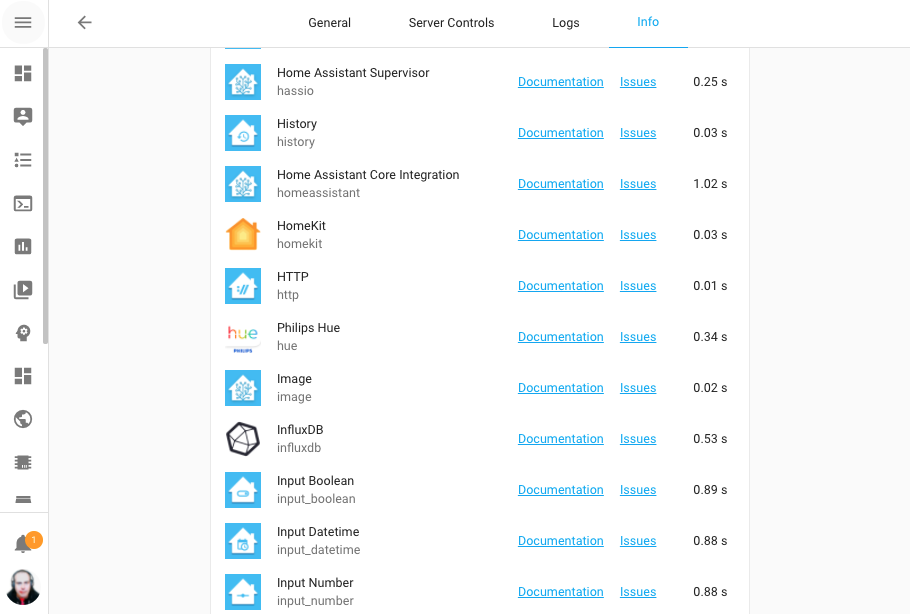 Screenshot of information 面板 showing 集成 set up times.
这个 My 按钮会直接带你过去:
为什么我按了重启按钮,Home Assistant 却没有重启?
那么,为什么你按下重启按钮后,Home Assistant 没有重启? 这个问题我们已经见过很多次了,而且确实非常烦人。现在,这个体验已经得到改进。
现在,重启按钮会直接给出反馈!这样一来,如果因为配置无效、集成损坏,或者数据库正在升级而无法重启,你会第一时间知道原因。
我们调整了超时设置,也修复了一些会让关闭流程无限卡住的问题。 例如,在重启 Home Assistant 时会检查配置,而之前就存在某些情况下会在这一步永久挂起的问题。
这也意味着现在重启更快了!因为 Home Assistant 的更多部分现在都能比以前更好地响应或取消关闭流程 (这也是 What the Heck 月活动的一部分成果)。
我们还审查了使用量最高的 35 个集成,确保它们在停止时会正确停止轮询。 感谢大家启用分析功能!
焕然一新的集成仪表板
集成仪表板 现在已经更新,界面更紧凑,同时也能提供更有用的信息。
例如,它现在会显示集成的状态;如果加载失败,也会直接告诉你失败原因。
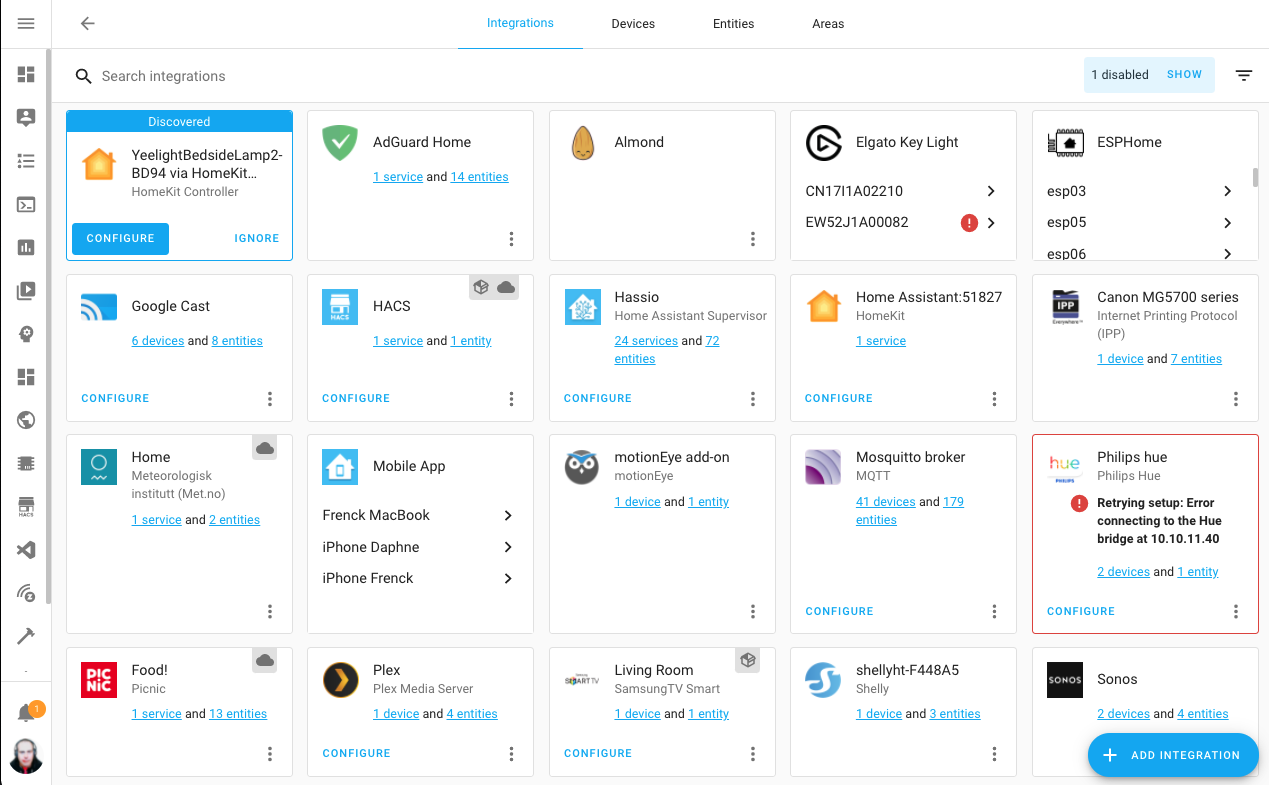 Screenshot of the updated 集成 仪表盘.
此外,你现在还可以分辨依赖云端的集成(会显示一个小云朵标签),以及以自定义集成方式安装的集成(会显示一个小包裹标签)。
颜色模式!
我们现在支持 RGBWW、RGBW 以及更多颜色模式了!
以前,我们主要依赖 HS(Hue Saturation)和亮度(HSB/HSV),Home Assistant 中的颜色处理基本都建立在这套模型上。 而现在,集成可以直接提供灯光真实支持的颜色模式。这样一来,Home Assistant(以及各类集成) 就能针对具体灯光做出更准确的行为适配。
例如,前端会根据灯光的颜色模式调整取色器;灯光的“更多信息”对话框也已经完成现代化改版,以支持这项变化:
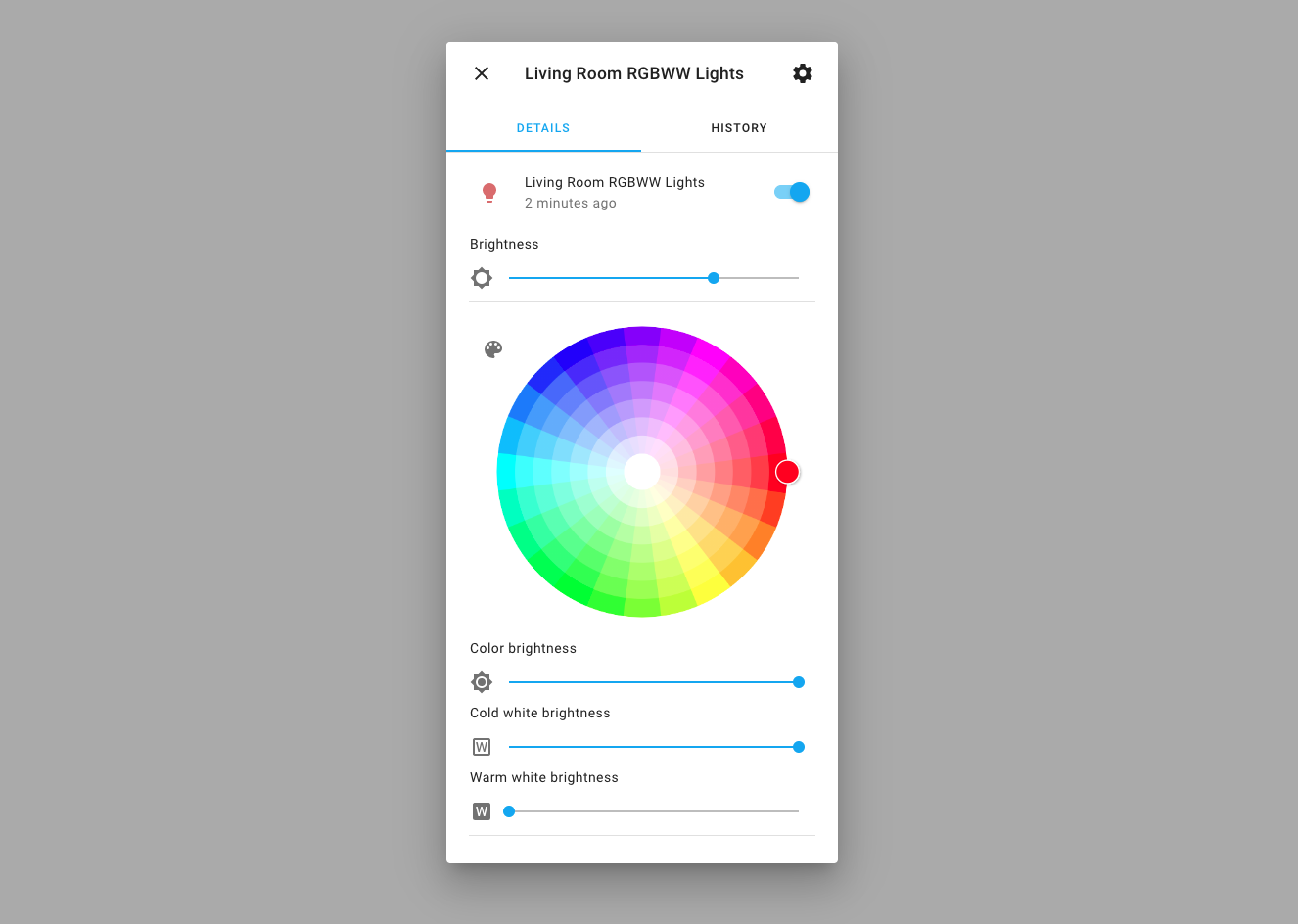 Screenshot of the updated more info dialog for 灯光.
请注意,目前还不是所有集成都已经支持颜色模式。不过,所有灯光都会拥有截图中那样更新后的漂亮界面。
基于触发器的二进制模板传感器
在上一期发布中,我们引入了基于触发器的模板传感器。这次发布在此基础上进一步扩展,新增了基于触发器的二进制模板传感器支持。
基于触发器的二元传感器还可以配置 auto_off 持续时间。
这样一来,它会在指定时间后自动把二元传感器状态切换回 off。
还有一些其他思路:
- Store webhook information in Home Assistant
- 一个每天基于时间触发器更新一次的例子 (例如“今天是不是我的生日?”这样的二元传感器)。
Docker 镜像现已签名,并可通过 GitHub 容器注册表获取
我们现在同时使用 DockerHub 和新的 GitHub 容器 Registry。
如果你想使用新的 GitHub 容器注册表,只需要使用:
ghcr.io/home-assistant/home-assistant
(Instead of homeassistant/home-assistant)
我们的核心镜像现在也已经使用 CodeNotary 签名, 这样你就可以验证镜像的完整性。
CodeNotary 是一个分布式账本方案,使用 immudb 作为数据库,内置加密证明与验证能力。
如果你运行的是 Home Assistant Operating System 或受监管模式安装, 我们已经会自动检查分发内容的完整性。 如果你使用的是容器安装方式,则可以安装 VCN 工具。
然后你可以这样使用它:
这样就可以告诉你并确认:你拿到的镜像,确实是由 Home Assistant 项目构建并发布的。
其他值得注意的变化
这次发布还有很多内容;下面是其中一些同样值得关注的变化:
- 你是不是经常开会?新的 mutesync 集成可以在 Home Assistant 中显示你是否正在开会、是否处于静音状态,这能解锁很多很酷的“请勿打扰”自动化。
- We did an audit of memory leaks and fixed a couple of generic cases in our 核心 codebase. But also fixed over 15 cases during unload/重载 in popular 集成.
- The TTS 服务 by Home Assistant Cloud now uses an improved bitrate, making it sound even more impressive.
- ClimaCell now supports the v4 API. So, If you've wanted to test it out you can now actually use it with the new API keys. Thanks @raman325!
- If you are into templating, we now have
min()andmax()available as functions in Jinja templates. - The AdGuard 集成 now supports multiple instances thanks to @eifinger.
- When viewing your 日志 in the 前端, the 日志 entry will tell you if the 日志 was 创建 by a custom 集成.
- If you have a Sonos Move or Sonos Roam, you can now see their battery level and charging 状态. Thanks for that @hufman and @jjlawren.
- Template 遮盖 now can have an opening and closing 状态, which was added by @bdr99, thanks for that!
- The ZHA 集成 now has 配置 options in the UI, allowing you to set things like default transition times for your 灯光. Thanks @dmulcahey!
- The Z-Wave JS 集成 now allows you to re-interview a 设备 from the UI thanks to @cgarwood.
- @cgarwood didn't stop there, you can now opt-in for sending Z-Wave JS telemetry to the Z-Wave JS project to help them out. This can be turned on in the Z-Wave JS 配置 面板.
新集成
欢迎以下新集成加入本次发布:
- Compensation, added by @Petro31
- iAlarm, added by @RyuzakiKK
- Kostal Plenticore, added by @stegm
- Met Éireann, added by @DylanGore
- motionEye, added by @dermotduffy
- Mutesync, added by @currentoor
- Picnic, added by @corneyl
- SiteSage Emonitor, added by @bdraco
新平台
以下集成新增了对新平台的支持:
- ClimaCell added 传感器 that provide a whole bunch of additional data, done by @raman325
- deCONZ now has support for 报警 control 面板, added by @Kane610
- Mazda Connected 服务 now provides a 设备 tracker for your car, added by @bdr99
- National Weather 服务 (NWS) added support for weather 传感器, added by @MatthewFlamm
- Rituals Perfume Genie now provides 传感器 and 二元sensor, added by @milanmeu
- Sonos added battery & charging 二元sensor for Sonos speakers that have those, done by @jjlawren
- Zigbee Home 自动化 (ZHA) now has support for 报警 control 面板, added by @dmulcahey
现已支持通过 UI 设置的集成
以下集成现在可以直接通过 Home Assistant UI 进行设置:
- Enphase Envoy, done by @bdraco
- Google Maps Travel Time, done by @raman325
- SMA Solar, done by @rklomp
- Waze Travel Time, done by @raman325
- Ezviz, done by @RenierM26
- AVM FRITZ!Box Tools, done by @chemelli74
发布 2021.5.1 - May 7
- Fix mysensors default persistence file on import (@MartinHjelmare - #48410) (mysensors docs)
- Only initialize Nuki configurations (@darkson95 - #49747) (nuki docs)
- Denonavr bugfixes (@scarface-4711 - #49984) (denonavr docs)
- Fix group selector (@tkdrob - #50088) (group docs)
- Fix RM pro temperature 传感器 (@felipediel - #50098) (broadlink docs)
- Ignore empty output from MQTT 风扇's value template (@jbouwh - #50122) (MQTT docs)
- Bump python-miio dependency (@rytilahti - #50129) (xiaomi_miio docs)
- Bump sqlalchemy to 1.4.13 (@bdraco - #50138) (recorder docs)
- Fix zwave_js websocket api KeyError on unloaded entry (@MartinHjelmare - #50154) (zwave_js docs)
- Fix unique_id issue on onewire config entries (@epenet - #50161) (onewire docs)
- Add color_mode support to group 灯光 (@emontnemery - #50165) (group docs)
- Move not loaded websocket constant to zwave_js (@MartinHjelmare - #50188)
- Add value map for Climacell V3 pollen 传感器 (@raman325 - #50200) (climacell docs)
- Ensure tesla 设置 is retried on timeout (@bdraco - #50202) (tesla docs)
- Allow SimpliSafe startup to retry on failure (@bachya - #50211) (simplisafe docs)
- Bump aiohue to 2.3.0 (@balloob - #50217) (hue docs)
- support more 报警 面板 (@dmulcahey - #50235) (zha docs)
- Fix Netatmo 温控 (@cgtobi - #50238) (netatmo docs)
- Fix 灯光 turn_on color conversion (@emontnemery - #50251) (灯光 docs)
- Add color_mode to demo 灯光 (@emontnemery - #49694) (demo docs)
发布 2021.5.2 - May 10
- Catch non payload modbus messages (@janiversen - #49910) (modbus docs)
- Fix incorrect 属性 checks in Modbus hub (@vzahradnik - #50241) (modbus docs)
- Fix amcrest detection of 传感器 reset (@FrnchFrgg - #50249) (amcrest docs)
- Skip Huawei LTE 设备 registry 设置 with no identifiers or connections (@scop - #50261) (huawei_lte docs)
- Fix Sonos polling bug (@jjlawren - #50265) (sonos docs)
- 更新 ovoenergy to 1.1.12 (@timmo001 - #50268) (ovo_energy docs)
- 更新 denonavr to 版本 0.10.7 (@scarface-4711 - #50288) (denonavr docs)
- Bump ha-philipsjs to 2.7.3 (@elupus - #50293) (philips_js docs)
- Fix tplink unloading when no 开关 are present (@bdraco - #50301) (tplink docs)
- Fix ESPHome timestamp 传感器 (@frenck - #50305) (esphome docs)
- Revert Rachio to seconds instead of total_seconds (@brg468 - #50307) (rachio docs)
- Support multiple disks in systemmonitor (@ColinRobbins - #50362) (systemmonitor docs)
- Bump androidtv to 0.0.59 (@JeffLIrion - #50367)
- Bump hatasmota to 0.2.12 (@emontnemery - #50372) (tasmota docs)
- Increase httpx timeout for Tesla (@alandtse - #50376) (tesla docs)
- Fix location of current_play_mode (@jjlawren - #50386) (sonos docs)
- Bump pysonos to 0.0.45 (@jjlawren - #50407) (sonos docs)
发布 2021.5.3 - May 11
- Handle transport 错误 when updating media via events (@bdraco - #50480) (sonos docs)
- Hotfix for Sonos favorites race 条件 (@jjlawren - #50495) (sonos docs)
- Include _StopScript.cause in trace (@emontnemery - #50441)
- 更新 denonavr 版本 0.10.8 (@scarface-4711 - #50476) (denonavr docs)
- Bump aiohue to 2.3.1 (@balloob - #50506) (hue docs)
发布 2021.5.4 - May 14
- Fix Sonos favorites race 条件 v2 (@jjlawren - #50575) (sonos docs)
- Fix battery 属性 (@cgtobi - #50405) (netatmo docs)
- Bumps aioasuswrt to 1.3.4 (@kennedyshead - #50414) (asuswrt docs)
- Skip adding battery on S1 Sonos 设备 (@jjlawren - #50536) (sonos docs)
- Bump pyhaversion from 21.3.0 to 21.5.0 (@ludeeus - #50540) (版本 docs)
- 更新 灯光 设备 动作 to check supported_color_modes (@emontnemery - #50611) (灯光 docs)
- Fix IQVIA failing to start if any API call fails (@bachya - #50615) (iqvia docs)
- 更新 灯光 intents to check supported_color_modes (@emontnemery - #50625) (灯光 docs)
发布 2021.5.5 - May 19
- 升级 freesms to 0.2.0 (@frenck - #50853) (free_mobile docs)
- Backport Sonos handle subscription failures (@jjlawren - #50796) (sonos docs)
- Bump hatasmota to 0.2.13 (@emontnemery - #50662) (tasmota docs)
- Bump pysonos to 0.0.47 (@jjlawren - #50792) (sonos docs)
- Bump pyatmo to 4.2.3 (@cgtobi - #50801) (netatmo docs)
如果你需要帮助……
……欢迎随时使用我们非常活跃的论坛,或者加入我们的聊天频道。
如果你遇到了这次发布引入的问题,请到我们的 issue tracker 提交反馈,并确保填写问题模板中的所有字段。
Backward-incompatible changes
Below is a listing of the breaking change for this 发布, per subject or 集成. Click on one of those to read more about the breaking change for that specific item.
We no longer run an udev instance inside our 容器. This was used by the Supervisor which now is using the host udev in all 容器.
For now, we have a fallback environment variable USING_UDEV=1 which you can
set on your 容器 to get the old behavior. This gives you time for using
the Docker way to map/use 设备.
If you run a system that uses the Supervisor, this is automatically taken care of.
Custom 集成 now require a 版本 key in their manifest file, this also means that all custom 集成 now require a manifest file.
If you are using a legacy custom 集成 like custom_components/awesome.py
this now needs to move to custom_components/awesome/__init__.py so you can
add custom_components/awesome/manifest.json to it.
更多信息 about 集成, manifests have a look here: https://开发者.home-assistant.io/docs/creating_integration_manifest
Custom 集成 that do not have this will be blocked from loading if it’s missing a 版本 in the manifest starting with Home Assistant 2021.6.
If you see these 错误, please report the issue with the author of that custom 集成.
An event fired with an event_type of more than 64 characters would previously
result in recorder 错误 but the event would otherwise work. Now, firing an
event with more than 64 characters in the event type will raise immediately.
If you are using long events in your 自动化 or 脚本, you should adjust to this change. Custom 集成 authors should review their event types.
The device_tracker 实体 状态 属性 ip_address has been changed and is
now be named ip. You need to 更新 自动化 and 脚本 that use this
属性.
The AVM FRITZ!Box Tools 集成 is now configured via the UI. Configuring the 集成 via YAML is now deprecated. Existing YAML 配置 is automatically imported on 升级 and can be safely removed after 升级.
(@chemelli74 - #48287)
YAML 配置 for AVM FRITZ!SmartHome has been removed, after it has been deprecated for 12 months. 配置 via UI is fully integrated. Existing YAML 配置 has already been imported automatically in the previous releases and can now safely be removed from your 配置 files.
The pin 配置 option is currently an integer but will need to be
prefixed with D for 树莓派 platforms.
Please adjust your YAML 配置 for this change.
ecobee 温控 设备 will change the reported temperature precision for their
current_temperature 属性 from whole degrees to 0.1 degree increments.
自动化 which rely on whole-number precision may need adjustments.
Setting a 风扇 hold in the ecobee 集成 will no longer also set a
temperature hold. If any 自动化 assumed that the temperature would be set
when calling the set_fan_mode 服务 on an ecobee 设备, those 自动化
will need to add the appropriate set_temperature 服务 call.
Enphase Envoy has fully transitioned to 配置 via UI. YAML 配置 will be removed in an upcoming 版本. Existing YAML 配置 will be imported automatically, and can now safely be removed from your 配置 files.
All 传感器 are now configured by default. Each inverter has a unique ID and can now be disabled in the UI.
The Ezviz 集成 is now configured via the UI. Configuring the 集成 via YAML is now deprecated. Existing YAML 配置 is automatically imported on 升级 and can be safely removed after 升级.
All 摄像头 状态 属性 were removed and replaced by binary_sensors, 传感器 or 开关.
List of old 摄像头 状态 属性 with their new replacements:
- "privacy": 开关 实体, camera_name.privacy
- "audio": 开关 实体, camera_name.sound
- "ir_led": 开关 实体, camera_name.infrared
- "state_led": 开关 实体, camera_name.灯光
- "follow_move": 开关 实体, camera_name.tracking
- "alarm_notify": camara status, "Recording"
- "alarm_sound_mod": 传感器, camera_name.alarm_sound_mod
- "encrypted": binary_sensor, camera_name.encrypted
- "local_ip": 传感器, camera_name.local_ip
- "detection_sensibility": 传感器, camera_name.detection_sensibility
If you are using one of these 属性 in your 自动化 or 脚本, you will need to adjust to this change.
(@RenierM26 - #45722)
The unit of measurement from Garmin Connect timestamp 传感器 has been removed. It used to be set to empty string. If you have 自动化, 脚本 or external data recvorder that rely on unit of measurement for these 传感器, you might need to adjust to this change.
The GNTP (Growl) 集成 has been deprecated and is going to be removed in Home Assistant 核心 2021.6.
The Growl project has now fully retired, see: https://growl.github.io/growl/
The Google Travel Time 集成 is now configured via the UI. Configuring the 集成 via YAML is now deprecated. Existing YAML 配置 is automatically imported on 升级 and can be safely removed after 升级.
The existing Hive 服务 heating_boost will be deprecated in Home Assistant
发布 2021.6 and a new 服务 to replace it has been 创建 called
heating_boost_on.
If you use the heating_boost Hive 服务 please 更新 your 配置
to the new 服务. A deprecation 警告 will be printed to the 日志 when the
deprecated 服务 is used.
The config_file YAML option for KNX was deprecated before and has now been
removed.
When a 灯光 实体 has a default profile associated, the default profile will
only be applied for the light.turn_on 服务 call when the 灯光 状态 is
off or no data is sent with the 服务 call.
The transition 属性 from the default profile in light_profiles.csv will
also be applied when light.turn_off is called.
(@karliemeads - #49376) (灯光 docs)
reset_waste_drawer, set_sleep_mode, and set_wait_time now have their own
服务. Previously, they were triggered by using send_command.
If you used any of those commands in your 自动化 or 脚本, you'll need
to replace them with their 服务 counter-part.
(@natekspencer - #48300)
A new option SWAP replaces REVERSE_ORDER, however REVERSE_ORDER is
still accepted and silently converted to SWAP=WORD.
Note: REVERSE_ORDER will be removed in a future 发布.
Old 配置 example:
New 配置 example:
Swap allows none/byte/word/word_byte options.
(@janiversen - #49719)
Recollect Waste pickup dates are now stored as UTC timestamps.
Database migrations are now done in the background and no longer prevent Home Assistant from starting.
The migration is started shortly after the started event since they are CPU intensive (mostly just sqlite since it's in the same process) and we do not want to compete with startup.
Events 创建 by your system are queued and processed when the migration is completed. There is a safety to start discarding events if more than ~30000 events happen before migration is completed to avoid memory exhaustion.
During migration, Home Assistant will prevent being started or stopped and
this will also disable the homeassistant.stop and homeassistant.start
服务 until the migration has been completed.
The sqlite database recovery logic can now recover at point after 设置 including purge, migration, and event insert. In short we can always (hopefully) recover and start a new db without a 重启.
The quick check is no longer performed on unclean shutdown since we can always
recover live. The db_integrity_check option has been deprecated.
If you are using a PostgreSQL database please verify that your connection URL starts with postgresql://. In case you use still an old URL starting with postgres://, please replace it with postgresql:// otherwise you will get an 错误 to set up the recorder.
The RoonLabs music player media_player previously had 集成 specific
服务 for roon.join and roon.un_join. These have been removed removes
and replaced with the media_player.join and media_player.unjoin 服务.
If you use these 服务 in your 自动化 or 脚本, you need to adjust those.
The Shelly Wi-Fi RSSI 传感器 unit was wrong, it is dBm and not dB. If you rely on the unit of measurement from this 传感器, you might need to adjust to this change.
The unpublished SimpliSafe cloud API no longer provides a functioning websocket.
Therefore, the 集成 will no longer be able to receive SIMPLISAFE_EVENT
or SIMPLISAFE_NOTIFICATION events, nor will it be possible for stage changes
performed outside of Home Assistant (e.g., via the keypad) to be reflected in
Home Assistant in near-realtime.
(@bachya - #49876) (simplisafe docs)
The SMA 集成 is now configured via the UI. Configuring the 集成 via YAML is now deprecated. Existing YAML 配置 is automatically imported on 升级 and can be safely removed after 升级.
Using custom 传感器 is deprecated and not possible using the UI. Feel free to submit additional 传感器 to be added as standard 传感器 to the pysma library.
The pv_power 传感器 is now reporting DC power of solar 面板 side A and named pv_power_a for new installations. grid_power is the total power supplied to the grid.
The following YAML 配置 options have been deprecated:
feedersflapspetsscan_interval
If you have one of these options in your YAML 配置, you can safely remove those.
FEON/BAFU changed their data which required removing some of the 属性.
The following 属性 are no longer available:
- delta-24h
- max-1h
- min-1h
- mean-1h
- previous-24h
The unit of measurement from System Monitor timestamp 传感器 has been removed. It used to be set to empty string. If you have 自动化, 脚本 or external data recorder that rely on unit of measurement for these 传感器, you might need to adjust to this change.
Tasmota 灯光 no longer supports deprecated white_value, use rgbw_color
instead.
(@emontnemery - #49599) (tasmota docs)
The Tasmota Wi-Fi RSSI 传感器 unit was wrong, it is dBm and not dB. If you rely on the unit of measurement from this 传感器, you might need to adjust to this change.
(@thecode - #49263) (tasmota docs)
The Waze Travel Time 集成 is now configured via the UI. Configuring the 集成 via YAML is now deprecated. Existing YAML 配置 is automatically imported on 升级 and can be safely removed after 升级.
If the default_interface is not set, the value is auto-detected based on the
system routing next hop for the mDNS broadcast address (224.0.0.251).
If the next-hop cannot be detected or is a loopback address, zeroconf will
broadcast on all interfaces. If the next hop is a non-loopback address,
zeroconf will only broadcast on the default interface.
Setting the default_interface to true or false will override the auto
detection.
Farewell to the following
The following 集成 are no longer available as of this 发布:
Both 集成 were in a broken 状态 and using webscaping methods to gather their data, which is not allowed for 核心 集成.
All changes
- Add config flow support to google_travel_time (@raman325 - #43509) (google_travel_time docs) (breaking-change)
- Bump 版本 to 2021.5.0dev0 (@frenck - #48559)
- Remove 设备 class timestamp from 设备 条件 and 触发器 (@MartinHjelmare - #48431) (garmin_connect docs) (hvv_departures docs) (传感器 docs) (breaking-change)
- Add nws 传感器 platform (@MatthewFlamm - #45027) (nws docs) (new-platform)
- Only raise integrationnotfound for dependencies (@alandtse - #48241)
- Clean lazytox 脚本 (@MartinHjelmare - #48583)
- Typing improvements for SolarEdge (@frenck - #48596) (solaredge docs)
- Remove Geizhals 集成 (ADR-0004) (@frenck - #48594) (geizhals docs) (breaking-change)
- 升级 Astral to 2.2 (@FMKaiba - #48573) (moon docs) (sun docs) (tod docs) (breaking-change)
- Add zwave_js WS API command to call node.refresh_info (@raman325 - #48564) (zwave_js docs)
- Add hive heat on demand (@KJonline - #48591) (hive docs)
- Add variables to execute 脚本 (@balloob - #48613) (websocket_api docs)
- Going async with denonavr (@scarface-4711 - #47920) (denonavr docs)
- Remove duplicate test case in modbus 开关 (@janiversen - #48636) (modbus docs)
- Add modbus CONF_VERIFY_STATE to new 开关 config (@janiversen - #48632) (modbus docs)
- Make modbus WRITE_COIL use write_coils in case of an array (@janiversen - #48633) (modbus docs)
- Add Compensation 集成 (@Petro31 - #41675) (compensation docs) (new-集成)
- Add retry mechanism on onewire sysbus 设备 (@epenet - #48614) (onewire docs)
- Make sonos event asyncio (@bdraco - #48618) (sonos docs)
- Optimize storage collection 实体 operations with asyncio.gather (@bdraco - #48352)
- Apply ConfigEntryNotReady improvements to PlatformNotReady (@bdraco - #48665)
- 升级 pytest to 6.2.3 (@frenck - #48672)
- 升级 holidays to 0.11.1 (@frenck - #48673) (workday docs)
- Remove modbus duplicate strings (@janiversen - #48654) (modbus docs)
- Remove Social Blade 集成 (ADR-0004) (@frenck - #48677) (socialblade docs) (breaking-change)
- Add modbus write coils (@janiversen - #48676) (modbus docs)
- Cleanup sonos (@bdraco - #48684) (sonos docs)
- 升级 wakonlan to 2.0.0 (@frenck - #48683) (wake_on_lan docs)
- Use shared aiohttp.ClientSession in bond (@bdraco - #48669) (bond docs)
- Add more 设备 触发器 to deCONZ 集成 (@Kane610 - #48680) (deconz docs)
- Limit 日志 spam from rest and include reason in platform retry (@bdraco - #48666) (rest docs)
- Fix sonos volume always showing 0 (@bdraco - #48685) (sonos docs)
- Add config flow for enphase envoy (@bdraco - #48517) (enphase_envoy docs) (breaking-change)
- Add emonitor 集成 (@bdraco - #48310) (emonitor docs) (new-集成)
- Provide api to see which 集成 are being loaded (@bdraco - #48274) (websocket_api docs)
- 更新 all systemmonitor 传感器 in one executor call (@bdraco - #48689) (systemmonitor docs)
- Add ClimaCell v4 API support (@raman325 - #47575) (climacell docs)
- Clean and optimize systemmonitor (@bdraco - #48699) (systemmonitor docs) (breaking-change)
- Add a new weather 集成 - Met Éireann (@DylanGore - #39429) (met_eireann docs) (new-集成)
- Add config flow for Waze Travel Time (@raman325 - #43419) (waze_travel_time docs) (breaking-change)
- Add AMD Ryzen processor temperatur capability to systemmonitor (@mib1185 - #48705) (systemmonitor docs)
- Small improvements for emonitor (@bdraco - #48700) (emonitor docs)
- Bump codecov/codecov-动作 from v1.3.1 to v1.3.2 (@dependabot - #48716)
- Fix sync api use in 报警 control 面板 test (@MartinHjelmare - #48725)
- Add doorsensor + coordinator to nuki (@pree - #40933) (nuki docs)
- Fix systemmonitor IP address look-up logic (@spacegaier - #48740) (systemmonitor docs)
- Bump pysonos to 0.0.42 to fix I/O in event loop (@bdraco - #48743) (sonos docs)
- New 集成 for Kostal Plenticore solar inverters (@stegm - #43404) (kostal_plenticore docs) (new-集成)
- 升级 pre-commit to 2.12.0 (@frenck - #48731)
- Set AsusWRT mac_address and ip_address properties (@bieniu - #48764) (asuswrt docs) (breaking-change)
- Clean up google travel time code (@raman325 - #48708) (google_travel_time docs)
- Bump 动作/upload-artifact from v2.2.2 to v2.2.3 (@dependabot - #48761)
- 更新 init.py (@DanielTheCoder - #48659) (homematic docs)
- Remove doorbird recorder test workaround (@bdraco - #48781) (doorbird docs)
- Store Recollect Waste pickup dates in UTC (@bachya - #48690) (recollect_waste docs) (breaking-change)
- Add Xiaomi Miio zhimi.airpurifier.mc2 (@starkillerOG - #48840) (xiaomi_miio docs)
- 更新 xknx to 版本 0.18.0 (@marvin-w - #48799) (knx docs) (breaking-change)
- Return TP-Link 传感器 & 灯光 属性 as
floatrather thanstring(@spacegaier - #48828) (tplink docs) - Let recorder deal with event names longer than 32 chars (@lmagyar - #47748) (recorder docs)
- Fix subscribe_bootstrap_integrations to send events (@bdraco - #48754) (websocket_api docs)
- Raise an exception when event_type exceeds the max length (@raman325 - #48115) (breaking-change)
- Add hive boost off functionality (@KJonline - #48701) (hive docs) (breaking-change)
- Add manufacturer matching support to zeroconf (@bdraco - #48810) (zeroconf docs)
- Test that we do not initialize bad 配置 (@balloob - #48872) (自动化 docs)
- Fix logic reversal in sonos update_media_radio (@bdraco - #48900) (sonos docs)
- Don't get code_context when calling inspect.stack (@emontnemery - #48849)
- Fix cpu temperature reporting for Armbian on Odroid (@tels7ar - #48903) (systemmonitor docs)
- Add fixtures for Axis rtsp client and adapt tests to use them (@Kane610 - #47901) (axis docs)
- Allow template 遮盖 to have opening and closing 状态 (@bdr99 - #47925) (template docs)
- 更新 "issur_melacha_in_effect" via time tracking (@amitfin - #42485) (jewish_calendar docs)
- AEMET town timestamp should be UTC (@Noltari - #48916) (aemet docs)
- 更新 Ezviz Component (@RenierM26 - #45722) (ezviz docs) (breaking-change)
- Bump pyupgrade to 2.12.0 (@cdce8p - #48943)
- Detach aiohttp.ClientSession 创建 by config entry 设置 on unload (@bdraco - #48908)
- Bump boto3 to 1.16.52 (@bdraco - #47772) (amazon_polly docs) (route53 docs)
- Don't 日志 template 错误 from developer tool (@emontnemery - #48933) (websocket_api docs)
- Bump hass-nabucasa 0.43 (@balloob - #48964) (cloud docs)
- Huawei LTE cleanups (@scop - #48959) (huawei_lte docs)
- Remove uneeded check in ZHA battery voltage attrib (@abmantis - #48968) (zha docs)
- Add custom JSONEncoder for subscribe_trigger WS endpoint (@zachowj - #48664)
- Raise ConfigEntryAuthFailed during 设置 or coordinator 更新 to start reauth (@bdraco - #48962)
- Add helper to get an 实体's supported features (@emontnemery - #48825) (device_automation docs) (灯光 docs)
- Add missing internal quality scale label (@MartinHjelmare - #48947)
- Bump python-typing-更新 to v0.3.3 (@cdce8p - #48992) (axis docs) (climacell docs) (denonavr docs) (kostal_plenticore docs) (modbus docs) (onewire docs)
- Improve schema of media_player.join 服务 (@EetuRasilainen - #48342) (media_player docs)
- Fix Zeroconf manifest schema in hassfest 脚本 (@chemelli74 - #49006)
- 日志 zone cleaning (@chemelli74 - #47912) (neato docs)
- Add support for event type closed to 集成 folder_watcher (@dynasticorpheus - #48226) (folder_watcher docs)
- Bump libhdate dependency (@amitfin - #48695) (jewish_calendar docs)
- Fix 灯光 template invalid color temp message (@adrienbrault - #48337) (template docs)
- Add KNX source address to 传感器 and BinarySensor (@marvin-w - #48857) (knx docs)
- Bump pysml to 0.0.5 (@mtdcr - #49014) (edl21 docs)
- 升级 wakonlan to 2.0.1 (@frenck - #48995) (wake_on_lan docs)
- Change vicare unit of power production current to POWER_WATT (@nbraem - #49000) (vicare docs)
- 升级 aioambient to 1.2.4 (@nebhale - #49035) (ambient_station docs)
- Correct vicare power production 设备 class (@nbraem - #49040) (vicare docs)
- Fix non-metric atmospheric pressure in Open Weather Map (@tels7ar - #49030) (openweathermap docs)
- Add new 属性 to Climacell (@raman325 - #48707) (climacell docs)
- Type data parameter as Mapping in async_create_entry (@KapJI - #49050)
- Reintroduce iAlarm 集成 (@RyuzakiKK - #43525) (ialarm docs) (new-集成)
- Add set_wait_time command support to Litter-Robot (@natekspencer - #48300) (litterrobot docs) (breaking-change)
- Add Rituals Perfume Genie 传感器 platform (@milanmeu - #48270) (rituals_perfume_genie docs) (new-platform)
- Patch ip interface instead of XKNX in knx (@mptei - #49064) (knx docs)
- Add device_tracker scanners to hass.config.components (@ludeeus - #49063) (device_tracker docs)
- 发布 ownership of amcrest 集成 (@pnbruckner - #49086) (amcrest docs)
- Create DataUpdateCoordinator for each proxmoxve vm/容器 (@Corbeno - #45171) (proxmoxve docs)
- Set hass when adding template 属性 (@balloob - #49094) (template docs)
- Live db migrations and recovery (@bdraco - #49036) (recorder docs) (breaking-change)
- Support min()/max() as template function (@frenck - #48996)
- Use shared httpx client in enphase_envoy (@bdraco - #48709) (enphase_envoy docs)
- Bump pyeconet to 0.1.14 (@w1ll1am23 - #49067) (econet docs)
- Fix forecast pressure unit in OpenWeatherMap (@l2dy - #49069) (openweathermap docs)
- Add support for custom configurations in ZHA (@dmulcahey - #48423) (zha docs)
- Fix xbox type hint (@cdce8p - #49102) (xbox docs)
- Replace old style type comments (@cdce8p - #49103) (stream docs)
- Reduce reporting delta for ZHA humidity channel (@abmantis - #49070) (zha docs)
- Don't import stdlib typing types from helpers.typing (@cdce8p - #49104) (command_line docs) (edl21 docs) (isy994 docs) (kodi docs)
- Improve trace of template 条件 (@emontnemery - #49101) (trace docs)
- Add min and max temp properties to zwave_js.温控 (@raman325 - #49125) (zwave_js docs)
- iAlarm small code quality improvements (@RyuzakiKK - #49126) (ialarm docs)
- Add Ecobee 加湿器 (@treylok - #45003) (ecobee docs)
- Bump yeelight 版本 to 0.6.0 (@starkillerOG - #49111) (yeelight docs)
- Allow top level non-触发器 template 实体 (@balloob - #48976) (template docs)
- Prevent calling stop or 重启 服务 during db 升级 (@bdraco - #49098) (homeassistant docs) (recorder docs) (breaking-change)
- Lazy load zwave_js platforms when the first 实体 needs to be 创建 (@raman325 - #49016) (zwave_js docs)
- ZHA support Quotra LED On quirk (@mikeodr - #49137) (zha docs)
- Add Hyperion 设备 support (@dermotduffy - #47881) (hyperion docs)
- Improve the discovery process for Gree (@cmroche - #45449) (gree docs)
- Bump 动作/设置-python from v2.2.1 to v2.2.2 (@dependabot - #49156)
- Bump 动作/cache from v2.1.4 to v2.1.5 (@dependabot - #49157)
- Use named constants for 核心 shutdown timeouts (@bdraco - #49146)
- Name the dhcp watcher Thread (@bdraco - #49144) (dhcp docs)
- Clean up 摄像头 服务 schema (@cgtobi - #49151) (摄像头 docs)
- Raise exception for invalid call to DeviceRegistry.async_get_or_create (@raman325 - #49038)
- Add 'mix' system support for Growatt 集成 (@muppet3000 - #49026) (growatt_server docs)
- Fix 服务 for Armcrest & Logi Circle (@frenck - #49166) (amcrest docs) (logi_circle docs)
- Migrate existing zwave_js 实体 if endpoint has changed (@raman325 - #48963) (zwave_js docs)
- Do not compile static templates (@bdraco - #49148)
- Internally work with modern config syntax for template 二元sensor platform config (@balloob - #48981) (template docs)
- Don't assert the 设备 registry entry in zwave_js (@raman325 - #49178) (zwave_js docs)
- Add edl21 OBIS IDs for Holley DTZ541-ZEBA (@mtdcr - #49170) (edl21 docs)
- Implement SMA config flow (@rklomp - #48003) (sma docs) (breaking-change)
- Describe Google Assistant events (@balloob - #49141) (cloud docs) (google_assistant docs)
- Fix Hue 服务 being removed on entry 重载 (@balloob - #48663) (hue docs)
- Cloud to set up Alexa conditionally (@balloob - #49136) (cloud docs)
- Enable the custom quirks path ZHA config option (@puddly - #49143) (zha docs)
- Enable passing Amcrest/Dahua signals through as HA events (@FrnchFrgg - #49004) (amcrest docs)
- Cancel sense updates on the stop event (@bdraco - #49187) (sense docs)
- Replace http startup logic with async_when_setup_or_start (@bdraco - #48784) (http docs)
- Cancel config entry retry, platform retry, and polling at the stop event (@bdraco - #49138)
- Use supported_color_modes in google_assistant (@emontnemery - #49176) (google_assistant docs)
- Use supported_color_modes in homekit (@emontnemery - #49177) (homekit docs)
- Use supported_color_modes in alexa (@emontnemery - #49174) (alexa docs)
- Added Spanish US voice to Google Cloud TTS (@soundch3z - #49200) (google_cloud docs)
- Fix logic of 实体 id extraction (@cgtobi - #49164)
- Bump pykmtronic to 0.3.0 (@dgomes - #49191) (kmtronic docs)
- Support all available Google Cloud TTS languages (@hmmbob - #49208) (google_cloud docs)
- Bump androidtv (0.0.58) and adb-shell (0.3.1) (@JeffLIrion - #49209) (androidtv docs)
- Allow debugging of 集成 dependancies (@KJonline - #49211)
- Add unique-ids to maxcube component (@unaiur - #49196) (maxcube docs)
- Stop ssdp scans when stop event happens (@bdraco - #49140) (ssdp docs)
- Add 二元sensor platform to Rituals Perfume Genie 集成 (@milanmeu - #49207) (rituals_perfume_genie docs) (new-platform)
- Reinitialize upnp 设备 on config change (@StevenLooman - #49081) (upnp docs)
- 升级 colorlog to 5.0.1 (@frenck - #49221)
- Fix stop listener memory leak in DataUpdateCoordinator on retry (@bdraco - #49186)
- Do not schedule future ping 设备 tracker updates once hass is stopping (@bdraco - #49236) (ping docs)
- Disconnect homekit_controller 设备 on the stop event (@bdraco - #49244) (homekit_controller docs)
- Create KNX 开关 实体 directly from config (@farmio - #49238) (knx docs)
- Add support for IoT class in manifest (@frenck - #46935)
- Ensure original 日志 handlers are restored at close (@bdraco - #49230)
- Only enable envoy inverters when the user has access (@bdraco - #49234) (enphase_envoy docs)
- Disconnect roomba on stop event (@bdraco - #49235) (roomba docs)
- Fix broken swiss_hydrological_data 集成 (@Bouni - #49119) (swiss_hydrological_data docs) (breaking-change)
- Remove redundant text from 文档 (@apapadopoulou - #49262)
- Cancel discovery flows that are initializing at shutdown (@bdraco - #49241)
- Define data flow result type (@KapJI - #49260) (bond docs) (hassio docs) (huawei_lte docs) (hyperion docs) (zwave_js docs)
- Fix shelly RSSI 传感器 unit (@thecode - #49265) (shelly docs) (breaking-change)
- Fix Tasmota WiFi Signal Strength unit (@thecode - #49263) (tasmota docs) (breaking-change)
- Add
searchandmatchas Jinja tests (@mdegat01 - #49229) - Add common 灯光 helpers to test for feature support (@emontnemery - #49199) (alexa docs) (google_assistant docs) (homekit docs) (灯光 docs)
- Add support for multiple AdGuard instances (@eifinger - #49116) (adguard docs)
- Add missing typing to data_entry_flow (@bdraco - #49271)
- Add 传感器 for other ClimaCell data (@raman325 - #49259) (climacell docs) (new-platform)
- Add missing target field to media_seek (@Lau1406 - #49031) (media_player docs)
- 更新 issue form to use latest changes (@frenck - #49272)
- Process AdGuard review comments (@frenck - #49274) (adguard docs)
- Move top-level av import behind type checking flag (@balloob - #49281) (stream docs)
- Avoid sending empty 集成 list multiple times during subscribe_bootstrap_integrations (@bdraco - #49181)
- Fix ignorability of AdGuard hassio discovery step (@frenck - #49276) (adguard docs)
- 升级 flake8 to 3.9.1 (@frenck - #49284)
- Deprecate GNTP (Growl) 集成 (@frenck - #49273) (gntp docs) (breaking-change)
- Clean up superfluous 集成 设置 - part 4 (@frenck - #49295)
- Clean up superfluous 集成 设置 - part 5 (@frenck - #49296)
- Clean up superfluous 集成 设置 - part 6 (@frenck - #49298)
- Add
device_infoproperty to OpenWeatherMap 实体 (@bieniu - #49293) (openweathermap docs) - Add dhcp discovery to tuya (@bdraco - #49312) (tuya docs)
- Add DHCP to MyQ (@balloob - #49319) (myq docs)
- Improve DHCP + Zeroconf manifest validation (@balloob - #49321) (lyric docs)
- Do not wait for websocket response to be delivered before shutdown (@bdraco - #49323) (homeassistant docs)
- Cancel tuya updates on the stop event (@bdraco - #49324) (tuya docs)
- Bump pysonos to 0.0.43 (@bdraco - #49330) (sonos docs)
- Type hint improvements (@scop - #49320)
- Exclude epson init module from coverage (@MartinHjelmare - #49316)
- Ensure 恢复 状态 is not written after the stop event (@bdraco - #49329)
- 升级 pre-commit to 2.12.1 (@frenck - #49331)
- Remove some unneeded pylint disables, 更新 ref to util.process one (@scop - #49314) (notify docs) (zha docs)
- Add 设备 tracker platform to Mazda 集成 (@bdr99 - #47974) (mazda docs) (new-platform)
- Explicitly define all methods in ConfigFlow (@KapJI - #49341)
- Remove HomeAssistantType alias - Part 3 (@frenck - #49339)
- Rituals Perfume Genie improvements (@milanmeu - #49277) (rituals_perfume_genie docs)
- Add reauth flow for lyric (@timmo001 - #47863) (lyric docs)
- Fix lyric heat cool setting (@timmo001 - #47875) (lyric docs)
- 更新 mazda to use ConfigEntryAuthFailed (@bdraco - #49333) (mazda docs)
- Shutdown harmony connection on stop (@bdraco - #49335) (harmony docs)
- Bump aiodiscover to 1.4.0 for dhcp (@bdraco - #49359) (dhcp docs)
- Only fetch the local ip once per run (@bdraco - #49336)
- Add set_myzone 服务 to Advantage Air (@Bre77 - #46934) (advantage_air docs)
- Ensure shutdown does not deadlock (@bdraco - #49282)
- Only set 风扇 状态 in ecobee set_fan_mode 服务 (@bjpetit - #48086) (ecobee docs) (breaking-change)
- Shutdown bond bpup and skip polling after the stop event (@bdraco - #49326) (bond docs)
- Add battery 传感器 to fritzbox smart home 设备 (@mib1185 - #49374) (fritzbox docs)
- Do not 日志 错误 messages when discovering Broadlink 设备 (@felipediel - #49394) (broadlink docs)
- Reduce time to first byte for 前端 index (@bdraco - #49396) (前端 docs)
- Fix esphome registering invalid 服务 name (@glmnet - #49398) (esphome docs)
- Change HomeAssistantType -> HomeAssistant in modbus (@janiversen - #49400) (modbus docs)
- Use broadlink.hello() for direct discovery (@felipediel - #49405) (broadlink docs)
- Small cleanups to rachio (@bdraco - #49404) (rachio docs)
- Improve debuggability by providing job as an arg to loop.call_later (@bdraco - #49328)
- Force recorder shutdown at final write event (@bdraco - #49145) (recorder docs)
- Add 服务 to the profiler to 日志 threads and event loop schedule (@bdraco - #49327) (profiler docs)
- Use google assistant TemperatureControl trait to report 传感器 (@koying - #46491) (google_assistant docs)
- Bump codecov/codecov-动作 from v1.3.2 to v1.4.0 (@dependabot - #49412)
- Expose the hostname of the 设备 in asuswrt (@bdraco - #49393) (asuswrt docs)
- 升级 dsmr_parser to 0.29 (@frenck - #49417) (dsmr docs)
- Add additional myq homekit models (@bdraco - #49381) (myq docs)
- Bump fritzconnection to 1.4.2 (@danielrheinbay - #49356) (fritzbox_netmonitor docs)
- 日志 an 错误 if modbus 遮盖 is not initialized correctly (@vzahradnik - #48829) (modbus docs)
- Add pymodbus exception handling and isolate pymodbus to class modbusHub (@janiversen - #49052) (modbus docs)
- Increase recorder test coverage (@bdraco - #49362) (recorder docs)
- Avoid executor jumps in history stats when no 更新 is needed (@bdraco - #49407) (history_stats docs)
- Raise HassioAPIError when 错误 is returned (@ludeeus - #49418) (hassio docs)
- Fix modbus 开关 "old style" config problem (@janiversen - #49352) (modbus docs)
- Use Hyperion human-readable effect names instead of API identifiers (@dermotduffy - #45763) (hyperion docs)
- Bump faadelays to 0.0.7 (@ntilley905 - #49443) (faa_delays docs)
- Set temperature precision for Ecobee 温控 实体 to tenths (@jjlawren - #48697) (ecobee docs) (breaking-change)
- Bump pymodbus 版本 to 2.5.1 (@janiversen - #49401) (modbus docs)
- SMA code quality improvement and bugfix (@rklomp - #49346) (sma docs)
- Fix memory leak in netatmo (@bdraco - #49464) (netatmo docs)
- Bump youtube-dl to 2021.04.17 (@chpego - #49474) (media_extractor docs)
- Fix/Workaround GitHub issue forms (@frenck - #49475)
- 更新 modbus 状态 when 传感器 fails (@janiversen - #49481) (modbus docs)
- Ensure harmony callbacks run in the event loop (@bdraco - #49450) (harmony docs)
- MQTT 遮盖 avoid 警告 on empty payload (@jbouwh - #49253) (MQTT docs)
- Fix memory leak in wemo on 重载 (@bdraco - #49457) (wemo docs)
- Add 报警 control 面板 support to deCONZ 集成 (@Kane610 - #48736) (deconz docs) (new-platform)
- 更新 typing syntax (@cdce8p - #49480)
- Fix memory leak in verisure (@bdraco - #49460) (verisure docs)
- Fix homekit memory leak on entry 重载 (@bdraco - #49452) (homekit docs)
- Fix memory leak on apple_tv 重载 (@bdraco - #49454) (apple_tv docs)
- Fix memory leak in logi_circle (@bdraco - #49458) (logi_circle docs)
- Fix memory leak in vera (@bdraco - #49459) (vera docs)
- Fix memory leak in heos (@bdraco - #49461) (heos docs)
- Fix memory leak in fritzbox (@bdraco - #49462) (fritzbox docs)
- Fix memory leak in unifi on 重载 (@bdraco - #49456) (unifi docs)
- Fix memory leak in freebox (@bdraco - #49463) (freebox docs)
- Fix memory leak in tibber (@bdraco - #49465) (tibber docs)
- Fix memory leak in insteon (@bdraco - #49466) (insteon docs)
- Fix memory leak in firmata (@bdraco - #49467) (firmata docs)
- Fix memory leak in deconz (@bdraco - #49468) (deconz docs)
- Fix memory leak in legacy nest (@bdraco - #49469) (nest docs)
- Fix memory leak in huawei_lte (@bdraco - #49470) (huawei_lte docs)
- Fix memory leak in hangouts (@bdraco - #49471) (hangouts docs)
- Fix memory leak in plum_lightpad (@bdraco - #49472) (plum_lightpad docs)
- Fix memory leak in onvif (@bdraco - #49473) (onvif docs)
- Limit executor jobs during custom_components load to match non-custom behavior (@bdraco - #49451)
- Fix memory leak in ambient_station on 重载 (@bdraco - #49455) (ambient_station docs)
- Fix mysensors MQTT 集成 设置 guard (@MartinHjelmare - #49423) (mysensors docs)
- Send only a single event per incoming Google command (@balloob - #49449) (google_assistant docs)
- Replace local listener implementation to using config_entry.on_unload in deCONZ (@Kane610 - #49494) (deconz docs)
- Cleanup history 状态 tests that were converted to async tests (@bdraco - #49446) (history_stats docs)
- Reduce broadlink executor jobs at 设置 time (@bdraco - #49447) (broadlink docs)
- Test pymodbus (@janiversen - #49053) (modbus docs)
- Bump yeelight dependency to 0.6.1 (@calebmah - #49490) (yeelight docs)
- Bump codecov to 1.4.1 (@bdraco - #49497)
- Use config_entry.on_unload rather than local listener implementation in UniFi (@Kane610 - #49496) (unifi docs)
- Use config_entry.on_unload rather than local listener implementation in Axis (@Kane610 - #49495) (axis docs)
- Fix HmIP-HAP 属性 unit (@dfigus - #49476) (homematic docs)
- 升级 to the latest hyperion-py (@dermotduffy - #49448) (hyperion docs)
- Fix and add some ScannerEntity property type hints (@scop - #49500) (device_tracker docs)
- Add additional 设备 classes to devolo Home Control (@Shutgun - #49425) (devolo_home_control docs)
- Bump zwave_js dependency to 0.24.0 (@raman325 - #49445) (zwave_js docs)
- Support wired clients in Huawei LTE 设备 tracker (@scop - #48987) (huawei_lte docs)
- prefer total_seconds over seconds (@balloob - #49505)
- Add support to enable/disable zwave_js data collection (@raman325 - #49440) (zwave_js docs)
- Do not close non existing clients in modbus (@janiversen - #49489) (modbus docs)
- 升级 isort to 5.8.0 (@frenck - #49516)
- Remove HomeAssistantType alias - Part 4 (@frenck - #49515) (elgato docs) (esphome docs) (evohome docs) (ffmpeg docs) (fireservicerota docs) (flo docs) (freebox docs)
- Fix typo in tuya config_flow (@ZephireNZ - #49517) (tuya docs)
- Add subscription for Z-Wave JS node re-interview status (@cgarwood - #49024) (zwave_js docs)
- Add WS API command to capture zwave_js 日志 from server (@raman325 - #49444) (zwave_js docs)
- Add Screenlogic set_color_mode 服务 (@dieselrabbit - #49366) (screenlogic docs)
- Change HomeAssistantType to HomeAssistant (@janiversen - #49522)
- Add denonavr DynamicEQ and Audyssey 服务 (@MarBra - #48694) (denonavr docs)
- Autodetect zeroconf interface selection when not set (@bdraco - #49529) (zeroconf docs) (breaking-change)
- Add Picnic 集成 (@corneyl - #47507) (picnic docs) (new-集成)
- 升级 to sqlalchemy 1.4.11 (@bdraco - #49538) (recorder docs) (sql docs)
- Implement reauth for smarttub (@mdz - #47628) (smarttub docs)
- Support local Smappee Genius 设备 (@bsmappee - #48627) (smappee docs)
- Secure 100% test coverage for modbus, binary_sensor and sensor (@janiversen - #49521) (modbus docs)
- Bump
brotherlibrary to 版本 1.0.0 (@bieniu - #49547) (brother docs) - Bump snapcast to 2.1.3 (@D3v01dZA - #49553) (snapcast docs)
- Rename HomeAssistantType —> HomeAssistant, 集成 s* - t* (@janiversen - #49550)
- Rename HomeAssistantType —> HomeAssistant, 集成 t* - v* (@janiversen - #49544)
- Rename HomeAssistantType to HomeAssistant, 集成 w* - z* (@janiversen - #49543)
- HomeAssistantType —> HomeAssistant for 集成 p* - s* (@janiversen - #49558)
- Rename HomeAssistantType —> HomeAssistant for 集成 n* - p* (@janiversen - #49559)
- Add zeroconf detection to devolo Home Control (@Shutgun - #47934) (devolo_home_control docs)
- Clean plex 服务.yaml (@tkdrob - #49535) (plex docs)
- Replace HomeAssistantType with HomeAssistant for 集成 m* - n* (@janiversen - #49566) (minecraft_server docs) (mobile_app docs) (mysensors docs) (neato docs)
- Fix deadlock in async_get_integration_with_requirements after failed dep pip 安装 (@bdraco - #49540)
- Bump pyvlx to 0.2.19 (@tikismoke - #49533) (velux docs)
- 集成 m*: Rename HomeAssistantType to HomeAssistant. (@janiversen - #49567) (melcloud docs) (meteo_france docs) (metoffice docs) (MQTT docs)
- Support 触发器-based template 二元sensor (@balloob - #49504) (template docs)
- Use supported_color_modes in emulated_hue (@emontnemery - #49175) (emulated_hue docs)
- Improve sun 条件 trace (@emontnemery - #49551) (sun docs)
- Correct min and max mired for 灯光 with color_mode support (@emontnemery - #49572) (灯光 docs)
- Remove SUPPORT_WHITE_VALUE from ZHA 灯光 groups (@emontnemery - #49569) (zha docs)
- Change dict[str, Any] to FlowResultDict (@milanmeu - #49546)
- SmartTub cleanup (@mdz - #49579) (smarttub docs)
- SmartTub: use get_full_status() (@mdz - #49580) (smarttub docs)
- Fix opening 遮盖 via emulated_hue without specifying a position (@Tho85 - #49570) (emulated_hue docs)
- Bump async-upnp-client to 0.16.1 (@bdraco - #49577) (dlna_dmr docs) (ssdp docs) (upnp docs)
- Allow config entries to store a reason (@balloob - #49581) (config docs)
- Make 灯光 supporting rgbw and rgbww accept colors (@emontnemery - #49565) (灯光 docs)
- 集成 h*: Rename HomeAssistantType to HomeAssistant. (@janiversen - #49590) (heos docs) (homematicip_cloud docs) (huawei_lte docs)
- 集成 i* - m*: Rename HomeAssistantType to HomeAssistant. (@janiversen - #49586)
- Use disabled_by constants (@scop - #49584)
- 集成 h* - i*: Rename HomeAssistantType to HomeAssistant. (@janiversen - #49587) (hyperion docs) (iaqualink docs) (icloud docs) (isy994 docs)
- Change Jewish calendar IOT class to calculated (@tsvi - #49571) (jewish_calendar docs)
- 集成: HomeAssistantType --> HomeAssistant. Last batch. (@janiversen - #49591) (garmin_connect docs) (geniushub docs) (gpslogger docs) (gtfs docs) (hassio docs)
- Encode ONVIF username password in URL (@xuefer - #49512) (onvif docs)
- Remove HomeAssistantType from typing.py as it is no longer used. (@janiversen - #49593) (breaking-change)
- Requesting data from last seven days (@mariwing - #49485) (withings docs)
- Add target and selectors to remote 服务 (@tkdrob - #49384) (remote docs)
- Clean up devolo Home Control config flow (@Shutgun - #49585) (devolo_home_control docs)
- Batch Google Report 状态 (@balloob - #49511) (google_assistant docs)
- Allow data entry flows to hint for additional steps (@emontnemery - #49202) (MQTT docs)
- Use dev endpoint for dev installations (@ludeeus - #49597) (analytics docs)
- 更新 met.no library (@Danielhiversen - #49607) (met docs)
- Fix charging 错误 in Roomba 集成 (@gralin - #49416) (roomba docs)
- 升级 watchdog to 2.0.3 (@frenck - #49594) (folder_watcher docs)
- Create a motionEye 集成 (@dermotduffy - #48239) (motioneye docs) (new-集成)
- Cancel august interval track at stop event (@bdraco - #49198) (august docs)
- 更新 xknx to 版本 0.18.1 (@farmio - #49609) (knx docs)
- Add 实体 服务 for deCONZ 报警 control 面板 to control 状态 used to help guide user transition between primary 状态 (@Kane610 - #49606) (deconz docs)
- Template 传感器/二元sensor without 触发器 now respect section unique id (@balloob - #49613) (template docs)
- Add new Huawei LTE 传感器 metadata, improve icons (@ofalvai - #49436) (huawei_lte docs)
- Revert "Remove HomeAssistantType from typing.py as it is no...2 (@janiversen - #49617)
- 更新 pylint to 2.8.0 (@cdce8p - #49637)
- Implement DataUpdateCoordinator to fritzbox 集成 (@mib1185 - #49611) (fritzbox docs)
- Fix August Type 错误 (@danielpervan - #49636) (august docs)
- Bump scapy to 2.4.5 for dhcp (@bdraco - #49437) (dhcp docs)
- Fix Shelly button first 触发器 (@thecode - #49635) (shelly docs)
- Use config_entries.SOURCE_* constants (@scop - #49631)
- Small cleanups for august (@bdraco - #49493) (august docs)
- Reduce hue gamut 警告 to 调试 (@starkillerOG - #49624) (hue docs)
- Skip recorder commit if there is nothing to do (@bdraco - #49614) (recorder docs)
- Rework Fritz config_flow and device_tracker (@chemelli74 - #48287) (fritz docs) (breaking-change)
- Ask for IoT class during scaffold (@balloob - #49647)
- Enable mccabe complexity checks in flake8 (@bdraco - #49616)
- 开关 screenlogic discovery to use async 版本 (@bdraco - #49650) (screenlogic docs)
- Remove dead code in modbus 传感器 and 100% test coverage (@janiversen - #49634) (modbus docs)
- Supplementary fixes to new motionEye 集成 (@dermotduffy - #49626)
- Fix pylint failures caused by fritz (@tkdrob - #49655) (fritz docs)
- Add battery support for Sonos speakers (@jjlawren - #49441) (sonos docs) (new-platform)
- Improve zeroconf test fixture (@cdce8p - #49657)
- Fix missing default value in fritz scan_devices (@cdce8p - #49668) (fritz docs)
- Fix Fritz unload (@chemelli74 - #49669) (fritz docs)
- Fix typing.Any spelling (@scop - #49673)
- Remove yaml 配置 from fritzbox (@mib1185 - #49663) (fritzbox docs) (breaking-change)
- Don't mark Somfy 设备 as unavailable (@tetienne - #49662) (somfy docs)
- Add target and selectors to sonos 服务 (@tkdrob - #49536) (sonos docs)
- Bump async-upnp-client to 0.16.2 (@bdraco - #49671) (dlna_dmr docs) (ssdp docs) (upnp docs)
- Fix 前端 freeze due to modbus 设备 not responding (@janiversen - #49651) (modbus docs)
- Drop unneeded async_setup from august (@bdraco - #49675) (august docs)
- Fix Rituals battery 传感器 KeyError (@milanmeu - #49661) (rituals_perfume_genie docs)
- Refactor screenlogic API data selection (@dieselrabbit - #49682) (screenlogic docs)
- Stop fast polling of a Zigbee 设备 after a check-in command (@Adminiuga - #49685) (zha docs)
- Use 核心 constants for apprise (@tkdrob - #49683) (apprise docs)
- Ensure hue connection 错误 are passed to ConfigEntryNotReady (@bdraco - #49674) (hue docs)
- 升级 TwitterAPI to 2.7.2 (@fabaff - #49680) (twitter docs)
- Address late review comments for denonavr (@MarBra - #49666) (denonavr docs)
- Only compile esphome icon schema once (@bdraco - #49688) (esphome docs)
- Add selectors to ecobee 服务 (@tkdrob - #49499) (ecobee docs)
- Don't ignore mypy 错误 by default (@KapJI - #49270) (自动化 docs) (knx docs)
- Add selectors to cast 服务 (@tkdrob - #49684) (cast docs)
- KNX Schema improvements (@farmio - #49678) (knx docs)
- Add selector to tts 服务 (@tkdrob - #49703) (tts docs)
- Add selectors to ps4 服务 (@tkdrob - #49702) (ps4 docs)
- Add selectors to 前端 服务 (@tkdrob - #49701) (前端 docs)
- Add selectors to plex 服务 (@tkdrob - #49706) (plex docs)
- Add unique_id to WOL 集成 (@Doomic - #49604) (wake_on_lan docs)
- Use 核心 constants for kwb (@tkdrob - #49708) (kwb docs)
- Reduce boilerplate to 设置 config entry platforms A-C (@bdraco - #49681)
- 升级 black to 21.4b0 (@frenck - #49715)
- Build images on GitHub 动作 (@pvizeli - #48318)
- Don't combine old and new value on 场景 更新 (@bramkragten - #49248) (config docs)
- Cleanup implementation of new Sonos 传感器 (@jjlawren - #49716) (sonos docs)
- Bump omnilogic dependency to 0.4.5 (@djtimca - #49526) (omnilogic docs)
- Change 日志 severity from warn to 错误 for custom 集成 版本 (@ludeeus - #49726) (breaking-change)
- Add 恢复 last 状态 test to modbus 传感器 (@janiversen - #49721) (kwb docs) (modbus docs)
- Use 核心 constants for nad (@tkdrob - #49709) (nad docs)
- Use StaticPool for recorder and NullPool for all other threads with sqlite3 (@bdraco - #49693) (recorder docs)
- 实体 for secondary temperature values 创建 by certain Xiaomi 设备 in deCONZ (@Kane610 - #49724) (deconz docs)
- Reduce config entry 设置/unload boilerplate D-F (@bdraco - #49733)
- Use ' instead of " for build if workflows (@pvizeli - #49739)
- Add swap byte/word/byteword option to modbus 传感器 (@janiversen - #49719) (modbus docs) (breaking-change)
- Add dispatch - odroid c2 (@pvizeli - #49744)
- TP Link: Don't report HS when in CT mode (@bramkragten - #49704) (tplink docs)
- Fix config entry reference for Home Assistant Cast user (@emontnemery - #49729) (cast docs)
- Fix arch command on build pipeline for machine (@pvizeli - #49748)
- Fix variable{1} on build pipeline (@pvizeli - #49750)
- 更新 动作/设置-python requirement to v2.2.2 (@dependabot - #49742)
- Fix " on build pipeline (@pvizeli - #49756)
- Fix neato possible None 状态 when creating 实体 (@vlebourl - #49746) (neato docs)
- Manifest cleanup (@milanmeu - #49745) (guardian docs) (srp_energy docs)
- Use machine in name for machine build (@ludeeus - #49761)
- Bump ZHA quirks library (@dmulcahey - #49757) (zha docs)
- Better ZHA 设备 reconfiguration (@dmulcahey - #49672) (zha docs)
- Clean up profiler constants (@tkdrob - #49752) (profiler docs)
- Clean up deconz constants (@tkdrob - #49754) (deconz docs)
- Use 核心 constants for openalpr_cloud (@tkdrob - #49755) (openalpr_cloud docs)
- Reduce config entry 设置/unload boilerplate G-J (@bdraco - #49737)
- Add selectors to wake_on_lan 服务 (@tkdrob - #49767) (wake_on_lan docs)
- Add power binary_sensor support to Sonos (@jjlawren - #49730) (sonos docs) (new-platform)
- Add 报警 control 面板 support to ZHA (@dmulcahey - #49080) (zha docs) (new-platform)
- Replace .no-strict-typing with .strict-typing (@KapJI - #49762)
- Add selector to google assistant 服务 (@tkdrob - #49769) (google_assistant docs)
- Clean up tellduslive constants (@tkdrob - #49765) (tellduslive docs)
- Reduce config entry 设置/unload boilerplate K-M (@bdraco - #49775)
- Make number of stored traces configurable (@emontnemery - #49728) (自动化 docs) (脚本 docs) (trace docs)
- Add selectors to zha 服务 (@tkdrob - #49773) (zha docs)
- Improve color conversion for RGBW 灯光 (@emontnemery - #49764) (灯光 docs)
- Add selectors to device_tracker 服务 (@tkdrob - #49780) (device_tracker docs)
- Add selectors to synology_dsm 服务 (@tkdrob - #49772) (synology_dsm docs)
- Add selectors to group 服务 (@tkdrob - #49779) (group docs)
- Reduce config entry 设置/unload boilerplate N-P (@bdraco - #49777)
- Fix and 升级 surepetcare (@benleb - #49223) (surepetcare docs) (breaking-change)
- Add selectors to profiler 服务 (@tkdrob - #49781) (profiler docs)
- Use ConfigEntry.async_on_unload in UpCloud (@scop - #49784) (upcloud docs)
- Limit precision when stringifying float 状态 (@emontnemery - #48822)
- Reduce config entry 设置/unload boilerplate Q-S (@bdraco - #49778)
- Reduce config entry 设置/unload boilerplate T-U (@bdraco - #49786)
- Add Screenlogic IntelliChem and SCG data (@dieselrabbit - #49689) (screenlogic docs)
- Mutesync 集成 (@currentoor - #49679) (mutesync docs) (new-集成)
- Reduce config entry 设置/unload boilerplate V-Z (@bdraco - #49789)
- Clean up intent_script (@tkdrob - #49770) (intent_script docs)
- Huawei LTE unload cleanups (@scop - #49788) (huawei_lte docs)
- Add dynamic 更新 interval to Airly 集成 (@bieniu - #47505) (airly docs)
- Change motionEye to use a two item 设备 identifier tuple (@dermotduffy - #49774) (motioneye docs)
- Rework roon media player grouping to use media_player base 服务 (@pavoni - #49667) (roon docs) (breaking-change)
- Add Blueprint foundation to 脚本 (@frenck - #48621) (config docs) (脚本 docs)
- 更新 前端 to 20210427.0 (@bramkragten - #49794) (前端 docs)
- Fix entity_id change for Google Cast (@emontnemery - #49743) (cast docs)
- Don't bind all clusters unconditionally (@Adminiuga - #49793) (zha docs)
- 更新 python-smarttub dependency to 0.0.24 (@mdz - #49800) (smarttub docs)
- Convert DHT to use circuitpython library (@TheGardenMonkey - #41525) (dht docs) (breaking-change)
- Correct conversion of RGB and XY colors to RGBW (@emontnemery - #49802) (灯光 docs)
- Add zwave_js discovery schema for Vision Security ZL7432 (@raman325 - #49510) (zwave_js docs)
- Bump httpx to 0.18.0 and respx to 0.17.0 (@bdraco - #49805)
- Fix scrape 传感器 auth with httpx (@bdraco - #49806) (scrape docs)
- Fix zeroconf test inadvertently matching strings that start with name (@bdraco - #49578) (zeroconf docs)
- Add selectors to icloud 服务 (@tkdrob - #49797) (icloud docs)
- Small typing tweaks to 灯光 component (@frenck - #49718) (灯光 docs)
- Add selector and target to pi_hole 服务 (@tkdrob - #49795) (pi_hole docs)
- Bump hatasmota to 0.2.11 (@emontnemery - #49811) (tasmota docs)
- Fix zwave_js flow set add-on options (@MartinHjelmare - #49813) (zwave_js docs)
- Improve color conversion for RGBWW 灯光 (@emontnemery - #49807) (灯光 docs) (MQTT docs)
- Fix KNX unique_id (@farmio - #49677) (knx docs)
- Add additional zwave_js WS API commands for nodes (@raman325 - #49509) (zwave_js docs)
- Don't overwrite existing files when generating 配置 (@ludeeus - #49815)
- Serialize websocket messages before placing them in the queue (@bdraco - #49582) (websocket_api docs)
- 更新 base image to 版本 2021.04.3 (@pvizeli - #49817)
- Fix white_value causing zwave-js to set non-existing values (@firstof9 - #49799) (zwave_js docs)
- Add OS 版本 and board type to analytics (@ludeeus - #49725)
- Add support for deCONZ 报警 events in logbook (@Kane610 - #49652) (deconz docs)
- Handle special Plex library sections (@jjlawren - #49525) (plex docs)
- Add selectors to google 服务 (@tkdrob - #49796) (google docs)
- Add tampering 传感器 to deCONZ 集成 (@Kane610 - #49776) (deconz docs)
- Bump 前端 to 20210428.0 (@balloob - #49821) (前端 docs)
- Add 服务 target to Neato (@chemelli74 - #49803) (neato docs) (beta fix)
- Fix color setting in LIFX 服务 (@amelchio - #49822) (lifx docs) (beta fix)
- Bump pyairvisual to 5.0.8 (@bachya - #49823) (airvisual docs) (beta fix)
- Set ClimaCell API limit to 500 requests/day (@raman325 - #49828) (climacell docs) (beta fix)
- Remove DHT from 树莓派 machine builds (@frenck - #49829) (beta fix)
- Apply default 灯光 profile only when 灯光 is toggled from off to on (@karliemeads - #49376) (灯光 docs) (breaking-change) (beta fix)
- Add auto_off to 二元sensor template 实体 (@balloob - #49615) (template docs) (beta fix)
- Catch missing/unavailable response from modbus (@janiversen - #49632) (modbus docs) (beta fix)
- Fix Fritz 设备 tracker multiple routers (@AaronDavidSchneider - #49808) (fritz docs) (beta fix)
- Improve Waze Travel Time import and naming logic (@raman325 - #49838) (waze_travel_time docs) (beta fix)
- Improve Google Travel Time import and naming logic (@raman325 - #49839) (google_travel_time docs) (beta fix)
- hassfest detect built-in domain override for custom 集成 (@frenck - #49845) (beta fix)
- Rename FlowResultDict to FlowResult (@KapJI - #49847) (beta fix)
- Fix
host_valid()logic in BraviaTV config flow (@bieniu - #49857) (braviatv docs) (beta fix) - Fix
host_valid()logic in DuneHD config flow (@bieniu - #49860) (dunehd docs) (beta fix) - Use EVENT_HOMEASSISTANT_STARTED instead of EVENT_HOMEASSISTANT_START (@raman325 - #49861) (google_travel_time docs) (waze_travel_time docs) (beta fix)
- Fix
host_valid()logic in Vilfo config flow (@bieniu - #49862) (vilfo docs) (beta fix) - Fix options flow bugs in Google/Waze Time Travel (@raman325 - #49866) (google_travel_time docs) (waze_travel_time docs) (beta fix)
- Add color modes to Shelly 灯光 (@thecode - #49867) (shelly docs) (beta fix)
- 恢复 missing Huawei LTE cleanup on HA stop (@scop - #49871) (huawei_lte docs) (beta fix)
- Fix jumpy Verisure Wallplug 状态 (@frenck - #49880) (verisure docs) (beta fix)
- 更新 前端 to 20210407.1 (@bramkragten - #49882) (前端 docs) (beta fix)
- Remove no-longer-functioning SimpliSafe websocket support (@bachya - #49876) (simplisafe docs) (breaking-change) (beta fix)
- Reduced polling interval for mutesync 集成 (@currentoor - #49884) (mutesync docs) (beta fix)
- Don't validate inputs on platform 设置 for Google/Waze travel time (@raman325 - #49886) (google_travel_time docs) (waze_travel_time docs) (beta fix)
- 更新 前端 to 20210429.0 (@frenck - #49896) (前端 docs) (beta fix)
- Fix unexpected data in Waze config flow import (@frenck - #49902) (waze_travel_time docs) (beta fix)
- Fix unexpected data in Google Travel Time config flow import (@frenck - #49903) (google_travel_time docs) (beta fix)
- Move ZHA config 面板 section translations to the 后端 (@dmulcahey - #49816) (zha docs) (beta fix)
- Small ZHA code cleanup (@dmulcahey - #49908) (zha docs) (beta fix)
- Use header URI in Plex config flow (@jjlawren - #49915) (plex docs) (beta fix)
- 更新 前端 to 20210430.0 (@bramkragten - #49928) (前端 docs) (beta fix)
- Bump xbox-webapi to 2.0.11 (@hunterjm - #49929) (xbox docs) (beta fix)
- Iqvia to check bad fetch during 设置 (@balloob - #49931) (iqvia docs) (beta fix)
- Bump Tesla dependency teslajsonpy to 0.18.3 (@alandtse - #49939) (tesla docs) (beta fix)
- Shelly 灯光 color mode bugfix (@thecode - #49948) (shelly docs) (beta fix)
- Fix 灯光 服务 descriptions (@thecode - #49951) (灯光 docs) (beta fix)
- Bump up ZHA dependencies (@Adminiuga - #49959) (zha docs) (beta fix)
- Bump simplisafe-python to 9.6.10 (@bachya - #49962) (simplisafe docs) (beta fix)
- Bump pysonos to 0.0.44 to fix client session race (@bdraco - #49964) (sonos docs) (beta fix)
- Fix KeyError in IQVIA (@bachya - #49968) (iqvia docs) (beta fix)
- Correct the selector for 前端.set_theme 服务 (@bramkragten - #49952) (前端 docs) (beta fix)
- Handle different entity_id formats (@balloob - #49969) (recorder docs) (beta fix)
- Fix Shelly external 传感器 invalid 999 value (@thecode - #49994) (shelly docs) (beta fix)
- 升级 yeelight to 0.6.2 (@TheZoker - #49995) (yeelight docs) (beta fix)
- Check exception causes for matching strings during recorder migration (@bdraco - #49999) (recorder docs) (beta fix)
- Fix Shelly battery operated 设备 value rounding (@thecode - #49966) (shelly docs) (beta fix)
- Fix KNX 灯光 unique_id (@farmio - #49967) (knx docs) (beta fix)
- Fix saving a 场景 (@bramkragten - #49980) (config docs) (beta fix)
- Handle Timeout exceptions in system_health (@ludeeus - #50017) (system_health docs) (beta fix)
- Fix Blink 实体 服务 schema (@frenck - #50019) (blink docs) (beta fix)
- Fix ELKM1 实体 服务 schema (@frenck - #50020) (elkm1 docs) (beta fix)
- Fix Genius Hub 实体 服务 schema (@frenck - #50024) (geniushub docs) (beta fix)
- Fix Harmony 实体 服务 schema (@frenck - #50025) (harmony docs) (beta fix)
- Mitigate NMBS key 错误 (@Mariusthvdb - #50026) (nmbs docs) (beta fix)
- Fix Nexia 实体 服务 schema (@frenck - #50027) (nexia docs) (beta fix)
- Bump pysmappee to 0.2.25 (@bsmappee - #50031) (smappee docs) (beta fix)
- 更新 前端 to 20210503.0 (@bramkragten - #50036) (前端 docs) (beta fix)
- Guard logbook assuming 实体 ID is a string (@balloob - #50047) (logbook docs) (beta fix)
- Handle missing transport_state on media 更新 in sonos (@bdraco - #50051) (sonos docs) (beta fix)
- Fix KNX 温控 unque_id (@farmio - #50054) (knx docs) (beta fix)
- Catch Shelly set 状态 exceptions when 设备 is inaccessible (@thecode - #50064) (shelly docs) (beta fix)
- 更新 前端 to 20210504.0 (@bramkragten - #50093) (前端 docs) (beta fix)
- Add color_mode support to tasmota 灯光 (@emontnemery - #49599) (tasmota docs) (breaking-change) (beta fix)
- Fix fitbit RuntimeError: I/O must be done in the executor (@vlebourl - #50058) (fitbit docs) (beta fix)
- Bump motioneye-client to v0.3.6 . (@dermotduffy - #50096) (motioneye docs) (beta fix)
- Remove surepetcare usage of deprecated config options (@benleb - #50113) (surepetcare docs) (beta fix)
- Fix Tasmota color scaling and RGBW 灯光 (@emontnemery - #50120) (tasmota docs) (beta fix)