

2021.4:献给高级用户 ❤️
愚人节顺利活下来了吗?我向你保证,这次四月发布可不是玩笑!
这次发布是献给更高级用户的一份礼物,因为里面装满了许多进阶功能与增强项,有经验的用户一定会很喜欢。准备好开始调试你的自动化了吗?没错,就是现在……
如果你还没有那么“高级”,也别担心,我相信这里面同样有值得你期待的内容。
哦,对了,你听说 ESPHome 加入 Home Assistant 大家庭的消息了吗?如果还没有,强烈建议你去看看那篇宣布消息的博客文章!
祝你享受这次发布!
../Frenck
- 数据库升级,请耐心等待
- 自动化调试
- Home Assistant 分析
- 警告 for undefined variables in Templates
- 筛选自动化、脚本与场景
- Z-Wave JS 更新
- 基于触发器的模板传感器
- 脚本字段的 UI 选择器
- 其他值得注意的变化
- 新集成
- 新平台
- 现已支持通过 UI 设置的集成
- 发布 2021.4.1 - April 8
- 发布 2021.4.2 - April 9
- 发布 2021.4.3 - April 10
- 发布 2021.4.4 - April 13
- 发布 2021.4.5 - April 16
- 发布 2021.4.6 - April 19
- If you need help...
- Backward-incompatible changes
- Farewell to the following
- All changes
数据库升级,请耐心等待
这次发布包含数据库迁移,也就是说,你的历史记录存储格式会发生变化。升级后会自动执行这项迁移,但它需要一点时间。具体耗时取决于你保存了多少历史数据,以及你的系统速度有多快。
升级到这个版本时,请耐心等待。
自动化调试
等等,为什么那盏灯没有打开?为什么恒温器没有调整?为什么这个自动化没有工作?到底发生了什么?!这房子闹鬼了吗?!
听起来很熟悉吧?我相信大家都遇到过这种时刻。那么,准备好了吗?我们现在可以调试自动化了!
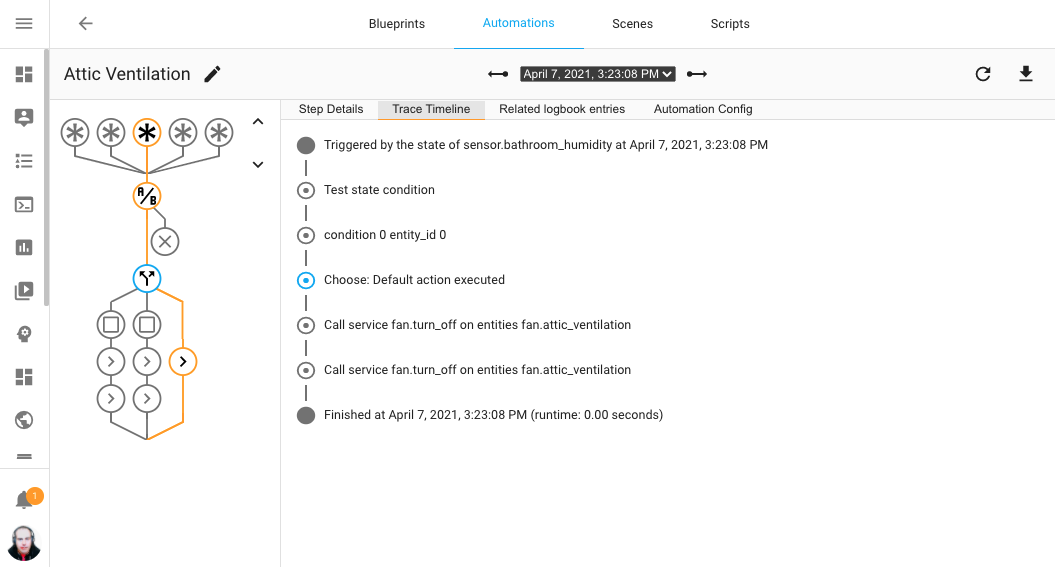 Screenshot showing the 自动化 trace of a previously ran 自动化.
上面的截图展示了一次自动化的历史运行记录。自动化会以交互式图表的形式呈现, 其中会高亮显示自动化实际走过的路径。图中的每个节点都可以点击,以查看该步骤中自动化发生了什么。 它会完整追踪一次自动化的执行过程。
如果某个自动化没有按预期运行,这个功能就能帮助你调试并理解它为什么会这样执行。
这个超级高级、又极其实用的功能,离不开 @emontnemery 为其打造的后端支持。 精美的图形展示由 @thomasloven 完成,而全部前端工作则由 @balloob 和 @bramkragten 负责。 大家干得太漂亮了,感谢你们!
此外,也特别感谢所有参与测试这个功能的(Beta)测试者,以及那些提供追踪样本、帮助我们修复 Bug 的朋友!
对这个功能有疑问?想看看它实际运行的样子?记得稍后锁定 2021.4 发布派对直播!
Home Assistant 分析
先别被这个标题吓到!
今天我们带来的是:Home Assistant Analytics。它采用自愿加入方式、注重隐私、公开透明,而且完全开源。这正是我们希望这个项目该有的样子。
@ludeeus 为这个新集成做了出色的工作。是否启用它,完全由你自己决定; 但我们可以保证,它从设计上就充分考虑了隐私。如果你怀疑?尽管去审查它! 所有内容都是开源的!
觉得这样还不够开放?我们还把结果公开出来,任何人都可以查看:
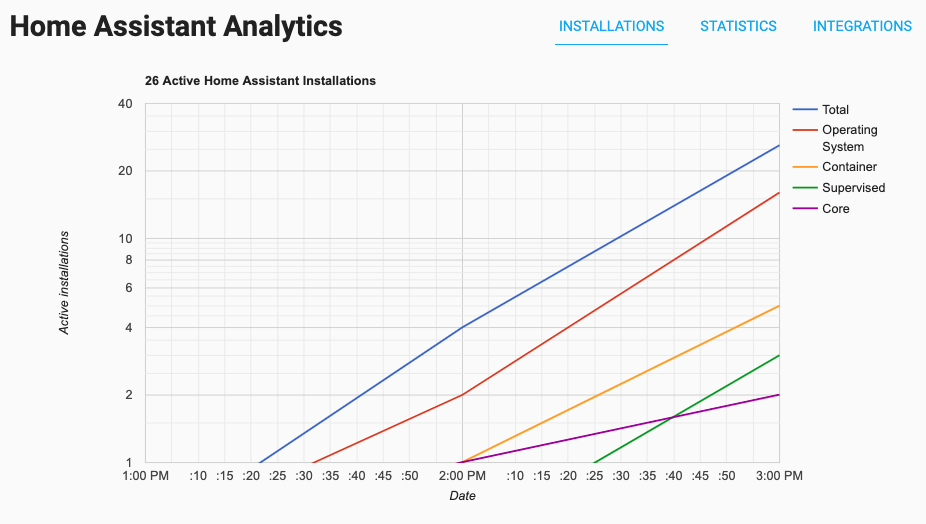 Screenshot of the Home Assistant Analytics website.
也许你想亲自看看公开结果:
https://analytics.home-assistant.io
那我们为什么要做这件事?因为它能帮助项目和所有贡献者了解很多信息,比如:哪些集成最常被使用。 这会极大帮助我们改进项目优先级安排,也能帮助我们说服厂商与 Home Assistant 合作,加入本地控制和更重视隐私的功能。
“可是 updater 以前不是已经做这件事了吗?”是的,不过 updater 实际上一直都有问题。 所以虽然我们曾经拿到过一些数据,但几乎没法真正使用(事实上可以说完全没法用)。 与其继续修它,我们现在有了一个更好的解决方案,也更符合项目目标。updater 仍然存在, 但它现在只负责一件事:提示是否有可用更新。
如果你愿意帮助这个项目,请启用 Home Assistant Analytics。我们会非常感激!
You can find the 设置 in the general 配置 options, or click the My Home Assistant button below to go directly to it. (Only visible to owner users)
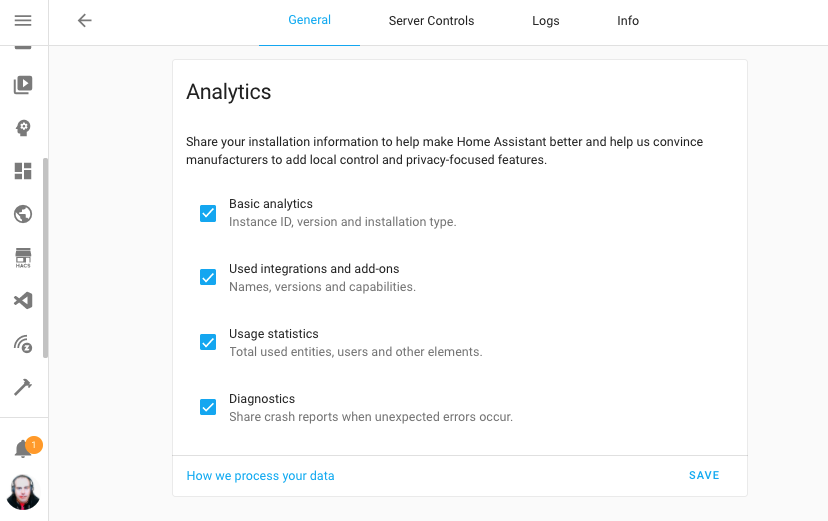 Screenshot of the Home Assistant Analytics options, you control the amount of
data you share.
Screenshot of the Home Assistant Analytics options, you control the amount of
data you share.
想了解它的工作原理以及会共享哪些数据, 请查看我们的文档。
Thanks for sharing already! ❤️
警告 for undefined variables in Templates
This feature is really cool. While technically a small improvement, it is a change that can impact you (as in "breaking"), but also, will greatly help you!
So imaging this little template: ``
Previously, if my_variable would not exist in the template or system as a
variable, Home Assistant would just ignore it and skip over it.
While this can be convenient, it can become problematic when it was misspelled or referring to a variable that doesn't exist at all. For example, if you would have mistyped it: ``, you would never know something is wrong, unless you spotted it.
从今天开始,Home Assistant 会通过日志中的警告把这件事明确告诉你!
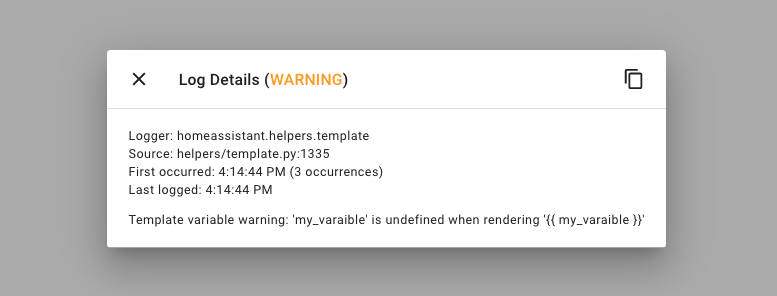 Screenshot of undefined variable warning log.
This helps to find templates that behave unexpectedly because the variable you thought was there, isn't. It is quite possible you get a bunch of warnings after upgrading to this release. Fixing those warnings, really helps to improve your setup.
So, what if a variable isn't always there, but I still want to use it? Well,
you can give it a default, for example:
. Or even a default value (10 in this example): .
Please note that these are just warnings for now. We plan to replace the warning with an error as of Home Assistant 2021.10 (in October).
筛选自动化、脚本与场景
Categorizing automations, is definitely one of the most requested things in our history. This became clear again during last year's month of what the heck and various issues/discussions/feature requests.
Suggestions for labels, folders, and many more have been created. However, we already have some great categorizing features in Home Assistant itself:
设备, Areas & 实体.
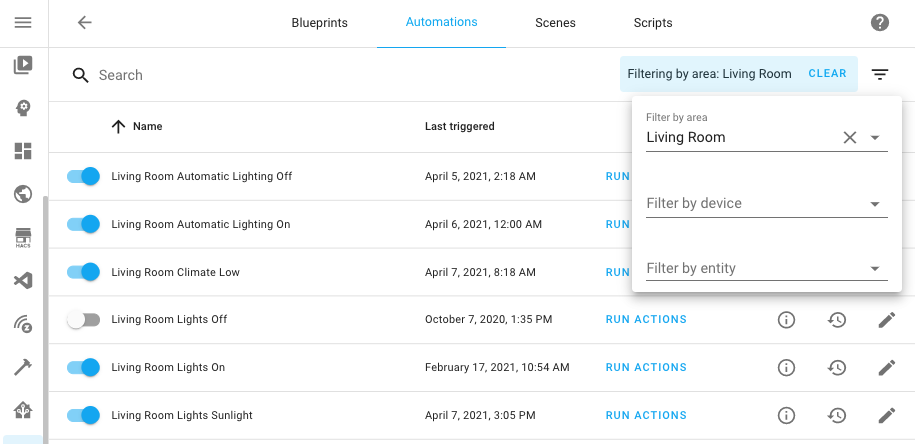 Screenshot of filtering automations by living room area.
从今天开始,你可以按区域、设备或实体来筛选自动化、脚本和场景。对于自动化和脚本,它甚至还能更进一步:自动找出那些会影响当前筛选区域、设备或实体的项目。
So, you can now look at the automations affecting your living room area (even if those automations itself are not in the living room area) and also filter the 自动化 list with just the ones that touch your thermostat.
Z-Wave JS update
So before we talk about The nice new things in Z-Wave JS, there are breaking changes in this release for the Z-Wave JS 集成 that could affect your existing automations. Be sure to read the backward-incompatible changes section for more info.
好了,现在来说点更有趣的!你现在可以直接在 Home Assistant 中配置每一个 Z-Wave 设备。当你在前端查看某个设备时,可以在设备页面上看到 CONFIGURE DEVICE 按钮。通过它,你就能管理并调整该设备(节点)专属的配置参数。
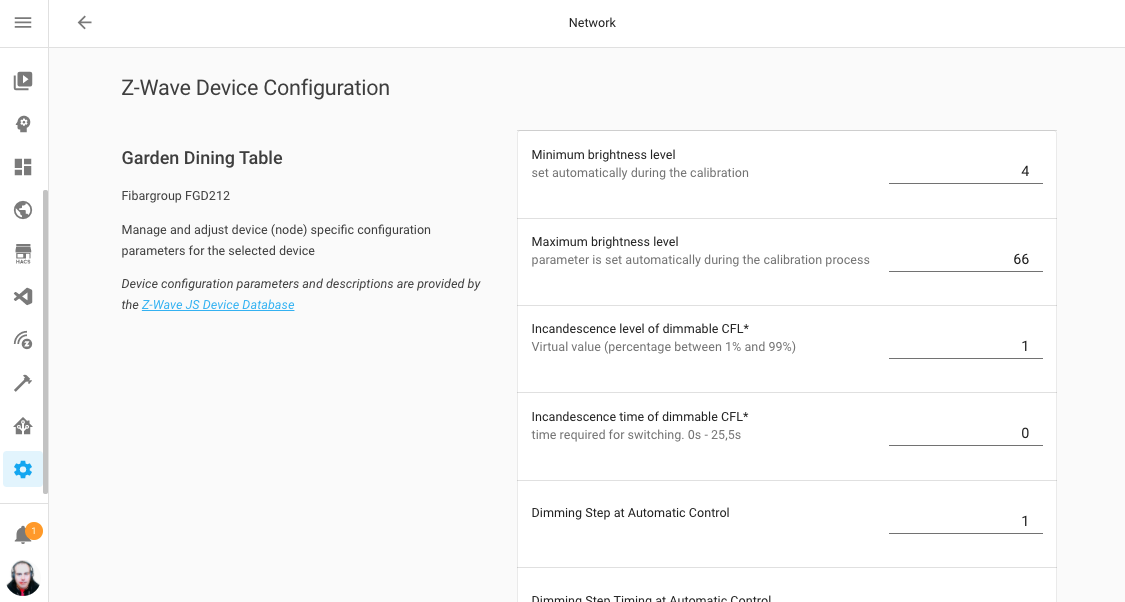 Screenshot of configuring a Z-Wave 设备 from within Home Assistant.
Furthermore two new, advanced, 服务 are introduced:
- , a 服务 that is capable of setting a value on a Z-Wave 设备 directly, bypassing Home Assistant.
- , a 服务 that will allow you to set 配置 parameters in bulk.
基于触发器的模板传感器
这次发布为一项相当高级、但也非常实用的新功能带来了初步支持:基于触发器及其携带数据进行更新的模板传感器。
Whenever the trigger fires, the template 传感器 will re-render and it will have access to the trigger data in the templates. This feature is a great way to create data based on webhook data, or have 传感器 be updated based on a time schedule.
See, for example, these two template 传感器 that update based on a single webhook trigger using data pushed into the webhook:
You can test this trigger 实体 with the following CURL command:
It is not just webhooks! Any trigger that you can use in automations, can be used to update these types of template 传感器.
For this release, it only works for 传感器; other platforms are not supported yet.
Please note: that these new template 传感器 are configured under the template:
key in the 配置 and is using a new 配置 format and keys.
For more information, see the documentation.
脚本字段的 UI 选择器
你现在可以在脚本字段参数中使用 UI 选择器了。这把蓝图拥有的同类 UI 能力带到了脚本中,让你能够创建更高级的脚本,并在 UI 中轻松复用,甚至可以直接在 UI 自动化中使用。
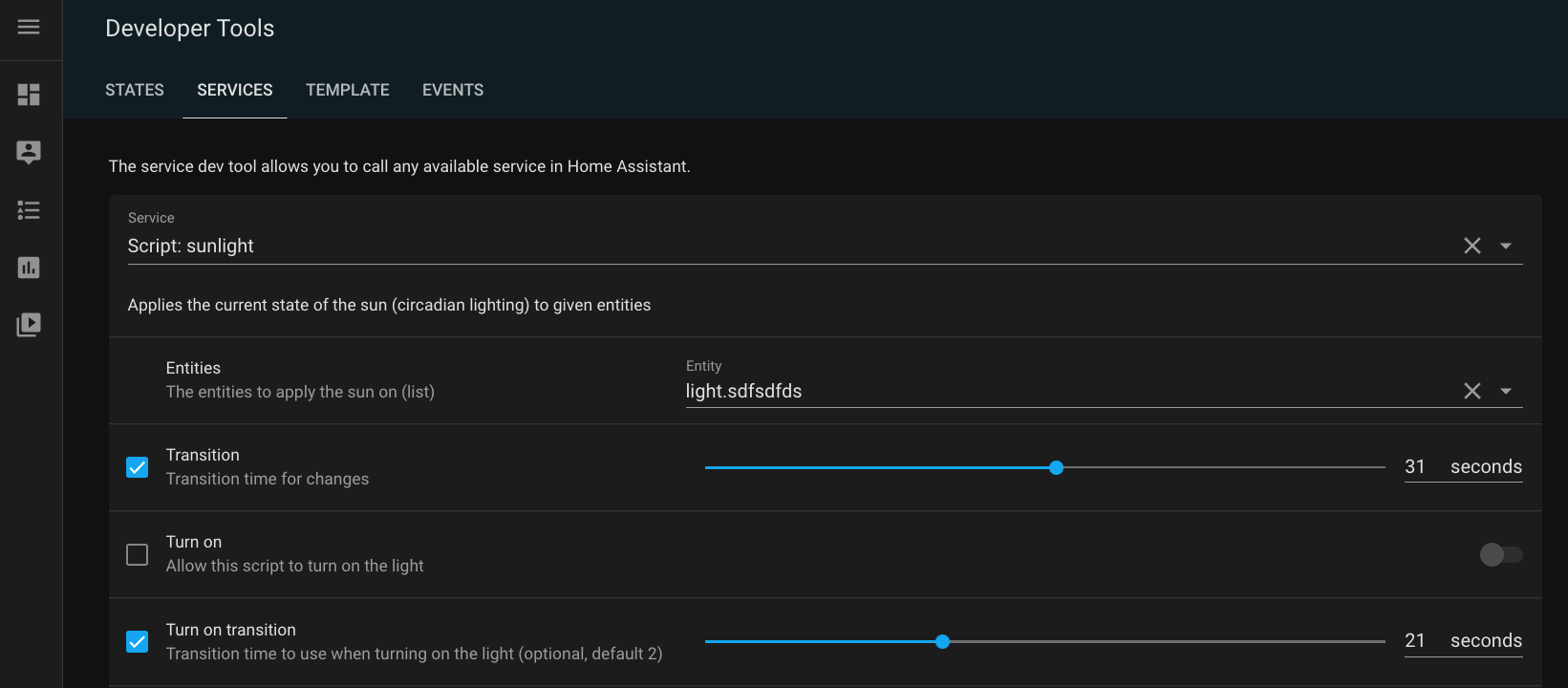 Screenshot of scripts using selects in its fields.
For more details on these new field 配置 options, see the scripts documentation
其他值得注意的变化
这次发布还有更多值得一看的内容;下面是一些其他值得注意的变化:
- The Supervisor is now also in the 集成 仪表盘, and provides 实体 for all kinds of things! These 实体 are disabled by default, so head over to the 集成 and see if there anything in there you could use. Thanks @raman325!
- The develo Home Control (@Shutgun), Apple TV (@bdraco), August (@bdraco) and MQTT (@RadekHvizdos) 集成 can now suggest areas.
- You can now configure additional Google Cast 设备 by IP address via the 集成 options. This is helpful in case of mDNS issues. Thanks @emontnemery!
- @joshmcrty added support for selecting the number formatting you like on your profile! Awesome work!
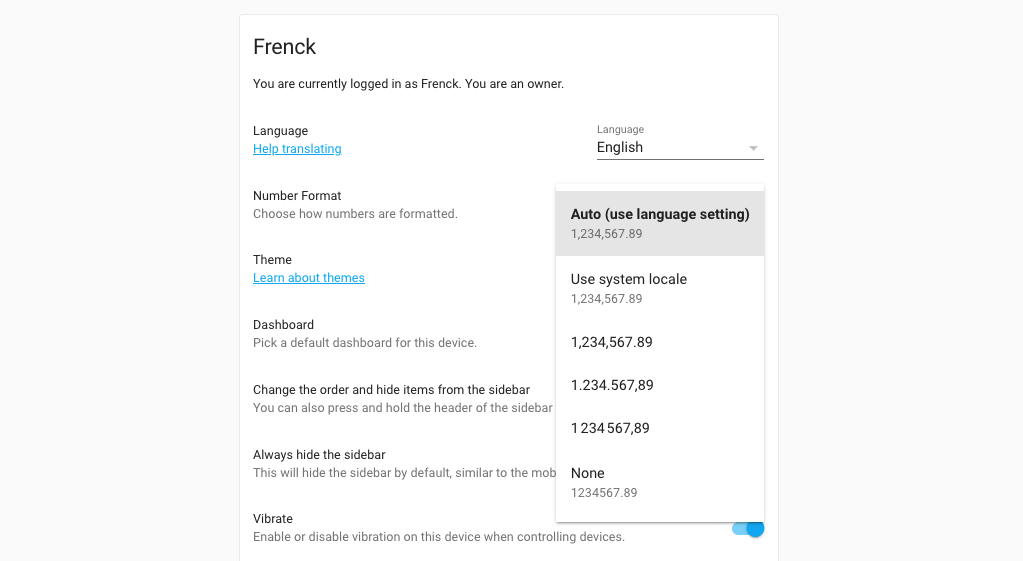 Screenshot of selecting the number format you prefer.
- @marvin-w added support for unique IDs to KNX 实体. So, as a KNX user you can now tweak your 实体 in the frontend and group them into areas!
- HomeKit now supports CO/CO2 设备 classes, thanks to @iMicknl!
- @robertdelpeut added monthly and yearly totals to the DSMR 传感器, thanks!
- Hyperion users can now hide certain effects from the UI using 集成 options. Thanks, @dermotduffy!
- Got that one message in your logs that you don't care about? @jshufro added support for filtering log messages using regular expression!
- The Plex 集成 now provides library count 传感器! These are disabled by default by can be enabled if you like that. Thanks, @jjlawren.
- The Quickbar had an update from @donkawechico! So press those C & E keys on you keyboard to see those beautiful new labels.
新集成
我们欢迎以下新集成加入这次发布:
- Analytics, added by @ludeeus
- Legrand Home+ Control, added by @chemaaa
- Pentair ScreenLogic, added by @dieselrabbit
新平台
以下集成新增了平台支持:
- Gogogate2 and iSmartGate provides battery 传感器 for wiresless door 传感器, added by @emontnemery
- Panasonic Viera has now support for remotes, added by @joogps
- Philips TV now has support for remotes, added by @elupus
- Rheem EcoNet Products now have support for climate 实体, added by @w1ll1am23.
- Supervisor 集成 now has 实体 and 服务 for things like versions and pending updates, added by @raman325
- Tado now has weather support, added by @Noltari
现已支持通过 UI 设置的集成
以下集成现已可通过 Home Assistant UI 进行设置:
- Xiaomi Miio, fans, 传感器 and lights, done by @starkillerOG
- Hive, done by @KJonline
- Verisure, done by @frenck
Release 2021.4.1 - April 8
- Check all endpoints for zwave_js.climate fan mode and operating state (@raman325 - #48800) (zwave_js docs)
- Add missing super call in Verisure Camera 实体 (@JohNan - #48812) (verisure docs)
- Fix iCloud extra attributes (@nzapponi - #48815) (icloud docs)
- Replace redacted stream recorder credentials with '****' (@emontnemery - #48832) (stream docs)
- Fix mysensor cover closed state (@MartinHjelmare - #48833) (mysensors docs)
- Validate supported_color_modes for MQTT JSON light (@emontnemery - #48836) (light docs) (mqtt docs)
- Bump speedtest-cli to 2.1.3 (@spacegaier - #48861) (speedtestdotnet docs)
- Correct wrong x in frontend manifest (@bramkragten - #48865) (frontend docs)
- Fix motion_blinds gateway signal strength 传感器 (@starkillerOG - #48866) (motion_blinds docs)
- Fix possibly missing changed_by in Verisure Alarm (@frenck - #48867) (verisure docs)
- Fix optional data payload in Prowl messaging 服务 (@frenck - #48868) (prowl docs)
- Update frontend to 20210407.2 (@bramkragten - #48888) (frontend docs)
Release 2021.4.2 - April 9
- Account for openweathermap 'dew_point' not always being present (@hanskroner - #48826) (openweathermap docs)
- Catch expected errors and log them in rituals perfume genie (@milanmeu - #48870) (rituals_perfume_genie docs)
- Extend media source URL expiry to 24h (@emontnemery - #48912) (media_source docs)
- Bump pykodi to 0.2.4 (@cgtobi - #48913) (kodi docs)
- Handle exceptions when looking for new version (@ludeeus - #48922) (version docs)
- Change discovery timeout from 10 to 60 (@ludeeus - #48924) (hassio docs)
- Fix "notify.events" trim() issue + add initial tests (@spacegaier - #48928) (notify_events docs)
- Bump pykodi to 0.2.5 (@cgtobi - #48930) (kodi docs)
- Bump ZHA quirks library (@dmulcahey - #48931) (zha docs)
- Extend Google Cast media source URL expiry to 24h (@Ph-Wagner - #48937) (cast docs)
- Fix Plex live TV handling (@jjlawren - #48953) (plex docs)
Release 2021.4.3 - April 10
- Add TTS engines in config.components (@ludeeus - #48939) (tts docs)
- Implement percentage_step and preset_mode is not not speed fix for MQTT fan (@jbouwh - #48951) (mqtt docs)
- Bump devolo Home Control to support old websocket-client versions again (@Shutgun - #48960) (devolo_home_control docs)
- Fix config forwarding (@balloob - #48967) (template docs)
- Prevent ping id allocation conflict with device_tracker (@bdraco - #48969) (ping docs)
- Fix Shelly button 设备 triggers (@thecode - #48974) (shelly docs)
- Update python-smarttub to 0.0.23 (@mdz - #48978) (smarttub docs)
Release 2021.4.4 - April 13
- Move cast config flow tests to test_config_flow (@emontnemery - #48362) (cast docs)
- Bump nexia to 0.9.6 (@bdraco - #48982) (nexia docs)
- Set Lyric hold time to use local time instead of utc (@timmo001 - #48994) (lyric docs)
- Fix Shelly brightness offset (@thecode - #49007) (shelly docs)
- Bump ha-philipsjs to 2.7.0 (@elupus - #49008) (philips_js docs)
- Fix use search instead of match to filter logs (@frenck - #49017) (logger docs)
- Resolve potential roku setup memory leaks (@ctalkington - #49025) (roku docs)
- Bump aiohomekit to 0.2.61 (@bdraco - #49044) (homekit_controller docs)
- Fix cast options flow overwriting data (@emontnemery - #49051) (cast docs)
- Quote media_source paths (@emontnemery - #49054) (http docs)
- mqtt fan percentage to speed_range and received speed_state fix (@jbouwh - #49060) (mqtt docs)
- Catch unknown equipment values (@dieselrabbit - #49073) (screenlogic docs)
- Downgrade logger message about homekit id missing (@bdraco - #49079) (homekit_controller docs)
- Upgrade maxcube-api to 0.4.2 (@unaiur - #49106) (maxcube docs)
- Check all endpoints for zwave_js.climate hvac_action (@jjlawren - #49115) (zwave_js docs)
Release 2021.4.5 - April 16
- Bump aiodiscover to 1.3.4 (@bdraco - #49142) (dhcp docs)
- Fix setting up remotes that lack a supported features list in homekit (@bdraco - #49152) (homekit docs)
- Don't receive homeassistant_* events from MQTT eventstream (@emontnemery - #49158) (mqtt_eventstream docs)
- Set deprecated supported_features for MQTT JSON light (@emontnemery - #49167) (light docs) (mqtt docs)
- Upgrade spotipy to 2.18.0 (@frenck - #49220) (spotify docs)
- Fix race when restarting script (@emontnemery - #49247)
- Fix mysensors 传感器 protocol version check (@MartinHjelmare - #49257) (mysensors docs)
- Fix Coronavirus 集成 robustness (@frenck - #49287) (coronavirus docs)
- Mark camera as a base platform (@ludeeus - #49297)
Release 2021.4.6 - April 19
- Apply Precision/Scale/Offset to struct in modbus 传感器 (@janiversen - #48544) (modbus docs)
- Upgrade pyMetno to 0.8.2 (@Danielhiversen - #49308) (met docs) (norway_air docs)
- Fix exception in roomba discovery when the 设备 does not respond on the first try (@bdraco - #49360) (roomba docs)
- Fix deadlock when restarting scripts (@emontnemery - #49410)
- Google report state: thermostatMode should be a string, not null (@bramkragten - #49342) (google_assistant docs)
If you need help...
如果你需要帮助,欢迎前往我们非常活跃的 论坛,或加入我们的 Discord 聊天。
如果这次发布带来了问题,请到我们的 问题追踪器 提交反馈,并确保完整填写 issue 模板中的所有字段。
Backward-incompatible changes
Below is a listing of the breaking change for this release, per subject or 集成. Click on one of those to read more about the breaking change for that specific item.
Custom 集成 now require a 版本 key in their manifest file, this
also means that all custom 集成 now require a manifest file.
If you are using a legacy custom 集成 like custom_components/awesome.py
this now needs to move to custom_components/awesome/__init__.py so you can
add custom_components/awesome/manifest.json to it.
For more information about 集成, manifests have a look here: https://developers.home-assistant.io/docs/creating_integration_manifest
For now, this will create a warning on startup. But this will be blocked from loading if it's missing a version in the manifest starting with Home Assistant 2021.6.
If you see these warnings, please report the issue with the author of that custom 集成.
(@ludeeus - [#45919])
The Xiaomi Miio Fan, 传感器 & Light platforms can now be configured via the UI.
If you currently have them configured using YAML 配置, they will be automatically imported into the UI on upgrade. After upgrading, you can safely remove the YAML 配置 for these 设备.
(@starkillerOG - #46866 #46964 #47161) (xiaomi_miio docs)
The config_file YAML option for KNX is deprecated, please remove it from
your YAML 配置 if you have it configured.
Float types are no longer valid for 传感器 / expose 传感器 type because the trailing zeros caused troubles when splitting to two integers.
(@farmio - #46874 #48005) (knx docs)
The LIFX Legacy platform is deprecated and will be removed in Home Assistant Core 2021.6.0. Use the LIFX 集成 instead.
(@frenck - #47235) (lifx_legacy docs)
At this moment, we are unsure if this is a breaking change or not, so we list it, just to be sure.
We are now explicitly only supporting secrets inside your Home Assistant Core and Lovelace 配置 files (and anything included from there). Secrets are no longer supported in other loaded YAML files.
This change should not affect regular users of Home Assistant, however, we have been made aware that some custom 集成 may cause problems. If you are a user of Dwains theme, the HomeKit Infused theme or lovelace_gen, please make sure to update those or check with the upstream project.
The HomeKit auto_start 配置 option has been deprecated. It dates
from the "old"-days to prevent 实体 not being available yet when HomeKit
started. However, nowadays, Home Assistant ensures all 实体 are available
on startup instantly.
Therefore, this option is no longer needed. If you still have it in your 配置 (and have automations for it to start HomeKit); those can be safely removed as well.
(@frenck - #47470) (homekit docs)
The Hive 集成 can now be configured via the UI and configuring it via YAML is now deprecated. If you have an existing YAML 配置, it will be automatically imported on upgrade. After the upgrade, the YAML 配置 can be safely removed.
(@KJonline - #47300) (hive docs)
Wake on LAN component now assumes a dummy state if a host is not provided.
Before, the state was only based on the host config parameter, which is
listed as optional.
With this change the host config is still optional, but if it is not defined,
the state of the switch is simply the last action that was taken. If you're
relying on a Wake on LAN 实体 in an 自动化 or script, please make sure
that your assumptions about state still hold.
(@ntilley905 - #47719) (wake_on_lan docs)
The Verisure 集成 largely rewritten and is now configured via the Home Assistant user interface.
Your existing YAML 配置 will be automatically imported when upgrading Home Assistant Core. After the upgrade completes, you can safely remove the existing Verisure YAML 配置.
If after upgrade your Verisure alarm system doesn't appear, please check your integrations 仪表盘. In rare cases (with accounts that have access to multiple Verisure alarm systems), it might be needed to select the specific Verisure alarm system to migrate.
This also means the YAML 配置 for the Verisure 集成 is now deprecated and will be removed in Home Assistant Core 2021.6.0.
The 服务 provided by the Verisure 集成 have changed to match the standard way of how Home Assistant handles 服务. The following 服务 are affected by this change:
Previously these 服务 required a device_serial parameter, they have now
changed to accept a regular Home Assistant 实体, 设备 or area as a target.
For example:
If you used any of these 服务 in your automations or scripts, please make sure you update them after updating to Home Assistant Core 2021.4.0.
(@frenck - #47880 #47905) (verisure docs)
Before this change, all 传感器 in an unknown state when the Prometheus exporter
starts (i.e.: when Home Assistant starts) were being setup and metrics were
exported with a default value of 0. Now, they will not be exported anymore
(unless they become available again) - they can be found by searching for
metrics where entity_available is 0 (will reveal both 实体 that are
in unknown or unavailable state).
You should update any automations, scripts or 3rd party data consumers that
depend on the old prometheus export with default value 0.
(@inetAnt - #47840) (prometheus docs)
August has fully transitioned to 配置 via UI. YAML 配置 is no longer supported. Existing YAML 配置 has already been imported automatically in the previous releases and can now safely be removed from your 配置 files.
(@bdraco - #47615) (august docs)
The Workday 集成 used to operate on the timezone configured on the system, instead of the timezone configured in Home Assistant. This can become problematic, for example, if your system runs on UTC, but you are 11 hours ahead of that.
This behavior has been correct and the workday 传感器 now rely on the timezone configured in Home Assistant. You might need to adjust to this, if you have automations, scripts or templates that previously manually corrected this.
(@schiermi - #47927) (workday docs)
The datetime returned in the last_recording_start_time state attribute of the
uvc camera 实体 was changed from local time to be UTC time. All times in state
attributes must be UTC time. You should update any automations or scripts that
depends on this state attribute.
Zwave JS climate 设备 that report their temperature in Fahrenheit will now report in tenth precision instead of whole precision, when the 设备 supports it.
Previously, when those 设备 reported a temperature of, for example, 67.6F it would be rounded and reported in whole precision as 68F. Those 设备 will now report the temperature with tenth precision, thus 67.6F.
This means that if you currently have 自动化 that depends on the temperature reported by these 设备 you may have to adjust their functionality to work properly with how the temperature is now being reported.
(@chilicheech - #48133) (zwave_js docs)
The event names for Z-Wave JS value notification (central scene) events will
now be called zwave_js_value_notification and notification (e.g.,
locking or unlocking a lock) events will now be called zwave_js_notification.
For notification events, the properties that Z-Wave JS provides have changed,
and we have changed the HA event property names to reflect that. The parameter
that used to be called label (The human-readable label for the
notification event) is now called event_label as there is now a
new label property which is the human-readable label for the notification
type.
In addition, we now support notification events for two command classes, Entry Control and Notification, so the command class is reflected in the event data. You can learn more about the different command class notifications and what each parameter means for the different notifications here:
https://zwave-js.github.io/node-zwave-js/#/api/node?id=quotnotificationquot
(@raman325 - #48094) (zwave_js docs)
Previously, during template rendering, undefined variables are replaced with an empty string. As an example the template `` will render as the empty string. This is error prone as it means misspelled or non existent variables are silently accepted by the template engine.
Starting this release, there will be a warning message in the log when a variable is undefined, but it is still rendered as the empty string. So, besides the warning, right now, nothing changes.
Starting with Home Assistant 2021.10, undefined variables will be treated as an error and template rendering will fail.
To allow rendering of templates where it is expected that a variably may not
be defined without logging a warning or failing to render, use the default
filter: ``.
(@emontnemery - #48140)
Zeroconf will now only listen on the default interface by default.
If you need to broadcast mDNS responses to all interfaces or retain the
previous behavior, set default_interface
to false.
With multiple interfaces, mDNS traffic processing happened numerous times since the duplicate packets appeared on each interface. This behavior was not desirable for most cases which necessitated a change in the default.
The Home Assistant Operating System has multiple interfaces and was affected.
(@bdraco - #48302) (zeroconf docs)
The YAML 配置 for the Google Cast 集成 has been deprecated and will be fully removed in Home Assistant Core 2021.6.0.
If you have existing YAML 配置 for the Google Cast 集成, please remove it from your 配置.
(@emontnemery - #47269) (cast docs)
Vacuum attributes clean start, clean stop and camera
attribute generated_at are now in a timestamp format.
New format is "2021-03-20T10:35:47Z". This allow 自动化 to use their
value based on as_timestamp().
If you relies on these attributes in your 自动化 or script, you might need to adjust them to match this change.
(@chemelli74 - #48150) (neato docs)
The fan entity model has been changed. This impacts the way the MQTT Fan supports speeds and the following 配置 options are deprecated and will be removed in Home Assistant Core 2021.7.0:
speed_command_topicspeed_state_topicspeed_value_templatespeedspayload_off_speedpayload_low_speedpayload_medium_speedpayload_high_speed
Additionally,preset_modes and percentage are added to replace the legacy
model supporting only three speeds low, medium and high.
Therefore, command templates for 状态, oscillation, preset_mode and
percentage are introduced.
(@jbouwh - #47944 #48413) (mqtt docs)
Block detectable I/O in the event loop
We added a warning when this happens last April and gave developers a year to fix the instability. We now prevent the instability by raising RuntimeError when code attempts to do known I/O in the event loop instead of the executor.
We now provide a suggestion on how to fix the code that is causing the issue.
You can now use the new style 配置 when configuring the modbus 集成. The existing 配置 style is kept, allowing you to change gradually.
Remark the existing 配置 style will be removed in a couple of releases.
Example of an existing 配置:
Same 配置 in new style:
(@janiversen - #46591) (modbus docs)
The reporting and include_used_components 配置 options have now
been deprecated, the updater 集成 will no longer report any analytics.
The analytics has moved to its own 集成.
See the analytics integration for more details on
how to configure it.
(@ludeeus - #48518) (updater docs)
The SolarEdge 配置 via YAML has been deprecated and will be removed in a future release of Home Assistant. The 集成 is using a 配置 via the UI for two years now.
Existing YAML configurations are automatically imported into the UI, and can be safely removed from your YAML 配置.
(@frenck - #48533) (solaredge docs)
MQTT JSON light now supports color_mode which should be used together with
supported_color_modes to signal the light's features.
Feature flags color_temp, hs, rgb, white_value, xy are all deprecated
and support will be removed in 2021.10.
(@emontnemery - #47993) (mqtt docs)
When restarting Home Assistant, the previous ping 传感器 state is now restored and then updated in the background to allow startup to proceed without the risk of timing out.
When the user has many ping 传感器, the ping 集成 could timeout starting up because each ping has to happen in the executor.
(@bdraco - #43869) (ping docs)
设备 representing Plex Web media_player 设备 are now removed. Any
automations, scenes, or scripts based on the 设备 will need to be changed
to use the media_player 实体.
(@jjlawren - #48369) (plex docs)
Farewell to the following
The following 集成 are no longer available as of this release:
- Griddy has been removed, Ercot shut down Griddy after the massive power mess in Texas in mid February. (@bdraco - #47218)
All changes
- Bump version to 2021.4.0dev0 (@frenck - #47017)
- Convert discovery helper to use dispatcher (@balloob - #47008) (discovery docs) (octoprint docs)
- Upgrade TwitterAPI to 2.6.8 (@fabaff - #47019) (twitter docs)
- Add Xiaomi Miio fan config flow (@starkillerOG - #46866) (xiaomi_miio docs) (breaking-change)
- hm climate: Return PRESET_NONE instead of None (@FHeilmann - #47003) (homematic docs)
- Normally there should only be one battery 传感器 per 设备 from deCONZ. (@Kane610 - #46761) (deconz docs)
- Upgrade icmplib to 2.0.2 (@fabaff - #47039) (ping docs)
- Clean up discovery 集成 (@balloob - #47022) (daikin docs) (discovery docs) (freebox docs)
- Upgrade pyowm to 3.2.0 (@fabaff - #47042) (openweathermap docs)
- Upgrade sendgrid to 6.6.0 (@fabaff - #47041) (sendgrid docs)
- Add remote control platform to Panasonic Viera (@joogps - #42450) (panasonic_viera docs) (new-platform)
- Bump gios library to version 0.2.0 (@bieniu - #47050) (gios docs)
- Replace wrong domain returned from xbox api 2.0 (@Melantrix - #47021) (xbox docs)
- Add zeroconf discovery to Freebox (@Quentame - #47045) (discovery docs) (freebox docs)
- Clean up Netatmo webhook handler (@cgtobi - #47037) (netatmo docs)
- Fix bond typing in config flow (@bdraco - #47055) (bond docs)
- Fix Z-Wave JS API docstrings (@cgarwood - #47061) (zwave_js docs)
- Upgrade youtube_dl to version 2021.02.22 (@chpego - #47078) (media_extractor docs)
- Bump pychromecast to 9.0.0 (@emontnemery - #47086) (cast docs)
- Remove flaky climacell test (@raman325 - #47080) (climacell docs)
- Add suggested_area support to devolo Home Control (@Shutgun - #47063) (devolo_home_control docs)
- Guard zwave_js missing nodes in websocket api (@cgarwood - #47096) (zwave_js docs)
- Improve handling for recording start of nest cam stream (@allenporter - #47144) (stream docs)
- Change 设备 class of window covers to shade (@Kane610 - #47129) (deconz docs)
- Bump airly library to version 1.1.0 (@bieniu - #47163) (airly docs)
- Clean up mqtt_room (@tkdrob - #46882) (mqtt_room docs)
- Tweak Tasmota fan typing (@emontnemery - #47175) (tasmota docs)
- Apply recommendations to synology_dsm (@mib1185 - #47178) (synology_dsm docs)
- Fix flaky hls keepalive test (@allenporter - #47186) (stream docs)
- Remove turn_on and turn_off from SmartTub pump switches (@mdz - #47184) (smarttub docs)
- Move SmartTub climate constants to module level (@mdz - #47190) (smarttub docs)
- Explain why should_pool is True initially for wemo (@esev - #47191) (wemo docs)
- Cleanup SmartTub filtration cycles (@mdz - #47192) (smarttub docs)
- Handle stream failures in recorder (@allenporter - #47151) (stream docs)
- Enforce typing in bond (@bdraco - #47187) (bond docs)
- Update pylint (@cdce8p - #47205)
- Add hassio addon_update 服务 and hassio config entry with addon and OS 设备 and 实体 (@raman325 - #46342) (hassio docs) (new-platform)
- Improve CI workflow (@cdce8p - #46696)
- Revert const replacement in fritzbox_callmonitor (@cgtobi - #47211) (fritzbox_callmonitor docs)
- Remove griddy 集成 (@bdraco - #47218) (griddy docs)
- KNX 服务 send and event_register accept multiple group addresses (@farmio - #46908) (knx docs)
- Deprecate knx config_file (@farmio - #46874) (knx docs) (breaking-change)
- Restore pylint concurrency (@frenck - #47221)
- Parameterize SmartTub tests (@mdz - #47189) (smarttub docs)
- Upgrade coverage to 5.5 (@frenck - #47227)
- Upgrade spotipy to 2.17.1 (@frenck - #47228) (spotify docs)
- Bump mcstatus to 5.1.1 (@jdeath - #47169) (minecraft_server docs)
- Overhaul command_line tests (@dermotduffy - #46682) (command_line docs)
- Minor Hyperion mypy cleanups (@dermotduffy - #45765) (hyperion docs)
- Address late hassio review (@raman325 - #47229) (hassio docs)
- KNX address constant (@farmio - #47196) (knx docs)
- Add support for a list of known hosts to Google Cast (@emontnemery - #47232) (cast docs)
- Add remote control support to philips_js (@elupus - #47249) (philips_js docs) (new-platform)
- Deprecate LIFX Legacy 集成 (@frenck - #47235) (lifx_legacy docs) (breaking-change)
- Fix typo in plaato strings (@milanmeu - #47245) (plaato docs)
- Remove rounding from The Things Network (@stephan192 - #47157) (thethingsnetwork docs)
- Add battery 传感器 for gogogate2 wireless door 传感器 (@emontnemery - #47145) (gogogate2 docs) (new-platform)
- Fix typing on fan percentage (@bdraco - #47259)
- Lint suppression cleanups (@scop - #47248)
- Clean up constants (@tkdrob - #46948)
- Add init test to Freebox (@Quentame - #46998) (freebox docs)
- Add 服务 for izone airflow min/max (@Nick-Adams-AU - #45727) (izone docs)
- Fix izone flake8 error (@frenck - #47276) (izone docs)
- Add force_update to tasmota 传感器 (@rlehfeld - #47052) (tasmota docs)
- Upgrade isort to 5.7.0 (@scop - #47279)
- Add disk 传感器 to Freebox (@Quentame - #46689) (freebox docs)
- Uniformize platform setup (@Quentame - #47101)
- Clean up secret loading (@balloob - #47034) (breaking-change)
- KNX remove custom deprecation warnings (@farmio - #47238) (knx docs)
- Add activity properties to remote 实体 model (@bdraco - #47237) (harmony docs) (remote docs)
- bump python-smarttub to 0.0.19 (@mdz - #47294) (smarttub docs)
- Remove name from keenetic-ndms2 strings (@milanmeu - #47113) (keenetic_ndms2 docs)
- Correct gogogate2 battery 传感器 attributes (@emontnemery - #47302) (gogogate2 docs)
- Update izone 服务.yaml and remove entity_id from schema. (@Nick-Adams-AU - #47305) (izone docs)
- Fix Supervisor platform coordinator data lookup (@MartinHjelmare - #47308) (hassio docs)
- Philips JS correct post review comments (@elupus - #47247) (philips_js docs)
- Fix grammar in pi_hole logs (@tkdrob - #47324) (pi_hole docs)
- Add LZW36 设备 schema to zwave_js discovery (@firstof9 - #47314) (zwave_js docs)
- Initial 自动化 tracing (@emontnemery - #46755) (自动化 docs) (config docs) ([script docs])
- Fix secrets in files included via include_dir_list (@frenck - #47350)
- Update Solax library to 0.2.6 (@ppetru - #47384) (solax docs)
- Update browse_media.py (@cgtobi - #47414) (xbox docs)
- Fix typo in docs link for forked_daapd (@Cooper-Dale - #47413) (forked_daapd docs)
- Spellcheck on Synology component (@systemcrash - #47451) (synology_dsm docs)
- Add allenporter to stream codeowners (@uvjustin - #47431) (stream docs)
- Limit log spam by ESPHome (@amelchio - #47456) (esphome docs)
- Clean up constants (@tkdrob - #47323)
- Prevent Zerproc leaving open unnecessary connections (@emlove - #47401) (zerproc docs)
- Deprecate HomeKit auto start (@frenck - #47470) (homekit docs) (breaking-change)
- Convert kulersky to use new async backend (@emlove - #47403) (kulersky docs)
- Increase test coverage of UniFi 集成 (@Kane610 - #46347) (unifi docs)
- Typing tweak to the Elgato 集成 (@frenck - #47471) (elgato docs)
- Improve restoring UniFi POE 实体 state (@Kane610 - #47148) (unifi docs)
- Update ZHA dependencies (@Adminiuga - #47479) (zha docs)
- Move AsusWrt 传感器 update logic in router module (@ollo69 - #46606) (asuswrt docs)
- Complete typing on TwenteMilieu 集成 (@frenck - #47480) (twentemilieu docs)
- Complete typing on Verisure 集成 (@frenck - #47482) (verisure docs)
- Add OPENING & CLOSING state to MySensors cover (@FidgetyRat - #47285) (mysensors docs)
- Upgrade upcloud-api to 1.0.1 (@scop - #47501) (upcloud docs)
- Merge action and condition traces (@emontnemery - #47373) (自动化 docs)
- Disable audio stream when ADTS AAC detected (@uvjustin - #47441) (stream docs)
- Complete typing on AdGuard Home 集成 (@frenck - #47477) (adguard docs)
- Add precipitation probability forecast to owm (@N1c093 - #47284) (openweathermap docs)
- Add 设备 classes for CO and CO2 measurements (@Adminiuga - #47487) (传感器 docs)
- Change default homekit ports to 21063 and 21064 (@bdraco - #47491) (homekit docs)
- Increase ESPHome log level on first connection failure (@amelchio - #47547) (esphome docs)
- Improve common structure in UniFi 设备 tracker tests (@Kane610 - #47526) (unifi docs)
- Correctly close lacrosse on homeassistant stop (@jplitza - #47555) (lacrosse docs)
- Clean up Lutron Caseta (@tkdrob - #47534) (lutron_caseta docs)
- Clean up kmtronic (@tkdrob - #47537) (kmtronic docs)
- Round miles in myChevy 传感器 (@austinmroczek - #46879) (mychevy docs)
- Remove @newAM from hdmi_cec codeowners (@newAM - #47542) (hdmi_cec docs)
- Bump actions/stale from v3.0.17 to v3.0.18 (@dependabot - #47612)
- Update rokuecp to 0.8.1 (@ctalkington - #47589) (roku docs)
- Upgrade elgato to 2.0.1 (@frenck - #47616) (elgato docs)
- Upgrade pre-commit to 2.11.0 (@frenck - #47618)
- Add support for Flo "pucks" (@adamjernst - #47074) (flo docs)
- Allow 10mV precision for ZHA battery 传感器 实体 (@Adminiuga - #47520) (zha docs)
- Add feels like temperature 传感器 to OpenWeatherMap (@freekode - #47559) (openweathermap docs)
- Code cleanup for SmartTub 集成 (@mdz - #47584) (smarttub docs)
- Upgrade pillow to 8.1.2 (@frenck - #47619)
- Add (some) of ZCL concentration clusters to ZHA component (@B-Hartley - #47590) (zha docs)
- Store 自动化 traces indexed by run_id (@emontnemery - #47509) (自动化 docs)
- Add title key to allow mobile app title translation to other languages (@Antoni-Czaplicki - #46593) (mobile_app docs)
- Add suggested_area support to Apple TV (@bdraco - #47015) (apple_tv docs)
- Remove self as code owner for mylink (@bdraco - #46242) (somfy_mylink docs)
- Config flow to allow marking itself as confirm only (@balloob - #47607)
- Fix I-frame interval in stream test video (@uvjustin - #47638)
- Add WS command to get a summary of 自动化 traces (@emontnemery - #47557) (自动化 docs) (config docs)
- Add type hints to LightEntity (@thecode - #47024) (light docs)
- Ensure bond light follows proper typing (@spacegaier - #47641) (bond docs)
- Include changed variables in 自动化 trace (@emontnemery - #47549)
- Update attrs to 20.3.0 (@scarface-4711 - #47642)
- Add option to reverse switch behaviour in KMTronic (@dgomes - #47532) (kmtronic docs)
- Upgrade sentry-sdk to 1.0.0 (@frenck - #47626) (sentry docs)
- Upgrade aiohttp to 3.7.4.post0 (@frenck - #47627)
- Fix maxcube thermostat transition from off to heat mode (@unaiur - #47643) (maxcube docs)
- Catch dhcp setup permission errors sooner (@bdraco - #47639) (dhcp docs)
- Harmony: set confirm only (@bdraco - #47617) (harmony docs)
- Add error message to options flow if connection fails for nut 集成 (@mib1185 - #46972) (nut docs)
- Shelly: set confirm only (@balloob - #47608) (shelly docs)
- Revert Shelly temperature 传感器 name change (@thecode - #47664) (shelly docs)
- Replace 实体.device_state_attributes with 实体.extra_state_attributes (@emontnemery - #47304)
- Update tests a-b to use async_get() instead of async_get_registry() (@emontnemery - #47651)
- Update tests t-z to use async_get() instead of async_get_registry() (@emontnemery - #47655)
- Update tests p-s to use async_get() instead of async_get_registry() (@emontnemery - #47654)
- Update tests c-h to use registry async_get (@emontnemery - #47652)
- Update tests i-o to use async_get() instead of async_get_registry() (@emontnemery - #47653)
- Add TYPE_CHECKING to coverage excludes (@cdce8p - #47668)
- Rename AutomationTrace.runid to AutomationTrace.run_id (@emontnemery - #47669) (自动化 docs)
- Improve logging elgato (@balloob - #47681) (elgato docs)
- Handle zeroconf updated events (@balloob - #47683) (zeroconf docs)
- Fix recorder with MSSQL (@bdraco - #46678) (recorder docs)
- Restore switch.turn_on and switch.turn_off functionality for SmartTub pumps (@mdz - #47586) (smarttub docs)
- Add confirm only for Elgato (@frenck - #47684) (elgato docs)
- Use the local timezone when parsing Todoist due dates (@c99koder - #45994) (todoist docs)
- Add support for breakpoints in scripts (@emontnemery - #47632) (自动化 docs) (config docs)
- Fix automations with traces. (@balloob - #47705) (自动化 docs)
- Bump codecov/codecov-action from v1.2.1 to v1.2.2 (@dependabot - #47707)
- Fix aemet temperatures with a value of 0 (@Noltari - #47680) (aemet docs)
- Add 设备 class CO2 to various 集成 (@iMicknl - #47676) (ambient_station docs) (awair docs) (fibaro docs) (netatmo docs) (tasmota docs)
- bump client library (@zxdavb - #47722) (evohome docs)
- Bump incomfort client to 0.4.4 (@zxdavb - #47718) (incomfort docs)
- Use LONGTEXT column instead of TEXT for MySQL/MariaDB and migrate existing databases (@CurrentThread - #47026) (recorder docs)
- Refactor Harmony tests to better follow Home Assistant conventions (@mkeesey - #47141) (harmony docs)
- Allow SSDP discovery modern Hue hubs (@balloob - #47725) (hue docs)
- Improve HomeKit discovered Hue config flow (@frenck - #47729) (hue docs)
- Add Tado weather support (@Noltari - #44807) (tado docs) (new-platform)
- Update xknx to 0.17.2 (@farmio - #47732) (knx docs)
- Add missing clear-night weather condition (@hung2kgithub - #47666) (template docs)
- Tweak 自动化 tracing (@emontnemery - #47721) (自动化 docs) (config docs)
- Verify get_zones webhook works (@balloob - #47741) (mobile_app docs)
- Ensure startup can proceed when there is package metadata cruft (@bdraco - #47706)
- Fixed string typos in Lutron and Roomba (@spacegaier - #47745) (lutron_caseta docs) (roomba docs)
- Fix light brightness_step on multiple 实体 (@emontnemery - #47746) (light docs)
- Add Xiaomi Miio 传感器 config flow (@starkillerOG - #46964) (xiaomi_miio docs) (breaking-change)
- Hoist mqtt name property and add icon support to MqttEntity (@kristianheljas - #47165) (mqtt docs)
- Add Xiaomi Miio light config flow (@starkillerOG - #47161) (xiaomi_miio docs) (breaking-change)
- Update 集成 a-e to override extra_state_attributes() (@emontnemery - #47756)
- Update 集成 f-i to override extra_state_attributes() (@emontnemery - #47757)
- Recorder improvements (@cdce8p - #47739) (recorder docs)
- Add DataUpdateCoordinator to Verisure (@frenck - #47574) (verisure docs)
- Update 集成 j-o to override extra_state_attributes() (@emontnemery - #47758)
- Update 集成 t-z to override extra_state_attributes() (@emontnemery - #47760)
- Update 集成 p-s to override extra_state_attributes() (@emontnemery - #47759)
- Consistent spelling of "PIN" (@spacegaier - #47771) (blink docs) (ecobee docs) (hangouts docs) (nest docs) (zwave docs)
- Upgrade numato-gpio to 0.10.0 (@clssn - #47539) (numato docs)
- Upgrade adguardhome to v0.5.0 (@frenck - #47774) (adguard docs)
- Add apply_filter attribute to recorder.purge 服务 (@cdce8p - #45826) (recorder docs)
- Bump broadlink from 0.16.0 to 0.17.0 (@felipediel - #47779) (broadlink docs)
- Bump pyIntesisHome to v1.7.6 (@jnimmo - #47500) (intesishome docs)
- Log the full exception when the recorder fails to setup (@bdraco - #47770) (recorder docs)
- Cleanup homekit and remove aid storage from hass.data (@bdraco - #47488) (homekit docs)
- Improve Atag 集成 and bump version to 0.3.5.3 (@MatsNl - #47778) (atag docs)
- Store the correct context in the trace (@balloob - #47785) (自动化 docs)
- Do not use AsyncTrackStates (@balloob - #47255) (api docs)
- Bump devolo_home_control_api to 0.17.0 (@Shutgun - #47790) (devolo_home_control docs)
- Remove unused COVER_SCHEMA from gogogate2 cover (@emontnemery - #47170) (gogogate2 docs)
- Bump pyatv to 0.7.7 (@postlund - #47798) (apple_tv docs)
- Allow filtering the logbook by context_id (@balloob - #47783) (logbook docs)
- Add ambient 传感器 to nut 集成 (@mib1185 - #47411) (nut docs)
- Add temperature 传感器 for gogogate2 wireless door 传感器 (@emontnemery - #47754) (gogogate2 docs)
- Return property_key in zwave_js get_config_parameters websocket (@cgarwood - #47808) (zwave_js docs)
- Add HomeKit support for new CO / CO2 设备 class (@iMicknl - #47737) (demo docs) (homekit docs)
- UniFi has changed to not report uptime in epoch form (@Kane610 - #47492) (unifi docs)
- Improve deCONZ init tests (@Kane610 - #47825) (deconz docs)
- Introduction of deCONZ websocket fixture (@Kane610 - #47812) (deconz docs)
- Update cloud 集成 to 0.42.0 (@klaasnicolaas - #47818) (cloud docs)
- Additional 传感器 for OpenWeatherMap (@hanskroner - #47806) (openweathermap docs)
- Fix unclean shutdown of recorder test (@emontnemery - #47791) (recorder docs)
- fix exception on 设备 removal (@dmulcahey - #47803) (zha docs)
- Bump frontend to 20210313.0 (@balloob - #47844) (frontend docs)
- Fix missing integer cast in squeezebox config flow (@rajlaud - #47846) (squeezebox docs)
- Add timeouts in stream tests to prevent possible hangs (@allenporter - #47545) (stream docs)
- Fix zwave_js preset supported feature (@raman325 - #47819) (zwave_js docs)
- Fix spelling of automatically in roomba/lutron_caseta components (@tdorsey - #47856) (lutron_caseta docs) (roomba docs)
- Update aiolyric to v1.0.6 (@timmo001 - #47871) (lyric docs)
- Add device_info to Apple TV 实体 (@postlund - #47837) (apple_tv docs)
- Bump up ZHA dependency (@Adminiuga - #47873) (zha docs)
- Fix zwave_js preset mode lookup (@MartinHjelmare - #47851) (zwave_js docs)
- Update 服务 config for lyric (@timmo001 - #47857) (lyric docs)
- Add HVAC action to Lyric climate platform (@timmo001 - #47876) (lyric docs)
- Verisure: Remove JSONPath, unique IDs, small cleanups (@frenck - #47870) (verisure docs)
- Add Xiaomi Miio subdevice lightbulb support (@starkillerOG - #46660) (xiaomi_miio docs)
- Upgrade Tibber library to 0.16.2 (@Danielhiversen - #47892) (tibber docs)
- Reduce number of iqair request (@jugla - #47890) (airvisual docs)
- Update pyhomematic to 0.1.72 (@danielperna84 - #47906) (homematic docs)
- Improve error reporting in recorder purge test (@bdraco - #47929) (recorder docs)
- Fix homekit checking for port cleanup too many times (@bdraco - #47836) (homekit docs)
- Add suggested area support to august (@bdraco - #47930) (august docs)
- Bump accuweather library (@bieniu - #47915) (accuweather docs)
- Bump gios library (@bieniu - #47917) (gios docs)
- Upgrade to maxcube-api-0.4.1 (@unaiur - #47910) (maxcube docs)
- Invalidate HLS Stream on nest url refresh failure (@allenporter - #47869) (nest docs)
- Address review comments and minor fix for Mazda 集成 (@bdr99 - #47702) (mazda docs)
- Update openwrt-luci-rpc from 1.1.6 to 1.1.8 (@pdecat - #47848) (luci docs)
- Improve bad JSON data reporting (@balloob - #47932)
- MQTT Light: Use flash attribute in async_turn_off (@drzony - #47919) (mqtt docs)
- Support all Xiaomi Miio gateway switches (@starkillerOG - #46657) (xiaomi_miio docs)
- Make Xiaomi Miio unavailable 设备 independent (@starkillerOG - #47795) (xiaomi_miio docs)
- Add Hive config flow (@KJonline - #47300) (hive docs) (breaking-change)
- Add tests for Netatmo climate (@cgtobi - #46392) (netatmo docs)
- Upgrade qnapstats library to 0.3.1 (@colinodell - #47907) (qnap docs)
- Clean up Lyric (@timmo001 - #47899) (lyric docs)
- Migrate LCN 配置 to ConfigEntry (Part 1) (@alengwenus - #44090) (lcn docs)
- Upgrade vsure to 1.7.3 (@frenck - #47946) (verisure docs)
- Sort supported features in vlc_telnet (@dmcc - #46800) (vlc_telnet docs)
- Add zwave_js dev docs readme (@MartinHjelmare - #47621) (zwave_js docs)
- None optional hass typing in base 实体 and notify (@frenck - #47528)
- Bump brother library (@bieniu - #47949) (brother docs)
- Implement Wake On Lan Dummy State (@ntilley905 - #47719) (wake_on_lan docs) (breaking-change)
- Update state translation strings for water_heater (@iMicknl - #46588) (water_heater docs)
- Ensure recorder purge tests can handle multiple purge cycle (@bdraco - #47956) (recorder docs)
- Use ClientTimeout for hassio send_command (@ludeeus - #47957) (hassio docs)
- improve debug logging (@mib1185 - #47858) (synology_dsm docs)
- Add suggested_area to MQTT discovery (@RadekHvizdos - #47903) (mqtt docs)
- Add config flow to Verisure (@frenck - #47880) (verisure docs) (breaking-change)
- Add zwave_js 传感器 humidity 设备 class (@MartinHjelmare - #47953) (zwave_js docs)
- Move Verisure 服务 to 实体 服务 (@frenck - #47905) (verisure docs) (breaking-change)
- Add 设备 to Verisure 集成 (@frenck - #47913) (verisure docs)
- Make it possible to list debug traces for a specific 自动化 (@emontnemery - #47744) (自动化 docs)
- Fix xmpp notify for muc rooms (@Socalix - #46715) (xmpp docs)
- Add voltage 设备 class to devolo Home Control (@Shutgun - #47967) (devolo_home_control docs)
- Add reauthentication to Verisure (@frenck - #47972) (verisure docs)
- Correct trace for choose and repeat script actions (@emontnemery - #47973)
- Add execute_script WS API (@emontnemery - #47964) (websocket_api docs)
- Add support for light color modes (@emontnemery - #47720) (kulersky docs) (light docs) (yeelight docs) (zerproc docs)
- Add custom JSONEncoder for 自动化 traces (@emontnemery - #47942) (自动化 docs)
- Guard extra call in ZHA lights (@dmulcahey - #47832) (zha docs)
- Ignore STATE_UNKNOWN in prometheus (@inetAnt - #47840) (prometheus docs) (breaking-change)
- Add 设备 classes to Verisure 传感器 (@frenck - #47990) (verisure docs)
- Update xknx to 0.17.3 (@farmio - #47996) (knx docs)
- Improve JSONEncoder test coverage (@emontnemery - #47935)
- Add aliases to actions in 自动化 blueprints (@klaasnicolaas - #47940) (自动化 docs)
- Fix withings InvalidParamsException (@ronaldheft - #47975) (withings docs)
- Bump up ZHA dependencies (@Adminiuga - #47997) (zha docs)
- Add binary_sensor 实体 for SmartTub reminders (@mdz - #47583) (smarttub docs)
- Add support for Xiaomi Air Purifier Pro H (@billsq - #47601) (xiaomi_miio docs)
- Add missing "pin" field in step "pair" for philips_js (@eifinger - #47802) (philips_js docs)
- Upgrade youtube_dl to version 2021.03.14 (@chpego - #48000) (media_extractor docs)
- Add location details to deprecation warning (@alandtse - #47155)
- KNX 传感器: float no longer valid for
type(@farmio - #48005) (knx docs) (breaking-change) - Add run_id to 自动化 logbook event (@balloob - #47980) (自动化 docs)
- Delay ZHA group updates to ensure all members are updated first (@abmantis - #46861) (zha docs)
- Remove YAML support from August (@bdraco - #47615) (august docs) (breaking-change)
- Add Pentair ScreenLogic 集成 (@dieselrabbit - #47933) (screenlogic docs) (new-集成)
- Fix historic 属性 for input_datetime (@spacegaier - #45208) (history docs)
- Fix issue with setting sleep mode during DST (@natekspencer - #48001) (litterrobot docs)
- Add support for percentage based 风扇 model in esphome (@blejdfist - #46712) (esphome docs)
- Bump codecov/codecov-动作 from v1.2.2 to v1.3.1 (@dependabot - #48020)
- Add Logger Check Before Adding Another (@ntilley905 - #47954)
- Rewrite tests for Template 灯光 (@sycx2 - #41163) (template docs)
- 更新 metadata license string (@cdce8p - #46899)
- Fix workday 传感器 to honor timezone (@schiermi - #47927) (workday docs) (breaking-change)
- 开关 history tests to pytest (@mdonoughe - #42318) (history docs)
- 更新 typing 01 (@cdce8p - #48013)
- Improve OWM Precipitation 传感器 (@hanskroner - #47945) (openweathermap docs)
- 更新 typing 02 (@cdce8p - #48014)
- 更新 typing 03 (@cdce8p - #48015)
- Add 服务 schema for ESPHome api 服务 (@glmnet - #47426) (esphome docs)
- 更新 typing 04 (@cdce8p - #48037)
- 更新 typing 05 (@cdce8p - #48038)
- 更新 typing 06 (@cdce8p - #48039)
- Google has deprecated a comma separated list for modes changed it to array (@KartoffelToby - #48029) (google_assistant docs)
- Upgraded aiopylgtv to v0.4.0 (@corneyl - #47014) (webostv docs)
- Add a 服务 to 重载 config entries that can easily be called though 自动化 (@bdraco - #46762) (homeassistant docs)
- 更新 typing 07 (@cdce8p - #48057)
- 更新 typing 08 (@cdce8p - #48058)
- Use websocket fixture in deCONZ 二元sensor tests (@Kane610 - #47820) (deconz docs)
- Reduce rest 设置 code (@bdraco - #48062) (rest docs)
- Use websocket fixture in deCONZ 温控 tests (@Kane610 - #47821) (deconz docs)
- 更新 typing 09 (@cdce8p - #48059)
- Use websocket fixture in deCONZ 遮盖 tests (@Kane610 - #47822) (deconz docs)
- Use websocket fixture in deCONZ event related tests (@Kane610 - #47823) (deconz docs)
- Use websocket fixture in deCONZ 风扇 tests (@Kane610 - #47824) (deconz docs)
- Use websocket fixture in deCONZ 灯光 tests (@Kane610 - #47826) (deconz docs)
- Use websocket fixture in deCONZ 门锁 tests (@Kane610 - #47827) (deconz docs)
- Use websocket fixture in deCONZ 传感器 tests (@Kane610 - #47830) (deconz docs)
- Use websocket fixture in deCONZ 开关 tests (@Kane610 - #47831) (deconz docs)
- Improve deCONZ 服务 and 场景 tests (@Kane610 - #47829) (deconz docs)
- Propagate RFLink 'send_command' event (@javicalle - #43588) (rflink docs)
- Amcrest add support for CrossLineDetection (@andreas-amlabs - #44582) (amcrest docs)
- 更新 typing 10 (@cdce8p - #48071)
- Allow hdmi_cec to recover from lost connection to adapter without 重启 (@rajlaud - #40714) (hdmi_cec docs)
- 更新 typing 11 (@cdce8p - #48072)
- Ignore not implemented lg_soundbar source/equaliser. (@bernimoses - #45868) (lg_soundbar docs)
- 更新 typing 12 (@cdce8p - #48073)
- 更新 typing 13 (@cdce8p - #48077)
- Add tests for Netatmo oauth2 api (@cgtobi - #46375) (netatmo docs)
- 更新 typing 14 (@cdce8p - #48078)
- 更新 typing 15 (@cdce8p - #48079)
- Add URL input for Prowl (@elyobelyob - #46427) (prowl docs)
- Add definitions for grouping media players (@klada - #41193) (media_player docs)
- Add images support to matrix notify (@bestlibre - #37625) (matrix docs)
- Correct trace for repeat 脚本 动作 (@emontnemery - #48031)
- Fix Shelly sleeping 设备 initialization after reconfiguration (@bieniu - #48076) (shelly docs)
- 更新 typing 16 (@cdce8p - #48087)
- Add python-typing-更新 to pre-commit-config (@cdce8p - #48088)
- 更新 pyupgrade to v2.10.1 (@cdce8p - #48089)
- Add Opentherm Gateway current and setpoint precision (@Martidjen - #47484) (opentherm_gw docs)
- Refactor Netatmo test (@cgtobi - #48097) (netatmo docs)
- Type check KNX 集成 expose (@farmio - #48055) (knx docs)
- Type check KNX 集成 weather, notify and 场景 (@farmio - #48051) (knx docs)
- Type check KNX 集成 灯光 (@farmio - #48053) (knx docs)
- Type check KNX 集成 binary_sensor, sensor and 开关 (@farmio - #48050) (knx docs)
- Type check KNX 集成 factory and schema (@farmio - #48045) (knx docs)
- Use 设备 class voltage in NUT 集成 (@bieniu - #48096) (nut docs)
- Add tests for Netatmo 灯光 (@cgtobi - #46381) (netatmo docs)
- Add tests for Netatmo 摄像头 (@cgtobi - #46380) (netatmo docs)
- Add "timestamp" 属性 to seventeentrack (@andreasbrett - #47960) (seventeentrack docs)
- Fix Homematic transition function on 灯光 设备 with multiple channels (@miccico - #45725) (homematic docs)
- 升级 RPi.GPIO to 0.7.1a4 (@frenck - #48106) (bmp280 docs) (mcp23017 docs) (rpi_gpio docs)
- Improve test coverage of deCONZ config flow (@Kane610 - #48091) (deconz docs)
- Add flake8 comprehensions checks to pre-commit & CI (@frenck - #48111)
- Add missing oauth2 错误 abort reason (@MartinHjelmare - #48112)
- Have pylint warn when user visible 日志 messages do not start with capital letter or end with a period (@bdraco - #48064)
- Wait for 开关 startup in generic_thermostat (@javicalle - #45253) (generic_thermostat docs)
- Improve uvc test 摄像头 (@sycx2 - #41438) (uvc docs) (breaking-change)
- Improve 传感器 coverage by verifying daylight 传感器 属性 (@Kane610 - #48090) (deconz docs)
- Make Vera should_poll static rather than dynamic (@pavoni - #47854) (vera docs)
- Type check KNX 集成 风扇 (@farmio - #48056) (knx docs)
- Type check KNX 集成 遮盖 (@farmio - #48046) (knx docs)
- Remove defunct test from percentage util (@frenck - #48125)
- Set zwave_js 温控 precision to tenths for F (@chilicheech - #48133) (zwave_js docs) (breaking-change)
- Rewrite of not a == b occurances (@frenck - #48132)
- 更新 pyvesync to 1.3.1 (@decompil3d - #48128) (vesync docs)
- Add tests for Netatmo webhook handler (@cgtobi - #46396) (netatmo docs)
- Yoda assertion style removed is (@frenck - #48142)
- Improve test coverage of deconz_device (@Kane610 - #48141) (deconz docs)
- Warn on undefined variables in templates (@emontnemery - #48140) (breaking-change)
- Fix a collection of tests with missing asserts (@frenck - #48127) (hassio docs) (logger docs) (recorder docs) (tod docs) (universal docs)
- only block coord removal if it is active (@dmulcahey - #48147) (zha docs)
- Use domain const in config_flow (@spacegaier - #48168) (ambiclimate docs) (daikin docs) (MQTT docs) (point docs) (tellduslive docs) (tradfri docs)
- ESPHome 触发器 reconnect immediately when mDNS record received (@OttoWinter - #48129) (esphome docs)
- 更新 RFLink tests (@javicalle - #48149) (rflink docs)
- Small code styling tweaks for HomeKit (@frenck - #48163) (homekit docs)
- Make Rflink handle set_level command for dimmable 设备 (@javicalle - #46499) (rflink docs)
- Mark base components' state_attribute @final, rename others to extra_state_attributes (@emontnemery - #48161)
- ScreenLogic cleanups (@dieselrabbit - #48136) (screenlogic docs) (new-platform)
- Fix typo in homekit strings.json (@eltociear - #48176) (homekit docs)
- Preset support for MOES thermostat valves (@xonestonex - #48178) (zha docs)
- Handle 开关 状态 updates from Konnected 设备 (@heythisisnate - #48167) (konnected docs)
- Index config entries by id (@bdraco - #48199) (config docs)
- 更新 homekit to improve representation of activity based remotes (@bdraco - #47261) (homekit docs)
- Make sure include_ignore=False always works with _async_current_entries (@bdraco - #48196)
- Fix Kulersky and Zerproc config unloading (@emlove - #47572) (kulersky docs) (zerproc docs)
- Improve 条件 trace tests (@emontnemery - #48152)
- Test that homeassistant stop and 重启 do not block WS (@emontnemery - #48081) (websocket_api docs)
- 触发器 Plex GDM scans regularly (@jjlawren - #48041) (plex docs)
- Exclude homekit accessories 创建 by the homekit 集成 from homekit_controller (@bdraco - #48201) (homekit_controller docs)
- Increase config entries test coverage (@bdraco - #48203)
- Convert august to be push instead of poll (@bdraco - #47544) (august docs)
- Ensure homekit yaml config works when there is an ignored config entry (@bdraco - #48175) (homekit docs)
- Populate 触发器 variable when manually triggering 自动化 (@balloob - #48202) (自动化 docs)
- Bump yalexs to 1.1.5 for august (@bdraco - #48205) (august docs)
- Remove vera should_poll (@pavoni - #48209) (vera docs)
- 更新 aqualogic library to v2.6 (@swilson - #48119) (aqualogic docs)
- Migrate 集成 a-c to extend SensorEntity (@emontnemery - #48210)
- Migrate 集成 d-e to extend SensorEntity (@emontnemery - #48211)
- Bump colorlog to 4.8.0 (@frenck - #48218)
- 升级 pre-commit to 2.11.1 (@frenck - #48219)
- Fix maxcube temperature for thermostat auto mode (@unaiur - #48047) (maxcube docs)
- Improve 脚本 tracing (@emontnemery - #48100)
- 升级 pyupgrade to v2.11.0 (@frenck - #48220) (esphome docs) (http docs) (wunderground docs) (zha docs)
- Add identification for YAML imports (@starkillerOG - #48162) (xiaomi_miio docs)
- Add jobstate parser to Onvif 集成 (@MatsNl - #46589) (onvif docs)
- Fix 条件 extra fields for 温控 and 加湿器 (@spacegaier - #48184) (温控 docs) (遮盖 docs) (加湿器 docs)
- Add an option to hide selected Hyperion effects (@dermotduffy - #45689) (hyperion docs)
- Refactor tracing: Move trace support to its own 集成 (@emontnemery - #48224) (自动化 docs) (trace docs) (new-集成)
- Migrate 集成 f-h to extend SensorEntity (@emontnemery - #48212)
- Migrate 集成 n-q to extend SensorEntity (@emontnemery - #48214)
- Migrate 集成 t-v to extend SensorEntity (@emontnemery - #48216)
- Migrate 集成 w-z to extend SensorEntity (@emontnemery - #48217)
- Migrate 集成 r-s to extend SensorEntity (@emontnemery - #48215)
- Migrate 集成 i-m to extend SensorEntity (@emontnemery - #48213)
- Improve Docker and Kubernetes support for KNX (@plomosits - #48065) (knx docs)
- Move SensorEntity last in the inheritance tree (@emontnemery - #48230)
- Clean up AsusWRT (@balloob - #48012) (asuswrt docs)
- Remove login details before logging stream source (@uvjustin - #45398) (stream docs)
- Bump nanoleaf to 0.1.0, add unique IDs (@dewet22 - #48135) (nanoleaf docs)
- Add Blink config migration (@fronzbot - #46671) (blink docs)
- Change nanoleaf name to configured name instead of hostname (@keis - #46407) (nanoleaf docs)
- Add august doorbells to dhcp discovery (@bdraco - #48244) (august docs)
- Add dhcp discovery support to blink (@bdraco - #48243) (blink docs)
- 升级 pylast to 4.2.0 (@fabaff - #48245) (lastfm docs)
- Increase test coverage of deCONZ 设备 触发器 (@Kane610 - #48126) (deconz docs)
- Add tests for Netatmo (@cgtobi - #46372) (netatmo docs)
- Use contextlib.suppress where possible (@frenck - #48189)
- Fix some 传感器 classes (@emontnemery - #48254)
- Bump up ZHA dependencies (@Adminiuga - #48257) (zha docs)
- 更新 issue form to use latest changes (@frenck - #48250)
- 更新 pypoint to 2.1.0 (@fredrike - #48223) (point docs)
- datetime must be a string (@dgomes - #47809) (buienradar docs)
- 安装 requirements.txt while building dev Dockerfile (@ludeeus - #48268)
- Add proper percentage support to deCONZ 风扇 集成 (@Kane610 - #48187) (deconz docs)
- Bump plexapi to 4.5.0 (@jjlawren - #48264) (plex docs)
- Refactor tracing: Prepare for tracing of 脚本 (@emontnemery - #48231) (自动化 docs) (trace docs)
- Google assistant: disconnect user agent when not found in google (@bramkragten - #48233) (cloud docs) (google_assistant docs)
- Migrate template to register 重载 服务 on async_setup (@balloob - #48273) (template docs)
- Add tests for Netatmo 传感器 (@cgtobi - #46393) (netatmo docs)
- Improve Plex GDM client connections (@jjlawren - #48272) (plex docs)
- Clean up SmartTub reminders (@mdz - #48033) (smarttub docs)
- Fix 核心 bug report issue form (@frenck - #48279)
- Add support for tracing 脚本 execution (@emontnemery - #48276) (自动化 docs) (脚本 docs) (trace docs)
- Add support for Roomba 980 discovery (@scyto - #47696) (roomba docs)
- Ignore python-typing-更新 for pre-commit requirements (@cdce8p - #48292)
- Bump omnilogic to 0.4.3 to fix API certificate issue (@djtimca - #48296) (omnilogic docs)
- Handle range conversions that do not start at 1 (@bdraco - #48298)
- Determine zwave_js 传感器 设备 class during initialization (@raman325 - #48304) (zwave_js docs)
- Listen on the default interface by default for zeroconf (@bdraco - #48302) (zeroconf docs) (breaking-change)
- Bump plexapi to 4.5.1 (@jjlawren - #48307) (plex docs)
- Add metrics upload by UDP to graphite (@BoresXP - #43751) (graphite docs)
- Fix missing glances temperature 传感器 (@TheNetAdmin - #46086) (glances docs)
- Type check KNX 集成 温控 (@farmio - #48054) (knx docs)
- Add allowed UUIDs and ignore CEC to Google Cast options flow (@emontnemery - #47269) (cast docs) (breaking-change)
- Add Homepluscontrol 集成 (@chemaaa - #46783) (homepluscontrol docs) (new-集成)
- Fix zha manual flow test (@MartinHjelmare - #48317) (zha docs)
- Add econet thermostat support and use getattr for 传感器 (@w1ll1am23 - #45564) (econet docs) (new-集成) (new-platform)
- Fix 设备 discovery of OAuth2 config flows (@frenck - #48326)
- Add tests for Netatmo data handler (@cgtobi - #46373) (netatmo docs)
- Bump plexwebsocket to 0.0.13 (@jjlawren - #48330) (plex docs)
- Support overriding token in notifify.event 服务 (@papajojo - #47133) (notify_events docs)
- Fix late comment to PR adding percentage support to deCONZ 风扇 platform (@Kane610 - #48333) (deconz docs)
- Bump python-typing-更新 to 0.3.2 (@cdce8p - #48303) (deconz docs) (yeelight docs)
- 更新 in 1 minute on unavailable Motion blinds (@starkillerOG - #47800) (motion_blinds docs)
- Address huisbaasje review comments (@frenck - #48313) (huisbaasje docs)
- Use async with in Acmeda config flow (@frenck - #48291) (acmeda docs)
- Subaru 集成 code quality changes (@G-Two - #48193) (subaru docs)
- Remove timedate manipulation from Neato 属性 (@chemelli74 - #48150) (neato docs) (breaking-change)
- xknx 0.17.4 (@farmio - #48350) (knx docs)
- Validate 设备 触发器 schemas once (@emontnemery - #48319)
- Pre-calculate Verisure 报警 状态 (@frenck - #48340) (verisure docs)
- Percentage and preset mode support for MQTT 风扇 (@jbouwh - #47944) (homeassistant docs) (MQTT docs) (breaking-change)
- Validate 设备 动作 schemas once (@emontnemery - #48351)
- Refactor Netatmo tests (@cgtobi - #48277) (netatmo docs)
- Bump snapcast to 2.1.2 (@D3v01dZA - #48343) (snapcast docs)
- Small speed up to adding 实体 (@bdraco - #48353)
- Improve august reconnect logic when 服务 become unreachable (@bdraco - #48349) (august docs)
- Xknx unneeded expose (@mptei - #48311) (knx docs)
- Add Netatmo schedule event handling (@cgtobi - #46573) (netatmo docs)
- Extend typing on scaffold templates (@frenck - #48232)
- Type check KNX 集成 init and knx_entity (@farmio - #48044) (knx docs)
- Merge of nested IF-IF cases - X-Z (@frenck - #48373) (xiaomi_miio docs) (zha docs) (zwave docs) (zwave_js docs)
- Create FUNDING.yml (@balloob - #48375)
- Merge of nested IF-IF case in elkm1 test (@frenck - #48374) (elkm1 docs)
- Improve traces for nested 脚本 runs (@emontnemery - #48366) (trace docs)
- Return config entry details after creation (@emontnemery - #48316) (config docs)
- Remove HomeAssistantType alias from AdGuard 集成 (@frenck - #48377) (adguard docs)
- Fix 脚本 default trace (@balloob - #48390)
- Block detectable I/O in the event loop (@bdraco - #48387) (breaking-change)
- Bump httpx to 0.17.1 (@bdraco - #48388)
- Merge multiple context managers in tests (@frenck - #48146)
- Merge of nested IF-IF cases - 核心 (@frenck - #48364)
- Lazy load broadlink storage (@bdraco - #48391) (broadlink docs)
- Merge of nested IF-IF cases - K-N (@frenck - #48370)
- 升级 flake8 and dependencies, enable flake8-noqa (@scop - #48393) (http docs) (seventeentrack docs)
- Merge of nested IF-IF cases - O-R (@frenck - #48371)
- Merge of nested IF-IF cases - S-W (@frenck - #48372)
- Merge of nested IF-IF cases - A-C (@frenck - #48365) (agent_dvr docs) (alarmdecoder docs) (alexa docs) (apprise docs) (asuswrt docs) (cast docs) (climacell docs)
- Merge of nested IF-IF cases - H-J (@frenck - #48368)
- Merge of nested IF-IF cases - E-G (@frenck - #48367)
- Add Maxcube unit tests (@unaiur - #47872) (maxcube docs)
- Remove HomeAssistantType alias from helpers (@frenck - #48400)
- Fix ability to ignore AdGuard hassio discovery (@frenck - #48401) (adguard docs)
- Fix 实体 服务 calls on WLED master 灯光 (@frenck - #48402) (wled docs)
- Bump yalexs to 1.1.9 (@bdraco - #48383) (august docs)
- Address late review of vesync 灯光 (@decompil3d - #48130) (vesync docs)
- Add Ambient Station PM25 indoor 传感器 (@conflipper - #47970) (ambient_station docs)
- Add support for selective config parameter 实体 discovery (@raman325 - #48336) (zwave_js docs)
- Add broadlink dhcp discovery (@bdraco - #48408) (broadlink docs)
- Add template support for remaining 属性 of weather 实体 (@csoltenborn - #47736) (template docs)
- ZHA 门锁 code 服务 and events (@jcam - #47208) (zha docs)
- 更新 mac address in broadlink test to match mocked 设备 (@bdraco - #48415) (broadlink docs)
- Bump ZHA quirks to 0.0.55 (@dmulcahey - #48418) (zha docs)
- Remove KNX type alias for homeassistant.核心 types (@farmio - #48422) (knx docs)
- Discard outdated data reported by AEMET stations (@Noltari - #48417) (aemet docs)
- Allow discovery 配置 of modbus platforms (@janiversen - #46591) (modbus docs) (breaking-change)
- Simplify maxcube 集成 (@unaiur - #48403) (maxcube docs)
- Handle routers that convert hostnames to lowercase in dhcp (@bdraco - #48429) (dhcp docs) (roomba docs)
- Fix bug in vlc_telnet seeking (@dmcc - #48425) (vlc_telnet docs)
- Add dsmr monthly and yearly totals (@robertdelpeut - #48253) (dsmr_reader docs)
- Detect when media position is stale in vlc_telnet (@dmcc - #48434) (vlc_telnet docs)
- Fallback to filename for title in vlc_telnet (@dmcc - #48438) (vlc_telnet docs)
- Add additional data source to dhcp (@bdraco - #48430) (dhcp docs)
- Fallback to current temperature unit for zwave_js 温控 (@raman325 - #48347) (zwave_js docs)
- Bump HAP-python to 3.4.1 for homekit (@bdraco - #48444) (homekit docs)
- Bump aiodiscover to 1.1.2 for dhcp (@bdraco - #48445) (dhcp docs)
- Remove myself as codeowner of HomematicIP Cloud (@SukramJ - #48437) (homematicip_cloud docs)
- Address review comments from trace refactoring PRs (@emontnemery - #48288) (自动化 docs) (脚本 docs) (trace docs)
- Speed up bond 设置 with gather (@bdraco - #48454) (bond docs)
- Bump aiodiscover to 1.2.0 in for dhcp (@bdraco - #48456) (dhcp docs)
- Fix template 风扇 default speed count (@bdraco - #48389) (风扇 docs) (template docs)
- Fix broken trace tests (@emontnemery - #48458) (trace docs)
- Fix knx tests (@mptei - #48407) (knx docs)
- 日志 the reason a config entry failed to 设置 (@bdraco - #48449)
- Don't write 0 to next modbus register (@PimDoos - #48378) (modbus docs)
- Include platform only 集成 in the manifest list api (@bdraco - #48269) (device_tracker docs) (websocket_api docs)
- Do not load ignored or disabled 集成 at startup (@bdraco - #48355)
- Add support for Selectors in 脚本 服务 fields (@frenck - #48469) (脚本 docs)
- Fix unmute bug in vlc_telnet (@dmcc - #48441) (vlc_telnet docs)
- Allow specifying template 实体 based on 触发器 (@balloob - #48169) (触发器 docs) (new-集成)
- Cloud: Expose if google is registered in status + check on login (@bramkragten - #48260) (cloud docs)
- Command template support for MQTT 风扇 (@jbouwh - #48413) (MQTT docs) (breaking-change)
- Add screenshot to manifest (@bramkragten - #48475) (前端 docs)
- Bump zwave-js-server-python to 0.23.0 to support zwave-js 7 (@raman325 - #48094) (zwave_js docs) (breaking-change)
- Make 集成 设置 optional (@frenck - #48381)
- Add 'for' to 遮盖 设备 触发器 (@emontnemery - #48324) (遮盖 docs)
- Merge 条件 and 动作 traces (@emontnemery - #48461) (自动化 docs) (脚本 docs) (trace docs)
- Clean up icons & 设备 classes for Toon (@frenck - #48471) (toon docs)
- Allow MQTT 实体 to be disabled by default (@emontnemery - #48284) (MQTT docs)
- Refactor 风扇 设备 触发器 to use ToggleEntity 触发器 (@emontnemery - #48321) (风扇 docs)
- Bump aiodiscover to 1.3.0 to improve performance (@bdraco - #48482) (dhcp docs)
- Create async_config_entry_first_refresh to reduce coordinator boilerplate (@bdraco - #48451)
- Clean up superfluous 集成 设置 - part 1 (@frenck - #48476)
- Clean up superfluous 集成 设置 - part 2 (@frenck - #48478)
- Clean up superfluous 集成 设置 - part 3 (@frenck - #48484)
- Remove HomeAssistantType alias from 实体 components - Part 1 (@frenck - #48467)
- Remove HomeAssistantType alias from 实体 components - Part 2 (@frenck - #48468)
- Add asyncio 门锁 to screenlogic api access points (@dieselrabbit - #48457) (screenlogic docs)
- Bump aiodiscoer to 1.3.2 for dhcp (@bdraco - #48489) (dhcp docs)
- Add analytics 集成 (@ludeeus - #48256) (analytics docs) (default_config docs) (hassio docs) (onboarding docs) (new-集成)
- Add image proxy to Kodi media browser (@cgtobi - #47315) (kodi docs)
- Add zwave_js.bulk_set_partial_config_parameters 服务 (@raman325 - #48306) (zwave_js docs)
- 更新 pylint to 2.7.3 (@cdce8p - #48488)
- Create new websession if more than one entry in Tesla (@alandtse - #47886) (tesla docs)
- Make devolo home control more robust against connection losts (@Shutgun - #48328) (devolo_home_control docs)
- Fixed auth issue for non-2FA iCloud accounts (@nzapponi - #48455) (icloud docs)
- Add opentherm_gw option for setpoint override mode (@Martidjen - #48465) (opentherm_gw docs)
- Bump yalexs to 1.1.10 for august (@bdraco - #48494) (august docs)
- Use MAX_VOLUME constant in vlc_telnet (@dmcc - #48491) (vlc_telnet docs)
- Include platform only 集成 in analytics (@bdraco - #48493) (analytics docs)
- Add zwave_js.set_value 服务 (@raman325 - #48487) (zwave_js docs)
- Add myself as codeowner to analytics (@ludeeus - #48498) (analytics docs)
- 更新 pylint to 2.7.4 (@cdce8p - #48500)
- Add 'for' to 报警 设备 触发器 (@emontnemery - #48503) (alarm_control_panel docs)
- Simplify 设备 触发器 code (@emontnemery - #48507) (alarm_control_panel docs) (温控 docs) (遮盖 docs) (device_automation docs) (门锁 docs) (吸尘器 docs)
- Add support for capturing renewals to dhcp discovery (@bdraco - #48242) (dhcp docs)
- Add 'for' to 吸尘器 设备 触发器 (@emontnemery - #48506) (吸尘器 docs)
- Add 'for' to media_player 设备 触发器 (@emontnemery - #48505) (media_player docs)
- Add 'for' to 门锁 设备 触发器 (@emontnemery - #48504) (门锁 docs)
- Raise Spotify exception if no active 设备 found (@spacegaier - #48486) (spotify docs)
- Add discovery for Tube's Zigbee coordinators to ZHA (@dmulcahey - #48420) (zha docs)
- Fix local mypy workflow (@KapJI - #48433)
- Correct FAA Delays 集成 domain in manifest (@frenck - #48512) (faa_delays docs)
- Fix duplicates and unexpected failures during roomba discovery (@bdraco - #48492) (roomba docs)
- KNX passive group addresses (@farmio - #48009) (knx docs)
- Enable strict typing for zeroconf (@KapJI - #48450) (zeroconf docs)
- Add regex-based filters to logger component (@jshufro - #48439) (logger docs)
- Evaluate AirVisual interval on reboot (@jugla - #48392) (airvisual docs)
- Remove analytics from updater (@ludeeus - #48518) (updater docs) (breaking-change)
- support feedback for ZHA 设备 reconfiguration (@dmulcahey - #48447) (zha docs)
- Fix init for first added shelly 设备 (@mib1185 - #48411) (shelly docs)
- Search for areas used in 自动化 and 脚本 (@bramkragten - #48499) (自动化 docs) (脚本 docs) (search docs)
- Add target 版本 to 日志 about missing 版本 (@ludeeus - #48520)
- Bump Synology DSM to 1.0.2 (@Quentame - #48528) (synology_dsm docs)
- Bump Météo-France to 1.0.2 (@Quentame - #48527) (meteo_france docs)
- Bump Freebox to 0.0.10 (@Quentame - #48526) (freebox docs)
- Bump async_upnp_client to 0.16.0 (@StevenLooman - #48521) (dlna_dmr docs) (ssdp docs) (upnp docs)
- Shield async httpx call in generic (@uvjustin - #47852) (generic docs)
- Deprecate SolarEdge YAML 配置 (@frenck - #48533) (solaredge docs) (breaking-change)
- Remove if/else from modbus test cases (@janiversen - #48514) (modbus docs)
- Add color_mode support to MQTT JSON 灯光 (@emontnemery - #47993) (灯光 docs) (MQTT docs) (breaking-change)
- Add vicare fuelcell (@nbraem - #47167) (vicare docs)
- Bump pyhaversion from 3.4.2 to 21.3.0 (@ludeeus - #48537) (版本 docs)
- Add missing neato 错误 status (@vlebourl - #48508) (neato docs)
- Add Plex library count 传感器 (@jjlawren - #48339) (plex docs)
- Use consolidated constant for "description" (@spacegaier - #48490)
- Add id to 自动化 触发器 (@emontnemery - #48464) (homeassistant docs)
- Prevent ping 集成 from delaying startup (@bdraco - #43869) (ping docs) (breaking-change)
- Ensure HA 脚本 and Python 脚本 服务 have a name (@spacegaier - #47204)
- Improve 错误 handling for WS API trace/get (@emontnemery - #48502) (trace docs)
- Set Plex 传感器 availability properly (@jjlawren - #48546) (plex docs)
- 更新 xknx to 版本 0.17.5 (@marvin-w - #48522) (knx docs)
- Avoid divide by zero 错误 in tplink 灯光 集成 (@superm1 - #48235) (tplink docs)
- Fix 更新 of surveillance_station data in Synology DSM (@mib1185 - #47966) (synology_dsm docs)
- Remove Hass.io terms in strings.json (@LEJOUI - #48541) (adguard docs) (almond docs) (deconz docs) (MQTT docs)
- Create homekit 门锁 according to spec (@bdraco - #48453) (homekit docs)
- 更新 前端 to 20210331.0 (@bramkragten - #48552) (前端 docs)
- Improve Plex 设备 handling (@jjlawren - #48369) (plex docs) (breaking-change)
- Add operation 传感器 to Shelly Gas (@chemelli74 - #48462) (shelly docs)
- Use Mapping[str, Any] instead of dict in 实体 (@KapJI - #48421)
- Add Qingping Air Monitor Lite support support (@arturdobo - #48181) (xiaomi_miio docs)
- Use SOURCE_REAUTH constant for starting reauth flows (@bdraco - #48553)
- Improve 自动化 trace tests (@emontnemery - #48542) (trace docs)
- Provide the improved 服务 UX with deCONZ 服务 (@Kane610 - #48382) (deconz docs)
- Fix timer.finish to cancel callback (@youknowjack0 - #48549) (timer docs) (beta fix)
- Remove analytics from default_config (@ludeeus - #48566) (default_config docs) (beta fix)
- Fix incorrect constant import in Ambient PWS (@bachya - #48574) (ambient_station docs) (beta fix)
- Don't care about DPI entries when looking for clients to be restored from UniFi (@Kane610 - #48579) (unifi docs) (beta fix)
- Cleanup orphan 设备 in onewire 集成 (@epenet - #48581) (onewire docs) (beta fix)
- Return config entry details for 1-step config flows (@emontnemery - #48585) (config docs) (beta fix)
- 升级 numpy to 1.20.2 (@frenck - #48597) (iqvia docs) (opencv docs) (tensorflow docs) (trend docs) (beta fix)
- Allow templatable 服务 target to support 脚本 (@frenck - #48600) (beta fix)
- Fix websocket search for related (@frenck - #48603) (search docs) (beta fix)
- Clean up mobile app (@balloob - #48607) (mobile_app docs) (beta fix)
- 更新 前端 to 20210402.0 (@bramkragten - #48609) (前端 docs) (beta fix)
- Increase time out for http requests done in Axis 集成 (@Kane610 - #48610) (axis docs) (beta fix)
- Include 脚本 script_execution in 脚本 and 自动化 traces (@emontnemery - #48576) (trace docs) (beta fix)
- Include blueprint input in 自动化 trace (@emontnemery - #48575) (自动化 docs) (脚本 docs) (trace docs) (beta fix)
- Bump aioshelly to 0.6.2 (@thecode - #48620) (shelly docs) (beta fix)
- Fix 触发器 template 实体 without a unique ID (@balloob - #48631) (template docs) (beta fix)
- Support modern config for the 触发器 based template 实体 (@balloob - #48635) (template docs) (beta fix)
- Updated 前端 to 20210402.1 (@bramkragten - #48639) (前端 docs) (beta fix)
- Bump aiodiscover to 1.3.3 for dhcp (@bdraco - #48644) (dhcp docs) (beta fix)
- Only listen for zeroconf when the esphome 设备 cannot connect (@bdraco - #48645) (esphome docs) (beta fix)
- Fix AEMET town timestamp format (@Noltari - #48647) (aemet docs) (beta fix)
- Prevent config entry retry from blocking startup (@bdraco - #48660) (beta fix)
- Fix Raspi GPIO binary_sensor produces unreliable responses (@mburget - #48170) (rpi_gpio docs) (beta fix)
- Implement Ignore list for poll control 配置 on Ikea 设备 (@Adminiuga - #48667) (zha docs) (beta fix)
- Bump zwave_js dependency to 0.23.1 (@raman325 - #48682) (zwave_js docs) (beta fix)
- Fix verisure deadlock (@balloob - #48691) (verisure docs) (beta fix)
- Abort discovery for unsupported doorbird accessories (@bdraco - #48710) (doorbird docs) (beta fix)
- Improve 警告 on undefined template 错误 (@emontnemery - #48713) (beta fix)
- Bump pychromecast to 9.1.2 (@emontnemery - #48714) (cast docs) (beta fix)
- Flag brightness support for MQTT RGB 灯光 (@emontnemery - #48718) (MQTT docs) (beta fix)
- Fix infinite recursion in LazyState (@blueshiftlabs - #48719) (history docs) (beta fix)
- Allow reloading top-level template 实体 (@balloob - #48733) (template docs) (beta fix)
- Updated 前端 to 20210406.0 (@balloob - #48734) (前端 docs) (beta fix)
- Do not activate Met.no without setting a Home coordinates (@frenck - #48741) (met docs) (beta fix)
- Generate a seperate UUID for the analytics 集成 (@ludeeus - #48742) (analytics docs) (beta fix)
- Rename hassio config entry title to Supervisor (@frenck - #48748) (hassio docs) (beta fix)
- Use microsecond precision for datetime values on MariaDB/MySQL (@agners - #48749) (recorder docs) (beta fix)
- Add custom 集成 to analytics (@ludeeus - #48753) (analytics docs) (beta fix) (new-集成)
- Solve cast delaying startup when discovered 设备 are slow to 设置 (@bdraco - #48755) (cast docs) (beta fix)
- Met.no - only 更新 data if coordinates changed (@Danielhiversen - #48756) (met docs) (beta fix)
- Remove login details before logging SQL 错误 (@emontnemery - #48758) (sql docs) (beta fix)
- Fix whitespace 错误 in cast (@emontnemery - #48763) (cast docs) (beta fix)
- 更新 前端 to 20210407.0 (@bramkragten - #48765) (前端 docs) (beta fix)
- Reject nan, inf from generic_thermostat 传感器 (@emontnemery - #48771) (beta fix)
- 更新 前端 to 20210407.1 (@bramkragten - #48778) (前端 docs) (beta fix)